This article is contributed. See the original author and article here.
The Azure Sphere 20.12 OS quality release is now available in the Retail feed. This update includes enhancements and bug fixes in the Azure Sphere OS; it does not include an updated SDK.
The 20.12 release incorporates the following changes and bug fixes:
Reduced the maximum transmission unit (MTU) from 1500 bytes to 1420 bytes.
Improved device update in congested networks.
Fixed an issue wherein the Wi-Fi module stops scanning but does not respond with a completion event if a background scan is running and the active Wi-Fi network is deleted.
Fixed a bug wherein I2CMaster_Write() returns EBUSY when re-sideloading the app interrupts operation.
Fixed an Ethernet connection issue for devices with both Wi-Fi and Ethernet enabled. In some cases, upon rebooting the device the Ethernet link-up appeared to be down when it is connected to a network.
CVE-2020-17002 – a patch for this CVE addresses an issue where the Azure IoT C SDK did not enable host name validation when using wolfSSL to establish a TLS connection with Azure IoT.
For more information on Azure Sphere OS feeds and setting up an evaluation device group, see Azure Sphere OS feeds.
For self-help technical inquiries, please visit Microsoft Q&A or Stack Overflow. If you require technical support and have a support plan, please submit a support ticket in Microsoft Azure Support or work with your Microsoft Technical Account Manager. If you would like to purchase a support plan, please explore the Azure support plans.
This article is contributed. See the original author and article here.
Power BI is the Magic Quadrant Leader among analytics and business intelligence platforms and over 200,000 customers around the world use Power BI and bring 40 petabytes of data into Power BI every month 1 and now, we’re building on that momentum with Power BI in Microsoft Search.
Microsoft Search transforms the way people in your organization find the info they need—no matter where you are in your cloud journey. Either integrated with Microsoft 365 or as a standalone solution, Microsoft Search is a secure, easily managed, enterprise search experience that works across all of your applications and services to deliver more relevant search results and increase productivity.
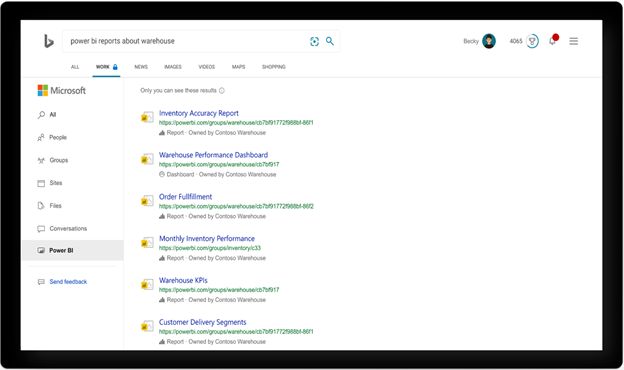
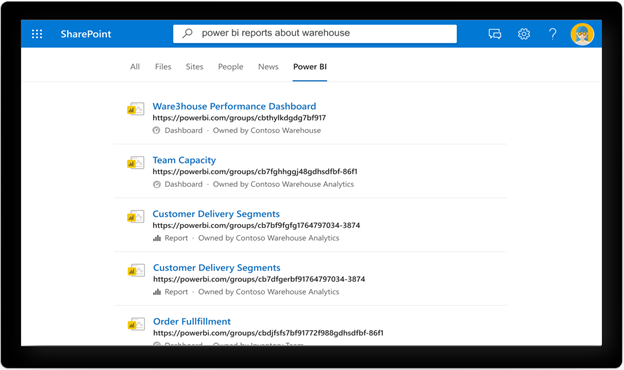
With Power BI search in Microsoft Search we’re making it easier to find Power BI artifacts such as reports and dashboards, by expanding the ability to search across these artifacts in your favorite productivity apps including , Office.com, Microsoft Bing, and the search box in .
Power BI search in Microsoft Bing
Power BI search in SharePoint
Power BI search expands the tenant-wide search scope through a built-in powerful search experience with Power BI content, to intelligently help search user to find the most work relevant information more productively.
Built-in experience: Seamless out-of-box search experience to easily and quickly find Power BI dashboard and report across your organization without switching back and forth between search portal and Power BI site.
Richer content: Modernized search experience to present Power BI data in the most useful way. Enrich Power BI search content beyond just hyperlinks to include more key information, such as type, owner.
Maximize access to information with data protection: Show the search result with relevant Power BI data that’s authenticated to you based on your workplace identity.
Unified search experience : Cohesive and coherent search experience to incorporate richer Power BI search content in bing.com, office.com, sharepoint.com. Search wherever you want to and get the consistent experience.
FaQ
Can I disable Power BI search ?
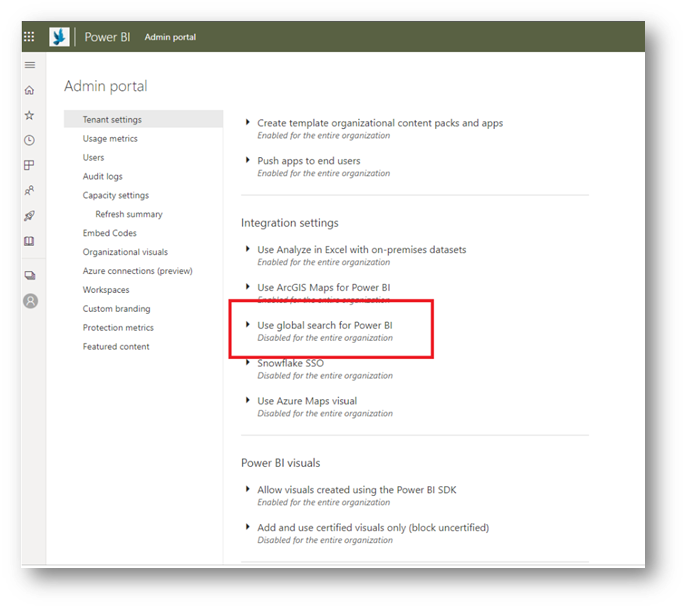
Power BI search is enabled for your organization by default. Your organizations’ Power BI admin can disable Power BI search in the Power BI admin portal if desired. In the Power BI admin portal, navigate to Tenant settings and then disable the Use global search for Power BI. To learn more refer to Administering Power BI in the admin portal.
This article is contributed. See the original author and article here.
Since its launch in 2019, Azure Lighthouse has become a best practice for cross- and multi-tenant management, allowing for higher automation, scalability, and enhanced governance across resources and tenants. The cross-tenant management experience offers the flexibility of managing multiple customers from within the service provider tenant, having a single pane of glass for enhanced scenarios and services available in the cloud. Azure Lighthouse is integrated with various services such as Azure Monitor, Azure Sentinel, and Azure Arc, to name a few. We are happy to announce the Azure Lighthouse integration with Azure Migrate for partners to manage migration projects at scale across multiple tenants.
Partners and customers engage in migration projects in diverse ways. Many use Azure Migrate tooling to discover, assess, and migrate on-premises environment to Azure. Usually, partners who perform migrations must access each customer subscription individually by using the CSP (Cloud Solution Provider) subscription model or by creating a guest user on customer tenant which can be quite time consuming. Reducing risk and security exposure is crucial when providing services to customers. Using the “admin on behalf of” model does not follow the least privilege access model as per the zero-trust security principles.
Azure Lighthouse streamlines these migration engagements by leveraging Azure resource delegation to provide a single view from the managed tenant to access all relevant Azure Migrate projects across multiple customer tenants and subscriptions. Azure Lighthouse integration with Azure Migrate simplifies the migration process, enabling service providers to discover, assess, and migrate workloads for different customers at scale while customers still have full visibility and control of their environments.
We have observed two commonly used scenarios from service providers who perform migrations via Azure Lighthouse:
Option 1: Create Azure Migrate project in the customer tenant
In this scenario, no resources will be created or stored in the managing tenant.
Discovery, assessment, and migration can be initiated from the managing tenant and set the customer tenant/subscription as target for the migrated resources.
This approach minimizes context switching for service providers working across multiple customers, while letting customers keep all their resources in their own tenants.
Option 2: Create Azure Migrate project in the managing tenant
In this scenario, Azure Migrate project and related resources for the project, including discovery and assessment data, will reside in the managing tenant. The assessments can be exported and shared with customers.
Required actions will be initiated from the managing tenant while setting customer tenant/subscription as the target for migration resources.
This approach enables services providers to start migration discovery and assessment projects quickly, abstracting away those initial steps from customer subscriptions and tenants.
You may choose to create the Azure Migrate project in the customer tenant or in your managing tenant depending on your customer contracts and what best fits their migration needs. For more information, please review our guide, How to: Manage migration projects at scale. Get started by creating an Azure Lighthouse Migration offer – a sample offer template is available for use in the Azure Lighthouse GitHub repo.
Finally, ensure you get partner recognition for the migrations performed on behalf of customer via Azure Lighthouse. As a member of the Microsoft Partner Network, you can link your partner ID with the credentials used to manage delegated customer resources. Partner Admin Link (PAL) enables Microsoft to recognize partners who drive Azure customer success based on the tasks performed for customers, including migration projects. For more information, see Link your partner ID to track your impact on delegated resources.
We are always awaiting your feedback to provide new and enhanced capabilities that will help you achieve more with Azure. Try managing your migrations projects at-scale with Azure Lighthouse and let us know what you think and would like to see in the future.
This article is contributed. See the original author and article here.
This weekin #DevDecember, wehad the hard job of selecting just a handful of sources of inspirationfrom a big grab bag of options.
You’ll find out what we went for below, but there were so many other exciting things we could have featured, so we hope you will add the things you prized most this year. What projects impressed you? What tools did you like using? Use our fill-in-the-blank to share what motivated and propelled you on in 2020, tagged as #DevDecember. Thanks in advance for the inspiration.
Now, let’s review whatwe featured in week 3:
IoT and Azure help with family chores
With everyone at home, dishes pile up faster, garbage accumulates, and chores must be done more frequently. To keep track in real time whatchoresneed to be completed andbywhen, Scott Hanselman built an IoT solution, using sensors, a web-based heatmap, and notifications.
Taking your mind offwhat you’re working on is sometimes the best way to get inspiration. The Developer Activity Book featuresfamily-friendly fun, includingsevencoloring pages, a crossword puzzle, a word search, and a logic puzzle.
The Imagine CupWorld Championship encouragesstudents across the globe to innovate using Microsoft Azure. Finalist teams created technologicalsolutionstotacklepressing global issues.Get inspired bytheir passionandthe incredible projects they created.
Most of the plastic that ends up in the oceans comes from inland sources. In this episode ofCodeStories,Seth Juarezshows howdeveloperscan use AI toaddress thisproblem by monitoringmicroplastic and trackingocean–boundplastic waste.
Next up is week 4 of #DevDecember. We’ll cover one of our favorite topics: the projects andtechnologieswe’re most looking forward toin 2021.
Meanwhile, we’rehoping you’ll upload a#DevWithABev selfieif you haven’t already.What’s this about? Simply put,devstake a picture of themselves with abev. Hot or cold, commonplace or original, we like it all. Shareandtag your pic#DevWithABev.
This article is contributed. See the original author and article here.
Admins who manage multiple Microsoft 365 tenants have told us that one of their top challenges is understanding the impact of service incidents and advisories across all their managed tenants. Signing into tenants individually and navigating through Service Health to understand the issues requires additional time and ultimately, it degrades the quality of end user support by making support reactive instead of proactive.
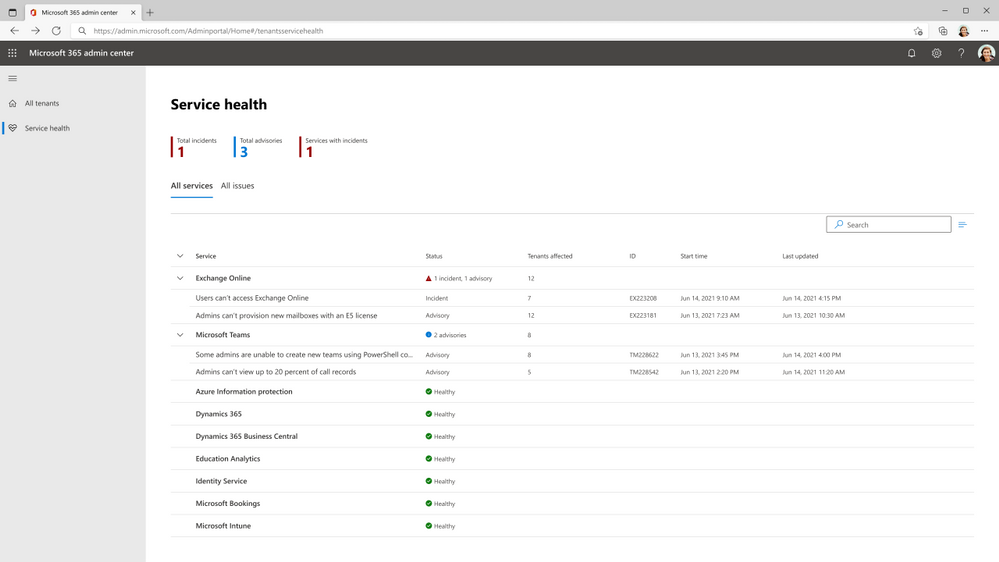
To address this challenge, we created an experience for these admins that includes aggregated views of service health incidents and advisories across multiple tenants. This view is designed to help admins that support multiple tenants to proactively support their customers. The multi-tenant Service health combines all incidents and advisories affecting your managed tenants and allows you to monitor the health of Microsoft 365 services across your managed tenants. You can see how many and which tenants are affected by a specific incident or advisory. This helps you ascertain the impact across tenants and allows you to proactively communicate to the affected users.
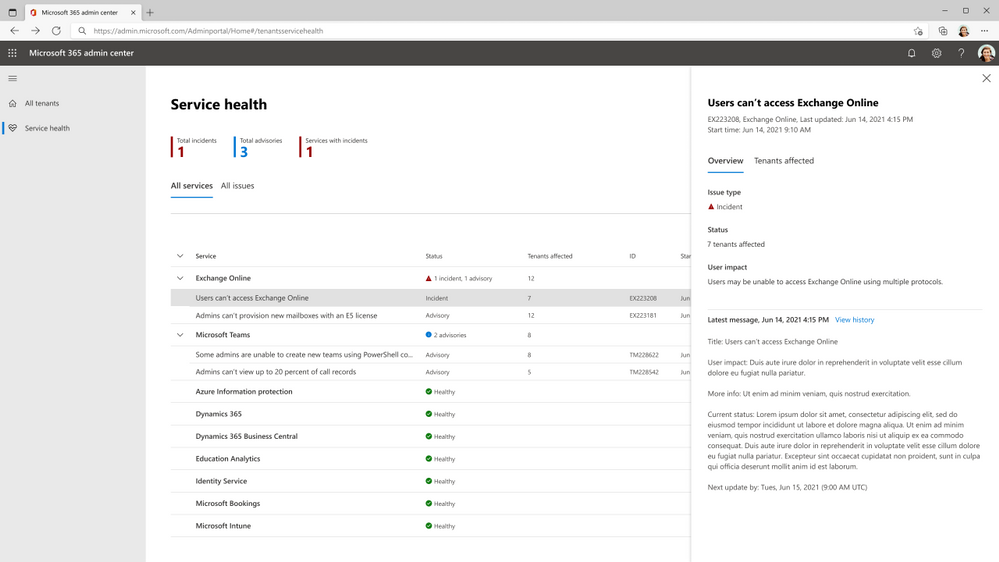
The landing page in the new experience is a start your day view that provides an aggregated view of service health. It shows you the total number of incidents, the total number of advisories affecting any of the managed tenants, and the number of services with active incidents. You can also see how many of your tenants are affected by incidents and advisories.
When you select an incident or advisory, a flyout provides important details about its cause and current status.
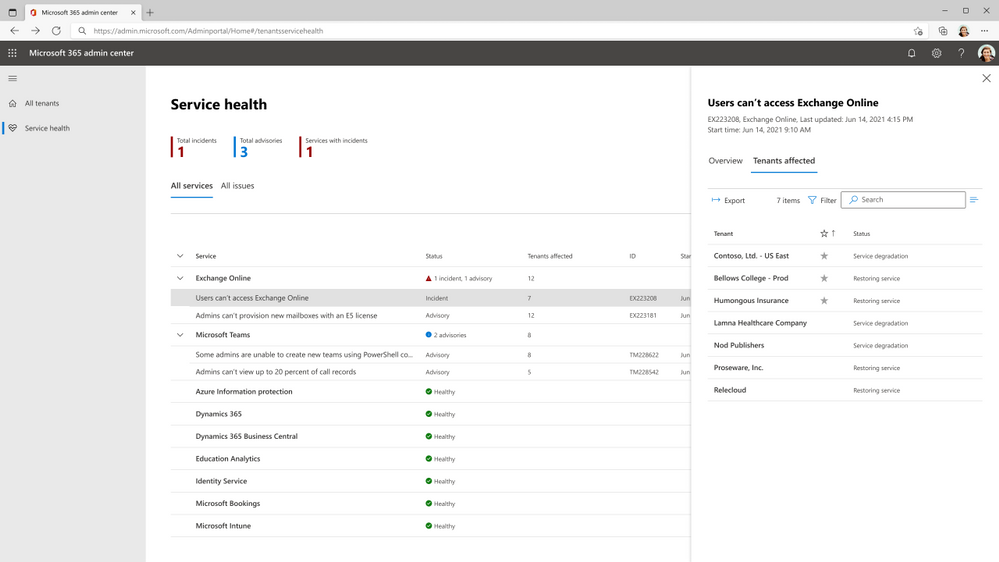
The Tenants affected tab lists the tenants that are currently affected by the selected incident. This enables you to take actions, such as informing your customers, sharing workarounds, and the like. The list of affected tenants can be exported to CSV format so that admins can share it with support teams.
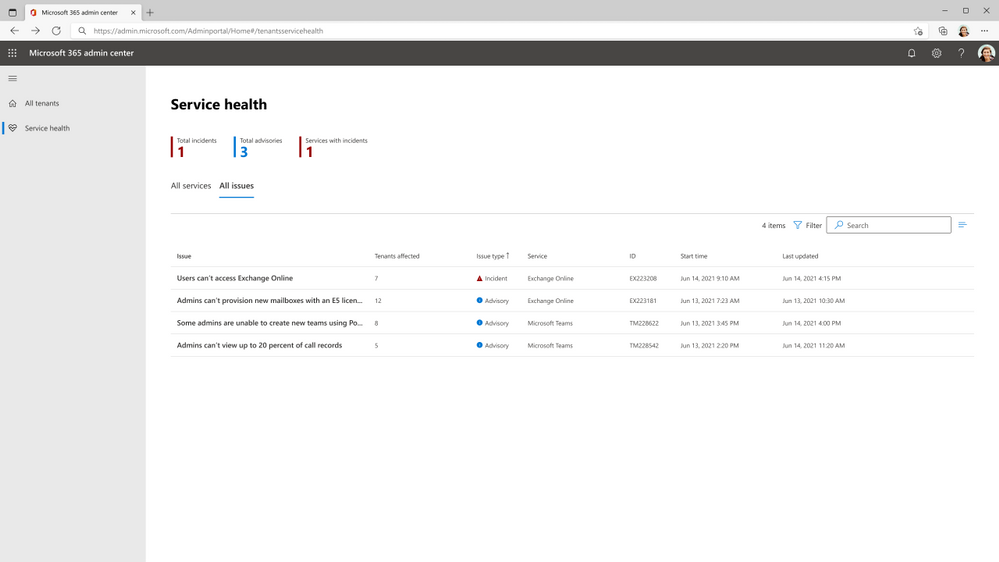
This new experience also includes filter options that can be used to view issues by issue type or by service.
We’re excited to release this feature to everyone, but initially support will be limited to partner admins with delegated administration privileges relationships for managing multiple tenants. See How to request a reseller relationship from a customer in Partner Center for information about delegated administration privileges for partners. If you’re a partner admin, we’d love to hear your thoughts on this new experience. Feel free to let us know using the built-in feedback in the Microsoft 365 admin center.
This article is contributed. See the original author and article here.
It might get cold as you make your lists, and check ‘em twice. So, we suggest wearing one of three Microsoft Lists-themed winter holiday sweaters to back you up and keep you warm – in Microsoft Teams, or to use as wallpaper on your desktop.
Make your information tracking festive and nice! Grab the below png’s and follow the ‘how to’ link below.
This article is contributed. See the original author and article here.
Azure Synapse Analytics brings the worlds of data integration, big data, and enterprise data warehousing together into a single service for end-to-end analytics—at cloud scale. In this blog post we will focus on using T-SQL to explore and analyze data.
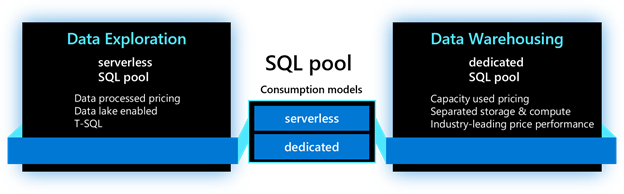
Every Synapse workspace includes a built-in serverless SQL pool designed to enable quick exploration of data stored in the data lake based on pay-per-query pricing. You can also provision one or more dedicated SQL pools to your workspace that lets you run high-performance analytics against data stored in tables with columnar storage.
Both serverless and dedicated SQL pools can be used within the same Synapse workspace, providing the flexibility to choose one or both options to cost-effectively manage your SQL analytics workloads. With Azure Synapse, you can use T-SQL to directly query data within a data lake for rapid data exploration and take advantage of the full capabilities of a data warehouse for more predictable and mission-critical workloads. With both query options available, you can choose the most cost-effective option for each of your use cases, resulting in cost savings across your business.
This post explores 2 consumption choices when exercising analytics using Synapse SQL (serverless and dedicated SQL pools) and examines the power and flexibility provided by Azure Synapse when both are used to execute T-SQL workloads. In addition, we will explore options to control cost when using both models.
Consumption choices
1. Serverless SQL pool
To enable easy exploration and transformation of data in your data lake you can use a serverless SQL pool. One can directly query external files stored in Azure storage without copying or loading data into a specialized store, all using familiar T-SQL dialect. A default, built-in, endpoint for this service is provided within every Synapse workspace and you can start querying data as soon as your workspace is created.
As the name implies, the serverless SQL pool is serverless, which means there is no infrastructure to manage, no upfront costs, and no resource reservations required to begin using the service. The serverless SQL pool follows pay-per-use model, so you are only charged for the data processed by queries you run.
Import sample dataset from Knowledge Center
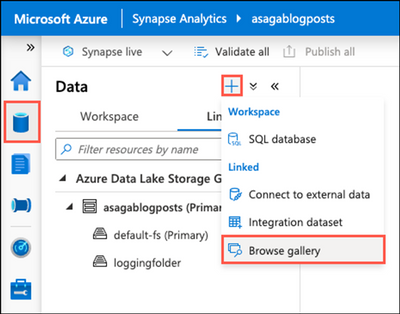
To demonstrate how easy it is to start with querying data in the data lake using a serverless SQL pool, let’s import some sample data from the Knowledge Center gallery and run some queries to explore the dataset. First, select the Data Hub from the left-hand menu in Synapse Studio, select the + (Add) icon on the Data Hub, and then select Browse gallery.
The Browse gallery link on the Data Hub’s add button menu is highlighted.
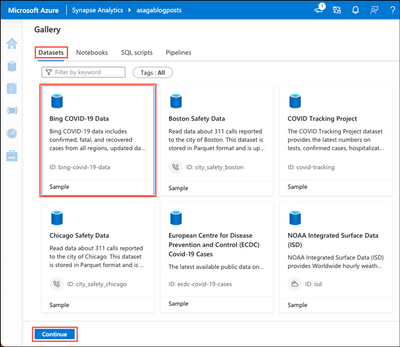
On the Gallery page, select the Datasets tab, choose the Bing COVID-19 Data sample, and then select Continue.
Within the Knowledge Center, the Datasets tab is selected, and the Bing COVID-19 Data sample dataset is highlighted.
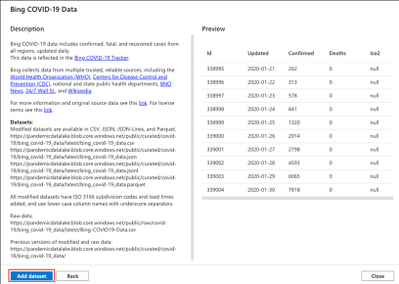
On the Bing COVID-19 Data page, you have to opportunity to preview the sample data. Select Add dataset to initiate a background process to import the Open dataset and create a Linked Service for it within Synapse Studio.
The Bing COVID-19 Data sample dataset is displayed in the Knowledge Center preview page.
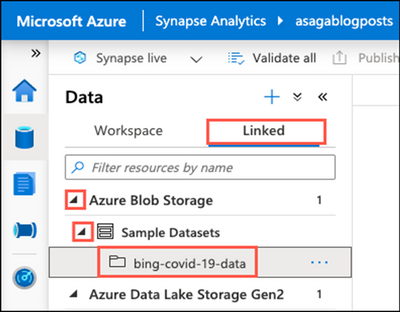
You can find the Linked Service for the downloaded sample dataset on the Linked tab within the Data Hub. It is named bing-covid-19-data and can be found under Azure Blob Storage, within the Sample datasets container.
On the Linked Services tab of the Data Hub, the bing-covid-19-data folder is highlighted under the Azure Blob Storage Sample Datasets container.
Query files in your data lake using a serverless SQL pool
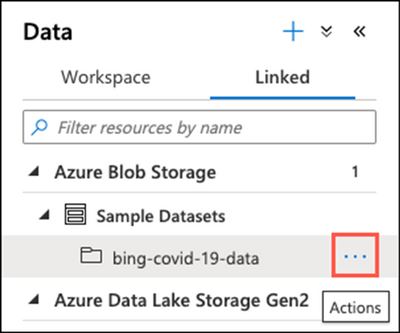
Next, we want to open the dataset using a T-SQL query. After locating Linked Service for the Bing COVID-19 sample dataset, select the Actions ellipsis next to it to display the actions menu.
The Actions menu ellipsis is highlighted next to the bing-covid-19-data sample dataset.
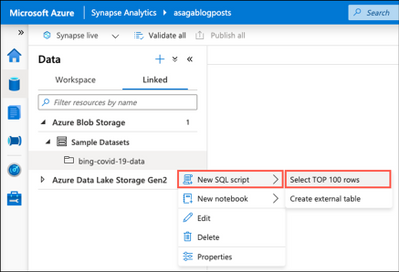
In the Action menu, select New SQL script and Select TOP 1000 rows.
On the Actions menu for the sample dataset, New SQL script and Select TOP 100 rows are highlighted.
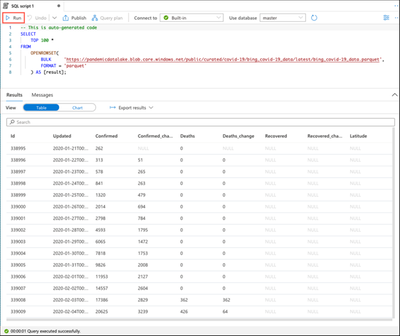
The previous action results in a new SQL script tab opening within Synapse Studio. This script contains the auto-generated T-SQL code for reading the top 100 rows of data from the bing_covid-19_data.parquet file located in Azure Storage. The query uses the OPENROWSET(BULK…) function to access files within the data lake.
Azure Synapse uses the OPENROWSET(BULK…) function to enable accessing files in Azure Storage. The OPENROWSET function reads the contents of an external data source and returns its content as a set of rows. The OPENROWSET function is referenced in the FROM clause of your query, allowing it to act as if it were a table named OPENROWSET. A built-in BULK provider enables data from files to be read and returned as a rowset.
To query data in the data lake using a serverless SQL pool, ensure that your serverless SQL pool, named Built-in, is selected in the Connect to box on the SQL script tab’s toolbar.
The auto-generated T-SQL script is displayed, and the Connect to textbox containing Built-in is highlighted.
Select Run on the SQL script tab’s toolbar to execute the query using the serverless SQL pool resource.
The Run button is highlighted on the SQL script toolbar, and the results of the query execution are displayed in the Results pane.
Execute GROUP BY query with serverless SQL pool
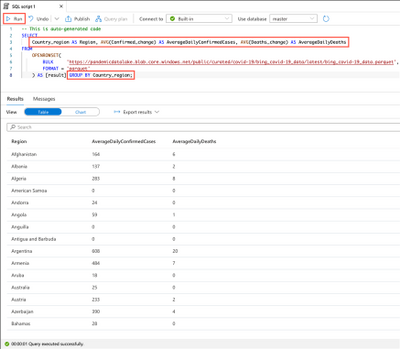
The previous query demonstrates how quickly you can query and explore data contained within files stored in Azure Storage. Now, let’s execute a query to perform some basic transformations on the sample dataset and calculate the average number of new daily confirmed cases and deaths by region.
Modify the code in the SQL script tab by making the following changes:
– Replace TOP 100 * with Country_region AS Region, AVG(Confirmed_change) AS AverageDailyConfirmedCases, AVG(Deaths_change) AS AverageDailyDeaths.
– Append GROUP BY Country_region to the end of the query, before the ; after [result].
Your final query should look similar to the following:
As you did previously, execute the updated query by selecting Run on the toolbar and observing the Results pane.
The Run button is highlighted on the SQL script toolbar, and the updated SELECT and added GROUP BY statements are highlighted within the query. The results of the transformation query are displayed in the Results pane.
The serverless SQL pool supports the whole range of GROUP BY options, giving you the ability to aggregate data stored in external files into a summary set of rows.
Create an external table
We will end our overview of using the serverless SQL pool resource by creating a serverless SQL pool database and defining an external table. The serverless SQL pool is an interactive query service over external data in Azure storage. As such, you cannot create tables in serverless SQL pool databases. You can, however, define external tables using the CREATE EXTERNAL TABLE T-SQL command. External tables point to data located in Hadoop, Azure Storage blob, or Azure Data Lake Storage. For the serverless SQL pool, you can use external tables to query data in Azure Storage using T-SQL statements. You can also use external tables to write serverless SQL pool query results to files in Azure Storage.
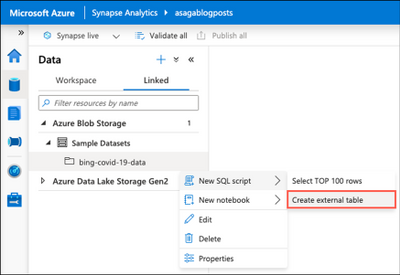
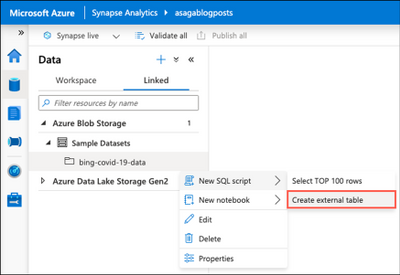
As you did earlier, select the Action menu ellipsis for the bing-covid-19-data Linked Service, but this time select New SQL script and Create external table from the menu.
On the Actions menu for the sample dataset, New SQL script and Create external table are highlighted.
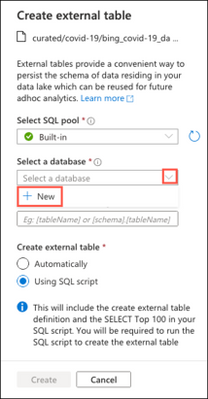
On the Create external table dialog, ensure Built-in is selected in the SQL pool dropdown, then select Select a database and select + New.
On the Create external table dialog, New is highlighted under Select a database.
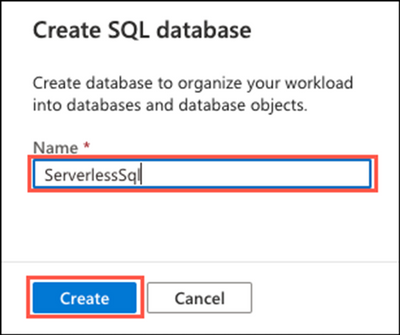
On the Create SQL database dialog, enter ServerlessSql in the Name field and select Create.
ServerlessSql is entered into the Name box and highlighted on the Create SQL database dialog.
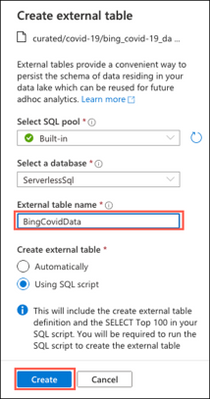
Back on the Create external table dialog, enter BingCovidData into the External table name field and select Create.
BingCovidData is entered into the External table name field, and the Create button is highlighted.
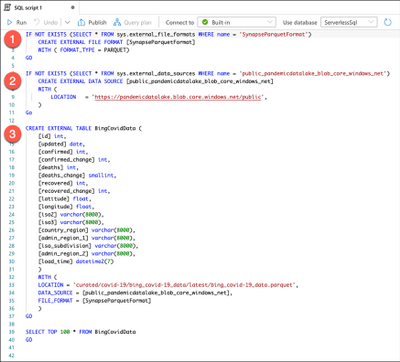
A new T-SQL script tab will open in Synapse Studio with the code to create an external table from the data lake file. This auto-generated script contains the three steps necessary to create an external table using serverless SQL pool.
– Create an external file format to specify the actual layout of the data referenced by the external table.
– Create an external data source, which is used to connect to your storage account.
– Create an external table to generate an external table that enables Azure Synapse to access data stored in Azure Storage.
The three steps, (1) create an external file, (2) create an external data source, and (3) create an external table, are highlighted within the auto-generated T-SQL code.
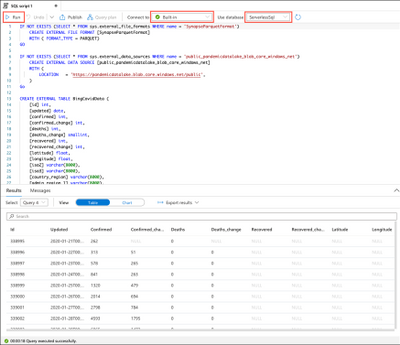
The script also contains a SELECT TOP 100 statement to query the newly created external table. Before running the query, verify the Connect to box is set to Built-in and note the value in the Use database dropdown. The database is set to the new SQL database created when you were generating the script for creating the external table.
Select Run from the toolbar to execute the query to create and query the BingCovidData external table.
Built-in is highlighted in the Connect to box, and the new ServerlessSql database is selected in the Use database dropdown. The Run button is highlighted on the toolbar.
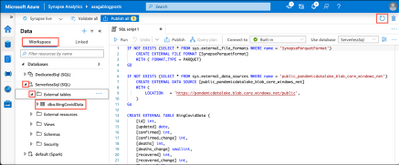
The newly defined database and the external table will now be accessible on the Data Hub’s Workspace tab, under Databases. From here, you can query the table just like you would any table in a SQL database.
On the Data Hub’s Workspace tab, the ServerlessSql database and External tables are expanded, and the dbo.BingCovidData table is highlighted.
You may need to select the Refresh button in the top right corner of Synapse Studio to see the database.
With each of these queries, as with all queries executed using a serverless SQL pool, you are only charged for the data processed by queries you run. This pay-per-use model helps provide a cost-effective way to explore data and execute ad-hoc queries against external data.
2. Dedicated SQL pool
To exercise enterprise data warehousing features available in Azure Synapse, provision and use dedicated SQL pools. Data is stored in tables with columnar storage, significantly reducing data storage costs and improving query performance. Once information is stored, you can run analytics at a massive scale. Compared to traditional database systems, queries finish in seconds instead of minutes or hours instead of days.
After you create a dedicated SQL pool in your Synapse workspace, you can import big data using simple to use COPY statement and then use the power of the distributed query engine to run high-performance analytics.
Add a dedicated SQL pool
There are two paths you can use to add a dedicated SQL pool to your Synapse workspace. You can create one via the Azure portal or from within Synapse Studio.
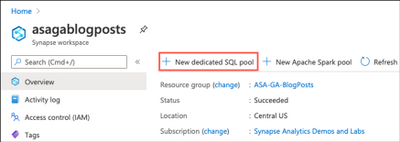
From the Azure portal, select the New dedicated SQL pool link from your Synapse workspace blade.
The new dedicated SQL pool button is highlighted on the toolbar of a Synapse workspace blade in the Azure portal.
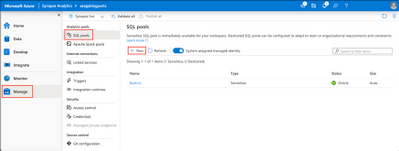
To add a dedicated SQL pool to your Synapse workspace from within Synapse Studio, navigate to the Manage Hub, select SQL pools, and then select the New button.
In Synapse Studio, the Manage Hub and SQL pools are selected, and the New button is highlighted.
The Manage Hub in Synapse Studio allows you to view and manage your SQL pools.
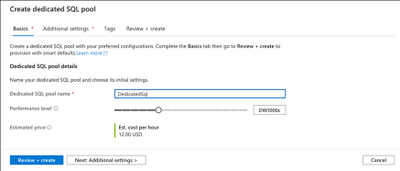
The process for creating the new dedicated SQL pool is the same after that. On the Create dedicated SQL pool Basics tab, you specify a name for your dedicated SQL pool and choose your desired performance level.
The Create dedicated SQL pool dialog is displayed, with DedicatedSql entered into the SQL pool name field.
The performance level can range from DW100c to DW30000c. To learn more about resource consumption, check out the Synapse SQL resource consumption article in the Azure Synapse Analytics documentation.
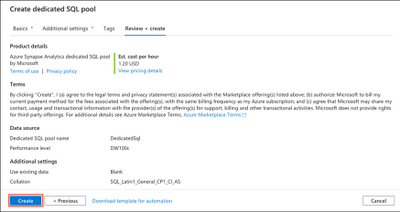
You can then select Review + create, which sets the default values in the Additional settings tab. Then, select Create to provision your dedicated SQL pool.
A summary of the configure settings for the dedicated SQL pool is displayed, and the Create button is highlighted.
Create an external table
As with serverless SQL pool, we can create external tables in dedicated SQL pool to provide pointers to external data. As you did previously for the serverless SQL pool queries, navigate to the Linked tab of the Data Hub, select the Action menu ellipsis for the bing-covid-19-data Linked Service, then select New SQL script and Create external table from the menu.
On the Actions menu for the sample dataset, New SQL script and Create external table are highlighted.
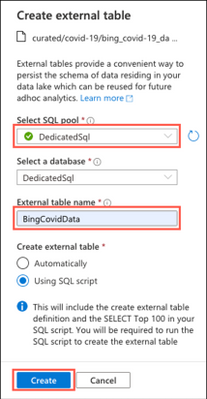
On the Create external table dialog, select your dedicated SQL pool, DedicatedSql, in the Select SQL pool dropdown, and then enter BingCovidData as the external table name, and select Create.
The create external table dialog is displayed with the dedicated SQL pool selected and BingCovidData entered into the external table name field.
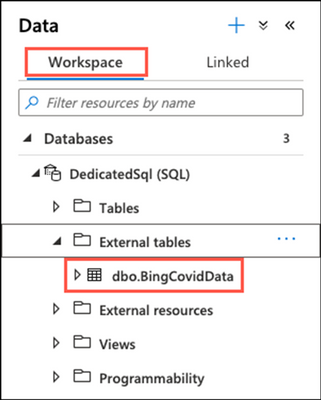
Select Run on the toolbar to execute the script and create the external table. When the script execution completes, select the Workspace tab within the Data Hub and expand DedicatedSql and External Tables under databases to view the new external table.
The BingCovidData external table is highlighted in the DedicatedSql database on the Data Hub.
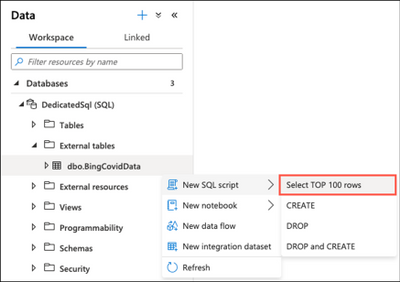
Select the Actions menu ellipsis next to BingCovidData and select New SQL script and Select TOP 100 rows.
Select top 100 rows is highlighted in the Actions menu.
Execute the query by selecting Run from the toolbar, as you have done previously, to view the table’s data.
Create table in the data warehouse
The simplest and fastest way to create a table in the data warehouse is to use the CREATE TABLE AS SELECT (CTAS) statement. CTAS is one of the most important T-SQL features available in dedicated SQL pool. It creates a new table based on the output of a SELECT statement.
To demonstrate how to use the CTAS statement, let’s use it to copy aggregated data from the BingCovidData external table into a new table in the data warehouse. Select the Actions menu ellipsis next to the DedicatedSql (SQL) database, and then select New SQL script and Empty script.
In the empty SQL script pane, paste the following code:
CREATETABLE [dbo].[CovidRegionalDailySummary] WITH ( DISTRIBUTION = ROUND_ROBIN, CLUSTERED COLUMNSTORE INDEX ) AS SELECT Country_region AS Region, AVG(Confirmed_change) AS AverageDailyConfirmedCases, AVG(Deaths_change) AS AverageDailyDeaths FROM [dbo].[BingCovidData] GROUPBY Country_region
With CTAS, we specify the new table name with the CREATE TABLE statement and can also specify both the distribution of the table data and the table structure type. We complete the statement with the AS SELECT statement and specify the source table in the FROM clause.
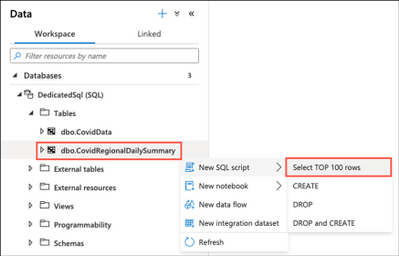
Execute the script to create the CovidRegionalDailySummary in your data warehouse. You can then find the new table under Tables in the DedicatedSql (SQL) database on the Data Hub’s Workspace tab. Select the tables Actions menu ellipsis and create a new Select TOP 100 rows query.
The CovidRegionalDailySummary table is highlighted under Tables in the dedicated SQL pool.
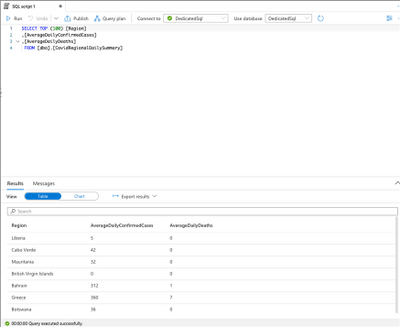
Execute the query and observe the results.
The results of the new aggregated data table are displayed.
Cost control
The ability to use serverless and dedicated SQL pools grants you flexibility in controlling costs. And the separation of storage and compute allows you to maintain better cost control for your resources There are also additional cost control options available from the Manage Hub in the Synapse Studio.
1. Serverless SQL pool
Serverless SQL pool is a pay per query service that automatically adjusts based on your requirements. The service frees you from managing infrastructure and needing to pick the right size for your solution.
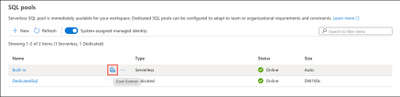
The cost control feature for a serverless SQL pool enables you to set one or more budgets for the amount of data (in TB) that can be processed in a day, week, or month. To configure cost control for serverless SQL pool in the Synapse Studio, navigate to Manage Hub and select SQL pool under Analytics pools. As you hover over the serverless SQL pool, the cost control icon will become visible. Select this icon to open the cost control dialog.
The Cost Control icon is highlighted for the serverless SQL pool.
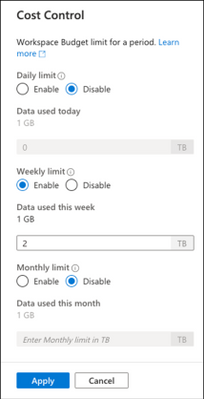
On the Cost Control dialog, you can select the workspace budget limit, depending on your requirements.
The Cost Control dialog and its various options are displayed.
2. Dedicated SQL pool
Controlling costs for your dedicated SQL pool is handled by pausing the SQL pool or scaling down.
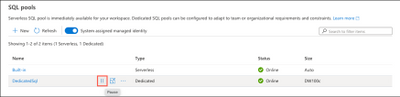
To pause your dedicated SQL pool in Synapse Studio, simply navigate to Manage Hub and select SQL pool under Analytics pools. As you hover over the dedicated SQL pool, the pause icon will become visible. Select this icon to pause the dedicated SQL pool.
The pause icon is highlighted for the dedicated SQL pool.
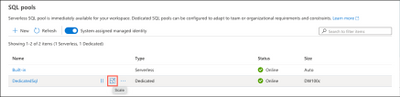
To scale the dedicated SQL pool in the Synapse Studio, navigate to Manage Hub and select SQL pool under Analytics pools. As you hover over the dedicated SQL pool, the scale icon will become visible. Select this icon to open the scale dialog.
The scale icon is highlighted for the dedicated SQL pool.
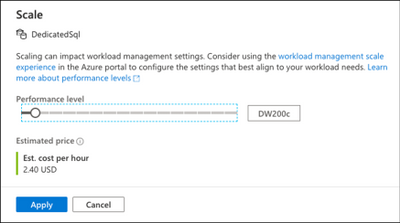
On the Scale dialog, select the desired performance level and select Apply.
The Scale dialog for the dedicated SQL pool is displayed.
Conclusion
This post discussed using both serverless and dedicated SQL pools to perform queries and analysis on your data. The ability to use dedicated and serverless SQL pools within a single Synapse workspace empowers you to choose the most cost-effective option for each of your analytics workloads.
Try out this tutorial today by creating an Azure Synapse workspace with a dedicated SQL pool.
This article is contributed. See the original author and article here.
Learn how you could load data into Azure from 90+ source connectors in Azure Data Factory. Azure Data Factory is a serverless data integration service that supports hybrid (on-premise/ multi-cloud) data integration capabilities in a code-free approach. In this episode with Abhishek Narain, he’ll demonstrate how you can easily get started with loading on-premise data into Azure SQL Database in just a few clicks.
Want more ADF? Don’t miss our Data Exposed Special, Around the Clock with Azure SQL and Azure Data Factory on February 3, 2021 at 9:00 AM PT. Register today: https://aka.ms/aroundtheclock
This article is contributed. See the original author and article here.
We continue to expand the Azure Marketplace ecosystem. For this volume, 98 new offers successfully met the onboarding criteria and went live. See details of the new offers below:
Applications
Ardor Node: Jelurida’s Ardor multichain blockchain platform provides a parent-child chain architecture on Microsoft Azure. The parent chain provides security for the chain network, while the interoperable child chains provide scalable blockchain functionality without traditional blockchain bloat.
Asset tokenization: Hunit offers a fully featured managed platform for tokenizing assets on Stellar, an open-source payment protocol. Quickly create digitalized ownership structures for assets such as financial instruments, artwork, or real estate.
Astera Centerprise: An end-to-end integration platform, Astera Centerprise by Astera Software offers a complete suite of data management capabilities. It enables businesses to streamline integration by supporting data extraction, cleansing, transformation, and loading within a unified platform.
Autoklose: Built for entrepreneurs, sales, and marketing professionals, Autoklose by ExchangeLeads is a sales engagement platform with email outreach software. Target the right prospects, engage them with highly customized emails, and grow your business.
Automated Salesforce Case creations from Email: When creating a case in Salesforce, users normally need to manually log into Salesforce to create the case, a time-consuming task. With MOURI Tech’s platform built on Microsoft Azure, you can create a case in Salesforce CRM just by sending an email, even when you are on the go.
Azure Extend by Macquarie Cloud Services: Macquarie Cloud Services, part of Macquarie Telecom Group, use managed virtual appliances to connect your Azure tenant with your datacenter so you can migrate servers on your schedule while continuing to use your existing network ingress/egress points. This app is only available in Australia.
CDM Desktop Anywhere: This managed Desktop as a Service (DaaS) built by Communications Design & Management (CDM) on Windows Virtual Desktop provides a fully managed environment to support your business applications.
CentOS 7 Latest: This ready-to-launch image from ProComputers.com contains CentOS 7 Linux with enough packages to launch SSH Server and allow users to login. This image has SELinux enabled, includes Microsoft Azure Linux Agent, and will automatically update with the latest security patches when launched.
CentOS 7 Minimal: This ready-to-launch image from ProComputers.com contains a minimal version of CentOS 7 Linux with enough packages to launch SSH Server and allow users to login. This image has SELinux enabled and includes Microsoft Azure Linux Agent.
CentOS 8 Latest: This ready-to-launch image from ProComputers.com contains CentOS 8 Linux with enough packages to launch SSH Server and allow users to login. This image has SELinux enabled, includes Microsoft Azure Linux Agent, and will automatically update with the latest security patches when launched.
CentOS 8 Minimal: This ready-to-launch image from ProComputers.com contains a minimal version of CentOS 8 Linux with enough packages to launch SSH Server and allow users to login. This image has SELinux enabled and includes Microsoft Azure Linux Agent.
COVID-19 Community Screening, Testing, Tracing: Flatten the COVID-19 curve by conducting population-wide screening, testing, and contact tracing. Use a simple capture-and-communication app to conduct community screening, record infections, and perform contact tracing.
CTIA: TaaS (Traceability as a Service) is a blockchain platform for rebuilding industrial infrastructure using distributed ledger technology. With TaaS from CTIA, you can automate administrative tasks and share line-of-business information. This app is only available in Japanese.
Direct Routing: Connect your Microsoft Teams to the public phone system with the Ask Roger! Direct Routing platform on Office 365. Users can have productivity and communication tools in one app and be accessible on all of their devices with calls routed through Teams. This app is available only in Dutch.
eGoveris: Provided by everis, eGoveris is an intuitive and scalable electronic administrative management platform for public services. It offers an easy-to-implement solution with a focus on rapid digitization and use of disruptive technologies to simplify administrative procedures.
G3 CATMAN: Designed for CPG and retailers, G3 Catman by the Gensa Group combines multiple data sources on a scalable, single platform. Make assortment and merchandising decisions, understand shopper insights, and ensure retail execution and new product implementation.
Genesys Gplus Adapter for Dynamics 365: This add-in for Microsoft Dynamics 365 improves customer experience and increases agent efficiency via data-driven automation through self-service interactive voice response (IVR) applications. Enable every call to be personalized.
guardREC Teams Compliance Recording: Provide a complete audit trail with the GuardREC Compliance solution. Ensure compliance with industry-specific regulations and directives, and record and store all communications in Microsoft Teams, including voice, chats, and videos.
Harbor – Cloud Native Repository: Harbor by Linnovate is an open-source registry that secures artifacts with policies and role-based access control (RBAC), ensuring images are free from vulnerabilities. Harbor helps you manage artifacts across cloud-native compute platforms like Kubernetes and Docker.
ITG Chatbot Office 365: ITG Solutions’ Chatbot Office 365 provides your users with immediate response at any time of day to queries regarding the users’ Microsoft 365 adoption. The app offers solutions to facilitate the use of Microsoft 365 tools. This app is only available in Spanish.
KONIS System – digital manufacturing factory: This solution by CleverSoft provides real-time management reports, identifies bottlenecks, and uncovers production potential, helping you create a digital manufacturing factory.
Konsolute Intranet – Free Modern Intranet 365: Modernize the way you connect with your workplace by using Konsolute Intranet – Free Modern Intranet 365, an out-of-the-box solution built on the Microsoft 365 platform. Automatically provision Konsolute Intranet with the click of a button.
Lia AI Chatbot: Helping organizations easily respond to customer queries all day, any day, Lia by Codegen is a next-generation, intelligent chatbot that harnesses the power of artificial intelligence and incorporates technologies such as natural language processing and machine learning.
Maritime Control Centre: Skylab Holding’s Maritime Control Centre (MCC) is an integrated communication platform that focuses on digitalization for the maritime industry. Delivering IoT with built-in cybersecurity protection, MCC remotely monitors ships, machines, and equipment and delivers data through IoT.
Matchwin – Automatic ledger account system: An automatic ledger account system from the FMS Group, Matchwin reconciles invoices and automatically matches up to 95 percent of transactions without any manual intervention. Its purpose is the automatic registration and closure of daily payments in your accounting or invoicing systems.
Migrate any incompatible application to Windows 10: Windows 16-bit and 32-bit applications are still needed by industry and government. You can securely and easily migrate legacy applications for Windows XP and/or Windows 7 onto 64-bit Windows 10 with this migration service from Legacy Box LTD.
MozCom: A complete digital platform for e-commerce, MozCom by Mozanta Technologies enables retail commerce providers to give an intuitive shopping experience to their end customers. Launching new brands and executing campaigns are much easier for the marketing and merchandising teams with MozCom.
My Quick Access WebPart for SharePoint: My Quick Access from nteam allows you to manage your most important links that are essential to your work on your own link dashboard on SharePoint. You can add or remove links and adjust the display order of the link tiles. This app is only available in German.
Nubiral Intelligent Forecasting: Developed for the retail, supply chain, and manufacturing industries, Nubiral uses machine learning algorithms to boost your business profitability with highly predictive forecasts. This artificial intelligence solution is available only in Spanish and English.
NVIDIA HPC SDK GPU-Optimized Image: The NVIDIA HPC SDK is a comprehensive suite of compilers, libraries, and tools to help maximize the performance and portability of HPC applications. Minimize coding time with a single, integrated suite that allows you to quickly port, parallelize, and optimize for GPU acceleration.
OneDirectory – Employee Directory Software: In large organizations, it’s hard to know who’s who and where everyone fits in. Vinewave’s OneDirectory is a modern employee directory for Microsoft 365. OneDirectory helps your employees to connect with each other, improves collaboration, and provides insight into your organization’s structure.
Openet Data Fabric (ODF): Telecom operators need a platform that can process records as they are generated. Openet’s real-time data streaming platform is designed to ingest data from internal or external systems and transform these events into a common format via a streaming messaging bus.
Profisee Master Data Management: The Profisee master data management (MDM) platform is a fast, affordable, and scalable PaaS solution to deliver trusted data across the enterprise without the cost, complexity, risk, and data domain boundaries of traditional MDM solutions.
PROGEL Booking App: COVID-19 social distancing restrictions put a limit on the number of available workstations at the office. The PROGEL Booking App provides a mechanism to balance office and remote work, allowing employees to book a desk in Microsoft Teams. This app is only available in Italian.
ResumeFree: ResumeFree’s services lets you do recruitment without using resumes. The online assessment and the application screening portal measure over 175 data points to provide accurate and objective results that match the top candidates with your requirements.
Riesco: Powered by Microsoft Power BI, Riesco by the FMS Group is a universal reconciliation engine, enabling matches between different accounting and/or non-accounting entities. With Riesco, you can reduce the complexity of data load formatting, in batch or manual mode.
Smarter SaaS for M365: The Business Software Centre’s Smarter SaaS for Microsoft 365 optimizes subscriptions with an automated, cloud-based, software asset management solution. Get a complete license overview of your Microsoft 365 purchases and usage through an automatic process.
Tag Manager: Whether you are an admin or developer, it’s hard to keep the Azure Tags in your environment consistent. With Tag Manager from Cubesys, you can efficiently simplify your Azure tags, visualize tag consistency, enable tag-based automation, and leverage cost summary and chargeback.
TaskControl: For smart project management, choose TaskControl from Orbit. Providing time savings, real-time control over the course of activities, and a detailed implementation record, the app helps coordinators and managers automatically delegate tasks and manage staff, groups, and suppliers.
Tezeva: Websym Solutions’ Tezeva is a cloud-native connected products platform that harnesses the power of IoT, cloud, and analytics for OEMs and their customers. The platform offers a customer-centric experience, while acting as single source of truth.
unify | HRS: This solution from Orisoft Technology provides a comprehensive range of human resources and payroll-related services. unify | HRS is a modular suite of tools that covers benefits administration, time and attendance, talent management, employee self-service, HR, payroll, and more.
WordPress on Ubuntu 20.04 with Apache Web Server: This pre-configured image from Cloud Infrastructure Services provides WordPress on Ubuntu 20.04. WordPress comes pre-installed with Apache Web Server, Lets Encrypt, MariaDB, Pro FTPd, and Webmin.
WordPress Web Server on Ubuntu 18.04 + Apache SSL: This pre-configured image from Cloud Infrastructure Services provides WordPress Web Server solution on Ubuntu 18.04 with Apache SSL enabled. WordPress is an open-source content management system (CMS).
WorkplaceBuddy Adoption: Help your employees adopt Microsoft 365 in a fun way through interviews, personal learning journeys, and proactive tips. WorkplaceBuddy provides an automated adoption approach for your entire workforce and a personal experience for your users.
Xceptor | Unleash your Data: Unleash your data with Xceptor, a no-code enterprise automation platform for the banking, financial services, and insurance industries. Xceptor makes data ingestion, data transformation, and process digitization easy, handling any data type, in any format, from any channel.
Zoho Analytics On-Premise (BYOL): Built with a self-service approach, Zoho Analytics On-Premise brings the power of analytics to both technical and non-technical users. This web-based BI and analytics software supports out-of-the-box integration with a variety of data sources.
Consulting services
.NET Application Modernization – 4 Day Free Assess: Cloud adoption is the new reality because of COVID-19. Hexaware Technologies’ free application modernization offering aims to optimize your infrastructure costs by 15 percent and reduce cloud migration time by 25 percent.
1 week security implementation: Seepath’s Microsoft Azure cybersecurity implementation gives customers a centralized way to optimize, secure, and manage their Azure workloads. The process includes a discovery session and security analysis, identification of vulnerabilities, and delivery of recommended improvements.
5 Day Free Azure Security Assessment: Get a free assessment of your hybrid cloud environment from Seepath and make sure your Microsoft Azure assets are configured according to cybersecurity best practices. This offer includes a design review, recommendations for enhancements, and a review of in-house progress.
App Modernization Using Containers-1 Wk Assessment: Hexaware Technologies will assess how its end-to-end cloud solution, Amaze for Applications, can reduce your overall migration time by 50 percent. Re-platforming monolithic apps into containers helps organizations scale their apps while reducing the cost of ownership.
Azure 101: 1-Day Workshop: Seepath will help you understand how Microsoft Azure can accelerate your business growth and support business transformation. This workshop is for large organizations who are beginning their migration to the cloud and want to understand how Azure can impact their business.
Azure Access Management Implementation 3+ days: Optiv Security Inc. will assess and configure your organization’s Microsoft Azure identity and access management implementation to meet your business and security requirements. Optiv will define and implement policies for SSO, MFA, and RBAC, detail best practices, and more.
Azure Application Migration: 2-Hr Briefing: This in-depth conversation with certified, seasoned Microsoft Azure consultants from Accedia will prepare you for application migration to the cloud by providing a structured view of all necessary considerations.
Azure Application Migration: 3-week Implementation (UK): Improve efficiency and reduce costs by migrating your apps with Accedia, а Gold Cloud Platform Partner. You will have a production-ready Microsoft Azure environment at a fraction of the cost and effort of an in-house implementation.
Azure Application Migration: 3-week Implementation (US): Instead of maintaining your on-premises applications, move the workload to the cloud with Accedia, а Gold Cloud Platform Partner with proven competencies in cloud migration advisory, strategy formation, and implementation services.
Azure Arc Jump-Start: 3-day-Workshop: T-Systems International GmbH offers this workshop to accelerate your hybrid cloud journey. T-Systems will walk you through Microsoft Azure Arc’s capabilities, match them to your requirements, and deliver a documented architecture vision, solution outline, and next steps.
Azure Cost Optimization: 2-Week Implementation: Accedia’s targeted, in-depth Microsoft Azure cost optimization implementation will help lower total cost of ownership, improve efficiency, enhance scalability, improve customer engagement, and provide rock-solid data security.
Azure Data Science UpSkilling: 2-Week Workshop: In this workshop, Volantsys Inc. will provide comprehensive data literacy training in applied data science and analytics skills. Transform your team with role-based skills that enable the collaborative development of positive business solutions.
Azure Database Migration- 1-Week Assessment: Migrating from on-premises databases like SQL Server, Oracle, or PostgreSQL to Azure can provide multiple benefits. Hexaware Technologies offers this free database assessment to help you optimize savings by up to 50 percent.
Azure Datawarehouse Migration – 6 Days Assessment: Migrate from legacy data warehouse appliances, like Teradata, Netezza, or Exadata, to Azure Synapse Analytics and reduce your total cost of ownership. Hexaware Technologies will provide you with a detailed assessment of your data warehouse landscape to ensure a smooth transition to the cloud.
Azure DevOps : 5 week Implementation: Seepath will implement its DevOps Starter dashboard for Microsoft Azure infrastructure to help you develop, deploy, and monitor your apps on the Azure service of your choice in a few steps. Reduce costs, speed delivery, and increase productivity.
Azure Governance: 5-week Assessment: Get recommendations from KPCS CZ s.r.o. on how to run cloud services properly to speed up Microsoft Azure migration projects. Within Azure governance, KPCS focuses on security and compliance, identity and access management, cost optimization, and rapid deployment.
Azure IaaS Migration: 2-Weeks PoC: Assess the benefits of Microsoft Azure by having a proof of concept implemented by Accedia. You will get recommendations on Azure architecture, performance improvements, and a cost matrix.
Azure Landing Zone: 4-Wk Implementation: Engage Insight Canada Inc.’s cloud experts to plan and implement your organization’s cloud transformation journey. The Azure Landing Zone engagement will leave your organization with a production-ready, well-governed, and secure Microsoft Azure environment.
Azure Migration Assessment: 3-day assessment: Ballard Chalmers will assess your readiness to migrate legacy, custom-developed business applications to Microsoft Azure, provide an estimated time and budget, and advise on the benefits of moving versus modernization.
Azure Sentinel SIEM: 4-Wk POC/POV: ITC Secure will deploy your first instance of Azure Sentinel, which you can try for four weeks for free. The proof of value delivers a comprehensive approach to event collection, threat detection, risk analysis, incident investigation, and rapid response.
Azure Site Recovery: 3-Day Implementation: Seepath will install and configure Azure Site Recovery, establishing disaster recovery as a service (DRaaS) to allow you to replicate up to five of your virtual machines to Microsoft Azure. Gain technical guidance and ensure that your DRaaS deployment adheres to best practices.
Azure Site Recovery: 10-Wk Implementation: This engagement with Lunavi helps replicate workloads to Microsoft Azure without adding secondary datacenter costs. Enable true business continuity and disaster recovery with minimal or no data loss by using Azure Site Recovery.
Azure VMware Migration (Linux) – 4 days-Assessment: Hexaware Technologies offers a free infrastructure assessment of your on-premises Linux machines on VMware. Using its proprietary AMAZE for Infrastructure, Hexaware can help accelerate your migration to the cloud by up to 70 percent.
Azure VMware Migration (Windows) – 4 days Assessment: Hexaware Technologies offers a free infrastructure assessment of your on-premises Windows machines on VMware. Using its proprietary AMAZE for Infrastructure, Hexaware can help accelerate your migration to the cloud by up to 70 percent.
ClideBox: Client Design: 4 hour Briefing: Are you migrating or upgrading to a new version of Windows 10? Trans4mation IT GmbH will review ClideBox, its tool for configuring Windows 10 clients on Azure-based virtual machines. On request, Trans4mation will offer you additional remote advice with one of its consultants.
Connected Platform Health & Life Sciences: 5wk Imp: Choose Microsoft Azure and the Insight Connected Platform to provide a flexible IoT solution for building smart healthcare spaces. The best-in-class IoT sensors help reduce deployment, configuration, and integration time.
Connected Platform Manufacturing: 5 Wk Imp: Insight will work with you to improve safety, ensure security, and detect manufacturing anomalies, using Microsoft Azure, Intel Vision Framework, and the Insight Connected Platform.
Connected Platform Restaurants & Retail: 5 Wk Imp: Gain complete visibility across your restaurant or retail business with the Insight Connected Platform built on Microsoft Azure. Start your journey to a more fully connected restaurant or retail environment, built with IoT.
Contactless Retail: 2 Wk – Workshop: In response to the new normal, the retail sector is turning to technology to decrease person-to-person interactions while improving revenue flow. Join this workshop with Mobiquity, a subsidiary of Hexaware Technologies, to find opportunities for app modernization.
Data Center Migration (Lift and Shift): 6 week POC: Nous Infosystems will demonstrate the benefits of migrating selected workloads to Azure Virtual Machines (VMs). The proof of concept will enable your organization’s modernization via assessment, plan, and blueprint to help ensure a successful migration to the cloud.
Data Lake Accelerator 1 day Assessment Offer: Establish an Azure Data Lake foundation in days with Bizdata. Participate in a discovery session and get a roadmap to bring together all your data assets in a central hub that accelerates data discovery, real-time reporting, and analytics.
Data Power Cloud – 5 weeks of implementation: Microsoft Azure offers a range of powerful tools for data analysis. Business & Decision will work with you to demonstrate to your business and technical teams how Microsoft Azure could help you perform better. This service is only available in French.
Database Migration Accelerator Pack : 3-Week POC: Nous Infosystems provides organizations with a 3-week engagement to help them migrate and modernize an identified database instance onto Microsoft Azure. The proof of concept can transform your on-premises SQL Server, MySQL, or PostgreSQL database.
Data-Driven Business Insights: 4-Hr Workshop: Many business leaders struggle with trusting the accuracy of their data and connecting it to their needs. Intellinet experts will meet with your stakeholders to understand a current business challenge and provide a conceptual roadmap for next steps to develop data-driven business insights.
DevOps with Github: 6-Wk Assessment: Ideal for both enterprise and mid-market customers, Magenic’s DevOps GitHub Accelerator is a collaborative, time-boxed, fixed-fee engagement that provides complete short-term and long-term plans for maturing your organization’s DevOps practices.
Digital Marketing OneView 1-day Assessment Offer: This framework provided by Bizdata leverages Microsoft Azure to unify multi-channel marketing campaigns into a single view, facilitating the measurement of the return on investment per campaign and against a range of targets.
Document Classification 1 day Assessment Offer: Join a discovery session with Bizdata to learn how Azure Machine Learning and Azure Cognitive Services can enable automated document classification for compliance, completeness, and discoverability.
Forecasting ML Model: 4-Week implementation: MAQ Software will work with your business strategists, data scientists, and IT business heads to help them forecast key metrics and gather key insights with a reliable machine learning model built on the Azure Databricks platform using Python.
Genomics Pipeline 1 day Assessment Offer: To enable the increased demand for next-generation sequencing, Genomics Pipeline Acceleration OnDemand from Bizdata provides a secure platform that significantly accelerates genomic analysis on Microsoft Azure.
Kentico Xperience Migration: 5-Day Implementation: Are you looking to modernize your Kentico Xperience architecture? Let Discover IT UK LIMITED solve your datacenter hosting headaches by migrating Kentico Xperience CMS to Microsoft Azure, ensuring that your web presence is scalable, secure, and cost effective.
Mainframe Modernization: 10 days – Assessment: Hexaware Technologies can help accelerate your migration to Microsoft Azure by up to 50 percent through to automation. You will get an initial assessment of your on-premises mainframe landscape and an Azure migration roadmap with an indicative ROI.
Modernize Open Source Apps: 3-Wk Assessment: Magenic will use its Cloud Readiness Accelerator to build a complete action plan with a target reference architecture for modernizing your open-source applications. Deliverables include an Agile plan, team model, backlog, DevOps plan, and proof of concept.
One Week Cloud Security Assessment: If you want to move to the cloud, Trustmarque Solutions Limited’s Cloud Security Assessment will help define your security strategy, providing an end-to-end security review of your whole IT environment. These workshops focus on due diligence, security, and ensuring compliance from day one.
Oracle DB for Guidewire on Azure – 1 Week Assessment: Hexaware Technologies can provide you with a comprehensive assessment of your on-premises Oracle Database for your Guidewire applications and give recommendations for the migration journey to Microsoft Azure.
PeopleSoft on Azure – 1 Week Assessment: Hexaware Technologies will use its proprietary tool, AMAZE for Infrastructure, to provide you with a comprehensive assessment of your on-premises Peoplesoft landscape and give detailed recommendations for your migration to the cloud.
Rapid Data Insights: 2-Wk Implementation: Intellinet’s data analytics and reporting experts will work with your team to provide you with high-value reports for data-driven business decisions, extensible data connectivity and availability within the cloud, and a high-level roadmap.
SAP on Azure – 1-Week Assessment: Hexaware Technologies will assess your on-premises SAP landscape to help accelerate your cloud migration by up to 50 percent. Hexaware will consider scenarios such as a lift and shift to Azure or a lift and migrate to Azure, with a goal of enabling a smooth and predictable transition to the cloud.
SAP on Azure Migration: 1-Wk Landscape Assessment: Kochasoft’s SAP architects will provide a detailed Azure migration path that can help you achieve up to 50 percent cost savings. Kochasoft will propose a customizable plan to migrate your legacy SAP workloads to Microsoft Azure.
SAP on Azure Migration: 8-Wk Implementation: KochaSoft cloud architects specialize in helping customers harness the power of Microsoft Azure and SAP’s digital platforms. The team will provide a custom-designed workload migration plan for your company to migrate SAP workloads to Azure.
SQL Migration Configuration Assessment: 1-Day: Open Sky Data Systems will analyze your current SQL configuration to assess the feasibility to migrate data to Microsoft Azure. The deliverables include a report detailing the recommended migration approach and a time/cost estimate for performing the migration.
XR Art of Possible – Workshop – 4 Hours: Using the power of cognitive and compute services on Microsoft Azure, Hexaware Technologies’ workshop provides a deep dive into the world of extended reality (XR). The workshop will help you understand the possibilities of XR and computer vision.
Zerto to Azure: 10-Week Implementation: Avoid costly outages and implement disaster recovery and automatic failover with Zerto from Lunavi. Publish data into Microsoft Azure, so accessibility and maintenance of information can be taken care of at the back end.
This article is contributed. See the original author and article here.
In this blog series we are exploring the latest fraud-related events and issues on the rise in our digitized world. The first installment in the series explored account takeovers (ATO) and the $7 billion yearly loss affecting even the largest organizations.
In this post, we are examining three current trends contributing to increased fraud in the retail and e-commerce verticals:
Increased online transactions
Data breaches from the early pandemic chaos
Omnichannel fraud
This topic is especially timely as we are well into the holiday season. With the dramatic surge in online transactions driven by the pandemic, fraudsters are showing no hesitation targeting the unprecedented volume of new accounts and new methods for getting products and services to consumers. Deloitte is forecasting e-commerce sales to grow 25 35 percent with sales expected to reach $182 $196 billion, compared to a 14.7 percent increase in 2019.
1. Record setting creation of new online accounts
In April, ACI Worldwide reported a 209 percent year-over-year growth in global ecommerce retail sales. A significant contributor to this rapid growth is new customer accounts which now represent 30 percent of transactions, a fivefold increase from pre-pandemic times, according to Help Net Security. Less experienced online users are at increased risk of fraud, as they are less likely to employ advanced security steps. With the responsibility of providing quick and seamless customer experiences, retailers must protect customer data while keeping up with the surge in new customer accounts.
LexisNexis, 2019: “True Cost of Fraud”
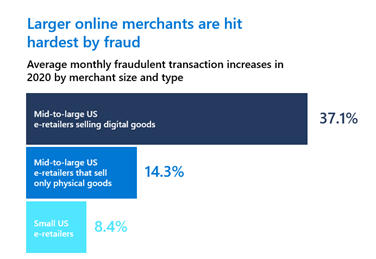
The explosion of online shopping transactions is diluting the percentage of fraud attacks across all channels, giving the false perception they are on the decline. While the percentage is shrinking, the number of fraud attacks in real terms has risen. Large online merchants selling digital goods and physical goods have been hit hardest. They’ve seen an average monthly increase in fraudulent transactions of 37.1 percent and 14.3 percent, respectively, according to Digital Commerce 360.
Additionally, there’s been a 66 percent increase in fraudsters re-targeting websites that previously failed to identify their attacks. Often these repeat attacks are occurring in newer and more vulnerable areas of the customer journey including loyalty programs and return policies.
Also on the rise is the cost of fraud for United States-based merchants. Shooting up 7.3 percent from 2019, both store-based and online retailers are paying $3.36 for every $1 of fraud. For United States e-commerce merchants it’s $3.73 per $1 of fraud, according to Digital Commerce 360. What’s more, United States merchants in 2020 were projected to see roughly $33 billion in payment card fraud loses before the pandemic.
2. Perfect storm of record setting transactions for the holiday season
In a survey of 500 e-commerce companies, 96 percent agreed that this year’s holiday shopping season is more important to their business than in 2019.
However, it will also be a prime time for fraudsters to capitalize for a few reasons. Primarily it’s due to the same confluence of events that already made more fraud possible: high transaction volumes, minimal or legacy security measures, and merchants and users who are new to online retail. Second, is the speculation that fraudsters will operationalize data they’ve already stolen. Chaos and confusion early in the pandemic created opportunities for data breaches and social engineering scams. The holidays offer an opportunity to exploit that data with fraudulent purchases, money stolen, or rewards points and credits usurped, according to TechRepublic.
3. Omnichannel delivery is convenient for fraudsters too
With the overnight changes in the ways that retailers could sell and consumers could buy, omnichannel delivery options became a must. However, as merchants have been pushed to provide new channels to serve customers, it has exposed new vulnerabilities. Therefore, omnichannel fraud is also on the rise. Buy Online, Pick-Up In Store (BOPIS) fraud rose 55 percent, according to Help Net Security. This trend is expected to increase with the surge in online shopping over the holidays.
How Dynamics 365 Fraud Protection can help prevent fraud
While many of the challenges that retailers and e-commerce merchants are facing are a result of operating in a vastly different landscape, several are coming from their legacy fraud prevention systems. That fivefold increase in new users we mentioned earlier is taxing to a legacy systems’ ability to identify legitimate users. Companies trying to keep up with the overwhelming number of fraud signals often rely on systems that generate false positives, incorrectly rejecting legitimate and loyal buyers. During a time when a single transaction can seemingly make or break a business, merchants cannot afford to lose customers or sales.
Microsoft Dynamics 365 Fraud Protection helps merchants combat against the types of fraud and legacy security systems gaps that are threatening to make the holiday shopping season less than merry.
A cloud-based solution recently awarded the Juniper cybersecurity platinum award, Dynamics 365 Fraud Protection is designed to help e-commerce, brick-and-mortar, and omnichannel merchants protect revenue and reputation. Deploying adaptive AI technology that continuously learns, Dynamics 365 Fraud Protection defends against purchase, account, and omnichannel return and discount fraud while reducing operational expenses and increasing acceptance rates. It also safeguards user accounts from fraud exposure helping to retain customers and maintain satisfaction.
Dynamics 365 Fraud Protection offers three capabilities which can be integrated together or used individually, providing merchants the option to use the capability that best suits their business needs:
1. Account protection helps protect online revenue and reputation and safeguard user accounts from abuse and fraud by combating fake account creation, account takeover and fraudulent account access.
In the first trend above, new customer accounts represent 30 percent of transactions. These online users with weaker security could utilize account protection capability to help safeguard accounts. Businesses and merchants with account protection could protect their customers’ data by preventing fraudulent account access. Rather than worry about keeping their customers data safe, merchants can focus back on seamless customer experiences. With both fraud attacks and cost of fraud to United States merchants rising, there is no better time to add the account protection capability to your toolkit.
2. Purchase protection helps protect revenue by improving the acceptance rate of e-commerce transactions with insights and tools that help balance revenue opportunity verses fraud loss and checkout friction.
The second trend highlights the need for purchase protection. With a higher number of transactions and new online users entering their card information, purchase protection can help keep good customers happy while helping mitigate fraud loss.
3.Loss prevention helps protect revenue by identifying anomalies on returns and discounts arising from omnichannel purchases, enabling store managers and loss prevention officers to quickly investigate potential fraud and take action to mitigate losses.
Our third trend, omnichannel delivery, is a growing area for fraudsters to strike. Loss prevention helps analyze merchant’s data and to identify patterns of anomalies to increase merchants’ visibility into potential fraud on returns and discounts while notifying store managers so action can be taken to prevent losses. It’s time to fight Buy Online, Pick-Up In Store (BOPIS) fraud with the loss prevention capability.




























































Recent Comments