by Contributed | Dec 17, 2020 | Technology
This article is contributed. See the original author and article here.
Curious if and how Microsoft’s monthly security updates will impact your server applications? We have got you covered! With Test Base for Microsoft 365, you can now validate your applications against Windows Server 2016 and 2019, including Server Core!
Software vendors and test engineers: you spoke, we listened. Prior to now, Test Base users could only validate their applications against upcoming security updates for Windows 10 client operating systems. However, understanding the importance of servers in the software application ecosystem and the essential role they play in this space, we are empowering you to achieve more on our platform.
Simply upload your applications to the Test Base server on Azure, then select that you’d like your apps to be validated against pre-release monthly security updates for Windows Server 2019 and/or Windows Server 2016, including the Server Core edition.
Not sure how to get started? Check out the step-by-step guide below to find out how to use this new feature.
Not yet using Test Base for Microsoft 365? Complete our short sign-up form to join the private preview.
Upload an application for testing against Windows Server 2016 and Windows Server 2019
To get started with validating your applications against pre-release updates for Windows Server 2016 and 2019 operating systems on Test Base for Microsoft 365, log on to our self-service onboarding portal. From the left-side navigation menu, select Upload new package under Package catalog and fill out the Test details.
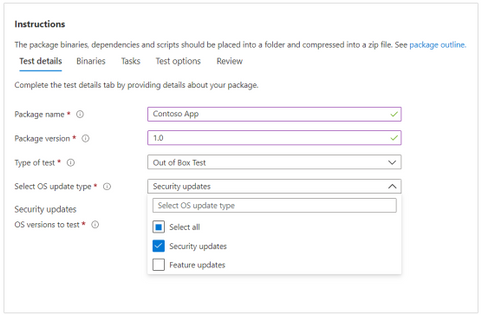
- Select Security updates as the OS update type:
Selecting the OS update type in Test Base for Microsoft 365
Note: We do not support feature update testing for Windows Server at this time.
|
- Under OS versions to test, select the applicable OS versions. You can select Windows Server OS versions or a combination of server and client OS versions.
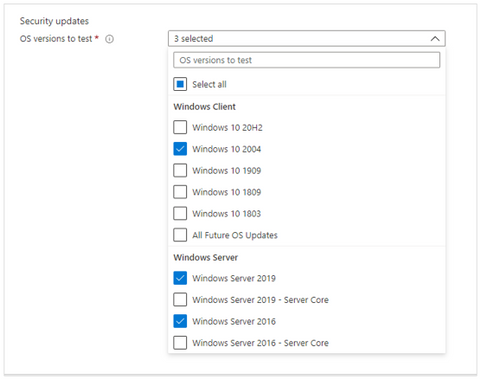 Selecting the OS version against which you want to test your applications in Test Base for Microsoft 365
Note: If you select to test your application against both server and client operating systems, please make sure that the app is compatible and can run seamlessly on both.
|
- Provide other required information, review the details provided, and upload your application package. After uploading, you can view package status on the Manage packages menu tab.
- To view test results and insights from the validation of your application against pre-release security updates for Windows Server 2016 and 2019, go to the Test summary page or the Security update results page.
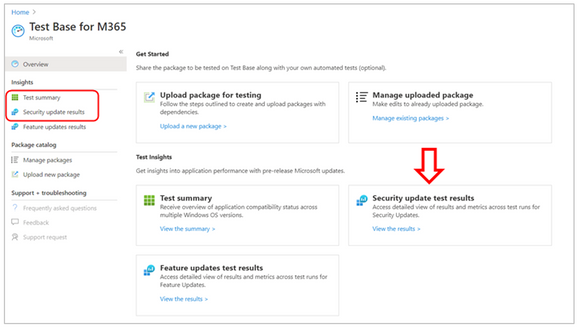 Where to find security update test results in Test Base for Microsoft 365
As we continue to innovate and build our service to meet all your application testing requirements, we look forward to hearing your comments and feedback on this new feature!
You can also email us at testbasepreview@microsoft.com.
by Contributed | Dec 17, 2020 | Technology
This article is contributed. See the original author and article here.
There is a rich opportunity for organizations to optimize and bring more comprehensive digital transformation to the forefront. With a pandemic shifting how we work today and likely in the future, a new question about business comes to mind: Can change drive optimization in your business?
This new normal is well, still new to a lot of us. Some elements of the business need urgent help with technology, like the rapid shift to remote work. Supporting a workforce that is suddenly remote comes with an increased time investment. Other parts of the business might need to be put on pause in order to focus on more immediate needs. Maintaining business continuity, keeping up with the digital landscape, and meeting demands are all part of the job – and now more than ever, IT departments need to stay focused and remain confident during these changing times.
What are the most important IT skills to support business optimization?
A recent IDC report1 may help set you on a path to relevant trainings and certifications for your team to be successful in keeping pace with technology. In the report, a finding that stands out: The skills most needed in your organization depend on the stage the business is in. Is your organization working to maintain continuity? Have you already returned to growth?
One of the requirements to being a proactively supportive IT team lead is understanding the current stage of growth.
Five stages of business growth1
- Business continuity – where we were before the pandemic
- Economic slowdown – where we were shortly after the pandemic hit, and many may still be here
- Recession – experiencing layoffs and restructuring
- Return to growth –pivoting the business model or rebounding from the early economic slowdown
- The next normal – looking ahead, settled into a growth pattern that’s appropriate for the uncertainty of the times
For each stage of business growth, there are specific IT skills that seem to take precedence, with cybersecurity taking the lead.
Five most important IT skills for business growth1
Cybersecurity, IT Operations, Data analytics, Digital innovation, Software development
Whereas Artificial Intelligence (AI) was an important IT skill pre-pandemic, research shows it gives way to software development as an organization moves through the stages of business recovery. It could be that AI requires more investment in capital and time, both of which were more abundant to organizations pre-pandemic. Moving to a “necessities only” IT position can help a business move out of the trough and into growth.
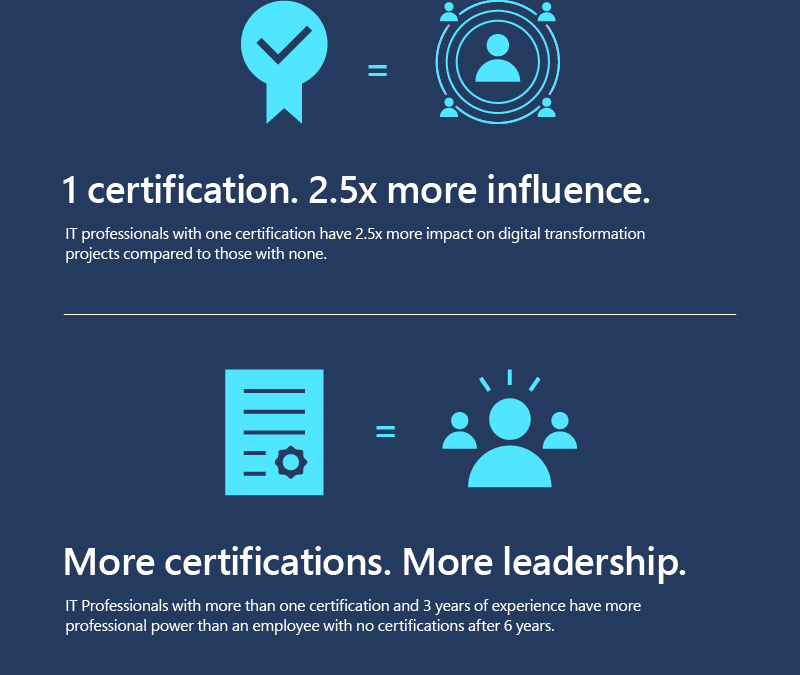
Certified IT leads have a significant influence on the organization
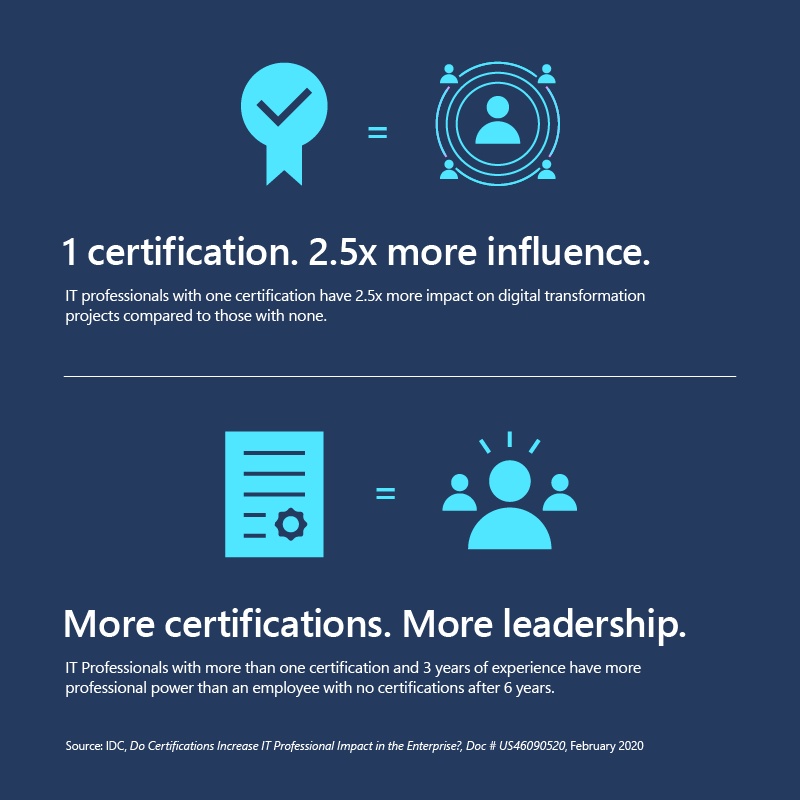
The training and certifications your team adopt are critical to business recovery. Why? IDC research2 has discovered that certification leads to professional influence. With the skills needed to be certified, in many ways a certification provides tenure that prescribes professional respect – especially when businesses need subject matter experts during recovery mode. Having an IT expert in house gives a business agility, security, and responsiveness, all of which can greatly impact the speed of recovery and optimization.
The path to recovery and optimization
This is an important moment for IT leads. Organizational recovery from the pandemic depends on IT skills. And IT can significantly influence the organization with certifications. Choosing the right certification focus for yourself and your team helps build not just a path to recovery, but the ability to respond to whatever comes next. Ultimately, certification empowers the team, which helps your business succeed – whether in recovery or growth.
Wherever you are on the path, certifications are key to helping your organization succeed in a digital world. Explore Microsoft Learn to find the right training and certifications for your team.
Related post:
The most important factor for business success
1. Source: IDC, Road to Recovery: What Are the Most Important IT Skills Worldwide to Support Organizational Recovery?, Doc # US46713620, July 2020
2. Source: IDC, Do Certifications Increase IT Professional Impact in the Enterprise?, Doc # US46090520, February 2020
by Contributed | Dec 17, 2020 | Technology
This article is contributed. See the original author and article here.
For so many of us, meetings form an important part of how work is done. With new applications and updates inside of Microsoft Teams, you will be better equipped to handle the ebb and flow of meetings throughout your day.
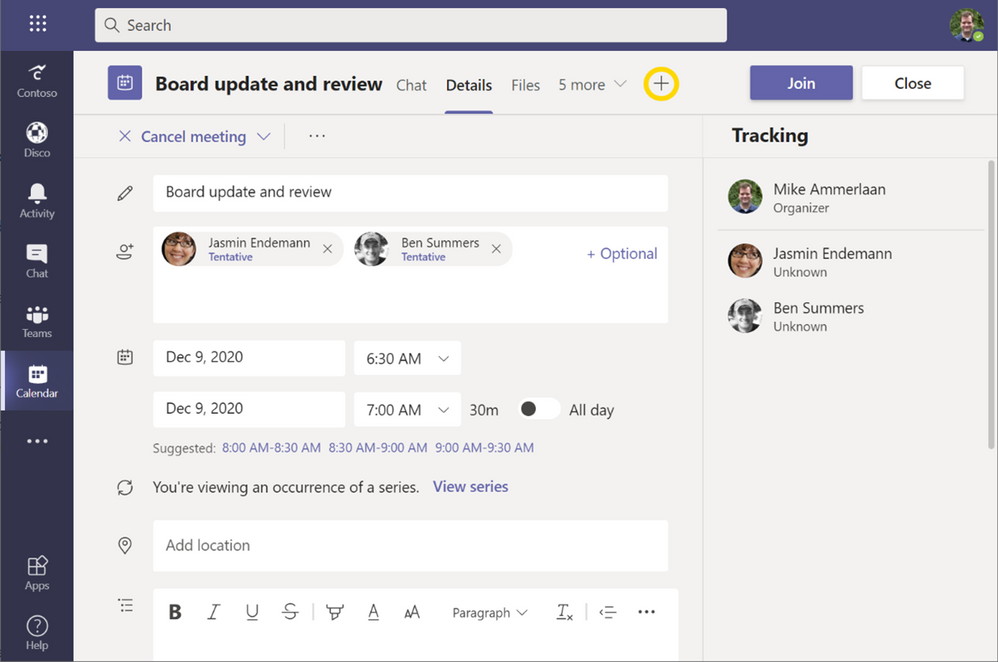
We’ve recently released apps in meetings, and there are nearly 20 apps now available. To get started with apps in meetings, edit the meetings you have scheduled and sent out within Teams, and select the + button at the top to add apps to your meetings:
Many apps in meetings have a pre-meeting preparation experience you can engage in before a meeting starts (e.g., setting up an agenda, designing simple poll questions.) Then, during a meeting, you can call up your tools as needed and as it fits the conversations you are having. Just like that – you can transform your meeting experiences with different apps to suit the types of meetings you are in.
1. Structured meetings are productive meetings with Decisions
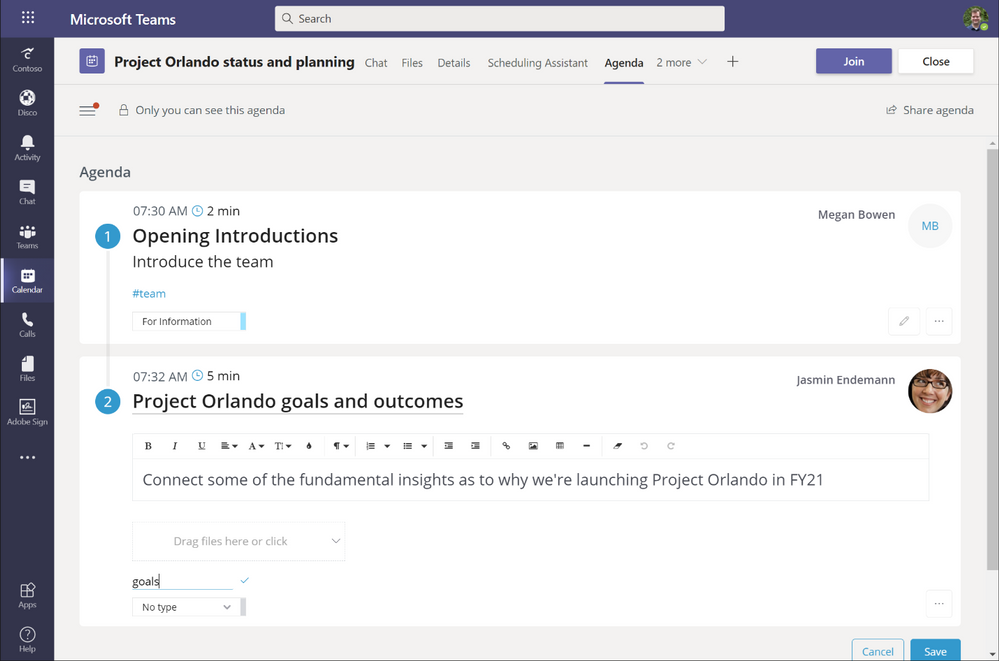
For all the time that you and your colleagues spend within a meeting, you want to ensure you actionable outcomes and next steps. Decisions has extended their Teams integration with an app for meetings – starting with an easy-to-edit agenda that allows you to tag and organize the expected timelines. This will help you, as a meeting organizer, become instantly better structured and outcome-oriented for the meetings you run. Within a meeting, Decisions takes advantage of the meetings pane so that you can see and interact with the agenda, alongside your colleagues, in real time during a meeting. With the power to keep the agenda always in view – alongside capabilities for adding notes, tasks, and taking votes – you can ensure that every great idea and every action follow up is recorded.
See more about Decisions available on Microsoft AppSource.
2. Connect with your team via Teamflect
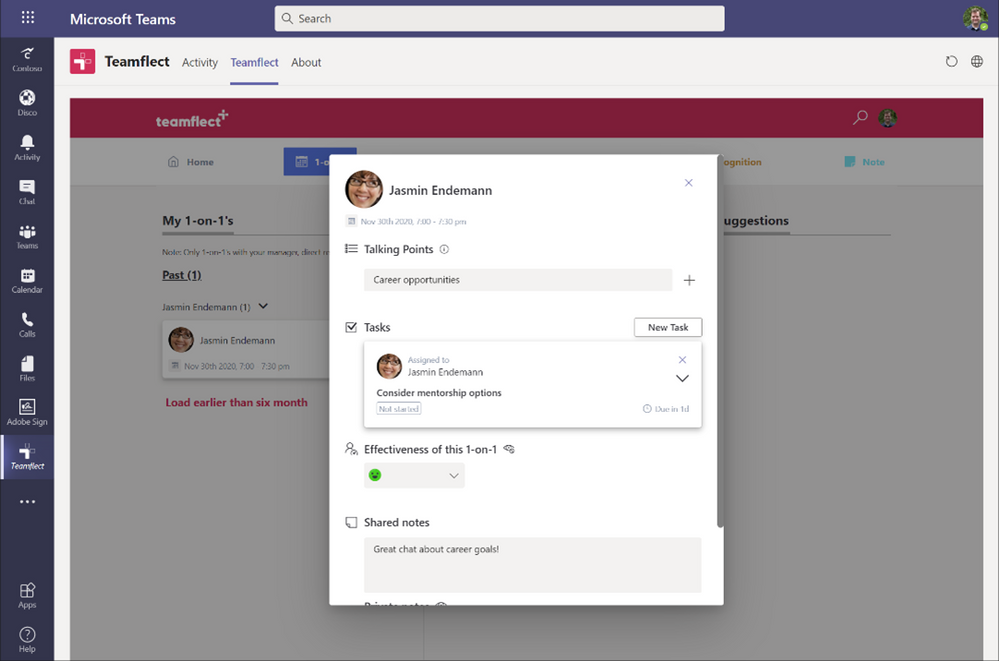
For managers and their team, the 1-on-1 meeting is a critical tool for team members to shape their relationships– including their status review, yearly plans, mentoring relationships, and more. Teamflect, a new app in Microsoft Teams, provides a way to manage and structure the process of those management relationships within an organization. It evaluates your connections with other colleagues and makes it easy to record follow up notes and feedback from your management conversations with your teammates. Because it particularly focuses on 1-on-1 conversations between managers and their team, it has focused tools to help structure plans for growth for everyone on your team. To have better and more structured 1-on-1s, give Teamflect a try within your next management meetings.
Add Teamflect from AppSource.
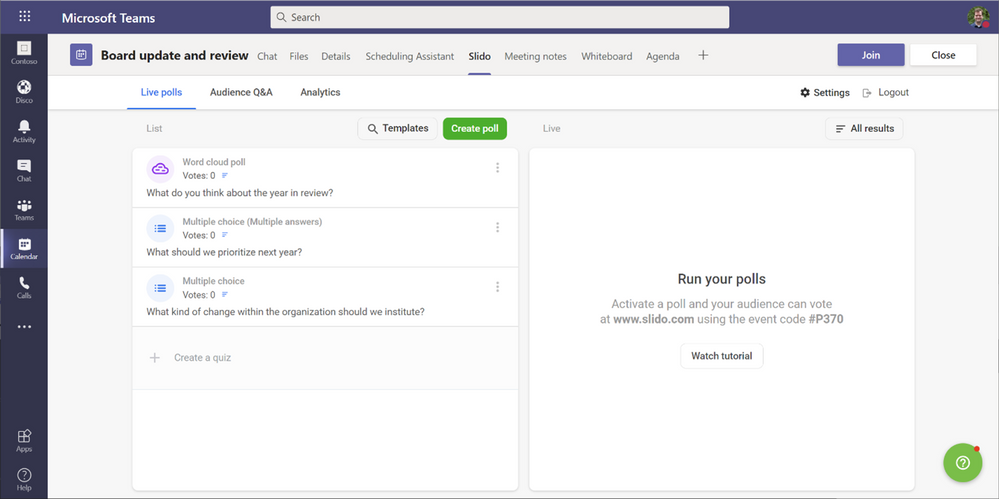
3. Poll the meeting audience with Slido
During a meeting – especially a large meeting – you will want to plan for ways to keep the audience engaged. At several points, consider asking the audience questions so you can encourage conversation or tailor your pitch to the mood of the audience. Slido is a simple but flexible polling tool you can integrate into your meeting workflows that help you get a broader sense of the room. Supporting several different question types – including word clouds, multiple choice questions, quizzes and ratings, there are a number of options for pausing during a meeting to ask for more audience participation and engagement.
Add the Slido app to your meetings from Microsoft AppSource.
4. Take a mini-break from meetings with Breakthru
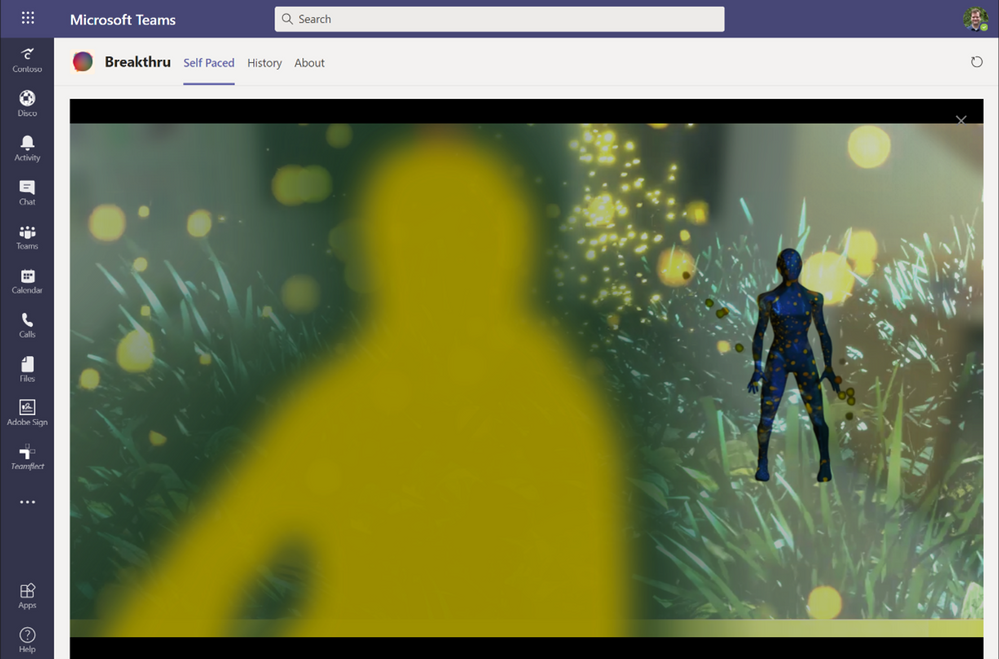
Finally, with more and more digital meetings it is more important to pay attention to your individual workload and sense of fatigue. We have found that ensuring you get time in between meetings to take some time out, relax, and shift your focus can make a big impact to your overall sense of wellbeing, and help you stay refreshed for that final late-afternoon meeting. Breakthru is a new application in Microsoft Teams that helps you do just that – it helps you take 2-minute mini breaks with meditative exercise that can help you and your team re-energize. Whether within a meeting with colleagues, or just by yourself, you can enhance your overall well-being with these helpful restorative pauses that can help clear your mind for what comes next.
Add the Breakthru app to try it out for yourself, or within a meeting.
For all the decisions and actions that take place in meetings, apps within and outside of meetings give you the right tools to get to better outcomes. With these apps in your toolbox, you can run more meaningful and engaged meetings throughout the week – and keep everyone engaged as well.
by Scott Muniz | Dec 17, 2020 | Security, Technology
This article is contributed. See the original author and article here.
This Alert uses the MITRE Adversarial Tactics, Techniques, and Common Knowledge (ATT&CK®) version 8 framework. See the ATT&CK for Enterprise version 8 for all referenced threat actor tactics and techniques.
The Cybersecurity and Infrastructure Security Agency (CISA) is aware of compromises of U.S. government agencies, critical infrastructure entities, and private sector organizations by an advanced persistent threat (APT) actor beginning in at least March 2020. This APT actor has demonstrated patience, operational security, and complex tradecraft in these intrusions. CISA expects that removing this threat actor from compromised environments will be highly complex and challenging for organizations.
One of the initial access vectors for this activity is a supply chain compromise of the following SolarWinds Orion products (see Appendix A).
- Orion Platform 2019.4 HF5, version 2019.4.5200.9083
- Orion Platform 2020.2 RC1, version 2020.2.100.12219
- Orion Platform 2020.2 RC2, version 2020.2.5200.12394
- Orion Platform 2020.2, 2020.2 HF1, version 2020.2.5300.12432
Note: CISA has evidence of additional initial access vectors, other than the SolarWinds Orion platform; however, these are still being investigated. CISA will update this Alert as new information becomes available.
On December 13, 2020, CISA released Emergency Directive 21-01: Mitigate SolarWinds Orion Code Compromise, ordering federal civilian executive branch departments and agencies to disconnect affected devices. Note: this Activity Alert does not supersede the requirements of Emergency Directive 21-01 (ED-21-01) and does not represent formal guidance to federal agencies under ED 21-01.
CISA has determined that this threat poses a grave risk to the Federal Government and state, local, tribal, and territorial governments as well as critical infrastructure entities and other private sector organizations. CISA advises stakeholders to read this Alert and review the enclosed indicators (see Appendix B).
Key Takeaways
- This is a patient, well-resourced, and focused adversary that has sustained long duration activity on victim networks.
- The SolarWinds Orion supply chain compromise is not the only initial infection vector this APT actor leveraged.
- Not all organizations that have the backdoor delivered through SolarWinds Orion have been targeted by the adversary with follow-on actions.
- Organizations with suspected compromises need to be highly conscious of operational security, including when engaging in incident response activities and planning and implementing remediation plans.
Click here for a PDF version of this report.
Overview
CISA is aware of compromises, which began at least as early as March 2020, at U.S. government agencies, critical infrastructure entities, and private sector organizations by an APT actor. This threat actor has demonstrated sophistication and complex tradecraft in these intrusions. CISA expects that removing the threat actor from compromised environments will be highly complex and challenging. This adversary has demonstrated an ability to exploit software supply chains and shown significant knowledge of Windows networks. It is likely that the adversary has additional initial access vectors and tactics, techniques, and procedures (TTPs) that have not yet been discovered. CISA will continue to update this Alert and the corresponding indicators of compromise (IOCs) as new information becomes available.
Initial Infection Vectors [TA0001]
CISA is investigating incidents that exhibit adversary TTPs consistent with this activity, including some where victims either do not leverage SolarWinds Orion or where SolarWinds Orion was present but where there was no SolarWinds exploitation activity observed. Volexity has also reported publicly that they observed an intrusion into a think tank using, as an initial intrusion vector, a Duo multi-factor authentication bypass in Outlook Web App (OWA) to steal the secret key.[1] Volexity attributes this intrusion to the same activity as the SolarWinds Orion supply chain compromise, and the TTPs are consistent between the two. This observation indicates that there are other initial access vectors beyond SolarWinds Orion, and there may still be others that are not yet known.
SolarWinds Orion Supply Chain Compromise
SolarWinds Orion is an enterprise network management software suite that includes performance and application monitoring and network configuration management along with several different types of analyzing tools. SolarWinds Orion is used to monitor and manage on-premise and hosted infrastructures. To provide SolarWinds Orion with the necessary visibility into this diverse set of technologies, it is common for network administrators to configure SolarWinds Orion with pervasive privileges, making it a valuable target for adversary activity.
The threat actor has been observed leveraging a software supply chain compromise of SolarWinds Orion products[2] (see Appendix A). The adversary added a malicious version of the binary solarwinds.orion.core.businesslayer.dll into the SolarWinds software lifecycle, which was then signed by the legitimate SolarWinds code signing certificate. This binary, once installed, calls out to a victim-specific avsvmcloud[.]com domain using a protocol designed to mimic legitimate SolarWinds protocol traffic. After the initial check-in, the adversary can use the Domain Name System (DNS) response to selectively send back new domains or IP addresses for interactive command and control (C2) traffic. Consequently, entities that observe traffic from their SolarWinds Orion devices to avsvmcloud[.]com should not immediately conclude that the adversary leveraged the SolarWinds Orion backdoor. Instead, additional investigation is needed into whether the SolarWinds Orion device engaged in further unexplained communications. If additional Canonical Name record (CNAME) resolutions associated with the avsvmcloud[.]com domain are observed, possible additional adversary action leveraging the back door has occurred.
Based on coordinated actions by multiple private sector partners, as of December 15, 2020, avsvmcloud[.]com resolves to 20.140.0[.]1, which is an IP address on the Microsoft blocklist. This negates any future use of the implants and would have caused communications with this domain to cease. In the case of infections where the attacker has already moved C2 past the initial beacon, infection will likely continue notwithstanding this action.
SolarWinds Orion typically leverages a significant number of highly privileged accounts and access to perform normal business functions. Successful compromise of one of these systems can therefore enable further action and privileges in any environment where these accounts are trusted.
Anti-Forensic Techniques
The adversary is making extensive use of obfuscation to hide their C2 communications. The adversary is using virtual private servers (VPSs), often with IP addresses in the home country of the victim, for most communications to hide their activity among legitimate user traffic. The attackers also frequently rotate their “last mile” IP addresses to different endpoints to obscure their activity and avoid detection.
FireEye has reported that the adversary is using steganography (Obfuscated Files or Information: Steganography [T1027.003]) to obscure C2 communications.[3] This technique negates many common defensive capabilities in detecting the activity. Note: CISA has not yet been able to independently confirm the adversary’s use of this technique.
According to FireEye, the malware also checks for a list of hard-coded IPv4 and IPv6 addresses—including RFC-reserved IPv4 and IPv6 IP—in an attempt to detect if the malware is executed in an analysis environment (e.g., a malware analysis sandbox); if so, the malware will stop further execution. Additionally, FireEye analysis identified that the backdoor implemented time threshold checks to ensure that there are unpredictable delays between C2 communication attempts, further frustrating traditional network-based analysis.
While not a full anti-forensic technique, the adversary is heavily leveraging compromised or spoofed tokens for accounts for lateral movement. This will frustrate commonly used detection techniques in many environments. Since valid, but unauthorized, security tokens and accounts are utilized, detecting this activity will require the maturity to identify actions that are outside of a user’s normal duties. For example, it is unlikely that an account associated with the HR department would need to access the cyber threat intelligence database.
Taken together, these observed techniques indicate an adversary who is skilled, stealthy with operational security, and is willing to expend significant resources to maintain covert presence.
Privilege Escalation and Persistence [TA0004, TA0003]
The adversary has been observed using multiple persistence mechanisms across a variety of intrusions. CISA has observed the threat actor adding authentication tokens and credentials to highly privileged Active Directory domain accounts as a persistence and escalation mechanism. In many instances, the tokens enable access to both on-premise and hosted resources. Microsoft has released a query that can help detect this activity.[4]
Microsoft reported that the actor has added new federation trusts to existing infrastructure, a technique that CISA believes was utilized by a threat actor in an incident to which CISA has responded. Where this technique is used, it is possible that authentication can occur outside of an organization’s known infrastructure and may not be visible to the legitimate system owner. Microsoft has released a query to help identify this activity.[5]
User Impersonation
The adversary’s initial objectives, as understood today, appear to be to collect information from victim environments. One of the principal ways the adversary is accomplishing this objective is by compromising the Security Assertion Markup Language (SAML) signing certificate using their escalated Active Directory privileges. Once this is accomplished, the adversary creates unauthorized but valid tokens and presents them to services that trust SAML tokens from the environment. These tokens can then be used to access resources in hosted environments, such as email, for data exfiltration via authorized application programming interfaces (APIs).
CISA has observed in its incident response work adversaries targeting email accounts belonging to key personnel, including IT and incident response personnel.
These are some key functions and systems that commonly use SAML.
- Hosted email services
- Hosted business intelligence applications
- Travel systems
- Timecard systems
- File storage services (such as SharePoint)
Detection: Impossible Logins
The adversary is using a complex network of IP addresses to obscure their activity, which can result in a detection opportunity referred to as “impossible travel.” Impossible travel occurs when a user logs in from multiple IP addresses that are a significant geographic distance apart (i.e., a person could not realistically travel between the geographic locations of the two IP addresses during the time period between the logins). Note: implementing this detection opportunity can result in false positives if legitimate users apply virtual private network (VPN) solutions before connecting into networks.
Detection: Impossible Tokens
The following conditions may indicate adversary activity.
- Most organizations have SAML tokens with 1-hour validity periods. Long SAML token validity durations, such as 24 hours, could be unusual.
- The SAML token contains different timestamps, including the time it was issued and the last time it was used. A token having the same timestamp for when it was issued and when it was used is not indicative of normal user behavior as users tend to use the token within a few seconds but not at the exact same time of issuance.
- A token that does not have an associated login with its user account within an hour of the token being generated also warrants investigation.
Operational Security
Due to the nature of this pattern of adversary activity—and the targeting of key personnel, incident response staff, and IT email accounts—discussion of findings and mitigations should be considered very sensitive, and should be protected by operational security measures. An operational security plan needs to be developed and socialized, via out-of-band communications, to ensure all staff are aware of the applicable handling caveats.
Operational security plans should include:
- Out-of-band communications guidance for staff and leadership;
- An outline of what “normal business” is acceptable to be conducted on the suspect network;
- A call tree for critical contacts and decision making; and
- Considerations for external communications to stakeholders and media.
MITRE ATT&CK® Techniques
CISA assesses that the threat actor engaged in the activities described in this Alert uses the below-listed ATT&CK techniques.
- Query Registry [T1012]
- Obfuscated Files or Information [T1027]
- Obfuscated Files or Information: Steganography [T1027.003]
- Process Discovery [T1057]
- Indicator Removal on Host: File Deletion [T1070.004]
- Application Layer Protocol: Web Protocols [T1071.001]
- Application Layer Protocol: DNS [T1071.004]
- File and Directory Discovery [T1083]
- Ingress Tool Transfer [T1105]
- Data Encoding: Standard Encoding [T1132.001]
- Supply Chain Compromise: Compromise Software Dependencies and Development Tools [T1195.001]
- Supply Chain Compromise: Compromise Software Supply Chain [T1195.002]
- Software Discovery [T1518]
- Software Discovery: Security Software [T1518.001]
- Create or Modify System Process: Windows Service [T1543.003]
- Subvert Trust Controls: Code Signing [T1553.002]
- Dynamic Resolution: Domain Generation Algorithms [T1568.002]
- System Services: Service Execution [T1569.002]
- Compromise Infrastructure [T1584]
SolarWinds Orion Owners
Owners of vulnerable SolarWinds Orion products will generally fall into one of three categories.
- Category 1 includes those who do not have the identified malicious binary. These owners can patch their systems and resume use as determined by and consistent with their internal risk evaluations.
- Category 2 includes those who have identified the presence of the malicious binary—with or without beaconing to avsvmcloud[.]com. Owners with malicious binary whose vulnerable appliances only unexplained external communications are with
avsvmcloud[.]com—a fact that can be verified by comprehensive network monitoring for the device—can harden the device, re-install the updated software from a verified software supply chain, and resume use as determined by and consistent with a thorough risk evaluation.
- Category 3 includes those with the binary beaconing to
avsvmcloud[.]com and secondary C2 activity to a separate domain or IP address. If you observed communications with avsvmcloud[.]com that appear to suddenly cease prior to December 14, 2020— not due to an action taken by your network defenders—you fall into this category. Assume the environment has been compromised, and initiate incident response procedures immediately.
Compromise Mitigations
If the adversary has compromised administrative level credentials in an environment—or if organizations identify SAML abuse in the environment, simply mitigating individual issues, systems, servers, or specific user accounts will likely not lead to the adversary’s removal from the network. In such cases, organizations should consider the entire identity trust store as compromised. In the event of a total identity compromise, a full reconstitution of identity and trust services is required to successfully remediate. In this reconstitution, it bears repeating that this threat actor is among the most capable, and in many cases, a full rebuild of the environment is the safest action.
SolarWinds Orion Specific Mitigations
The following mitigations apply to networks using the SolarWinds Orion product. This includes any information system that is used by an entity or operated on its behalf.
Organizations that have the expertise to take the actions in Step 1 immediately should do so before proceeding to Step 2. Organizations without this capability should proceed to Step 2.
- Step 1
- Forensically image system memory and/or host operating systems hosting all instances of affected versions of SolarWinds Orion. Analyze for new user or service accounts, privileged or otherwise.
- Analyze stored network traffic for indications of compromise, including new external DNS domains to which a small number of agency hosts (e.g., SolarWinds systems) have had connections.
- Step 2
- Affected organizations should immediately disconnect or power down affected all instances of affected versions of SolarWinds Orion from their network.
- For federal agencies: Until such time as CISA directs affected agencies to rebuild the Windows operating system (OS) and reinstall the SolarWinds software package, agencies are prohibited from (re)joining the Windows host OS to the enterprise domain. Affected entities should expect further communication from CISA and await guidance before rebuilding from trusted sources utilizing the latest version of the product available.
- Additionally:
- Block all traffic to and from hosts, external to the enterprise, where any version of SolarWinds Orion software has been installed.
- Identify and remove all threat actor-controlled accounts and identified persistence mechanisms.
- Step 3
- Only after all known threat actor-controlled accounts and persistence mechanisms have been removed:
See Joint Alert on Technical Approaches to Uncovering and Remediating Malicious Activity for more information on incident investigation and mitigation steps based on best practices.
CISA will update this Alert, as information becomes available and will continue to provide technical assistance, upon request, to affected entities as they work to identify and mitigate potential compromises.

by Contributed | Dec 17, 2020 | Dynamics 365, Microsoft 365, Technology
This article is contributed. See the original author and article here.
To run an effective manufacturing and distribution operation, you need an accurate understanding of your inventory and where it’s located along the supply chain. What’s more, having clear visibility into your inventory has become critically important as organizations shift to omnichannel order fulfillment and distribution and therefore need to manage inventory located in multiple places at any given time, such as in different warehouses or on delivery trucks.
The Inventory Visibility Add-in for Dynamics 365 Supply Chain Management, now available for preview, helps large volume retailers and manufacturers accurately track global, cross-channel inventory in real-time. Built for scalability, the add-in can handle a high volume of transactions every minute. With the Inventory Visibility Add-in, you can mitigate stockouts and overstocking that tend to happen when you lack visibility into all the inventory you have on hand at any given moment.
Feature highlights
The Inventory Visibility Add-in for Dynamics 365 Supply Chain Management (preview) enables real-time global inventory visibility with external systems:
- All information that relates to on-hand inventory is exported in near real-time through low-level SQL Server integration. On-hand inventory changes post to the inventory service with a specified index, modifier, and dimension values. Real-time queries on RESTful APIS enable the retrieval of a list of available positions. You can also query across legal entities to get a single global view of inventory positions.
- Partitioning defines a scheme that allows for small groupings of data while still allowing for meaningful data queries, thus significantly improving the performance of the inventory visibility. Site and warehouse are the default partition keys for the Inventory Visibility Add-in.
- Indexing provides the flexibility to configure queries on the dimension or a combination of the dimensions.
The add-in is highly scalable as a microservice and built on Microsoft Dataverse, which supports extensibility, provides better data management, and gives you the ability to build Power Apps and use Power BI for advanced customizations.
Integration with third-party and ancillary systems
The Inventory Visibility Add-in is extensible and integrates easily with third-party systems:
- Configuration of the add-in standardizes how inventory changes are posted, organized, and queried across the multiple systems.
- Supply Chain Management is the default data source for the add-in. You can add new data sources to the inventory system configuration entity to connect with third-party systems.
- When a data source posts an inventory change, the add-in posts with the physical measure, which is a list of modifiers that reflects a summary of the inventory transaction status. New physical measures can be configured for custom inbound or outbound change modifiers from the new data source.
- The custom calculated measure allows the configurable calculated quantities for the query output.
Next steps
Still have questions? Please feel free to reach out to us at D365InventVisibility@microsoft.com. You can find more details in our documentation, Inventory Visibility Add-in. You can also become part of the conversation on our Yammer group.
The post Increase visibility into inventory across your supply chain appeared first on Microsoft Dynamics 365 Blog.
Brought to you by Dr. Ware, Microsoft Office 365 Silver Partner, Charleston SC.

by Scott Muniz | Dec 17, 2020 | Security
This article was originally posted by the FTC. See the original article here.
If you’ve explored alternative treatments for medical conditions, you’ve probably noticed that CBD products are pretty popular. But if an ad claims a CBD-based product is scientifically proven to cure or treat your symptoms, take that with a dose of caution to prevent losing money and, possibly, putting your health at risk.
Today, the FTC announced six proposed complaints and settlement agreements as part of “Operation CBDeceit.” This operation is a law enforcement sweep against companies claiming their CBD products treat serious diseases and chronic health conditions like diabetes, depression, arthritis, heart disease, Alzheimer’s, and cancer. The FTC also says one of the companies charged people’s credit cards for bottles of CBD extract they hadn’t ordered. The proposed settlements would ban these companies and their affiliates from making disease prevention and cure claims without adequate scientific proof to back them up. As part of the settlements, the companies would have to notify people who bought their CBD products that no scientific evidence supports the companies’ serious health-related claims.
Operation CBDeceit is the FTC’s latest crackdown against companies making misleading or false statements about the health benefits of their products. Before CBD companies can claim their products are proven to treat or cure symptoms or diseases, they must have scientific evidence that meets the standards set by experts in those diseases and conditions.
Before you try CBD-based or any other products, take these steps to protect yourself:
-
Talk to your doctor before trying any alternative medicines — and definitely before you stop taking any prescription medications. .
-
Avoid products that say they’re “guaranteed” to treat your condition. These people don’t even know you. How can they know a product will work with your body to treat your condition?
-
Find out more about miracle cure claims by reading the infographic below and visiting FTC.gov/miraclehealth.
If you think a company deceived you about how effective its products are, report it to the FTC at ReportFraud.ftc.gov.

Brought to you by Dr. Ware, Microsoft Office 365 Silver Partner, Charleston SC.

by Scott Muniz | Dec 17, 2020 | Security
This article was originally posted by the FTC. See the original article here.

This year, during the pandemic, your holidays might be moving a bit online. On the 10th day of Consumer Protection, maybe you’re planning to send e-cards to family and friends. Or maybe your kids are writing their letter to Santa online, using a site that promises a customized letter back from Santa. Before you share your personal information — and certainly before you pay:
-
Check out the website. Do a quick online search for the site or company name, plus the words “complaint,” “review,” or “scam.” What do people say about them? (Knowing, of course, that those glowing reviews could be fakes…)
-
Share only what you need to share. Does the site really need your home address, your age, or access to your contacts? And none of these companies needs your bank account or Social Security number. (Frankly, Santa probably already knows, so why would he ask?)
-
Don’t click links in unexpected texts or emails. Nothing good comes of that. Instead, check them out first, and then type in the URL yourself so you know where you’re headed.
-
Ignore calls for immediate action. Scammers try to get you to act before you have time to think. Take your time. Legit offers will still be there.
If you decide to move forward with your card or Santa letter, pay with a credit card to get the best protections. But only pay if the site’s URL starts with “https.” That means your transaction will be encrypted — but that, alone, doesn’t mean the site is legit.
If you spot a scammy e-mail, text, or website, tell your friends and family so they can avoid it, too. Then tell the FTC at ReportFraud.ftc.gov.
Brought to you by Dr. Ware, Microsoft Office 365 Silver Partner, Charleston SC.
by Contributed | Dec 17, 2020 | Technology
This article is contributed. See the original author and article here.
This week, as the year draws to a close, we are excited to announce that Bot Framework Composer 1.3 is now available to download. Composer has come a long way since we made the product GA (generally available) at the Microsoft Build conference earlier this year and this is our biggest release yet, adding many significant capabilities and making building sophisticated bots and virtual assistants even easier!
New features to improve the developer experience and workflow
For developers who are working with Bot Framework Skills today, you will know that developing multiple bots locally that work together can sometimes be a challenge, especially when it comes to setting up debugging. In Composer 1.3, we have now added a multi-bot authoring and management experience to transform this scenario, adding the capability to create, manage and test multiple bots within a single project. With a single click, you can now start all local bots for debugging, enabling you to test your root (parent) bot, connected to one or more skills with no additional manual configuration needed.
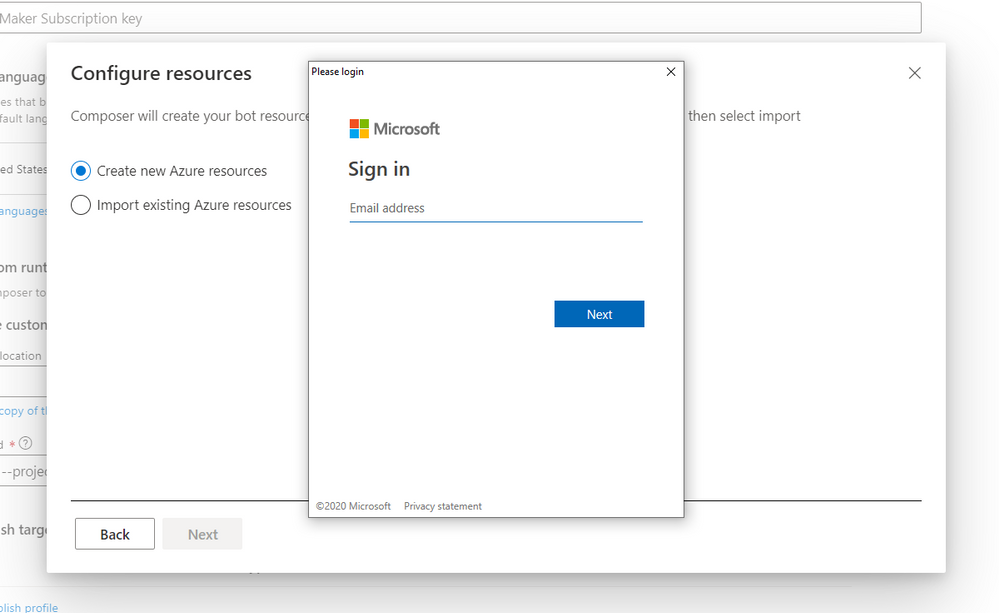
Another significant enhancement is for the provisioning feature, which previously required developers to leave Composer and run a PowerShell script, copying back a resulting configuration into Composer. Now though, the provisioning process has been overhauled and users can now login to Azure, provision required resources and subsequently publish bots, all within the Composer environment!
Additionally, we have implemented a new settings experience, providing an improved interface, removing the need to manually edit the underlying JSON for common settings, whilst retaining the ability to make changes or add additional configuration manually if you need to.
Localization
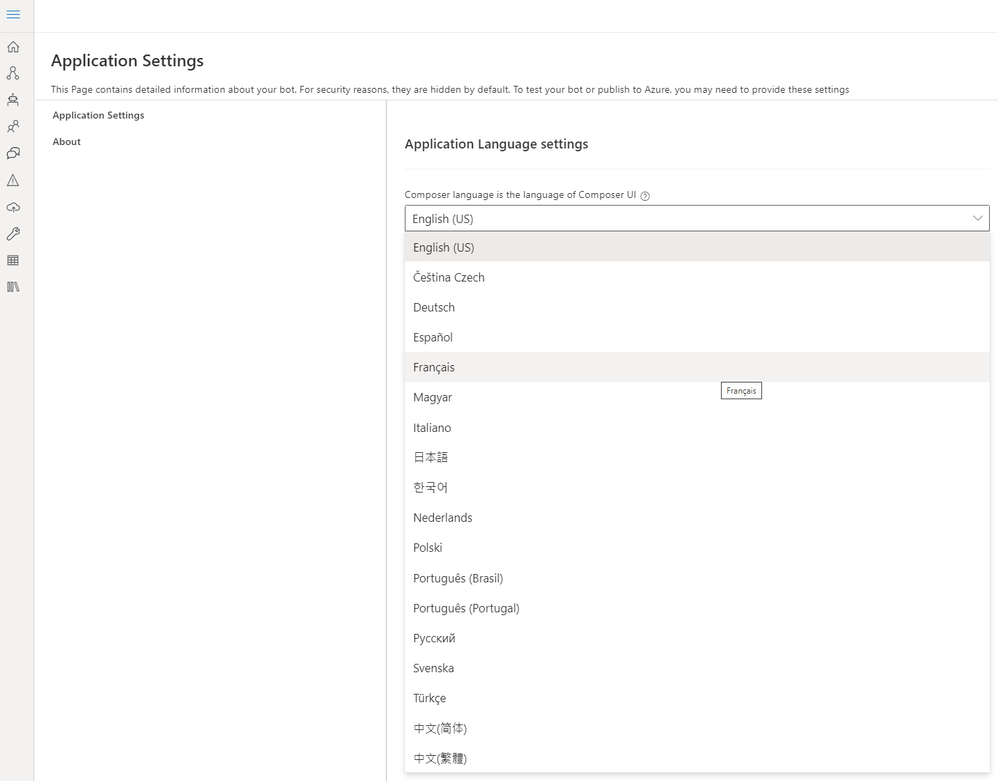
In addition to the existing capability for developers to localize their bots, multilingual support has now been added to the Composer UI! You can now choose from a long list of available languages within the Application Settings pane to change the language displayed within Composer.
Preview features
As part of version 1.3, you can now choose to enable one or more preview features by choosing preview feature flags within the Composer settings page. These features are designed to give you early access and a chance to try what we are working on right now for future Composer releases. The following preview feature flags are now available.
- Form Dialogs – Automatically generate a sophisticated dialog by simply providing the properties that you would like customers to provide as part of the conversation, with Composer then generating the appropriate dialog, language understanding (to enable dis-ambiguation and interruption scenarios) and bot responses (.lg files) assets.
- Orchestrator – A new top-level recognizer which can help to arbitrate (dispatch) between multiple LUIS and QnA Maker models to ensure accurate routing of user requests to the appropriate language model or skill.
- Package Manager – Developers can now discover and install packages from NuGet / NPM that contain re-usable assets, including dialogs, custom actions and .LG (language generation) files, that can be utilized by their bots. Once installed, assets contained within a package become available for use within a bot. Moving forward, we will provide guidance for how you can create and publish your own packages (including to internal feeds if desired), as well as making available a number of packages covering common scenarios that will ship with Composer.
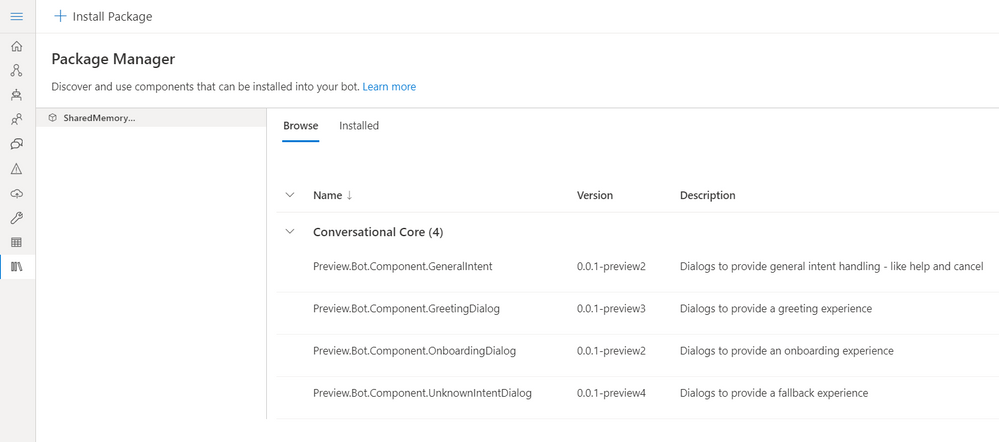
- Conversational core template – Built on the new package capabilities, surfaced via the preview of the Package Manager, we are developing a new component model for bot development using re-usable building blocks (packages). With this preview, users can create a bot using the new conversational core template which consists of a configurable runtime that can be extended with packages or importing additional skills.
Help us to improve Composer!
Within this release we have enabled the ability for users of Composer to opt in to sending usage information to us, to allow us to better understand how Composer is used. As we gather this telemetry, we can use it as an additional signal to help us prioritize our efforts in future releases and ensure we are focusing on the right features. You can help us by opting into providing usage data via the Data Collection section of the Composer settings page.
Finally, a huge thank you to all of our users for your support and feedback during 2020 – we are excited to bring more significant updates to you as we move into 2021. Happy Holidays to everyone from the entire Conversational AI team!

by Contributed | Dec 17, 2020 | Technology
This article is contributed. See the original author and article here.
When we deploy SQL Server on AKS, sometimes we may find SQL HA is not working as expect.
For example, when we deploy AKS using our default sample with 2 nodes:
https://docs.microsoft.com/en-us/azure/aks/tutorial-kubernetes-deploy-cluster#create-a-kubernetes-cluster
az aks create
    --resource-group myResourceGroup
    --name myAKSCluster
    --node-count 2
    --generate-ssh-keys
    --attach-acr <acrName>
There should be 2 instances deployed in the AKS virtual machine scale set:
According to the SQL document:
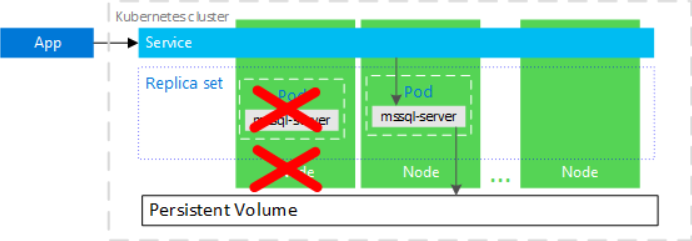
In the following diagram, the node hosting the mssql-server container has failed. The orchestrator starts the new pod on a different node, and mssql-server reconnects to the same persistent storage. The service connects to the re-created mssql-server.
However, this seems not always be true when we manually stop the AKS node instance from the portal.
Before we stop any nodes, we may see the status of the pod is running.
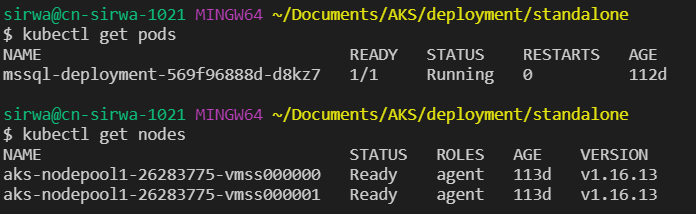
If we stop node 0, nothing will happen as SQL reside on node 1.

The status of SQL pod remains running.
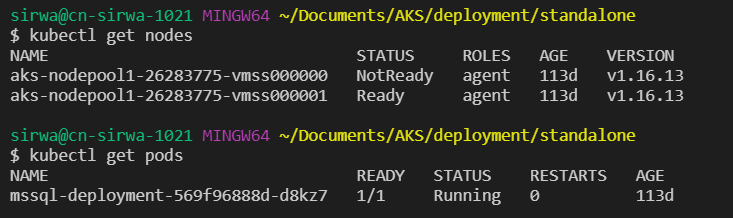
However, if we stop node 1 instead of node 0, then there comes the issue.

We may see original sql remains in the status of Terminating while the new sql pod stucks in the middle of status ContainerCreating.
$ kubectl describe pod mssql-deployment-569f96888d-bkgvf
Name:           mssql-deployment-569f96888d-bkgvf
Namespace:      default
Priority:       0
Node:           aks-nodepool1-26283775-vmss000000/10.240.0.4
Start Time:     Thu, 17 Dec 2020 16:29:10 +0800
Labels:         app=mssql
                pod-template-hash=569f96888d
Annotations:    <none>
Status:         Pending
IP:
IPs:            <none>
Controlled By:  ReplicaSet/mssql-deployment-569f96888d
Containers:
  mssql:
    Container ID:
    Image:          mcr.microsoft.com/mssql/server:2017-latest
    Image ID:
    Port:           1433/TCP
    Host Port:      0/TCP
    State:          Waiting
      Reason:       ContainerCreating
    Ready:          False
    Restart Count:  0
    Environment:
      MSSQL_PID:    Developer
      ACCEPT_EULA:  Y
      SA_PASSWORD:  <set to the key 'SA_PASSWORD' in secret 'mssql'>  Optional: false
    Mounts:
      /var/opt/mssql from mssqldb (rw)
      /var/run/secrets/kubernetes.io/serviceaccount from default-token-jh9rf (ro)
Conditions:
  Type              Status
  Initialized       True
  Ready             False
  ContainersReady   False
  PodScheduled      True
Volumes:
  mssqldb:
    Type:       PersistentVolumeClaim (a reference to a PersistentVolumeClaim in the same namespace)
    ClaimName:  mssql-data
    ReadOnly:   false
  default-token-jh9rf:
    Type:        Secret (a volume populated by a Secret)
    SecretName:  default-token-jh9rf
    Optional:    false
QoS Class:       BestEffort
Node-Selectors:  <none>
Tolerations:     node.kubernetes.io/not-ready:NoExecute for 300s
                 node.kubernetes.io/unreachable:NoExecute for 300s
Events:
  Type     Reason              Age                  From                                        Message
  ----     ------              ----                 ----                                        -------
  Normal   Scheduled           <unknown>            default-scheduler                           Successfully assigned default/mssql-deployment-569f96888d-bkgvf to aks-nodepool1-26283775-vmss000000
  Warning  FailedAttachVolume  18m                  attachdetach-controller                     Multi-Attach error for volume "pvc-6e3d4aac-6449-4c9d-86d0-c2488583ec5c" Volume is already used by pod(s) mssql-deployment-569f96888d-d8kz7
  Warning  FailedMount         3m16s (x4 over 14m)  kubelet, aks-nodepool1-26283775-vmss000000  Unable to attach or mount volumes: unmounted volumes=[mssqldb], unattached volumes=[mssqldb default-token-jh9rf]: timed out waiting for the condition
  Warning  FailedMount         62s (x4 over 16m)    kubelet, aks-nodepool1-26283775-vmss000000  Unable to attach or mount volumes: unmounted volumes=[mssqldb], unattached volumes=[default-token-jh9rf mssqldb]: timed out waiting for the condition
This issue caused by an multi-attach error should be expected due to the current AKS internal design.
If you restart the node instance that was shutdown, the issue will be resolved.
by Contributed | Dec 17, 2020 | Technology
This article is contributed. See the original author and article here.
This enhanced solution builds on the existing “Connector Health Workbook” described in this video. The Logic App leverages underlying KQL queries to provide you with an option to configure “Push notifications” to e-mail and/or a Microsoft Teams channel based on user defined anomaly scores as well as time since the last “Heartbeat” from Virtual Machines connected to the workspace. Below is a detailed description of how the rule and the logic app are put together. The solution is available for deployment from the official Azure Sentinel GitHub repo on this link .
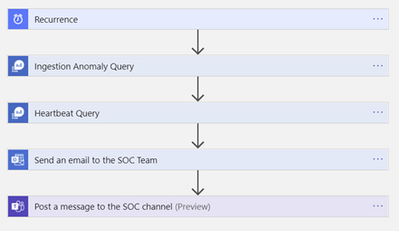
Overview of the steps the Logic App works through
The Logic App is activated by a Recurrence trigger whose frequency of execution can be adjusted to your requirements
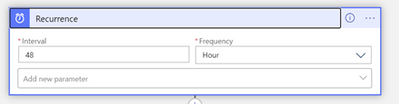
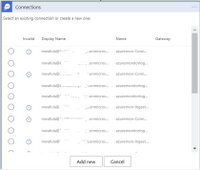
Since the Logic App is being deployed from an ARM template you will need to make connections to Azure Monitor, Office 365 and Teams before the Logic App can work in your environment. You can expect to see windows like the one below. Click “Add new” to create a connection for each of the three resources.
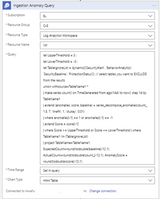
The KQL query below will be added to this step in the Logic App and will execute against your workspace. You can modify the threshold values to suit your needs
let UpperThreshold = 3.0; // Upper Anomaly threshold score
let LowerThreshold = -3.0; // Lower anomaly threshold score
let TableIgnoreList = dynamic([‘SecurityAlert’, ‘BehaviorAnalytics’, ‘SecurityBaseline’, ‘ProtectionStatus’]); // select tables you want to EXCLUDE from the results
union withsource=TableName1 *
| make-series count() on TimeGenerated from ago(14d) to now() step 1d by TableName1
| extend (anomalies, score, baseline) = series_decompose_anomalies(count_, 1.5, 7, ‘linefit’, 1, ‘ctukey’, 0.01)
| where anomalies[-1] == 1 or anomalies[-1] == -1
| extend Score = score[-1]
| where Score >= UpperThreshold or Score <= LowerThreshold
| where TableName1 !in (TableIgnoreList)
| project TableName=TableName1, ExpectedCount=round(todouble(baseline[-1]),1), ActualCount=round(todouble(count_[-1]),1), AnomalyScore = round(todouble(score[-1]),1)
Execute query against workspace to detect potential VM connectivity issues
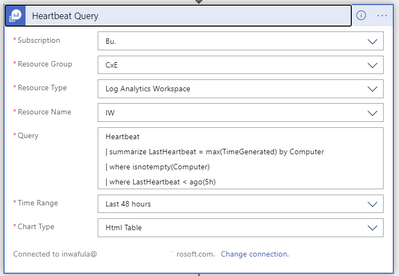
To adjust the lookback period for the last heartbeat received from VMs in the workspace, change the “| where LastHeartbest < ago(5h)” line in the query above
Send out the results of the query to the SOC team as a summarized HTML table
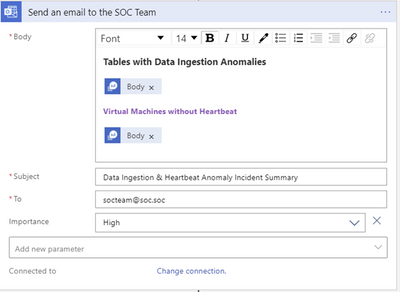
Note that while the two queries use two query outputs named “Body” they are different and care should be taken to select the correct output. Naming the Ingestion Anomaly and the Heart Beat query steps differently will help distinguish between the two “Body” variables.
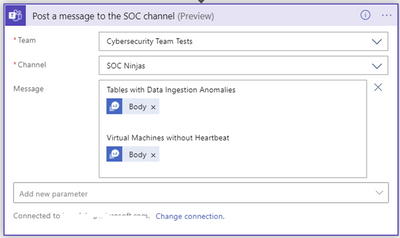
Send the same message to a Microsoft Teams channel monitored by the SOC team
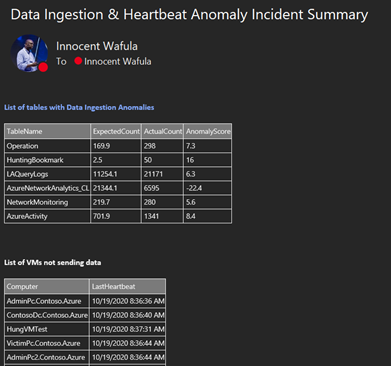
Below is a sample output of the push notification message
This solution was built in close collaboration with @Javier Soriano , @Jeremy Tan and @Benjamin Kovacevic


Recent Comments