
Introducing Service Agent in Microsoft 365 Copilot

Introducing Service Agent in Microsoft 365 Copilot

This article is contributed. See the original author and article here.

A new way to bring service workflows, insights, and actions directly into Copilot

Microsoft 365 Copilot is becoming the primary interface for how people get work done. As more teams rely on Microsoft 365 Copilot to retrieve information, reason over data, and take action, the need for domainspecific intelligence, especially for customer service, has never been greater.

On March 9th, we announced the frontier transformation, where we introduced a new type of business application integrated with Microsoft 365 Copilot. Today, we’re excited to introduce Service Agent in Microsoft 365 Copilot: a purpose‑built agent that brings customer service context, insights, and actions directly into the Copilot experience employees already use every day.

Service Agent enables service teams to move faster, stay focused, and resolve issues with greater confidence, without switching tools or losing context.

What is Service Agent?

Service Agent is a declarative agent that runs inside Microsoft 365 Copilot, designed specifically for customer service scenarios.

It combines:

  • The reach and familiarity of Microsoft 365 Copilot
  • The depth of Dynamics 365 Customer Service data
  • The power of agents that can reason, retrieve, and take action

With Service Agent, service professionals can interact with cases, knowledge, and service workflows using natural language—grounded in both Microsoft 365 and Dynamics 365 Customer Service system data—right from Copilot.

Why this matters for IT and service leaders

For years, service professionals have had to juggle multiple tools: CRM systems, knowledge bases, emails, internal chats, and reports, often switching context.

Service Agent changes that model by making Copilot the primary system of engagement for service work.

This approach delivers three key benefits:

1. One Copilot experience, across all applications including within Dynamics 365 Customer Service

Service Agent brings service workflows into the same Copilot surface used for everyday productivity, reducing friction, training overhead, and context switching.

2. Faster resolution through richer context

By grounding Copilot in both Microsoft 365 data (Outlook, Teams, SharePoint) and Dynamics 365 service data (such as cases, emails, knowledge, customer history), service professionals can build case understanding in seconds—not minutes.

3. Action, not just answers

Service Agent doesn’t stop at reading and synthesizing data. It can help service professionals prioritize cases, update records, draft responses to customers, and trigger workflows—all through natural language.

What Service Agent can do in Public Preview

In its initial release, Service Agent enables scenarios such as:

  • Case understanding and summarization
    Quickly generate rich summaries of customer cases, including context from prior interactions and related knowledge.
  • Case prioritization and workload awareness
    Ask Copilot what needs attention now, based on customer signals and service data.
  • Service knowledge retrieval
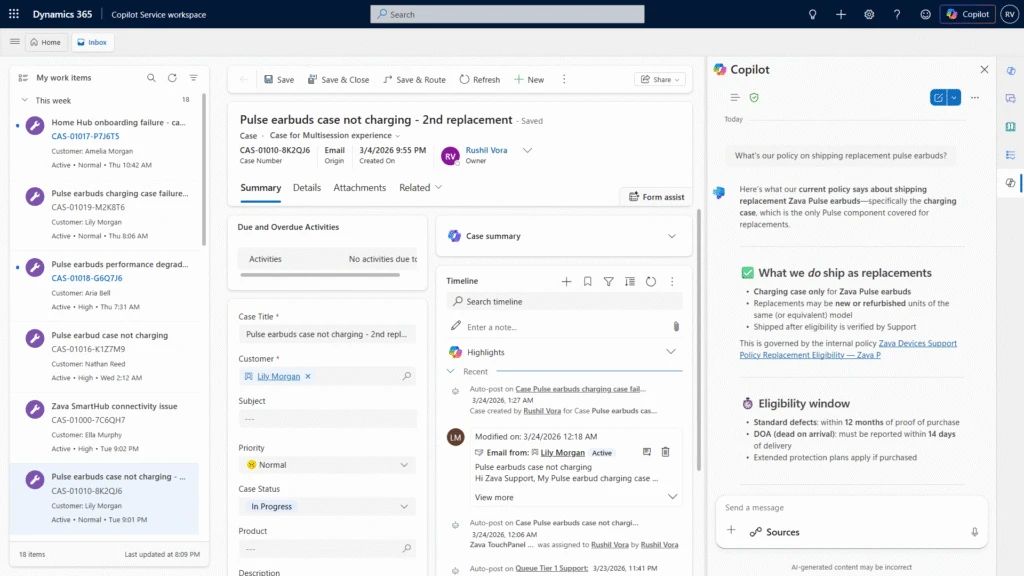
    Get relevant answers grounded in Dataverse and SharePoint knowledge, directly within Copilot.
  • Make data updates and initiate workflows
    Make updates to service records, add case notes and initiate workflows such as child case creation without leaving Copilot.
  • Crossapp continuity, shared history, shared memory
    Move seamlessly between applications such as Teams, Outlook, and Dynamics 365 Customer Service while maintaining shared memory and chat history.

Figure 1: Getting answers from Dataverse and SharePoint in Copilot Service Workspace
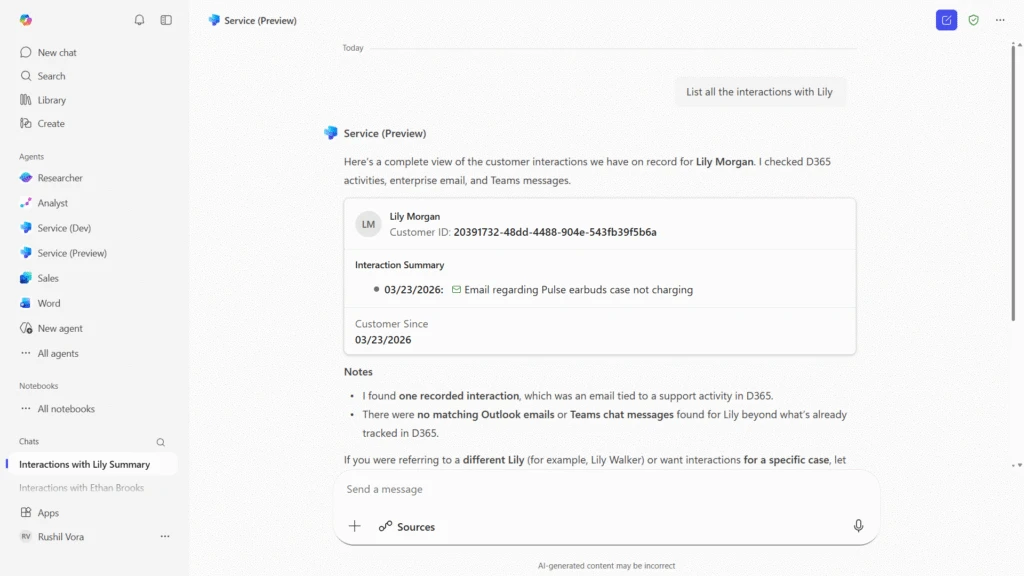
Figure 2: Customer interactions summaries across Dataverse, Teams and Outlook in Microsoft 365 Copilot app

Built for enterprise requirements

Service Agent is designed with enterprise IT needs in mind:

  • Grounded in Microsoft 365 Copilot with enterprise‑grade security and compliance
  • Aligned with existing Dynamics 365 Customer Service investments
  • Extensible, Service Agent will extend to supporting additional skills, apps, and workflows over time
  • Admin‑friendly, building on familiar Copilot and Dynamics management models

Service Agent acts as an intelligent layer on top of existing service systems, bringing the right information and actions to users, when and where they need them across the application ecosystem.

Getting started

Service Agent is now available in public preview, with several ongoing enhancements planned as we expand capabilities, performance, and extensibility.

To learn more:

Looking ahead

Service Agent is a significant step toward a future where Copilot is the primary way people engage with business systems—not just to ask questions, but to get work done.

We’re excited to partner with customers and IT leaders as we continue to evolve Service Agent and bring more service capabilities into Microsoft 365 Copilot.

Stay tuned for more.

The post Introducing Service Agent in Microsoft 365 Copilot appeared first on Microsoft Dynamics 365 Blog.

Brought to you by Dr. Ware, Microsoft Office 365 Silver Partner, Charleston SC.

Enable accelerated growth with confidence: A Forrester TEI study projects more than 200% ROI over three years and six-month payback using Dynamics 365 Business Central

Enable accelerated growth with confidence: A Forrester TEI study projects more than 200% ROI over three years and six-month payback using Dynamics 365 Business Central

This article is contributed. See the original author and article here.

Growth is exciting—but it introduces complexity. 

As small and midsize businesses scale, finance and operations become harder to manage. Transactions increase, reporting requirements expand, and disconnected systems start to strain visibility and margins. What once worked becomes a constraint. 

A newly published Forrester Total Economic Impact™ (TEI) study helps quantify what many organizations are already experiencing: modernizing on Microsoft Dynamics 365 Business Central delivers measurable financial impact.

Microsoft commissioned Forrester Consulting to evaluate the potential return on investment organizations may realize by deploying Business Central. Based on interviews with four business decision makers, which were aggregated to model a fictitious composite organization1, the study projected that the composite organization could potentially realize: 

  • More than 200% return on investment (ROI) over three years 
  • An estimated $460K net present value (NPV) over three years 
  • Potential payback in six months 

Across finance productivity, enterprise resource planning (ERP) consolidation, improved profitability, and reporting efficiency, the composite organization modeled by Forrester realized more than $680K in three‑year, risk‑adjusted present value benefits

These outcomes reflect the potential impact of modernizing finance and operations on a single, integrated cloud ERP platform—while also establishing the foundation for AI‑powered experiences like Microsoft 365 Copilot and intelligent agents. 

Where the value comes from 

The Forrester TEI study highlights several areas where organizations can potentially realize tangible, risk‑adjusted benefits when using Business Central. 

Support faster, more efficient finance operations 

Manual processes often slow growing organizations. Interviewed customers reported meaningful efficiency gains across accounts payable (AP), accounts receivable (AR), billing, and financial close. 

By year three, the composite organization was projected to potentially achieve: 

  • Up to 30% reduction in monthly close time 
  • Up to 50% time savings for AP, AR, and billing activities 

These improvements translated to more than $210K in present value over three years in finance productivity alone for the composite organization—allowing teams to shift focus from reconciliation to higher‑value analysis. 

Standardizing data and workflows in Business Central also creates the conditions necessary for AI‑enabled automation. While AI benefits were not independently quantified in this study, interviewees noted that unified processes accelerate the adoption of Copilot‑supported approvals, variance analysis, and exception handling. 

Lower total cost of ownership through ERP consolidation 

Interviewees reported operating aging on‑premises ERP systems alongside spreadsheets and disconnected point solutions. Consolidating onto Business Central reduced infrastructure complexity and IT overhead. 

The study projected the following potential benefits for the composite organization over three years: 

  • More than 10% reduction in total cost of ownership (TCO) 
  • More than $170K in present value savings from retired systems and reduced maintenance 

Beyond direct savings, simplification can reduce operational risk and improved scalability—allowing organizations to grow without layering on new systems to compensate for gaps. 

Enable improved profitability through better visibility 

Unified, real‑time visibility across finance and operations enables faster, more informed decisions. 

By year three, the composite organization was modeled to potentially experience: 

  • Up to 3% improvement in net profit margins 
  • More than $240K in present value from improved profitability 

Better insight into costs, projects, and performance enables earlier course correction. AI‑powered experiences such as Copilot can further assist by surfacing cost variances, project overruns, or unbilled work sooner. While AI alone does not drive margin improvement, modern ERP data and standardized processes strengthen an organization’s ability to act with precision. 

Fast reporting and audit readiness 

Business Central’s integrated data model and native Microsoft Power BI capabilities streamlined reporting and audit preparation. 

Based on modeling by Forrester, by year three, the composite organization was projected to potentially reduce: 

  • Audit preparation time by up to 30% 
  • Time spent creating internal and executive reports 

These projected improvements were valued at nearly $50K in present value, while also enabling increased confidence in data accuracy and consistency. 

Beyond the numbers: Building an AI-ready foundation

In addition to quantified financial outcomes, interviewees highlighted broader operational improvements, including enhanced customer experience, reduced days sales outstanding (DSO), better warehouse management, and a more intuitive user experience. 

Just as importantly, Business Central provides an AI‑ready ERP foundation. 

By unifying finance and operations data and aligning processes to best practices, organizations are better positioned to leverage Copilot, Power BI, and intelligent agents to: 

  • Help reduce time-to-insight—not just report creation
  • Surface anomalies and trends quickly 
  • Enable more proactive, data‑driven decision‑making 

While AI‑driven outcomes were not directly measured in this TEI, the study reinforces a critical principle: realizing AI value at scale depends on clean data, integrated systems, and standardized processes. Business Central delivers that foundation. 

Read the full study 

For SMB‑focused organizations and partners evaluating ERP modernization, the full Forrester TEI study provides a detailed financial framework to help quantify potential projected value—grounded in customer interviews and risk‑adjusted modeling. 

Join us at Directions North America 2026 

The Forrester TEI study highlights the potential value organizations may realize with Business Central—from faster financial processes to improved profitability and lower total cost of ownership. 

We’ll continue these conversations at Directions North America 2026, where partners, Microsoft engineering, and product leaders come together to discuss what’s next for the Business Central ecosystem and the future of AI-powered ERP. 

Join me for the keynote, where I’ll explore how Business Central is evolving into an AI-powered system of action with Copilot and intelligent agents. 

Attendees will: 

  • Gain insight into the Business Central roadmap 
  • Prepare for upcoming AI-powered capabilities 
  • Connect directly with Microsoft engineering and product experts 
  • Engage with partners across the Business Central community 

  1. Composite organization assumption: Results are based on a Forrester modeled composite organization derived from customer interviews, with $50M in annual revenue, 300 employees, 15 core finance and accounting users, and 100 light users, using Dynamics 365 Business Central in a cloud deployment. All quantified benefits represent the three-year, risk-adjusted present value for the composite organization.

The post Enable accelerated growth with confidence: A Forrester TEI study projects more than 200% ROI over three years and six-month payback using Dynamics 365 Business Central appeared first on Microsoft Dynamics 365 Blog.

Brought to you by Dr. Ware, Microsoft Office 365 Silver Partner, Charleston SC.

Copilot Cowork: Now available in Frontier

Copilot Cowork: Now available in Frontier

This article is contributed. See the original author and article here.

Today, Copilot Cowork—designed for long-running, multi-step work in Microsoft 365—is available via the Frontier program.

The post Copilot Cowork: Now available in Frontier appeared first on Microsoft 365 Blog.

Brought to you by Dr. Ware, Microsoft Office 365 Silver Partner, Charleston SC.
