This article is contributed. See the original author and article here.
Azure Stack HCI integrates hyperconverged infrastructure (HCI) technology for you to run virtualized applications on-premises in a familiar way and gain easy access to Azure services. One of the strengths of Azure Stack HCI is that the customers can use the tools they are familiar with on Azure Stack HCI such as System Center, Windows Admin Center, and PowerShell. If a customer is already using Hyper-V, they are already well versed on how to run Azure Stack HCI on the compute front. To compliment this familiarity, Azure Stack HCI is also compatible with third partner software tools. In this blog, we explore the integration of Azure Stack HCI with utility software that brings great value to Azure Stack HCI customers and provide joint solution briefs for each partner solution.
One of the critical processes to make hyperconverged clusters enterprise ready is the backup and replication process so that customers can preserve their data in case of failure. We are proud to have the leading Independent Software Vendors in this space provide support for Azure Stack HCI with Altaro Software, Commvault, Veeam and Veritas. With this choice of popular vendors, the majority of Azure Stack HCI customers will have no need to learn a new tool for their backup and recovery.
Another area where customers can benefit from further insight is in their infrastructure and application monitoring. While there are often simple monitoring tools integrated with various hyperconverged products, there is no substitute for a global unified platform that can accelerate development and reduce mean time to resolution for various fault that can be monitored on the cluster. We have worked with a leading vendor in the space, Datadog, to provide this capability for Azure Stack HCI.
Altaro VM Backup is an award-winning VM backup and replication solution for Hyper-V and VMware environments. Designed for IT departments, IT resellers and consultants, and Managed Service Providers (MSPs), the solution provides robust, streamlined, enterprise-level functionality.
Commvault is a complete data management platform to store, protect, manage, and use data across on-premises and cloud locations.
Datadog is a fully unified platform encompassing infrastructure monitoring, application performance monitoring, log management, user-experience monitoring, and more.
Veeam Backup & Replication is the one solution for simple, reliable, and flexible protection of all your cloud, virtual, and physical workloads. Take the stress out of managing your data protection, ransomware prevention, and compliance challenges.
Veritas Backup Exec is an easy-to-use backup and recovery solution that helps protect your environment’s virtual, physical, and cloud resources.
This article is contributed. See the original author and article here.
In December 2020, we introduced the Cluster API Provider for Azure (CAPZ) to enable users to operate self-managed Kubernetes clusters on Azure infrastructure. CAPZ empowers you to build and manage Kubernetes clusters on Azure using the same tools and methods you are already using to manage your Kubernetes workloads. Changing a configuration on the cluster becomes as easy as running a `kubectl patch` command.
Started by the Kubernetes Special Interest Group (SIG) Cluster Lifecycle, the Cluster API project uses Kubernetes-style APIs and patterns to automate cluster lifecycle management for platform operators. CAPZ is the Azure provider implementation of Cluster API and it is backed by Cluster API’s vibrant community that of engineers from cloud providers, ISVs and the wider FOSS community.
Since December, the community has continued growing, welcoming new members like GiantSwarm, getting closer to a v1alpha4 release, and starting to plan the v1beta1 release. While the v1alpha4 cycle was focused mostly on stability and iterative improvements, paving the way for a 1.0 release, some of the recent notable feature additions include support for Windows nodes and automatic remediation of unhealthy control plane machines via MachineHealthChecks.
As we look forward to the upcoming release, one capability that has been requested by users of CAPZ is the ability to integrate Azure services with your Kubernetes cluster, such as turning on Azure Monitor to track the health and performance of your workloads, or enabling Azure Active Directory (AD) role-based access control (RBAC) to limit access to cluster resources based a user’s identity or group membership. This is similar to the concept of AKS and AKS Engine addons that you might already be familiar with. But what if you could do this the same way across all your Kubernetes clusters?
Today, we’re excited to announce three new features for Azure Arc enabled Kubernetes that address the above-mentioned problems:
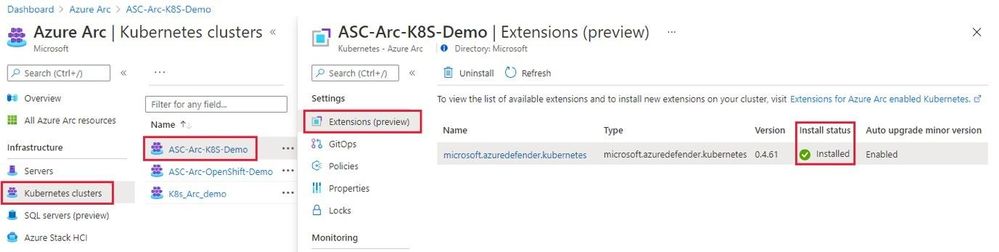
Cluster extensionsintroduces an Azure Resource Manager driven approach for deployment and lifecycle management of Azure Monitor and Azure Defender for Kubernetes. As each cluster extension gets its own Azure Resource Manager representation, you’ll now be able to leverage Azure Policy for at-scale deployment of these extensions across all your CAPZ clusters as well.
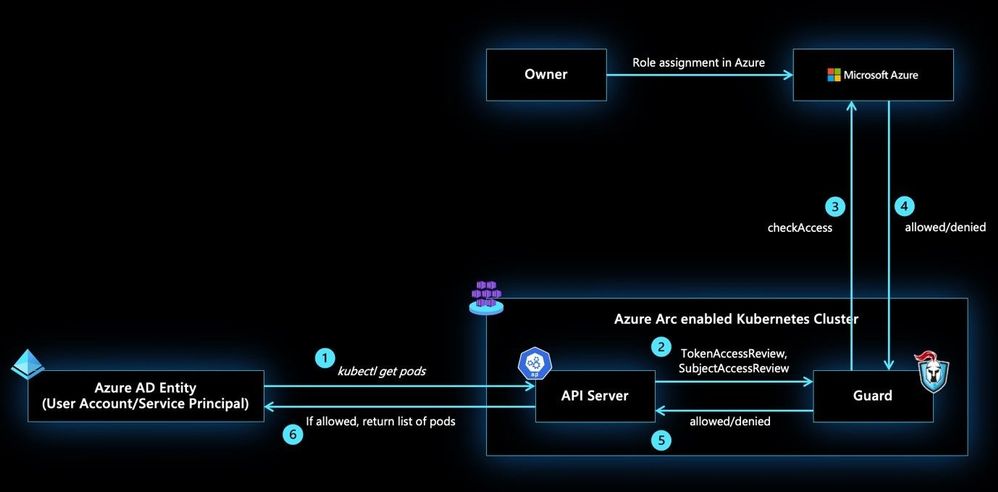
Azure RBAC for Arc enabled Kubernetesallows you to control authorization checks happening on your CAPZ clusters using role assignments on the Azure Arc enabled Kubernetes resource. These role assignments can be done at the cluster scope or namespace scope to account for multi-tenant scenarios on the same cluster. In addition to the built-in roles defined as part of this feature, custom roles could be authored and consumed in role assignments to control the permissions on Kubernetes resources at a more granular level.
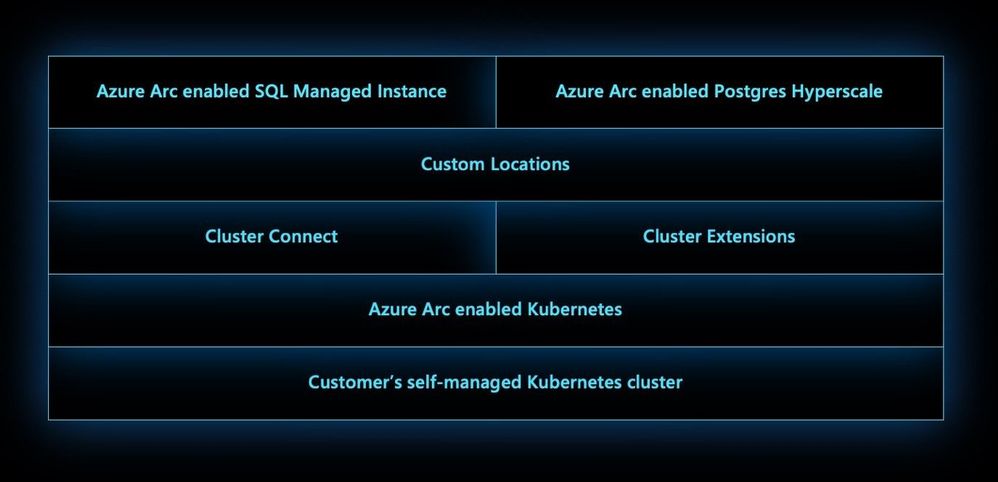
Custom locationson top of Azure Arc enabled Kubernetes is envisioned to be anevolutionoftheAzure locationconstruct. It provides a way for tenant administrators to utilize their Azure Arc enabled Kubernetes clusters as target locations to deploy instances of Azure services. Examples of such Azure resources are Azure Arc enabled SQL Managed Instance and Azure Arc enabled PostgreSQL Hyperscale. LikeAzurelocations, end users within the tenant who have access to Custom Locations can deploythese Azure PaaS resources ontheirself-managed Kubernetes clusters where they have complete control on the specification of the CAPZ cluster.
This article is contributed. See the original author and article here.
Extending Azure Arc enabled Kubernetes
The Azure Arc team is excited to bring a new set of capabilities to preview! In the new Azure Arc enabled Kubernetes 1.1 release customers may now turn on additional Azure integrated services for your Azure Arc enabled clusters using the Azure Portal, CLI or REST APIs. These new extension APIs give customers a unified way to turn on additional cluster services and the Azure Arc platform takes care of installing and updating those integrations over time.
Extensions greatly simplify onboarding; customers can deploy Azure integrations with just a few clicks or API calls. Azure Arc enabled Kubernetes ensures that you always have the latest bits and can automatically apply updates as they become available.
We are excited to bring two services to preview using extensions, Azure Monitor Container Insights and Azure Defender for Kubernetes:
Azure Defender for Kubernetes is expanding its threat protection capabilities to defend Azure Arc connected clusters, leveraging the new extensions capabilities.
When Kubernetes clusters are connected to Azure Arc, a new recommendation from Azure Security Center offers to deploy the Azure Defender extension to them with only a few clicks.
This integration between Azure Security Center, Azure Defender and Azure Arc enabled Kubernetes brings:
Easy provisioning of the Azure Defender extension to unprotected Azure Arc enabled Kubernetes clusters (manually and at-scale)
Monitoring the Azure Defender extension and its provisioning state on Azure Arc Portal
Security recommendations from Azure Security Center are reported in a new Security page of the Azure Arc Portal
Identified security threats from Azure Defender for Kubernetes are reported in new Security page of the Azure Arc Portal
Azure Arc enabled Kubernetes clusters are integrated into the Azure Security Center platform and experience
Azure Monitor Container Insights monitors the performance of container workloads deployed to any Azure Arc enabled Kubernetes cluster. Container insights provides performance visibility and log aggregation for Kubernetes controllers, nodes, and containers using standard Kubernetes APIs. Which helps customers:
Identify performance issues through processor and memory utilization
Review historical resource utilization for your workloads, including processes that may be running on underlying hosts
Configure alerts to proactively notify when a threshold is exceeded or a health state changes
Collect metrics from Prometheus endpoints, easily integrating with ecosystem applications
This preview release streamlines onboarding any Azure Arc enabled Kubernetes cluster using the new Azure CLI or portal experiences and allows automatic agent updates for all the latest container insights releases.
We are also excited to announce cluster connect in preview which allows developers or cluster administrators to securely access their clusters using standard Kubernetes tooling. Users who have access to your Azure Arc enabled Kubernetes cluster in Azure may request a secure connection to the cluster with authentication provided by Azure Active Directory and authorization for Kubernetes resources within the cluster provided by Kubernetes-native RBAC.
Cluster connect provides secure and seamless connectivity, no matter where your clusters are running and is great for interactive development and debugging in addition to integration into just about any system that speaks Kubernetes APIs.
We are also bringing custom locations to public preview, which is a building block for Azure Arc enabled services. Cluster administrators can create a custom location, enable Azure services for that location, and grant access to users within their tenant. We’ll have much more to talk about with custom locations in upcoming blogs.
Learn more about custom locations in our concepts docs
Azure AD-based Role Based Access Control
Finally, we are also excited to extend both authentication and authorization for Kubernetes clusters to Azure Active Directory. This is great for customers who would like to use Azure role assignments to not only manage visibility of Azure Arc enabled Kubernetes clusters but also use role assignments to control access to Kubernetes-native constructs.
Learn more about our Azure RBAC integration in our concepts docs
This article is contributed. See the original author and article here.
Meet Evgeney Ryzhyk, Alexander Sloutsky and Avner Aharoni for a session on the next version of Azure Data Explorer (ADX).
During this session, the PG team will reveal the secret source behind latest ADX performance updates release and highlight several optimizations and performance improvements of the release.
This article is contributed. See the original author and article here.
Database migrations often involve multiple phases, steps, and tools based on various scenarios and workload requirements. To help you migrate your databases to Azure, we have published a set of new Azure Database Migration Guides and a Hub page that provides scenario-based migration content and “How To” guides depending on your source database and target database platforms. In this episode with Mohamed Kabiruddin, he will walk you through the new migration hub page to easily navigate to the content you need based on your scenario, how to use the relevant database migration guides, and how to provide feedback to Microsoft for any specific content.
This article is contributed. See the original author and article here.
Final Update: Saturday, 03 April 2021 13:44 UTC
We’ve confirmed that all systems are back to normal with no customer impact as of 4/03, 12:15 UTC. Our logs show the incident started on 4/03, 09:20 UTC and that during the 2 hours & 55 minutes that it took to resolve the issue some customers may experience data access issue and delayed or missed alerts in East US 2 region.
Root Cause: The failure was due to issues with one of our dependent service.
Incident Timeline: 2 Hours & 55 minutes – 4/03, 09:20 UTC through 4/03, 12:15 UTC
We understand that customers rely on Azure Log Analytics as a critical service and apologize for any impact this incident caused.
-Harshita
Initial Update: Saturday, 03 April 2021 10:12 UTC
We are aware of issues within Log Analytics and are actively investigating. Some customers may experience data access issue and delayed or missed alerts in East US 2 region.
Work Around: None
Next Update: Before 04/03 16:30 UTC
We are working hard to resolve this issue and apologize for any inconvenience. -Harshita
This article is contributed. See the original author and article here.
Final Update: Friday, 02 April 2021 05:47 UTC
We’ve confirmed that all systems are back to normal with no customer impact as of 4/02, 04:30 UTC. Our logs show the incident started on 4/01, 21:20 UTC and that during the 7 Hours & 10 minutes that it took to resolve the issue some customers may have experienced data access issue, missed or delayed azure alerts and data ingestion latency issue.
Root Cause: The failure was due to DNS outage.
Incident Timeline: 7 Hours & 10 minutes – 4/01, 21:20 UTC through 4/02, 04:30 UTC
We understand that customers rely on Azure Monitor service as a critical service and apologize for any impact this incident caused.
-Harshita
Update: Friday, 02 April 2021 03:10 UTC
We continue to have residual effect in Azure monitor services due to DNS outage. Some customers in East US2 may still experience data access issue and missed/delayed Azure alerts. Customers in Central US region may still experience data ingestion latency.
Work Around: None
Next Update: Before 04/02 05:30 UTC
-Anupama
Update: Friday, 02 April 2021 01:34 UTC
We continue to have residual effect in Azure monitor services due to DNS outage. Some customers in East US2 may still experience missed/delayed Azure alerts. The issue with data access and data ingestion has been recovered and services are healthy in East US. We currently have no estimate for resolution.
Work Around: None
Next Update: Before 04/02 03:00 UTC
-Anupama
Update: Thursday, 01 April 2021 23:46 UTC
We continue to have issues within Azure monitor services due to DNS outage. Some customers in East US and East US2 continue to experience issues accessing data, issues with data ingestion and missed/delayed Azure alerts. We currently have no estimate for resolution.
Work Around: None
Next Update: Before 04/02 02:00 UTC
-Anupama
Initial Update: Thursday, 01 April 2021 22:29 UTC
We are aware of issues within Azure monitoring services due to a DNS outage and we are actively investigating. Some customers may experience issues accessing data, issues with data ingestion and missed/delayed Azure alerts.
Work Around: None
Next Update: Before 04/02 00:30 UTC
We are working hard to resolve this issue and apologize for any inconvenience. -Anupama
This article is contributed. See the original author and article here.
Final Update: Wednesday, 31 March 2021 14:17 UTC
We’ve confirmed that all systems are back to normal with no customer impact as of 03/31, 14:00 UTC. Our logs show the incident started on 03/31, 12:05 UTC and that during the 1 Hour & 55 minutes that it took to resolve the issue some customers may have experienced data access issue and delayed or missed alerts in East US 2 region.
Root Cause: The failure was due to issues with one of our dependent service.
Incident Timeline: 1 Hour & 55 minutes – 03/31, 12:05 UTC through 03/31, 14:00 UTC
We understand that customers rely on Azure Log Analytics as a critical service and apologize for any impact this incident caused.
-Harshita
Initial Update: Wednesday, 31 March 2021 13:03 UTC
We are aware of issues within Log Analytics and are actively investigating. Some customers may experience data access issue and delayed or missed alerts in East US 2 region.
Work Around: None
Next Update: Before 03/31 16:30 UTC
We are working hard to resolve this issue and apologize for any inconvenience. -Harshita
This article is contributed. See the original author and article here.
Final Update: Wednesday, 31 March 2021 07:37 UTC
We’ve confirmed that all systems are back to normal with no customer impact as of 03/31, 07:30 UTC. Our logs show the incident started on 03/31, 04:44 UTC and that during the 2 hours 46 minutes that it took to resolve the issue some customers experienced data access issues, missed or delayed Log Search Alerts, service unavailable and/or experienced difficulties accessing data in Service Map for resources hosted in West Central US region.
Root Cause: The failure was due to an outage in one of the dependent service.
Incident Timeline: 2 Hours & 46 minutes – 03/31, 04:44 UTC through 03/31, 07:30 UTC
We understand that customers rely on Application Insights and Azure Log Analytics as critical services and apologize for any impact this incident caused.
-Harshita
Initial Update: Wednesday, 31 March 2021 07:18 UTC
We are aware of issues within Log Analytics and Service Map and are actively investigating. Some customers may have experienced data access issues, missed or delayed Log Search Alerts, service unavailable and/or experienced difficulties accessing data in Service Map for resources hosted in West Central US region.
Work Around: None
Next Update: Before 03/31 11:30 UTC
We are working hard to resolve this issue and apologize for any inconvenience. -Harshita
Microsoft Mesh is a new service that allows your enterprise and your social media to go far together, allowing users and customers to interconnect using a web-enabled mesh. This new internet-based service combines the advantages of social networking and collaboration together with business tools like enterprise mobility management, collaboration, and task management for a really multi-dimensional experience on the internet. Microsoft Mesh also enables groups to work together not just inside the scope of a project but also when creating tasks shared. It follows that group real-time and productivity tasks can be handled in exactly the same fashion across multiple network devices.
Multi-user capabilities extend beyond networking. Microsoft Mesh offers rich editing and publishing experiences for e-commerce, publishing, collaboration, and publishing of all documents in addition to data. A multi-user network can include anywhere from 1 individual to several hundred consumers based on the size of your network. Since Microsoft Mesh is cross platform and cross apparatus capable, it delivers a special opportunity to leverage the capabilities of numerous devices and browsers across your corporate network without any additional investments in software or connection.
For companies looking for a new way to connect with their clients and strengthen their business ties, the usage of Microsoft Mesh is a clear way for moving your company ahead. Employing this cross-platform social network you can achieve a highly targeted audience over several devices while at the exact same time increasing your revenue. The price and complexity of integrating this system in your company should be no problem at all, letting you construct your organization and reach your goals easily. Mesh is a powerful tool and needs to be leveraged for the current generation of mobile computing.




Recent Comments