by Contributed | Oct 21, 2020 | Technology
This article is contributed. See the original author and article here.
Automation in Cloud App Security: Auto-disable Malicious Inbox Rule
By @Caroline_Lee & @Sebastien Molendijk
Welcome back to the Automation in Cloud App Security blog series. For those of you who have been keeping up with us, what do you think of the templates so far? Any feedback? If you are new to this series and are joining us for the first time, I encourage you to go check out our last three posts: https://aka.ms/MCAS/Auto-Blog, https://aka.ms/MCAS/Auto-Triage & https://aka.ms/MCAS/Auto-Action. In this series, we showcase various Power Automate flows that help to mitigate advanced customer scenarios we see today in Microsoft Cloud App Security (MCAS).
Today, we have an awesome Power Automate template to share with you all on how to auto-disable malicious inbox forwarding rules.
If you are unfamiliar with malicious inbox forwarding rule, attackers who gain access to a user’s credentials can create mailbox rules to forward emails to exfiltrate sensitive company data. MCAS has a built-in policy to detect this activity based on the learned behavior of a user and alert if they are potentially compromised. We walkthrough how users can investigate these types of anomalies in our investigation guide.
We’ve taken it one step further by creating a flow that will auto-disable a malicious inbox rule if detected. The flow will initiate once an alert is generated in Cloud App Security. We’ll collect details on the compromised user, their manager, and we’ll call the MCAS API using the Provider Alert ID which is an internal ID to gain more information on the alert than what’s given by default.
The most important value we see from the MCAS API is the “ruleName,” this show the inbox rule names which we’ll use to identify a malicious inbox rule i.e. “…”
We will also call the Microsoft Graph to obtain a specific ID that correlates with the ruleID. Using the ID retrieved from the Microsoft Graph API, if a malicious inbox rule is found, then the rule will be disabled. The flow will also resolve the alert in Cloud App Security and send an email to the user and the user’s manager to inform them that a remediation action was applied and the rule was disabled.
Pairing this flow with the alert generated in Cloud App Security not only allows users to stay alert on rules that are exfiltrating data but goes one step further by disabling the rule itself. Let us know what you think of this template & if there are any use cases you’d like us to explore!
Github template: https://github.com/microsoft/Microsoft-Cloud-App-Security/tree/master/Playbooks
by Contributed | Oct 21, 2020 | Technology
This article is contributed. See the original author and article here.
Azure Data Explorer in a superfast analytics service that unlocks snappy data exploration use cases.
As such, we aim to make our dashboard integrations as efficient as possible and more specifically the integration with Power BI which is a heavily used BI service in conjunction with ADX.
For long time you have been asking for dynamic parameter binding in Power BI and we have been listening and discussing with Power BI team.
We’re very happy to announce that this is now available in public preview as part of the October Power BI desktop release.
For more details please read the Power BI blog post – https://powerbi.microsoft.com/en-us/blog/power-bi-october-2020-feature-summary/#_Toc52195564
This important feature allows Power BI users to create filters and slicers in reports in a much more performant way.
By default, when using a report filter, the filter operation is added at the tail of the derived Kusto Query Language (KQL) query, which is significantly less efficient in some cases.
The new capability allows users to explicitly inject the filter at the designated place in the query and improve query performance by a few factors, especially when the report is built on top of a very big dataset, or using complex query logic.
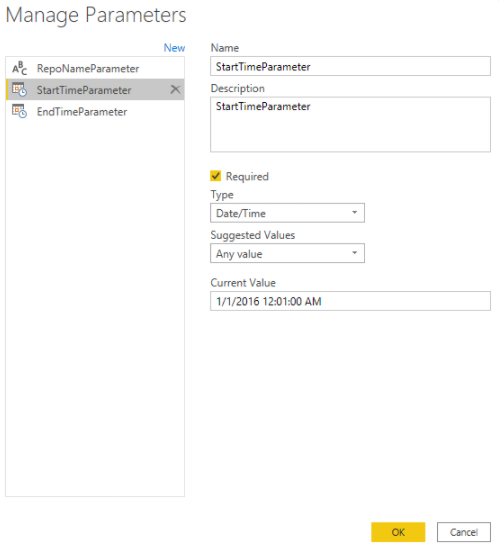
To unlock this the dashboard author needs to create a M Query Parameter, and reference it in the M query.
The author then needs to create a table with a column that provides the possible value to that parameter and bind it to the parameter.
Once all of this is done you can use that parameter in report slicers and filters to get the performant effect users are expecting.
Kudos to Power BI team that worked on designing and implementing this important report performance optimization.
This is now in public preview and we’re looking forward for your feedback.
Kusto team
by Contributed | Oct 21, 2020 | Technology
This article is contributed. See the original author and article here.
Azure Service Fabric 7.2 is now available!
We’re excited to announce that 7.2 release of the Service Fabric runtime has started rolling out to the various Azure regions along with tooling and SDK updates. The updates for .NET SDK, Java SDK and Service Fabric runtimes will be available through Web Platform Installer, NuGet packages and Maven repositories in 7-10 days within all regions.
What is new in Service Fabric 7.2?
This release is loaded with key features and improvements. Some of the key features are highlighted below:
Key Announcements
In addition, this release contains other new features, bug fixes, and performance improvements. For the full list of changes, please refer to the release notes.
Breaking Changes
- Service Fabric 7.2 and higher runtime drops support for .Net core Service Fabric apps running with .Net core 2.2 runtime. .Net core runtime 2.2 is out of support from Dec 2019. Service Fabric runtime will not install .Net core runtime 2.2 as part of its dependency. Customers should upgrade their .Net 2.2 runtime SF apps to the next .Net core LTS version 3.1.
- .Net core runtime LTS 2.1 runtime will go out of support from Aug 21, 2021. Service Fabric releases after that date will drop support for Service Fabric apps running with .Net core 2.1 runtime. Service Fabric .Net SDK will take a dependency on .Net runtime 3.* features to support Service Fabric .Net core apps. This has no impact on Service Fabric .Net Framework SDK.
- We will be deprecating the latest tag for OneBox container images. The new scheme for containers will substitute the current naming scheme ‘latest’ to be replaced with an OS-targeted latest set to explicitly identify the base OS for latest SF releases:
- mcr.microsoft.com/service-fabric/onebox:u16
- mcr.microsoft.com/service-fabric/onebox:u18
- The default action of deleting uploaded application package is changed. If the application package is registered successfully, the uploaded application package is deleted by default. Before this default action changes, the uploaded application package was deleted either by calling to Remove-ServiceFabricApplicationPackage or by using ApplicationPackageCleanupPolicy parameter explicitly with Register-ServiceFabricApplicationType
- Service Fabric 7.2 will become the baseline release for future development of image validation. When the feature is activated in future version e.g., Service Fabric 7.3, the cluster is not desired to rolled back down to 7.1 or lower. The version 7.2 is the baseline to which the cluster can downgrade.
by Contributed | Oct 21, 2020 | Technology
This article is contributed. See the original author and article here.
This installment is part of a broader series to keep you up to date with the latest features in Azure Sentinel. The installments will be bite-sized to enable you to easily digest the new content.
*Note, this post will be updated with more information at a later time.
When it comes to investigating incidents within a Security Operation Center (SOC), valuable time can be measured in a matter of seconds. SOC Analysts tremendously benefit when there is a variety of data available within a convenient location while investigating an incident. Azure Sentinel strives to deliver such an experience. In an effort to achieve this, Azure Sentinel is now offering Entity Insights, which is now in Public Preview!
This new Entity Insights feature will allow for valuable information, such as trends and actions over a time period, to be present while investigating an incident. In order for Insights to be present within the investigation, the following data sources are needed:
- Syslog
- Security Events
- Audit Logs
- Sign-in Logs
- Office Activity
These data types provide a variety of Insights for the accounts and hosts. A few examples of the insights are:
- Actions on Accounts
- Group Additions
- Events Cleared (by user, on host)
- Process Execution
- Process Rarity
- Sign-In Activity
- and more.
Entity Insights performs queries for each Entity to pull in the relevant information. These Insights are the same as the Insights within Entity Analytics (also in Public Preview). The main difference between the two locations is the time period used, in which Entity Insights uses a period around the time of the alert instead of the current time. In the future, all Insights will be posted on the Azure Sentinel GitHub (coming soon).
How to Use:
Entity Analytics can be found within the Investigation Graph. The requirement for the information to appear is to choose an incident that includes a User or Host entity that contains logs for the data types listed above.
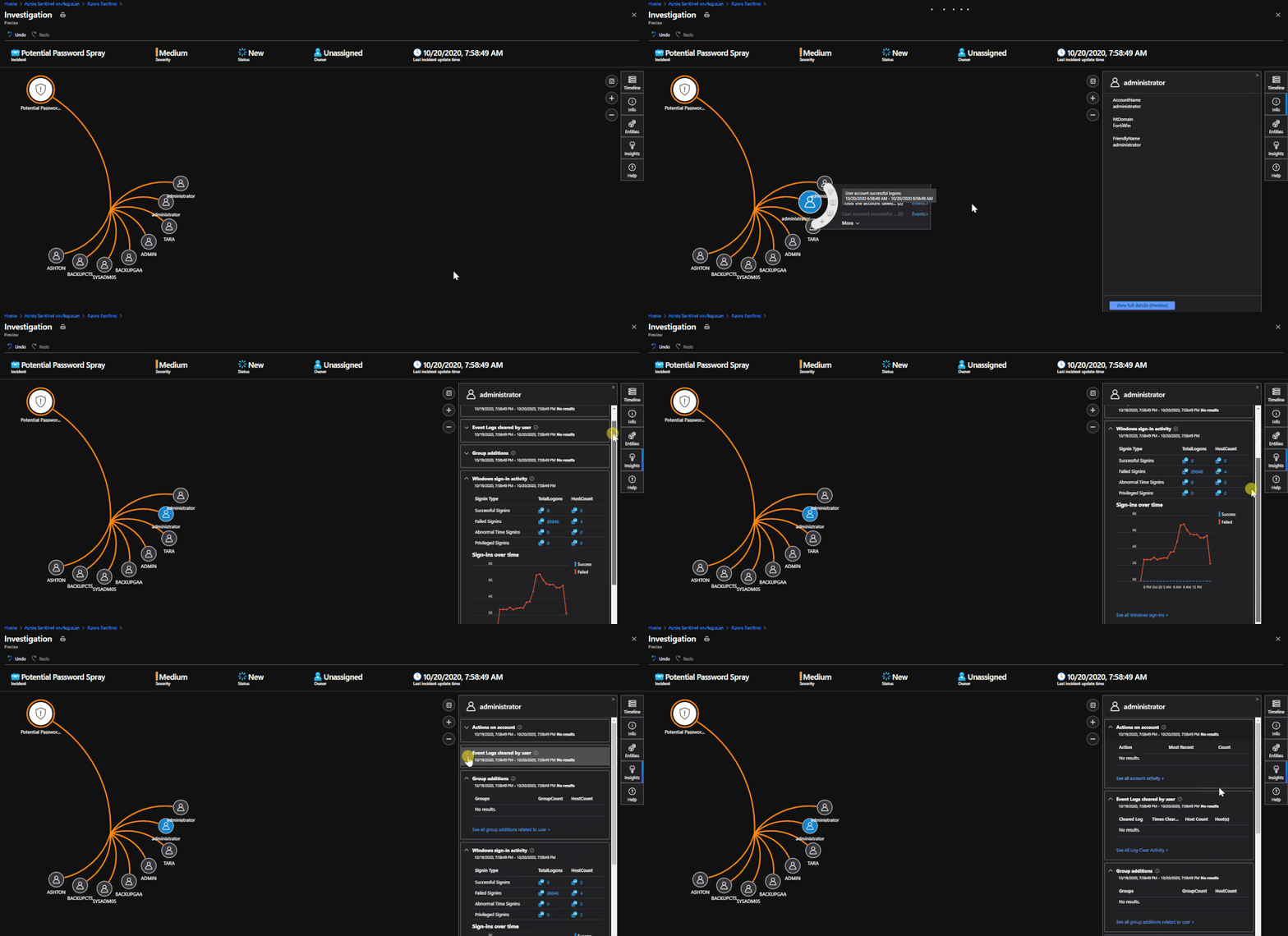
When in the Investigation Graph, click on an Entity within the graph. There is an option for ‘Insights’ that will be available on the right side of the screen. When selected, queries will be performed on the Entity and any result that appears will be shown.
 Insights will contain relevant events for Hosts and Users to provide context about trends and actions performed.
*Note: If the Insights are blank, there are not any pieces of information to show for that Entity. This can be confirmed by checking Entity Analytics if needed.
When to Use:
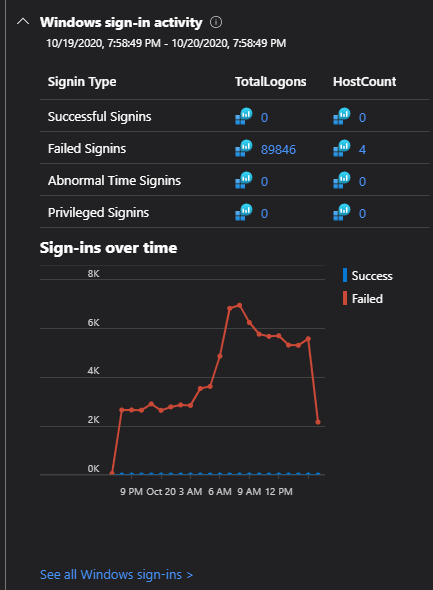
Entity Insights can be used with any incident that contains the Host or User entity. This feature is meant to provide valuable information within the Investigation Graph that is already being used. An example of when value is provided by Entity Insights is the gif provided above. The incident is for a password spray attempt. The Entity Insights tab provides the total number of failed sign-ins on one of the administrator accounts over a time period surrounding the alert. This also would have shown if any attempts during the spray were successful.
Get started today!
We encourage you to utilize this new feature to enhance your experience when performing investigations on newly raised incidents.
Try it out and let us know what you think!
![[Guest blog] Fuel your career with community passion and the tank will never run empty!](https://www.drware.com/wp-content/uploads/2020/10/large-1015-999x675.)
by Contributed | Oct 21, 2020 | Technology
This article is contributed. See the original author and article here.

This article is written by Office Development MVP, David Warner, who discusses the importance of being vulnerable, and why it’s important to share professional AND personal passions with others in the community.
Have you ever felt afraid to share your passions and interests? Don’t be – Passion is a powerful emotion; Anyone who possesses it can achieve their aspirations previously thought to be impossible.
In our daily lives – especially in our professional lives – passion is vital to our happiness. Aside from sleeping, we likely spend more waking hours doing our job than we do performing any other task.
While this concept applies to every industry on earth, it is vitally important to the technology industry.
We don’t write software for machines; we write software for humans, and our passion translates into the quality of our software.
This is especially applicable to the Microsoft 365 ecosystem.
“Why is it so applicable to the Microsoft 365 ecosystem?”, you ask?
When we think about how fast the technology in the Microsoft 365 ecosystem progresses, the rapid progression makes it difficult to keep up with the change. Keeping up with this accelerated pace of change is not easy. It requires hard work, determination and… you guessed it, passion!
Quite often, our personal interest in the technology is what drives our passion. But, let us be honest, sometimes we may find ourselves working in a situation where we do not have much support from management and peers to keep that passion alive. Alone, we may find it hard to sustain that passion.
The Microsoft 365 community is a community where you’ll never be alone. To me, it is one of the most inclusive and collaborative global communities that you’ll ever be a part of! We could all use such a community right now, especially at a time where we’re all asked to socially distance, where those comforting daily routines allow us to keep in touch/ get actual face-time with people in our community are now a thing of the past, and where we can’t hug or even simply shake someone’s hand. More than ever, we need to lean into community.
So, how do you get involved? Read on!
The Who, Not Just the What
We have all spent time researching a topic or learning how to complete a given task. We’ve all had to read blog posts or watch videos that someone else in the community authored.
When you think back on a favorite blog post, do you only think about the topic? More than likely, you think about who (i.e the human) wrote the blog post. If you’ve watched a video, you’ve most likely seen or heard the author.
“I loved that video by April Dunnam,” you may say. “She’s always awesome!”.
You may even learn to associate some of those community authors as your “go-to” resources when doing your research.
The point is: it isn’t just the technical content that helps us, it’s the fact that we feel connected with the person – the human – behind the blog post or video.
You might have connected with that person over a similar technology interest, but maybe you also learned that they like the same sports team as you do, or that they share the same favorite food as you do. Maybe they love dogs or cats as much as you do. That common human passion is what strengthens your connection with them.
Other community members have interests, likes, and passions outside of work just like you do!
I’m a very shy person. By forcing myself to step out of my shell, I have been able to learn things I have in common with so many in the community. Or at the very least, I have learned some fascinating facts about the passions of others that have helped me create a much stronger personal friendship with them.
For example, Hugo Bernier used to be a Chef and we connected on cooking (we also share the same hairstyle). Sebastian Levert and I share a love of Hockey. Emily Mancini and I love setting up social community games and trivia.
I would have never learned about these passions we have in common had I not looked beyond their technology interests. I reached out to other community members to ask them questions about their passions, or strike up a conversation, and in doing so, I formed a relationship on a more personal level. Knowledge management experts say that when you identify with another person as a peer, you adopt their knowledge more easily than if you don’t feel connected to them.
When I listen to Chris Kent talk about SharePoint List Formatting, for example, it isn’t just another random presenter who happens to talk about warrior horses; it is my friend Chris (who’s just as funny in real life, if not funnier!) who’s talking to me about something I know he’s passionate about, and I can’t help but want to learn more from him.
This personal connection can be a two-way street. I am learning about the passions of others by pro-actively collaborating, but how do I contribute back to help foster a stronger personal human connection in the community?
Share Your Passions
As you get more involved in the community, do not be afraid to share your passions with others, and don’t forget about the passions you have which go beyond just the technology.
For example, it is no secret that I am deeply passionate about connecting with others in the community on a personal level. I really believe that the more we connect beyond the tech, the stronger our relationships in the community are and the more positive our interactions will be with one another.
When the COVID outbreak initially hit – in early March – quarantine began to really affect the emotional and mental health of everyone around the globe. I wanted to, in a very small way, to make a difference and share something good that had nothing to do with technology.
I began an initiative I named “Comfort in a Cup”. Each day I randomly select a community member, (ironically technology still makes an appearance…!) and virtually buy them a cup of coffee or tea from a retailer of their choice.
The idea was to bring a bit of brightness and joy in an otherwise dark time and difficult time – it is a small but meaningful way to connect with each other, and have socially-distant/virtual coffee together while conversing and getting to know one another better.
Ultimately, a cup of coffee or tea is not a life-altering gift, but my hope is that the initiative resulted in random smiles at a time when something to smile about was so few and far between.

It’s also a reminder to those people in the community that they matter, and that their contributions to the community make a difference.
The community feedback around “Comfort in a Cup” has been incredibly positive. Everyone has been very supportive, and I have had the pleasure of getting to know so many amazing community members by having virtual coffee together.
The moral of the story: don’t be afraid to act on or share your passion within the community. You never know who else shares your passion, wants to learn more about your passion, or where it might take you. By being willing to share your passion, you enable both you and the other person to create a lasting connection.
Who knows, you might even make a new friend in the community! :)
Get Involved
Now that I have hopefully inspired you to not only look for opportunities to learn about the passions of others in the community but also to share about your own passions, you might be wondering,
“Where do I find these community members and learn about their passions?”.
Below you will find a collection of community resources that can help you get more involved and connected with others in the Microsoft 365 Community. I strongly encourage you to connect, communicate, and collaborate with the Microsoft 365 community and its members.
Start getting involved TOMORROW!
Why wait to plug into community? Join us at a Humans of IT Microsoft Reactor event TOMORROW, October 22 at 10am PT for the topic on “You Can’t Spell Community without ‘U’: How to Foster Belonging in M365“. Join us for this group discussion with MVPs and folks in the community like @Hugo Bernier @Tracy van der Schyff @Luise Freese as we share about ways to collaborate and get involved in giving back to your community. We’ll discuss about how we can unite globally and offer guidance on where to find support, resources, and best practices on leveraging M365 solutions to drive positive social impact. Most importantly, we want to hear from YOU too – so join us and share your ideas on what has worked well in your local communities!
Register here (it’s FREE + open to everyone globally!):
https://www.meetup.com/Microsoft-Reactor-Redmond/events/273559044/

Community Resources
Patterns and Practices Community
- Collaborative and inclusive collection of tools, guidance, and members meant to help you extend Microsoft 365 to your needs following best practices. #SharingIsCaring
Community Closeups
- Beau Cameron and I host a webinar wherein we interview a guest who is a member of the community. What makes this webinar unique is we focus on the personal side of the guest. We cover topics such as favorite places to visit, favorite movies, food, and what makes them who they are from a personality perspective.
- We believe that relationships in the community are stronger when we better can appreciate the personalities of one another in the community.
M365 Social
- There is a very active collection of community members on Twitter. I’ve created a list of the most inclusive and active members. This list includes the Twitter account and a link to their blog or website.
See you in the community, Humans of IT!
#CommunityBuzz
#HumansofIT

by Contributed | Oct 21, 2020 | Technology
This article is contributed. See the original author and article here.

KVL has a team of 200 construction and industrial engineers, architects, and other professionals who manage real-estate and building projects from concept to completion. With offices throughout Germany and around the globe in places like Peru and Russia, KVL employees must collaborate across time zones whether they are in the office, at home, traveling, or at a construction site. The company had €20 million in revenue in 2019.
KVL has worked with IT partner Quality Hosting since 2010. Over the years, the construction company has migrated from on-premises Microsoft Office applications to services like Exchange Online and Office 365.
In early 2020, the customer began migrating to Microsoft 365. KVL was already interested in helping employees work from anywhere more efficiently, but the COVID-19 crisis sped up its timeline to upgrade. Field workers continued to go to construction sites as usual, because Germany designated construction an essential industry and workers are able to practice social distancing and wear personal protection equipment on the job. But most KVL office employees had to start working from home.
The need for remote collaboration
Another factor in the move to the cloud was KVL’s involvement, with IT partner Quality Hosting in a Microsoft Security campaign aimed at chief security officers (CSOs), with both companies helping promote the Microsoft Security CSO ebook. As part of the campaign, KVL attended a Microsoft cloud value briefing in Munich, Germany, where its employees learned about the latest innovations through a series of Quality Hosting webinars on Microsoft Enterprise Mobility + Security features like conditional access, mobile device management, and compliance features relevant to the construction industry.
The experience left KVL eager to embrace remote work more fully, address security strategies outlined in the ebook, and manage secure mobile devices remotely to help employees collaborate from home or job sites. To start, KVL enabled Multi-Factor Authentication (MFA), PC and Mobile Device Management (MDM) with Microsoft Intune, Conditional Access (CA), and email scanning with Office 365 Advanced Threat Protection (ATP). These features help give KVL peace of mind that its remote, distributed work force is protected by adequate security measures. The company expects Conditional Access and Multi-Factor Authentication to prevent fraud, and is converting all employees to a multifactor authentication by the end of year.
The company also added Microsoft Project Online for 20 of its project managers, to orchestrate work more effectively while employees were not able to work together in person. To enable remote meetings now that office workers had to stay home, the company also deployed Microsoft Teams collaboration features, including online chat, task tracking, file storage, and online meetings. Before, employees had to be in a conference room with audio visual equipment to attend online meetings, and now participants can work from home and see up to nine other people on-screen at once, for a realistic, inviting experience. The KVL management board has determined that with Teams, meetings run on time and are two to three times more effective.
Thanks to the IT structure changes the company had already made during its journey to the cloud, its employees were able to switch to full-time remote work within two days of KVL updating its licensing.
An integrated collaboration platform that spans organizational borders
KVL plans to replace its phone system with Teams, to eliminate the cost of maintaining telephony hardware while freeing employees to make calls from anywhere. By default, employees can make internal Voice Over IP (VoIP) calls in Teams, but KVL is working with another IT partner, CentricCom AG , to draw on private branch exchange (PBX) business telephony capabilities from within Teams and Microsoft 365 for enabling outside calls. Employees are already collaborating with customers and partners via chat and file-sharing on Teams channels.
Before the implementation of Microsoft 365, KVL used a third-party tool for managing tasks; now its employees use Microsoft Planner, which supports easy integration of external participants, for better collaboration with partners and customers. KVL is also adding Microsoft Planner to Teams, to make tasks visible to all members on a project team, for clarity of individuals’ responsibilities and the overall project timeline. Team members will also be able to assign, prioritize, and review tasks from a handy dashboard. Plus they integrated Power Apps into Teams to provide a reporting tool.
Scalable changes with flexible licensing
These changes have been easy to accommodate because adding or eliminating Microsoft 365 features is as scalable as changing licensing, a process that doesn’t affect solution performance. KVL uses this capability to respond quickly to events like the COVID-19 crisis or fluctuations in business volume. So far in 2020, the company has increased the number of licenses by around 400 percent, spending €10,000 per month on Microsoft licensing (with upgrades to Microsoft 365), to provide a fully productive modern workplace for employees.
Today, KVL’s employees collaborate efficiently from home and on the road using Teams and Microsoft 365. Its employees communicate faster and share files internally and externally more conveniently using secure devices.
According to Kai Hansen, Head of Communications at KVL, “Thanks to the digital tools from Microsoft 365 introduced with the help of Quality Hosting, we have taken a big step toward efficient, mobile collaboration and communication. Working remotely from home or on the road, sharing data, and communicating with our customers has become much easier. We’ve improved the security of our devices with more effective administration. In a short time, we have taken big steps toward digital transformation. This makes us more flexible, stronger, and able to respond to crises much faster.”
by Contributed | Oct 21, 2020 | Technology
This article is contributed. See the original author and article here.
Conditional Access Adoption
Quick recap on the blog series & high-level challenges:
This blog forms part of a series showcasing the impact SMC has had in securing our customer’s cloud-based identities. If you haven’t read the 1st blog, which covers the background to this series, I highly recommend you give it a read first. Link below:
How the Microsoft Mission Critical Team helped secure AAD
Below is a high-level overview of our customer’s challenges. (This is covered in more detail in the initial blog.)
- Hundreds of Risky Sign-ins have been reported every day.
- More than 1 million incorrect username and password attempts were made in just a month (Password Spray attacks).
- Numerous phishing emails were detected by the M365 team.
- Numerous impossible travel alerts were also detected.
- Numerous sign-in attempts were detected from legacy Browser using weak authentication.
Additionally, there has been several security related incidents reported in the environment.
Immediate business requirement to address some of the challenges above:
- Secure Identities accessing cloud-based resources from regions outside of the customers geographical business area.
- Mitigate credential and or identity theft as far as possible.
- Implement the use of a granular and specific policy-based solution.
- Automation of a user registration process.
Understanding the causes of the challenges:
At the time of the initial engagement the customer had a “per user” base MFA deployment with only admin staff included. This presented a few difficulties moving forward looking at the problem statement, namely:
- Administration: the admin page is separate to the Azure portal – making administration confusing and cumbersome.
- Troubleshooting: there is no sign-in log reference to verify MFA – causing troubleshooting to become a nightmare. (In order to understand this difficulty, you must understand user states please click the link here: Understanding User states: Docs)
- Non-flexible Per user: MFA will apply pretty much everywhere and there isn’t really any control or policy to dictate how its applied…
It is clear that Per User MFA would not suffice in this situation.
Solution to the challenges: Conditional Access to the rescue
Since the customer has an Azure Active Directory P2 licence we could leverage Conditional Access based MFA and Identity Protection for the MFA registration.
First the “Per user” MFA state had to be migrated to Conditional Access. The following steps can be taken to achieve this:
PowerShell can be used to query the user state e.g. below.
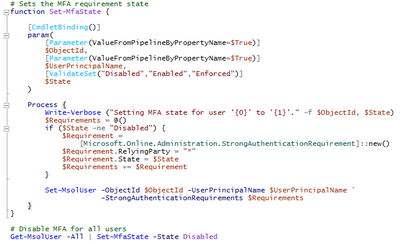
Get-msoluser -UserPrincipalName ‘DKLopez@M365x529362.onmicrosoft.com’ | Select-Object -ExpandProperty StrongAuthenticationRequirements

As can be seen the “State” is enforced. [Understanding User states: Docs]
To migrate, disable MFA. Sample scripts can be found here: Per-User MFA to Conditional Access.
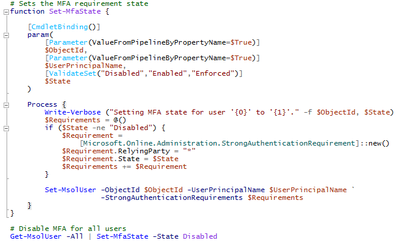
Note: after the migration, the get-msoluser query should not retrieve any result.
MFA will be disabled.
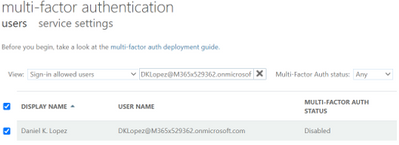
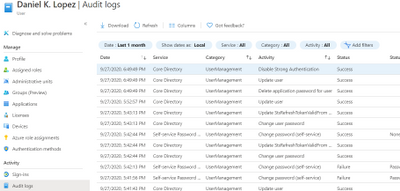
Fig 1: Confirmation after migration.
Identity Protection
After all the target users were migrated, in order to enforce MFA registration we assisted in setting up our new Identity protection policy (Azure Active Directory > Security > Identity Protection > MFA registration policy).
The MFA registration policy was set to apply to newly created dynamic groups. These groups are populated dynamically based on a set of attributes that is created via MIM upon account creation.
As expected, our users were prompted for MFA registration upon interactive logon.
Users that had already registered will not be prompted for re-registration.
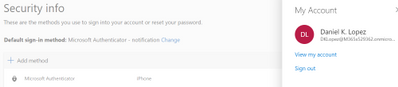
Fig 2: Security info (aka.ms/mfasetup or mysignins.microsoft.com)
Conditional Access & MFA
The same Dynamic groups as mentioned above were used with our Conditional Access policy (Azure Active Directory > Security > Conditional Access. Excluding Service and break glass accounts) to enforce MFA for all cloud apps along with a location-based condition excluding our “trusted” MFA IP’s.
Confirmation of conditional access policy being applied can be seen in the screenshot below. The User will be prompted for MFA.
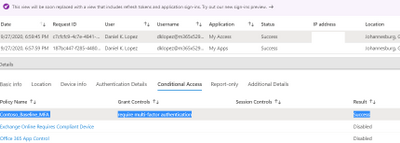
Fig 3: Sign-ins Conditional Access
Education as a crucial part of the solution:
Education formed a crucial part in the success of this project. Before we embarked on a user enablement process with the customer an extensive education campaign was kicked off. This lasted several weeks before any non-admin or end user account was migrated to use the conditional access MFA policy or identity protection MFA registration.
Some great sample documentation can be found here to educate end users on the coming changes and process involved in MFA registration.
Useful Links.
https://docs.microsoft.com/en-us/azure/active-directory/identity-protection/howto-identity-protection-configure-mfa-policy
https://docs.microsoft.com/en-us/azure/active-directory/conditional-access/concept-conditional-access-cloud-apps
https://docs.microsoft.com/en-us/azure/active-directory/identity-protection/howto-identity-protection-configure-mfa-policy
https://www.microsoft.com/en-us/download/details.aspx?id=57600&WT.mc_id=rss_alldownloads_all
https://www.microsoft.com/en-us/security/business/identity/mfa
https://docs.microsoft.com/en-us/azure/active-directory/authentication/howto-mfa-userstates#convert-users-from-per-user-mfa-to-conditional-access
At this point I want to thank you for reading and please do keep an eye out for upcoming follow up posts.
NOTE: The features and guidelines implemented in this case was specific to this customer’s requirements and environment, this is not a “General” guideline to enable any of the above-mentioned features.
Mornè Naude
Customer Engineer
get-schwifty
by Contributed | Oct 21, 2020 | Technology
This article is contributed. See the original author and article here.
References and Information Resources
|
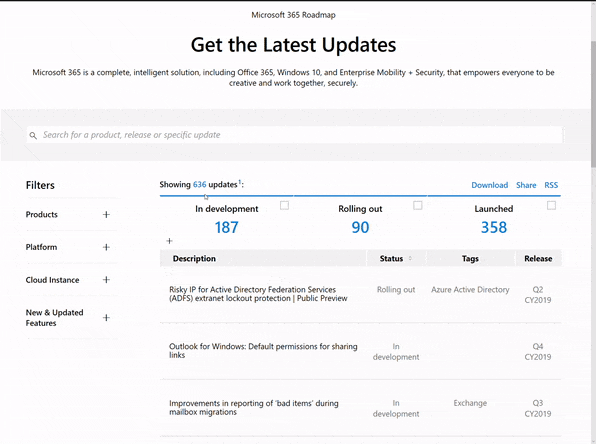
Microsoft 365 Public Roadmap
This link is filtered to show GCC, GCC High and DOD specific items. For more general information uncheck these boxes under “Cloud Instance”.
New to filtering the roadmap for GCC specific changes? Try this:
Stay on top of Office 365 changes
Here are a few ways that you can stay on top of the Office 365 updates in your organization.
Microsoft Tech Community for Public Sector
Your community for discussion surrounding the public sector, local and state governments.
Microsoft 365 for US Government Service Descriptions
|
|
- Office ProPlus (GCC, GCCH, DoD)
- PowerApps (GCC, GCCH, DoD)
- Flow (GCC, GCCH, DoD)
- Power BI (GCC, GCCH)
- Planner (GCC, GCCH, DoD)
- Outlook Mobile (GCC, GCCH, DoD)
- My Analytics (GCCH, DoD)
- Dynamics 365 US Government
|
October Webinars & Remote Work Resources
• Microsoft Teams – IT Admins & Planning
• Microsoft Teams – End Users & Champions
• Security & Azure AD
• Blogs & Articles of Interest
The Official Ignite 2020 Book of News
Guide to Microsoft 365 Government @ Ignite 2020
Your guide to US Public Sector targeted sessions and information.
October is National Cyber Security Awareness Month (NCSAM)!
For the last 17 years, the National Cybersecurity Awareness Month (NCSAM) campaign, driven by the Department of Homeland Security, has raised awareness about the importance of cyber security across the Nation with the mission of ensuring that all Americans have the resources they need to be safer and more secure online.
Enabling secure remote work by embracing Zero Trust – CyberScoop
Steve Faehl is Microsoft’s U.S. security chief technology officer, responsible for helping organizations develop strategies to reduce risk by improving their cyber defenses.
Microsoft To Do Coming to GCC in October
Starting late October 2020, Microsoft To Do will be available to Office 365 customers in the GCC environment. MC223082
Changes to SPO Sharing in GCCH Tenants
After September 1, 2020, users will find that they no longer have the ability to share files or SharePoint Online sites with tenants in Office 365 commercial or GCC environments and that any links previously shared will no longer work.
New Meeting and Calling Experience in Microsoft Teams in GCC
We’re pleased to share that we’re making several of the new features announced in Reimagining virtual collaboration for the future of work and learning available to users of Teams in Gov Cloud.
97 Azure Government services now authorized for DoD IL5 workloads
We recently announced the addition of 18 new services for a total of 97 services authorized for IL5 workloads in Azure Government – more than any other cloud provider.
Enhanced regulatory, legal and forensic investigation capabilities now in the Government Cloud
Today, more than ever, government organizations are facing increasing challenges associated with remote delivery of public services.
Message Center Highlights
|
MC221225 – Communication Compliance availability in GCC and GCC-High
Coming soon to GCC and GCC-High environments, Communication Compliance is part of a broader set of insider risk solutions in Microsoft 365 that intelligently detects and helps remediate regulatory compliance and code of conduct violations within an organization’s communications.
MC222157 – Microsoft Teams: Windows 10 native notifications in Teams
With this update, your users will be able to choose their preferred means of Teams notifications delivery, either via the Teams built-in notification system or via their native OS notification system.
MC222216 – Deployment schedule available for Microsoft Power Platform 2020 Release Wave 2
As previously announced in MC218287 (July 2020), we will begin to enable Microsoft Power Platform Wave 2 between October 2020 and March 2021.
MC222596 – Intune: New Endpoint Security Antivirus reports
We are introducing new Microsoft Defender Antivirus reports in the Microsoft Endpoint Manager admin center to help you monitor your devices for status on malware and antivirus states. You will be able to use two new operational reports to see which devices need your attention and two organizational reports to view general antivirus information.
MC222600 – List creation from templates Visual refresh in SharePoint sites
List creation from SharePoint sites will get a visual refresh and users will get the additional capability to create lists from eight built-in templates. These updates are already part of the Microsoft Lists app and Lists in Teams rollouts – we are bringing the same goodness to SharePoint sites too.
MC222627 – Advanced eDiscovery now supports linked content (modern attachments) from OneDrive and SharePoint Online
Advanced eDiscovery will now support linked content (modern attachments) from OneDrive and SharePoint Online (OD/SPO). Linked content can be shared in Teams and Yammer chat messages and Outlook emails.
MC222638 – Announcing general availability for Microsoft Compliance Manager
As announced at Ignite, Compliance Manager (formerly Compliance Score) is moving out of public preview and the tasks you previously found in Compliance Manager (via the Service Trust Portal) are now housed within the Microsoft 365 compliance center under Compliance Manager. We announced the public preview of Compliance Score in November 2019.
MC222745 – Introducing live transcription in Microsoft Teams meetings
Live transcripts in Microsoft Teams meetings will provide another way to both follow and review meeting conversations. Note: Live transcription currently supports only spoken English (English-US).
MC222755 – Auto-classification with sensitivity labels in SPO, EXO, OneDrive
Auto-classification with sensitivity labels in OneDrive, SharePoint Online, and Exchange Online will soon be available in GCC and GCC-High environments.
Microsoft 365 IP and URL Endpoint Updates
|
29 September 2020 – GCC
01 September 2020 – DOD
by Contributed | Oct 21, 2020 | Technology
This article is contributed. See the original author and article here.
In this article, I want to highlight some information and examples on how to enhance linked server queries, by using Inner Join of type Remote and OpenQuery:
Remote Join:
when you have an inner join between local and remote table (a linked server) , you can force the join operation to be on the remote server.
If you have two tables , one local small table (10 rows in my example testdest table) and one huge linked server table (sourctbl table with about 76 million rows)
on the Managed instance, I executed the select query with inner join , the left table is the small local table:
select testdest.rowid , sourcetbl.createdate from testdest inner  join [mylinkedserver].mydatabase.[dbo].[sourcetbl] sourcetbl /*76915552 rows*/
on testdest.rowid = sourcetbl.rowid
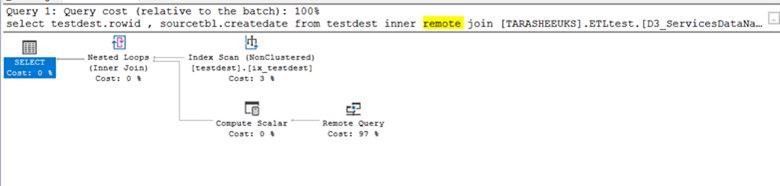
and here is the execution plan:
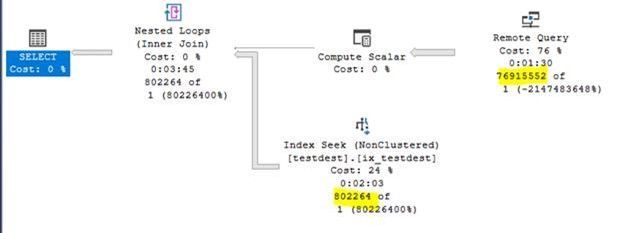
as you see, the estimated execution plan here does not show too much about what is happening on the remote server , it shows only that remote query cost is 76%.
the execution time is more than 3.5 minutes:
SQL Server parse and compile time:
CPU time = 31 ms, elapsed time = 597 ms.
(802264 rows affected)
Table ‘testdest’. Scan count 76915552, logical reads 153831104, physical reads 0, page server reads 0, read-ahead reads 0, page server read-ahead reads 0, lob logical reads 0, lob physical reads 0, lob page server reads 0, lob read-ahead reads 0, lob page server read-ahead reads 0.
SQL Server Execution Times:
CPU time = 203750 ms, elapsed time = 217270 ms.
I executed the same query but with Remote hint:
select testdest.rowid , sourcetbl.createdate from testdest inner remote  join [mylinkedserver].mydatabase.[dbo].[sourcetbl] sourcetbl /*76915552 rows*/
on testdest.rowid = sourcetbl.rowid
the Remote Join execution plan:
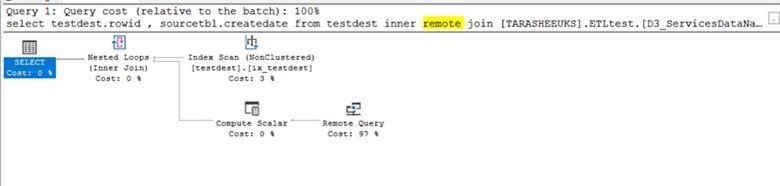
the estimated execution plan shows that the query optimizer is using index scan and the remote query cost here is 97%, but the actual execution time is much lower, about 2~3 seconds:
Warning: The join order has been enforced because a local join hint is used.
SQL Server parse and compile time:
CPU time = 16 ms, elapsed time = 593 ms.
(802264 rows affected)
Table ‘testdest’. Scan count 1, logical reads 2, physical reads 0, page server reads 0, read-ahead reads 0, page server read-ahead reads 0, lob logical reads 0, lob physical reads 0, lob page server reads 0, lob read-ahead reads 0, lob page server read-ahead reads 0.
SQL Server Execution Times:
CPU time = 937 ms, elapsed time = 2875 ms.
the idea here is that the join is performed on the remote server , and the number of network packets that are transferred between the instances back and forth are much lower.
if you compare between the inner join and remote inner join
Inner Join:
Inner Remote Join:
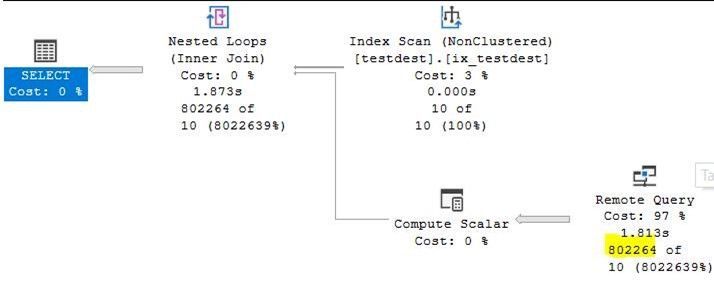
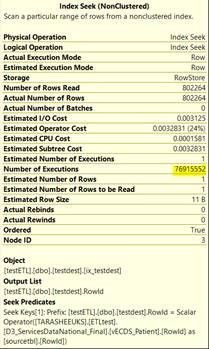
you will notice that this execution plan is using index scan and the first one was using seek, but here the index scan is for only 10 rows and was only once , also the rows retrieved from the remote server is only 802264 (the result set of the query).
* it is a important to create a covering index on remote server as well, rowID in our example here.
* Remote hint is working only for Inner Join not outer joins.
OpenQuery:
Here also I will give you examples of how to work with remote queries using the OPENQUERY statement.
select top 1000 example:
select top 1000 * from [mylinkedserver].mydatabase.[dbo].[sourcetbl]
SQL Server parse and compile time:
CPU time = 0 ms, elapsed time = 629 ms.
(1000 rows affected)
SQL Server Execution Times:
CPU time = 31 ms, elapsed time = 1812 ms.
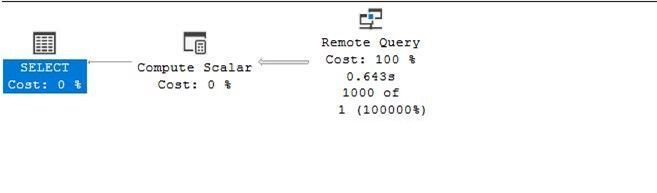
the execution plan:
the openquery statement:
select * from openquery([mylinkedserver], 'select top 1000 * mydatabase.[dbo].[sourcetbl]’) sourcetbl
SQL Server parse and compile time:
CPU time = 0 ms, elapsed time = 146 ms.
(1000 rows affected)
SQL Server Execution Times:
CPU time = 31 ms, elapsed time = 888 ms.
openquery execution plan:
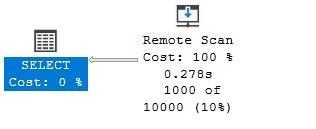
“where” example:
select * from [mylinkedserver].mydatabase.[dbo].[sourcetbl] where rowid =50
SQL Server parse and compile time:
CPU time = 0 ms, elapsed time = 657 ms.
(50155 rows affected)
SQL Server Execution Times:
CPU time = 1078 ms, elapsed time = 10950 ms.
2nd try
SQL Server parse and compile time:
CPU time = 0 ms, elapsed time = 0 ms.
(50155 rows affected)
SQL Server Execution Times:
CPU time = 984 ms, elapsed time = 9002 ms.
“Where” with OpenQuery example:
select * from openquery([mylinkedserver], 'select * from mydatabase.[dbo].[sourcetbl] where rowid =50') sourcetbl
SQL Server parse and compile time:
CPU time = 0 ms, elapsed time = 149 ms.
(50155 rows affected)
SQL Server Execution Times:
CPU time = 1094 ms, elapsed time = 2009 ms.
2nd try
SQL Server parse and compile time:
CPU time = 0 ms, elapsed time = 0 ms.
(50155 rows affected)
SQL Server Execution Times:
CPU time = 1094 ms, elapsed time = 2111 ms.
with Openquery, the evaluation of the query and part of the query processing “of where clause or top rows for example” will be on the remote server, put in consideration also the load on both servers and which one of them is the production and which one of them has more valuable resources.
for more information about Remote Joins and Openquery:
Remote Inner Join:
https://docs.microsoft.com/en-us/sql/t-sql/queries/hints-transact-sql-join?view=sql-server-ver15#arguments
OpenQuery:
https://docs.microsoft.com/en-us/sql/t-sql/functions/openquery-transact-sql?view=sql-server-ver15
by Contributed | Oct 21, 2020 | Technology
This article is contributed. See the original author and article here.
‘Load Balancing’ is here the distribution (e.g. web requests) based on defined criteria (e.g. user location, resource utilization or round robin) to achieve a goal, e.g. avoid overloading or in case of a disaster to increase availability by automatically failing over to a redundant component.
Please also look at the decision tree for when to use what.
We will start with the regional services followed by the global services.
Regional Load Balancing Services
A regional service is a service that is running in one region. If the region has an outage, then the service might stop working. If the target region has Availability Zones, you can deploy the regional service zone-redundant to get higher availability – but if the entire zone ‘explodes’ then you will be affected by this.
Please note: regional service does not mean that you must route the traffic to the same region!
Azure Load Balancer (ALB)
Azure Load Balancer is certainly one of the core services of Azure – they are available since 2014 and many iterations have been added since then. Back then only one SKU was available, now we have Standard and Basic Load Balancers available, with different capabilities, scale, SLA, and pricing.
The Azure Load Balancer is a Layer 4 network service (see OSI model), so it transports the traffic to the target service. It is working for all traffic (TCP, UDP) and its recommended for non-HTTP(S) traffic. It is obviously used once you deploy a VM in multiple Availability Zones, or if you use Kubernetes.
Additionally, there is an interesting feature in preview to make the Azure Load Balancer a cross-regional service. Follow the documentation or Azure Update for further information.
Docs
Pricing
SLA
Azure Application Gateway (AAG)
Azure Application Gateway is a Layer 7 network service (see OSI model) for HTTP(s)-based applications – compared to the previous mentioned Azure Load Balance the AAG is “closer to the user”, can therefore inspect the traffic and even offload the SSL termination. It can run with only private IPs, this is sometimes the decision point to use the service compared to the global services described later. A Web Application Firewall can also be added and configured to get protection against common attacks (e.g. SQL injection, cross site scripting).
Docs
Pricing
SLA
Global Load Balancing Services
Next, we look at the two global Azure Load Balancing services, Azure Traffic Manager and Azure Front Door – both require that the target service be accessible via the internet, in other words, must have a public IP.
Azure Traffic Manager (ATM)
Azure Traffic Manager is a DNS-based load balancer – you request the DNS name, it returns the best IP to connect to. This is sometimes misunderstood, ATM does not act like a proxy and tunnels the traffic to the target, it tells the client to what target it can connect – based on load, geographic proximity, or health of the endpoint. The target must be an internet-facing service.
Docs
Pricing
SLA
Azure Front Door (AFD)
Azure Front Door is very similar to Azure Traffic Manager but adds a ton of features for HTTP-based, internet-facing applications. It can do SSL termination for noticeable faster response times, can add a Web Application Firewall, supports HTTP/2, CDN – if you want to run a public website in multiple regions, then this service provides great flexibility.
Docs
Pricing
SLA
Hope it helps,
Max


Recent Comments