Get started configuring Microsoft Edge using Intune for Education

Get started configuring Microsoft Edge using Intune for Education

This article is contributed. See the original author and article here.

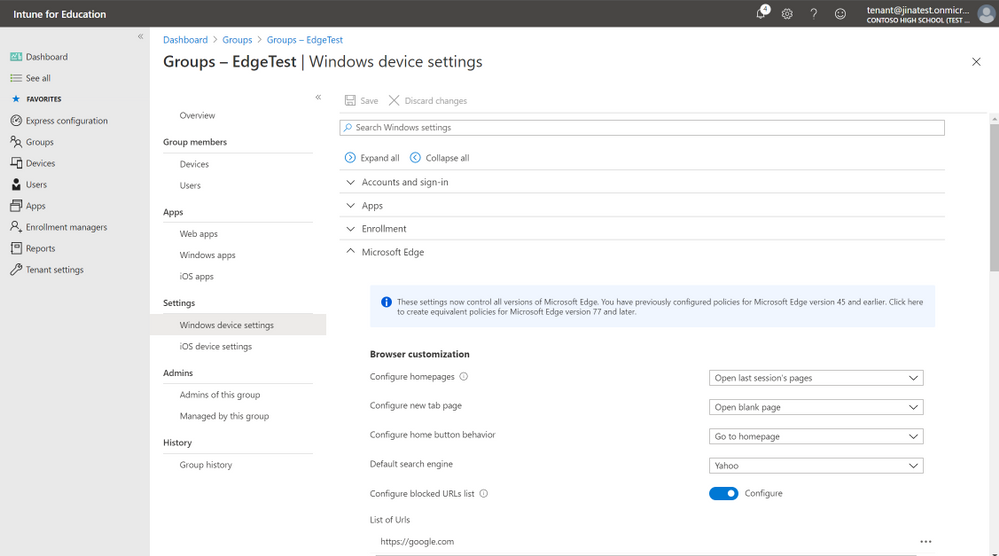
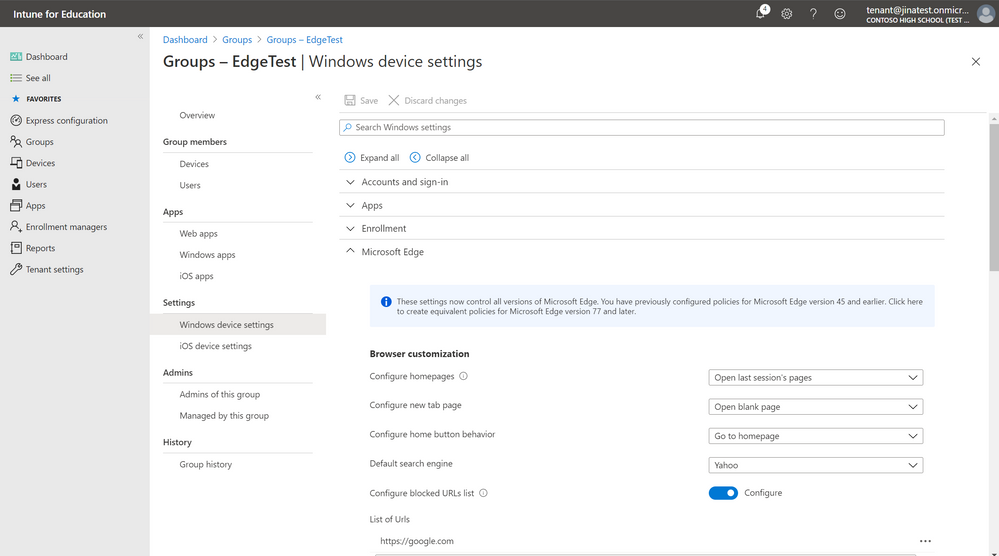
The Microsoft Edge settings in Intune for Education now control all versions of Microsoft Edge. If you’ve previously configured settings for Microsoft Edge version 45 and earlier, you will see an info bubble:


EdgeMigrate4.png


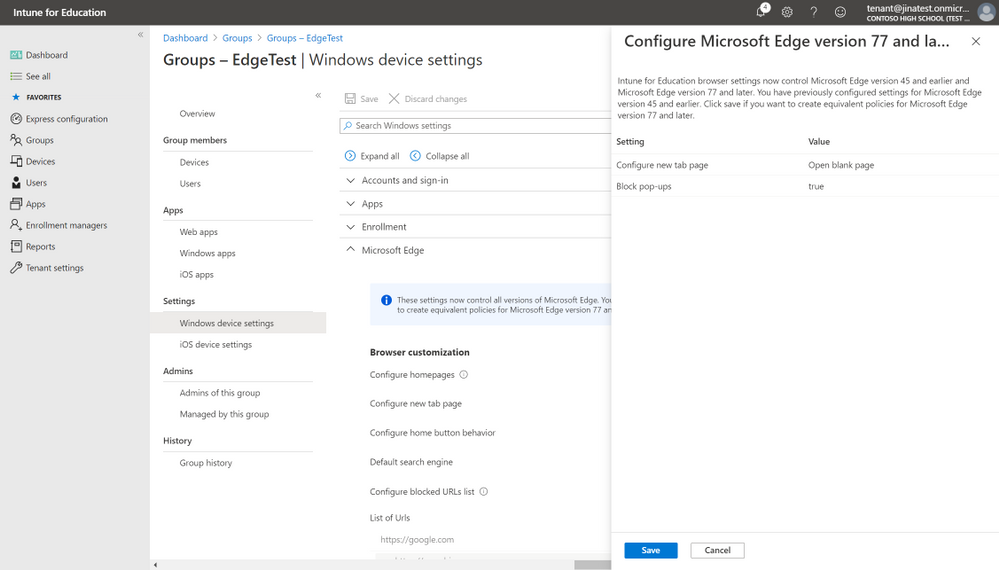
and have the option to create equivalent policies for Microsoft Edge version 77 and later.


EdgeMigrate5.png


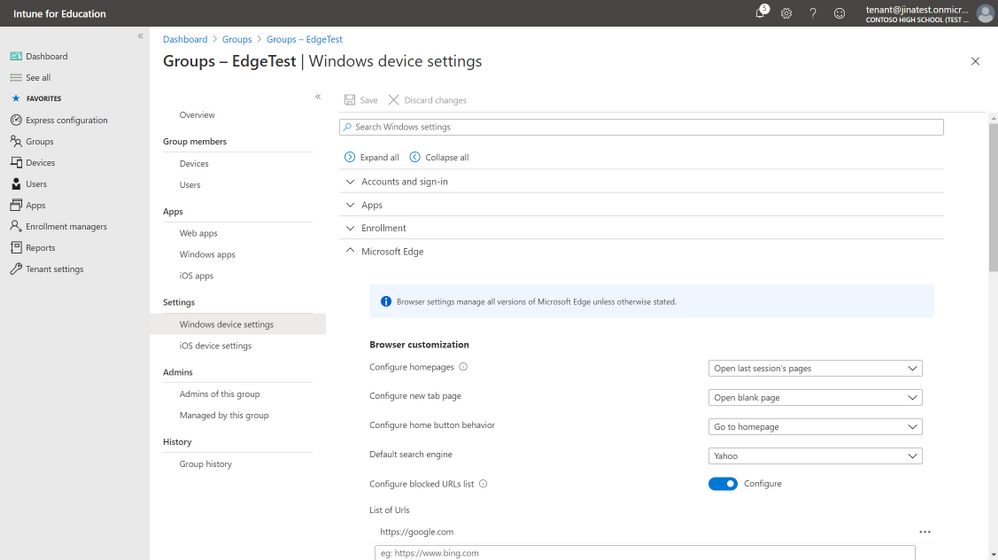
Once you click “Save” the settings you have previously configured for Microsoft Edge version 45 and earlier will also be created for Microsoft Edge version 77 and later and going forward the settings you see in Intune for Education will control all versions of Microsoft Edge unless otherwise stated.


EdgeMigrate6.png


Let us know if you have any questions or feedback by responding to this post or tagging @lizforeducation on twitter.

Experiencing Alerting failure for Metric Alerts – 11/11 – Investigating

This article is contributed. See the original author and article here.

Initial Update: Wednesday, 11 November 2020 21:46 UTC

We are aware of issues within Metric Alerts starting around 9 AM UTC and are actively investigating. Some customer using Azure Monitor may experience failure notifications when performing service management operations such as create and update for Azure Metric Alert Rules.
  • Work Around: None
  • Next Update: Before 11/12 00:00 UTC
We are working hard to resolve this issue and apologize for any inconvenience.
-Eric Singleton

Azure Logic Apps Running Anywhere – Monitor with Application Insights – part 1

Azure Logic Apps Running Anywhere – Monitor with Application Insights – part 1

This article is contributed. See the original author and article here.

In our previous post about the Azure Logic Apps (Preview) extension for Visual Studio Code, we provided an deep dive into how the redesigned Logic Apps runtime is hosted as an extension on the Azure Functions runtime. We also covered how the runtime interprets a workflow definition as jobs that are durably run by the Logic Apps orchestration engine.


In this post, we explore the telemetry that the runtime emits during workflow execution along with other emitted events. You can use this telemetry to get better visibility into how well your workflows run and how the runtime works in various ways. This post also describes how you can monitor your workflows by using Application Insights and learn about the available trace types that you can use for logging.


Integration with Application Insights


The redesigned runtime includes built-in integration with Application Insights, providing you near real-time telemetry (live metrics). This capability can help you investigate failures and performance problems more easily when you use this data to diagnose issues, set up alerts, and build charts.


To open Application Insights for a logic app that you created using the preview extension and deployed to Azure, follow these steps:


  1. In the Azure portal, find your deployed logic app.

  2. On the logic app menu, under Settings, select Application Insights.

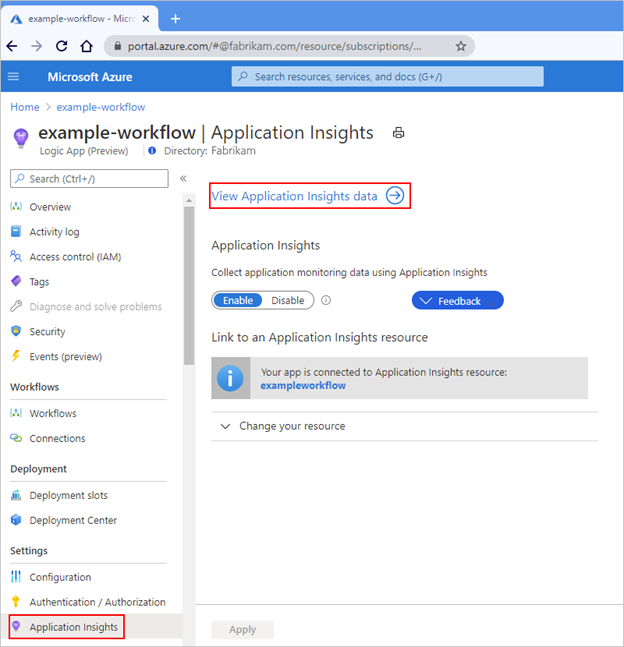
  3. If your subscription already has Application Insights enabled, on the Application Insights pane, select View Application Insights data.


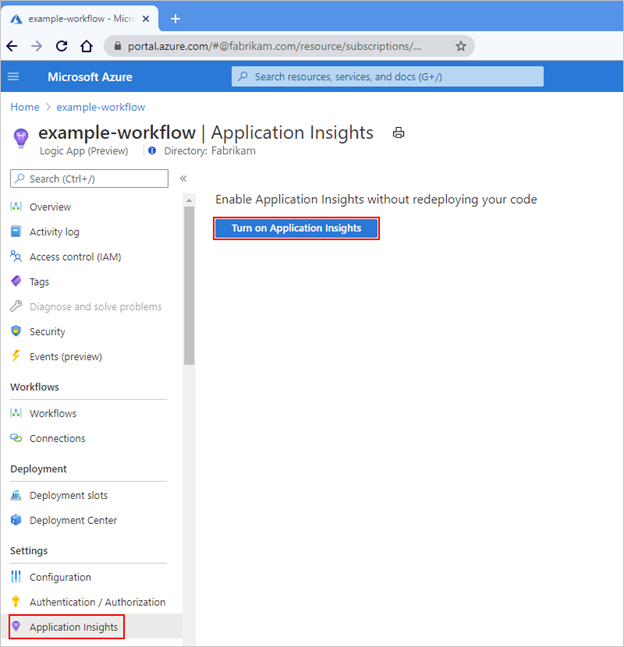
If your subscription doesn’t have Application Insights enabled, on the Application Insights pane, select Turn on Application Insights. After the pane updates, at the bottom, select Apply.


For example, when Application Insights is already enabled, the pane looks like this:


Picture4.png


When Application Insights isn’t enabled yet, the pane looks like this:


Picture5.png


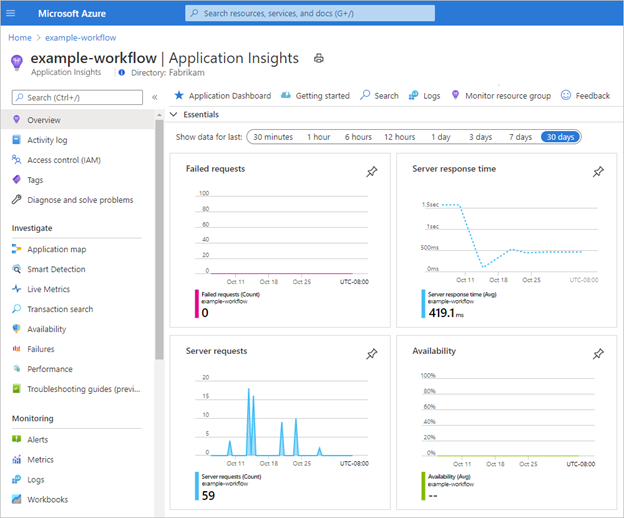
Application Insights opens and shows various metrics for your logic app, for example:


Picture6.png


Available trace types


Each time that a workflow-related event happens, for example, when a workflow is triggered or when an action runs, the runtime emits various traces. These traces cover the lifetime of the workflow run and include, but aren’t limited to, the following types:


  • Service activity, such as start, stop, and errors.

  • Jobs and dispatcher activity.

  • Workflow activity, such as trigger, action, and run.

  • Storage request activity, such as success or failure.

  • HTTP request activity, such as inbound, outbound, success, and failure.

  • Ad-hoc development traces, such as debug messages.


Each event type is assigned a severity level. This table shows the severity level that’s assigned to each trace type:


Severity level


Trace type


Critical


Logs that describe an unrecoverable failure in your logic app.


Debug


Logs that you can use for investigation during development, for example, inbound and outbound HTTP calls.


Error


Logs that indicate a failure in workflow execution, but not a general failure in your logic app.


Information


Logs that track the general activity in your logic app or workflow, for example:


  • When a trigger, action, or run starts and ends.

  • When your logic app starts or ends.


Trace


Logs that contain the most detailed messages, for example, storage requests or dispatcher activity.


Warning


Logs that highlight an abnormal state in your logic app but doesn’t prevent its running.


You can adjust the severity level for the data that’s captured by your logic app and transmitted to Application Insights, based on the trace type that you want.


  1. In the Visual Studio Code project for your logic app, find the host.json file that exists at the project root location.

  2. Edit the host.json file by selecting the LogLevel enum value based on the trace type that you want.


The host.json file is included with the artifact that deploys to Azure Functions, along with other files such as the workflow.json file and connections.json file.


Sample host.json file


This example host.json file sets logging to the “Trace” severity level, which captures the most detailed messages, such as storage requests, plus all the messages that are related to workflow execution activity:


{
    "version": "2.0",
    "logging": {
        "logLevel": {
            "Host.Triggers.Workflows": "Trace"
        }
    }
}


The “logging” node controls the log type filtering for all the workflows in your logic app and follows the ASP.NET Core layout for log type filtering. To specify the log type for your logic app, in the “logLevel” object, set the “Host.Triggers.Workflows” property to log type that you want. For more information about logging in .NET Core, see Log filtering.


The next post in this series explores the ways that you can query the telemetry data for your logic app’s workflows. This post also covers the ways that you can track workflow behavior and the performance for your hosting environment.


SMS “HRESULT E_FAIL from COM component” workaround coming

This article is contributed. See the original author and article here.

Heya, Ned here again. Storage Migration Service admins: if you’re seeing “Error HRESULT E_FAIL has been returned from a call to a COM component” during transfer validation after installing the November cumulative update, we have a workaround coming to WAC, watch for it to appear next 48 hours. Once you get it, you will be able to ignore the error (which is bogus) and proceed with transfer; this will allow us time to diagnose the real issue and have a real fix inside the Orchestrator itself. We still cannot reproduce this issue ourselves and suspect some networking environment issue in a small subset of customer environments.


Do not uninstall the November update as a workaround. I say again, do NOT do that. The update upgrades your database and cannot be reversed without deleting the DB.


– Ned “Hang in there” Pyle

Hunting for Barium using Azure Sentinel

This article is contributed. See the original author and article here.


Leveraging Indictors of Compromise (IOC) and searching historical data for attack patterns is one of the primary responsibilities of a security monitoring team. Relevant security data for threat hunting/investigation related to an enterprise is produced in multiple locations – cloud, on-premises, and being able to analyze all the data from a single point makes it easier to spot trends and attack. Azure Sentinel has made it super easy to collect data from multiple logs across different environments and run KQL queries of recently released threat indicators across this entire data set. For example, through its recently released Microsoft 365 Defender connector security teams can now easily ingest Microsoft 365 data into Azure Sentinel allowing correlation of M365 raw logs with Sentinel’s additional data sources to provide additional insights for investigations, hunting and alerts. In this blog post we share some of the IOC’s related to one such threat actor that Microsoft tracks as Barium and the sample Azure Sentinel queries related to it that leverage multiple logs including those coming from Microsoft 365 Defender connector .


About a month and a half ago, the US Department of Justice, Office of Public Affairs, released documents detailing work done by a range of public and private sector organizations, including Microsoft, to disrupt Barium’s cyberattack infrastructure. Barium is intent on compromising research and development (R&D) heavy organizations in telecom, high tech, computer, and healthcare; their financially motivated operations have focused primarily on the video game industry. The techniques that the group have used in the past have varied from using malicious .lnk files, Word and PowerPoint macros, to the use of open-source tools like Cobalt strike to achieve their objective. The group has been pretty prolific in the use of “supply chain” attacks to compromise software providers and then modify the providers’ code to facilitate further intrusions against its customers. They have also been seen using C2 “dead drops,” which are seemingly legitimate web pages that have encoded instructions to their malware.  In their campaign they have also been seen using typo-squatted domains to impersonate legitimate companies and products.  


Microsoft Threat Intelligence Center (MSTIC) along with partner teams have been tracking and gathering information on Barium, monitoring the group’s activities as they operate a number of websites, domains and internet-connected computers. You can read more about this in the September 2020 Microsoft Digital Defense report.


MSTIC has now shared many of these indicators (IP/domains) so that you can hunt for them in Azure Sentinel using relevant data like the newly integrated Microsoft 365 Defender data, DNS logs, Firewall data etc. Below are sample Azure Sentinel queries that you can run to check for Barium activity in your environment. 


Barium IP Indicators


id: 6ee72a9e-2e54-459c-bc9a-9c09a6502a63 

name: Known Barium IP 

description: | 

  ‘Identifies a match across various data feeds for IP IOCs related to the Barium activity group.  


severity: High 

requiredDataConnectors: 

  – connectorId: Office365 

    dataTypes: 

     – OfficeActivity 

  – connectorId: DNS 

    dataTypes: 

      – DnsEvents 

  – connectorId: AzureMonitor(VMInsights) 

    dataTypes: 

      – VMConnection 

  – connectorId: CiscoASA 

    dataTypes: 

      – CommonSecurityLog 

  – connectorId: PaloAltoNetworks 

    dataTypes: 

      – CommonSecurityLog 

  – connectorId: SecurityEvents 

    dataTypes: 

      – SecurityEvent 

  – connectorId: AzureActiveDirectory 

    dataTypes: 

      – SigninLogs 

  – connectorId: AzureMonitor(WireData) 

    dataTypes: 

      – WireData 

  – connectorId: AzureMonitor(IIS) 

    dataTypes: 

      – W3CIISLog 

  – connectorId: AzureActivity 

    dataTypes: 

      – AzureActivity 

  – connectorId: AWS 

    dataTypes: 

      – AWSCloudTrail 

  – connectorId: Microsoft 365 Defender 

    dataTypes: 

      – DeviceNetworkEvents 

queryFrequency: 1

queryPeriod: 1

triggerOperator: gt 

triggerThreshold: 0 

tactics: 

  – CommandAndControl 

query:  |  

let timeframe = 1d; 

  let IPList = dynamic([“216.24.185.74”“107.175.189.159”“192.210.132.102”“67.230.163.214”

“199.19.110.240”“107.148.130.176”“154.212.129.218”“172.86.75.54”“45.61.136.199”

“149.28.150.195”“108.61.214.194”“144.202.98.198”“149.28.84.98”“103.99.209.78”

“45.61.136.2”“176.122.162.149”“192.3.80.245”“149.28.23.32”“107.182.18.149”“107.174.45.134”

“149.248.18.104”“65.49.192.74”“156.255.2.154”“45.76.6.149”“8.9.11.130”“140.238.27.255”

“107.182.24.70”“176.122.188.254”“192.161.161.108”“64.64.234.24”“104.224.185.36”

“104.233.224.227”“104.36.69.105”“119.28.139.120”“161.117.39.130”“66.42.100.42”“45.76.31.159”

“149.248.8.134”“216.24.182.48”“66.42.103.222”“218.89.236.11”“180.150.227.249”“47.75.80.23”,

 “124.156.164.19”“149.248.62.83”“150.109.76.174”“222.209.187.207”“218.38.191.38”

“119.28.226.59”“66.42.98.220”“74.82.201.8”“173.242.122.198”“45.32.130.72”“89.35.178.10”

“89.43.60.113”]); 

  (union isfuzzy=true 

  (CommonSecurityLog 

  | where TimeGenerated >= ago(timeframe)  

  | where isnotempty(SourceIP) or isnotempty(DestinationIP) 

  | where SourceIP in (IPList) or DestinationIP in (IPList) or Message has_any (IPList) 

  | extend IPMatch = case(SourceIP in (IPList), “SourceIP”, DestinationIP in (IPList), “DestinationIP”

“Message”)  

  | summarize StartTimeUtc = min(TimeGenerated), EndTimeUtc = max(TimeGenerated) by 

SourceIP, DestinationIP, DeviceProduct, DeviceAction, Message, Protocol, SourcePort, DestinationPort, 

DeviceAddress, DeviceName, IPMatch 

  | extend timestamp = StartTimeUtc, IPCustomEntity = case(IPMatch == “SourceIP”, SourceIP, 

IPMatch == “DestinationIP”, DestinationIP, “IP in Message Field”)  

  ), 

  (OfficeActivity 

  | where TimeGenerated >= ago(timeframe)  

  |extend SourceIPAddress = ClientIP, Account = UserId 

  | where  SourceIPAddress in (IPList) 

  | extend timestamp = TimeGenerated , IPCustomEntity = SourceIPAddress , 

AccountCustomEntity = Account 

  ), 

  (DnsEvents  

  | where TimeGenerated >= ago(timeframe)  

  | extend DestinationIPAddress = IPAddresses,  Host = Computer 

  | where  DestinationIPAddress has_any (IPList)  

  | extend timestamp = TimeGenerated, IPCustomEntity = DestinationIPAddress, 

HostCustomEntity = Host 

  ), 

  (VMConnection  

  | where TimeGenerated >= ago(timeframe)  

  | where isnotempty(SourceIp) or isnotempty(DestinationIp)  

  | where SourceIp in (IPList) or DestinationIp in (IPList)  

  | extend IPMatch = case( SourceIp in (IPList), “SourceIP”, DestinationIp in (IPList), 

“DestinationIP”“None”)  

  | extend timestamp = TimeGenerated , IPCustomEntity = case(IPMatch == “SourceIP”,

 SourceIp, IPMatch == “DestinationIP”, DestinationIp, “None”), Host = Computer 

  ), 

  (Event 

  | where TimeGenerated >= ago(timeframe) 

  | where Source == “Microsoft-Windows-Sysmon” 

  | where EventID == 3 

  | extend EvData = parse_xml(EventData) 

  | extend EventDetail = EvData.DataItem.EventData.Data 

  | extend SourceIP = EventDetail.[9].[“#text”], DestinationIP = EventDetail.[14].[“#text”

  | where SourceIP in (IPList) or DestinationIP in (IPList)  

  | extend IPMatch = case( SourceIP in (IPList), “SourceIP”, DestinationIP in (IPList), “DestinationIP”“None”)  

  | extend timestamp = TimeGenerated, AccountCustomEntity = UserName, HostCustomEntity = Computer , 

IPCustomEntity = case(IPMatch == “SourceIP”, SourceIP, IPMatch == “DestinationIP”, DestinationIP, “None”

  ),  

  (WireData  

  | where TimeGenerated >= ago(timeframe) 

  | where isnotempty(RemoteIP) 

  | where RemoteIP in (IPList) 

  | extend timestamp = TimeGenerated, IPCustomEntity = RemoteIP, HostCustomEntity = Computer 

  ), 

  (SigninLogs 

  | where TimeGenerated >= ago(timeframe) 

  | where isnotempty(IPAddress) 

  | where IPAddress in (IPList) 

  | extend timestamp = TimeGenerated, AccountCustomEntity = UserPrincipalName, 

IPCustomEntity = IPAddress 

  ), 

  (W3CIISLog  

  | where TimeGenerated >= ago(timeframe) 

  | where isnotempty(cIP) 

  | where cIP in (IPList) 

  | extend timestamp = TimeGenerated, IPCustomEntity = cIP, HostCustomEntity = Computer, 

AccountCustomEntity = csUserName 

  ), 

  (AzureActivity  

  | where TimeGenerated >= ago(timeframe) 

  | where isnotempty(CallerIpAddress) 

  | where CallerIpAddress in (IPList) 

  | extend timestamp = TimeGenerated, IPCustomEntity = CallerIpAddress, AccountCustomEntity = Caller 

  ), 

  ( 

  AWSCloudTrail 

  | where TimeGenerated >= ago(timeframe) 

  | where isnotempty(SourceIpAddress) 

  | where SourceIpAddress in (IPList) 

  | extend timestamp = TimeGenerated, IPCustomEntity = 

SourceIpAddress, AccountCustomEntity = UserIdentityUserName 

  ), 

  ( 

  DeviceNetworkEvents 

  | where TimeGenerated >= ago(timeframe)  

  | where isnotempty(RemoteIP)  

  | where RemoteIP in (IPList)  

  | extend timestamp = TimeGenerated, IPCustomEntity = RemoteIP, HostCustomEntity = DeviceName  

  ) 

  ) 


Barium Domain Indicators


id: 70b12a3b-4899-42cb-910c-5ffaf9d7997d 

name: Known Barium domains  

description: | 

  ‘Identifies a match across various data feeds for domains IOCs related to the Barium activity group.’ 


severity: High 

requiredDataConnectors: 

  – connectorId: DNS 

    dataTypes: 

      – DnsEvents 

  – connectorId: AzureMonitor(VMInsights)  

    dataTypes: 

      – VMConnection 

  – connectorId: CiscoASA 

    dataTypes: 

      – CommonSecurityLog 

  – connectorId: PaloAltoNetworks 

    dataTypes: 

      – CommonSecurityLog 

  – connectorId: Microsoft 365 Defender 

    dataTypes: 

      – DeviceNetworkEvents 

queryFrequency: 1

queryPeriod: 1

triggerOperator: gt 

triggerThreshold: 0 

tactics: 

  – CommandAndControl 

query:  |  


let timeframe = 1d; 

let DomainNames = dynamic([“0.ns1.dns-info.gq”“1.ns1.dns-info.gq”“10.ns1.dns-info.gq”“102.ns1.dns-info.gq”

“104.ns1.dns-info.gq”“11.ns1.dns-info.gq”“110.ns1.dns-info.gq”“115.ns1.dns-info.gq”“116.ns1.dns-info.gq”

“117.ns1.dns-info.gq”“118.ns1.dns-info.gq”“12.ns1.dns-info.gq”“120.ns1.dns-info.gq”“122.ns1.dns-info.gq”

“123.ns1.dns-info.gq”“128.ns1.dns-info.gq”“13.ns1.dns-info.gq”“134.ns1.dns-info.gq”“135.ns1.dns-info.gq”

“138.ns1.dns-info.gq”“14.ns1.dns-info.gq”“144.ns1.dns-info.gq”“15.ns1.dns-info.gq”“153.ns1.dns-info.gq”

“157.ns1.dns-info.gq”“16.ns1.dns-info.gq”“17.ns1.dns-info.gq”“18.ns1.dns-info.gq”“19.ns1.dns-info.gq”

“1a9604fa.ns1.feedsdns.com”“1c7606b6.ns1.steamappstore.com”“2.ns1.dns-info.gq”“20.ns1.dns-info.gq”

“201.ns1.dns-info.gq”“202.ns1.dns-info.gq”“204.ns1.dns-info.gq”“207.ns1.dns-info.gq”“21.ns1.dns-info.gq”

“210.ns1.dns-info.gq”“211.ns1.dns-info.gq”“216.ns1.dns-info.gq”“22.ns1.dns-info.gq”“220.ns1.dns-info.gq”

“223.ns1.dns-info.gq”“23.ns1.dns-info.gq”“24.ns1.dns-info.gq”“25.ns1.dns-info.gq”“26.ns1.dns-info.gq”

“27.ns1.dns-info.gq”“28.ns1.dns-info.gq”“29.ns1.dns-info.gq”“3.ns1.dns-info.gq”“30.ns1.dns-info.gq”

“31.ns1.dns-info.gq”“32.ns1.dns-info.gq”“33.ns1.dns-info.gq”“34.ns1.dns-info.gq”“35.ns1.dns-info.gq”

“36.ns1.dns-info.gq”“37.ns1.dns-info.gq”“39.ns1.dns-info.gq”“3d6fe4b2.ns1.steamappstore.com”

“4.ns1.dns-info.gq”“40.ns1.dns-info.gq”“42.ns1.dns-info.gq”“43.ns1.dns-info.gq”“44.ns1.dns-info.gq”

“45.ns1.dns-info.gq”“46.ns1.dns-info.gq”“48.ns1.dns-info.gq”“5.ns1.dns-info.gq”“50.ns1.dns-info.gq”

“50417.service.gstatic.dnset.com”“51.ns1.dns-info.gq”“52.ns1.dns-info.gq”“53.ns1.dns-info.gq”,

 “54.ns1.dns-info.gq”“55.ns1.dns-info.gq”“56.ns1.dns-info.gq”“57.ns1.dns-info.gq”“58.ns1.dns-info.gq”

“6.ns1.dns-info.gq”“60.ns1.dns-info.gq”“62.ns1.dns-info.gq”“63.ns1.dns-info.gq”“64.ns1.dns-info.gq”

“65.ns1.dns-info.gq”“67.ns1.dns-info.gq”“7.ns1.dns-info.gq”“70.ns1.dns-info.gq”“71.ns1.dns-info.gq”,

 “73.ns1.dns-info.gq”“77.ns1.dns-info.gq”“77075.service.gstatic.dnset.com”“7c1947fa.ns1.steamappstore.com”,

 “8.ns1.dns-info.gq”“81.ns1.dns-info.gq”“86.ns1.dns-info.gq”“87.ns1.dns-info.gq”“9.ns1.dns-info.gq”

“94343.service.gstatic.dnset.com”“9939.service.gstatic.dnset.com”“aa.ns.mircosoftdoc.com”

“aaa.feeds.api.ns1.feedsdns.com”“aaa.googlepublic.feeds.ns1.dns-info.gq”

“aaa.resolution.174547._get.cache.up.sourcedns.tk”“acc.microsoftonetravel.com”

“accounts.longmusic.com”“admin.dnstemplog.com”“agent.updatenai.com”

“alibaba.zzux.com”“api.feedsdns.com”“app.portomnail.com”“asia.updatenai.com”

“battllestategames.com”“bguha.serveuser.com”“binann-ce.com”“bing.dsmtp.com”

“blog.cdsend.xyz”“brives.minivineyapp.com”“bsbana.dynamic-dns.net”

“californiaforce.000webhostapp.com”“californiafroce.000webhostapp.com”

“cdn.freetcp.com”“cdsend.xyz”“cipla.zzux.com”“cloudfeeddns.com”“comcleanner.info”,

 “cs.microsoftsonline.net”“dns-info.gq”“dns05.cf”“dns22.ml”“dns224.com”

“dnsdist.org”“dnstemplog.com”“doc.mircosoftdoc.com”“dropdns.com”

“eshop.cdn.freetcp.com”“exchange.dumb1.com”“exchange.misecure.com”“exchange.mrbasic.com”,

 “facebookdocs.com”“facebookint.com”“facebookvi.com”“feed.ns1.dns-info.gq”“feedsdns.com”

“firejun.freeddns.com”“ftp.dns-info.dyndns.pro”“goallbandungtravel.com”“goodhk.azurewebsites.net”

“googlepublic.feed.ns1.dns-info.gq”“gp.spotifylite.cloud”“gskytop.com”“gstatic.dnset.com”

“gxxservice.com”“helpdesk.cdn.freetcp.com”“id.serveuser.com”“infestexe.com”“item.itemdb.com”,

 “m.mircosoftdoc.com”“mail.transferdkim.xyz”“mcafee.updatenai.com”“mecgjm.mircosoftdoc.com”,

 “microdocs.ga”“microsock.website”“microsocks.net”“microsoft.sendsmtp.com”

“microsoftbook.dns05.com”“microsoftcontactcenter.com”“microsoftdocs.dns05.com”“microsoftdocs.ml”

“microsoftonetravel.com”“microsoftonlines.net”“microsoftprod.com”“microsofts.dns1.us”“microsoftsonline.net”,

 “minivineyapp.com”“mircosoftdoc.com”“mircosoftdocs.com”“mlcrosoft.ninth.biz”“mlcrosoft.site”

“mm.portomnail.com”“msdnupdate.com”“msecdn.cloud”“mtnl1.dynamic-dns.net”“ns.gstatic.dnset.com”

“ns.microsoftprod.com”“ns.steamappstore.com”“ns1.cdn.freetcp.com”“ns1.comcleanner.info”“ns1.dns-info.gq”

“ns1.dns05.cf”“ns1.dnstemplog.com”“ns1.dropdns.com”“ns1.microsoftonetravel.com”

“ns1.microsoftonlines.net”“ns1.microsoftprod.com”“ns1.microsoftsonline.net”“ns1.mlcrosoft.site”

“ns1.teams.wikaba.com”“ns1.windowsdefende.com”“ns2.comcleanner.info”“ns2.dnstemplog.com”

“ns2.microsoftonetravel.com”“ns2.microsoftprod.com”“ns2.microsoftsonline.net”“ns2.mlcrosoft.site”

“ns2.windowsdefende.com”“ns3.microsoftprod.com”“ns3.mlcrosoft.site”“nutrition.mrbasic.com”

“nutrition.youdontcare.com”“online.mlcrosoft.site”“online.msdnupdate.com”“outlookservce.site”

“owa.jetos.com”“owa.otzo.com”“pornotime.co”“portomnail.com”

“post.1a0.066e063ac.7c1947fa.ns1.steamappstore.com”“pricingdmdk.com”“prod.microsoftprod.com”

“product.microsoftprod.com”“ptcl.yourtrap.com”“query.api.sourcedns.tk”“rb.itemdb.com”“redditcdn.com”

“rss.otzo.com”“secure.msdnupdate.com”“service.dns22.ml”“service.gstatic.dnset.com”“service04.dns04.com”

“settings.teams.wikaba.com”“sip.outlookservce.site”“sixindent.epizy.com”“soft.msdnupdate.com”“sourcedns.ml”

“sourcedns.tk”“sport.msdnupdate.com”“spotifylite.cloud”“static.misecure.com”“steamappstore.com”

“store.otzo.com”“survey.outlookservce.site”“team.itemdb.com”“temp221.com”“test.microsoftprod.com”

“thisisaaa.000webhostapp.com”“token.dns04.com”“token.dns05.com”“transferdkim.xyz”

“travelsanignacio.com”“update08.com”“updated08.com”“updatenai.com”“wantforspeed.com”,

 “web.mircosoftdoc.com”“webmail.pornotime.co”“webwhois.team.itemdb.com”“windowsdefende.com”“wnswindows.com”,

 “ashcrack.freetcp.com”“battllestategames.com”“binannce.com”“cdsend.xyz”“comcleanner.info”“microsock.website”

“microsocks.net”“microsoftsonline.net”“mlcrosoft.site”“notify.serveuser.com”“ns1.microsoftprod.com”

“ns2.microsoftprod.com”“pricingdmdk.com”“steamappstore.com”“update08.com”“wnswindows.com”

“youtube.dns05.com”“z1.zalofilescdn.com”“z2.zalofilescdn.com”“zalofilescdn.com”]); 

  (union isfuzzy=true 

  (CommonSecurityLog  

  | where TimeGenerated >= ago(timeframe)  

  | parse Message with * ‘(‘ DNSName ‘)’ *  

  | where DNSName in~ (DomainNames) 

  | extend Account = SourceUserID, Computer = DeviceName, IPAddress =  DestinationIP 

  ), 

  (DnsEvents  

  | where TimeGenerated >= ago(timeframe)  

  | extend DNSName = Name 

  | where isnotempty(DNSName) 

  | where DNSName  in~ (DomainNames) 

  | extend IPAddress =  ClientIP

  ), 

  (VMConnection  

  | where TimeGenerated >= ago(timeframe)  

  | parse RemoteDnsCanonicalNames with * ‘[“‘ DNSName ‘”]’ * 

  | where isnotempty(DNSName) 

  | where DNSName  in~ (DomainNames) 

  | extend IPAddress = RemoteIp 

  ), 

  ( 

   DeviceNetworkEvents 

  | where isnotempty(RemoteUrl) 

  | where RemoteUrl  in~ (DomainNames)  

  | extend IPAddress = RemoteIP 

  | extend Computer = DeviceName 

  ) 

  ) 

  | extend timestamp = TimeGenerated, AccountCustomEntity = Account, HostCustomEntity = Computer, IPCustomEntity = IPAddress 



References: 


https://www.justice.gov/opa/pr/seven-international-cyber-defendants-including-apt41-actors-charged-connection-computer 


https://blogs.microsoft.com/on-the-issues/2020/09/29/microsoft-digital-defense-report-cyber-threats/ 


https://docs.microsoft.com/en-us/azure/sentinel/connect-microsoft-365-defender 


https://aka.ms/m365-sentinel-offer 


https://techcommunity.microsoft.com/t5/azure-sentinel/what-s-new-microsoft-365-defender-connector-now-in-public/ba-p/1865651 


Microsoft On-Premises DLP Webinar

Microsoft On-Premises DLP Webinar

This article is contributed. See the original author and article here.

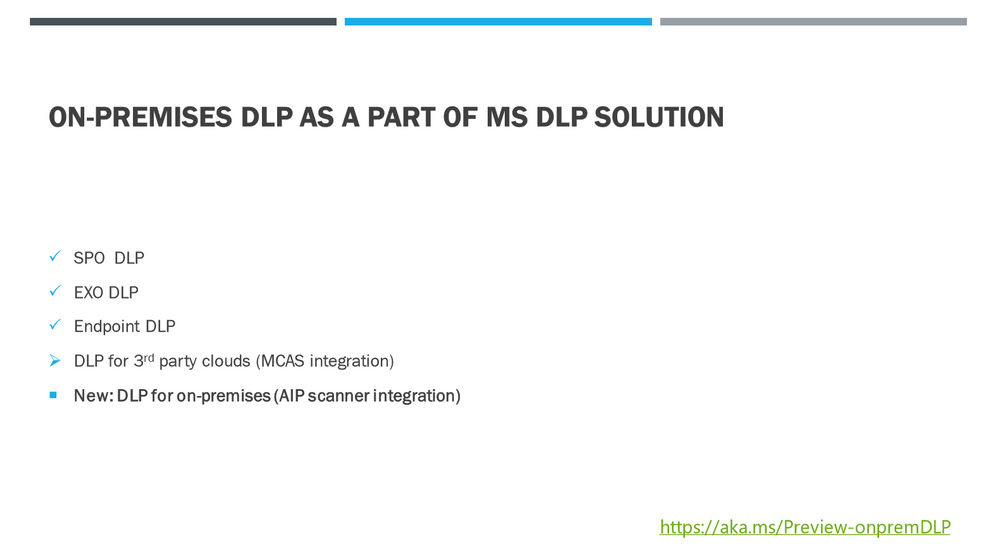
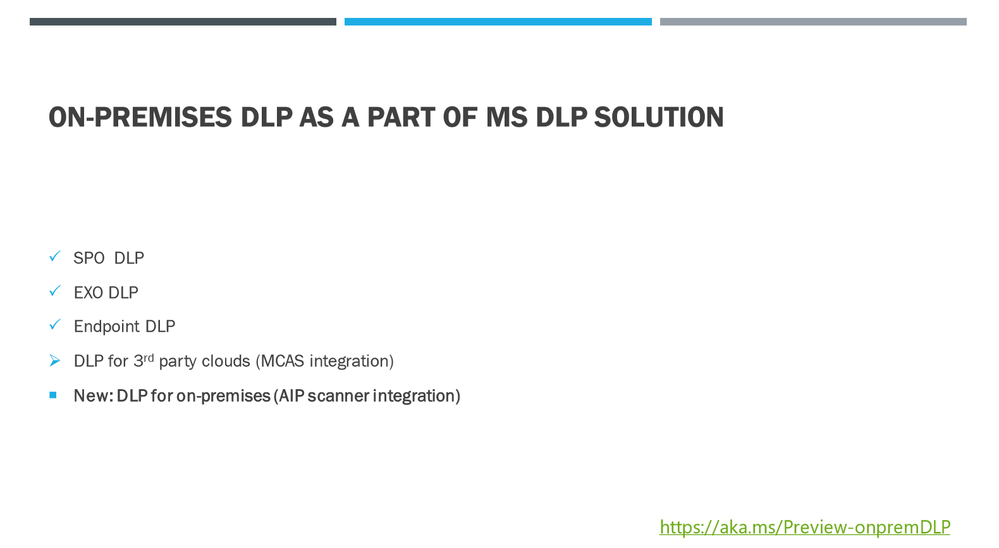
The On-Premises DLP webinar provided an overview of an MIP solution for on-premises data at rest, understanding on-prem specific challenges, implementing methodology, and concluded with a demonstration of the most useful scenarios that can be addressed by the on-premises scanner.


on-prem DLP thumbnail blog.PNG


References:


This webinar was presented on November 4th, 2020, and the recording can be found here.


Attached to this post is the FAQ document that summarizes the questions and answers that came up over the course of the EMEA/NA & APAC Webinars.


Thanks to those of you who participated during the two sessions and if you haven’t already, don’t forget to check out our resources available on the Tech Community.


Thanks!


@LaurenVaughn on behalf of the MIP and Compliance CXE team

Understanding Azure Analysis Services Processing using Log Analytics

Understanding Azure Analysis Services Processing using Log Analytics

This article is contributed. See the original author and article here.

When Azure Analysis Services is processing, how do you know where there are opportunities for improvement? A typical design pattern is to process AAS to ensure that it is fully ready for users, although AAS can be processed asynchronously in a trigger-based cloud world. When Azure Analysis Services sends telemetry data to Log Analytics, the logs can be analyzed to find where the timing is taking for Analysis Services processing. The language for Azure Monitor is Kusto, which is also used for a few other Microsoft services as well (Azure Data Explorer, Application Insights, etc.)


For example, finding all the Refresh commands that were executed against an instance would look something like the below:


AzureDiagnostics
| where ResourceProvider == "MICROSOFT.ANALYSISSERVICES"
| where EventClass_s == "COMMAND_END"
| extend DurationMs=extract(@"([^,]*)", 1,Duration_s, typeof(long))
| project RootActivityId_g, TextData_s, StartTime_t, EndTime_t
| where TextData_s contains "Refresh"
| where StartTime_t <> todatetime('1601-01-01T00:00:00Z')


Image1.jpg


The result provides an excellent overview of how long the processing is taking. However, we’re looking for something a bit deeper. What partitions/tables are taking the longest to process?


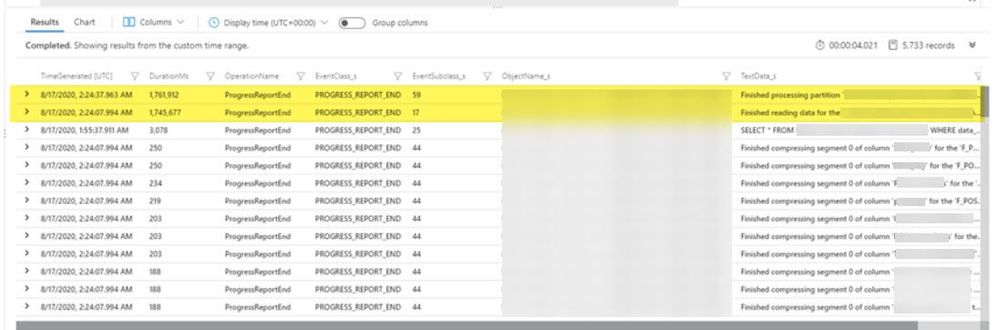
//use the below query to identify the processing time per partition in the model. The DurationMs report the number of milliseconds that elapsed to perform the processing. This query shows a detailed breakdown per partition, showing the amount of time spent running the SQL query, transferring data over the network, and compressing the data.

AzureDiagnostics
| where ResourceProvider == "MICROSOFT.ANALYSISSERVICES"
//capture progress reort end events and event subclass 59.
| where EventClass_s == "PROGRESS_REPORT_END" and ((EventSubclass_s == 17 and TextData_s contains "reading") or (EventSubclass_s == 25 and TextData_s contains "SELECT") or (EventSubclass_s == 59 and TextData_s contains "partition") or EventSubclass_s == 44 or EventSubclass_s == 6)
| extend DurationMs=extract(@"([^,]*)", 1,Duration_s, typeof(long))
| summarize count() by OperationName, EventClass_s, EventSubclass_s, DurationMs, ObjectName_s, TextData_s, TimeGenerated
| order by ObjectName_s, DurationMs


Image2.jpg


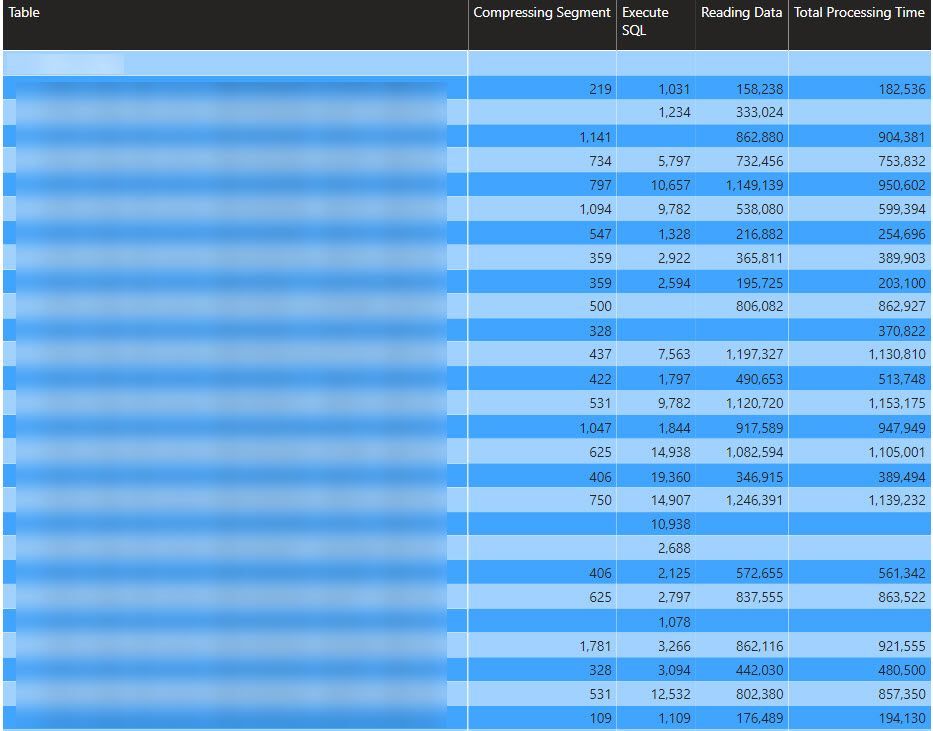
To make this a bit easier to understand, I’ve created a Power BI report that connects to a log analytics workspace and runs the Kusto mentioned above. Paste in the workspace URL into the parameter, and refresh the report. It is left pretty vanilla out of the box. In real life, this could be combined with all sorts of useful information to create an AAS “Dashboard” showing number of users, query duration percentiles, processing performance, etc.


Image3.jpg


The above query breaks down where the data is spending time processing at the partition level. When AAS is processing data, time is spent on three different categories:


  • Executing SQL

  •  Reading the data from the source.

  • Compressing the data into segments


Execute SQL is the very first step in the process, which is the amount of time that it takes the underlying data source to return the very first row to the AAS engine. If the latency here is long, the partition’s underlying SQL statement takes a long time to run. One of the first places to look is at the partition definitions in AAS, although the query could also be tuned at the database layer to return the data faster.


The second category you see is Reading data. Reading data is encapsulated in event subclass 17 and indicates the time that AAS was waiting for the entire dataset to be retrieved. There are a few potential bottlenecks to investigate here. A few quick places to look:


  • Check the on-premises data gateway performance counters and look for CPU, Memory, and Networking to look for the box’s oversaturation. For reading data bottlenecks, this should ALWAYS be the first place to look.

  • Check to see if the data gateway is streaming or spooling. This can be set via the StreamBeforeRequestCompletes property that exists in the %/On-Premises data gatewayMicrosoft.PowerBI.DataMovement.Pipeline.GatewayCore.dll.config file. False indicates the data is spooled locally to the gateway before the data packets are sent to the destination (Analysis Services); True indicates the data is streamed directly to the destination without spooling first.


The last step in Analysis Services Processing is compressing the various segments for columnar compression. Compression occurs after all the data has been read into Analysis Services and is handled via the Formula Engine. Have you ever processed an AS database and noticed that after it says all the data has been retrieved, it just looks like it sits there? That’s compression being applied. Some ways this can be reduced are:


  •  Only include columns that will be used in OLAP queries. Although the business generally asks for “all the columns,” only about 10% of these are used in reality. By analyzing the query log data, unused columns can be removed from the model or answered via direct queries to the source rather than using up valuable processing time.

  •  Avoid columns with lots of unique values. Vertipaq (the underlying engine behind AS) is a columnar based engine. It achieves high compression rates by storing only distinct values within a column/table. Because of this, fact tables generally compress at a much higher rate than dimension tables. Dimensions with large string values and lots of columns have the worst compression. This is also why one big table of all the things is wrong in Power BI! ;)

  • Set the coding hint appropriately. See the docs page for more details, but without going into too much detail, Value Encoding is better for numerical, aggregating columns (facts) and hash encoding is better for everything else. I have personally seen the optimization of this alone result in a processing reduction of 20-30%. 


The report and code samples I shared above are hosted within a GitHub repository here.

Nest Azure IoT Edge devices to collect insights across industrial networks in Public Preview

Nest Azure IoT Edge devices to collect insights across industrial networks in Public Preview

This article is contributed. See the original author and article here.

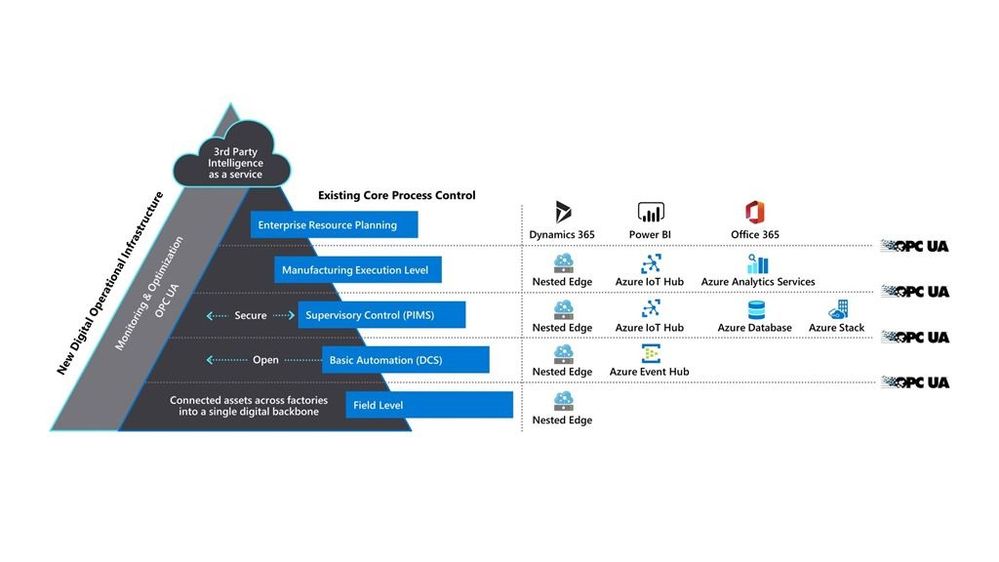
Azure IoT Edge devices can now be nested to securely collect data across networks organized in hierarchical layers. Industrial customers commonly use layered networks to isolate and secure their most critical assets, as recommended by the ISA-95 standard. With this new IoT Edge capability, customers can quickly overcome the challenges of collecting data from each layer and gain local insights to help reduce unplanned downtime, increase equipment efficiency, and reduce product defects while fully complying with strict industry standards.


The ISA-95 automation standard is widely adopted across industrial control and automation systems within factories, oil refineries, mining sites, datacenters, power plants, and other types of industrial sites. However, it also makes acquiring data from these systems very challenging. Per the ISA-95 standard, these systems are protected by organizing network zones into hierarchical layers, where only the top layer has connectivity to the cloud and the lower layers in the hierarchy can only communicate with adjacent north and south layers. Building the capabilities from scratch to integrate the layers of the automation pyramid requires intense networking effort and expertise. Without this integrated connectivity at each layer, companies are unable to fully realize their vision of connecting the shop floor.


AutomationPyramid.jpg


Figure 1 – Collect data across the automation pyramid with nested Azure IoT Edge devices


Starting with Azure IoT Edge 1.2, IoT Edge devices can now be nested so that industrial customers can easily deploy an IoT Edge device per layer, chain them, and securely extract data out from the automation pyramid and into the cloud. It provides a safe, secure, and open solution that fits into existing industrial networks without modifying their security rules.  Azure IoT Edge 1.2 released public preview today.


To get started with this public preview:


  • See this sample to simulate an ISA-95 compliant network and IoT Edge devices in Azure

  • See this tutorial to try it on your own hardware

Microsoft Insider Risk Management & Communication Compliance – New Announcements & Updates

Microsoft Insider Risk Management & Communication Compliance – New Announcements & Updates

This article is contributed. See the original author and article here.

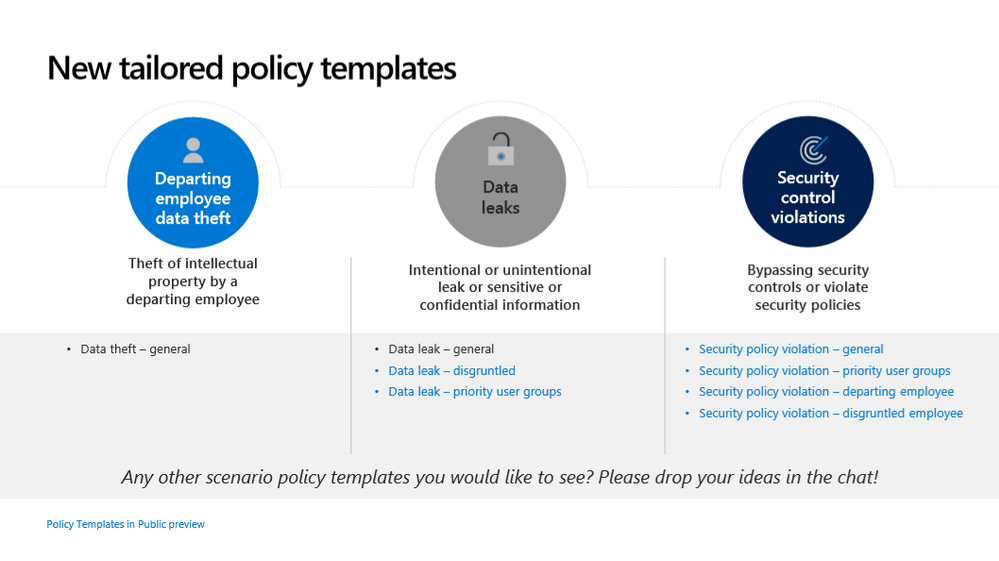
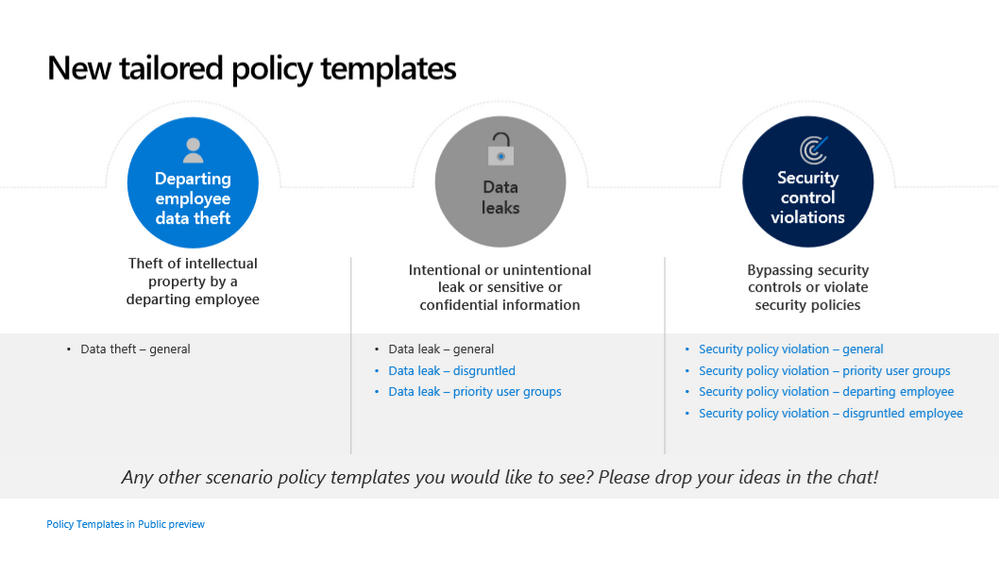
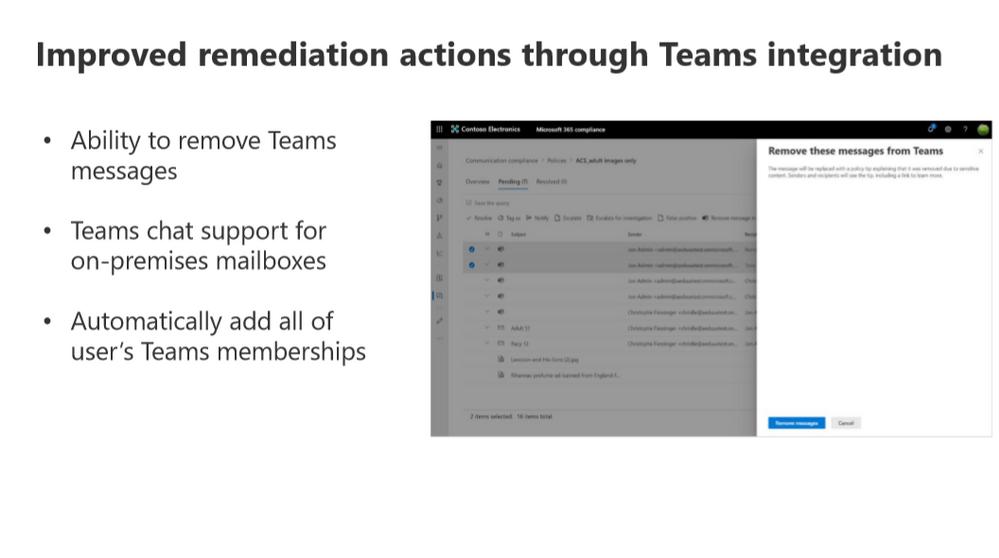
The Microsoft 365 community is excited to announce new capabilities in Microsoft Insider Risk Management & Communication Compliance to help minimize internal risks by enabling you to detect, investigate, capture, and act on malicious and inadvertent activities in your organization.


IR Blog Thumbnail.PNGCC Blog Thumbnail.PNG


References:


This webinar was presented on October 29th, 2020, and the recording can be found here.


Attached to this post is the FAQ document that summarizes the questions and answers that came up over the course of the EMEA/NA & APAC Webinars.


Thanks to those of you who participated during the two sessions and if you haven’t already, don’t forget to check out our resources available on the Tech Community.


Thanks!


@LaurenVaughn on behalf of the MIP and Compliance CXE team

The Microsoft Cloud App Security (MCAS) Ninja Training is Here!

The Microsoft Cloud App Security (MCAS) Ninja Training is Here!

This article is contributed. See the original author and article here.

Welcome to the MCAS Ninja Training!


Updated Ninja Diagram.png


Check out the MCAS Ninja Training video introduction here!


Have you been wanting to secure your cloud resources? Do you have agreements with non-Microsoft cloud applications? Do you want to share your cloud security knowledge and experience with others? Wait no longer, the Microsoft Cloud App Security (MCAS) Ninja training is here!


I am very pleased to introduce my MCAS Ninja training to you.  MCAS has hundreds of amazing videos out there and it can sometimes be overwhelming with determining where to start and how to progress through different levels. Over the last few months, I’ve gone through all these and created this repository of training materials in an ascending order… all in one central location! Please let me know what you think in the comments.


In terms of overall structuring, the training sessions are split into three different knowledge levels:


·       Beginner (Fundamentals)


·       Intermediate (Associate)


·       Advanced (Expert)


Module


Description


1.       Level 1: Beginner (Fundamentals)


Introduction to Microsoft Cloud App Security, licensing, portal navigation, policy basics, and overall definitions.


2.       Level 2: Intermediate (Associate)


Capability demos, automatic governance, overall deployment, and integrations.


3.       Level 3: Advanced (Expert)


Power automate, 3rd party IdP integration, and advanced use case scenarios.


In addition, after each module/level, there will be a knowledge check based on the training material you’d have just finished! Since there’s a lot of content, the goal of the knowledge checks is to help you determine if you were able to get some of the major key takeaways. Lastly, there’ll be a fun certificate issued at the end of the training: Disclaimer: This is not an official Microsoft certification and only acts as a way of recognizing your participation in this training content.


Lastly, this training will be updated on a quarterly basis to ensure you all have the latest and greatest material!


Let us know what you think!


P.S I wanted to give my colleague, @DanEdwards, a huge kudos for helping me automate the certificate app and knowledge check! Thank you, Dan!


Legend/Acronyms


(D)


Microsoft Documentation


(V)


Video


(B)


Blog


MCAS


Microsoft Cloud App Security


RBAC


Role-based access control


MDATP


Microsoft Defender Advanced Threat Protection


AATP


Azure Advanced Threat Protection


ATP


Advanced Threat Protection


AIP


Azure Information Protection


ASC


Azure Security Center


AAD


Azure Active Directory


CASB


Cloud Access Security Broker


MTP


Microsoft Threat Protection


GCC


Government Community Cloud


GCC-H


Government Community Cloud High


Note: Threat protection product names from Microsoft are changing. Read more about this and other updates here. We’ll be updating names in products and in the docs soon.


  • Microsoft 365 Defender (previously Microsoft Threat Protection)


  • Microsoft Defender for Endpoint (previously Microsoft Defender Advanced Threat Protection)


  • Microsoft Defender for Office 365 (previously Office 365 Advanced Threat Protection)


  • Microsoft Defender for Identity (previously Azure Advanced Threat Protection)


MCAS Ninja Training


Level: Beginner  (Fundamentals) (Video Introduction)


  1. Community Information

    1. MCAS Tech Community

      1. This is a Microsoft Cloud App Security (MCAS) Tech Community space that provides an opportunity to connect and discuss the latest news, updates, and best practices with Microsoft professionals and peers.


  2. Understanding CASBs

    1. Top 20 Use Cases for CASBs (D)

      1. This document provides use cases which can be leveraged as a starting point during a proof of concept (POC), or as you’re getting ready to deploy your CASB solution looking for ways to prioritize your deployment component.


  3. MCAS Best Practices (D)

    1. This article provides best practices for protecting your organization by using Microsoft Cloud App Security. These best practices come from our overall experience working with Cloud App Security and from the experiences from customers like you.


  4. MCAS Introduction

    1. MCAS Licensing (V)*subject to change*

      1. Questions on MCAS licensing? Contact your Microsoft reseller or Microsoft Partner.

      2. MCAS License Datasheet (D)

      3. Differences between MCAS and OCAS (D)

      4. Differences between MCAS and CAD (D)


    2. Microsoft Cloud App Security Introduction (V)

      1. This is an introductory video presentation of Microsoft’s Cloud Access Security Broker (CASB): Microsoft Cloud App Security (MCAS).


  5. Initial Settings

    1. Configure IP Addresses (V)

      1. This video shows you how to add your organization’s IP address ranges to remove complexities from policy creation, investigation, and improve the accuracy of your alerts.

      2. For more information, check out this article. (D)


    2. Import User Groups (V)

      1. This video shows you how to important user groups into MCAS to help create relevant policies.

      2. For more information, check out this article. (D)


    3. Configure Admin Roles (V)

      1. In this video, we show you how to configure admin roles and setup role-based access controls.

      2. For more information, check out this article. (D)


    4. Configure MSSP Access (V)

      1. The above video walks you through adding Managed Security Service Provider (MSSP) access to MCAS.


  6. Cloud Discovery

    1. Dashboard Basics (D)

      1. The above article gives an overview on how to work with MCAS daily while providing a few tips on how to navigate the portal.


    2. Discovered Apps (D)

      1. The above article provides guidance on how to work with discovered apps and the steps to take to dive deep into what the dashboard offers.


    3. App Risk Scoring (V)

      1. This video provides an overview on how MCAS evaluates the risk over discovered SaaS apps in your environment.

      2. For more information, check out this article. (D)


    4. MCAS App Connectors (V)

      1. This video provides a brief introduction on MCAS 3rd party SaaS connectors.

      2. For more information, check out this article. (D)


    5. Using the Cloud App Discovery Feature (V)

      1. This is a video overview of MCAS and its discovery functions.


  7. Information Protection and Real-time Controls

    1. Connect Office 365 (V)

      1. This video demonstrates how to connect Office 365 to Microsoft Cloud App Security and enable our powerful capabilities across DLP, Threat Protection, and more.


    2. Configure AAD with MCAS Conditional Access App Control (V)

      1. In this video, we walk you through how to configure real-time monitoring and control across your cloud apps leveraging our powerful, native integration with Azure AD Conditional Access.


    3. What is Conditional Access App Control? (V)

      1. In this video, we explore what Conditional Access App Control is, how to deploy and configure it, and testing of a scenario (Microsoft Teams).


    4. Block Sensitive Information Downloads (D)

      1. The above article walks you through a tutorial on how to create a session policy to block the download of sensitive information.


  8. Threat Detection

    1. Threat Detection Overview (V)

      1. The above video walks you through MCAS’s threat detection capabilities that allow you to identify advanced attackers and insider threats.


    2. User and Entity Behavior Analytics (V)

      1. This video provides a brief overview on User & Entity Behavior Analytics (UEBA) in MCAS.


    3. Discover and Mange risky OAuth applications (V)

      1. This video discusses how MCAS can help you identify when users authorize OAuth apps, detect risky apps, and revoke access to risky apps.


Level: Beginner (Fundamentals) Knowledge Check


Level: Intermediate (Associate) (Video Introduction


  1. Overview

    1. Microsoft Cloud App Security: Overview (V)

      1. This is an overview video discussing the different pillars and configuration steps for MCAS with a demo.


  2. Cloud Discovery

    1. Cloud Discovery Interactive Guide (V)

      1. This interactive guide walks you through discovering, protecting, and controlling your apps.


    2. Cloud Discovery Policies (D)

      1. The above article walks you through creating cloud discovery policies within your MCAS environment.


    3. MCAS and MDATP Integration (V)

      1. This video walks through the process of Integrating MDATP and MCAS and how simple the integration is—without requiring extra agents or proxies.

      2. For more information, check out this article. (D)


    4. Log Collector Configuration (V)

      1. An overview on using the log collector to enable cloud discovery and a walk-through on deployment.

      2. For guidance on log collector deployment, choose your deployment mode here and follow the accompanying steps. (D)


    5. Integrate with Zscaler (D)

      1. If you work with both Cloud App Security and Zscaler, you can integrate the two products to enhance your security Cloud Discovery experience.


    6. Integrate with iboss (D)

      1. If you work with both Cloud App Security and iboss, you can integrate the two products to enhance your security Cloud Discovery experience.


    7. Integrate with Corrata (D)

      1. If you work with both Cloud App Security and Corrata, you can integrate the two products to enhance your security Cloud Discovery experience for mobile app use.


  3. Information Protection and Real-Time Controls

    1. Protecting Storage Apps and Malware Detection (V)

      1. This video shows you how MCAS can help you protect your cloud storage apps and ensure that they are not infected with malware.

      2. For more information, please see this article. (D)


    2. Configuring a read-only mode for external users (V)

      1. This video walks you through one of the many use-cases focused on external users using Conditional Access App Control, our reverse proxy solution.


    3. Block unauthorized browsers form accessing corporate web apps (V)

      1. A video detailing the policy configuration required to block unauthorized browsers from accessing corporate web applications.


    4. Using Admin Quarantine to investigate files (D)

      1. The above article is a tutorial helping you use admin quarantine to protect your files.


    5. Automatically apply labels to your sensitive files (D)

      1. The above article is a tutorial walking you through applying a label to a sensitive file.


    6. Information Protection Policies (D)

      1. The above article walks you through creatin information protection policies within your MCAS environment.


  4. Threat Detection

    1. Threat Policies (D)

      1. The above article walks you through creatin threat protection policies within your MCAS environment.


    2. Azure Advanced Threat Protection Integration

      1. How Azure ATP integrates with MCAS (D)

      2. The above article is designed to help you understand and navigate the enhanced investigation experience in MCAS with Azure ATP.


    3. Detect Threats and Manage Alerts (V)

      1. The interactive guide above walks you through the steps of managing threats and alerts.


    4. Malware Hunting and Automatic Remediation (V)

      1. This video provides a brief overview of Malware Hunting in SaaS Apps using MCAS.


Level: Intermediate (Associate) Knowledge Check


Level: Advanced (Expert) (Video Introduction)


  1. Power Automate Blog Series (B)

    1. Triage Infrequent Country Alerts using Power Automate and MCAS  (V)

      1. A video walk- through on creating a new Power Automate Flow to automate the triage of Infrequent Country alerts in MCAS (Threat Protection Pillar).


    2. Request user validation to reduce your SOC workload  (V)

      1. A vide walk-through on using Power Automate Flow to request user validation for file sharing (Data Protection Pillar).


    3. Request for Manager Action (V)

      1. This video walks you through using Power Automate Flow to request manager validation for their team.

      2. Step-by-step guidance (B)


    4. Auto-disable malicious inbox rules using MCAS & Power Automate (V)

      1. This video walks you through a new Power Automate Flow on how to remove malicious inbox rules detected in your cloud environment.


  2. 3rd Party IdP Configuration 

    1. PingOne (D)

      1. This document walks you through integrating PingOne with MCAS for Conditional Access App Control using Salesforce as an example.


    2. ADFS (Coming soon!)

    3. Okta (Coming soon!)


  3. Conditional Access App Control steps for non-Microsoft SAAS applications

    1. Workplace for Facebook (V)

    2. Box (V)

    3. Slack (V)


  4. SIEM Integrations

    1. Connect Azure Sentinel (V)

      1. This video details how to connect Azure Sentinel (Microsoft’s SIEM + SOAR product) to MCAS.


    2. Azure Sentinel Entities Enrichment (Users) (V)

      1. This video looks at how you can use the provided playbooks to enrich your impacted user profiles, and then consume it in Sentinel, ServiceNow, or Postman.


    3. Microsoft CAS Infrequent Country triage with Azure Sentinel and Logic Apps (V)

      1. This video walks you through the deployment of a playbook to using it to triage your Azure Sentinel incidents.


    4. Connect a 3rd Party SIEM (V)

      1. This video details how to connect a third party SIEM to MCAS.    


  5. Advanced Scenarios and Guidance

    1. Indicators of Compromise  (V)

      1. This video walks you through how to create custom Indicators of Compromise in MCAS.


    2. MCAS and Microsoft Threat Protection  (V)

      1. A video guide on how Microsoft is unifying our threat products.


    3. MCAS API Documentation (D)

      1. The above article describes how to interact with Cloud App Security over HTTPS.


    4. Configuring a Log Collector behind a Proxy (D)

      1. The above article walks you through further configuration to ensure your log collector works when behind a proxy.


    5. Ninja Training Blog Series (B)

      1. This blog series dives into partner specific topics (such as ideas for managed services, reporting dashboards, playbooks, and more) that you can use to help your clients be successful with Microsoft Cloud App Security.


    6. MCAS Data Protection Blog Series (B)

      1. This blog goes through different data protection scenarios based on questions the CxE team has received from customers.


    7. Securing Administrative Access to Microsoft Cloud App Security and Defender for Identities (B)

      1. This blog provides guidance on how to configure Azure AD Conditional Access to secure administrative access to Microsoft Cloud App Security (MCAS) and Defender for Identities (formerly Azure ATP).


    8. Limiting Inherited Roles from Azure Active Directory in MCAS (B)

      1. This blog goes over a customer scenario for MCAS and the steps that can be taken to meet their requirements on limiting inherited AAD roles’ accesses in MCAS.


  6. Important Announcements

    1. Unified Data Loss Prevention Post Announcement (B)

      1. This blog details all the latest and greatest information protection improvements including the new changes for MCAS.


    2. MCAS is removing non-secure cipher suites (B)

      1. This blog provides an update on the non-secure cipher suites no longer supported by MCAS and the steps to take to prepare for this change.


    3. Unified Labeling is now generally available in GCC and GCC-H environments (B)

      1. This blog provides an update that information protection is available in our government tenants.


Level: Advanced (Expert) Knowledge Check


Once you’ve finished the training and the knowledge checks, please go to our attestation portal to auto-generate your certificate (Coming Soon!).