by Contributed | Nov 24, 2020 | Dynamics 365, Microsoft 365, Technology
This article is contributed. See the original author and article here.
Companies that work with manufacturing and distribution need to be able to run key business processes 24/7, without interruption, and at scale. Challenges arise with unreliable connections or network latency when business processes compete for the same system resources when peak scale is required, or during periodic or regular maintenance for different regions, across time zones, or to meet different scheduling requirements. The ability to execute daily mission-critical processes must be agnostic to these situations.
Cloud and edge scale units enable companies to execute mission-critical manufacturing and warehouse processes without interruptions. This functionality is provided by the following add-ins, now available in public preview:
- Cloud Scale Unit Add-in for Dynamics 365 Supply Chain Management
- Edge Scale Unit Add-in for Dynamics 365 Supply Chain Management
Cloud and edge scale units allow you to build resilience into your supply chain by providing dedicated capacity for your manufacturing and warehouse execution processes. This also places scale units near the location where the work is done, such as on the shop floor or in the warehouse.
How cloud and edge scale units work
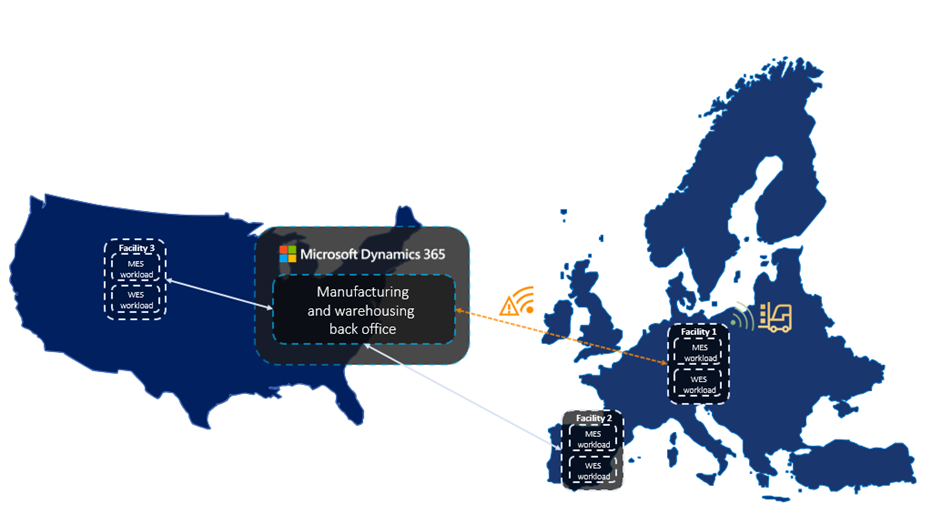
Dynamics 365 Supply Chain Management provides scale units in the cloud that runs in the nearest Microsoft Azure data center. Alternatively, scale units can run on the edge, hosted in appliances right in your facility. All scale units are connected to your enterprise-wide Supply Chain Management hub in the cloud to have all information readily available to fulfill your business needs.
Cloud and edge scale units for Dynamics 365 Supply Chain Management deliver on two key business objectives:
- When a company is offline or when network latency is high,mission-critical processes must keep running.
- When throughput is high and heavy processes runin parallel, manufacturing and warehouse processes muststill support high user productivity.
Hybrid multi-node topology is the foundation
One important foundation for cloud and edge scale units is a hybrid multi-node topology for Supply Chain Management. We have evolved the Dynamics 365 architecture into a loosely coupled system that runs selective business processes in a distributed model. Scale units are the environments that run those business processes, where all computation capacity is reserved for the processes and data in the assigned workloads.
Workloads define the processes and data
Workloads define the set of business processes, data, and policies including rules, validation, and ownership that can run on scale units. The preview capabilities include one workload for manufacturing execution and one for warehouse execution. These workloads bring the processes and data from the execution phase of the manufacturing and warehouse processes into the scale units.
Inbound, outbound, and other warehouse management processes for cloud and edge scale units have been split into decoupled phases for planning, execution, receiving, and shipping. Manufacturing processes are structured in a similar way for planning, execution, and finalization. Scale units take ownership of the execution phase.
After you configure the workload, the workers on the manufacturing or warehouse shop floor continue to go through the work and report results like they are used to, but now operate on the dedicated scale unit processing capacity.
Modern user experience for workers on the production floor
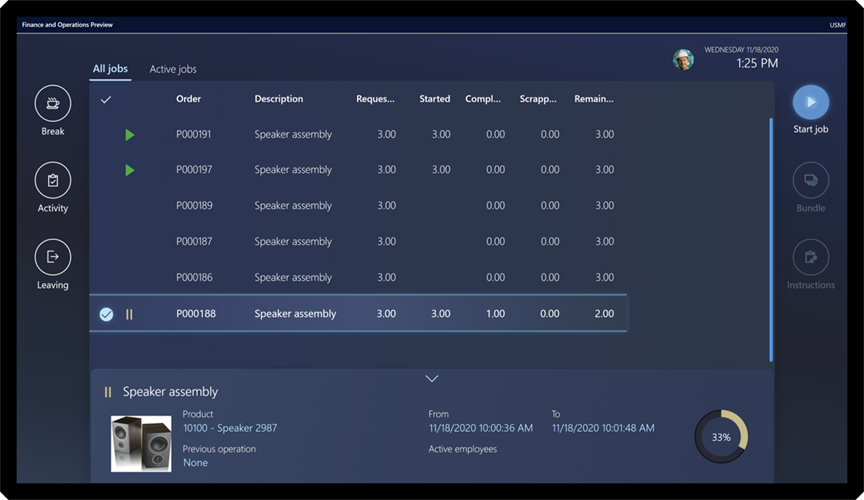
The new Production Floor Execution (PFE) interface for manufacturing workers comes with a modern, touch-friendly user experience. It not only looks great but is also tuned for difficult illumination situations on the shop floor.
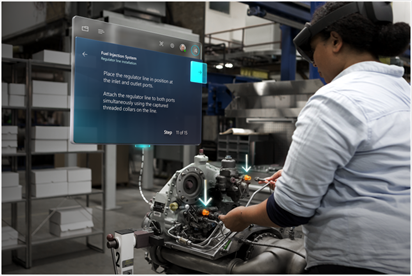
Plus, the PFE now supports Dynamics 365 Guides which can be used to guide users to complete tasks in the best possible way, especially in complex production scenarios.
Deployment experience for scale units and workloads
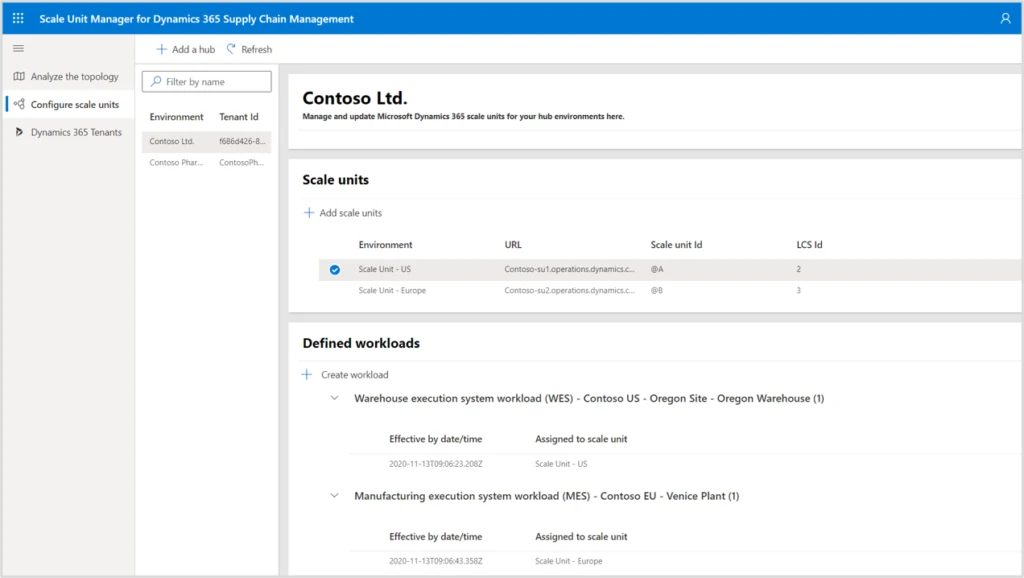
The Scale Unit Manager helps you to configure scale units and define where workloads for selected manufacturing and warehouse facilities run.
In the future, the topology analysis page will show facilities, your Supply Chain Management hub, and your scale units. By looking at measures for bottlenecks, latency, and performance history you can identify the most beneficial applications for your scale units.
Next steps and learning
Dynamics 365 can help you build resilient supply chains in a multi-node topology using scale units in the cloud or on the edge. This is available now in public preview.
The post Boost supply chain resilience with cloud and edge scale units in Supply Chain Management appeared first on Microsoft Dynamics 365 Blog.
Brought to you by Dr. Ware, Microsoft Office 365 Silver Partner, Charleston SC.
by Scott Muniz | Nov 24, 2020 | Security, Technology, Tips and Tricks
Scammers use email or text messages to trick you into giving them your personal information. But there are several things you can do to protect yourself.
How to Recognize Phishing
Scammers use email or text messages to trick you into giving them your personal information. They may try to steal your passwords, account numbers, or Social Security numbers. If they get that information, they could gain access to your email, bank, or other accounts. Scammers launch thousands of phishing attacks like these every day — and they’re often successful. The FBI’s Internet Crime Complaint Center reported that people lost $57 million to phishing schemes in one year.
Scammers often update their tactics, but there are some signs that will help you recognize a phishing email or text message.
Phishing emails and text messages may look like they’re from a company you know or trust. They may look like they’re from a bank, a credit card company, a social networking site, an online payment website or app, or an online store.
Phishing emails and text messages often tell a story to trick you into clicking on a link or opening an attachment. They may
- say they’ve noticed some suspicious activity or log-in attempts
- claim there’s a problem with your account or your payment information
- say you must confirm some personal information
- include a fake invoice
- want you to click on a link to make a payment
- say you’re eligible to register for a government refund
- offer a coupon for free stuff
Here’s a real world example of a phishing email.
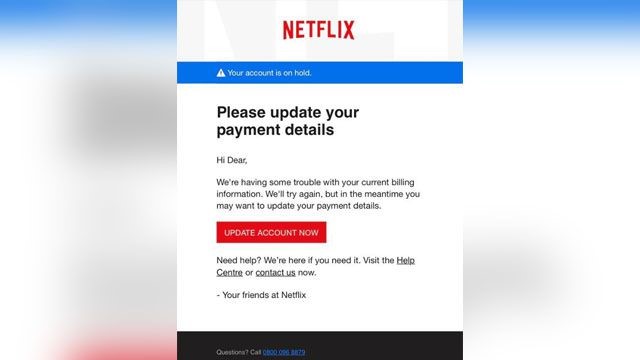
Imagine you saw this in your inbox. Do you see any signs that it’s a scam? Let’s take a look.
- The email looks like it’s from a company you may know and trust: Netflix. It even uses a Netflix logo and header.
- The email says your account is on hold because of a billing problem.
- The email has a generic greeting, “Hi Dear.” If you have an account with the business, it probably wouldn’t use a generic greeting like this.
- The email invites you to click on a link to update your payment details.
While, at a glance, this email might look real, it’s not. The scammers who send emails like this one do not have anything to do with the companies they pretend to be. Phishing emails can have real consequences for people who give scammers their information. And they can harm the reputation of the companies they’re spoofing.
How to Protect Yourself From Phishing Attacks
Your email spam filters may keep many phishing emails out of your inbox. But scammers are always trying to outsmart spam filters, so it’s a good idea to add extra layers of protection. Here are four steps you can take today to protect yourself from phishing attacks.
Four Steps to Protect Yourself From Phishing
1. Protect your computer by using security software. Set the software to update automatically so it can deal with any new security threats.
2. Protect your mobile phone by setting software to update automatically. These updates could give you critical protection against security threats.
3. Protect your accounts by using multi-factor authentication. Some accounts offer extra security by requiring two or more credentials to log in to your account. This is called multi-factor authentication. The additional credentials you need to log in to your account fall into two categories:
- Something you have — like a passcode you get via text message or an authentication app.
- Something you are — like a scan of your fingerprint, your retina, or your face.
Multi-factor authentication makes it harder for scammers to log in to your accounts if they do get your username and password.
4. Protect your data by backing it up. Back up your data and make sure those backups aren’t connected to your home network. You can copy your computer files to an external hard drive or cloud storage. Back up the data on your phone, too.
What to Do If You Suspect a Phishing Attack
If you get an email or a text message that asks you to click on a link or open an attachment, answer this question: Do I have an account with the company or know the person that contacted me?
If the answer is “No,” it could be a phishing scam. Go back and review the tips in How to recognize phishing and look for signs of a phishing scam. If you see them, report the message and then delete it.
If the answer is “Yes,” contact the company using a phone number or website you know is real. Not the information in the email. Attachments and links can install harmful malware.
What to Do If You Responded to a Phishing Email
If you think a scammer has your information, like your Social Security, credit card, or bank account number, go to IdentityTheft.gov. There you’ll see the specific steps to take based on the information that you lost.
If you think you clicked on a link or opened an attachment that downloaded harmful software, update your computer’s security software. Then run a scan.
How to Report Phishing
If you got a phishing email or text message, report it. The information you give can help fight the scammers.
Step 1. If you got a phishing email, forward it to the Anti-Phishing Working Group at reportphishing@apwg.org. If you got a phishing text message, forward it to SPAM (7726).
Step 2. Report the phishing attack to the FTC at ftc.gov/complaint.
Bonus
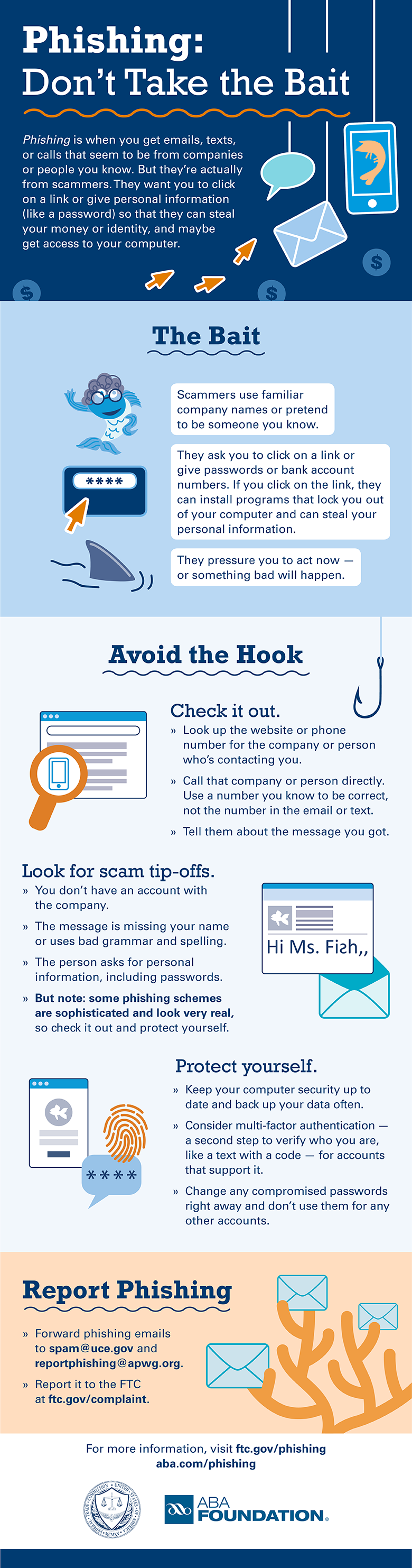
The FTC’s new infographic (below) offers tips to help you recognize the bait, avoid the hook, and report phishing scams. Please share this information with your school or family, friends, and co-workers.
Download the PDF
by Scott Muniz | Nov 24, 2020 | Security, Technology
This article is contributed. See the original author and article here.
Original release date: November 24, 2020
With more commerce occurring online this year, and with the holiday season upon us, the Cybersecurity and Infrastructure Security Agency (CISA) reminds shoppers to remain vigilant. Be especially cautious of fraudulent sites spoofing reputable businesses, unsolicited emails purporting to be from charities, and unencrypted financial transactions.
CISA encourages online holiday shoppers to review the following resources.
If you believe you are a victim of a scam, consider the following actions.
This product is provided subject to this Notification and this Privacy & Use policy.
by Contributed | Nov 24, 2020 | Azure, Microsoft, Technology
This article is contributed. See the original author and article here.
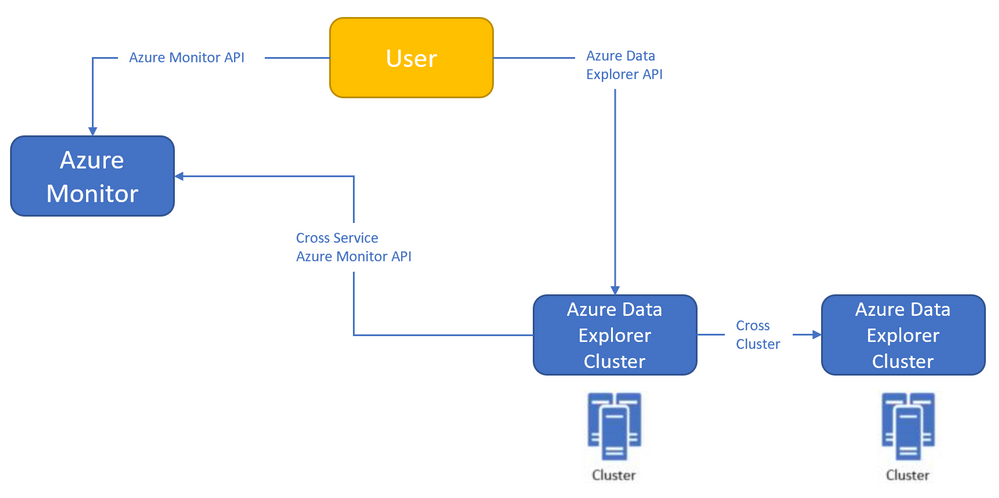
Azure Monitor<->Azure Data Explorer cross-service querying
This experience enables you to query Azure Data Explorer in Azure Log Analytics/Application Insights tools (See more info here),
and the ability to query Log Analytics/Application Insights from Azure Data Explorer tools to make cross resource queries. (See more info here.),
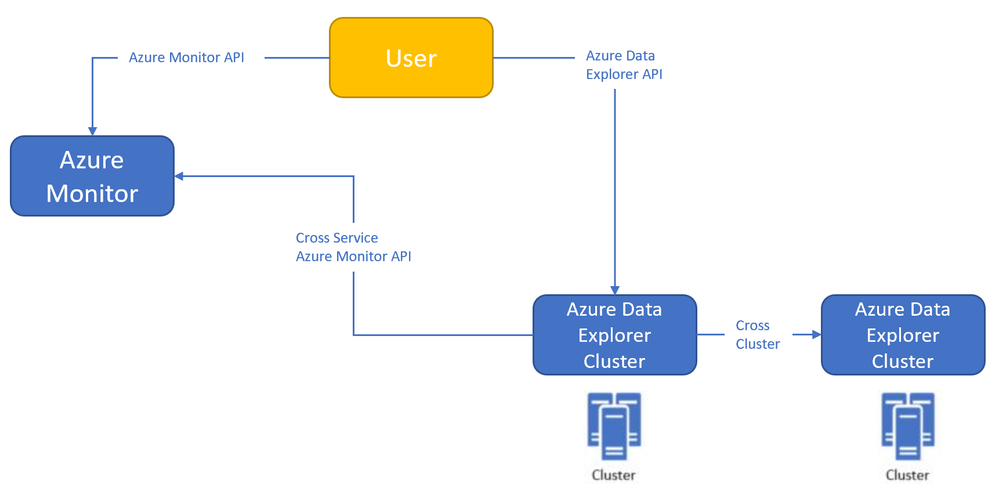
For example (querying Azure Data Explorer from Log Analytics):

Where the outer query is querying a table in the workspace, and then joining with another table in an Azure Data Explorer cluster (in this case, clustername=help, databasename=samples) by using a new “adx()” function, like how you can do the same to query another workspace from inside query text.
Both experiences are in Private Preview.
The ability to query Azure Monitor from Azure Data Explorer is open for everyone to use – no need to be allowlisted,
The ability to query Azure Data Explorer from Log Analytics/Application Insights requires to be allowlisted – We need the following to get you enrolled (you can send the info to me):
- Tenant ID
- List of the Azure Data Explorer clusters (the list is required to enable the team to modify the callout policy of that cluster, that will allow them to communicate with the proxy)
- Email address
We started a private preview program, and we are happy to add early adopters to experience the new functionality.
Please note that the product is new with limited SLA, and we estimate that we will be able to move to pubic preview with production level SLA within ~2-4 months.
by Contributed | Nov 24, 2020 | Azure, Microsoft, Technology
This article is contributed. See the original author and article here.
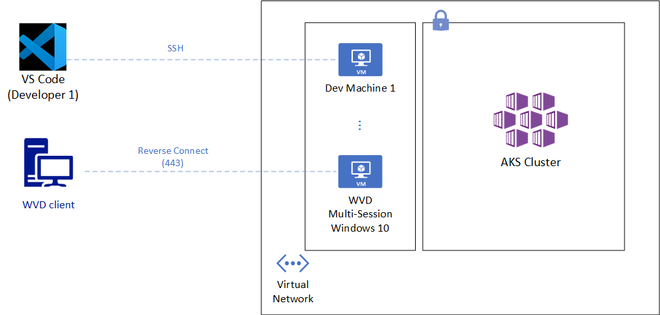
Azure Monitor<->Azure Data Explorer cross-service querying (join between LA/AI and ADX!)
This experience enables you to query Azure Data Explorer in Azure Log Analytics/Application Insights tools (See more info here),
and the ability to query Log Analytics/Application Insights from Azure Data Explorer tools to make cross resource queries. (See more info here.),
For example (querying Azure Data Explorer from Log Analytics):
Where the outer query is querying a table in the workspace, and then joining with another table in an Azure Data Explorer cluster (in this case, clustername=help, databasename=samples) by using a new “adx()” function, like how you can do the same to query another workspace from inside query text.
Both experiences are in Private Preview.
The ability to query Azure Monitor from Azure Data Explorer is open for everyone to use – no need to be allowlisted,
The ability to query Azure Data Explorer from Log Analytics/Application Insights requires to be allowlisted – We need the following to get you enrolled (you can send the info to me):
- Tenant ID
- List of the Azure Data Explorer clusters (the list is required to enable the team to modify the callout policy of that cluster, that will allow them to communicate with the proxy)
- Email address
We started a private preview program, and we are happy to add early adopters to experience the new functionality.
Please note that the product is new with limited SLA, and we estimate that we will be able to move to pubic preview with production level SLA within ~2-4 months.
by Contributed | Nov 24, 2020 | Technology
This article is contributed. See the original author and article here.
API Server is a crucial component of Kubernetes that allows cluster configuration, workload management and a lot more. While this endpoint is incredibly important to secure; developers and engineers typically require regular and convenient access to that API. Striking a balance between security and convenience is quite desirable here.
Azure Kubernetes Service (AKS) provides two robust mechanisms to restrict access to the API Server: namely through restricting authorized source IP addresses or disabling public access to the API endpoint.
While the above two controls ensure additional security for the API endpoint, developers and engineers do face a few challenges here:
- With the rise of remote work, many users could be unable to keep a static source IP address that has been whitelisted by AKS.
- Although VPN solutions are increasingly deployed, many users could find that always on VPN becomes a challenge sometimes; especially if it affects an already low internet bandwidth at home.
- While some users get access to a jump box or an Azure Bastion host, it lacks many notable features like AD authentication or a true desktop experience.
Recommendations
One good approach to overcome the above challenges is to allow remote access to a fixed cloud endpoint, which has sole access to the AKS Cluster. Being more specific, Visual Studio Code Remote Development and Windows Virtual Desktop are two solutions that can provide a secure yet convenient access to restricted AKS cluster.
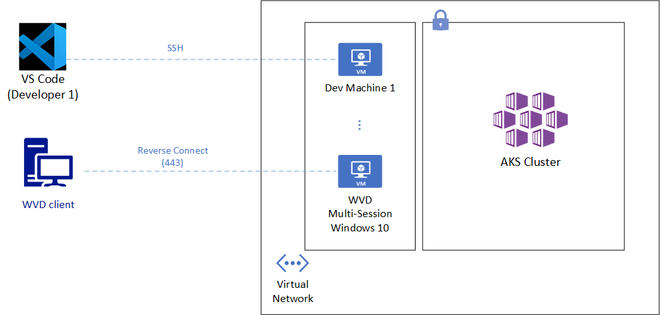
Visual Studio Code Remote Development (SSH)
VS Code Remote Development (SSH) can allow developers and engineers access from within Visual Studio Code to hardened and right-sized per-user virtual machines. The solution has the following benefits:
- The virtual machines could use automation to start up and shutdown during regular work hours.
- Users leverage their local VS Code to run code and terminal commands that are in fact running on a remote machine that has access to a restricted AKS cluster.
- Linux users would leverage SSH keys to get access to those machines but could also evaluate the preview feature of Linux AD authentication.
- Remote VM can be in a VNET with access to a private AKS cluster or can have an outbound IP whitelisted by AKS.
Windows Virtual Desktop
While the above solution has some great benefits, it requires SSH access from at least a wide array of IP ranges owned by developers or engineers. It might also require additional GUI access to the Azure virtual machines to run some Kubernetes tools such as Lens, a Kubernetes IDE. Windows Virtual Desktop on the contrary requires no open SSH ports and provides desktop access. It just requires TCP port 443 access to a defined Microsoft endpoint. Other benefits from this solution include:
- Use various clients such as Windows, macOS, Android, iOS, or Web.
- Desktop discovery based on AD Authentication. No IP or host name distribution required.
- Full desktop experience with Windows 10 or Windows 7.
- Users might be able to leverage existing licenses to assign desktops.
- Desktop host can be in a VNET with access to a private AKS cluster or can use a Load Balancer outbound IP whitelisted by AKS.
Whichever solution you choose to provide access to an AKS cluster, it’s quite important to try strike a balance between meeting security requirements and ensuring teams productivity. VS Code Remote Development and Windows Virtual Desktop are two options worth considering.
by Contributed | Nov 24, 2020 | Technology
This article is contributed. See the original author and article here.
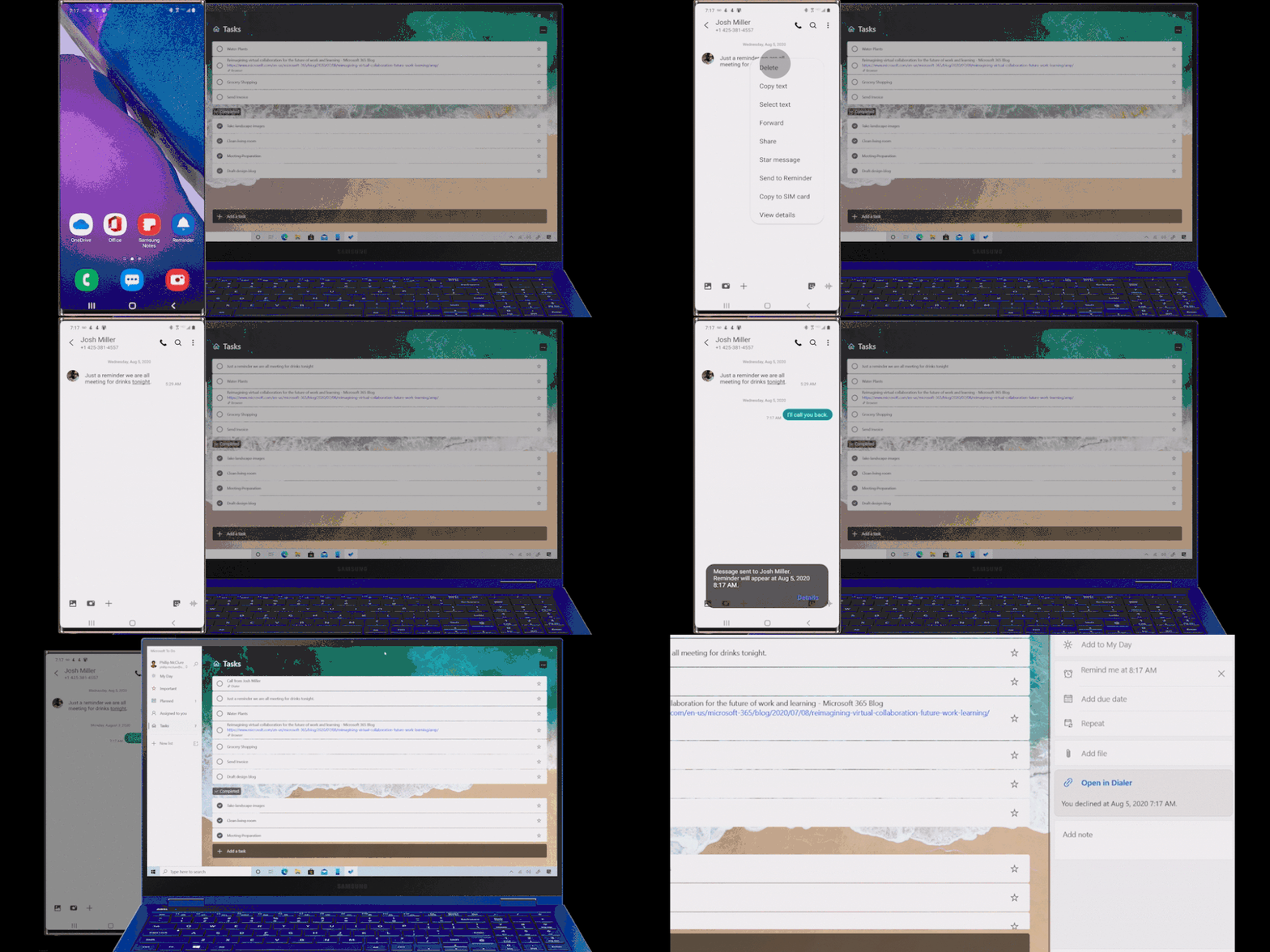
We have a super exciting announcement to make. You can now sync your reminders on Samsung Reminder app with To Do. It’s a great way to access your phone reminders created from Bixby, calls, notes, messages, etc. on PC and browser apps of To Do, Outlook and Teams.
3 ways to get the best out of it
- Now, more than ever, it’s important to connect. Create a reminder from a call and it will be available with all your tasks in To Do. Even better, you can click on ‘Open in Dialer’ to start your call right from your laptop with Your Phone app.
- Use Bixby to quickly capture a reminder on the go. Just say “Bixby, remind me to pay bills this evening” and the captured reminder would sync and be available on your PC and web.
- Create a reminder from Samsung Messages, Samsung Notes, or Samsung browser, then manage them in the To Do app on your PC.
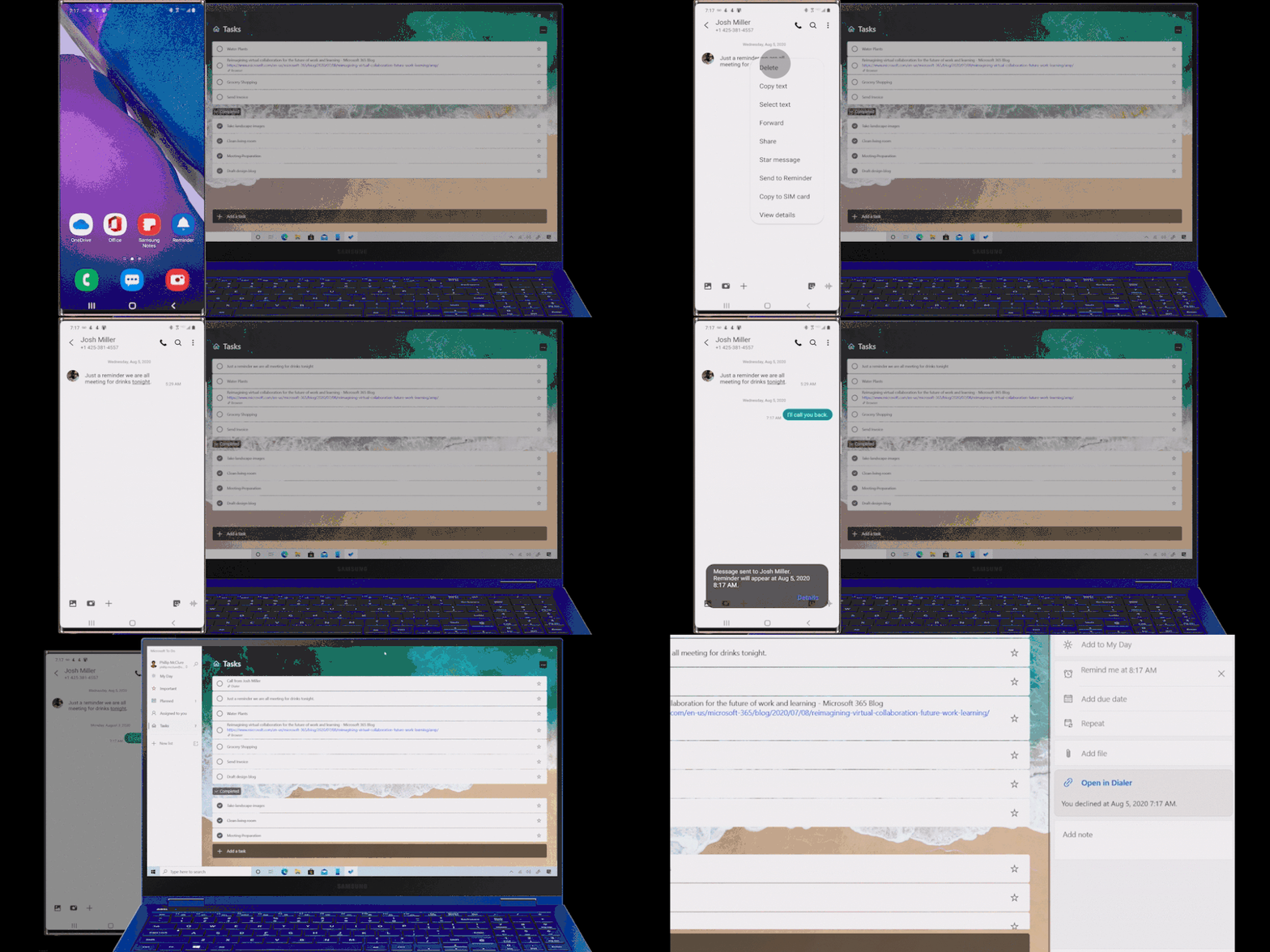 Manage reminders from Samsung Galaxy in To Do
How to start syncing?
To start syncing your To Do lists and tasks with Samsung Reminder, connect it to Microsoft To Do:
- Open the Samsung Reminder app > Settings > Sync with Microsoft To Do.
- Sign in with your Microsoft account.
- Accept the permission request and you’re good to go!
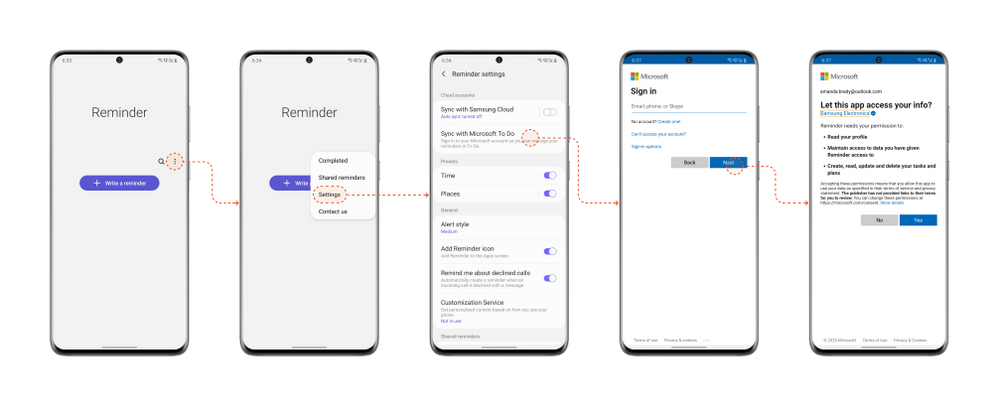 Steps to start syncing with Samsung Reminder app
It’s important that you set To Do as your default list so that reminders created from outside of the Reminder app e.g. from Bixby, calls, etc., are synced with To Do. To do that, open your Samsung Reminder app settings > > Microsoft To Do.
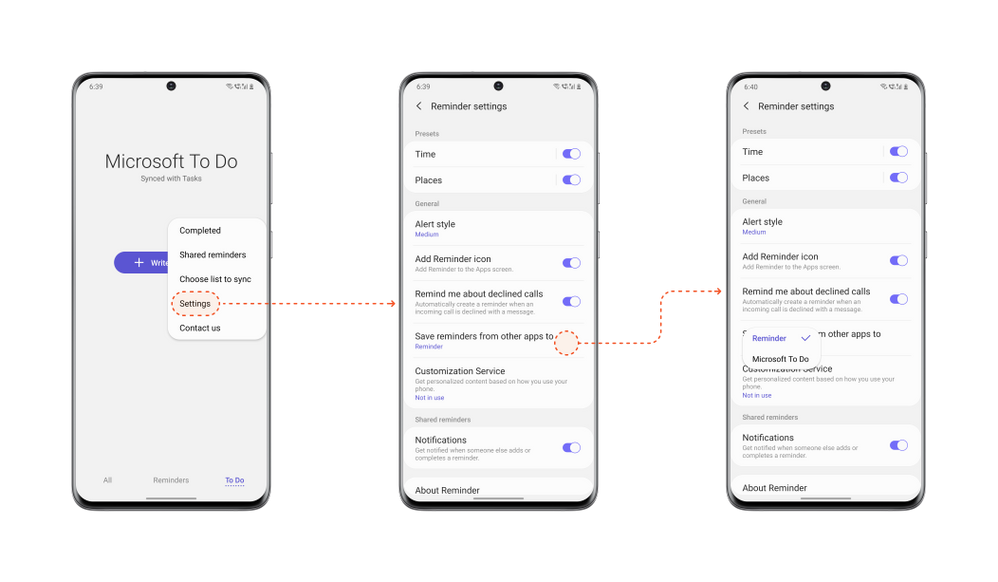 Steps to set To Do as default
Note: Samsung Reminder sync with Microsoft To Do is available for all Galaxy Models with Android 10 or higher.
We can’t wait to hear what you think of this integration – let us know in the comments below or over on Twitter and Facebook. You can also write to us at todofeedback@microsoft.com.
by Contributed | Nov 24, 2020 | Technology
This article is contributed. See the original author and article here.
Major version upgrades of production databases can be stressful and a significantly time-consuming and costly project if you are dealing with a fleet of database servers to upgrade. You are expected to deal with a daunting list of tasks to plan and execute a seamless upgrade with minimal impact to the business. The tasks are daunting not because they are complex but because the stakes are high. You will need to practice and practice until you get perfection and confidence to execute upgrade of your production environment flawlessly in the acceptable downtime window. Some of these tasks can be automated but generally each environment is a bit different (for e.g. Ubuntu 16 vs Ubuntu 18) and often heavily customized for the application or business it is running. This makes automation of the task a bit challenging. The practice session may involve building production like environment, testing the application for compatibility, simulating the workload, practicing the steps multiple times, and documenting it to ensure all the dependencies or customizations are taken care of. This makes the upgrade process stressful as it involves multiple manual steps and error prone when you are working under pressure towards a tight deadline. We are trying to make this process a bit easy for you with our new major version upgrade feature in Azure Database for MySQL service.
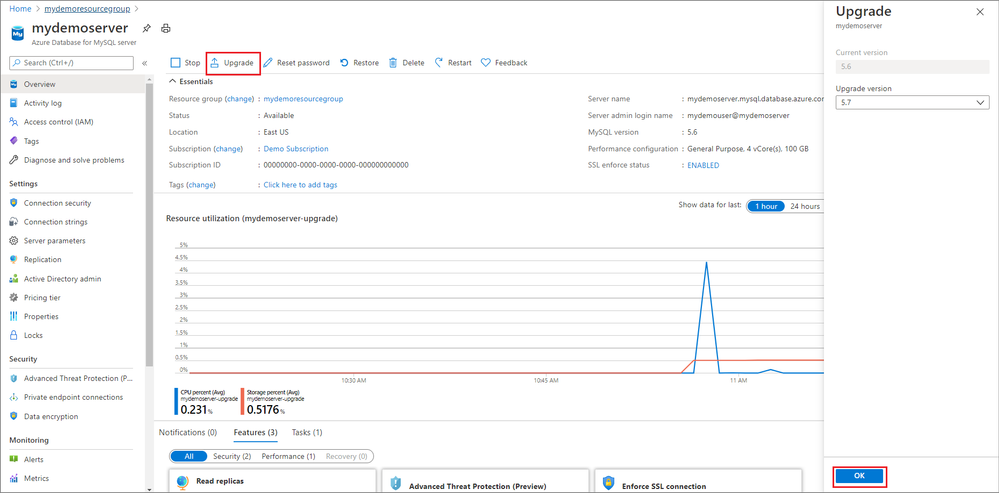
With the release of Major Version Upgrades in Azure Database for MySQL, you can now upgrade your MySQL v5.6 servers to MySQL v5.7 with a click of a button.
In Azure portal, on the Overview blade, you will now see an Upgrade button for MySQL v5.6 servers that can use to upgrade your existing MySQL servers.

You can learn more about how to upgrade using this feature in our documentation.
While this feature doesn’t promise to take all your problems away :smiling_face_with_smiling_eyes: (I wish we had that magic wand) but together with managed service value proposition, it does promise to simplify some of the tasks for you. For instance –
- Simulating a production like environment – This is easy with managed service as you can use point in time restore feature (another turnkey solution) to clone your production environment.
- Practicing upgrades – With multiple manual steps taken out from your upgrade document and replaced with a single step of a click of a button, this becomes a simplified experience which can be further be automated using Azure CLI.
- Managing upgrades for a fleet of servers – You can use Azure CLI to automate restore and upgrade operations which can then be used to run across the fleet of servers with ease.
- No dealing of customized environments – With standardization and restricted access to a managed service, you do not need to worry about customized environment which is often the common causes of failed upgrades as there is heavy customization at the underlying OS and filesystem.
While the above challenges are addressed and simplified with this feature, you can focus your energy on
- Understanding the changes in MySQL 5.7 to drive clarity to your business and development team on what will break or behave differently in MySQL 5.7.
- Test your application compatibility to ensure it works as intended and the compatibilities are addressed.
- Estimate and plan for the downtime required for the upgrades and execute the upgrade operation during your planned maintenance window.
Sometimes testing the application compatibility and upgrading the application code is the most challenging task of the upgrade and time/effort consuming too so can we afford to not be under the gun for upgrade timelines. The answer to that is: Yes.
We have updated our retirement policies for Azure Database for MySQL where we have clearly documented the restrictions if you chose to run your servers after retirement date and what you can expect.
It is now time for you to plan your upgrades of MySQL v5.6 servers as the end of support is approaching soon on February 5, 2021.
Let us know how we can help. Please reach out to us (Mailto: AskAzureDBforMySQL@service.microsoft.com) if you have questions or need clarification.
by Contributed | Nov 23, 2020 | Technology
This article is contributed. See the original author and article here.
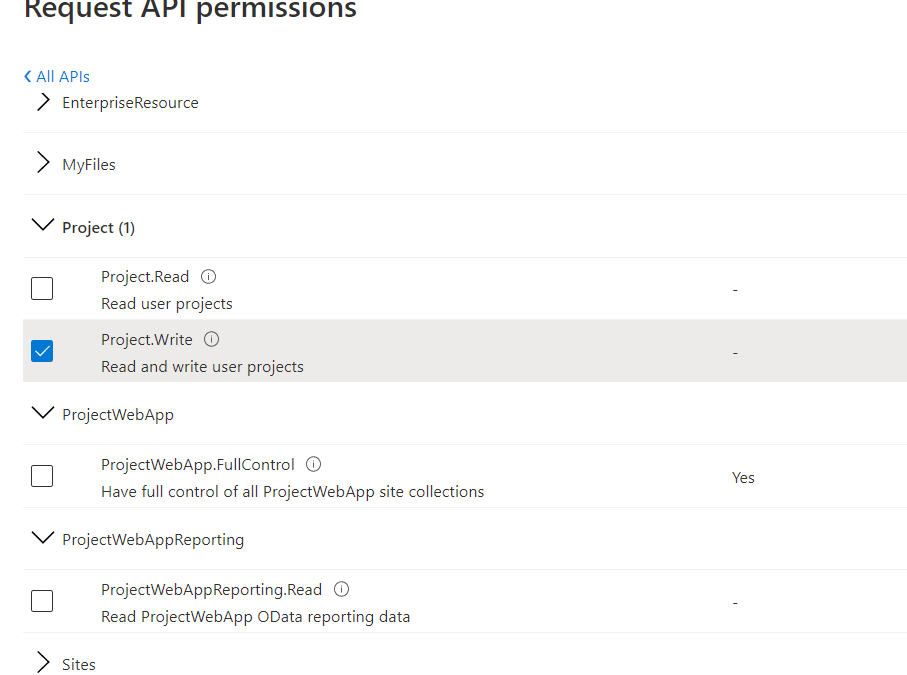
With the most recent updates to the SharePoint client object model (CSOM) libraries it is now possible to authenticate to SharePoint and Project Online with the MSAL libraries rather than ADAL – and this opens up the use of .NET Standard rather than needing the .NET Framework. This DOES NOT however mean that Project Online supports App ID only authentication. SharePoint Online does support app only – but the additional authorisation level in Project to understand who the user is and what they can do requires app + user. See more information here – https://docs.microsoft.com/en-us/sharepoint/dev/sp-add-ins/using-csom-for-dotnet-standard and the API permissions you can choose are shown here. Im my example I’ve just selecting the Project.Write which allows me to create and update a project.
 API Permission Options for Project Online
You application would need to reference the Application (Client) ID associated with these permissions when requesting token – but would also need to pass in the credentials of a user with permissions and license to Project Online. This could be an interactive login – or using a securely stored username and password (not recommended) or using a stored token that is refreshed periodically. Attempting to connect by with the application ID will fail with an “unauthorized” response.
As an example, the following code would get the token and set for project context to make further CSOM calls:
            string domainName = "brismith.onmicrosoft.com";
            string PJOAccount = "brismith@brismith.onmicrosoft.com";
            string scope = "https://brismith.sharepoint.com/Project.Write";
            string redirectUri = "http://localhost";
            string pwaInstanceUrl = "https://brismith.sharepoint.com/sites/pwa/";         // your pwa url
            int DEFAULTTIMEOUTSECONDS = 300;


            HttpClient Client = new HttpClient();
            var TenantId = ((dynamic)JsonConvert.DeserializeObject(Client.GetAsync("https://login.microsoftonline.com/" + domainName + "/v2.0/.well-known/openid-configuration")
                .Result.Content.ReadAsStringAsync().Result))
                .authorization_endpoint.ToString().Split('/')[3];

            // This client ID just has project.write
            PublicClientApplicationBuilder pcaConfig = PublicClientApplicationBuilder.Create("87edf46a-466d-4241-8afc-b9650d7fb0d7")
            .WithTenantId(TenantId);

            pcaConfig.WithRedirectUri(redirectUri);

            // This section uses the interactive flow for auth
            var TokenResult = pcaConfig.Build().AcquireTokenInteractive(new[] { scope })
                .WithPrompt(Prompt.NoPrompt)
                .WithLoginHint(PJOAccount).ExecuteAsync().Result;


            //The following section uses the username and password - this would be best pulled from Azure Key Vault or use another auth flow
            //This also requires the app registration to be set as a public client
            //SampleConfiguration config = SampleConfiguration.ReadFromJsonFile("appsettings.json");
            //string text1 = config.Text1;
            //var sc = new SecureString();
            //foreach (char c in text1) sc.AppendChar(c);

            //var TokenResult = pcaConfig.Build().AcquireTokenByUsernamePassword(new[] { scope }, PJOAccount, sc).ExecuteAsync().Result;

            // Load ps context
            csom.ProjectContext psCtx = new csom.ProjectContext(pwaInstanceUrl);
            psCtx.ExecutingWebRequest += (s, e) =>
            {
                e.WebRequestExecutor.RequestHeaders["Authorization"] = "Bearer " + TokenResult.AccessToken;
            };
– using the latest MSAL (Microsoft.Identity.Client v4.22) and Microsoft.ProjectServer.Client from Microsoft.SharePointOnline.CSOM 16.1.20616.12000 at the time of writing. These will also work with legacy auth disabled which is a setting that may break some existing custom applications.
To check if legacy auth is disabled you can open the SharePoint Online Management shell, connect to your admin Url and run Get-SPOTenent. Look in the returned properties for:
LegacyAuthProtocolsEnabled : False
which in my case shows that legacy auth is disabled.
Hopefully we will get the sample on Github updated with this latest information.
by Contributed | Nov 23, 2020 | Azure, Microsoft, Technology
This article is contributed. See the original author and article here.
Initial Update: Monday, 23 November 2020 22:36 UTC
We are aware of issues within Log Analytics and are actively investigating. Some customers in East US may experience log data latency, data gaps and incorrect alert activation. Start time for the issue is determined to be on 11/23 at 19:28 UTC.
- Next Update: Before 11/24 03:00 UTC
We are working hard to resolve this issue and apologize for any inconvenience.
-Jayadev


Recent Comments