by Contributed | Dec 4, 2020 | Technology
This article is contributed. See the original author and article here.
Hello Developers & Microsoft Teams Fans!
The Learn Together: Developing Apps on Microsoft Teams event is happening on Dec 16.
Currently, there are 115+ million Teams daily active users. That is millions of new users that developers can reach when they develop apps for Teams.
Join us! We will be hosting LIVE discussions and learning opportunities that are specially curated for developers (by developers) around the possibilities and reasons to build apps for Teams.
Expect to see appearances from your favorite Microsoft personalities, surprise guests, trivia, digital swag, and a Teams Learn Challenge to win prizes.
Did we mention it is all FREE?
This digital experience is going to be a bit different. Rather than being talked TO, we will be talking WITH you. Whether you can join us live, or you want to have the content to watch on-demand, make sure to sign up today so you can have all the links and information!
Visit http://aka.ms/learntogether to join the conversation!
Please invite your community to join the event with you! You can also create a watch party to stream the event on Learn TV while watching together in a Teams Meeting with together-mode on.
See you there!
– The #LearnTogether Team
by Contributed | Dec 4, 2020 | Technology
This article is contributed. See the original author and article here.
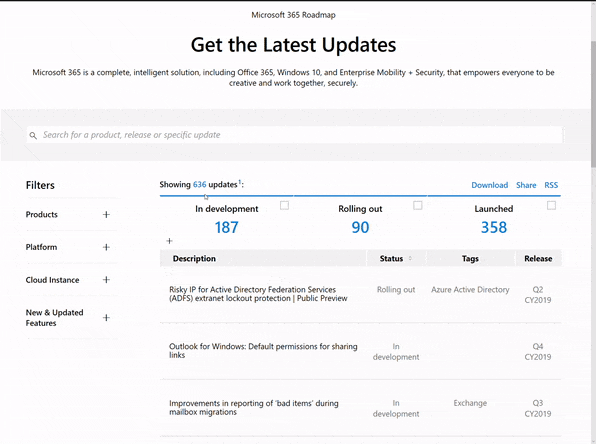
Microsoft 365 Public Roadmap
This link is filtered to show GCC, GCC High and DOD specific items. For more general information uncheck these boxes under “Cloud Instance”.
New to filtering the roadmap for GCC specific changes? Try this:
Stay on top of Office 365 changes
Here are a few ways that you can stay on top of the Office 365 updates in your organization.
Microsoft Tech Community for Public Sector
Your community for discussion surrounding the public sector, local and state governments.
Microsoft 365 for US Government Service Descriptions
|
|
- Office ProPlus (GCC, GCCH, DoD)
- PowerApps (GCC, GCCH, DoD)
- Flow (GCC, GCCH, DoD)
- Power BI (GCC, GCCH)
- Planner (GCC, GCCH, DoD)
- Outlook Mobile (GCC, GCCH, DoD)
- My Analytics (GCCH, DoD)
- Dynamics 365 US Government
|
November Webinars & Remote Work Resources
- Microsoft Teams – IT Admins & Planning
- Microsoft Teams – End Users & Champions
- Security & Azure AD
- Blogs & Articles of Interest
Office 365 Government GCC is now FedRAMP High – Microsoft Tech Community
We’re excited to announce that our Office 365 Government GCC environment now has a FedRAMP High SAR
Using SharePoint Look Book in your GCC High Tenant
Getting errors when you try to use Look Book templates in your GCC High tenant? Read on!
Top 5 Security Questions Asked by our US Government Customers for Microsoft Teams – Microsoft Tech Community
Teams engineering Senior Technical PM Nolene LaNeve breaks down what the top 5 security questions asked by our US Government customers.
Guidance for delivering Virtual Events | Microsoft Adoption
This guidance has been created to assist event organizer, technical producers, IT professionals and content creators deliver virtual events.
Teams features by platform
If you need to know which Teams capabilities are available on which platforms, here’s the detail for you.
Release News
Seamlessly Share Personal Lists in Microsoft To Do
Planner Integration into Message Center – Updated to include GCC
Tenant admins will be able to create a policy that automatically revokes access for SharePoint Online and OneDrive documents for external guests
The Site performance page will equip site owners and editors with more tools and information to make page performance improvements
Groove.exe sync with SPO will no longer allow users to sync their OneDrive and Shared Libraries using Groove
SharePoint page authors will soon need to supply required information before a page or news post can be published
Known Folder Move status script – A new PowerShell script to check Known Folder Move status and know more about your deployment in your organization has been created
Tenant admins will be able to create a policy that automatically revokes access for SharePoint Online and OneDrive documents for external guests
Users will be able to schedule a page or news post to be published at a specific date and time in the future
The migration manager helps orchestrate and simplify management of large-scale migrations. Admins can add and manage multiple migration machines to centrally orchestrate all migration activities
Teams noise cancellation
Teams meeting recordings can now be saved to OneDrive and SharePoint instead of Stream. Administrators can opt-in to the new experience ahead of the broader rollout in 2021
Forced tunnel (split tunnel) exception for Teams Live Events CDN endpoints updates
Tenant upgrade to TeamsOnly mode is now blocked if an on-prem Skype for Business deployment is detected in one or more SIP domains
Teams templates enables administrators to use pre-defined or custom team structures to create templates that can be used by end-users to quickly create new teams with pre-configured settings, channels, and apps
Microsoft Teams will soon require users to use a recent version of Teams to sign-in. Users on older versions will see an in-product banner advising them to update to the latest version
Message Center Highlights
|
MC223128 – PowerPoint: Live captions and subtitles in PowerPoint for GCC and GCC-High
This message is associated with Microsoft 365 Roadmap ID 66205
Live Captions and Subtitles enables presenters to turn captions or subtitles on in 60+ languages, while presenting in 10+ spoken languages with PowerPoint for Windows 10, macOS, and Web. Note this release is for our GCC and GCC-High tenants, and does not yet include DoD environments.
MC224734 – Security Defaults – MFA update to four administrator roles
If you have Security Defaults enabled in your tenant, all Application Administrators, Cloud Application Administrators, Password Administrators, and Privileged Authentication Administrators will soon be required to perform multi-factor authentication (MFA) each time they sign-in.
MC224081 – Upcoming updates to Office 365 threat hunting experiences through Threat Explorer/Real-Time Detections
This message is associated with Microsoft 365 Roadmap ID 66467
As part of this work, we will be introducing additional enhancements when it comes to identifying threats within your organization
MC224173 – Required properties improvements for SharePoint pages
Microsoft 365 Roadmap ID 63257
A pre-publish panel enforces that authors supply missing required properties before they can publish a page or a news post. Additional improvements related to required properties in the pages library take effect.
MC223174 – Redirecting eDiscovery tool usage from the Office 365 Security and Compliance Center to the Microsoft Compliance Center
Starting Oct 30th, users will be redirected to the Microsoft 365 Compliance Center to access content search, eDiscovery, and Advanced eDiscovery.
MC223176 – Upgrade macOS to access new Microsoft 365 for Mac updates
MC223189 – Announcing the general availability of Double Key Encryption for Microsoft 365 for government clouds
This message is associated with Microsoft 365 Roadmap ID 67105
Coming soon to government clouds, Double Key Encryption from Microsoft allows you to protect your highly sensitive data while maintaining full control of your key. You can protect your data with two keys – your Azure key and your key in the Double Key Encryption service.
MC223198 – Announcing general availability of Records Management for Microsoft 365
This message is associated with Microsoft 365 Roadmap ID 63063
Records Management in Microsoft 365 enables government customers to manage recordkeeping obligations intelligently. This update restructures capabilities that were previously part of the Advanced Data Governance solution and provides you with a dedicated and specialized solution for records management, with new features including proof of disposal, record versioning, and enhanced record immutability.
MC223358 – Microsoft Threat Protection and Advanced Threat Protection product name change. These changes will start rolling out in mid/late October and will continue through February 2021.
We are making the following product name changes to bring Microsoft Threat Protection and the products formerly known as Advanced Threat Protection together under the Microsoft Defender brand:
- Microsoft 365 Defender (previously Microsoft Threat Protection)
- Microsoft Defender for Endpoint (previously Microsoft Defender Advanced Threat Protection)
- Microsoft Defender for Office 365 (previously Office 365 Advanced Threat Protection)
- Microsoft Defender for Identity (previously Azure Advanced Threat Protection)
MC223029 – Prevent attendees from unmuting in Teams Meetings
This message is associated with Microsoft 365 Roadmap ID 66575
Gives meeting organizers the ability to mute one to many meeting participants while removing the muted participants’ ability to unmute themselves.
MC222157 – Microsoft Teams: Windows 10 native notifications in Teams
This message is associated with Microsoft 365 Roadmap IDs 66742
With this update, your users will be able to choose their preferred means of Teams notifications delivery, either via the Teams built-in notification system or via their native OS notification system.
MC224054 – Firmware Update for Teams Phones
A new update will be made available to Microsoft Teams phones deployed in your tenant. The following models will receive an update:
- Audiocodes C450HD/C448HD
- Lenovo ThinkSmart View
- Poly Trio C60
- Poly CCX series
- Yealink T5x series
- Yealink MP56
- YealinkVP59
- Yealink CP960.
MC224343 – Microsoft Teams – Virtual Breakout Rooms
Microsoft 365 Roadmap ID: 65332
Meeting hosts can create breakout rooms to be used by meeting participants for smaller group discussion. They can assign participants to a room and call them back to the larger group when the breakout is complete.
MC224359 – Meeting chat moderation settings
Microsoft 365 Roadmap ID: 67175
Meeting organizers can now turn off the chat functionality during a meeting, which is turned on by default.
MC224238 – Transfer Teams meeting between devices or add another device
This message is associated with Microsoft 365 Roadmap ID 67176.
End users can transfer meetings between mobile, desktop, and web, and add another device as a companion to their meeting.
MC224751 – Reducing background noise in Microsoft Teams meetings
This message is associated with Microsoft 365 Roadmap ID 68694.
AI-based, real-time noise suppression, will be added to Microsoft Teams. This feature will automatically remove unwelcome background noise during your meetings.
MC224842 – Outgoing screen-sharing support in Safari for Microsoft Teams
This message is associated with Microsoft 365 Roadmap ID 67174
Teams meetings in Safari 13 and later will now support outgoing screen sharing. A participant can share their screen. No configuration is needed.
MC224937 – Organizers can manage meeting options in the meeting experience for GCC
This message is associated with Microsoft 365 Roadmap ID 73388.
Meetings organizers can now view and update meeting options within the in-meeting making it easier and faster to manage your meeting options during a meeting.
MC225004 – iOS Teams app updates enhances mobile meetings
This feature is associated with Roadmap ID 68834
We’re improving the Teams experience on iOS devices with a new presentation mode, the ability to see more participants, and the ability to see shared content and a spotlighted participant concurrently.
Microsoft 365 IP and URL Endpoint Updates
|
Documentation – Office 365 IP Address and URL web service
28 October 2020 – GCC
28 October 2020 – GCC High
28 October 2020 – DOD
by Contributed | Dec 4, 2020 | Technology
This article is contributed. See the original author and article here.
Contributors:
Rob Garrett – Sr. Customer Engineer, Microsoft Federal
John Unterseher – Sr. Customer Engineer, Microsoft Federal
Martin Ballard – Sr. Customer Engineer, Microsoft Federal
What are Learning Pathways?
Microsoft 365 learning pathways is a customizable, on-demand learning solution designed to increase usage and adoption of Microsoft 365 services in your organization. |
Microsoft 365 learning pathways is a customizable, on-demand learning solution designed to increase usage and adoption of Microsoft 365 services in your organization. Learning Pathways consists of a fully customizable SharePoint Online Communication site collection, with content populated from the Microsoft online catalog; so, your content is always up to date. Learning Pathways provide integrated playlists to meet the unique needs of your organization.
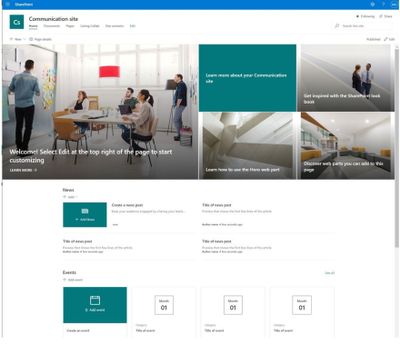
M365 Learning Pathways build atop of the Look Book Provisioning Service and templates (https://lookbook.microsoft.com). In a previous blog post, we detailed the nuances of the Look Book Provisioning Service and additional steps required to deploy templates to GCC High tenants. Since Learning Pathways depend on the provisioning service to create a Communication site with customizations, via a Look Book template, this post details the additional steps to follow those from the earlier blog post.
Challenge – Using Learning Pathways in GCC High
Because of provisioning limitations in the GCC High sovereign cloud, documented installation instructions result in errors. |
Microsoft strives to implement functionality parity between all sovereign clouds. However, since each Office 365 cloud type serves a different customer audience and requirements, functionality will differ between these cloud types. Of the M365 clouds – Commercial, Government Community Cloud, Government Community Cloud High, and DOD Cloud, the last two offer the least functionality to observe US federal mandates and compliance.
As Microsoft develops new functionality for Microsoft 365 and Azure clouds, we typically release new functionality to commercial customers first, and then to the other GCC, GCC High, and DOD tenants later as we comply with FedRAMP and other US Government mandates. Open-source offerings add another layer of complexity since open-source code contains community contribution and is seldom developed with government clouds in mind.
Apply Learning Pathways to GCC High
Manual configuration steps detailed below make Learning Pathways in GCC High possible.
|
Microsoft 365 Learning Pathways offers manual steps to support deployment to an existing SharePoint Online Communication site. Recall from the earlier blog post that the Look Book Provisioning Service is unable to establish a new site collection in GCC High, because of necessary restrictions. We, therefore, deploy Learning Pathways using the manual steps with a pre-provisioned Communication site collection.
Manual setup of Learning Pathways requires experience working with Windows PowerShell and the SharePoint Online Management Shell.
Prerequisites
Before getting into the manual steps, we must meet prerequisites for manual install of Learning Pathways, the following is a summary:
- Create and designate a new Communication in SharePoint Online for Learning Pathways.
- Create a tenant-wide application catalog (steps below).
- Install the latest SharePoint PnP.
- Perform all steps as a SharePoint Tenant Administrator.
We begin by creating a new Communication site via the SharePoint Administration site:
https://mytenant-admin.sharepoint.us/_layouts/15/online/AdminHome.aspx#/siteManagement/view/ALL%20SITES
Note: Ensure you review the default language for the new site.
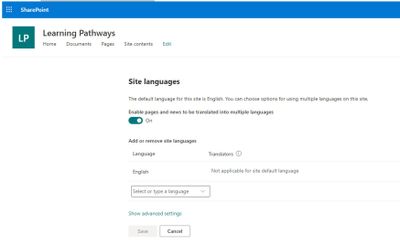
Next, check your language settings – choose one of the following three options:
- Option 1 – You do not want multilingual support:
- From the SharePoint communication site, select Settings > Site information > View all site settings > Language settings.
- Set the Enable pages and news to be translated into multiple languages switch to Off.
- Option 2 – You want multilingual support with the default language:
- From the SharePoint communication site, select Settings > Site information > View all site settings > Language settings.
- Set the Enable pages and news to be translated into multiple languages switch to On.
- Add additional languages, and then click Save.
- Option 3 – You want multilingual support with a different default language:
- Create a new Communication site and select the desired default language.
- From the SharePoint communication site, select Settings > Site information > View all site settings > Language settings.
- Set the Enable pages and news to be translated into multiple languages switch to On.
- Add additional languages, and then click Save
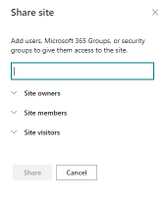
Ensure the appropriate permissions for users of the Learning Pathways site:
- Open the Learning Pathways site collection in your web browser.
- From the home page, click the Share link.
- Add students to the Site Visitors group.
- Add playlist editors of the pathways site to the Site Members group.
- Add site administrators of the pathways site to the Site Owners group.
We shall now create the tenant app catalog (if it does not already exist):
- Open the SharePoint Admin center in your browser.
https://mytenant-admin.sharepoint.us
- Select More Features in the left sidebar.
- Locate the Apps section and click Open.
https://mytenant-admin.sharepoint.us/_layouts/15/online/TenantAdminApps.aspx
- Select the App Catalog.
- If you do not already have an app catalog, provide the following details:
- Title: App Catalog
- Web Site Address Suffix: preferred suffix for the app catalog, e.g. apps.
- Administrator: SharePoint Administrator.
Ensure that the latest version of SharePoint PnP is installed – run the following commands within an elevated PowerShell window:
- Install the SharePoint PnP module with the following (requires an Internet connection):
Install-Module SharePointPnPPowerShellOnline
- If the module is already installed, you should update it to the latest version with:
Update-Module SharePointPnPPowerShellOnline
- Ensure the module is loaded with the following:
Import-Module SharePointPnPPowerShellOnline
Download Learning Pathways Files
With the prerequisites completed, we shall now download the required files for Learning Pathways.
- Visit the following location, on GitHub, via your web browser:
https://github.com/pnp/custom-learning-office-365/tree/master/webpart
- Download the following files to your workstation:
customlearning.sppkg
M365lpConfiguration.ps1
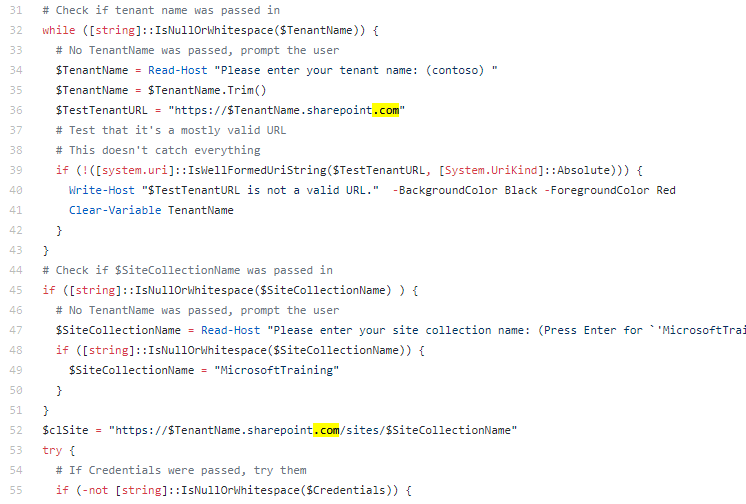
- Edit the PowerShell script and replace the sharepoint.com references to sharepoint.us.
The following image is the code locations at the time this post was published.
Uploading the package to the App Catalog
Having downloaded the customlearning.sppkg file, upload it to the app catalog site (which you created/validated in the prerequisites):
- Open the app catalog site in your web browser, e.g.:
https://mytenant.sharepoint.us/sites/appcat/SitePages/Home.aspx
- Click Apps for SharePoint in the left sidebar.
- Click the Upload button.
- Select the customlearning.sppkg file.
- Click the OK button to upload the package.
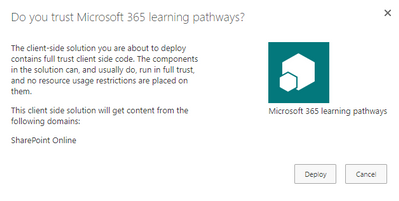
- If asked, trust the application by clicking the Deploy button:
Run the PowerShell Script
Now, we run the downloaded PowerShell script: M365lpConfiguration.ps1
Note: The script will prompt for credentials – authenticate with the credentials of a Tenant SharePoint Administrator.
Using the script looks like this:
M365lpConfiguration.ps1 -TenantName contoso -SiteCollectionName MicrosoftTraining
For example, if your site is…
https://mytenant.sharepoint.us/sites/LearningSite/
you run:
M365lpConfiguration.ps1 -TenantName mytenant -SiteCollectionName LearningSite
Note: Sites may take a few minutes to be fully available.
Validate Deployment of Learning Pathways
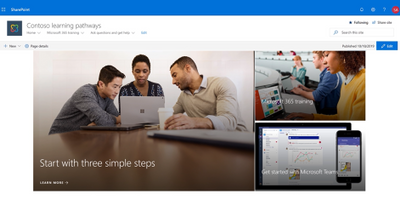
Having completed the earlier steps in this post, including running the PowerShell script without error, you should now see both user and admin pages in your learning site collection:
https://mytenant.sharepoint.us/sites/my-site-name/SitePages/CustomLearningViewer.aspx
https://mytenant.sharepoint.us/sites/my-site-name/SitePages/CustomLearningAdmin.aspx

by Contributed | Dec 4, 2020 | Technology
This article is contributed. See the original author and article here.
The Microsoft Health Bot is a cloud platform service “that empowers developers in Healthcare organizations to build and deploy their compliant, AI-powered virtual health assistants and health bots, that help them improve processes and reduce costs. It allows you to offer your users intelligent and personalized access to health-related information and interactions through a natural conversation experience.” – What is the Microsoft Health Bot Service?
Today I received a query from a customer looking to extend their Health Bot and they wanted to know if it was possible and if so how to go about doing it. Thankfully, the Health Bot is extensively documented with all the information needed for implementation, compliance, configuration and extending the QnA Maker. Rather than just send over the information as a one-off email I have pulled it all together and am posting here for others who may want to look at the Health Bot or who would also like to further configure/customize it.
- Quickstarts
- Concepts
- How-to guides
- Resources
- APIs
Thanks for visiting – Michael Gannotti LinkedIn | Twitter
 Michael Gannotti
by Scott Muniz | Dec 4, 2020 | Security, Technology
This article is contributed. See the original author and article here.
Original release date: December 4, 2020
Google has released Chrome version 87.0.4280.88 for Windows, Mac, and Linux. This version addresses vulnerabilities that an attacker could exploit to take control of an affected system.
The Cybersecurity and Infrastructure Security Agency (CISA) encourages users and administrators to review the Chrome Release and apply the necessary updates.
This product is provided subject to this Notification and this Privacy & Use policy.

by Contributed | Dec 4, 2020 | Azure, Microsoft, Technology
This article is contributed. See the original author and article here.
The UP Podcast with Lisa Crosbie & Megan V. Walker
Lisa Crosbie and Megan V. Walker are Business Application MVPs. With Lisa in Australia and Megan in the United Kingdom, the pair thought it was a great idea to start a podcast together about Microsoft Business Applications, the Power Platform, Dynamics 365, and Microsoft technologies. The UP Podcast shares what is new and exciting, highlights community content, and seeks to share and learn with the audience. Follow on Twitter @LisaMCrosbie, @MeganVWalker, @the_UP_podcast.

How to automatically re-enable flow using Power Automate
Hiroaki Nagao is a Business Applications MVP from Japan. Currently working as a system administrator in an operating company, Hiroaki is a core member of the local Power Apps / Power Automate community. A regular blogger with more than 100 posts this year, find more on his blog or Twitter @mofumofu_dance

Engage Your Audience with Forms Polls in Microsoft Teams Meetings
Matti Paukkonen is an Office Apps & Services MVP and Modern Work Architect from Finland. He has more than 10 years’ experience of Microsoft collaboration solutions, like SharePoint, Microsoft Teams and Microsoft 365. He writes technical blog articles, organizes a local Teams User Group, and participates on several communities and speaks on events. Follow him on Twitter @mpaukkon.

Azure Sentinel: Connecting the Enterprise Firewalls
John Joyner is an inventor, author, speaker, and professor on datacenter and enterprise cloud computing topics. John, who has been named as an MVP for the past twelve years, teaches a cloud computing management course at the University of Arkansas. For more, check out his Twitter @john_joyner

ML.NET Model Builder: Getting Started (using ASP.NET Core)
Syed Shanu is a Microsoft MVP, a two-time C# MVP and two-time Code project MVP. Syed is also an author, blogger and speaker. He’s from Madurai, India, and works as Technical Lead in South Korea. With more than 10 Years of experience with Microsoft technologies, Syed is an active person in the community and always happy to share his knowledge on topics related to ASP.NET , MVC, ASP.NET Core, Web API, SQL Server, UWP, Azure, among others. You can see his contributions to MSDN and TechNet Wiki here. Follow him on Twitter @syedshanu3.
by Scott Muniz | Dec 4, 2020 | Security
This article was originally posted by the FTC. See the original article here.
Welcome to the FTC’s 12 Days of Consumer Protection, a holiday series to help you save money and avoid scams.
Each day, we’ll cover a new topic — from shopping online and bogus shipping notifications to temporary job scams and fake charities. We’ll give you practical information you can use every day and share with your family, friends, and community so they can be safe too.
Brought to you by Dr. Ware, Microsoft Office 365 Silver Partner, Charleston SC.
by Contributed | Dec 4, 2020 | Technology
This article is contributed. See the original author and article here.
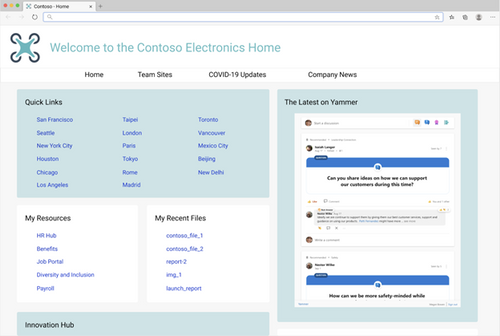
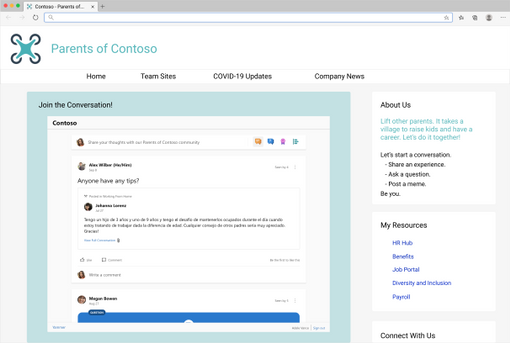
Soon, you can bring the new Yammer to a web page near you! This is an update to the current embeddable JavaScript widgets that brings Yammer’s new platform experience to any HTML based application. We plan to start rolling out starting December 2020.
You will not need to take any additional actions, if the feed is eligible to be upgraded (see known limitations chart below), your users will see the new Yammer instead of the Classic Yammer in the Embeds!
What’s new and different about this updated experience?
You’ll get the new Yammer experience including rich media previews and visual treatment for questions, praise, and polls. Plus, you’ll get an improved, relevant Home Feed to stay on top of conversations across your communities – embed the Home Feed on your intranet home page to help your employees stay up-to-date on their personalized feed.
The new Yammer Embed brings more functionality, like reacting to and pinning conversations.
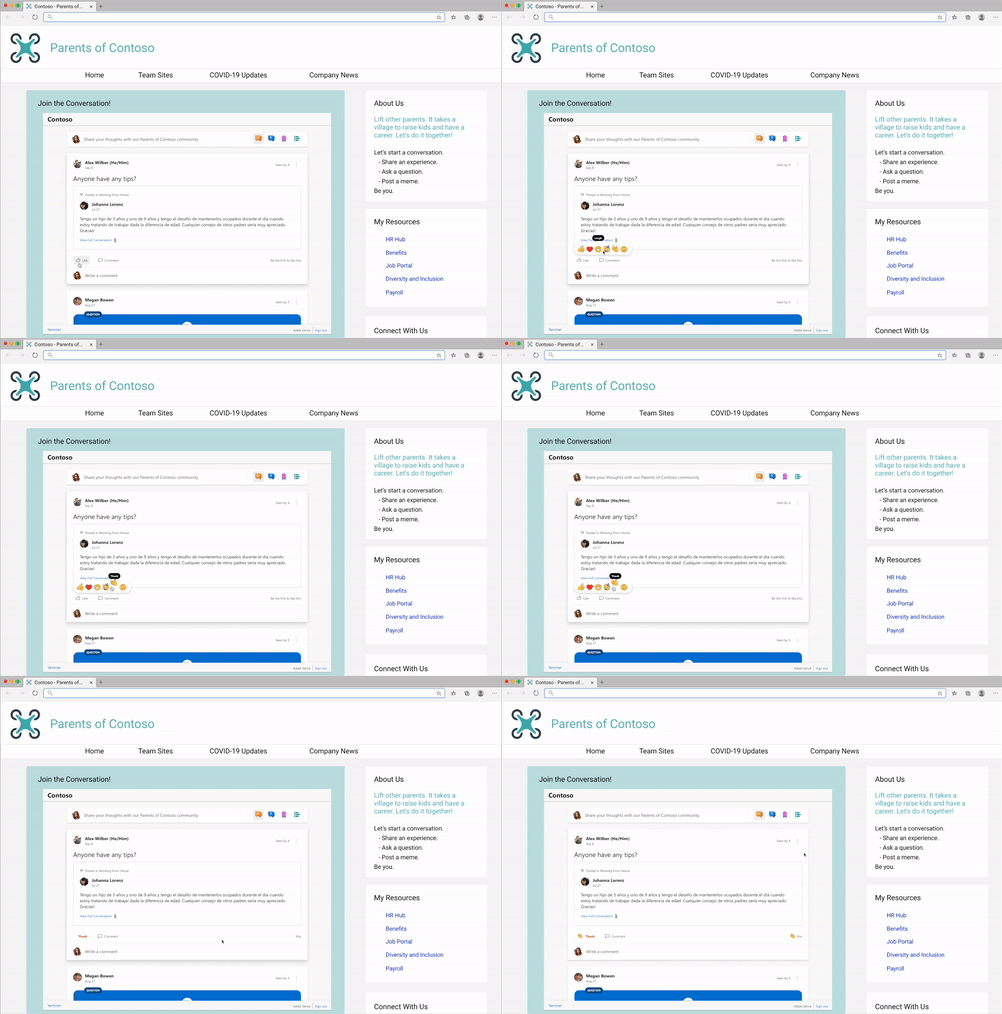
- Start a conversation in any community
- Create any type of Yammer post directly from Embed– questions, polls, praise, etc.
- Upload of images & files into new conversations and replies
- Use rich text in messages
- Close Conversation, Mark Best Answer to a Question
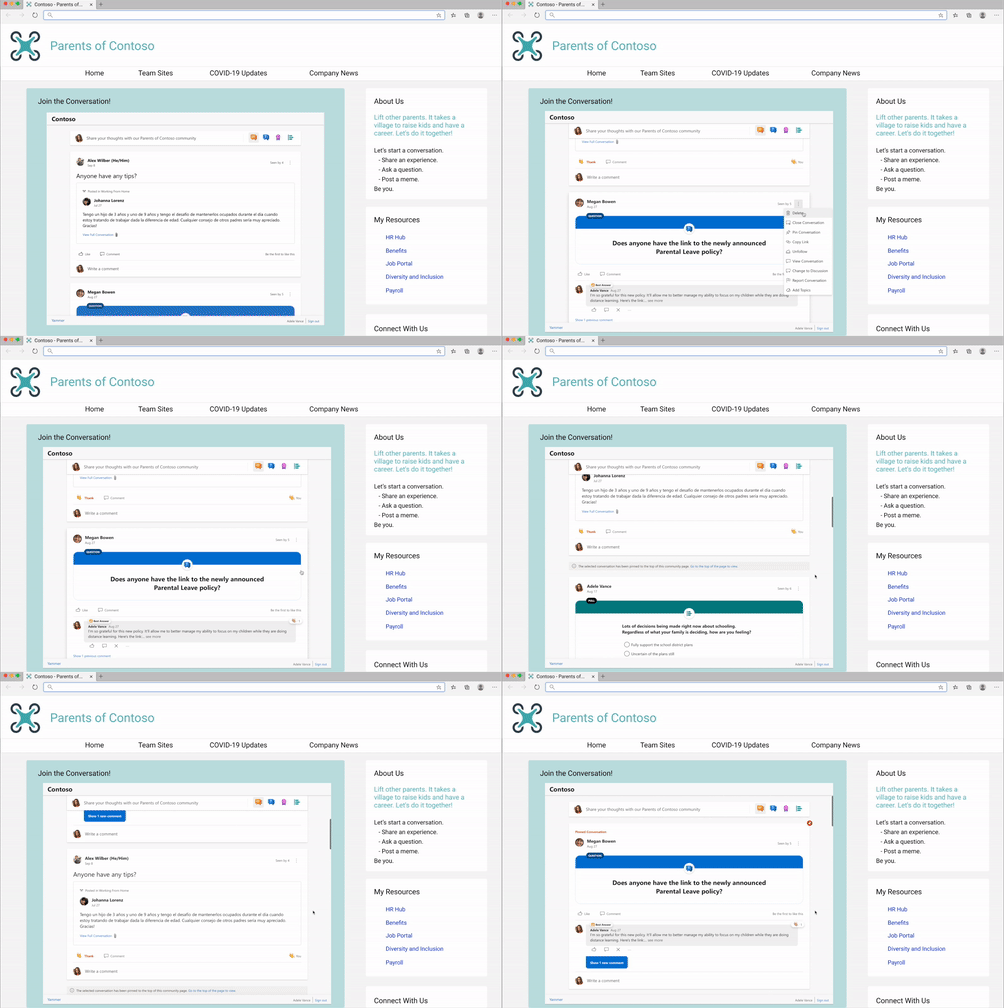
We’ve seen our customers embed Yammer in a variety of ways, including embedding the conversations for virtual events. Need help with this? Request virtual event assistance for embed.
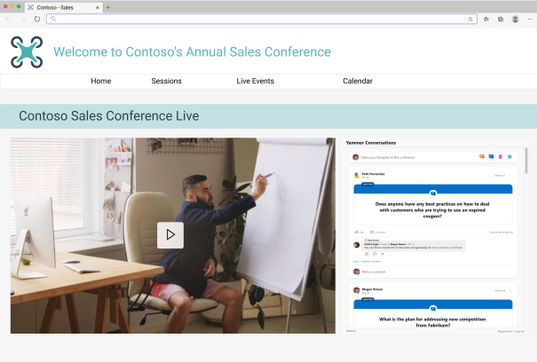
Or embedding conversations for community and team sites.
Current limitations and future development
Limitation
|
Estimated Timeline for changes
|
defaultGroupId configuration: We are currently still working on supporting this configuration, which will allow for home, user, topic, and Open Graph feeds to be set to the provided defaultGroupId to publish to. Currently, if home, topic, or user feeds are used with a defaultGroupId configured, the feed will be set to the community feed of the defaultGroupId. The defaultGroupId parameter is invalid for community feeds and will set the publisher to the provided defaultGroupId for Open Graph feeds.
|
CY2021 Q1
|
External networks: Embeds that attempt to access a feed from an external network will be redirected to use the existing classic Yammer Embeds
|
CY2021 Q2
|
Metadata Overrides for Open Graph feeds: the ability to override ‘type’, ‘title’, ‘image’, ‘description’ are no longer supported
|
NA
|
IE11 redirection: Users attempting to load the Embeds on IE11 will be redirected to use the existing classic Yammer Embeds
|
NA
|
Additionally, feature requests and feedback can be submitted to newyammerembedpreview@service.microsoft.com.
How are you embedding Yammer at your organization? Please share your tips and best practices is in the comments below.
by Contributed | Dec 4, 2020 | Technology
This article is contributed. See the original author and article here.
Introduction
This is John Barbare and I am a Sr. Customer Engineer at Microsoft focusing on all things in the Cybersecurity space. In this blog I will walk you through various Microsoft products from the Microsoft Security Stack and explain in detail what each of the Secure Scores depict. This is especially important as you are assessing the overall risk of your environment and seeing how prone your organization is from attacks. With that said, let’s talk about Microsoft Secure Score, the various products which incorporate it, and conclude with your overall Secure Score for multiple products in the Microsoft Security Stack.
Microsoft Secure Score
Microsoft Secure Score is a measurement of an organization’s security posture, with a higher number indicating more improvement actions taken and the overall achievement is to get a lower or acceptable secure score for your environment. This Secure Score can protect your organization against a number of threats, threat vectors, CVEs (Common Vulnerabilities and Exposures), improve security configuration changes, and numerous other security modifications. By using Secure Score, you can help your organization assess the current security posture, improve your overall security posture with delivering discoverability, visibility, guidance, and control, and finally comparing with benchmarks and establishing key performance indicators (KPIs).
Azure Security Center / Azure Defender
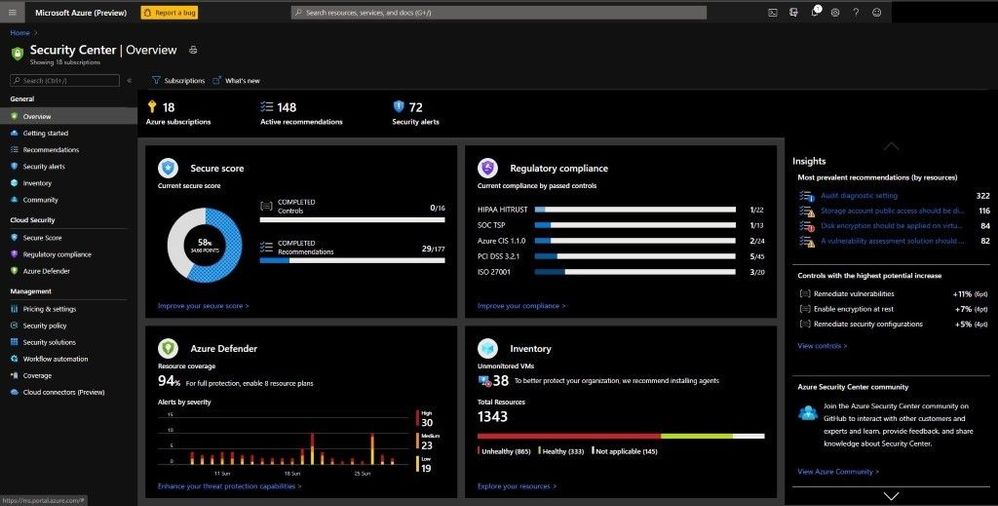
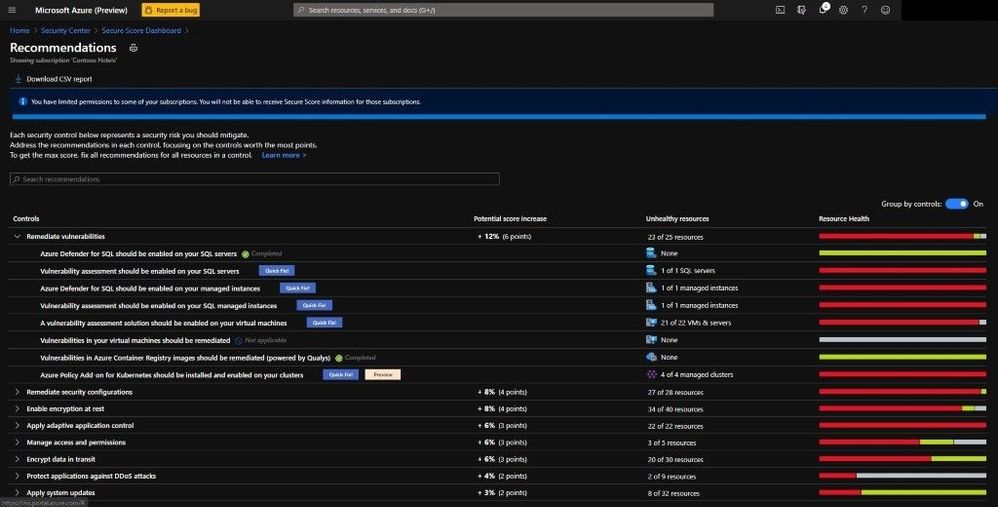
Inside Azure Defender you are displayed with the Secure Score dashboard and various security-based information in deriving the Secure Score. Here we can see how to better understand the current security situation inside Azure Defender and all the security settings and assist in efficiently and effectively improving your overall Secure Score. Recommendations are grouped into security controls. Each control is a logical group of related security recommendations and reflects your vulnerable attack surfaces. Your score only improves when you remediate all the recommendations for a single resource within a control. In order to get all the possible points for a selected security control, every one of your resources must comply with all security recommendations within the specific security control. For example, Remediate Vulnerabilities has a max score of 6 points. If you have 40 resources, you will divide the maximum score by 40 giving you .15 maximum points per resource.
- Potential increase (0.15 x 7 unhealthy resources = 1.05) – The remaining points available to you within the control. If you remediate in this case, 1.05 points rounds to 1 point.
- Current score (0.15 x 30 healthy resources = 4.50) – The current score for this control. Each control contributes to the total score. In this example, the control is contributing 4.50 points to the current secure total.
- Max score – The maximum number of points you can gain by completing all recommendations within a control. The maximum score for a control indicates the relative significance of that control. Use the max score values to triage the issues to work on first.
As you can see below, the dashboard is extraordinarily rich with lots of information to see why your Secure Score is low or high and the insights into the most prevalent security recommendations.
Azure Security Center / Azure Defender
By selecting the Improve your Secure Score underneath the pie graph, you can see all the security recommendations as seen below.
 Remediation options
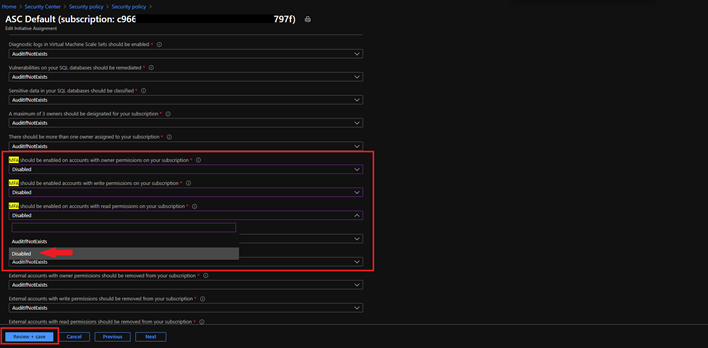
One item to make note of is that only built-in Azure Security recommendations have an impact on the Secure Score. If you have any 3rd party controls or any items in preview, these actions are not included in the calculation of your overall Secure Score. This doesn’t mean to not remediate, but when the preview does end and you have remediated, your Secure Score will be factored in. If you use a 3rd party control – RSA Token for MFA – and do not use the one recommended for Secure Score in Azure Defender, you have the option to change the Security policy since you are using an RSA Token for MFA, but this doesn’t have an impact on the calculation of the Secure Score. The idea of disabling the MFA policy in this example will not negatively affect the Secure Score and will also not deduct any points in the process.
To change this, go to the Security Policy blade, select the Subscription, select View effective policy under Security Center effective policy, select the assignment hyperlink, select the parameters tab on the next screen, and search for MFA. Since you are using MFA via an RSA Token, you can edit the initiative assignment from AuditifNotExists to Disable and select Review + Save.
 Disabling an Audit Policy
Azure Active Directory Identity Protection
Moving over to Azure Active Directory and seeing how your Secure Score is and your overall security of your Azure Active Directory tenant. Inside Azure Active Directory you can gain a maximum of 243 points based on how well you are aligned with Microsoft’s best recommendation for security as it pertains to Azure Active Directory security. You can measure your identity security posture, a list of improvements, and a trend graph of how your identity has changed over time. Every 48 hours, Azure looks at your security configuration and compares your settings with the recommended best practices for Azure Active Directory and your tenants. Based on the outcome of this assessment, a new score is calculated for your directory and your configurations.
 Azure Active Directory Identity Protection
If you want to see what actions in your environment are impacting it the greatest from an Identity/ User impact perspective, one can select the User Impact column and sort from High to Low as seen below. Then you can drill down and start remediating high user impact identity action items and start remediating to have a stronger Secure Score.
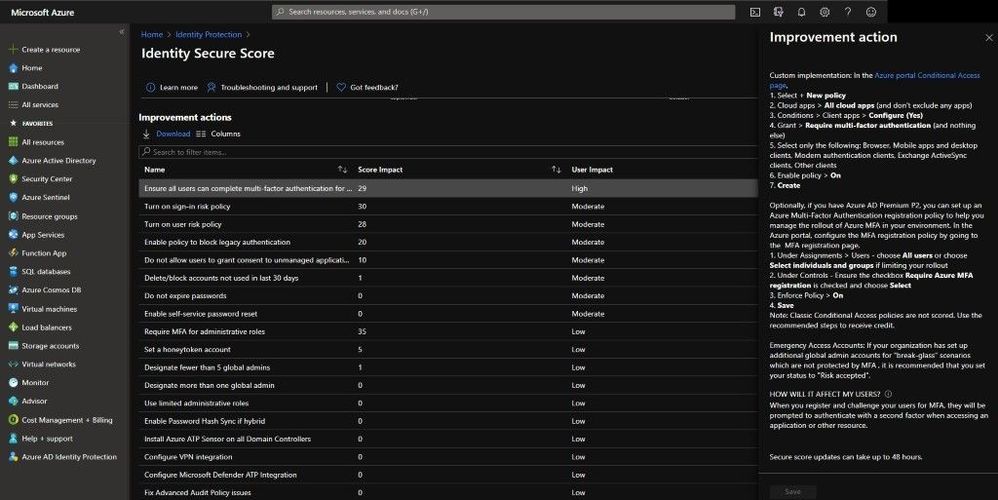 Improve an action
Microsoft Defender for Endpoint
The product I have the most experience with and my favorite is Microsoft Defender for Endpoint. Inside the Threat and Vulnerability Dashboard we can see multiple scores that are accessing our onboarded endpoints.
The first one is Exposure Score, which reflects the current exposure associated with devices in your organization. Several factors affect the Exposure Score:
- Weaknesses discovered on devices.
- The likelihood of devices to get breached.
- Value of devices to the organization.
- Related alerts discovered on devices.
One can reduce the Exposure Score by addressing what needs to be remediated based on the prioritized security recommendations. Underneath the score you can see your Exposure Score over time and see any impacts or improvements made along the chart.
The second one is Microsoft Secure Score for Devices which reflects the collective security configuration posture of your devices across O/S, Application, Network, Accounts, and Security Controls. One can Increase the secure score for devices by addressing what needs to be remediated in your O/S, applications, network, accounts, and security controls, based on the prioritized security recommendations. Underneath the score you can see your score for devices over time and see any impacts or improvements made along the chart.
The third one is not really a score, but an Exposure Distribution number based on a low, medium, and high categorization. Exposed devices are easy targets for cybersecurity attacks so ensuring that these devices can receive security updates, have critical security controls, and are properly configured is key to maintaining an acceptable and minimal risk level.
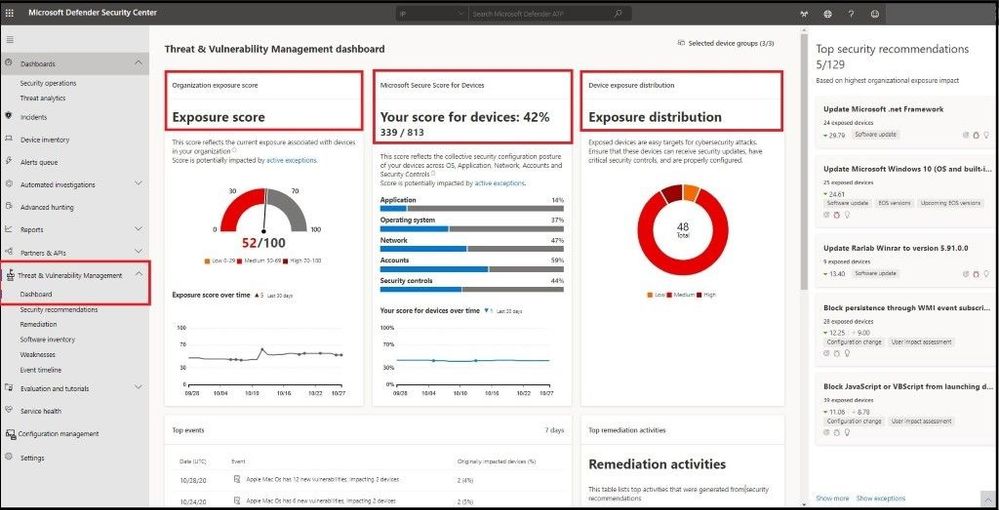 MDE – Threat and Vulnerability Management Dashboard
Microsoft 365 Compliance Center
Inside Microsoft 365 Compliance Center and under the Compliance Manager blade, one will find your overall Compliance Score. The Compliance score measures your progress in completing actions that help reduce risks around data protection and regulatory standards. This score measures your progress in completing recommended improvement actions within controls. Your score can help you understand your current compliance posture. It can also help you prioritize actions based on their potential to reduce risk.
Compliance Manager gives you an initial score based on the Microsoft 365 data protection baseline. This baseline is a set of controls that includes key regulations and standards for data protection and general data governance. This baseline draws elements primarily from NIST CSF (National Institute of Standards and Technology Cybersecurity Framework) and ISO (International Organization for Standardization), as well as from FedRAMP (Federal Risk and Authorization Management Program) and GDPR (General Data Protection Regulation of the European Union). Most of my customers use these baselines so this is always a big hit once we have everything onboarded to see where they are.
Because every organization has specific needs, Compliance Manager relies on you to set up and manage assessments to help minimize and mitigate risk as comprehensively as possible. Actions are assigned a score value based on whether they are mandatory or discretionary, and whether they are preventative, detective, or corrective.
 Microsoft 365 Compliance Center
Microsoft Cloud App Security
Heading over to Microsoft’s Cloud App Security Broker – Microsoft Cloud App Security – we can assess cloud applications in the environment and determine a risk score based on a plethora of metrics. Cloud Discovery analyzes your traffic logs against Microsoft Cloud App Security’s cloud app catalog of over 16,000 cloud apps. The apps are ranked and scored based on more than 80 risk factors to provide you with ongoing visibility into cloud use, Shadow IT, and the risk Shadow IT poses to your organization.
Cloud Discovery provides you with important data regarding the credibility and reliability of the cloud apps that are used across the environment. Within the portal, each discovered app is displayed along with a total score. The score represents Cloud App Security’s assessment of this app’s maturity of use for enterprises. The total score of any given app is a weighted average of sub scores relating to the subcategories which Cloud App Security considers when assessing reliability:
- General – This category refers to basic facts about the company that produces the app, including its domain, founding year, and popularity. These fields are meant to show the company’s stability on the most basic level.
- Security – The security category accounts for all standards dealing with the physical security of the data used by the discovered app. This category includes fields such as multi-factor authentication, encryption, data classification, and data ownership.
- Compliance – This category displays which common best-practice compliance standards are upheld by the company that produces the app. The list of specifications includes standards such as HIPAA (Healthcare Insurance Portability & Accountability Act), CSA (Cloud Security Alliance), and PCI-DSS.
- Legal – This category displays which apps have regulations and policies in-place to ensure data protection and privacy of the app’s users such as GDPR, DMCA (Digital Millennium Copyright Act), and data retention policy.
One item I like to do when onboarding Microsoft Cloud App Security and after everything is connected and synchronized is to show the risk scores of “risky” applications. On the Discovered Apps dashboard, I will slide the Risk Score from a 0 – 7 thresholds. This will pull up all the apps that are deemed to be “risky” as I base this off 70% or lower. Then by going in and investigating, I can make further determination to see if it is risky or to accept the risk based on all the data provided.
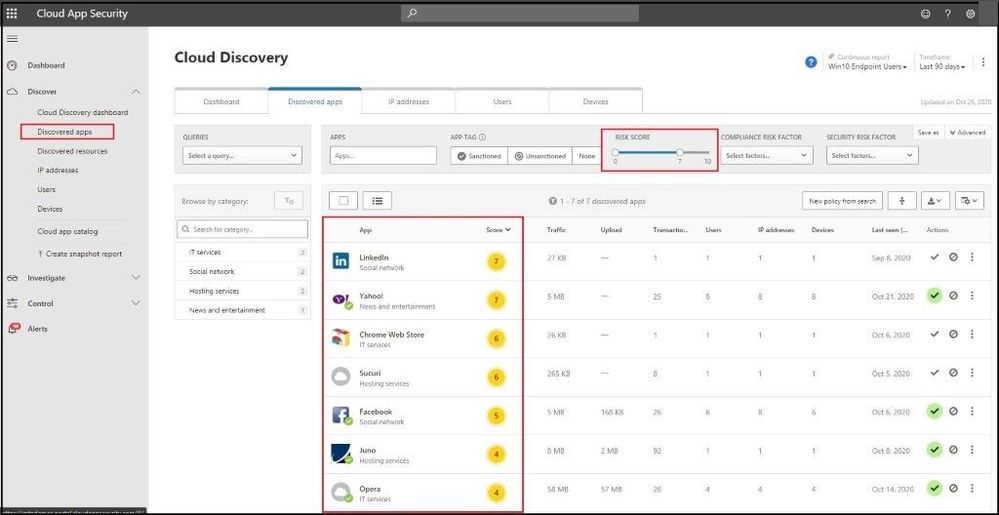 Microsoft Cloud App Security – Discovered Apps
Here I have selected the Chrome Web Store app and want to investigate why it has a number/score of a 6 out of 10 rating. Upon hovering over the Compliance field, I am presented with a property score of 2/10 with a total category weight of 29%. If my company is very strong from a compliance standpoint and needed all apps to be ISO 27001, HIPAA, and SOC2 compliant, I can confirm that this app will be “unsanctioned” in my environment and I will not allow users to run or install this app in my environment. A great blog post on a walkthrough of how to do this can be found here.
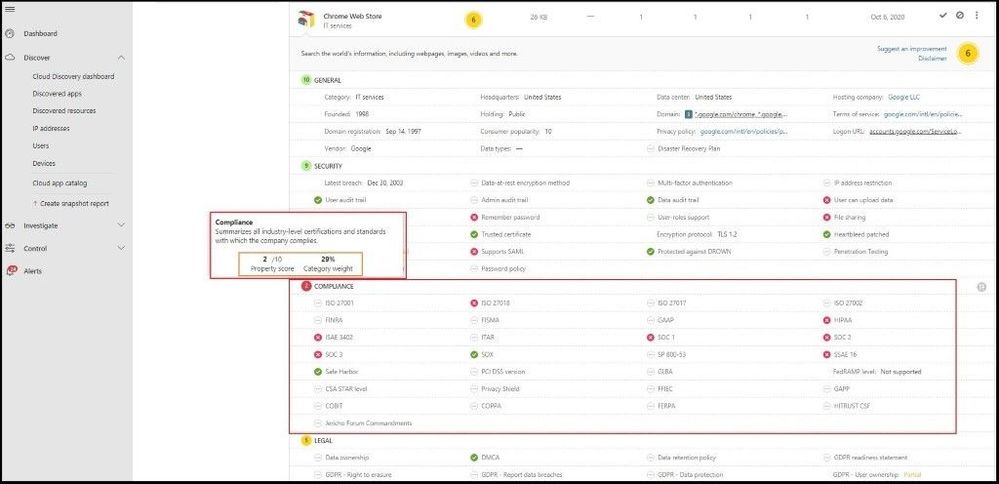 Compliance Score of an App
Microsoft 365 Defender
Even though I went over several of the Microsoft Security products your organization can use for which licenses you have that will display a Secure Score, I will conclude with Microsoft 365 Defender which pulls in all the security dashboards / Secure Scores all into one overall Secure Score. From the main dashboard (Overview tab), you can see your overall Secure score with a breakdown from an Identity, Data, Devices, and Applications perspective. Next, you can review the actions to review and the top improvement actions across your enterprise.
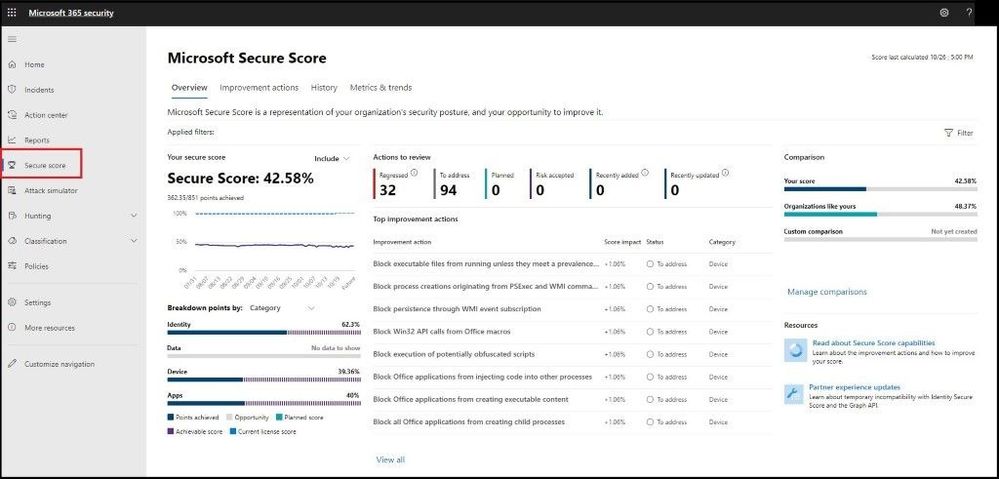 Microsoft 365 Defender – Secure Score
Next, we will select the Improve actions tab which will display all the improvement actions across all the products. When you make any changes, it may take up to 24 hours to reflect a change in the score or dashboard.
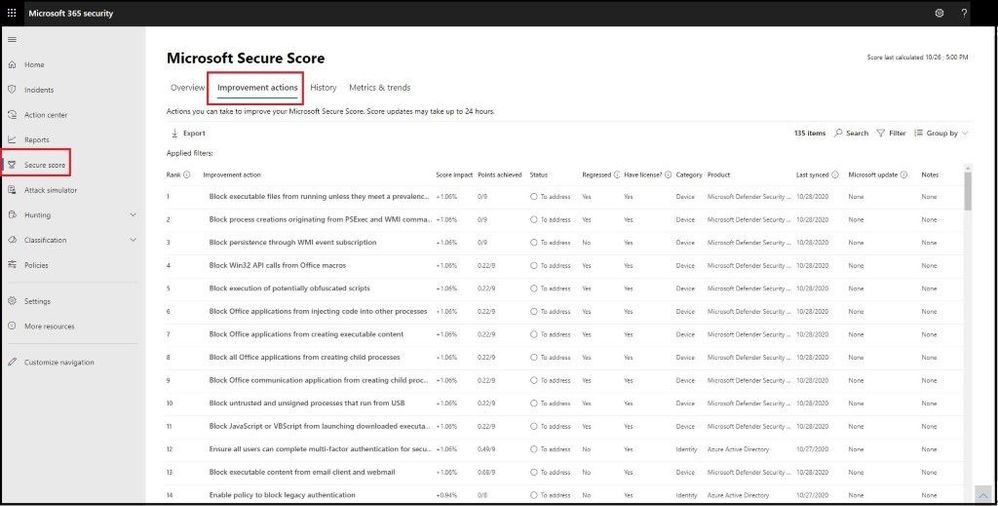 Improve Actions
Next, we will select the History tab and see a history graph for the last 90 days or custom date range. Under the graph we can see all the activity that has resulted in a security change and the resulting points, category, and what it was attributed to.
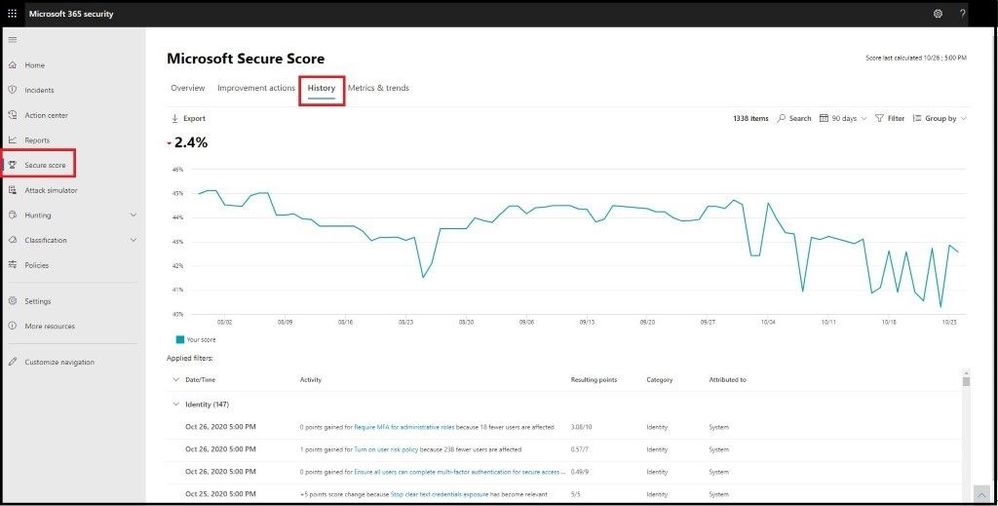 History of Secure Score
If you select the Filter tab, you can filter by category, product, and/or update type as seen in the image below.
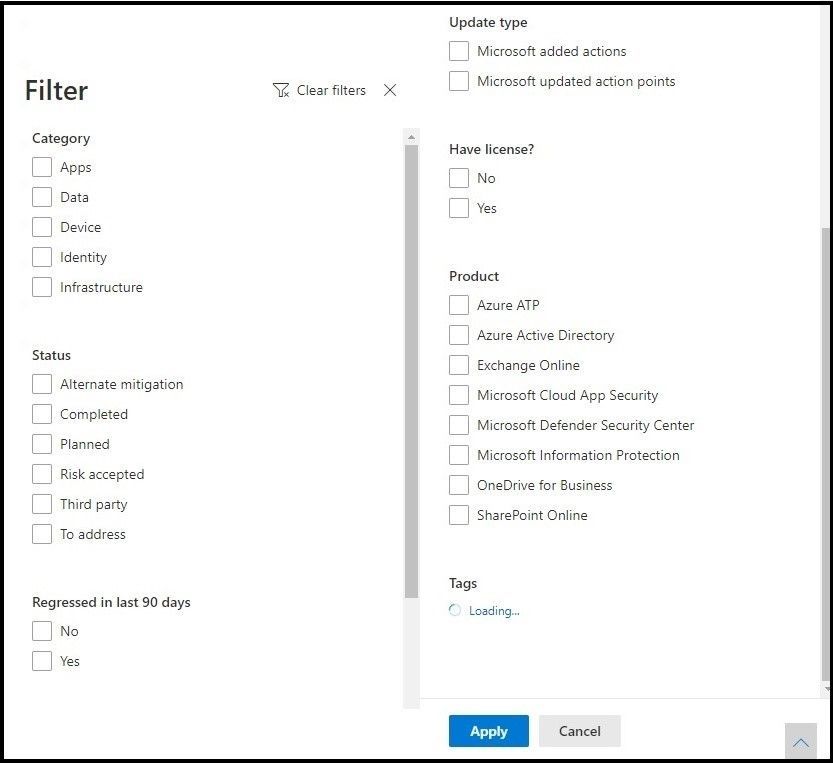 Filters
After applying any filters, you can get more fine grained with the overall Secure Score and dive into the status or see what has regressed over the last 90 days.
Next, we will go into the Metrics and Trends tab. Inside here we can see are several graphs and charts to give you more visibility into trends and set goals. You can set the date range for the whole page of visualizations. The visualizations include:
- Your Secure Score zone – Customized based on your organization’s goals and definitions of good, okay, and bad score ranges.
- Regression trend – A timeline of points that have regressed because of configuration, user, or device changes.
- Comparison trend – How your organization’s Secure Score compares to others’ overtime. This view can include lines representing the score average of organizations with similar seat count and a custom comparison view that you can set.
- Risk acceptance trend – Timeline of improvement actions marked as “risk accepted.”
- Score changes – The number of points achieved, points regressed, along with the subsequent score change, in the specified date range.
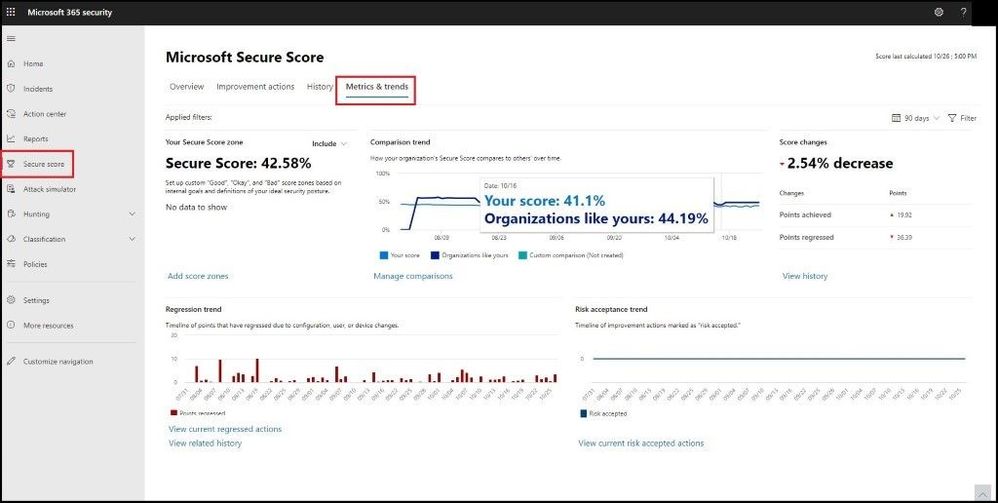 Metrics and Trends
The feature I like best about these Metrics and Trends is being able to compare your organization with others in the same industry, Microsoft product licenses, organization size, and/or geographical region. By selecting the Manage Comparisons link under the comparison trend chart, we can select and choose the custom criteria to compare your organization with as seen below.
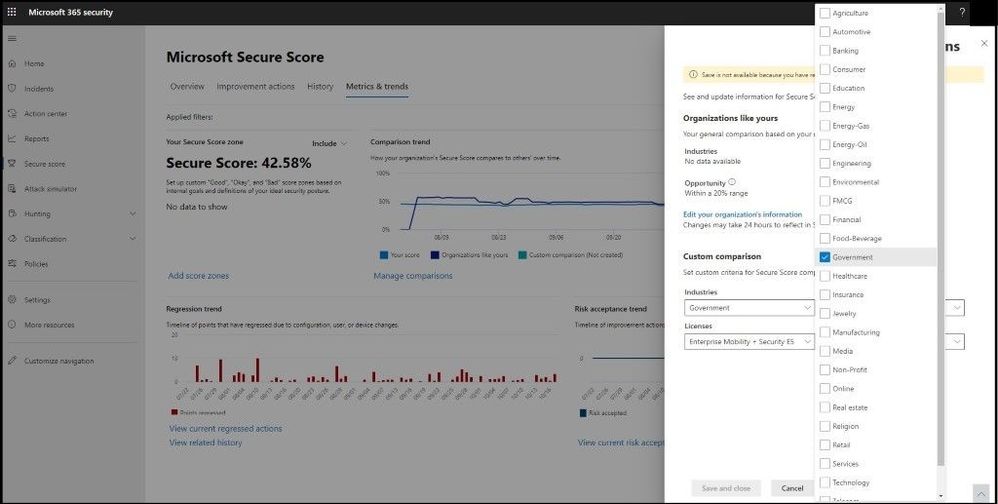 Comparing Like Organizations
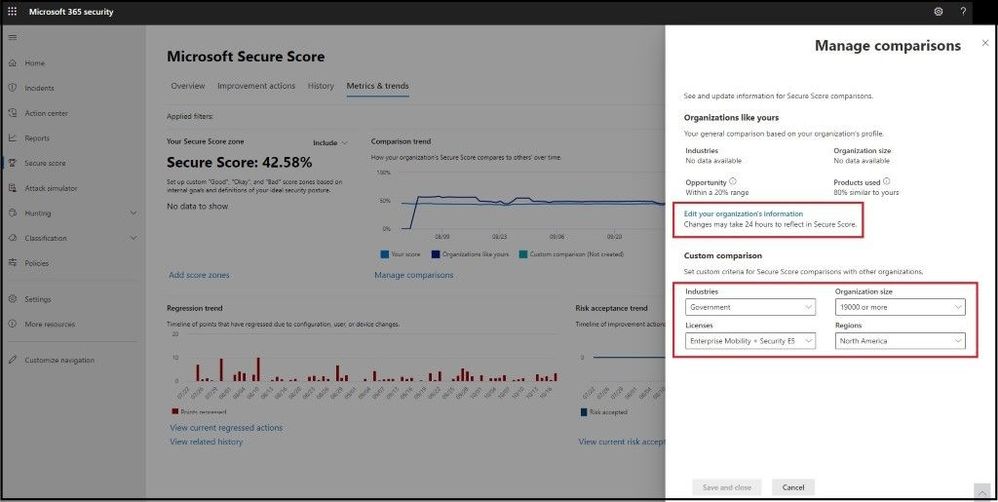 Like Organizations
The comparison data is anonymized, so Microsoft does not know exactly which other tenants are included and your privacy is protected as well.
Video Demo
Conclusion
Thanks for taking the time to read this blog and I hope you had fun reading how Microsoft uses Secure Score across multiple security products and then combines into one overall Secure Score in Microsoft 365 Defender. Even though I did not show every specific product that has a Secure Score, this blog will show you how to get started in remediating and securing your endpoints more securely. All of my clients have raved about Microsoft Secure Score and now you can see in more detail why and how you can use it in your current environment. Hope to see you in the next blog and always protect your endpoints!
Thanks for reading and have a great Cybersecurity day!
Follow my Microsoft Security Blogs: http://aka.ms/JohnBarbare and also on LinkedIn.

by Contributed | Dec 4, 2020 | Technology
This article is contributed. See the original author and article here.
Learn Together: Dev Apps for Teams is happening on Dec 16 and it will be more of a conversation-style event. Make sure to set your reminders to attend!
These conversations are specially curated for developers (by developers) around the opportunities and reasons to build apps for Teams.
So what are we most excited to learn in the two hours?
- Understand Teams Apps Learn the key concepts and terms necessary to build apps for Teams. Expand on the messaging, Tab app, extensions, Bots, and more. Learn to speak the language!
- “Hello, world! for Teams Getting started with Teams app development is as easy as click, click, hello world! Learn to build apps for Teams in minutes with the Teams Toolkit Visual Studio Code extension.
- Make your app part of your user’s day. Enhance the usability of your application by integrating messaging and meeting extensions, adaptive cards, and more.
The event is closely tied around the Teams App Dev Learning Path and there will even be a Teams Dev Challenge for those that want to win prizes and put their skills to the test.
Join us live or stream on-demand and we are excited to #learntogether! See you there!


Recent Comments