This article is contributed. See the original author and article here.
Official websites use .gov A .gov website belongs to an official government organization in the United States.
Secure .gov websites use HTTPS A lock () or https:// means you’ve safely connected to the .gov website. Share sensitive information only on official, secure websites.
This article is contributed. See the original author and article here.
In this atypical year, many of us have discovered a new sense of appreciation for our computers as critical tools to get work done. Now more than ever, we are all looking for new ways to be productive on our laptops and desktops. At Microsoft, we are committed to delivering great Microsoft 365 experiences that help our customers work easier and faster on their favorite devices. With this in mind, we want to share some of the latest Microsoft 365 innovations that can make you even more productive on a Mac.
Universal app support for Macs with M1 is here
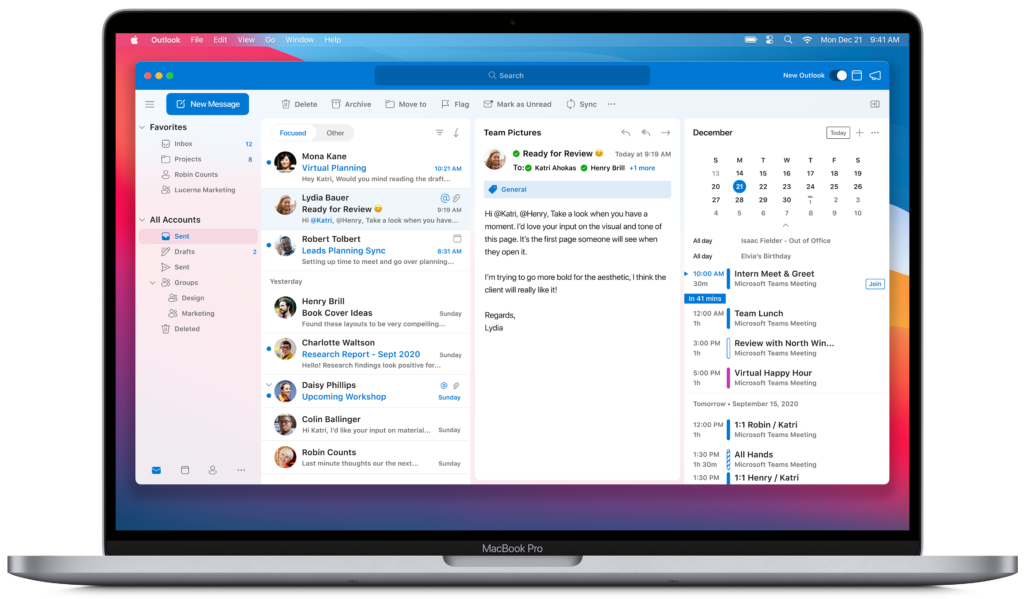
We are excited to announce that starting today we are releasing new versions of many of our Microsoft 365 for Mac apps that run natively on Macs with M1. This means that now our core flagship Office apps—Outlook, Word, Excel, PowerPoint, and OneNote—will run faster and take full advantage of the performance improvements on new Macs, making you even more productive on the latest MacBook Air, 13-inch MacBook Pro, and Mac mini. The new Office apps are Universal, so they will continue to run great on Macs with Intel processors. The apps are not only speedy, but they also look fantastic as they have been redesigned to match the new look of macOS Big Sur. Here is a peek at Outlook on the new 13-inch MacBook Pro.
If you have automatic updates turned on, you will start to receive these updates today. Otherwise, you can go to the Mac App Store and click the Updates tab, or with Microsoft AutoUpdate, you can go to your Office app’s Help menu and choose Check for Updates. Plus, find more commonly asked questions on our support page.
With more than 115M daily active users, Teams has become a critical part of the way many people are navigating the current situation. Teams allows you to meet, chat, call, and collaborate all in a single app. And, when people work in Teams, they all get the full breadth and depth of Microsoft 365. Microsoft Teams is currently available in Rosetta emulation mode on Macs with M1 and the browser. We are working on universal app support for M1 Macs and will share more news as our work progresses. Download the Teams app for your Mac here now.
Microsoft 365 experiences made for Mac
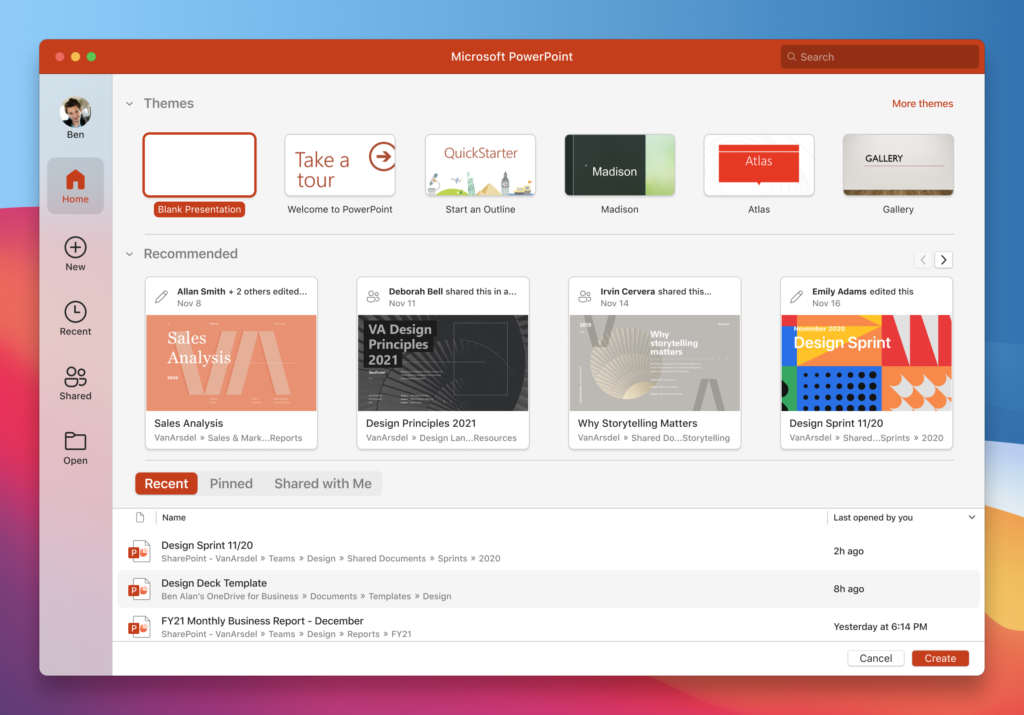
Over the past months, we have redesigned the experiences in our flagship apps for Mac with a focus on simplicity to improve ease of use. The new Outlook for Mac looks great with a redesign that matches the new look of macOS Big Sur, and an updated Office Start experience for Word, Excel, PowerPoint, and OneNote for Mac that incorporates the Fluent UI design system. This means that Microsoft 365 apps enable you to be more focused with immersive experiences that are easier to use right from the first screen. Experiences that feel both unmistakably Microsoft 365 and include elements that are native to the look of macOS so they are also unmistakably made for Mac. The new Office Start experience will be available next month.
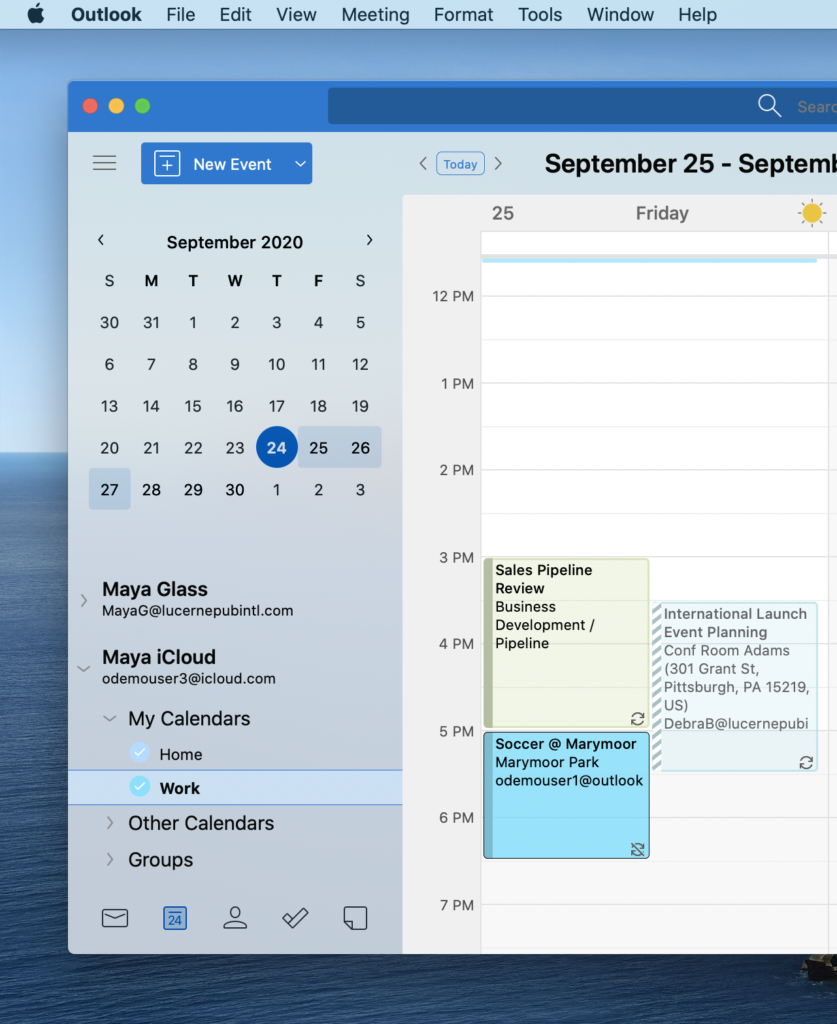
We continue to learn how customers want to use our products through continued feedback. So, thank you to each and every one of you who have shared your experiences with us. Today we are pleased to announce support for iCloud accounts in the new Outlook for Mac. This will enable you to organize work and personal emails, contacts, and calendars together in one app so it is easier for you to stay connected to what matters. We will start to roll this out using the new Outlook for Mac in the coming weeks.
Work your way
Another area of focus is to make our Microsoft 365 apps work the way you do. Through many new innovations on our Mac apps, our goal is to help you get work done in more simple and intuitive ways.
Tell Me is a search box that quickly gets you to the Office tools you need or actions you want to take by just typing what you are looking for in Word, Excel, PowerPoint, or OneNote for Mac. Microsoft Search in the new Outlook for Mac allows you to type out your query or question using language you use every day to find emails, events, and files—no fancy syntax needed. These capabilities help simplify how you use Microsoft 365 apps to achieve more and are now available to all Mac users.
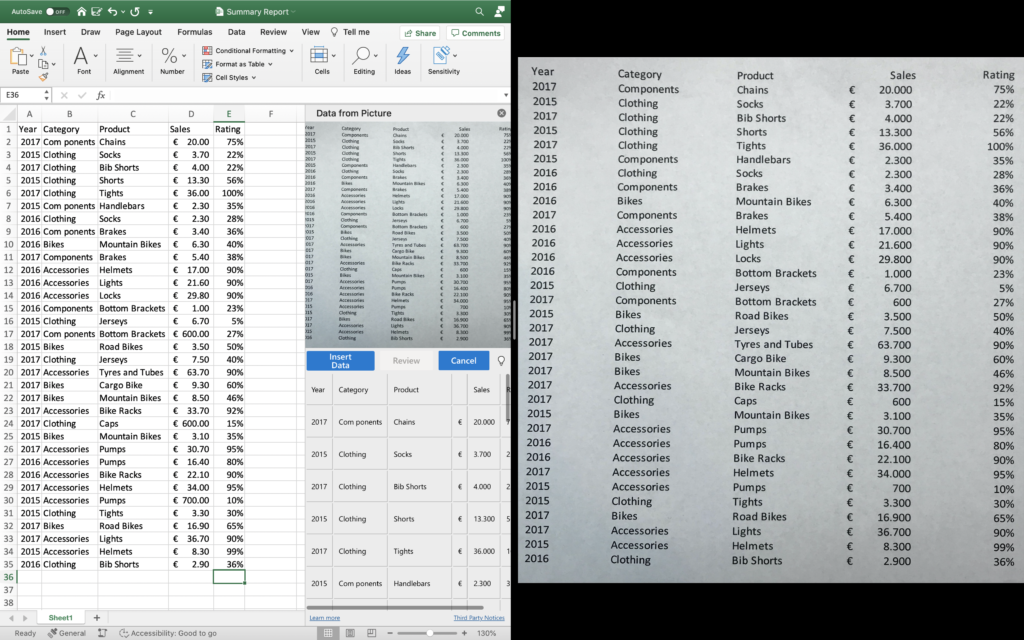
A commonly used productivity hack is to use your phone to capture images of important information you want to work on. With Data from Picture, you can take a photo of a table directly on your iPhone and turn it into data you can edit in Excel for Mac. This handy new feature uses Continuity Camera on your Mac and is also available now.
Voice input is a growing part of our digital lives and can be a great way to simplify your workflow. A new dictation toolbar with voice commands for creating content with your voice is coming to Word and Outlook for Mac. In addition, to help you check spelling, correct grammar, and get writing style suggestions, we will enable Microsoft Editor in Word for Mac. We plan to make these updates available to customers with access to Microsoft 365 for Insiders in early 2021.
New ways to work together
The shift to remote work highlights the need for teams to collaborate with agility, while ensuring sensitive data stays secure and meets compliance requirements. Our Microsoft 365 app teams have been busy getting modern collaboration and compliance capabilities ready so you can work from home more effectively on your Mac.
Sharing your calendars in Outlook with your co-workers helps you manage your time more efficiently. By giving access to participants’ calendars through simplified permissions, planning meetings and events is quick and easy. Based on the Microsoft sync technology and connected architecture, Outlook can provide reliable and faster synchronization of calendar events across Mac, Windows, iPhone, Android, and Web, keeping you on track of your time your way. The new Outlook for Mac will support shared calendars for customers subscribed to the Office Insider Mac Beta Channel in the first months of next year.
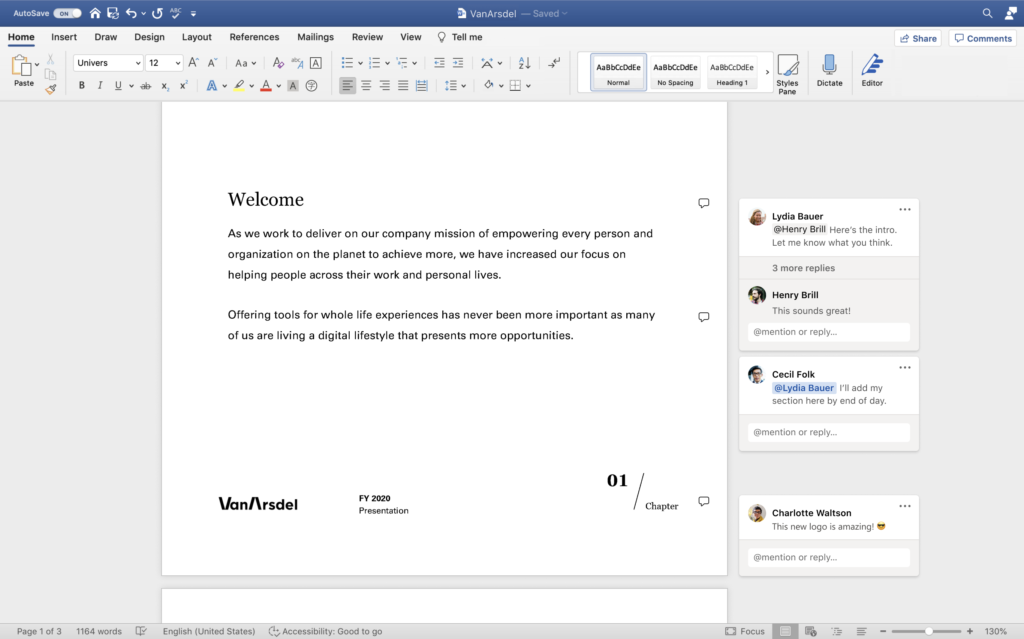
When creating new content as a team, the ability to collaborate around documents and presentations becomes especially valuable when your team is not in the same location. The new modern commenting experience in Word for Mac enables a contextual view of comments that allows you to focus on your content without missing active comments by contributors and reviewers. Modern commenting also includes improved @mentions in PowerPoint and Word for Mac that make it easier to reply to comments. The new @mentions experience is available now in PowerPoint for enterprise customers. Modern commenting for Word is in the Office Insider Beta Channel now and coming to Current Channel Preview in February 2021.
Have you ever collaborated with someone in a worksheet and suddenly your view changes and you are unable to finish your work? This can often happen when an active collaborator adds filters or sorts the data in a table of a shared worksheet. Excel sheet view is a new way to create customized views to sort and filter your data without disrupting what others see. This capability is an example of customer-driven product improvement and is now available on Excel for Mac.
Last, but certainly not least, Microsoft Information Protection sensitivity labels allow you to classify and protect your organization’s data with minimal effort through manual and automatic content labeling. Manual labeling is available on Word, Excel, PowerPoint, and Outlook for Mac. Automatic labeling is coming to these same apps for Microsoft 365 E5 customers in early 2021.
We are excited about the Microsoft 365 innovations we are delivering for our Mac user community and would love to hear your feedback about your experience using our latest features. If you want to try out new Office features first and make a difference in the products you use every day, please join the Office Insiders and check out the Mac channels.
Brought to you by Dr. Ware, Microsoft Office 365 Silver Partner, Charleston SC.
This article is contributed. See the original author and article here.
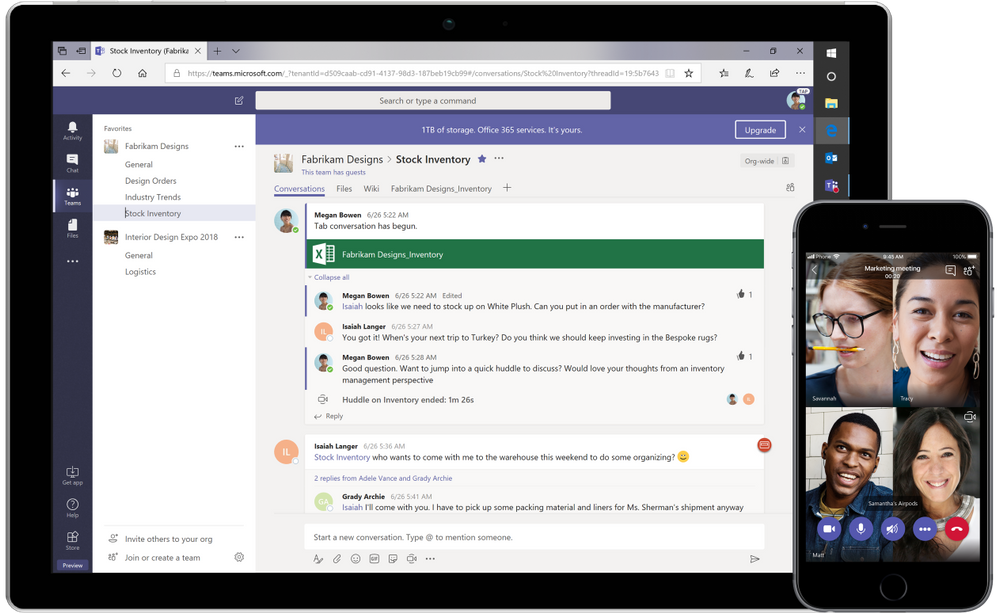
In the months since remote work became the new normal for many of us, we’ve all had our fair share of “virtual everything,” from customer meetings to online events and virtual team gatherings. Businesses of all sizes are using Microsoft Teams to stay connected, whether as part of their Microsoft 365 plan, or the free version of Microsoft Teams, which enables you to meet, chat, and collaborate securely, all in one place, at no cost.
Here are five things about the free version of Teams that make remote work easier, including new features now available.
1. Schedule meetings with anyone
Earlier this year we delivered scheduled meetings in the free version of Teams, answering one of the most frequent feature requests. When scheduling a meeting, organizers can either copy the meeting link to send it directly to other participants or send an invite via Outlook or Google calendar. Anyone, including external participants, can join meetings in one click—no setup or account required.
Now, we are also adding the ability to view past and upcoming meetings in Teams. Soon you’ll be able to view and edit all the meetings you scheduled in Teams, including their security options, right from the Meetings app on the left rail.
2. Reduce meeting fatigue with Together mode
Together mode is a new meeting experience in Teams that digitally places meeting participants in a shared background. It’s great for meetings in which multiple people speak, such as brainstorms or roundtable discussion, because it makes it easier to pick up body language and non-verbal cues. Together mode is now available in the free version of Teams with a variety of scenes including auditoriums, conference rooms, and even a coffee shop.
3. Work with external stakeholders using guest access
Often you need to collaborate with people outside your organization, such as clients, suppliers, and partners. You can do so directly in Teams by adding them as a guest. Guest access allows you to provide access to certain teams and chats to people outside the organization, while maintaining control over your company data.
Note: Guest access is not required to join a meeting.
4. Share files with built-in cloud storage or integrate your existing storage
The free version of Teams comes with 10 GB of team cloud storage and 2 GB of personal cloud storage per user. This allows organizations to securely store, access, and share important documents in Teams. You can even co-author Word, Excel and PowerPoint files with colleagues in real time within the Teams app.
Want to keep using your existing cloud storage service? No problem. You can easily integrate third party storage providers such as Google Drive, Dropbox and Box, enabling you to view, manage, and share those files in Teams as well.
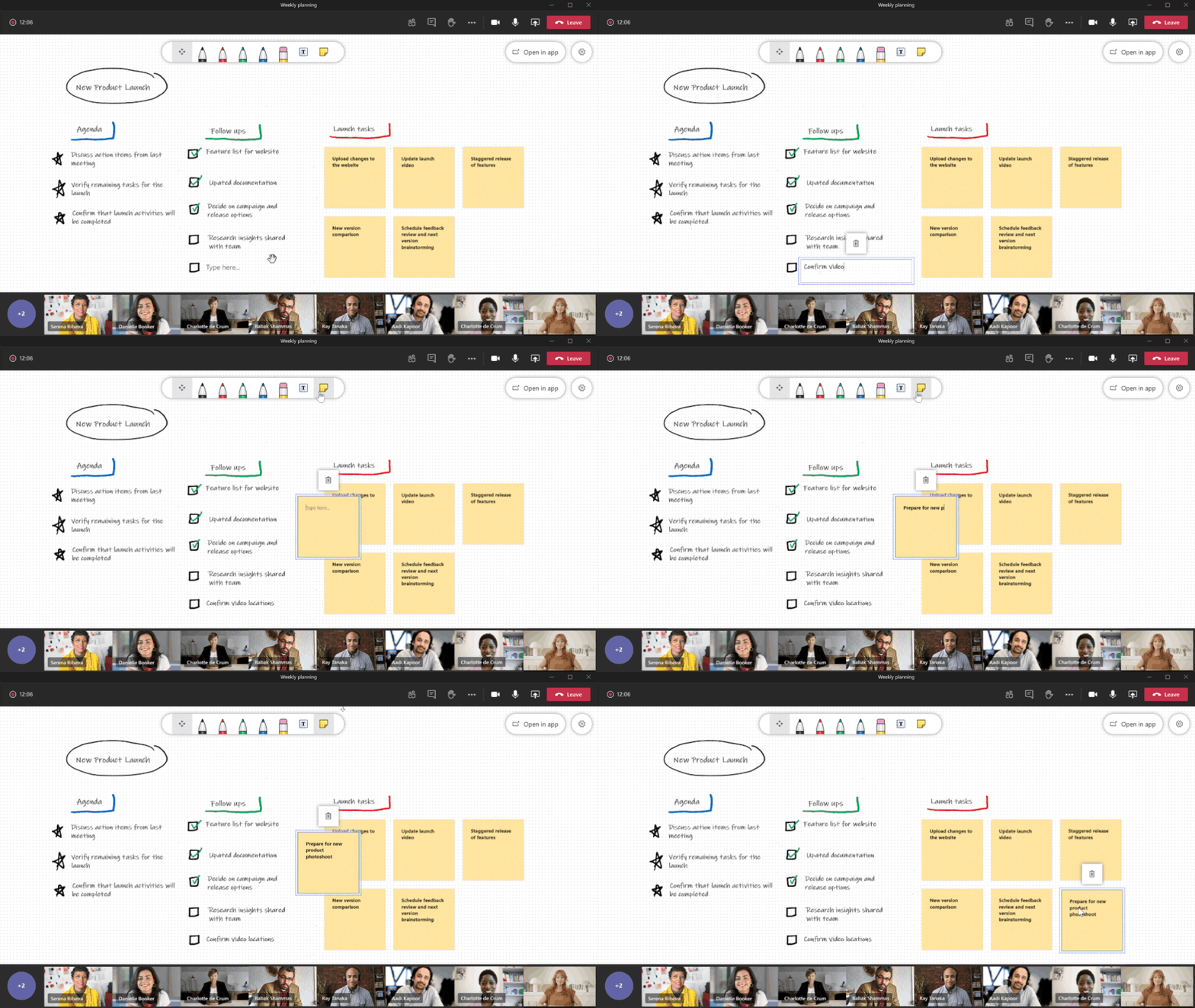
5. Brainstorm together with Whiteboard in Teams Whiteboard in Teams makes it easy to run brainstorming and creative thinking sessions in a remote or hybrid work environment. Each Teams meeting has a dedicated whiteboard where participants can draw, sketch, and write on a shared digital canvas. You can also quickly add sticky notes to a whiteboard, making it easy to contribute if you’re not using a digital pen.
This article is contributed. See the original author and article here.
This past year has certainly been an extraordinary one, and we’ve seen the impact of technology as it transforms to meet increasing productivity and collaboration needs around the world. In just the first two months of the COVID-19 pandemic, we observed two years’ worth of digital transformation take place. And the momentum continues to help organizations and businesses optimize. In fact, in the past year, Microsoft Azure grew by more than 1,000 new capabilities, allowing us to innovate with the latest advancements in key areas including AI, machine learning, and virtualization. The rapid pace of technology change has truly shifted the landscape of in-demand skills for a digital world.
At Microsoft, we’ve been building a portfolio of role-based training and certifications designed to help tech professionals stay current and be future-ready. The retirement of product-focused certifications has allowed us to continue investing in our role-based learning offerings. And today, we’re excited to announce a couple of upcoming updates to our certification program to help our customers and partners keep pace with technology.
First, we’re providing our certified professionals a method to renew their Microsoft Certifications, initially earned by passing rigorous exam(s). In early February 2021, you’ll be able to renew your role-based and specialty certifications by passing a free renewal assessment on Microsoft Learn. Rather than having to retake scheduled exam(s), the renewal assessment can be completed online on your own time, and anytime within six months before your certification expires. After you pass the renewal assessment, your certification is extended by one additional year from the current expiration date; this can be done annually. To help you prepare, you’ll also have the option to access a free collection of curated learning modules for each renewal assessment.
Second, we’re updating the validity for role-based and specialty certifications to one year from the date you earned it. Starting in June 2021, this change will take effect for newly earned certifications. The shift to a one-year certification validity aligns to how quickly cloud technology changes; renewing certifications on an annual basis validates skills and ability to perform in job roles are relevant in the market.
This new frictionless approach is intended to enable you to focus on keeping current with technology, while also reducing the stress, complexity, and cost of keeping your certification active. Embracing a growth mindset and the need for continuous learning can help you open career opportunities, successfully perform in job roles, and continue to support your organization’s digital and cloud transformation. With a Microsoft Certification—globally recognized and industry-endorsed evidence of mastered real-world skills—you also demonstrate your proficiency in keeping pace with technology.
We’re happy to share these upcoming changes that enable you to stay current with necessary skills and to seamlessly weave in your certification renewal. For additional details on how to renew role-based and specialty certifications, including answers to frequently asked questions, check out the Renew your Microsoft Certification page. We thank you for sharing your learning journey with us, and we look forward to keeping you up to date on technology’s groundbreaking ability to continue transforming our world.
This article is contributed. See the original author and article here.
With many retailers extending online holiday sales, consumers are taking advantage of the ease of shopping from home. Online shopping can also enable more impulse buying, which in turn increases the likelihood of returns and cancelations and can open the door to abuse and fraud. Merchants need the right tools and controls to help reduce fraud and maximize their holiday revenue.
Here are some proactive and reactive ways to mitigate fraud and related losses during the high-volume holiday sales season.
Do a fraud check before the order is shipped
While it is common to do a fraud check at the time of checkout for online purchases, another effective method to protect against fraud is to do an assessment before the order is ready to be shipped. This will ensure that any change in the status of orders, during the time elapsed since checkout, gets accounted for. To get an idea of the fraud vulnerabilities that exist in your system, try to identify a user placing several orders repeatedly and then canceling the orders.
Doing this additional fraud check also helps prevent the loss of goods and saves the associated shipping costs. It’s especially important for your retail business, when most of what you sell are physical goods the fraud loss could influence the overall profit efficiency of your business.
To reduce loss, you can create a segment of high purchase value products and apply a distinctive fraud strategy for that segment. In addition, if you have a manual review process in place for reviewing orders, you can control the overall manual review volume by choosing to send orders for products that experience a high-fraud rate category instead of sending all orders for review.
Frequently look for patterns in consumer purchases
While proactive ways to stop fraud are ideal, another way to detect fraud is to reactively look for patterns in bulk data from the most recent orders.
Running anomaly detection on purchase orders placed in the last hour, identifying outliers in the data, and sending those specific outliers for further investigation is a good control that complements the real-time fraud checks.
This is also a good feedback loop for the real-time systems that use artificial intelligence to improve precision and accuracy in identifying fraudulent orders. A reactive fraud strategy is a good way to supplement overall fraud controls that are already in place.
Deriving insights through reporting
In addition to responding proactively and reactively, having robust reporting can provide additional insights and enable analytics. The ability to drill down to a specific product level to review transaction lines, see the specific reason code applied, and having access to the entire journal would enable fraud analysts and investigations teams to make decisions rapidly. Setting up alerts on when specific conditions and thresholds are met for products (or markets) that have been traditionally subject to fraud gives you the ability to respond quickly and adjust fraud strategies rapidly.
How Microsoft can help reduce post-purchase fraud loss
Reactive fraud assessment features can help to identify specific vulnerabilities existing at the store, point of sale, product levels, and so on. The Dynamics 365 Fraud Prevention tool provides a risk-based ranking of staff and point of sale terminals, analyzes underlying transaction data, and helps drive investigations. It provides the ability to drill down to specific transaction lines and review what reason codes were applied by the staff at the point of sale to order. This helps fraud investigators understand which business process such as returns, cancellations, or price overrides is the most susceptible to abuse. It also helps to identify where controls are needed the most (such as region, district, or store). Running your reactive fraud processes frequently will help your overall fraud strategy to be more effective over time.
Next steps
If you are currently using Dynamics 365 Fraud Protection, you can get a fraud check in real-time. The scorecard gives you a real-time view of the performance and support tool that helps to search and investigate all transactions including risk information and history. You can also enable loss prevention, which is based on anomaly detection for protecting against the abuse that happens in relation to returns and cancellations.
This article was originally posted by the FTC. See the original article here.
“Hello? It’s me — Frosty. Look it’s a long story but without my top hat, I’m melting. Please, I need your help — send money now or I’ll be nothing but a puddle!”
Brought to you by Dr. Ware, Microsoft Office 365 Silver Partner, Charleston SC.
This article is contributed. See the original author and article here.
This post was co-authored with Qinying Liao, Sheng Zhao, Gang Wang, Yueying Liu
Neural Text to Speech (Neural TTS), a powerful speech synthesis capability of Cognitive Services on Azure, enables you to convert text to lifelike speech which is close to human-parity. Since its launch, we have seen it widely adopted in a variety of scenarios by many Azure customers, from voice assistants to audio content creation. More and more customers are asking for richer and more diverse choices of synthetic voices for different use cases.
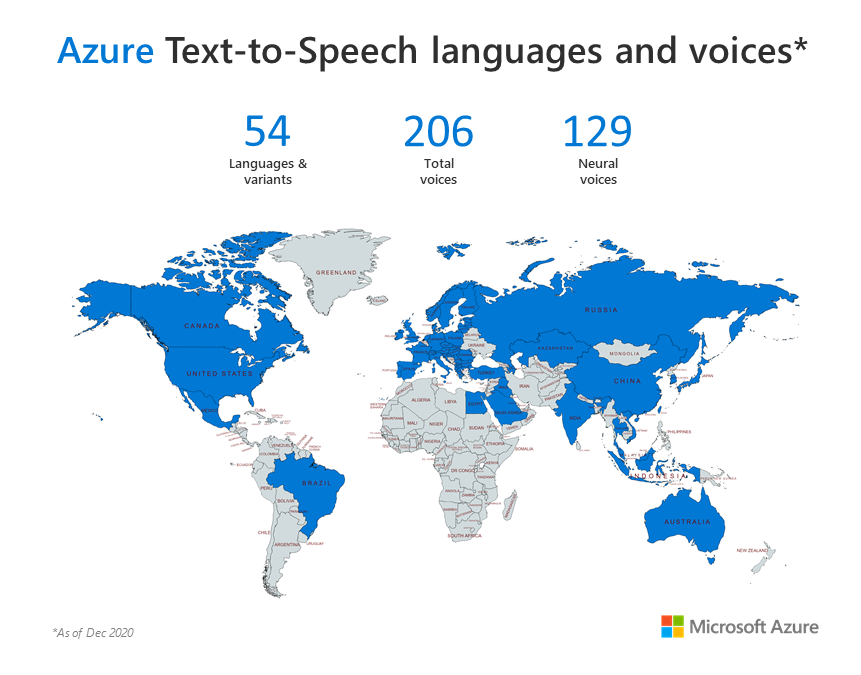
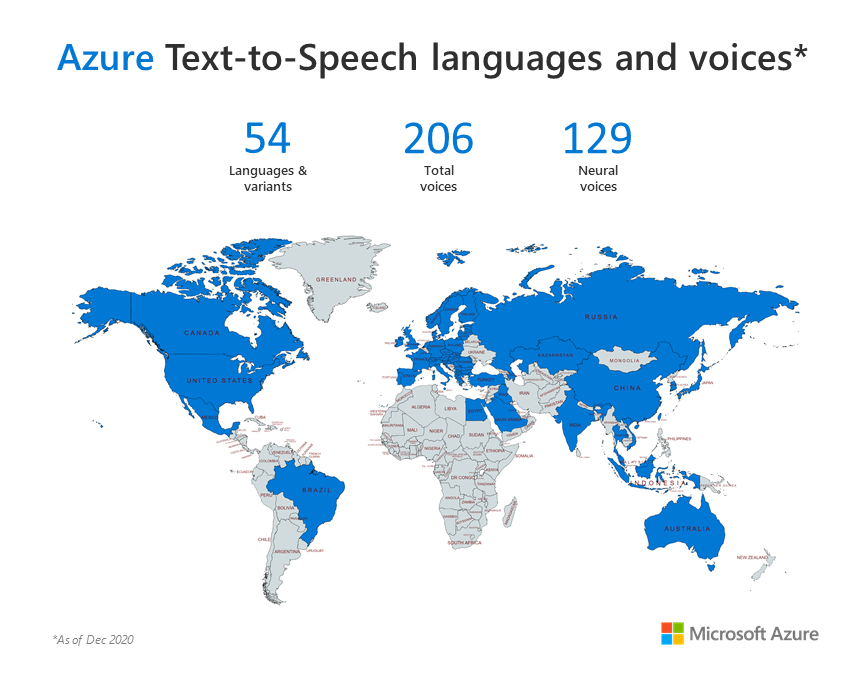
Today, we are excited to announce that Azure Neural TTS has added 51 new voices for a total of 129 neural voices across 54 languages/locales. With this release, we provide at least one male and one female voice for customers to choose in each language/locale. In total, Azure TTS now enables developers to reach millions more people with more than 200 voices available in standard and neural TTS.
What’s new
Neural TTS has now been extended to support 51 new voices, which will bring to you the capability to have both male and female voices in each language for your apps. You can hear samples of the voices below, or try them with your own text in our demo.
46 new voices are generally available
In total 46 new voices are released across the 49 locales that are generally available in the Azure data centers/regions that support neural TTS (see the full list of Azure regions here).
Locale
Language
Gender
Voice
Sample audio
ar-EG
Arabic (Egypt)
Male
ShakirNeural
البركان هو أكثر ما في الطبيعــة إثارة للرهبة
ar-SA
Arabic (Saudi Arabia)
Male
HamedNeural
الناس مَعادن، تصدأ بالملل، وتتمدد بالأمل، وتنكمش بالألم
bg-BG
Bulgarian (Bulgary)
Male
BorislavNeural
Шофьорът задължително трябва да вземе експерт за второ мнение, за да провери дали всички системи на автомобила работят нормално.
ca-ES
Catalan (Spain)
Male
EnricNeural
Les activitats docents tenen lloc al campus del Poblenou.
ca-ES
Catalan (Spain)
Female
JoanaNeural
L’artista està considerat com el pintor de les multituds.
cs-CZ
Czech (Czech)
Male
AntoninNeural
Opravdový zasvěcenec ví, že nejmocnějším tajemstvím je to, které nemá žádný obsah.
da-DK
Danish (Denmark)
Male
JeppeNeural
61 procent af de kandidatstuderende er kvinder.
de-AT
German (Austria)
Male
JonasNeural
Das ist das letzte lange Pfingstwochenende für Schülerinnen und Schüler.
de-CH
German (Switzerland)
Male
JanNeural
Eine Person, die sich bei Brandausbruch im oberen Stock aufgehalten hat, hat sich noch rechtzeitig in Sicherheit bringen können.
el-GR
Greek (Greece)
Male
NestorasNeural
Συγκλονιστικές εξελίξεις και ανατροπές στα επόμενα επεισόδια .
en-CA
English (Canada)
Male
LiamNeural
He had held the position since 2010.
en-IE
English (Ireland)
Male
ConnorNeural
Life is short, think before you talk.
en-IN
English (India)
Male
PrabhatNeural
Sometimes you can see snow on the mountains.
fi-FI
Finnish (Finland)
Male
HarriNeural
Yhtiö kertoi loppuvuoden tuloksestaan ennakkotietoja.
fi-FI
Finnish (Finland)
Female
SelmaNeural
Hevoset ovat uljaita ja nopeita eläimiä.
fr-CH
French (Switzerland)
Male
FabriceNeural
La Suisse comptera 5,6 millions (12%) de personnes actives en 2050.
he-IL
Hebrew (Israel)
Male
AvriNeural
הוא אמר שהמספרים מדאיגים בשל עצמם, אבל בכל הישיבות שלנו המסקנה היא שזה סימפטום למשהו רחב יותר.
hi-IN
Hindi (India)
Male
MadhurNeural
सिद्धार्थ ने भी शहनाज के साथ इस इवेंट की फोटो शेयर की है।
hr-HR
Croatian (Croatia)
Male
SreckoNeural
Video je pregledan gotovo 70 tisuća puta, a neki od obožavatelja su mu u komentarima pisali kako ih je motivirao.
hu-HU
Hungarian (Hungary)
Male
TamasNeural
A lakóhelyem nagyon komfortos.
id-ID
Indonesian (Indonesia)
Female
GadisNeural
Inflasi ringan terjadi apabila kenaikan harga berada di bawah angka 10% setahun.
ms-MY
Malay (Malaysia)
Male
OsmanNeural
Setiap individu perlu memakai topeng muka ketika berada di luar.
nb-NO
Norwegian (Bokmål, Norway)
Male
FinnNeural
Jansson forteller at den svenske øya tar imot rundt 8000 besøkende fra Norge årlig.
nb-NO
Norwegian (Bokmål, Norway)
Female
PernilleNeural
For en fantastisk forestilling!
nl-NL
Dutch (Netherlands)
Female
FennaNeural
De afstand tussen Rotterdam en Breda is ongeveer 45 km.
nl-NL
Dutch (Netherlands)
Male
MaartenNeural
Zij heeft haar studie al een tijdje geleden afgerond.
pl-PL
Polish (Poland)
Female
AgnieszkaNeural
To już nie będzie to samo, będzie drożej.
pl-PL
Polish (Poland)
Male
MarekNeural
Na wszelki wypadek sprawdź, czy coś cię jednak nie zaskoczy.
pt-PT
Portuguese (Portugal)
Male
DuarteNeural
Para a aprovação do exame, tenho de ter pelo menos 80% das respostas corretas.
pt-PT
Portuguese (Portugal)
Female
RaquelNeural
A minha mãe ensinou-me que devo ter respeito por todos, mas principalmente pelos mais velhos.
ro-RO
Romanian (Romania)
Male
EmilNeural
Actul normativ se axează pe instituirea de măsuri active, 41,5 % din salariul de bază la revenirea din șomaj tehnic.
ru-RU
Russian (Russia)
Male
DmitryNeural
Ранее посольство требовало от агентства опровержения статьи о количестве больничных коек в России.
ru-RU
Russian (Russia)
Female
SvetlanaNeural
Изменений в организме людей, попробовавших еду без приправ, не произошло.
sk-SK
Slovak (Slovakia)
Male
LukasNeural
Zápis 45 % je v skutočnosti iba skratka pre zlomok.
sl-SI
Slovenian (Slovenia)
Male
RokNeural
Zloraba bonov in dvigovanje cen turističnih storitev je nesprejemljivo ravnanje.
sv-SE
Swedish (Sweden)
Male
MattiasNeural
Båda lagen bjöd på riktigt bra hockey och skapade flera riktigt bra målchanser.
Sosyal mesafeye büyük ölçüde riayet eden çocuklar, başta mahalle parkları olmak üzere sahiller ve oyun parklarında enerji attı.
vi-VN
Vietnamese (Vietnam)
Male
NamMinhNeural
Nhiệt độ hiện tại ở thành phố Hồ Chí Minh là 38 độ C.
zh-HK
Chinese (Cantonese, Traditional)
Female
HiuMaanNeural
抗疫舉措成為安全重啟經濟的重要一環。
zh-HK
Chinese (Cantonese, Traditional)
Male
WanLungNeural
隨着疫情緩和,愈來愈多人回到辦公室上班,但是很多人仍想留在家中工作(work from home)。
zh-TW
Chinese (Taiwanese Mandarin)
Female
HsiaoChenNeural
賭博的勝率應該不到50%。
zh-TW
Chinese (Taiwanese Mandarin)
Male
YunJheNeural
台北車站大廳能不能坐,連日引發正反意見。
5 new voices are in public preview
We have also added 5 male voices in the 5 low-resource languages that have been supported since November. These voices are available in public preview in three Azure regions: EastUS, SouthEastAsia and WestEurope.
Hear the samples below:
Locale
Language
Gender
Voice Name
Sample audio
et-EE
Estonian (Estonia)
Male
KertNeural
Ametlikku meetodit sellise pettuse avastamiseks ei olegi olemas.
ga-IE
Irish (Ireland)
Male
ColmNeural
Ritheadh próiseas comhairliúcháin faoin scéal sa bhfómhar.
lt-LT
Lithuanian (Lithuania)
Male
LeonasNeural
Aišku, anksčiau ar vėliau paaiškės tos priežastys.
lv-LV
Latvian (Latvia)
Male
NilsNeural
Aizvadīto gadu uzņēmums noslēdzis ar 6,3 miljonu eiro zaudējumiem.
mt-MT
Maltese (Malta)
Male
JosephNeural
Anki tfajjel tal-primarja jaf li l-popolazzjoni tikber fejn hemm il-prosperità.
In general, Neural TTS can convert text to lifelike speech, however there are nuances that can always be improved. For example, we have customers who have requested the ability to support a scenario where Katja, our de-DE neural voice, can pronounce English words in the context of a German sentence. This was valuable feedback, and we anticipate a similar need across languages.
For German, we observed that our users prefer the voice to handle an English word/phrase as close as the native English pronunciation. To enable a voice model to speak English as a second language, it is normally required that we collect the speech data of the same speaker speaking English besides his/her native language. This is a big challenge as we do not have sufficient multi-language speech data from our German voice talents. By leveraging cross-lingual capability of UNI-TTS, we are able to generate more English pronunciation data with the transferred voice from our German voice talent. Such data is used to improve the quality of the English word/phrase pronunciations for the German Katja voice, so Katja can pronounce English words in a more natural way.
The CMOS metric is used to measure the improvement of the English word pronunciation for Katja. Below table shows that the updated model is significantly better in pronouncing English words in the context of a German sentence.
Script
Old
New
Star Wars – Das Erwachen der Macht
Three Billboards outside Ebbing, Missouri.
This improvement has now been released to the Azure Neural TTS service for Katja. Moving forward, we’ll extend this capability to support more languages.
Tell us your experience!
By offering more voices across more languages and locales, we anticipate developers across the world will be able to build applications that change experiences for millions. Whether you’re building a voice-enabled chatbot or IoT device, an IVR solution, adding read-aloud features to your app, converting e-books to audio books, or even adding Speech to a translation app, you can make all these experiences natural sounding and fun with Neural TTS.
Let us know how you are using or plan to use Neural TTS voices in this form. If you prefer, you can also contact us at mstts [at] microsoft.com. We look forward to hearing your experience and developing more compelling services together with you for the developers around the world.
Retailers are already preparing for what they hope will be a successful shopping season. Because of COVID-19, it’s likely that we’ll be going online to look for those perfect buys. With so many deals around and what seem like eternal “Black Friday” sales, it’s important to keep some online shopping tips in mind.
So, if you plan to shop from the comfort of your home instead of heading out in person for those doorbuster deals, first, make sure your home computer has the latest antivirus software updated. This will help protect you from hackers and identity thieves. Read more computer safety tips here.
Once you’re ready to shop, make sure you:
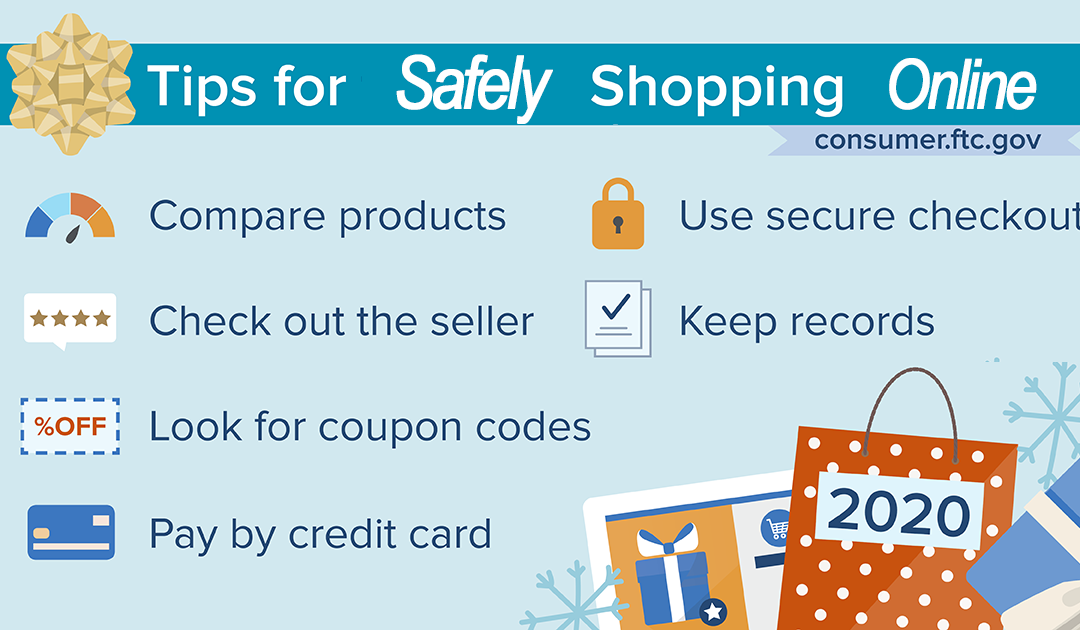
Take time to compare products. To get the best deal, compare products. Do research online, check product comparison sites, and read online reviews.
Check out the seller. Confirm that the seller is legit. Look for reviews about their reputation and customer service, and be sure you can contact the seller if you have a dispute.
Look for coupon codes. Search the store’s name with terms like “coupons,” “discounts,” or “free shipping.”
Pay by credit card. Paying by credit card gives you added protections. Never mail cash or wire money to online sellers. If the seller asks you to pay this way, it could be a scam.
Use secure checkout. Before you enter your credit card information online, check that the website address starts with “https.” The “s” stands for secure. If you don’t see the “s,” don’t enter your information.
Keep records of online transactions until you get the goods, confirm you got what you ordered, and that you’re satisfied you won’t have to return the item.
This article is contributed. See the original author and article here.
In this article, I will demonstrate how to call a logic app with the Aouth2 approach
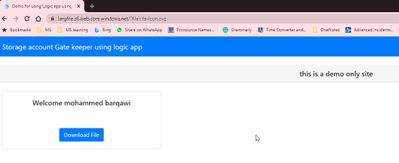
The problem that I going to solve is to provide a gatekeeper page that will not download files from the Storage account unless the user is authenticated.
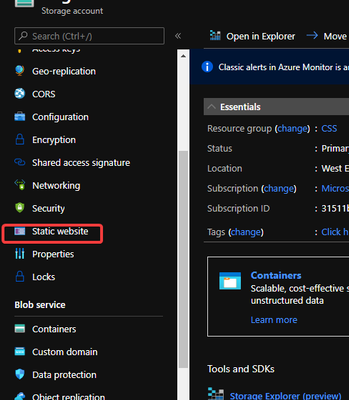
I will utilize a static web site on the storage account to host small HTTP pages and javascripts
I have used the library GitHub – AzureAD/microsoft-authentication-library-for-js: Microsoft Authentication Library (MSAL) for JS to do the authentication
If you have access to multiple tenants, use the Directory + subscription filter
in the top menu to select the tenant in which you want to register an application.
Search for and select Azure Active Directory.
Under Manage, select App registrations > New registration.
Enter a Name for your application. Users of your app might see this name, and you can change it later.
Under Supported account types, select Accounts in any organizational directory and personal Microsoft accounts.
Select Register. On the app Overview page, note the Application (client) ID value for later use.
Under Platform Configurations, select Add a platform. A panel opens on the left. There, select the Web Applications region.
Still on the left, set the Redirect URI value to [the static website URL] Then, select Access Token and ID Token.
Select Configure.
1.2.2 Build the HTML page with msal.js
Create HTML with the below content
!DOCTYPE html>
<html lang="en">
<head>
<meta charset="UTF-8">
<meta name="viewport" content="width=device-width, initial-scale=1.0, shrink-to-fit=no">
<title>Demo for using Logic app using Azure Active Directory Authorization Policies </title>
<link rel="SHORTCUT ICON" href="./favicon.svg" type="image/x-icon">
<!-- msal.min.js can be used in the place of msal.js; included msal.js to make debug easy -->
https://alcdn.msauth.net/lib/1.4.4/js/msal.js
<!-- msal.js with a fallback to backup CDN -->
<script type="text/javascript">
if (typeof Msal === 'undefined') document.write(unescape("%3Cscript src='https://alcdn.msftauth.net/lib/1.4.4/js/msal.js' type='text/javascript' %3E%3C/script%3E"));
</script>
<!-- adding Bootstrap 4 for UI components -->
<link rel="stylesheet" href="https://stackpath.bootstrapcdn.com/bootstrap/4.4.1/css/bootstrap.min.css"
integrity="sha384-Vkoo8x4CGsO3+Hhxv8T/Q5PaXtkKtu6ug5TOeNV6gBiFeWPGFN9MuhOf23Q9Ifjh" crossorigin="anonymous">
</head>
<body>
<nav class="navbar navbar-expand-lg navbar-dark bg-primary">
<a class="navbar-brand" href="/">Storage account Gate keeper using logic app </a>
<div class="btn-group ml-auto dropleft">
<button type="button" id="signIn" class="btn btn-secondary" onclick="signIn()">Sign In</button>
<button type="button" id="signOut" class="btn btn-success d-none" onclick="signOut()">Sign Out</button>
</div>
</nav>
<br>
<h5 class="card-header text-center">this is a demo only site </h5>
<br>
<div class="row" style="margin:auto">
<div id="card-div" class="col-md-3 d-none">
<div class="card text-center">
<div class="card-body">
<h5 class="card-title" id="welcomeMessage">Please sign-in to see your profile and read your mails</h5>
<div id="profile-div"></div>
<br>
<br>
<button class="btn btn-primary" id="seeProfile" onclick="downloadFile()">Download File</button>
<br>
</div>
</div>
</div>
<br>
<br>
<div class="col-md-4">
<div class="list-group" id="list-tab" role="tablist">
</div>
</div>
<div class="col-md-5">
<div class="tab-content" id="nav-tabContent">
</div>
</div>
</div>
<br>
<br>
<!-- importing bootstrap.js and supporting js libraries -->
https://code.jquery.com/jquery-3.4.1.slim.min.jshttps://stackpath.bootstrapcdn.com/bootstrap/4.4.1/js/bootstrap.min.js
<!-- importing app scripts (load order is important) -->
http://./authConfig.jshttp://./ui.jshttp://./authPopup.js
</body>
</html>
Create file authPopup.js
// Create the main myMSALObj instance
// configuration parameters are located at authConfig.js
const myMSALObj = new Msal.UserAgentApplication(msalConfig);
var Bearer = ''
let searchParams = new URLSearchParams(window.location.search)
let fileParam = searchParams.get('file')
function signIn() {
  myMSALObj.loginPopup(loginRequest)
    .then(loginResponse => {
      console.log("id_token acquired at: " + new Date().toString());
      console.log(loginResponse);

      if (myMSALObj.getAccount()) {
        Bearer = loginResponse.idToken.rawIdToken;
        showWelcomeMessage(myMSALObj.getAccount());
      }
    }).catch(error => {
      console.log(error);
    });
}

function signOut() {
  myMSALObj.logout();
}

//endpoint, token, callback
function downloadFile() {

  const headers = new Headers();
  const bearer = `Bearer ${Bearer}`;

  headers.append("Authorization", bearer);
  headers.append("FileName", fileParam);

  const options = {
    method: "post",
    headers: headers
  };
  fetch(logicAppUrl, options)
    .then(resp => resp.blob())
    .then(blob => {
      const url = window.URL.createObjectURL(blob);
      const a = document.createElement('a');
      a.style.display = 'none';
      a.href = url;
      // the filename you want
      a.download = fileParam;
      document.body.appendChild(a);
      a.click();
      window.URL.revokeObjectURL(url);
      alert('your file has downloaded!'); // or you know, something with better UX...
    })
    .catch(error => console.log(error))
}
authConfig.js
// Config object to be passed to Msal on creation.
// For a full list of msal.js configuration parameters,
// visit https://azuread.github.io/microsoft-authentication-library-for-js/docs/msal/modules/_authenticationparameters_.html
const msalConfig = {
  auth: {
    clientId: "7ebe8908-7acd-4e20-b1f4-24715b364cf0",
    authority: "https://login.microsoftonline.com/common",
    redirectUri: "https://largfile.z6.web.core.windows.net",
  },
  cache: {
    cacheLocation: "sessionStorage", // This configures where your cache will be stored
    storeAuthStateInCookie: false, // Set this to "true" if you are having issues on IE11 or Edge
  }
};

// Add here the scopes to request when obtaining an access token for MS Graph API
// for more, visit https://github.com/AzureAD/microsoft-authentication-library-for-js/blob/dev/lib/msal-core/docs/scopes.md
const loginRequest = {
  scopes: ["openid", "profile", "User.Read"]
};

const logicAppUrl='https://prod-39.eastus.logic.azure.com:443/workflows/92083fac9d2c4805b153907db6976f86/triggers/manual/paths/invoke?api-version=2016-10-01'
Creating the logic app
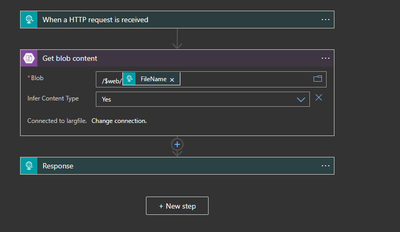
The logic app will receive the request using HTTP and will pass the file name to the storage account action
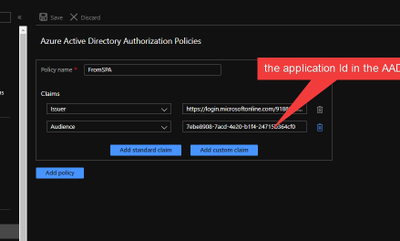
1.3.1 Enable logic app Azure Active Directory Authorization Policies
This article is contributed. See the original author and article here.
This past September at Ignite 2020, we made a ton of new hybrid announcements. And not only did new products go into GA and Preview, we showed how customers have been using our hybrid solutions every day in their own on-premises, multi-cloud, and multi-edge environments.
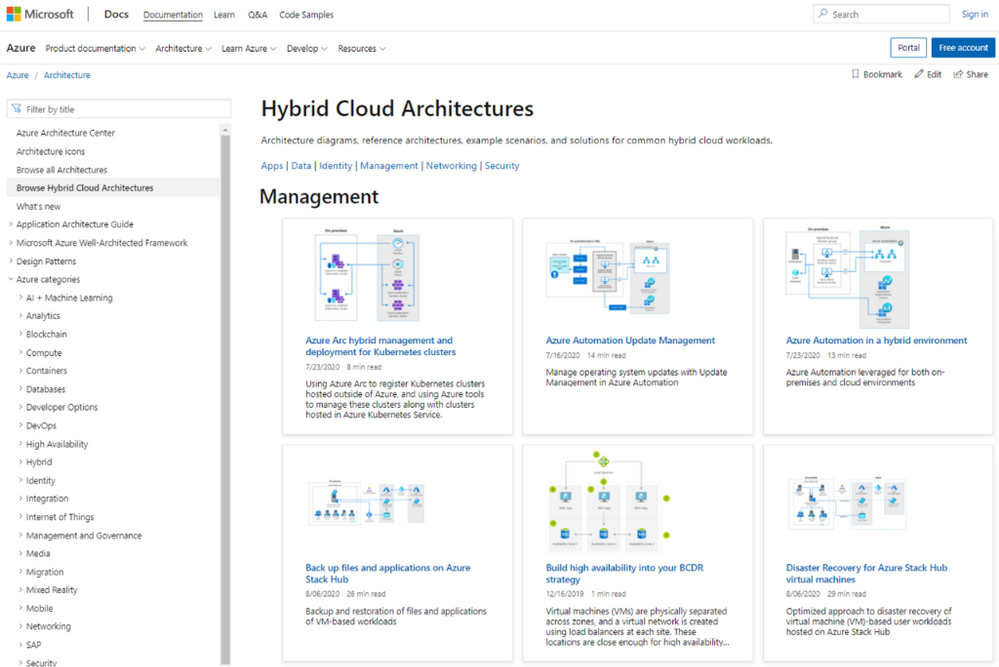
Organizations such as Africa’s Talking, Ferguson,Haivision, KPMG, RxR Realty, and Siemens Healthineers have been using Azure Arc and Azure Stack to bring Azure to any infrastructure and modernize on-premises datacenters. As more customers adopt these solutions, we are excited to share the new Hybrid and Multicloud Architectures section in Architecture Center – which is part of our Docs website – for how to bring these solutions to life.
Azure Hybrid Cloud Architectures
Azure Arc
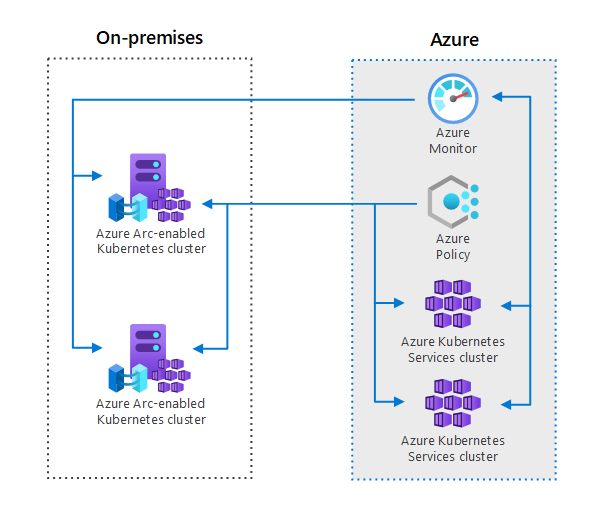
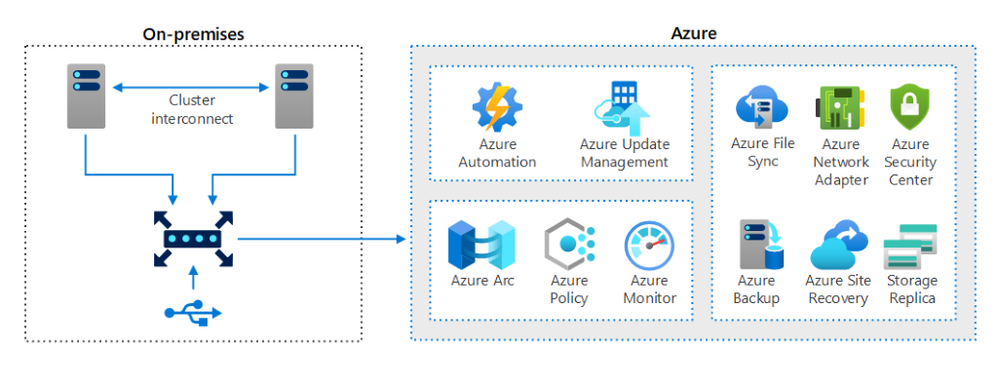
Azure Arc hybrid management and deployment for Kubernetes clusters demonstrates how Azure Arc extends Kubernetes cluster management and configuration across your datacenters, multi-cloud environments, and edge locations. By extending the Azure Resource Manager (ARM) control plane, Azure Arc allows you to project your Kubernetes clusters deployed outside of Azure alongside those in Azure – enabling you to have a single interface to manage the sprawl of clusters. You can register any CNCF Kubernetes cluster that is running and start using services like Azure Monitor and Azure Policy.
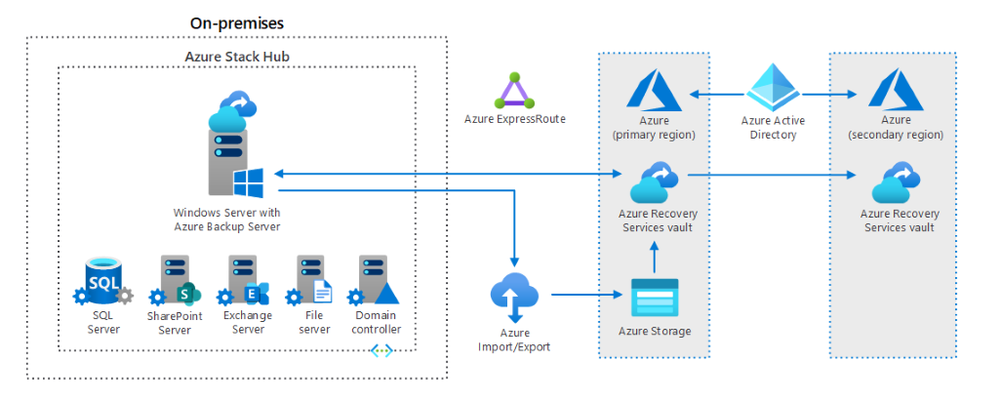
Back up files and applications on Azure Stack Hubdescribes an optimized approach to backup and restore of files and applications of VM-based user workloads hosted on Azure Stack Hub. With backup and restore being essential components of any BC/DR strategy, Azure Stack Hub delivers a scalable, resilient, easy-to-manage and cost-efficient backup solution that relies on a bomination and cloud and on-premises components.
Azure Stack Hub
Azure Security Center and Azure Sentinel
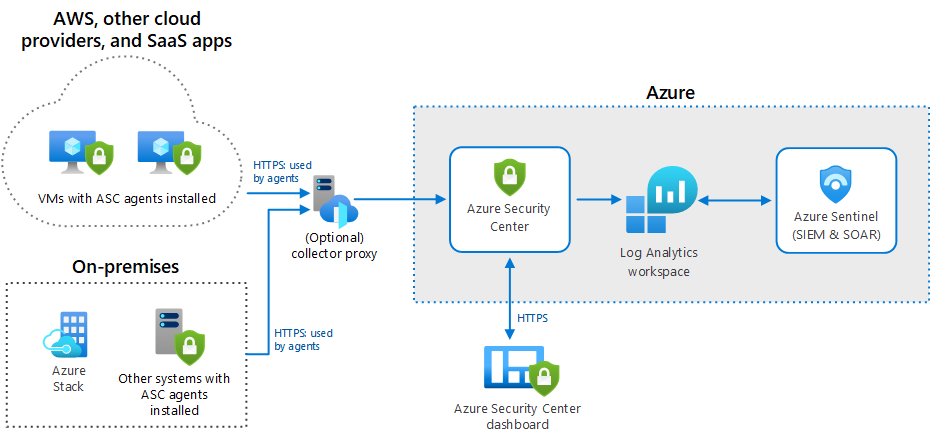
Hybrid Security Monitoring using Azure Security Center and Azure Sentinelillustrates how to monitor the security configuration and telemetry of on-premises and Azure operation system workloads. Enabling Azure Security Center to monitor Windows and Linux servers, Azure Stack VMs, and integrating Azure Sentinel with Azure Security Center help you detect, hunt, prevent, and respond to threats across your entire hybrid estate – even resources hosted outside of Azure.



 ) or https:// means you’ve safely connected to the .gov website. Share sensitive information only on official, secure websites.







Recent Comments