by Contributed | Dec 15, 2020 | Technology
This article is contributed. See the original author and article here.
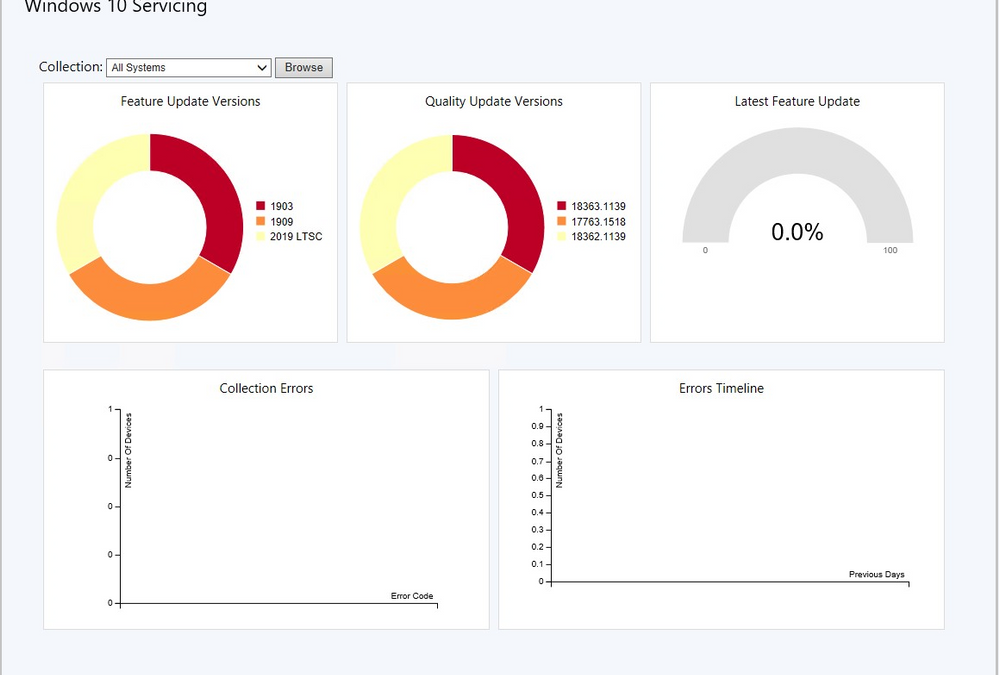
Update 2012 for the Technical Preview Branch of Microsoft Endpoint Configuration Manager has been released. We’ve simplified the Windows 10 Servicing dashboard to make it more relevant. The new Quality Update Versions chart displays the top five revisions of Windows 10 across your devices. The Latest Feature Update chart shows the number of devices that installed the latest feature update. The Windows 10 Usage chart, showing the distribution of Windows 10 major releases, was renamed to Feature Update Versions. Servicing plan and Windows 10 ring information were removed from the dashboard.
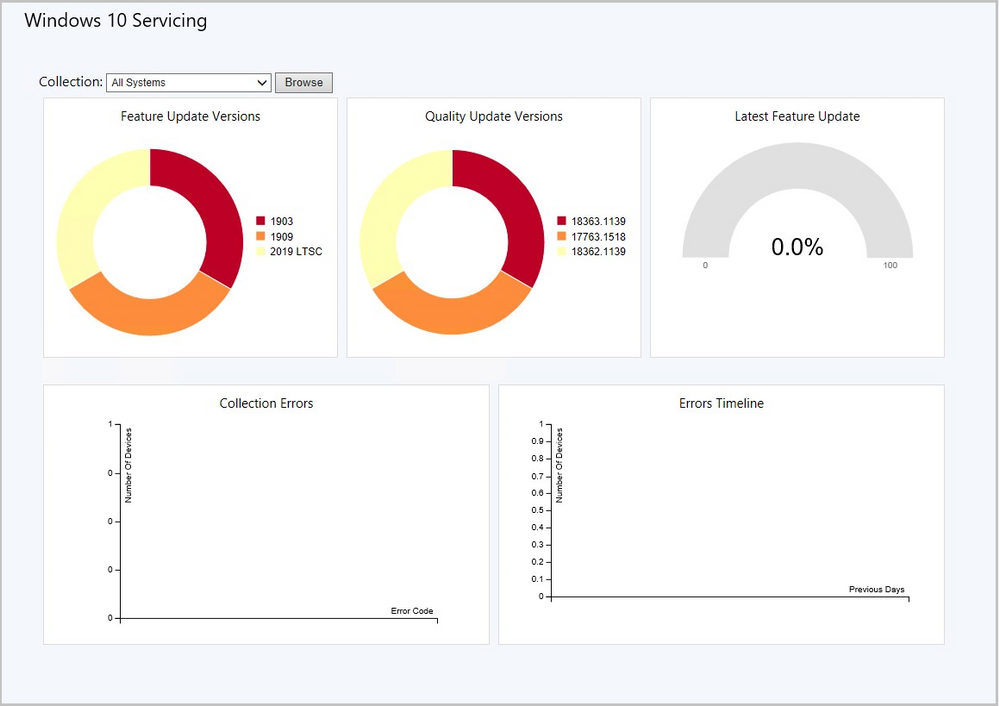 Windows 10 Servicing dashboard
Learn more about the Windows 10 Servicing dashboard changes.
This preview release also includes:
Task sequence error shows more check readiness details – Based on your UserVoice feedback, the task sequence progress can now display more information about readiness checks. If a task sequence fails because the client doesn’t meet the requirements configured in the Check readiness task sequence step, the user can now see more details about the failed prerequisites. They still see the common “task sequence error” message, but can now select an option to Inspect. This action shows the checks that failed on the device.
Tenant Attach: Application details – When tenant attach is enabled, the applications pane in the Microsoft Endpoint Manager admin center will show an Error Description if the application status is Failed. The Learn more link for application installation error will take you to an article where you can review the code and troubleshooting steps.
Windows 10 Servicing dashboard changes – We’ve simplified the Windows 10 Servicing dashboard to make it more relevant. The new Quality Update Versions chart displays the top five revisions of Windows 10 across your devices. The Latest Feature Update chart shows the number of devices that installed the latest feature update. The Windows 10 Usage chart, showing the distribution of Windows 10 major releases, was renamed to Feature Update Versions. Servicing plan and Windows 10 ring information were removed from the dashboard.
Disable application deployments – Based on your UserVoice feedback, you can now disable application deployments. For device-based deployments, when you disable the deployment or object, use the client notification action to Download Computer Policy. This action immediately tells the client to update its policy from the site. If the deployment hasn’t already started, the client receives the updated policy that the object is now disabled.
Get console extensions from the Community hub – The Community hub now supports sharing extensions to the Configuration Manager console. When you get an extension from the hub, it’s available in a new Console extensions node in the console. Getting an extension from the hub doesn’t make it immediately available. First, an administrator has to approve the extension for the site. Then console users can install the extension to their local console.
Access the top queries shared in the Community hub from CMPivot– You can now access the top CMPivot queries shared in the Community hub from on-premises CMPivot. By leveraging pre-created CMPivot queries shared by the broader community, CMPivot users gain access to a wider variety of queries. On-premises CMPivot accesses the Community hub and returns a list of the top downloaded CMPivot queries. Users can review the top queries, customize them, and then run on-demand. This improvement gives a wider selection of queries for immediate usage without having to construct them and also allows information sharing on how to build queries for future reference.
Community hub support for application content – This release continues to iterate on the scenario to share apps via the Community hub. You can now download linked content for Windows Installer apps in the hub. This improvement helps you to easily get a fully functional app from the Configuration Manager community.
OneTrace support for jump lists – Support Center OneTrace now supports jump lists for recently opened files. Jump lists let you quickly go to previously opened files, so you can work faster.
There are now three methods to open recent files in OneTrace:
- Windows taskbar jump list
- Windows Start menu recently opened list
- In OneTrace from File menu or Recently opened tab.
Improved user experience and security with Software Center custom tabs – Since current branch version 1906, you can add up to five custom tabs to Software Center. These custom tabs let you give your users easy access to common web apps and other sites. Previously, to display websites Software Center used the Windows built-in Internet Explorer browser control. Starting in this release, Software Center can now use the Microsoft Edge WebView2 browser control. The WebView2 browser control provides improved security and user experience. For example, more websites should work with these custom tabs without displaying script errors or security warnings.
PowerShell release notes preview – These release notes summarize changes to the Configuration Manager PowerShell cmdlets in technical preview version 2012.
Update 2012 for Technical Preview Branch is available in the Microsoft Endpoint Configuration Manager Technical Preview console. For new installations, the 2010 baseline version of Microsoft Endpoint Configuration Manager Technical Preview Branch is available on the Microsoft Evaluation Center. Technical Preview Branch releases give you an opportunity to try out new Configuration Manager features in a test environment before they are made generally available.
We would love to hear your thoughts about the latest Technical Preview! Send us Feedback about product issues directly from the console and use our UserVoice page for ideas about new features.
Thanks,
The Configuration Manager team
Configuration Manager Resources:
Documentation for Configuration Manager Technical Previews
Try the Configuration Manager Technical Preview Branch
Documentation for Configuration Manager
Microsoft Endpoint Manager announcement
Microsoft Endpoint Manager vision statement
Configuration Manager Forums
Configuration Manager Support
by Contributed | Dec 15, 2020 | Technology
This article is contributed. See the original author and article here.
Hopefully, you had a chance to read Get a bird’s eye view of your data estate with Azure Purview Data Insights blog, to get an understanding of all that you can achieve with Azure Purview Data Insights. Below I offer a deeper dive into how you can convert the Data Insights into actionable measures.
Answer questions with Purview Insights
Imagine you are a member of the governance team in your company and you have a charter that requires all assets with Credit Card Number to be stored in a specific location within a database. Like most companies today, critical information is typically secured in a single location. But monitoring over time is a challenge.
With Azure Purview however, you can map and classify the data comprehensively. Here’s how we can help you ratify your earlier decision regarding critical information.
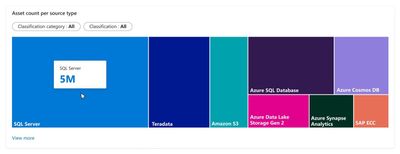
1) Start at Asset Insights. First, you see the data estate has multiple source types with millions of assets, which is expected. You pick classification category as Personal and classification as Credit Card Number. You notice, however, that Credit Card Number is stored in multiple locations including your petabyte sized data lake that is generously accessed. This violates your corporate credit card storage policy and must be addressed.
Figure 1
2) You dive into ADLS Gen 2 where you discovered data classified as Credit Card Number. Click on “View more” and pick ADLS Gen 2 from the list.
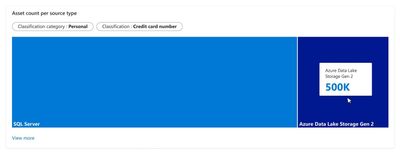
Figure 2
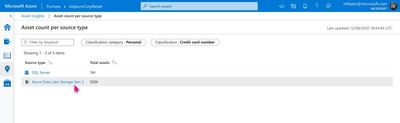
Figure 3
3) You can click on Asset count and view the list of assets that are classified as containing Credit Card Number.
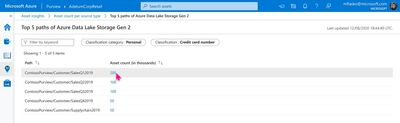
Figure 4
4) Contact the owners of the Data Lake – You can now find out the data owners by clicking on the assets from the list and contact them with next steps.
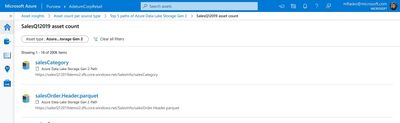
Figure 5
Conclusion
Azure Purview Data Insights helps you get a bird’s eye view of your data estate and deep dive into a specific area to answer a question or solve a problem.
Azure Purview Data Insights caters to a diverse set of users – from technical and business oriented users. Learn more about how we answer a business user’s questions using Glossary insights.
If you manage scans in Azure Purview, Insights can help you get an overview of all your scans through Scan insights. Learn more about Insights concepts today and Create an Azure purview account.
For more information, check out a demo of Azure Purview or start a conversation within the Azure Purview tech community.
More Resources
Read more about Azure Purview
Have a question? Check out our Frequently Asked Questions
by Contributed | Dec 15, 2020 | Technology
This article is contributed. See the original author and article here.
You’ve started scanning, classifying, and discovering the data at your company with Azure Purview. You’re now ready to engage with Azure Purview Data Insights – you can now assess data usage across your company with specific insights for data catalog administrators, data stewards, data officers, compliance and security officers. In Azure Purview Data Insights, you will gain access to important, eye-opening details about data residing in on-premises, multi-cloud and SaaS apps.
Azure Purview Data Insights creates a bird’s eye view across your data estate and allows you to drill into report data and take to understand your data, govern your data, govern your data glossary, and address anomalies in your data estate from inside the Azure Purview experience. Data officers and security officers can answer questions through Azure Purview Data Insights such as: what data does your company have, where is your company’s data, what classification of data is held within a data asset, what is the sensitivity of data in an asset, and how is my data estate changing over time. Let’s look at the Purview Data Insights reports you can check out right away!
Azure Purview Data Insights
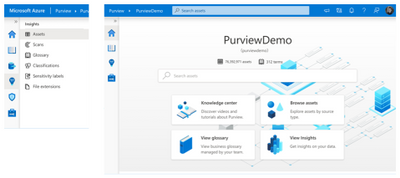
Azure Purview Data Insights can be found by navigating to the Insights icon.
Asset Insights
Asset insights provides a panoramic view across the data estate managed by Azure Purview. This experience offers insights into the progression of data assets including how many data sources have been scanned, how many assets were discovered, and how many discovered assets were classified. You can select a system- or user-defined classification and view the distribution of assets by source type, for the classification. For example, below shows the distribution of assets classified as ‘Email Address’. With View more, you can also see the top 5 folders containing the filtered classification.
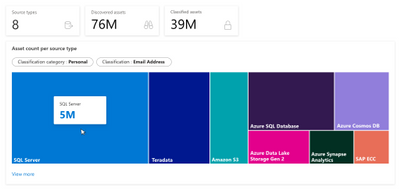
For file-based assets (Azure Blob, ADLS Gen 1 and ADLS Gen 2), Asset Insights enables a deeper look into size and file type trends, as well as files not associated with resource sets. This enables you to quickly identify anomalies in data assets. For instance, if you have a specific resource set pattern for your ADLS Gen 2 account, use the “Assets without Resource set” graph to identify files that do not follow the resource set pattern. Asset Insights allows you to drill down and contact the asset owner to address the anomaly.
To learn more, visit Asset Insights documentation
Scan Insights
Scan insights provides a view of scan progress across the last 30 days. This allows you to gain insights about scans and understand when scans are failing. Scanning sets the stage for the additional insights. With View more, you can see scan names by count of successful, canceled, and failed scans. If you want to drill deeper, Insights can help you navigate to scan history to see exactly when the scans were run with a failed, canceled, or successful outcome.
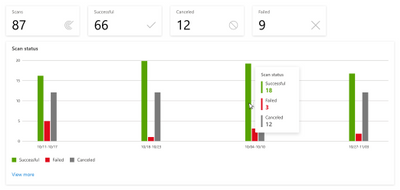
To learn more, visit Scan Insights documentation
Glossary Insights
A glossary provides a vocabulary for business users to manage business terms attached to assets. Glossary Insights enables you as a business user, to understand total terms in the glossary, count of approved and expired terms and understand the usage of terms applied to assets. Glossary Insights also helps business users complete their glossary by showing terms with missing experts or stewards. With View more, you can see which terms are missing information and you can navigate to Glossary to remediate immediately.
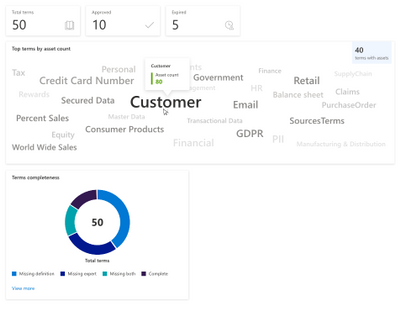
To learn more, visit Glossary Insights documentation
Classification Insights
Classification insights help you understand the types of information found in your organization’s data estate, and where classified data is located. In Azure Purview, classifications are used to identify content of a specific type in your data estate.
Classifications insights showcase what set of assets contain sensitive information types like Credit Card information, SSNs and email addresses were found. .Use the report to identify data with specific classifications and understand required actions, such as adding additional security to the repositories, or moving data to a more secure location.
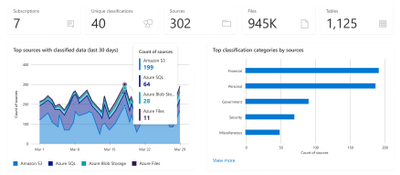
To learn more, visit Classification Insights documentation
Microsoft Information Protection sensitivity labels Insights
Microsoft Information Protection sensitivity labels enable you to classify and protect your organization’s data, while ensuring user productivity and their ability to collaborate isn’t hindered. With Azure Purview, you can now extend these sensitivity labels to your Azure assets and gain insights into the state of your data. Sensitivity labels insights provide you an overview of the sensitivity labels applied in your data estate, as well as a drilldown to the labeled files and databases.
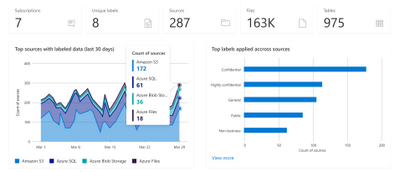
To learn more, visit Sensitivity label insights documentation
File Extensions Insights
After scanning your assets, Azure Purview will detect the file types found in your data estate and provide you with details about each file type as part of File Extensions Insights report. Use the report to identify how many different file types you have, how many files of each type are found, where those files are, and whether they can be scanned for sensitive data or not.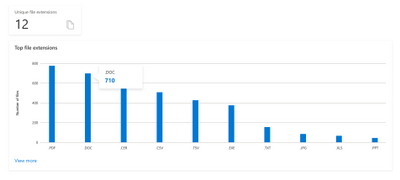
To learn more, visit File extension Insights documentation
Filter for Close-up Insights
Each set of Insights offers you the ability to filter to dimensions that help you understand your data estate. Use the time, source type, file type, classification category, and classification to customize the report. Please read about these concepts in the documentation here

Conclusion
Azure Purview data insights offers a wealth of information to help you understand your data. From the panoramic view across your data of Asset Insights to in-depth view to act on specific assets to understanding the sensitivity of data with Classification Insights and Sensitivity Labels.
Create an Azure Purview account today and start understanding your data supply chain from raw data to business insights with free scanning for all your SQL Server on-premises and Power BI online.
For more information, check out a demo of Azure Purview or start a conversation within the Azure Purview tech community.
Read More
Read more about Azure Purview
Have a question? Check out our Frequently Asked Questions

by Contributed | Dec 15, 2020 | Technology
This article is contributed. See the original author and article here.
TL;DR – What-if is now Generally Available. We have closed over 90 customer-reported issues, improved the depth of the policy-aware capabilities, and made it easier for resource providers to fix their own what-if noise issues. While you might still encounter noise, these can now be resolved by the owning resource provider team, so issues should be resolved faster.
Why do I need what-if?
Deploying an ARM template can be a time-consuming process, which is why it is particularly frustrating if your deployment does not execute as expected. This creates a challenging and long dev/test loop, which can get frustrating very quickly! To help with this problem, we have introduced a new capability for ARM templates called What-if, which allows you to preview the effects of a template deployment before it is executed, allowing you to validate that the changes are expected before starting the deployment process. In this example, I am updating a Linux VM by upgrading the VM size. Before deploying, I can see that it is the only expected change and I can deploy with confidence.
What-if has been in a public preview for the last few months, and as part of our GA release, we are introducing the following improvements:
- Major noise-reduction and other enhancements to what-if quality. We have closed ~90 publicly reported issues from the what-if noise github repo. In addition, we have set up an internal pipeline to allow each resource provider to resolve their own what-if noise related to ARM API compliance, which is often the root cause of the issue. As a result, we expect to see a rapid, continual improvement of what-if quality going forward.
- What-if is now “policy aware” for the modify effect. This means if a property will be modified by policy, it will be captured in the what-if response. For example, if a tag is going to be added by a modify policy, this will be reflected in the what-if output for the relevant resources. What-if is already policy-aware for the deny effect, so deployments that will fail due to policy will be caught quickly with what-if. We plan to also support the audit effect as part of our post-GA improvements.
How do I get started with what-if?
What-if is available as part of the deployment cmdlets in the PowerShell Az module and the deployment commands in Az CLI. If you have a recent release of either of these tools, you likely already have them available. You will need version 4.2 or later of PowerShell Az and version 2.5 or later for Az CLI.
The easiest way to run what-if is simply by appending either -Confirm in Az PowerShell or –confirm-with-what-if or -c in Az CLI to the commands you are already using:
Az PowerShell:
New-AzResourceGroupDeployment -TemplateFile ./azureDeploy.json -ResourceGroupName my-rg -Confirm
Az CLI:
az deployment group create -f ./azureDepoy.json -g my-rg --confirm-with-what-if
This will emit a user-friendly formatted text output to the console like the screenshot above and ask you if you’d like to proceed with the deployment, but you can also return the results as JSON so you can interrogate the results programmatically. You can also run what-if without the confirm behavior if you’d like to use what-if for a CI/CD approval workflow.
For a full walkthrough, you can use the what-if How To guide.
Some notes on what-if noise
During the public preview, our primary goal was to reduce the amount of noise you would see in the what-if response. These were cases where what-if told you, incorrectly, that a change was going to take place even though no change would occur. You all in the Azure community have done a great job opening issues in the what-if repo and exposing us to the noise you encountered. All told, we have closed ~90 noise issues so far and will continue to burn down the list.
At the same time, we have instituted more quality gates for resource provider teams to ensure their resources are modelled correctly. This quality check will ensure what-if works as expected with no noise in the response. As a result of this, what-if quality should continue to get improve at a quicker pace.
While the quality of what-if has increased dramatically, it is still possible to find what-if noise depending on the resource types you deploy in your templates. If you encounter noise, you should still open an issue in the what-if repo and we can get it routed to the right team to get it fixed quickly.
As always, if you have any questions or problems with deployment scripts, don’t hesitate to reach out at alfran@microsoft.com, on twitter or on GitHub.
by Contributed | Dec 15, 2020 | Technology
This article is contributed. See the original author and article here.
TL;DR – Deployment Scripts is now Generally Available, and as part of this release we’ve made deployment scripts more reliable and easier to use with an improved permissions model.
Why do I need Deployment Scripts?
Often during an ARM Template deployment, there is an operation that needs to be performed that cannot be done natively in the template – either because there is no explicit support or because the operation takes place outside of Azure. For example, you may need to populate data in a database, deploy a Kubernetes manifest, or get a new IP address from an IPAM system. Customers will often fill this gap by running a script in a release pipeline or manually performing the task before or after the deployment occurs.
Deployment Scripts allow you to complete these “last mile” scenarios as part of your ARM Template deployments by running your bash or PowerShell script in a native Deployment Scripts resource. Deployment Scripts has been available in public preview for a few months, and today we are making Deployment Scripts generally available.
What’s new for GA?
With our GA release we are adding the following features and capabilities:
- You are no longer required to provide a User-assigned Managed Identity for the script to be executed. This is for use cases that do not require authentication to Azure, such as a data transformation or communication with a non-Azure API or if you’d rather use a service principal to authenticate to Azure instead of a Managed Identity. This makes executing deployment scripts much lower friction with less prerequisites.
- The underlying resources that are required for a deployment script to execute (Azure Container Instance and Storage Account) will no longer be created with the Managed Identity. Instead, we use the permissions of the AAD principal that created the deployment to create them. For a principal to create a deploymentScript they will now need the following permissions:
"Microsoft.Resources/deploymentScripts/*",
"Microsoft.ContainerInstance/containerGroups/*",
"Microsoft.Storage/storageAccounts/*"
We will use the permissions of the AAD principal executing the deployment to create these resources and register the underlying ContainerInstance Resource Provider. As a result of this change, the permissions granted to the managed identity can be more limited as it only requires what the script needs to run successfully.
- Better error handling for RBAC replication issues. You should now be able to reliably assign permissions to the Managed Identity in the same template that creates the deployment script without any authentication issues. This makes it easier to create a “self-contained” template deployment script template. During the preview, we noticed issues to do replication delays that prevented from working well.
How do I get started?
If you are already familiar with ARM Templates, getting started with Deployment Scripts is easy. Simply add a resource of type Microsoft.Resources/deploymentScripts to your ARM template:
    {
      "type": "Microsoft.Resources/deploymentScripts",
      "apiVersion": "2020-10-01",
      "kind": "AzurePowerShell",
      "name": "[parameters('dsName')]",
      "location": "[parameters('location')]",
      "properties": {
        "azPowerShellVersion": "3.0",
        "scriptContent": "
          $DeploymentScriptOutputs['test'] = 'test this output'
          Write-Host 'I am a deployment script'
        ",
        "forceUpdateTag": "[parameters('timestamp')]", // utcNow()
        "retentionInterval": "PT4H"
      }
    }
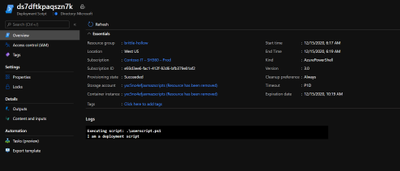
Once the script has executed I can view the details of the script execution in PowerShell, CLI, or in the Azure Portal
For more details, take a look at the below guides and examples.
We have seen a lot of awesome use cases be developed for deployment scripts during the public preview and we are looking forward to hearing how these new GA capabilities improve the experience even further. As always, if you have any questions or problems with deployment scripts, don’t hesitate to reach out at alfran@microsoft.com, on twitter or on GitHub.
Happy Deployment Scripting!

by Contributed | Dec 15, 2020 | Technology
This article is contributed. See the original author and article here.
‘Tis the season! Did you grab a Microsoft-themed sweater? Sold out? Don’t worry. We’ve created three SharePoint-themed winter holiday sweaters to back you up – in Microsoft Teams, or to use as wallpaper on your desktop.
Make your productivity festive and intranet’ty! Grab the png’s and follow the ‘how to’ link below.
SharePoint holiday sweater background – abstract.
Download SharePoint holiday sweater background – abstract.
 SharePoint holiday sweater background – Hanukkah.
Download SharePoint holiday sweater background – Hanukkah.
 SharePoint holiday sweater background – Christmas.
Download SharePoint holiday sweater background – Christmas.
Learn how to change your background for a Microsoft Teams meeting.
Special thanks to our design team for creating the fun.
View more Microsoft background and wallpapers.
Stay safe and happy holidays,
Wenvi Hidayat
by Contributed | Dec 15, 2020 | Technology
This article is contributed. See the original author and article here.
Howdy folks,
Today we are announcing the public preview of password management and autofill capability in the Microsoft Authenticator app. For any sites or apps you visit on your mobile device, Authenticator will help you autofill strong passwords without having to remember them. These passwords can be synced across mobile and desktop, so you can seamlessly autofill passwords as you move across devices. This is currently only available for Microsoft accounts (MSA) and not for Azure AD based work or school accounts.
Rajat Luthra, one of our program managers in the Identity team, has written a guest blog post diving into details of this new capability. You can see his blog post below.
As always, we’d love to hear from you. Please let us know what you think in the comments below or on the Azure AD feedback forum.
Best regards,
Alex Simons (@Alex_A_Simons)
Corporate VP of Program Management
Microsoft Identity Division
——————————————
Hi everyone!
I’m excited to share that Microsoft Authenticator can now securely store and autofill passwords on apps and sites you visit on your mobile device. Once you make Authenticator an autofill provider, it will offer to save your passwords when you enter them on a site or app’s login page. Your synced passwords are protected on mobile with multi-factor authentication. These passwords are synced using your Microsoft account (outlook.com, hotmail.com, live.com, etc.), making them also available on your desktop with Microsoft Edge and the new Google Chrome extension.
While passwordless and multi-factor authentication is the way to go for security, we understand many sites still require passwords and some don’t even support multi-factor authentication. In a previous blog, we showed how no human generated password can be unique enough to beat attackers. That’s where Authenticator can help! Since you no longer need to remember passwords, Authenticator can autofill complex and unique passwords for you.
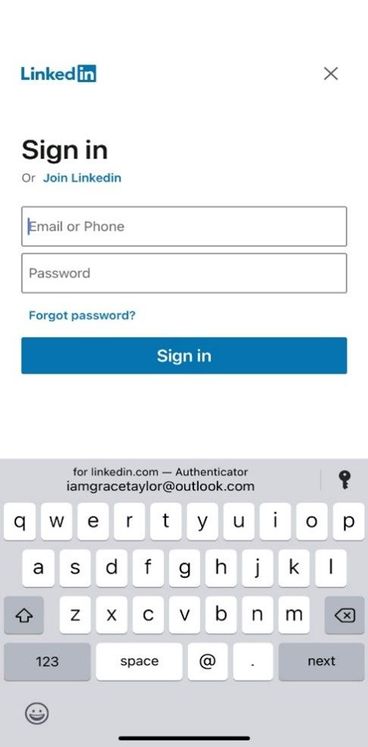
Here’s a sneak peek of autofill experience on iOS. A similar experience exists for Android.
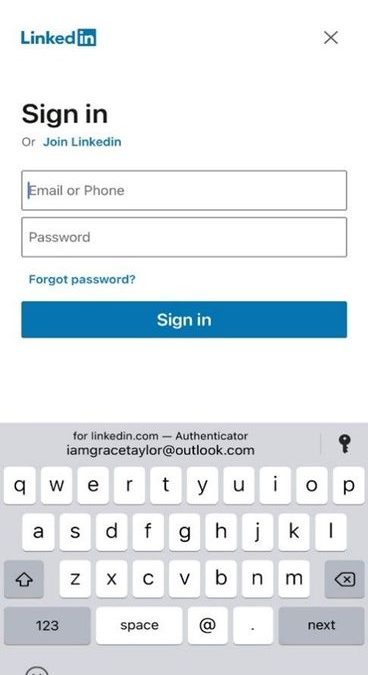
When you visit a site or app for which you have saved a password, Authenticator offers to autofill it.
When you visit a site or app where your username and password is not saved, “Passwords” text appears on top of keyboard, clicking on which lets you save password in Authenticator.
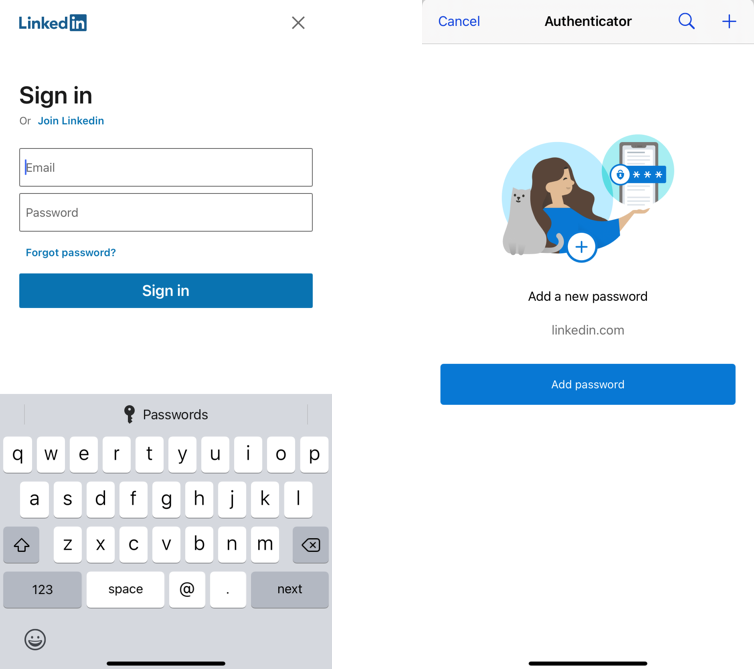
Getting started
To use the autofill feature and sync passwords, use your Microsoft account (MSA) and follow these simple steps. We’ve provided iOS screenshots below – the feature is available on both iOS and Android.
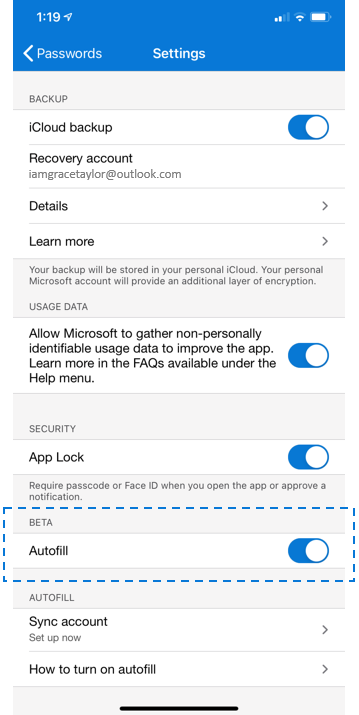
- Open your Authenticator app, go to Settings –> Beta –> Autofill, and turn the toggle ON. Once you toggle ON Autofill in Settings, the Passwords tab will appear.
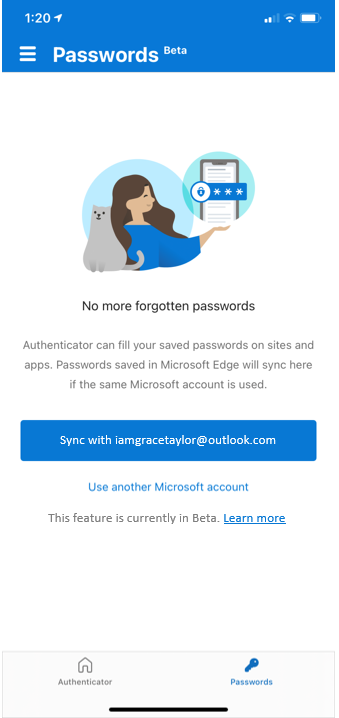
- Then, go to the Passwords tab, and sign-in using your Microsoft account or sync passwords from a Microsoft account already added to your Authenticator app.
- Finally, make Authenticator the default autofill provider on your phone.
- iOS: Open Settings –> Search for “Autofill Passwords” –> Click on “Autofill Passwords” –> Select “Authenticator”
- Android: Open Settings –> Search for “Autofill” –> Select “Auto-fill service” –> Click on “Auto-fill service” on next screen –> Select “Authenticator”
- You can sync and autofill these passwords in Microsoft Edge. If you also use Google Chrome on desktop, you can sync and autofill the same passwords using the Google Chrome extension.
Prerequisites
Autofill experience is rolling out in Authenticator app on iOS (iOS 12.0 and above) and Android (Android 6.0 and above). To learn more about the autofill feature, visit our FAQs page.
Autofill only works with Microsoft accounts (MSA), and is currently disabled for enterprise users who are using the Authenticator app for Phone sign-in or multi-factor authentication on their enterprise accounts. To allow enterprise users to use this feature on their Authenticator app, click here.
We look forward to your feedback!
Thanks,
Rajat Luthra (@_luthrarajat)
Senior Program Manager
Microsoft Identity Security & Protection
by Contributed | Dec 15, 2020 | Technology
This article is contributed. See the original author and article here.
As we wrap up the end of the year, I wanted to share my gratitude for all the partners that have contributed in helping our customers rapidly enable a secure remote workforce. From securing applications to rolling out passwordless solutions or ensuring seamless collaboration across organizations, our partners have been critical in helping our customers adapt to a new way of work.
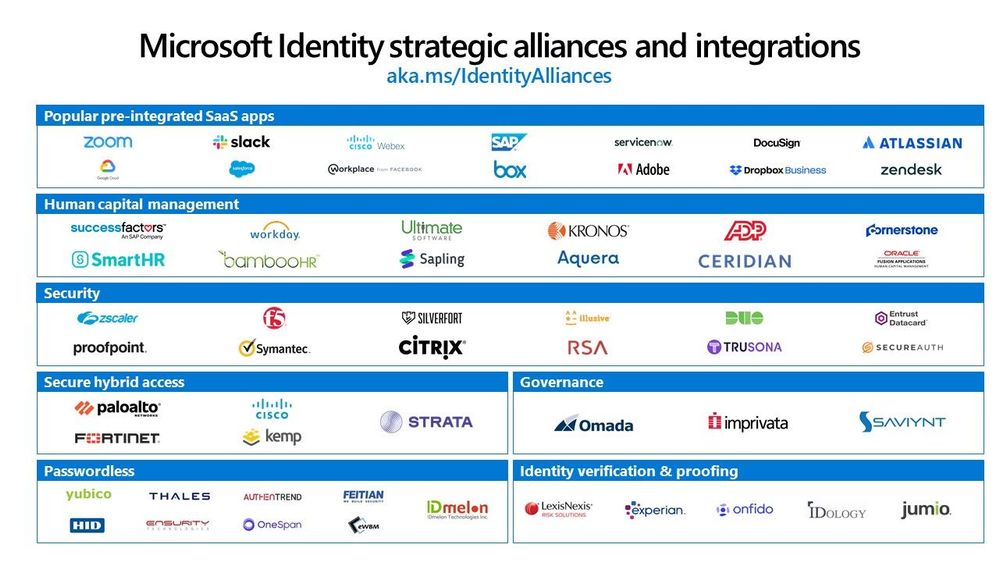
We built Microsoft identity as a platform to bring together all your tools, apps, and services—whether or not we built them—to allow you to deliver better experiences for you and your employees. We now have over 3,400 applications in our Azure AD app gallery and deep partner integrations across categories.
We’ve seen amazing progress in our partner ecosystem and wanted to share 5 recent integrations with partners as we wrap 2020.
Simplifying identity management and access to your apps
As employees continue to work remotely, they need secure, seamless access to all types of applications from cloud apps to on-premises apps. That’s why we continue to partner with software providers to integrate with Azure AD to simplify and secure application access. Last month we added over 52 new federated applications and 9 new provisioning connectors in our Azure AD app gallery for you to quickly enable single sign-on and automate user provisioning.
Hashicorp Terraform SSO
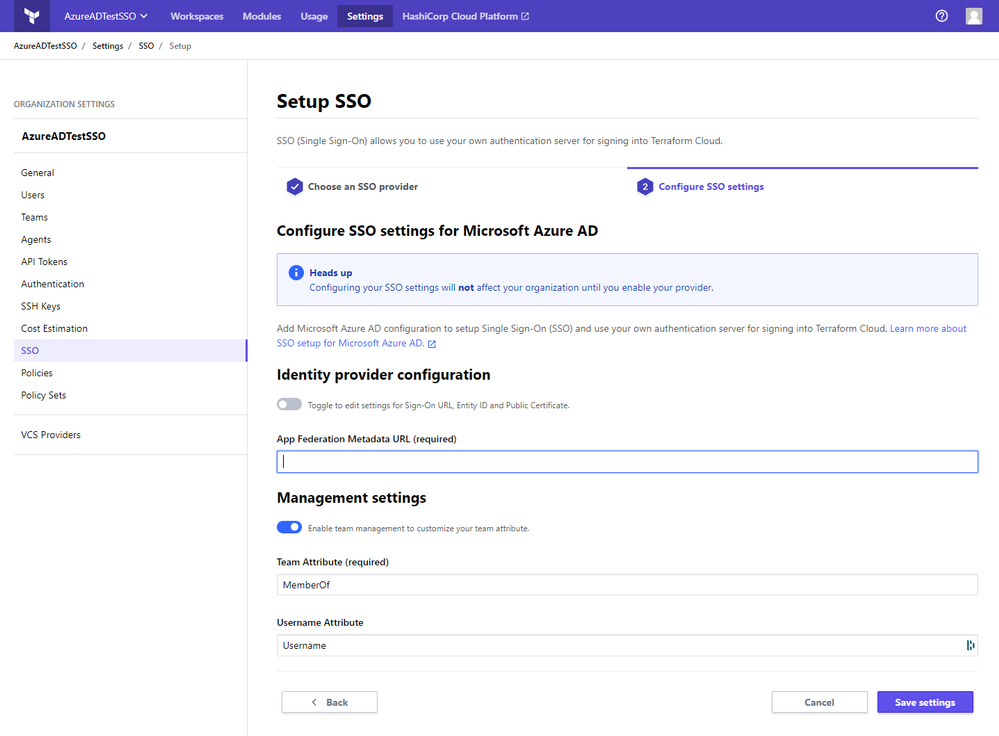
One new federated application that has been recently added to our Azure AD app gallery is Terraform Cloud from Hashicorp. Terraform Cloud provides infrastructure automation-as-a-service for the open source project Terraform. Many of our customers have adopted Terraform as a mechanism to automate the provisioning of resources in their Azure environments. Terraform Cloud helps customers manage infrastructure provisioning, collaborate across teams, and provide governance and security across an organization. By integrating with Azure AD, Terraform Cloud customers can easily secure and manage organizational access to their Terraform environment. Users can get the convenience of single sign-on for Terraform Cloud, and admins can assign each user to the Terraform Cloud team with the appropriate permissions for their role in minutes. You can learn more and sign up for Terraform Cloud for free at terraform.io/cloud.
Adobe rolls out support for SCIM-based provisioning
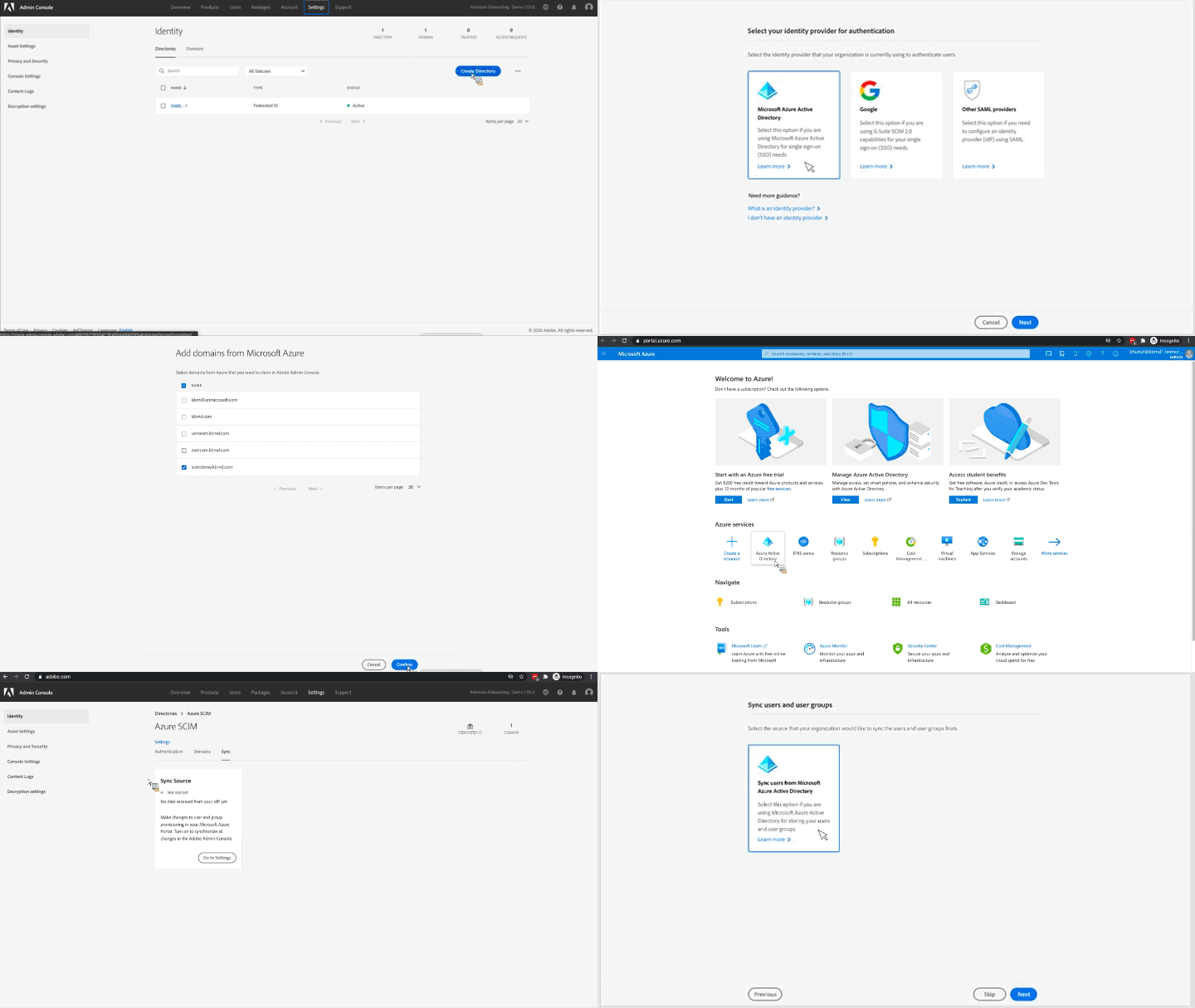
At Microsoft Ignite, Adobe announced a private preview of SCIM standard-based app provisioning integration for its core Adobe Identity Management platform. The updated admin experience makes it easier to manage user lifecycles across Adobe Creative Cloud, Adobe Document Cloud, and Adobe Experience Cloud. We are excited to announce that this integration is now publicly available for all Adobe and Azure AD customers. Get started setting this up by going to the documentation here.
Protect legacy applications through new secure hybrid access partnerships
To help customers secure and manage access to their legacy authentication-based apps, we continue to expand our secure hybrid access partnerships. Our secure hybrid access partnerships allow our customers to use their existing application delivery networks, VPNs and software defined perimeter solutions to secure access to legacy applications.
Pulse Secure SSO
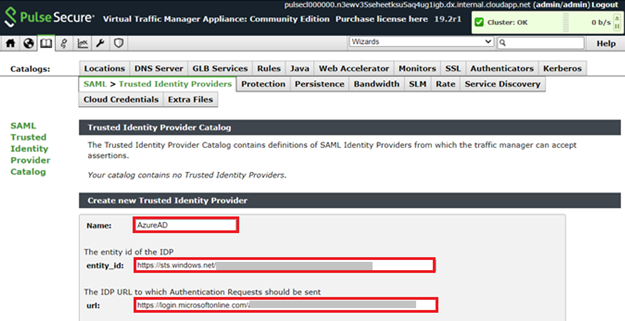
One new solution that we recently added is Pulse Connect Secure. Pulse Connect Secure is a VPN solution that provides secure, authenticated access for remote and mobile users from any web-enabled device to corporate resources. With our integration, employees can easily sign-in to Pulse Connect Secure with their Azure AD credentials to access legacy application and admins can secure access to Pulse Connect Secure.
Enabling the move to passwordless
Weak passwords are a vulnerable attack vector for bad actors, which is why we are such strong advocates of passwordless technologies. According to Forrester, passwordless technology is top security trend that customers are evaluating to ensure secure yet easy to use experiences. To help customers adopt passwordless methods, including FIDO2 security keys, we’ve worked with hardware partners like Yubico to pilot a program to accelerate deployment of passwordless solutions through our services partners.
Yubico Passwordless Pilot Program
Services partners like System Integrators are an important catalyst to help customers accelerate their passwordless deployment. That’s why we’ve partnered with Yubico to provide services partners the ability to nominate their customers to pilot YubiKeys. Services partners can leverage our joint pilot program and receive 25 YubiKeys to deploy with customers. Here’s what one partner, Metsys, who has participated in the pilot program and deployed YubiKeys for Groupe Bel had to say:
“The passwordless campaign run by Microsoft and Yubico is the opportunity to show our customers the benefits of the YubiKeys in the Microsoft environment: a simplified user experience for a maximum level of security”- Laurent Cayatte, President of Metsys
New FIDO2 security keys from VinCSS
We are always seeking new partnerships with FIDO2 security key vendors who enhance our ability to provide customers with passwordless authentication options. We’ve recently added VinCSS, the cybersecurity affiliate of VinGroup in Vietnam, to our list of FIDO2 security key vendors that are compatible with our passwordless experience. With this latest addition, customers in Vietnam and Asia Pacific have another FIDO2 solution to go passwordless.
See you next year!
Look out next month for another update on how our partners are contributing to help enable a secure remote workforce and ensuring seamless access to all your apps and resources. Be sure to check out the Azure AD partner page to learn more about all the partnerships we have to help you with solving your identity needs.
Have a great holiday season and Happy New Year!
Best Regards,
Sue Bohn
Partner Director of Program Management
Microsoft Identity Division

by Contributed | Dec 15, 2020 | Technology
This article is contributed. See the original author and article here.
Sync Up is your monthly podcast hosted by the OneDrive team taking you behind the scenes of OneDrive, shedding light on how OneDrive connects you to all your files in Microsoft 365 so you can share and work together from anywhere. You will hear from experts behind the design and development of OneDrive, as well as customers and Microsoft MVPs. Each episode will also give you news and announcements, special topics of discussion, and best practices for your OneDrive experience.
So, get your ears ready and Subscribe to Sync up podcast!
In this year’s final episode, we look back over 2020, discussing product highlights, our team’s learnings and achievements, and what are looking forward to for 2021. This month, cohosts Ankita Kirti and Jason Moore talk with Randy Wong. Principal PM Manager, responsible for customer success, sharing, and collaboration. OneDrive played a critical role for customers all over the world this year in essential jobs in governments, schools, pharmaceutical companies and more. We also share other important learning lessons from this year, including our focus on empathy, health, gratitude, and Jason’s “No Meetings Friday” policy.
Tune in!
Meet your show hosts and guests for the episode:
Jason Moore is the principal group program manager for OneDrive and the Microsoft 365 files experience. He loves files, folders, and metadata. Twitter: @jasmo
Ankita Kirti is a product manager on the Microsoft 365 product marketing team responsible for OneDrive for Business. Twitter: @Ankita_Kirti21
Randy Wong is a Principal PM Manager on the OneDrive team responsible for customer success, sharing, and collaboration. Twitter: @randybwong_
Quick links to the podcast
Links to resources mentioned in the show:
Be sure to visit our show page to hear all the episodes, access the show notes, and get bonus content. And stay connected to the OneDrive community blog where we’ll share more information per episode, guest insights, and take any questions from our listeners and OneDrive users. We, too, welcome your ideas for future episodes topics and segments. Keep the discussion going in comments below.
As you can see, we continue to evolve OneDrive as a place to access, share, and collaborate on all your files in Office 365, keeping them protected and readily accessible on all your devices, anywhere. We, at OneDrive, will shine a recurring light on the importance of you, the user. We will continue working to make OneDrive and related apps more approachable. The OneDrive team wants you to unleash your creativity. And we will do this, together, one episode at a time.
Thanks for your time reading and listening to all things OneDrive,
Ankita Kirti – OneDrive | Microsoft
by Contributed | Dec 15, 2020 | Technology
This article is contributed. See the original author and article here.
SQL Server started as a departmental database engine. It is now a modern data platform and a force in the industry. In this episode of Data Exposed with Bob Ward, learn how Microsoft is innovating SQL Server from IOT edge devices to your data center to the Azure cloud.
Watch on Data Exposed
Resources:
View/share our latest episodes on Channel 9 and YouTube!


Recent Comments