by Contributed | Jan 6, 2021 | Technology
This article is contributed. See the original author and article here.
Starting today, Data Exposed will be going live every Wednesday at 9AM PT on LearnTV. Every 4 weeks (mostly the first week of each month), we’ll do a News Update. We’ll include product updates, videos, blogs, etc. as well as upcoming events and things to look out for. We’ve included an iCal file, so you can add a reminder to tune in live to your calendar.
Data Exposed will continue to release new, shorter episodes on Thursdays at 9AM PT, plus #MVPTuesday episodes once a month. We’re expanding so we can further our connection with you, our SQL community and #sqlfamily.
Along with the News Update on Data Exposed Live, you can read this blog to get the guide and links to all the things discussed in the show. We’re looking forward to 2021, here’s your first update:
Product updates
To get a comprehensive update on what’s new in Azure SQL Managed Instance, I highly recommend you check out the Live session we did in December: https://aka.ms/sqlmi-live-dec20. This session featured so many updates and even insights on what’s coming in 2021.
Machine Learning in Azure SQL Managed Instance officially became generally available with support for R and Python. For more information, see here: https://aka.ms/managed-instance-machine-learning. And, in case you missed it (ICYMI), in late 2020, Machine Learning Services actually introduced open sourcing for R and Python custom runtime. This is a great addition that will help you bring newer version of R and Python that you may be using in your organization.
In December, the general availability of Azure Data Share snapshot-based sharing for Azure SQL Database and Azure Synapse Analytics happened. This integration enables you to share database tables and views from Azure SQL Database and Dedicated SQL pool (formerly Azure SQL DW), and share tables from Synapse workspace dedicated SQL pool. You can now share structured data stored in relational databases and data warehouse easily and securely between internal departments, with external partners, vendors, or customers for collaboration. More info on how to do that here.
Transparent Data Encryption (TDE) has been available across all deployment options of Azure SQL for a while, but in December the team announced public preview for TDE with customer-managed keys for Azure SQL Database Hyperscale.
Finally, Mara Steiu, Program Manager, came on the show to talk to us about Private Link for Azure SQL Data Sync, which recently went into a public preview for Azure SQL Database.
Additionally, the latest Azure Data Studio update was released in November. Make sure you’re up to date and get the full details in the release blog here.
Videos
Data Platform Summit(DPS) took place in December online over the course of 72 hours, plus two days of pre-cons and post-cons. Microsoft had a great showing.
We released a TON of new Data Exposed episodes to round out the year. Here is the list, or you can just see the playlist we created with all the episodes!
- Top Reasons Your On-premises SQL Server Instance Can Benefit from Azure, Amit Banerjee
- Getting Started with DevOps for Azure SQL, Arvind Shyamsundar
- MVP EDITION – How to Automate Disaster Recovery in SQL Server On-Prem, Chrissy LeMaire
- Use Azure Pipelines for Azure SQL Deployments, Arvind Shyamsundar
- Understanding High-Performant, Hybrid Data Integration Using Azure Data Factory, Abishek Narain
- MVP EDITION – The A to S of Azure Data Studio, Warwick Rudd
- Elastic Jobs in Azure SQL Database – Part 3, Kate Smith
- Elastic Jobs in Azure SQL Database – Part 4, Kate Smith
- Elastic Jobs in Azure SQL Database – Part 5, Kate Smith
Blogs
As always, our team is busy writing blogs to share with you all. Blogs contain announcements, tips and tricks, deep dives, and more. Here’s the list I have of SQL-related topics you might want to check out.
- Azure Blog
- SQL Server Techcommunity
- Azure SQL Tech Community
- Azure SQL Devs’ Corner
- Azure Database Support (SQL-related posts)
*This includes the General Availability announcement for Azure Synapse Analytics, as well as the Preview announcement for Azure Purview.
Upcoming events
As always, there are several events coming up this month. Here are a few to put on your calendar and register for:
1/10: Multicloud Meetup
Azure SQL Database Networking using Private Link and connecting with PAAS, Anna Hoffman
1/20: Azure Webinar Series: Four Ways to Take Your Data Security to the Next Level
1/29: C# Corner SQL Virtual Conference
Learn Azure SQL Database through Demos, Anna Hoffman
Develop Best Practices for Azure SQL: Avoiding common pitfalls when using the Cloud Database, Davide Mauri
Executable Troubleshooting Guides with Notebook for SQL People, Julie Koesmarno & Aaron Nelson
SQL Server 2019 Big Data Clusters Architecture, Buck Woody
SQL Projects for Database Development, Drew Skwiers-Koballa
Data Replication Options in Azure SQL / SQL Server, Mara Steiu
In addition to these upcoming events, here’s the schedule for Data Exposed Live this month:
1/13: Deep Dive: Enterprise Data Integration Simplified with Azure Data Factory
1/20: Something Old, Something New: Two Data Scientists Walk Into a Bar? What Are the Odds? with Buck Woody
1/27: Azure SQL February 2021 Updates
Tune in every Wednesday at 9AM PT to interact with us live: aka.ms/LearnTV
Find any episodes you missed on-demand: aka.ms/dataexposedlive
Coming up on February 3, join our first-ever Data Exposed Special, Around the Clock with Azure SQL and Azure Data Factory: an engineering event focused on Azure SQL and Azure Data Factory – with the idea that Azure Data Factory can do a lot of things, but it does Azure SQL really well! Register today!
Featured Microsoft Learn Module
Learn with us! This month I highlighted the Introduction to Azure SQL module. Check it out!
Anna’s pick of the month: books!
Near the end of November, two Azure SQL-related books were published.
Azure SQL Revealed was written by Bob Ward to help SQL Server professionals translate their knowledge to Azure SQL. Practical Azure SQL Database for Modern Developers, written by Davide Mauri, Silvano Coriani, Sanjay Mishra, Jovan Popovic, and I, was written to help developers (including those new to SQL Server) get the most out of Azure SQL Database and Azure SQL Managed Instance. These are great complementary resources, and I can’t recommend them enough!
Until next month…
That’s it for now! Be sure to check back next month for the latest updates, and tune into Data Exposed Live every Wednesday at 9AM PST on LearnTV. We also release new episodes on Thursdays at 9AM PST and new #MVPTuesday episodes on the second Tuesday of every month at 9AM PST at aka.ms/DataExposedyt.
Having trouble keeping up? Be sure to follow us on Twitter to get the latest updates on everything, @AzureSQL. You can also download the iCal link with a recurring invite!
We hope to see you next time, on Data Exposed.
–Anna and Marisa
by Contributed | Jan 6, 2021 | Technology
This article is contributed. See the original author and article here.
As we continue listening to students and educators, we have heard many requests for OneNote integration with H5P, the tool that allows people to create, share and reuse interactive content. The OneNote binder metaphor, and the ability to easily embed H5P interactive pages in OneNote, organize them, or distribute to others in OneNote Class Notebook, seemed like a great match. Today we are excited to announce the integration between H5P and OneNote.
Educators around the world use H5P to create interactive learning resources and digital materials for their classroom. There are hundreds of H5P templates available to pick from and teachers and students can create interactive presentations, infographics and escape rooms easily and no programming or design skills required. H5P aims to change the way we communicate, from static, boring content, to interactive, engaging presentations and materials. Visual, interactive content is normally hard and expensive to develop. But with H5P creating interactive content becomes, fun, simple and affordable for everyone.
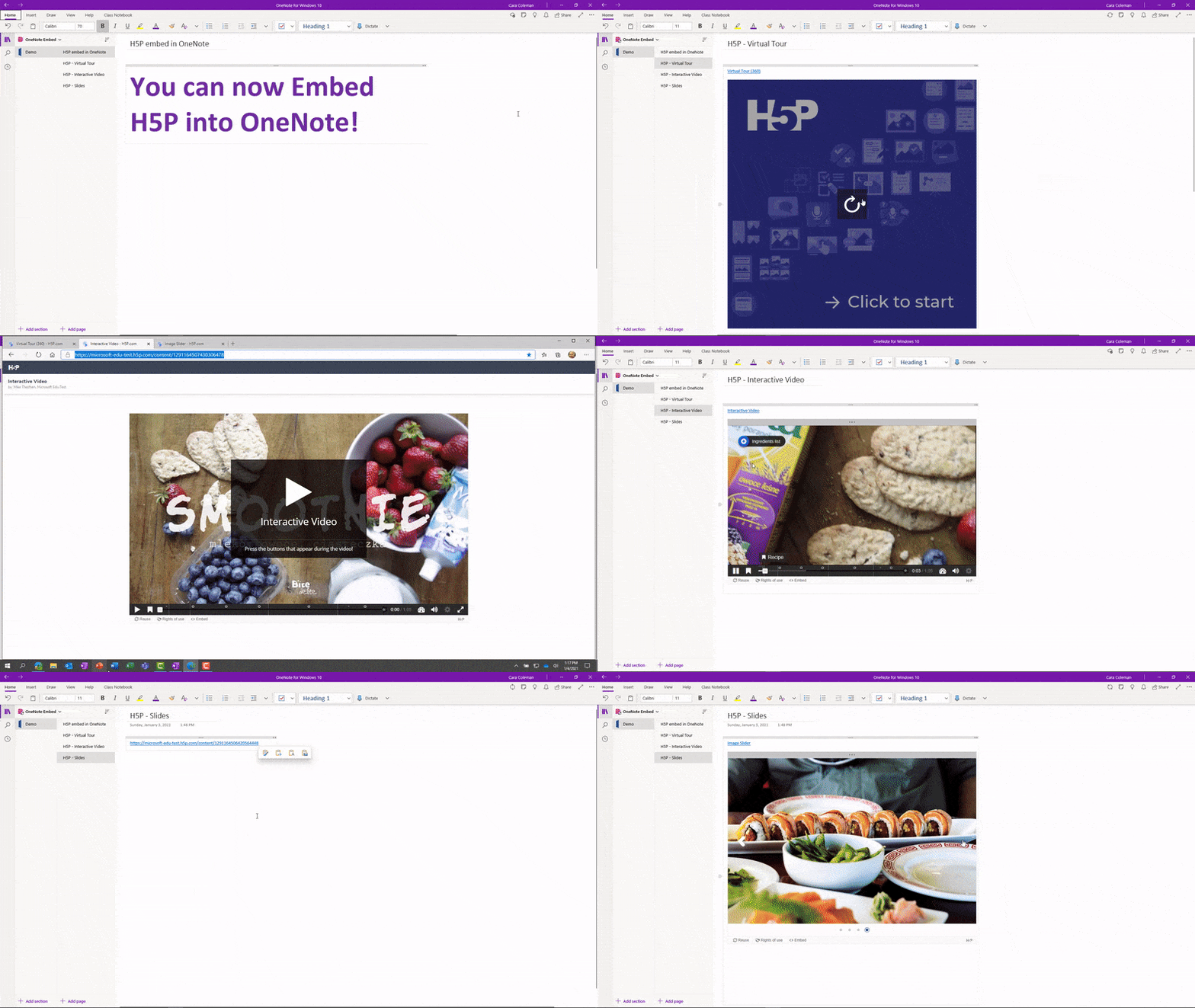
As of today, you can now paste any H5P.com URL on to a OneNote page and it will render it as a live interactive embed. You can now create pages, section, and even entire notebooks chock-full of H5P! A great way to make learning more fun and easy, together.
To see some examples or how easy this is to do, see the example video of an H5P in OneNote. This integration works in OneNote Windows 10, Online, Mac, iPad, Android, and 2016
Demo of H5P content embedded in OneNote
We hope you enjoy this new integration to bring together two great apps that students and educators love!
Mike Tholfsen
Microsoft Education Product Manager
@mtholfsen
by Contributed | Jan 6, 2021 | Technology
This article is contributed. See the original author and article here.
Starting today, Data Exposed will be going live every Wednesday at 9AM PT on LearnTV. Every 4 weeks (mostly the first week of each month), we’ll do a News Update. We’ll include product updates, videos, blogs, etc. as well as upcoming events and things to look out for. We’ve included an iCal file, so you can add a reminder to tune in live to your calendar.
Data Exposed will continue to release new, shorter episodes on Thursdays at 9AM PT, plus #MVPTuesday episodes once a month. We’re expanding so we can further our connection with you, our SQL community and #sqlfamily.
Along with the News Update on Data Exposed Live, you can read this blog to get the guide and links to all the things discussed in the show. We’re looking forward to 2021, here’s your first update:
Product updates
To get a comprehensive update on what’s new in Azure SQL Managed Instance, I highly recommend you check out the Live session we did in December: https://aka.ms/sqlmi-live-dec20. This session featured so many updates and even insights on what’s coming in 2021.
Machine Learning in Azure SQL Managed Instance officially became generally available with support for R and Python. For more information, see here: https://aka.ms/managed-instance-machine-learning. And, in case you missed it (ICYMI), in late 2020, Machine Learning Services actually introduced open sourcing for R and Python custom runtime. This is a great addition that will help you bring newer version of R and Python that you may be using in your organization.
In December, the general availability of Azure Data Share snapshot-based sharing for Azure SQL Database and Azure Synapse Analytics happened. This integration enables you to share database tables and views from Azure SQL Database and Dedicated SQL pool (formerly Azure SQL DW), and share tables from Synapse workspace dedicated SQL pool. You can now share structured data stored in relational databases and data warehouse easily and securely between internal departments, with external partners, vendors, or customers for collaboration. More info on how to do that here.
Transparent Data Encryption (TDE) has been available across all deployment options of Azure SQL for a while, but in December the team announced public preview for TDE with customer-managed keys for Azure SQL Database Hyperscale.
Finally, Mara Steiu, Program Manager, came on the show to talk to us about Private Link for Azure SQL Data Sync, which recently went into a public preview for Azure SQL Database.
Additionally, the latest Azure Data Studio update was released in November. Make sure you’re up to date and get the full details in the release blog here.
Videos
Data Platform Summit(DPS) took place in December online over the course of 72 hours, plus two days of pre-cons and post-cons. Microsoft had a great showing.
We released a TON of new Data Exposed episodes to round out the year. Here is the list, or you can just see the playlist we created with all the episodes!
- Top Reasons Your On-premises SQL Server Instance Can Benefit from Azure, Amit Banerjee
- Getting Started with DevOps for Azure SQL, Arvind Shyamsundar
- MVP EDITION – How to Automate Disaster Recovery in SQL Server On-Prem, Chrissy LeMaire
- Use Azure Pipelines for Azure SQL Deployments, Arvind Shyamsundar
- Understanding High-Performant, Hybrid Data Integration Using Azure Data Factory, Abishek Narain
- MVP EDITION – The A to S of Azure Data Studio, Warwick Rudd
- Elastic Jobs in Azure SQL Database – Part 3, Kate Smith
- Elastic Jobs in Azure SQL Database – Part 4, Kate Smith
- Elastic Jobs in Azure SQL Database – Part 5, Kate Smith
Blogs
As always, our team is busy writing blogs to share with you all. Blogs contain announcements, tips and tricks, deep dives, and more. Here’s the list I have of SQL-related topics you might want to check out.
- Azure Blog
- SQL Server Techcommunity
- Azure SQL Tech Community
- Azure SQL Devs’ Corner
- Azure Database Support (SQL-related posts)
*This includes the General Availability announcement for Azure Synapse Analytics, as well as the Preview announcement for Azure Purview.
Upcoming events
As always, there are several events coming up this month. Here are a few to put on your calendar and register for:
1/10: Multicloud Meetup
Azure SQL Database Networking using Private Link and connecting with PAAS, Anna Hoffman
1/20: Azure Webinar Series: Four Ways to Take Your Data Security to the Next Level
1/29: SQL Virtual Conference
Learn Azure SQL Database through Demos, Anna Hoffman
Develop Best Practices for Azure SQL: Avoiding common pitfalls when using the Cloud Database, Davide Mauri
Executable Troubleshooting Guides with Notebook for SQL People, Julie Koesmarno & Aaron Nelson
SQL Server 2019 Big Data Clusters Architecture, Buck Woody
SQL Projects for Database Development, Drew Skwiers-Koballa
Data Replication Options in Azure SQL / SQL Server, Mara Steiu
In addition to these upcoming events, here’s the schedule for Data Exposed Live this month:
1/13: Deep Dive: Enterprise Data Integration Simplified with Azure Data Factory
1/20: Something Old, Something New: Two Data Scientists Walk Into a Bar? What Are the Odds? with Buck Woody
1/27: Azure SQL February 2021 Updates
Tune in every Wednesday at 9AM PT to interact with us live: aka.ms/LearnTV
Find any episodes you missed on-demand: aka.ms/dataexposedlive
Coming up on February 3, join our first-ever Data Exposed Special, Around the Clock with Azure SQL and Azure Data Factory: an engineering event focused on Azure SQL and Azure Data Factory – with the idea that Azure Data Factory can do a lot of things, but it does Azure SQL really well! Register today!
Featured Microsoft Learn Module
Learn with us! This month I highlighted the Introduction to Azure SQL module. Check it out!
Anna’s pick of the month: books!
Near the end of November, two Azure SQL-related books were published.
Azure SQL Revealed was written by Bob Ward to help SQL Server professionals translate their knowledge to Azure SQL. Practical Azure SQL Database for Modern Developers, written by Davide Mauri, Silvano Coriani, Sanjay Mishra, Jovan Popovic, and I, was written to help developers (including those new to SQL Server) get the most out of Azure SQL Database and Azure SQL Managed Instance. These are great complementary resources, and I can’t recommend them enough!
Until next month…
That’s it for now! Be sure to check back next month for the latest updates, and tune into Data Exposed Live every Wednesday at 9AM PST on LearnTV. We also release new episodes on Thursdays at 9AM PST and new #MVPTuesday episodes on the second Tuesday of every month at 9AM PST at aka.ms/DataExposedyt.
Having trouble keeping up? Be sure to follow us on Twitter to get the latest updates on everything, @AzureSQL. You can also download the iCal link with a recurring invite!
We hope to see you next time, on Data Exposed.
–Anna and Marisa
by Contributed | Jan 6, 2021 | Technology
This article is contributed. See the original author and article here.
What’s a Coding Pack?
Coding Packs are specialized installs of Visual Studio Code that are pre-configured for specific coding environments. They are designed to help students and educators ramp up on VS Code more quickly by automating editor and environment configuration. Coding Packs are a single download that performs the following when installed:
- Installs VS Code
- Installs a specific runtime (Python, Java, etc.)
- Installs essential extensions
- Ensures installs happen under the user scope so as not to require administrator permissions.
Coding Packs
There are over 72 million students learning Computer Science today in college/university settings. Students and new learners want to use real-world tools in their courses, but these tools come out of the box with an intimidating amount of detail. We want Visual Studio Code to help students get started coding easily and quickly.
We’ve heard from students and educators alike that valuable course time is wasted at the beginning of each semester getting set up on their computers with the proper programming environment and development tools. For instance, we heard from one professor teaching a CS 101 course that “set up for their students normally takes 5 class periods, because there’s a lot of complexity, such as dealing with multiple versions of Python.” Another professor said they would prefer a version of VS Code specifically set up for a Python installation.
We also noticed that students who are learning to code but aren’t used to VS Code often get confused by the concept of extensions and further set–up once they install the correct extension. To address these pain points, we’ve created Coding Packs for Python and Java that include everything you need to start coding in those languages.
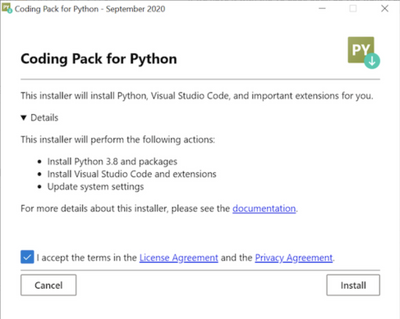
The Coding Pack for Python will download everything you need to start coding in Python all at once, so you don’t have to worry about installing a bunch of different software yourself. It will install:
- Python 3.8 and add it to your PATH
- Visual Studio Code and the Python extension in VS Code
- Python packages including, jupyter, numpy, sklearn, pandas, and matplotlib
These components will be installed on the user scope instead of system, so that no admin privileges are required. Note, that the Coding Pack for Python is only available on Windows currently.
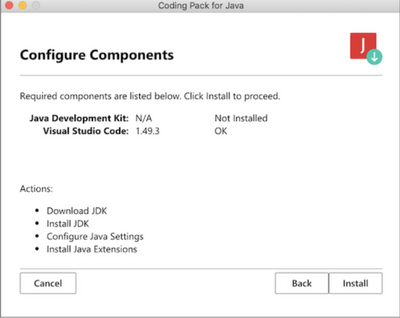
Similarly, the Coding Pack for Java will download everything you need to get started with Java, all at once. We know it can be frustrating to figure out which JDK to download and how to get it on your computer, so the Coding Pack for Java will install:
- Java Development Kit (JDK) and add it to the PATH
- Visual Studio Code and the Java extension pack in VS Code
Specifically it will install the OpenJDK11 on your machine and update any related environment settings. The Coding Pack for Java is available for Mac and Windows.
For more educational resources about VS Code, please see our website. If you have any questions or feedback about the installers, please feel free to open an issue on the Python VS Code repository or Java VS Code repository.
Useful links:
Coding Pack downloads
Microsoft Learn modules on Getting Started with Visual Studio Code
Video on how to leverage these installers in an educational context
Start your 2021 year right with these free and convenient Coding Packs!

by Contributed | Jan 6, 2021 | Dynamics 365, Microsoft 365, Technology
This article is contributed. See the original author and article here.
Setting up or overhauling a supply chain operation has traditionally been an arduous, complex process. Now, by deploying modern, intelligent cloud applications like Dynamics 365 Supply Chain Management, organizations are demonstrating just how rapidly one can transform operations, especially when guided by the right experts.
Invitalia, the Italian national agency for economic development, provided a great example of just how rapidly an organization can ramp up a supply network, especially when faced with a monumental, global crisis that won’t wait for tedious deployment or onboarding of new technologies and processes.
When the COVID-19 pandemic spread to Italy in early 2020, the country’s prime minister, Giuseppe Conte, contacted Invitalia CEO Domenico Arcuri and requested that the organization take over emergency responsibility for the supply of personal protective equipment (PPE).
“The situation in Italy was critical at the time, and the international market for PPE was complicated, with many buyers all chasing a limited supply of equipment.”Fabrizio Bellezza, Chief Information Officer, Invitalia
Invitalia took on managing the acquisition and distribution of essential PPE, medicines, medical devices, and other supplies from a variety of international sources. The agency needed a new logistics platform so that it could simplify the complex process of purchasing and distributing thousands of units of PPE from sellers in other countries.
“Because demand for PPE around the world was so high, and supply was limited, it was very often a first-come, first-served situation, so it was essential that we react as fast as possible,” Bellezza said.
Outrunning the pandemic
To help streamline management of PPE and other COVID-19 supplies, Invitalia worked with Microsoft Services and Agic Technology, a Microsoft Gold Partner, to get the new system up and running.
“The pandemic was running fast,” said Giuseppe La Mantia, partner at Agic. “Every day, Invitalia had new requirements to manage. They were really overloaded, and the solution needed to be fast and simple, but complete. To reach the objectives on time, we had to outrun the pandemic.”
Invitalia had already established a productive relationship with Microsoft that included moving all of the agency’s datacenter IT resources to Microsoft Azure, so its leadership felt comfortable bringing in more Microsoft technology at such a crucial time. Agic helped Invitalia deploy Microsoft Dynamics 365 Supply Chain Management, which includes planning, production, inventory, and transportation features that organizations can use to build agile, resilient supply chains and maximize operational efficiencies.
Over a period of two intense weeks, the Agic and Invitalia teams worked together to install the solution. “We worked night and day, seven days a week,” La Mantia said. “In a very short time, we performed all the steps of a project plan, from analysis to deployment. We worked together to make a solution design that could be representative of COVID task force needs. Each deliverable was shared with the IT project team and then the business team to be sure they would deliver the expected results. After solution design, we made the necessary setup and simple customizations, showing defined mockups to share the intermediate results. Then we made adjustments and moved forward toward the final goals. We tested the solution and trained the users, and then we arranged everything to deploy the solution.”
Without the need to retool or replace multiple systems, Invitalia was able to maintain their existing investment while deploying SCM rapidly to meet urgent supply chain needs. In addition, Agic Technology and Invitalia streamlined the deployment process and reduced complexity, dramatically accelerating the time to value.
Invitalia expects to expand its use of Dynamics 365 into other areas of public administration. “It connects easily with other Microsoft products, giving us the opportunity to create end-to-end solutions for enterprise resource planning,” says Bellezza.
Once it was ready, the Invitalia team launched Dynamics 365 Supply Chain Management with hundreds of suppliers on file. With it, the team could learn right away when any of the suppliers had products available, and Invitalia could respond appropriately. The solution also helped the Invitalia streamline the distribution of PPE from shipping locations to hospitals around the country, so they were able to get the equipment to the people who needed it most.
Better prepared for upcoming phases
Several months later, as Invitalia prepares for a new phase of the pandemic, Agic continues to offer ongoing support, helping the agency maintain the solution and providing any updates they need to comply with new government regulations.
“Now, Invitalia is able to manage worldwide suppliers, check and report about products, quantities and prices, and respect regulations from the Italian government and internal approval processes, to track in real time where materials are,” La Mantia said.
With Dynamics 365 Supply Chain Management, Invitalia can now rely on a centralized solution that helps the agency assess medical needs across the country and then quickly provision and distribute critical medical equipment. The agency can process hundreds of orders a day and provide more than one thousand hospitals with the supplies they need to contain the spread of COVID-19 and help save the lives of affected individuals.
Overcoming personal limits to achieve a goal
Bellezza believes that the PPE project brought out the best in everyone involved.
“Agic and Microsoft really put forth their best resources to help us, and we very much valued their deep knowledge and expertise. We also learned a lot about our own capabilities because a critical moment like this teaches you a lot about yourself, and you discover strengths that you never knew you had.”Fabrizio Bellezza, Chief Information Officer, Invitalia
La Mantia agreed. “Each team member worked very hard, guided by the awareness of making a contribution to the most important cause for Italy in that moment,” La Mantia said. “As a company and team, we learned that we can reach very challenging goals, working together with partner and customers in the same direction. We also learned that if you are guided from a very strong motivation you can overcome personal limits and aim straight for the goal.”
Learn more
Dynamics 365 Supply Chain Management is agile enough to help Invitalia address their high-stakes challenges without overhauling their entire supply chain operation. It can help you too.
Learn how your customers can use Microsoft Dynamics 365 Supply Chain Management to rapidly streamline their processes and get quicker time to market while utilizing their current investment.
The post How Agic Technology deployed Supply Chain Management in 2 weeks to help Invitalia fight the pandemic appeared first on Microsoft Dynamics 365 Blog.
Brought to you by Dr. Ware, Microsoft Office 365 Silver Partner, Charleston SC.
by Contributed | Jan 6, 2021 | Technology
This article is contributed. See the original author and article here.
What’s one of the hottest roles in today’s fast-paced IT environment? If you guessed data scientist, you’d be right. In great demand, these professionals are empowered by AI, machine learning, and data science. A data scientist helps their organization visualize and deliver innovation, improve customer experience, grow the company’s revenue, and stay ahead of the competition. Specifically, a data scientist promotes a data-driven culture using rigorous scientific methodology and algorithms to discover and resolve business problems and to pursue opportunities to help achieve their organization’s goals. If this describes you, your skill set, and your passion for data, we have just the certification for you.
The Azure Data Scientist Associate certification validates that you have subject matter expertise implementing and running machine learning workloads on Microsoft Azure. You earn the certification by passing Exam DP-100: Designing and Implementing a Data Science Solution on Azure.
Your responsibilities include planning and creating a suitable working environment for data science workloads on Azure, and you run data experiments and train predictive models. In addition, you manage, optimize, and deploy machine learning models into production.
What kind of knowledge and experience should you have?
As a candidate for this certification, you should have knowledge and experience in data science and using Azure Machine Learning.
How can you get ready?
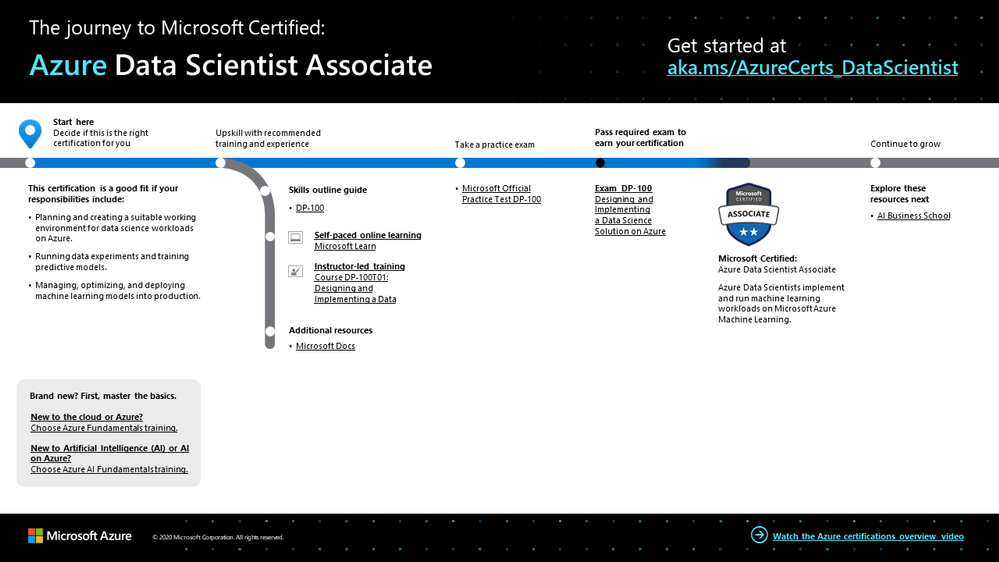
To help you plan your journey, check out our infographic, The journey to Microsoft Certified: Azure Data Scientist Associate. You can also find it in the resources section on the certification and exam pages, which contains other valuable help for Azure data scientists.
To map out your journey, follow the sequence in the infographic. First, decide whether this is the right certification for you.
Next, to understand what you’ll be measured on when taking Exam DP-100, review the skills outline guide on the exam page.
Sign up for training that fits your learning style and experience:
Then take a trial run with the Microsoft Official Practice Test for DP-100: Designing and Implementing a Data Science Solution on Azure. All objectives of the exam are covered in depth, so you’ll find what you need to be ready for any question.
Complement your training with additional resources, like Microsoft Docs.
After you pass the exam and earn your certification, check out the many other training and certification opportunities. Want to add to your skill set? Explore the AI Business School.
Note: Remember that Microsoft Certifications assess how well you apply what you know to solve real business challenges. Our training resources are useful for reinforcing your knowledge, but you’ll always need experience in the role and with the platform.
It’s time to level up!
Your Microsoft Certification can help validate that you have the skills to stay ahead with today’s technology. It can also help empower you with a boost in confidence and job satisfaction—and maybe even a salary increase. Want to know more? In our blog post, Need another reason to earn a Microsoft Certification?, we offer 10 good reasons to earn your certification.
Ready to prove your experience and skills in this in-demand role? Take the exam, earn your Azure Data Scientist Associate Certification, and roll up your sleeves to help your organization navigate the fast pace of IT transformation. As a data scientist, you’ll bring the agility, resilience, and actionable insight of AI and Azure Machine Learning to deliver insights, innovation, and results.
Related announcements
Understanding Microsoft Azure certifications
Finding the right Microsoft Azure certification for you
Master the basics of Microsoft Azure—cloud, data, and AI
by Contributed | Jan 6, 2021 | Technology
This article is contributed. See the original author and article here.
We continue to expand the Azure Marketplace ecosystem. For this volume, 117 new offers successfully met the onboarding criteria and went live. See details of the new offers below:
|
Applications
|
|
Alevate RTP: Based on Microsoft Azure, Serrala’s Alevate RTP (request-to-pay) tool connects to any source system to generate payment requests and delivers them via the customer’s online payment method of choice.
|
 |
AlphaVAT from Tax Systems: This cloud-based compliance engine by Tax Systems will transform your VAT return process. With best-practice workflows built into AlphaVAT, customers benefit from improved accuracy and shorter submission times.
|
 |
Alstom Mastria – Digital Mobility: Enabling mobility as a service (MaaS), Mastria by Alstom is a mobility platform for transport authorities and operators. It helps optimize traffic, reduce commuting time, and increase transportation capacity.
|
 |
Appen Data Annotation Platform: Providing faster data annotation at scale, the Appen platform combines human intelligence with machine learning technology to annotate all sorts of raw data, including text, video, images, and audio.
|
 |
ARMIS: ARMIS is an AI-powered SaaS platform that transforms print circulars into online ads for brick-and-mortar retailers to increase online and offline sales. Create store-specific ads in a few clicks and monitor the results.
|
 |
Asianux Server7 SP4: Developed by Cybertrust Japan, this enterprise-focused Linux distribution provides high-quality technical support and full compatibility with Red Hat Enterprise Linux 7. This application is available only in Japanese.
|
 |
bGrid Smart Buildings: bGrid is a smart building solution that uses the Internet of Things (IoT) to communicate and connect with everything in your building while providing valuable data insights.
|
 |
BIGDAT@Viewer: Available only in Japanese, this application allows users without advanced knowledge in statistical or multivariate analysis to visualize and analyze big data through an intuitive user interface.
|
 |
Blue.GDPR: Securely anonymize personal data from documents, images, medical data, videos, and speech in just a few seconds. Make your data compliant with any industry-specific regulations, including GDPR, BDSG, CCPA, HIPAA, and CSL.
|
 |
bounce2021offer: This is a digital platform designed specifically for schools to help them measure and continually monitor the well-being, behaviors, health, and perceptions of the school community.
|
 |
Bunnyshell DevOps Platform: Manage your Microsoft Azure virtual machines (VMs) using Bunnyshell, a managed cloud platform that automates all manual and repetitive tasks required for provisioning, deploying, and maintaining software stacks.
|
 |
Cerillion Enterprise BSS/OSS: The Cerillion Enterprise BSS/OSS (business support system and operations support system) suite is a pre-integrated CRM and billing solution for fixed, mobile, cable, and multi-service communications providers worldwide.
|
 |
CIS SUSE Linux 15 Benchmark L1: This pre-configured image from the Center for Internet Security provides CIS SUSE Linux 15 Benchmark L1. The benchmark was developed to build, deploy, assess, or secure solutions that incorporate CIS SUSE Linux 15.
|
 |
CLAPS Security: A software as a service solution by Midway Technologies on Microsoft Azure, CLAPS helps manage user security privileges and compliance requirements for your corporate endpoints and servers worldwide.
|
 |
Closed Eyes Detection API: SnoozeDet is a closed-eyes-detection API meant for IT developers who are creating apps to detect snoozing car drivers, plane pilots, navigators, and others who may fall asleep on the job.
|
 |
Cloudified Mediaroom: Mediaroom is an internet protocol television (IPTV) by MK Systems USA, known for operational excellence and large-scale multicast deployments. Cloudified Mediaroom is a hybrid cloud solution for media room operators.
|
 |
COLIN: Developed by Intelogy, COLIN is an easy-to-use media management tool for government and commercial organizations that enables press teams to trace all incoming and outgoing communications both to media outlets and to the public.
|
 |
CraftTalk. Messaging Contact Center with AI: CraftTalk is an omnichannel contact center powered by a team of AI and human agents to provide quick and easy customer service via chat. CraftTalk enables full automation of up to 70 percent of requests in just two to three months.
|
 |
CrystalBridge – Automated Carve-out: When parts of a company are divested and sold, data from different systems must be separated and transferred to a new system. CrystalBridge by the SNP Group helps execute your carve-out quickly and precisely.
|
 |
CrystalBridge – Move Scenario Module: Moving SAP to the cloud can be challenging. CrystalBridge by the SNP Group delivers reliable planning and transparency, visualizing the SAP landscape, creating optimal roadmaps, and simulating the effects of planned changes.
|
 |
CyberPanel: This CyberPanel image provides a one-click installer to automatically install OpenLiteSpeed, LSCache, WordPress, PrestaShop, or Joomla. CyberPanel is a next-generation hosting control panel with a friendly user interface.
|
 |
De-Identification Engine: Transform sensitive and personally identifiable information (PII) into an analytics-ready dataset. Ensure privacy objectives while supporting open data initiatives for data within an organization, as well as externally.
|
 |
DesktopReady – The Modern Desktop as a Service: This is a comprehensive desktop as a service (DaaS) solution designed by Anunta for small and midsize businesses seeking fully managed desktops that are easy to deploy, secure, and cost efficient.
|
 |
EM.Connect – Retail: This centralized facilities management solution helps run your retail locations centrally, improve air quality, and reduce costs. It combines the benefits of next-generation IoT devices, secure cloud architecture, and building automation.
|
 |
Emergency Vehicles Detection API: Powered by artificial intelligence and cloud infrastructure, EmergDet is an API that detects and localizes the lit beacons of emergency vehicles (police, ambulances, firefighters) in photos.
|
 |
Enghouse Voxtron Communication Center: Enghouse Voxtron Communication Center offers advanced contact center features integrated with Microsoft Teams, including self-service, surveys, integrations with CRM, callbacks, outbound campaigns, and quality management.
|
 |
Ensur: Built by Provoke, Ensur empowers organizations to aggregate essential alerts and notifications from their Microsoft Azure and Microsoft 365 solutions, allowing customers to monitor their crucial platforms 24/7.
|
 |
EverSQL: Your Database, Just Faster: Start optimizing your SQL queries online for free. EverSQL focuses on optimizing your experience with MySQL, PostgreSQL, Aurora for MySQL, MariaDB, and Percona Server.
|
 |
Face Blur API: FaceBlurest detects and localizes human faces on a still photo and blurs them with confidence scores and timestamps. It is recommended for people-anonymizer apps, virtual tours, and more.
|
 |
FairWarning User Monitoring for Office 365: Combining machine learning and AI with best practices and managed services, FairWarning’s platform helps healthcare and enterprise organizations protect sensitive data, prevent insider threats, and comply with regulations.
|
 |
FreeBSD 12.2: Advanced networking, security, storage, and monitoring features have made FreeBSD the platform of choice for managing busy websites and pervasive embedded networking and storage devices.
|
 |
GeoCloud HPC: GeoCloud is a reservoir simulation solution that provides access to unlimited computing power to improve oil recovery. The app is developed by Cegal, a global digitalization partner for oil and gas, renewables, and ocean industries.
|
 |
GeoData For Business: GeoData for Business helps analyze the geographical areas of Mexico, providing demographic data including occupations, average monthly income, and socioeconomic levels. This application is available only in Spanish.
|
 |
High-Five: This is a smart city Internet of Things solution to encourage children to walk or bike to school. Kids get an armband, and they can scan it at strategic places around the school. This application is available only in Dutch.
|
 |
Hrvey: Integrating with Microsoft 365, Hrvey provides a hassle-free way to track vacation and sick days for all your employees with an automatically updated calendar in Outlook. Try the free starter plan.
|
 |
HYPR: A passwordless cloud platform, HYPR unites your security program with corporate initiatives to drive business growth. Eliminate passwords and accelerate adoption of multifactor security across all channels.
|
 |
ITG MeasureSoft: Organizations spend a lot of time trying to predict future cloud consumption. MeasureSoft by ITG provides all the information about your Microsoft Azure consumption in one place. This application is available only in Spanish.
|
 |
IVIX platform: IVIX provides tax authorities technologies to improve tax collection and combat the shadow economy. By analyzing public data sources, IVIX can focus tax authorities’ resources on the most promising cases.
|
 |
JKIT Smart Factory (MVP1): JKIT Smart Factory is an IoT-enabled asset and environment monitoring platform to give live updates on a wide spectrum of measurements and environments, including factory spaces or production areas.
|
 |
Kurvv ML: Targeting the manufacturing, logistics, plant, and capital equipment industries, Kurvv’s data science as a service enables business decision-makers to build machine learning models.
|
 |
Legal documents lifecycle management: Designed by lawyers for lawyers, the ROKH Platform manages the entire lifecycle of legal documents, including drafting, negotiation, governance, signing, and archiving.
|
 |
License Plate Blur API: PlateBlurer detects and localizes vehicle license plate numbers in a photo and blurs them with confidence scores and timestamps. It is recommended for vehicle anonymizer apps, virtual tours, and more.
|
 |
lims eusoft.Lab 10: Available in English and Italian, this laboratory management SaaS application by Eusoft enables data analysis, improves laboratory performance, and supports business growth.
|
 |
Logico Cloud: Available only in Spanish, this app by Alto Control centralizes all information needed to manage your products, including price lists, trading conditions, discount policies, stock management, logistics, finance, and customers.
|
 |
mConnect: The Moodle Connect App by Skooler brings the rich learning management functionality of Moodle, a leading global open-source learning management system, into Microsoft Teams for a one-stop teaching and learning experience.
|
 |
Mugato SaaS: Mugato provides an overview of your entire IT infrastructure and extensive insights for your digital transformation projects. Prepare for cloud migration, optimize your IT operations, and find weak links in your security environment with Mugato.
|
 |
MyService – ServiceDesk: Service Management Automation X (SMAX) helps meet all your service desk and IT service management needs. Increase employee and IT productivity by resolving issues faster with embedded machine learning and automation.
|
 |
M-Zeit.de: Available only in German, M-Zeit.de is a personal time recording app that captures when an employee is coming, going, or taking a break.
|
 |
National Cartography: Discover new territories and reach isolated communities with National Cartography, a rich, standardized source of geographic information with high-resolution satellite images. This app is available only in Spanish.
|
 |
NICE inContact CXone Agent for Microsoft Teams: Powering company-wide collaboration, this pre-built unified communication and contact center integration provides full contact center controls and synchronizes Microsoft Teams contacts.
|
 |
OpenText EnCase Endpoint Investigator: Identify, collect, and analyze digital data for investigations that involve network-enabled devices and endpoints. Accurately investigate target information in Microsoft Azure and boost investigation power with cloud processing.
|
 |
OpenText EnCase Forensic: Identify, collect, and analyze digital data for investigations that involve physical access to the target device. Accurately investigate target information in Microsoft Azure and boost investigation power with cloud processing.
|
 |
Physical Security Solution: Health and Safety: Turning smartphones into temporary security devices, Guardian Zone bridges the communication gap between on-site security, law enforcement, staff, and visitors during an emergency.
|
 |
Prokuria – sourcing and supplier management: Prokuria is an easily customizable cloud-based platform to automate sourcing and supplier management, helping procurement teams around the world deliver significant cost and time savings.
|
 |
PST_CrewPro: CrewPro railroad crew management and rail crew scheduling provides real-time crew supply and demand matching, minimizes vacation bidding time, and allows for simplified travel accommodation scheduling.
|
 |
QuickBooks Analytics using Microsoft Power BI (Beta): Boost your QuickBooks analytics and reporting capabilities with QBETL, a data migration service with a Microsoft Power BI dashboard. QBETL automates QuickBooks desktop data synchronization with Microsoft Azure.
|
 |
Quicklart: Developed by IBB Innovations using Azure Kinect DK, Quicklart is an AI video surveillance solution that detects suspicious human behavior, gun/knife threats, fighting, and fallen bodies, then notifies authorities in real time.
|
 |
Quickstarts for SAS 9.4/Grid & Viya on Azure: Quickstarts by Core Compete deploys a well-architected SAS platform into your Microsoft Azure subscription, enabling data scientists to discover more with SAS analytics.
|
 |
Rookout: Dramatically reducing debugging time and time to resolution, Rookout lets developers and DevOps teams debug remote applications without adding code or stopping the application.
|
 |
SAP M365 ArchiveLink Integration: docuflow is a no-code solution by VersaFile that facilitates streamlining and automating time-consuming SAP processes. It provides seamless SAP archiving, linking, and process automation across your Microsoft 365 environment.
|
 |
SAS Event Stream Processing Trial: Analyze streaming data and uncover hidden insights with AI to drive real-time intelligent decisions. SAS ESP elevates SAS solutions to include streaming data in deep analytical assessments, case management activities, and workflows.
|
 |
Scormium LMS: Developed by Sense4code, Scormium is a scalable, customizable, and user-friendly learning management system (LMS) for e-learning courses, student management, and course planning.
|
 |
Scormium Studio: Scormium Studio is a cloud-based platform by Sense4code designed to facilitate the creation, distribution, and licensing of e-learning material. The content is securely saved in Microsoft Azure, where you can create, edit, or connect catalogs.
|
 |
SensorMine: Maintaining mining equipment is one of the largest expenses for mine operators. The introduction of sensors and IoT capabilities to mining provides an easy-to-implement, low-cost, end-to-end predictive maintenance solution.
|
 |
SepiaCMS – Multilingual Content Management System: This multisite content management system by Sepia Solutions is more than a marketing website. It provides a platform with a wide variety of modules for portal management.
|
 |
Shohoz Truck Rental: Powered by Microsoft Azure cloud services and Azure Machine Learning, this SaaS platform can make it easier for shippers, transporters, and brokers around the world to connect with verified truck owners and fleet operators.
|
 |
Skooler Learning Tools: This web app facilitates onboarding and management of Skooler installations. Skooler is a set of tools that integrates with Microsoft 365 to provide a full learning portal for K-12 schools and school districts.
|
 |
SmartMailAI: SmartMailAI uses machine learning to train itself to respond to email inquiries with speed and accuracy. Newwave’s vision is to empower knowledge workers to focus on their more important work by automating email and chat inquiries.
|
 |
SMX 365 Dual layer email security for Office 365: SMX 365 delivers targeted, regional threat detection for enterprise and government organizations in Australasia. It is architected to deliver dual-layer security with Microsoft Exchange and Microsoft Defender for Identity.
|
 |
Testportal for Higher Education: Powered by the scalable infrastructure of Microsoft Azure and featuring seamless integration with Microsoft Teams, this leading examination platform enables you to conduct advanced online tests and proctored exams.
|
 |
TigerGraph Version 3 (Enterprise Edition): TigerGraph is a scalable analytics platform for creating big graph applications. It offers a native enterprise massively parallel processing database and GraphStudio, a visual software development kit.
|
 |
TIM – Predictive Analytics with InstantML: Tangent Information Modeler (TIM) is a predictive model-building engine that automates the forecasting and anomaly detection process by analyzing time series data and generating accurate models.
|
 |
TIS_RoboticBase on Azure: Providing integrated robot and IoT infrastructure services, RoboticBase by TIS centrally manages facilities by not only linking robots, but also drones, IoT devices, cameras, and elevators. This app is available only in Japanese.
|
 |
Vehicles Lit HeadLights Detection API: LightsLitDet is a cross-browser REST API that detects and localizes vehicles’ lit headlights in an input photo with a confidence score and timestamp.
|
 |
Vendavo Pricing Intelligence: With an annual margin improvement totaling more than $2.5 billion across companies in various industries, Vendavo powers the shift to digital business, unlocking value, growing margin, and accelerating revenue.
|
 |
Voicy Conversational SMS: Voicy is a two-way conversational text message solution that interacts with customers and automates customer service. Empower your customers to resolve their queries and generate orders automatically.
|
 |
Wavefront Container Image: This pre-configured image from Bitnami provides Wavefront, a high-performance streaming analytics platform for monitoring and optimizing your environment and applications.
|
 |
Workspace Booking for iOS & Android: Workspace by Add-On Products can help you return safely to the office by automating new procedures, such as blocking off desks, pre-booking workspaces, viewing floor plans, finding team members, and tracing contacts.
|
 |
WorkyBe: WorkyBe by Servissoft helps manage your team efficiently. Colleagues can see their own assignments and to-do lists on the calendar monthly, weekly, and daily.
|
Consulting services
|
 |
2-Week Application Migration Implementation: Newt Global Consulting offers end-to-end application migration for small and midsize businesses to migrate (lift and shift) on-premises applications and databases to Microsoft Azure.
|
 |
10-hour cloud readiness assessment: Vaporvm offers 10 hours of free consulting services in data analytics and DevOps on Microsoft Azure, legacy application modernization, or cybersecurity to show how you can solve your business problem with Azure.
|
 |
Application Modernization: 10-Day Assessment: Catapult can simplify the process of moving your applications to Microsoft Azure through a variety of workshops where you discuss current and future goals, map your objectives, and discover risks.
|
 |
Azure App Modernisation Assessment: 6 Weeks: Many existing applications can be enhanced significantly by moving them to a cloud-first architecture. Content+Cloud will review your current application to determine how it could be rebuilt using Microsoft Azure.
|
 |
Azure Cloud Catalyst: 4-Wk Implementation: Start your journey to the cloud with Azure Cloud Catalyst, an agile delivery approach by Datacom Systems. The cloud adoption framework is the basis for a well-governed and secure cloud platform.
|
 |
Azure Migrate Service – 4-Week Assessment: Advania Finland’s four-step assessment program is designed to help transfer your existing workloads to Microsoft Azure, leading to faster time to market and lower total cost of ownership.
|
 |
Azure Migration: 1-Week Assessment: Trying to decide if you’ll get value by moving your apps or infrastructure to Microsoft Azure? Artic will work with your team to determine the time, effort, and cost for your organization to migrate to the cloud.
|
 |
Azure Security Model Design 8-week Implementation: Protiviti will help you understand how Microsoft Azure security services fit into your wider organizational security model, how your company could utilize each service, the cost implications, and the scope of service.
|
 |
Azure Synapse Analytics 1-Day Assessment: In the Azure Synapse Analytics assessment, FyrSoft’s experts will review your current data platform and provide a roadmap on how to successfully implement a modern data warehouse and data analytics infrastructure.
|
 |
Azure Synapse Analytics 1-Day Workshop: Azure Synapse brings together approaches of data lakes and data warehouses in a service, providing limitless analytics. In this workshop, FyrSoft will teach you how to create an analytics pipeline.
|
 |
Azure Windows Virtual Desktop: 6-Week Proof of Concept: With Windows Virtual Desktop, you can deploy and scale your Windows desktops and apps on Microsoft Azure in minutes. Inviso will help you quickly unlock the full scope of Windows Virtual Desktop on Azure.
|
 |
BC Best Practices for Azure: 1-Day Workshop: In this workshop, you will learn how to build a resilient business continuity practice. Sayers will take you through six established best practices, and you will learn how to apply the power of Microsoft Azure to each practice.
|
 |
BrillioOne Supply Chain360: 2-Week Free Assessment: Brillio will help implement a digital experience solution centered on key Microsoft Azure IaaS/PaaS components, such as Azure Data Lake Analytics, Azure Synapse, Azure Cosmos DB, or Azure Machine Learning.
|
 |
CAF Quickstart – 6-Day Workshop: The Cloud Adoption Framework Quickstart engagement ensures the success of your platform and application modernization journey by designing your cloud architecture correctly, right from the beginning.
|
 |
Chmura Krajowa-Road to Cloud: 3-week assessment: In this three-week assessment, Chmura Krajowa will work with you to develop an efficient migration plan for your organization’s move to Microsoft Azure, reducing the required time and impact of migration processes on your business.
|
 |
Cloud Adoption Framework: 6-week Implementation: Inviso Corporation’s free implementation uses the Cloud Adoption Framework (CAF), Microsoft’s best-practices approach to Azure cloud adoption, to provide insights on how to create a reliable, auditable, and flexible governance framework for your organization.
|
 |
Cloud Desktop (powered by Windows Virtual Desktop): ITON offers Windows Virtual Desktop (WVD) technology as a managed service on Microsoft Azure. This service is available only in Dutch.
|
 |
Data & AI Discovery: Proof of Concept in 3 weeks: Learn about relevant AI use cases and what benefits they can offer your employees, customers, products, or operations in Cegeka’s Data & AI Discovery proof of concept. Deliverables include a tailored machine learning model stored in Azure SQL Database and visualized in Power BI.
|
 |
Data Analytics in Azure: 4-week Proof of Concept Canada: Skip the learning curve and take advantage of Inviso’s professional services to quickly unlock the full scope of data and analytics on Microsoft Azure. Invisio will work with you to define a functional proof of concept that can include connections to source data, Power BI modeling, and more.
|
 |
Defender for Endpoint MDR Managed Service: The managed detection and response (MDR) services provided by ITC Secure use Microsoft Azure Sentinel and Microsoft Defender for Endpoint to deliver preventative protection, post-breach detection, automated investigation, and response.
|
 |
Dynamics NAV & BC on Azure: 1-Day Assessment: Learn about the benefits of migrating your Microsoft Dynamics NAV and Dynamics 365 Business Central applications from on-premises servers or costly third-party datacenters to Microsoft Azure in this free one-day assessment from Korcomptenz.
|
 |
Leveraging Azure for BC/DR: 1-Hour Briefing: Learn how to take advantage of the power of Microsoft Azure and third-party Azure Marketplace solutions to meet your organization’s business continuity and disaster recovery needs in Sayers’ free one-hour briefing.
|
 |
Microsoft Azure Governance – 1-day workshop: Available only in German, Bright Skies Ltd’s one-day workshop is designed to raise your awareness of security, cost management, and compliance in your organization’s Microsoft Azure environment.
|
 |
Microsoft Dynamics GP on Azure: 1-Day Assessment: Learn about the benefits of migrating Microsoft Dynamics GP from on-premises servers or costly third-party datacenters to Microsoft Azure in this free one-day assessment from Korcomptenz.
|
 |
Migration of Sage on Azure: 1-Day Assessment: Learn about the benefits of migrating Sage from on-premises servers or costly third-party datacenters to Microsoft Azure in this free one-day assessment from Korcomptenz.
|
 |
Migration to Microsoft Azure: 1-day Assessment: Learn about the business advantages of migrating to Microsoft Azure in this one-day assessment from Transition Technologies – Managed Services Sp. z o.o. Deliverables include a tailored plan addressing the benefits, cost, and next steps for your cloud journey.
|
 |
Oracle TCO Transformation 3-week Assessment: Data Intensity’s offer combines the power of 20 years of Oracle design, implementation, and management of Oracle RDBMS and E-Business Suite (EBS) experience with a focused software license services practice to define your customized Oracle workload migration path to Microsoft Azure.
|
 |
SAP to Azure Migration 5-Day Assessment: Businesses need to consider dependencies as they migrate on-premises workloads and applications to Microsoft Azure. FyrSoft’s five-day assessment will provide you with a comprehensive report containing system architecture on Azure, cost, and a high-level migration plan.
|
 |
Sepia – Azure Suite: Sepia Solutions offers a five-step process to move your services to the cloud and deploy Microsoft Azure packages. Sepia Solutions will provide you with value-added services, starting with a free assessment.
|
 |
Sepia – Security Suite: Sepia Solutions offers a four-step process to ensure that your enterprise security is a top priority. Let Sepia Solutions secure your data, your people, and your enterprise.
|
 |
Sitecore Migration – 2 Week Technical Assessment: AKQA’s Sitecore to Microsoft Azure offer provides Sitecore XP and Sitecore XC customers with a technical and cloud migration readiness assessment through a series of onsite or virtual workshops and Q&A sessions with AKQA’s Sitecore, Microsoft, and Azure architects.
|
 |
SQL Server Migration: 10-Day Implementation: Open Sky Data Systems’ SQL Server migration implementation is a continuation of the company’s one-day Technical Analysis assessment. Migrate your servers, applications, databases, and workloads to Microsoft Azure for increased security, enhanced performance, and more.
|
 |
The Atlas Framework: 2-Hour Assessment: Atlas is a comprehensive set of infrastructure tools for jump-starting development projects, designed to accelerate the delivery of business functionality on Microsoft Azure. Learn about the benefits Atlas and Azure can offer to achieve your business goals in this free two-hour assessment.
|
 |
Threat Protection Review: 5-day assessment: Silversands Ltd will use Microsoft Cloud App Security in its five-day Threat Protection Review assessment to identify business risks, then recommend next steps to maximize value and validate your current configuration of Microsoft services.
|
 |
Web app modernisation (CAF): 1-hour briefing: Futurice Oy’s free briefing covers the main points of using the Microsoft Cloud Adoption Framework (CAF) and Azure services to modernize web applications. Learn about cost savings, reduced technical complexity, increased business agility, and more.
|
 |
Windows Virtual Desktop – 1-Week Implementation: Adfolks offers a one-week implementation of Windows Virtual Desktop (WVD), a comprehensive desktop and app virtualization service in the cloud that delivers multi-session Windows 10, Office 365 ProPlus optimization, and support for Remote Desktop Services.
|
 |
WVD Adoption Accelerator: 8-Day Implementation: Softcat’s WVD Adoption Accelerator is designed to get you up and running with Microsoft’s Windows Virtual Desktop (WVD) service. Learn about the productivity and flexibility advantages WVD offers with a pilot deployment to test in your own environment.
|
 |
WVD Fastrack: 4-Week Implementation: This implementation from Howell Technology Group will provide all the tools necessary to successfully implement your move to Windows Virtual Desktop (WVD). The WVD Fastrack program includes consultation, assessment of your existing environment, design, and implementation.
|
|
by Contributed | Jan 6, 2021 | Technology
This article is contributed. See the original author and article here.
Sometime either primary or secondary cluster certificates get expired before you can rotate with new certificate which can cause cluster to be inaccessible or unreachable then you can follow these steps to recover standalone Service Fabric cluster. If you looking to rotate a near expiry certificate refer to previous article : Certificate rotation Azure Service Fabric Standalone cluster – Microsoft Tech Community.
This article assumes you are running cluster with thumbprint approach. In general, the common name approach is recommended for easy certificate management. More information about certificate on Standalone cluster refer to Secure a cluster on Windows by using certificates – Azure Service Fabric | Microsoft Docs
Recover Azure Service Fabric Standalone Cluster which is inaccessible or unreachable due to expired cluster certificates:
- Create or get the new certificate.
- Deploy the new cert to all nodes manually by following https://docs.microsoft.com/en-us/powershell/module/pkiclient/import-pfxcertificate?view=win10-ps
3. RDP into each VM and make sure certificate is present and the private key is already ACL’d to ‘Network Service’
a ) Run certlm.msc
b) Find the new certificate
c) Right click cert, Manage Private Keys, ensure NETWORK SERVICE has full permissions
4. Stop and disable “Microsoft Service Fabric Host Service” service in command prompt with administrative rights.
Set-Service -ServiceName FabricHostSvc -StartupType disabled
net stop FabricHostSvc
5. Locate ClusterManifest.current.xml in the cluster root folder like “C:ProgramDataSFFabricClusterManifest.current.xml” according to actual datapath deployed, and copy to somewhere like C:TempclusterManifest.xml
6. Remove clusterManifest.xml read-only attribute and Modify the C:TempclusterManifest.xml and update with new thumbprint.
a) Replace all occurrences of old cert with the new thumbprint .
7. Locate InfrastructureManifest.xml from .FabricFabric.DataInfrastructureManifest.xml path, for my case, it is C:ProgramDataSFvm0FabricFabric.DataInfrastructureManifest.xml as dataroot is at C:ProgramData, and copy to c:temp too.
8. Modify the C:TempInfrastructureManifest.xml and update with new thumbprint.
a) Replace all occurrences of old cert with the new thumbprint
9. Run following cmdlet to update the Service Fabric cluster, replace the SvcFab path according to the actual path.
New-ServiceFabricNodeConfiguration “C:ProgramDataSF” -FabricLogRoot “C:ProgramDataSFlog” -ClusterManifestPath “C:TempclusterManifest.xml” -InfrastructureManifestPath “C:tempInfrastructureManifest.xml”
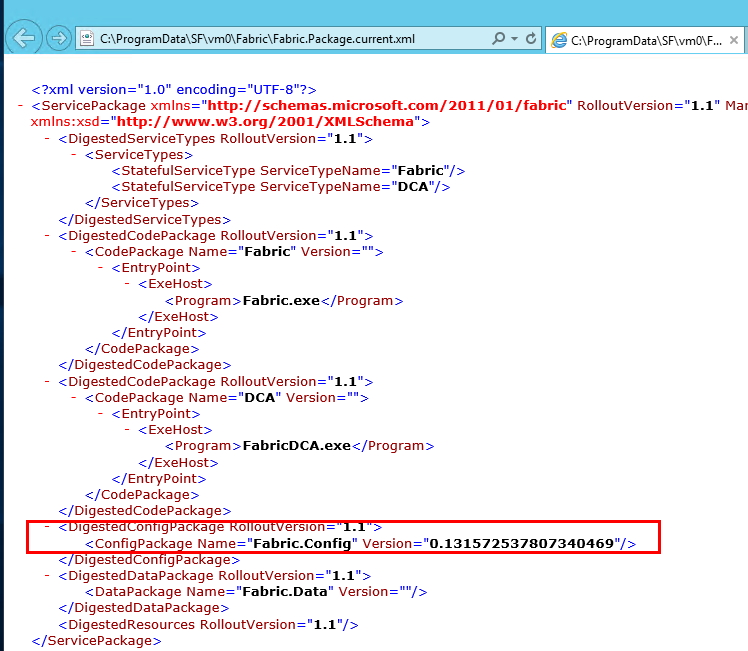
10. Look for ”C:ProgramDataSFvm0FabricFabric.Package.current.xml” and note the “Configuration version”
Cd into the corresponding folder
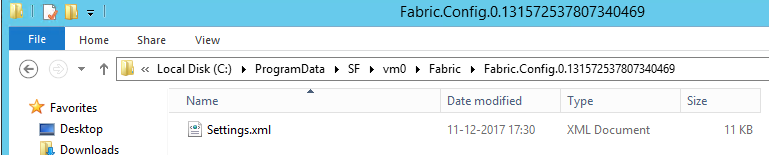
Edit “C:ProgramDataSFvm0FabricFabric.Config.0.131572537807340469Settings.xml” and Replace all occurrences of old cert with the new thumbprint .
11. Set the services “Microsoft Service Fabric Host Service” startup type and start it again
Set-Service -ServiceName FabricHostSvc -StartupType automatic
net start FabricHostSvc
12. Repeat the above steps on every cluster node.
13. After step 12 you should able to reconnect to the cluster over SFX and PowerShell.
14. Now, even the SFX is working, and you can call Connect-ServiceFabricCluster from one of cluster node and secure connection is fine, but Get-ServiceFabricClusterConfiguration still give you the old cluster thumbprint in deployment JSON file.
Get-ServiceFabricClusterConfiguration still outputs the old cluster cert thumbprint expired as expected.
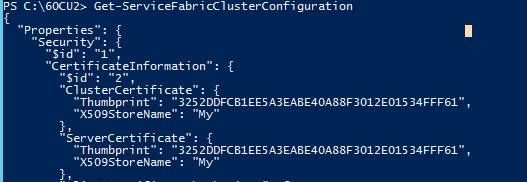
15. We will have to use set-ServiceFabricUpgradeOrchestrationServiceState to get into the cluster state
- Connect-ServiceFabricCluster
- Get-ServiceFabricUpgradeOrchestrationServiceState | Out-File .state.json
- Replace the old thumbprint in state.json file with the new thumbprint.
- Set it back “set-ServiceFabricUpgradeOrchestrationServiceState -StateFilePath c:60CU2state.json
16. Run Get-ServiceFabricClusterConfiguration cmdlet again, you should see the updated cert info.
by Contributed | Jan 6, 2021 | Technology
This article is contributed. See the original author and article here.
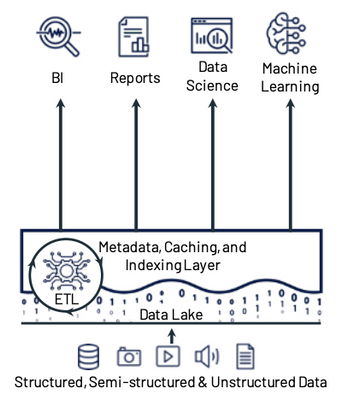
Today’s companies are dealing with data of many different types, in many different sizes, and coming in at varying frequencies. These companies are looking beyond the limitations of traditional data architectures to enable cloud scale analytics, data science, and machine learning on all of this data. One architecture pattern that addresses many of the challenges of traditional data architectures is the lakehouse architecture.
Lakehouses combine the low cost and flexibility of data lakes with the reliability and performance of data warehouses. The lakehouse architecture provides several key features including:
- Reliable, scalable, and low-cost storage in an open format
- ETL and stream processing with ACID transactions
- Metadata, versioning, caching, and indexing to ensure manageability and performance when querying
- SQL APIs for BI and reporting along with declarative DataFrame APIs for data science and machine learning
Lakehouse Principles and Components
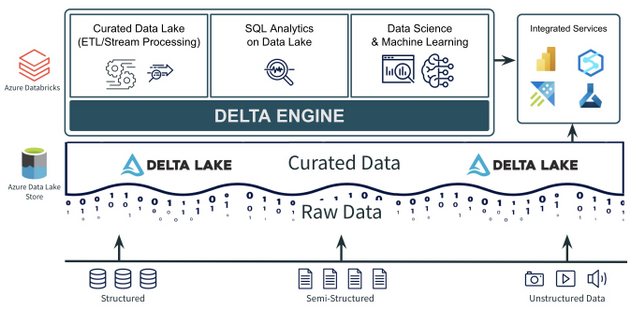
When building a lakehouse architecture, keep these 3 key principles and their associated components in mind:
- A data lake to store all your data, with a curated layer in an open-source format. The data lake should be able to accommodate data of any type, size, and speed. The format of the curated data in the lake should be open, integrated with cloud native security services, and it should support ACID transactions.
- A foundational compute layer built on open standards. There should be a foundational compute layer that supports all of the core lakehouse use cases including curating the data lake (ETL and stream processing), data science and machine learning, and SQL analytics on the data lake. That layer should also be built on open standards that ensure rapid innovation and are non-locking and future proof.
- Easy integration for additional and/or new use cases. No single service can do everything. There are always going to be new or additional use cases that aren’t a part of the core lakehouse use cases. These new or additional use cases often need specialized services or tools. This is why easy integrations between the curated data lake, the foundational compute layer, and other services and tools are key requirements.
Let’s look at how Azure Databricks along with Azure Data Lake Storage and Delta Lake can help build a lakehouse architecture using these 3 principles.
Open, Transactional Storage with Azure Data Lake Storage + Delta Lake
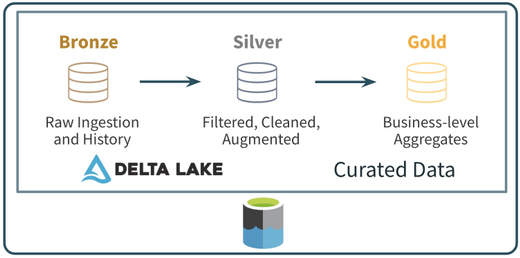
One part of the first principle is to have a data lake to store all your data. Azure Data Lake Storage offers a cheap, secure object store capable of storing data of any size (big and small), of any type (structured or unstructured), and at any speed (fast or slow). The second part of the first principle is to have the Curated data in the data lake be in an open format that supports ACID transactions. Companies often use Delta Lake to build this curated zone of their data lake. Delta Lake is simply an open file format based on Parquet that can be stored in Azure Data Lake Storage. Among other things, it supports ACID transactions (UPDATE, DELETE, and even MERGE), time travel, schema evolution/enforcement, and streaming as a source and a sync. These features make the Delta Lake format used in Azure Data Lake Storage an ideal component for the first principle of the lakehouse architecture.
Azure Databricks for Core Lakehouse Use Cases
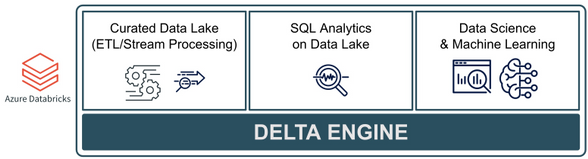
The 2nd principle discussed above is to have a foundational compute layer built on open standards that can handle all of the core lakehouse use cases. The Photon-powered Delta Engine found in Azure Databricks is an ideal layer for these core use cases. The Delta Engine is rooted in Apache Spark, supporting all of the Spark APIs along with support for SQL, Python, R, and Scala. In addition, Azure Databricks provides other open source frameworks including:
- Always the latest and greatest version of Spark which is ideal for ETL/ELT, stream processing, distributed data science and ML, and SQL analytics on the data lake
- Optimized compute for the Delta Lake file format which includes data skipping and data source caching capabilities for faster queries
- A machine learning runtime with pre-installed, optimized libraries for model development and training. This also includes the open-source Koalas, which provides data scientists the ability to work on big data with a Pandas API that runs on top of Apache Spark
- Tightly integrated MLflow to help develop, train, and operationalize (batch, stream, or API) data science and machine learning models
Azure Databricks also provides a collaborative workspace along with the Delta Engine that includes an integrated notebook environment as well as a SQL Analytics environment designed to make it easier for analysts to write SQL on the data lake, visualize results, build dashboards, and schedule queries and alerts. All of this makes Azure Databricks and the Delta Engine and ideal foundational compute layer for core lakehouse use cases.
Integrated Services for Other/New Use Cases
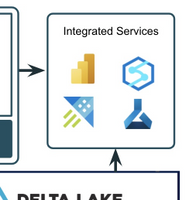
The final principle focuses on key integrations between the Curated data lake, foundational compute layer, and other services. This is necessary because there will always be specialized or new use cases that are not “core” lakehouse use cases. Also, different business areas may prefer different or additional tools (especially in the SQL analytics and BI space). A lakehouse built on Azure Data Lake Storage, Delta Lake, and Azure Databricks provides easy integrations for these new or specialized use cases.
- Azure Data Lake Storage is a storage service that is supported by all of the data and AI services in Azure.
- Delta Lake is an open source storage format with supported interfaces for Spark, Hive, Presto, Python, Scala, and Java. It also has native connectors in Azure services like Azure Synapse and Data Factory and it can be used with other services like Power BI, HDInsight, and Azure Machine Learning.
- Azure Databricks is tightly integrated into the rest of the Azure ecosystem with optimized, secure connectivity to services like Azure Data Factory, Power BI, and Azure Synapse. The service also includes REST API, Command Line, and JDBC/ODBC interfaces allowing for integrations with just about any tool or service.
To conclude, the lakehouse architecture pattern is one that will continue to be adopted because of its flexibility, cost efficiency, and open standards. Building an architecture with Azure Databricks, Delta Lake, and Azure Data Lake Storage provides the foundation for lakehouse use cases that is open, extensible, and future proof.
To learn more about Lakehouse architecture, check out this research paper and blog from Databricks and join an Azure Databricks event.
by Contributed | Jan 6, 2021 | Technology
This article is contributed. See the original author and article here.
Introduction
Technologies such as Intune and Endpoint Configuration Manager (used manage enterprise devices) are becoming more robust, and these tools can also now be used for virtual devices such as those used by Microsoft’s Windows Virtual Desktop service in Azure.
Windows Virtual Desktop (WVD)
Overview
As a desktop and app virtualization service in Azure, Windows Virtual Desktop allows administrators to set up a scalable, multi-session Windows 10 deployments using virtualized desktops as well as virtualized Microsoft 365 and other apps in multi-user virtual scenarios.
Deploying and managing WVDs in Azure can also be accomplished with multiple options for management of host pools, app groups, user assignment and resource publishing.
Requirements
The following requirements are needed to setup and connect WVDs and apps.
Requirements
|
Description
|
Supported OS
|
· Window 10 Enterprise (including multi-session)
· Windows 7 Enterprise
· Windows Server 2012 R2, 2016, 2019
|
Azure Active Directory (AAD)
|
Tenant required
|
Windows Server AD (in sync with AAD)
|
Only Hybrid Azure AD joins are supported
|
Azure Subscription
|
Parented to same AAD tenant and connected to the Windows Server AD or Azure AD DS instance
|
Users
|
· Users must be sourced from same AD connected to AAD
· UPN to subscript to WVD must exist in the AD domain the VM is joined.
NOTE: WVDs do not support Azure AD guest user accounts
|
Azure WVDs (Intune prerequisites)
|
· Windows 10 (1809) or later
· Hybrid AD-joined (no AAD-joined)
· Configured as personal remote desktops in Azure
· Enrolled in Intune using either AD group policy to auto-enroll hybrid-AAD joined devices, ECM co-management or user self-enrollment via Azure AD join.
NOTE: Intune treats WVD personal VMs the same as physical Win10 Enterprise desktops.
|
Supported RD clients
|
· Windows Desktop
· Web
· macOS and iOS
· Android
· Microsoft Store Client
NOTE: RemoteApp, RADC or the Remote Desktop Connection (MSTSC) client are NOT supported
|
Multi-session
Windows 10 Enterprise multi-session is a new Remote Desktop Session Host that allows multiple concurrent interactive sessions. Multi-session varieties of Windows 10 also:
- Cannot run in on-premises production environments
- Will not activate against on-premises Key Management Services (KMS)
- Only support hybrid Azure AD joined configurations
Microsoft recommends Endpoint Configuration Manager (Current Branch, 1906/newer releases) when managing deployed multi-session WVDs.
Hybrid Azure AD Join
One of the requirements for managing your Windows 10 WVD environment with Endpoint Manager is the use of Hybrid Azure AD join. When you configure your devices to Hybrid join Azure AD, these devices will be visible and manageable in both your on-premises AD as well in Azure AD.
Requirements, Support and Considerations
- Credentials of a global administrator for the Azure AD tenant and an Enterprise Administrator account for the on-prem forest are required.
- Domain Controller should be at least Windows Server 2008 R2
- Server 2016 or Server 2019 are recommended
- Server Core does NOT support any type of device registration
NOTE: A single forest should sync identities to only one Azure tenant. Single forest syncing of identity data to multiple Azure AD tenants is NOT supported.
- Client devices as old as Windows 8.1 are supported
- Latest release of Windows 10 is recommended
- Older operating systems (pre-Windows 10 and pre-Server 2016) using credential roaming, user profile roaming, or mandatory profiles are NOT supported
- When using Sysprep for pre-Windows 10 1809 reference images that are used for deployments, make sure the image isn’t from a device that is already registered in Hybrid Azure AD.
- Ensure that VM snapshots, used to create new VMs, are not from a virtual machine that is already registered with Hybrid Azure AD.
- Enabling Unified Write Filter and similar technologies prior to Hybrid Azure AD join will result in the device getting unjoined on every reboot, so do not apply them until after the device is joined.
- Windows 10 releases older than 1803, which are already Azure AD registered, must have this registration removed before enabling Hybrid Azure AD; otherwise, a dual state condition will exist.
- Support for FIPS-compliant TPM 2.0
- TPM 1.2 is not supported and considered not existent.
Hybrid Azure AD join requires devices have access to the following Microsoft resources inside your organization’s network:
https://enterpriseregistration.windows.net
https://login.microsoftonline.com
https://device.login.microsoftonline.com
https://autologon.microsoftazuread-sso.com (seamless SSO)
NOTE: Azure AD Connect provides a wizard to configure hybrid Azure AD join, which significantly simplifies the configuration process.
Managed vs. Federated Environments
In depth information for these two topics are out of the scope of this document; however, a few key components are worth mentioning, and exploring more for a full understanding of each.
- A managed environment can be deployed either through Password Hash Sync (PHS) or Pass Through Authentication (PTA) with Seamless Single Sign On. These configurations don’t require a federation server for authentication.
Note: Azure AD does not support smartcards or certificates in managed domains
- Federated Environments should have an identity provider that supports the following requirements, which are already supported by Active Directory Federated Services (AD FS).
- WIAORMULTIAUTHN claim: Needed for hybrid Azure AD join for Windows down-level devices.
- Down-level devices are pre-Windows 10 and pre Windows Server 2016
- WS-Trust protocol: Needed authentication between Windows current hybrid Azure AD joined devices and Azure AD. AD FS environments must enable the following WS-Trust endpoints:
- /adfs/services/trust/2005/windowstransport
- /adfs/services/trust/13/windowstransport
- /adfs/services/trust/2005/usernamemixed
- /adfs/services/trust/13/usernamemixed
- /adfs/services/trust/2005/certificatemixed
- /adfs/services/trust/13/certificatemixed
Example: Using AAD Connect to Perform Hybrid join
Step
|
Description
|
1)
|
Start Azure AD Connect and click the Configure button
|
2)
|
Click Configure Device Options from the list of Additional Tasks
|
3)
|
Review the Overview page and click Next
|
4)
|
Enter the credentials for an Azure AD global administrator account, and click Next
|
5)
|
Select Configure Hybrid Azure AD join and click Next.
|
6)
|
Select the Device OS configuration (current Windows 10 or older “down-level” operating systems) which will be supported and click Next.
|
7)
|
Service Connection Points (SCP) are used by devices to discover their Azure AD tenant information, and one must be configured for EACH forest.
Click on the Edit button and fill in your Enterprise Administrator credentials and click on Next.
NOTE: As stated in the Wizard, a configuration PowerShell script (ConfigureSCP.ps1) can be provided to, and run manually by, an Enterprise Administrator in the organization in the event that the person using AD Connect does not have the permissions.
|
8
|
Click on Configure to begin the process.
|
9)
|
When the Configuration Complete message displays, the Wizard can be exited.
|
Synchronizing Session Hosts and Confirming Status
Computer accounts from the local Active Directory must synchronize with Azure AD before registration can be completed
Using the dsregcmd /status command line on a client is a quick way of verifying registration status. The AzureAdJoined attribute of Device State should be YES
NOTE: It can usually take 15 minutes or more for the registration process to complete.
Intune Enrollment
When a device is enrolled, it is issued an MDM certificate. This certificate is used to communicate with the Intune service.
NOTE: Licenses must be assigned to an administrator’s account before that administrator can enroll devices to Intune. (more information)
Enable Automatic Enrollment
Automatic enrollment allows users to enroll their Windows 10 devices in Intune by adding their work account to their personally owned devices, or join corporate-owned devices to Azure Active Directory. The device then registers, joins Azure AD and becomes managed with Intune.
Step
|
Description
|
1)
|
From the Azure Portal, navigate to Azure Active Directory > Mobility (MDM and MDM).
|
2)
|
Open the Microsoft Intune item
NOTE: Some tenants might have both Microsoft Intune and Microsoft Intune Enrollment under Mobility. Make sure that your auto-enrollment settings are configured under Microsoft Intune (not Microsoft Intune Enrollment).
|
3)
|
Verify MDM discovery URL during auto-enrollment
· https://enrollment.manage.microsoft.com/enrollmentserver/discovery.svc (Home > Mobility (MDM and MAM))
|
4)
|
Ensure automatic enrollment is enabled for the users (All or Some (group membership)) who will self-enroll devices into Intune.
|
5)
|
Make any other desired changes and then apply the new settings.
|
Auto-enroll Using Group Policy
Starting in Windows 10, version 1607, once the enterprise has registered its local Active Directory with Azure AD, a domain-joined Windows device will be automatically registered in Azure AD.
Once the group policy is created and enabled on the local Active Directory, a task is created in the background that initiates the enrollment using the existing MDM service configuration from the Azure AD information of the user, and without their interaction.
NOTE: If multi-factor authentication is enabled, the user will be prompted for additional authentication.
Example Group Policy Configuration (Single Device)
Complete the steps below to configure a group policy to enroll a single device into Intune.
Step
|
Description
|
1)
|
Enter gpedit into the Windows Search bar to open the Group Policy Editor (Edit group policy)
|
2)
|
Navigate to Administrative Templates > Windows Components > MDM in the Editor.
|
3)
|
Open Enable automatic MDM enrollment using default Azure AD credentials (previously called Auto MDM Enrollment with AAD Token in Windows 10, version 1709).
|
4)
|
Click Enable and select User Credential from the dropdown Select Credential Type to Use, then click OK.
Note: The MDM.admx file was updated in Windows 10 (1903) to include the Device Credential option, which only affects Windows 10, version 1903 clients.
Older Windows releases revert to User Credential, and Device Credential is not supported for enrollment type when you have an Endpoint Configuration Manager agent on the device.
|
After a group policy refresh, a scheduled task (Schedule created by enrollment client for automatically enrolling in MDM from AAD) will be created, and run every 5 minutes for the duration of one day.
If two-factor authentication is required, you will be prompted to complete the process.
Example Group Policy Configuration (Group)
Complete the steps below to configure a group policy for enrolling a group of devices into Intune.
Step
|
Description
|
1)
|
Download Administrative Templates (.admx) for Windows 10:
|
2)
|
Install the package on the Domain Controller.
|
3)
|
Navigate to folder (depends on version):
C:Program Files (x86)Microsoft Group PolicyWindows 10…
- …April 2018 Update (1803) v2
- …October 2018 Update (1809) v2
- …May 2019 Update (1903) v3
- …November 2019 Update (1909)
- …May 2020 Update (2004)
|
4)
|
Rename the extracted Policy Definitions folder to PolicyDefinitions.
|
5)
|
Copy PolicyDefinitions folder to C:WindowsSYSVOLdomainPolicies
|
6)
|
Restart the Domain Controller to make the policy available.
|
7)
|
1. Create a Group Policy Object (GPO) and enable the Group Policy Computer Configuration > Policies > Administrative Templates > Windows Components > MDM > Enable automatic MDM enrollment using default Azure AD credentials.
|
8
|
2. Create a Security Group for the PCs.
|
9)
|
3. Link the GPO and filter using security groups
|
Bulk Enrollment
Create a provisioning package to bulk enroll devices for the Azure AD tenant using the Windows Configuration Designer (WCD) app. When the package is applied to corporate-owned devices they join to the Azure AD tenant and enroll into Intune for management.
Create Provisioning Package
Step
|
Description
|
1)
|
Open the Windows Configuration Designer (can be downloaded from the Microsoft Store), and select Provision desktop devices
|
2)
|
Specify the following in the New project window:
· Name – A name for your project
- Project folder – Save location for the project
- Description – An optional description of the project
|
3)
|
Enter unique names for devices.
· Names can include a serial number (%SERIAL%) or a random set of characters.
Other configuration options include:
· Product key if upgrading the edition of Windows
· Configure the device for shared use
· Remove pre-installed software.
|
4)
|
Optionally, you can configure the Wi-Fi network devices connect to when they first start. If the network devices aren’t configured, a wired network connection is required when the device is first started.
|
5)
|
Select Enroll in Azure AD, enter a Bulk Token Expiry date, and then select Get Bulk Token.
|
6)
|
Provide your Azure AD credentials to get a bulk token.
|
7)
|
In the Stay signed in to all your apps page, select No, sign in to this app only.
|
8
|
Click Next when Bulk Token is fetched successfully.
|
9)
|
Optionally, you can Add applications and Add certificates. These apps and certificates are provisioned on the device.
|
10)
|
Optionally, you can password protect your provisioning package. Click Create.
|
Provision Devices
The steps below will help provision devices using the bulk enrollment provisioning package. Detailed step-by-step instructions for applying these packages are out of the scope of this document, but can be found here (Apply a provisioning package)
Step
|
Description
|
1)
|
Access the provisioning package in the location specified in Project folder specified in the app.
|
2)
|
Choose how to apply the provisioning package to the device, which can be done one of the following ways:
- Place the provisioning package on a USB drive, insert the USB drive into the device you’d like to bulk enroll, and apply it during initial setup
- Place the provisioning package on a network folder, and apply it after initial setup
|
3)
|
After you apply the package, the device will automatically restart in one minute.
|
4)
|
When the device restarts, it connects to the Azure Active Directory and enrolls in Microsoft Intune.
|
Publishing the Remote Desktop Client Package
Creating the WVD Package
Complete the steps below to create the wrapper package that will be deployed to the necessary devices.
NOTE: If successful, there will be a .intunewin file with the contents of the Win32 Content Prep tool.
Configuring App Policy Using the MEM Admin Center
Complete the steps below to create the app policy for the new WVD wrapper package created in the previous section.
Step
|
Description
|
1)
|
From the MEM Admin Center, navigate to Apps > Windows
|
2)
|
Click +Add button and select Windows app (Win32)
|
3)
|
Click Select app package file, and browse to the .intunewin package created above.
|
4)
|
Customize the App Information (name, desc., logo) as needed.
|
5)
|
Configure the Program installation command lines and restart behavior
|
6)
|
Configure the Requirements (architecture, OS).
|
7)
|
Configure Detection Rules
|
8
|
Skip Dependencies
|
9)
|
Assign the app to the necessary AAD group(s)
|
10)
|
Review the configuration and then Create the App policy
|
© 2021 Microsoft Corporation. All rights reserved. This document is provided “as-is.” Information and views expressed in this document, including URL and other Internet Web site references, may change without notice. You bear the risk of using it. This document does not provide you with any legal rights to any intellectual property in any Microsoft product. You may copy and use this document for your internal, reference purposes. You may modify this document for your internal, reference purposes.


Recent Comments