by Contributed | Feb 5, 2021 | Technology
This article is contributed. See the original author and article here.
Howdy folks,
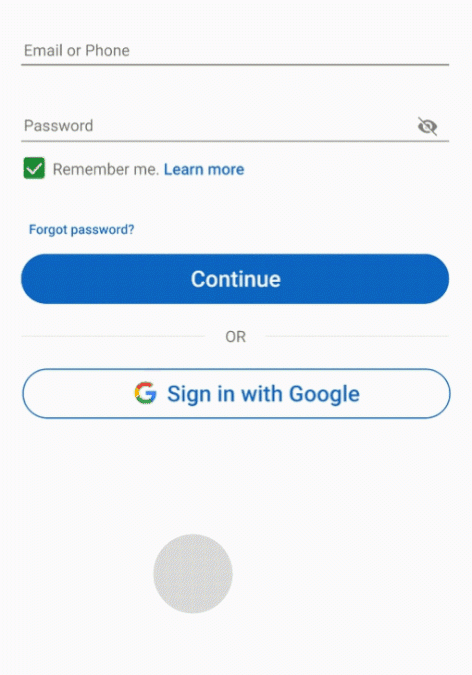
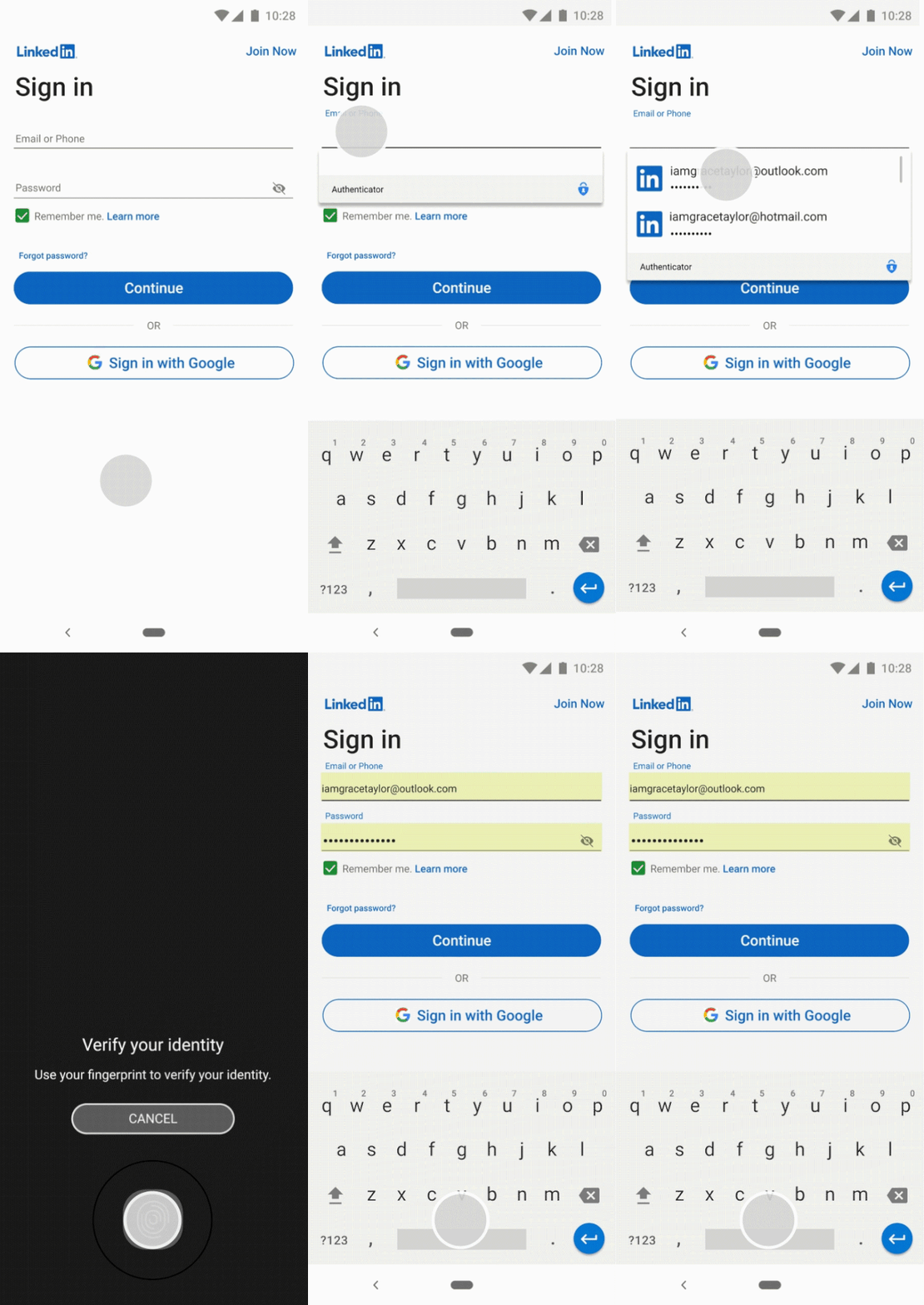
Today we are announcing the general availability of password management and autofill capability in the Microsoft Authenticator app. Ever since we announced the public preview, we’ve seen a lot of interest among both enterprises and individual users. Users love the convenience of the Authenticator app syncing and autofilling their strong passwords for all their identities even as they move across devices – mobile or desktop. On desktops, you can autofill these passwords using either Microsoft Edge or Google Chrome extension.
The passwords are saved as part of your personal Microsoft account and they are encrypted both on the device as well as in the cloud. In addition, every password autofill from the Authenticator requires the same bio-gesture you provide for sign-ins, enforcing a multi-factor authentication.
Since the public preview, we have made a few additional changes to this feature:
- Enable autofill even when a work account is added to the Authenticator – During the preview, the autofill feature was disabled if a work account was configured in the Authenticator app. Based on your feedback, we have now allowed this Microsoft account-based capability for your users even when they have a work account in the Authenticator app. Enterprises can request this feature to be disabled on Authenticator apps that have work or school accounts added.
- Passwords import – We also saw a lot of interest for importing existing passwords from your other password solutions. We have added support for importing passwords from Google Chrome and select password managers.
Autofill is rolling out in Authenticator app on iOS (iOS 12.0+) and Android (Android 6.0+). To learn more about the autofill feature, visit our FAQs page.
As always, we’d love to hear from you. Please let us know what you think in the comments below or on the Azure AD feedback forum.
Best regards,
Alex Simons (@Alex_A_Simons)
Corporate VP of Program Management
Microsoft Identity Division

by Contributed | Feb 5, 2021 | Technology
This article is contributed. See the original author and article here.
Date: February 18, 2021
Time: 5:00 PM (GMT) 9.00 AM (Pacific)
Location: Global
Format: Livestream
Games have a long history as test beds in pushing AI research forward. From early works on chess and Go to more recent advances on modern video games, researchers have used games as complex decision-making benchmarks. Learning in multi-agent settings is one of the fundamental problems in AI research, posing unique challenges for agents that learn independently, such as coordinating with other learning agents or adapting rapidly online to agents they haven’t previously learned with.
In this webinar, join Microsoft researcher Sam Devlin and Queen Mary University of London researchers Martin Balla, Raluca D. Gaina, and Diego Perez-Liebana to learn how the latest AI techniques can be applied to multiplayer games in the challenging and diverse 3D environment of Minecraft.

The researchers will demonstrate how Project Malmo—a platform for AI experimentation built on Minecraft—provides an ideal environment for designing different and rich training tasks and how reinforcement learning agents can be trained in these scenarios. They’ll provide examples of tasks, agent implementations, and the latest research done in this area.
Together, you’ll explore:
- The Malmo platform and multi-agent tasks
- Using the reinforcement learning library RLlib to implement and train agents to complete Minecraft tasks
- Coordinated policies for collaborative multi-agent tasks
- Open challenges in learning robust policies for ad-hoc teamwork
*This webinar features a live Q&A session with open captioning.
Speakers
by Contributed | Feb 5, 2021 | Technology
This article is contributed. See the original author and article here.
When releasing new versions of SharePointDsc, we perform several tests and have unit tests in place to guarantee certain quality of the releases. Unfortunately a breaking issue in SharePointDsc v4.5 was reported shortly after release.
Over the past days, we investigated the issue and were able to fix this issue. That is why this morning we release SharePointDsc v4.5.1.
Make sure you use this version instead of v4.5!
by Contributed | Feb 5, 2021 | Technology
This article is contributed. See the original author and article here.
Based on your feedback, we have decided to split the Microsoft Dynamics 365 Fundamentals exam into its core components—customer engagement apps and finance and operation apps. The first one, MB-910: Microsoft Dynamics 365 Fundamentals Customer Engagement Apps (CRM), is now in beta. This exam covers the features and capabilities of Dynamics 365 customer engagement apps. Candidates should have a fundamental understanding of customer engagement principles and business operations.
When you successfully pass this exam, you will earn the Microsoft Dynamics 365 Fundamentals Customer Engagement Apps (CRM) certification.
To receive the 80% discount*, use code MB910Travel when prompted for payment. You can use this code to register for and take the exam on or before March 8, 2021.
This is NOT private access code.
*The first 300 people who register can take these exams for an 80% discount! (Why beta exams are no longer free.) The seats are offered on a first-come, first-served basis. You must register for the exam on or before March 8, 2021. Take the exam as soon as possible, so we can leverage your comments, feedback, and exam data in our evaluation of the quality of the questions.
Preparing for Beta Exams
Taking a beta exam is your chance to have a voice in the questions we include on the exam when it goes live. The rescore process starts on the day that exams go live, and final scores are released approximately 10 days later. For updates on when the rescore is complete, follow me on Twitter (@libertymunson). For questions about the timing of beta exam scoring and live exam release, see the blog posts The Path from Beta Exam to Live Exam and More Tips About Beta Exams.
Remember, the number of spots is limited, so when they’re gone, they’re gone. You should also be aware that there are some countries where the beta code will not work (including Turkey, Pakistan, India, and China). You will not be able to take the beta exam in those countries.
Also keep in mind that these exams are in beta, which means that you will not be scored immediately. You will receive your final score and passing status after your exam is live.
Related announcements
Skill up and stand out, with new role-based training and certification!
New role-based certification and training is here, and we’re just getting started!
Catching up: continuing our journey with new role-based certifications and training
Announcing two new Microsoft Dynamics 365 Fundamentals certifications!

by Contributed | Feb 5, 2021 | Technology
This article is contributed. See the original author and article here.
In Azure Synapse, system configurations of spark pool look like below, where the number of executors, vcores, memory is defined by default.
There could be the requirement of few users who want to manipulate the number of executors or memory assigned to a spark session during execution time.
Usually, we can reconfigure them by traversing to the Spark pool on Azure Portal and set the configurations in the spark pool by uploading text file which looks like this:


But in the Synapse spark pool, few of these user-defined configurations get overridden by the default value of the Spark pool.
What should be the next step to persist these configurations at the spark pool Session level?
For notebooks
If we want to set config of a session with more than the executors defined at the system level (in this case there are 2 executors as we saw above), we need to write below sample code to populate the session with 4 executors. This sample code helps to logically get more executors for a session.

Execute the below code to confirm that the number of executors is the same as defined in the session which is 4 :

In the sparkUI you can also see these executors if you want to cross verify :

A list of many session configs is briefed here .
We can also setup the desired session-level configuration in Apache Spark Job definition :
For Apache Spark Job:
If we want to add those configurations to our job, we have to set them when we initialize the Spark session or Spark context, for example for a PySpark job:
Spark Session:
from pyspark.sql import SparkSession
if __name__ == “__main__”:
# create Spark session with necessary configuration
spark = SparkSession
.builder
.appName(“testApp”)
.config(“spark.executor.instances”,”4″)
.config(“spark.executor.cores”,”4″)
.getOrCreate()
Spark Context:
from pyspark import SparkContext, SparkConf
if __name__ == “__main__”:
# create Spark context with necessary configuration
conf = SparkConf().setAppName(“testApp”).set(“spark.hadoop.validateOutputSpecs”, “false”).set(“spark.executor.cores”,”4″).set(“spark.executor.instances”,”4″)
spark = SparkContext(conf=conf)
Hope this helps you to configure a job/notebook as per your convenience with the number of executors.
by Contributed | Feb 5, 2021 | Technology
This article is contributed. See the original author and article here.
We use AI (Artificial Intelligence) integrated applications daily, from search engines optimized to find the most relevant content, to recommendation engines for streaming or shopping. During AI’s early years rising to popularity, improving applications with AI was only possible for companies with big budgets dedicated to research and experts, preventing companies that cannot effort an AI team to compete. Today AI is readily available for any product, without having to invest in research and development. There are open-source libraries that help you train Machine Learning models like TensorFlow. With a fraction of the effort and a little bit of cost, AI services are available to easily integrate into your applications, with pre-trained models and ways to train custom models for your specific use case. In Integrating AI series, I aim to help you decide if and how to integrate AI into your applications, get you started with Azure’s ready to use AI solutions, Cognitive Services and answer your most frequent questions when getting started.
Let’s start with these fundamental questions:
- What are the problems you can solve with AI?
- What do you need to know before starting to build your solution?
- How do you measure the success of your new AI features?
What are the problems you can solve with AI?
AI is a groundbreaking technology but not a magical solution for everything. It is important to know if you are adding value or solving an actual user problem. There are complex products like Wikipedia and Reddit that have a lot of information but use crowdsourcing and simple search to cater to unique needs without the help of AI. To make an informed decision, you need to start with your users’ needs. What are the problems they face? Is there a process that you can automize like filling expense forms that can be automated with Form Recognizer service? Send voice messages to your customers with updates using Speech Services? Do they make complex choices while using your product that could be customized to your users with the use of Personalizer? Do you need to improve the usability of your application with voice interactions and Language Understanding? It is important to solve a real need for your users instead of assuming the solution that will be useful. User research is the best way to figure out the issues and a lot can be surfaced by user analytics. You can use Metrics Advisor AI service to detect anomalies and figure out future AI solutions as well.
Once you have a clear definition of the problem and define how to measure success, it is time to explore practical solutions.
Most AI solutions can fall into two categories. The first major use case for AI is automating the mindless repetitive jobs. If the users of an expense report or a hiring application need to type in information from a form or a receipt to your system, it is easily automated by OCR (Optical Character Recognition). Similar automations are possible for close captioning, translation, classifying images and automizing alert messages.
The second category of AI solutions can be categorized as complex human decisions based on data. You could give your friends recommendations on what to watch next easily, knowing what they like, what they don’t like. For example, a streaming service with thousands of movies to choose from, cannot surface relevant content with simple filtering of the genres or release dates. It would take forever to choose what to watch by browsing unless you know the exact name of the movie. For a decision like recommendation among thousands or millions of results, AI might be better at recommending to your best friend, maybe even better than you over time. Understanding the language and intent of people is another example. A human can understand and classify a review as positive or negative easily. For machines to detect the same emotions, you must do more than detect certain words to get sentiment.
What do you need to know before starting to build your solution?
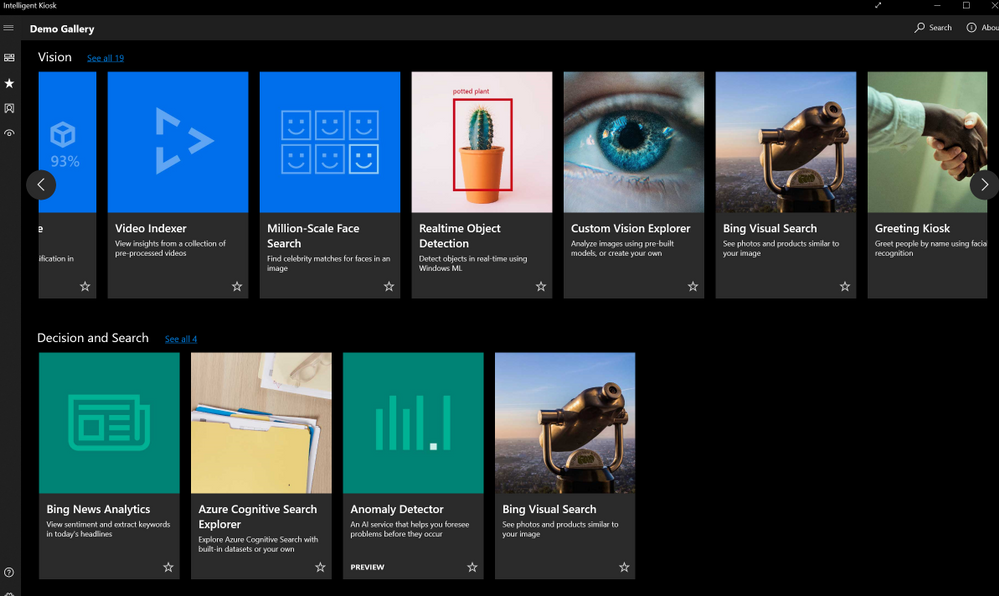
Some problems are easier to solve than others with AI. Experimenting with different tools to confirming your solutions is important. All the Cognitive services are easy to try out and here is how to do that:
Will your users love your solution?
Scaling an application and polishing the user experience takes most of the development time. It is better to try out features fast and adjust before making the investment in perfecting the wrong experience. You might assume an application flow that users are going to interact, but users can surprise you in their own creative ways of using your tools. Prototype your applications quickly and get user feedback early on.
Power platform is one of the tools that allows you to create mobile apps that integrates important AI capabilities without writing any code. With power platform, you can easily deploy and share your prototypes, without leaving the platform’s UI. After the free trial period, both training and using your AI models will cost but not as much as the development time of an actual app with AI and having to make major changes after the release. Check out some of the capabilities and use cases of AI Builder on Power Platform and how to train a custom vision model and creating a mobile app on Power Platform in this article.
There are other fast and easy options to add AI to your applications, without a big development investment, especially if you are adding the capabilities to an existing application. You can use a logic app to design an application on Azure platform to find twitter mentions of your brand and analyze the sentiment of the tweets. You can visualize the data on Power BI or your choice of visualization platform or tools.
Once you integrate your AI solution, you can make the new AI features to a limited group of users and compare the effectiveness of your solution with your non-AI features.
Start your learning journey on AI Developer resources and sign up for a free Azure Account. Sign up for a free account.
Let us know the problems you are trying to solve and your specific use cases on the comments below.
by Scott Muniz | Feb 5, 2021 | Security, Technology
This article is contributed. See the original author and article here.
Google has released Chrome Version 88.0.4324.150 for Windows, Mac, and Linux. This version addresses a vulnerability that an attacker could exploit to take control of an affected system.
CISA encourages users and administrators to review the Chrome Release and apply the necessary updates.
by Scott Muniz | Feb 5, 2021 | Security, Technology
This article is contributed. See the original author and article here.
The National Cyber Investigative Joint Task Force (NCIJTF) has released a joint-sealed ransomware factsheet to address current ransomware threats and provide information on prevention and mitigation techniques. The Ransomware Factsheet was developed by an interagency group of subject matter experts from more than 15 government agencies to increase awareness of the ransomware threats to police and fire departments; state, local, tribal, and territorial governments; and critical infrastructure entities.
To reduce the risk of public and private sector organizations falling victim to common infection vectors like those outlined in the NCIJTF factsheet, CISA launched the Reduce the Risk of Ransomware Campaign in January to provide informational resources to support organizations’ cybersecurity and data protection posture against ransomware.
CISA encourages users and administrators to review the NCIJTF Ransomware Factsheet and CISA’s Ransomware webpage for additional resources to combat ransomware attacks.

by Contributed | Feb 5, 2021 | Technology
This article is contributed. See the original author and article here.
Dynamics is Weird
Kylie Kiser is a Power Platform enthusiast and two-time Business Applications MVP who has been working with Microsoft technologies for over 10 years. Kylie is passionate about the community and shows this through blogging, presenting, and hosting events. Further, she leads a thriving user group based in Washington, DC. For more, check out Kylie’s Twitter @KylieKiser

MSIX app attach WVD integration, my first test drive!
Freek Berson is an Infrastructure specialist at Wortell, a system integrator company based in the Netherlands. Here he focuses on End User Computing and related technologies, mostly on the Microsoft platform. He is also a managing consultant at rdsgurus.com. He maintains his personal blog at themicrosoftplatform.net where he writes articles related to Remote Desktop Services, Azure and other Microsoft technologies. An MVP since 2011, Freek is also an active moderator on TechNet Forum and contributor to Microsoft TechNet Wiki. He speaks at conferences including BriForum, E2EVC and ExpertsLive. Join his RDS Group on Linked-In here. Follow him on Twitter @fberson

How to easily use new Teams Power Automate application to increase personal and team productivity (aka creating flows without having to know how)
Vesku Nopanen is a Principal Consultant in Office 365 and Modern Work and passionate about Microsoft Teams. He helps and coaches customers to find benefits and value when adopting new tools, methods, ways or working and practices into daily work-life equation. He focuses especially on Microsoft Teams and how it can change organizations’ work. He lives in Turku, Finland. Follow him on Twitter: @Vesanopanen

ASP.NET CORE MVC: IMPORT/EXPORT CSV FILE
Asma Khalid is an Entrepreneur, ISV, Product Manager, Full Stack .Net Expert, Community Speaker, Contributor, and Aspiring YouTuber. Asma counts more than 7 years of hands-on experience in Leading, Developing & Managing IT related projects and products as an IT industry professional. Asma is the first woman from Pakistan to receive the MVP award three times, and the first to receive C-sharp corner online developer community MVP award four times. See her blog here.

Teams Real Simple with Pictures: Building a Call Queue
Chris Hoard is a Microsoft Certified Trainer Regional Lead (MCT RL), Educator (MCEd) and Teams MVP. With over 10 years of cloud computing experience, he is currently building an education practice for Vuzion (Tier 2 UK CSP). His focus areas are Microsoft Teams, Microsoft 365 and entry-level Azure. Follow Chris on Twitter at @Microsoft365Pro and check out his blog here.
by Contributed | Feb 5, 2021 | Technology
This article is contributed. See the original author and article here.
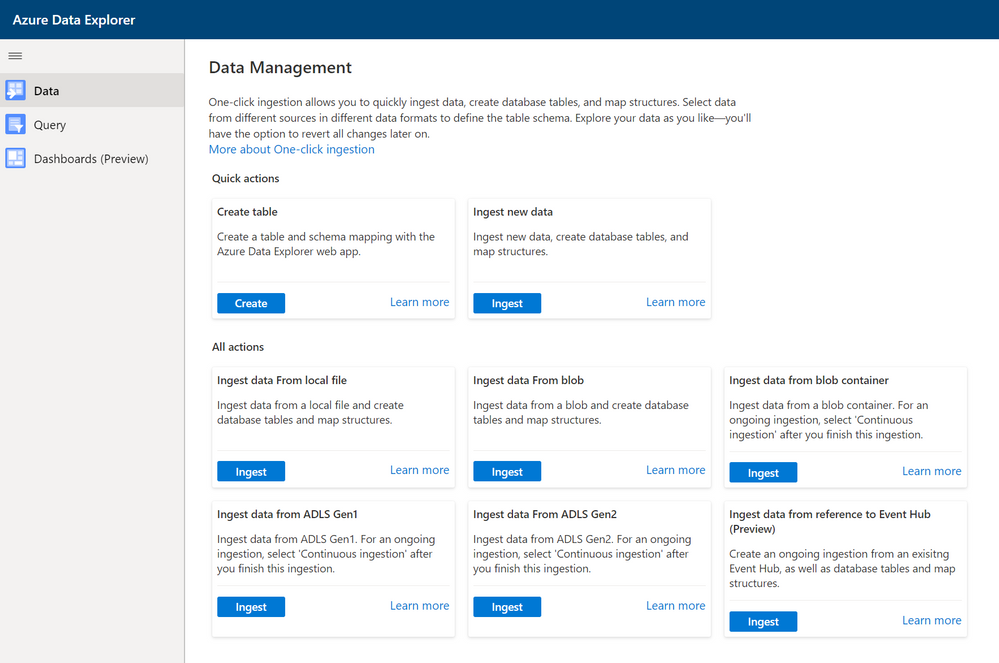
New Data landing page which collect all One Click capabilities (ingestion, create table and (soon to come) create external table) in one place.
- Open Kusto Web Explorer
- Click on Data at the left side of the page
- Select one of the create or ingest functions


Recent Comments