This article is contributed. See the original author and article here.
Sonia joins Anthony to discuss AR switches, public preview updates to Azure Backup and Azure Security Center, a new Azure Monitor agent and Intune notifications. Our Microsoft Learn Module of the week is a Cloud Skills Challenge currently running, for Windows Server and Hybrid topics.
Using AR to see the devices attached to your network switch
Scott Hanselman has been posting great content on TikTok, including this footage of how augmented reality lets him visualize what devices are plugged into which network ports! Go and check out Scott’s other TikTok content.
Updates to Azure Backup Center (public preview)
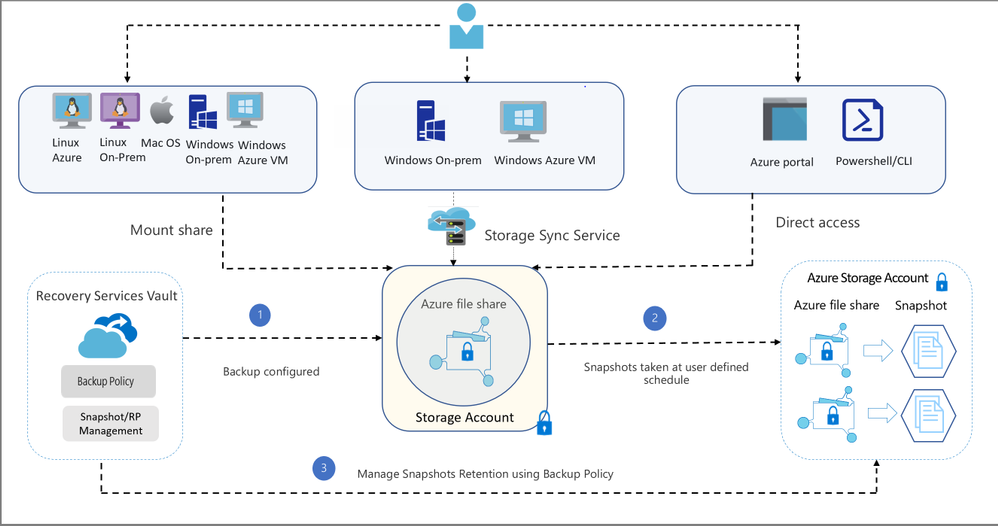
Azure Backup Center has seen a few updated features now in public preview. SQL in Azure VM, SAP HANA in Azure VM and Azure Files are now supported workloads. In particular, Azure File share backup lets you customize scheduled backups and retention periods, alert and report on backup and restore failures, restore files instantly and enable a 14 day soft delete feature on storage accounts.
Azure File share Backup architecture
There are also new public preview built-in policies for Azure Backup that allow you to configure backup of Azure Virtual Machines at scale, based on resource group and tag information. Learn more here: Auto-Enable Backup on VM Creation using Azure Policy.
To get started with using Backup Center, search for Backup Center in the Azure portal and navigate to the Backup Center (Preview) dashboard.
New Azure Monitor Agent available on latest Linux distros and new regions
Azure Monitor has introduced a new concept for configuring data collection and a new, unified agent for Azure Monitor in public preview. This new agent (Azure Monitor Agent, or AMA) and the Data Collection Rules (or DCR) improve on a few key areas of data collection from VMs including granular and flexible configuration (e.g. collect from a subset of VMs for a single workspace), collect once and send to both Log Analytics and Azure Monitor Metrics, send to multiple workspaces (multi-homing for Linux), data filtration at source for Windows and Linux, improved extension management and better performance overall.
New Linux distros and regions have been added to this public preview: CentOS Linux 8* Debian 10 Oracle Linux 8* Red Hat Enterprise Linux Server 8* SUSE Linux Enterprise Server 15.2* SUSE Linux Enterprise Server 15.1* Ubuntu 20 *Known issue with Syslog events. Only supports Performance Counters (CPU, Memory, Disk, Network)
Additional regions: UK West (WUK) KoreaCentral (SE) France Central (FRC) South Africa North (JNB) Switzerland North
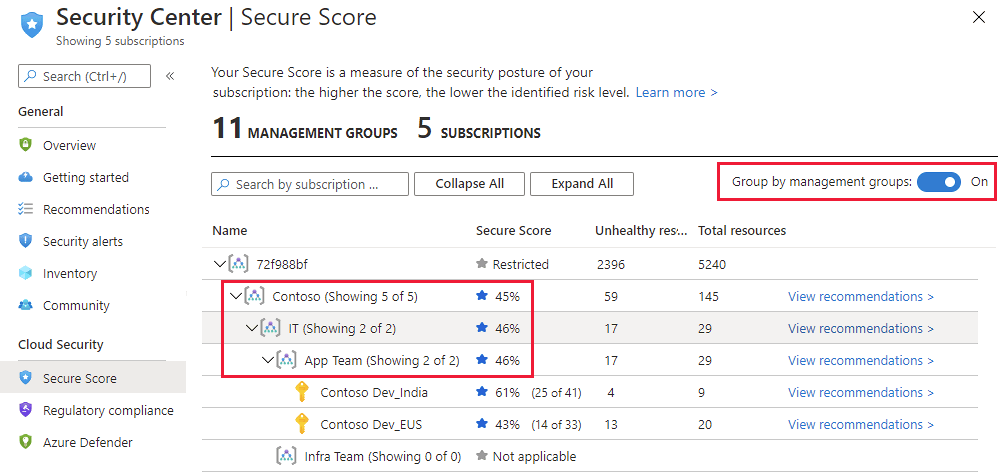
Azure Secure Score management groups grouping filter
35 new preview recommendations have been added to the Azure Security Benchmark policy initiative for Azure Security Center. These include policies for encryption at rest, security best practices, Web Application Firewall for protection againt DDoD attacks, and restricting unauthorized network access.
Microsoft Intune enhancements to noncompliance email notifications
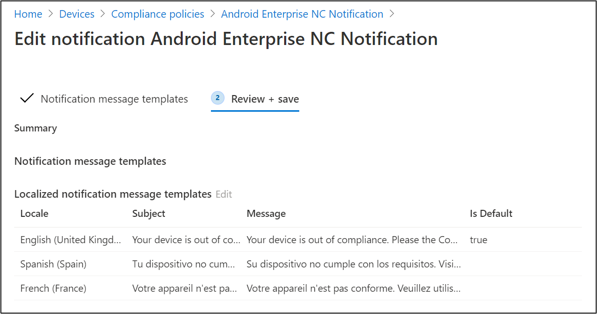
Receiving an email that your device is not compliant with a corporate Intune policy can be very confusing, if the notification is in English and that’s not your native language. Until now, administrators have needed to set up duplicate policies to add non-compliant notifications in different languages. Now, you can use the one policy and a single notification template, but add multiple localized language messages to it.
Microsoft’s second online Microsoft Ignite couldn’t wait a whole year – join us on March 2-4. Register here.
MS Learn Module of the Week
ITOps Talks: All things Hybrid – Cloud Skills Challenge
The Cloud Skills Challenge is a collection of Microsoft Learn modules on Windows Server and Hybrid topics. These include server deployment & administration, Hyper-V, Active Directory Domain Controllers in Azure, hybrid identity, hybrid networking, hybrid file servers, hybrid backup & recovery, Azure Arc, Azure Stack and more!
There’s also the chance to win 1:1 time with some Microsoft staff!
This article is contributed. See the original author and article here.
Final Update: Friday, 05 February 2021 09:28 UTC
We’ve confirmed that all systems are back to normal with no customer impact as of 02/05, 08:46 UTC. Our logs show the incident started on 02/05, 06:45 UTC and that during the 2 hours that it took to resolve the issue some customers may have experienced intermittent metric data gaps and incorrect metric alert activation in West Europe region.
Root Cause: The failure was due to an issue with one of our dependent service.
Incident Timeline: 2 Hours & 1 minute – 02/05, 06:45 UTC through 02/05, 08:46 UTC
We understand that customers rely on Application Insights as a critical service and apologize for any impact this incident caused.
This article is contributed. See the original author and article here.
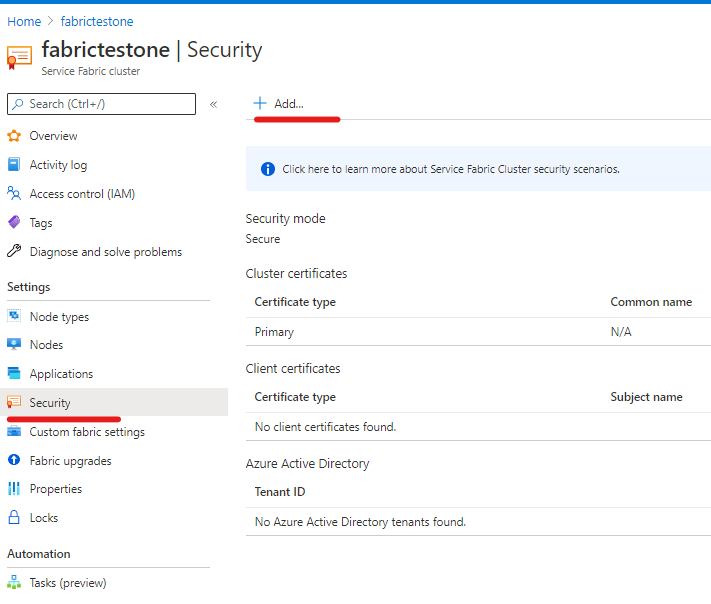
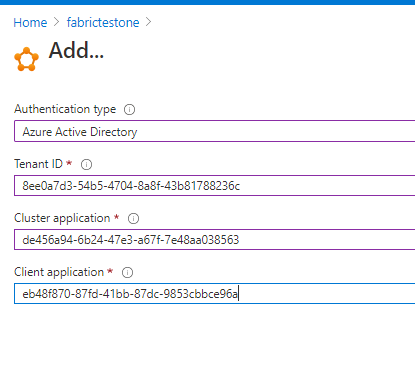
When we connect to service fabric’s management endpoint, we will need to provide certificate information to pass authentication. However, we can also use Azure AD for authentication.
Here is our official documentation on how to use Azure AD to authenticate service fabric connection endpoint. It uses Powershell script to create two applications in the Azure AD resource.
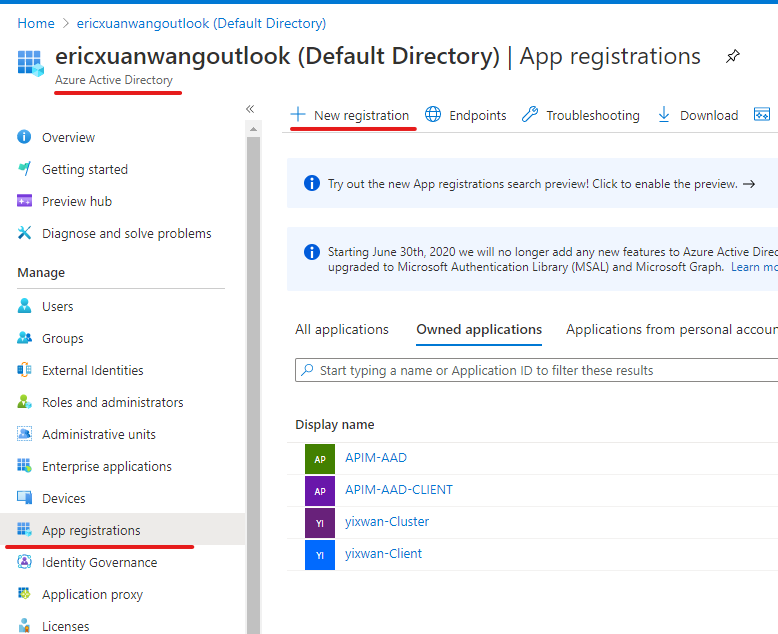
We can also do these steps manually with UI in Azure Portal.
Abstract at the beginning of the blog:
The service fabric cluster here will be treated as an AAD web app. When users access it with browser, it will pop the sign in box and navigate back to the provided reply URL after authentication just like any web OAuth process.
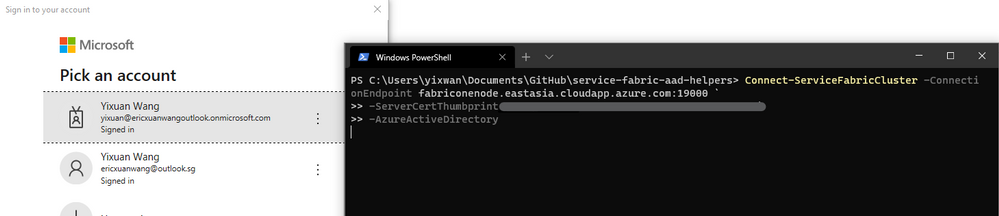
When user access it with client tool like SF Powershell module, the AAD client app here will sign in the user, then use the exposed API from AAD web app to validate if the user has the Admin role.
Application registration:
1) AAD web app
The first application we need to register in Azure AD is a web app, represents the cluster.
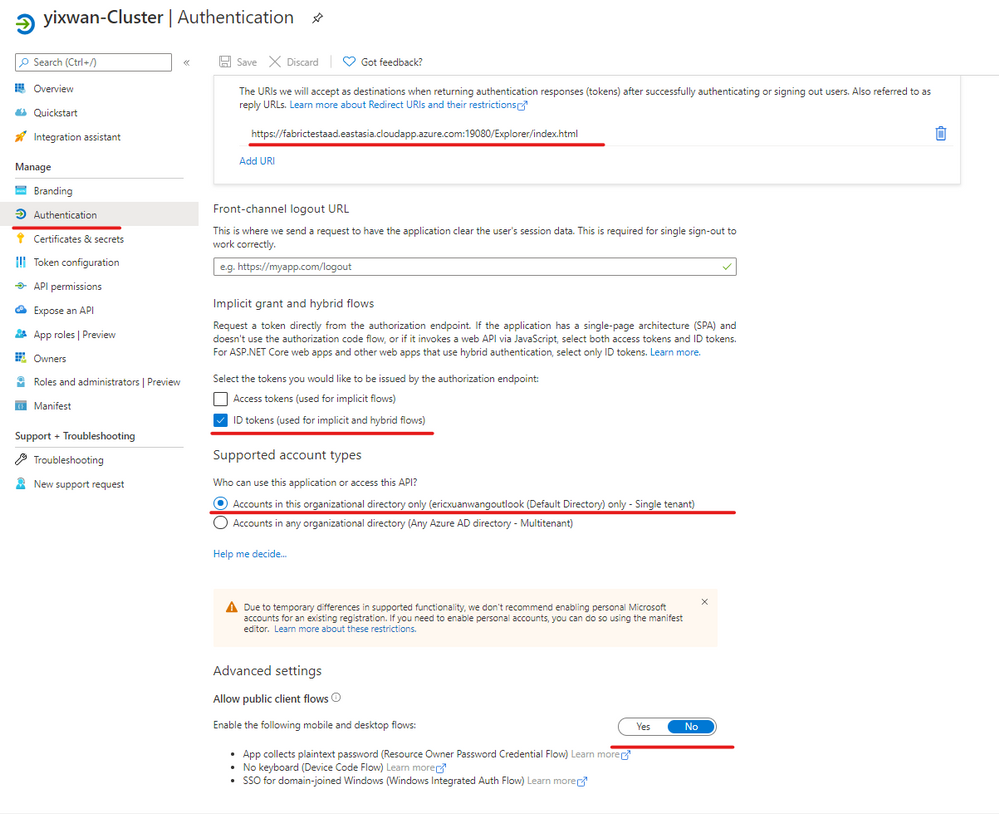
In authentication blade, we will configure like this:
Accounts in this organization directory only (Single tenant)
Allow Public client flows:
No
User Role assignment:
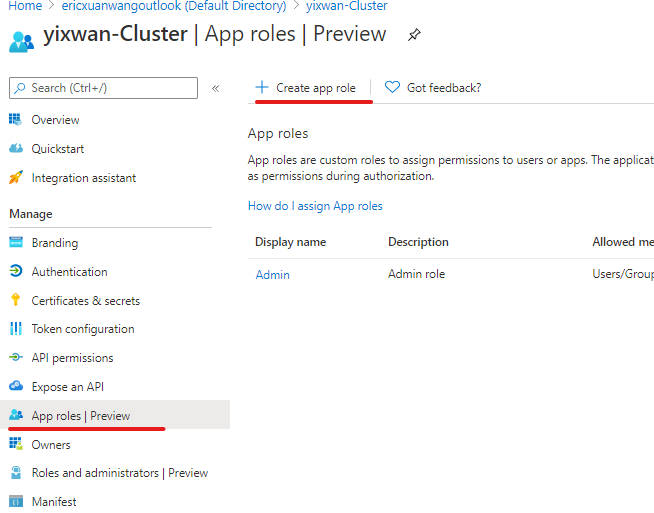
We need to create an Admin App-Role for the cluster app.
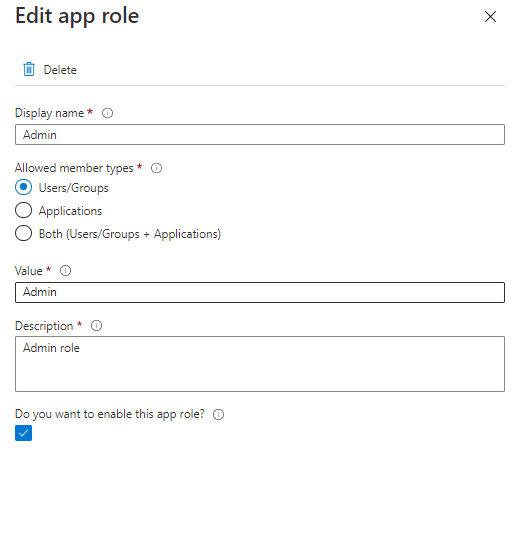
In App roles blade, we create app role with below configurations.
Display name:
Admin
Allowed member types:
Users/Groups
Value
Admin
Description:
Admin role
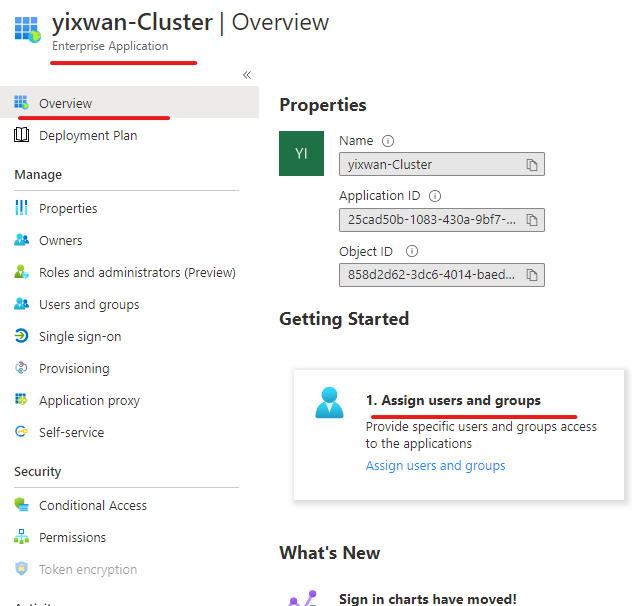
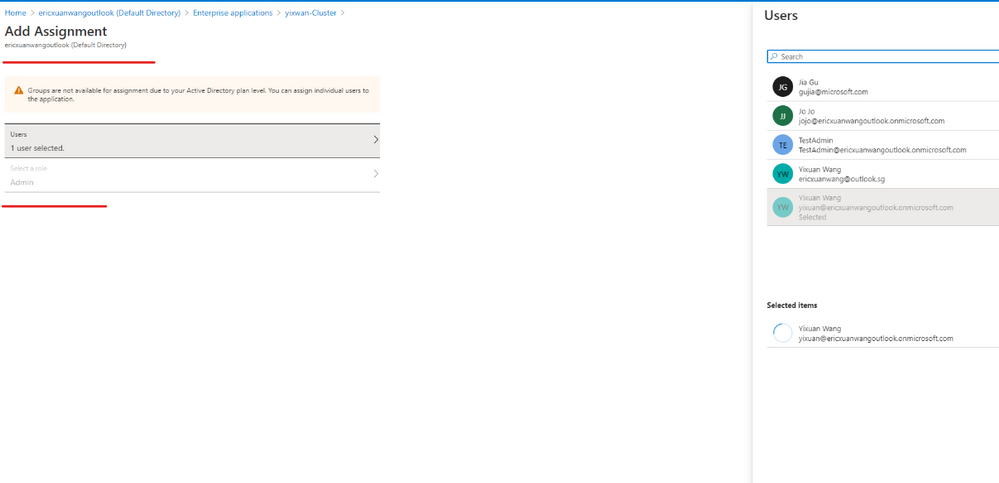
Then we will go to Enterprise applications blade of Azure AD. Go to overview the page of the applications we created. In Getting started section, we will see “Assign users and groups.”
We will add a user as Admin so that user can access SF connection endpoint with Azure AD.
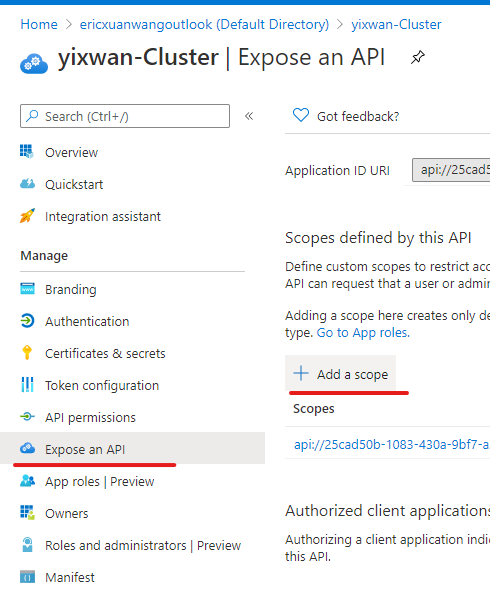
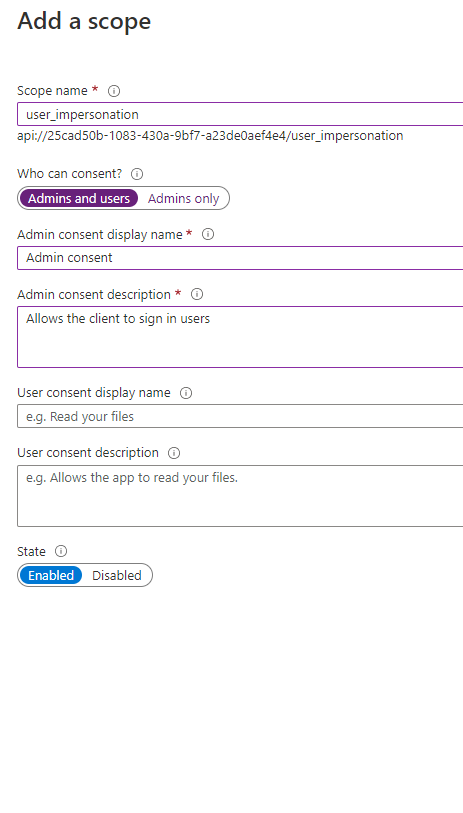
Expose API
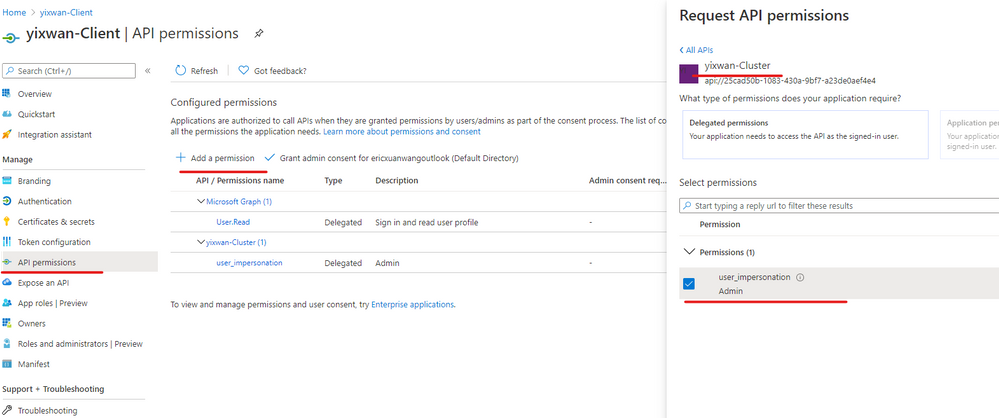
We need to expose the authentication API of the web app so that the client app like powershell can use it to sign in the admin user.
Steps are done for the AAD web app here.
2) AAD client app
The second application we need to register in Azure AD is a Desktop/Native app, it represents tools like SF Powershell module. (Connect-ServiceFabricCluster)
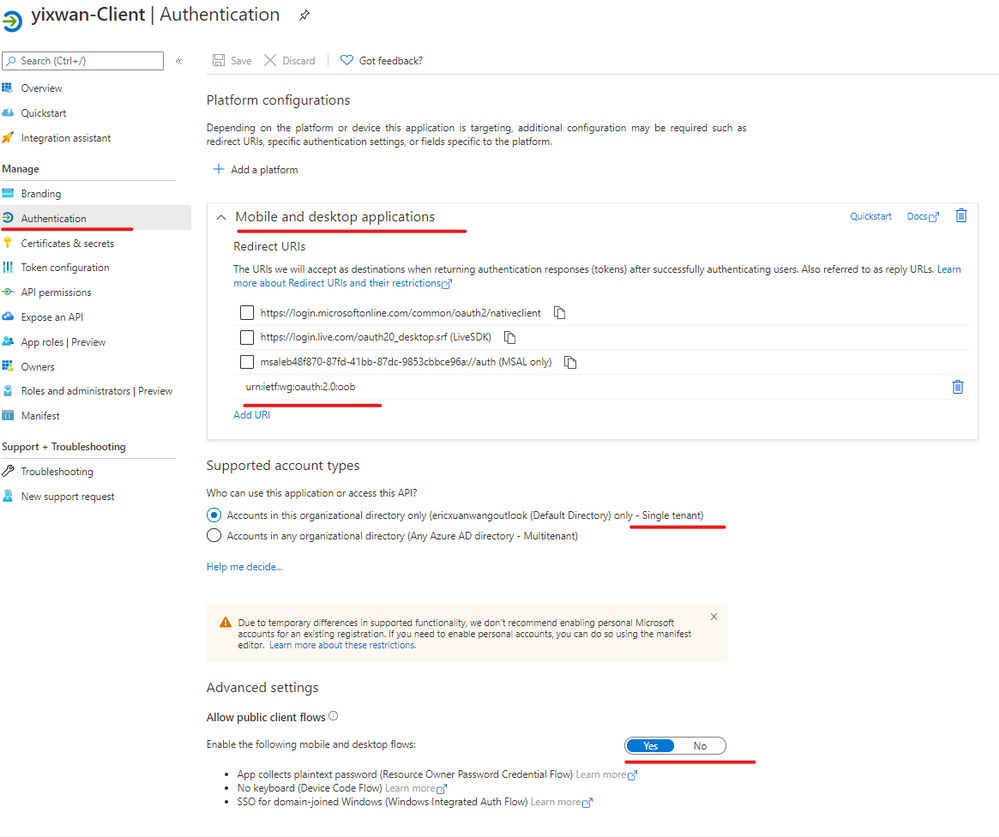
In the authentication blade, we will configure like this:
You can also read the Powershell script provided in our official documentation to understand what has been done. This is a steps-by-steps guide for users who prefer Azure Portal.
This article is contributed. See the original author and article here.
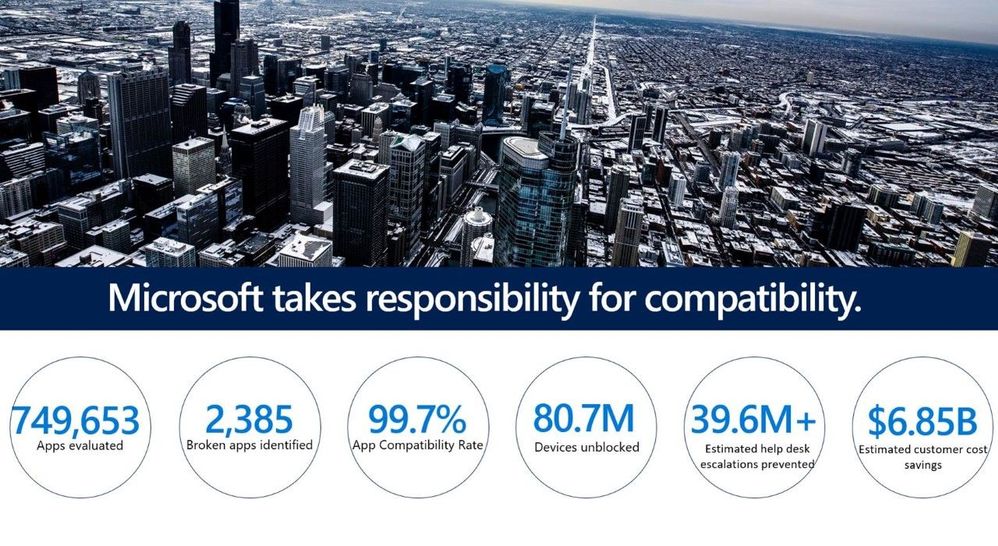
The App Assure service launched in October 2018, reassuring our customers that their applications will work on the latest versions of our software, and if they experience any issues, we’ll help them fix them at no cost!Since then, we’ve helped Windows 10 (x86, x64), Microsoft 365 Apps, Microsoft Edge, and Windows Virtual Desktop customersaddress application compatibility issues, so that they can continue to use their business critical applications. This is included at no additional cost as part of the FastTrack benefit, eligible with Microsoft 365 and Windows 10 plans of 150+ licenses.
A year ago, App Assure started assisting withMicrosoft Edge-related cases and through our customer engagements, we’ve found that the most successful customers followed our recommended deployment process for Microsoft Edge.Using Enterprise Site Discovery to identify legacy sites and apps helps admins gain insights and make informed decisions when configuring Microsoft Edge.We highly recommend understanding yourenvironment and what sites need Internet Explorer(IE) 11 and can use IE mode in Microsoft Edge.
What is Internet Explorer mode?
IE mode enables legacy apps and sites to work in Microsoft Edge.Microsoft Edge supports modern apps, thanks to the Chromium engine, and legacy apps, thanks to IE mode.Some legacy apps useActiveX controls (e.g., Java, Silverlight), Browser Helper Objects, etc. that are not supported natively by the Chromium engine and, therefore, may not run properly without setting up IE mode in Microsoft Edge.
IE mode:
Makes it easy to access the legacy sites that your organization needs in a single browser
Givesyour team more time to upgrade legacy apps to faster, moremodern technology
Enables automatic switching from the Microsoft Edge engine to the IE engine for sites that need it
We understand how critical legacy web apps can be to enterprises. Here are two features that will keep your legacy apps working smoothly as youplan for and deploy Microsoft Edge. Since we started supporting Microsoft Edge, we’ve discovered thatmany compatibility issues fall into two main categories that the MicrosoftEdge built-inbrowser features mitigate:
Discover which sites are using legacy document modes
Unless these sites are detecting modern browsers and providing different HTML, they will likely need to run in IE mode
Discover which sites are using ActiveX controls
Modern browsers including Microsoft Edge don’t support ActiveX controls; unless these sites are detecting modern browsers and providing different HTML, they probably need to use IE mode
Neutral sites are typically sites that provide Single Sign-On (SSO)
If you navigate to a neutral site from Microsoft Edge, then you want to stay in Microsoft Edge to authenticate
If you navigate to a neutral site in Internet Explorer mode, then you want to stay in Internet Explorer mode to authenticate
Common symptoms of legacy sites on modern browsers and how to fix them
There are some common symptoms you may experience and options that most likely resolve them.Thesymptomsbelow may indicate the site has legacycomponentsandthe issue will likely be resolved by configuring IE mode.
Web app or site functionality is impaired or missing
The browser displays a white screen instead of rendering thecontent
Buttons are missing or don’t perform the expected outputs whenclicked
Expected fields are blank ornotinteractive
“Unsupported Browser” or similar messagingappears
Displayed content ismisaligned
As of Microsoft Edge version 86, you can quickly test the site in IE mode by enablingthe policy to“Open sites in Internet Explorer mode’ under ‘More Tools’ to determine if adding the URL to your site list will resolve the issue.
As noted earlier most, if not all, of these sites would be identified by following Enterprise Site Discovery. So, it might be worthwhile to go back and run it for the rest of your site inventory.
Authentication / Single Sign-On issues
The site list has been configured, but users are being prompted for credentials after an app or site opens in IEmode
The authentication process goes into a loop, hangs, orfails
“500 Internal Server Error”isdisplayed
“SAML Bad Authentication Error 400” isdisplayed
These issues are most commonly due to IE mode redirections between IE and Microsoft Edge. Resolve these quicklyby configuring theURL as aneutral site in theEnterprise Site List.
Need Microsoft Edge deployment assistance?
Toassist you as you deploy Microsoft Edge,Microsoft FastTrackis equipped with experts to help you work through the above-mentioned deployment items like Enterprise Site Discovery, IE modeconfiguration, and other deployment–related activities.This is included at no additional cost as part of the FastTrack benefit, eligible with Microsoft 365 and Windows 10 plans of 150+ licenses.
Need help with your applications?
If you’ve tried the suggested remediations above and are still having concerns with your app on Microsoft Edge, App Assure is ready to help.If your app or site works with Internet Explorer 11, supported versions of Google Chrome, or any version of Microsoft Edge, App Assure will help you get them working in Microsoft Edge, at no additional cost with eligible Microsoft 365 and Windows 10 plans of 150+ licenses. Visit the App Assurepage and sign in to submit your request for assistance fora dedicated App Assure Manager. If you experience any issues submitting a request for assistance, please contact ACHELP@microsoft.com and our team members will reach out to you to help!Learn more about App Assure compatibility assistance for Microsoft Edge here.
This article is contributed. See the original author and article here.
Background
At-scale data processing systems typically store a single table in storage as multiple files. Representing these files as single assets can clutter a data catalog and not accurately represent that these files make up a single dataset. Azure Purview uses resource sets to address this problem by grouping assets in storage into a single object in the catalog if they match certain built-in patterns.
Before these changes, resource sets just used the final path of the qualified name which made it difficult to understand what the asset was representing when searching, browsing, or exploring lineage.
For example, the output of a Apache Spark job would just be represented as {SparkPartitions} within the catalog. In this example, a user would likely be more interested in the name of the containing folder that the Spark Partitions are written into (say, for example, a delta table).
Starting this week, improvements to how the friendly names are extracted are coming to Azure Purview. Using a variety of heuristics that parse the resource set qualified name for useful information, the catalog will now more accurately display what the asset is representing. No longer will you see display names like {SparkPartitions}, flowsheet{N}_at_{Year}-{Month}-{Day}T{Hour}:{N}:{N}, or {GUID}.
Once this change is available in your Purview region, all new resource sets ingested via scan will automatically use the new friendly names. Over the next couple weeks, existing resource sets will have the new naming heuristics applied via a passive background process. No action needs to be done by anyone using the tool!
Examples
Below are some examples of how Azure Purview extracts the default name from resource set qualified paths.
This article is contributed. See the original author and article here.
Final Update: Thursday, 04 February 2021 21:02 UTC
We’ve confirmed that all systems are back to normal with no customer impact as of 02/04, 19:38 UTC. Our logs show the incident started on 02/04, 19:18 UTC and that during the 20 minutes that it took to resolve the issue some customers ingesting telemetry in West Europe region may have experienced intermittent data latency, data gaps and incorrect alert activation.
Root Cause: The failure was due to issues with one of the backend services.
Incident Timeline: 20 minutes – 02/04, 19:18 UTC through 02/04, 19:38 UTC
We understand that customers rely on Application Insights as a critical service and apologize for any impact this incident caused.
This article is contributed. See the original author and article here.
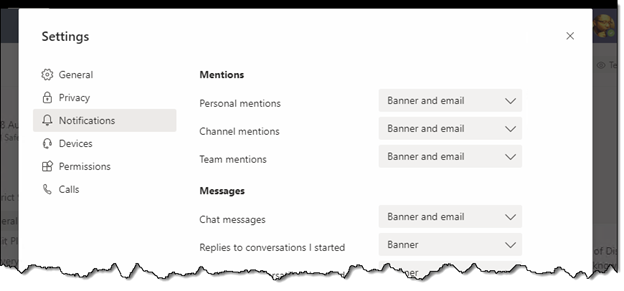
It can sometimes be challenging to manage the volume of notifications that come from your colleagues’ activity in Microsoft Teams. Even managing the lack of volume (ie trying not to miss those few messages that appear in a rarely used Channel) can be problematic. Using Hide/Show on your favorite teams and channels helps keep things organized, and making sure your Notifications settings are tuned to your own preferences is important:
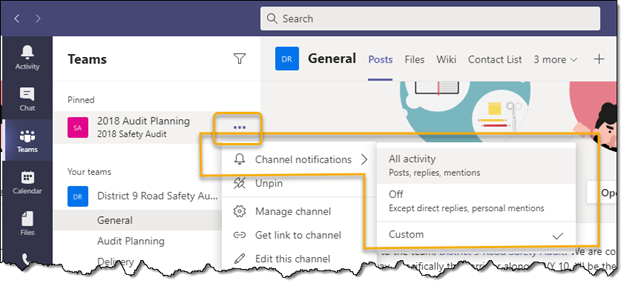
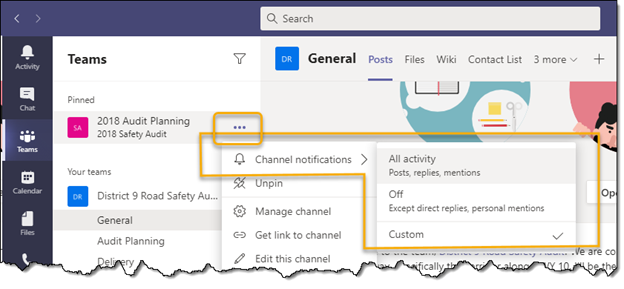
Now, in addition to those options, new channel notification options have been released to Microsoft Teams in GCC. They can be found thru the ellipse button next to a channel:
At this level, you can see that we have the ability per channel to decide whether to turn off all the activity notifications of perhaps a particularly chatty channel, while still maintaining a different setting for the rest of the channels in that team.
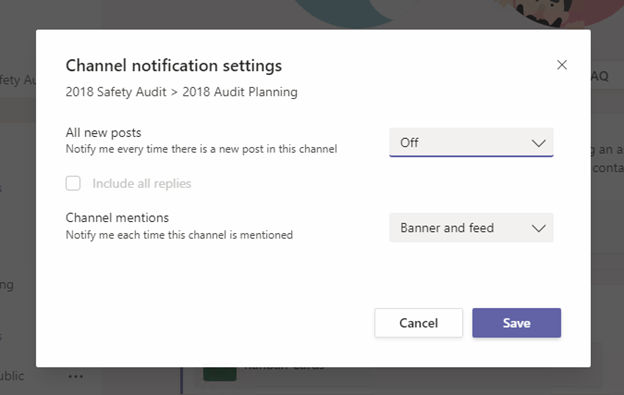
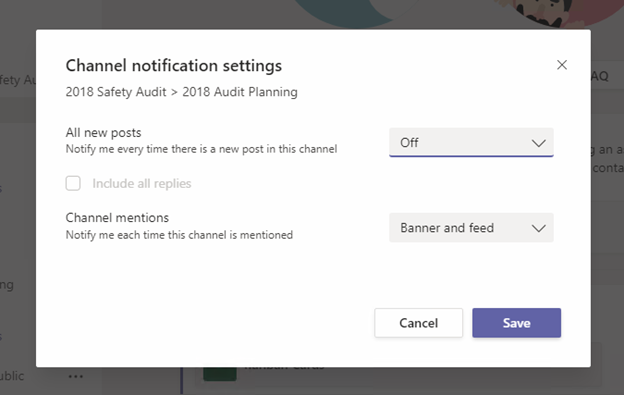
If we use the Custom choice, we see that we have the opportunity to get even more granular with our options for that channel:
Some of the ideas for new scenarios this might help you enable include things like:
I’m interested in knowing when a new topic of conversation starts here, but I’ll uncheck “Include all replies” so I don’t have to see everyone’s response to the new topic.
For example: “Welcome Mary Smith to the Team!”
“Welcome Mary!”
“Welcome Aboard!”
“Glad you’ve joined us.”
“Congrats Mary!”
…..
I have team members in this channel that use the Channel Mentions a little too often. However, I’m okay with how they’re used elsewhere. Let me turn them off for this channel only.
Someone created a new channel on a subject that I’m really interested in following. Let me turn on “Include all replies” so I make sure I don’t miss anything.
Hopefully you see how this feature can help you gain even greater control over your notifications experience in Microsoft Teams.
This article is contributed. See the original author and article here.
It can sometimes be challenging to manage the volume of notifications that come from your colleagues’ activity in Microsoft Teams. Even managing the lack of volume (ie trying not to miss those few messages that appear in a rarely used Channel) can be problematic. Using Hide/Show on your favorite teams and channels helps keep things organized, and making sure your Notifications settings are tuned to your own preferences is important:
Now, in addition to those options, new channel notification options have been released to Microsoft Teams in GCC. They can be found thru the ellipse button next to a channel:
At this level, you can see that we have the ability per channel to decide whether to turn off all the activity notifications of perhaps a particularly chatty channel, while still maintaining a different setting for the rest of the channels in that team.
If we use the Custom choice, we see that we have the opportunity to get even more granular with our options for that channel:
Some of the ideas for new scenarios this might help you enable include things like:
I’m interested in knowing when a new topic of conversation starts here, but I’ll uncheck “Include all replies” so I don’t have to see everyone’s response to the new topic.
For example: “Welcome Mary Smith to the Team!”
“Welcome Mary!”
“Welcome Aboard!”
“Glad you’ve joined us.”
“Congrats Mary!”
…..
I have team members in this channel that use the Channel Mentions a little too often. However, I’m okay with how they’re used elsewhere. Let me turn them off for this channel only.
Someone created a new channel on a subject that I’m really interested in following. Let me turn on “Include all replies” so I make sure I don’t miss anything.
Hopefully you see how this feature can help you gain even greater control over your notifications experience in Microsoft Teams.
This article is contributed. See the original author and article here.
Microsoft is excited to be sponsoring and participating in Devnexus 2021, and you might be wondering—what is Microsoft doing with Java? Quite a bit actually! We’ve been busy releasing new features and functionality to support Java apps on Azure, contributing to open-source projects, and improving our developer tools experience. Read on to find out more about Java at Microsoft and a get a preview of our sessions at Devnexus this year.
Java at Microsoft
You might be surprised to learn that in addition to helping developers run Java apps on Azure, Microsoft uses Java extensively in our own applications and operations. Java is at the heart of some of our most popular products like LinkedIn, Minecraft, and Yammer. We use several Java-based systems behind the scenes like Apache Kafka, Spark, and Zookeeper to help manage Azure infrastructure.
As part of our work on Java we support and contribute to some key open-source projects. In recent months we’ve contributed directly to the OpenJDK, including ports and performance enhancements. We have a large effort in the Spring community to provide integrations for Azure services, and GitHub support projects from OpenJDK, Quarkus, and Apache with free compute cycles for CI/CD and code scanning.
Recent announcements for Java on Azure
On the product and feature side we’ve also been very active. Azure’s first party service for running Spring Boot applications, Azure Spring Cloud, became generally available last September and since then we’ve had several more releases.
We’ve been working with Oracle and IBM to make it easier to run Java EE/Jakarta EE applications on Azure Virtual Machines and containers. You can now run Oracle WebLogic Server on Azure VMs with Azure Marketplace offers that provision VMs running WebLogic in various configurations. In November, we announced guidance and solutions to run WebLogic on Azure Kubernetes Service (AKS) using the validated WebLogic Operator. In December, we released solutions to run WebSphere Liberty/Open Liberty on Azure Red Hat OpenShift (ARO). This is just the start of our work, with more support and solutions for Java EE on Azure coming soon.
Most recently, we announced that Application Performance Monitoring (APM) is now fully integrated with Azure Spring Cloud. This functionality is powered by Application Insights (part of Azure Monitor) and lets you monitor your Spring applications with no code changes – just deploy and start monitoring.
Java on Azure developer tools and resources
Java on Azure is all about choice and that includes developer tools and integrations. You can use your favorite IDEs with Azure Toolkits for IntelliJ and Eclipse and deploy apps directly to Azure. We have plugins for Maven and Gradle that let you natively build and interact with Azure services. And you can automate your workflows and deployments with GitHub Actions, Jenkins, and Terraform.
We’ve also been working to ensure Java developers have a great experience with VS Code by adding essential functionality with Java focused extensions. A recent update to the VS Code Project Manager for Java adds support for several new features, including “Run” and “Update” directly from the project explorer view and key bindings. You can visit our developer tools documentation to learn about all the support for Java.
Check out our sessions at Devnexus 2021
Now for the main event! Microsoft has several sessions and two half-day workshops at Devnexus on a variety of topics. The list below includes all the details, so mark your calendars and be sure to use this link for a 50% discount on Day 2 Microsoft workshop tickets.
Presented by Julien Dubois – Java Developer Advocacy Manager at Microsoft
Date/time: Wednesday, February 17 | 11:25 AM EST
Details: Julien will do a deep dive into Spring Cloud Function and show how you can deploy your Spring Boot applications to serverless platforms. You’ll also learn about performance and per-request billing and compare running code with the JVM and GraalVM to see what to really expect in production.
Presented by Reza Rahman – Principal Program Manager for Java on Azure at Microsoft
Date/time: Wednesday, February 17 | 2:30 PM EST
Details: There are several key techniques to understand while using Kubernetes with Jakarta EE and MicroProfile applications. This demo driven session will cover topics like how K8s primitives align with application server administration, how to use Prometheus/Grafana, and how to use Operators for cluster management. You’ll get access to demos on GitHub to explore further after the session.
Presented by Kirk Pepperdine – Principal Engineer at Microsoft
Date/time: Wednesday, February 17 | 2:30 PM EST
Details: Come learn about the true cost of memory in Java and why our observability is failing us. Better yet, you’ll learn what we can do about it. Kirk comes at this topic with a wealth of experience; he is the author of jPDM, a performance diagnostic model that helps people to quickly identify the root cause of performance regressions.
Introduction to Azure Spring Cloud (On demand demo)
Presented by Asir Selvasingh – Principal Program Manager for Java on Azure at Microsoft
Details: Azure Spring Cloud abstracts away the complexity of infrastructure and Spring Cloud middleware management, so you can focus on building your applications and let Azure take care of dynamic scaling, patches, security, compliance, and high availability. With a few steps, you can provision Azure Spring Cloud, create apps, deploy, and start monitoring in minutes. Learn more in this demo session and see how easy it is to get started.
Presented by Reza Rahman – Principal Program Manager for Java on Azure at Microsoft
Date/time: Thursday, February 18 | 9:00AM – 1:00PM EST
Details: This workshop will show you the many ways of effectively deploying a Java EE/Jakarta EE application to Azure. You’ll learn the trade-offs of each deployment option, with guidance for which approach might be best for your application on the cloud. At the end of the workshop, you’ll have first-hand exposure and be prepared to develop your own Java EE/Jakarta EE applications on Azure.
Presented by Brian Benz – Senior Developer Advocate at Microsoft
Date/time: Thursday, February 18 | 1:30PM – 5:30PM EST
Details: DevOps is great, if you have the people, processes, and tools to support it. In this session Brian will highlight the easiest ways for developers to work with their IT organizations and partners to deliver their Java code to the cloud using GitHub, including the best ways to reliably make updates and maintain production Java code.
Don’t forget to visit our virtual booth to chat with experts during the event and access more resources.
Learn more and get started
Want to learn more about developing your Java applications on Azure? Here are a few key resources:
Start with our new Java on Azure learning path on Microsoft Learn to discover all the ways you can run Java applications on Azure
Visit our developer docs center for all our Java on Azure documentation, including QuickStart guides and tutorials
Discover the best practices of Cloud resource with Steven Murawski and Foteini Savvidou, utilizing the Carnegie Mellon University Microsoft Learn Module. Automating your cloud resource management can increase productivity, sustainability, and the scalability of your services. In this session led by Steven Murawski, Principal Cloud Advocate at Microsoft, and Microsoft Student Ambassador, Foteini Savvidou will explain the concept of Infrastructure-as-Code and discuss the advantages that it offers over ordinary scripting. They will then go on to show how to automate cloud resource management with infrastructure-as-code tools like Terraform and explore its role as an infrastructure orchestrator They will describe how it differs from conventional configuration management practices.
During this session You will walk through principles and hands on demonstrations and walk away with tools and best practices for your cloud management strategy.
Steven Murawski, Principal Cloud Advocate, Microsoft Steven Murawski is a Principal Cloud Advocate focused on DevOps, Site Reliability Engineering, and other modern operational concepts. Steven is a founding member of the League of Extraordinary Cloud DevOps Advocates). Steven has worked on both the Dev and Ops sides of the house, most recently as a Principal Engineer at Chef, building tools for operating applications and infrastructure at scale and velocity. Blog https://devblogs.microsoft.com/devops/author/stmurawsmicrosoft-com/
Foteini Savvidou, Microsoft Student Ambassador Foteini Savvidou is an Electrical and Computer Engineering student at Aristotle University of Thessaloniki, Greece and Microsoft Learn Student Ambassador. She is interested in software engineering, data science, AI and especially in applications of technology in healthcare and education. Always passionate about teaching, Foteini helps people expand their technical skills through organizing workshops and writes articles on her blog. Her goal is to use technology to promote accessibility, digital and social inclusion.





Recent Comments