by Contributed | Feb 5, 2021 | Technology
This article is contributed. See the original author and article here.
Final Update: Friday, 05 February 2021 21:32 UTC
We’ve confirmed that all systems are back to normal with no customer impact as of 02/05, 21:16 UTC. Our logs show that the incident started on 02/05, 20:51 UTC and that during the 25 minutes that it took to resolve the issue some customers ingesting telemetry in West US 2 region might have experienced intermittent data latency, data gaps and incorrect alert activation.
- Root Cause: The failure was due to issues with one of the backend services.
- Incident Timeline: 20 minutes – 02/05, 20:51 UTC through 02/05, 21:16 UTC
We understand that customers rely on Azure Log Analytics as a critical service and apologize for any impact this incident caused.
-Saika
by Contributed | Feb 5, 2021 | Dynamics 365, Microsoft 365, Technology
This article is contributed. See the original author and article here.
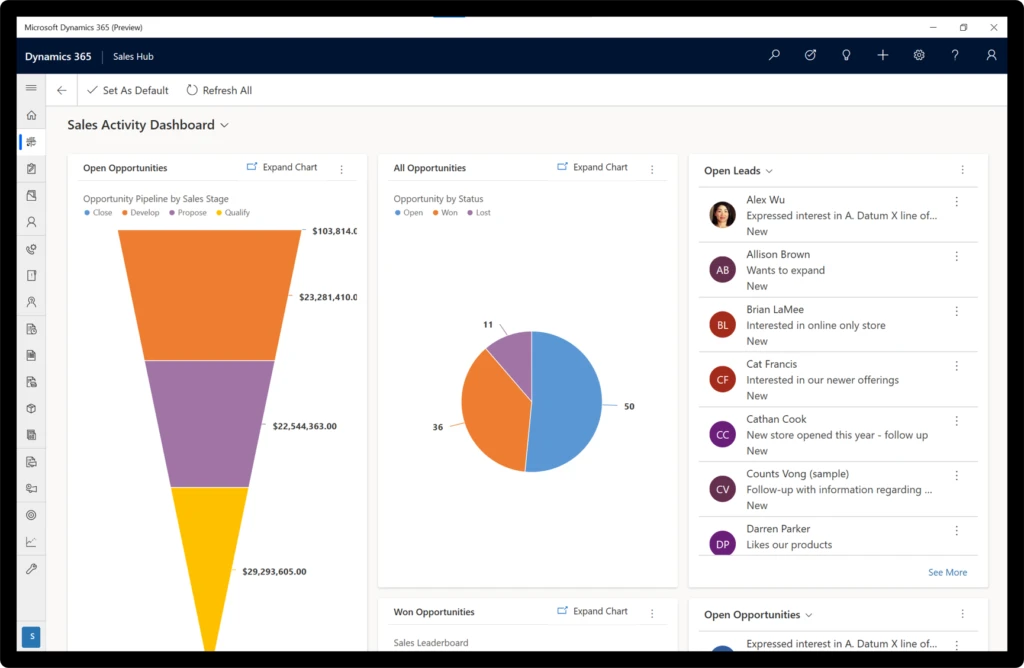
The Microsoft Dynamics 365 (Preview) app for Windows is optimized to help your team stay productive whether they’re connected or working offline.
The app provides your salespeople, agents, and supervisors with tools they need to track their tasks, arrive prepared for appointments, take notes, and access customer records.
It is seamless to deploy because employees can install the app themselves from the Microsoft Store, and then with one sign-in access all the Dynamics 365 apps enabled for your organization, with no additional configuration.
If you want to customize the app, you can tailor it to meet your business requirements using the Microsoft Power Apps app designer and extensibility points, and configure it to work offline. The seamless setup experience enables you configure the app once, and then deploy it everywhere on iOS, Android, or Windows devices.
Key capabilities
The Dynamics 365 (Preview) app for Windows delivers these key capabilities:
- A personalized action hub to help users get to common tasks, suggestions, and records quickly
- Offline access with synchronization, so users can be productive on the go
- Access records from an easy-to-use home page
- Track progress for key performance indicators visually with charts
- Access personalized views of lists and grids so that users see the data most important to them
We’ll continue to improve the app, adding features that are currently available in the iOS and Android mobile versions including:
- Ability to capture video, photo, and audio in the timeline when adding notes
- GPS geolocation
- Integrated barcode scanner
Next steps and continued learning
To learn more about the Dynamics 365 (Preview) app for Windows, check out the documentation for more details on the capabilities, setup process, and to get the link to install the app.
We’d like to hear from you. Please send us your feedback.
The post Dynamics 365 (Preview) app for Windows comes with offline access appeared first on Microsoft Dynamics 365 Blog.
Brought to you by Dr. Ware, Microsoft Office 365 Silver Partner, Charleston SC.
by Contributed | Feb 5, 2021 | Technology
This article is contributed. See the original author and article here.
We’re excited to invite you to the next Microsoft Defender for Endpoint AMA (ask me anything) on the Microsoft TechCommunity. This time, the topic will be our threat and vulnerability management capabilities.
This AMA will be on Wednesday, February 17, 2021, from 8:00-9:00am Pacific Time. Bring all your questions about threat and vulnerability management – our disruptive, risk driven approach that helps accelerate the maturity of your vulnerability management program. Our team is excited to chat with you!
Details:
Microsoft Defender for Endpoint AMA – threat and vulnerability management
Date: Wednesday, February 17, 2021
Time: 8:00-9:00am PT
Place: https://aka.ms/ama/DefenderforEndpoint
Save the .ics file to ensure you have this on your calendar!
by Contributed | Feb 5, 2021 | Technology
This article is contributed. See the original author and article here.
Master Data Management (MDM) on Azure – How to use Profisee with Azure Data Factory
An obvious – but all too frequently overlooked – aspect of any analytic project is that the data must be of sufficiently good quality that it can support the desired analysis. As it is often coming from multiple sources, the data in Azure can be particularly susceptible to this issue if not handled proactively.
Profisee MDM is a master data management platform, built on Azure, and designed to ‘combine and align’ data from multiple sources and deliver trusted, relevant, and authoritative information to drive the efficiency and effectiveness of Azure. Using the Profisee REST gateway, 3rd party services can connect with Profisee using REST API.
Azure Data Factory (ADF) templates for Profisee are now available to enable you to use Profisee with various Azure Data services. These ADF templates provide a reference architecture blueprint on how to read and write data using the Profisee’s REST Gateway API and ADF.
Architecture and Solution
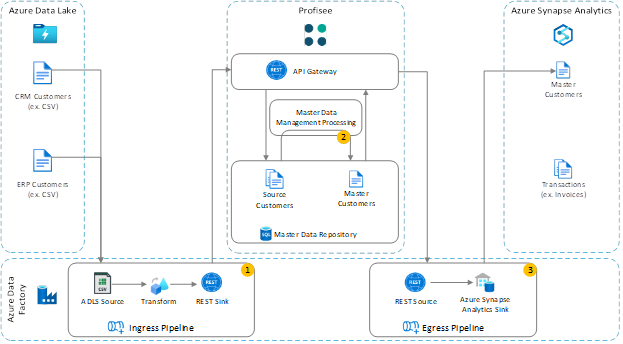
Figure 1 – Azure Data Factory and Profisee Architecture Solution
From Figure 1, Ingress and Egress modules enable Azure data integration for Profisee, using Azure Data Factory to enable data ingestion, and transformation. Figure 1 also shows the details for integrating with the Profisee Master Data Management solution.
We are excited to share the release of Profisee ARM Template. These templates show how you can use Azure Kubernetes Service (AKS), Azure SQL Server, NGNIX server, and Azure Data Factory. The ARM template deploys Profisee server on Azure.
Key to note is that Azure Data Factory and Profisee include native REST integration support, providing a lightweight and modern integration.
- Load Source Data to MDM – Azure Data Factory is used to extract the data from the data lake, SaaS sources etc., transform it to align to the master data model, and load it into the MDM repository via a REST sink.
- Master Data Management Processing – The MDM platform processes source master data through a sequence of activities to verify, standardize and enrich the data, as well as execute data quality processes. Finally, matching and survivorship is performed to find and group duplicate records and create master records. Optionally, data stewards can be issued tasks to perform data stewardship. The result is a set of high-quality, trusted master data for use in downstream analytics, machine learning and so on.
- Load Master Data for Analytics – Azure Data Factory uses its REST source to load master data from Profisee to Azure Synapse Analytics
Azure Data Factory Templates for Profisee
In collaboration with Microsoft, Profisee has developed a set of Azure Data Factory templates that make it faster and easier to integrate Profisee into the Azure Data Services ecosystem. These templates use Azure Data Factories REST data source and data sink to read and write data from Profisee’s REST Gateway API. Templates are provided for both reading from and writing to Profisee.
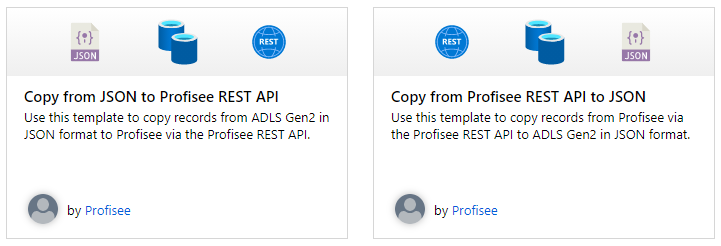
Figure 2 – Azure Data Factory pre-built templates for Profisee
ADF REST connectors enable Profisee to write Profisee model objects into Profisee using the Profisee REST gateway. ADF enables Profisee to load data from data lakes, Dynamics 365, Salesforce and more. In addition, ADF enables customers to ingest Profisee objects, and enabling customers to perform ETL tasks on Profisee objects. Choices of integration are plenty given the ADF connector portfolio.
Click here for additional documentation on the Azure Data Factory templates for Profisee.
![[ANNOUNCEMENT] Community Mentors Application: Feature Enhancements](https://www.drware.com/wp-content/uploads/2021/02/medium-28)
by Contributed | Feb 5, 2021 | Technology
This article is contributed. See the original author and article here.
Good news! We’ve just released new features of our Community Mentors app. These exciting new features will help you connect more effectively with other Humans of IT on our mentorship platform.
IMPORTANT: Make sure you’re on this latest version of the app to gain access to all these new features. You can check your app version in your app store, and update it accordingly.
Have you checked out the Community Mentors App for Desktop version?
The Community Mentors App for desktop, gives mentors and mentees access to platform via web browser. The availability of both options enables everyone to engage in the most effective way. Check it out if you haven’t already!
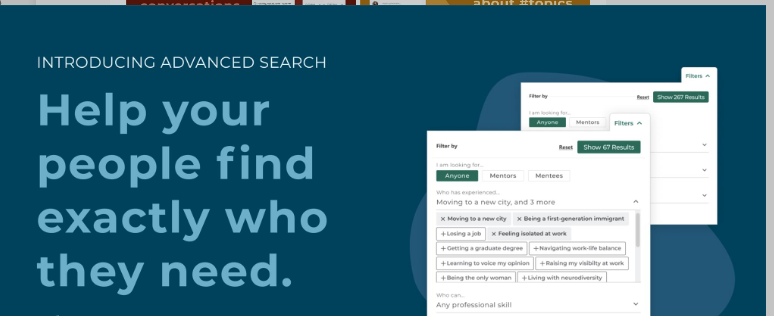
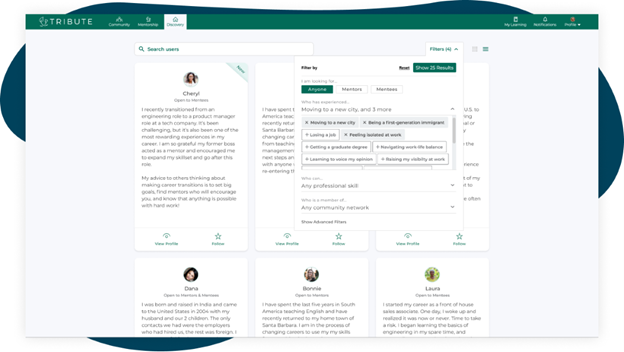
Advanced searchability by skillset, name or email address
Our latest feature release makes finding a mentor (or mentee) extremely easy. Simply search by name, email, or a specific skill and voila!
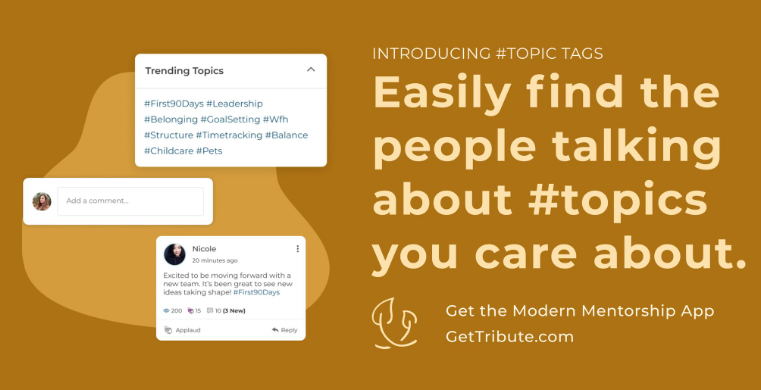
Trending topics you care about
Search by people that are talking about trending topics you care about using hashtags
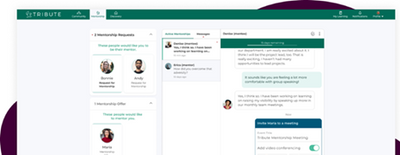
Calendar and video conferencing
Ready to connect? Calendaring and video conferencing can be set with one easy click.
Connecting with your mentor has never been easier!
Just getting started on the app? Watch our walkthrough demo to learn how to navigate the Community Mentors mobile app where we empower Humans of IT like you to get mentored and be mentored by other tech professionals around the world! In this video, we will walk you through how the app works, and ways you can get all set up so you can dive into the world of mentoring!
Have ideas on new features you’d like to see, or experiences to add? Submit your ideas here, or feel free to drop us a note at msftcmp@microsoft.com.
Become a mentor/mentee on our Community Mentors app today!
- Go to https://aka.ms/communitymentors and download our mentorship app
- Watch our newly released Community Mentors App: Walkthrough Demo
- Once you’re in the app, explore new featured stories, mentorship enhancements, reactions, and notifications.
- Check out the new desktop version at: https://aka.ms/CMPDesktop
- Join our upcoming AMA on Tuesday, February 9, 9:00-10:00 AM PT. More details here
Happy Mentoring!
by Contributed | Feb 5, 2021 | Technology
This article is contributed. See the original author and article here.
Hey folks, Eric Woodruff here – a Customer Engineer who lives in the world of Azure Active Directory.
Today we are going to be examining custom app consent policies in Azure Active Directory, and how you can leverage them for some advanced and granular consent policies within your Azure AD tenant.
We won’t really be diving into the basics of application consent today, but it’s increasingly becoming a topic of discussion with customers, to ensure that they are keeping their organization secure and that they have insight and control over what applications their end users are accessing with their organization identities. For a bit more background on application consent, as well as why you should be aware of it within your organization, refer to some of our docs – and perhaps the future will hold further blog posts discussing such.
Configure how end-users consent to applications using Azure AD | Microsoft Docs
Detect and Remediate Illicit Consent Grants – Office 365 | Microsoft Docs
Background
For customers that want to restrict the ability for end users to grant consent to applications, the trade-off between security and usability starts to come into play.
We have multiple options to help customers try and find this balance – the ability for organizations to specify permissions considered low impact, or from verified publishers. And we have the ability for organizations to enable the preview feature of admin consent workflows – when a user needs an app, a request will be sent to specified administrators to approve (or deny) it. And for most of our customers these solutions fit their business needs.
We have a subset of customers that wish to restrict the ability for end users to be able to onboard new applications into the organization and require that the end users still must consent to the delegated permissions before being able to use the application. With a custom app consent policy, we can meet these needs.
Problem Scenario
In our demo Azure AD tenant, we want to allow for users to be able to perform a delegated user consent for the Fabrikam B2C Enterprise Application – in your Azure AD tenant this could be any Enterprise App that requires user consent.
We have already gone through the process of onboarding the application into Azure AD, but we still want to require the users to accept the delegated permissions when accessing this application.
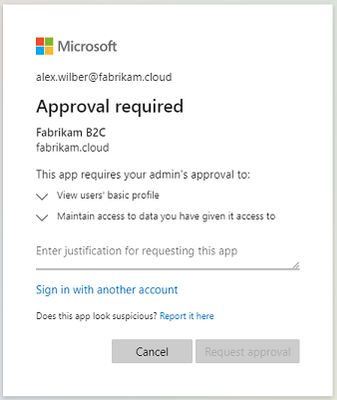
In our tenant, we have disabled the ability for users to consent to apps accessing data on their behalf. And while the admin consent workflow would allow for granting permissions, that process also performs an Admin consent grant, so subsequently users would be able to access the application without needing to consent to the permissions themselves.
The app consent approval workflow that just won’t fit our business requirements.
Implementation
1 | Revoke Any Existing Permissions
Depending on how the application was onboarded, there may be a pre-existing set of permissions already accepted that we may want to remove; if this does not fit your case then just move on to step 2.
Luckily, Azure AD already provides an easy means of giving you a PowerShell snippet to revoke existing approvals. From within the Enterprise Application, if you select Permissions under the Security section of the applications blade, and within the details blade, select Review permissions at the top, and then select This application has more permissions than I want. There will be a PowerShell script presented that you can run to remove all pre-existing permission grants.
2 | Build A Custom Application Consent Policy
2.1 | Examining Existing Policies
Now that we have a fresh slate for our application, we are ready to build a custom app consent policy.
Ensure that we are using the latest version of the Azure AD Preview PowerShell module, connect to your Azure AD tenant.
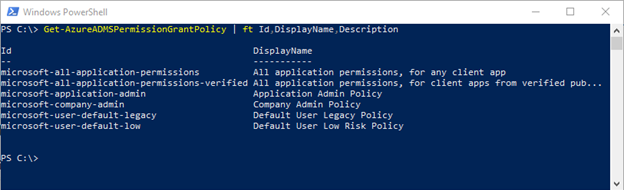
After connecting to Azure AD, we can get familiar with the policies that already exist in our tenant; all customers will have some out of the box consent policies within their tenant, as we can see when we enumerate them:
Get-AzureADMSPermissionGrantPolicy | ft Id,DisplayName,Description
2.2 | Create New Policy
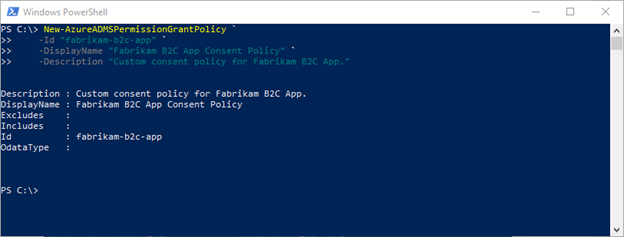
Now that we see what policies already exist, we can create our new policy:
New-AzureADMSPermissionGrantPolicy `
 -Id "fabrikam-b2c-app" `
 -DisplayName "Fabrikam B2C App Consent Policy" `
 -Description "Custom consent policy for Fabrikam B2C App."
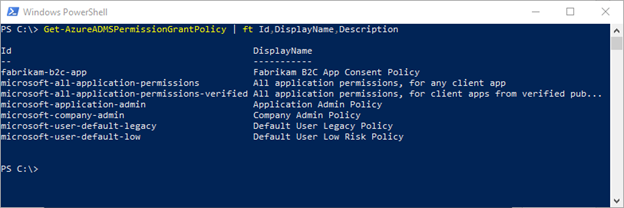
After creation, we can enumerate our policies again and verify creation:
2.3 | Create Policy Conditions
Now that we have the policy, we must create the policy conditions that will be defined within it. When defining our policy, we have several conditions we can use to create include and/or exclude conditions. I won’t be diving into all those conditions here, but they are notated in our documentation:
Manage app consent policies in Azure AD | Microsoft Docs
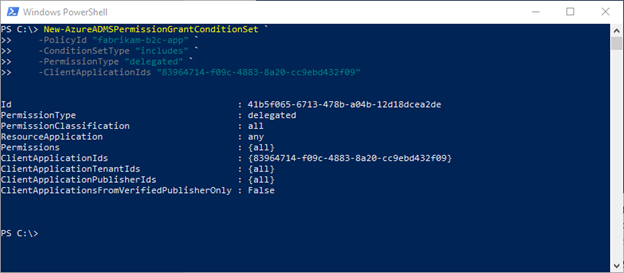
In our case, we are going to build a policy that is specific to the ClientApplicationIds condition, which will contain the Application ID that is assigned to the Fabrikam B2C Application in our tenant – the Application ID will be unique for each application in a tenant.
New-AzureADMSPermissionGrantConditionSet `
 -PolicyId "fabrikam-b2c-app" `
 -ConditionSetType "includes" `
 -PermissionType "delegated" `
 -ClientApplicationIds "<application-id>"
3 | Create a Custom Azure AD Role
Now that we have our policy defined, we need to create a custom role within Azure AD to assign it to. When we create this custom role, we will be assigning the custom app consent policy to the role – this will be the only action associated with it.
We must create a custom role as we cannot scope an app consent policy to a group or user directly.
Using a code block from our public documentation, we are going to build this role through PowerShell:
# Basic role information
$displayName = "Fabrikam B2C Role"
$description = "For access to Fabrikam B2C Application."
$templateId = (New-Guid).Guid

# Set of permissions to grant
$allowedResourceAction =
@(
 "microsoft.directory/servicePrincipals/managePermissionGrantsForSelf.fabrikam-b2c-app"
  )
$rolePermissions = @{'allowedResourceActions'= $allowedResourceAction}

# Create new custom admin role
$customAdmin = New-AzureADMSRoleDefinition -RolePermissions $rolePermissions `
 -DisplayName $displayName -Description $description `
 -TemplateId $templateId -IsEnabled $true
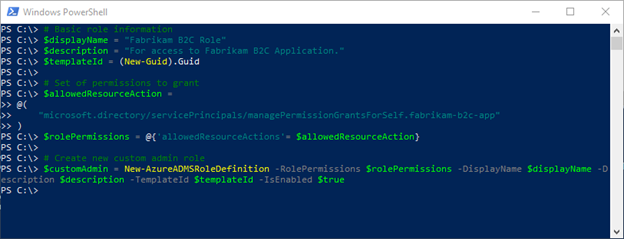
Looking at the code presented, line 9 is the important piece, where we can see that we are giving the ability to manage permission grants for self to the role, relative to what applications would then be specified within the policy.
One thing to point out for this snippet of code – if you refer to documentation on setting this, we refer to policy ID, which in this case is the name, as you can see in our example fabrikam-b2c-app. People (including this author) may initially get tripped up and think ID = something like the Object ID for the policy, which is not was we are referencing in this case.
4 | Assign Users to the Custom Role
The last step is to assign users to the custom role. From a management perspective it may seem arduous to think about having to assign every relevant user in your organization to this role.
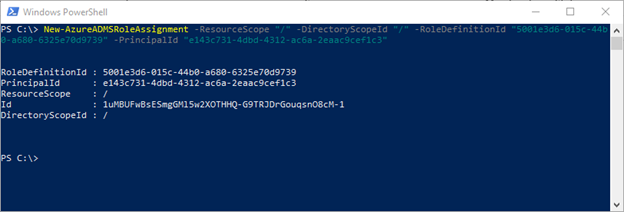
Luckily, with cloud the ability to use cloud groups for role assignment (in public preview at the time of this writing), we can simply assign a group to this role – for my test tenant I’m using an existing group that already contains all the relevant employees. The snippet to assign a group to the role assignment is as follows:
New-AzureADMSRoleAssignment -ResourceScope "/" -DirectoryScopeId "/" `
 -RoleDefinitionId "5001e3d6-015c-44b0-a680-6325e70d9739" `
 -PrincipalId "e143c731-4dbd-4312-ac6a-2eaac9cef1c3"
End Result
Now that we have created the policy, assigned it to a custom role, and have users scoped to that role by group membership, they are now able to consent to just this one specific application, without requiring administrative consent grant.
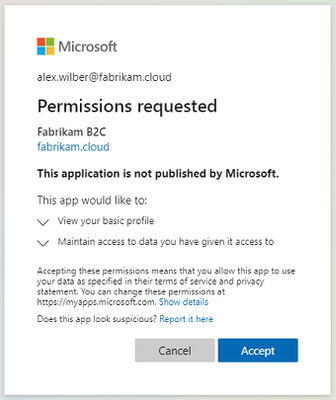
Now we are in business with delegated application consent for just this one application.
Disclaimer
The sample scripts are not supported under any Microsoft standard support program or service. The sample scripts are provided AS IS without warranty of any kind. Microsoft further disclaims all implied warranties including, without limitation, any implied warranties of merchantability or of fitness for a particular purpose. The entire risk arising out of the use or performance of the sample scripts and documentation remains with you. In no event shall Microsoft, its authors, or anyone else involved in the creation, production, or delivery of the scripts be liable for any damages whatsoever (including, without limitation, damages for loss of business profits, business interruption, loss of business information, or other pecuniary loss) arising out of the use of or inability to use the sample scripts or documentation, even if Microsoft has been advised of the possibility of such damages.
by Contributed | Feb 5, 2021 | Technology
This article is contributed. See the original author and article here.
Hi Teams Community,
Our team has just released a new diagnostic, Teams Call Forwarding.
If you or your users are having issues with Call Forwarding in Teams, this Diagnostic is for you. We check the most common causes of Call Forwarding issues in Teams including User Provisioning, Policies, Licensing, and forwarding configuration.
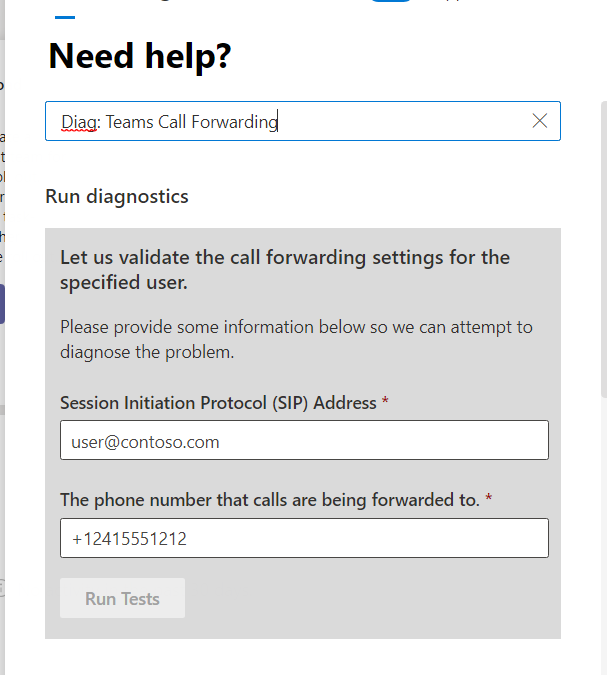
As always you can call the diagnostic directly in your M365 Admin Portal by typing in Diag: Teams Call Forwarding in the Support experience (Need Help, or Support – New service request) as in the following example:
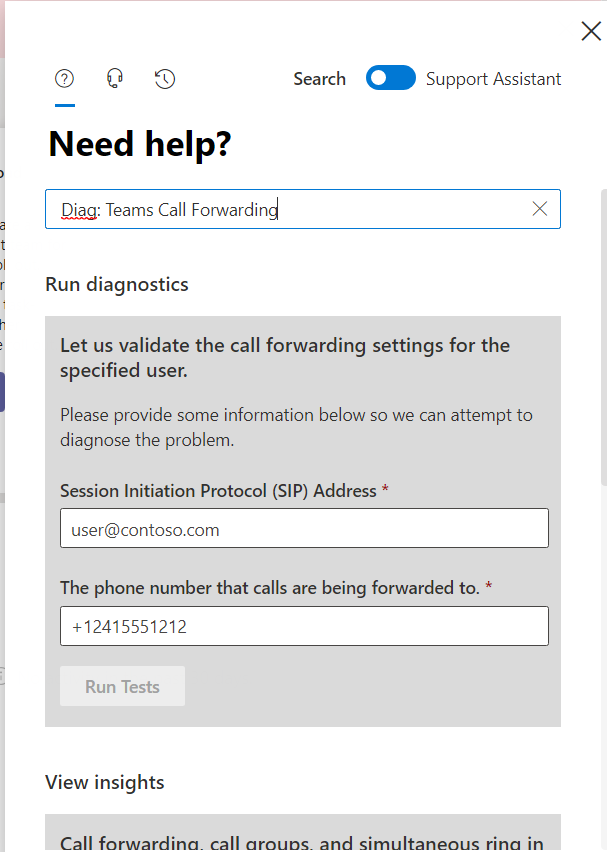
Here’s an example from my test tenant where I do not have the user configured for calling:
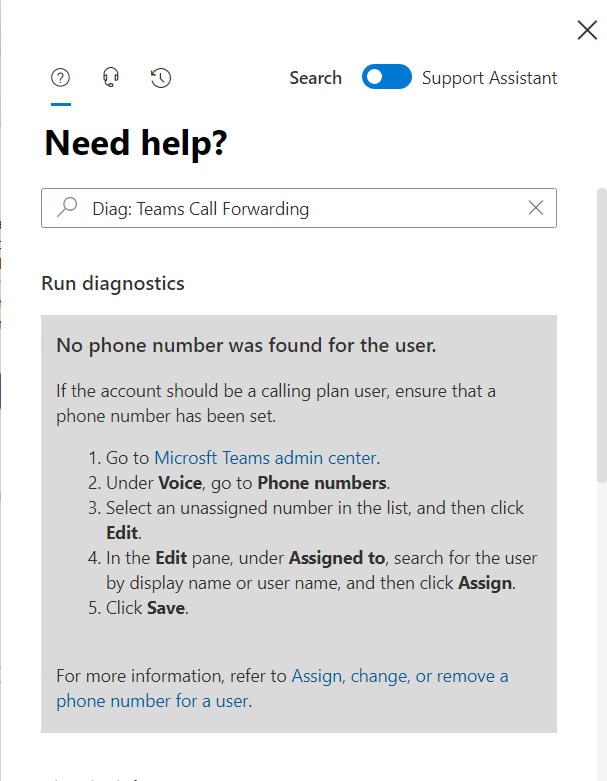
The diagnostic checks the most common causes for Call Forwarding issues that we know of, so if you or one of your users is having an issue getting call forwarding to work, including SimRing – give this Diagnostic a try.
As always, we’re constantly working on new diagnostics and expanding our existing ones; for a full list, click here.
Questions? Comments? Please post below and we’ll happily follow up!
Thanks!
Microsoft Teams Support
by Contributed | Feb 5, 2021 | Technology
This article is contributed. See the original author and article here.
In Teams support, we often receive questions from customers seeking help when working with Guests – especially from new tenants. You can guess how excited we are to see Guest Access be enabled by default in Teams for new tenants starting on February 8, 2021. This default behavior follows the rest of the Office 365 suite where Guest Access is already enabled, so this should empower new tenants to collaborate with greater ease, while also still supporting the same deep controls to adjust guest settings to fit individual organizations’ needs.
With this being a support focused blog, let’s talk about some things that customers may have questions about related to Guest Access being enabled by default.
The biggest question is – what is going to happen?
- Until February 2021, guest access is still turned off by default. You must turn on guest access for Teams before admins or team owners can add guests. After you turn on guest access, it might take a few hours for the changes to take effect. If users see the message Contact your administrator when they try to add a guest to their team, it’s likely that either guest access hasn’t been turned on or the settings aren’t effective yet.
- After February 2021, guest access in Microsoft Teams will be turned on by default for new customers & existing customers who haven’t configured this setting. When this change is implemented, if you’ve not already configured guest access capability in Microsoft Teams, that capability will be enabled in your tenant. If you want guest access to remain disabled for your organization, you’ll need to confirm that the guest access setting is set to Off instead of Service default.
If you are signed into your M365 Tenant Admin Portal as an Admin you can also review the information in Message Center Post 234252.
Additional Frequently Asked Questions
Q: When will these changes impact my tenant?
A: The changes will start to roll out beginning February 8, 2021 and should complete within about a week.
Q: My tenant has Guest access enabled, but I don’t want that. How can I turn off Guest Access in Teams?
A: Follow these steps:
1. Sign in to the Microsoft Teams admin center.
2. Select Org-wide settings > Guest access.
3. Set Allow guest access in Microsoft Teams to Off.
Q: I already have Teams and Guest Access is enabled, will anything change?
A: No, you will continue to have Guest Access and no action is needed.
Q: I’m still having trouble with Guest Access, what should I do?
A: Admins can run the Teams Guest Access support diagnostic (shortcut cmd Diag: Teams Guest Access). Learn more at Self-help diagnostics for Teams administrators – Microsoft Teams | Microsoft Docs
More Information
Read more about the Guest access change at Simplify an inclusive meeting experience by enabling Guest access as the default – Microsoft Tech Community and Turn on or turn off guest access to Microsoft Teams – Microsoft Teams | Microsoft Docs
Learn more about Guest access settings in Teams in Guest access in Microsoft Teams – Microsoft Teams | Microsoft Docs and Collaborate with guests in a team | Microsoft Docs
by Scott Muniz | Feb 5, 2021 | Security
This article was originally posted by the FTC. See the original article here.
Some of you are celebrating your second COVID-19 vaccination with the giddy enthusiasm that’s usually reserved for weddings, new babies, and other life events. You’re posting a photo of your vaccination card on social media. Please — don’t do that! You could be inviting identity theft.
Your vaccination card has information on it including your full name, date of birth, where you got your vaccine, and the dates you got it. When you post it to Facebook, Instagram, or to some  other social media platform, you may be handing valuable information over to someone who could use it for identity theft.
Think of it this way — identity theft works like a puzzle, made up of pieces of personal information. You don’t want to give identity thieves the pieces they need to finish the picture. One of those pieces is your date of birth. For example, just by knowing your date and place of birth, scammers sometimes can guess most of the digits of your Social Security number. Once identity thieves have the pieces they need, they can use the information to open new accounts in your name, claim your tax refund for themselves, and engage in other identity theft.
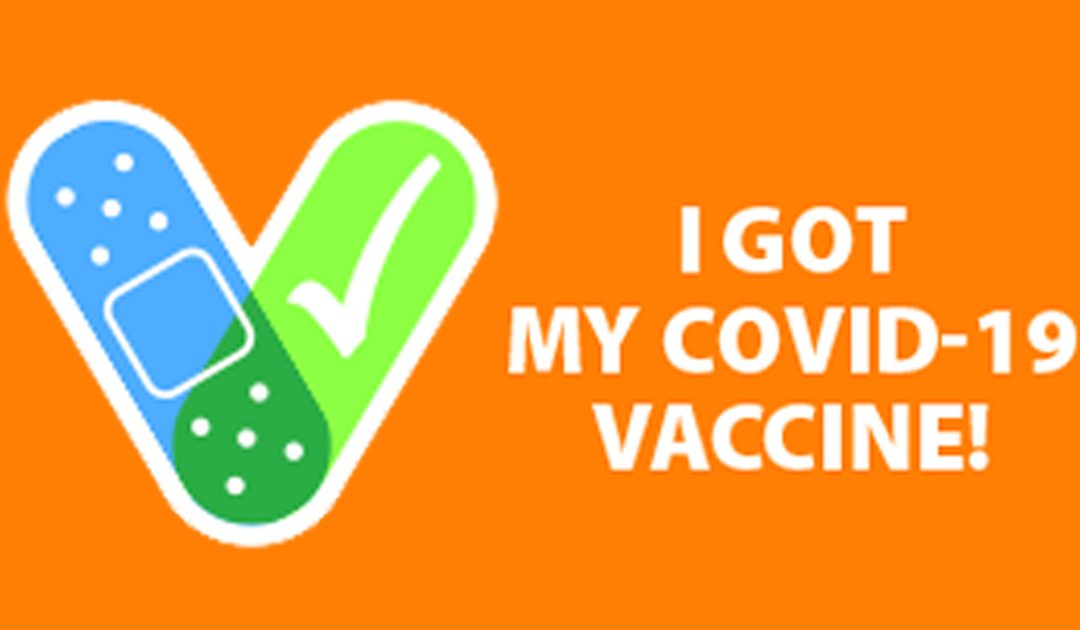
Want to share the news about your vaccination? How about a photo of a nifty adhesive bandage on the injection site? (You can show off your tattoos and deltoids at the same time.) Or, post a photo of your white or orange vaccine sticker. The stickers are really cool.
As for your social media networks, be sure that you’re not oversharing information that can serve as a key to your PIN number or answer a security question. And, while you’re checking, check your privacy settings too. If you want to limit access to a small group of family and friends, make sure the settings are configured to avoid sharing information with strangers.
Visit How to Keep Your Personal Information Secure for more tips about protecting your information against identity thieves.
Brought to you by Dr. Ware, Microsoft Office 365 Silver Partner, Charleston SC.
by Contributed | Feb 5, 2021 | Technology
This article is contributed. See the original author and article here.
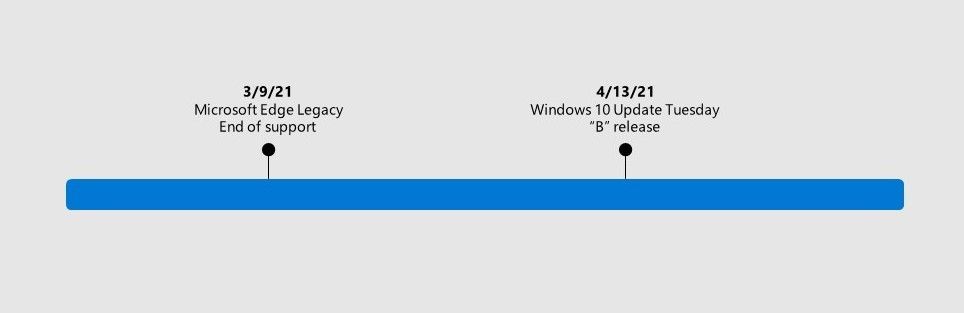
In August 2020, we announced that support for the Microsoft Edge Legacy desktop application  ends on March 9, 2021. After this date, Microsoft Edge Legacy will no longer receive security updates.
To replace this out of support application, we are announcing that the new Microsoft Edge  will be available as part of the Windows 10 cumulative monthly security update—otherwise referred to as the Update Tuesday (or “B”) release—on April 13, 2021. When you apply this update to your devices, the out of support Microsoft Edge Legacy desktop application will be removed and the new Microsoft Edge will be installed. The new Microsoft Edge offers built-in security and our best interoperability with the Microsoft security ecosystem, all while being more secure than Chrome for businesses on Windows 10.
Note: This replacement will also occur if you apply the optional Windows 10 March Preview (or “C”) release.
What Windows 10 versions will be impacted?
This will be a part of the Windows 10 Update Tuesday (or “B”) release on April 13, 2021 for the following Windows 10 versions (other versions will follow):
This will also be part of the optional Windows 10 March Preview (or “C”) release for the versions below unless otherwise indicated.
- Windows 10, version 1803, all editions (April 2018)
- Note: This version will not be included in the optional Windows 10 March Preview release.
- Windows 10, version 1809, all editions (October 2018)
- Windows 10, version 1903, all editions (May 2019)
- Note: This version is out of support for desktop
- Windows 10, version 1909, all editions (October 2019)
- Windows 10, version 2004, all editions (May 2020)
- Windows 10, version 20H2, all editions (October 2020)
- Because Windows 10, 20H2 already uses the new Microsoft Edge as its default browser, it will not be reinstalled; only Microsoft Edge Legacy will be removed.
Will this impact Windows 7 or Windows 8.X?
No, Microsoft Edge Legacy was not available for Windows 7 or Windows 8.X. This will only impact the Windows 10 versions listed previously.
What if the new Microsoft Edge is already installed?
If the new Microsoft Edge is already installed, applying this update will not reinstall the new Microsoft Edge and will only remove Microsoft Edge Legacy.
Can I still run Microsoft Edge Legacy and the new Microsoft Edge as a side-by-side experience after this update?
Because Microsoft Edge Legacy will no longer be on devices after you apply this update, the side-by-side experience will no longer be available.
Can I skip this update?
We do not recommend skipping this update. Windows cumulative monthly security updates provide critical updates to the Windows 10 operating system.
What will the end user experience be like?
Your Windows 10 defaults and personalization, such as your default browser or taskbar pins, will be respected (e.g. if you had Microsoft Edge Legacy pinned to the taskbar, this would be replaced with the new Microsoft Edge).
I use kiosk mode in Microsoft Edge Legacy—how will this affect me?
You will need to set up kiosk mode in the new Microsoft Edge. Please see this blog for details and recommendations for kiosk mode.
Will this affect other apps that use EdgeHTML?
EdgeHTML—the rendering engine for Microsoft Edge Legacy—will continue to be supported. To develop apps for the new Microsoft Edge, use WebView2, the Chromium-based version of Microsoft’s WebView.
If I use a private WSUS server for updates, how can I keep the new Microsoft Edge up to date?
After the update is installed, the new Microsoft Edge will check for and install updates automatically via its own updater. This requires an internet connection. If you manage devices that connect to a private WSUS server, you can use the updates for the new Microsoft Edge in the WSUS catalog to keep these devices up to date. See our guide for managing Microsoft Edge with Configuration Manager for more information.
What do I need to do?
We recommend that you update to the new Microsoft Edge prior to support ending for Microsoft Edge Legacy on March 9, 2021. For guidance, please refer to this Docs page. If you use kiosk mode in Microsoft Edge Legacy, you will also need to set up kiosk mode in the new Microsoft Edge.
If you decide to wait, Microsoft Edge Legacy will be replaced with the new Microsoft Edge when you apply the Windows 10 Update Tuesday (or “B”) release.
Note: This replacement will also occur if you apply the optional Windows 10 March Preview (or “C”) release.
How can I prepare? What support options are available?
To prepare, we recommend that you first read this article about how to plan for deployment. This article is a great starting point to help you with key questions and will offer a path forward for major steps in the transition to the new Microsoft Edge. There is also a dedicated Docs page for this transition.
To get help, we offer a variety of support options. If you have Microsoft Unified Support, you can reach out to that support service for help with the transition. There’s also FastTrack which is available at no additional charge to customers with 150 or more paid seats of Windows 10 Enterprise. And if you prefer to get started on your own, we have self-guided deployment and configuration materials, complete with a series from Microsoft Mechanics, ready for you on our Docs site.
Finally, if you run into compatibility or app issues as you transition to the new Microsoft Edge, there’s App Assure. The App Assure promise is this: if your web apps and sites work on IE 11, supported versions of Google Chrome, or any version of Microsoft Edge (including Microsoft Edge Legacy), those web apps and sites should work on the new Microsoft Edge. If not, you can contact App Assure at no additional cost for remediation support or by email if you experience any challenges submitting your request (ACHELP@microsoft.com). You can also read more about App Assure and Microsoft Edge in this blog.
Where can I learn more about the Windows 10 release as it becomes available?
Find more information about April’s Windows 10 Update Tuesday release (or the Windows 10 March Preview release) on the Windows message center Docs site.
The new Microsoft Edge offers built-in security and works with the Microsoft security ecosystem to help customers realize a holistic approach to security. We are excited for everyone to see the benefits of the new Microsoft Edge and we are thankful for your valued partnership.
– Microsoft Edge Team
_____________________________________________________________________________________________________________
Continue the conversation by joining us in the Microsoft 365 Tech Community! Whether you have product questions or just want to stay informed with the latest updates on new releases, tools, and blogs, Microsoft 365 Tech Community is your go-to resource to stay connected!


Recent Comments