by Contributed | Feb 18, 2021 | Technology
This article is contributed. See the original author and article here.
A team of Cloud Advocates have created a series of videos answering questions they’ve received from customers and member of the IT community covering off topics from Containers to Zero Trust Architectures.
Donovan Brown, Dean Byren, Jay Gordon, Sarah Lean, Steven Murawski, Thomas Maurer, Zachary Deptawa spent some time gathering and collating questions from their interactions with customers and the community and answered them for everyone’s benefit.
What I love about this video series is that the answers are in bitesize chunks, they get right to the heart of the answer. They are like quick how-to guides, or tutorials. No mess, no fuss.
There are over 40 videos within the video playlist on our YouTube channel.
https://youtube.com/watch?v=videoseries&list=PLjt5SKzX1iI_uqRk5ADrooAPG5FWqHes8
As mentioned the videos cover off a variety of topics. Be sure to check it out and see if any of the questions could help you and your organisation with your cloud journey. And if you have a burning question you’d love answered please do reach out to us and we can try and help!
by Contributed | Feb 18, 2021 | Technology
This article is contributed. See the original author and article here.
We are pleased to announce the availability of Flexible Deployment for Project for the web. As a part of the Microsoft Dataverse (formerly known as Common Data Service (CDS)) platform, Flexible Deployment enables you to create different environments based on organizational, business unit, or teams needs.
In addition to the existing Default environment, you now have more choices to spin up different kinds of Dataverse environments for the Project for the web: Production and Sandbox. With Production, your organization can create specific environments such as limiting access to data for the HR department, deploying different customizations for different sets of users, or staying compliant on data residency requirements if your users and tenant are not located in the same country. The Sandbox environment allows for Application Lifecycle Management to develop and test customized solutions for Project before rolling out to production.
You can use Flexible Deployment with Project Plan 1, Project Plan 3, and Project Plan 5. Each subscription comes with a certain amount of storage.
The choice of deployment gives you the flexibility and extensibility to stay on top of business needs while reducing complexity for your IT group. Please refer to the links below to find out more.
- Learn how to get started in Deploying Project.
- Help end users learn how to get started with the Project Power App.
- Learn about the new Project for the Web Security Roles.
- If you have additional questions, check out Frequently Asked Questions.
by Contributed | Feb 17, 2021 | Technology
This article is contributed. See the original author and article here.
Registration for Microsoft Ignite in March is open, but one event can’t contain all the activities we have organized to help you build your Microsoft Endpoint Manager skills and engage directly with the engineers creating the latest capabilities! In this post, you’ll find details on all these activities, links to save the date, and an opportunity to guide the topics of our upcoming Ask Our Experts sessions. Let’s jump in!
Endpoint Management Acceleration Day: March 9, 2021
You don’t want to miss this technical readiness event that will provide you with the information you need to accelerate your deployment and utilization of the latest endpoint management capabilities in this new world of remote and on-premises work using Microsoft Endpoint Manager.
Endpoint Management Acceleration Day will offer eight (yes, eight!) hours of technical training delivered across three time zones direct from our technical program managers. There will be two core tracks: mobile device management and Windows device management. Attend the four topics in any region and in any order, whatever suits your location and personal schedule best. Spend time with our Microsoft Endpoint Manager product group to learn and have your endpoint management questions answered.
Mobile device management
Hour 1
|
How to operate Microsoft Intune in the real world
|
Hour 2
|
How to secure your users with Microsoft Defender for Endpoint Mobile Threat Defense on iOS and Android
|
Hour 3
|
Deploying shared and frontline worker devices with Microsoft Endpoint Manager
|
Hour 4
|
Automate common Microsoft Endpoint Manager activities – a primer (Microsoft Graph, PowerShell and Power Platform)
|
Select the time that works best for you to save the date:
- Option 1 – 10:00 AEST | 00:00 UTC | 16:00 PT
- Option 2 – 18:30 AEST | 08:30 UTC | 00:30 PT
- Option 3 – 03:30 AEST | 17:30 UTC | 09:30 PT
Windows device management
Hour 1
|
Cloud attach your organization
|
Hour 2
|
Policy management on a cloudy day
|
Hour 3
|
Leveraging the cloud to update and secure your devices with Microsoft Endpoint Manager
|
Hour 4
|
Where are my logs? Troubleshooting a Windows MDM device
|
Select the time that works best for you to save the date:
- Option 1 – 14:30 AEST | 04:30 UTC | 20:30 PT
- Option 2 – 23:00 AEST | 13:00 UTC | 05:00 PT
- Option 3 – 08:00 AEST | 22:00 UTC | 14:00 PT
Microsoft Endpoint Manager 1:1 consultations: March 15-19, 2021
Want a one-on-one discussion with an expert? Our Microsoft Endpoint Manager product managers and engineers will be covering shifts around the clock around the world—just to talk with you! Bookmark this post for details about signups. Space is limited, so it will be first come, first served. Even better, join our Microsoft Endpoint Management Insiders community to get first choice of available times—just one of the perks of being a MEM Insider!
- Android device management
- iOS/iPad device management
- Intune App Protection for Mobile Apps
- Windows device management
- Endpoint Analytics
- Endpoint Security
- Windows Autopilot
- Endpoint Manager Configuration Manager
- Managing devices in education
- Intune support case & troubleshooting follow-up (Stuck on troubleshooting or have a tricky support case? Bring your details to our experts and see if they can unstick you!)
Microsoft Endpoint Manager Ask Our Experts
You can also join us for an Ask Our Experts series on Tech Community. We’re still working on dates and topics so answer our survey and tell us what you think! How many Ask Our Experts events do you want? Should we focus on a few key topics, or give you everything we can pack into three weeks? We’ll post dates (including calendar invitations) and topics in March, but here’s what you need to know about this opportunity:
- March 10, 2021 | 8:00 a.m. PT – We’re kicking off Ask Our Experts with the Configuration Manager team, led by David James, Jason Githens, and the program managers and engineers you know and love.
- March 10-25, 2021 – This year we are combining Ask Our Experts with our text-based Ask Me Anything (AMA) events on Tech Community, giving you a chance to post questions up to 24-hours in advance, and then engage with our experts in a Teams Live Event, both on camera and in text chat. Ask them ANYTHING about their subject areas! We’ll also post wrap-ups and recordings of the Teams Live Events on Tech Community in case you can’t be there live.
Stay tuned!
Microsoft Ignite is an exciting, but brief, moment! I’ll be posting a guide to all our Microsoft Endpoint Manager activities soon, but I invite you to join us for any and all of the activities I’ve outlined above. We also have some great resources on Microsoft Learn to help you keep developing your #MEMPowered skills and manage your devices more efficiently and effectively than ever.
by Contributed | Feb 17, 2021 | Technology
This article is contributed. See the original author and article here.
The first refresh release for the Azure Service Fabric managed clusters preview is now available in all supported regions (centraluseuap, eastus2euap, eastasia, northeurope, westcentralus, and eastus2).
With this release, customers can now:
To utilize the new features in this refresh, the API version for Service Fabric managed clusters must be updated to “2021-01-01-preview”. For more information, see the release notes.
Try it out
Start out with our Quickstart or head over to the Service Fabric managed clusters documentation page to get started. You can find many resources including documentation, and cluster templates. You can view the feature roadmap and provide feedback on the Service Fabric GitHub repo.
by Contributed | Feb 17, 2021 | Technology
This article is contributed. See the original author and article here.
One of the biggest challenges organizations face in ensuring compliant and governed data usage is knowing where and what types of sensitive data exists in their environment. Data continues to grow at exponential rates as does the demand for data-driven business insights. Concurrently, the rising slate of industry regulations and security threats makes this understanding a critical requirement for businesses to survive and thrive in these unprecedented times!
Sensitive information could live in a PDF or a Word document file, within SharePoint or OneDrive; or in operational and analytical data stores. Until the advent of Azure Purview, sensitivity labels in Microsoft Information Protection was a reliable way to tag and protect your organization’s productivity data, such as emails and files, while making sure that user productivity and their ability to collaborate isn’t hindered.
With Azure Purview, you can now extend the reach of Microsoft 365 sensitivity labels to operational and analytical data! Label Power BI workspaces and database columns with the same ease as labelling a word doc, thanks to Azure Purview!
Interested in getting started? Read on!
Page 1: Define labels in Microsoft Information Protection.
1. If your organization is a Microsoft 365 E5 customer, you already have the right licenses in place. Also likely that your compliance team already has a set of sensitivity labels defined that you can find in the Microsoft 365 Compliance Center.
2. In Microsoft 365 there are 5 system defined Sensitivity Labels as Personal, Public, General, Confidential, Highly Confidential:

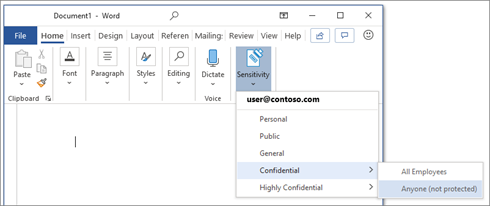
3. Once labels are published through a policy for all or certain users, they can assign them to the files and emails.
You can also edit or remove existing labels or create your own custom labels such as Highly ConfidentialContoso FTE and Highly ConfidentialSensitive and Secret in the example below.
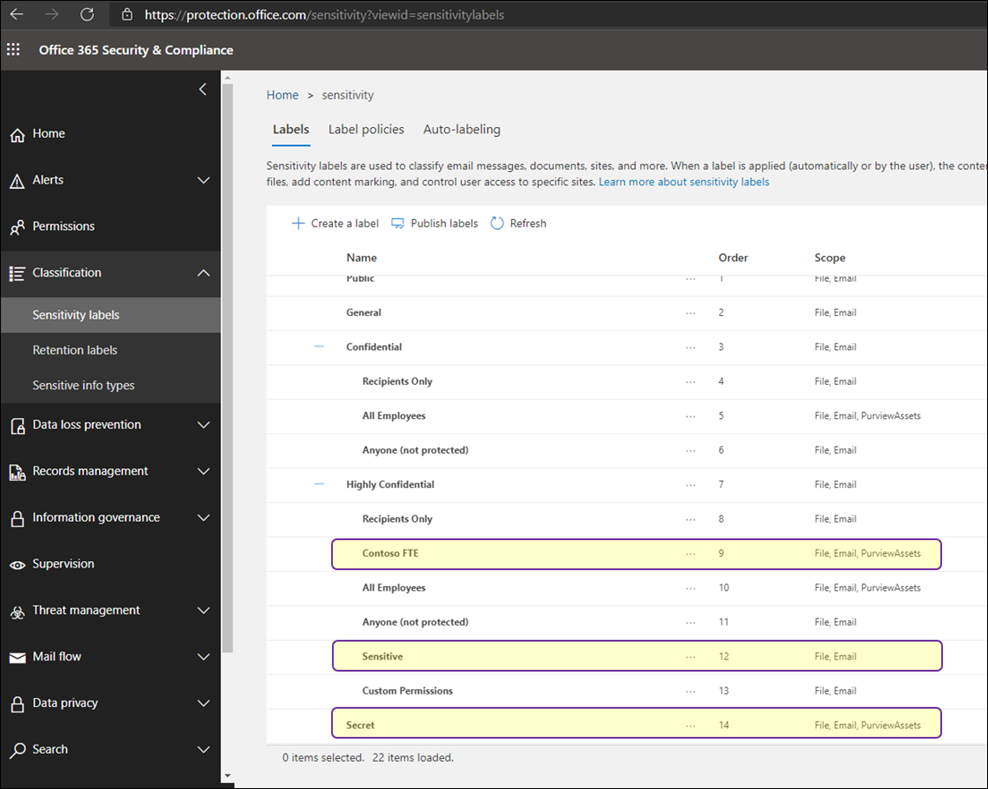
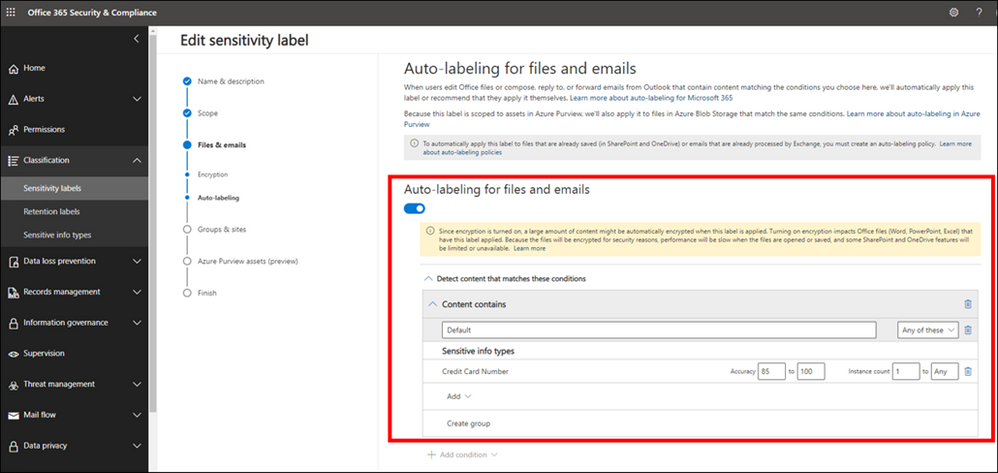
While you can give the option to users to assign published labels to their files themselves, you can also configure auto-labeling rules to assign a label to a file based on certain conditions. For example, make the file labeled as Sensitive if they contain Credit Card Number. You can also define priority for your labels, the most generic labels on the top of the list and more restrictive labels on the bottom.
Page 2: Extend M365 Sensitivity Labels in Azure Purview
1. Prerequisites
- An Azure Active Directory tenant
- A Microsoft M365 E5 active license
- An Azure Purview Account in your Azure Subscription
2. To start using your M365 Sensitivity Labels in Azure Purview, you need to follow few steps.
- In Azure Portal: Make sure you have an Azure Purview account or create a new Azure Purview Account in your Azure Subscription.
- In Azure Purview Studio: Register your data sources. Common supported data sources in Azure Purview that also support automatic labeling are:
- On-premises SQL Servers
- Azure SQL Database
- Azure Storage
- Azure Data Lake Storage Gen 1 and Gen 2
To apply Labels to OneDrive and SharePoint you still need to use Microsoft 365 Sensitivity Labels directly.
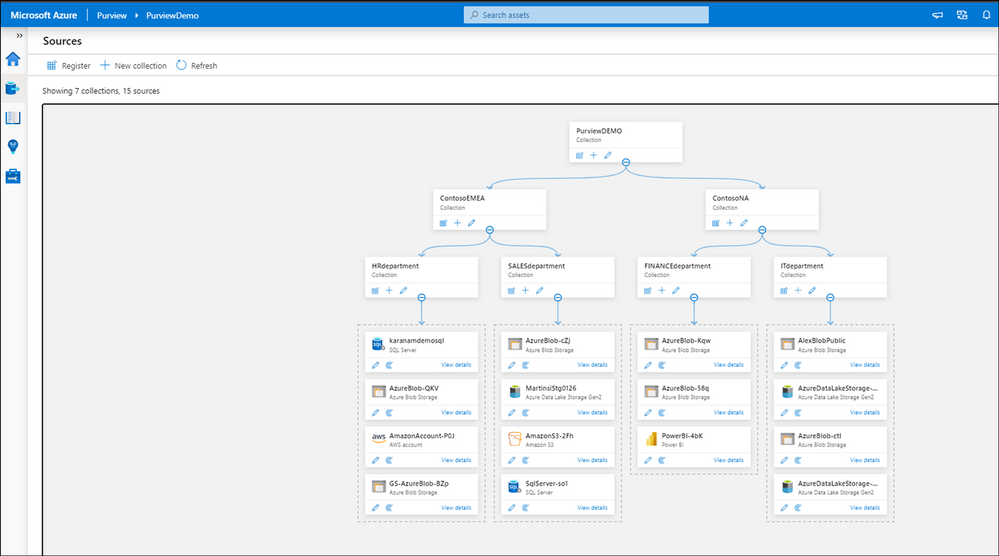
3. After registering your data sources you should be able to see existing sources and update your data catalog through Azure Purview Studio.
4. In Microsoft 365 Security and Compliance Center consent extending labels to Azure Purview. This is a one-time action and needed before any labels can be used in Purview:
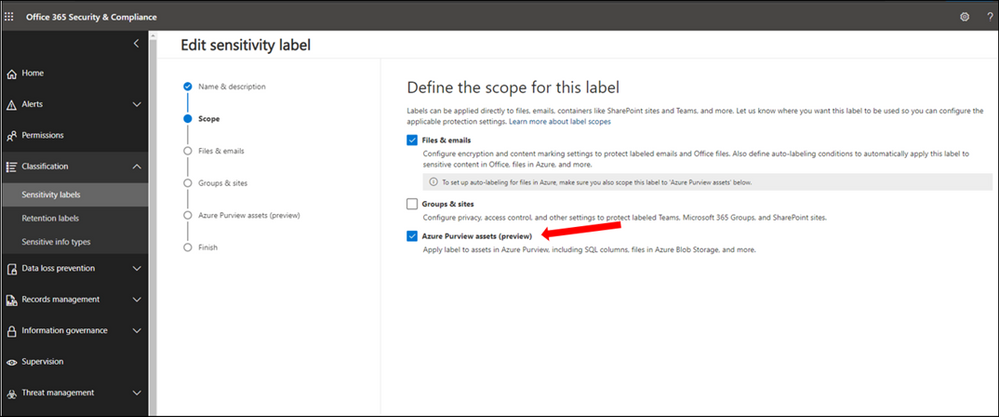
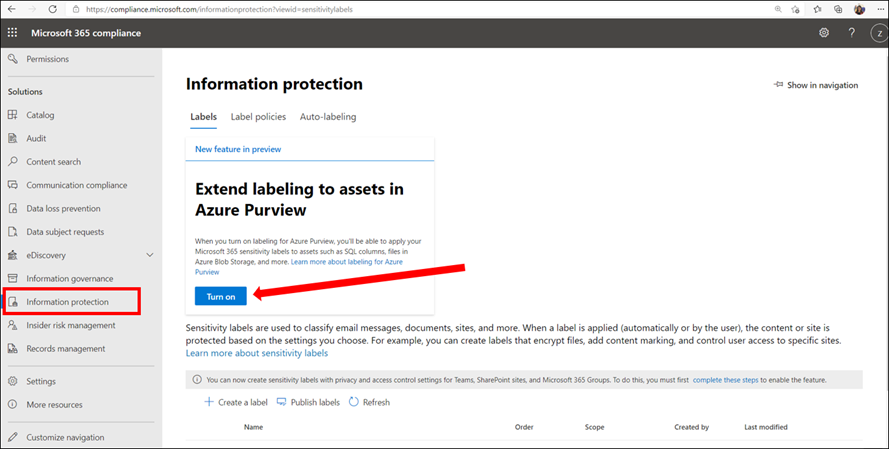 5. In Microsoft 365 Security and Compliance Center create and publish at least one sensitivity label. If you have any existing labels, you can edit these labels to extend them to Azure Purview. Select Azure Purview Assets.
6. Configure Auto-labeling Rules
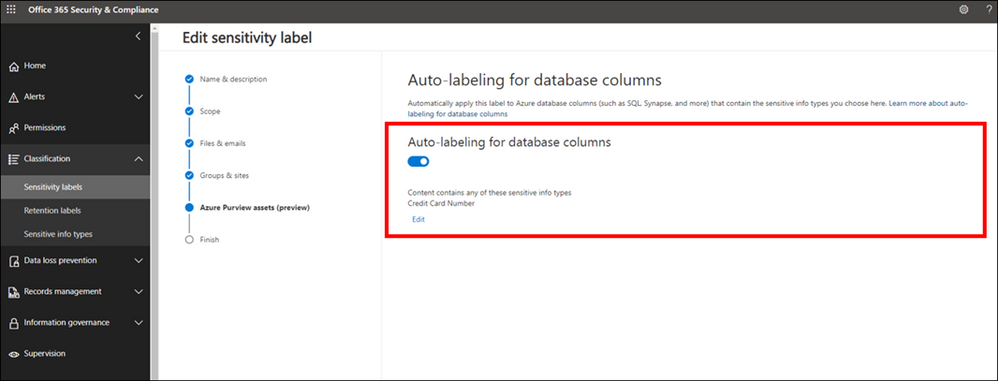
7. Turn on Auto-labeling for database columns
8. In Azure Purview Studio, Start a new scan of your assets in Azure Purview. The new scan is needed so Azure Purview can detect and automatically assign the labels to the metadata if they meet the extended any Sensitivity Labels conditions. You can launch a manual scan or schedule a regular scan of your data sources. It is highly recommended to schedule regular automatic scans, so any changes in data state is detected by Azure Purview and reduce manual overhead for your data curators.
9. Search the Azure Purview Data Catalog or use Sensitivity Labels Insights to view data assets and their assigned sensitivity labels.
Page 3: Explore Sensitivity Labels in Azure Purview
We are now set up and ready to navigate data and their Sensitivity Labels in Azure Purview Studio. Azure Purview Data Map powers the Purview Data Catalog and Purview data insights as unified experiences within the Purview Studio.
Option 1: Search the Azure Purview Data Catalog
Once you register your data sources and the scan is completed, you can use Search Data Catalog from Azure Purview Studio to lookup for data assets using any terms or keywords. Let’s take a look and search for data. As you type the characters, the data map provides recent searches and a list of matching search terms as Search Suggestions.
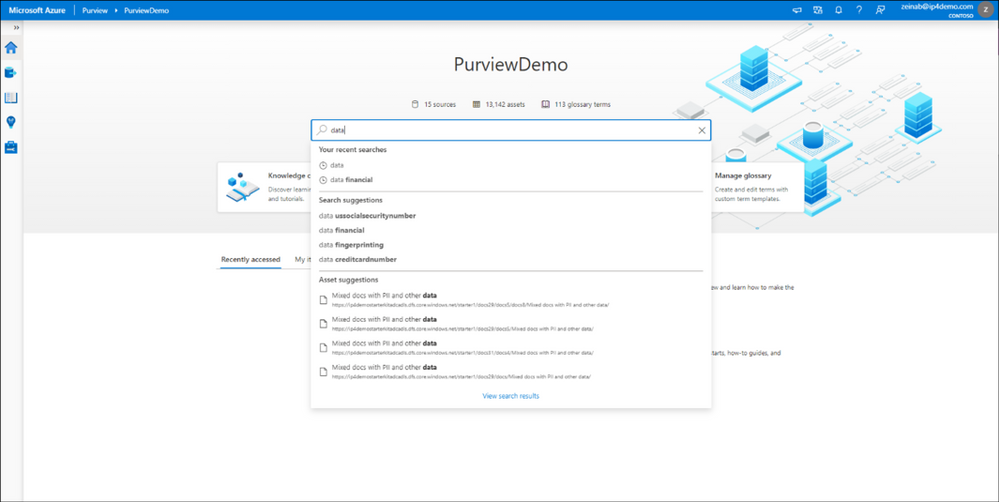
Awesome! There are over 12,000 results and it took just few seconds to get the results. To narrow down the search, you can apply one or multiple filters using any of these categories:
- Asset Type
- Classification
- Label
- Contact
- Glossary term
For subject matter experts, data stewards and officers, the Purview Data Catalog provides data curation features like ability to search and browse assets by any business or technical terms in the organization and gain visibility across data assets in your organization quickly!
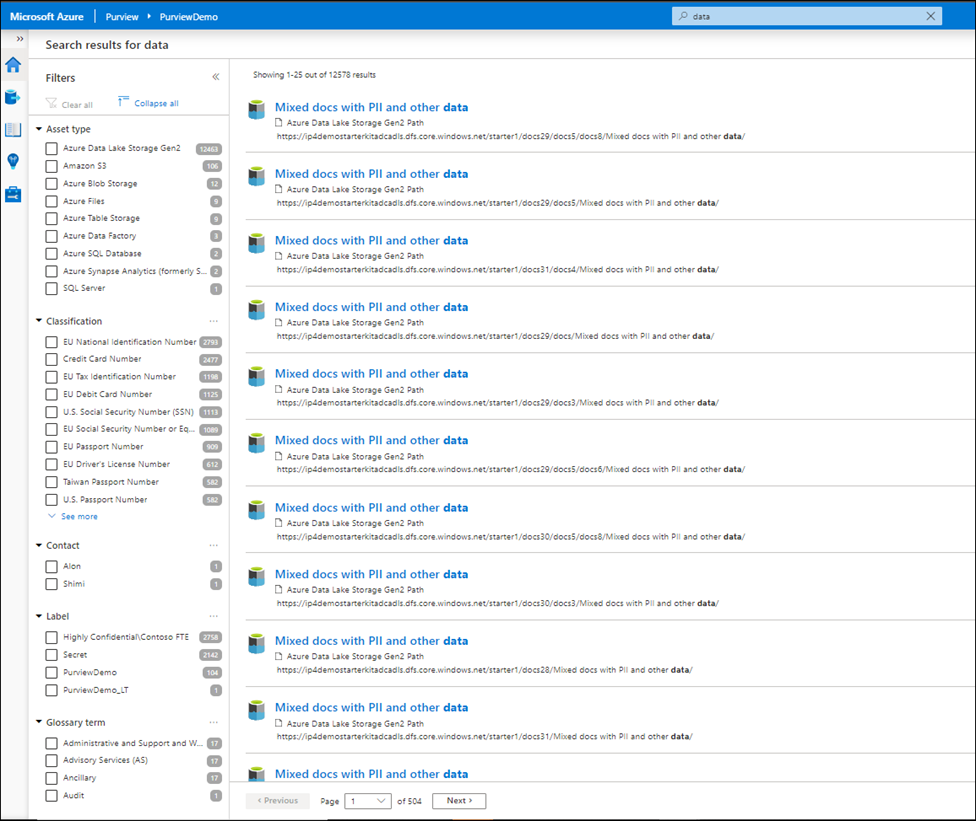
Narrowing down the filter you can select any listed label and the search result automatically gets updated accordingly.
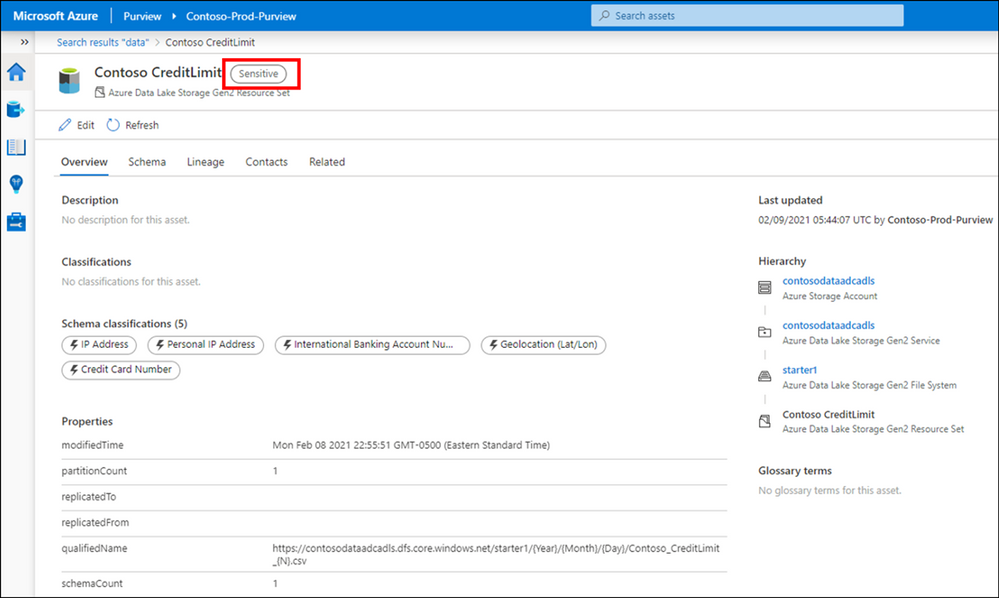
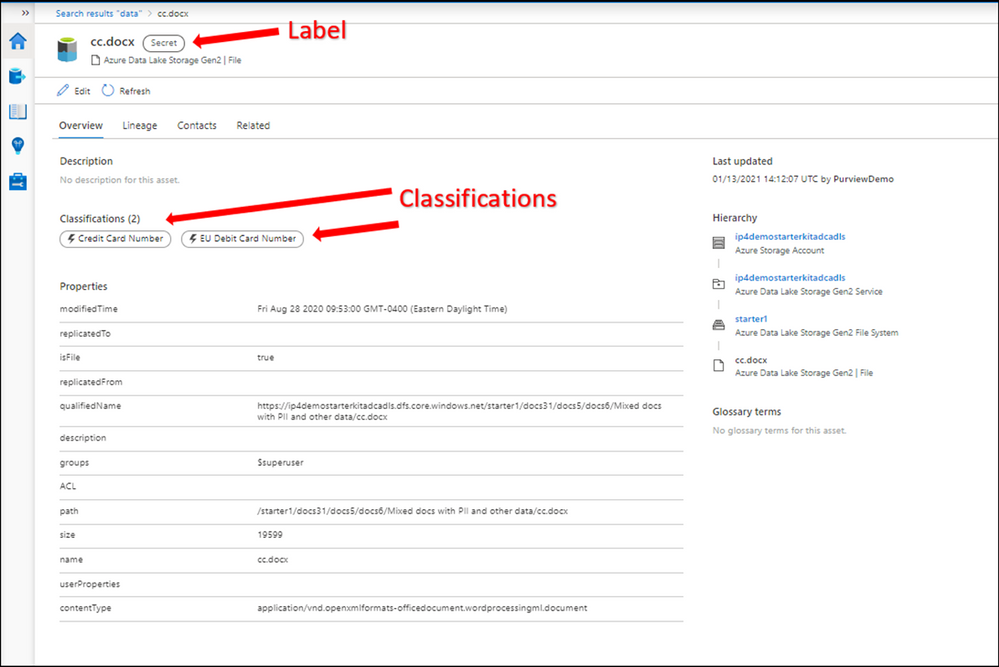
Let’s select a label such as Secret and then select one of the assets from the results to navigate into its metadata. The data is automatically labeled as Secret and the reason is because it contains a piece of information that matches with the M365 labeling rule. In this case Credit Card Number. You can use Edit button to modify the Classifications, Glossary terms and Contact, however you cannot modify labels as they are assigned automatically based on the condition. Please note that Labels for files are only applicable in the catalog and not in the original location at this point!
Option 2: Use Sensitivity Labels Insights
If you are looking for a bird’s eye view of your data estate, you can use Azure Purview Insights. Data and security officers can get an overview and telemetry around data sources and sensitivity labels across data estate and get an answer for these questions:
- How many unique labels are found?
- How many sources, files and tables are labeled?
- What are the top sources with labeled data?
- What data types labels are applied to?
- What are the common labels used across data?
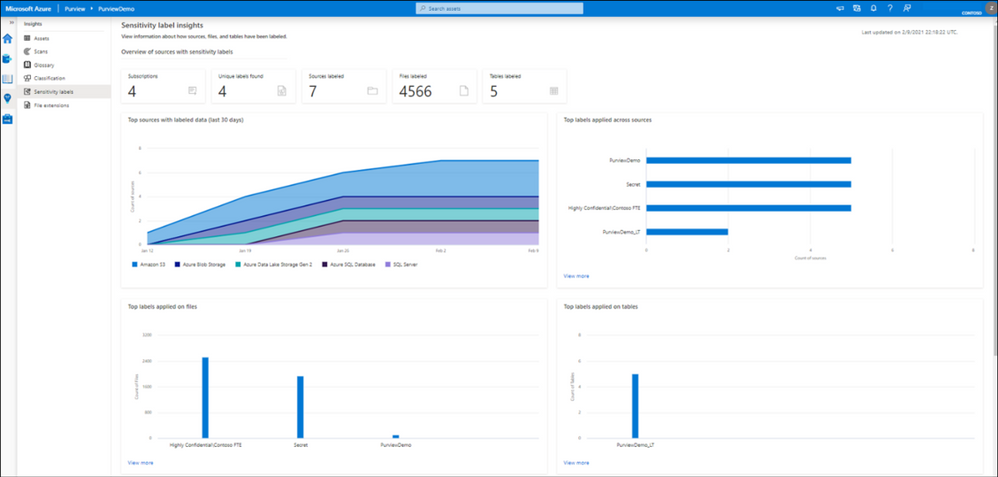
You can also view quickly what the trend related to label assignments is over the last 24 hours, 7 or 30 days on your files and tables.
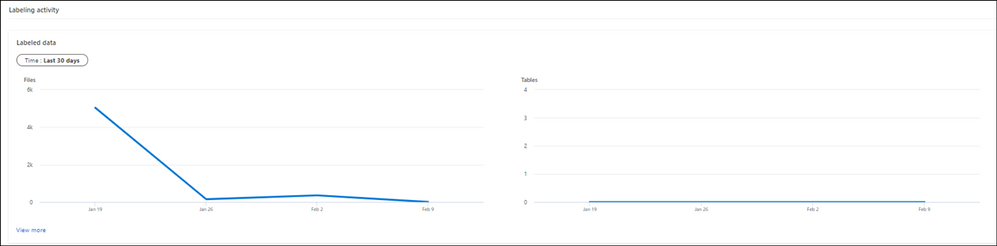
To obtain more detailed information, you can click on view more on any of the titles.

Supported data types for Sensitivity Labels in Azure Purview
We currently support Automatic Labeling in Azure Purview for the following data types:
Data type
|
Sources
|
Automatic labeling for files
|
– Azure Blob Storage
– Azure Data Lake Storage Gen 1 and Gen 2
|
Automatic labeling for database columns
|
– SQL server
– Azure SQL database
– Azure SQL Database Managed Instance
– Azure Synapse
– Azure Cosmos DB
|
You can review the list later as we will add support for more data types in near future.
Summary and Call to Action
Through close integration with Microsoft Information Protection offered in Microsoft 365 Azure Purview enables direct ways to extend visibility into your data estate, and classify and label your data.
We would love you hear your feedback and know how Azure Purview helped tracking your sensitive data estate using automatic labeling.
- Create an Azure Purview account now and extend your M365 Sensitivity Labels across your files and database columns in Azure Purview.
- Use Sensitivity Labels Insights to get a bird’s eye view of your data estate by the sensitivity labels.
- Learn more about Azure Purview Autolabeling and Sensitivity Label Insights.
- Provide your feedback.
by Contributed | Feb 17, 2021 | Technology
This article is contributed. See the original author and article here.
The Azure Service Fabric 7.2 sixth refresh release includes stability fixes for standalone, and Azure environments and has started rolling out to the various Azure regions. The updates for .NET SDK, Java SDK and Service Fabric Runtime will be available through Web Platform Installer, NuGet packages and Maven repositories in 7-10 days within all regions.
- Service Fabric Runtime
- Windows – 7.2.457.9590
- Ubuntu 16 – 7.2.456.1
- Ubuntu 18 – 7.2.456.1804
- Service Fabric for Windows Server Service Fabric Standalone Installer Package – 7.2.457.9590
- .NET SDK
- Windows .NET SDK – 4.2.457
- Microsoft.ServiceFabric – 7.2.457
- Reliable Services and Reliable Actors – 4.2.457
- ASP.NET Core Service Fabric integration – 4.2.457
- Java SDK – 1.0.6
Key Announcements
- This release introduces a fix to an issue identified in 7.2CU4 and 7.2CU5 in which deleted services were recreated and appear in an error state. With this fix the replica deleted state will now be correctly persisted on the node in all scenarios preventing services from entering an error state upon node restart. If you were impacted by this issue, you can reduce the value of the cluster configuration FailoverManager::DroppedReplicaKeepDuration to mitigate the issue, and update to CU6 to resolve the issue.
- Key Vault references for Service Fabric applications are now GA on Windows and Linux.
- .NET 5 apps for Windows on Service Fabric are now supported as a preview. Look out for the GA announcement of .NET 5 apps for Windows on Service Fabric.
- .NET 5 apps for Linux on Service Fabric will be added in the Service Fabric 8.0 release.
For more details, please read the release notes.
by Contributed | Feb 17, 2021 | Technology
This article is contributed. See the original author and article here.
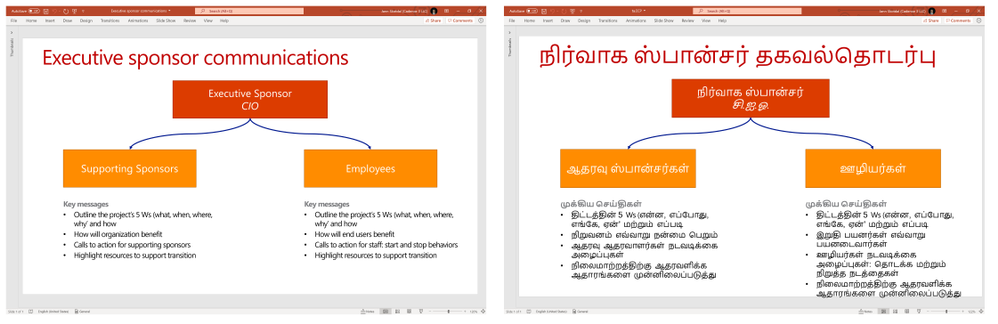
We are announcing Document Translation, a new feature in Azure Translator service which enables enterprises, translation agencies, and consumers who require volumes of complex documents to be translated into one or more languages preserving structure and format in the original document. Document Translation is an asynchronous batch feature offering translation of large documents eliminating limits on input text size. It supports documents with rich content in different file formats including Text, HTML, Word, Excel, PowerPoint, Outlook Message, PDF, etc. It reconstructs translated documents preserving layout and format as present in the source.
Standard translation offerings in the market accept only plain text, or HTML, and limits count of characters in a request. Users translating large documents must parse the documents to extract text, split them into smaller sections and translate them separately. If sentences are split in an unnatural breakpoint it can lose the context resulting in suboptimal translations. Upon receipt of the translation results, the customer has to merge the translated pieces into the translated document. This involves keeping track of which translated piece corresponds to the equivalent section in the original document.
The problem gets complicated when customers want to translate complex documents having rich content. They convert the original file in variety of formats to either .html or .txt file format and reconvert translated content from html or txt files into original document file format. The transformation may result in various issues. The problem gets compounded when customer needs to translate a) large quantity of documents, b) documents in variety of file formats, c) documents while preserving the original layout and format, d) documents into multiple target languages.
Document Translation is an asynchronous offering to which the user makes a request specifying location of source and target documents, and the list of target output languages. Document Translation returns a job identifier enabling the user to track the status of the translation. Asynchronously, Document Translation pulls each document from the source location, recognizes the document format, applies right parsing technique to extract textual content in the document, translates the textual content into target languages. It then reconstructs the translated document preserving layout and format as present in the source documents, and stores translated document in a specified location. Document Translation updates the status of translation at the document level. Document Translation makes it easy for the customer to translate volumes of large documents in a variety of document formats, into a list of target languages thus eliminating all the challenges customers face today and improving their productivity.
Document Translation enables users to customize translation of documents by providing custom glossaries, a custom translation model id built using customer translator, or both as part of the request. Such customization retains specific terminologies and provides domain specific translations in translated documents.
“Translation of documents with rich formatting is a tricky business. We need the translation to be fluent and matching the context, while maintaining high fidelity in the visual appearance of complex documents. Document Translation is designed to address those goals, relieving client applications from having to disassemble and reassemble the documents after translation, making it easy for developers to build workflows that process full documents with a few simple steps.”, said Chris Wendt, Principal Program Manager.
To learn more about Translator and the Document Translation feature in the video below
References
Send your feedback to translator@microsoft.com
by Contributed | Feb 17, 2021 | Technology
This article is contributed. See the original author and article here.
This article explains how to manually configure database migration from SQL Server 2008-2019 to SQL Managed Instance using Log Replay Service (LRS). This is a cloud service enabled for managed instance based on the SQL Server log shipping technology in no recovery mode. LRS should be used in cases when Azure Data Migration Service (DMS) cannot be used, when more control is needed or when there exists little tolerance for downtime.
When to use Log Replay Service
In cases that Azure DMS cannot be used for migration, LRS cloud service can be used directly with PowerShell, CLI cmdlets, or API, to manually build and orchestrate database migrations to SQL managed instance.
- You might want to consider using LRS cloud service in some of the following cases:
- More control is needed for your database migration project
- There exists a little tolerance for downtime on migration cutover
- DMS executable cannot be installed in your environment
- DMS executable does not have file access to database backups
- No access to host OS is available, or no Administrator privileges
Note: Recommended automated way to migrate databases from SQL Server to SQL Managed Instance is using Azure DMS. This service is using the same LRS cloud service at the back end with log shipping in no-recovery mode. You should consider manually using LRS to orchestrate migrations in cases when Azure DMS does not fully support your scenarios. |
How does it work
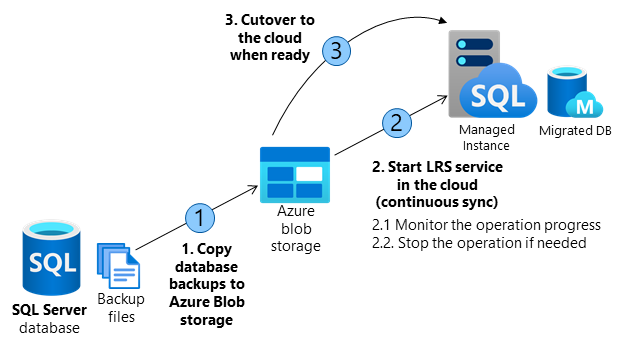
Building a custom solution using LRS to migrate a database to the cloud requires several orchestration steps shown in the diagram and outlined in the table below.
The migration entails making full database backups on SQL Server and copying backup files to Azure Blob storage. LRS is used to restore backup files from Azure Blob storage to SQL managed instance. Azure Blob storage is used as an intermediary storage between SQL Server and SQL Managed Instance.
LRS will monitor Azure Blob storage for any new differential, or log backups added after the full backup has been restored, and will automatically restore any new files added. The progress of backup files being restored on SQL managed instance can be monitored using the service, and the process can also be aborted if necessary. Databases being restored during the migration process will be in a restoring mode and cannot be used to read or write until the process has been completed.
LRS can be started in autocomplete, or continuous mode. When started in autocomplete mode, the migration will complete automatically when the last backup file specified has been restored. When started in continuous mode, the service will continuously restore any new backup files added, and the migration will complete on the manual cutover only. The final cutover step will make databases available for read and write use on SQL Managed Instance.
Operation |
Details |
1. Copy database backups from SQL Server to Azure Blob storage. |
– Copy full, differential, and log backups from SQL Server to Azure Blob storage using Azcopy or Azure Storage Explorer.
– In migrating several databases, a separate folder is required for each database. |
2. Start the LRS service in the cloud. |
– Service can be started with a choice of cmdlets:
PowerShell start-azsqlinstancedatabaselogreplay
CLI az_sql_midb_log_replay_start cmdlets.
– Once started, the service will take backups from the Azure Blob storage and start restoring them on SQL Managed Instance.
– Once all initially uploaded backups are restored, the service will watch for any new files uploaded to the folder and will continuously apply logs based on the LSN chain, until the service is stopped.
|
2.1. Monitor the operation progress. |
– Progress of the restore operation can be monitored with a choice of or cmdlets:
PowerShell get-azsqlinstancedatabaselogreplay
CLI az_sql_midb_log_replay_show cmdlets. |
2.2. Stopabort the operation if needed. |
– In case that migration process needs to be aborted, the operation can be stopped with a choice of cmdlets:
PowerShell stop-azsqlinstancedatabaselogreplay
CLI az_sql_midb_log_replay_stop cmdlets.
– This will result in deletion of the being database restored on SQL Managed Instance.
– Once stopped, LRS cannot be continued for a database. Migration process needs to be restarted from scratch.
|
3. Cutover to the cloud when ready. |
– Once all backups have been restored to SQL Managed Instance, complete the cutover by initiating LRS complete operation with a choice of API call, or cmdlets:
PowerShell complete-azsqlinstancedatabaselogreplay
CLI az_sql_midb_log_replay_complete cmdlets.
– This will cause LRS service to be stopped and database on Managed Instance will be recovered.
– Repoint the application connection string from SQL Server to SQL Managed Instance.
– On operation completion database is available for R/W operations in the cloud.
|
Requirements for getting started
SQL Server side
- SQL Server 2008-2019
- Full backup of databases (one or multiple files)
- Differential backup (one or multiple files)
- Log backup (not split for transaction log file)
- CHECKSUM must be enabled as mandatory
Azure side
- PowerShell Az.SQL module version 2.16.0, or above (install, or use Azure Cloud Shell)
- CLI version 2.19.0, or above (install)
- Azure Blob Storage provisioned
- SAS security token with Read and List only permissions generated for the blob storage
Best practices
The following are highly recommended as best practices:
- Run Data Migration Assistant to validate your databases will have no issues being migrated to SQL Managed Instance.
- Split full and differential backups into multiple files, instead of a single file.
- Enable backup compression.
- Use Cloud Shell to execute scripts as it will always be updated to the latest cmdlets released.
- Plan to complete the migration within 47 hours since LRS service has been started.
Important: Database being restored using LRS cannot be used until the migration process has been completed. This is because underlying technology is log shipping in no recovery mode. Standby mode for log shipping is not supported by LRS due to the version differences between SQL Managed Instance and latest in-market SQL Server version.
|
Steps to execute
Copy backups from SQL Server to Azure Blob storage
The following two approaches can be utilized to copy backups to the blob storage in migrating databases to Managed Instance using LRS:
Create Azure Blob container and SAS authentication token
Azure Blob storage is used as an intermediary storage for backup files between SQL Server and SQL Managed Instance. Follow these steps to create Azure Blob storage container:
- Create a storage account
- Crete a blob container inside the storage account
Once a blob container has been created, generate SAS authentication token with Read and List permissions only following these steps:
- Access storage account using Azure portal
- Navigate to Storage Explorer
- Expand Blob Containers
- Right click on the blob container
- Select Get Shared Access Signature
- Select the token expiry timeframe. Ensure the token is valid for duration of your migration.
- Ensure Read and List only permissions are selected
- Click create
- Copy-paste the token starting with “?sv=” in the URI
Important: Permissions for the SAS token for Azure Blob storage need to be Read and List only. In case of any other permissions granted for the SAS authentication token, starting LRS service will fail. This security requirements is by design.
|
Log in to Azure and select subscription
Use the following PowerShell cmdlet to log in to Azure:
PowerShell
|
Login-AzAccount
|
Select the appropriate subscription where your SQL Managed Instance resides using the following PowerShell cmdlet:
PowerShell
|
Select-AzSubscription -SubscriptionId <subscription ID>
|
Start the migration
The migration is started by starting the LRS service. The service can be started in autocomplete, or continuous mode. When started in autocomplete mode, the migration will complete automatically when the last backup file specified has been restored. This option requires the start command to specify the filename of the last backup file. When LRS is started in continuous mode, the service will continuously restore any new backup files added, and the migration will complete on the manual cutover only.
Start LRS in autocomplete mode
To start LRS service in autocomplete mode, use the following PowerShell, or CLI commands. Specify the last backup file name with -LastBackupName parameter. Upon restoring the last backup file name specified, the service will automatically initiate a cutover.
Start LRS in autocomplete mode – PowerShell example:
PowerShell
|
Start-AzSqlInstanceDatabaseLogReplay -ResourceGroupName “ResourceGroup01” `
-InstanceName “ManagedInstance01” `
-Name “ManagedDatabaseName” `
-Collation “SQL_Latin1_General_CP1_CI_AS” `
-StorageContainerUri “https://test.blob.core.windows.net/testing” `
-StorageContainerSasToken “sv=2019-02-02&ss=b&srt=sco&sp=rl&se=2023-12-02T00:09:14Z&st=2019-11-25T16:09:14Z&spr=https&sig=92kAe4QYmXaht%2Fgjocqwerqwer41s%3D” `
-AutoComplete `
-LastBackupName “last_backup.bak”
|
Start LRS in autocomplete mode – CLI example:
CLI
|
az sql midb log-replay start -g mygroup –mi myinstance -n mymanageddb -a –last-bn “backup.bak”
–storage-uri “https://test.blob.core.windows.net/testing”
–storage-sas “sv=2019-02-02&ss=b&srt=sco&sp=rl&se=2023-12-02T00:09:14Z&st=2019-11-25T16:09:14Z&spr=https&sig=92kAe4QYmXaht%2Fgjocqwerqwer41s%3D”
|
Start LRS in continuous mode
Start LRS in continuous mode – PowerShell example:
PowerShell
|
Start-AzSqlInstanceDatabaseLogReplay -ResourceGroupName “ResourceGroup01” `
-InstanceName “ManagedInstance01” `
-Name “ManagedDatabaseName” `
-Collation “SQL_Latin1_General_CP1_CI_AS” `
-StorageContainerUri “https://test.blob.core.windows.net/testing” `
-StorageContainerSasToken “sv=2019-02-02&ss=b&srt=sco&sp=rl&se=2023-12-02T00:09:14Z&st=2019-11-25T16:09:14Z&spr=https&sig=92kAe4QYmXaht%2Fgjocqwerqwer41s%3D”
|
Start LRS in continuous mode – CLI example:
CLI
|
az sql midb log-replay start -g mygroup –mi myinstance -n mymanageddb
–storage-uri “https://test.blob.core.windows.net/testing”
–storage-sas “sv=2019-02-02&ss=b&srt=sco&sp=rl&se=2023-12-02T00:09:14Z&st=2019-11-25T16:09:14Z&spr=https&sig=92kAe4QYmXaht%2Fgjocqwerqwer41s%3D”
|
Important: Once LRS has been started, any system managed software patches will be halted for the next 47 hours. Upon passing of this window, the next automated software patch will automatically stop the ongoing LRS. In such case, migration cannot be resumed and it needs to be restarted from scratch.
|
Monitor the migration progress
To monitor the migration operation progress, use the following PowerShell command:
PowerShell
|
Get-AzSqlInstanceDatabaseLogReplay -ResourceGroupName “ResourceGroup01” `
-InstanceName “ManagedInstance01” `
-Name “ManagedDatabaseName”
|
To monitor the migration operation progress, use the following CLI command:
CLI
|
az sql midb log-replay show -g mygroup –mi myinstance -n mymanageddb
|
Stop the migration
In case you need to stop the migration, use the following cmdlets. Stopping the migration will delete the restoring database on SQL managed instance due to which it will not be possible to resume the migration.
To stopabort the migration process, use the following PowerShell command:
PowerShell
|
Stop-AzSqlInstanceDatabaseLogReplay -ResourceGroupName “ResourceGroup01” `
-InstanceName “ManagedInstance01” `
-Name “ManagedDatabaseName”
|
To stopabort the migration process, use the following CLI command:
CLI
|
az sql midb log-replay stop -g mygroup –mi myinstance -n mymanageddb
|
Complete the migration (continuous mode)
In case LRS is started in continuous mode, once you have ensured that all backups have been restored, initiating the cutover will complete the migration. Upon cutover completion, database will be migrated and ready for read and write access.
To complete the migration process in LRS continuous mode, use the following PowerShell command:
PowerShell
|
Complete-AzSqlInstanceDatabaseLogReplay -ResourceGroupName “ResourceGroup01” `
-InstanceName “ManagedInstance01” `
-Name “ManagedDatabaseName” `
-LastBackupName “last_backup.bak”
|
To complete the migration process in LRS continuous mode, use the following CLI command:
CLI
|
az sql midb log-replay complete -g mygroup –mi myinstance -n mymanageddb –last-backup-name “backup.bak”
|
Disclaimer
Please note that products and options presented in this article are subject to change. This article reflects the user-initiated manual failover option available for Azure SQL Managed Instance in February, 2021.
Closing remarks
If you find this article useful, please like it on this page and share through social media.
To share this article, you can use the Share button below, or this short link: https://aka.ms/mi-logshipping.
by Contributed | Feb 17, 2021 | Technology
This article is contributed. See the original author and article here.
First published on February 12, 2018
Howdy folks,
I hope you’ll find today’s post as interesting as I do. It’s a bit of brain candy and outlines an exciting vision for the future of digital identities.
Over the last 12 months we’ve invested in incubating a set of ideas for using Blockchain (and other distributed ledger technologies) to create new types of digital identities, identities designed from the ground up to enhance personal privacy, security and control. We’re pretty excited by what we’ve learned and by the new partnerships we’ve formed in the process. Today we’re taking the opportunity to share our thinking and direction with you. This blog is part of a series and follows on Peggy Johnson’s blog post announcing that Microsoft has joined the ID2020 initiative. If you haven’t already Peggy’s post, I would recommend reading it first.
I’ve asked Ankur Patel, the PM on my team leading these incubations to kick our discussion on Decentralized Digital Identities off for us. His post focuses on sharing some of the core things we’ve learned and some of the resulting principles we’re using to drive our investments in this area going forward.
And as always, we’d love to hear your thoughts and feedback.
Best Regards,
Alex Simons (Twitter: @Alex_A_Simons)
Director of Program Management
Microsoft Identity Division
———————————————–
Greetings everyone, I’m Ankur Patel from Microsoft’s Identity Division. It is an awesome privilege to have this opportunity to share some of our learnings and future directions based on our efforts to incubate Blockchain/distributed ledger based Decentralized Identities.
What we see
As many of you experience every day, the world is undergoing a global digital transformation where digital and physical reality are blurring into a single integrated modern way of living. This new world needs a new model for digital identity, one that enhances individual privacy and security across the physical and digital world.
Microsoft’s cloud identity systems already empower thousands of developers, organizations and billions of people to work, play, and achieve more. And yet there is so much more we can do to empower everyone. We aspire to a world where the billions of people living today with no reliable ID can finally realize the dreams we all share like educating our children, improving our quality of life, or starting a business.
To achieve this vision, we believe it is essential for individuals to own and control all elements of their digital identity. Rather than grant broad consent to countless apps and services, and have their identity data spread across numerous providers, individuals need a secure encrypted digital hub where they can store their identity data and easily control access to it.
Each of us needs a digital identity we own, one which securely and privately stores all elements of our digital identity. This self-owned identity must be easy to use and give us complete control over how our identity data is accessed and used.
We know that enabling this kind of self-sovereign digital identity is bigger than any one company or organization. We’re committed to working closely with our customers, partners and the community to unlock the next generation of digital identity-based experiences and we’re excited to partner with so many people in the industry who are making incredible contributions to this space.
What we’ve learned
To that end today we are sharing our best thinking based on what we’ve learned from our decentralized identity incubation, an effort which is aimed at enabling richer experiences, enhancing trust, and reducing friction, while empowering every person to own and control their Digital Identity.
- Own and control your Identity. Today, users grant broad consent to countless apps and services for collection, use and retention beyond their control. With data breaches and identity theft becoming more sophisticated and frequent, users need a way to take ownership of their identity. After examining decentralized storage systems, consensus protocols, blockchains, and a variety of emerging standards we believe blockchain technology and protocols are well suited for enabling Decentralized IDs (DID).
- Privacy by design, built in from the ground up.
Today, apps, services, and organizations deliver convenient, predictable, tailored experiences that depend on control of identity-bound data. We need a secure encrypted digital hub (ID Hubs) that can interact with user’s data while honoring user privacy and control.
- Trust is earned by individuals, built by the community.
Traditional identity systems are mostly geared toward authentication and access management. A self-owned identity system adds a focus on authenticity and how community can establish trust. In a decentralized system trust is based on attestations: claims that other entities endorse – which helps prove facets of one’s identity.
- Apps and services built with the user at the center.
Some of the most engaging apps and services today are ones that offer experiences personalized for their users by gaining access to their user’s Personally Identifiable Information (PII). DIDs and ID Hubs can enable developers to gain access to a more precise set of attestations while reducing legal and compliance risks by processing such information, instead of controlling it on behalf of the user.
- Open, interoperable foundation.
To create a robust decentralized identity ecosystem that is accessible to all, it must be built on standard, open source technologies, protocols, and reference implementations. For the past year we have been participating in the Decentralized Identity Foundation (DIF) with individuals and organizations who are similarly motivated to take on this challenge. We are collaboratively developing the following key components:
- Decentralized Identifiers (DIDs) – a W3C spec that defines a common document format for describing the state of a Decentralized Identifier
- Identity Hubs – an encrypted identity datastore that features message/intent relay, attestation handling, and identity-specific compute endpoints.
- Universal DID Resolver – a server that resolves DIDs across blockchains
- Verifiable Credentials – a W3C spec that defines a document format for encoding DID-based attestations.
- Ready for world scale:
To support a vast world of users, organizations, and devices, the underlying technology must be capable of scale and performance on par with traditional systems. Some public blockchains (Bitcoin [BTC], Ethereum, Litecoin, to name a select few) provide a solid foundation for rooting DIDs, recording DPKI operations, and anchoring attestations. While some blockchain communities have increased on-chain transaction capacity (e.g. blocksize increases), this approach generally degrades the decentralized state of the network and cannot reach the millions of transactions per second the system would generate at world-scale. To overcome these technical barriers, we are collaborating on decentralized Layer 2 protocols that run atop these public blockchains to achieve global scale, while preserving the attributes of a world class DID system.
- Accessible to everyone:
The blockchain ecosystem today is still mostly early adopters who are willing to spend time, effort, and energy managing keys and securing devices. This is not something we can expect mainstream people to deal with. We need to make key management challenges, such as recovery, rotation, and secure access, intuitive and fool-proof.
Our next steps
New systems and big ideas, often make sense on a whiteboard. All the lines connect, and assumptions seem solid. However, product and engineering teams learn the most by shipping.
Today, the Microsoft Authenticator app is already used by millions of people to prove their identity every day. As a next step we will experiment with Decentralized Identities by adding support for them into to Microsoft Authenticator. With consent, Microsoft Authenticator will be able to act as your User Agent to manage identity data and cryptographic keys. In this design, only the ID is rooted on chain. Identity data is stored in an off-chain ID Hub (that Microsoft can’t see) encrypted using these cryptographic keys.
Once we have added this capability, apps and services will be able to interact with user’s data using a common messaging conduit by requesting granular consent. Initially we will support a select group of DID implementations across blockchains and we will likely add more in the future.
Looking ahead
We are humbled and excited to take on such a massive challenge, but also know it can’t be accomplished alone. We are counting on the support and input of our alliance partners, members of the Decentralized Identity Foundation, and the diverse Microsoft ecosystem of designers, policy makers, business partners, hardware and software builders. Most importantly we will need you, our customers to provide feedback as we start testing these first set of scenarios.
This is our first post about our work on Decentralized Identity. In upcoming posts we will share information about our proofs of concept as well as technical details for key areas outlined above.
We look forward to you joining us on this venture!
Key resources:
Regards,
Ankur Patel (@_AnkurPatel)
Principal Program Manager
Microsoft Identity Division
![[Guest Blog] Living a (Mixed Reality) Life Beyond Imagination](https://www.drware.com/wp-content/uploads/2021/02/medium-266)
by Contributed | Feb 17, 2021 | Technology
This article is contributed. See the original author and article here.
This article was written by Collaboration Application Analyst and Business Applications MVP Anj Cerbolles as part of our Humans of Mixed Reality Guest Blogger Series. Anj, who is based in Singapore, shares about her path to Mixed Reality in the Business Applications space.
Me :)
In a room with a full audience and an atmosphere full of excitement and admiration, a man drinking coffee on stage is wearing a device on his head. He kept walking around “his house” and watching a movie while a screen keeps on tagging along with him. He uses “gaze and air tap” gestures to resize the screen. After watching, he checks his calendar to see if he has a scheduled meeting for today and pins his contacts on the wall. When he demonstrates what he could do with the device on his head, a woman wearing a similar device on her head enters the stage.
She displays a corpse on the scene using the same gestures the man did earlier. By interacting with the human anatomy and studying what could be the problem in the body, she screens it out. A hologram of a snapped femur bone suddenly displays, concluding that it could help her with the body’s diagnosis. After interacting with the human body anatomy using the device, her time was up. Another presenter comes up on stage, and this time, a woman enters the scene with a robot. The robot is named B15. It says “Hello” to the audience when the woman instructed it while wearing the same head-mounted device as the previous presenters and shows the pin location. This guides B15 to move accordingly. While B15 moves to the next pin, the presenter obstructs the path where B15 will move next, but it didn’t stop B15 from moving. It finds a new route to get away with the obstruction, carrying on with its tasks successfully. When B15 says “Goodbye” to the audience, everyone claps with great excitement, and I, too, kept on clapping in that magic show live at home.
Oh wait, it’s not a magic show!
It was the Build 2015 Keynote with Alex Kipman. As he introduced a truly magical device called “Microsoft HoloLens,” I was one of the audiences at home, clapping excitedly and amazed at what I had just witnessed. A human interacting with the digital world in the real world by simply wearing the HoloLens, isn’t it impressive? By wearing the device and moving your fingertips, you can easily visualize 3D objects, interacts with maps and structures, and experience virtual items being overlaid onto your real world.
When I was in college, I used to interact with 3D objects by hand using the “Right-Hand Rule” Method and draw them using the drawing tools. When using the “Right-Hand Rule,” you rotate your right hand in the direction x, y, z, or merely horizontal and vertical to visualize better the objects (even your head is turning to imagine the 3D object). Now imagine making a building structure in 3D, and you simply have to use your fingers to seamlessly flip or twist objects, or rotate your head to visualize what it would look like in the real world. Imagine having to call your team member in another part of the country or even across the world, asking for help and advice to fix/inspect a machine in your factory. It will be time-consuming since you have to wait for them to book a flight and get to your location, battle jet lag and even after they’ve arrived, you can’t easily visualize the complex piece of machinery.
However, with Dynamics 365 Remote Assist on Hololens 2, a new world has opened and the possibility is endless. Gone is the need to book flights and spend an exorbitant amount of money to have overseas experts come to your site. Now, you can call them directly via the HoloLens, and they can see exactly what you’re seeing, in REAL-TIME and even draw mixed reality annotations right into your physical environment. It’s hard to simply live in a 2D, paper-based environment once you’ve experienced the magic of mixed reality.
At the last “Future Now Conference 2018” #MicrosoftAI event I attended in Singapore, I got a chance to experience the Microsoft HoloLens 2. That experience was life-changing since I don’t often indulge in buying them for development and tinkering, and it is not in my direct line of work. However, I was deeply curious and wanted to explore this fascinating piece of technology for my own learning. I knew that there are many possibilities that we could do with this technology – we’re only at the tip of the iceberg of what’s possible!
When I tried on the HoloLens, a thought came to my mind. I love the HoloLens, but what if you wanted to experience virtual objects in the real world but had no access to an AR wearable device? Could we make mixed reality a possibility for these people too? If you are like me and interested in mixed reality but may not have the budget to procure an expensive AR device, what are your options?
Enter Power Platform. Its fan base has been growing rapidly as it makes it super easy to create an application. Even developers or app makers can quickly build one with minimal coding required. Infusing AI with Power Platform application is as easy as a point-and-click; what about Mixed Reality? For me, I originally thought that making an application with AI would be complex to build and use simultaneously, and significantly more so if I added Mixed Reality into the equation.
Yet, Power Platform has been a great help in removing the impostor syndrome inside of me. I got to meet many people in the community and was even able to build an AI application using Power Platform quickly. I could make an app with AI and my goal back then was to make one with Mixed Reality next. My wishful desire was granted when Power Platform rapidly evolved; In April 2020, Mixed Reality technology was released as a Private Preview in Power Platform. I was so excited and thrilled about it that I immediately signed up for the private preview, and truly ecstatic that my application was accepted.
I started looking for inspiration to do some demos and business case scenarios to help the customers and the company, so I configured my development tenant to experience and try the preview of Mixed Reality in Power Apps. Even though it’s not currently part of my line of work, I still had the chance to explore and enjoy it in my leisure time without sacrificing my job. I was impressed by its capabilities and possibilities with Mixed Reality in Power Apps and so excited to share it with everyone in the community.
 Mixed Reality in Power Apps
The first time I shared it with was during the ASEAN Microsoft BizApps UG Women in Tech online. I shared the same stage with Dona Sarkar, Soyoung Lee, April Dunnam, and other amazing women speakers worldwide. But it didn’t end there. My speaking career with Mixed Reality in Power Apps continued until I reached Kuala Lumpur, Germany, and Paris through online speaking engagements. I get to share great things and ways of what we could do with Mixed Reality in Power Apps.
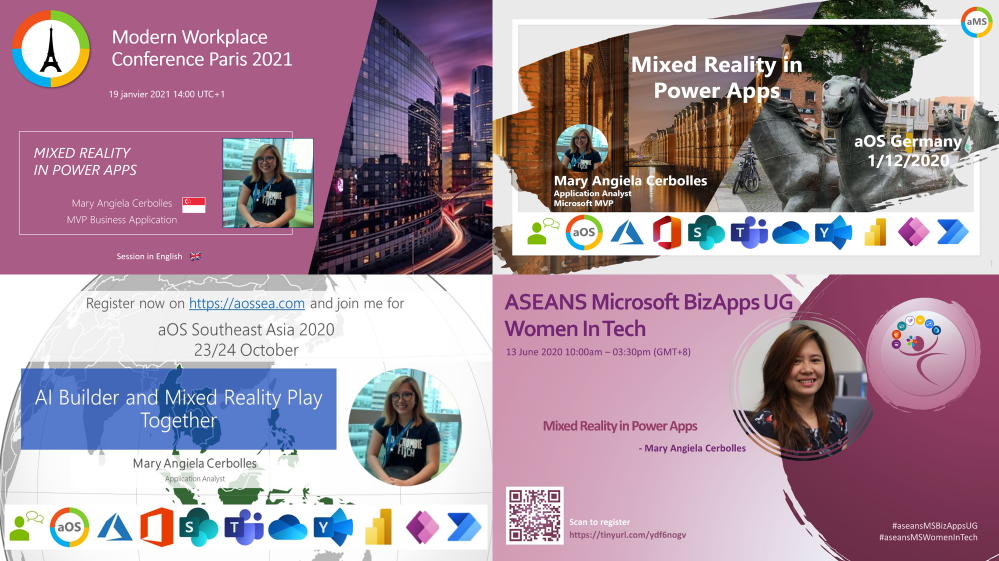 My Mixed Reality in Power Apps Presentations
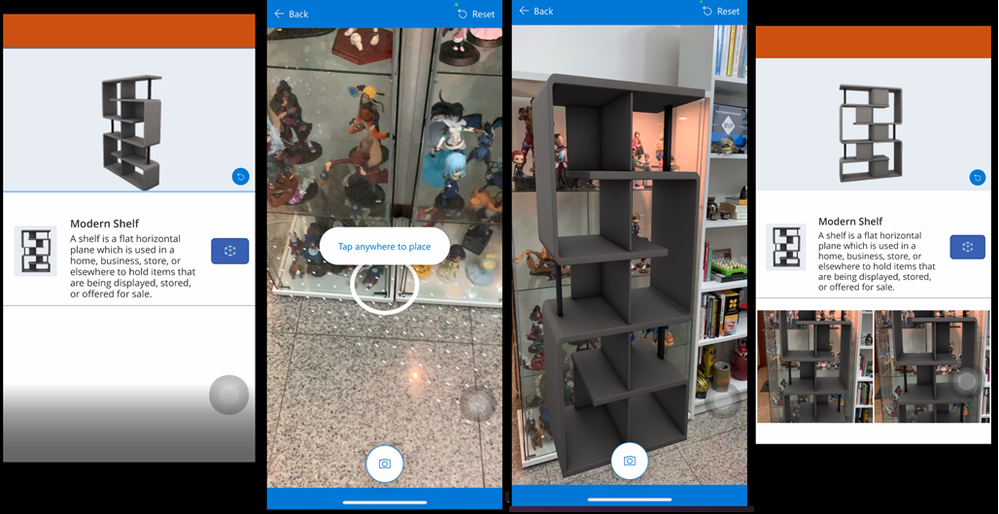
While we’re still in the midst of a global pandemic where social distancing is observed, the possibility of traveling and meeting with other people is almost zero. Everything is online now. From buying products, engaging with colleagues, training, and even classes use online platforms. With Mixed Reality, we can easily view the products we order online, take measurements, and easily visualize them from our home or business area instead. Even if you can’t get your hands on a Hololens, we can still make use of our phones with Mixed Reality in Power Apps. Dynamics 365 Remote Assist also works on iOS and Android mobile devices, which most of us likely already have! I highly encourage all of you to experiment with it using devices you already have, and you might just be inspired to use mixed reality in new ways as well.
There is an excellent potential for the device in life, health, and safety aspects to help you visualize objects, experience, and engage with other humans. The possibility of this technology is endless; the only limitation you have is your imagination. What will you create with mixed reality next?
Editor’s note:
Anj Cerbolles will be hosting a Table Talk on “Intro to Mixed Reality Business Applications” in the Connection Zone along with Daniel Christian and Adityo Setyonugroho at Microsoft Ignite 2021. If you are interested in this topic and want to connect with her LIVE, be sure to register for Microsoft Ignite and add their session to your schedule! Microsoft Ignite 2021 is free to attend and open to all.
Helpful Links:
- Microsoft Dynamics 365 Remote Assist and Guides
- Microsoft Learn paths for Remote Assist and Guides
- Introducing Mixed Reality in Power Apps
- Power Apps Mixed Reality 3D Control
- Power Apps Mixed Reality Measurements
#MixedReality #CareerJourneys


Recent Comments