by Contributed | Mar 8, 2021 | Technology
This article is contributed. See the original author and article here.
Projects come in all shapes and sizes with differing complexity. Visibility and collaboration coupled with flexibility can help accelerate your efforts to deliver projects on time.
Join us on Thursday, March 18, 2021 from 8:00 AM—9:30 AM Pacific Time for the keynote of the Reimagine Project Management with Microsoft conference. At this free digital event, you’ll find out the latest on Microsoft Project, Microsoft Planner, and Dynamics 365 Project Operations.
Register now for Reimagine Project Management with Microsoft to:
- Discover new features and best practices during the keynote and 6+ hours of additional on-demand demos and product walkthroughs.
- Engage with our product teams and partners by signing up for roundtables on a range of topics related to our project management solutions.
- Connect with Microsoft experts, technology partners, and peers to expand your network.
>Register now

by Contributed | Mar 8, 2021 | Technology
This article is contributed. See the original author and article here.
On Monday, 3/8, the MidDay Café Crew was joined by Microsoft’s Mark Kashman. Mark presented on the power of Microsoft Lists as well as in their versatility for use within Microsoft Teams as well as SharePoint Online. Attendees were treated to some powerful demonstrations showing the ease of setup, even directly within teams, as well as real world use cases such as the Patients List Template available from within Microsoft Teams.
Watch the on-demand video below, check out the resources and share with your colleagues.
Resources:
MidDay Café 03/08/2021 Agenda:
- Welcome and Introductions.
- Mid-Day Café News and Events
- Microsoft Lists with Microsoft’s Mark Kashman, Senior Product Manager, Microsoft.
- Open Q&A
- Wrap Up
Keep up to date with MidDay Café:
Thanks for visiting – Michael Gannotti LinkedIn | Twitter
 Michael Gannotti
by Contributed | Mar 8, 2021 | Technology
This article is contributed. See the original author and article here.
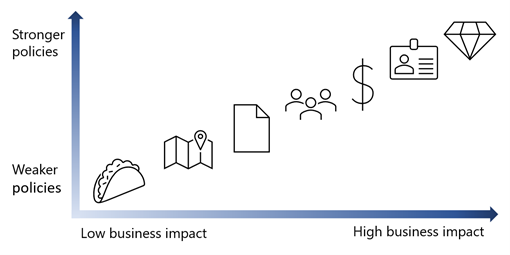
Today I am excited to share how you can maximize user productivity AND protect your most sensitive resources with Conditional Access authentication context. Conditional Access is the Zero Trust control plane that allows you to target policies for access to all your apps – old or new, private or public, on prem or multi-cloud. And now, with Conditional Access authentication context, you can apply different policies within those apps.
I have asked Caleb Baker, a PM on the Identity team, to tell you more. Let us know what you think!
Alex Weinert
————————–
Hello! We are incredibly excited to introduce Conditional Access authentication context, because it really empowers you to apply policies in exactly the ways you’ve told us you want to. Your HR handbook and secret plans in SharePoint can have different access policies, and your company’s financials app can apply a different standard between reading balances and wiring funds.
Conditional Access authentication context lets you target policies for data and actions within an app so you can refine your Zero Trust policies for least privileged access while minimizing user friction.
With the public preview, which will start soon, we are adding support to several Microsoft services as well as support for SaaS apps and line-of-business apps:
Microsoft Cloud App Security (MCAS) file upload and download: Use the MCAS session proxy to trigger Conditional Access policy when files are uploaded or downloaded from a Microsoft application SaaS application or apps that use the Application Proxy in Azure Active Directory.
Azure AD Privileged Identity Management (PIM) role activation: When a user activates Azure AD or Azure roles, you can require Conditional Access policies like Azure AD multifactor authentication, third-party multi-factor authentication, device compliance, Azure Identity Protection risk levels, or location-based controls. This will make it more difficult for an attacker to act in a privileged role.
Microsoft Information Protection (MIP) labeled SharePoint site collections: Use MIP labels to identify sensitive SharePoint sites and apply Conditional Access policies so your organization’s most sensitive data is kept secure.
SaaS app integration: Conditional Access authentication context support is not just for Microsoft apps. SaaS apps can use the same approach to protect your data and actions. We’d like to thank SaaS app providers like LumApps and Powell Software for their help in validating the approach and showcasing how authentication context can be used by all apps.
Line-of-business apps: The same integration available to SaaS apps is there for your apps. Do you have sensitive employee data in your HR app, or need protection for high-value transactions? Conditional Access will help you add extra security.
Look for the public preview in April!
User experience
Here’s what a user sees when authentication context is used to protect an app resource. In this case, we’ll show the MCAS integration, but the user experience is similar in all cases. The user will need to accept terms of use before downloading classified files.
After signing into a cloud app, they are redirected to the MCAS session proxy. At this point, if there’s a Conditional Access policy applied to user sign-in, like multifactor authentication, the user will be prompted.
When they try to download a classified document, MCAS intercepts the click and displays a page to tell the user an additional security check is required.
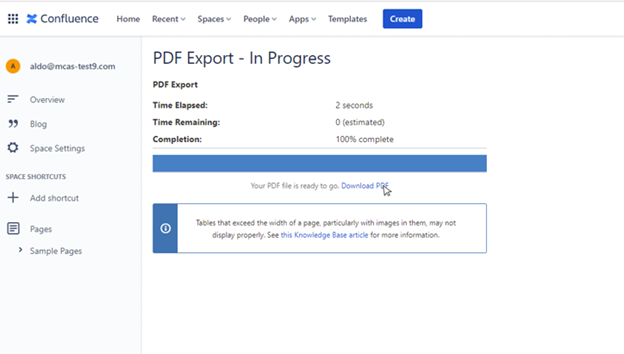
A user clicks on Download PDF.
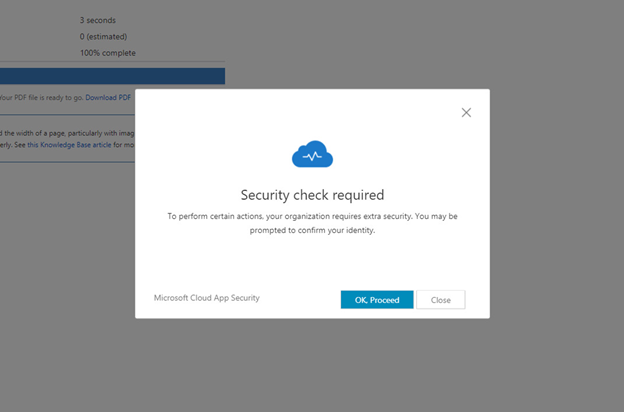
User receives a notification that additional security checks are required.
After clicking OK, Proceed, the user is prompted to agree to the organization’s terms of use, on a page triggered by authentication context.
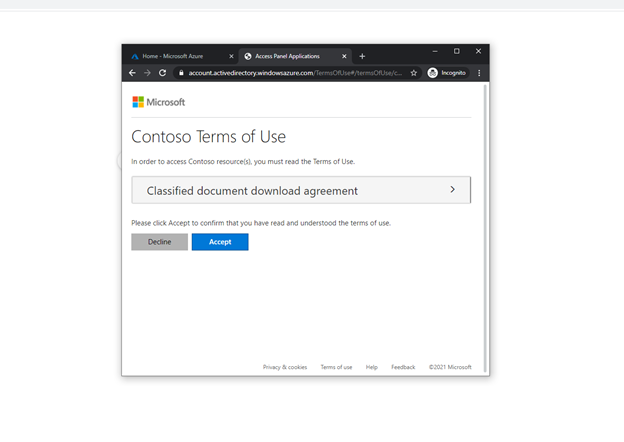
Any app can use this functionality to require a Conditional Access authentication context and make use of the existing Conditional Access controls.
How it works
You may be curious about how this all works behind the scenes. It’s a familiar standards-based pattern that’s used when an app requires Azure AD multifactor authentication, except we’ve allowed the app to make a sign-in request that will trigger Conditional Access policy. After a user signs in, app controls if additional policies need to be enforced. A redirect and new sign-in request is sent back to Azure AD, and the user is then prompted to complete any policy requirements. This way, the app can use its own business logic to trigger additional policies when needed.
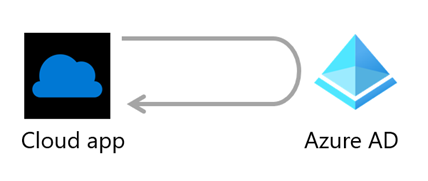
The app or MCAS then inspects claims in the sign-in token to tell if the required authentication context and Conditional Access policies have been satisfied. If the required claim is present, the user will be granted access.
Protocol support is built on top of industry standards in OpenID Connect. authentication context reference value with the claims request parameter to give apps a way to trigger policy.
What’s next
We’re finalizing the details of the release and will get the public preview out soon. Then, we plan to extend support to more Microsoft apps and work with more SaaS apps. Our goal is to allow you to create more granular security policies, where you need them, and help move you forward on your Zero Trust journey.
We look forward to hearing your feedback and suggestions!
Learn more about Microsoft identity:

by Contributed | Mar 8, 2021 | Technology
This article is contributed. See the original author and article here.
These Imagine Cup World Finalists have teamed up and used their passion and creativity to develop new ways to solve pressing earth-related issues with Azure IoT, Storage, Artificial Intelligence, and other innovative tech.
The 2021 Imagine Cup is all about innovating to help solve pressing global issues, and this year’s competition is focused on solutions in four social good categories: Earth, Education, Healthcare, and Lifestyle. All tech ideas submitted to the competition were developed under the category that best aligned with a team’s passion and motivation to make a difference. In this feature, we’ll look at innovations leveraging IoT, gamification, and more in the Earth category.
Earth overview
Students creating projects in the Earth category could build a solution encompassing issues like climate change, agriculture, or green tech. A wide variety of solutions focused on sustainability were submitted, applying Azure technology in unique and innovative ways to environmental issues.
Why it matters
Sustainable Software Engineering is a field which is becoming increasingly important in the work for both climate conservation and designing a sustainable future for all. This field not only focuses on applications that are sustainable in themselves, but also recognizes we all have a part to play in the climate solution through applying tech to help create a better world. Agriculture is also a focus of earth-related innovation, including developing tools to assist farmers, creating more sustainable farming practices, and reducing risk to crops and natural resources.
Our Earth category World Finalists developed projects with a sustainable philosophy at their core, which have the potential to impact our global climate, agriculture, and natural environment.
Meet our Earth category World Finalists:
Team Green Guru, United States
Project: Green Guide
Green Guide is a mobile app that leverages gamification to empower users to lead sustainable and eco-friendly lifestyles.
|
|
Team Intelligent Hives, Poland
Project: Intelligent Hives – Bee Monitoring System
On average, 30% of bee colonies are unable to survive into the next season. Intelligent Hives brings beekeeping into the 21st century. The team’s intelligent solution helps save bees, beekeepers, money, and time.
|
 |
Team ProTag, New Zealand
Project: ProTag
ProTag is a smart ear tag for livestock that can detect the early onset of illness in real-time, lowering costs and increasing animal welfare along with farmers’ peace of mind.
|
 |
Team SimplyLCA, Germany
Project: SimplyLCA
SimplyLCA aims to enable companies of every size to participate in the journey towards a sustainable future. To become eco-friendly as a company, the platform uses Azure Storage and Visual Studio Code to allow users to exchange, trade, and publish primary supplier-specific Life Cycle Assessment data.
|
 |
Team Spiffeng, Singapore
Project: IoT Hydroponic System
The team’s project is an end-to-end automated IoT hydroponic system. It consists of a hydroponics greenhouse connected to an app, which allows real-time remote monitoring and data analysis of user preferences and habits.
|
 |
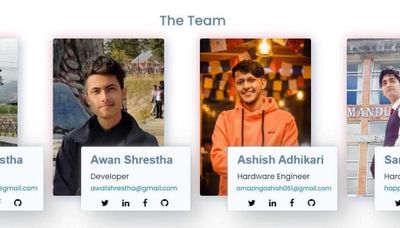
Team Virtual Radiologist, Nepal
Project: Pico Sat
Pico Sat is a miniature version of an environmental satellite, which provides users information about environmental parameters like altitude, temperature, humidity, pressure, dust, and pressure.
|
 |
We’re so inspired by these students’ passion to make a difference and are excited to see them pitch their projects at the World Finals this month. Four winning teams will be selected from each of the competition categories, taking home USD10,000 and Azure credits. These teams will also move forward to the World Championship for the chance to win USD75,000 and mentorship with Microsoft CEO, Satya Nadella. Two runner-up teams in each category will take home USD2,500 plus Azure credits.
Follow the action
Follow these teams’ journey on Instagram and Twitter as they head to the World Finals to compete.
by Contributed | Mar 8, 2021 | Technology
This article is contributed. See the original author and article here.
If you’ve been looking for a reason to get started with AI to solve a particular problem or use case, look no further! We invite you to put your skills to the test and apply Azure AI to a new or existing project. As you may have seen in an earlier post by Anand Raman, we have been hosting an Azure AI hackathon in which you can submit your project and be eligible to win prizes. Developers of all backgrounds and skill levels are welcome to join and submit any form of AI project, whether using Azure AI to enhance existing apps with pre-trained machine learning (ML) models with Cognitive Services or building your own custom ML models with Azure Machine Learning.
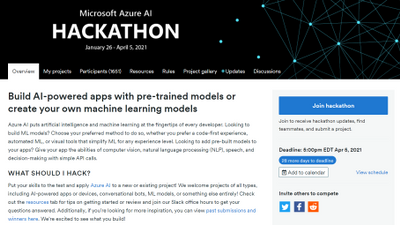
AI Hackathon homepage
If you’re interested in participating, visit the Azure AI Hackathon page to get started. The deadline is April 5th so you still have time to build and submit a project! Use one or more of the following Azure AI services to build a new project or update an existing project: Azure Machine Learning, Azure Cognitive Services, Bot Framework and Azure Cognitive Search. Projects may integrate with other Azure services, open source technologies (including but not limited to frameworks, libraries, and APIs) and physical hardware of your choice.
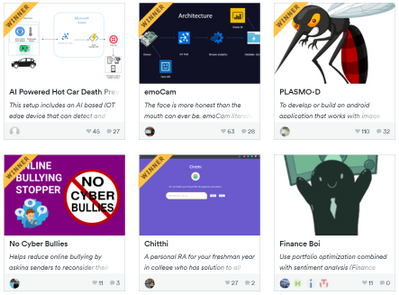
If you’re looking for a little inspiration, below are a few examples of past winners:
2019 First Place– Trashé
 Trashe Smarter Recycling solution
Submitted by Nathan Glover and Stephen Mott, Trashé is a SmartBin that aims to help people make more informed recycling decisions. While the idea is super impactful, it’s even more powerful when you see it in action- not just the intelligence, but the end-to-end scenario of how it can be applied in a real-world environment.
This team used many Azure services to connect the hardware, intelligence, and presentation layers—you can see this is a well-researched architecture that is reusable in multiple scenarios. Azure Custom Vision was a great choice in this case, enabling the team create a well performing model with very little training data. The more we recycle, the better the model will get. It was great to see the setup instructions included to help build unique versions of Trashé so users can contribute to helping the environment by recycling correctly within their local communities—this community approach is incredibly scalable.
2019 Second Place- AfriFarm

Niza Siwale’s app recognizes crop diseases from images using Azure Machine Learning service and publishes the findings so anyone can track disease breakouts. This also provides a real-time update for government agencies to act quickly and provide support to affected communities. As quoted by Niza, this project has an incredible reach to a possible 200 million farmers whose livelihoods depend on farming in Africa.
Creating a simple Android application where users can take photos of crops to analyze if each farmer is getting information when they need it, users can also contribute their own findings back to the community around them keeping everyone more informed and connected. Using the popular Keras framework along with the Azure Machine Learning service, this project built and deployed a good plant disease recognition model which could be called from the application. Any future work or improved versions of models can be monitored and deployed in a development cycle. From this, the progression of the model can be tracked over time.
2019 Third Place- Water Level Anomaly detector

Roy Kincaid’s project identifies drastic changes in water levels using an ultrasonic sensor that could be useful for detecting potential floods and natural disasters. This information can then be used to provide adequate warning for people to best prepare to major changes in their environment. Water Level Anomaly Detector could also be beneficial for long-term analysis of the effects of climate change. This is another great example of an end-to-end intelligent solution.
Roy is well skilled in the hardware and connection parts of this project, so it was brilliant to see the easy integration of the Anomaly Detector API from Azure Cognitive Services and to hear how quickly Roy could start using the service. Many IoT scenarios have a similar need for detecting rates and levels; in fact, Roy had hinted at coffee level detector in the future. In a world where we all want to do our part to help the environment, it’s a great example of how monitoring enables us to measure changes over time and be alerted when issues arise.
These are just 3 of the past winners and submissions. For more inspiration, visit our gallery of past submissions.
Resources to get started
by Contributed | Mar 8, 2021 | Technology
This article is contributed. See the original author and article here.
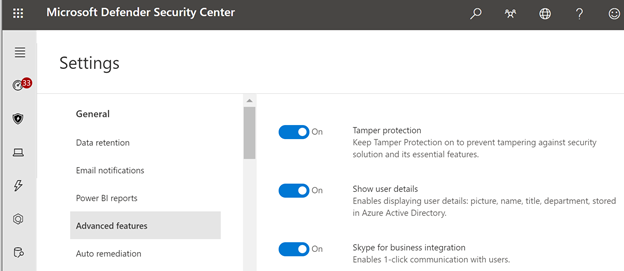
Advanced breaches like human-operated ransomware campaigns and Solorigate continue to pose significant risks to businesses. Most of these breaches involve tampering with security solutions and settings. To defend against these types of breaches, it’s clear that tamper protection in Microsoft Defender for Endpoint should be turned on for all devices. Tamper protection helps prevent bad actors from disabling security features, such as antivirus protection, on your devices.
Last year, we announced support for tamper protection on Configuration Manager managed devices (using tenant attach). The update helps ensure that all devices onboarded to Microsoft Defender for Endpoint have tamper protection turned on, and is applicable for both active- and passive-mode devices.
TIP: If you are managing devices in a hybrid environment, or you need more granular control than a tenant-wide setting, continue using Intune or Configuration Manager. We recommend keeping tamper protection turned on, tenant wide. To do that, you can use the Microsoft Defender Security Center or the Microsoft 365 security center.
You shouldn’t need to exclude devices from tamper protection; however, if your organization wants to exclude devices, use the Microsoft Endpoint Manager admin center. To learn more, see Exclude groups from a profile assignment.
Currently, the option to manage tamper protection for Microsoft Defender for Endpoint is on an opt-in basis, with plans to make this the default method in near future.
To learn more, see Manage tamper protection using the Microsoft Defender Security Center.
There’s more to come!
Additional resources:
Microsoft Defender for Endpoint is an industry leading, cloud powered endpoint security solution offering vulnerability management, endpoint protection, endpoint detection and response, and mobile threat defense. With our solution, threats are no match. If you’re not yet taking advantage of Microsoft’s unrivaled threat optics and proven capabilities, sign up for a free Microsoft Defender for Endpoint trial today.
Microsoft Defender for Endpoint team
by Contributed | Mar 8, 2021 | Technology
This article is contributed. See the original author and article here.
We are excited to share a short attack simulation to highlight how Microsoft Defender for Endpoint can alert analysts for every suspicious system event that’s related to an intrusion and how analysts can mitigate the attacker’s actions right from the alert page. We’ve chosen a relatively straightforward exploitation scenario which we believe still carries significant risk for organizations that have not been able to update their operating systems. In this scenario, we use the updated Microsoft Defender for Endpoint alert page, which has features to make the investigation experience better and more effective.
SafeBreach, one of our evaluation lab partners for breach and attack simulation solutions, discovered an elevation of privilege vulnerability in the Windows print spooler mechanism. This vulnerability, assigned CVE-2020-1048[i], has already been patched. However, it remains an
interesting case study because of the prevalence of the print spooler mechanism, and the vulnerability’s involvement in a widely covered high-profile attack in the past.
The actual exploitation details have already been discussed extensively in other blogs, but in summary, this vulnerability allows an unprivileged user to modify a file that they should not have been able to access, or to create a file in a folder they should not have write access to.
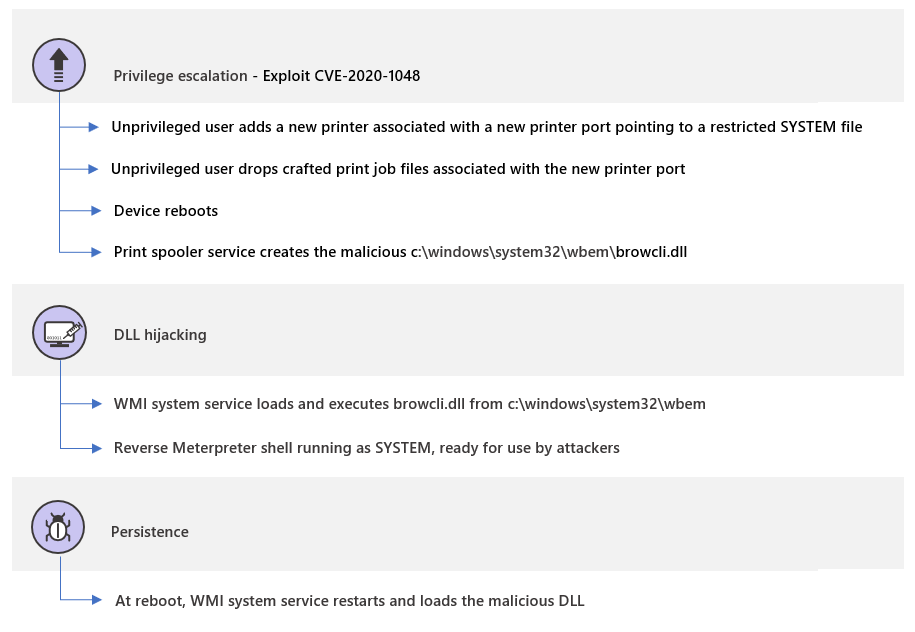
Figure 1. Attack phases of a sample attack using CVE-2020-1048
The print spooler is a Windows component that manages the printing process and runs with system privileges. Specifically, it can write or modify files in the System32 folder. Since this is a common service that comes preinstalled, any suspicious activity initiated by the spooler might be easily missed.
Unprivileged users could easily add new printers in Windows. Every printer is then associated to a port. The catch is that the printer port, instead of being an actual port, could instead be a path to a file. When the port is a file path, the printer creates a file on the file system and prints content to it. Before the vulnerability was patched, this means that any user could print to folders they don’t have access to.
Malicious actors can thus use this vulnerability to create a malicious DLL, for instance, print it to the system folder, and wait for the system to run it in a classic DLL hijacking attack. We will use this scenario in our simulation.
Microsoft Defender for Endpoint blocks, detects, and remediates the attack. This blog will cover the phases of the attack and how Defender for Endpoint correlates these to a single view of an incident, providing the full context of the related alerts, impacted entities, and the investigation.
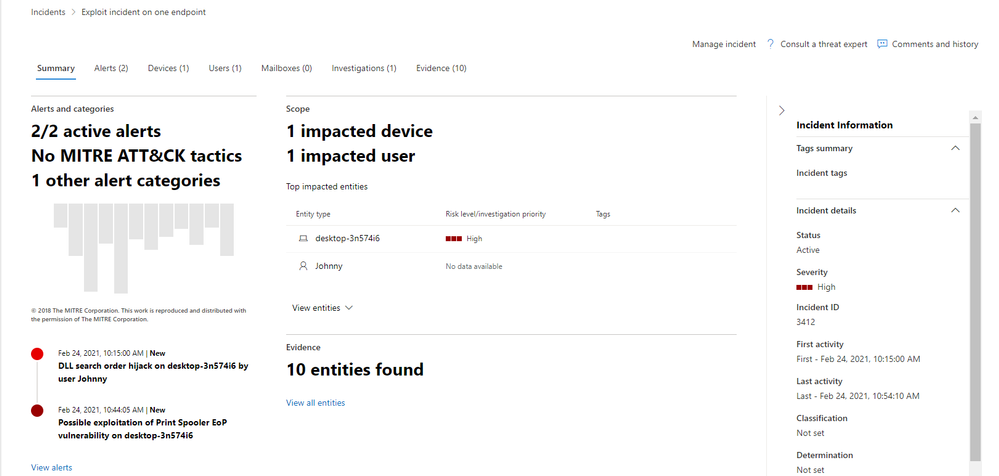
Figure 2. The incident page providing the full context of the attack
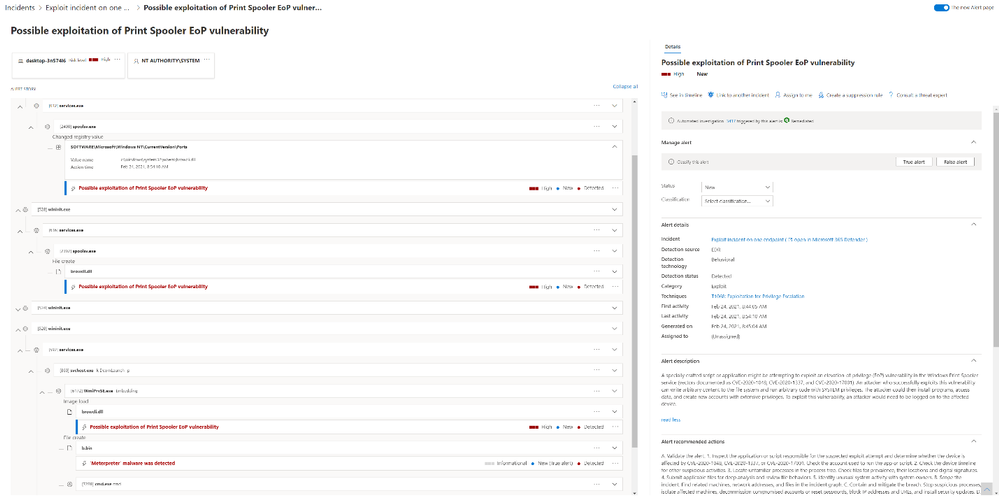
Figure 3. Detailed alert story showing steps of the attack and affected assets
Step 1: Add a new printer and a printer port
Let’s say an attacker was able to determine that one of the devices in our fictional network has not yet been patched for CVE-2020-1048 and was able to log on to the device through an effective social engineering lure. The first phase of our exploitation scenario is for the attacker to add a new printer on this device called MS Publisher Color Printer. It is then associated to a new printer port which points to our targeted system file c:windowssystem32wbembrowcli.dll.

Figure 4. Printer and port creation
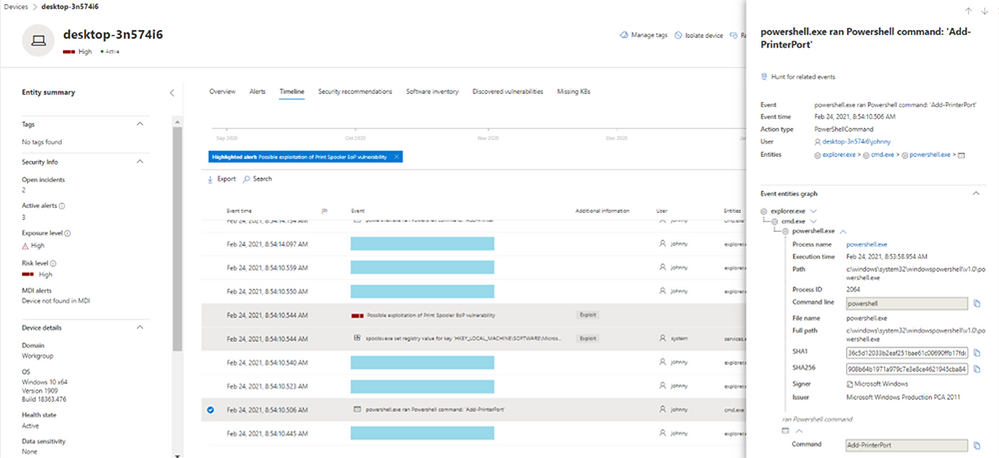
Figure 5. device timeline event showing the printer port was added
In the background, whenever a printer port is added, the spooler service adds a registry key containing the value of the path the user pointed to and where they would like to insert content. Since Defender for Endpoint monitors registry operations, it will detect this action as a suspicious registry activity right off the bat. The analyst will see the following alert:
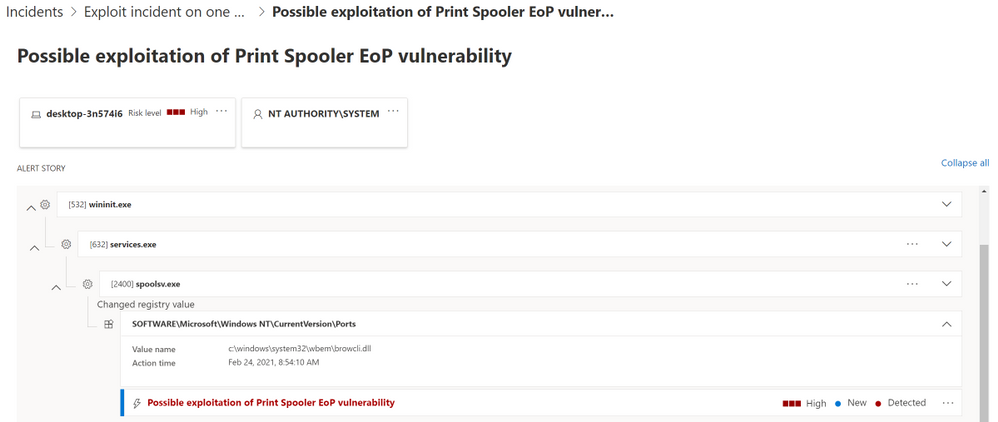
Figure 6. Alert flagging suspicious registry entry
Step 2: Print content to a restricted file
Typically, when a regular user creates a print job, the print job will be stored by the print spooler service (spoolsv.exe) to a dedicated folder, System32SPOOLPrinters, as two files: the file, which contains the content to be printed, and the shadow job file (SHD), which contains the metadata of the print job, including the path of the printer port that was created. This same behavior is taken advantage of in this attack.
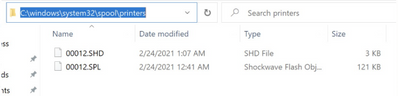
Figure 7. Print job creation
The core of this vulnerability is that through adding a printer port that points to the SYSTEM folder and by rebooting the spooler service, the attacker gets to run its malicious file when the spooler reloads, running as SYSTEM, and “prints” to the folder specified in the printer port.
SafeBreach Labs created proof-of-concept code on GitHub to generate one such crafted SHD file.
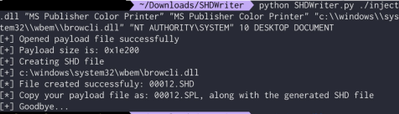
Figure 8. Sample SHD file
Now the attacker simply needs to wait for the print spooler to be initialized after a reboot. The print spooler then does its regular function of enumerating the SHD files folder so that it can process any remaining print jobs.

Figure 9. Print spooler enumerates unprocessed print jobs
In our exploitation scenario, the attacker was able to write arbitrary data to the path of the printer port which the attacker should not have had write access to. Just by copying the crafted SHD and SPL files and waiting for the system to reboot, the attacker achieved an elevation of privilege.
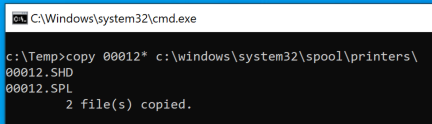
Figure 10. Attacker copies crafted print jobs files which triggers the vulnerability.
Fortunately, analysts will be made aware that this step was performed on the system because Defender for Endpoint will trigger and alert for the file creation of browcli.dll by the print spooler service.
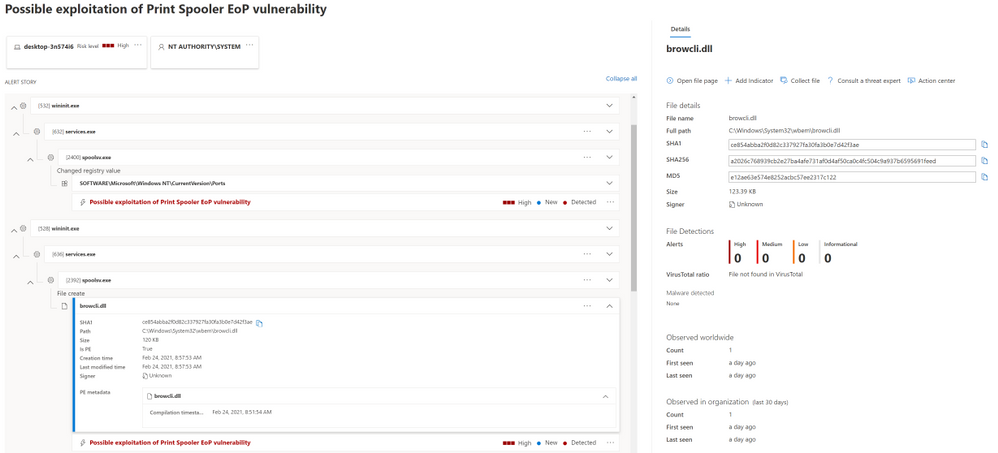
Figure 11. Alerts flagging suspicious file creation
Step 3: Perform DLL hijacking
In Windows environments, when an application or a service starts, it first loads several dependencies, also known as DLLs, to function properly. If these dependencies don’t exist or are implemented in an insecure way, attackers could load and execute their malicious DLL instead.
In our attack scenario, the elevation of privilege allows code execution using DLL search order hijacking. The DLL actually contains a stager payload which reflectively (in-memory) loads a Meterpreter Reverse TCP shellcode over a TCP socket.
Once Windows is restarted, the WMI service (which is running as NT AUTHORITYSYSTEM) will execute the browcli.dll library from the C:WindowsSystem32wbem folder, resulting in a reverse Meterpreter shell. This provides the attacker the ability to remotely steal information and propagate throughout more computers in the network, among others. The service executes the DLL every time the system reboots, so the attacker can use the vulnerability to elevate privileges.
In this case, thanks to the Defender for Endpoint registry, file, and load image sensors, we produced strong detection logic to identify suspicious behaviors indicating any attempt to exploit the vulnerability. At this point, the analyst assigned to this set of alerts will see the following alert story:
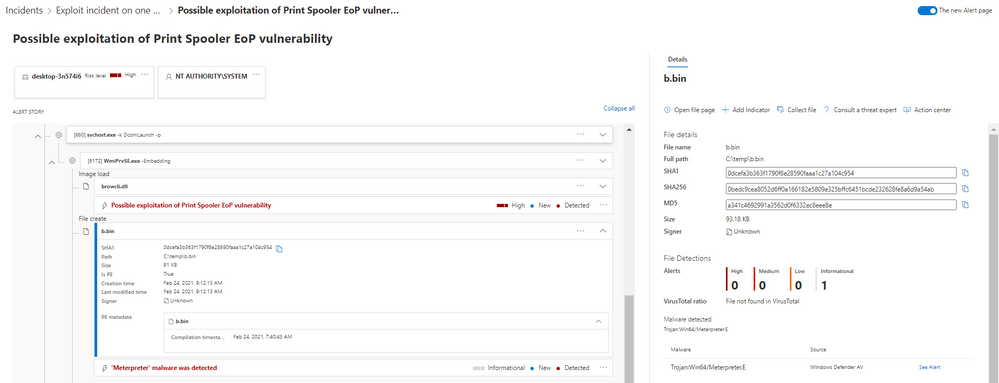
Figure 12. Alerts flagging suspicious ‘Meterpreter’ payload in memory
Please note that in this specific case we used an un-patched device, with the AV in passive-mode for the purpose of the simulation. If Defender AV was enabled, it would have blocked the malware before execution.
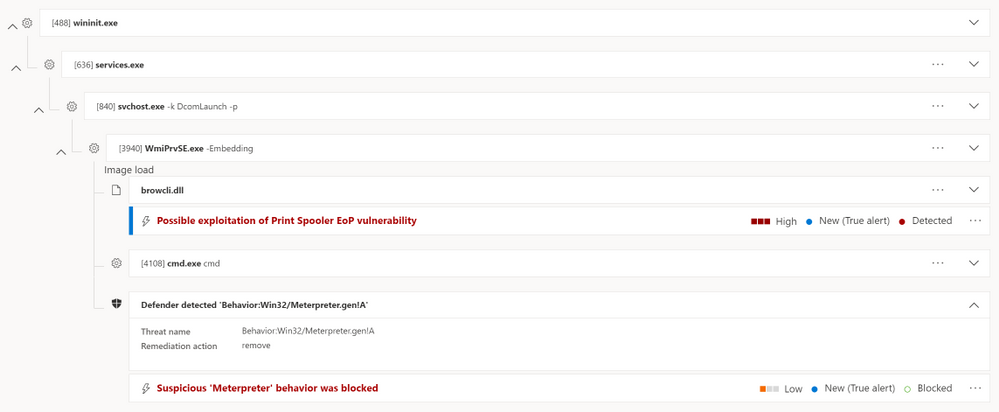
Figure 13. malicious ‘Meterpreter’ activity blocked by Defender AV
Seeing the attack story in one view
On top of the individual suspicious event detection, Defender for Endpoint provides an extensive attack storytelling capability. The incident page is the first stop of the security analyst, where they can learn about the scope of the attack, the related alerts, and the impacted entities across the organization, together with a full context of the investigation and remediation actions.
Diving in the new alert page, the full story of the suspicious registry activity by the printer port (detected by the EDR) followed by the Meterpreter file creation and the file loading events (detected by the AV) will be shown in the same detailed page, making the investigation more efficient and providing a better understanding of why the alerts were triggered—along with their impact.
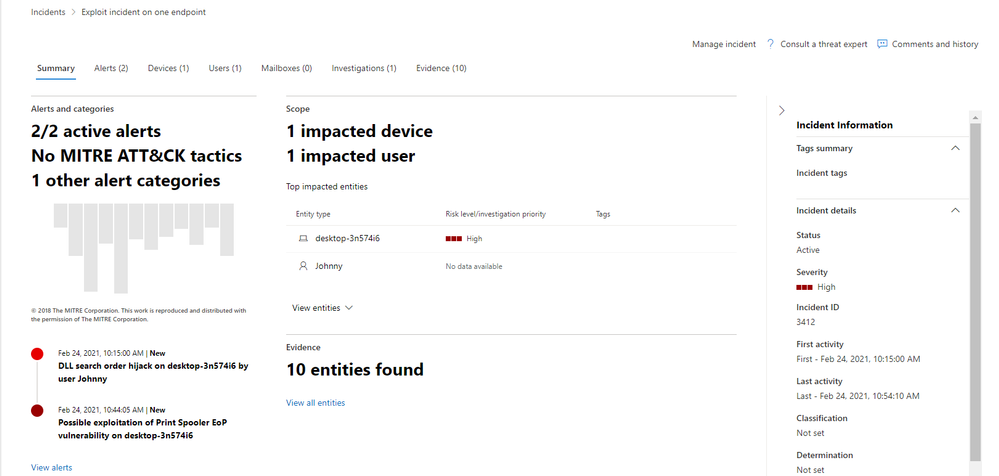
Figure 14. Analyst’s first stop – the incident page
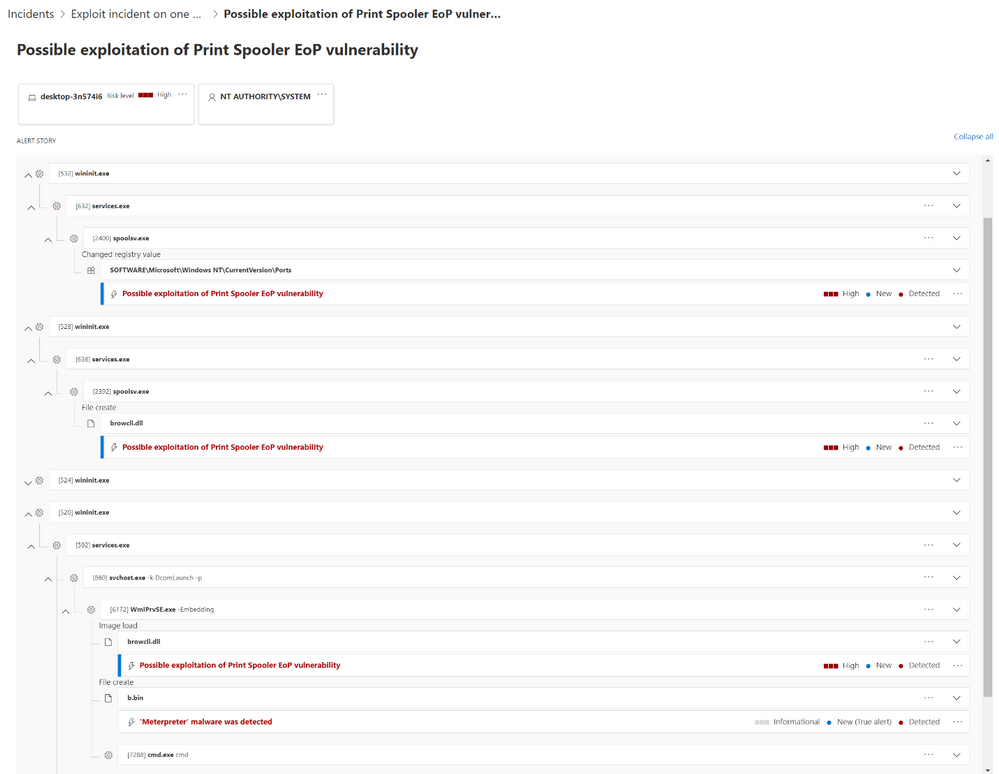
Figure 15. Full alert story of each step of the attack
This view of the correlation provides a full visualization of the attack goals and activities. The security operations team can clearly see that the alerts are related to the same sequence of events and thus can respond with the full attack context in mind.
The analyst can then drill down into the DLL tile, which is the malicious binary in this scenario, and see all the relevant details and actions, within the context of the investigation. Likewise, each tile in the alert story is expandable and shows more details in the side pane when clicked. Alert tiles are also actionable. By clicking on the “…” icon, available actions will be provided directly from the process tree.

Figure 16. Available actions provided directly from the alert story
By opening the automated investigation page, available both in the incident and the alert pages, the analyst can get a better understanding of the actions that were taken on the device, which assets where involved, and get all the related evidence.
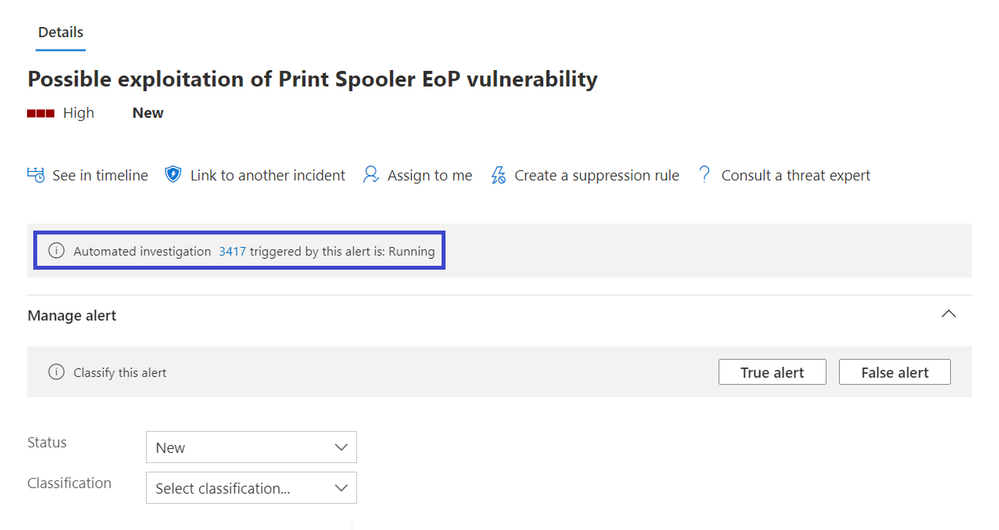
Figure 17. Alert details and actions
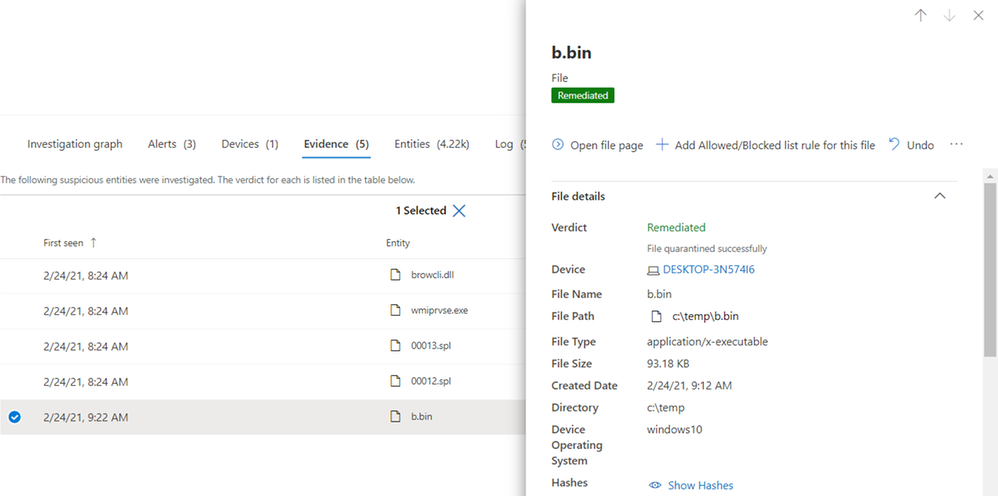
Figure 18. Automated investigation remediates and quarantines the malicious file
Searching for the vulnerability in Weaknesses page in Threat and Vulnerability Management will also help to identify all the other devices that might be vulnerable to spooler EoP:
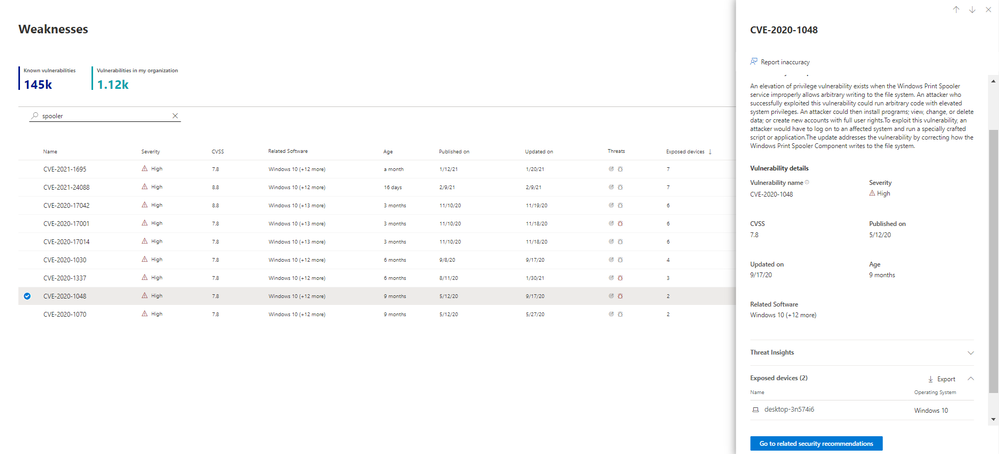
Figure 19. Exposed devices in weaknesses page
Furthermore, the details pane provides information about which MITRE ATT&CK technique was used in each step. These are incredibly useful in post-activity learning in incident response as it identifies which gaps exist in the current configuration of the network so the analyst can make recommendations to admins to improve security to avoid or lessen the impact of the next attack.
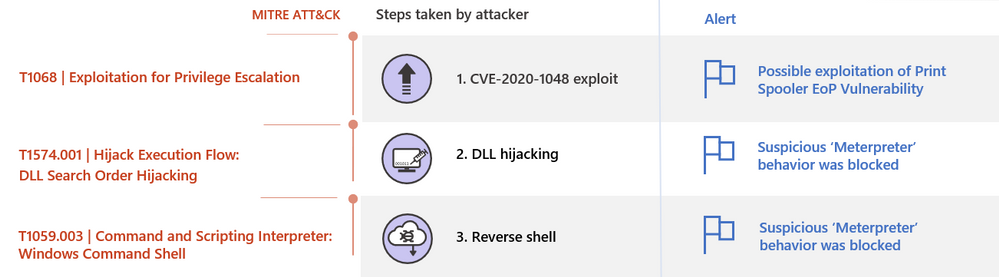
Figure 20. MITRE ATT&CK techniques and alerts flagged for each attacker step
As you have seen, using the SafeBreach attack simulations, Defender for Endpoint was able to detect the attack across the different kill-chain stages, provide a full investigation experience across detection and protection, including all data needed and by that telling the full alert story. The security operations team can explore all relevant details and take action on each related entity—without leaving the context of the alert investigation, designed to make the investigation experience efficient and easy.
To learn more about the new alert page, please read our documentation and blog post.
If you’re not yet taking advantage of Microsoft Defender for Endpoint’s industry leading security optics and detection capabilities, we encourage you to sign up for a free trial today.
Peleg Hadar SafeBreach Labs
Charles-Edouard Bettan & Yonit Glozshtein Microsoft Defender for Endpoint team
______________________________________________________________________________________
[i] Microsoft released fixes to address fix bypasses to CVE-2020-1048. These were documented as CVE-2020-1337 and CVE-2020-17001. While we are not discussing the details of those CVEs, the detection for CVE-2020-1048 also detects attempts to exploit CVE-2020-1337 and CVE-2020-17001.
by Contributed | Mar 8, 2021 | Technology
This article is contributed. See the original author and article here.
We have spent time listening and seeking to understand unique challenges as it relates to cloud data privacy in the legal industry. We hear you!
At Microsoft, we understand the importance of data privacy. Law Firms have the additional burden of protecting Client Matter Data as a commitment to the customers that they serve. At Microsoft, our mission is “to empower every person and every organization on the planet to achieve more”. The goal of Microsoft 365 Solution for Legal is to address the concerns over blind subpoenas while helping Law Firms realize their full potential using the most secure cloud and leverage Microsoft Teams in a way that is curated and configurable to meet those requirements. For as long as Microsoft has had a cloud offering, it may have felt like we were ignoring these concerns that law firms have. In many ways, we lacked some of the controls that were needed. Indeed we are listening!
We recognize the value of Document Management Systems (DMS) providers and are working with many of the core software solution providers in this space to guide Client Matter Data to the DMS and keep it out of SharePoint and OneDrive when necessary. If data accidentally lands in SharePoint or OneDrive, we can leverage our file encryption technology to ensure that it is illegible to Microsoft (rendering it worthless to the blind subpoena) and only usable by you. The solution recognizes that each Law Firm is unique and have their own level of comfort with the cloud. So we also created an approach that can be modified to accommodate the needs and unique requirements that each Law Firm feels ready to adopt.
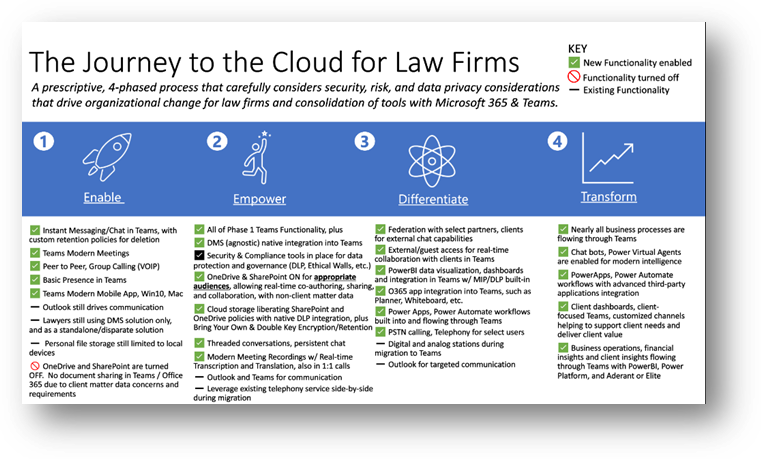
We have developed a 4-phased approach to 1) Enable, 2) Empower, 3) Differentiate, and 4) Transform your journey to Microsoft Teams leveraging Microsoft 365 security and compliance tools.
Firms want to enable better communication.
The first phase of “Enable” is what we will focus on first. Phase One illustrates a graceful way to enable Teams while turning off SharePoint and OneDrive. We want to drive collaboration while minimizing disruption for attorneys. So you will continue to leverage on-premise Exchange and Outlook for an email with plugins as the primary vehicle of communication. You will also continue leveraging existing DMS solutions for Client Matter Data creation and management.
The enablement phase enables Firms to use Microsoft Teams for instant messaging, chat and channel conversations with retention policies similar to what is already in place for any of Firms’ other messaging tools. You gain the ability to experience a modern way of joining meetings across devices, understand someone’s presence/availability and even have peer-to-peer or group calling using voice over internet protocol (VOIP). You will be able to seamlessly extend communication using a Teams mobile app that works the same on IOS and Android. Teams is an amazing experience hands-free in your car. No more dial-in passcodes! Since we have disabled SharePoint and OneDrive in this phase, Law Firms can control client matter is located in the system that has been contractually agreed upon.
The second phase called “Empowerment” utilizes a combination of both communication and collaboration internally at Law Firms to leverage capabilities such as co-authoring, sharing, and cloud storage for appropriate audiences that don’t deal with Client Matter Data, but instead staff, committee, practice group, and non-client matter data that usually fills your on-premises file shares or even SharePoint document libraries. Utilizing Office 365 SharePoint and OneDrive policies with native DLP integration (blocking or alerting on client matter data being saved to Teams for example), ethical walls plus encryption and/or retention for information governance adds an added bonus that you may not be leveraging storing unstructured data in native on-prem locations. This opens Teams for threaded conversations and persistent chat, modern meeting recording with real-time transcription and translation, and the ability to access files anywhere.
Firms want to stop data from leaking.
The second phase is empowerment. In this phase, firms can start leveraging cloud storage capabilities. For those of you adopting Office Apps, OneDrive for Business, and SharePoint Online, this is your last migration! Law Firms use this phase to determine what can go into the cloud and where Client Matter Data should reside. Teams, powered by OneDrive and SharePoint enable co-authoring, sharing, and collaboration on documents. You also can choose to integrate with your Document Management System and store Client Matter Data in the location you prefer.
Data Loss Prevention is important to all companies. Law firms have the additional burden of protecting their client’s data as well. So we give you the tools to make sure that data can only be used in the ways you allow. This includes capabilities like:
- Printing, copying & forwarding
- Enforcing multifactor authentication rules
- Restricting access from insecure locations or countries
- Blocking access from insecure/unmanaged devices
- Blocking access from accounts that have weak or exploited passwords
- Blocking downloads/uploads to sites you don’t allow
- Inappropriate sharing
- Understanding insider risk that integrates with HR changes
For your most sensitive data, you can use Microsoft’s Double Key Encryption. This solution means that once we find and label the data, we encrypt it in a way that renders it illegible to the Microsoft Cloud. You still have access to the data, it’s encrypted with a key that is stored in your datacenter. This satisfies the concerns over a blind subpoena. Double Key Encryption (DKE) uses two keys together to access protected content. Microsoft stores one key in Microsoft Azure, and you hold the other key. You maintain full control of one of your keys using the Double Key Encryption service. However, certain cloud services are negatively impacted because the file can no longer be processed by certain services including:
- Transport rules including anti-malware and spam that require visibility into the attachment
- Microsoft Delve
- eDiscovery
- Content search and indexing
- Office Web Apps including co-authoring functionality
Firms want easier sharing, integration, and automation.
The third and fourth phases include federation with select partners, clients for external chat capabilities, and/or external guest access for real-time file collaboration and storage with clients in Teams. You will have powerful data visualization tools that can be created by people without development skills. Your staff can quickly build rich dashboards, reports, and gain insights so long as they have the right permission to the data.
In addition, you can start to envision new ways of performing complex tasks through code-free automation, using bots to have a conversation with your data, information, and internal tools. Some examples include financial insights with time tracking; historical firm litigation matters; and knowledge management initiatives like using advanced artificial intelligence. You will be creating a knowledge network inside your firm consisting of data, people, and their skills so you can move faster than your competition.
Join the upcoming Microsoft webinars https://aka.ms/M365Legal
Microsoft 365 for Legal v-team: Jon Kefaloukos, Michelle Gilbert, Paul Edlund, Corey Buzzell, Rahul Varrier
by Contributed | Mar 8, 2021 | Technology
This article is contributed. See the original author and article here.
Pssst! You may notice the Round Up looks different – we’re rolling out a new, concise way to show you what’s been going on in the Tech Community week by week.
Top 10 Blogs & Conversations this Week:
Catch up on all blogs here!
Important Events:
by Contributed | Mar 8, 2021 | Technology
This article is contributed. See the original author and article here.
With SAP solutions on Microsoft Azure, organizations can unlock and implement important business strategies and accelerate innovation. With the scalability, flexibility, and cost savings of Azure, these solutions can help organizations drive better outcomes and gain real-time insights. As an architect or engineer specialized in Azure for SAP workloads, make the most of these opportunities and prove your expertise and worth with this certification.
The Azure for SAP Workloads Specialty certification validates that you have extensive experience and knowledge of the SAP system landscape and industry standards that are specific to the long-term operation of an SAP solution on Azure. You earn this certification by passing Exam AZ-120: Planning and Administering Microsoft Azure for SAP Workloads.
If your responsibilities include making recommendations on services and adjusting resources for optimal resiliency, performance, scale, provision, size, and monitoring, this could be the certification for you. Additionally, you partner with cloud administrators, cloud database administrators, and clients to implement solutions.
What kind of knowledge and experience should you have?
As a candidate for this certification, you should have extensive experience and knowledge of SAP applications, including SAP HANA, S/4HANA, SAP NetWeaver, SAP BW/4HANA, and OS servers for SAP applications and databases. You also need to be familiar with the Azure portal, Azure Resource Manager templates, operating systems, virtualization, cloud infrastructure, storage structures, high availability design, disaster recovery design, data protection concepts, and networking.
Candidates for this certification must have expert Azure administration and Azure solutions architect skills. Although it’s not required, we strongly recommend that you shore up your foundation with training in these areas. In fact, you might even consider earning the Azure Administrator Associate certification and the Azure Solutions Architect Expert certification. For more details, check out our blog posts, Level up with Microsoft Certified: Azure Administrator Associate and Level up with Microsoft Certified: Azure Solutions Architect. It would also be very helpful to have SAP HANA and Linux certifications.
How can you get ready?
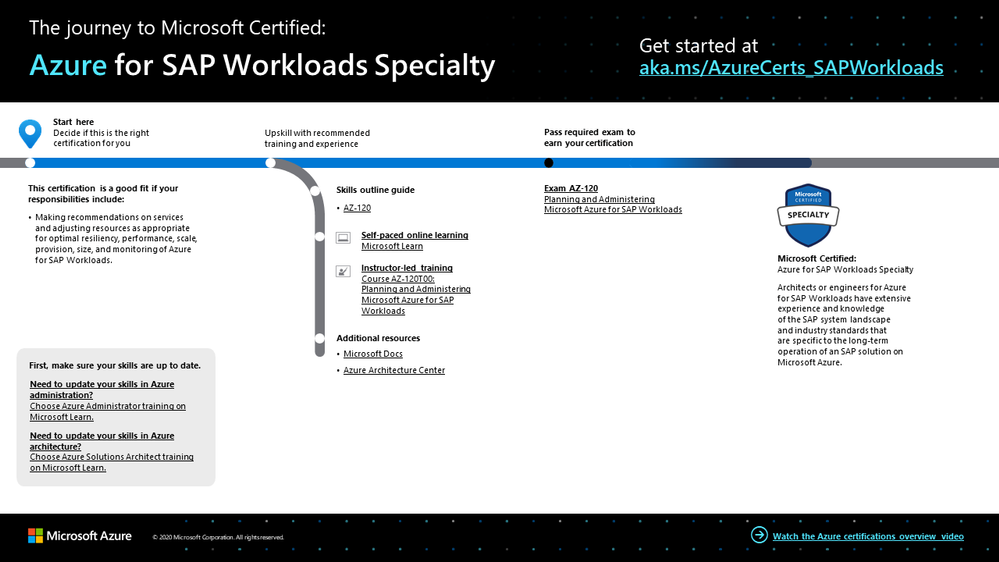
To help you plan your journey, check out our infographic, The journey to Microsoft Certified: Azure for SAP Workloads Specialty. You can also find it in the resources section on the certification and exam pages, which contains other valuable help for professionals pursuing this specialty certification.
The journey to Azure for SAP Workloads Specialty
To map out your journey, follow the sequence in the infographic. First, decide whether this is the right certification for you, and then be sure your Azure administrative skills are up to date. To understand what you’ll be measured on when taking Exam AZ-120, review the skills outline guide on the exam page.
Sign up for training that fits your learning style and experience:
Complement your training with additional resources, like Microsoft Docs or the Azure Architecture Center.
After you pass the exam and earn your certification, check out our many other training and certification opportunities on Microsoft Learn.
Note: Remember that Microsoft Certifications assess how well you apply what you know to solve real business challenges. Our training resources are useful for reinforcing your knowledge, but you’ll always need experience in the role and with the platform.
Celebrate your Azure talents with the world
When you earn a certification or learn a new skill, it’s an accomplishment worth celebrating with your network. It often takes less than a minute to update your LinkedIn profile and share your achievements, highlight your skills, and help boost your career potential. Here’s how:
- If you’ve earned a certification already, follow the instructions in the congratulations email you received. Or find your badge on your Certification Dashboard, and follow the instructions there to share it. (You’ll be transferred to the Acclaim website.)
- To add specific skills, visit your LinkedIn profile and update the Skills and endorsements section. Tip: We recommend that you choose skills listed in the skills outline guide for your certification.
Keep your certification up to date
If you’ve already earned your Azure for SAP Workloads Specialty certification, but it’s expiring in the near future, we’ve got good news. You’ll soon be able to renew your current certifications by passing a free renewal assessment on Microsoft Learn—anytime within six months before your certification expires. For more details, please read our blog post, Stay current with in-demand skills through free certification renewals.
It’s time to level up!
Your Microsoft Certification can help validate that you have the skills to stay ahead with today’s technology. It can also help empower you with a boost in confidence and job satisfaction—and maybe even a salary increase. Want to know more? In our blog post, Need another reason to earn a Microsoft Certification?, we offer 10 good reasons to earn your certification.
If you’re ready to help your organization simplify and accelerate SAP migration, unlock new insights, and drive business value, earn your Azure for SAP Workloads Specialty certification. Not only can you help your business but also you can create new and better customer and employee experiences, as you bring the benefits of Azure to your SAP applications.
Related announcements
Understanding Microsoft Azure certifications
Finding the right Microsoft Azure certification for you
Master the basics of Microsoft Azure—cloud, data, and AI


Recent Comments