by Contributed | Mar 16, 2021 | Technology
This article is contributed. See the original author and article here.
Today we are announcing the availability of quarterly servicing cumulative updates (CUs) for Exchange Server 2016 and Exchange Server 2019. These CUs include fixes for customer reported issues as well as all previously released security updates. Although we mentioned in a previous announcement that this release would be the final cumulative update for Exchange 2016, we do expect to release one more CU for Exchange 2016 next quarter which will includes all fixes made for customer reported and accepted issues received before the end of mainstream support.
A full list of fixes is contained in the KB article for each CU, but we wanted to highlight that these latest CUs contain the fixes that were previously released as Exchange Server Security Updates on March 2, 2021. This means you don’t have to install the March 2021 Security Updates after installing the March 2021 CUs.
Release Details
The KB articles that describe the fixes in each release and product downloads are as follows:
Additional Information
Microsoft recommends all customers test the deployment of any update in their lab environment to determine the proper installation process for your production environment. These updates contain schema and directory changes and so require you prepare Active Directory (AD) and all domains. You can find more information on that process here.
Also, to prevent installation issues you should ensure that the Windows PowerShell Script Execution Policy is set to Unrestricted on the server being upgraded or installed. To verify the policy settings, run the Get-ExecutionPolicy cmdlet from PowerShell on the machine being upgraded. If the policies are NOT set to Unrestricted you should use these resolution steps to adjust the settings.
Additionally, a reminder that if you plan to install any Cumulative Update using the unattended option with either PowerShell or Command Prompt, make sure you specify either the full path to the setup.exe file or use a “.” in front of the command if you are running it directly from directory containing the update. If you do not the Exchange Server Setup program may indicate that it completed successfully when it did not. Read more here.
Reminder: Customers in hybrid deployments where Exchange is deployed on-premises and in the cloud, and those using Exchange Online Archiving with their on-premises Exchange deployment are required to deploy the currently supported CU for the product version in use.
For the latest information on the Exchange Server and product announcements please see What’s New in Exchange Server and Exchange Server Release Notes.
Note: Documentation may not be fully available at the time this post is published.
The Exchange Server team

by Contributed | Mar 16, 2021 | Technology
This article is contributed. See the original author and article here.
BSR reports that sustainability and ESG (environmental, social, and governance) reporting is increasing globally. In 2011, 20% of S&P companies published sustainability reports, compared to 90% in 2019. Great. And while boardrooms still need to ramp up quickly, I believe it is fair to say that in the corporate world, more time, money, and effort are spent on sustainability than ever before. Good. Corporations are stepping up their game.
One quick outcome is the number of jobs with sustainability in their title popping up left and right: Sustainable Supply Chain Program Manager, Environmental and Social Governance (ESG) Reporting Manager, Green Finance Expert. Great. Companies are hiring to keep their promises.
Very few of these jobs though are marketing jobs. As a marketer myself, I wonder why that is. Aren’t marketing leaders needed in the shift to a more sustainable and just corporate world? Are we not supposed to help our corporations become more sustainable too?
I think these roles will start emerging soon (:crossed_fingers:), but most importantly, I don’t think marketers should wait for them. I believe marketers should lead the sustainability charge at their companies.
Customers care. All of them. So should you.
Whether your role is demand generation, brand awareness, or thought-leadership marketing, I assume you talk to customers. A marketer’s role is to understand what customers think, what’s important to them, and how your product or brand is relevant to them. Your goal is to make your brand and products as fit as possible to your customers’ moments of truths and build your strategy around that. And ALL customers care about sustainability. So you should, too.
A few statistics:
Whether you are a Business2Customer or Business2Business marketer your customers are all citizens of this world and they are conscious and concerned about the state of the planet. Any way you can help them reconcile their work with having a positive impact will be welcome.
A few tips:
- Include sustainability in your customer surveys and research. Ask questions about it in relation to your business. You are the voice of the customer at your company, sustainability should be part of your pitch.
- Optimize based on new insights and let your customers know. This is valid for any type of business, whether you sell toothbrushes or software. (Sustainable software is a thing.) Check out the Microsoft Sustainable Software Engineering Learn Module for a solid introduction to sustainable software.
Shape the narrative. Bring purpose front and center.
Marketers tell stories that shape our brand and people’s perceptions of it. Brands need to get real, fast. As we build trust with our customers, sustainability is a dimension we all need to add to our practice. It used to be all about Profit. Then we added the People aspect. Planet is next. Profit, People, Planet. The triple bottom line.
I believe brand loyalty and trust will grow if we take the triple bottom line into consideration.
Enough of the bad marketing tactics that mislead people. Enough of the bad marketing that bores marketers before it bores customers. Sustainability is the new creative playground and it enables us to market like we actually give a damn! It’s too beautiful of an opportunity to stand by and wait for a nice “sustainability” word added to our title.
Greenwashing at its best
For the French speakers. Pour un reveil ecologique shames brands that greenwash – useful and funny don’t you think?
I am a big believer that we can shape our own work and write our own story. Our role is not to advertise or to sell, it is rather to solve problems. I hope you’ll join me in writing the story of more responsible marketing. Let’s make ourselves accountable for not only how our products gain market share, but also for how they impact the people and the planet. Every job is a climate job. Come on marketers, let’s lead the way! The world is watching (no pressure).
This piece was originally published on LinkedIn and titled, Marketers – let’s get serious about sustainability, by Jessica Mercuriali.
by Contributed | Mar 16, 2021 | Technology
This article is contributed. See the original author and article here.
(VOICES OF DATA PROTECTION – Episode 4)
Host: Bhavanesh Rengarajan – Principal Program Manager, Microsoft
Guest: Vivek Bhatt – CTO, Infotechtion
The following conversation is adapted from transcripts of Episode 4 of the Voices of Data Protection podcast. There may be slight edits in order to make this conversation easier for readers to follow along.
This podcast features the leaders, program managers from Microsoft and experts from the industry to share details about the latest solutions and processes to help you manage your data, keep it safe and stay compliant. If you prefer to listen to the audio of this podcast instead, please visit: aka.ms/voicesofdataprotection
BHAVANESH: Welcome to Voices on Data Protection. I’m your host, Bhavanesh Rengarajan, and I am a Principal Program Manager at Microsoft. Vivek, why don’t you give us a quick introduction about yourself?
VIVEK: I’m the CTO for Infotechtion, a Microsoft partner consulting firm. We specialize in information protection and governance solutions for Microsoft 365 and beyond.
A bit of a background for me, I started my professional career in software development in Microsoft Technologies and then leveraged that experience to transition into kind of more defining business solutions strategies. And the last decade has really been a focus area on information governance solutions, especially working with Microsoft team, engineering team and joint customers and advising them on what’s the best way to transition to managing information effectively, especially as they have been moving in the last decade from more paper-based solutions to more digital and cloud-based solutions.
BHAVANESH: So, Vivek, one question that we are asked all the time is, “Where do I start in my information governance or records management journey, and where should I get to and where do I need to be and how does organization scale and developer roadmap for implementation?” Could you kind of put everything in a nutshell for this audience?
VIVEK: Yeah, thank you. I get that question a lot. And my experience, the starting point is it’s really always your goal before you start the journeys. Before you set the direction of your travel, you need to know where you’re going. And a key aspect of that goal definition is to really outline the strategic, operational, and legal benefits which will ultimately deliver value to your business. And in that regards, you you’re looking at clearly defined goals, which is essential to confirm whether your governance initiative is set to travel in the right direction or not.
And for me, a good test is always when you when you define your governance goals, is whether those governance goals support your business or corporate goals or not. If they do, then that’s the best place to be and that’s the best starting point.
The second step, you really want to develop a minimum viable product definition or what we call as an MVP. And that MVP is really based on your goals, your business use cases and what your key success factors are.
Information governance is a very wide space and organizations can spend multiple years to actually implement it. And so, it’s very key to start defining what’s your benchmark, what are you trying to achieve as a first step, and in that an MVP definition is a clear benefit.
In that regard we focus on documenting business use cases instead of technology requirements. We really want to ensure that the governance program is enabling staff to excel at work instead of creating a change fatigue because we are just deploying another technology for them. We really want to make it contextual for them.
And the third step is really to develop then a roadmap that quickly delivers value for them. Plan your roadmap with focus on priorities to showcase the value and turn your users into champions. And then through those users and which have become your champions, you further penetrate the adoption of governance into your organization. And you can actually do that by involving your users in proof of concepts to verify the technology solution and really learn from that experience to improve your roadmap.
The advantage is, once you have adopted the culture and collective information governance mindsets are fantastic, and we have seen practical examples of how effective governance has enabled organizations to gain competitive edge and advantage and manage their compliance commitments.
BHAVANESH: Vivek, over the last six to eight months, a lot of organizations have moved all their working to over the remote work locations and they want to begin this information governance journey as well. For such organizations, it’s a journey which could span years before you can start and understand the processes behind it. What would it be the right first step to take in this information governance journey?
VIVEK: That’s a really good question and that’s where we also want organizations to get started with, with their journey.
And something going back to my previous point is goals are important and identify your top priority. Where do you want to actually focus on and where are you expected to gain the maximum value out of it? Is it compliance? Is it protecting data value leakage? Is it protecting information from sharing externally? And really, we can tie those into some specific implementations which can really quickly apply some governance capabilities into it.
For example, one of the customers that we’ve been working with is going through a rapid digital transformation, as a lot of companies have gone through, and one of their concerns is that as they’re going through with the Teams deployment. They want to control how Teams is created, how people are sharing information and actually put some controls on that doesn’t add any additional burden on the users on taking the responsibility of sharing the right thing.
We don’t talk about records management with them, but from a governance point of view, we really take the priority in terms of how Teams are provisioned, how metadata is provisioned to Teams, and how information protection controls are applied, so that the users, when they work with the information, the system automatically knows and understands those rules and actually applies accordingly and prevents users from making some mistakes.
BHAVANESH: So, what I’m hearing you say is that we’ve had a few other episodes with various other industry leaders from Microsoft and the industry. What I’ve heard them say is that when you are establishing a particular product in your organization, deploying Teams, I think there is a governance aspect to it and there is a protection aspect to it. They both basically go hand-in-hand.
VIVEK: Indeed. And so, behind the scenes, they might be different technologies, but from an end user point of view, we really don’t want to talk about different or discrete technologies. It really is about protecting and applying governance to the information that you deal with. And whether behind the scenes that gets applied using sensitivity labels or some other components, such as data loss prevention or insider risk, we bring those all together to solve a collective problem.
BHAVANESH: And do you see the personas as the same people in organization doing both the information protection and governance, or are they split apart?
VIVEK: Traditionally, it’s been all fragmented and different teams have been responsible for, for example, protection of information has very much traditionally been the responsibility of information risk management teams, whereas governance has fallen into the hands of ethics and compliance, e-discovery and litigation teams.
But I am definitely seeing a shift and in some of our customers where we are actually driving that shift is really moving away from that mindset and looking at information governance as a holistic product, so really taking people away from a project-based mindset to a product-based mindset where information governance has the core concepts, capabilities and it serves a collective purpose rather than applying discrete solutions and different solutions to solve specific problems.
BHAVANESH: The next thing is the implementation itself, that goes beyond a lot of processes. You also need to bring people and employees into the full picture, right? What have been some of the best practices that you’ve learned on how to approach this successfully?
VIVEK: That actually has been one of the hardest parts of actually going with through information. And especially when I say information governance, we’ve all been doing information governance for several years, but it really is the modernization of information governance has really been quite a big shift and a behavior change within organizations.
For me, it’s always important to know your customers. And when you say, know your customers, it’s about identifying where the leadership stands on information governance. Do you have the right support from leadership on the value information governance is going to deliver? Identify potential adoption blockers and find a way to turn them into your champions.
As part of the implementation, I’ve seen that the technology has improved quite significantly, and governance programs are no longer technology-led programs. They’re all business-led programs. It’s all about delivering business value. And technology is really a key enabler in that process. Having a strong multi-marketing and engagement strategy is essential, is a big part of governance programs.
Because an information governance program impacts and enables everyone in the organization, you will need an engaging marketing plan and active change network to carry your message to your users and actually find a way to consistently communicate that message, not just during the implementation, but find a mechanism and a structure through which that communication continues to flow because information, governance, the principles, the definitions, and the landscape is constantly evolving.
I think in that space I see things like leveraging technology to enable the change is a very, very key enabler. Technology is a key enabler for adoption as the way I see it. The outcome is truly beautiful when technology is implemented to solve real life issues.
We’ve gone to great lengths to apply technology to assist and make it easy as possible for users to adopt the changes. And there are again some great examples where Microsoft governance is integrated seamlessly with business processes, almost working behind the scenes, yet making a positive impact to their business outcomes.
BHAVANESH: It’s actually good to know, Vivek, because the way in which we are also approaching this problem statement is we are putting the business users ahead of the IT crowd because they are the ones who are making the decision and trying to basically bring the data across them.
When you said, know your customers, at the end of the day, for the customers, they need to understand about the data. We have this pillar called ‘Know Your Data’, which basically brings it out to the customer to tell them exactly how all their datasets get classified in the organization. So, we are heavily pivoting on trying to bring that insight out to the customer, saying, okay, you have so many documents which contain Social Security number or credit card number, and how many of these are unlabeled and how many of these are basically protected by the right DLP policies and how many of these are guarded by the right retention policies? We are thinking about that.
The second part over here is you have the protection and the governance working on it, so we have the right protection policies and governance policies that you can apply on it.
And last but not the least, you need to have the right monitoring capability because life is not always green, some things go wrong. So, you need to have the right capabilities and you can try to go and figure out what are the activities which could lead to some sort of a data leak or a risk or some sort of an issue with not retaining the content for the right amount of time. We need to provide those abilities to our administrator as well.
BHAVANESH: I think that’s a great example of knowing your customer through your data. And I see that ‘Know Your Data’ capability or the analytics capabilities are a great way to actually understand the customer and understand the behaviors and the changes that we need to include, and we should include in our marketing and adoption strategies to make sure that the message is actually well received by the customers.
What have been some of the best practices from a development and deployment point of view that you’ve seen from organizations who you’ve worked with closely?
VIVEK: I’ve been playing this role for many years in multiple projects and I’ve kind of played the role of design authority in that space to really develop some of the best practices, and especially from an implementation point of view, not just from a technology implementation, but the best practices as regards to how that piece of technology should be explained to the end user so that it is seamless and it works part of their business processes rather than something in addition to what they do today. And so, my advice would be to always take time to set up and survey the landscape properly and its complexities.
And coming back to your point, it’s about knowing your data, right? So, know your data, know your complexities, know what customizations exist because they do exist, and people do customized things and configure things and are actually very specific to them and there is a personal attachment to it. We want to understand all of those behavioral aspects and make sure that we are not breaking those by deploying the new change in behaviors.
I absolutely believe that architecture is a key foundation to any solution strategy, and so working with different architectural teams, including Microsoft, to ensure that the governance capabilities, the protection capabilities are actually implemented in the way that they are intended to be. So, always work with the experts and actually really develop a blueprint or a solution foundation.
I think what we’re seeing now is a day and age that automation, machine learning is actually becoming reality, and we are seeing some great examples of how machine learning is actually solving real life problems.
And so absolutely proactively seek automation options, not only to actually solve business problems, but it actually helps us simplify, repeat tasks, and enable our teams to focus on important activities than doing tasks which can actually be done by a simple script or an automation script, right?
And finally, one of the best practices that I’ve followed is that technology will always have constraints and will always have challenges, and it’s always evolving. So, understanding the roadmap and adopting a fail fast approach is always really efficient because it helps us quickly learn and adjust our solutions strategy. The technology might not be available today, but if we know and if we understand what the roadmap for technology is, then our business is much more accepting of the current solution.
BHAVANESH: Okay, so the way in which I see it is it’s not a one-way street, it’s more a cycle. You’re going to keep coming back to it.
VIVEK: No, indeed it’s not. I mean, those days are gone that you would implement a piece of software and then forget about it for five years until there is the next upgrade. Change is constant. We don’t see that anymore as a single project implementation activity, it’s a continuous change.
Anything that we do and any implementation that we do has to evolve as part of the evolving technology and also the evolving landscape, which is not just technology, environmental landscape, business landscape and the risk that the businesses are carrying these days.
BHAVANESH: Yeah, we here in Microsoft, as we do with you folks, as well as design partners, so we have a customer experience team wherein we reach out to a lot of customers. We have these regular surveys happening because the needs keep shifting every quarter. So, we kind of get in touch with a lot of our customers, understand exactly where they are in their journey and what is that they really would like from Microsoft, right? And we prioritize and start developing.
The days are gone where we are into a box and trying to develop things for a couple of years and shift it and what we are doing is every quarter or every half year, we are reaching out to the customers, understanding their priority because those keep switching and then trying to adopt a roadmap according to that.
So that has been one of our core areas wherein we’ve spent a lot of our time over the last year or so and we hope to make that process better, so I think with an intent that people get to learn about this more and try to reach out to us and we can include them in that community wherein you’re giving constant feedback, what you need at the end of the day. and try to see how we can prioritize and ship the same thing for you.
VIVEK: I think that really has been one of the significant shifts that I’ve seen in the past five, six years in that shift of change of relationship from being a vendor to customer is to really being in partnership, not just between Microsoft and Microsoft customers, but even for us, it really is about being in a partnership with customers and actually listening to them and it’s no longer a one-way discussion. It really is a circular discussion of continuous feedback and learning from each other.
BHAVANESH: With that, Vivek, before we close out the session, so let’s kind of do a quickfire exercise. Let me throw some terms at you and why don’t you tell me what comes into your head, first? Information governance?
VIVEK: Oh, don’t wait. Start practicing right now.
BHAVANESH: Defensibility.
VIVEK: I think essential to stay relevant right now and stay competitive.
BHAVANESH: Collaboration on records. I’m biased here. Advanced versioning.
VIVEK: Puts an end to copies and broken hyperlinks.
BHAVANESH: Retention schedule.
VIVEK: Just keep them simple. Don’t complicate them.
BHAVANESH: And Microsoft 365 podcast.
VIVEK: I think we should do it again. It was good fun. Thank you.
To learn more about this episode of the Voices of Data Protection podcast, visit: https://aka.ms/voicesofdataprotection.
For more on Microsoft Information Protection & Governance, click here.
To subscribe to the Microsoft Security YouTube channel, click here.
Follow Microsoft Security on Twitter and LinkedIn.
Keep in touch with Bhavanesh on LinkedIn.
Keep in touch with Vivek on LinkedIn.
by Contributed | Mar 16, 2021 | Technology
This article is contributed. See the original author and article here.
Intro
Azure dashboards are a quick and easy way to create a single pane of glass to monitor your Azure estate.
Log Analytics allows pinning of query results and visualizations to an Azure Dashboard for easy monitoring.
See Create and share dashboards of Log Analytics data to learn more.
The team is happy to introduce the following improvements to the Log Analytics dashboard experience:
New Dashboard editing experience:
We have upgraded our dashboard part editing experience.
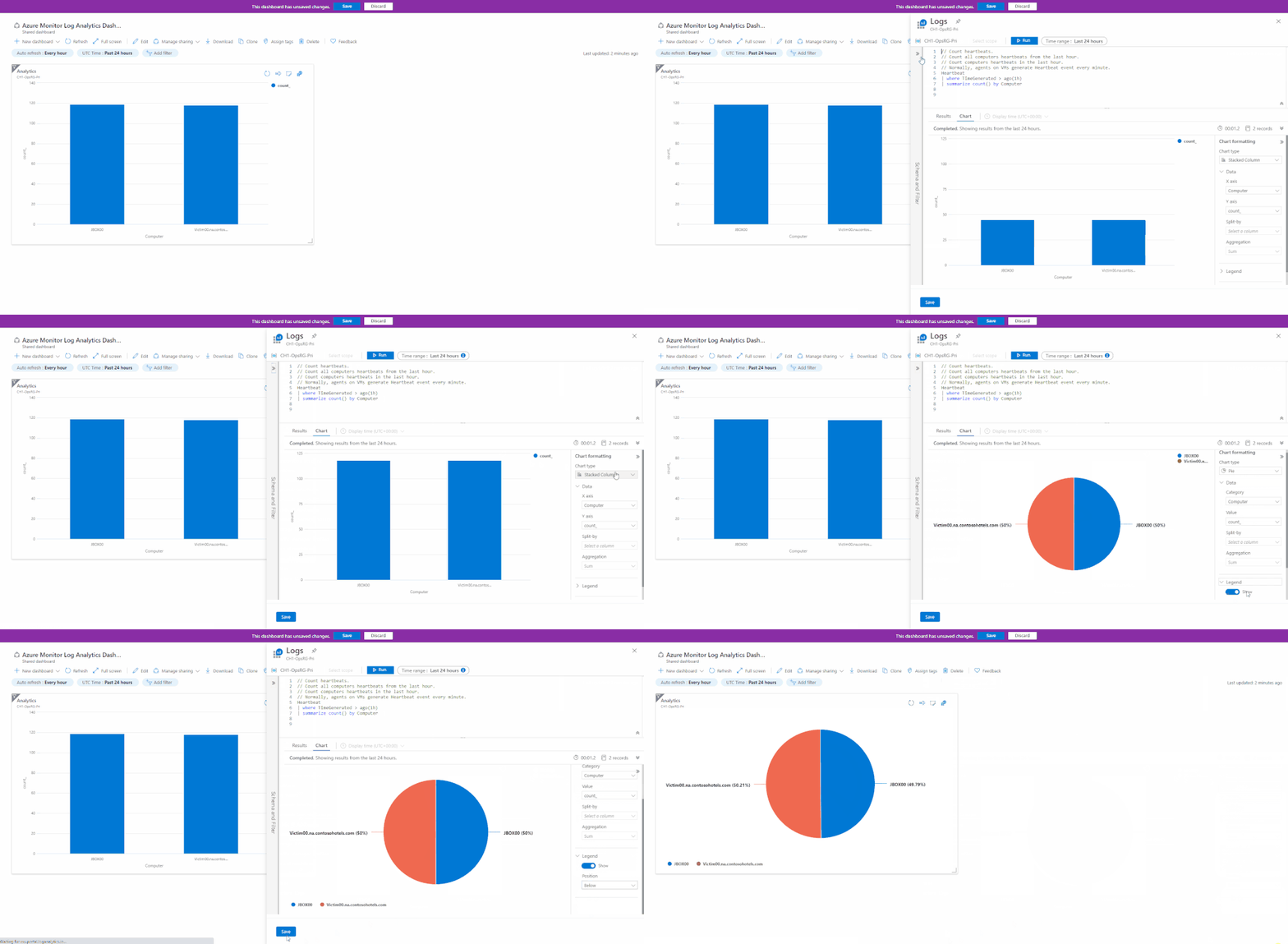
When editing a dashboard part – you will enjoy a full “Log Analytics” experience allowing you to update your queries and visualizations – right from your dashboard:
The new editing experience leverages Log Analytics’ new visualization UI to allow better control of your pinned dashboard parts.
Time filter warnings in Dashboard:
Log Analytics queries may contain specific time definitions that may conflict with the Dashboard’s general time scope.
For example, you may want the dashboard to show the last 24 hours worth of data, but have one part show data from the last week.
This might cause issues where the time scope of a pinned part is unclear.
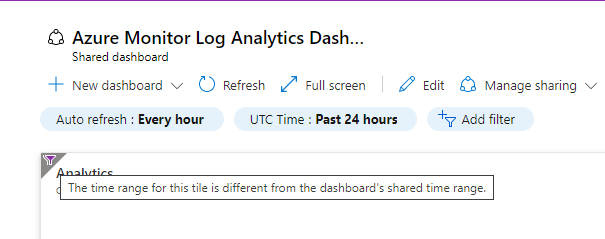
To address this we have added a visual indication to help users understand the time scoping of specific pinned part, if it’s different from the general dashboard scope.
Feedback
We appreciate your feedback! comment on this blog post and let us know what you think of the this feature.
You may also use our in app feedback feature to provide us with additional feedbacks:

by Contributed | Mar 16, 2021 | Technology
This article is contributed. See the original author and article here.
Last month, we used this space to announce Microsoft Viva Insights, part of the broader Microsoft Viva initiative that’s empowering and connecting employees in new ways in our evolving digital age. (You can this and other past blog articles here). In addition to Viva Insights, the Workplace Analytics team has introduced other feature updates over the past few weeks. Today’s update describes expanded support of worldwide languages in query results and the release of an R package for Workplace Analytics.
- UTF-8 encoded characters allowed in metric names
- Open-source R package for Workplace Analytics
UTF-8-encoded characters allowed in metric names
When you define a query, you select metrics and organizational-data attributes. After the query runs, its results are organized into columns and rows. The column headers in the results match the attribute names and metric names that you selected while defining the query.
Before this update, metric names that were in any character set other than Latin appeared garbled in column headers in query and OData output. This caused some customers to develop downstream apps or clients that anticipated and processed that output to make it consumable.
Now, this is no longer necessary. With this update, the names of metrics that you select while building a query can now be in any UTF-8 encoded character set – in other words, in the language of your choice.
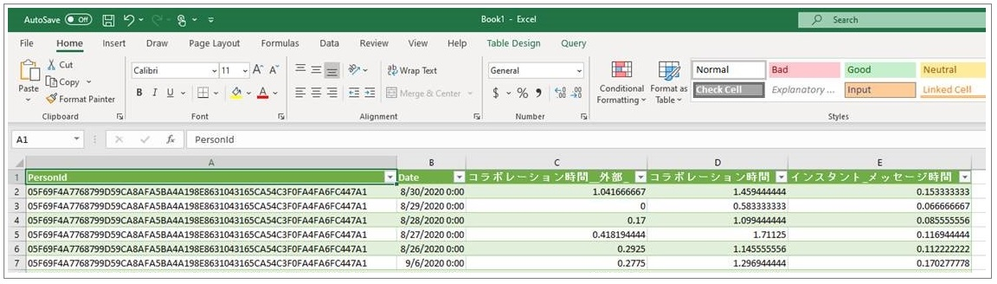
In the following example of a query-result file that’s been opened in Excel, metric names that the customer input in Japanese have remained in Japanese, while attribute names were uploaded in English and remain in English:
For more information, see Supported languages for column headers.
Open-source R package for Workplace Analytics

The M365 Insights team is pleased to share the first open-source release of Workplace Analytics shareable code, the wpa R package.
Note: R is an open-source statistical programming language and one of the most popular toolkits for data analysis and data science. For users of the R language, a “package” is a unit of sharable code that’s organized into libraries.
The wpa R package is a flexible repository of more than 100 functions that provide pre-built analyses in a single curated package. With this release, customer and partner analysts can go beyond the popular insights that Power BI templates and Workplace Analytics queries make available. They can help leaders go deeper and solve more specific problems by defining, scoping, and executing custom analyses.
Analyst objectives
This R package can be used by analysts and data scientists who are intermediate-to-advanced users of R or Python. With the wpa package, an analyst can:
- Run prebuilt analysis and visualizations of Workplace Analytics data with the ability to make settings to use organizational data variables and maintain privacy thresholds. They can easily export these outputs into any format required, including clipboard (copy & paste), Excel, .csv, and – for plots – .png, .svg, and .pdf.
- Validate data prior to analysis by running a data validation report, which performs systematic checks on metrics, organizational attributes, and meeting subject lines. The data-validation functions promote good practices of checking for patterns such as public holidays, non-knowledge workers, outliers, and missing values in the data to improve the quality and reliability of analysis.
- Generate prebuilt interactive HTML reports, which includes reports on data validation, subject-line text mining, and key collaboration metrics.
- Leverage advanced analytics functions, such as text mining, network analysis, and hierarchical clustering, all designed specifically for Workplace Analytics metrics.
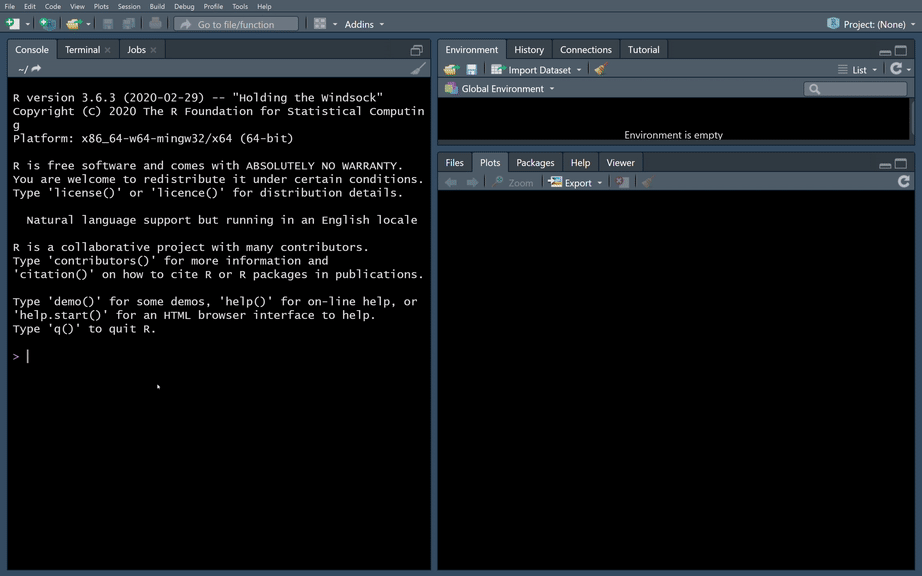
The user experience in creating Workplace Analytics visuals in R
Additional resources:
by Contributed | Mar 16, 2021 | Technology
This article is contributed. See the original author and article here.
Azure IoT is a leading platform of choice for organizations to develop applications and extract value from their sensor data. In order to do that, we need efficient tools and services that can help extract, collect, and understand relevant data to the Azure IoT platform from a variety of sensors from devices located on the edge.
Azure IoT Edge allows parts of AI, machine learning, advanced analytics, and other workloads that have traditionally been run in the cloud to be offloaded to on-prem IoT devices. Additionally, the runtime implements many of the mundane tasks required to create any IoT device (provisioning, secret integration with HSM, and observability) so that developers can concentrate on the business logic being run by the device. Even with these benefits, other aspects of IoT solutions are still pushed on to customers.
Orchestrating deployment of Azure IoT Edge on devices, managing the hardware, or ensuring secure and consistent data delivery from the sensors on to Azure IoT Hub are all areas that extend the development of IoT solutions. Customers need robust end-to-end IoT edge lifecycle management with orchestration optimized to scale their IoT deployments, and the ability to route relevant data securely and efficiently to both Azure IoT and on-prem.
Infiot’s integration with Azure IoT delivers relevant capabilities to more quickly unleash the power of Azure IoT at scale. With Infiot and Microsoft together, the solution unlocks value from IoT sensor data by solving the challenges of provisioning and securing IoT Edge devices, deploying applications, and accelerating the transmission and collection of data headed to Azure IoT Hub and enables capabilities like analytics and machine learning. The solution offers the following:
- Azure IoT Edge Runtime Deployed on : Customers benefit from complete life-cycle of container management for Azure IoT Edge Runtime and service modules on edges with policy based workflows.
- Automated Azure IoT Hub Connectivity: With API integration, Azure IoT Edge devices automatically connect to Azure IoT Hub and IoT devices are auto provisioned in the IoT Hub via Device Provisioning Service, making scalability simple and straightforward.
- Zero Trust Security: Comprehensive security functionality based on zero trust models safeguards IoT traffic from sensor devices to Azure IoT cloud services.
- Infiot Private Access: IoT devices can easily be accessed securely from anywhere with remote maintenance and troubleshooting with Infiot Private Access.
- Ruggedized Form Factor: Automated connectivity to Azure IoT Edge runtime deployed on Infiot ruggedized edges to Azure IoT cloud over wired or wireless (LTE/5G) WAN with complete link visibility and insights.
- Infiot Store and Forward: Upon blackout conditions, Infiot’s thin, wireless ruggedized edges locally store telemetry data bound for Azure IoT Hub. Once connectivity is restored, locally stored messages are delivered to IoT Hub.
Infiot Intelligent Access is ideal for all IoT deployments requiring converged connectivity, zero trust security, and edge compute, connecting IoT devices over LTE and 5G cellular networks, and addressing the challenges of most IoT projects around complexity and efficiency. Infiot thin, wireless ruggedized edge devices collect data from various assets and sensors running on a wide spectrum of protocols, govern data ownership, and send the right data to the right place by the right personnel – enabling deploying and managing hundreds of Azure IoT Edge devices at scale.
To learn more, please visit: https://www.infiot.com/azure-iot/
by Contributed | Mar 16, 2021 | Technology
This article is contributed. See the original author and article here.
Welcome to the “March Ahead with Azure Purview” blog series that helps you to maximize your Azure Purview trial/pilot/PoC with best practices, tips and tricks from product experts. In the previous blog post, we covered setting up the appropriate control plane and data plane roles to manage Azure Purview. In this post, we’ll roll up the sleeves and walk through the process of scanning data. Let’s get started!
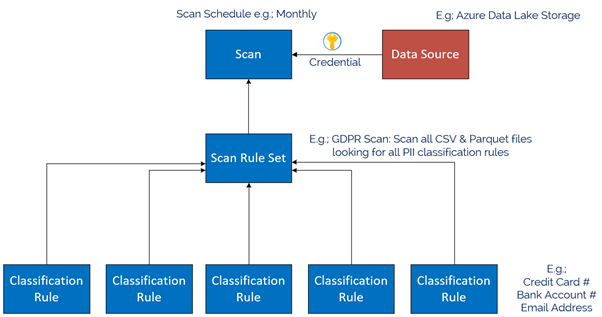
The Azure Purview Data Map enables you to create a holistic knowledge graph of your data residing in on-premises, multicloud and SaaS data stores via automated scanning and classification. The anatomy of an Azure Purview scan involves a number of key components illustrated in this diagram;
Starting at the bottom, we have Classification rules. Out of the box, Purview provides rules for common Personally Identifiable Information (PII) data such as Name, Email Address, Social Security Number and a heap of others. These are known as “System Rules”. We can access the System Rules by clicking Classification Rules in the Management Centre of Purview Studio.
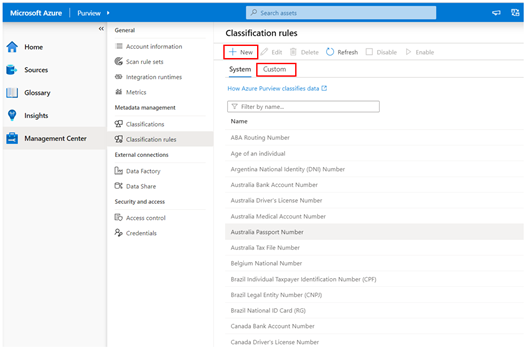
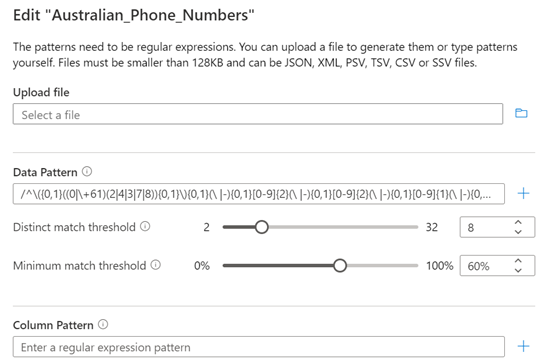
Beyond these, you can create your own custom classification rules using Regular Expressions and Dictionary Lists. Click on the Custom tab and then click + New to add a new Custom Rule. An example below is for Australian Phone Numbers.
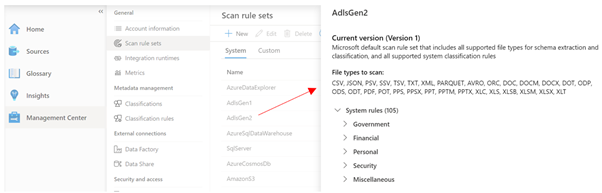
Once we have our Classification Rules, we group them together into Scan rule sets, used by a scan to look for certain data points. Out of the box, Purview has default Scan Rule Sets for each Source Type. For example, the default Scan Rule Set for Azure Data Lake Storage Gen 2 will scan all common file types (csv, json, parquet etc) looking for all out of the box System Rules.
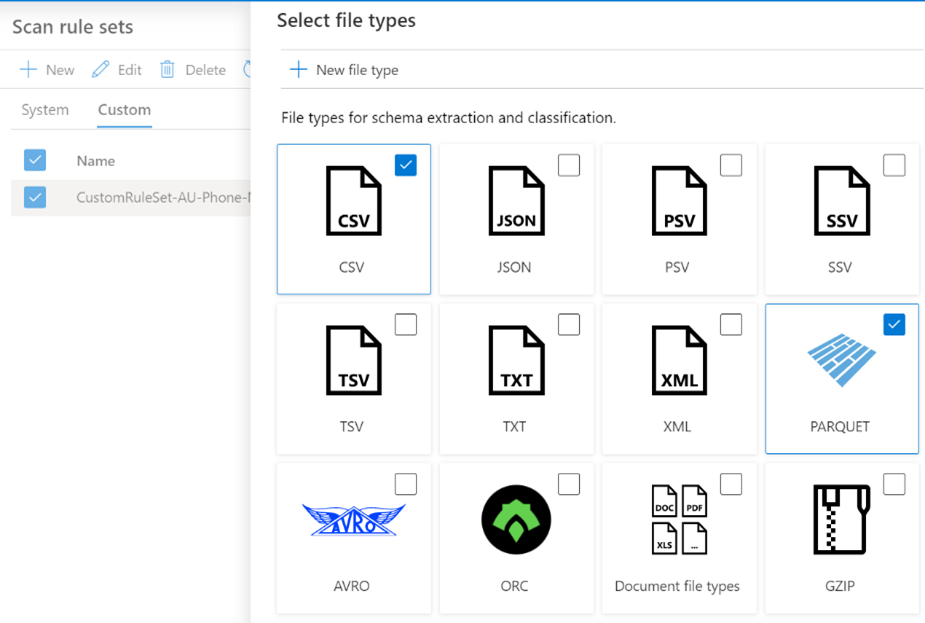
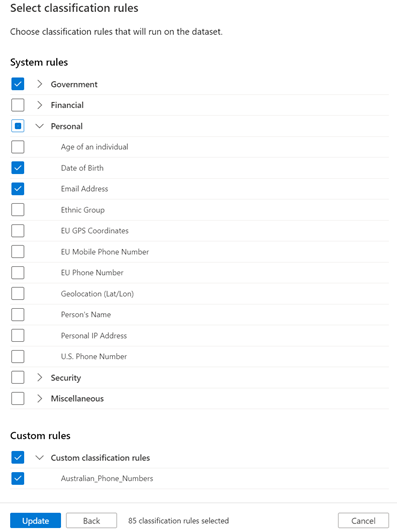
You can create your own Scan Rule Sets should you wish to customize how scans are performed. For example, you may only wish to scan certain file types, and include custom classification rules and/or ignore some System rules. This allows you to fine tune the time scans take, and therefore control the cost of Purview. Like Classification Rules, to create a custom Scan Rule Set, click on the Custom tab and then + New.
In the example below, we limit the file types for our custom Scan Rule Set to Parquet and CSV and choose specific classification rules to include in the scan.
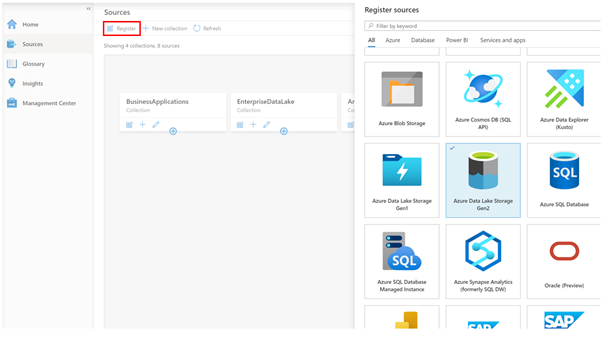
Now we have our Classification Rules and Scan Rule Sets, let’s create a data source to scan! On the Sources tab, we click Register, and choose a data source type. Today we natively support a range of Azure data sources such as Azure SQL Database, Power B I and Data Lake Storage, along with preview support for Oracle, SAP and Teradata . This list will expand as we move towards General Availability. Note that for Power BI and 3rd Party data sources such as Oracle, it’s a meta-data only scan. For these sources, we don’t use the classification rules during scanning to detect data such as email addresses.
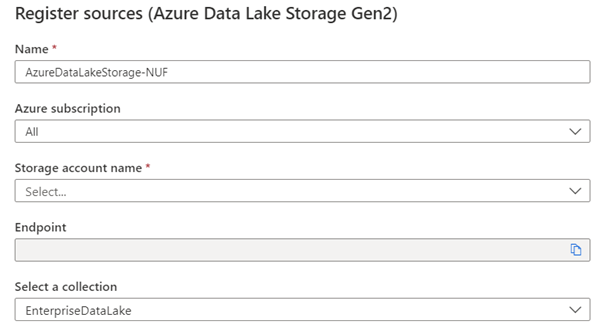
In my case, I chose Azure Data Lake Storage Gen2, so I’m asked for the account details, such as Subscription, Storage Account Name and what collection on the Data Map I want to register this source into, for example, EnterpriseDataLake.
Once registered, I can now perform a scan of the source by clicking the scan icon.
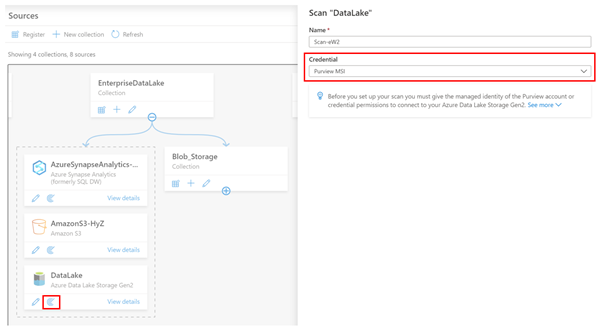
The first thing I need to do is choose what credentials Purview will use to scan the source. In the example above, I’m using the Purview Managed Service Identity (MSI), so I would need to grant the MSI permissions to read the storage account.
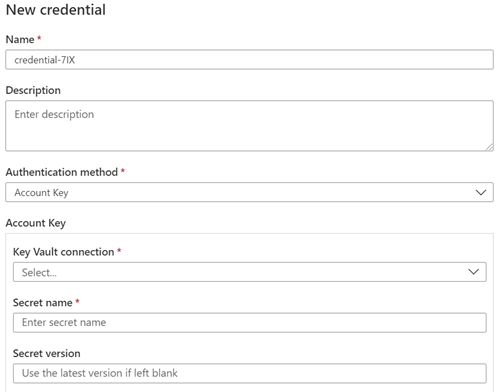
Let’s say my data source was Azure SQL Database, and I wanted to use a username and password, instead of the Purview MSI. In this case, I can choose to create a new credential and use Purview’s integration with Azure Key Vault to securely reference credentials from there.
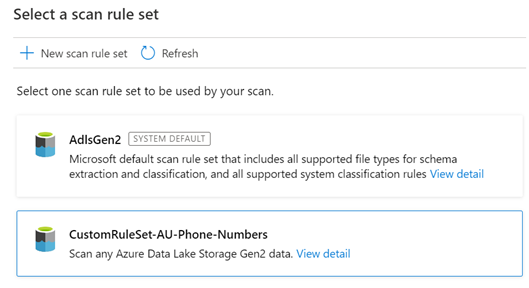
Depending on the Data Source, the next step asks for the scan scope. In the case of a Data Lake storage account, it might be to select which folders to scan or for a SQL Database, which tables to scan. After this, you choose the Scan Rule Set, as we covered above. In this example I’m choosing my Custom Scan Rule set.
The final step is to choose the scan schedule, which can be either recurring, or a Once-off scan.
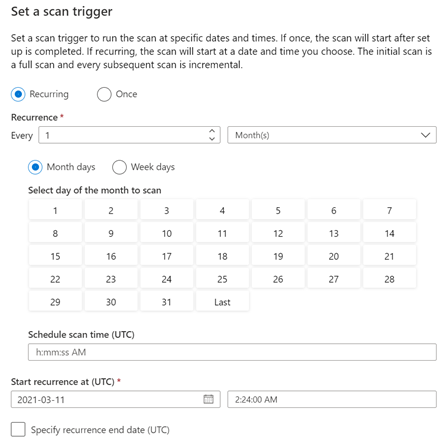
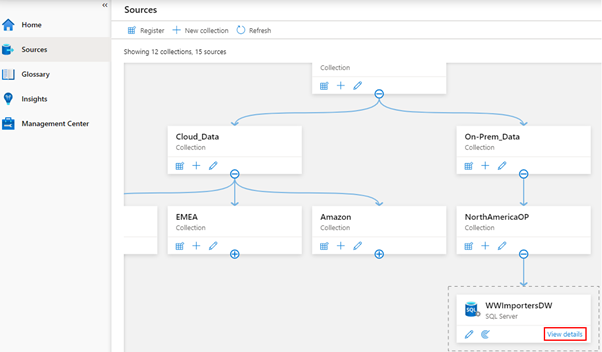
And that’s it! The scan is now scheduled to execute per your instructions. You can view the scan status by clicking View details button in the Data Map.
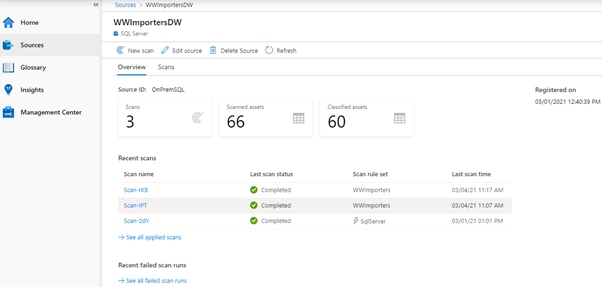
The Details screen shows the scan history and the number of assets scanned and classified.
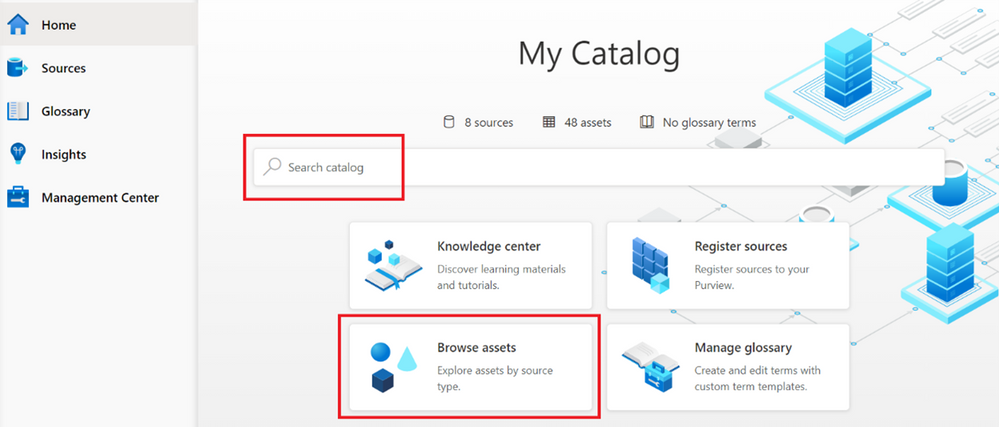
Once your scan completes, you can browse the assets from the home page, using either the Search bar, or the Browse Assets button.
Depending on the source, the scan setup process varies, for example, On-Premises SQL Server, AWS S3, Teradata, Oracle, SAP S/4HANA and SAP ECC. And be sure to checkout this blog post, which covers additional information on scanning, including Resource sets and scanning scale.
Finally, we’ve encapsulated some important Purview best practices here covering stakeholder management, deployment models and platform hardening.
Happy scanning!

by Scott Muniz | Mar 16, 2021 | Security
This article was originally posted by the FTC. See the original article here.
If you’re feeling anxious about your financial health during these uncertain times, you’re not alone. That’s why the three national credit reporting agencies, which last year gave people weekly access to monitor their credit report for free, are extending that benefit until April 20, 2022.
This is some helpful news, because staying on top of your credit report is one important tool to help manage your financial data. Your credit report has information about your credit history and payment history — information that lenders, creditors, and other businesses use when giving you loans or credit.
Now it’s easier than ever to check your credit more often. That’s because everyone is eligible to get free weekly credit reports until April 20, 2022 from the three national credit reporting agencies: Equifax, Experian, and Transunion. To get your free reports, go to AnnualCreditReport.com.
If you’re one of the many Americans struggling to pay your bills right now because of the Coronavirus crisis, here’s what you can do:
- Contact the companies you owe money to. Ask if they can postpone your payment, put you on a payment plan, or give you a temporary forbearance.
- Check your credit report regularly to make sure it’s correct — especially any new payment arrangements or temporary forbearance. The CARES Act generally requires your creditors to report these accounts as current.
- Fix any errors or mistakes that you spot on your credit report. Notify the credit reporting agencies directly. You can find out more by reading Disputing Errors on Credit Reports.
Find more advice and tips on handling the financial impact of the Coronavirus, and subscribe to the FTC’s Consumer Alerts.
Updated March 16, 2021 to reflect extension of weekly free credit reports.
Brought to you by Dr. Ware, Microsoft Office 365 Silver Partner, Charleston SC.

by Scott Muniz | Mar 16, 2021 | Security
This article was originally posted by the FTC. See the original article here.
At a time when many people left jobless by the pandemic are struggling to get by, scammers reportedly are using websites that mimic government unemployment insurance (UI) benefits websites. These sites trick people into thinking they’re applying for UI benefits, and they wind up giving the scammers their personal information.
The Department of Justice’s National Unemployment Insurance Fraud Task Force reports that scammers lure people to their fake websites by sending spam text messages and emails. These messages look like they’re from a state workforce agency (SWA) and give people links to these fake sites. When people enter their sensitive personal information on the fake sites, the scammers can use the information for identity theft.
A report to the FTC even said one of the fake sites told people to click the link if they did not file for UI benefits.
Here’s what you need to know: An SWA will not contact you out of the blue. SWAs will not send a text message or email inviting you to apply for UI benefits. If you get an unsolicited text or email message that looks like it’s from an SWA, know the steps to take to protect yourself:
- Never click links in an unexpected text message or email claiming to be from an SWA.
- If you have applied for UI benefits and get a text or email about your application, contact your SWA directly using contact information from its official website.
- If you need to apply for UI benefits, use this link to find your state’s UI application page. Follow the directions you find there.
- If you gave someone your sensitive information, visit IdentityTheft.gov/unemploymentinsurance to learn how to protect your credit from scammers or, if necessary, report that someone has misused your personal information to claim UI benefits.
If you get a suspicious text message or email message claiming to be from an SWA, please report it to the National Center for Disaster Fraud by visiting justice.gov/disaster-fraud or by calling 866-720-5721. You also can report it to the FTC at ReportFraud.ftc.gov. And please, tell the people you know about this scam. By sharing the information, you can help defeat the scammers.
Brought to you by Dr. Ware, Microsoft Office 365 Silver Partner, Charleston SC.

by Contributed | Mar 16, 2021 | Dynamics 365, Microsoft 365, Technology
This article is contributed. See the original author and article here.
As the supply chain evolves, logistics management has an even greater impact on the bottom line. Knowing the full price of an item once it arrives at your warehouse is crucial. Miscalculating landed cost through manual entry can result in lost profits for business owners. The Landed cost module in Supply Chain Management provides companies with an innovative way to track goods and determine the total charge in getting a shipment to its destination. With a single data entry, landed cost allows you to record end-to-end transportation fees quickly and accurately. Automating administrative tasks such as estimating landed costs and status tracking helps avoid financial missteps that can weaken product profitability. These enhanced features save time for staff and streamline production from the manufacturer to the warehouse. Landed cost often can account for up to 40 percent or more of the total cost of each imported freight item. First, there’s transport to the departure port, loading, sailing, customs clearance, and, finally, transport from the port of arrival. Then there are the delays, duties or other contingencies that will impact the landed price. Landed cost module functionality The Landed cost module in Supply Chain Management includes: Estimated landed cost visible at time of creation of voyage Receiving by container Status tracking at purchase order line level Landed cost apportioned to multiple purchase orders on one voyage Additional cost apportionment rules Preliminary posting of estimated costs that are reversed/adjusted as actual costs are received Automatic updates for FIFO, LIFO, weighted average, moving average, and standard costing Support of transfer orders Reduce guesswork Here are a few features that take the guesswork out of determining true costs of products and offer visibility for employees: Distribution of landed cost to items from voyage or containers. This is based on quantity, amount, percentage, weight, volume, volumetric calculation, or user-defined measure. Goods in transit accrual allows for full visibility of goods in transit for any tracked activity (for example: loading, customs, or clearance) and transport leg (for example: air, ocean, rail, or truck). Centralized shipping, which means voyages can contain products from multiple vendors, purchase orders, or legal entities in one or more containers/folios. Automated costs so that automated estimates of landed cost are used and then reversed out when actual landed cost invoices are processed. Import of business process compliance, which uses due dates to track invoices processed before or after receipt in the warehouse. Cost comparisons and reports to help you review costs by total voyage, container, purchase order, and line item by cost type code and category (such as FOB price, freight, accessed charges, duty, commissions, and brokerage fees). Voyage editor Every step of a voyage can be defined, including adding a purchase order to a container. Employees can also create a voyage with a purchase order from multiple entities. Template shipping and costing Landed cost also supports the creation of a series of customized templates covering standard freight journeys. These templates make it easier for your employees to keep journeys on course by allowing them to accurately record fees both actual and accrued for each step. It also helps to ensure that freight voyages are in legal and regulatory compliance. Voyage tracking Landed cost includes functionality to record and track voyage in transit. All data is integrated across the Supply Chain Management application. First, an activity start date or end date such as the loading date is entered. That entry then triggers an update to the shipping status and the purchase order receipt or confirmed date. This functionality allows you to: Record lead times between multiple ports based on rules Assign a voyage status to the purchase order line or goods in transit Process invoices before receipting of goods Share containers and voyages across entities Place goods from multiple vendors, countries, or regions in the same container Next steps To learn more, read the documentation for the Landed cost module. To see for yourself how Dynamics 365 Supply Chain Management can help your operations, get started today with a free trial
The post Here’s a way to increase the accuracy of landed cost calculations appeared first on Microsoft Dynamics 365 Blog.
Brought to you by Dr. Ware, Microsoft Office 365 Silver Partner, Charleston SC.



Recent Comments