by Contributed | Apr 9, 2021 | Technology
This article is contributed. See the original author and article here.
A plethora of cloud services stories to share this week. News includes Cloud Services (extended support) is generally available, migration tool in preview, new Azure AD Verifiable Credentials, Windows Virtual Desktop Start VM on connect feature, Azure Monitor container insights support for Azure Arc enabled Kubernetes extension mode in preview and an enterprise-scale Microsoft Learn module of the week.
Microsoft announces general availability of Cloud Services (extended support)
The new Azure Resource Manager (ARM)-based deployment model for Azure Cloud Services has now become generally available along with the platform-supported tool for migrating existing cloud services to Cloud Services (extended support) has gone into preview.
The primary benefit Cloud Services (extended support) provides is regional resiliency along with feature parity with Azure Cloud Services deployed using Azure Service Manager (ASM). It also offers some ARM capabilities such as role-based access and control (RBAC), tags, policy, private link support, and use of deployment templates.
There are several resources customers can use to learn more about Cloud Services (extended support).
Public preview for Azure AD verifiable credentials is now available
Organizations can now empower users to control credentials that manage access to their information. Organizations using Azure AD can now easily design and issue verifiable credentials to represent proof of employment, education, or any other claim, so that the holder of such a credential can decide when, and with whom, to share their credentials. Each credential is signed using cryptographic keys associated with the DID that the user owns and controls.
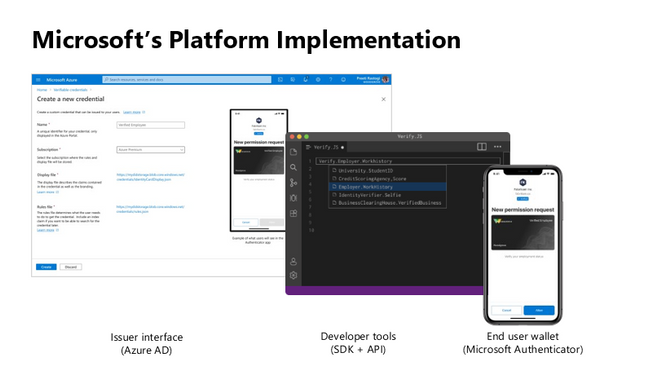
Unlike current proprietary identity systems, verifiable credentials are standards-based which makes it easy for developers to understand, and doesn’t require custom integration. Users can manage and present credentials using Microsoft Authenticator with one key difference. Unlike domain-specific credentials, verifiable credentials function as proofs that users control, even when they’re issued by organizations. Because verifiable credentials are attached to DIDs that users own, they can be confident that they—and only they—control who can access them and how.
Please visit Verifiable Credentials documentation to learn more.
Start VM on connect feature for Windows Virtual Desktop now in public preview
The start VM on connect setting for Windows Virtual Desktop automatically turns on a VM that is in a deallocated state when a user attempts to connect to it. This setting enables the ability to deallocate VMs that are not in use to save cost while ensuring that users can connect to it if needed.
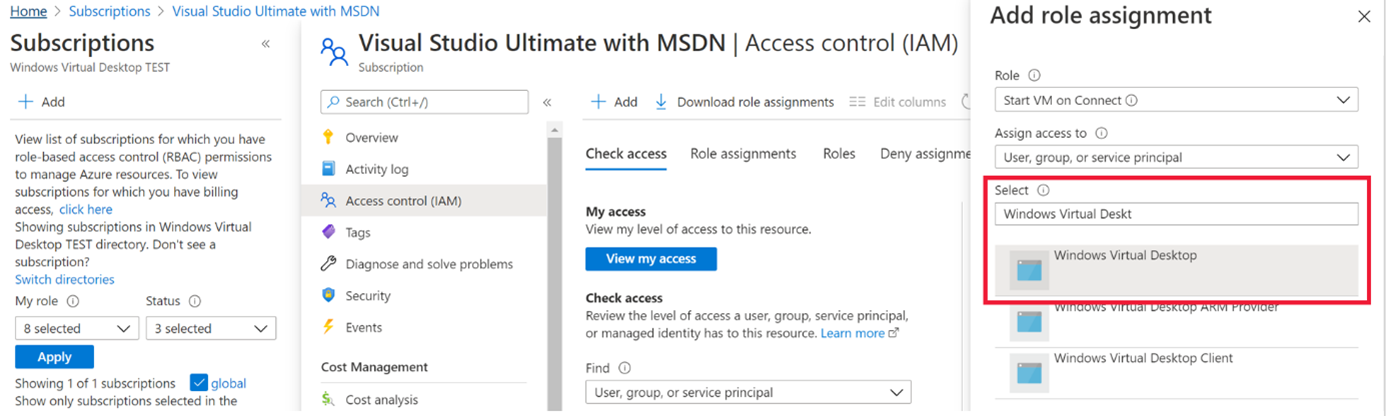
Please note the following limitations currently with the public preview:
- The setting can be configured on the validation pool only
- The setting can only be applied for personal host pools only.
- Access to this setting is available from PowerShell and Rest API only.
Learn more about additional pre-requisites and set-up guidance in our documentation.
Azure Monitor container insights support for Azure Arc enabled Kubernetes extension model in public preview
Containers insights in Azure Monitor is now extending monitoring support for Kubernetes clusters hosted on Azure Arc via public preview.
Container insights on Azure Arc-enabled Kubernetes keeps the same features as Azure Kubernetes Service (AKS) monitoring, such as:
- Performance visibility by collecting memory and processor metrics from controllers, nodes, and containers that are available in Kubernetes.
- Visualization through workbooks and in the Azure portal.
- Alerting and querying historical data for troubleshooting issues.
- Capability to scrape Prometheus metrics.
With the new extension model update, you receive these new benefits:
- Easier enablement of container insights through the portal.
- Receive automatic agent updates for the latest version of monitoring.
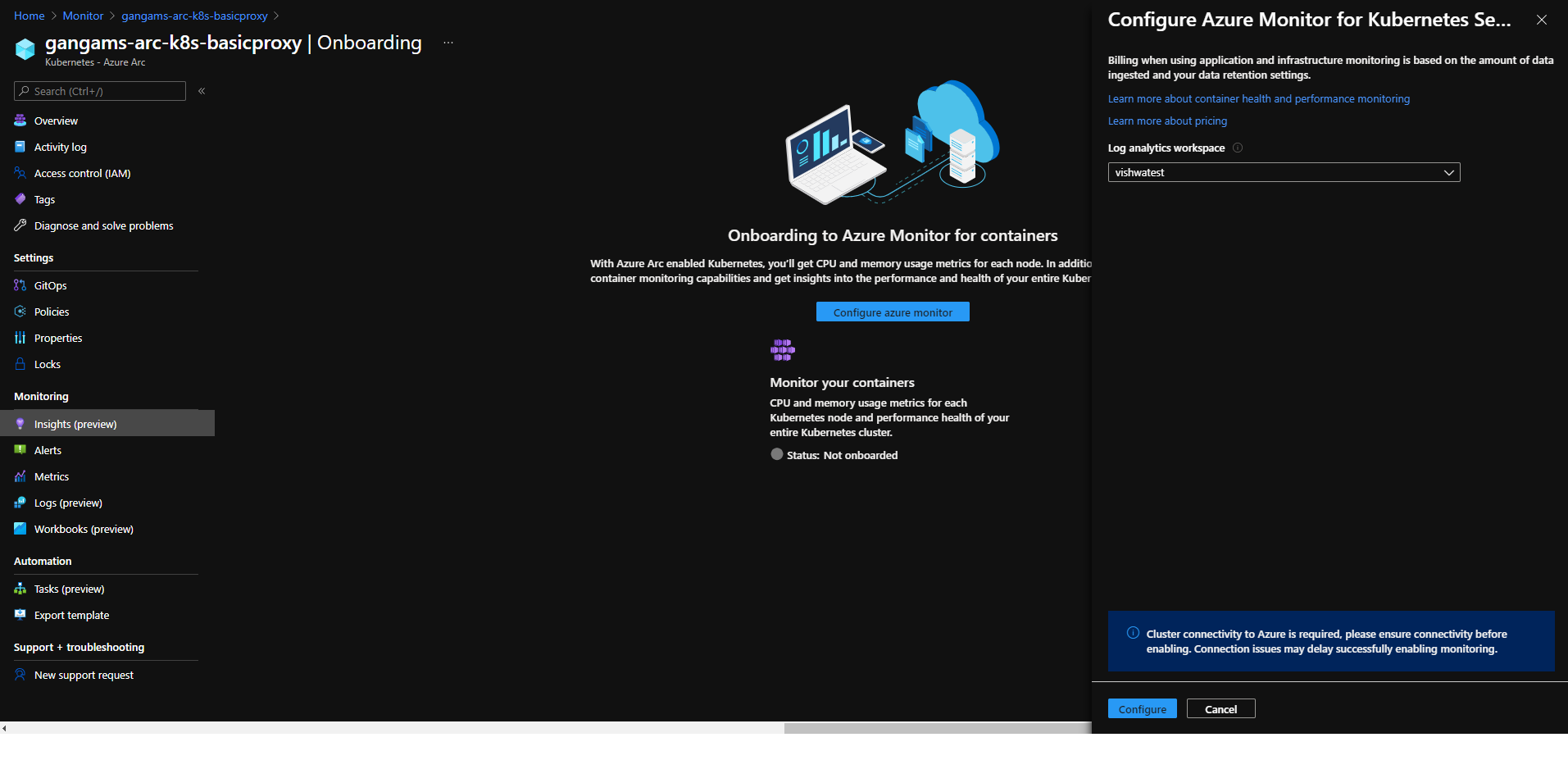
Learn more about containers insights.
Learn more about Azure Arc-enabled Kubernetes onboarding through the extension model.
Community Events
- Global Azure 2021 – April 15th to 17th, communities around the world are organizing localized live streams for everyone around the world to join and learn about Azure from the best-in-class community leaders.
- Hello World – Special guests, content challenges, upcoming events, and daily updates
- Testing in Production – Producer Pierre and Producer Steve are back to share thier broadcasting tips and talk a little tech
MS Learn Module of the Week

Creating an enterprise-scale architecture in Azure
Learn how Microsoft Cloud Adoption Framework for Azure enterprise-scale landing zones can help your organization to accelerate cloud adoption from months to weeks. We will explore how to create Azure landing zone architecture at enterprise-scale. Learn about landing zone critical design areas to build and operationalize your Azure environment.

Modules include:
- Introduction to enterprise-scale landing zones in the Microsoft Cloud Adoption Framework for Azure
- Enterprise-scale architecture organizational design principles
- Network design principles for enterprise-scale architecture
- Enterprise-scale architecture operational design principles
Learn more here: Create an enterprise-scale architecture in Azure

Let us know in the comments below if there are any news items you would like to see covered in the next show. Be sure to catch the next AzUpdate episode and join us in the live chat.

by Contributed | Apr 9, 2021 | Technology
This article is contributed. See the original author and article here.
SharePoint Framework Special Interest Group (SIG) bi-weekly community call recording from April 8th is now available from the Microsoft 365 Community YouTube channel at http://aka.ms/m365pnp-videos. You can use SharePoint Framework for building solutions for Microsoft Teams and for SharePoint Online.
Call summary:
Preview the new Microsoft 365 Extensibility look book gallery – cross platform extensibility. Update on upcoming SharePoint Framework v1.12.1 features, preview, beta and release. Register now for April trainings on Sharing-is-caring. Latest project updates include: PnPjs Client-Side Libraries v2.4.0 release scheduled for April 9, and please provide feedback on v3.0 Hub planning and discussion issues posted – issue #1636 by April 15th. CLI for Microsoft 365 Beta v3.9 delivered. Reusable SPFx React Controls – v2.6.0 and v3.0.0 (on hold for SPFx v1.12.1) and Reusable SPFx React Property Controls – v2.5.0 and v3.0.0 (on hold for SPFx v1.12.1). PnP SPFx Generator v1.16.0 (Angular 11 supported), PnP Modern Search v3.19 to be released shortly and v4.1.0 released March 20th. There were eight PnP SPFx web part samples delivered last 2 weeks. Great work! The host of this call is Patrick Rodgers (Microsoft) @mediocrebowler. Q&A takes place in chat throughout the call.
Actions:
Demos:
Teams Meeting Questionnaire App with SharePoint Framework – The Questionnaire Pre-meeting app allows Microsoft Teams meeting attendees to ask questions related to meeting before meeting starts. SPFx v1.12 provides support for Microsoft Teams meeting apps development, this web part. Operationally – in calendar create meeting, then add Meeting Questionnaire tab to meeting. Questionnaire is tied to a single SharePoint list that organizes questions by Meeting ID. Sample in PnP Samples repository.
Building an advanced SPFx Image Editor web part – This solution contains an SPFx web part – a browser-based HTML Image Editor that uses canvas and Office UI Fabric. Use File Picker component to select image and manipulate it – Resize, Crop, Flip, Rotate, Scale, Filter (Grayscale / Sepia), Redo / Undo, History of Actions. Web part created initially to pick files from a custom external data source. Sample is in Sample Gallery.
Viva Connections Desktop and Extensibility – Microsoft Viva is a suite of products. Viva Connections is an integrated experience with Microsoft Teams and SharePoint backed by Microsoft security, privacy, and compliance. Viva Connections is extensible – use out of the box web parts or create custom web parts and extensions based on requirements. You ultimately determine what capabilities to make available in the Viva Connections UX. The journey – a phased rollout of capabilities Worldwide over the next 6 months. Currently available Viva Connections Desktop is just a start on this journey.
SPFx web part samples: (https://aka.ms/spfx-webparts)
As is the case this week, samples are often showcased in Demos. Thank you for your great work.
Agenda items:
Demos:
Resources:
Additional resources around the covered topics and links from the slides.
General Resources:
Other mentioned topics:
Upcoming calls | Recurrent invites:
PnP SharePoint Framework Special Interest Group bi-weekly calls are targeted at anyone who is interested in the JavaScript-based development towards Microsoft Teams, SharePoint Online, and also on-premises. SIG calls are used for the following objectives.
- SharePoint Framework engineering update from Microsoft
- Talk about PnP JavaScript Core libraries
- Office 365 CLI Updates
- SPFx reusable controls
- PnP SPFx Yeoman generator
- Share code samples and best practices
- Possible engineering asks for the field – input, feedback, and suggestions
- Cover any open questions on the client-side development
- Demonstrate SharePoint Framework in practice in Microsoft Teams or SharePoint context
- You can download a recurrent invite from https://aka.ms/spdev-spfx-call. Welcome and join the discussion!
“Sharing is caring”
by Contributed | Apr 9, 2021 | Technology
This article is contributed. See the original author and article here.
Azure Batch:
You can use Batch to run large-scale parallel and high-performance computing (HPC) applications efficiently in the cloud. It’s a platform service that schedules compute-intensive work to run on a managed collection of virtual machines (VMs). It can automatically scale compute resources to meet the needs of your jobs.
With the Batch service, you define Azure compute resources to execute your applications in parallel, and at scale. You can run on-demand or scheduled jobs. You don’t need to manually create, configure, and manage an HPC cluster, individual VMs, virtual networks, or a complex job and task-scheduling infrastructure.
Azure Data Factory:
Data Factory is a cloud-based data integration service that orchestrates and automates the movement and transformation of data. You can use Data Factory to create managed data pipelines that move data from on-premises and cloud data stores to a centralized data store. An example is Azure Blob storage. You can use Data Factory to process/transform data by using services such as Azure HDInsight and Azure Machine Learning. You also can schedule data pipelines to run in a scheduled manner (for example, hourly, daily, and weekly). You can monitor and manage the pipelines at a glance to identify issues and take action.
Configure Batch job with ADF:
In this article, we will be looking into the steps involved in configuring a simple batch job with Azure data factory using the Azure portal.
We will be using an *.exe file and execute it in Azure data factory pipeline using Azure Batch.
This example does not require any additional tools or application to be pre-installed for the execution.
Create a Batch account:
- In the Azure portal, select Create a resource > Compute > Batch Service.
- In the Resource group field, select Create new and enter a name for your resource group.
- Enter a value for Account name. This name must be unique within the Azure Location selected. It can contain only lowercase letters and numbers, and it must be between 3-24 characters.
- Under Storage account, select an existing storage account or create a new one.
- Do not change any other settings. Select Review + create, then select Create to create the Batch account.
When the Deployment succeeded message appears, go to the Batch account that you created.
Public documentation for creating a Batch account.
Create a Pool with compute nodes:
- In the Batch account, select Pools > Add.
- Enter a Pool ID called mypool.
- In Operating System, select the following settings (you can explore other options).
Setting
|
Value
|
Image Type
|
Marketplace
|
Publisher
|
microsoftwindowsserver
|
Offer
|
windowsserver
|
Sku
|
2019-datacenter-core-smalldisk
|
- Scroll down to enter Node Size and Scale settings. The suggested node size offers a good balance of performance versus cost for this quick example.
Setting
|
Value
|
Node pricing tier
|
Standard A1
|
Target dedicated nodes
|
2
|
- Keep the defaults for remaining settings, and select OK to create the pool.
Batch creates the pool immediately, but it takes a few minutes to allocate and start the compute nodes. During this time, the pool’s Allocation state is Resizing. You can go ahead and create a job and tasks while the pool is resizing.
After a few minutes, the allocation state changes to Steady, and the nodes start. To check the state of the nodes, select the pool and then select Nodes. When a node’s state is Idle, it is ready to run tasks.
Public documentation for creating a Batch pool.
Create Azure Data Factory:
- Go to the Azure portal.
- From the Azure portal menu, select Create a resource.
- Select Integration, and then select Data Factory.
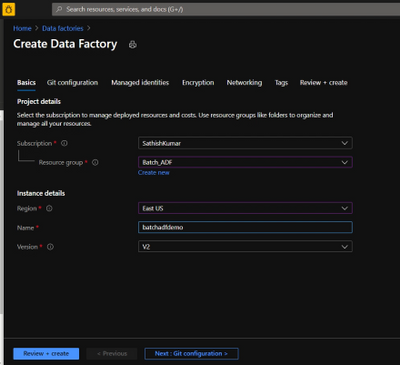
- On the Create Data Factory page, under Basics tab, select your Azure Subscription in which you want to create the data factory.
- For Resource Group, take one of the following steps:
- Select an existing resource group from the drop-down list.
- Select Create new, and enter the name of a new resource group.
- For region, select the same region as the Batch account to avoid additional charges due to communication between different datacenters.
- For Name, provide a name for your ADF and kindly note that the name must be universally unique.
- For version, select v2.
- Select Next: Git configuration, and then select Configure Git later check box.
- Select Review + create and select Create after the validation is passed. After the creation is complete, select Go to resource to navigate to the Data Factory page.
- Below is an example of how a Azure Data Factory overview page looks like.
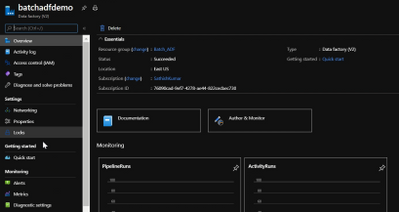
- Now click on ‘Author & Monitor’ to open the ADF workspace.
- Before the next step, download the helloworld.exe file from the here and upload it to one of the containers in your storage account which is being used with the Batch account.
Public documentation for creation of Azure Data Factory.
Configure a pipeline in ADF:
- In the left-hand side options, click on ‘Author’.
- Now click on the ‘+’ icon next to the ‘Filter resource by name’ and select ‘Pipeline’.
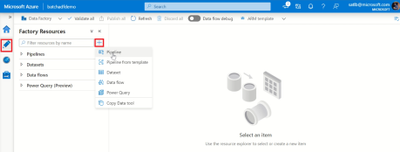
- Now select ‘Batch Services’ under the ‘Activities’.
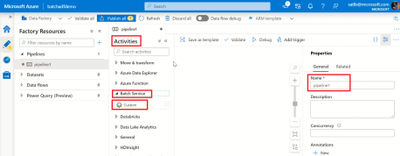
- Change the name of the pipeline to the desired one.
- Drag and drop the custom activity in the work area.
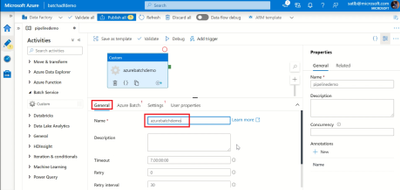
- Under the General section, enter a Name.
- Next, select Azure Batch and select the existing Azure Batch Linked Service or create a new one.
- To create an Azure Batch Linked Service, click on the + New. Enter the details as provided in the below screenshot.
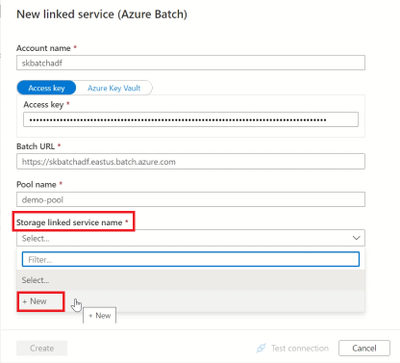
- Create a Storage Linked service name too, by selecting the + New in the dropdown.
- Enter the required details to create a storage linked service name, test the connection to check if it succeeds and click on create.
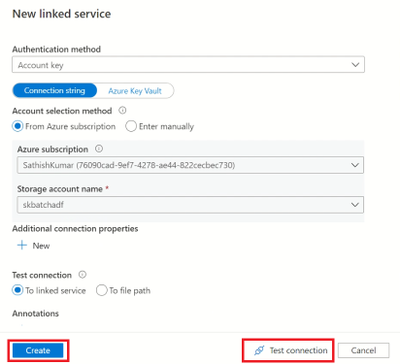
- Now, select the storage linked service name in the Azure Batch linked service and click on create.
- Next, click on settings and enter the command you want to execute (in this example, we will execute a simple helloworld.exe file which will print ‘Hello World’).
- So, in the command line type ‘(filename).exe’
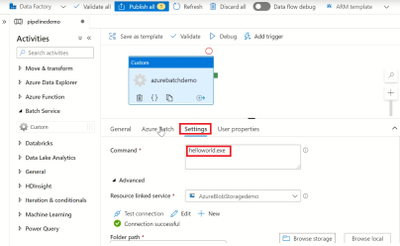
- Select the storage account linked service which we created, under the Resource Linked service.
- Under the Folder path, select the location of the container where the ‘helloworld.exe’ file is present by clicking on Browse storage.
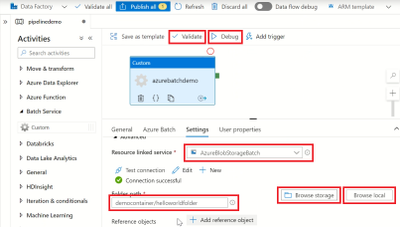
- Then click on Validate to check for any errors in the configuration.
- Finally, click on Debug to run the pipeline while will create a job in the Azure batch pool and execute the command line as a task.
Note: We are currently checking the pipeline without publishing it. So once the pipeline succeeds make sure to click on Publish All else all these configuration will be lost.
Check the Job status in Azure Batch:
- Navigate to the corresponding Batch account and click on Jobs.
- Click on the recently created Job and open the task which had run under it.
- Check for the successful Job completion by opening the stdout.txt file which will contain the output.
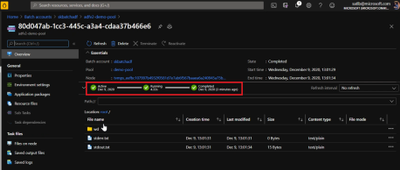
- The output is displayed in the stdout.txt file for us.
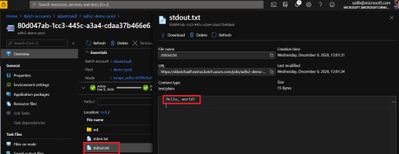
- We have now configured a simple Batch job using ADF pipeline and verified the output successfully.
Thank you for following the steps, I hope the blog was useful and kindly provide any comments based on your view or if any additional information needs to be included.
You can also try out a different execution of Azure batch with Azure Data Factory using a python script file.
by Contributed | Apr 9, 2021 | Technology
This article is contributed. See the original author and article here.
Ultra Disk Storage is now generally available for the HPC and GPU VM sizes.
Ultra Disks
Ultra Disks are the highest performance tier of Azure managed disks for data-intensive workloads. They deliver high throughput and IOPS, and consistent low latency disk storage. Customers can dynamically change the performance of the disks without the need to restart your virtual machines (VM).
For HPC/AI workloads, the Ultra Disks can be used as a higher performance tier to Premium Disks for remote storage scenarios (NFS pools, parallel file systems, etc.)
Considerations for Ultra Disks vis-a-vis Premium Disks
Note that the availability of Ultra Disks by region/AZ/SKU is different (and restrictive today) from that of Premium Disks. Even though a VM size is supported, the support is different per region/zone.
- Today Ultra Disk and VMs have to be co-located, so Ultra Disks are only available to deploy for those H/N clusters that are co-located with Ultra Disk. Hence NOT ALL H/N clusters will be deployable with Ultra Disk.
HPC and GPU VM SKUs with Ultra Disks
In addition to the support for Premium Disks, the Ultra Disks can now also be attached to the following H* and N* VM sizes (depending on region/zone as outlined above):
- HPC: HBv2, HB, HC
- Currently HBv3 is not co-located with Ultra Disk. So as an example, Ultra Disk cannot be attached to an HBv3 VM in any region where HBv3 is live today.
- GPU: NDv4, NDv2, ND, NC_T4_v3, NCv3, NCv2, NVv4, NVv3
Performance
The table below demonstrated averaged bandwidth, IOPS and latency numbers on some of the HPC and GPU SKUs. These are obtained obtained using fio.
- The biggest improvement from Ultra Disks on the H*/N* VMs is to latencies that are now sub-millisecond (10x lower than Premium Disks).
- For most scenarios, the VM limits are the bottleneck with Ultra Disks and the disk limits becomes the bottleneck with Premium Disks. The suspected VM limits are anticipated to be increased in the coming weeks.
- VM limits are pre-assigned limits for managed disk performance to each VM size.
- HBv2 and HC obtain max write bandwidth with Ultra Disk. For many other SKUs, However the bandwidth obtained with an Ultra Disk is similar to what is obtained with Premium Disk.
- A single Ultra Disk can hit the , hence removing the need for striping multiple disks and making disk management easier.
- The IOPS obtained with a single Ultra Disk is 2.5-4x of a single Premium Disk.
- Note the results obtained below are using both the Disks at the highest performance tiers
VM SKU |
Premium (20000 GB) |
Ultra (1024 GB) |
Spec: BW 900 MBps, 20K IOPS |
Spec: BW 2000 MBps, 160K IOPS |
BW (MBps) |
IOPS (K) |
Latency (ms) |
BW (MBps) |
IOPS (K) |
Latency (ms) |
HC44 |
876 (R, W) |
20 |
2.495 |
700 (R), 1944 (W) |
64 |
0.215 |
HB120_v2 |
876 (R, W) |
18 |
2.422 |
840 (R), 1946 (W) |
30 |
0.235 |
NV48_v3 |
880 (R, W) |
20 |
1.51 |
1172 (R, W) |
80 |
0.339 |
NV32_v4 |
703 (R, W) |
20 |
2.258 |
703 (R, W) |
49 |
0.242 |
NDv2 |
876 (R, W) |
20 |
2.207 |
710 (R), 1173 (W) |
78 |
0.216 |
NC64_T4_v3 |
704 (R, W) |
20 |
2.149 |
704 (R, W) |
49 |
0.254 |
Impact of Accelerated Networking
None. AccelNet does not improve Managed Disks performance. Exceptions maybe corner cases of the VMs doing heavy VM-VM network traffic over the Ethernet interface while doing VM-Managed Disk traffic at the same time.
Resources

by Contributed | Apr 8, 2021 | Technology
This article is contributed. See the original author and article here.
Oxford’s AI Group 4 Project 15 Writeup
Who are we?
Goal
The goal of the project was to count the number of elephants in a sound file.
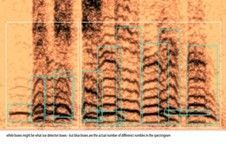
To do so, we detected whether rumbles are belonging to the same elephant or not
Literature
- Poole, Joyce H. (1999). Signals and assessment in African elephants: evidence from playback experiments. Animal Behaviour, 58(1), 185-193
- Jarne, Cecilia (2019). A method for estimation of fundamental frequency for tonal sounds inspired on bird song studies. MethodX, 6, 124-131
- Stoeger, Angela S. et al (2012). Visualizing Sound Emission of Elephant Vocalizations: Evidence for Two Rumble Production Types.
- O’Connell-Rodwell, C.E. et al (2000). Seismic properties of Asian elephant (Elephas maximus) vocalizations and locomotion. Journal of the Acoustic Society of America, 108(6), 3066-3072
- Heffner, R. S., & Heffner, H. E. (1982). Hearing in the elephant (Elephas maximus): Absolute sensitivity, frequency discrimination, and sound localization. Journal of Comparative and Physiological Psychology, 96(6), 926–944
- Elephant Listening Project, Cornell University: https://elephantlisteningproject.org/
- Project 15, Microsoft: https://microsoft.github.io/project15/
Introduction
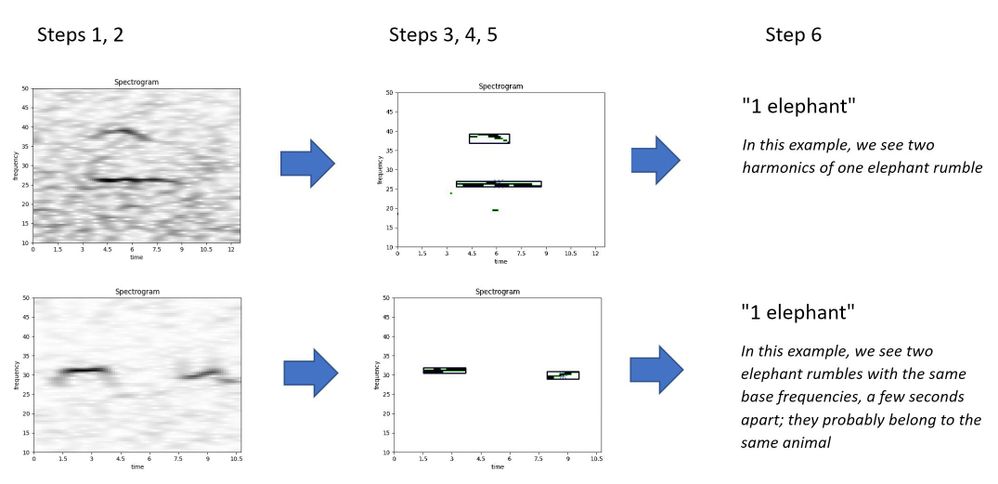
- Sound files can be analysed by transforming them into a 2D image: a spectrogram of time (seconds) vs frequency (Hertz). The third dimension is sound intensity (decibel), which can be shown as a colour or grayscale.
- Elephants produce rumbles to communicate with a typical frequency of 10 – 50 Hz and lasting 2 – 6 seconds
- One elephant rumble will have many harmonics, which are sound waves of increasing frequency.
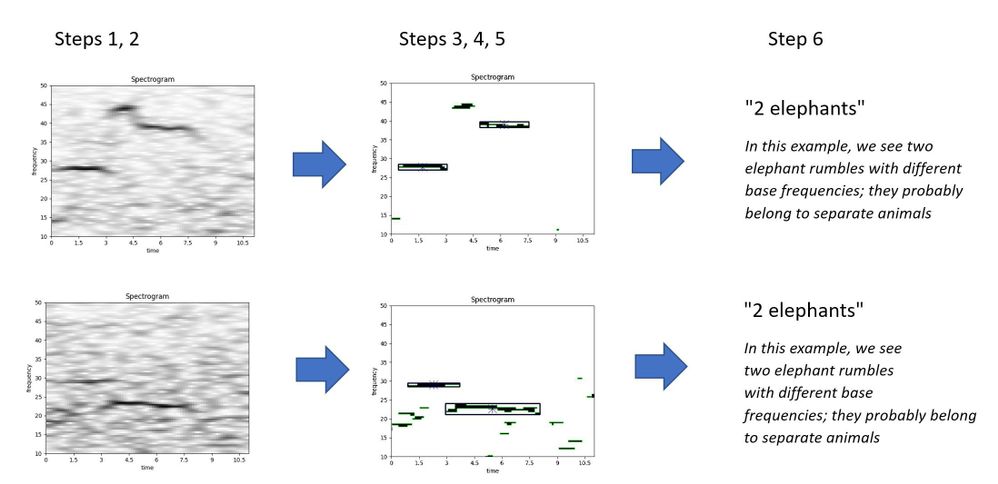
- An elephant can be identified by its base frequency. If there are two slightly overlapping or separated rumbles with a different base frequency, they probably belong to separate animals.
Data
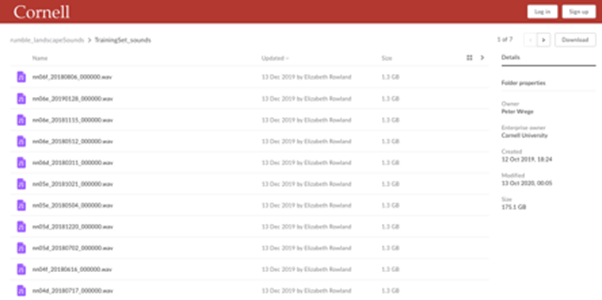
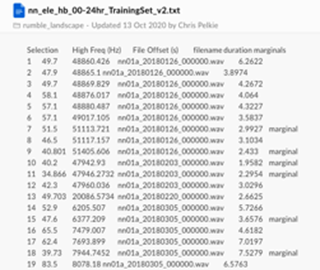
We received a set of sounds files (.wav) and metadata that pointed us to the segments where elephants were likely to produce rumbles.
Challenges:
- Big data set
- Joining the files might be a challenge
- Labels / annotations don’t mention the number of elephants
Data Pipeline
- Segmenting data: based the metadata files, we create segments of a few seconds that contain the interesting information
- Spectrograms: each data segment is transformed into a 2D image of time vs frequency (10-50 Hz), using FFT transformation algorithm, lowpass/highpass filters, and frequency filters
- Noise reduction: each spectrogram is reduced of noise and transformed into a simple monochrome (black and white) image
- Contours detection: each monochrome image is evaluated with a contour detection algorithm, to distinguish the separate ‘objects’ which in our case are the elephant rumbles
- Boxing: for each contour (potential elephant rumble) we calculate the size (height and width) by drawing a box around the contour
- Counting: we compare the boxes that identify the rumbles to each other in each spectrogram. Based on a few business rules, we count the number of unique elephant rumbles in each image
Samples
Source Code
- The source code is made available at: https://github.com/AI-Cloud-and-Edge-Implementations/Project15-G4
- All code is written in Python and runs on premise or in the cloud (Azure)
- We used the following frameworks to process and analyze the data:
- boto3 for connecting to Amazon AWS
- Numpy, Pandas, SciPy and MatPlotLib for statistical analysis and visualization
- Librosa for FFT
- noisereduce for noice reduction
- SoundFile
- OpenCV for contour detection
- Explanatory video can be found at:
Results
- We analysed 3935 elephant sounds:
- 112 spectrograms were identified as containing 0 elephants
- 3277 spectrograms were identified as containing 1 elephant
- 505 spectrograms were identified as containing 2 elephants
- 40 spectrograms were identified as containing 3 elephants
Results of the Boxing algorithm
- The boxing algorithm was evaluated by Liz Rowland of Cornell University
- The reported accuracy of the model is:
- 97.29 % for the Training dataset (3180 cases)
- 99.29 % for the Testing dataset (758 cases)
- This proves that the model is useful for counting elephants
- In combination with other models (elephant detection), many interesting use case can be built with this model, for example visualizing elephant movements and detecting poaching
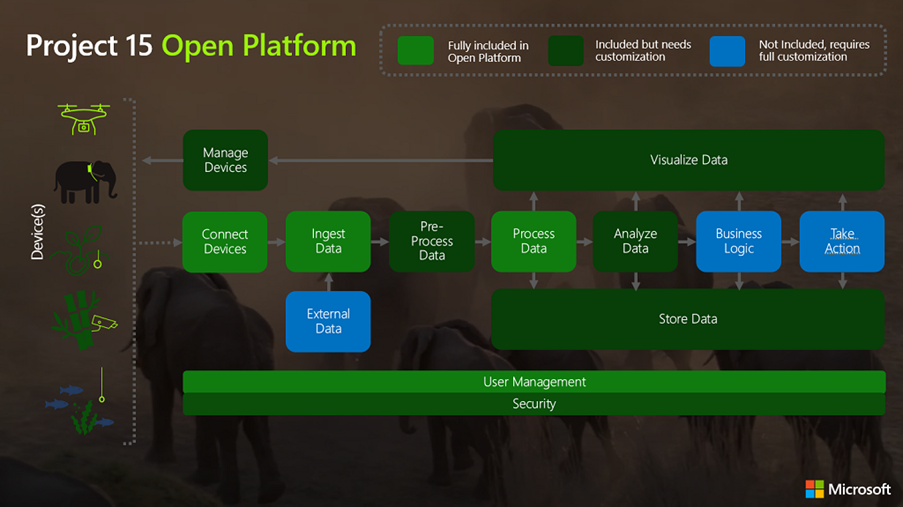
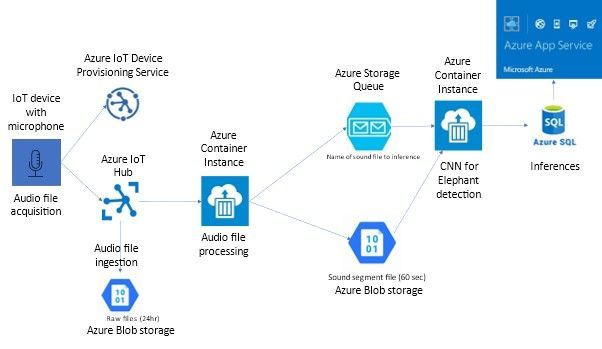
Project 15 Architecture
Building ML Models
- Aim
Using the processed spectrogram data as an input to a CNN to automatically categorise how many elephants are present
- Why are we doing this?
- To enable automation the workflow end to end
- To improve accuracy by reducing human error
- To save time, enabling researchers to focus their attention on complex problems
- Our Approach
Transfer learning looks to take advantage of models which have been pre-trained on large datasets, then fine tuning to our specific problem. This approach is becoming very popular for several reasons (quicker time to train, better performance, not needing lots of data) and we found it to work well.
Model Summary
- Implemented using keras with a tensorflow backend.
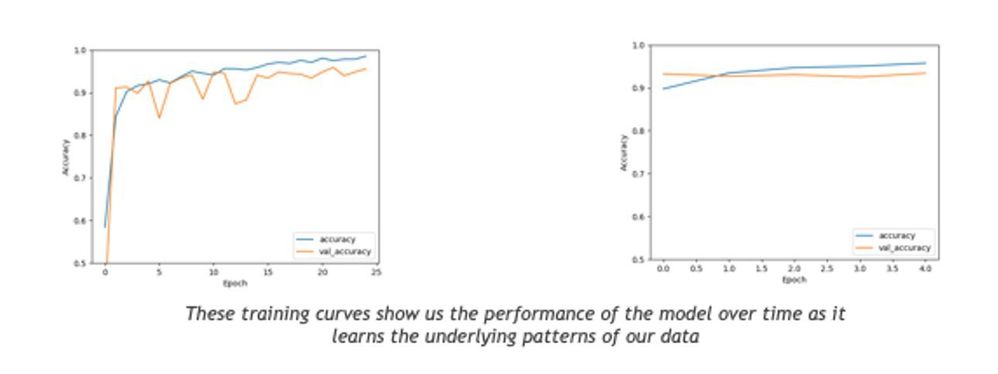
- To evaluate the performance of our models we looked at the following measures of our two most promising architectures:
- Resnet50
- accuracy: 0.9620
- loss: 0.1622
|
VGGNet
accuracy: 0.9477
loss: 0.3252
|
Model – Resnet50
- Below configuration was found to be optimal while running the classification task on Resnet50
- Epochs: 25
- Batch Size: 100
- Weights = “imagenet”
- Intermediate dense layers:
- Nodes: 4 layers of 256,128,64 respectively
- activation = ‘relu’
- Dropout = 0.5
- BatchNormalization()
- Final dense layer:
- Nodes: 3
- activation = ‘softmax’
- Optimizer: Adam with a learning rate of 0.001
Introduction
Sound files
Further Research
- Machine learning on spectrograms using labelled data
- Automatic classification and better acoustic analysis (https://journals.plos.org/plosone/article?id=10.1371/journal.pone.0048907)
- Further fine-tuning of the boxing algorithm might lead to even better results, e.g.
- Fixing the time axis in the spectrograms
- Increasing the frequency range
- Other (better) noise reduction techniques
Conclusions
- Elephant counting based on base frequency analysis is possible
- The team delivered a ready-to-use software library for counting elephants that with a high accuracy (97% on selected cases)
- The software can be used in the IoT Hub (Project 15) or on-premise
- The application can be integrated into other software
- A machine learning model (VGG or Resnet50) could be used to count the elephants instead of the rule-based boxing algorithm
- Further research is needed to improve the results, for example for broadening to other species
Thanks
- Many thanks to all people who helped with the project, by providing insights, performing reviews, and participating in meetings:
- Peter Wrege (Cornell University)
- Liz Rowland (Cornell University)
- Lee Stott (Microsoft)
- Sarah Maston (Microsoft)
- Thanks to the organizers of the “Artificial Intelligence – Cloud and Edge Implementations” course:
- Ajit Jaokar (University of Oxford)
- Peter Holland (University of Oxford)
by Contributed | Apr 8, 2021 | Technology
This article is contributed. See the original author and article here.
The seasons are changing and we have a lot of news to share! This blog will cover what we’ve recently shipped and what’s coming in the next few weeks. You can also find recent updates for Yammer from Microsoft Ignite in this session on-demand.
New Yammer as default experience
The new Yammer is generally available, and starting next week, all users on web will default to the new Yammer experience. Check out our new Yammer resources for tips and a guide what’s changed. But don’t worry, users will still be able to use the slider to toggle back to the Yammer classic experience.
https://www.youtube-nocookie.com/embed/EgKC34sZbRM
New design for Yammer Discovery and Digest emails
We’re updating the design and making content enhancements to the Discovery and Digest emails in Yammer to align with the new Yammer styling and UX. Coming soon.
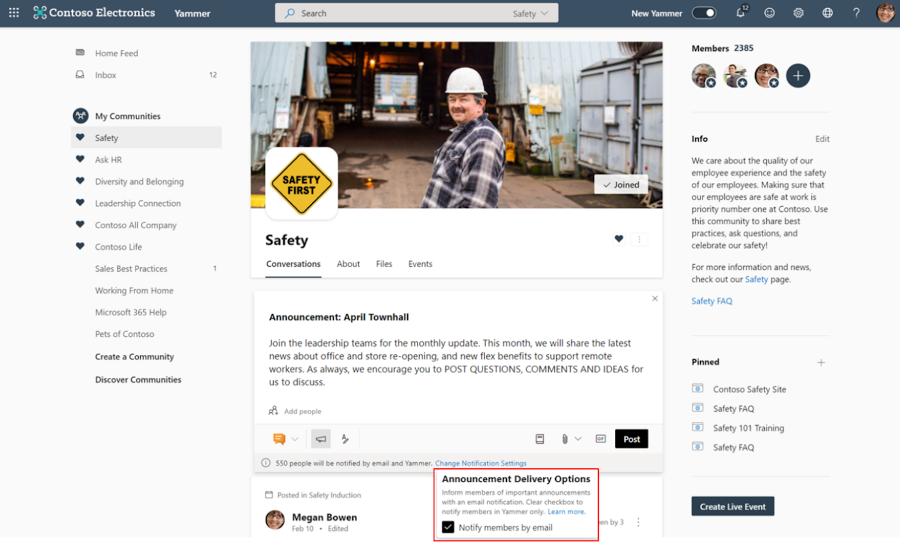
Essential Announcements
This feature allows Yammer community admins to achieve a guaranteed distribution of important community announcements via email for all members of that community, even if its outside of their preferred notification settings.
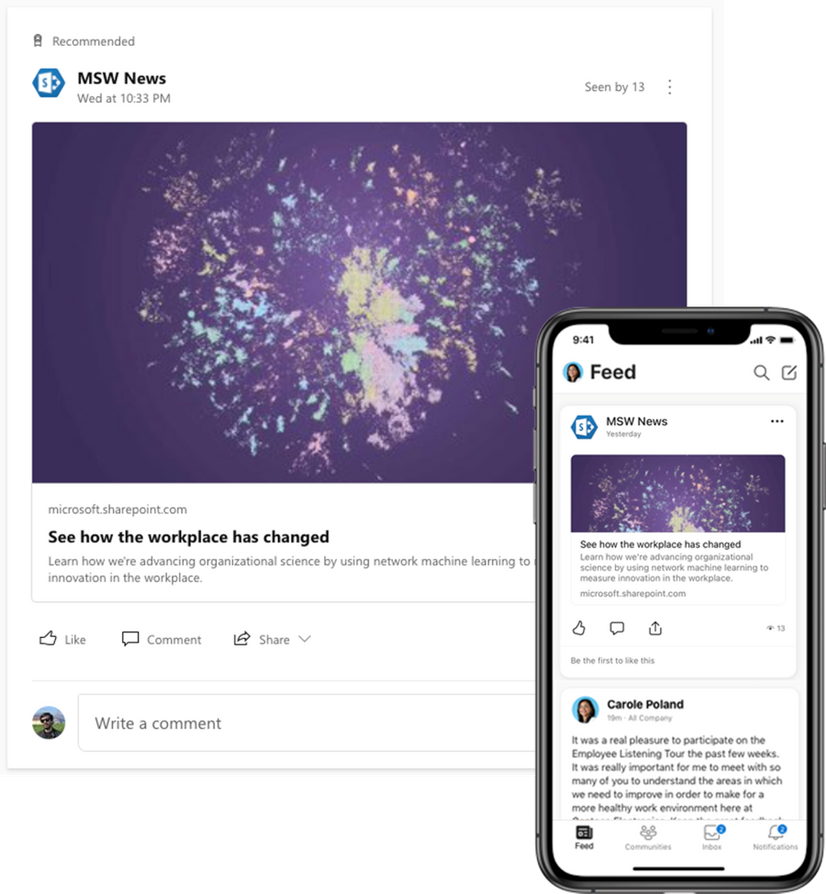
SharePoint News in the Yammer Home Feed
Spark conversations and share company news directly from SharePoint to the Yammer home feed. This is now available on iOS and Android mobile experiences and coming soon to the web.
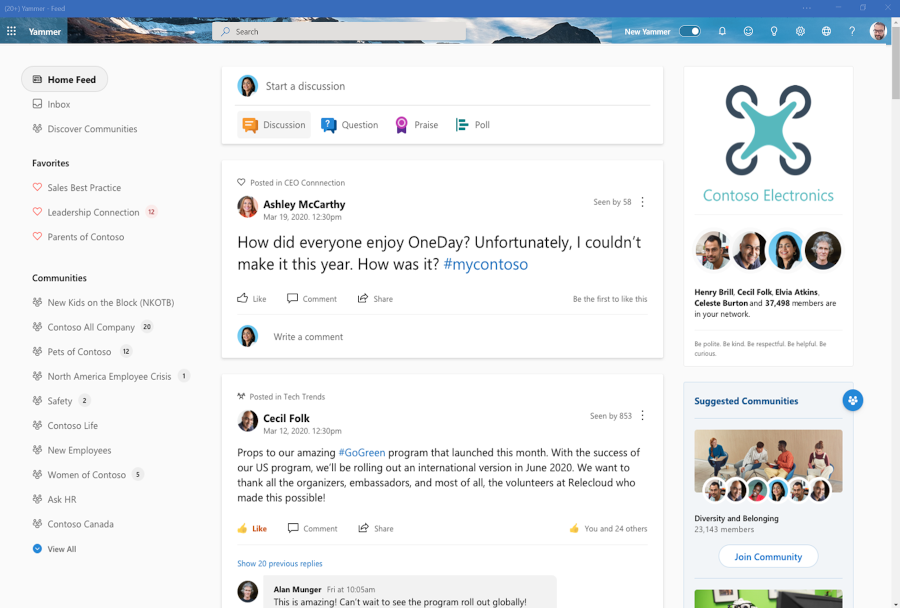
New Yammer Desktop Experience (PWA)
You can now install the web version of Yammer as a progressive web app (PWA) in Microsoft Edge, Google Chrome, or Mozilla Firefox. After you install the web version of Yammer as a progressive web app, it will work like any stand-alone desktop experience. You can pin and launch the app from your computer’s home screen or task bar, and you can opt in to receive notifications for relevant announcements and messages from Yammer.
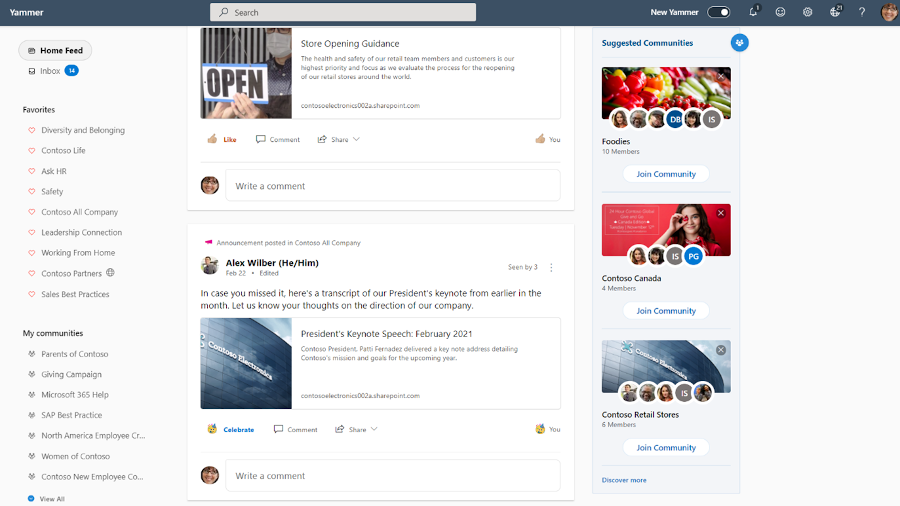
Suggested Communities
This new section on the right rail of the Yammer homepage will suggest relevant communities for people discover and join. This is rolling out now.
New Yammer Insights now available
Improve your live events viewership. Monitor attendance, measure engagement, and recognize trends.
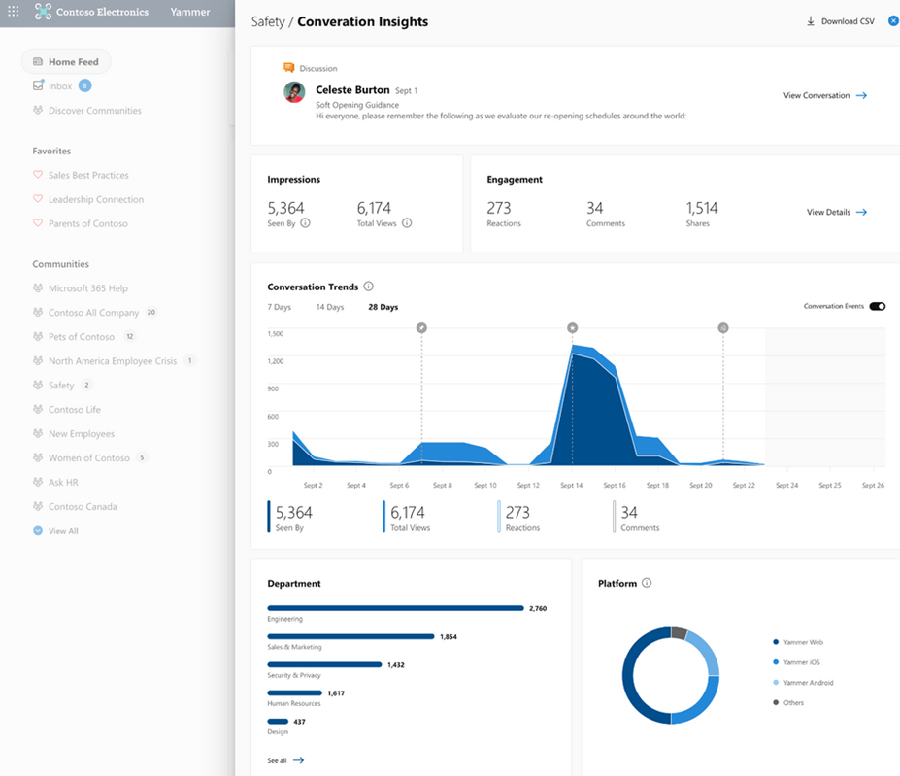
Conversation insights – See which conversations perform best. New insights into impressions, total views, click-through rate, and a breakdown of reactions.
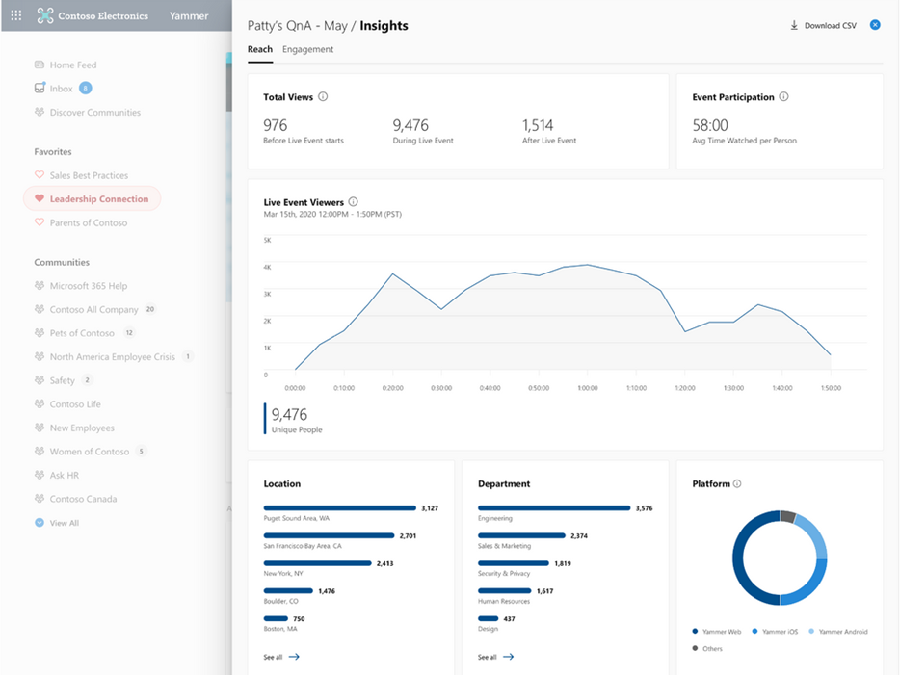
Live event insights – Improve your live events viewership. Monitor attendance, which segments had the greatest viewership, and see where those views are coming from, all geared to help you optimize your current and future events. Learn more on our announcement blog.
New Embed widget options
Allowing you to easily create and customize embeddable Yammer feeds to place on your own sites.
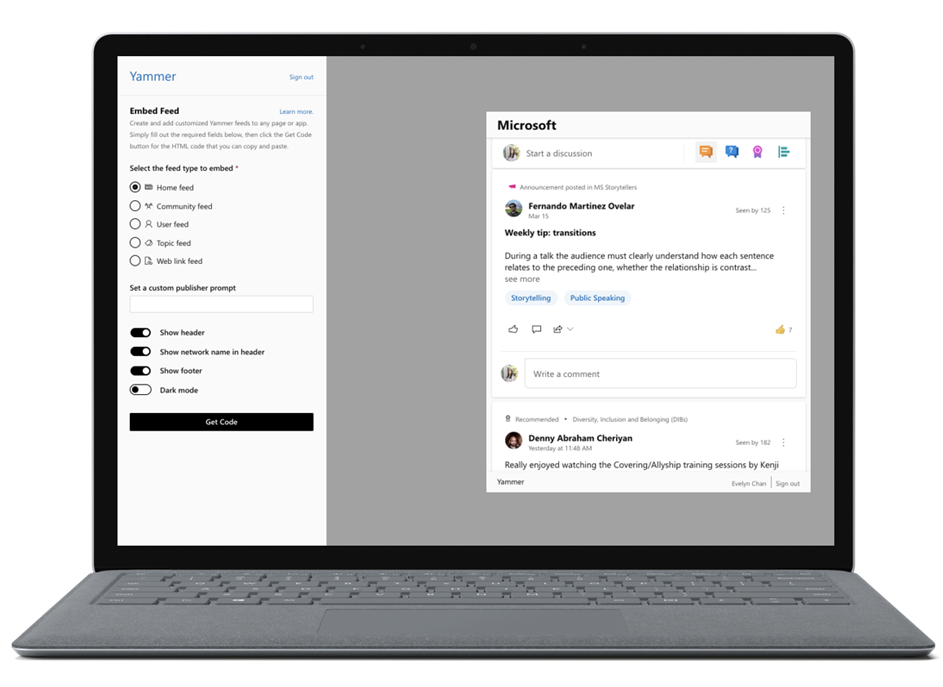
This is coming soon to preview. We are now collecting sign-ups for interest, sign up here.
Azure B2B Guest Access GA
External collaboration is a key ingredient for the success of any organization. Yammer guests allow you to call in experts, such as consultants or vendors, from outside your organization. Users can invite guests to a community and quickly start a rich conversation by sharing access to community resources like files while ensuring that privacy, access, governance and compliance policies remain intact. Now, Guest Access with Azure B2B is generally available.
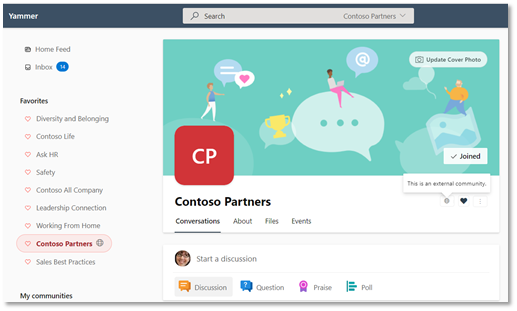 – Communities with external members are denoted by a globe icon.
Cross-geo external collaboration for External Networks for the EU
With this release, guests from Yammer networks associated located in the European Union can be invited to Yammer External Networks hosted by a Yammer network located in the United States.
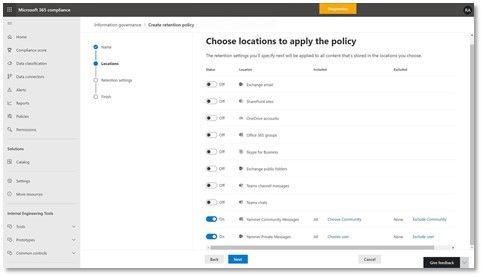
Retention policies in Yammer
This update enables organizations to apply retention policies on Yammer messages.
Additional updates
Here are a few other changes planned that you’ll be seeing in your Yammer network soon:
- New file views: Browse community files stored in SharePoint with SharePoint library structure and capabilities. You’ll also get the ability to browse files in your document library while in native mode.
- Collapse pinned posts: Pinned conversations now collapse automatically after a user has viewed them.
- Updated community settings: There are new community settings on web for communities and All Company community.
See what else Yammer has planned on our public roadmap and keep an eye on this blog for more news, updates, and best practices relating to Yammer and communities in Microsoft 365.
– Mike Holste
Michael Holste is a senior product marketing manager for Yammer + Employee Engagement
by Contributed | Apr 8, 2021 | Technology
This article is contributed. See the original author and article here.
Explore your options to select the right VMs for your workloads. On this episode of Azure Essentials, Matt McSpirit shares core compute and disk storage options for any workload you want to run in Azure.
If you’re new to Azure, shifting your apps or workloads onto a virtual machine or multiple VMs in Azure can be achieved without rearchitecting them or writing new code. You can even deploy your workloads to Azure Dedicated Hosts that provide single tenant physical servers dedicated to your organization. Azure literally becomes the equivalent of running your physical data center in the cloud.
The primary benefit of running your apps and workloads in Azure is choice. Azure provides a comprehensive range of hundreds of VMs to deliver the scale and performance needed across your preferred Linux distros and Windows Server based applications.
Select the right VMs for your workloads: From entry-level to optimized, depending on the workload.
Deployment: Download images from the Azure Marketplace, or deploy your own.
Scale: Create thousands of virtual machines using Azure Virtual Machines Scale Sets.
Pay for what you consume: Bring existing and future Windows and SQL server licenses, Red Hat enterprise Linux, and SUSE licenses into Azure using the Azure Hybrid Benefit.
QUICK LINKS:
00:40 — Azure offers choice
01:38 — A series: Entry-level
02:24 — D series: General purpose compute
03:33 — E series: Memory optimized VMs
04:09 — M series: Optimized
04:27 — Constrained vCPU VMs
04:47 — F series: Compute optimized
05:10 — L series: Storage optimized
05:42 — Deployment
06:05 — Scale
06:32 — Pay for what you consume
07:19 — Wrap up
Link References:
To learn more about the economics of running your workloads in Azure, check out our recent Azure Essentials episode at https://aka.ms/AzureEconomics
Find more resources at https://aka.ms/AzureVMEssentials
Unfamiliar with Microsoft Mechanics?
We are Microsoft’s official video series for IT. You can watch and share valuable content and demos of current and upcoming tech from the people who build it at Microsoft.
Video Transcript:
-Welcome to Microsoft Mechanics, and today’s episode of Azure Essentials. In the next few minutes, I’ll walk you through your core compute and disk storage options for any workload that you want to run in Azure.
-Now before we get into the specifics, there are a few things worth pointing out. If you’re new to Azure, the good news is that lifting and shifting your apps or workloads onto a virtual machine or multiple VMs in Azure, as part of infrastructure as a service, can be achieved without re-architecting them or writing new code. You can even deploy your workloads to Azure Dedicated Hosts that provide single-tenant physical servers dedicated to your organization. Azure literally becomes the equivalent of running your physical data center in the cloud.
-Now, one of the primary benefits that we give you when running your apps and workloads in Azure is choice. Azure provides a comprehensive range of hundreds of VMs to deliver the scale and performance that you need across your preferred Linux distros and Windows Server-based applications. Our Azure-tuned Linux kernels incorporate new features and performance improvements at a faster cadence compared to default or generic kernels, meaning there’s no need to repackage your apps and services. For SUSE and Red Hat Linux, we offer co-located integrated support to accelerate the resolution of any issues you might encounter. Azure VM families are optimized for compute, memory, and storage-intensive workloads in addition to AI, machine learning, and mission-critical scenarios. And you can switch among VM types and sizes at any time and leverage free tools like Azure Migrate to assess the requirements of your on-prem workloads and right-size your infrastructure in Azure. And we also gave you the choice of CPUs and GPUs from Intel, AMD, and Nvidia to take advantage of the latest hardware innovation.
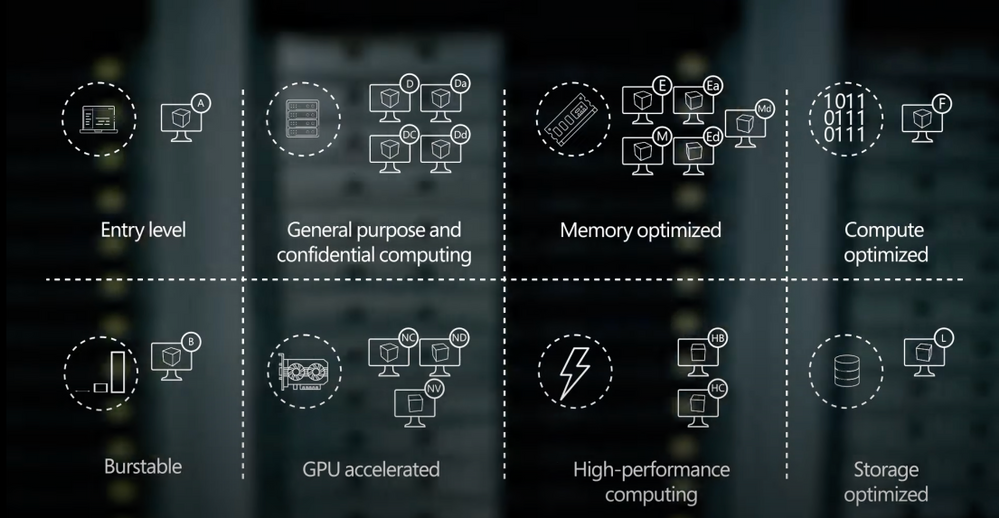
-So let’s break down your core options to select the right VMs for your workloads. Depending on the workload, it’ll require different VM characteristics.
-If you need to run entry-level workloads, like dev test, or maybe low-traffic web servers, small databases, or code repositories, the A-series VMs are a great fit. Now with balanced CPU performance and memory configurations, these VMs provide a great low-cost option to get started with Azure. Next, burstable VMs are useful for workloads that typically run at a low-to-moderate CPU baseline, but sometimes need to burst to significantly higher CPU utilization when the demand rises. An example here would be a web front-end or think of a check-in and check-out application at a hotel, for example. Where you need to plan for sporadic compute capacity to handle the traffic spikes.
-That said, most of your general purpose workloads, such as app servers or relational databases, are best run on the D family of Azure Virtual Machines. These VMs offer the vCPUs, memory, and temporary storage to meet the requirements of most production workloads. There are a few options with the latest chip sets from AMD and Intel. The Da-series use AMD EPYC processors and the D-series run on Intel Xeon processors. The new VM sizes include fast, larger local SSD storage, and a design for applications that benefit from low-latency, high-speed local storage, such as applications that require fast reads and writes to temporary storage. Now if you need additional security, the DC-series confidential VMs, backed by Intel SGX and AMD SEV-SNP technologies, can help you encrypt your data while in use. This uses a hardware-based trusted execution environment, which reserves a secure private portion of the processor and memory on the hardware. Only verified and authorized code can run and access the data. Now, this is useful if you’re in a highly-regulated industry, such as healthcare, where multiple parties need to securely work on a shared dataset for medical research.
-Conversely, memory-optimized VM sizes offer a high memory-to-CPU ratio. These VMs are ideal for relational database servers, data analytics, applications like SAP NetWeaver, as well as other large in-memory business-critical workloads. You can again choose from both AMD and Intel VM options featuring their latest processors. Now depending on your requirements, you can select E-series VM sizes that include large and fast local SSD disk storage for applications that benefit from low-latency, high-speed, local storage. Alternatively, you can choose VM sizes with no temporary data disk to reduce your TCO.
-Then taking things to the next level, the M-series VMs are designed for applications that process large amounts of data in memory. M-series VMs are ideal for extremely large databases or other applications, like SAP HANA, that benefit from massive memory footprints and extremely high vCPU counts.
-Also to reduce the cost of software licensing for memory and storage-intensive workloads, we provide constrained vCPU capable VMs. For example, some database workloads may not need as many cores. So with this option, we limit the vCPU count all while leaving memory, storage, and I/O bandwidth unchanged.
-Now for compute-intensive applications, F-series VMs have a high CPU-to-memory ratio and are great for medium traffic web servers, network appliances, batch processes, and application servers, as well as video encoding and rendering, AI inferencing, and gaming applications. The F-series VMs run on the latest Intel Xeon scalable processors, and can scale up to 72 vCPUs.
-Finally, if you need to run big data, NoSQL databases, or large data warehousing solutions in Azure, storage-optimized VM sizes can deliver the high disk throughput and I/O bandwidth that these applications demand. The L-series VMs feature high-throughput, low-latency, directly-mapped local NVMe temporary storage, in addition to the high-performance remote disk storage that you can attach. These VMs give you access to up to 19.2 TB of local storage, which yields up to 3.8 million IOPS.
-Now you know your options, as you go to deploy your VMs, the Azure Marketplace provides thousands of pre-defined first and third-party reference VM images, or you can bring and use your own images. Additionally, to speed up your deployment, you can also choose from hundreds of Azure Resource Manager templates to automate and hydrate complete solutions with multiple VMs and services, or author your own.
-You can create thousands of virtual machines using Azure virtual machine scale sets. With scale sets, you can create and manage a group of heterogeneous load-balanced VMs, where you can increase or decrease the number of VMs automatically in response to demand, or based on a schedule you define. And you can also centrally manage, configure, and update your VMs at scale, all while improving the availability of your stateful and stateless applications across availability zones and fault domains.
-Now, if you’re wondering how much all of this costs, charges accrue via a pay for what you consume model, versus the upfront infrastructure and software licensing costs that you typically pay on-premises in your data center. And you can bring your existing and even future Windows and SQL Server licenses, as well as your Red Hat Enterprise Linux and SUSE licenses, into Azure using the Azure Hybrid Benefit. Now additionally, you can take advantage of one-year or three-year terms for reserved VM instances to optimize your cloud costs. And with spot virtual machines, you can acquire unused compute capacity in Azure, as it becomes available, which is returned as the Azure service needs it. So that’s great for workloads that can be interrupted, such as a task sequence that resumes where it left off. And in fact, this option can lead to significant cost savings.
-Now, to learn more about the economics of running your workloads in Azure, you can check out our recent Azure Essentials episode on the topic at https://aka.ms/AzureEconomics. So that was a quick overview of your options for Azure core compute. Whether you’ve got basic or advanced compute needs, we give you a huge range of VMs to choose from. And in fact, there are also additional options for specialized scenarios. For example, you can get extreme computing power for your high-performance computing scenarios and remote visualization workloads with GPU-enabled VMs, as well as purpose-built infrastructure for workloads like SAP HANA and VMware, or even access dedicated Cray supercomputers. You can find more resources on the topic at https://aka.ms/AzureVMEssentials. Thanks for watching.

by Contributed | Apr 8, 2021 | Technology
This article is contributed. See the original author and article here.
Team 3. University of Oxford Microsoft Project 15 and Elephant Listening Project Capstone
Project Title. Gunshot Detection in Tropical African Forests
Introduction
This project is a group exercise undertaken as part of the University of Oxford Artificial Intelligence: Cloud and Edge Implementations course, as a learning challenge from Microsoft Project 15 and in association with the Elephant Listening Project. The objective is to devise solutions against illegal elephant hunting in tropical African forests by enabling sensors for instant prediction of gunshot events and thus mitigate poaching attempts.
Project Resources
Meet the Team
Our team is an interesting mix of technologists with a wide range of experience from software engineers, data scientists, dev-ops engineers and solution architects.
Elephant Listening Project Challenge
As proposed by Dr. Peter Wrege, Director Elephant Listening Project, Center for Conservation Bioacoustics, Cornell Lab of Ornithology, gunshot detection is an issue in African National Parks and environmental audio data is being collected into a public database at Congo Soundscapes as part of the Elephant Listening Project.
The current model (for gunshot detection) is very inefficient – less than .2% of tagged signals are gunshots and we typically get 10K- 15K tagged signals in a four-month deployment at just one of the 50 recording sites. The issue is we have about 200 good gunshots annotated, but because poaching is way too high, gunshots are still extremely rare in the sounds and it is extremely time-consuming to create the “truth” logs where we can say that every gunshot in a 24hr file has been tagged. From our understanding, this makes developing a detector more difficult.
How you approached the challenge
We approached the challenge by individual research about the problem in general and we gathered ideas on converting the gunshot detection problem statement into a machine learning problem. The main issue as per the challenge is the lack of tagged data for model training and also mostly the gunshot audio data for such use cases is proprietary. So we collected free gunshot samples and other environmental audio samples from random internet sources. There was some basic audio cleaning done to remove noise and clip exact audio data points post converting all formats to .wav files into the dataset. The further audio analysis was carried out using Azure Machine Learning Cloud Services. For brevity, only a part of the dataset is uploaded in the repo but all examples, notebooks, and the dataset are structured in a way to accommodate more data and scale the model training process as we move ahead.
Many features were analyzed across two different classes namely gunshot and environmental audio. The environmental audio contains audio data of elephant noises and other sounds of the tropical African forests. Some of the features analyzed are as follows,
- Spectral Centroid
- 13 MFCCs
- Zero-Crossing Rate
- Onset Detection Frequency
There could be more features relevant to this classification problem that can be analyzed to improve the model in the future and for the scope of this exercise the first thirteen Mel-Frequency Cepstral Coefficients suited best as input features for audio classification.
The input to the machine learning model will be a set of audio features and the model has to classify each input set into two classes, i.e gunshot or environmental audio. This is a binary classification problem and a suitable Dataset was created for training purposes. A feature extraction script was created to convert the raw audio .wav files into relevant feature data and corresponding true values for classification.
Azure Machine Learning cloud service has been leveraged for the classification model supervised training. In this case, two different model architectures were tested by running scripts from the Makefile and the following results were observed,
Neural Network Architecture
|
Train Accuracy
|
Test Accuracy
|
Multi-layer Perceptron
|
0.9756
|
0.9405
|
Convolutional Neural Network
|
0.9740
|
0.9236
|
Note: These accuracy metrics depend directly on the limited data used for model training and testing. Further improvements in contextual data collection, feature extraction and analysis, and experimentation with model architectures is needed to validate the reliability of these model metrics for practical applications.
Solution Architecture – Microsoft Project 15 – Azure Cloud Services
The Microsoft Project 15 Architecture is leveraged to follow the best practices in the deployment of scalable IoT solutions. One of the core goals of the Project 15 Open Platform is to boost innovation with a ready-made platform, allowing the scientific developer to expand into specific use cases.
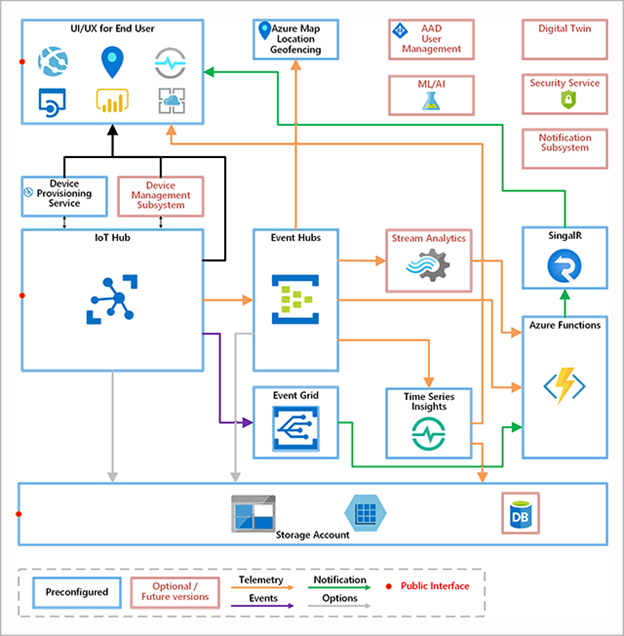
Data Scientists can train the model using Azure Machine Learning cloud service and deploy the model to edge devices using IoT services. This process can be automated using Azure cloud services for upgrading the edge devices models at runtime through a strategic rollout.
Event processing for Gunshot detection
- Edge devices continuously read audio data, extracts features, and makes ML inference to classify events as gunshot or not.
- Edge devices at multiple locations in the National park then, sends this telemetry data to Event Hub through the IoT gateway
- If an alert is required to be sent then it will be sent to Azure Notifications Hub
- We could also write the events to a structured database for long-term persistence and audit purposes later.
- Azure apps or Power BI monitoring dashboard reads and displays live telemetry data from multiple sensors at different locations.
- Rangers can monitor the notifications and live dashboard for threats.
Edge Device Simulation
For demo purposes, we have created an edge device prototype that simulates predictions from audio data and sends telemetry data to IoT Hub. This is a nodejs based application that uses tensorflow as a backend to make predictions using the model created during the training phase.
The model created during the training phase needs conversion to a tensorflow js graph model format to be used in a node js application. So we convert the models to tfjs graph format for the client to predict
Register an edge device to IoT Hub and copy IoT device connection string from the microsoft portal into .env file in the edge device source folder. Finally, run the edge device prototype to simulate gunshot predictions randomly and send telemetry data to IoT Hub
We found the challenge very interesting to begin with but finally to see the end to end prototype working as intended was extremely satisfying. Through this journey we learnt many new capabilities offered by the Azure Cloud for Model development, deployment and monitoring or the full MLOps lifecycle.
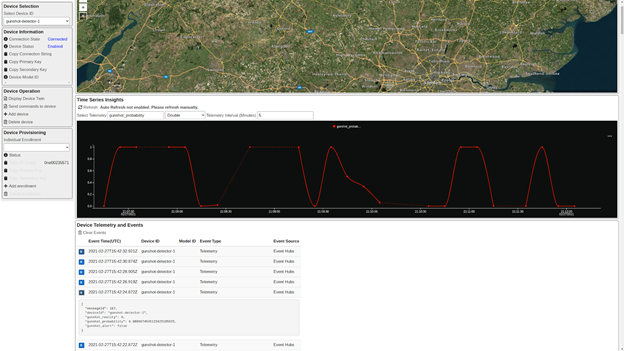
Live Monitoring and Demo
- Monitor gunshot detection from the Project 15 app
Future Work
Gunshot detection is still an unsolved problem today and there is ongoing research on this front for both military and surveillance purposes around the world. The machine learning classification model in this context can be improved with better data collection from the tropical forests in Africa. The lack of sufficient data remains the major issue with this challenge. Accurate gunshot audio should be recorded using the apposite set of hunting rifles for improved accuracy and further feature analysis can be conducted comparing gunshots with other surrounding sounds in the elephant habitat.
Further, many more model architectures can be tested and compared to understand what hyper-parameters work best for such remote environments. This can surely improve the model training process. Also, better deployment practices, telemetry, alert systems, and model upgrade processes can be explored with cloud-based IoT solutions to improve the overall efficiency of the solution.
Project GitHub Repo
https://github.com/Oxford-ContEd/project15-elp

by Contributed | Apr 8, 2021 | Technology
This article is contributed. See the original author and article here.
MICROSOFT AI FOR GOOD
PROJECT TITLE: A Baseline Elephant Infrasound Detection architecture using IoT Edge, Cloud and Machine learning frameworks for elephant behavioural monitoring.
Group 2:
Authors: Shawn Deggans, Aneeq Ur Rehman, Tommaso Pappagallo, Vivek Shaw, Giulia Ciardi, Dnyaneshwar Kulkarni
INTRODUCTION
The goal of this project is to create a platform that will allow researchers to continuously build and refine machine learning models that can recognize elephant behaviour from infrasound. This platform is based on Microsoft’s Project15 architecture- an open-source solution platform built to aid conservation and sustainability projects using IoT devices.
We aim to apply this technology stack to the tracking and understanding of elephant behaviour to contribute to an effective monitoring program. Our solution aims to achieve this goal by:
- Systematically collecting data related to elephant vocalization via IoT devices.
- Detect threats and infer behavioural patterns based on elephant vocalization by using custom machine learning and signal processing modules deployed on the IoT device using Azure IoT stack.
Furthermore, Elephants’ low-frequency vocalizations (infrasound) are produced by flow-induced self-sustaining oscillations of laryngeal tissue [1]. This unique anatomy allows elephants to communicate in a sonic range that is below the audible human hearing range (14-24hz). This means that a standard microphone will not be an adequate detect for elephant vocalization. The normal range for standard microphones is 20hz-20khz. Specialized microphones can capture sound in the range of 1hz and above. Acquiring these specialized microphones and infrasound detection tools are beyond the scope of this project, in our approach we will outline how such a tool could be created and used in the field by rangers and researchers in our proposed architecture below.
The design of this architecture can be built upon in the future, to deploy more advanced custom modules and do more advanced analytics based on these collated vocalizations. We propose an end-to-end architecture that manages these needs for the researchers and domain experts to analyse and monitor elephant behaviour and identify potential threats and take timely action.
PROPOSED APPROACH
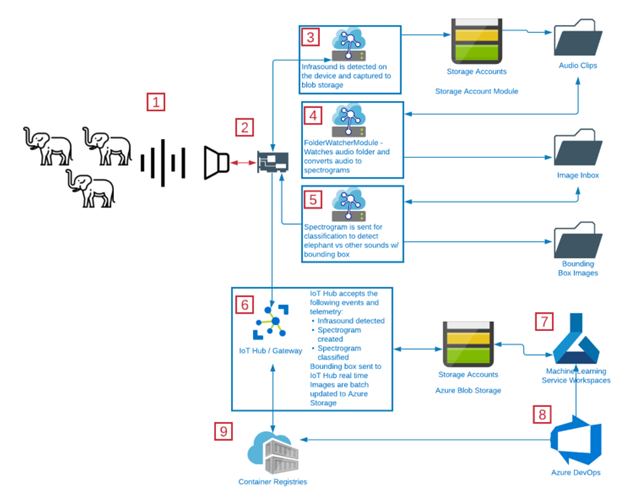
The above follows the overall proposed flow of the device-to-cloud communication, as well as the IoT Edge’s internal device logic.
1. Capture Infrasound using infrasound detection arrays on elephants:
The infrasound capture device continuously monitors for infrasound. These infrasound signals are captured and sent to the device for analysis. We are interested in exploring one type of infrasound capture device:
- Infrasound detection array
The infrastructure detection array is the capstone project of a Spring 2020 project by team members: James Berger, Tiffany Graham, Josh Wewerka, and Tyler Wyse. Project details can be explored here, “[2]“
This project was designed to detect infrasound direction using an array of infrasound microphones, but we would use the infrasound microphones in a low-powered device that could communicate over a long-range radio network, such as LoRaWAN. This network of devices would serve as the primary means for tracking elephants and recording their vocalization.
We envision this device as an IoT Edge device capable of supporting Azure Storage Account Blob Storage and custom IoT Edge Modules that are containerized machine learning modules capable to converting audio into spectrograms, and spectrograms into bounding box marked images, and delivering telemetry to IoT Hub.
2. Send infrasound data to IoT Device:
The 64-bit Raspberry Pi model captures the infrasound audio signals, breaks these into segments based on detected beginning-of-signal and end-of-signal indicators. Initially this limitation could mean we miss “conversations,” because this is the equivalent of capturing a word from each sentence in human speech. Elephants do not necessarily speak in words and sentences, so this likely will not keep us from meeting the goals of the system.
3. Storing data via Azure Blob Storage:
These audio files will be saved to an Azure Blob Storage device module in an audio clips file [3].
4. Azure Functions and Spectrogram conversion via the FileWatcher Module.
We develop a custom IoT Edge module known as the filewatcher module. This module uses an Azure Function to serve as a file watcher for the file storage. [4]
When it detects the file has been received in the blob storage account, it will convert the audio file to a spectrogram.
A MATLAB script is used to convert the raw audio files to spectrograms. The details of this script are available on our github repository. MATLAB offers better resolution images and a higher fidelity power spectrum that improves our elephant rumble detection process.
These spectrograms are stored in an image inbox in the blob storage.
5. Elephant Rumble Detection Module:
Another Azure function listens to the image inbox for new images and keeps a track of the images uploaded here.
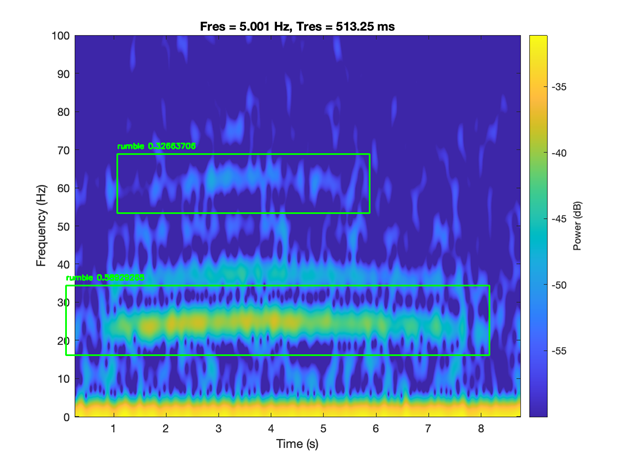
When new images appear, the function feeds the images to the rumble detection model.
The rumble detection model is trained via the custom vision ai using the spectrogram images from the raw audio files.
The custom vision AI is a good place to prototype and to build object detection and image classification models.
An example of steps to build a custom computer vision model and deploy to IoT Edge can be found here via DevOps (https://github.com/aneeqr/DevOpsCICD_final)
The rumble detection model returns the image label (rumble or no rumble) and the bounding box coordinates. We use OpenCV to draw the coordinates on the image. Images are then saved to the Bounding Box Images folder for more backend processing within Azure ML to help feed the ML loop.
We implement this logic flow as part of a DevOps pipeline. For more detail on the pipeline components, please see technical design.
6. Elephant Spectrogram Feature Extraction and Analysis:
In addition to the above, we also extract features from the created spectrograms in our Azure storage accounts.
For our feature extraction we calculated 19 different variables with relation to flow statistic on the audio (mean, variance, etc.) and common signal characteristics (rms, peak2peak, etc.) making use of the MATLAB software here which enabled a wider array of spectral features to be extracted.
In summary for each sample, we found the frequency of the peak magnitude across the overall power spectrum, the 1st formant, the 2nd formant, the max, min, mean and finish of the fundamental. In addition, we computed the power in the low frequency range 0-30 Hz, mid frequency range 30-120 Hz and high frequency range >120 Hz. We located the frequency of the spectral kurtosis peak and the flow cumulative sum range.
7. Analysis in the ML Workspace using stored data:
Our results offer some starting points for further research particularly in relation to trying to learn any underlying structure, with regards to age groups, in our population, given unlabelled data.
By unlabelled data, we mean that the raw audio files have no annotations or additional information associated with it to classify or distinguish elephant rumbles into maturity groups.
We classify elephant rumbles into maturity groups by
1. Leveraging the extracted features such as the 1st and 2nd formant frequencies, rms, peak to peak envelopes, max, min, finish, frequencies for each sample- We then aim to classify the samples into Maturity Groups 1 or 2 We achieve this by observing the thresholds of these features extracted by setting these thresholds as proposed in this paper [5]. We also do a visual inspection by plotting these features out doing a visual inspection using various data visualisation techniques. An example of a Violin plot is shown below.
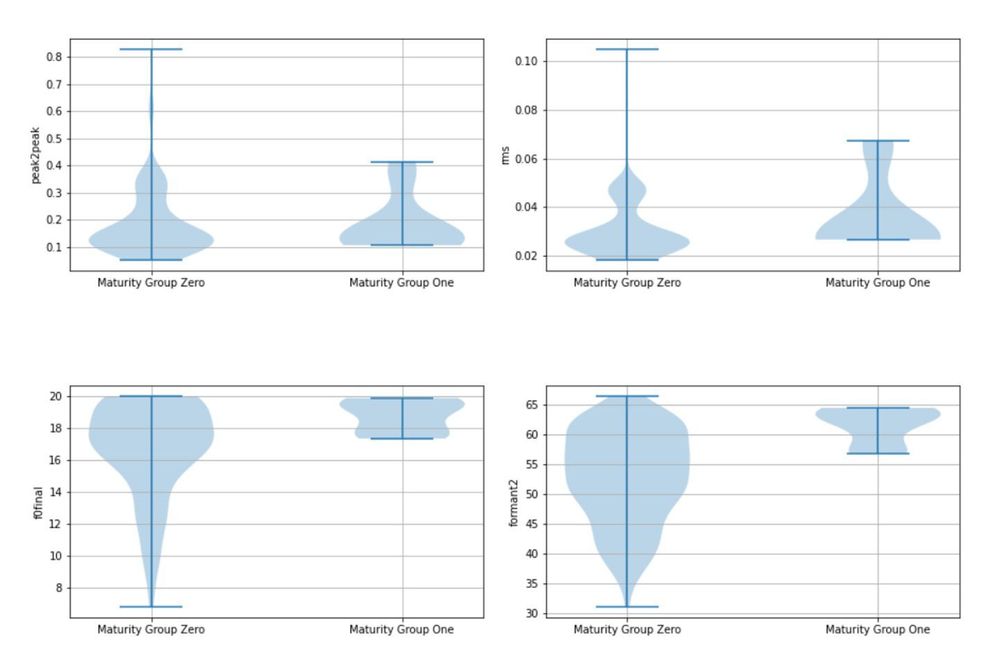
The violin plot clearly shows that at certain thresholds, we can cluster elephants into two different maturity groups.
2. We use unsupervised methods such as PCA to generate principal components and perform K-means clustering. This method showed clear signs of clustering when the points were projected into the PCA dimensions as seen in the output below.
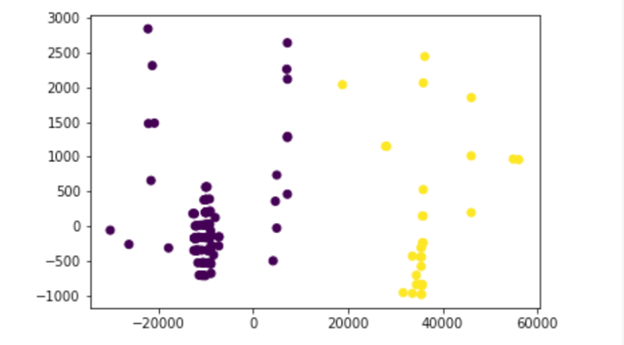
When comparing method 1 and 2 the classified maturity groups overlapped for over 75% of the data, however, to check whether this is statistically significant we would need to perform a t-test.
PROJECT OVERVIEW VIDEO
MLOPS TECHNICAL DESIGN
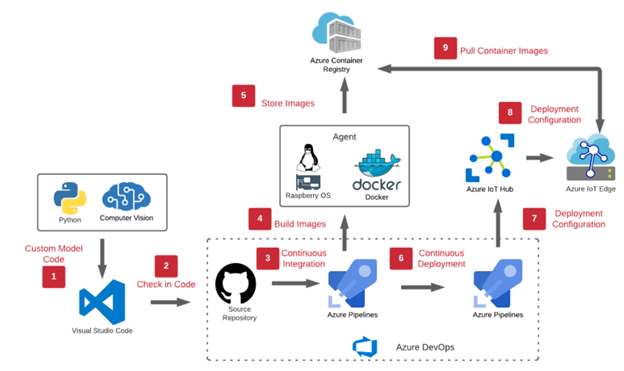
The above is the MLOPs pipeline as part of our workflow. We use the continuous integration and continuous deployment feature of azure DevOps to manage our workflows.
The following are some of the steps in this pipeline.
1. Creation of Azure Resources:
Resource Group:
Needed to create all our resources in azure.
IoT Hub:
IoT Hub is used as the primary IoT gateway. From here we manage device provisioning, IoT edge device creation, telemetry routing, and security. We will use the SAS token security and employ a regular SAS key rotation policy to keep devices secure.
IoT Edge device:
This is created in the IoT Hub and acts as our IoT device.
IoT Edge RunTime Agent:
This will be deployed on a raspberry pi OS VM container.
Azure Blob Storage:
Blob Storage holds images saved on the IoT Edge Module. This means that it also has folders that represent audio clips, image inbox, and bounding box images. This represents cold storage of data that could be studied later or needs to be archived.
Azure Container Registry:
Container Registry is used to hold the Dockerfile images that represent the IoT Edge Modules. Modules are pulled by [1] IoT Hub to automatically deploy to devices in the field. All our custom modules mentioned previously contain docker files which are pushed to azure container registry as part of the pipeline.
Azure DevOps:
Azure DevOps is one of the most important pieces of our MLOPs process. From here code is checked in and pushed out to the Container Registry. This also accounts for version control for our code base and manages pipelines. All docker files for both modules are located here and DevOps offers a continuous integration and continuous deployment scenario, as builds the code for the two custom modules, and generates a deployment manifest which is deployed on the IoT Edge device in the IoT Hub.
2. Import source code in DevOps:
We import our code files and repos in DevOps from our source repository.
3. Create a CI pipeline in DevOps:
The pipeline is then created with all environment variables defined. Environment variables include details of container registry, IoT Hub to build and push our modules to the azure container registry. We enable continuous integration.
4. Enable CD pipeline in DevOps:
We then create a release pipeline and push our deployment to the IoT Hub and hence the IoT Edge device [6].
The device is now ready to work in production.
TECHNICAL STACK AND CORE CONCEPTS APPLIED:
- Azure Custom Vision AI Portal
- Azure DevOps.
- Azure Machine learning.
- Azure Blob Storage
- Azure IoT Edge
- Azure IoT Hub
- Azure Container Registry
- Docker
- Matlab
- Python
- Jupyter notebooks
- Digital Signal Processing
- Data visualisation
CHALLENGES FACED:
- Procurement of physical device/microphone to detect elephant rumbles.
- Unlabelled data- Lack of ground truth available to classify elephant rumble type.
- Spectrogram resolutions
- Need to be good enough for the training of the object detection model in custom vision ai portal.
- We applied a variety of data augmentation methods using the Augmentor software package [7]. Some transformations yielded better results than the other but this needs to be explored in more detail.
- Noise Separation- Separating elephant rumbles from background noise.
- After research, we understand that our approach of analysing infrasound is of a limited scope on the overall communication amongst the elephants. The sounds are important, but like humans, elephants express their communication in more ways than just their voices. Elephants also express body language (visual communication), chemical communication, and tactile communication. We understand that this means the audio only component will not be able to capture the full picture. It will, however, add to the Elephant Sound Database.
- The MATLAB packages locked us into a specific vendor and made it impossible for us to use the libraries in an IoT Edge container. This was due to licensing restrictions. We used MATLAB as the spectrogram resolutions were promising.
FUTURE WORK
- Polishing baseline code to a more production ready code base.
- More literature review and access to labelled data for building machine learning models.
- Use of semi-supervised approaches to develop a clean and annotated dataset for rumble classification. Validating this dataset with domain experts to serve as a gold standard.
- Use of denoising auto-encoders for background noise cancellation in audio files.
- Use deep learning (CNNs and graph CNNs) for extracting spectrogram data when building models instead of feature engineering. Comparison of both approaches.
- Use of advanced unsupervised methods to get more insights on the data extracted from spectrograms.
- Investigate sustainability and scalability of the proposed architecture in more detail.
- Investigate paid and open-source datasets available for ML.
- Improve existing custom vision ai model by:
- Incorporating more training data and researching data augmentation strategies for spectrogram data.
- Using better data augmentation methods via spectrograms such as the following SpecAugment package [8]. Having a unified platform via python for improving spectrogram resolutions would be preferred.
- Algorithm development around bounding box detection of fundamental frequency and harmonics in the rumbles.
REFERENCES
[1] https://jeb.biologists.org/content/216/21/4054
[2] https://engineering.ucdenver.edu/current-students/capstone-expo/archived-expos/spring-2020/electrical-engineering/elec6-improving-infrasound-detection
[3] https://docs.microsoft.com/en-us/azure/iot-edge/how-to-store-data-blob?view=iotedge-2018-06
[4] https://jaredrhodes.com/2017/11/27/create-azure-function-to-process-iot-hub-file-upload/
[5] https://www.nature.com/articles/srep27585/tables/3
[6] https://docs.microsoft.com/en-us/learn/modules/implement-cicd-iot-edge/6-exercise-create-release-pipeline-iot-edge
[7] https://augmentor.readthedocs.io/en/master/code.html
[8] https://github.com/DemisEom/SpecAugment.
LEARN MORE ABOUT PROJECT15
Project 15: Empowering all to preserve endangered species & habitats.
Date: April 22, 2021
Time: 08:00 AM – 09:00 AM (Pacific)
Location: Global
Format: Livestream
Topic: DevOps and Developer Tools
What is this session about?
If, just like us, you want to save animals and preserve our ecosystems, come celebrate Earth Day 2021 with us by learning how we are helping and how you could too!
Project 15 from Microsoft is an effort that includes an open source software platform that helps non-governmental organizations (NGOs) reduce their cost, complexity, and time to deployment by connecting scientific teams with the needed technology to empower them to solve those environmental challenges.
We will also be highlighting community efforts, Internet of Things (IoT) and Machine Learning for sustainability, Open-Source GitHub repository, and existing projects by students!

by Scott Muniz | Apr 8, 2021 | Security, Technology
This article is contributed. See the original author and article here.
Official websites use .gov
A .gov website belongs to an official government organization in the United States.

Secure .gov websites use HTTPS A
lock ( )
) or
https:// means you’ve safely connected to the .gov website. Share sensitive information only on official, secure websites.















Recent Comments