Microsoft Project15 & University of Oxford Capstone Project with Elephant Listening Project Team 1

Microsoft Project15 & University of Oxford Capstone Project with Elephant Listening Project Team 1

This article is contributed. See the original author and article here.

Oxford’s AI Team 1 solution to Project 15’s Elephant Listening Project

CPDOxford.JPG


Who are we?


rick.jpg


Srikar.jpg


sukanya.jpg


Rick Durham


Srikar Vedula


Sukanya Mandal


Thanya.jpg


Oscar.jpg


Harnaik.jpg


Thanya Chartsakulkanajarn


Oscar Ordenes


Harnaik Nahal


Members of Microsoft Project 15 have approached Oxford University to help analyse these audio recordings to better monitor for threats and elephant well-being. We will use the machine learning algorithms to help identify, classify, and respond to acoustic cues in the large audio files gathered from Elephant Listening Project 


What are we trying to do?


Microsoft’s Project 15’s
Elephant Listening Project Challenge document


The core of this project is to assist in Project 15’s mission to save elephants and precious wildlife in Africa from poaching and other threats. Project 15 has tied with the Elephant Listening Project (ELP) to cleverly record acoustic data of the rural area in order to listen for threats to elephants and monitor their health


Elephant_Calling.jpg


Baby elephant calling out for mama elephant.


How are we going to do it?


Documentation for video (here)


Data preview / feature engineering


The key to many machine learning challenges boils down to data quality: not enough data or too much data. In this case, the rich audio files proves expensive and time-consuming to analyse in full. Hence, MATLAB 2020b and the Audio Toolbox was used to truncate audio files down into processable sizes.


Before we began, we conducted a brief literaure search on what kind of audio snippets we needed to truncate out. A paper analysed gunshots in cultivated environments (Raponi et al.) and characteristed two distinctive signals in the acoustic profile in most guns: a muzzle blast and ballistic shockwave. From this, we had a better clue of what kind of audio snippet profiles we should extract.


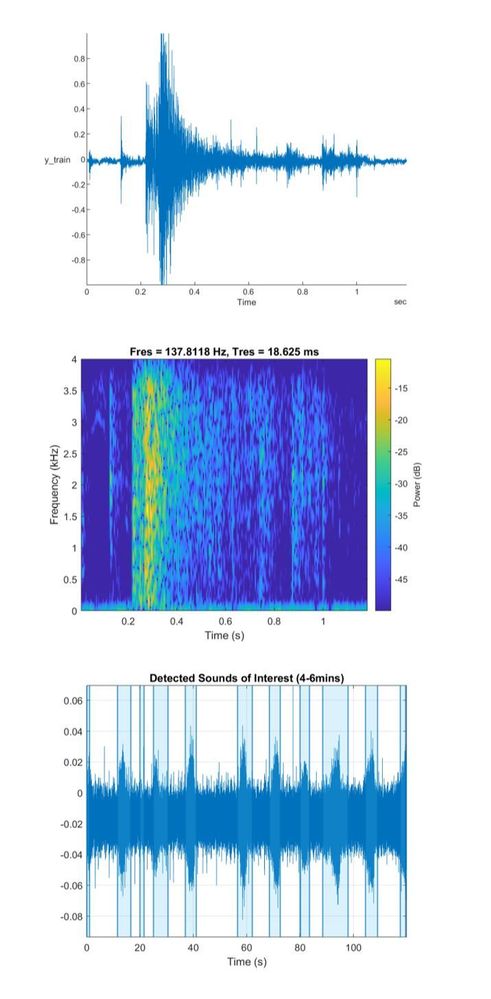
A variety of ELP audios were obtained and placed into a directory to work within MATLAB 2020b to ensure the audio snippets obtained reflected the diverse African’ environment. DetectSpeech, a function in MATLAB’s audio toolbox was used to extract audios of interest; audio snippets whose signal to noise ratio suggested speech due to it’s high frequency signal. These extracted snippets were compared to a gunshot profile obtained from the ELP with the spectrogram shown. This method allowed us to only analyse segments of the large 24hr audio file.


This datastore will be used later in validating and testing our models.


ELP.JPG


Modelling


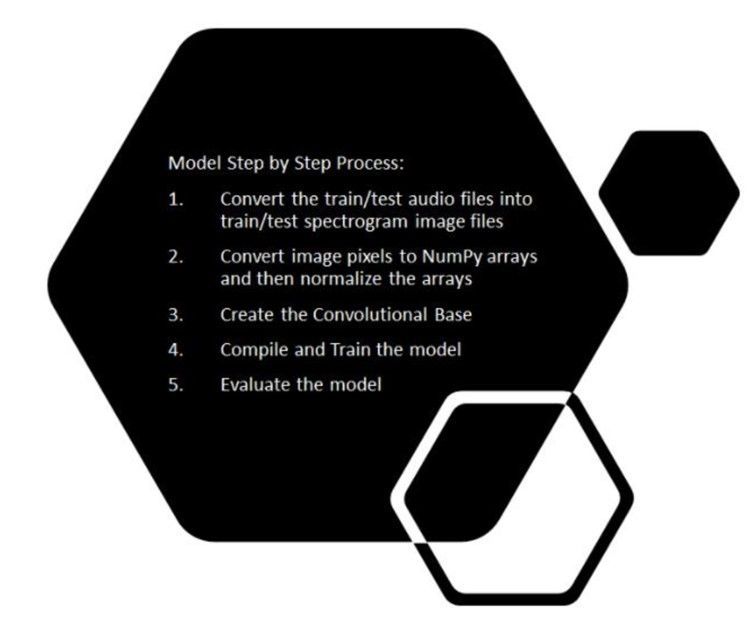
We developed and designed a deep learning model that would take in a dataset of audio files and classify elephant sounds, gunshot sounds and other urban sounds. We had approximately 8000 audio files as our training set and 2000 audio files as our testing set ranging from elephant sounds, gunshot sounds, to urban sounds. The procedure we followed was to convert these audio files into spectrograms and then classify based on the spectrogram images. The step-by-step process is highlighted below:


modelling.jpg


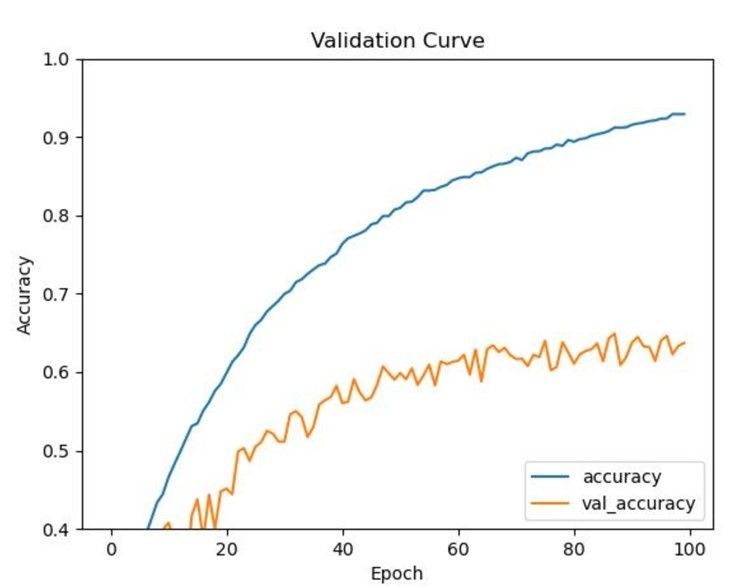
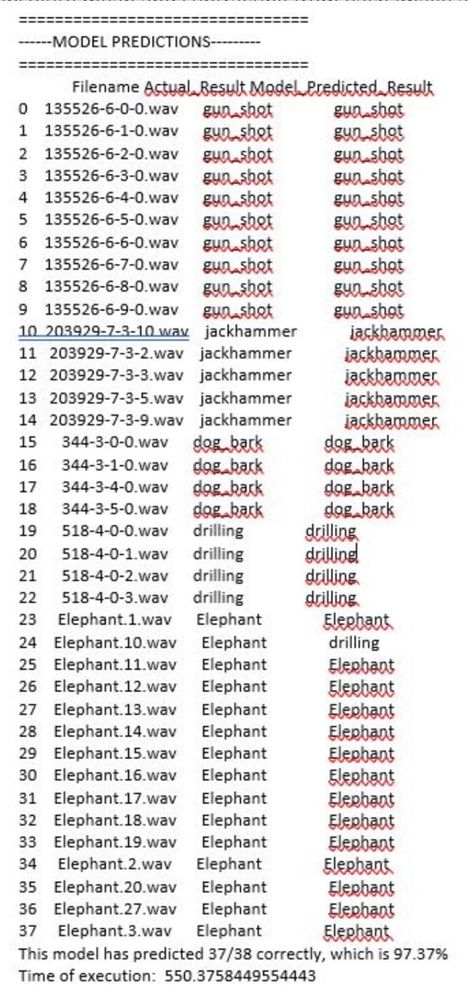
After getting the spectrograms, we converted the spectrograms into Numpy arrays with each pixel of an image is represented as an array. Spectrograms frequencies vary for each class of an audio file. The sound frequency pattern is different for elephants, gunshots, etc. We want to be able to classify each audio based on the differences in sound frequencies captured in spectrogram images. After converting spectrograms into Numpy arrays, we normalized each numpy representation of a spectrogram by taking the absolute mean and subtracting from each image and then diving by 256. From this point, we applied convolutional later and started training the model. We adjusted the hyperparameters to see which would yield better accuracy in classifying audio files. SGD has better generalization performance than ADAM. SGD usually improves model performance slowly but could achieve higher test performance. The figure below shows the results of the model:


validationcurv.jpg


modelprediction.jpg


Deployment Strategy


Our actual deployment strategy (as mentioned in our video presentation) is to deploy the built model to an Edge Device (NVIDIA jetson Nano connected to a microphone – in our case) which would be present in the location and perform real time inferencing. The device would wake up whenever there is a sound and perform the inferencing to detect either gunshots or elephant noise.


As of now we have our model deployed on cloud – using Azure ML Studio and is hosted through a docker endpoint (through ACI). Presently inferencing is being performed on the cloud using this endpoint. As an arrangement to this approach, all our data is hosted locally in our cloud workspace environment for the time being. 


Simultaneously we are also testing the model deployment on our preferred edge device. Once this is done, we will be able to enable real time inferencing on the edge. Post successful completion of this we will also modify our data storage approach.


Conclusion and Future Directions


Currently we have a working model which is able to detect gunshots as well as elephant sound. Our model is deployed on cloud and is ready for inferencing.


conclusion.jpg


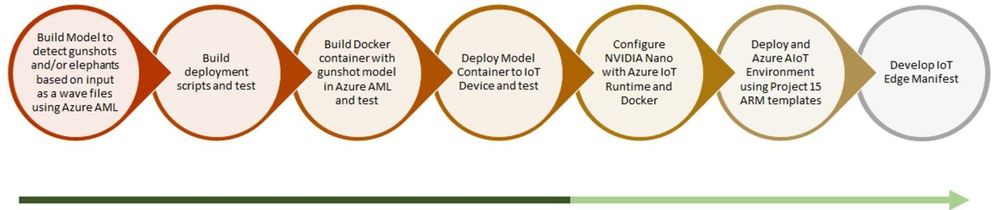
As per our end to end workflow – we are testing our model container deployed on our preferred IoT Device. Once this test is a success, we will configure our edge device with azure IoT runtime and docker. And then, test the same for real time edge inferencing with gunshot and elephant sound.


Upon the success of this, we will automate the entire deployment process using an ARM template. Once we reach a certain level of maturity technically and are ready to scale – we will develop an IoT Edge Deployment Manifest for replicating the desired configuration properties across a group of Edge Devices.


Our next steps solely for improving model performance – 


  • Classify elephant sounds based on demographics

  • Combine gunshots with ambient sounds (Fourier transform)

  • Eventually rework the way we infer so that a spectrogram file does not have to be created and ingested by the Keras model. This would be more of an in memory operation


Contact us if you’d like to join us in helping Project 15


Although we are proud of our efforts, we recognise more brains out there can help inject creativity into this project to further assist Project 15 and ELP. Please visit our GitHub repo (here) to find more information on our work and where you can help! 


https://github.com/Oxford-AI-Edge-2020-2021-Group-1/AI4GoodP15

Azure Service Fabric 8.0 Release

This article is contributed. See the original author and article here.

Azure Service Fabric 8.0 is now available!


We are excited to announce that 8.0 release of the Service Fabric runtime has started rolling out to the various Azure regions along with tooling and SDK updates. The updates for .NET SDK, Java SDK and Service Fabric runtimes will be available through Web Platform Installer, NuGet packages and Maven repositories in 7-10 days within all regions.


What is new in Service Fabric 8.0?


This release is loaded with key features and improvements. Some of the key features are highlighted below:


Key Announcements


  • Support for .NET 5 for Windows is now generally available


  • Stateless NodeTypes are now generally available


  • Ability to move stateless service instances

  • Ability to add parameterized DefaultLoad in the application manifest

  • For singleton replica upgrades – ability to have some of the cluster level settings to be defined at an application level

  • Ability for smart placement based on node tags

  • Ability to define percentage threshold of unhealthy nodes that influence cluster health

  • Ability to query top loaded services

  • Ability to add a new interval for new error codes

  • Capability to mark service instance as completed

  • Support for wave-based deployment model for automatic upgrades

  • Added readiness probe for containerized applications

  • Enable UseSeparateSecondaryMoveCost to true by default

  • Fixed StateManager to release the reference as soon as safe to release

  • Block Central Secret Service removal while storing user secrets


Current Breaking Changes


  • Service Fabric 7.2 and higher runtime drops support for .NET Core Service Fabric apps running with .NET Core 2.2 runtime. .NET Core runtime 2.2 is out of support from Dec 2019. Service Fabric runtime will not install .NET Core runtime 2.2 as part of its dependency. Customers should upgrade their .NET 2.2 runtime SF apps to the next .NET Core LTS version 3.1.

  • Guest executable and container applications created or upgraded in SF clusters with runtime versions 7.1+ are incompatible with prior SF runtime versions (e.g. SF 7.0).
    Following scenarios are impacted:


    • An application with guest executables or containers is created or upgraded in an SF 7.1+ cluster.
      The cluster is then downgraded to a previous SF runtime version (e.g. SF 7.0).
      The application fails to activate.

    • A cluster upgrade from pre-SF 7.1 version to SF 7.1+ version is in progress.
      In parallel with the SF runtime upgrade, an application with guest executables or containers is created or upgraded.
      The SF runtime upgrade starts rolling back (due to any reason) to the pre-SF 7.1 version.
      The application fails to activate.


To avoid issues when upgrading from a pre-SF 7.1 runtime version to an SF 7.1+ runtime version, do not create or upgrade applications with guest executables or containers while the SF runtime upgrade is in progress.


    • The simplest mitigation, when possible, is to delete and recreate the application in SF 7.0.

    • The other option is to upgrade the application in SF 7.0 (for example, with a version only change).


If the application is stuck in rollback, the rollback has to be first completed before the application can be upgraded again.


Upcoming Breaking Changes 


  • .NET Core runtime LTS 2.1 runtime will go out of support from Aug 21, 2021. Service Fabric releases after that date will drop support for Service Fabric apps running with .NET Core 2.1 runtime. Service Fabric .NET SDK will take a dependency on .Net runtime 3.* features to support Service Fabric .NET Core apps. This has no impact on Service Fabric .NET Framework SDK.

  • Support for Windows Server 2016 and Windows 10 Server 1809 will be discontinued in future Service Fabric releases. We recommend updating your cluster VMs to Windows Server 2019.


Online Register for Classes with Analytics (ORCA) Project

Online Register for Classes with Analytics (ORCA) Project

This article is contributed. See the original author and article here.

teamorca.png


Team members (from top left to right):


Emeralda Sesari, Khesim Reid, Arzhan Tong, Xinyuan Zhuang, Omar Beyhum, Lydia Tsami, Yanke Zhang, Chon Ng, Elena Aleksieva, Zisen Lin, Yang Fan, Yifei Zhao


Supported by:


Lee Stott, Microsoft


Dean Mohamedally, University College London


Giovani Guizzo, University College London 


The Team


We are a group of 12 students at University College London (UCL).  UCL’s Industry Exchange Network (IXN) programme enabled us to work on this project in collaboration with Microsoft as part of a course within our degree.


Introduction


Attendance and engagement monitoring is an important but exceptionally challenging process universities and colleges; especially during the COVID-19 pandemic in 2020, students attend both online synchronous and asynchronous courses around the world. Predictably, we need a sensible course monitoring system to facilitate teaching staff and learning administrators who set the curriculum to better manage students in their courses, not just during the pandemic. ORCA is a system that was created for this purpose.


ORCA is designed to complement the online learning and collaboration tools of schools and universities, most notably Moodle and Microsoft Teams. In brief, it can generate visual reports based on student attendance and engagement metrics, and then provide them to the relevant teaching staff.


Since ORCA is designed to integrate with both MS Teams and Moodle, our entire development team (12 students in total) is grouped into two small groups (the MS Teams group and the Moodle group). The two groups set up the main functionalities of ORCA together and implemented the integrations with the respective platforms separately.


In short, ORCA is aimed to:


  • assess the effectiveness of online learning by gathering data on students’ use of online learning including students’ attendance and engagement from both MS Teams and Moodle;

  • keep track of the status of students that may impact their education;

  • help teaching staff and learning administrators get actionable insights from data to improve teaching methods.


Design


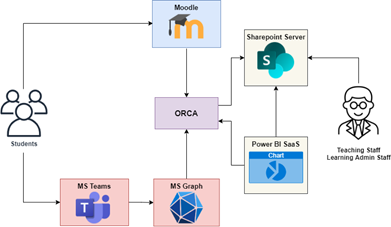
ORCA allows institutions to gain insights about students’ attendance and engagement with online platforms. To accomplish this, the ORCA system mainly integrates with Moodle and Microsoft Graph


orcadesign.png


Figure 1: ORCA’s design


These two external systems send out notifications to ORCA whenever students interact with Moodle and Microsoft Teams respectively. ORCA then standardizes the incoming information into a common format and stores it on Sharepoint lists which the relevant teaching and learning administration staff can access to check attendance.


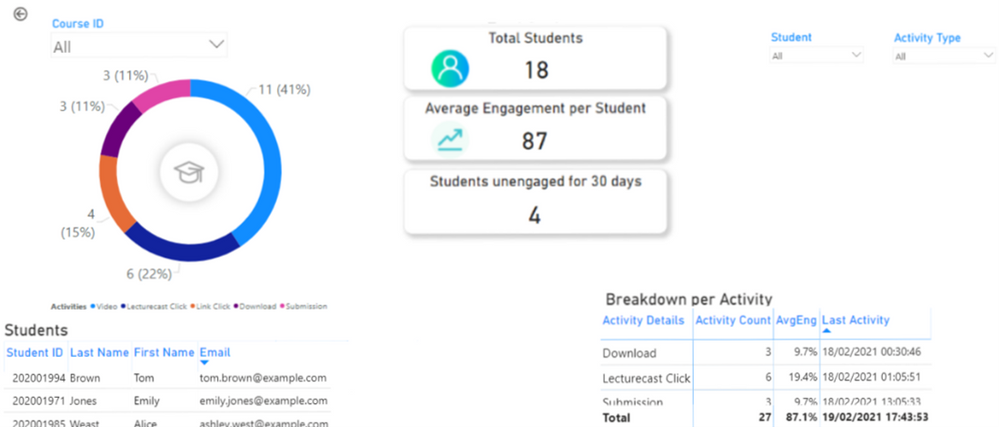
ORCA also gives the option to store student engagement data in a database which can be exposed to the Power BI dashboarding service and embedded into Sharepoint, allowing staff to visualize how students interact with online content.


orcapowerbi.png


Figure 2: Student engagement visualized through Power BI


Implementation


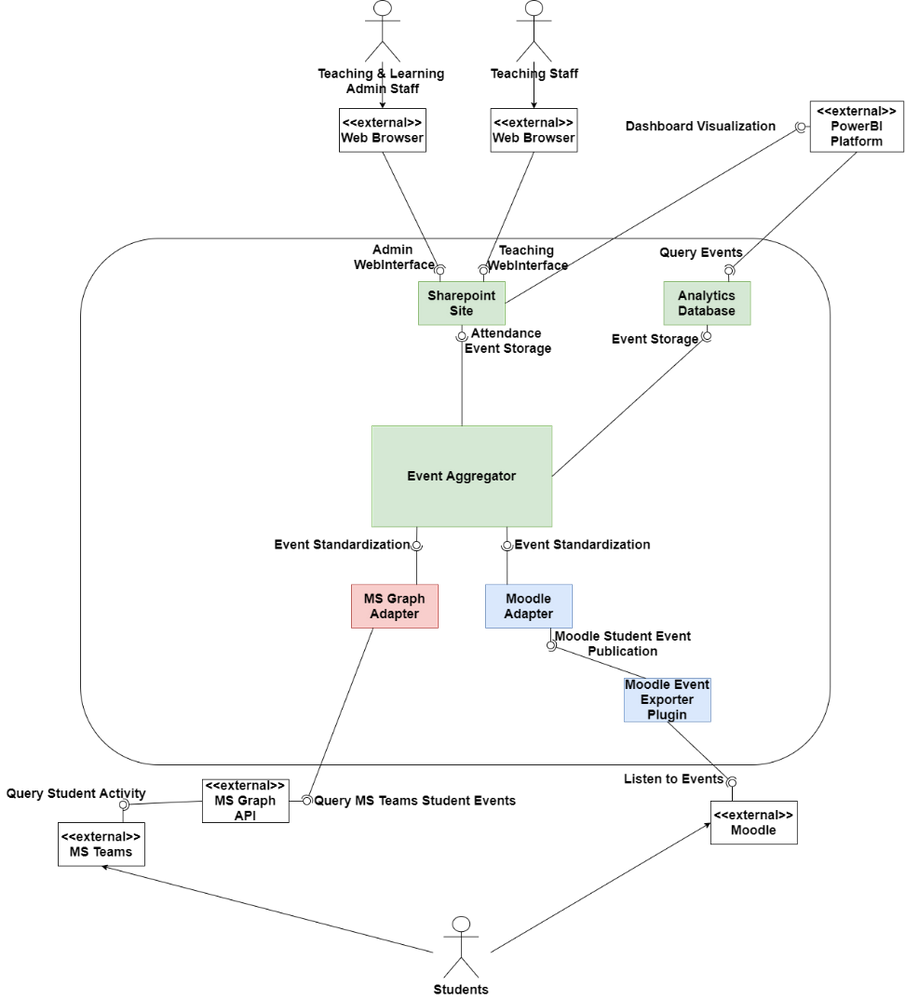
orcaarchitecture.png


Figure 3: ORCA’s architecture


ORCA is a .NET 5 application implemented in C#. Figure 3 shows the main architecture of ORCA. The core of the system, the event aggregator, is where all the information is collected from different sources.  The event aggregator interfaces with pluggable API adapters, which allow data (i.e., student events) from a different system to be standardized so that the event aggregator can persist them for future analysis. 


So far, there are 2 main API adapters, the MS Graph Adapter which is notified by Microsoft’s Graph API whenever students join lectures, and the Moodle Adapter, which receives information about student activity through a plugin that can be installed on an institution’s Moodle server. The Moodle Adapter also follows the IMS Caliper standard, which allows it to integrate with any Learning Management System implementing the standard, such as Blackboard Learn.


ORCA can be automatically deployed to the Azure cloud or configured to run on a custom (on-premises) Windows, Linux, or macOS machine of an IT Administrator’s choosing. Powershell scripts and precompiled binaries are provided in our Github Releases page to automate configuration and deployment, although ORCA’s centralized configuration can also be manually changed.


ORCA makes use of Azure Resource Manager (ARM) Templates to define the resources it requires to run on the Azure cloud. By packaging a script which dynamically generates an ARM template based on the IT Administrator’s configuration choices, we can automatically provision and configure a webserver and optional database to run ORCA on the cloud within minutes. If a database was selected, the script also generates Power BI dashboards which automatically connect to the provisioned database.


Future Work


While the ORCA project is a functional software product that can be deployed to an institution’s infrastructure, we have yet to run it against real student data during the development stage due to privacy concerns. To comply with privacy regulations, current testing is based on synthetically generated data. We are in the process of piloting ORCA with UCL’s Information Services Division to better assess how the system meets institutions’ needs in a more productionized environment.


We also hope to increase ORCA’s level of customization and allow administrators to configure which activities count towards engagement, and at what point they should be automatically alerted about student inactivity.


ORCA is an open source project which any institution can adopt, contribute to, or simply inspire themselves from to build their own solution.


You can check it out at https://github.com/UCL-ORCA/Orca

Reddit AMA with the Office Rangers (/u/OfficeRangers) April 15th!

This article is contributed. See the original author and article here.

The Office Rangers (/u/OfficeRangers) will be hosting a Reddit AMA next Thursday, April 15th from 9:00 – 1:00 PDT. We will be covering all topics around the Microsoft 365 Apps for enterprise manageability, deployment and performance. covering all topics around Office deployment and manageability. Be sure to join us and ask us anything! 


Link to AMA to follow shortly! 


Get Started with Azure Data Explorer using Apache Spark for Azure Synapse Analytics | Data Exposed

This article is contributed. See the original author and article here.

In this episode of Data Exposed, Manoj Raheja shows us how to seamlessly integrate with Azure Data Explorer from Apache Spark for Azure Synapse Analytics.


Watch on Data Exposed


Resources:

Connect to Azure Data Explorer using Apache Spark for Azure Synapse Analytics
GitHub (Sample Code)


View/share our latest episodes on Channel 9 and YouTube!

Microsoft Sessions at NVIDIA GTC

This article is contributed. See the original author and article here.

 Microsoft Sessions at NVIDIA GTC


This year’s NVIDIA GTC event is certain not to disappoint. The big buzz around cloud-based NVIDIA GPUs is the introduction of deep learning and AI capabilities complementary to existing visualization, rendering, and gaming workflows. Having on-demand versatility by which GPUs can be consumed and transacted empowers greater productivity and efficiency with enhanced VDI/DaaS, real-time visualizations, and more immersive gaming & entertainment experiences.


This year we are sharing examples of some of the most versatile GPU-powered resources anywhere in the public cloud, with a clear understanding of maximum cost-for-performance metrics. We’re focusing on three main application use cases for GPUs:


  • Visualization, including 3D design rendering, remote rendering, and desktop virtualization

  • AI for machine learning, model training and inferencing

  • Edge Computing for hybrid scenarios, decoupled environments, and IoT device ecosystems


Microsoft Digital Sessions at NVIDIA GTC


Microsoft will be supporting the following pre-recorded sessions at GTC this year.


SESSION ID


TITLE


SPEAKER(S)


S32779


Azure: Empowering the World with High-Ambition AI and HPC


Girish Bablani, CVP, A and Ian Buck, VP Data Center, NVIDIA


S31060


Get to Solutioning: Strategy and Best Practices When Mapping Designs from Edge to Cloud


Paul DeCarlo Principal Cloud Advocate Microsoft


S31074


The Possibilities of Intelligence: How GPUs are Changing the Game across Industries


Rishabh Gaur Technical Architect Microsoft


S31141


Inferencing at Scale with Triton, Azure, and Microsoft Word Online


David Langworthy Architect Microsoft, Mahan Salehi Deep Learning Software PM NVIDIA, Emma Ning SPM Microsoft


S31330


Interactive Visualization of Large-Scale Super-Resolution Digital Core Samples in Azure


Kadri Umay WW CTO Process Manufacturing and Resources Microsoft Josephina Schembre-McCabe Digital Rock Technology R&D Specialist Chevron


S31582


Accelerating Large-Scale AI and HPC in the Cloud


Eddie Weill Data Scientist & Solutions Architect NVIDIA Jon Shelley HPC/AI Benchmarking Team, Principal PM Manager, Azure Compute Microsoft


S31594


Seamlessly Deploy Graphics-Intensive Geoscience Applications On-Prem and in the Cloud via Azure Stack HUB


Gaurang Candrakant Principal PM, Azure Edge + Platform Microsoft Shashank Panchangam Chief product Manager, Cloud services Halliburton


S31610


Accelerating AD/ADAS Development with Auto-Machine Learning + Auto-Labeling at Scale


Henry Bzeih CSO/CTO Automotive Microsoft Willy Kuo Chief Architect Linker Networks


S31614


Edge-Native Application Research using Azure Stack Hub by Carnegie Mellon University


Kirtana Venkatraman Program Manager 2 Microsoft James Blakley Living Edge Lab Associate Director Carnegie Mellon University Thomas Eiszler Senior Research Scientist Carnegie Mellon University


S31884


Latest Enhancements to CUDA Debugger IDEs


Julia Reid Program Manager 2 Microsoft Steve Ulrich Software Engineering Manager NVIDIA


S31873


Using Unreal Engine Anywhere from the Cloud to your HMD


Patrick Cesium xx Cesium Pete Rivera xx Microsoft Tim Woodard Senior Solutions Architect NVIDIA Sebastien Loze Epic Games Veronica Yip CloudXR Product Manager NVIDIA Sean Young Director of Global Business Development, Manufacturing NVIDIA


S32001


Deploy Compute and Software Resources to Run State-of-the-Art GPU-Supported AI/ML Applications in Azure Machine Learning with Just Two Commands


Accelerated Data Science


Krishna Anumalasetty Principal Program Manager Microsoft Manuel Reyes Gomez Developer Relations Manager NVIDIA


S32107


Building GPU-Accelerated Pipelines on Azure Synapse Analytics with RAPIDS


Rahul Potharaju Principal Big Data R&D Manager Microsoft Alexander Spiridonov Solution Architect NVIDIA


S31860


Introducing NVIDIA Nsight Perf SDK: A Graphics Profiling Toolbox


Avinash Baliga Software Engineering Manager NVIDIA Austin Kinross Senior Software Engineer Microsoft


S31644


Profiling PyTorch Models for NVIDIA GPUs


Geeta Chauhan PyTorch Partner Engineering Lead Facebook AI Gisle Dankel Software Engineer Facebook Maxim Lukiyanov Product Manager, PyTorch Profiler Microsoft


S32224


Accelerating Deep Learning Inference with OnnxRuntime-TensorRT


Steven Li Software Engineer Microsoft Kevin Chen NVIDIA Peter Pyun Principal Data Scientist NVIDIA


S32228


Build Immersive Mixed-Reality Experiences with Azure Remote Rendering.


Rachel Peters Senior Program Manager Azure Remote Rendering, Microsoft


S32240


ONNX Runtime: Accelerating PyTorch and TensorFlow Inferencing on Cloud and Edge


Peter Pyun Principal Data Scientist NVIDIA Emma Ning Senior Product Manager Microsoft


E32336


Microsoft Azure InfiniBand HPC Cloud User Experience and Best Practices


Gilad Shainer SVP Marketing, Networking NVIDIA Jithin Jose Senior Software Engineer, Microsoft Azure Microsoft


SS33079


Enterprise ready ML Model Training on NVIDIA GPUs across Hybrid Cloud, leveraging Kubernetes


Saurya Das Product Manager, Azure ML Microsoft


S31076


Bringing AI to the Edge


Rishabh Gaur Technical Architect Microsoft


S32184


Azure Live Video Analytics with Nvidia DeepStream


Avi Kewalramani Sr. Product Manager Microsoft


NVIDIA DLI Training Powered by Azure


Microsoft is proud to host the NVIDIA DLI instructor-led online training covering AI, accelerated computing, and accelerated data science all powered on Microsoft Azure.


This year’s GTC event is shaping up to mark a major leap forward in how GPUs are utilized for modern application and service development workflows.


OneDrive sync 64-bit for Windows now in public preview

This article is contributed. See the original author and article here.

We’re excited to announce that the 64-bit OneDrive sync client for Windows is now available as a public preview!


We know this has been a long awaited and highly requested feature, and we’re thrilled to make it available for early access. You can now download the 64-bit version for use with OneDrive work, school, and home accounts.  


To move from the 32-bit to 64-bit (or vice versa) you’ll need to make sure the OneDrive version you install is the same version as you currently have, or newer. For more information, see  What version of OneDrive am I using?


The 64-bit version is the right choice if you plan to use large files, if you have a lot of files, and if you have a computer that’s running a 64-bit version of Windows. Computers running 64-bit versions of Windows generally have more resources—such as processing power and memory—than their 32-bit predecessors. Also, 64-bit applications can access more memory than 32-bit applications (up to 18.4 million Petabytes).


Note: The OneDrive 64-bit version is only for AMD64 devices (for ARM64 devices, you should continue to use the 32-bit OneDrive). 


For instructions on installing the 64-bit client see Choose between the 64-bit and 32-bit version of OneDrive.


We continue to evolve OneDrive as a place to access, share, and collaborate on all your files in Office 365, keeping them protected and readily accessible on all your devices, anywhere.


You can stay up-to-date on all things via the OneDrive Blog and the OneDrive release notes.


Check out the new and updated OneDrive documentation.


Take advantage of end-user training resources on our Office support center.


Thank you again for your support of OneDrive. We look forward to your continued feedback on UserVoice and hope to connect with you at Ignite or another upcoming Microsoft or community-led event.


Thanks for your time reading all about OneDrive,


Ankita Kirti


OneDrive | Microsoft

Introducing new capabilities to transform customer service and field service

Introducing new capabilities to transform customer service and field service

This article is contributed. See the original author and article here.

Today we’re announcing new capabilities to help customer and field service teams deliver more consistent and engaging experiences, from the call center to on-site visits. The new features for Microsoft Dynamics 365 Customer Service and Microsoft Dynamics 365 Field Service provide the agility to adapt to changing customer needs, as well as streamline agent and technician workspaces, so they can resolve issues faster. Let’s look at what’s new in this release. Be sure to review the full release notes for Dynamics 365 Customer Service and Dynamics 365 Field Service. Dynamics 365 Customer Service In our journey to help optimize support delivery and increase agent productivity, the following features are now generally available: Unified routing with modernized assignment capabilities leveraging custom rules and machine learning models to automate and scale work classification and assignment for large support organizations. Federated knowledge search to enable organizations to streamline and centralize the growth of their support knowledge base through other Dynamics 365 organizations, Microsoft SharePoint, and Microsoft Graph connectors. Embedded insights dashboards, which highlight important KPI insights for support summary KPIs, agent performance, support topic activity, and knowledge to alert supervisors to direct actions they can take to optimize support delivery every day. AI-powered suggestions to help agents resolve customer issues faster, and we’ve expanded these capabilities to support non-English languages. Streamlined, simplified set up for omnichannel through a new administrative experience. Intelligent work classification and assignment with unified routing Many people are involved in monitoring support queues to ensure incoming customer requests are properly classified in the right queues and assigned to available agents. This time-consuming activity can slow customer issue resolution and impact customer satisfaction. With unified routing, organizations can author custom rules, create and apply machine learning models to analyze incoming customer requests, and automatically classify the issue to better match the best available agent. Corresponding assignment rules can also be created with custom rules to analyze the classified issues and choose the best available agent to handle the issue based on the agent’s skills, spoken language, product expertise, or other attributes. Unified routing eliminates the need for constant queue supervision and manual work distribution. Agents can resolve issues faster when their strongest skills are being leveraged. This ensures customer issues are handled as quickly as possible by the best available agent resulting in increased customer satisfaction and customer retention. Expanding your knowledge base with federated knowledge search and knowledge insights Knowledge is something that most organizations have developed over time and it often resides in many different tools. This can make centralizing knowledge and making it easily accessible through a single interface costly and challenging. With federated knowledge search, organizations using Dynamics 365 Customer Service can enable agents to retrieve search results within multiple Microsoft Dataverse environments, SharePoint sites, and Microsoft Graph connectors through a single search interface in the agent productivity pane. Agents can deliver faster, more comprehensive service, knowing they have all the knowledge at their fingertips without having to browse disparate sets of information. Knowledge insights dashboards also help supervisors discover the topics agents are searching for most that lack sufficient knowledge article support. Supervisors can then take action to increase and improve the knowledge base for those topics. Optimizing service delivery with insights Analyzing support reports and deriving actionable insights can consume much of the supervisor’s time, reducing the amount of time to coach agents to support customers. With the latest insights dashboards, supervisors can quickly see what insights require action to drive improvement in customer sentiment, satisfaction, and speed of support delivery. The embedded summary dashboard surfaces key insights, showing supervisors what’s driving the trend in customer satisfaction, channel volumes, queue volumes, handle time, and other KPIs. Also surfaced are support topics to watch based on key KPIs that may require automation through virtual agents or additional knowledge articles to help agents indicate product-related issues. Agent dashboards provide deep agent analytics and important KPIs like active cases, resolved cases, customer satisfaction score (CSAT), and customer sentiment. Supervisors can drill down to specific agents to determine what action is needed, such as reducing or increasing their capacity, adjusting their skills and queue assignments, providing additional training, or coaching them on soft skills to improve customer sentiment. Topic dashboards show how AI-generated support topics are impacting KPIs and provide the ability to drill into individual topics and acts, such as adding knowledge articles or automating the topic to a Microsoft Power Virtual Agents bot through a seamless authoring flow. And finally, conversation insights help supervisors monitor customer issues across channels in a single dashboard where they can optimize support delivery by tracking metrics, such as wait time, abandoned conversations, and time to resolution, either at the ecosystem view or by channel. Increasing agent productivity with improvements to smart assistance In traditional contact centers, agents spend time searching for similar cases and knowledge articles that are relevant to the current issue they are working on. This delays resolution time and can cause decreased customer satisfaction. AI-driven suggestions help agents share the best-suited information by using the current case or conversation context and scanning thousands of cases and articles to suggest those that are the most relevant. We’re expanding AI-powered suggestions to now support non-English languages such as French, German, Spanish, Italian, Dutch, and Japanese. Streamlining setup and configuration in omnichannel Our new administrator experience for omnichannel makes configuring channels, such as adding Power Virtual Agents and Microsoft Dynamics 365 Customer Voice surveys, and configuring unified routing streamlined and easy. You can also experiment with live chat through a demo and test out your own configuration changes without having to implement them in an environment. Check out what’s coming up Microsoft Teams continues to provide powerful collaboration capabilities for businesses across organizational boundaries. In June, we will be releasing Teams integrated into Customer Service Hub for agents to be able to seamlessly reach out to other colleagues and subject matter experts for advice and assistance while helping customers from the Dynamics 365 Customer Service Hub agent experience. Agents can easily associate chats to records and visually differentiate Teams chats for faster discoverability. In August, our first-party voice solution built on Azure Communication Services will be generally available. We are excited to offer a truly all-in-one experience with our first-party voice channel. Learn more about how the new voice channel streamlines omnichannel customer experiences. Dynamics 365 Field Service As we continue to enable customers to transform their service experience, the following features are now generally available: Technician tracking enables customers to more effectively plan around their service visits. Streamlined onboarding experience for faster time-to-value and ability to use Dynamics 365 Field Service in productive environments. Empowering technicians with knowledge management in Dynamics 365 Field Service mobile, capturing ad-hoc inspections, and inspections in multiple languages. Enabling dispatchers with enhanced scheduling experience, including a map, and weekly and monthly views. Plus, view appointments from other sources included in the scheduling experience. Technician tracking for greater appointment accuracy With the ability to view the technician’s location on a map, customers can plan around the visit and be ready when the technician arrives. This can decrease overall service delivery time and eliminate trips that might otherwise be canceled, and increase customer satisfaction with the efficient use of their time. Streamlining setup for Dynamics 365 Field Service administrators To ensure field service app administrators can quickly get started with Dynamics 365 Field Service, we’re introducing a simplified experience. From this improved getting started experience, you can provision your frontline workers, service accounts, and create and schedule work orders. Additionally, we provide inline access to our Dynamics 365 Field Service documentation, release plans, community, and ideas forum in the event you want to learn more, view upcoming feature work, or submit product ideas. Empowering technicians with enhanced knowledge and inspections Knowledge management is now embedded in the Dynamics 365 Field Service mobile app to better service assets and resolve issues even without the internet. By embedding knowledge management into field service processes in the mobile app, technicians can more reliably resolve work orders and install assets the first time, reducing costs by avoiding follow-up visits. Technicians can also author and link knowledge articles to work orders, enabling knowledge sharing to help other technicians with the same issue on future visits. Capturing inspections while on the job is essential for many field service technician scenarios. In some situations, the inspection is required when the work order is created. However, in other situations, technicians need the option to do an “ad-hoc” inspection for a customer which was not specified in the work order. Technicians can now select and complete an inspection from the list of inspections relating to a customer asset, regardless of whether it is specified on a work order. In addition, inspections are now available to be viewed and completed based on the preferred language of the technician. Enabling dispatchers with a rich scheduling experience Having a single view with all relevant information is key for dispatchers to safeguard that customer commitments are being met while ensuring technicians are scheduled effectively. The new scheduling experience (introduced during last year’s release wave 2) has been enhanced to now include a map view that shows work and technicians by location. The experience now also includes multi-day scheduling for work which spans across multiple days. Another challenge for dispatchers is having visibility into other appointments, such as those on a technician’s Microsoft Outlook calendar, which needs to be considered when determining availability. In addition to typical bookings, the scheduling experience now provides visibility into appointments from other calendars. These enhancements enable the dispatcher to have a comprehensive scheduling view and ensure optimal scheduling in a single experience. Check out what’s in preview and what’s coming up Be sure to enable “preview” on your organization and check out the portal for customers to manage appointment scheduling. When organizations are solely responsible for scheduling field service visits, customers often must wait for contact centers to reach out to schedule and update them on their field service appointments. This process can cause frustration, decrease customer satisfaction, and increase back-office overhead. To empower customers with flexibility and transparency to schedule, adjust, and monitor their field service visits, we’re introducing a self-service portal. Through the portal, customers can schedule their service appointments, view upcoming appointments, receive reminders, and track their technician’s location while en route to the visit. Giving customers the ability to manage their service appointments can help reduce scheduling errors and rescheduling of appointments. This has the added benefit of reducing your organization’s back-office costs by decreasing scheduling call volume and freeing up team members to focus on delivering quality service. In June, we’ll launch the preview of embedded Teams collaboration, which allows users to collaborate within the Microsoft Dynamics 365 workspace and link conversations to work orders. With this embedded functionality, all stakeholders involved in the service process can collaborate through Teams with full context. Dispatchers, asset managers, and other field service stakeholders can link existing Teams conversations or initiate new conversations, such as informing the scheduled technician of added information about the service. If your organization allows for Teams collaboration with customers, they can collaborate on work orders, too. We are honored to continue supporting you on your journey to deliver amazing service and earn customers for life. We look forward to continued engagement and your feedback on these new features and continuing to deliver the capabilities you need to enable great service delivery in your organization. Learn more Read more about the April 2021 release wave 1, and how Dynamics 365 Customer Service transforms the contact center and the new Dynamics 365 Field Service customer empowering features. Review the October 2020 release wave 2 for Dynamics 365 Customer Service and Dynamics 365 Field Service

The post Introducing new capabilities to transform customer service and field service appeared first on Microsoft Dynamics 365 Blog.

Brought to you by Dr. Ware, Microsoft Office 365 Silver Partner, Charleston SC.

WhoIAM: Enabling inclusive security through identity protection and fraud prevention

WhoIAM: Enabling inclusive security through identity protection and fraud prevention

This article is contributed. See the original author and article here.

Greetings,


This is Sue Bohn, Director of Program Management for Identity and Access Management. In this Voice of the Partner blog post, we’ve invited Ajith Alexander, Head of Product Management at WhoIAM, a leading identity and access management (IAM) company, to share his experience around providing a more accessible, secure authentication and identity management solution leveraging Microsoft Azure Active Directory platform for big-brand consumer businesses across the world.


Enabling inclusive security with Azure Active Directory
by Ajith Alexander, Head of Product Management at WhoIAM


WhoIAM is headquartered in Bellevue, Washington, with engineering teams in the United Kingdom, South America, India, and here in the Pacific Northwest. Our team is focused on addressing the evolving challenges of identity security, working with clients to provide customized biometric and hardware-based authentication methods that fit their unique business needs.


WhoIAM operates simultaneously as both a systems integrator and an independent software vendor (ISV). As a systems integrator, we rely heavily on the Microsoft Identity Platform, including Microsoft Azure Active Directory (Azure AD)  and External Identities. We mostly work with government clients and large consumer brands, helping them critically evaluate their current customer identity and access management (CIAM) architecture to better secure their end users’ identities, as well as upgrade the company’s digital ID solutions. As an ISV, we build customized CIAM extensibility apps that fill critical gaps for our clients.


The market landscape per WhoIAM


The global CIAM software market is projected to grow from USD 7.5 billion in 2020 to 15.3 billion by 2025. Today’s consumers expect companies to protect their personal information, and to do so in a way that won’t inconvenience or frustrate them. Our clients come to us because they have a brand that needs protecting, and part of their brand value hinges on providing seamless security. We help them deliver on their brand promise by using a carefully orchestrated combination of Azure AD External Identities for their CIAM needs, Dynamics Fraud Protection for account/payment protection and network penetration testing, and our own biometric and hardware-based authentication methods using WhoIAM’s Branded Identity Management System (BRIMS).


We work across multiple industries. In the government space, we work with agencies who need to protect their services from fraudulent use, such as during enrollment for health or unemployment insurance. In the private sector, we work with clients in the airline industry, big restaurant chains, and other big brands. Typically, these companies have millions of end users and many B2B relationships as well; therefore, they need support around preventing fraudulent transactions as well as secure payment processing.


The challenge: Inclusive security


IT decision-makers are usually quite tuned in to the challenges around the cost of acquiring new customers, keeping user data secure, and managing infrastructure costs. However, large groups of users are often left behind because of an inherent set of biases in identity security.


For instance, authenticator apps, while secure, require a reasonably tech-savvy user. On-device biometrics such as a fingerprint sensor or retina scan create a dependency on newer, more powerful hardware. SMS-based MFA, while more readily available, is expensive both to our client and their end customers and is considered less secure than other authentication factors. Even onscreen identity verification challenges tend to be biased towards English speakers who don’t have visual impairments. Asking a non-native speaker to solve a CAPTCHA that identifies all “sidewalks” or “stop lights” often does not translate well, and CAPTCHAs are historically a poor option for the visually impaired.


While these are important factors to solve for, consumer brands still have to strike the right balance between security, cost, and usability. Here are some of the important litmus-test questions we ask our clients as they adapt their user-identity strategy to be more inclusive:


  • What are the added costs of implementing a new authentication factor?

  • How disruptive—how many users do you risk losing because of changes to your existing sign-up or sign-in process?

  • Is there a specific group of users who are unfairly impacted by your current set of authentication factors? Are there alternative authentication factors you can present to such users?


Solution: Azure AD B2C, Dynamics Fraud Protection, and BRIMS


We use a layered approach of Azure AD B2C, Dynamics Fraud Protection, and BRIMS to learn as much as we can about the user and their specific scenario or situation up front. We then make in-flight decisions on authentication factors as they sign-up or sign-in to an app or site.


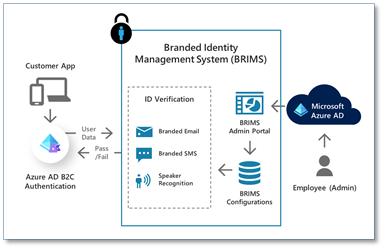
Branded Management System.png


Figure 2: WhoIAM BRIMS (Branded Identity Management System) runs on Azure AD


To begin, we use Dynamics Fraud Protection’s device fingerprinting and risk detection, which works by embedding a small piece of JavaScript on an app’s pages. We use Fraud Protection’s scores to get two broad categories of assessments even before a user begins an authentication journey:


  1. Per-transaction assessments: These help us examine each access request individually; evaluating the likelihood of the transaction being a bot, as well as determining the type of device and the location from which the connection originates.

  2. Macro-trends-based assessments: We’re also able to keep track of metrics, such as users experiencing low completion rates for authentication.


Subsequently during authentication, Azure AD B2C calls an intermediate API that checks Fraud Protection’s rules engine, as well as the individual user’s risk scoring, and then responds back. Combined with Azure AD Identity Protection, this information enables us to configure rules so that Azure AD B2C can present authentication journeys that are aware of the user’s specific scenarios as they attempt to interact with an application. Being able to identify a user as being low-risk for being a bot allows us to bypass an unnecessary human-or-not check that may have inclusivity challenges. Similarly, being able to spot groups of users with low authentication completion rates can be used to identify issues such as an inability to understand the on-screen instructions, or not knowing how to interact with complex hardware capabilities on their device.


Using voice biometrics for verification is also a powerful tool for implementing inclusive security. Human voices are readily available, can be recorded in a contactless way, and do not require specialized hardware. Our voice carries an imprint of our identity that comes through regardless of what we’re saying, what language we’re speaking, or where we’re speaking from. This makes voice biometrics an ideal choice for catering to users who are visually impaired, have difficulty reading or understanding a language, don’t have access to a dedicated personal device (residents at assisted-living communities, shift-workers), or live in less developed areas that rely on fixed phone lines.


For such users, we enable BRIMS voice biometrics, which relies on Deep Neural Networks (DNN)-based speaker recognition technologies developed by our partner, Oxford Wave Research. For voice biometrics to work accurately, we need a short recording of a person’s speech. BRIMS uses a combination of speaker recognition (who said it), as well as automatic speech recognition (What did they say?) to accurately identify a user. For the visually impaired, we prompt the user to respond to a knowledge-based question, such as their name, employee ID, or their favorite city. For other users who have difficulty reading an onscreen prompt due to a language barrier, we present an image for them to describe instead. Creatively solving for flexible, inclusive user verification ensures we can log in previously marginalized customers securely without identity verification being a frustrating experience.


Results: Azure AD and Dynamics Fraud Protection help us compete


For WhoIAM, betting on the Microsoft Identity Platform makes a lot of sense, and we’re looking to expand our footprint in Azure to achieve our goal of inclusive security. Because of Azure AD B2C’s design flexibility with its policy engine, and Dynamics Fraud Protection’s customer signaling from sign-in to sign-out; we’re able to weave in full-circle alerting and real-time decision making. This enables us to present our clients with strong security that’s both inclusive and affordable. Additionally, the availability of the entire Azure stack across Azure Key Vault, Azure App Service, Azure Cosmos DB and a whole slew of complementary products on the same Azure subscription is invaluable. This makes it easy for us to put together highly customized identity architectures for our clients while using Azure as a one-stop shop.


Learn more about Microsoft identity:


Azure Marketplace new offers – Volume 129

Azure Marketplace new offers – Volume 129

This article is contributed. See the original author and article here.


We continue to expand the Azure Marketplace ecosystem. For this volume, 102 new offers successfully met the onboarding criteria and went live. See details of the new offers below:


Applications


AskCody Room and Desk Booking.png

AskCody Room and Desk Booking: Built for Microsoft 365 and Outlook, AskCody Room and Desk Booking enables frictionless room and desk reservations to help you manage meetings more smartly and improve employee experience.


AskCody Visitor Management.png

AskCody Visitor Management: Empower receptionists to manage your business’s visitors with automated check-in flows, badge printing, NDA signing, and notifications. AskCody Visitor Management for Microsoft 365 and Outlook delivers an overview of all guests in a building at any given time.


AskCody Workplace and Meeting Services.png

AskCody Workplace and Meeting Services: AskCody Meeting Services for Microsoft 365 and Outlook makes ordering services for meetings intuitive and easy. Enable users to handle everything from meeting invites and room booking to service requests in one integrated interface in Outlook.


Basic IPCC.png

Basic IPCC: Monitor all Windows PC communications and limit unauthorized network connections with Basic IPCC, a security solution that limits where laptops can be connected outside your company and enforces the same security policies as within your company. This application is available only in Japanese.


Bizlat.png

Bizlat: Available only in Japanese, Bizlat on Microsoft Azure is a video distribution solution that includes user management and authentication functions. Scale from a few viewers to thousands and automatically generate a viewing portal for your users.


Careers Education for Schools.png

Careers Education for Schools: BECOME ME is a careers education service for primary and secondary schools. The curriculum- and web-based service will help your school teach agency — the ability to navigate a lifetime of learning and career choices. Get students excited about their future with BECOME ME.


Civica SLAM.png

Civica SLAM: Civica SLAM provides the insight to price, monitor, and manage the activities and costs associated with contract requirements. The solution unifies activity and price data sets across healthcare settings to deliver efficient, transparent, and consistent expenditure control.


Cloud2Go - Cloud Management Enterprise.png

Cloud2Go – Cloud Management Enterprise: One of the biggest challenges in using IaaS is the visibility and constant management of monthly computational resource costs. Cloud2Go’s Cloud Management Enterprise offering applies governance, security, and financial management techniques and tools to your dynamic Microsoft Azure environment.


CreateTeam.png

CreateTeam: Delivered via a simple app in Microsoft Teams, CreateTeam automatically manages the entire lifecycle of creating teams to ensure best practices, wide adoption, and optimized governance and security across your organization.


CustomInvite.png

CustomInvite: CustomInvite is a plugin for Microsoft Outlook and Skype for Business video meetings. Customize the layout of your Teams and Skype for Business meeting invitations and control your messaging to align with each meeting’s context and audience.


Data&Data - The intelligence of luxury.png

Data&Data – The Intelligence of Luxury: Leveraging computer vision technology, natural language processing, and translation APIs, Data&Data helps key decision-makers understand the ever-changing dynamics of the global online market. Monitor your online distribution across global e-commerce sites, online marketplaces, and social media.


Debian 10 with Docker CE.png

Debian 10 with Docker CE: This preconfigured image from Virtual Pulse provides Debian 10 with Docker Community Edition (CE). Docker enables more efficient use of system resources, rapid deployment of ready-made software products, and scaling and porting to other environments.


devNXT - AI-driven smart application development.png

devNXT – AI-driven Smart Application Development: Wipro devNXT is an AI-driven platform for developing smart applications and accelerating application modernization and cloud enablement. The solution integrates a host of Microsoft Azure Cognitive Services to facilitate efficient and effective collaboration and knowledge management.


Diagnostics for Skype for Business.png

Diagnostics for Skype for Business: Purpose-built for Skype for Business, Diagnostics delivers trend data and actionable insights to inform decision-making and help enterprises drive continuous service improvement. Boost user experience to drive enterprise-wide adoption and maximize the value of your Microsoft investments.


EduMall.png

EduMall: EduMall is an educational content distribution service that allows content makers to leverage a wealth of content, including digital textbooks, videos and animated content, and printed materials. This offer is available only in Japanese.


Fusion Cash Management.png

Fusion Cash Management: Finastra Fusion Cash Management provides a single, scalable view into cash and liquidity management functions, enabling you to provide the working capital optimization features corporate treasuries need to manage cash flow effectively.


Fusion Invest.png

Fusion Invest: Finastra Fusion Invest for investment management facilitates better transparency and collaboration throughout the investment process by delivering a consistent analytics framework on top of a real-time Investment Book of Record (IBOR).


Fusion Opics.png

Fusion Opics: Finastra Fusion Opics is a front-to-back office solution for regional and local banks looking to centralize their systems and gain increasing value from treasury operations. Fusion Opics helps simplify core treasury processing, manage risk more effectively, consolidate systems, and reduce costs.


G2K PARSIFAL - COVID Control Suite.png

G2K PARSIFAL – COVID-19 Control Suite: Powered by artificial intelligence, Parsifal offers contactless fever screening via thermal imaging and contactless, camera-based monitoring of mask compliance. Turn your data into knowledge and provide robust early detection to help mitigate the spread of COVID-19.


GigaVUE Cloud Suite for Azure 5.11.01 - Hourly.png

GigaVUE Cloud Suite for Azure 5.11.01 – BYOL: GigaVUE Cloud Suite for Microsoft Azure is an intelligent network traffic visibility solution that delivers increased security, operational efficiency, and scale across virtual networks (VNets).


GigaVUE Cloud Suite for Azure 5.11.01.png

GigaVUE Cloud Suite for Azure 5.11.01 – Hourly: GigaVUE Cloud Suite for Microsoft Azure is an intelligent network traffic visibility solution that delivers increased security, operational efficiency, and scale across virtual networks (VNets).


Gloopy.png

Gloopy: Available only in Portuguese, Gloopy is an e-commerce and customer retention platform designed for small businesses. The solution generates an app store and an online store depending on your needs, enabling your business to sell products online.


iEMS.png

iEMS: iEMS is an end-to-end power-management system that integrates power monitoring, troubleshooting, data analysis, system maintenance, and other power-management features. This application is available only in Traditional Chinese.


Infosys Soln.png

Infosys Solution for Slot Booking, Recommendations, and Scan & Pay: Infosys’ OMNI solution for retailers helps ensure a safe shopping experience for customers during the COVID-19 pandemic. The solution contains OMNIXSLOT for booking customer appointments, OMNIXWEAR to provide customer recommendations, and OMNIXPAY for contactless payments.


Intelliproc - Azure Data Engineering Solution.png

IntelliProc – Azure Data Engineering Solution: Facilitate big data and Microsoft Azure adoption with IntelliProc, a self-service data migration framework from Wipro. IntelliProc optimizes and integrates various big data solutions and provides them in one integrated package.


iPerf3 Server on Debian 10.png

iPerf3 Server on Debian 10: This preconfigured image from Virtual Pulse provides iPerf3 Server on Debian 10. iPerf is a production-ready, cross-platform network performance tool that delivers active measurements of the maximum achievable bandwidth on IP networks.


iPerf3 Server on Linux CentOS 7.9.png

iPerf3 Server on CentOS 7.9: This preconfigured image from Virtual Pulse provides iPerf3 Server on CentOS 7.9. iPerf is a production-ready, cross-platform network performance tool that delivers active measurements of the maximum achievable bandwidth on IP networks.


iPerf3 Server on Linux CentOS 8.3.png

iPerf3 Server on CentOS 8.3: This preconfigured image from Virtual Pulse provides iPerf3 Server on CentOS 8.3. iPerf is a production-ready, cross-platform network performance tool that delivers active measurements of the maximum achievable bandwidth on IP networks.


Kamude.png

Kamude: Kamude is a corporate governance management tool that highlights risk and compliance discrepancies across an enterprise. The easy-to-use solution delivers actionable insights to help drive informed decision-making. This application is available only in Norwegian.


KangaLock vHSM v1.0.png

KangaLock vHSM v1.0: KangaLock vHSM is a key-management solution that protects your sensitive data – even in the face of infrastructure, virtual machine, and operating system compromise. Available only in South Korea, KangaLock scales with demand and is fast and easy to deploy on Microsoft Azure.


Lighthouse Prism.png

Lighthouse Prism: Lighthouse Prism is a big data analytics solution that automates privilege and responsive predictions, junk document detection, and identification of sensitive information, such as personally identifiable information, protected health information, trade secrets, and source code.


MachineLogix - Smart Factory Solution.png

MachineLogix – Smart Factory Solution: MachineLogix integrates Microsoft Azure Cognitive Services, IoT Hub, IoT Edge, Stream Analytics, and other Azure services to enable real-time visibility into machine operations and related parameters. Improve overall equipment effectiveness, productivity, and efficiency with MachineLogix.


Medical Practice Management Software.png

Medical Practice Management Software: Featuring intuitive workflow automation, partnered product integrations, and a doctor app and patient portal, Clinic to Cloud gives healthcare professionals and their patients access to all the information they need when they need it.


Modality - OneConsultation.png

Modality – OneConsultation: Modality’s OneConsultation is a customizable virtual consultation service that integrates with your existing Skype for Business or Microsoft Teams deployment. Designed for the healthcare sector, OneConsultation provides secure virtual consultation rooms for doctors and their patients.


Moodle Lilicampus.png

Moodle Lilicampus: Based on the Moodle learning management system and hosted on Microsoft Azure, Edunao Lilicampus enables educators to design and create content, features more than 50 instructional activities, and connects to dozens of Plug and Play connectors.


MxExam.png

MxExam: Harnessing the power of Windows Virtual Desktop and Microsoft Azure, MxExam gives schools and colleges the ability to run a full timetable of online exams with the same level of privacy, security, and integrity they would have in a physical classroom.


Network Aggregation for Reliable PSAP Connectivity.png

Network Aggregation for Reliable PSAP Connectivity: The Dejero GateWay network aggregation solution enables high-throughput connectivity for nomadic or mobile emergency operations center and remote workforces, ensuring business continuity when disaster strikes.


OneDesk Mobile.png

OneDesk Mobile: Based on Microsoft 365, OneDesk Mobile is a personal, widget-based workspace that displays daily work tasks, corporate news, communications, and more while driving collaboration across the enterprise. This application is available only in Dutch.


OneMeeting.png

OneMeeting: Hosted on Microsoft Azure, Modality Systems OneMeeting is a Cloud Video Interop service for Microsoft Teams meetings. Conduct all your videoconferencing in Teams, get real-time usage reports in Microsoft Power BI, improve user experience, and more.


OpenGround Cloud.png

OpenGround Cloud: OpenGround Cloud is an enterprise cloud collaboration platform for geotechnical information management. Improve collaboration and facilitate data-driven decisions among all project contributors and significantly increase the value of your geotechnical data.


PAD Property Asset Manager.png

PAD Property Asset Manager: Combining financial, building management, and usage data elements into user-friendly views and reports, PAD from Bolderwood Solutions provides a central, easily accessible area for recording property-related information with data provided by CIPFA Property’s AssetManager.NET and local data sources.


Productivity and Collaboration Security.png

Productivity and Collaboration Security: Protect your assets and facilitate secure collaboration with business partners using ITG Solutions’ productivity and collaboration security solution. Features include advanced email content protection, shadow IT discovery, and more. This application is available only in Spanish.


Silk Cloud Data Platform.png

Silk Cloud Data Platform: Silk’s Cloud Data Platform makes moving to the cloud fast and easy, enabling companies to migrate their applications to Microsoft Azure without the expensive and time-intensive effort of re-engineering them first.


Slack to Teams Migration Tool.png

Slack to Teams Migration Tool: Spyglass’ migration tool provides a seamless migration from Slack to Microsoft Teams. Empower your teams with a robust collaboration platform, a unified search experience, and a digital environment that tightly integrates with other Microsoft 365 features and applications.


SMS on Microsoft Bot Framework.png

SMS on Microsoft Bot Framework: Infobip’s SMS adapter for the Microsoft Bot Framework enables you to provide rich, two-way communication and instant customer support while improving customer experience. Connect to multiple countries via a single provider and drive compliance and value across your organization.


Sonetto Product Information Management PIM+.png

Sonetto Product Information Management PIM+: Customers expect comprehensive product information, transparency, and personalization in a rich and seamless customer journey. Sonetto PIM+ on Microsoft Azure enables retailers to speak their customers’ language across all touchpoints for higher sales, profitability, and brand penetration.


SpiderOak CrossClave.png

SpiderOak CrossClave: SpiderOak CrossClave is a file-sharing/chat application that offers peace-of-mind by providing teams with the tools they need to effectively collaborate and communicate on projects while ensuring their work is safe from attacks.


Spirion Sensitive Data Finder.png

Spirion Sensitive Data Finder: Spirion Sensitive Data Finder on Microsoft Azure is an AI-driven, identity-centric privacy management solution that allows organizations to easily respond to data subject access requests, individual rights requests, and subject rights requests.


Spirion Sensitive Data Manager.png

Spirion Sensitive Data Manager: Spirion Sensitive Data Manager extends the protection provided by Microsoft Azure Information Protection (AIP) and Microsoft Information Protection (MIP) to environments and platforms outside the Microsoft ecosystem.


Spirion Sensitive Data Platform.png

Spirion Sensitive Data Platform: Spirion Sensitive Data Platform extends the protection provided by Microsoft Azure Information Protection (AIP) and Microsoft Information Protection (MIP) to environments and platforms outside the Microsoft ecosystem. Gain greater visibility into your sensitive data.


Supermetrics for Azure Storage.png

Supermetrics for Azure Storage: Supermetrics is a no-code data pipeline that makes it easy for anyone to move marketing data from different platforms, including Adobe Analytics, Facebook, and Salesforce, to Microsoft Azure Synapse Analytics or Azure Storage.


UAS Live Video Streaming & Connectivity.png

UAS Live Video Streaming & Connectivity: Dejero’s UAS Live Video Streaming & Connectivity works seamlessly with unmanned aerial systems to provide real-time video from the safety of the sky. The mobile solution helps first responders make informed decisions that save time, resources, and lives.


Ubuntu 20.04 LTS with Docker CE.png

Ubuntu 20.04 LTS with Docker CE: This preconfigured image from Virtual Pulse provides Ubuntu 20.04 LTS with Docker Community Edition (CE). Docker is a set of platform-as-a-service products using OS-level virtualization to deliver software in packages called containers.


Viber for Business on Microsoft Bot Framework.png

Viber for Business on Microsoft Bot Framework: Easily connect with your customers and provide an always-on experience with Infobip’s Viber connector for the Microsoft Bot Framework. Enable your contact center agents to provide quick, conversational support; get instant feedback; resolve issues in one-on-one conversations; and more.


WhatsApp for Business on Azure.png

WhatsApp for Business on Azure: Deliver an improved, connected customer experience with WhatsApp Business for Microsoft Azure. Enable your contact center agents to provide quick, conversational support; get instant feedback; resolve issues in one-on-one conversations; and more.


WhatsApp for Business on Microsoft Bot Framework.png

WhatsApp for Business on Microsoft Bot Framework: Connect with customers and provide an always-on experience with Infobip’s WhatsApp connector for the Microsoft Bot Framework. Enable your contact center agents to provide quick, conversational support; get instant feedback; resolve issues in one-on-one conversations; and more.


Windows Server 2016 with iPerf3 – SpeedTest Server.png

Windows Server 2016 with iPerf3 – SpeedTest Server: This preconfigured image from Virtual Pulse provides Windows Server 2016 with iPerf3. iPerf is a production-ready, cross-platform network performance tool that delivers active measurements of the maximum achievable bandwidth on IP networks.


Windows Server 2019 with iPerf3 – SpeedTest Server.png

Windows Server 2019 with iPerf3 – SpeedTest Server: This preconfigured image from Virtual Pulse provides Windows Server 2019 with iPerf3. iPerf is a production-ready, cross-platform network performance tool that delivers active measurements of the maximum achievable bandwidth on IP networks.


WIZ.AI Talkbot.png

WIZ.AI Talkbot: WIZ.AI Talkbot uses voice artificial intelligence to digitalize the process of inbound and outbound calls for the customer service industry. Deliver a highly scalable experience that engages and attracts customers via process automation.


WSC Sports - Automated Video Solutions.png

WSC Sports – Automated Video Solutions: WSC Sports’ platform leverages advanced AI and machine learning technologies to analyze live sports broadcasts, identify events in the game, and create customized short-form video content for publishing to any digital destination.


Consulting services


Actuarial Science Projection Tool 10-Week Implementation.png

Actuarial Science Projection Tool: 10-Week Implementation: novaCapta DevOps for Actuaries integrates the scaling and parallelization capabilities of Microsoft Azure Batch service to provide actuaries with timely insight into risk assessment and help them meet regulatory standards. This service is available only in German.


AI at Edge - 2-Week Proof of Concept.png

AI at Edge – 2-Week Proof of Concept: In this two-week engagement, Proximus will demonstrate the value Microsoft Azure IoT can bring to your organization by implementing Azure IoT Edge modules for a given use case.


AI for Customer Excellence 10-Week Implementation.png

AI for Customer Excellence: 10-Week Implementation: Looking for a better understanding of customer behavior? Whether your business model is subscription based, B2C, or B2B, Kapacity’s AI for Customer Excellence framework facilitates data-driven customer operations and helps you predict customer needs and behavior.


Azure App Services and AKS 1-Month Proof of Concept.png

Azure App Services and AKS: 1-Month Proof of Concept: Exploring options for modernizing your software applications on Microsoft Azure? Eastbanc Technologies will migrate your on-premises or other cloud services to Azure App Service, Azure Kubernetes Service, or other platform as a service technologies in this 10-day proof of concept.


Azure Backup 2-Week Implementation.png

Azure Backup: 2-Week Implementation: Microsoft Azure Backup reduces the costs of maintaining backup servers on-premises while enabling you to store your backup data securely in the cloud. Available only in Japanese, Agrex’s implementation includes designing and building your backup environment according to your business needs.


Azure Disaster Site - 10-Day Implementation.png

Azure Disaster Site – 10-Day Implementation: Office Line will assess, build, test, and deliver a disaster recovery environment on Microsoft Azure for your critical workloads in this 10-day implementation.


Azure Kubernetes for Ops 3-Day Workshop.png

Azure Kubernetes for Ops: 3-Day Workshop: Deep Network’s Azure Kubernetes Service (AKS) for Ops workshop includes a review of basic Kubernetes concepts and an introduction to optimization and advanced management techniques, scaling, node pools, and networking.


Azure Sentinel - 4-Week Assessment.png

Azure Sentinel – 4-Week Assessment: KPMG will work with you to identify your organization’s key focus areas for designing and implementing a SecOps transformation program centering on Microsoft Azure Sentinel. Simplify your security operations with KPMG and Azure Sentinel.


Azure VMware Solution 7-Day Workshop.png

Azure VMware Solution: 7-Day Workshop: NTT Germany’s Azure VMware Solution workshop will enable you to migrate workloads from on-premises environments to Microsoft Azure, deploy new virtual machines, and consume Azure services from your private clouds.


Azure Web App Migration - 2-Week Implementation.png

Azure Web App Migration – 2-Week Implementation: Fermorite’s offering will help you modernize your web apps by migrating them to Microsoft Azure App Service. Deliverables include migration plan documentation; resource provisioning; database migration to Azure SQL Database, PostgreSQL, or a MySQL-supported version; and more.


Cloud Readiness and On-Boarding 1-Hour Briefing.png

Cloud Readiness and On-Boarding: 1-Hour Briefing: Get an introduction to Cloud Direct’s migration services for Microsoft Azure in this free one-hour briefing. Learn about your cloud readiness and how you can optimize costs, performance, and security by migrating workloads to Azure.


Cloud Strategy and Implementation 8 Weeks.png

Cloud Strategy and Implementation: 8 Weeks: Aligned with the Microsoft Cloud Adoption Framework for Azure, Sonata’s cloud strategy service is designed to reduce time-to-market for cloud adoption. Simplify your journey to the cloud with Sonata and Microsoft Azure.


Device Connectivity Assessment 1 Week.png

Device Connectivity Assessment: 1 Week: This one-week assessment from Proximus will identify all the different devices in use at your organization and offer recommendations for integrating your ecosystem on Microsoft Azure. Learn about the benefits of Azure IoT Hub, Azure IoT Edge, and more.


DevOps Dojo 3-Week Briefing.png

DevOps Dojo: 3-Week Briefing: Transform your product into a cloud-native application by leveraging DevOps processes in CGI Germany’s three-week DevOps Dojo offering. Learn about the benefits of CI/CD pipelines, automated tests, feature flags, always-on deployments, and more. This offer is available only in German.


DigitalKYC Implementation 10 Weeks.png

DigitalKYC Implementation: 10 Weeks: Deliver the fluid, personalized experience customers crave with DigitalKYC, a seamless and compliant know-your-customer (KYC) solution from Proximus. Increase revenue and client conversions while boosting operational efficiency.


Disaster Response (Azure Site Recovery) 2-Week Implementation.png

Disaster Response (Azure Site Recovery): 2-Week Implementation: Agrex’s engagement includes a discovery session to determine your business needs along with the implementation of Microsoft Azure Site Recovery. Keep your data safe in the event of server failure or disaster. This offer is available only in Japanese.


DRaaS 1-Hour Briefing.png

DRaaS: 1-Hour Briefing: Learn about Cloud Direct’s disaster recovery services for Microsoft Azure in this free briefing. Modernize your disaster recovery strategy and optimize costs, performance, and security across your organization.


Dynamic Clustering (DCaaS) 3-Week Proof of Concept.png

Dynamic Clustering (DCaaS): 3-Week Proof of Concept: E-Level Cloud Services offers its Dynamic Clustering proof of concept to help you gain a deeper understanding of your data and generate strategies to increase profits with Microsoft Azure Machine Learning.


eacs Managed Service.png

eacs Managed Service: Reduce costs and improve service levels with eacs’ managed services for Microsoft Azure. The flexible, scalable services enable you to have as little or as much assistance as you wish depending on your budget, level of IT knowledge, and resource availability.


FHIR-based Interoperability Solution 10-Week Implementation.png

FHIR-based Interoperability Solution: 10-Week Implementation: ITC Infotech’s Fast Healthcare Interoperability Resources (FHIR)-based solution uses the Microsoft Azure API for FHIR to make clinical health data interoperable across systems. Consolidate healthcare data from disparate systems to drive better care, compliance, and coordination.


File Sharing (Azure Files) 2-Week Implementation.png

File Sharing (Azure Files): 2-Week Implementation: In this two-week engagement, Agrex will implement a tailored storage solution using Microsoft Azure Files. Reduce the administrative and operational costs of maintaining on-premises file servers while keeping your data safe in the cloud. This service is available only in Japanese.


GLAM - Half Day Workshop.png

GLAM – Half-Day Workshop: HCL Technologies’ Microsoft Azure-powered, IoT-based Geospatial Linear Asset Management (GLAM) solution for the energy and utilities industry delivers accurate, economical, and remote monitoring of linear assets across energy distribution networks.


Implement a Modern Azure Data Platform in 10 Weeks.png

Implement a Modern Azure Data Platform in 10 Weeks: Sword IT Solutions will help you design, plan, deploy, and adopt Microsoft Azure and its analytics services in this 10-week implementation. Facilitate a healthy data culture with a modern data platform that equips your organization with AI-powered insights.


Industry 4.0 Performance with ThingWorx 6-Week Proof of Concept.png

Industry 4.0 Performance with ThingWorx: 6-Week Proof of Concept: Implement an industrial data processing chain and optimize the performance of your production line with Sword’s Industry 4.0 solution based on ThingWorx and Microsoft Azure. This offer is available only in French.


IoT for Manufacturing 1-Hour Briefing.png

IoT for Manufacturing: 1-Hour Briefing: Learn how Cloud Direct’s IoT services for manufacturing integrate Microsoft Azure IoT technologies and protocols to help you optimize costs, performance, and security.


Knowledge as a Service (KaaS) 1-Hour Briefing.png

Knowledge as a Service (KaaS): 1-Hour Briefing: This free Knowledge as a Service briefing from 3fifty covers how Microsoft Azure and Microsoft 365 services can help your organization optimize costs, innovate more quickly, and collaborate more effectively.


Managed Detection and Response.png

Managed Detection and Response: NTT’s Managed Detection and Response is a turnkey service focused on quickly detecting and effectively responding to hard-to-find cybersecurity threats. Leverage 24/7 analyst-driven investigation and remediation with NTT’s threat-hunting platform on Microsoft Azure.


Microsoft Teams and LMS (Moodle) Implementation Service.png

Microsoft Teams and LMS (Moodle) Implementation Service: Deliver a unified learning experience for your students with Sonata Software’s implementation of Microsoft Teams and the Moodle learning management system (LMS) on Microsoft Azure. Drive improved educational outcomes with seamless learning experiences in and out of the classroom.


Migrate Servers to Azure 1-Month Implementation.png

Migrate Servers to Azure: 1-Month Implementation: : Space Hellas’ cloud migration framework combines industrialized capabilities with migration tools and automation across all cloud models and delivery methods for hosting Windows and SQL Server workloads on Microsoft Azure.


Modern Data Warehouse on Azure 1-Day Workshop.png

Modern Data Warehouse on Azure: 1-Day Workshop: Learn about the architecture and components of modern business intelligence and data warehouse solutions on Microsoft Azure in this one-day workshop from inovex. Topics include how you can benefit from the integration of Azure artificial intelligence and machine learning services.


Modernize SQL with Azure 1-Month Implementation.png

Modernize SQL with Azure: 1-Month Implementation: Looking to migrate lots of apps from an on-premises or IaaS environment to a fully managed PaaS cloud environment on Microsoft Azure? Space Hellas will seamlessly migrate your organization’s SQL databases to Microsoft Azure SQL Database in this one-month implementation.


nC Application Modernization 10-Day Assessment.png

nC Application Modernization: 10-Day Assessment: Covering the benefits of both cloud-hosting legacy apps and cloud-native development, novaCapta’s assessment will help you define the right modernization strategy on Microsoft Azure to meet your requirements.


SQL HealthCheck 2-Day Assessment.png

SQL HealthCheck: 2-Day Assessment: Available from SQL Service Nordic, the SQL HealthCheck assessment includes a review of your Azure SQL Managed Instance, Azure SQL Database, or SQL Server instance along with recommendations for improving performance and stability across your on-premises or cloud environment.


SQL Performance Review 2Day Assessment.png

SQL Performance Review: 2-Day Assessment: Available from SQL Service Nordic, the SQL Performance Review assessment includes a review of your Azure SQL Managed Instance, Azure SQL Database, or SQL Server instance along with recommendations for improving performance and stability across your on-premises or cloud environment.


TDG Cloud Managed Service.png

TDG Cloud Managed Service: Available only in Korean, TechDataGlobal’s managed cloud offering provides open-source technical and operational services to drive your organization’s digital transformation.


Time Series Assessment 1 Week.png

Time Series Assessment: 1 Week: Proximus’ Time Series assessment includes a review of your organization’s IT landscape along with recommendations for implementing a solution integrating Microsoft Azure Time Series Insights, Azure Storage, or Azure Data Explorer based on your requirements.


UNIFYSecure Managed Security Service.png

UNIFYSecure Managed Security Service: UNIFYSecure is a comprehensive managed security service offering from UNIFY that delivers managed detection and response services using Microsoft products and technologies. Protect your identities, data, applications, and devices at a global scale in real time.


Video Managed Services.png

Video Managed Services: Modality Systems delivers a reliable and scalable Video Managed Services solution that monitors and manages your videoconference technology to reduce the burden on IT teams. Reduce costs and enhance user experience while maximizing adoption, engagement, and return on investment.


Windows Virtual Desktop 1-Day Assessment.png

Windows Virtual Desktop: 1-Day Assessment: Available in three tiers that align to various levels of deployment complexity, Insight Technology Solutions’ Windows Virtual Desktop assessment explores how you can harness the benefits virtualized desktops and applications to boost productivity, accelerate speed to market, and bolster security.


Work from Home Using Quickbook on Azure 3-Day Implementation.png

Work from Home Using QuickBooks on Azure: 3-Day Implementation: Cloud 9 Infosystems will migrate your on-premises QuickBooks accounting package to Microsoft Azure, facilitating secure, remote access to QuickBooks from any device without the hassle of managing additional software and hardware.


WVDSync 1-Day Implementation.png

WVDSync: 1-Day Implementation: Struggling to reduce increasing Windows Virtual Desktop costs associated with employees working from home during the COVID-19 pandemic? TechData Global’s WVDSync automatically powers down unused VMs for organizations running Microsoft Azure-based Windows Virtual Desktop environments.


IT Vizion ITSM.png

IT Vizion ITSM: IT Vizion offers Microsoft-centric IT service management (ITSM) support for any business looking to optimize IT operations across its Microsoft Azure environment. Optimize your operations and minimize downtime even in the most complex heterogeneous environments.