by Contributed | Apr 9, 2021 | Technology
This article is contributed. See the original author and article here.
Workplace collaboration is evolving—and so is Microsoft Word. Today, we’re pleased to announce expanded availability of our new modern commenting experience across Word platforms.
Modern comments sets the stage for a richer Word collaboration experience for you and your teams by enabling modern features such as @mention notifications and more. It aligns how comments work across Office on different endpoints, so that you and your team can rely on a consistent experience regardless of whether you’re using Word, Excel, or PowerPoint on any platform.
Modern comments was first introduced on the mobile and Web versions of Word where we iterated based on feedback. Now it is rolling out to Production on Word for Windows, and Current Channel (Preview) on Word for Mac!
Here’s a look at what to expect:
Stay in control
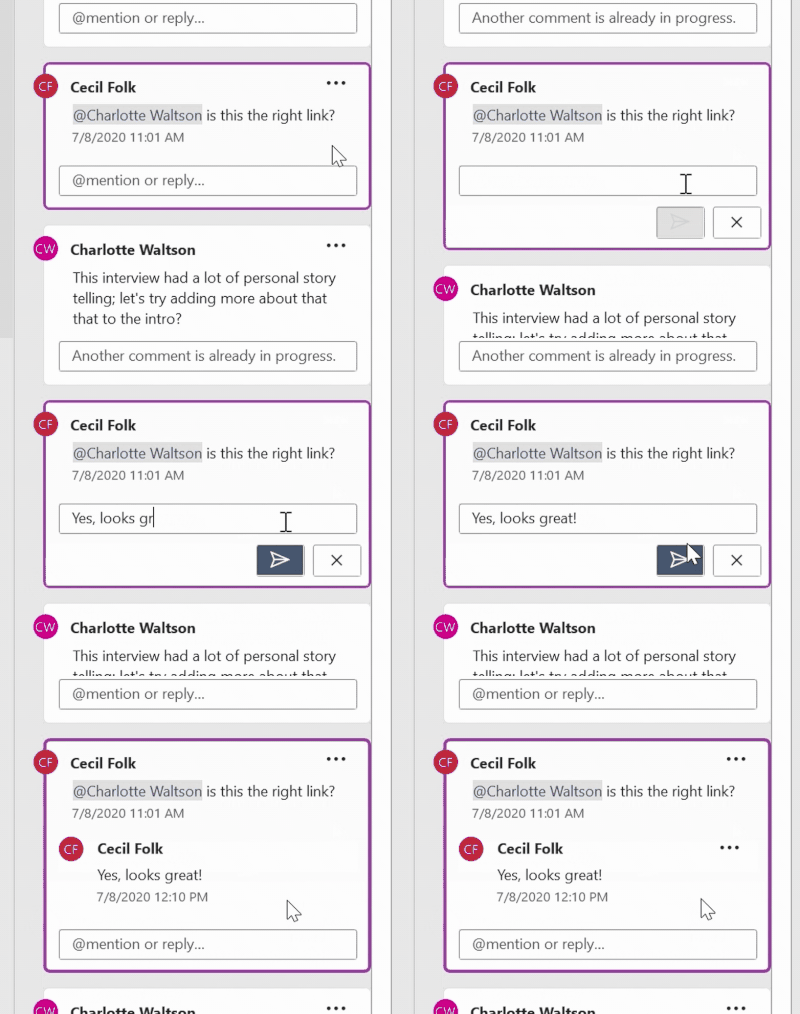
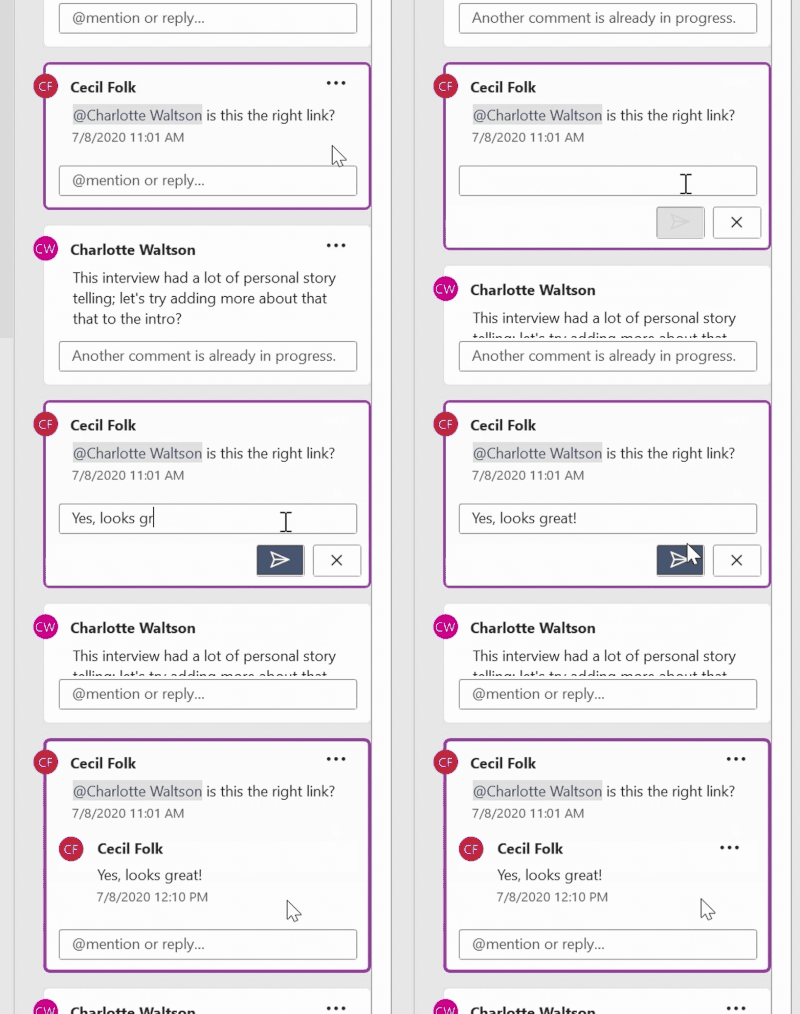
With modern comments, you no longer have to worry about your comments being seen by others before you’re finished editing them. After you draft a new comment or reply, click the Post button or use the keyboard shortcut Ctrl+Enter (Windows) or Cmd + Enter (MacOS) to share your thoughts with others. Now, a comment or reply can only be edited by the person who created it.
Flexibility in how you view and interact with comments
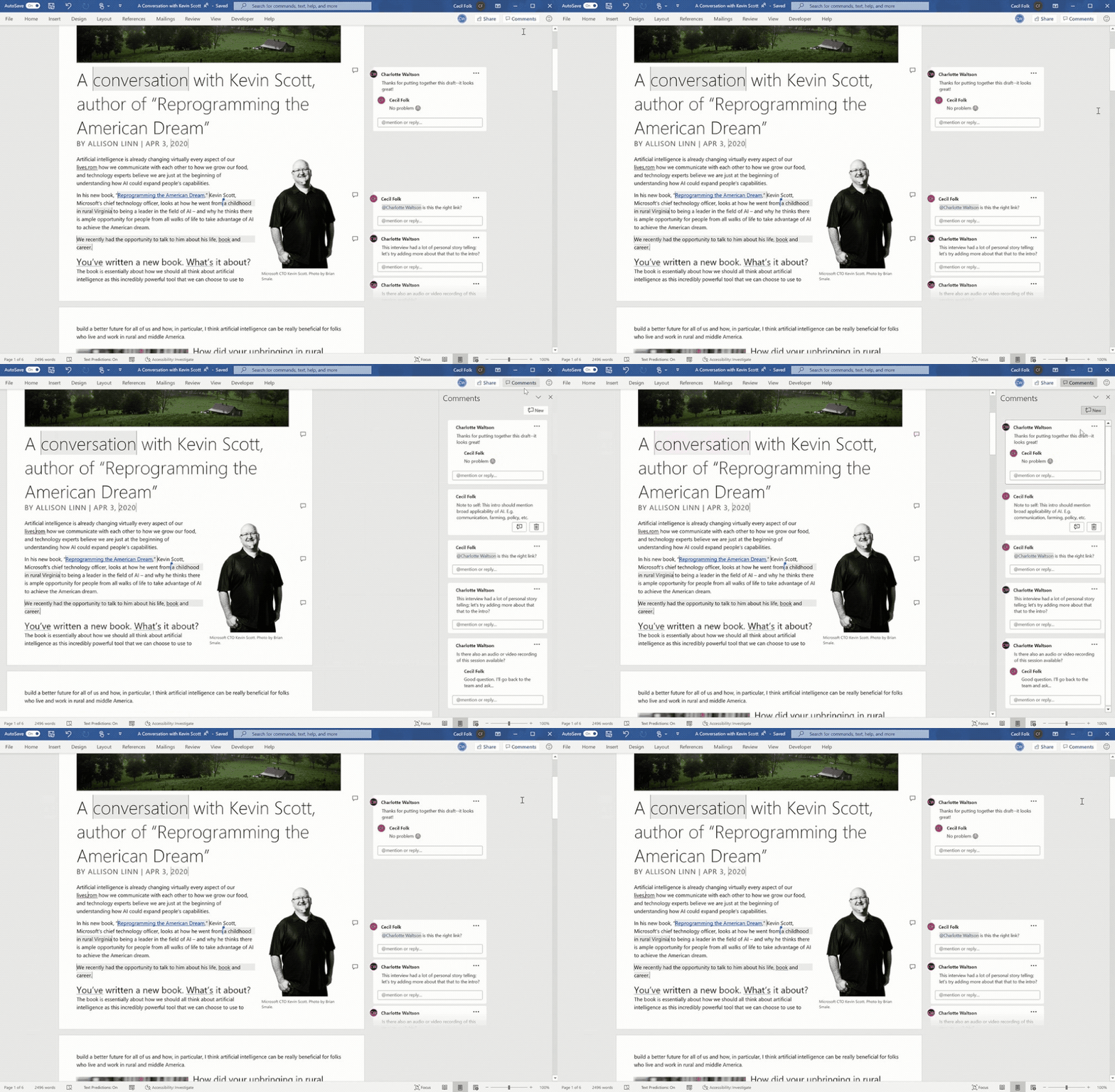
In Word you’ll find comments to the right of your page, by default. In this view, contextual comments are side-by-side with the page content, to help you focus on the feedback that’s most relevant to the part of the document you’re working on.
In the Comments pane, you can see a single list of all comments in your document, including resolved comments. To switch between the contextual view and the Comments pane, simply click the Comments button in the upper right corner of your Word window.
Resolve comment threads
Comments in documents generally represent questions, ideas, or concerns about the content. When those have been addressed, comments allow you to mark that thread as resolved. Resolved comment threads won’t appear in the contextual view (though you can still find them in the Comments pane) to help you stay focused on what’s active.
Improved @mentions in comments
Users have been adding names to comments for years. Now, if you’re an enterprise user working on cloud files, you can more easily use an @mention to call out to one or more of your colleagues in your organization or school. Just highlight some text, click the Comment button, type your comment, and @mention anyone you want to see it.
When you post your comment, anybody that you’ve @mentioned in it will get an email notification. Whoever started the comment thread will also be notified. Notification emails let your collaborators know there’s been new activity in the comment thread, gives them a preview of the document content where the comment was made, as well as the comment you left. They can reply to your comment from the email, or they can click a link in the notification email to open the document and go straight to the comment if they want to see more context.
Better collaboration practices for today’s remote world
These new commenting experiences are ideal for today’s remote teams who may be working together from across town or around the world. Comments eliminate the need to coordinate schedules or conduct in-person discussions, providing greater flexibility and enabling collaborators to provide better insights. A consistent experience across applications makes everything flow smoothly.
We’re continuing to iterate on Modern comments and other collaboration features in Office, and your feedback plays an invaluable role in the process. If you have the new commenting experience in Word, let us know what you think and what you’d like to see next!
If you don’t have Modern Comments yet but can’t wait to try it, join our Office Insider Program.
See our support page for more information: Using Modern Comments in Word.
by Contributed | Apr 9, 2021 | Technology
This article is contributed. See the original author and article here.
Customers around the world rely on Microsoft Azure to drive innovations related to our environment, public health, energy sustainability, weather modeling, economic growth, manufacturing and more. Finding solutions to these important challenges requires huge amounts of focused computing power. Customers are increasingly finding the best way to access such high-performance computing (HPC) is through the agility, scale, security, and leading edge performance of Azure’s purpose-built HPC and AI cloud services.
Azure’s market-leading vision for HPC and AI is based on a core of genuine and recognized HPC expertise, using proven HPC technology and design principles, enhanced with the best features of the cloud. The result is a capability that delivers performance, scale, and value unlike any other cloud. This means applications scaling 12 times higher than other public clouds. It means higher application performance per node. It means powering AI workloads for one customer with a supercomputer fit to be among the top five in the world. And it means delivering massive compute power into the hands of medical researchers over a weekend to prove out life-saving innovations in the fight against COVID-19.
This year during Ansys Simulation World 2021, we’re spotlighting some of the most transformational applications that highlight our commitment to IOT, AI, HPC and cloud computing. Learn more about the event and register here.
Presentations by Microsoft experts range from how to drive more productivity from simulations by leveraging the power of GPU’s on Azure to optimal setups for running complex IC simulations in the cloud to novel methods of developing advanced control algorithms using machine learning and simulations together. Overall, the conference represents many industries coming together to discuss simulation and digital transformation, and as the Diamond Sponsor, Microsoft is right in the middle of this movement.
Microsoft Sessions
Recommended Ansys Sessions
References

by Contributed | Apr 9, 2021 | Dynamics 365, Microsoft 365, Technology
This article is contributed. See the original author and article here.
Unified Service Desk for model-driven apps provides a configurable framework that allows you to build applications that give call center agents a unified view of customer data. Unified Service Desk version 4.2, available for public preview in April, enables you to host web applications using Microsoft Edge WebView2 Process based on the Chromium open-source framework, as well as delivering improved performance and other enhancements. The Microsoft Edge WebView2 control enables you to embed web technologies (HTML, CSS, and JavaScript) in your native apps. Microsoft Edge WebView2 Process is based on CefSharp, which is an open-source framework in the Chromium core that powers many modern browsers. With support for Microsoft Edge WebView2, Unified Service Desk admins have these capabilities: Ability to select WebView2 Process as the hosting type for their organization. Ability to select WebView2 Process as the hosting type for web applications, along with Chrome Process. In addition, Microsoft Edge WebView2 Process delivers: Availability on supported versions of the Windows operating system. Easy configuration of host applications in Unified Service Desk. Ability to switch seamlessly from one browser to another for your entire organization. Enhanced performance and memory optimization. Next steps To learn more, check out the Unified Service Desk documentation or the Microsoft Edge WebView2 documentation. To test and validate the capabilities, download and install or update Unified Service Desk
The post Host web apps using Microsoft Edge WebView2 Process in Unified Service Desk (Preview) appeared first on Microsoft Dynamics 365 Blog.
Brought to you by Dr. Ware, Microsoft Office 365 Silver Partner, Charleston SC.

by Contributed | Apr 9, 2021 | Technology
This article is contributed. See the original author and article here.
Which community project do you maintain?
CLI Microsoft 365
How does it help people?
It helps you automate tasks for your Microsoft 365 tenant and helps developers with their SPFx projects
What have you been working on lately?
We recently released our docker container; I’ve been working on getting that docker container running in the Azure Container Instances orchestrated from an Azure Logic App. And obviously helping out with new commands.
What do you do at work?
I provide our sales team with a technical conscience. Have the opportunity to collaborate with my colleagues on our larger projects. And last but not least I get to play around with the new shiny toys in an R&D setting to see if they would improve our development practices.
Why are you a part of the M365 community?
I get to learn from inspiring people, learn new technologies or products that I might not know about and finally committing to something forces me to push myself outside of the comfort zone.
What was you first community contribution?
A minor fix for the PnP Modern Search WebParts, followed by a few Dutch translations for that same webpart.
One tip for someone who’d like to start contributing
Anyone can make the world a better place, if you see something that you think is wrong raise an issue, if you have an opinion on something engage in the discussions and if you can just improve what is already there. It doesn’t matter if it is code or docs, complex functions or sample scripts. If you learned something, chances are high that someone else will as well!
by Contributed | Apr 9, 2021 | Technology
This article is contributed. See the original author and article here.
Hello friends,
Since my last update, the Azure Active Directory (Azure AD) External Identities team has been focused on delivering so many exciting new features that I can’t wait to share. Here are two that we’re releasing today: Now, Azure AD B2C developers can create custom domains for B2C user experiences with Azure Front Door; and public preview of Azure AD B2C in Australia allows organizations there to optimize their customer experiences. These two updates represent Microsoft’s ongoing commitment to making it easier for organizations to deliver experiences to employees, partners, and customers.
Self-service custom domains
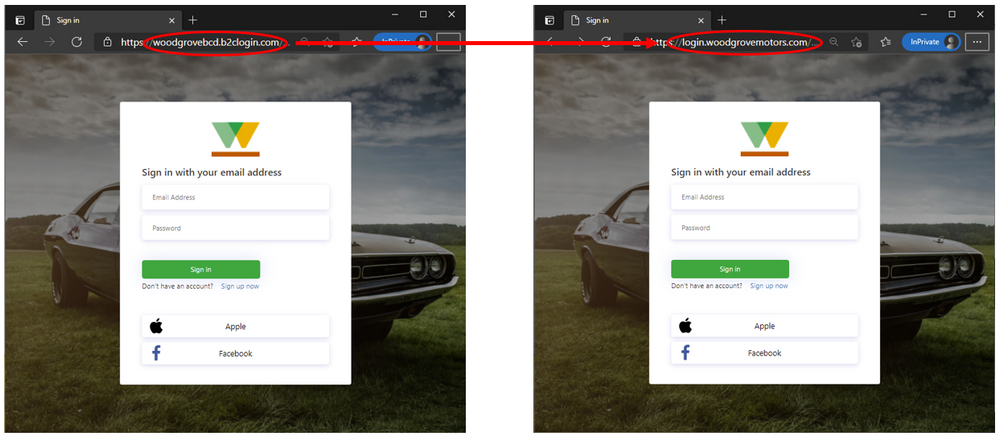
Customer experiences should reflect your company’s brand from start to finish – even when users are redirected to authenticate. Now, Azure AD B2C developers worldwide can set up a custom domain name through a self-service process, which is possible via integration with Azure Front Door. Instead of redirecting users to a generic Azure AD B2C domain (eg. contoso.b2clogin.com), you can direct users to a custom domain specified by you (eg. login.contoso.com) for a more seamless, branded experience.
Setting up custom domains for Azure AD B2C with Azure Front Door is seamless and works with both standard and custom user flows. You can learn more on how to set it up in our documentation.
Instead of redirecting to contoso.b2clogin.com, Azure AD B2C displays a custom domain name specified by the app owner.
Expanded availability in Australia
Starting today, Azure AD B2C tenants are available in public preview in Australia. This enables organizations to access all the capabilities of our global Azure AD B2C service, with the added benefit of being able to store B2C user data within Australia. In addition, apps hosted in Australia will avoid latency in the identity experience since the service is hosted on the same side of the world.
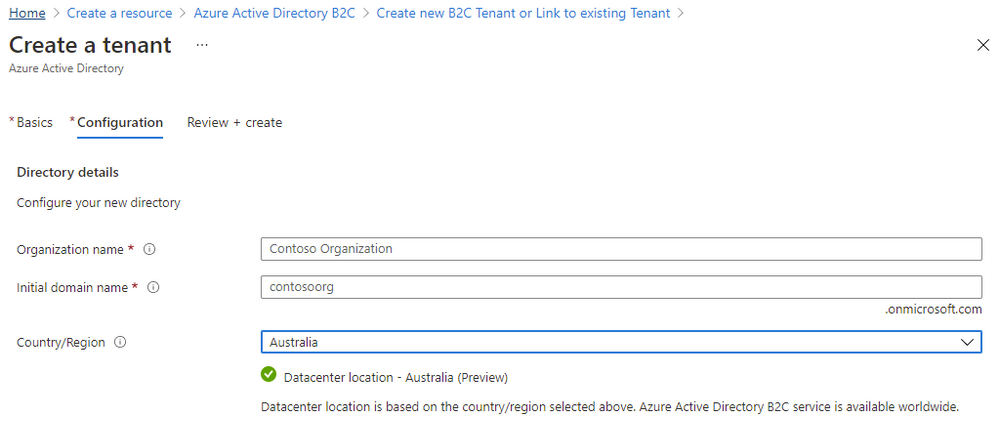
Create a tenant in Australia.
Existing Azure customers in Australia and New Zealand can try it out by going to the Azure portal in Australia and searching for B2C. New customers can try it out by choosing Australia or New Zealand as the Country/Region when creating a new Azure AD B2C tenant.
We love hearing from you, so keep trying new features and sharing feedback through the Azure forum or by following @AzureAD on Twitter.
Learn more about Microsoft identity:
by Contributed | Apr 9, 2021 | Technology
This article is contributed. See the original author and article here.
Would you like to help influence the direction of our Microsoft 365 Compliance products? We need your input!
The Microsoft Compliance Product Groups are currently running several surveys that will help prioritize the top asks that we’ve captured from our customers. Filling out these surveys will allow us to understand what features customers want and need, and in what priority they prefer.
The surveys are active until April 21, 2021 and are available at the following links:
by Contributed | Apr 9, 2021 | Technology
This article is contributed. See the original author and article here.
By: Marc Swinnen, Dir. Product Marketing, Semiconductors, Ansys and Andy Chan, Director, Azure Global Solutions, Semiconductor/EDA/CAE
What is Ansys RedHawk-SC?
Modern semiconductor integrated circuits (IC) can contain a staggering 50 billion transistors or more and would be impossible to design without software tools grouped under the Electronic Design Automation (EDA) category that support, automate, and verify every step of the chip design process.
RedHawk-SC is an EDA tool developed by Ansys that is the market leader for power integrity and reliability sign-off, which provide a vital sign-off step in the design process for all semiconductor chip design. Sign-off algorithms are extremely resource-intensive requiring hundreds of CPU cores running over many hours, making it an ideal application for cloud computing.
Designed for the Cloud
RedHawk-SC was architected on a cloud-friendly analysis platform called Ansys SeaScape™. RedHawk-SC’s SeaScape database is fully distributed and thrives on distributed disk access across a network. RedHawk-SC distributes the computational workload across many CPUs, or “workers”, that have low memory requirements – less than 32GB per worker. This elastic compute architecture allows for instant start as soon as just a few workers become available.
The distribution of the computational workload is extremely memory efficient, allowing the optimal utilization of over 2,500 CPUs. There is also no need for a heavy master node because the distribution is orchestrated by an ultra-light master scheduler using less than 2GB for even the largest chips. The same is true for loading, viewing, or debugging results.
RedHawk-SC Workloads on Azure
EDA applications like RedHawk-SC have specific requirements for optimal cloud deployment. We can summarize these considerations with the following points:
- Sign-off generates very large workloads requiring thousands of CPUs
- Large design sizes necessitate persistent or distributed storage for data and results in the cloud
- Worker communication calls for a high-bandwidth network (10Gbps or more)
Ansys and Microsoft have worked together to evaluate the performance of realistic RedHawk-SC workloads on the Azure cloud and how to optimally configure the hardware setup.
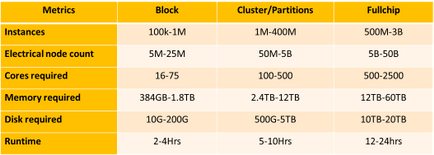
Table-1: RedHawk-SC resource requirements for representative small “Block” workloads, medium “Cluster/Partition” workloads, and large “Full Chip” workloads
Cloud Compute Models for EDA
Microsoft worked closely with Ansys to develop finely tuned solutions for RedHawk-SC running on Azure’s high-performance computing (HPC) infrastructure. These targeted reference architectures help ease the transition to Azure and allow design teams to run faster at a much lower cost.
IC design companies may choose to contract with cloud providers like Azure under an “all-in” model where the entire design project is conducted in the cloud or may look for a “hybrid” use model where cloud resources complement their existing in-house capacity (Figure-
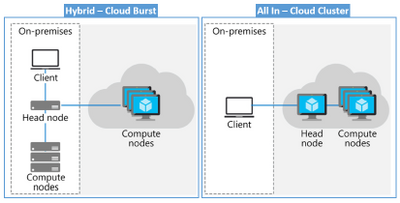
Figure-1. Hybrid versus all-in model with both the head and compute nodes in the cloud.
Ansys and Microsoft Azure have verified that RedHawk-SC successfully accommodates both “all-in” and “hybrid” use models and licensing.
Azure infrastructure optimized for EDA
To achieve the fastest possible runtimes, companies typically start by investing in processors that support the highest clock speed available. Additionally, the cloud poses other efficiency considerations such as datacenter efficiency and workflow architecture. Benchmarks show that storage in the cloud is a high-impact architectural component, as are scale technologies. Through extensive testing with realistic workloads, Microsoft and Ansys have recommended an optimized hardware configuration for running RedHawk-SC on Azure in Figure-2 (below) The Azure Silicon team selected the following infrastructure to power this test:
- AMD’s EPYC powered HBv2
- Intel Cascade Lake powered FX VM family
- Azure NetApp Files
- CycleCloud Operations Orchestration
Azure NetApp Files is a high-performance, NFS-metered file storage service enables RedHawk-SC file applications to run without the need for code changes. CycleCloud cloud-scaling was used to support RedHawk-SC in orchestrating dynamic VM deployment.
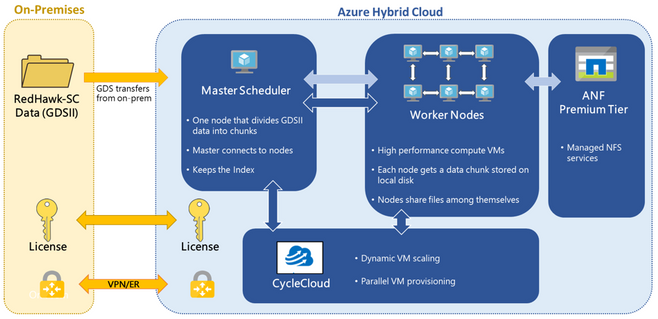
Figure-2: Reference architecture for running Ansys RedHawk-SC on an Azure hybrid cloud
RedHawk-SC shows near-linear runtime scaling as the number of CPUs is increased. This is shown for the three different workloads in Graph-1 (below). The favorable scaling reflects the efficient distribution technology underlying RedHawk-SC’s SeaScape architecture.
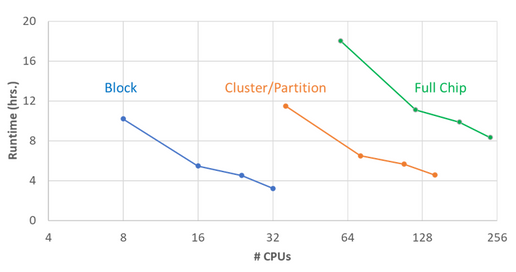
Graph-1: Runtime required to run various RedHawk-SC workloads on Microsoft Azure as a function of the number of CPUs
In a surprising finding from Graph-1, the total cost of running a RedHawk-SC job on Azure actually decreases as you increase the number of workers (up to the optimum threshold). This contradicts the commonly held assumption that the total cost will increase as you enlist more CPUs (Graph-2). The reason for this is the very high CPU utilization RedHawk-SC can achieve. The optimal number of CPUs is the number of power partitions automatically calculated by RedHawk-SC.
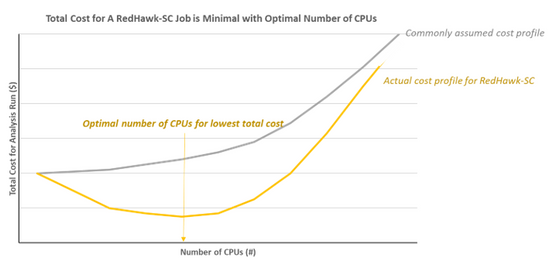
Graph-2: This plot illustrates the non-intuitive decrease in total Azure costs for RedHawk-SC runs as the number of CPUs is increased to an optimal value – the number of power partitions in RedHawk-SC
This result is not intuitively obvious and indicates that customers should not try to reduce the CPU count to save money. In fact, they should actually increase their CPU count to the optimal value to achieve lower cost and a faster runtime.
Conclusion
Extensive testing of RedHawk-SC on Azure has allowed Microsoft to identify an optimized VM configuration for cloud-based EDA work. This configuration has demonstrated excellent scalability to over 2500 CPUs running on a range of realistic EDA workloads of enormous sizes. The testing further identified the optimal number of CPUs to minimize the total cost for running RedHawk-SC on Azure. The result is that customers can easily set up their power integrity signoff analysis jobs on Azure with optimal configurations for both throughput and cost.
For further information contact your local sales representative or visit www.ansys.com.
Join us at Ansys Simulation World 2021 April 20th – 21st. Register here.
by Contributed | Apr 9, 2021 | Technology
This article is contributed. See the original author and article here.
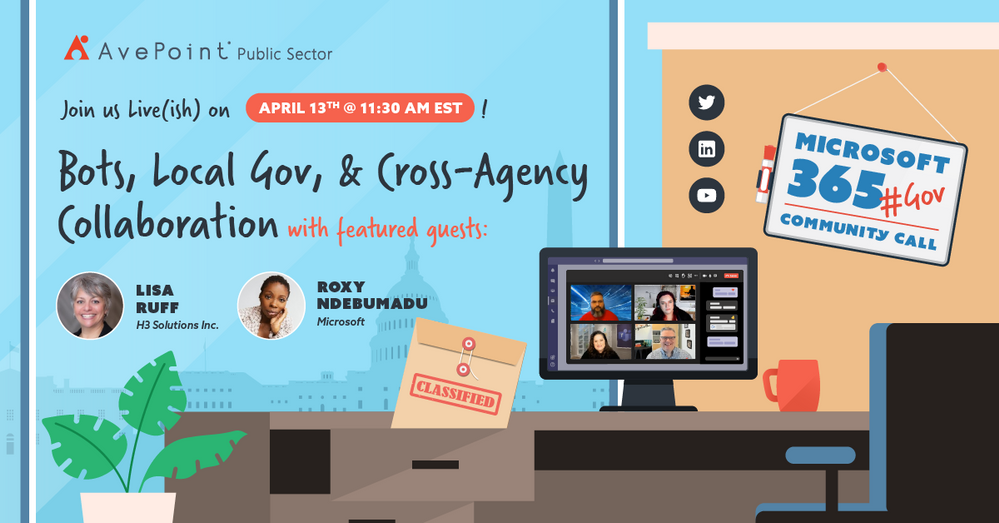
April 2021 #M365GovComCall discussing Bots, State & Local Government, and Cross-Agency Collaboration in M365 for Government
A new month means a new M365 Government Community Call! This month @Jeremy Wood, @Rima Reyes, @Sarah Gilbert and I are very excited to have Lisa Ruff and Roxy Ndebumadu join us to talk about Bots and Cross-Agency Collaboration in M365 as well as what specialty needs and use cases may exist within State and Local government.
April 2021 Panelists
- Lisa Ruff (@RuffLisa | LinkedIn), VP of Sales & Partnerships at H3 solutions, the Maker of AtBot
- Roxy Ndebumadu (@RoxyNdebumadu | LinkedIn), Sr. Customer Success Manager in Microsoft Federal, Bowie City councilwoman District 4
- Jeremy Wood (@geekwithin | LinkedIn), Director of Policy & Planning at the Millennium Challenge Corporation, Organizer of Microsoft 365 for Government DC Users Group
- Rima Reyes (@rimazima | LinkedIn), Principal Program Manager for Government at Microsoft Teams Engineering
- Sarah Gilbert (@singingtech | LinkedIn), Community Technical Manager Public Sector at Microsoft
- Jay Leask (@jayleask | LinkedIn), Lead Modern Workplace Strategist at AvePoint Public Sector, Organizer at NOVA365 and Azure User Group
How to Watch
We go live the second Tuesday of each month on LinkedIn where you can engage with our panel and ask questions right in the chat. Be sure you “Follow” the AvePoint Public Sector LinkedIn page to be notified every time we go live!
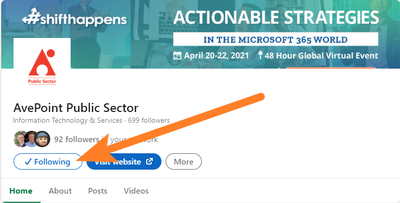 “Follow” the AvePoint Public Sector LinkedIn page for notifications every time we go live!
After the show we will update this page with notes, links to articles and topics we discussed, as well as embed the recorded video for your viewing!
by Contributed | Apr 9, 2021 | Technology
This article is contributed. See the original author and article here.
April 2021 #M365GovComCall discussing Bots, State & Local Government, and Cross-Agency Collaboration in M365 for Government
A new month means a new M365 Government Community Call! This month @Jeremy Wood, @Rima Reyes, @Sarah Gilbert and I are very excited to have Lisa Ruff and Roxy Ndebumadu join us to talk about Bots and Cross-Agency Collaboration in M365 as well as what specialty needs and use cases may exist within State and Local government.
April 2021 Panelists
- Lisa Ruff (@RuffLisa | LinkedIn), VP of Sales & Partnerships at H3 solutions, the Maker of AtBot
- Roxy Ndebumadu (@RoxyNdebumadu | LinkedIn), Sr. Customer Success Manager in Microsoft Federal, Bowie City councilwoman District 4
- Jeremy Wood (@geekwithin | LinkedIn), Director of Policy & Planning at the Millennium Challenge Corporation, Organizer of Microsoft 365 for Government DC Users Group
- Rima Reyes (@rimazima | LinkedIn), Principal Program Manager for Government at Microsoft Teams Engineering
- Sarah Gilbert (@singingtech | LinkedIn), Community Technical Manager Public Sector at Microsoft
- Jay Leask (@jayleask | LinkedIn), Lead Modern Workplace Strategist at AvePoint Public Sector, Organizer at NOVA365 and Azure User Group
How to Watch
We go live the second Tuesday of each month on LinkedIn where you can engage with our panel and ask questions right in the chat. Be sure you “Follow” the AvePoint Public Sector LinkedIn page to be notified every time we go live!
“Follow” the AvePoint Public Sector LinkedIn page for notifications every time we go live!
After the show we will update this page with notes, links to articles and topics we discussed, as well as embed the recorded video for your viewing!

by Contributed | Apr 9, 2021 | Technology
This article is contributed. See the original author and article here.
Export SharePoint Version History to Excel Using PowerShell
Mohamed El-Qassas is a Microsoft MVP, SharePoint StackExchange (StackOverflow) Moderator, C# Corner MVP, Microsoft TechNet Wiki Judge, Blogger, and Senior Technical Consultant with +10 years of experience in SharePoint, Project Server, and BI. In SharePoint StackExchange, he has been elected as the 1st Moderator in the GCC, Middle East, and Africa, and ranked as the 2nd top contributor of all the time. Check out his blog here.

Azure Linux VM: Using several apps to remote connect
George Chrysovalantis Grammatikos is based in Greece and is working for Tisski ltd. as an Azure Cloud Architect. He has more than 10 years’ experience in different technologies like BI & SQL Server Professional level solutions, Azure technologies, networking, security etc. He writes technical blogs for his blog “cloudopszone.com“, Wiki TechNet articles and also participates in discussions on TechNet and other technical blogs. Follow him on Twitter @gxgrammatikos.

Excluding failing dependencies from Application Insights logging
Tobias Zimmergren is a Microsoft Azure MVP from Sweden. As the Head of Technical Operations at Rencore, Tobias designs and builds distributed cloud solutions. He is the co-founder and co-host of the Ctrl+Alt+Azure Podcast since 2019, and co-founder and organizer of Sweden SharePoint User Group from 2007 to 2017. For more, check out his blog, newsletter, and Twitter @zimmergren

Create your classroom lab with Azure Lab Services!
Sergio Govoni is a graduate of Computer Science from “Università degli Studi” in Ferrara, Italy. Following almost two decades at Centro Software, a software house that produces the best ERP for manufacturing companies that are export-oriented, Sergio now manages the Development Product Team and is constantly involved on several team projects. For the provided help to technical communities and for sharing his own experience, since 2010 he has received the Microsoft Data Platform MVP award. During 2011 he contributed to writing the book: SQL Server MVP Deep Dives Volume 2. Follow him on Twitter or read his blogs in Italian and English.

Teams Real Simple with Pictures: Forms to the Flow, to the List, to the Team and Yammer using conditions and approvals
Chris Hoard is a Microsoft Certified Trainer Regional Lead (MCT RL), Educator (MCEd) and Teams MVP. With over 10 years of cloud computing experience, he is currently building an education practice for Vuzion (Tier 2 UK CSP). His focus areas are Microsoft Teams, Microsoft 365 and entry-level Azure. Follow Chris on Twitter at @Microsoft365Pro and check out his blog here.


Recent Comments