by Contributed | Mar 3, 2021 | Technology
This article is contributed. See the original author and article here.

by Contributed | Mar 3, 2021 | Technology
This article is contributed. See the original author and article here.
Following the announcement of Microsoft Mesh, our Cloud Advocacy team received an abundance of requests for more information on how to get started with Mixed Reality. Fortunately, this is an area our Cloud Advocacy team specializes in helping the community! But for starters, what is Mixed Reality?
Mixed Reality is a blend of physical and digital worlds, unlocking the links between human, computer, and environment interaction. We think of Mixed Reality as a spectrum — with the physical world on one end and the digital world on the other.

Image: Mixed Reality is the result of blending the physical world with the digital world.
You may often associate Mixed Reality with HoloLens. Although yes, you could use a HoloLens for Mixed Reality development, Microsoft Mesh is a device agnostic solution. This means that you have far more options as it relates to which device can be used to create your own Mixed Reality experiences. And as it relates to getting started with Mixed Reality, there’s no device requirement beyond your computer! You can complete most simulations within the Unity editor.
So, where should you get started? Follow the concepts in the order presented for a major impact in how you learn. The concepts are presented in a manner which builds upon prior learned concepts. Already familiar with a concept listed below? Feel free to skip ahead!
Mixed Reality
For the true beginner, I’d first suggest getting started with our Introduction to Mixed Reality Learn module. This module provides you with a foundation in the core concepts, terminology, and design processes that are unique to mixed reality development.
Mixed Reality Design Principles
There’s a wealth of design principles which you should become familiar with prior to creating any experience. Understanding how to design for Mixed Reality is a concept that shouldn’t be taken for granted. You’ll want to ensure that you’re creating a comfortable, accessible, and inclusive experience. To get started with design principles, check out our Design documentation.
Language
Are you already familiar with C#? If not, then no worry! We have a Take Your First Steps with C# Learn module designed to help you establish a foundation of the C# programming language. Learning C# comes in handy when it’s time to start Unity scripting. What’s Unity? Don’t worry, I’ll cover that next.
Development Platform
What’s this Unity thing I spoke of? Unity is a real-time development platform that’s great for creating 2D, 3D, AR & VR experiences. Like learning any new technology platform, the learning curve can be relatively steep if you’ve never used the platform for development. Fortunately, Unity provides a Learn platform that’s pretty helpful for getting familiar with the interface as well as Unity Scripting. You can also choose to focus on specific areas of Unity development if you’re already familiar with the platform. My advice would be to start with learning how to create for 2D first and then transition to 3D. C# knowledge comes in handy here given that you’ll use C# for Unity scripting.
P.S. I cover additional platforms in a post I wrote on Dev.to for Development Platforms for XR. Check it out to learn more about other platform options.
Windows Mixed Reality Development with Unity
At this stage, you’re ready to dive into Windows Mixed Reality Development! However, there’s a bit of set-up involved before you can start doing cool things with 3D models. Fortunately, we break down the steps for you in our Set up a Mixed Reality Project in Unity with the Mixed Reality Toolkit Learn module. This is a crucial step to getting started given that you must have your environment properly configured prior to working with our tools.
Mixed Reality Toolkit
The aforementioned Learn module leaves off with a brief introduction to the Mixed Reality Toolkit (MRTK). MRTK is an open-source, cross-platform development kit that provides a set of components and features used to accelerate mixed reality app development. You can sort of think of MRTK as a low code/no code tool for adding UX features to your experiences. Check out the MRTK documentation to learn more about its UX building blocks and most important, Spatial Awareness. Spatial Awareness is how you can make your holograms aware of what’s in your real-world environment.
Another P.S.: I created a YouTube video series on getting started with Spatial Awareness. Check out the GitHub repository for more information about getting started.
From here, the journey is wherever you’d like for your experience to go! We have two dedicated Azure mixed reality cloud services available if you’d like to try your hand at integrating these services into your apps:
In addition, you could integrate many other Azure cloud services into your Unity project. For example, if you’re interested in Azure Speech, we created a Learn module to help you get started with integrating speech translation into your app. I also created a video series that guides you through the steps of integrating a Bot created with the QnA Maker into your mixed reality app. To learn more about services support, check out our Azure mixed reality Cloud Services Overview.
And if you’re ahead of the curve and want to get started with Microsoft Mesh, check out our Microsoft Mesh documentation — and check back often for more updates!
As you continue your learning journey, you’ll likely come across many more resources to help you get started with mixed reality. The best advice I could give you is to take your time and enjoy the journey.
Have any questions about getting started? Feel free to leave a comment below or come find me on Twitter @VogueandCode.
Happy Learning!
by Contributed | Mar 3, 2021 | Technology
This article is contributed. See the original author and article here.
We have released an update to Microsoft.Data.SqlClient, version 2.1.2. The update addresses several issues that are important to our customers.
Updates in Microsoft.Data.SqlClient 2.1.2 include:
Fixed
- Fixed issue connecting with instance name from a Linux/macOS environment #874
- Fixed wrong results issues by changing the timeout timer to ensure a correct execution state #929
- Fixed a vulnerability by prohibiting DtdProcessing on XmlTextReader instances in .NET Core #885
- Fixed Kerberos authentication when an SPN does not contain the port #935
- Fixed missing error messages in Managed SNI #883
- Fixed missing System.Runtime.Caching dependency for .NET Standard assemblies #878
- Fixed event source tracing issues #941
- Fixed MARS header contains errors issue against .NET Framework 4.8.1 #928
To get the new package, add a NuGet reference to Microsoft.Data.SqlClient in your application.
For the list of changes in Microsoft.Data.SqlClient 2.1.2, you can also see the Release Notes.
If you encounter any issues or have any feedback, head over to the SqlClient GitHub repository and submit an issue.
David Engel
by Contributed | Mar 3, 2021 | Technology
This article is contributed. See the original author and article here.
Check it out at http://aka.ms/mcasninja!
Feedback
Let us know if you have any feedback or relevant use cases/requirements for this portion of Cloud App Security by emailing CASFeedback@microsoft.com and mention the core area of concern.
Learn more
For further information on how your organization can benefit from Microsoft Cloud App Security, connect with us at the links below:
To experience the benefits of full-featured CASB, sign up for a free trial—Microsoft Cloud App Security.
Follow us on LinkedIn as #CloudAppSecurity. To learn more about Microsoft Security solutions, visit our website. Bookmark the Security blog to keep up with our expert coverage on security matters. Also, follow us at @MSFTSecurity on Twitter, and Microsoft Security on LinkedIn for the latest news and updates on cybersecurity.
by Contributed | Mar 3, 2021 | Technology
This article is contributed. See the original author and article here.
MCAS DLP Walk-Through
March 2021
Hi everyone! Welcome to the fourth blog of my MCAS Data Protection Blog Series! If this is your first time seeing this blog, check out my landing page for some more information about me and links to previous blogs!
This month, I’ll be focusing on the new capability of extending Microsoft data loss prevention to MCAS (announced in September here) in the Compliance Center.
As my colleague Mas Libman mentioned, since MCAS provides compliance visibility and control over both native and third-party apps, this new extension of capability pushes the integration for Microsoft DLP policy-based content inspection across connected applications such as Dropbox, Box, Google Drive, WebEx, One Drive, SharePoint, and others. This goal is to help users remain continuously compliant when using both native and third-party cloud apps. It also helps prevent sensitive content from accidentally or inappropriately being shared. DLP in MCAS now uses the same DLP policy framework common across all Microsoft DLP offerings, to provide a familiar, consistent, and seamless compliance experience.
After this announcement and the rollout of the capability, my team and I have received several questions regarding deployment. For this blog, I’ll be walking through how this looks for MCAS users.
Before we begin, please refer to the table below with some high-level details regarding the portals necessary for the following customer scenario. Disclaimer: the following scenario is based on a use case submitted by a commercial customer.
Name
|
Portal
|
Colloquial Names
|
What can you access? (Non-Exhaustive List)
|
Microsoft 365 Compliance Center
|
Compliance.microsoft.com
GCC-High: compliance.microsoft.us
DOD: compliance.apps.mil
|
Compliance Center, Compliance Portal
|
- Sensitivity Labels
- Custom and Built-in Information Types
- Test Custom Information Types
- Trainable Classifiers
- Content Explorer
- Activity Explorer
- Endpoint DLP
|
Microsoft Cloud App Security
|
Portal.cloudappsecurity.com
GCC-High: portal.cloudappsecurity.us
|
MCAS, Microsoft CAS, Microsoft CASB
|
- File Policies
- Threat Detection Policies
- Information Protection Policies
- Cloud Discovery Policies
|
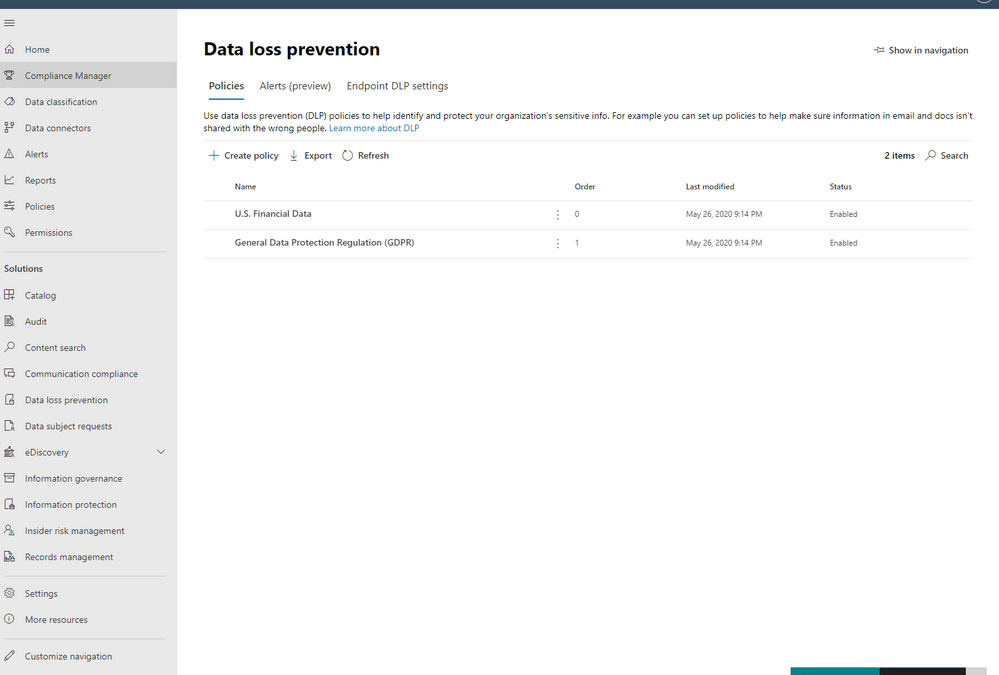
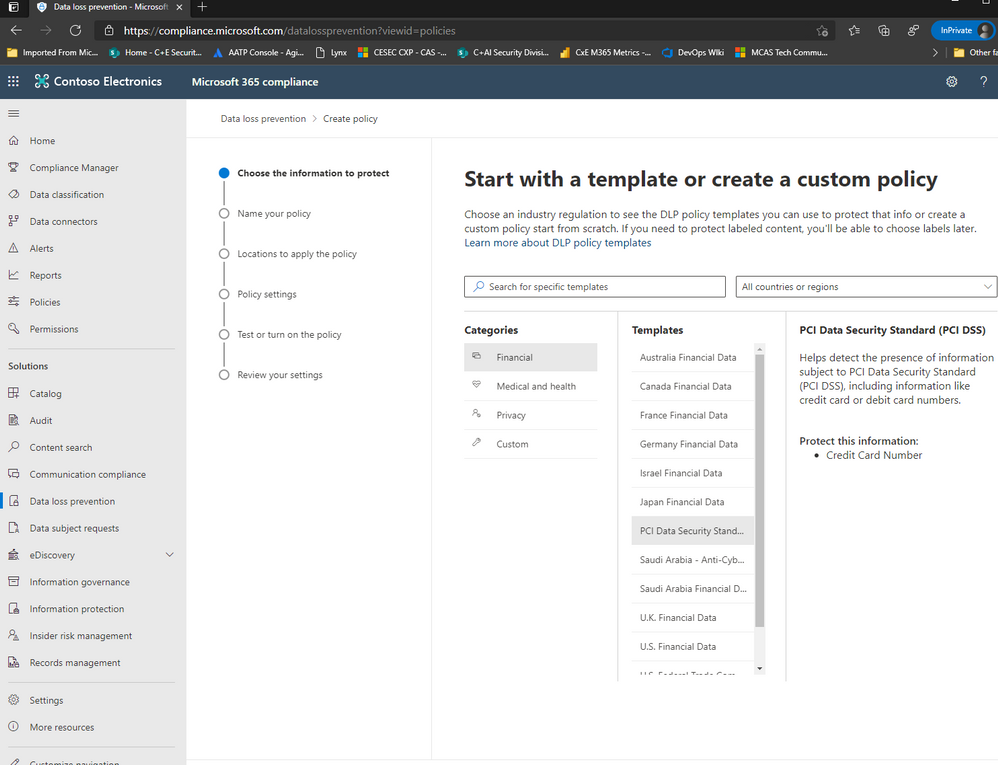
Alright, so for our first step, we are going to jump over to the Compliance Portal. Let’s scroll down to Solution and select Data Loss Prevention. From there, please select Policies and click Create Policy.
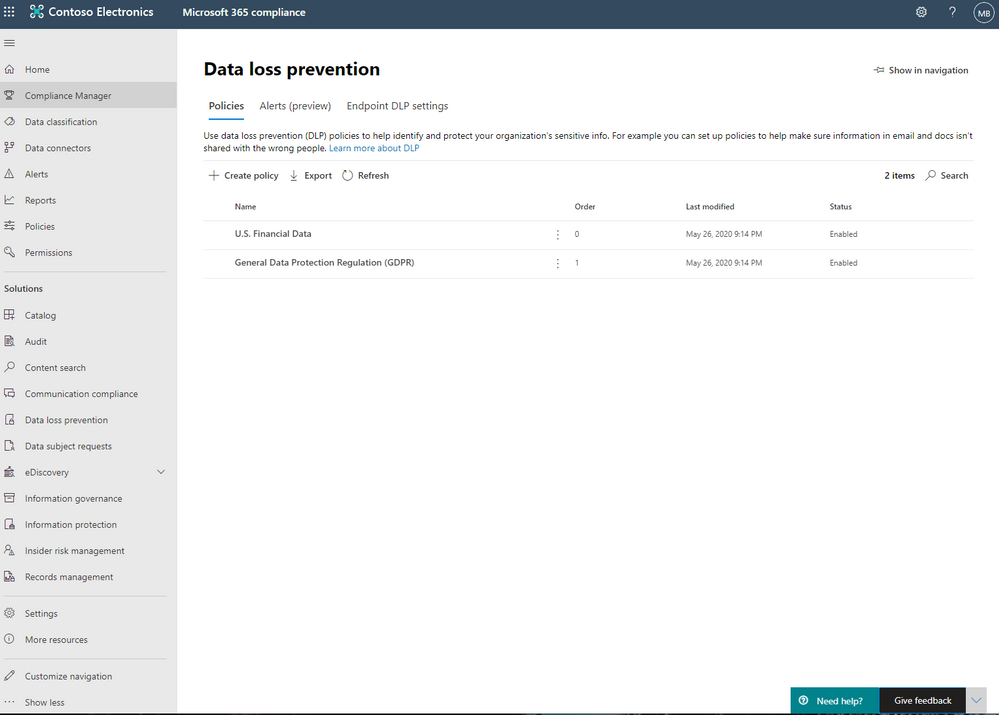
For the purposes of this effort, we’re going to focus on PCI DSS and select this under Templates from the Financial Category.
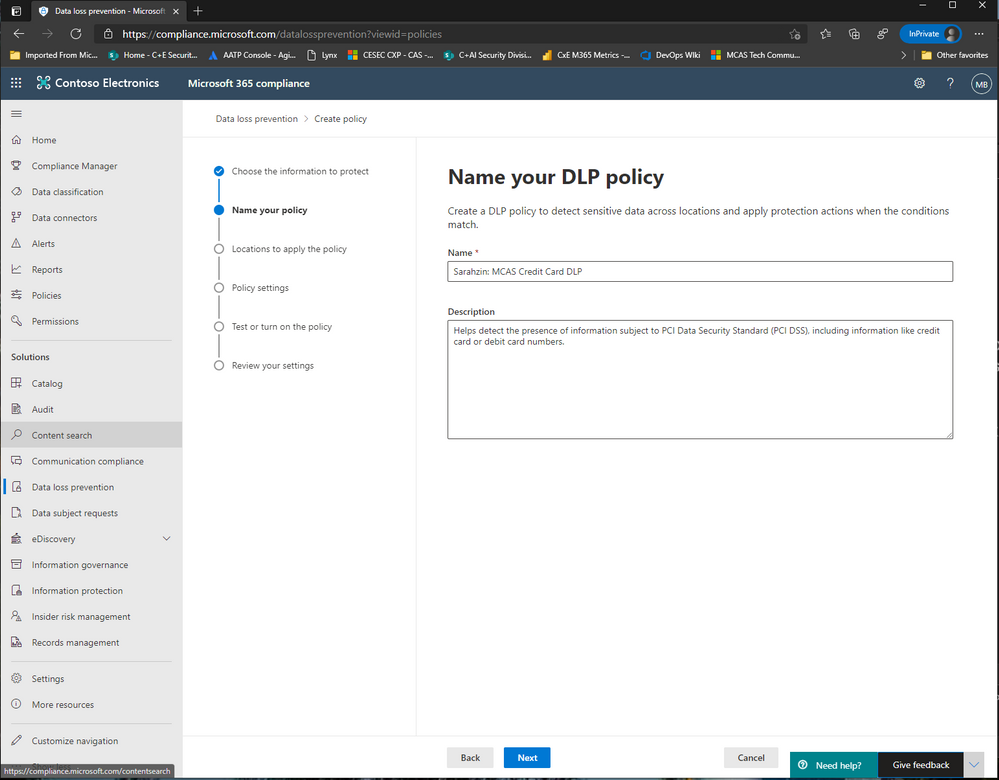
Now, enter a name that’ll help you differentiate this policy from others, I’m naming it “Sarahzin: MCAS Credit Card DLP” to make it easier to identify.
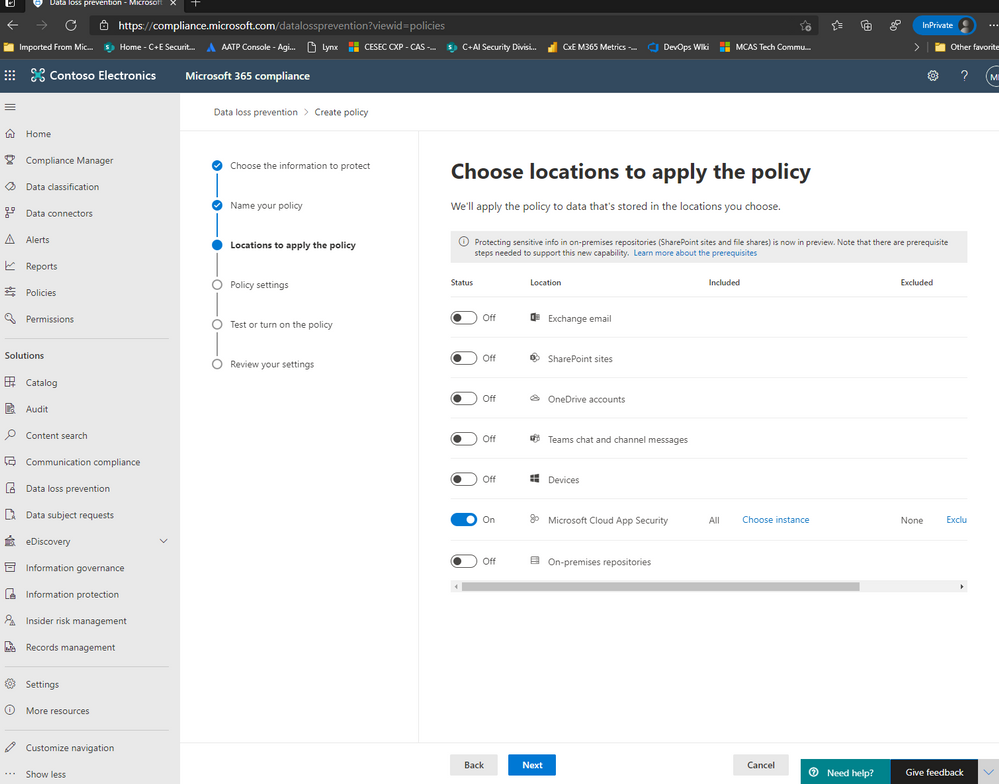
Next, let’s choose the location of Microsoft Cloud App Security (only) and click Choose whichever Instances you’d like to use. For my scenario, I selected Box, Salesforce, Dropbox, and ServiceNow.
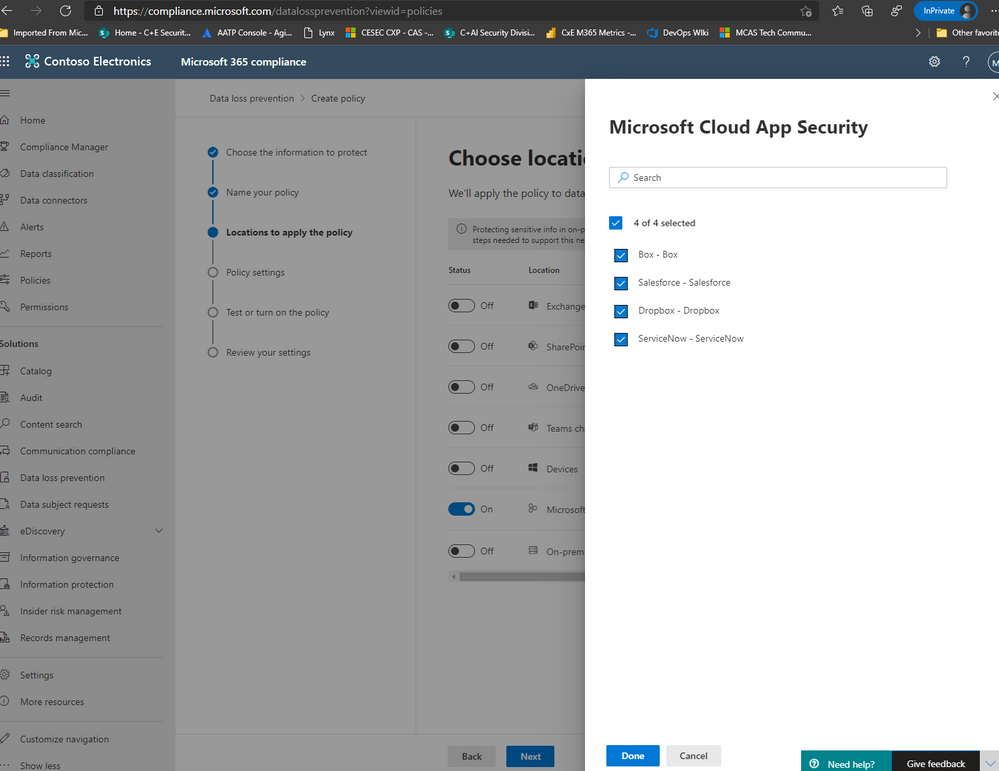
NOTE: To have your instances pop up here, it is required that your apps already be connected in MCAS. Visit our documentation here to get more guidance on connected apps in MCAS.
Afterwards, move on to the next step and click Create or customize advanced DLP rules.
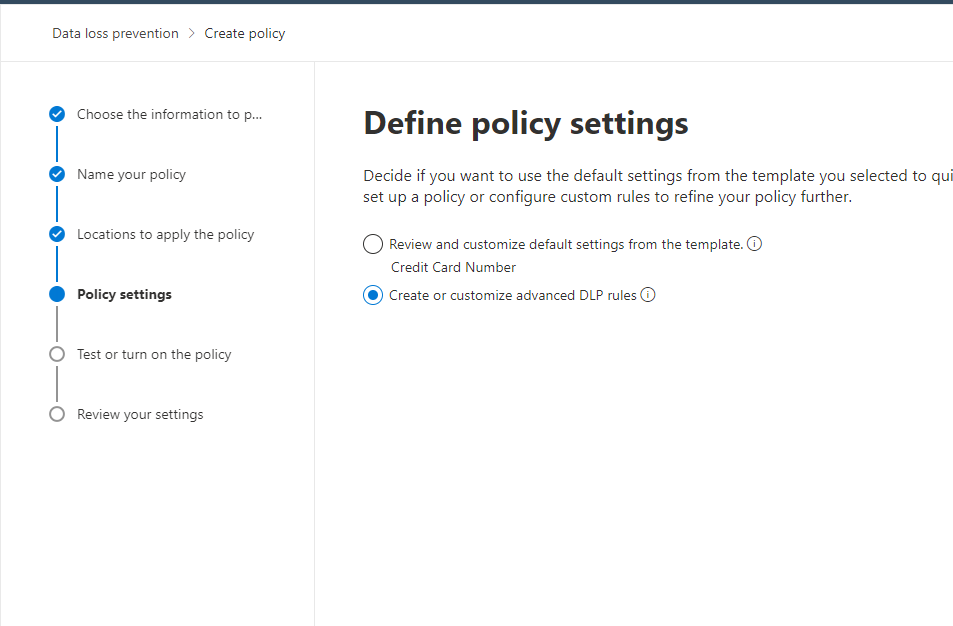
Next, you can either create a rule or use the prepopulated Low volume of content detected PCI Data Security Standard or High volume of content detected PCI Data Security Standard rule sets. We’re going to create a custom rule and delete the prefilled rule sets (not a requirement).
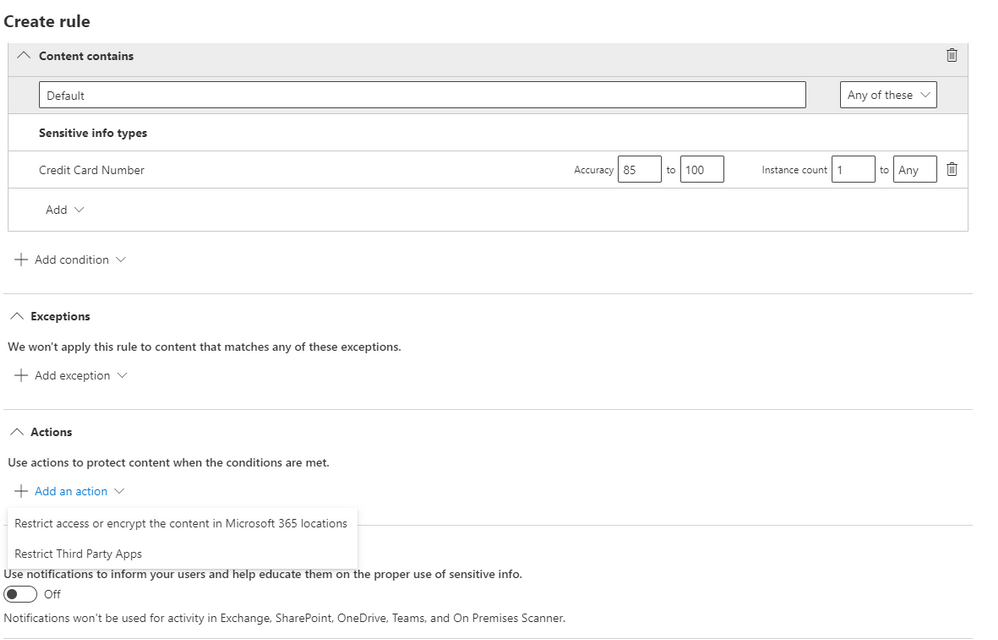
Please add a condition with the sensitive information type of Credit Card Number. Then, click on Add an action and select Restrict Third Party Apps.
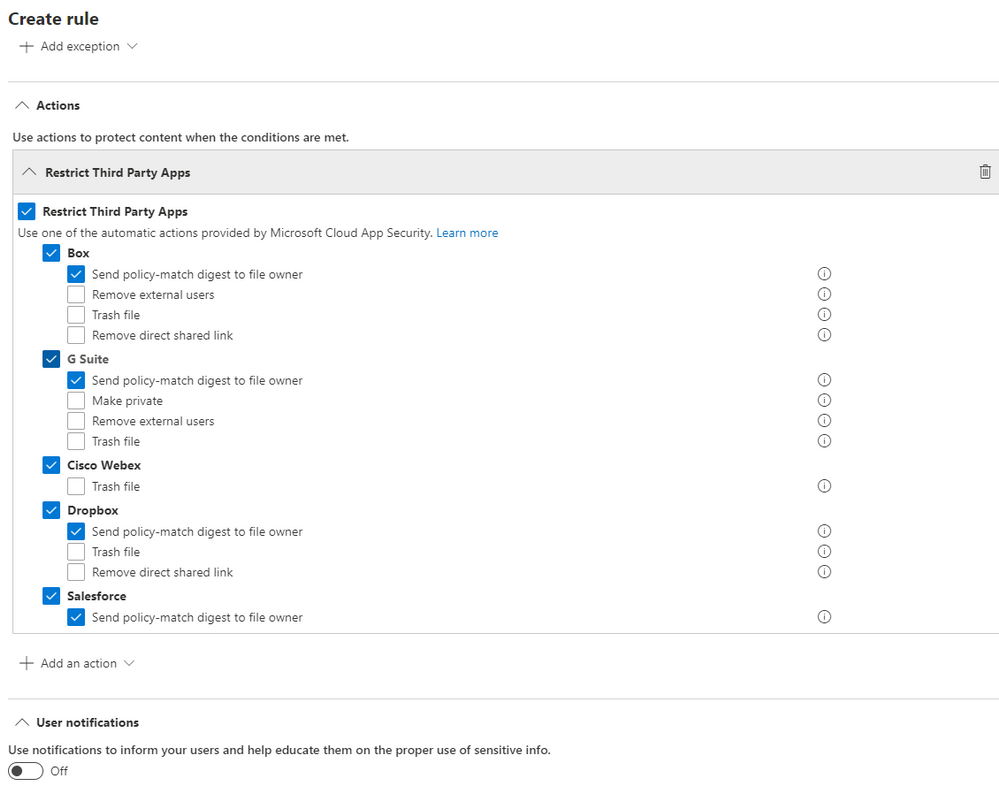
Please select Restrict Third Party Apps at the top, and choose “Send policy-match digest to file owner” for the apps that have this option available. You can choose any of these actions and these are from the list of governance provided by MCAS.
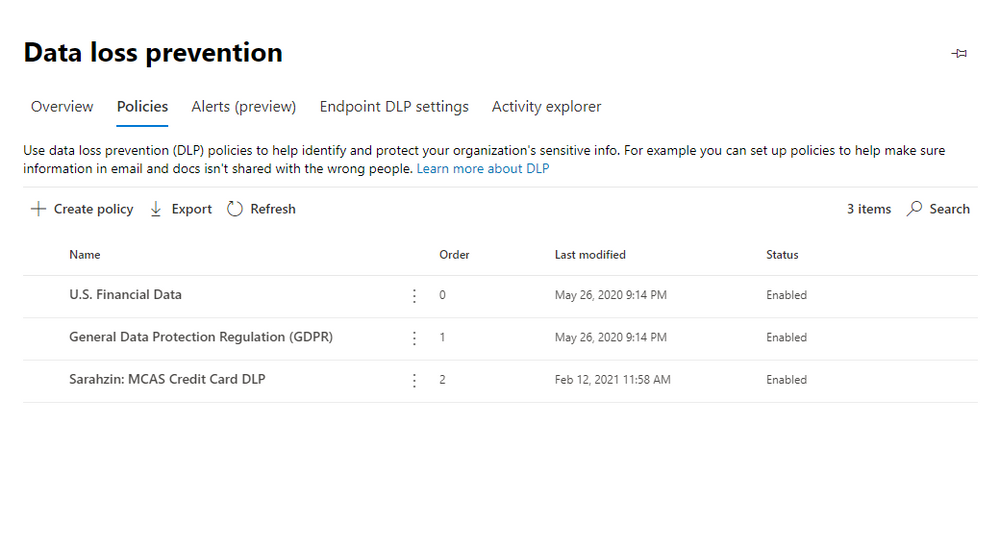
After saving your configurations, your page should look like the image below.
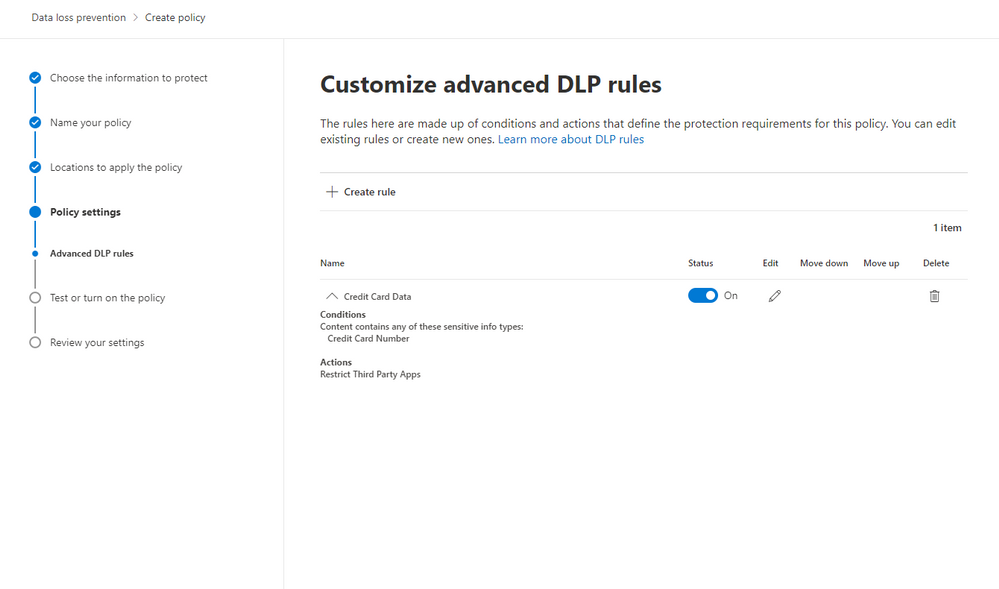
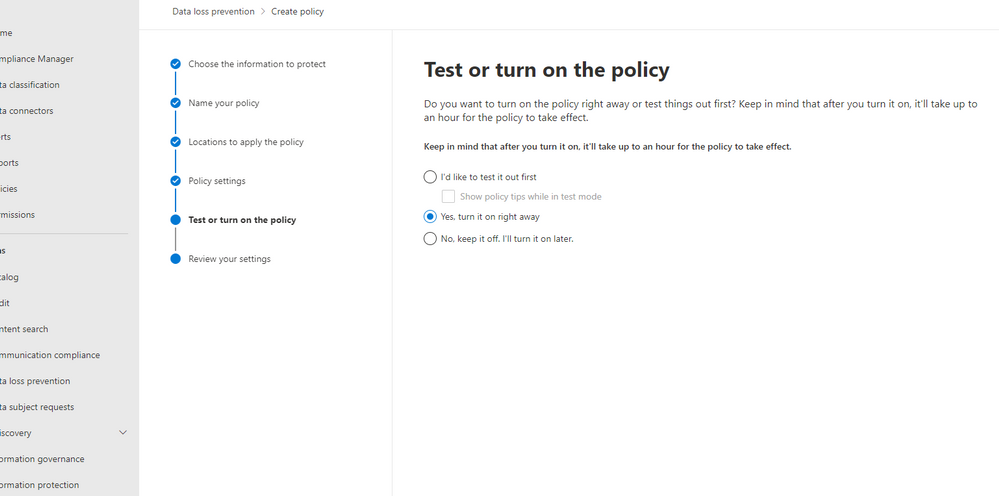
Next, you have the option to turn this on, run in simulation mode, or keep turned off but saved. We’re turning it on.
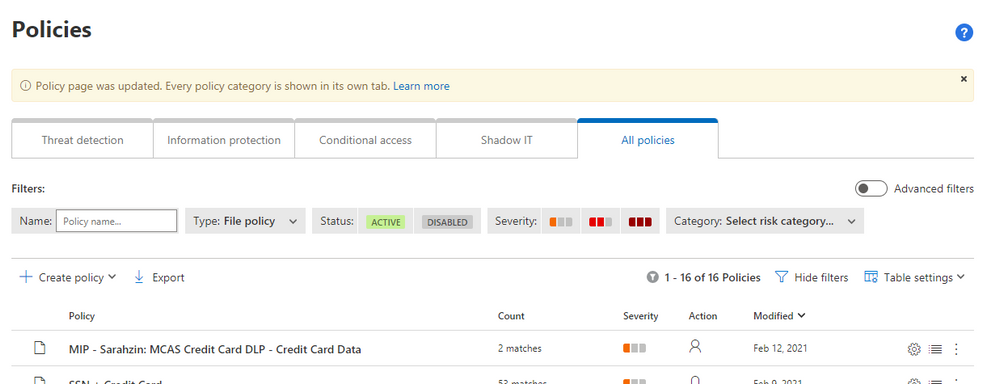
So once the policy is set through the Compliance center, after some time, it’ll populate in MCAS as a policy. The naming convention will say “MIP – ” with your name from the Compliance Center. In MCAS, go to policies and filter on File Policies. You’ll see your new policy here.
Note: Policies from the Compliance Center pop up in MCAS but policies from MCAS do not pop up in the Compliance Center (only alerts under the Alerts section on the Compliance Center home page).
When you click into the policy in MCAS, you wont be able to change any of the configurations. It gives you a warning that “This policy is an imported subset rule of Microsoft Information Protection policy. Read-only fields can be edited in the original policy. Go to Microsoft Information Protection policies.”
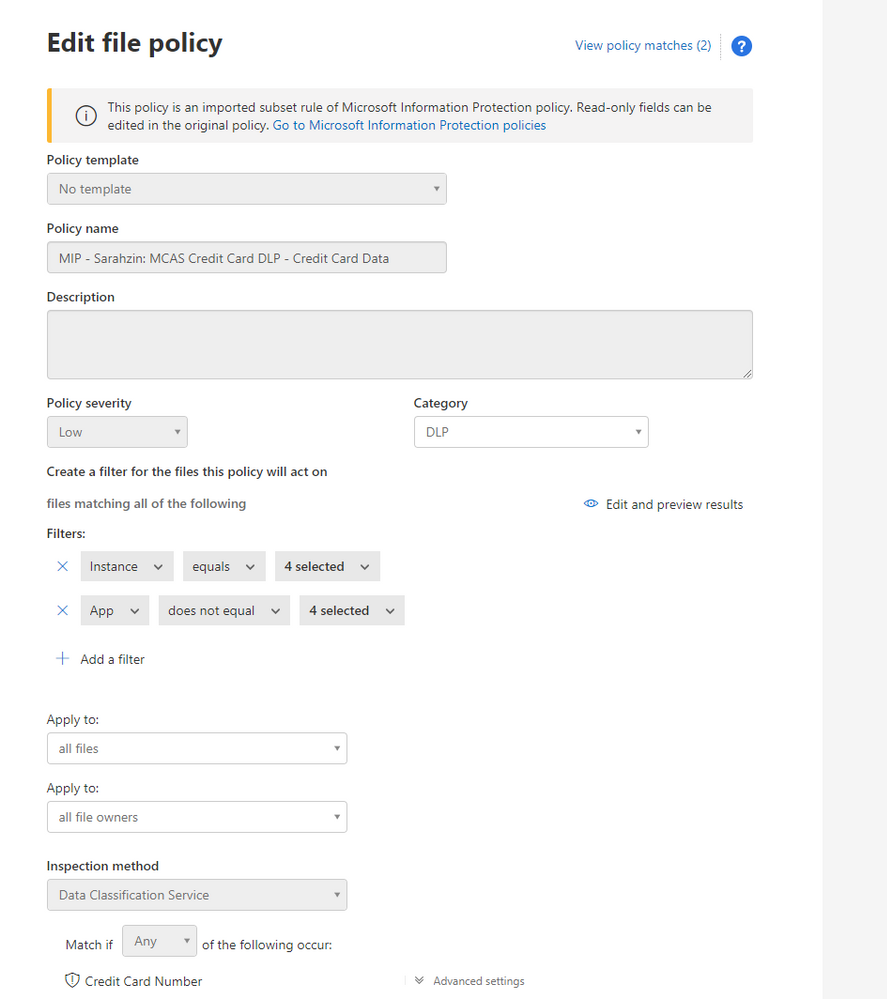
The filters are pre-filled and your governance actions are selected as well.
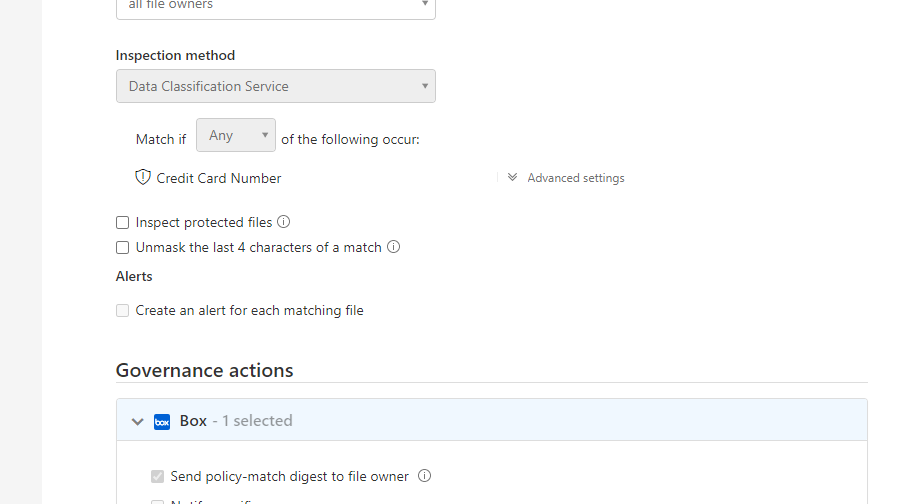
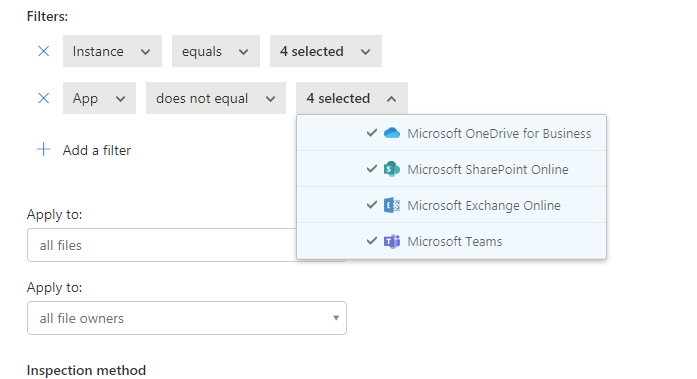
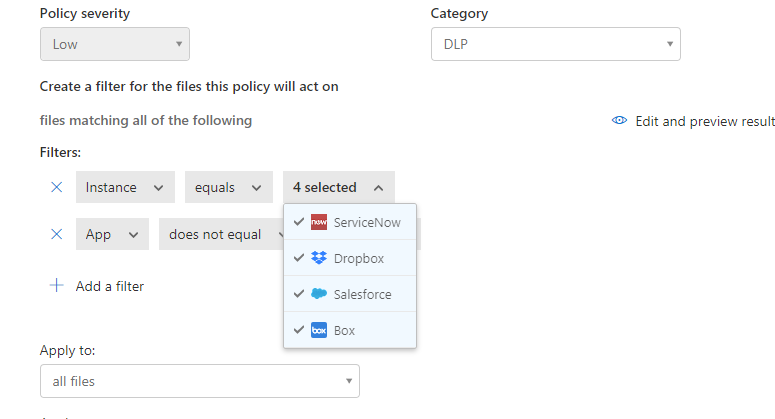
You’ll notice that the policy has a couple matches. When you click into the matches, you’ll find the files that triggered the policy.
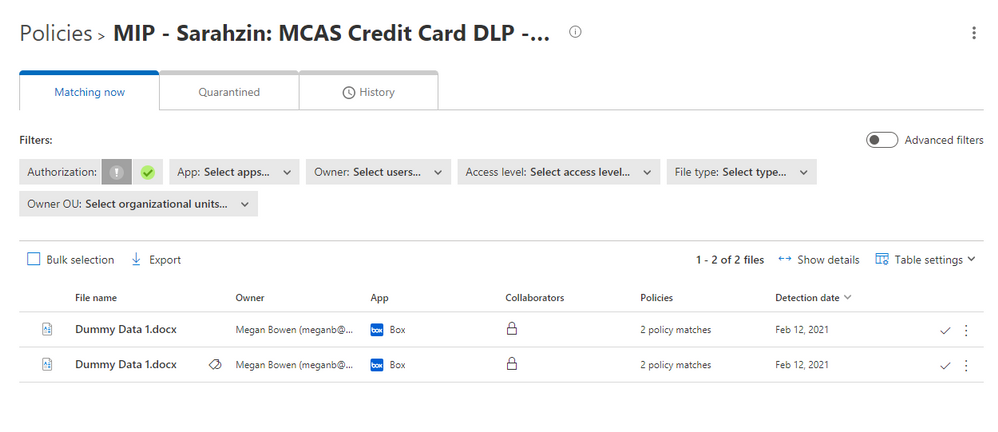
There you have it! Your policies are working now and triggering any time you have matches.
Please let us know if you have any additional questions or if you’d like to see something else.
——-
Feedback
Let us know if you have any feedback or relevant use cases/requirements for this portion of Cloud App Security by emailing CASFeedback@microsoft.com and mention the core area of concern.
Learn more
For further information on how your organization can benefit from Microsoft Cloud App Security, connect with us at the links below:
To experience the benefits of full-featured CASB, sign up for a free trial—Microsoft Cloud App Security.
Follow us on LinkedIn as #CloudAppSecurity. To learn more about Microsoft Security solutions, visit our website. Bookmark the Security blog to keep up with our expert coverage on security matters. Also, follow us at @MSFTSecurity on Twitter, and Microsoft Security on LinkedIn for the latest news and updates on cybersecurity.


Recent Comments