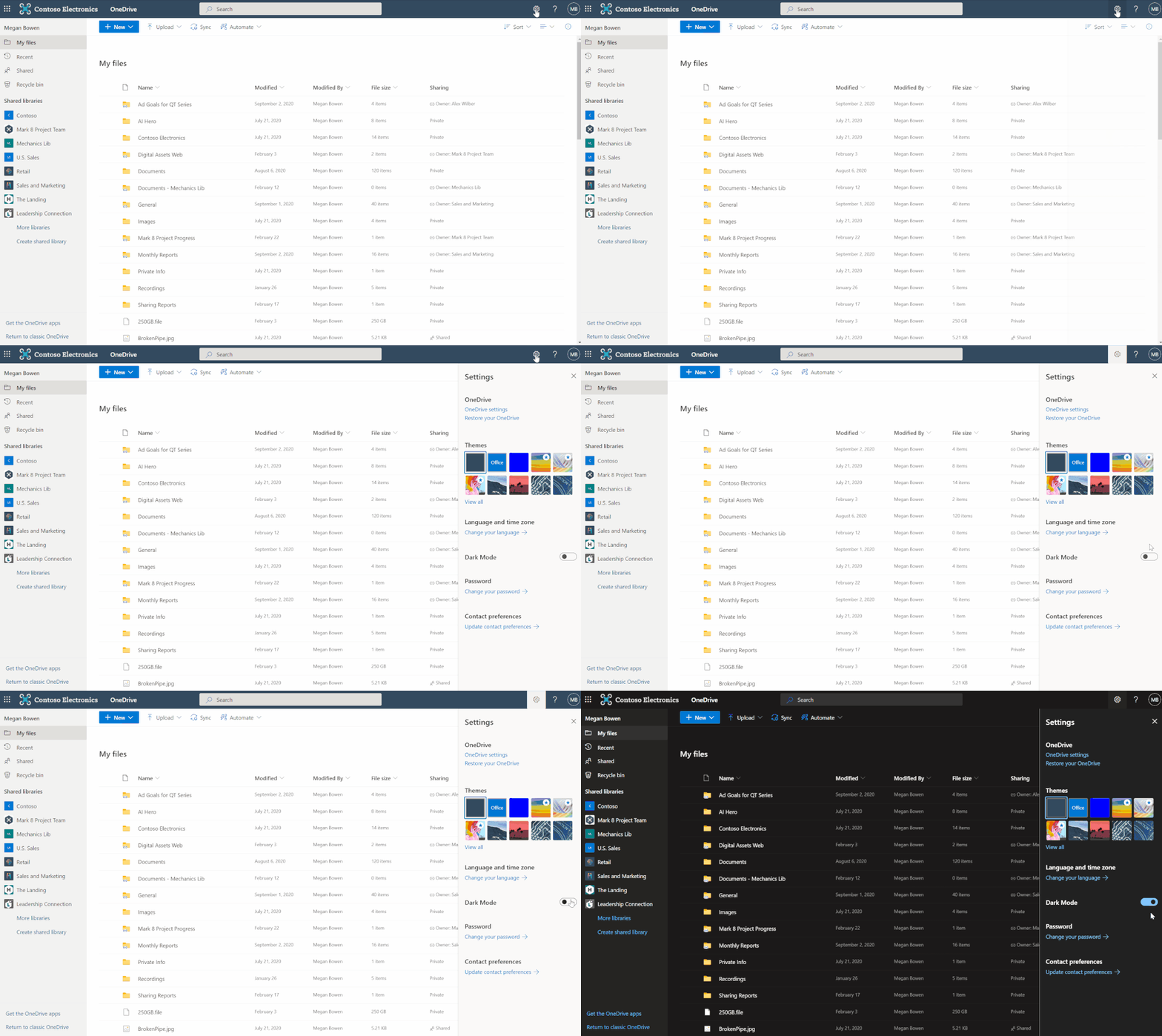
The OneDrive team is always focusing on inclusive design principles to provide millions of our users more choice and greater flexibility. In this effort , we are rolling out Dark Mode for OneDrive web, for both commercial and personal accounts. In addition to its aesthetic appeal, Dark Mode also reduces eye strain and improves the battery life of your devices.
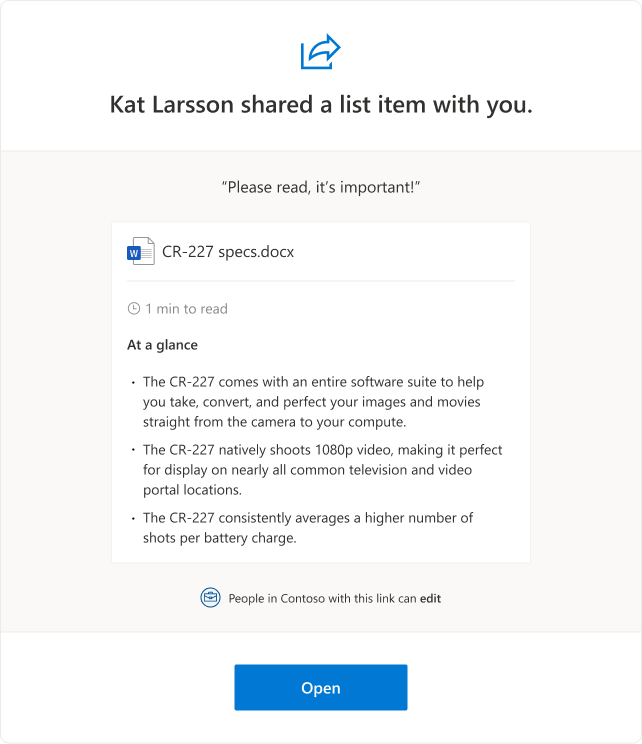
When users share Word files, the sharing e-mail will now include new information like estimated time to read as well as key points in the document. This will help recipients decide how to engage with the shared document. Note that files that have been marked as sensitive by DLP will not include this information.
Quick summary of the shared document in the sharing email.
Admins who do not want this new functionality can disable it using the SharePoint Online Management Shell by running “Set-SPOTenant – IncludeAtAGlanceInShareEmails $false”
Getting back to your important PDFs in your mobile devices just got easier. Use the new bookmark option in OneDrive for iOS to add bookmarks to your important content so you can pick up where you left off.
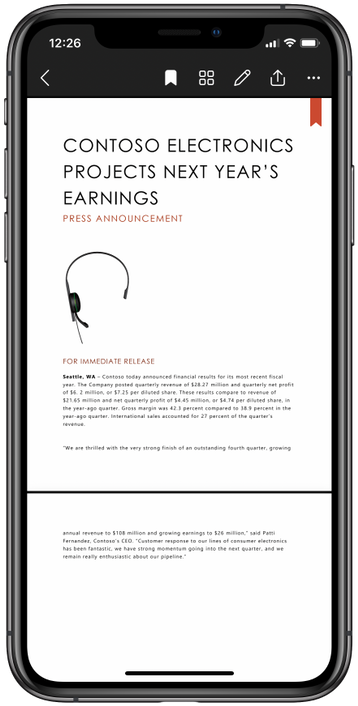
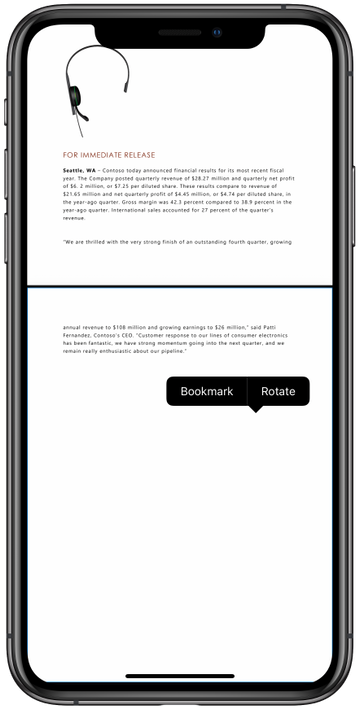
Now when you open a PDF on your iOS device you would be able to add or remove bookmarks by tapping the bookmark icon(on the top-right corner) of the page or by long-pressing anywhere on the page you want to tag.
Tap the new bookmark icon to bookmark any page in a PDF.Add bookmark to a PDF page by long-pressing anywhere on the selected page.
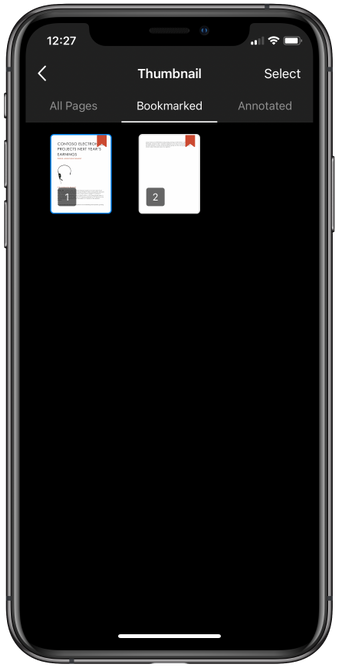
You also have the option to access all your bookmarked pages in the single view.
View all the pages bookmarked in a single view.
This feature will soon roll out to Android as well – Roadmap ID 70547
We’re updating OneDrive Sync client to support Version History for DWG files. This change fixes a known issue where Version History is missing for DWG files backed by Sync client.
Learn more and stay engaged
Hear from Omar Shahine, VP of Product OneDrive and SharePoint (Microsoft 365), as he shares all of the new innovations and capabilities in OneDrive, SharePoint and Lists.
As you can see, we continue to evolve OneDrive as a place to access, share, and collaborate on all your files in Microsoft 365, keeping them protected and readily accessible on all your devices, anywhere.
Thank you again for your support of OneDrive. We look forward to your continued feedback on UserVoiceand hope to connect with you at Ignite or another upcoming Microsoft or community-led event.
Thanks for your time reading all about OneDrive,
Ankita Kirti – Product Manager – OneDrive | Microsoft
This article is contributed. See the original author and article here.
Protect your Power BI instance using Microsoft Cloud App Security
In the last couple of years, Microsoft has demonstrated its extraordinary ability to turn vision into reality, as witnessed by Microsoft’s repeatedly being named as a Leader in Gartner’s Magic Quadrant, in both the security and business intelligence landscapes.
In the Microsoft Cloud App Security and Power BI teams (two of the named leaders in the Cloud Access Security Broker (CASB), and Analytics and BI markets, respectively), we have identified an opportunity to provide an even more comprehensive solution. By bringing these two technologies together, we provide security administrators the tools they need to safely onboard business users to a large cloud workload such as Power BI (which has become an even greater key service for businesses in “work-from-home” mode during the COVID-19 crisis), while enjoying peace of mind with respect to the threats and risks inherent in using cloud services.
Using Cloud App Security, it is possible to detect and control risky Power BI sessions as they occur, thus reducing the threat that arises when malicious actors try to access content and data.
This partnership, first publicly announced at the end of 2019, has continued to evolve and deepen. We’d like to take the opportunity here to recap the capabilities that currently exist and are available to organizations that (or might be do so in the future). Some of these capabilities you may have already tried; others have been launched just recently.
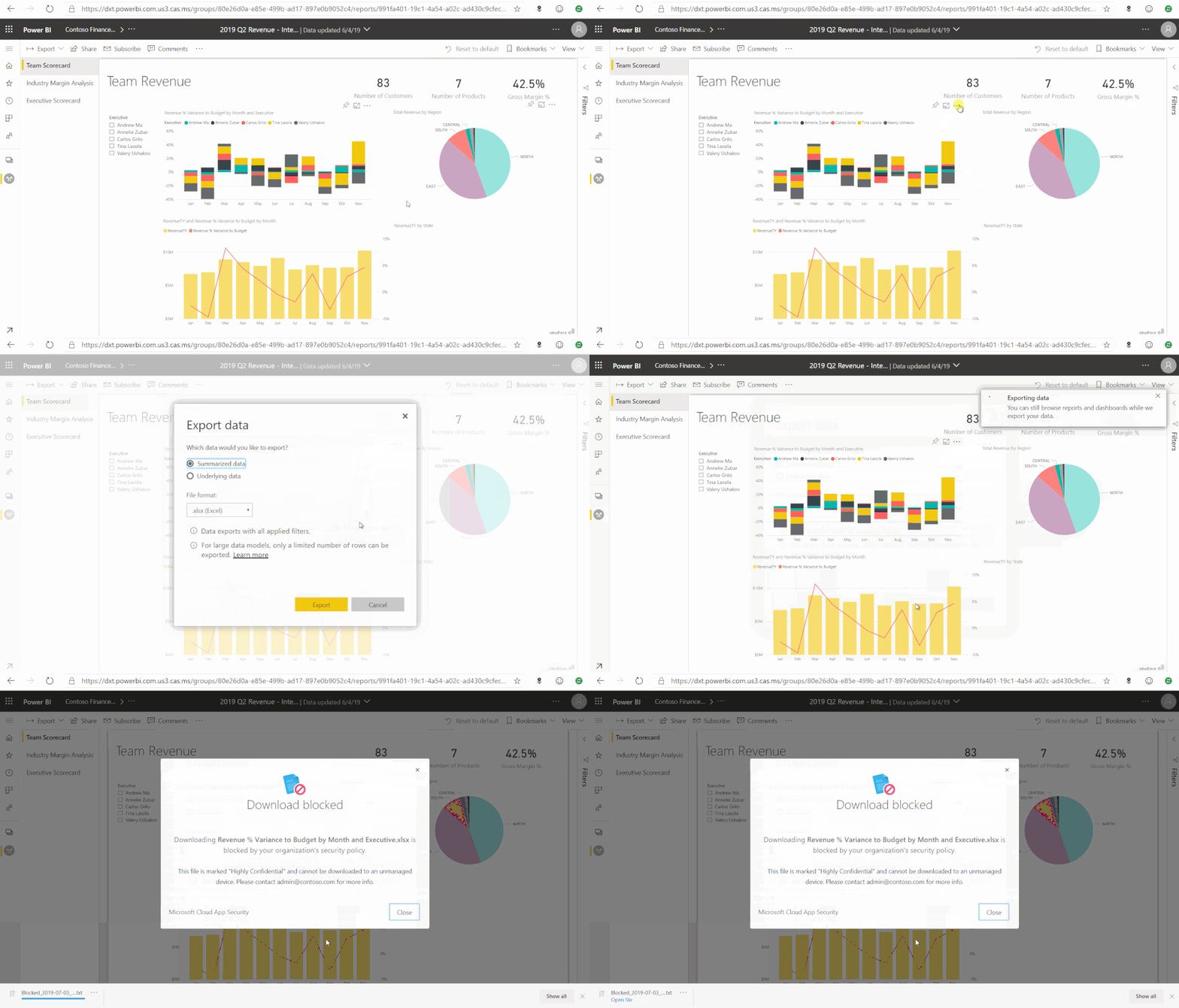
With Cloud App Security, organizations can monitor and control, in real time, risky Power BI sessions such as user access from unmanaged devices or infrequent locations. Security administrators can define policies to control user actions, such as downloading reports with sensitive information.
For example, if a user connects to Power BI from outside of their country, the session can be monitored by Cloud App Security’s real-time controls, and risky actions, such as downloading data tagged with a “Highly Confidential” sensitivity label, can be blocked immediately.
Figure 1: Cloud App Security real-time controls in Power BI service
Investigate Power BI user activity with the Cloud App Security activity log
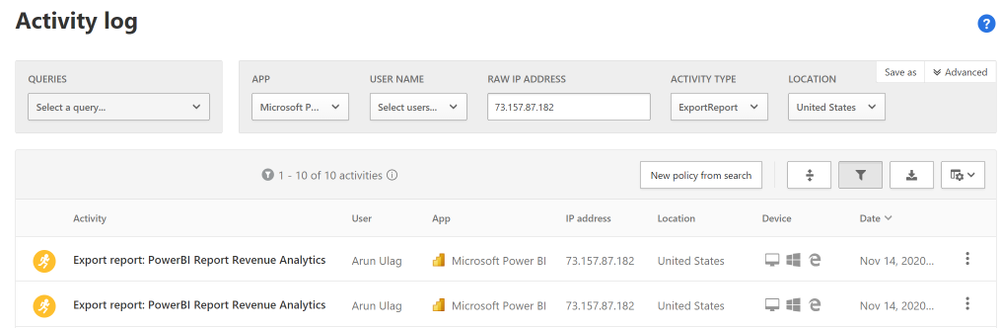
The Cloud App Security activity log includes a large portion of the Power BI activity as captured in the Office 365 audit log, which contains information about all user and admin activities, as well as sensitivity label information for relevant activities such as apply, change, and remove label.
Cloud App Security brings you the following added value:
Advanced filters for improved search and exploration of activities. For example, activity log filters can be used to look for all user “remove” activities where the sensitivity label Confidential is removed from Power BI reports and/or datasets.
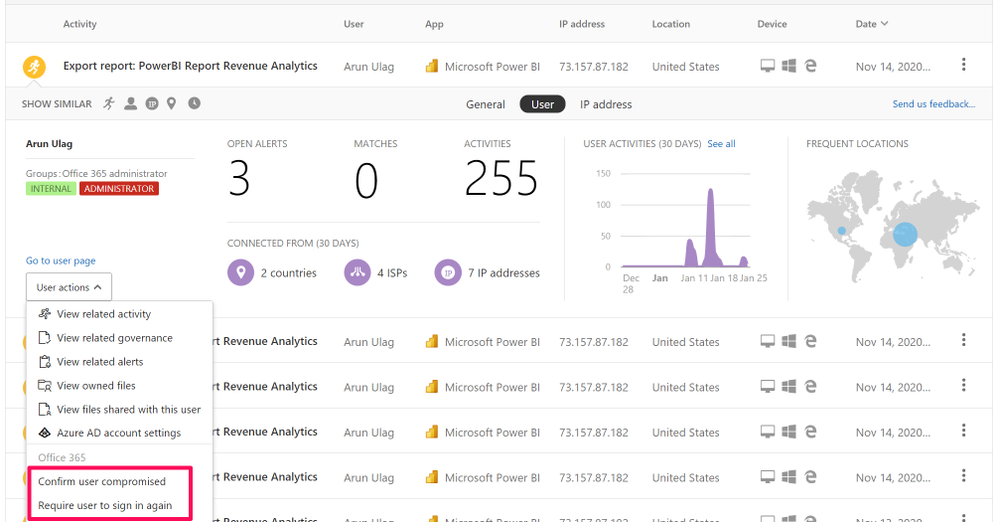
Quick actions that can be carried out as part of the activity investigation process.
Figure 2.1: Power BI audit events in Cloud App Security activity log
Create custom policies to alert on suspicious user activity in Power BI
After you’ve investigated user activity, be it in the Office 365 audit log or in the Cloud App Security activity log, you probably have a good understanding of which, how, and by whom content is being accessed and modified.
The next step is to leverage Cloud App Security’s activity policy feature to define your own custom rules, to help you detect user behavior that deviates from the norm, and even possibly act upon it automatically, if it seems too dangerous.
Some examples of scenarios that can be detected using activity policies:
Massive sensitivity label removal. For example: alert me when sensitivity labels are removed by a single user from 20 different reports in a time window shorter than 5 minutes.
Encrypting sensitivity label downgrade. For example: alert me when a report that was with the ‘Highly confidential’ sensitivity label is now classified as ‘Public’.
Sensitivity label change by an unauthorized user. For example: alert me when a user who is not a dataset owner applies, changes, or removes a sensitivity label.
Massive download of content. For example: alert me when a single user performs more than 20 export operations in a time window shorter than 5 minutes.
Unauthorized users are accessing confidential datasets. For example: alert me when someone outside a predefined security group is viewing an executive report.
Notes:
The unique identifiers of sensitivity labels can be found using the informationProtectionLabel endpoint provided by Microsoft Information Protection REST APIs.
Cloud App Security’s anomaly detection policies provide out-of-the-box user behavioral analytics and machine learning so that you are ready from the outset to run advanced threat detection across your cloud environment. When an anomaly detection policy identifies a suspicious behavior, it triggers a security alert. For example:
Multiple Power BI report sharing: Alerts you when a user performs an unusual number of Power BI report sharing activities, compared to the learned baseline.
Suspicious Power BI sharing: Alerts you when a potentially sensitive Power BI report is suspiciously shared outside of your organization.
Impossible travel: This detection identifies by the same user (in a single or multiple sessions) originating from geographically distant locations within a time window shorter than the time it takes to travel from the first location to the second. This indicates that a different user is using the same credentials.
Cloud App Security provides an app-specific admin role that can be used to grant Power BI admins only the permissions they need to access Power BI-relevant data in the portal, such as alerts, users at risk, activity logs, and other Power BI-related information.
However, it doesn’t stop there; this role not only provides access to the information listed above – it can also be used to create custom policies and detections such as those presented earlier in this article.
Cloud App Security admins, you are encouraged to let Power BI admins in your organization into the Cloud App Security portal, to start and help securing the next cloud workload on your list.
Additional resources
Learn how to create the Power BI admin role in the Cloud App Security portal – Manage admin roles
Let us know if you have any feedback or relevant use cases and requirements for this portion of Cloud App Security by emailing CASFeedback@microsoft.com and mention the Power BI integration.
Follow us on LinkedIn as #CloudAppSecurity. To learn more about Microsoft Security solutions visit our website. Bookmark the Security blog to keep up with our expert coverage on security matters. Also, follow us at @MSFTSecurity on Twitter, and Microsoft Security on LinkedIn for the latest news and updates on cybersecurity.
This article is contributed. See the original author and article here.
Official websites use .gov A .gov website belongs to an official government organization in the United States.
Secure .gov websites use HTTPS A lock () or https:// means you’ve safely connected to the .gov website. Share sensitive information only on official, secure websites.
This article is contributed. See the original author and article here.
Critical to any digital transformation effort is understanding how your devices contribute to your end-user’s experience and enable them to reach their goals. This is why Endpoint analytics is a critical category to Microsoft Productivity Score. The visibility and insights it provides in areas like device boot times and application reliability can help your users quickly capture an idea or join that first meeting on Monday morning on time and not suffer through an endless login process or lose the work they just did as an application unexpectedly shuts down.
The problem was that some of you could not see all these great insights. Some of this detailed information was in the Endpoint analytics section of the Microsoft Endpoint Manager console. If you were an Intune Admin or a Global Admin, you could see this, but the rest of you who were using Productivity Score to drive your transformation efforts were in the dark. Well, not anymore. Based on your feedback, we have created a new Endpoint analytics page that shares these organizational insights with the other roles that already have access to Productivity Score.
New Endpoint analytics page
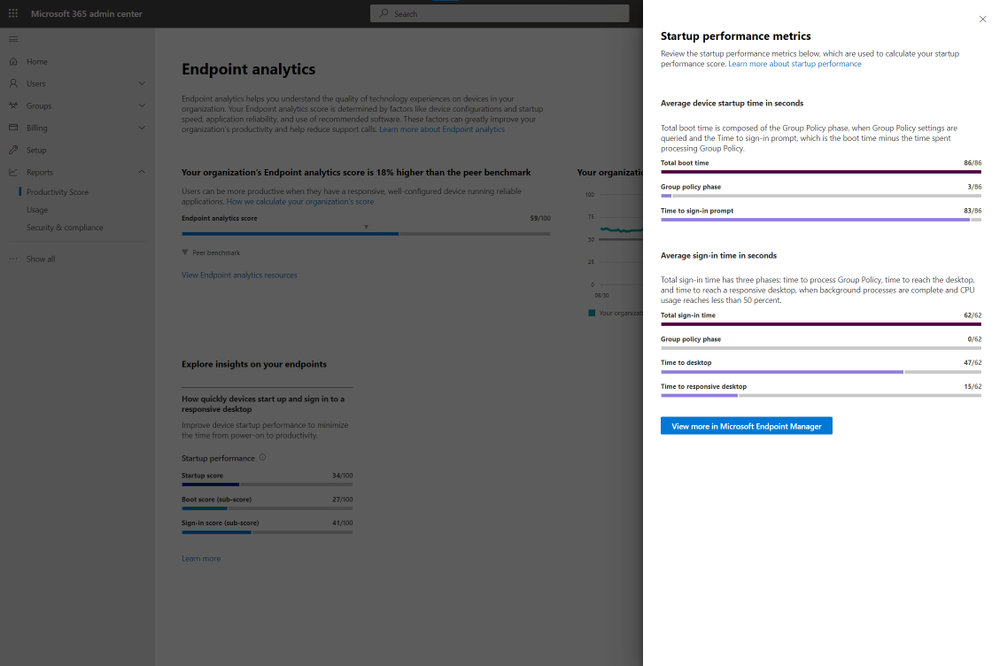
This new page looks very similar to the other pages you see in the people experiences, making it easy to dive right in. You can see your Endpoint analytics score and your score over the at the top of the page. Below that, you can see the startup insight showing your boot and sign-in scores. If you click the link under the startup insight you will get additional details about the startup performance. In the future, we will add the other insights you see in the Endpoint analytics console.
Details panel for the startup performance insight
To check out the new page which is rolling out over the next few days, head over to https://aka.ms/productivityscore. If you want to learn more about the new page, you can read the documentation at https://aka.ms/ea-ps. As always, feel free to leave any questions or thoughts you have below!
This article is contributed. See the original author and article here.
The pandemic has fundamentally changed how we all live, learn, and work. As we begin to recover from the pandemic and plan our return to the office, many organizations are rethinking the future of work:
Over 80% of managers surveyed expect to have more flexible work from home policies post-pandemic.
More than 70% of the employees and managers reported a desire to continue working from home at least part-time.
Source: Harris Poll survey commissioned by Microsoft, May 2020
At Microsoft, we believe the future of work is hybrid. The essence of hybrid work is extreme flexibility, in terms of where and when people work. Organizations are creating new policies that empower employees to spend some portions of their week working from home, as well as flexible working hours. While certain measures may need to be put in place to optimize hybrid workplace functions, there is no turning back when it comes to the future of work. A large majority of people prefer a mix of remote-work and office-work instead of a return to the traditional work model, or permanent all-remote work.
As we return to the workplace, moving to a hybrid work model will not just be about continuing the great work-from-home experiment many of us have been participating in for almost 12 months now. We will need to change our behavior by developing new skills and habits to help us stay healthy, finding new ways to engage and stay connected as we adopt this new way of working. It is going to take a collective effort for organizations to make a successful transition to a hybrid workplace.
There are big changes ahead for those of us moving to a hybrid work model. Like any organizational change initiative, we must be thoughtful about how we guide people through the journey. If not, organizations face risks such as decreased productivity, increased turnover, or employees that are just not engaged.
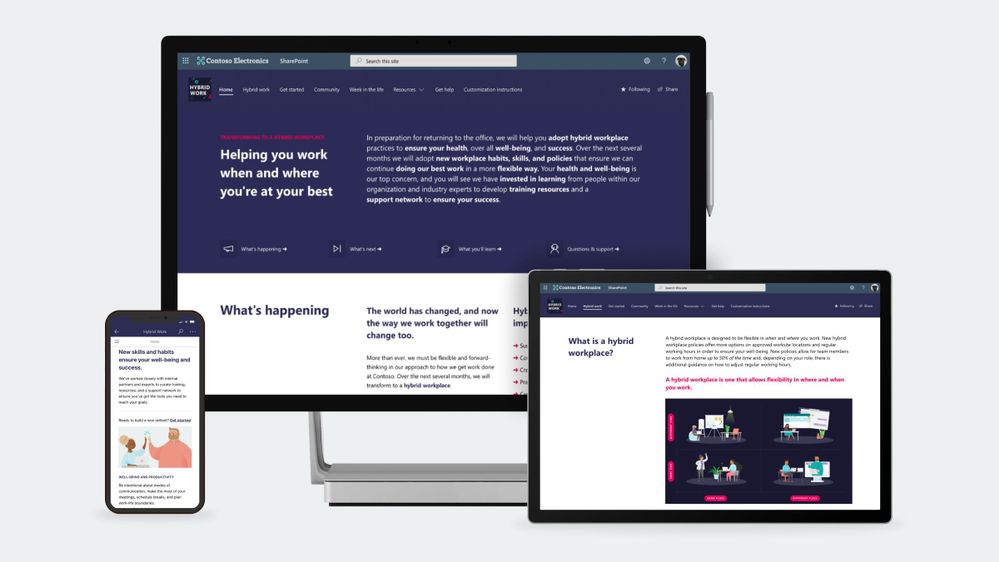
To help our customers lead their organization’s transition to a hybrid workplace we have launched a SharePoint site template on the SharePoint look book called the Workplace transformation site as well as new end-user training to help employees learn new habits and skills that support hybrid work.
Workplace transformation site
The Workplace transformation site template helps organizations:
Inspire employees on the new possibilities the hybrid workplace offers.
Provide employees with the information, resources, and support they will need to buy-in and adopt the new way of working.
Prepare employees for a successful transition to a hybrid workplace with a change journey checklist and quick tips.
The Workplace transformation site features:
A fully configured and customizable hybrid work transformation site built on SharePoint communication sites: The Workplace transformation site brings together information architecture, pre-populated content, site design and webparts to help inform and support employees through the transition to a new way of working. The site can be customized to add your organization’s content and to align with its look and feel.
Hybrid work checklist: Any organizational change initiative can be stressful for employees. Help your employees through the change process by providing them a curated change journey checklist. Guide employees through organizational changes with a customizable activity list of tasks such as required training courses and learning events.
Inspirational help content: Understanding how the day-to-day workplace will change in the new hybrid model is key to helping onboard employees. The Workplace transformation site includes “quick tip” guides for employees and managers, and a week in the hybrid workplace content.
Support resources: As employees’ transition to a hybrid work model, they will need multiple levels of support from self-service support like FAQs to one-on-one help from champions. The hybrid work transformation site includes a champions program overview page, a Yammer community web part, and pre-populated FAQs to help support employees.
Mobile-ready: The Workplace transformation site can be easily accessed on mobile devices so employees can continue their hybrid work transition journey from wherever they may be working.
Hybrid work end user training
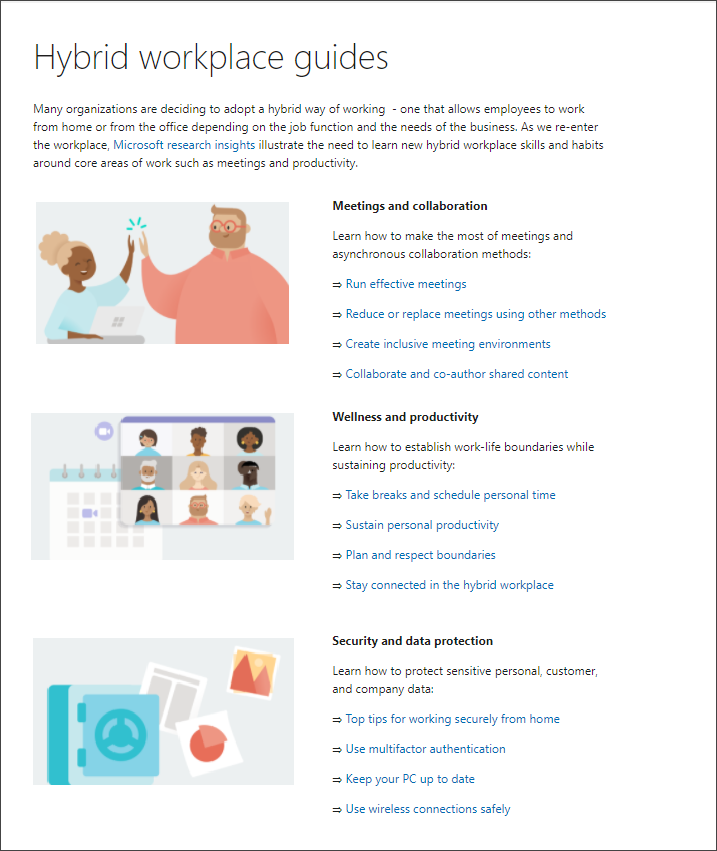
To help employees develop new hybrid workplace habits and discover new tools that set them up for success, we have developed new end-user training content based on Microsoft research insights. The training content is focused on collaboration and meetings in a hybrid world, using asynchronous collaboration methods, well-being, productivity, security, and data protection. Embed hybrid workplace training content into your Workplace transformation site using Microsoft 365 learning pathways – a free, on-demand training solution. Microsoft 365 learning pathways can be easily deployed in your Microsoft 365 tenant environment and can be used to customize new hybrid work training playlists to suit your organization, along with other Microsoft-maintained product training playlists.
Question: What are the requirements for installing the Workplace transformation site into my tenant environment?
Answer:
Ensure SharePoint Online is enabled in your environment.
The individual that will provision the hybrid work transformation site must be the tenant admin.
Question: How long will it take to install the site in our tenant environment?
Answer: Based on our testing of the installation, it should take 10 minutes or less. Individual tenant configurations could cause differences in installation duration. This does not include time to customize the site to your organizations’ requirements.
Question: What customization options are available for the Workplace transformation site?
Answer: The site can be fully customized to fit the needs of your change management project, users, and organization. Review the Workplace transformation site template provisioning and customization guidance before getting started.



 ) or https:// means you’ve safely connected to the .gov website. Share sensitive information only on official, secure websites.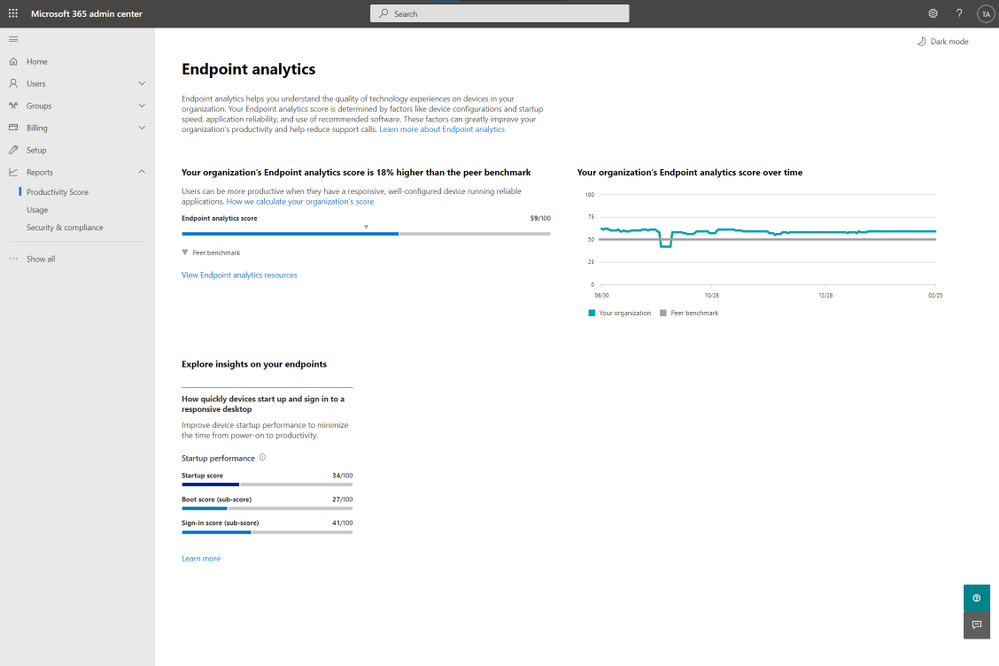

Recent Comments