
by Contributed | Mar 4, 2021 | Technology
This article is contributed. See the original author and article here.
Mixed reality enables immersive capabilities that merge the digital and the physical worlds. With Azure mixed reality services, developers can create experiences that understand people, places, and things in their environment. These services consist of Azure Spatial Anchors, Azure Remote Rendering, and Azure Object Anchors. Azure Spatial Anchors is generally available and enables multi-user, multi-device, spatially aware mixed reality experiences. At Ignite 2021, we announced the general availability of Azure Remote Rendering and preview of Azure Object Anchors.
Azure Remote Rendering is now generally available
Mixed reality use cases require users to view and interact with 3D models. Models are decimated and simplified to enable visualizations through target devices – mixed reality headsets or mobile devices. The result is the loss of important detail which is necessary in design reviews and for making business decisions. Azure Remote Rendering enables developers to render high-quality, interactive 3D content and stream it to a HoloLens 2 device in real time. Remote Rendering leverages the power of the Azure cloud to enable visualizations without decimation for the most complex models. Developers can render models up to 20 million polygons with Standard Remote Rendering and over a billion or more polygons with Premium Remote Rendering.
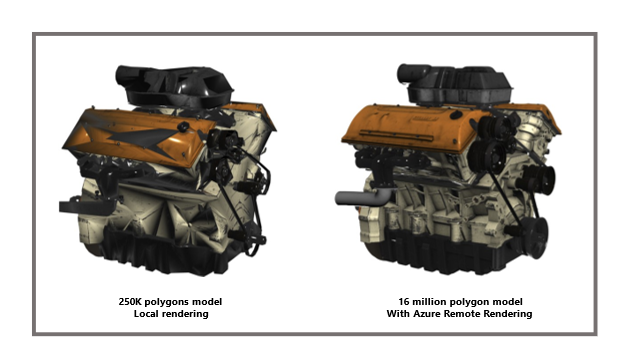
How does the service work?
Azure Remote Rendering moves the workload to high-end GPUs in the cloud. A cloud-hosted graphics engine renders the image, encodes it as a video stream, and streams that to the target mixed reality device. In addition, Remote Rendering supports hybrid rendering where local content like menus are automatically combined with remote objects for an immersive experience.
Get started today with this learning module. For more information, review our documentation.
Customer adoption
It has been great to see how customers and partners are leveraging Remote Rendering to enable 3D visualizations with high fidelity. Bentley Systems has reimagined the bridge inspection process using HoloLens and Remote Rendering. Every detail matters when performing structural inspections. Dan Vogen summarizes it well:
“We need to display, and interact with, hundreds of millions of polygons in reality meshes.
Azure Remote Rendering helps us do this and more – it’s like sci-fi interaction with infrastructure assets. The resolution, detail, and accuracy “teleport” users to an asset. This cuts time spent, lowers costs, improves safety, and reduces traffic disruptions thanks to our HoloLens-based immersive inspection processes.”
Dan Vogen, Vice President, Transportation Asset Management, Bentley Systems
HoloLab is building an application to enable visualization of architectural layouts at scale and with precision using Azure Remote Rendering.
“We’re excited about the innovation and efficiency of Azure Remote Rendering. We work with enterprises in manufacturing, architecture, engineering, and construction. They use Remote Rendering for visualization, and sharing, of high polygon, 3D CAD data. The BIM construction data used to be so large that you could only display one floor at a time. Now, thanks to Remote Rendering, HoloLens shows an entire building at once.”
Kaoru Nakamura, Co-Founder & CEO, HoloLab Inc.
To provide our global partners and customers a choice of regions for their Remote Rendering solutions we’ve expanded the availability of Remote Rendering to 10 regions including Australia East, East US 2, Japan East, North Europe, South Central US, and UK South, East US, West US 2, West Europe, and Southeast Asia.
Azure Object Anchors is now in public preview
Azure Object Anchors is innovation based on customer and partner feedback. Adoption of mixed reality technologies has accelerated and customers want to easily align holograms to physical objects. Enter Azure Object Anchors. Object Anchors enables developers to automatically align and anchor 3D content to objects in the physical world. This eliminates the need for markers and manual holographic alignment.
During the private preview, we worked closely with Toyota. Toyota is leveraging Object Anchors so that its technicians can easily align holographic wiring content with car engine wiring. As soon as the technicians align objects, they can walk up, scan, and begin work. This saves time and reduces errors.
“Azure Object Anchors enables our technicians to service vehicles more quickly and accurately thanks to markerless and dynamic 3D model alignment. It has removed our need for QR codes, and eliminated the risk of error from manual model alignment, thus making our maintenance procedures more efficient.“
Koichi Kayano, Project Manager Technical Service Division at Toyota
We’re working with other partners as well as internal teams including D365 Guides. It has integrated Object Anchors in private preview and is hearing positive feedback from customers. Whether you’re building a custom mixed reality application or an industry specific solution, developers can use Object Anchors in scenarios such as task guidance, step-by-step training, and virtual inspections.
The early feedback from our customers has led to many improvements in our latest SDK, documentation, and samples. We’re excited to expand this broadly with Azure Object Anchors entering public preview.
How does this service work?
The Azure Object Anchors workflow encompasses two main steps: training and runtime.
Training
The Object Anchors service converts 3D assets into AI models that enable object-aware mixed reality experiences. For the physical object to which you’d like to align content, you need a 3D model of it in one of our supported formats (gltf, glb, obj, fbx, ply). The service ingests the model and runs it through our training pipeline. Once completed, it outputs the information you need to leverage detection and alignment in our runtime.
Runtime
To create a runtime detection experience:
- Start a session
- Load object model (output from training)
- Set search area
- Detect physical object and align content
- Lock alignment
- Render 3D content
It’s easy to get started with Object Anchors sample applications leveraging Unity and MRTK. You can also write custom code using our runtime SDK.
Learn more about Object Anchors here. To get started with existing 3D models see this.
Azure mixed reality services have momentum. In only two years, our customers and partners have built immersive mixed reality solutions to enable technicians, educators, students, and professionals to achieve more. We can’t wait to see what you build next. Get started today with Azure mixed reality services.
Credits: Archana Iyer, Jonathan Lyons, Armin Rezaiean-Asel
by Contributed | Mar 4, 2021 | Technology
This article is contributed. See the original author and article here.
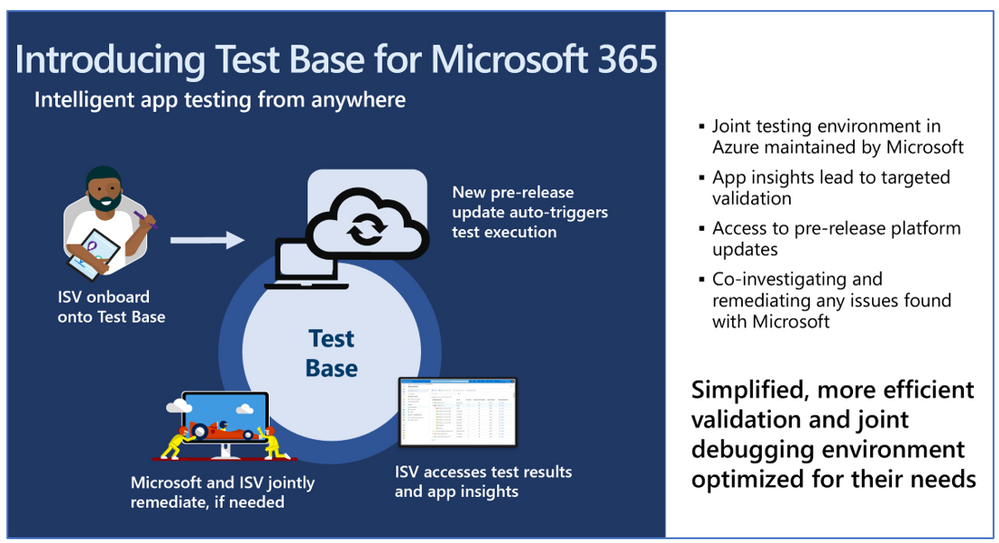
We are excited to update you on the latest Test Base for Microsoft 365 features and how you and your organization can take advantage of this service.
A little more than a year ago, we announced the availability of a new testing service targeted at desktop applications called Test Base for Microsoft 365. Over the last several months, the Test Base for Microsoft 365 team met with several enterprise customers to learn more about their testing operations and challenges. They shared some valuable insights into enterprise behaviors and key pain points, including:
- More than three-quarters are pursuing a cloud-based virtualization strategy.
- About half are doing pre-deployment testing on monthly Windows updates.
- Most are neutral to dissatisfied with pre-deployment testing of Windows feature updates.
- Test needs span across third-party, line-of-business (LOB), and in-house built applications.
Subtle changes have happened in the application testing space since the launch of Windows 10. It has ushered in an era of superior application compatibility, with newer processes such as ring-based testing and flighting strategies helping IT pros pilot devices against upcoming builds of Windows and Office, while limiting exposure to many end users. Despite these positive changes, there is still a need to test business critical apps such as antivirus, VPN or internally-developed LOB applications.
What is Test Base for Microsoft 365?
Test Base for Microsoft 365 is an Azure service that facilitates data-driven testing of applications. Backed by the power of data and the cloud, it enables IT professionals to take advantage of intelligent testing from anywhere in the world. If you are a developer or a tester, Test Base strengthens your application’s ability to continue working even as platform dependencies such as the latest Windows updates change. It will help you test your applications without the hassle, time commitment, and expenditure of setting up and maintaining complex test environments. Most importantly, it will give you access to pre-release Windows Updates on secure virtual machines (VMs) and world-class intelligence for your applications.
The IT pro and Test Base
As an IT professional, you’re no doubt evaluating modernization technologies that will simplify the application and device management across your user base. Technologies such as Windows Virtual Desktop and MSIX, in tandem with early adoption via the Windows Insider Program, help reduce the application compatibility concerns associated with Windows and Office updates. Based on your feedback, the testing workflow usually takes you outside of the core device management tools that you use today. In addition, the install base or the business-critical nature of some applications can make it painful when encountering a failure. The subsequent coordination of failure analysis with software vendors or internal developers can be time consuming and can delay remediation. You have asked that testing and validation be part of the seamless workflow – assess, remediate, deploy at scale.
Test Base aspires to help our customers focus their test efforts and get to the confidence they seek faster. Our initial offering focused on critical third-party software vendors whose applications (anti-virus, VPN, disk encryption etc.) we all depend on. As we expand the value to our enterprise customers, we want to invite you to onboard your internal LOB applications on Test Base. Not only will you get test coverage against Windows security and feature updates, but also data insights and support on application failures, allowing you to quickly remediate fixes prior to broad release across your organization.
While we further build out this seamless workflow, here is what you can do now as an IT professional – nominate the software vendors or onboard your internal standalone apps. Once onboarded, you will benefit by having the confidence signals for the applications that you care about.
What’s new since Microsoft Ignite: September 2020?
We are constantly innovating and adding capabilities based on customer feedback. Here’s a quick summary of new features that you can look forward to:
- Intelligent CPU regression analysis – Test Base now provides software developers with insights into CPU performance regressions when their application is running on a pre-release version of an upcoming Windows update.
- Support for Server application testing – A top ask from software vendors, your apps will be validated against pre-release monthly security updates for Windows Server 2019 and/or Windows Server 2016, including the Server Core edition.
- Test Base Champions – We established a program where our most active customers can meet with us to share feedback as well as learn what’s next for Test Base. This is a great forum for customers to collaborate on their favorite features and drive prioritization.
- Test Base how-to videos – Our how-to video series will help you ramp up quickly. Learn how to onboard your applications and analyze the results on Test Base:
What’s next on the roadmap for Test Base for Microsoft 365?
We are continuously gathering and collaborating on feedback to improve upon and prioritize the future for the Test Base service. Examples of capabilities that you can expect to light up in the next few months include asynchronous alerts & notifications, support for API-based onboarding and support for Office 365 testing.
Join the Test Base community
We are actively engaging with enterprise customers now to understand their needs and design a solution that addresses their use cases. If you would like to participate in this discussion, please join in! I would also like invite you to come join us on the new Test Base for Microsoft 365 community on Tech Community so you can share your experiences and connect with other customers using the service.
If you are software vendor who is interested in onboarding your applications to Test Base, or if you are an IT professional whose organization is interested in nominating a software vendor to participate, please complete the preview sign-up form.
by Contributed | Mar 4, 2021 | Technology
This article is contributed. See the original author and article here.
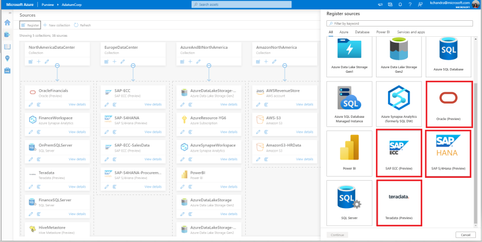
Azure Purview expands on the Non-Microsoft Connectors supportability. In addition to the numerous Azure sources supported today, customers can now register and scan from various databases like Teradata and Oracle. Azure purview also supports ERP sources like SAP S/4HANA and SAP ECC.
Functionalities Supported
1. Register and Scan: Once the sources are registered, customers can now run a full scan on all these sources. For Teradata and Oracle sources, customers can either scan their entire database or scope scans based on schema names.
2. Classify: Customers can manually classify the data assets in these sources
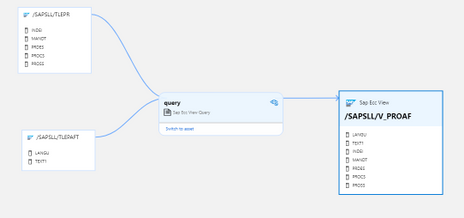
3. Lineage: In addition to the lineage obtained from ETL tools like Azure Data factory, Azure Purview can now fetch lineage between the data assets for these sources. As shown below, the SAP View has two tables as upstream sources. The view query used to fetch from these two tables will also be represented in the lineage view.
Permissions and access
- Purview Data Source Administrator can register and trigger scans on these sources.
- In addition, the Data Source Administrator should be a Data Reader or a Data Curator as well.
What’s coming next
Stay tuned for the ability to automatically classify the data from these on-premises sources as we will have more information to share soon!
Get started today!
For detailed information on how to register and setup a scan, please refer to the below how-to-guides:
- Teradata: Register and scan Teradata source
- Oracle: Register and scan Oracle source
- SAP S/4HANA: Register and scan SAP S/4HANA source
- SAP ECC: Register and scan SAP ECC source
by Contributed | Mar 4, 2021 | Technology
This article is contributed. See the original author and article here.
We announce a new feature called Azure Active Directory only authentication for Azure SQL (hereafter “AAD-only auth”). This feature is in public preview and is supported for all Azure SQL SKUs such as Azure SQL Database, Azure Synapse Analytics, Managed Instance (MI) and Hyperscale.
Following the SQL on-premises feature that allows the disabling of SQL authentication and enables only Windows authentication, we developed a similar feature for Azure SQL that allows only Azure AD authentication and disables SQL authentication in the Azure SQL environment.
Behavior in detail
When “AAD-only auth” is active (enabled), it disables SQL authentication, including SQL server admin as well as SQL logins and users, and allows only Azure AD authentication for the Azure SQL server and MI. SQL authentication is disabled at the server level (including all databases) and prevents any authentication (connection to the Azure SQL server and MI) based on any SQL credentials.
Although SQL authentication is disabled, the creation of new SQL logins and users is not blocked. Neither the pre-existing nor newly created SQL accounts will not be allowed to connect to the server. In addition, enabling the AAD-only auth does not remove existing SQL login and user accounts, but it disallows these accounts to connect to Azure SQL server and any database created for this server.
Tooling-support
We support PowerShell, CLI commands, Rest APIs, ARM templates, as well as the Azure portal for SQL Database to enable or disable the AAD-only auth feature. The Azure portal for MI is currently not supported. For more on details on this feature and available interfaces, see the AAD-only-authentication.
Permissions required to enable/disable this feature
To enable or disable the AAD-only auth feature, one of the following built-in roles are required for the AAD users executing these operations: subscription owner, contributor or co-administrator. The required permissions can also be customized by creating custom roles. For more information on Azure built-in roles, see https://docs.microsoft.com/en-us/azure/role-based-access-control/built-in-roles. To allow Azure AD users with lower privileges to set/unset the AAD-only auth feature, the existing built-in role SQL Security Manager was modified to allow these operations for SQL DB and MI. The two Azure SQL built-in roles, SQL Server Contributor (used for SQL DB) and SQL Managed Instance Contributor (used for MI), do not have that permission. This role-separation helps in implementing Separation of Duties, where users who can create an Azure SQL server or create an Azure AD admin, such as SQL Server contributor or SQL Managed Instance Contributor, cannot enable nor disable security features such as AAD-only auth.
Enabling/disabling the AAD-only auth feature using the Azure portal
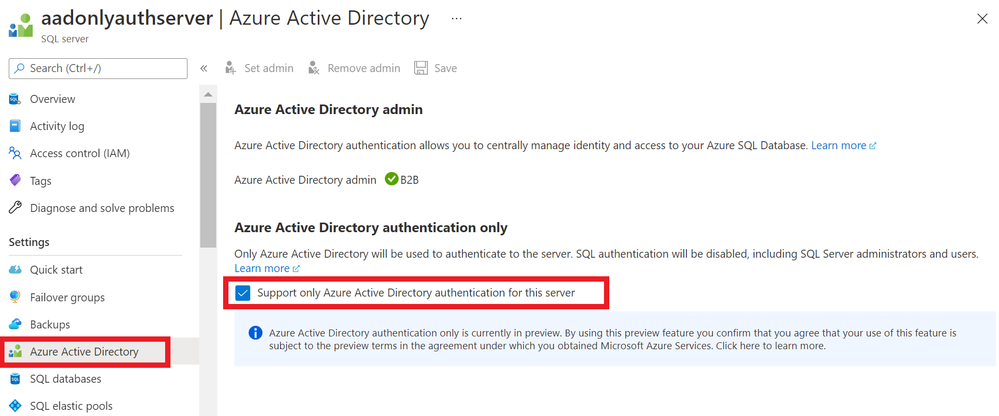
After assigning an Azure AD user a role discussed above such as SQL Security Manager, the AAD-only auth feature can be enabled using the Azure portal by checking the feature box and saving its action (see below). The AAD-only auth feature using the Azure Portal is currently supported only for SQL DB, and not for MI.
Note that the Azure AD admin must be set for this server to check the feature box.
Once the feature is enabled, any attempt to login to this server using SQL authentication fails with an error message indicating the cause of the failure (see below).
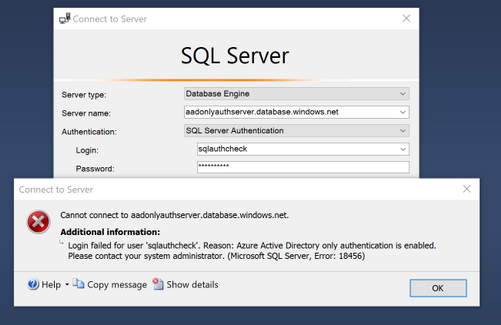
Similarly, the feature box can be unchecked allowing both Azure AD and SQL authentication. In this case, repeating the SQL login using the SSMS example above will succeed.
Limitations
- AAD-only auth is supported at the Azure SQL server level
- This means that when this mode is enabled, all databases that belong to this server can only be accessed using Azure AD authentication
- Enabling AAD-only auth does not remove existing SQL logins or SQL users based on these logins. They continue being stored in SQL metadata, but cannot be used for SQL authentication
- Even though the AAD-only auth is enabled, with proper SQL permissions for Azure AD users, SQL logins and SQL users can be created. However, the authentication process to connect to Azure SQL using such logins/users will fail
- Azure AD users with proper permissions can impersonate existing SQL users
- Impersonation continues working between SQL authentication users even though the AAD-only auth feature is enabled. This is consistent to the way impersonation works today where even disabled users can be impersonated
by Scott Muniz | Mar 4, 2021 | Security
This article was originally posted by the FTC. See the original article here.
In 2015, the FTC and state partners
sued and shut down four sham charities that harassed millions of people with more than 1.3 billion illegal robocalls about donating to charity. The FTC and 46 charity state regulators from 38 states and the District of Columbia are holding the fundraisers that made those illegal calls accountable in a
lawsuit announced today.
According to the FTC, Associated Community Services (and some related companies and individuals) called more than 67 million people using illegal pre-recorded messages. Those messages falsely claimed the money would go to support breast cancer patients, the families of children with cancer, homeless veterans, and other people in need. In reality, the FTC says that almost none of the more than $110 million donated between 2016 and 2018 went to help those causes.
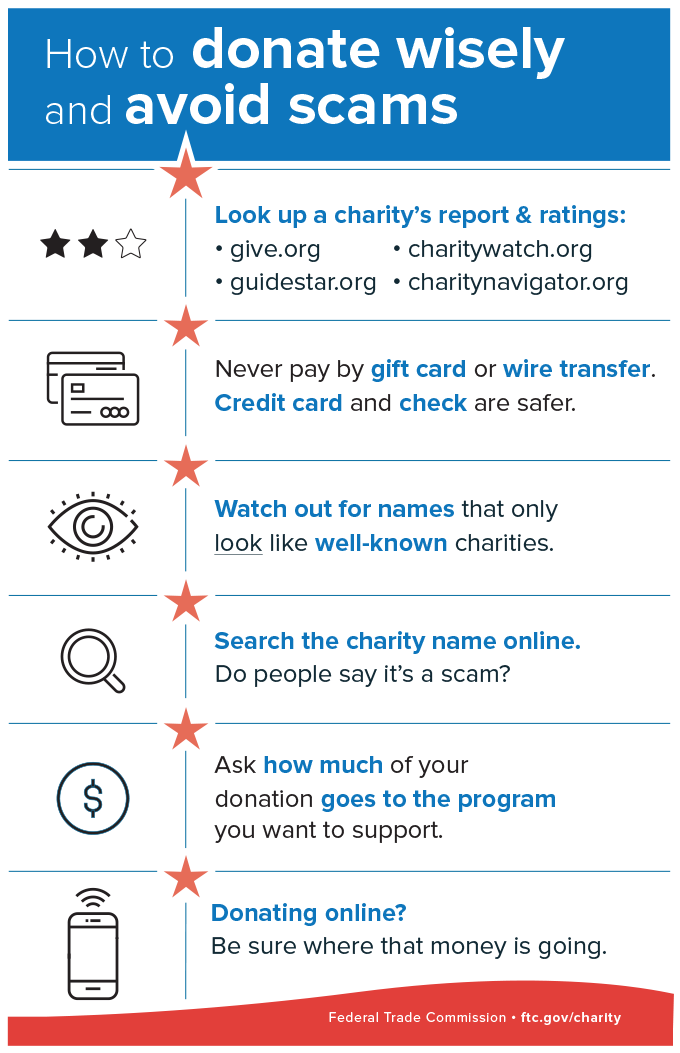
The next time you get a call with a pre-recorded message from charity fundraisers, remember these tips:
- Don’t trust your caller ID. Dishonest fundraisers can make calls look like they’re from your local area code to get you to answer.
- Hang up if you get a robocall with a pre-recorded message from a charity you don’t know. It’s illegal for a charity to call you with pre-recorded messages, unless you’ve donated to them before. In that case, the caller must tell you that you can opt out of future calls and give you a way to do that.
- Don’t be rushed. A legitimate charity won’t pressure you and will take your donation at any time.
- Ask questions. Ask the fundraiser for the charity’s exact name, web address, and mailing address, so you can confirm it later. And ask exactly how much of your donated dollars will be spent on the charitable cause.
Brought to you by Dr. Ware, Microsoft Office 365 Silver Partner, Charleston SC.



Recent Comments