by Contributed | Mar 4, 2021 | Technology
This article is contributed. See the original author and article here.
We are pleased to announce the enterprise-ready release of the security baseline for Microsoft Edge, version 89!
We have reviewed the new settings in Microsoft Edge version 89 and determined that there are no additional security settings that require enforcement. The settings from the Microsoft Edge version 88 package continues to be our recommended baseline. That baseline package can be downloaded from the Microsoft Security Compliance Toolkit.
Microsoft Edge version 89 introduced 8 new computer settings, 8 new user settings. We have attached a spreadsheet listing the new settings to make it easier for you to find them.
As a friendly reminder, all available settings for Microsoft Edge are documented here, and all available settings for Microsoft Edge Update are documented here.
Please continue to give us feedback through the Security Baselines Discussion site or this post.
by Contributed | Mar 4, 2021 | Technology
This article is contributed. See the original author and article here.
Last year, we started requiring multi-factor authentication in Microsoft Advertising online. Multi-factor authentication is a security process that requires you to verify your identity in two different ways. Starting in April we will require multi-factor authentication for all users who sign in through a third-party application that uses the Bing Ads API.
What users need to do: When you sign in and allow third-party applications to access your Microsoft Advertising account , you’ll be asked to provide a second form of verification that matches contact information in your Microsoft account profile. You must check your Microsoft account settings now to ensure that your security information is up to date.
What developers need to do: Upon enforcement of multi-factor authentication, if your users have not setup multi-factor authentication the Bing Ads API will not accept any access tokens that you obtain or have already obtained on the user’s behalf. We recommend that you inform and guide users to complete multi-factor authentication in advance.
As always please feel free to contact support or post a question in the Bing Ads API developer forum.
by Contributed | Mar 4, 2021 | Technology
This article is contributed. See the original author and article here.
Blogger: Ståle Hansen, RD & MVP, CEO and Principal Cloud Architect at CloudWay
Session codes: FS192, OD380, OD378
As the author of the of the Teams calling and meetings chapter of the monthly updated book called Office 365 for IT Pros, I was looking forward to the news on these topics at Microsoft Ignite.
Calling updates
I did not expect to be as surprised as I was with the announcement of Operator Connect and Operator Connect Conferencing. This is the next evolution of Direct Routing, where you can bring your own telecom operator and handle connectivity and number assignment natively in the Teams Admin Center without the technical setup. The service provides shared SLA’s to ensure a stable service. This was unexpected news since Microsoft has been focusing on Direct Routing to connect to your own telecom equipment and Calling Plans. They even announced availability of Calling Plans in 8 new markets with countries such as New Zealand, Finland, and my own home country Norway. This means that even more countries have the freedom of choice when choosing how to get telephony in Teams.
The way I will talk about calling in Teams from now in is:
- Use Calling Plans in countries where it is available, and you do not have need for least cost routing
- Use Operator Connect to bring your own operator and continue your current agreements with your favourite partner, more partners will certify in the future. The question is, can we do least cost routing in this setup? We need to investigate that when it becomes available.
- Use Direct Routing when you need to connect with your own PBX environment through a certified SBC to Teams and get the full flexibility for least cost routing and branch site connectivity. This is suitable for complex calling scenarios for global organizations.
Let us not forget about Operator Connect Conferencing, I did honestly not see this one coming. This is where you can add operator dial-in numbers to a Microsoft Audio Conferencing bridge. The advantage here is that you can add additional location not provided natively from Microsoft. I am not sure about how licensing will work in this scenario at this point in time. Read more about calling news at https://aka.ms/OperatorConnect.
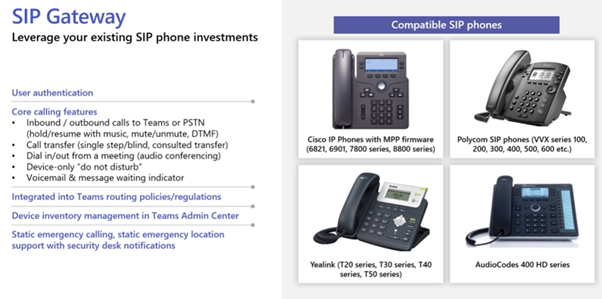
There is one more interesting calling update at Microsoft Ignite, SIP Gateway. This is a service at no extra cost where you can leverage existing SIP phone investment since you can connect Cisco IP phones, Polycom VVX phones, Yealink T20 series and the cheaper AudioCodes 400 HD series. If you already have this SIP based phones you can leverage them as desk phones or shared devices. Best of all, these will show up under Devices in the Teams Admin Center.
Security updates in calls and meetings
Today Teams traffic is encrypted in transit and at rest which is detailed here. To be able to place a call you need to go through layers of identity security and conditional access. It is a very secure service where you can be confident that your calls will not get compromised. But it does not qualify as a true end-to-end encryption (E2EE) service, since you have bot services that does transcripts and cloud recordings. Personally, I did not expect Microsoft to deliver E2EE in Teams, but they just announced this at MS Ignite. It will be available for ad-hoc 1-to-1 calls initially and will later be available as an option for scheduled calls and meetings. You should expect that recordings, AI based services such as transcript and live translation, and analytics to be unavailable for these calls. The reason for this is that the call is getting encrypted at the source and decrypted at the destination, without any ability for intermediary services to bring added functionality. Voice, video and screensharing is available in such a call. E2EE will be possible to enable for individuals or groups and they can specify which calls are E2EE. A welcome addition.
Working with larger organizations and governments I spend a lot of time talking to security about how to secure meetings. Features I typically point to are lobby, attendee role, unique conference ID for each meeting and the ability to adjust meeting options before and during the meeting. Microsoft announced two additional highly requested features, chat moderation controls and Invite only meetings options.
Chat moderation is the ability to enable, disable or only enabled during meeting configuration of the chat. In addition to this organizer should be aware that if you leave the chat open for recurring meetings, people who were invited to single occurrences of a meeting, has access to the chat after the meeting. This is something we teach users about, to go in to chat and remove those who do should not be in future version of the chat. Hopefully, this feature can create a new chat per occurrence of a meeting, but that is purely speculation and needs to be investigated when the feature becomes available.
A question I get when talking to the security department is how we can know that only invited people can join the meeting. Today, the answer is, you cannot. If you have access to the meeting link, then you can join the meeting or get to the lobby. With the Invite only meeting option, it is only the addresses of those users that were directly invited that can bypass lobby. If a user tries to join the same meeting and was not invited directly, but got a copy of the meeting link, they will get to the lobby. This is useful within organizations where we often see the lobby setting of everyone in the organization can bypass lobby.
Meetings updates
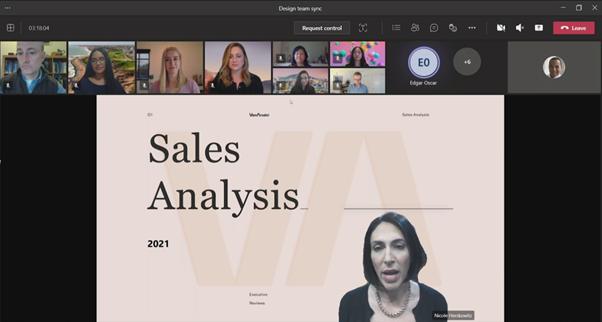
As in IT Pro I do a lot of workshop, presentations, and technical handovers. When doing that using Teams meetings, it is important to keep the audience engaged and connected. Even though these are not IT Pro specific news, I wanted to highlight them. Dynamic view and standout presenter mode are welcome additions to the Teams meetings layout. Now you can have the video gallery on top of your Teams client, so that you can look more into the camera when looking at yourself or attendees in the meeting. The standout presenter mode puts you on top of your content, more like in a gamer stream, which makes it easier for you to connect with you audience when presenting content. Paired with Live Reactions, it can make for a very engaging session. Learn more here.
Management updated for calls and meetings
There are two announced features I want to call out for management. Real time telemetry for ‘in progress’ meetings and remote provisioning of Android based devices.
Real time telemetry is something a lot of IT Pros has asked for. It will empower the IT/Helpdesk to do live support during high stakes meetings. The data you will see is jitter, latency, packet loss, and frames per second for audio, video, and screen sharing. Based on this insight it is possible to take immediate action during meetings or use it as an active troubleshooting tool.
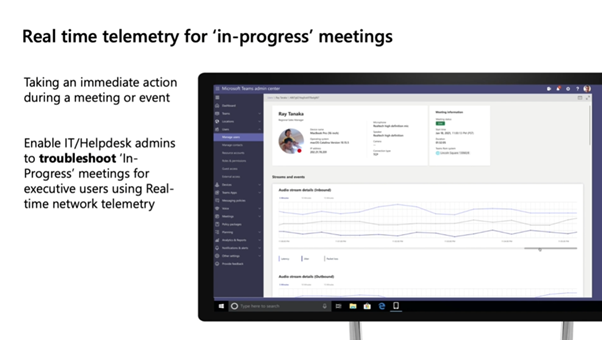
Remote provisioning of Android devices is the ability to sign into the device directly from the Teams Admin Center without physically being at the location of the device. This is a specific feature for common area phones. Read more here.
A bright future
It is interesting to see that Microsoft is constantly improving the capabilities for calling and meetings, making them more feature rich, secure, and manageable. I am looking forward to learning more details on these capabilities as soon as they become General Available.
Read more here:

by Contributed | Mar 4, 2021 | Technology
This article is contributed. See the original author and article here.
The work-from-anywhere world has put IT partners on the forefront of driving their small and medium business customers’ digital transformations – to help customers stay productive from anywhere, while safeguarding against cyberthreats. With Microsoft 365 Business Premium, partners have a comprehensive solution that brings together productivity and collaboration capabilities with security, device management and remote access to meet today’s customer needs.
To help IT partners in your journey to learn, deploy and sell Microsoft 365 Business Premium and build the right managed service offers for your customers, we recently announced new partner enablement benefits and training. Read along for more details.
1. Microsoft 365 Business Premium Partner Playbook
We’ve created the Microsoft 365 Business Premium Partner Playbook – a one-stop content and training hub for partner enablement across all phases of partner journey from building a profitable practice to technical and sales training to deployment guidance.
This includes:
- Practical guidance on developing profitable managed services offers
- Technical enablement and checklists from Microsoft experts
- Sales guidance and tools to help partners drive customer conversations
- Handy IT checklists and deployment guidance
- A companion readiness webinar series developed in partnership with Industry experts
Get the Partner Playbook at https://aka.ms/M365BPPartnerPlaybook
2. Companion Partner Readiness Series
As a companion to the Microsoft 365 Business Premium Partner Playbook, we have developed a training series to help IT partners accelerate your business growth through managed services. This in-depth readiness webinar series covers:
- Guidance about developing profitable managed services offers with real-world examples from industry experts like Paul Dippell, Alex Fields and more!
- Best practices from MSP peers and Microsoft experts.
- Deep dive security training covering aspects like cyberthreat protection with Microsoft Defender, securing devices with Intune and enabling secure remote access with Azure AD.
- Live Q/A with a panel of experts
Register now at https://aka.ms/AccelerateWithM365BP to join the webinars or watch on-demand.
3. Announcing Microsoft 365 Business Premium product licenses for partners with the Small and Midmarket Cloud Solutions competency, Office 365 services option
We are excited to announce that Microsoft 365 Business Premium product licenses are now included for partners with the Small and Midmarket Cloud Solutions competency, Office 365 services option. Learn more about these licenses and how to activate them in Partner Center. The specific quantities for M365 Business Premium included are:
- Silver Small and Midmarket Cloud Solutions competency, O365 services option – 10 seats (licenses)
- Gold Small and Midmarket Cloud Solutions competency, O365 services option – 25 seats (licenses)
If you’re a partner with the Small and Midmarket Cloud Solutions competency – Office 365 services option, Microsoft 365 Business Voice product licenses are also included for you in markets where it is available.
We hope these resources and benefits will help our partners in your journey of building managed services with Microsoft 365 Business Premium. We’d love to hear more about additional enablement and training that may be of value.
by Scott Muniz | Mar 4, 2021 | Security, Technology
This article is contributed. See the original author and article here.
CISA is aware of threat actors using open source tools to search for vulnerable Microsoft Exchange Servers and advises entities to investigate for signs of a compromise from at least September 1, 2020. CISA has updated the Alert on the Microsoft Exchange server vulnerabilities with additional detailed mitigations.
CISA encourages administrators to review the updated Alert and the Microsoft Security Update and apply the necessary updates as soon as possible or disconnect vulnerable Exchange servers from the internet until the necessary patch is made available.


Recent Comments