
Automated Machine Learning on the M5 Forecasting Competition

Automated Machine Learning on the M5 Forecasting Competition

This article is contributed. See the original author and article here.


We announce here that Microsoft’s Automated Machine Learning, with nearly default settings, achieves a score in the 99th percentile of private leaderboard entries for the high-profile M5 forecasting competition. Customers use Automated Machine Learning (AutoML) for ML applications in regression, classification, and time series forecasting. For example, The Kantar Group leverages AutoML for churn analysis, allowing clients to boost customer loyalty and increase their revenue.


Our M5 result demonstrates the power and effectiveness of our Many Models Solution which combines classical time-series algorithms and modern machine learning methods. Many Models is used in production pipelines by customers such as AGL, Adamed, and Oriflame for demand forecasting applications. We also use our open-source Responsible AI tools to understand how the model leverages information in the training data. All computations take place on our scalable, cloud-based Azure Machine Learning platform.


The M5 Competition


The M5 Competition, the fifth iteration of the Makridakis time-series forecasting competition, provides a useful benchmark for retail forecasting methods. The data contains historical daily sales information for about 3,000 products from 10 different Wal-Mart retail store locations. As is often the case in retail scenarios, the data has hierarchical structure along product catalog and geographic dimensions. Data features like sales price, SNAP (food stamp) eligibility, and calendar events are provided by the organizers in addition to historical sales. The accuracy track of the competition evaluates 28-day-ahead forecasts for 30,490 store-product combinations. With submissions from over 5,000 teams and 24 baseline models, the competition provides a rich set of comparisons between different modeling strategies.


Modeling Strategy


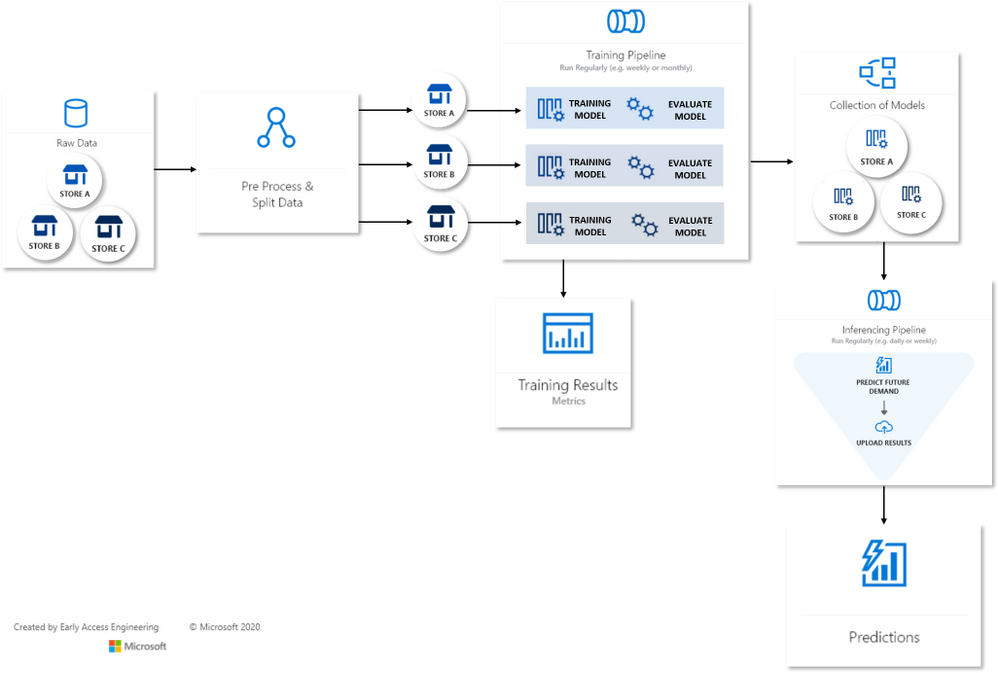
There are myriad approaches to modeling the M5 data, especially given its hierarchical structure. Since our goal is to demonstrate an automated solution, we executed what we considered the most simple strategy: build a model for each individual store-product combination. The result is a composite model with 30,490 constituent time-series models. Our Many Models Solution, born out of deep engagement with customers, is precisely suited to this task.


Many Models Flow MapMany Models Flow Map


The Many Models accelerator runs independent Automated Machine Learning (AutoML) jobs on each store-product time-series, creating a model dictionary over the entire dataset. In turn, each AutoML job generates engineered features and sweeps over model classes and hyperparameters using a novel collaborative filtering algorithm. AutoML then selects the best model for each time-series via temporal cross-validation. Training and scoring are data-parallel operations for Many Models and easily scalable on Azure-managed compute resources.


Understanding the Final Model


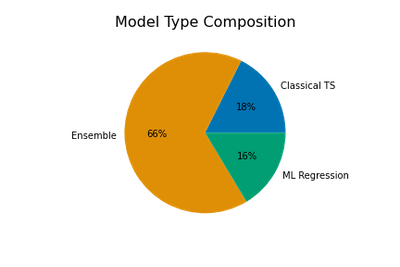
The final composite model is a mix of three model types: classical time-series models, machine learning (ML) regression models, and ensembles which can contain multiple models from either or both of the first two types. AutoML creates the ensembles from weighted combinations of top performing time-series and ML models found during sweeping. Naturally, the ensemble models are often the best models for a given store-product combo.


model_type_pie.png

The chart above shows that two-thirds of the selected models are ensembles, with classical time-series and ML models making up approximately equal portions of the remainder.


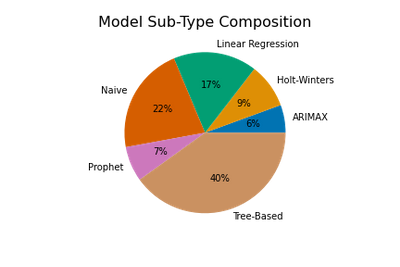
We get a more detailed view of the composite model by breaking into model sub-types. AutoML sweeps over three ML regression subtypes: regularized linear models, tree-based models, and Facebook’s Prophet model. Classical algorithms include Holt-Winters Exponential Smoothing, ARIMAX (ARIMA with regressors), and a suite of “Naive”, or persistence, models. Ensembles are weighted combinations of these sub-types.  


model_subtypes_pie.png

The proportions of subtypes in the full composite model are shown above, where ensemble weights are used to apportion subtypes from each ensemble. Tree-based models like Random Forest and XGBoost that are capable of learning complex, non-linear patterns are a plurality. However, relatively simple linear and Naive time-series models are also quite common!


Feature Importance


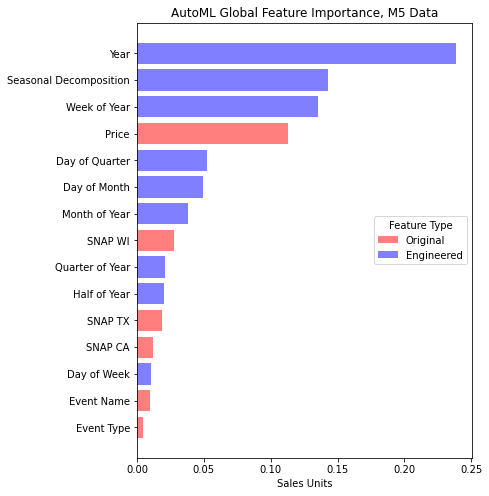
Most of AutoML’s models can make use of the data features beyond the historical sales, so we find yet more insight into the composite model by examining the impact, or importance, of these features relative to the model’s predictions. A common way to quantify feature importance is with game-theoretic Shapley value estimates. AutoML optionally calculates these for the best model selected from sweeping, so we make use of them here by aggregating values over all models in the composite.


m5_feature_importance.png


In the feature importance chart, we distinguish between features present in the original dataset, such as price, and those engineered by AutoML to aid model accuracy. Evidently, engineered features associated with the calendar and a seasonal decomposition make the most impact on predictions. The seasonal decomposition is derived from weekly sales patterns detected by AutoML. Price is the most important of the original features which is expected in retail scenarios given the likely significant effects of price on demand.


The Value of AutoML and Many Models


Our automatically tuned composite model performs exceedingly well on the M5 data – better than 99% of the other competition entries. Many of these teams spent weeks tuning their models. Despite this excellent result, it is important to note that no single modeling approach will always be the best. In this case, we achieved great accuracy with an assumption that the product-store time-series could be modeled independently of one another. This implies that the dynamics driving changes across sales at different stores and products may vary widely. We’ve learned from several successful engagements with our enterprise customers that the Many Models approach achieves good accuracy and scales well across other forecasting scenarios as well.


From more information, see our other Many Models post: Train and Score Hundreds of Thousands of Models in Parallel.


Special thanks to Sabina Cartacio for contributing text and editorial guidance.

Microsoft Releases November 2021 Security Updates

This article is contributed. See the original author and article here.

Microsoft has released updates to address multiple vulnerabilities in Microsoft software. An attacker can exploit some of these vulnerabilities to take control of an affected system.

CISA encourages users and administrators to review Microsoft’s November 2021 Security Update Summary and Deployment Information and apply the necessary updates.

#M365GovCommunityCall November 2021: Teach a Govie to Fish (through MSFT updates)

This article is contributed. See the original author and article here.


https://www.youtube-nocookie.com/embed/hsNc_QjYwfw


At the beginning of November, Microsoft had their second Ignite of the year, announcing or further clarifying details around many of the latest and near-immediate future features expected to rollout to Microsoft 365. However, as many of the US Federal cloud tenants see features months (if not longer) after they hit the commercial tenant, these users are often left wondering “what’s next for us” instead of having the same excitement commercial tenant owners have coming out of these conferences.


In this episode, we meet with Microsoft architect John Moh (LinkedIn) to discuss our favorite ways to stay up to date on what’s available to us in the GCC, GCC-H, and DOD tenants!


Government Community Events


In the News


Roadmap Update


Today’s Discussion


Today’s Panelists


Today’s panelists can be found on Twitter if you want to connect with them further!


CISA Releases Security Advisory on Siemens Nucleus Real-Time Operating Systems

This article is contributed. See the original author and article here.

CISA has released an Industrial Control Systems (ICS) advisory detailing multiple vulnerabilities found in Siemens Nucleus Real-Time Operating Systems (RTOS) and supporting libraries. A remote attacker could exploit some of these vulnerabilities to take control of an affected system.

CISA encourages users and administrators to review ICS Advisory: ICSA-21-313-03 Siemens Nucleus RTOS TCP/IP Stack for more information and apply the necessary mitigations.

Get started with minimal API for .NET 6

This article is contributed. See the original author and article here.

TLDR; Using minimal API, you can create a Web API in just 4 lines of code by leveraging new features like top-level statements and more.


 Why Minimal API


There are many reasons for wanting to create an API in a few lines of code:


  • Create a prototype. Sometimes you want a quick result, a prototype, something to discuss with your colleagues. Having something up and running quickly enables you to quickly do changes to it until you get what you want.

  • Progressive enhancement. You might not want all the “bells and whistles” to start with but you may need them over time. Minimal API makes it easy to gradually add what you need, when you need it.


How is it different from a normal Web API?


There are a few differences:


  • Less files. Startup.cs isn’t there anymore, only Program.cs remains.

  • Top level statements and implicit global usings. Because it’s using top level statements, using and namespace are gone as well, so this code:


 using System;
   namespace Application
   {
        class Program
        {
            static void Main(string[] args)
            {
                Console.WriteLine("Hello World!");
            }
        }
   }


is now this code:


 Console.WriteLine("Hello World!");


  • Routes Your routes aren’t mapped to controller classes but rather setup with a Map[VERB] function, like you see above with MapGet() which takes a route and a function to invoke when said route is hit.


 Your first API


To get started with minimal API, you need to make sure that .NET 6 is installed and then you can scaffold an API via the command line, like so:


dotnet new web -o MyApi -f net6.0


Once you run that, you get a folder MyApi with your API in it.


What you get is the following code in Program.cs:


var builder = WebApplication.CreateBuilder(args);
var app = builder.Build();

if (app.Environment.IsDevelopment())
{
    app.UseDeveloperExceptionPage();
}

app.MapGet("/", () => "Hello World!");

app.Run();


To run it, type dotnet run. A little difference here with the port is that it assumes random ports in a range rather than 5000/5001 that you may be used to. You can however configure the ports as needed. Learn more on this docs page


 Explaining the parts


Ok so you have a minimal API, what’s going on with the code?


 Creating a builder


var builder = WebApplication.CreateBuilder(args);


On the first line you create a builder instance. builder has a Services property on it, so you can add capabilities on it like Swagger Cors, Entity Framework and more. Here’s an example where you set up Swagger capabilities (this needs install of the Swashbuckle NuGet to work though):


builder.Services.AddEndpointsApiExplorer();
builder.Services.AddSwaggerGen(c =>
    {
        c.SwaggerDoc("v1", new OpenApiInfo { Title = "Todo API", Description = "Keep track of your tasks", Version = "v1" });
    });


Creating the app instance


Here’s the next line:


var app = builder.Build();


Here we create an app instance. Via the app instance, we can do things like:


  • Starting the app, app.Run()

  • Configuring routes, app.MapGet()

  • Configure middleware, app.UseSwagger()


Defining the routes


With the following code, a route and route handler is configured:


app.MapGet("/", () => "Hello World!");


The method MapGet() sets up a new route and takes the route “/” and a route handler, a function as the second argument () => “Hello World!”.


Starting the app


To start the app, and have it serve requests, the last thing you do is call Run() on the app instance like so:


app.Run();


 Add routes


To add an additional route, we can type like so:


public record Pizza(int Id, string Name); 
app.MapGet("/pizza", () => new Pizza(1, "Margherita"));


Now you have code that looks like so:


var builder = WebApplication.CreateBuilder(args);
var app = builder.Build();

if (app.Environment.IsDevelopment())
{
    app.UseDeveloperExceptionPage();
}

app.MapGet("/pizza", () => new Pizza(1, "Margherita"));
app.MapGet("/", () => "Hello World!");

public record Pizza(int Id, string Name); 

app.Run();


Where you to run this code, with dotnet run and navigate to /pizza you would get a JSON response:


{
  "pizza" : {
    "id" : 1,
    "name" : "Margherita"
  }
}


Example app


Let’s take all our learnings so far and put that into an app that supports GET and POST and lets also show easily you can use query parameters:


var builder = WebApplication.CreateBuilder(args);
var app = builder.Build();

if (app.Environment.IsDevelopment())
{
    app.UseDeveloperExceptionPage();
}

var pizzas = new List<Pizza>(){
   new Pizza(1, "Margherita"),
   new Pizza(2, "Al Tonno"),
   new Pizza(3, "Pineapple"),
   new Pizza(4, "Meat meat meat")
};

app.MapGet("/", () => "Hello World!");
app.MapGet("/pizzas/{id}", (int id) => pizzas.SingleOrDefault(pizzas => pizzas.Id == id));
app.MapGet("/pizzas", (int ? page, int ? pageSize) => {
    if(page.HasValue && pageSize.HasValue) 
    {
        return pizzas.Skip((page.Value -1) * pageSize.Value).Take(pageSize.Value);
    } else {
        return pizzas;
    }
});
app.MapPost("/pizza", (Pizza pizza) => pizzas.Add(pizza));

app.Run();

public record Pizza(int Id, string Name);


Run this app with dotnet run


In your browser, try various things like:


 Learn more


Check out these LEARN modules on learning to use minimal API