by Contributed | Apr 6, 2021 | Technology
This article is contributed. See the original author and article here.
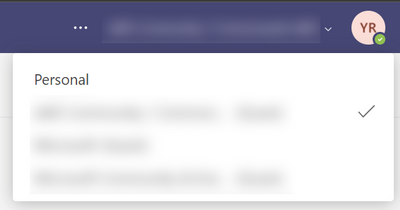
I love Microsoft Teams and I also love controlling my online appearance, but sadly both aren’t big friends when you are a Guest in another tenant. There still isn’t a good/easy way of controlling your own profile picture, which is sad because you are reduced to a not-very-personal coloured circle with initials:

Fellow MVP Kazushi Kamegawa shared a method of changing your profile picture in a private forum, but it stopped working due to some UI changes in the Azure Portal. Luckily, with some more “hackery”, we can still make it work!
The tldr version:
- Tenant switch to the tenant where you want to change your profile picture
- Figure out the ID of your user account in that tenant
- Open your user profile page in the Azure Portal using a direct link
- Edit the profile, upload a profile picture
- Wait for about a week to have the profile picture synced into Teams
Switch tenants
If you found this blogpost, it’s probably safe to assume that you know how to switch tenants. For the purpose of this guide, it is VERY important you do this in your browser because otherwise authentication will get confused ;).
- Open your browser, go to https://teams.microsoft.com and sign in with your credentials
- Top right of the Teams UI, switch to the tenant where you want to change the profile picture of your Guest account
Get ID of user account
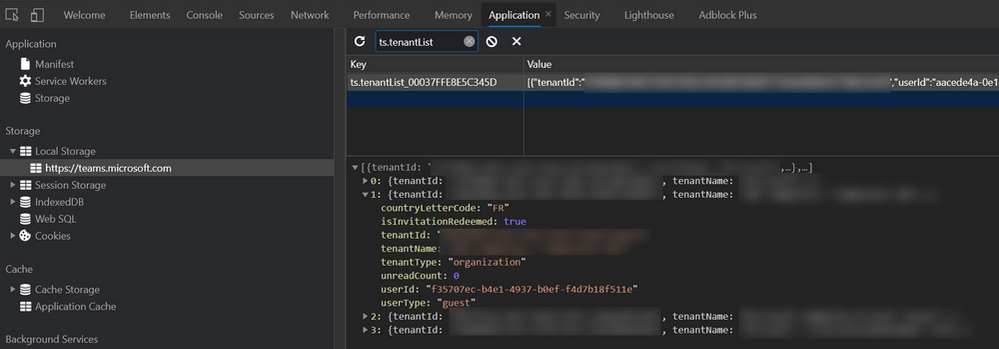
I don’t know of any place in the UI that shows the id of your Guest account in a tenant, so I had to find a way using the Developer Tools of Chrome/Edge.
- After switching to the Guest tenant, hit the F12 key to open the Developer Tools
- Select the
Applications tab
- In the left part underneath
Storage and Local storage, select https://teams.microsoft.com
- In the right part, do a search for
ts.tenantList. It should only show one result, select it.
- It shows all tenants you are part of as a Guest, open up the one you are currently in. You’ll need the value next to the
userId property. In my screenshot, it is the GUID that starts with f35707ec-…
User profile page in Azure Portal
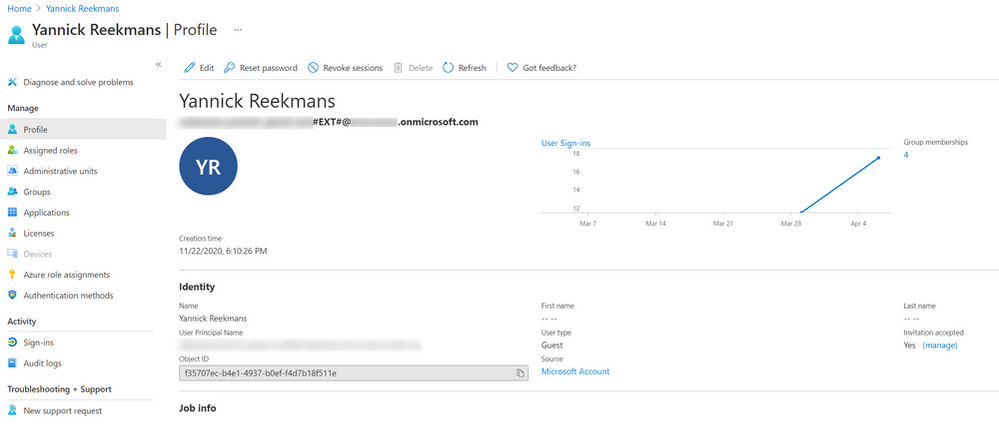
Now that you have your user account ID, you can open up your profile page in the Azure AD of the Guest tenant!
- In the same browser window, open https://portal.azure.com
- Top right of the portal, make sure you are in the tenant where you are a Guest. Most probably that is not the case, so do a tenant switch in the Azure Portal too.
- In the same browser window, open up this link:
https://portal.azure.com/#blade/Microsoft_AAD_IAM/UserDetailsMenuBlade/Profile/userId/<userId>. Make sure to replace <userId> with the id you copied in the previous step.
- You should now see your profile page in the Azure AD where you are a Guest.
Edit profile and upload picture
Finally time to upload your profile picture!
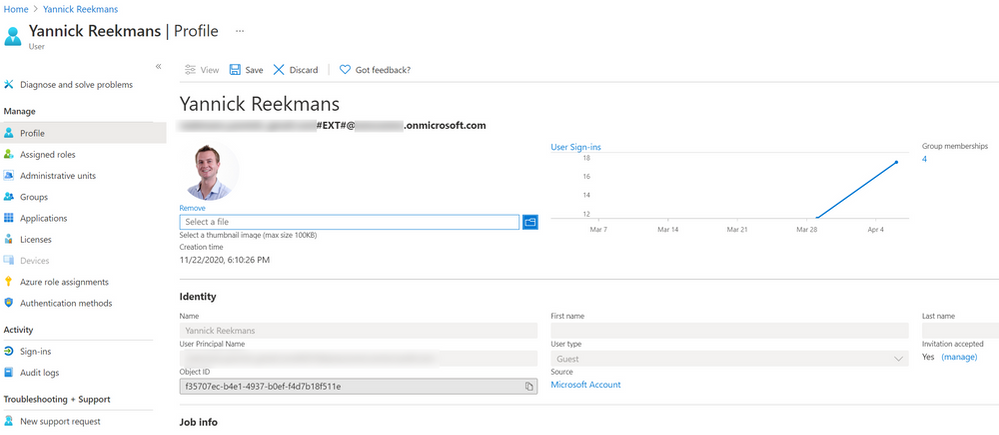
- Top of the profile, click the
Edit button
- With your profile in edit mode, you can browse for a photo on your computer and upload it to your profile!
Wait and enjoy success
It takes a while for your profile picture to show in Teams, and it might even show for a short while and go away again. But if you have enough patience, after about a week or so, your profile picture should show consistently across the Teams UI both for you and for others!

Until Microsoft Teams or Microsoft 365 gives us an easier way to change our profile picture, this is the best way to do it self service. The days of the anonymous circle with initials are over, time to show your personality also in your Guest tenants!
by Contributed | Apr 6, 2021 | Technology
This article is contributed. See the original author and article here.
Ever get annoyed with the page properties web part put out by Microsoft? If you’ve got some OCD issues (like me) then it may not take very long. At ThreeWill, we help clients with their digital workplaces and improving the way their users can obtain information and makes sense of it all. Oftentimes, the Page Properties web part can be useful here, as we very often add valuable metadata to pages in a digital workplace, which we often tie to page templates as well. News might roll up based on these page properties, which can assist in finding information in many ways. But its often handy to display this metadata in a clean way on a page as well. The standard Page Properties web part seeks to do just that. And, for the most part, it does a fine job with it. But it has a few deficiencies. The most annoying thing to me, when setting up digital workplaces was that it only supports a white background. But there are other small things, like the limitations with pretty standard field types. I like the idea of taking advantage of metadata columns for pages, but being able to use it visually is equally important. I finally decided to do something about it and build a new version of this web part. So with this in mind, let’s lay out our goals with this new web part. We will call it the Advanced Page Properties web part.
Feature Goals
Attempt to replicate the functionality of Page Properties with the following improvements:
Support for theme variants
Updated to standard capsule look for list options
Support for image fields
Support for hyperlink fields
Support for currency
Improved support for dates
In other words, we’re shooting for this:
Property Pane
For a part like this, it’s all about getting the property page figured out first. We want this to feel familiar too and not stray too much from the original design, unless it helps.
Let’s start by recognizing our chief property that the web part needs: selectedProperties. This array will hold the internal names of the fields that a user has selected for display in our web part. We intend on passing this property down to our React component. Here’s a look at our property object:
export interface IAdvancedPagePropertiesWebPartProps {
title: string;
selectedProperties: string[];
}
In our AdvancedPagePropertiesWebPart, we want to hold all possible properties for drop downs in a single array.
private availableProperties: IPropertyPaneDropdownOption[] = [];
Next, we need the following method to obtain the right types of properties for display:
private async getPageProperties(): Promise<VOID> {
Log.Write(“Getting Site Page fields…”);
const list = sp.web.lists.getByTitle(“Site Pages”);
const fi = await list.fields();
this.availableProperties = [];
Log.Write(`${fi.length.toString()} fields retrieved!`);
fi.forEach((f) => {
if (!f.FromBaseType && !f.Hidden && !f.Sealed && f.SchemaXml.indexOf(“ShowInListSettings=”FALSE””) === -1
&& f.TypeAsString !== “Boolean” && f.TypeAsString !== “Note” && f.TypeAsString !== “User”) {
this.availableProperties.push({ key: f.InternalName, text: f.Title });
Log.Write(f.TypeAsString);
}
});
}
We are using the PnP JS library for gathering the fields in the Site Pages library. Figuring out the right types of filters to gather was a bit of trial-and-error. We are excluding anything that’s inherited from a base type or is hidden in any way. We are also excluding 3 standard types so far: boolean, note and user. Note doesn’t make sense to display. Boolean can definitely work, but needs a good display convention. User was the only tricky object, which is the reason it isn’t done yet.
We call the above method prior to loading up the property pane.
protected async onPropertyPaneConfigurationStart(): Promise<VOID> {
Log.Write(`onPropertyPaneConfigurationStart`);
await this.getPageProperties();
this.context.propertyPane.refresh();
}
We need handlers for adding and deleting a property and selecting a property from a dropdown. These methods make necessary changes to the selectedProperties array.
protected onAddButtonClick (value: any) {
this.properties.selectedProperties.push(this.availableProperties[0].key.toString());
}
protected onDeleteButtonClick (value: any) {
Log.Write(value.toString());
var removed = this.properties.selectedProperties.splice(value, 1);
Log.Write(`${removed[0]} removed.`);
}
protected onPropertyPaneFieldChanged(propertyPath: string, oldValue: any, newValue: any): void {
if (propertyPath.indexOf(“selectedProperty”) >= 0) {
Log.Write(‘Selected Property identified’);
let index: number = _.toInteger(propertyPath.replace(“selectedProperty”, “”));
this.properties.selectedProperties[index] = newValue;
}
}
Finally, with all of our pieces in place, we can render our property pane with all it’s needed functionality.
protected getPropertyPaneConfiguration(): IPropertyPaneConfiguration {
Log.Write(`getPropertyPaneConfiguration`);
// Initialize with the Title entry
var propDrops: IPropertyPaneField<ANY>[] = [];
propDrops.push(PropertyPaneTextField(‘title’, {
label: strings.TitleFieldLabel
}));
propDrops.push(PropertyPaneHorizontalRule());
// Determine how many page property dropdowns we currently have
this.properties.selectedProperties.forEach((prop, index) => {
propDrops.push(PropertyPaneDropdown(`selectedProperty${index.toString()}`,
{
label: strings.SelectedPropertiesFieldLabel,
options: this.availableProperties,
selectedKey: prop,
}));
// Every drop down gets its own delete button
propDrops.push(PropertyPaneButton(`deleteButton${index.toString()}`,
{
text: strings.PropPaneDeleteButtonText,
buttonType: PropertyPaneButtonType.Command,
icon: “RecycleBin”,
onClick: this.onDeleteButtonClick.bind(this, index)
}));
propDrops.push(PropertyPaneHorizontalRule());
});
// Always have the Add button
propDrops.push(PropertyPaneButton(‘addButton’,
{
text: strings.PropPaneAddButtonText,
buttonType: PropertyPaneButtonType.Command,
icon: “CirclePlus”,
onClick: this.onAddButtonClick.bind(this)
}));
return {
pages: [
{
header: {
description: strings.PropertyPaneDescription
},
groups: [
{
groupName: strings.SelectionGroupName,
groupFields: propDrops
}
]
}
]
};
}
Our Component and Displaying our fields/values
Our React component needs to properly react to the list of selected properties changing. It also needs to react to our theme changing. I leveraged this awesome post from Hugo Bernier for the theming, so I will not cover that in-depth, although you will see how it’s being leveraged in the code snippets below. Here are the properties we plan to start with and respond to:
export interface IAdvancedPagePropertiesProps {
context: WebPartContext;
title: string;
selectedProperties: string[];
themeVariant: IReadonlyTheme | undefined;
}
We will track the state of our selected properties and their values with hooks. We want to trigger off of changes to our properties, so we will setup a reference to their current state. We will also establish our themeVariant and context at the start of our component.
// Main state object for the life of this component – pagePropValues
const [pagePropValues, setPagePropValues] = useState<PAGEPROPERTY>([]);
const propsRef = useRef(props);
const { semanticColors }: IReadonlyTheme = props.themeVariant;
propsRef.current = props;
sp.setup({ spfxContext: props.context });
So we are tracking the state of pagePropValues, which is an array of type PageProperty. What is PageProperty?
import { IFieldInfo } from “@pnp/sp/fields”;
export interface PageProperty {
info: IFieldInfo;
values: any[];
}
Our effect is looking to see when changes are made to the properties, then is peforming our core logic to refresh properties and values.
/**
* @description Effects to fire whenever the properties change
*/
useEffect(() => {
refreshProperties();
return () => {
// No cleanup at this moment
};
}, [propsRef.current]);
The core method is refreshProperties. It has 2 main calls it needs to make, whenever selected properties has changed: Establish any known metadata for each property that will assist in display and obtain all actual values for this property and the specific page id that we are viewing.
/**
* refreshProperties
* @description Gets the actual values for any selected properties, along with critical field metadata and ultimately re-sets the pagePropValues state
*/
async function refreshProperties () {
var newSetOfValues: PageProperty[] = [];
if (props.selectedProperties !== undefined && props.selectedProperties !== null) {
Log.Write(`${props.selectedProperties.length.toString()} properties used.`);
// Get the value(s) for the field from the list item itself
var allValues: any = {};
if (props.context.pageContext.listItem !== undefined && props.context.pageContext.listItem !== null) {
allValues = await sp.web.lists.getByTitle(“Site Pages”).items.getById(props.context.pageContext.listItem.id).select(…props.selectedProperties).get();
console.log(allValues);
}
for (let i = 0; i < props.selectedProperties.length; i++) {
const prop = props.selectedProperties[i];
Log.Write(`Selected Property: ${prop}`);
// Get field information, in case anything is needed in conjunction with value types
const field = await sp.web.lists.getByTitle(“Site Pages”).fields.getByInternalNameOrTitle(prop)();
// Establish the values array
var values: any[] = [];
if (allValues.hasOwnProperty(prop)) {
switch (field.TypeAsString) {
case “TaxonomyFieldTypeMulti”:
case “MultiChoice”:
values = _.clone(allValues[prop]);
break;
case “Thumbnail”:
values.push(JSON.parse(allValues[prop]));
break;
default:
// Default behavior is to treat it like a string
values.push(allValues[prop]);
break;
}
}
// Push the final setup of a PageProperty object
newSetOfValues.push({ info: field, values: […values] });
}
setPagePropValues({…newSetOfValues});
}
}
As we loop through all of the properties that have been selected, we make calls with PnP JS to get all of the metadata per field and all of the values per field. The call to get all of the values can return with any number of data types, so we need to be prepared for that. This is why it is of type any[] to start. But this is also why we have a switch statement for certain outlier situations, where the line to set the array of any need to be done a little differently than the default. Our 3 known cases of needing to do something different are TaxonomyFieldTypeMulti, MultiChoice and Thumbnail.
React and Display
Our function component returns the following:
return (
<DIV classname=”{`${styles.advancedPageProperties}”>
{RenderTitle()}
{RenderPageProperties()}
</DIV>
);
RenderTitle is pretty straightforward.
/**
* RenderTitle
* @description Focuses on the 1 row layer, being the Title that has been chosen for the page
* @returns
*/
const RenderTitle = () => {
if (props.title !== ”) {
return <DIV classname=”{styles.title}”>{props.title}</DIV>;
} else {
return null;
}
};
RenderPageProperties is the first of a 2-dimensional loop, where we want to display a section for each page property that was select, just like the original.
**
* RenderPageProperties
* @description Focuses on the 2nd row layer, which is the property names that have been chosen to be displayed (uses Title as the display name)
* @returns
*/
const RenderPageProperties = () => {
if (pagePropValues !== undefined && pagePropValues !== null) {
var retVal = _.map(pagePropValues, (prop) => {
return (
<>
<DIV classname=”{styles.propNameRow}”>{prop.info.Title}<SPAN style=”{{display:”> – {prop.info.TypeAsString}</SPAN></DIV>
<DIV classname=”{styles.propValsRow}”>
{RenderPagePropValue(prop)}
</DIV>
);
});
return retVal;
} else {
return <I>Nothing to display</I>;
}
};
This method then calls our final display method, RenderPagePropValue, which peforms our 2nd layer of array display, mapping all of the values and providing the correct display, based on the field type of the selected property. This is the heart of the display, where various type conversions and logic are done real-time as we display the values, including trying to achieve a slightly more modern SharePoint look using capsules for array labels.
/**
* RenderPagePropValue
* @description Focuses on the 3rd and final row layer, which is the actual values tied to any property displayed for the page
* @param prop
* @returns
*/
const RenderPagePropValue = (prop: PageProperty) => {
console.log(prop);
var retVal = _.map(prop.values, (val) => {
if (val !== null) {
switch (prop.info.TypeAsString) {
case “URL”:
return (
<SPAN classname=”{styles.urlValue}”><A href=”{val.Url}” target=”_blank” style=”{{color:” semanticcolors.link=””>{val.Description}</A></SPAN>
);
case “Thumbnail”:
return (
<SPAN><IMG classname=”{styles.imgValue}” src=”{val.serverRelativeUrl}” /></SPAN>
);
case “Number”:
return (
<SPAN classname=”{styles.plainValue}”>{(prop.info[“ShowAsPercentage”] === true ? Number(val).toLocaleString(undefined,{style: ‘percent’, minimumFractionDigits:0}) : (prop.info[“CommaSeparator”] === true ? val.toLocaleString(‘en’) : val.toString()))}</SPAN>
);
case “Currency”:
return (
<SPAN classname=”{styles.plainValue}”>{(prop.info[“CommaSeparator”] === true ? new Intl.NumberFormat(‘en-US’, { style: ‘currency’, currency: ‘USD’ }).format(val) : Intl.NumberFormat(‘en-US’, { style: ‘currency’, currency: ‘USD’, useGrouping: false }).format(val))}</SPAN>
);
case “DateTime”:
//,””,,
switch (prop.info[“DateFormat”]) {
case “StandardUS”:
return (
<SPAN classname=”{styles.plainValue}”>{new Date(val).toLocaleDateString()}</SPAN>
);
case “ISO8601”:
const d = new Date(val);
return (
<SPAN classname=”{styles.plainValue}”>{`${d.getFullYear().toString()}-${d.getMonth()}-${d.getDate()}`}</SPAN>
);
case “DayOfWeek”:
return (
<SPAN classname=”{styles.plainValue}”>{new Date(val).toLocaleDateString(“en-US”, { weekday: ‘long’, month: ‘long’, day: ‘numeric’, year: ‘numeric’ })}</SPAN>
);
case “MonthSpelled”:
return (
<SPAN classname=”{styles.plainValue}”>{new Date(val).toLocaleDateString(“en-US”, { month: ‘long’, day: ‘numeric’, year: ‘numeric’ })}</SPAN>
);
default:
return (
<SPAN classname=”{styles.plainValue}”>{new Date(val).toLocaleDateString()}</SPAN>
);
}
case “TaxonomyFieldTypeMulti”:
case “TaxonomyFieldType”:
return (
<SPAN classname=”{styles.standardCapsule}” style=”{{backgroundColor:” semanticcolors.accentbuttonbackground=””>{val.Label}</SPAN>
);
default:
return (
<SPAN classname=”{styles.standardCapsule}” style=”{{backgroundColor:” semanticcolors.accentbuttonbackground=””>{val}</SPAN>
);
}
} else {
return (<SPAN classname=”{styles.plainValue}”>N/A</SPAN>);
}
});
return retVal;
};
So that’s all of the necessary code. Here’s what the finished product looks like, compared to the original page properties web part.
This web part is now officially apart of the PnP Web Parts repository and can be found here. I would love to hear about improvements you’d like to see and obviously you are more than welcome to contribute. I already have a bit of a list of things I’d love to see it do.
Other ideas for improvements:
Capsules to be linkable to either a search result page or a filtered view of site pages (we always get clien requests for this)
Support for People fields (this is the only thing lacking from the original)
Support for Boolean fields (just need the right idea for proper display, really)
Styling per property (ie. colorizing per property or something to that effect)
Conclusion
Hopefully, I’ve gotten you excited about Page Properties again and you’ve learned a little along the way around how the current Page Properties part might be doing what it does under the hood. Please consider contributing and feel free to reach out to me anytime. Thanks for your time!
</PAGEPROPERTY></ANY></VOID></VOID>

by Contributed | Apr 6, 2021 | Technology
This article is contributed. See the original author and article here.
Azure Stack HCI integrates hyperconverged infrastructure (HCI) technology for you to run virtualized applications on-premises in a familiar way and gain easy access to Azure services. One of the strengths of Azure Stack HCI is that the customers can use the tools they are familiar with on Azure Stack HCI such as System Center, Windows Admin Center, and PowerShell. If a customer is already using Hyper-V, they are already well versed on how to run Azure Stack HCI on the compute front. To compliment this familiarity, Azure Stack HCI is also compatible with third partner software tools. In this blog, we explore the integration of Azure Stack HCI with utility software that brings great value to Azure Stack HCI customers and provide joint solution briefs for each partner solution.
One of the critical processes to make hyperconverged clusters enterprise ready is the backup and replication process so that customers can preserve their data in case of failure. We are proud to have the leading Independent Software Vendors in this space provide support for Azure Stack HCI with Altaro Software, Commvault, Veeam and Veritas. With this choice of popular vendors, the majority of Azure Stack HCI customers will have no need to learn a new tool for their backup and recovery.
Another area where customers can benefit from further insight is in their infrastructure and application monitoring. While there are often simple monitoring tools integrated with various hyperconverged products, there is no substitute for a global unified platform that can accelerate development and reduce mean time to resolution for various fault that can be monitored on the cluster. We have worked with a leading vendor in the space, Datadog, to provide this capability for Azure Stack HCI.
Get familiar with the high-level capabilities for these partners and for more in-depth information, we have published a set of solutions briefs that you can find at Utility applications for Azure Stack HCI – Azure Stack HCI | Microsoft Docs
- Altaro VM Backup is an award-winning VM backup and replication solution for Hyper-V and VMware environments. Designed for IT departments, IT resellers and consultants, and Managed Service Providers (MSPs), the solution provides robust, streamlined, enterprise-level functionality.
- Commvault is a complete data management platform to store, protect, manage, and use data across on-premises and cloud locations.
- Datadog is a fully unified platform encompassing infrastructure monitoring, application performance monitoring, log management, user-experience monitoring, and more.
- Veeam Backup & Replication is the one solution for simple, reliable, and flexible protection of all your cloud, virtual, and physical workloads. Take the stress out of managing your data protection, ransomware prevention, and compliance challenges.
- Veritas Backup Exec is an easy-to-use backup and recovery solution that helps protect your environment’s virtual, physical, and cloud resources.
Learn more about Azure Stack HCI www.azure.com/hci
by Contributed | Apr 6, 2021 | Technology
This article is contributed. See the original author and article here.
In December 2020, we introduced the Cluster API Provider for Azure (CAPZ) to enable users to operate self-managed Kubernetes clusters on Azure infrastructure. CAPZ empowers you to build and manage Kubernetes clusters on Azure using the same tools and methods you are already using to manage your Kubernetes workloads. Changing a configuration on the cluster becomes as easy as running a `kubectl patch` command.
Started by the Kubernetes Special Interest Group (SIG) Cluster Lifecycle, the Cluster API project uses Kubernetes-style APIs and patterns to automate cluster lifecycle management for platform operators. CAPZ is the Azure provider implementation of Cluster API and it is backed by Cluster API’s vibrant community that of engineers from cloud providers, ISVs and the wider FOSS community.
Since December, the community has continued growing, welcoming new members like GiantSwarm, getting closer to a v1alpha4 release, and starting to plan the v1beta1 release. While the v1alpha4 cycle was focused mostly on stability and iterative improvements, paving the way for a 1.0 release, some of the recent notable feature additions include support for Windows nodes and automatic remediation of unhealthy control plane machines via MachineHealthChecks.
As we look forward to the upcoming release, one capability that has been requested by users of CAPZ is the ability to integrate Azure services with your Kubernetes cluster, such as turning on Azure Monitor to track the health and performance of your workloads, or enabling Azure Active Directory (AD) role-based access control (RBAC) to limit access to cluster resources based a user’s identity or group membership. This is similar to the concept of AKS and AKS Engine addons that you might be familiar with. But what if you could do this the same way across all your Kubernetes clusters?
Today, we’re excited to announce three new features for Azure Arc enabled Kubernetes that address the above-mentioned problems:
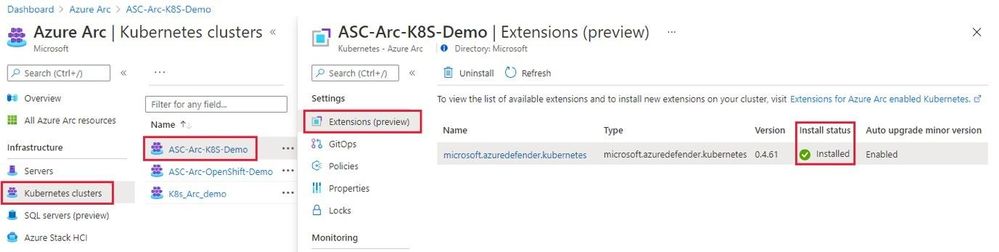
Cluster extensions introduces an Azure Resource Manager driven approach for deployment and lifecycle management of Azure Monitor and Azure Defender for Kubernetes. As each cluster extension gets its own Azure Resource Manager representation, you’ll now be able to leverage Azure Policy for at-scale deployment of these extensions across all your CAPZ clusters as well.
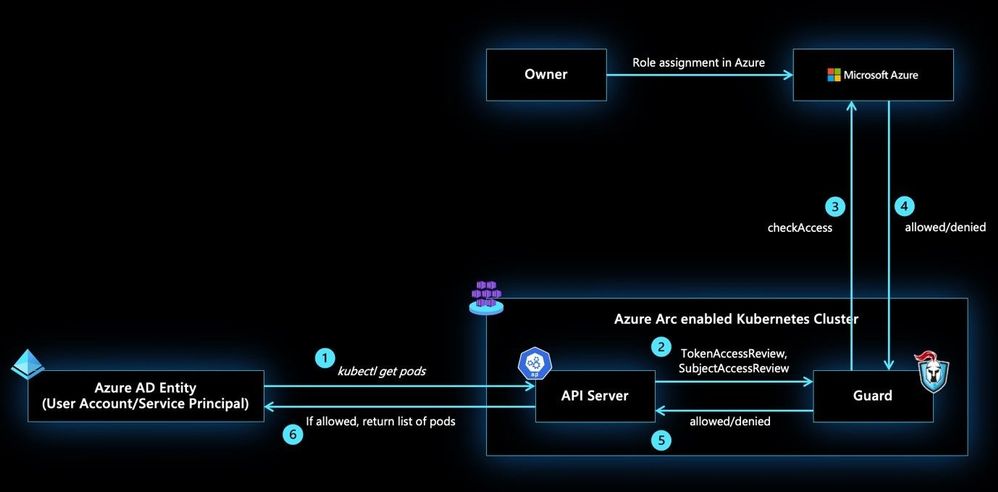
allows you to control authorization checks happening on your CAPZ clusters using role assignments on the Azure Arc enabled Kubernetes resource. These role assignments can be done at the cluster scope or namespace scope to account for multi-tenant scenarios on the same cluster. In addition to the built-in roles defined as part of this feature, custom roles could be authored and consumed in role assignments to control the permissions on Kubernetes resources at a more granular level.
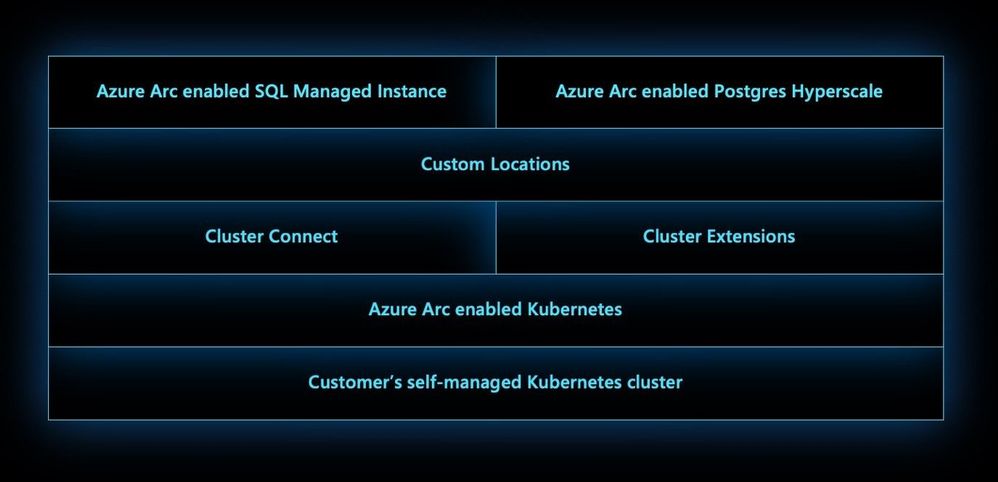
Custom locations on top of Azure Arc enabled Kubernetes is envisioned to be an evolution of the Azure location construct. It provides a way for tenant administrators to utilize their Azure Arc enabled Kubernetes clusters as target locations to deploy instances of Azure services. Examples of such Azure resources are Azure Arc enabled SQL Managed Instance and Azure Arc enabled PostgreSQL Hyperscale. Like Azure locations, end users within the tenant who have access to Custom Locations can deploy these Azure PaaS resources on their self-managed Kubernetes clusters where they have complete control on the specification of the CAPZ cluster.
Learn more about Cluster API + CAPZ
Join the Cluster API community
Learn more about Azure Arc enabled Kubernetes:
by Contributed | Apr 6, 2021 | Technology
This article is contributed. See the original author and article here.
Extending Azure Arc enabled Kubernetes
The Azure Arc team is excited to bring a new set of capabilities to preview! In the new Azure Arc enabled Kubernetes 1.1 release customers may now turn on additional Azure integrated services for your Azure Arc enabled clusters using the Azure Portal, CLI or REST APIs. These new extension APIs give customers a unified way to turn on additional cluster services and the Azure Arc platform takes care of installing and updating those integrations over time.
Extensions greatly simplify onboarding; customers can deploy Azure integrations with just a few clicks or API calls. Azure Arc enabled Kubernetes ensures that you always have the latest bits and can automatically apply updates as they become available.
We are excited to bring two services to preview using extensions, Azure Monitor Container Insights and Azure Defender for Kubernetes:
Azure Defender for Kubernetes is expanding its threat protection capabilities to defend Azure Arc connected clusters, leveraging the new extensions capabilities.
When Kubernetes clusters are connected to Azure Arc, a new recommendation from Azure Security Center offers to deploy the Azure Defender extension to them with only a few clicks.
This integration between Azure Security Center, Azure Defender and Azure Arc enabled Kubernetes brings:
- Easy provisioning of the Azure Defender extension to unprotected Azure Arc enabled Kubernetes clusters (manually and at-scale)
- Monitoring the Azure Defender extension and its provisioning state on Azure Arc Portal
- Security recommendations from Azure Security Center are reported in a new Security page of the Azure Arc Portal
- Identified security threats from Azure Defender for Kubernetes are reported in new Security page of the Azure Arc Portal
- Azure Arc enabled Kubernetes clusters are integrated into the Azure Security Center platform and experience
Learn more in: Defend Azure Arc enabled Kubernetes clusters
Azure Monitor Container Insights monitors the performance of container workloads deployed to any Azure Arc enabled Kubernetes cluster. Container insights provides performance visibility and log aggregation for Kubernetes controllers, nodes, and containers using standard Kubernetes APIs. Which helps customers:
- Identify performance issues through processor and memory utilization
- Review historical resource utilization for your workloads, including processes that may be running on underlying hosts
- Configure alerts to proactively notify when a threshold is exceeded or a health state changes
- Collect metrics from Prometheus endpoints, easily integrating with ecosystem applications
This preview release streamlines onboarding any Azure Arc enabled Kubernetes cluster using the new Azure CLI or portal experiences and allows automatic agent updates for all the latest container insights releases.
Learn more and enable Azure Monitor Container insights
Connecting to your Azure Arc enabled clusters
We are also excited to announce cluster connect in preview which allows developers or cluster administrators to securely access their clusters using standard Kubernetes tooling. Users who have access to your Azure Arc enabled Kubernetes cluster in Azure may request a secure connection to the cluster with authentication provided by Azure Active Directory and authorization for Kubernetes resources within the cluster provided by Kubernetes-native RBAC.
Cluster connect provides secure and seamless connectivity, no matter where your clusters are running and is great for interactive development and debugging in addition to integration into just about any system that speaks Kubernetes APIs.
Learn more about cluster connect concepts
Custom Locations
We are also bringing custom locations to public preview, which is a building block for Azure Arc enabled services. Cluster administrators can create a custom location, enable Azure services for that location, and grant access to users within their tenant. We’ll have much more to talk about with custom locations in upcoming blogs.
Learn more about custom locations in our concepts docs
Azure AD-based Role Based Access Control
Finally, we are also excited to extend both authentication and authorization for Kubernetes clusters to Azure Active Directory. This is great for customers who would like to use Azure role assignments to not only manage visibility of Azure Arc enabled Kubernetes clusters but also use role assignments to control access to Kubernetes-native constructs.
Learn more about our Azure RBAC integration in our concepts docs
Get started today
Azure Arc enabled Kubernetes clusters that have updated to the latest 1.1 agent can start using these features today. Otherwise, grab the latest CLI and connect your first cluster today.


Recent Comments