This article is contributed. See the original author and article here.
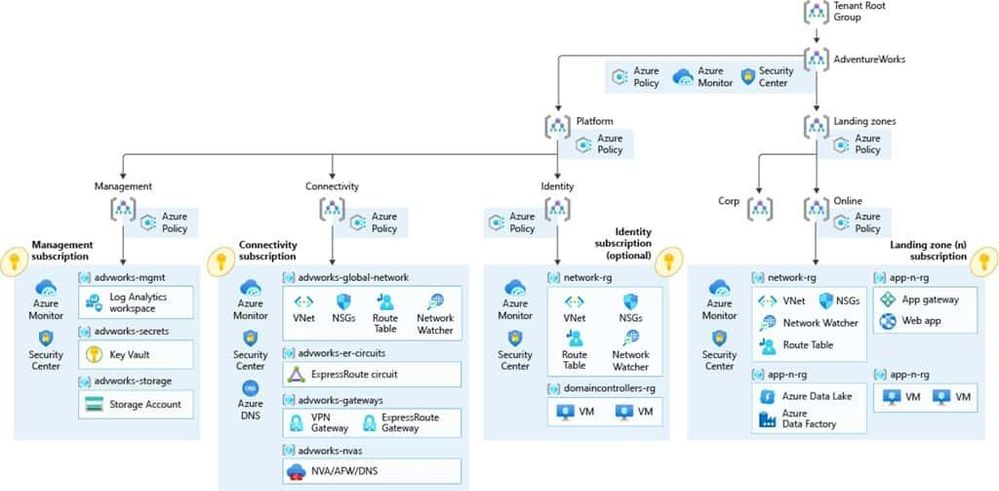
If you are starting with your cloud journey, there are many things you need to think of to set up your cloud environment and your Azure cloud architecture . Things like networking, subscription management, security, governance, and many more, can be fairly complex. That is where the Cloud Adoption Framework for Azure can deliver proven guidance to help you with your Azure cloud journey. And with Enterprise-scale landing zones, you even get an architectural approach and a reference implementation that enables effective construction and operationalization of landing zones on Azure, at scale. I had the chance to collaborate with Sarah Lean (Azure Cloud Advocate) on an enterprise-scale series of blog posts to show how our fictional company Tailwind Traders can leverage the Cloud Adoption Framework and Azure Landing Zones to accelerate their cloud journey.
You can find our Enterprise-Scale landing zones blog series on the Azure.com blog:
Microsoft Azure Cloud Adoption Framework Enterprise-Scale
The Microsoft Cloud Adoption Framework for Azure is proven guidance that’s designed to help you create and implement the business and technology strategies necessary for your organization to succeed in the cloud. It provides best practices, documentation, and tools that cloud architects, IT professionals, and business decision makers need to successfully achieve short-term and long-term objectives. By using the Microsoft Cloud Adoption Framework for Azure best practices, organizations can better align their business and technical strategies to ensure success.
Next to our Enterprise-Scale landing zones blog series, we will also host a livestream on April 7.
We will be exploring Tailwind Traders and their cloud adoption journey using enterprise-scale architecture in future blog posts. However, if you’d like to learn more about enterprise-scale landing zones then please join Sarah Lean and Thomas Maurer on the 7th April at 8am PST/3pm GMT on LearnTV where we will be doing a Q&A and deployment of an Enterprise-Scale Landing Zone live!
This article is contributed. See the original author and article here.
Issue: Unable to configure and use On-Premise data gateway when user is having personal account (*.gmail.com/*.yahoo.com etc) or work/school account belongs to multiple tenants by design.
Workaround: We can follow the below steps to install, configure and create on-premise data gateway on on-premise as well as on Azure with below steps.
Creating user in Azure AD tenant:
Create new user in the destined Azure Active directory. You can refer this doc CreateNewUser .
Provide contributor access at subscription or Resource Group (where you want to create the Azure data gateway) level
Sign-out from the portal and sign-in with new user created above . It will ask you to change password, update the password and check if you are able to login to portal.
Install and Configure On-Premise data gateway on On-Premise machine:
Now, you can download and install the on-premise data gateway on your On-Premise machine. You can refer to the link for downloading and installing gateway logic-apps-gateway-install .
Once the gateway is successfully installed, it pops up for the sign-in to configure the gateway.
Use the new user created in the Azure Active directory to sign-in and configure gateway. Follow the steps mentioned n above link. install-data-gateway
Verify Gateway Cluster in Power Platform center:
You can verify whether the gateway clustered configured is available in the power platform portal (log in with new Azure AD user) Manage DataGateways.
You need to select region in which you configured gateway in portal, option is available on the top right side.
Creating On-Premise data gateway in Azure:
Sign-in to azure portal with new Azure AD user used to configure the data gateway on on-premise machine
Create new Azure On-Premise data gateway resource in respective resource group where user has access. you can follow this doc on how to create azure On-premise data gateway resource. Create-azure-gateway-resource
Note:
This can be an extra effort for managing the new user we created in Azure AD tenant.
This article is contributed. See the original author and article here.
The 10th cumulative update release for SQL Server 2019 RTM is now available for download at the Microsoft Downloads site. Please note that registration is no longer required to download Cumulative updates. To learn more about the release or servicing model, please visit:
Starting with SQL Server 2017, we adopted a new modern servicing model. Please refer to our blog for more details on Modern Servicing Model for SQL Server
This article is contributed. See the original author and article here.
About #EarthDay
Did you know that April 22 is Earth Day? In 2020, over 100 million people worldwide celebrated the 50th anniversary of Earth Day, driving awareness and actionable learning around environmental issues with activities focused on education, conservation, citizen science, cleanup and more.
In 2021, the #EarthDay theme is Restore Our Earth with a focus on five topics:
The Canopy Project – a conservation and restoration effort to plant trees and rehabilitate areas in need of reforestation.
Global Earth Challenge – a citizen science initiative to engage millions of people in collecting and understanding environmental data.
Sustainability is an area of significant importance to Microsoft and we wanted to do something to help create awareness and empower actionable learning around relevant topics for technologists.
Awareness: #GreenTech Advocacy
In a January 2020 announcement, Microsoft laid out ambitious company-level goals for sustainability including: being carbon negative by 2030, removing historical carbon emissions by 2050, and establishing a $1B climate innovation fund to invest in research in context. One year later, the Environmental Sustainability Report (read the three-part blog coverage) reviewed progress, focusing on four pillars:
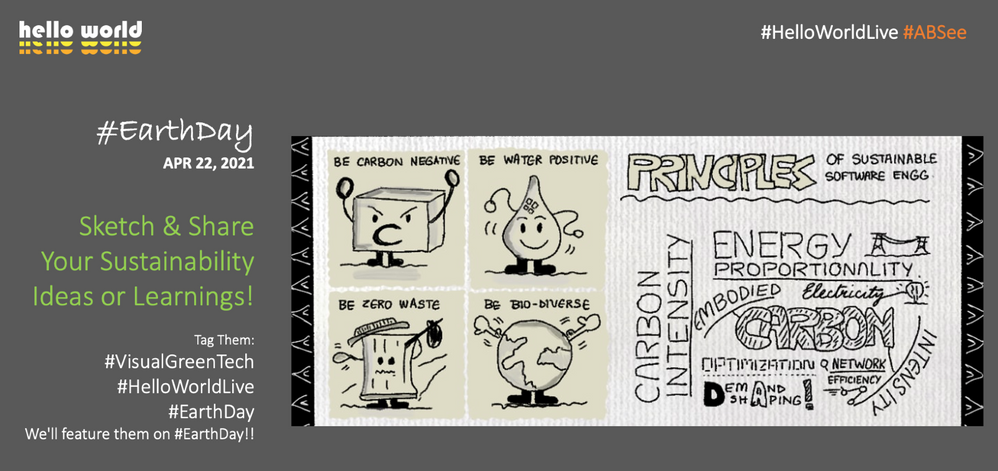
Be carbon negative – remove more carbon dioxide than we emit each year.
Be water positive – put more water back into the environment than we consume.
Be zero waste — encourage redesign of resource lifecycles to eliminate or reduce waste.
Support healthy ecosystems – collect and analyze data to understand ecosystems, stop decline.
This is progress at organization scale. But you might be asking yourself — “how can I educate myself on the issues and contribute to, or advocate for, sustainable living and engineering practices in my community and workplace?” We’re glad you asked!
Here are a few resources to get you started on your learning journey:
GreenTech blog – read articles on best practices and insights from experts and practitioners.
Awareness is great but actionable learning is better! So we came up with a fun challenge for April, just in time for #EarthDay!
Action: #VisualGreenTech Challenge
Here is how this works:
What we do: Share a learning prompt (pinned daily under @nitya) with a resource link to help you explore that topic.
What you do: Check out the resource and respond to the prompt using a visual (sketchnote or doodle) with insights.
Share the visual on Twitter and tag it #EarthDay #VisualGreenTech
We’ll collate all submissions and feature them in a segment on the #HelloWorldLive show on EarthDay (Apr 22)
Submit responses to as many prompts as you like, as many times as you want to. The goal is to create awareness around those topics and share our own learnings and perspectives in context. Want a sneak peek at the prompts in advance?check out the gallery here.
But wait. There’s one more thing!
Share a Sketch. Plant A Tree!
Along with featuring all submitted visual Earth Day images, we will also work with Ecosia to plant 1,000 trees in honor of all #VisualGreenTech challenge participants to help tackle climate change. Yes, that’s right! Let’s give back to the earth and learn more about sustainability in the process.
Have questions? Leave us a comment on this post!And let’s make a difference to this planet.
This article is contributed. See the original author and article here.
Azure Static Web Apps seamlessly integrates globally distributed hosting for your static content, serverless APIs powered by Azure Functions, as well as features like authentication, custom routing, and route-based authorization.
With the new Static Web Apps CLI, you can now run your entire full-stack web app locally in your development environment and access many of the platform’s capabilities without deploying your app. The CLI hosts your frontend and API on a single localhost endpoint and emulates authentication, custom routing, and authorization rules.
Static Web Apps CLI can serve static content from a folder. It also works great with local development servers from any frontend framework, including React, Angular, Next.js, and Blazor WebAssembly.
Getting started
Install the Static Web Apps CLI from npm:
npm install -g @azure/static-web-apps-cli
To serve static content from a folder, run:
swa start ./my-app
Your app is accessible at http://localhost:4280. If you have any custom route logic or settings configured in a staticwebapp.config.json file, it’ll apply them automatically.
Run and test your full-stack app
Use a framework dev server
Most frontend frameworks provide a local dev server that allows you to iterate on your app quickly using features such as hot module reloading. Static Web Apps CLI can proxy traffic to a dev server that’s already running.
How you start your app’s dev server depends on your framework. Here are some examples:
# Create React App
npm start
# Next.js
npm run dev
# Blazor WebAssembly
dotnet watch run
Then, in a separate terminal, start the CLI and provide your framework dev server’s local address:
swa start http://localhost:3000
Requests to http://localhost:4280 are proxied to your dev server. Using that endpoint, you can test out how your app interacts with Static Web Apps features like authentication and API functions.
Simulate authentication
Azure Static Web Apps provides integrated authentication using providers such as GitHub, Twitter, and Azure Active Directory. The Static Web Apps CLI simulates the same authentication flow so you can test your authentication/authorization logic locally.
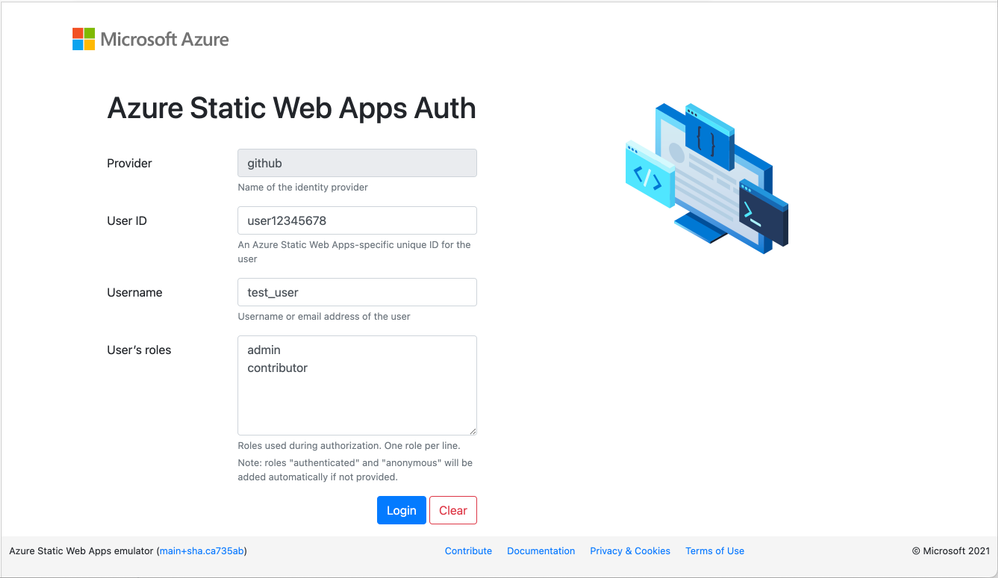
When your app requests a Static Web Apps authentication login URI, such as /.auth/login/github, the CLI displays a page that allows you to log in as any identity by specifying their information. This works with all supported identity providers without any additional configuration.
Static Web Apps CLI local authentication page
You can use this to easily test your app using different identities and roles. The /.auth/me endpoint returns information about the current user, and API function calls include a claims principal header—they work just like they do when your app is deployed to Azure! Learn more about how to access user information from our documentation.
Run API functions
If your app has an Azure Functions API, you can include its location when you start the Static Web Apps CLI:
swa start http://localhost:5000 –api ./api
Behind the scenes, as the CLI launches, it also starts the API app using the Azure Functions Core Tools. You can access your API functions at http://localhost:4280/api/*. Because the frontend app and serverless functions are served from the same origin, you don’t have to worry about CORS (cross-origin resource sharing) when you call your APIs.
What’s next?
Static Web Apps CLI is currently in preview. We’re only getting started and have lots more planned!
Together with the Azure Static Web Apps VS Code extension, the CLI will play an important role in our local development experience. We plan on offering an integrated debugging experience in VS Code that lets you start your entire stack and attach debuggers to both your frontend and backend apps.
While we are initially focusing on running apps locally, we plan on expanding the CLI with more commands such as creating Static Web Apps projects.



Recent Comments