Design a Azure IoT Indoor Air Quality monitoring platform from scratch

Design a Azure IoT Indoor Air Quality monitoring platform from scratch

This article is contributed. See the original author and article here.

This article is the first part of a series which explores an end-to-end pipeline to deploy an Air Quality Monitoring application using off-the-market sensors, Azure IoT Ecosystem and Python. We will begin by looking into what is the problem, some terminology, prerequisites, reference architecture, and an implementation. 


Indoor Air Quality – why does it matter and how to measure it with IoT?


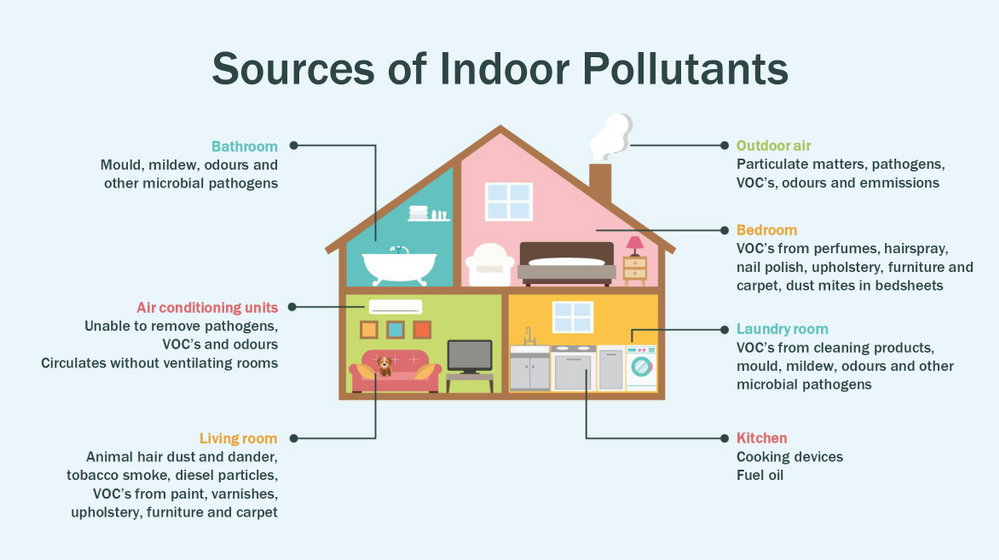
Most people think of air pollution as an outdoor problem, but indoor air quality has a major impact on health and well-being since the average American spends about 90 percent of their time indoors. Proper ventilation is one of the most important considerations for maintaining good indoor air quality. Poor indoor air quality is known to be harmful to vulnerable groups such as the elderly, children or those suffering chronic respiratory and/or cardiovascular diseases. Here is a quick visual on some sources of indoor air pollution.


KaushikRoy_0-1626298945190.png


Post Covid-19, we are in a world where awareness of our indoor environments is key for survival. Here in Canada we are quite aware of the situation, which is why we have a set of guidlines from the Government of Canada, and a recent white paper from Public Health Ontario. The American Medical Association has put up this excellent document for reference. So now that we know what the problem is, how do we go about solving it? To solve something we must be able to measure it and currently we have some popular metrics to measure air quality, viz. IAQ and VOC.


So what are IAQ and VOC exactly?

Indoor air quality (IAQ) is the air quality within and around buildings and structures. IAQ is known to affect the health, comfort, and well-being of building occupants. IAQ can be affected by gases (including carbon monoxide, radon, volatile organic compounds), particulates, microbial contaminants (mold, bacteria), or any mass or energy stressor that can induce adverse health conditions. IAQ is part of indoor environmental quality (IEQ), which includes IAQ as well as other physical and psychological aspects of life indoors (e.g., lighting, visual quality, acoustics, and thermal comfort). In the last few years IAQ has received increasing attention from environmental governance authorities and IAQ-related standards are getting stricter. Here is a IAQ blog infographic if you’d like to read.


Volatile organic compounds (VOC) are organic chemicals that have a high vapour pressure at room temperature. High vapor pressure correlates with a low boiling point, which relates to the number of the sample’s molecules in the surrounding air, a trait known as volatility. VOC’s are responsible for the odor of scents and perfumes as well as pollutants. VOCs play an important role in communication between animals and plants, e.g. attractants for pollinators, protection from predation, and even inter-plant interactions. Some VOCs are dangerous to human health or cause harm to the environment. Anthropogenic VOCs are regulated by law, especially indoors, where concentrations are the highest. Most VOCs are not acutely toxic, but may have long-term chronic health effects. Refer to this and this for vivid details.


The point is, in a post pandemic world, having a centralized air quality monitoring system is an absolute necessity. The need for collecting this data and using the insights from it is crucial to living better. And this is where Azure IoT comes in. In this series we are going to explore how to create the moving parts of this platform with ‘minimum effort‘. In this first part, we are goiing to concentrate our efforts on the overall architecture, hardware/software requirements, and IoT edge module creation. 


Prerequisites


To accomplish our goal we will ideally need to meet a few basic criteria. Here is a short list.


  1. Air Quality Sensor (link)

  2. IoT Edge device (link)

  3. Active Azure subscription (link)

  4. Development machine

  5. Working knowledge of Python, Sql, Docker, Json, IoT Edge runtime, VSCode

  6. Perseverance


Lets go into a bit of details about the aforementioned points since there are many possibilities. 


Air Quality Sensor


This is the sensor that emits the actual IAQ/VOC+ data. Now, there are a lot of options in this category, and technically they should be producing the same results. However, the best sensors in the market are Micro-Electro-Mechanical Systems (MEMS). MEMS technology uses semiconductor fabrication processes to produce miniaturized mechanical and electro-mechanical elements that range in size from less than one micrometer to several millimeters. MEMS devices can vary from relatively simple structures with no moving elements, to complex electromechanical systems with multiple moving elements. My choice was uThing::VOC™ Air-Quality USB sensor dongle. This is mainly to ensure high quality output and ease of interfacing, which is USB out of the box, and does not require any installation. Have a look at the list of features available on this dongle. The main component is a Bosch proprietary algorithm and the BME680 sensor that does all the hard work. Its basically plug-and-play.  The data is emitted in Json format and is available at an interval of 3 milliseconds on the serial port of your device. In my case it was /dev/ttyACM0, but could be different in yours.
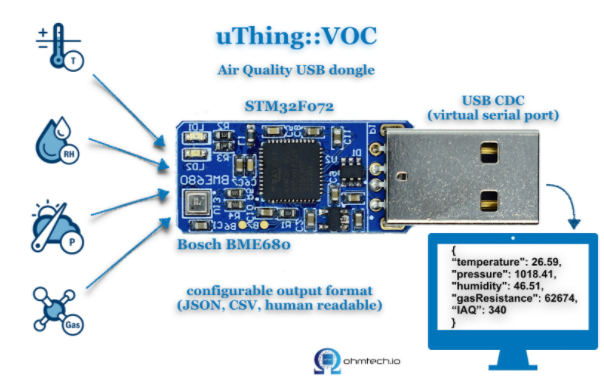

KaushikRoy_0-1626350059920.png


IoT Edge device


This is the edge system. where the sensor is plugged in. Typical choices are windows or linux. If you are doing windows, be aware some of these steps may be different and you have to figure those out. However, in my case I am using ubuntu 20.04 installed on an Intel NUC. The reason I chose the NUC is because many IoT modules require an x86_64 machine, which is not available in ARM devices (Jetson, Rasp Pi, etc.) Technically this should work on ANY edge device with a usb port, but for example windows has an issue mounting serial ports onto containers. I suggest better stick with linux unless its a client requirement.
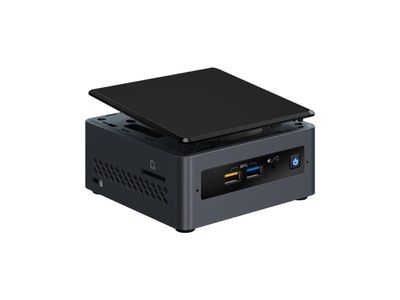


KaushikRoy_0-1626351757966.jpeg


Active Azure subscription


Surely, you will need this one, but as we know Azure has this immense suit of products, and while ideally we want to have everything, it may not be practically feasible. For practical purposes you might have to ask for access to particular services, meaning you have to know ahead exactly which ones you want to use. Of course the list of required services will vary between use cases, so we will begin with just the bare minimum. We will need the following:


  • Azure IoT Hub (link)

  • Azure Container Registry (link)

  • Azure blob storage (link)

  • Azure Streaming Analytics (link)(future article)

  • Power BI / React App (link)(future article)

  • Azure Linux VM (link)(optional)


A few points before we move to the next prerequisite. For IoT hub you can use free tier for experiments, but I will recommend to use the standard tier instead. For ACR get the usual tier and generate username password. For storageaccount its the standard tier. The ASA and BI products will be used in the reference architecture, but is not discussed in this article. The final service Azure VM is an interesting one. Potentially all the codebase can be run using VM, but this is only good for simulations. However, note that it is an equally good idea to experiment with VMs first as they have great integration and ease the learning curve.


Development machine


The development machine can be literally anything from which you have ssh access to the edge device. From an OS perspective it can be windows, linux, raspbian, mac etc. Just remember two things – use a good IDE (a.k.a VSCode) and make sure docker can be run on it, optionally with priviliges. In my case I am using a Startech KVM, so I can shift between my windows machine and the actual edge device for development purposes, but it is not neccessary.


Working knowledge of Python, Sql, Docker, Json, IoT Edge runtime, VSCode


This is where it gets tricky. Having a mix of these knowledge is somewhat essential to creating and scaling this platform. However, I understand you may not be having proficiency in all of these. On that note, I can tell from experience that being from a data engineering background has been extremely beneficial for me. In any case, you will need some python skills, some sql, and Json. Even knowing how to use the VSCode IoT extension is non-trivial. One notable mention is that good docker knowledge is extrememly important, as the edge module is in fact simply a docker container thats deployed through the deployment manifest (IoT Edge runtime).


Perseverance


In an ideal world, you read a tutorial, implement, it works and you make merry. The real world unfortunately will bring challenges that you have not seen anywhere. Trust me on this, many times you will make good progress simply by not quitting what you are doing. Thats it. That is the secret ingredient. Its like applying gradient descent to your own brain model of a concept. Anytime any of this doesn’t work, simply have belief in Azure and yourself. You will always find a way. Okay enough of that. Lets get to business.


Reference Architecture


Here is a reference architecture that we can use to implement this platform. This is how I have done it. Please feel free to do your own.
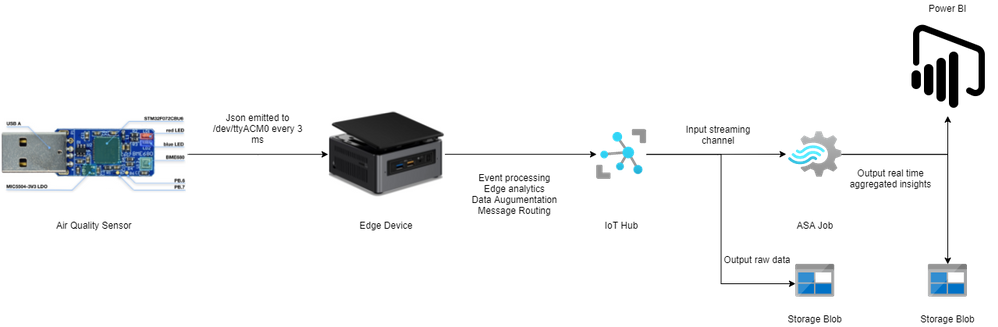


aqarch.png


Most of this is quite simple. Just go through the documentation for Azure and you should be fine. Following this we go to what everyone is waiting for – the implementation.


Implementation


In this section we will see how we can use these tools to our benefit. For the Azure resources I may not go through the entire creation or installation process as there are quite a few articles on the internet for doing those. I shall only mention the main things to look out for. Here is an outline of the steps involved in the implementation.


  1. Create a resource group in Azure (link)

  2. Create a IoT hub in Azure (link)

  3. Create a IoT Edge device in Azure (link)

  4. Install Ubuntu 18/20 on the edge device

  5. Plugin the usb sensor into the edge device and check blue light

  6. Install docker on the edge device 

  7. Install VSCode on development machine 

  8. Create conda/pip environment for development

  9. Check read the serial usb device to receive json every few milliseconds

  10. Install IoT Edge runtime on the edge device (link)

  11. Provision the device to Azure IoT using connection string (link)

  12. Check IoT edge Runtime is running good on the edge device and portal 

  13. Create an IoT Edge solution in VSCode (link)

  14. Add a python module to the deployment (link)

  15. Mount the serial port to the module in the deployment

  16. Add codebase to read data from mounted serial port

  17. Augument sensor data with business data

  18. Send output result as events to IoT hub

  19. Build and push the IoT Edge solution (link)

  20. Create deployment from template (link)

  21. Deploy the solution to the device 

  22. Monitor endpoint for consuming output data as events 


Okay I know that is a long list. But, you must have noticed some are very basic steps. I mentioned them so everyone has a starting reference point regarding the sequence of steps to be taken. You have high chance of success if you do it like this. Lets go into some details now. Its a mix of things so I will just put them as flowing text.


90% of what’s mentioned in the list above can be done following a combination of the documents in the official Azure IoT Edge documentation. I highly advise you to scour through these documents with eagle eyes multiple times. The main reason for this is that unlike other technologies where you can literally ‘stackoverflow’ your way through things, you will not have that luxury here. I have been following every commit in their git repo for years and can tell you the tools/documentation changes almost every single day. That means your wits and this document are pretty much all you have in your arsenal. The good news is Microsoft makes very good documentation and even though its impossible to cover everything, they make an attempt to do it from multiple perspectives and use cases. Special mention to the following articles.


Once you are familiar with the ‘build, ship, deploy’ mechanism using the copius SimulatedTemperatureSensor module examples from Azure Marketplace, you are ready to handle the real thing. The only real challenge you will have is at steps 9, 15, 16, 17, and 18. Lets see how we can make things easy there. For 9 I can simply do a cat command on the serial port.


cat /dev/ttyACM0


This gives me output every 3 ms. 


{"temperature": 23.34, "pressure": 1005.86, "humidity": 40.25, "gasResistance": 292401, "IAQ": 33.9, "iaqAccuracy": 1, "eqCO2": 515.62, "eqBreathVOC": 0.53}


This is exactly the data that the module will receive when the serial port is successfully mounted onto the module. 


"AirQualityModule": {
            "version": "1.0",
            "type": "docker",
            "status": "running",
            "restartPolicy": "always",
            "settings": {
              "image": "${MODULES.AirQualityModule}",
              "createOptions": {
                "Env": [
                  "IOTHUB_DEVICE_CONNECTION_STRING=$IOTHUB_IOTEDGE_CONNECTION_STRING"
                ],
                "HostConfig": {
                  "Dns": [
                    "1.1.1.1"
                  ],
                  "Devices": [
                    {
                      "PathOnHost": "/dev/ttyACM0",
                      "PathInContainer": "/dev/ttyACM0",
                      "CgroupPermissions": "rwm"
                    }
                  ]
                }
              }
            }
          }


Notice the Devices block in the above extract from the deployment manifest. Using these keys/values we are able to mount the serial port onto the custom module aptly named AirQualityModule. So we got 15 covered.


Adding codebase to the module is quite simple too. When the module is generated by VSCode it automatically gives you the docker file (Dockerfile.amd64) and a sample main code. We will just create a copy of that file in the same repo and call it say air_quality.py. Inside this new file we will hotwire the code to read the device output. However, before doing any modification in the code we must edit requirements.txt. Mine looks like this:


azure-iot-device
psutil
pyserial


azure-iot-device is for the edge sdk libraries, and pyserial is for reading serial port. The imports look like this:


import time, sys, json
# from influxdb import InfluxDBClient
import serial
import psutil
from datetime import datetime
from azure.iot.device import IoTHubModuleClient, Message


Quite self-explainatory. Notice the influx db import is commented, meaning you can send these reading there too through the module. To cover 16 we will need the final three peices of code. Here they are:


message = ""
#uart = serial.Serial('/dev/tty.usbmodem14101', 115200, timeout=11) # (MacOS)
uart = serial.Serial('/dev/ttyACM0', 115200, timeout=11) # Linux
uart.write(b'Jn')
message = uart.readline()
uart.flushInput()
if debug is True:
  print('message...')
  print(message)
data_dict = json.loads(message.decode())


There that’s it! With three peices of code you have taken the data emitted by the sensor, to your desired json format using python. 16 is covered. For 17 we will just update the dictionary with business data. In my case as follows. I am attaching a sensor name and  coordinates to find me :happyface:.


data_dict.update({'sensorId':'roomAQSensor'})
data_dict.update({'longitude':-79.025270})
data_dict.update({'latitude':43.857989})
data_dict.update({'cpuTemperature':psutil.sensors_temperatures().get('acpitz')[0][1]})
data_dict.update({'timeCreated':datetime.now().strftime("%Y-%m-%d %H:%M:%S")})


For 18 it is as simple as 


print('data dict...')
print(data_dict)
msg=Message(json.dumps(data_dict))
msg.content_encoding = "utf-8"
msg.content_type = "application/json"
module_client.send_message_to_output(msg, "airquality")


Before doing step 19, two things must happen. First, u need to replace the default main.py in the dockerfile and with air_quality.py. Second, you must use proper entries in .env file to generate deployment & deploy successfully. We can quickly check the docker image exists before actual deployment.


docker images
iotregistry.azurecr.io/airqualitymodule   0.0.1-amd64  030b11fce8af  4 days ago  129MB


Now you are good to deploy. Use this tutorial to help deploy successfully. At the end of step 22 this is what it looks like upon consuming the endpoint through VSCode.


[IoTHubMonitor] Created partition receiver [0] for consumerGroup [$Default]
[IoTHubMonitor] Created partition receiver [1] for consumerGroup [$Default]
[IoTHubMonitor] [2:33:28 PM] Message received from [azureiotedge/AirQualityModule]:
{
  "temperature": 28.87,
  "pressure": 1001.15,
  "humidity": 38.36,
  "gasResistance": 249952,
  "IAQ": 117.3,
  "iaqAccuracy": 1,
  "eqCO2": 661.26,
  "eqBreathVOC": 0.92,
  "sensorId": "roomAQSensor",
  "longitude": -79.02527,
  "latitude": 43.857989,
  "cpuTemperature": 27.8,
  "timeCreated": "2021-07-15 18:33:28"
}
[IoTHubMonitor] [2:33:31 PM] Message received from [azureiotedge/AirQualityModule]:
{
  "temperature": 28.88,
  "pressure": 1001.19,
  "humidity": 38.35,
  "gasResistance": 250141,
  "IAQ": 115.8,
  "iaqAccuracy": 1,
  "eqCO2": 658.74,
  "eqBreathVOC": 0.91,
  "sensorId": "roomAQSensor",
  "longitude": -79.02527,
  "latitude": 43.857989,
  "cpuTemperature": 27.8,
  "timeCreated": "2021-07-15 18:33:31"
}
[IoTHubMonitor] Stopping built-in event endpoint monitoring...
[IoTHubMonitor] Built-in event endpoint monitoring stopped.


Congratulations! You have successfully deployed the most vital step in creating a scalable air quality monitoring platform from scratch using Azure IoT.


Future Work


Keep an eye out for a follow up of this article where I shall be discussing how to continue the end-to-end pipeline and actually visualize it on Power BI.

Azure Marketplace new offers – Volume 153

Azure Marketplace new offers – Volume 153

This article is contributed. See the original author and article here.


We continue to expand the Azure Marketplace ecosystem. For this volume, 84 new offers successfully met the onboarding criteria and went live. See details of the new offers below:


Applications


Asset Performance Management.png

Asset Performance Management: By harnessing machine condition data (vibration, oil, thermography) and process operating data, Symphony Industrial AI provides accurate and predictive information on machine health and performance with a portfolio of integrated products.


AugmentedStore.png

AugmentedStore: Create an enhanced sales channel that helps customers understand more about your products in an interactive way. Support customers in their decision-making process with an at-home digital experience that improves your brand awareness and sales conversion rate.


Bedrock.png

Bedrock: Bedrock is a cloud-based enterprise artificial intelligence (AI) platform that helps you achieve a faster time to market for massive-scale AI engines. Inbuilt governance enables transparency and accountability of AI, the foundation for responsible AI deployments in enterprises.


BeyondMinds AI Platform.png

BeyondMinds AI Platform: BeyondMinds enterprise artificial intelligence (AI) platform delivers hyper-customized, production-ready AI systems that enable companies to overcome the massive failure rate in AI adoption and rapidly implement ROI-positive transformations.


BIA Employee.png

BIA Employee: Help employees manage their human resources activities anytime with this complete human capital management (HCM) platform. Enjoy powerful tools for reporting and data analysis with Microsoft Power BI and benefit from single sign-on with Microsoft 365 integration.


CENTERSIGHT scale - Your flexible IoT solution.png

CENTERSIGHT scale – Your flexible IoT solution: CENTERSIGHT scale enables fast implementation of initial Internet of Things (IoT) projects so you can immediately see a return on investment. It links Microsoft Azure services with ready-to-use IoT applications for solutions based on a flexible framework.


CGI Renewables Management System (RMS).png

CGI Renewables Management System (RMS): Need a real-time monitoring, control, and performance management solution for your power plants? RMS uses Microsoft Azure services like Azure IoT Hub and Azure Machine Learning to maximize availability, decrease energy losses, and boost your bottom line.


Cloud Native CMS & DXP for Joomla.png

Cloud Native CMS & DXP for Joomla: Build websites, portals, intranets, extranets, and more with this image from VMLAB. It contains all the components required to deploy and run the open-source content management system (CMS) Joomla! on Microsoft Azure.


Connected Drums.png

Connected Drums: This digital solution for cable drum management combines hardware, software, services, and engineering expertise to enable real-time pinpointing of drum location, allowing you to optimize drum management, logistics, and rotation cycle time while preventing loss and theft.


Content Collaboration Platform based on Seafile.png

Content Collaboration Platform based on Seafile: Sync, share, and collaborate across devices and teams with this image from VMLAB. It contains all the components required to run the open-source file sync and share solution Seafile on Microsoft Azure, designed for high reliability and performance.


Coroban.png

Coroban: Assess the risk of your medical patients falling by analyzing electronic records through the artificial intelligence Concept Insider, enabling uniform and objective judgments while reducing the burden on hospital or facility staff. This application is available only in Japanese.


Document Project CRM and Collaboration All in One.png

Document Project CRM and Collaboration All in One: VMLab offers this preconfigured image of ONLYOFFICE Groups for Microsoft Azure. ONLYOFFICE Groups is an open source collaborative system developed to manage documents, projects, customer relationships, and email correspondence, all in one place.


Enterprise AI Bots.png

Enterprise AI Bots: DBA LOUNGE’s Enterprise AI Bot on Microsoft Teams integrates with ERP and non-ERP business applications to create a conversational experience that interprets users’ intent, automating processes and delivering contextual responses to text commands.


Genpact Cora Finance Analytics.png

Genpact Cora Finance Analytics: Built on a robust and scalable data foundation layer, Cora Finance Analytics is Genpact’s comprehensive analytics solution that provides finance teams with strategic, operational, and tactical capabilities to help them make better, faster, and more insightful decisions.


Graphical and Creative Programming Platform.png

Graphical and Creative Programming Platform: VMLab provides this preconfigured image of Scratch GUI, which is a set of React components that compose the interface for creating and running Scratch 3.0 projects on Microsoft Azure.


HoloMuseum.png

HoloMuseum: HoloMuseum offers new ways to engage visitors during their remote or on-site museum tours. Visitors connect through Microsoft Teams or other collaborative platform and share the same point of view of the tour guide, who, thanks to Azure Spatial Anchors, can draw on several elements of each display.​


INFRABIRD.png

INFRABIRD: Nexans INFRABIRD helps telecom service providers prevent unauthorized access to their fiber-to-the-home street cabinets. The keyless access and Internet of Things supervision system can be deployed in just a few minutes to turn passive cabinets into smart, cloud-connected assets.


JARVIS Video Analytics - Automating Existing CCTVs.png

JARVIS Video Analytics – Automating Existing CCTVs: Joint AI Research for Video Instances and Streams (JARVIS) is an AI-powered video analytics platform that can be used on existing CCTV infrastructure to automate safety, security, and operational SOPs in real time.


Klaviyo Power BI Connector.png

Klaviyo Power BI Connector: Innovoco’s Klaviyo Power BI Connector enables users to gain access to hidden data from Klaviyo, integrate it into the business intelligence ecosystem, and visualize it using Microsoft Power BI. Bridge the gap between the data you need and the dashboards you use.

Market For Help.png

Market For Help: Available only in Italian, GeckoWay’s Market For Help is a cloud platform available to associations and public administration for managing the social service of giving assistance to disadvantaged people.


Metallic Backup for Microsoft Dynamics 365.png

Metallic Backup for Microsoft Dynamics 365: Metallic delivers enterprise-grade data backup and recovery with the simplicity of SaaS. With comprehensive coverage across production and sandbox environments, Metallic protects Microsoft Dynamics 365 data with ease – helping your business stay safe, compliant, and rapidly recoverable.


Metallic Database Backup.png

Metallic Database Backup: Metallic Database Backup offers a single solution to protect the structured data of database servers. The solution ensures backup as a service (BaaS) will enable customers to quickly and easily back up and recover database data from SQL Server, SAP HANA, and Oracle.


Metallic File & Object Backup.png

Metallic File & Object Backup: Metallic File & Object Backup offers a single solution to protect data stored on Windows, Linux, and Unix servers as well as in Microsoft Azure Blob Storage and Azure Files. Leverage cost-optimized protection for your unstructured data.


Metallic Salesforce Backup.png

Metallic Salesforce Backup: Metallic SaaS Backup delivers powerful, enterprise-grade data backup and recovery. With broad-ranging coverage across the Salesforce Cloud, Metallic safeguards valuable data from deletion, corruption, and ransomware attack. Keep your cloud data secure and recoverable.


Metallic VM & Kubernetes Backup.png

Metallic VM & Kubernetes Backup: Metallic VM & Kubernetes offers a single solution to protect workloads in hybrid virtual environments. Protect on-premises virtual machines running on Microsoft Hyper-V or VMware vSphere and cloud-native workloads running on a Microsoft Azure virtual machine.


MinIO Blob Storage Gateway (S3 API).png

MinIO Blob Storage Gateway (S3 API): MinIO Gateway provides an Amazon S3-compatible API for objects stored in Microsoft Azure Blob Storage. Enable applications to simultaneously use both the Azure Blob Storage API and the Amazon S3 API to access buckets and objects with the same credentials.


NousMigrator for Cognos to Power BI.png

NousMigrator for Cognos to Power BI: Migrate Cognos reports to Microsoft Power BI faster with reduced risks and complexities using NousMigrator. NousMigrator partially automates report migration, reducing both the risk of human error when migrating and the time to market per report.


Open Source Cloud Native CRM for SuiteCRM.png

Open Source Cloud Native CRM for SuiteCRM: VMLab provides this preconfigured image of SuiteCRM with PHP runtime on Microsoft Azure. SuiteCRM delivers workflow, reporting, portal, quotes, invoices, accounts, contacts, and much more with a responsive mobile theme and Microsoft Outlook and Thunderbird integration.


Open Source Online Office Suite.png

Open Source Online Office Suite: VMLab provides this preconfigured image of ONLYOFFICE Docs Community on Microsoft Azure. ONLYOFFICE Docs Community is a powerful online editor for text documents, spreadsheets, and presentations. Supported formats include docx, xlsx, pptx, odt, ods, odp, pdf, rtf, html, and more.


Open Source Wiki and Knowledge Base Software.png

Open Source Wiki and Knowledge Base Software: VMLab provides this preconfigured image of MediaWiki on Microsoft Azure. MediaWiki is an open-source wiki package written in PHP, originally for use on Wikipedia. It is used by several other projects of the nonprofit Wikimedia Foundation and by many other wikis.


OpenText EnCase Information Assurance.png

OpenText EnCase Information Assurance: EnCase Information Assurance (formerly EnCase eDiscovery) is a data risk management solution designed to help corporations and government agencies locate sensitive or regulated information quickly across the entire IT infrastructure.


PostgreSQL Server.png

PostgreSQL Server: Cloud Infrastructure Services provides this preconfigured image of PostgreSQL Server and pgAdmin on Ubuntu Server 20.04. PostgreSQL is an enterprise-class, open source relational database system that supports both SQL (relational) and JSON (non-relational) querying.


PostgreSQL Server with pgAdmin.png

PostgreSQL Server with pgAdmin: Cloud Infrastructure Services provides this preconfigured image of PostgreSQL Server and pgAdmin on CentOS Server 8.3. PostgreSQL is an enterprise-class, open source relational database system that supports both SQL (relational) and JSON (non-relational) querying.


Process Performance Optimization.png

Process Performance Optimization: Symphony Industrial AI’s Performance 360 channels the power of rapidly evolving IIOT, artificial intelligence, and big data technologies to optimize the performance of process units and plants, increasing reliability and availability, minimizing costs, and reducing operational risks.


Rapid7 VM Scan Engine.png

Rapid7 VM Scan Engine: Rapid7’s vulnerability management solutions, Nexpose and InsightVM, reduces your organization’s risk by dynamically collecting and analyzing risk across vulnerabilities, configurations, and controls from the endpoint to the cloud.


Recorded Future for Azure Sentinel.png

Recorded Future for Azure Sentinel: Recorded Future reduces security risk by automatically positioning threat intelligence data in your Microsoft Azure environment. Data is delivered to Azure Sentinel to provide context and empower analysts to identify and triage alerts faster, proactively block threats, and more.


Refactr Runner.png

Refactr Runner: Refactr helps you jump-start your journey to IT-as-code by introducing the latest automation techniques in DevSecOps. With minimal setup, DevSecOps teams can create repeatable, software-defined, and secure automation pipelines that are executed with a few clicks or through automation triggers.


RemoteSelling.png

RemoteSelling: RemoteSelling offers new ways to engage customers during remote or on-site shopping. Visitors connect through Microsoft Teams or other collaborative platform and share the same point of view of the sales representative, who, thanks to Azure Spatial Anchors, can draw on several elements of each product.


Route Guard _ IP Hijack Detection & Prevention.png

Route Guard | IP Hijack Detection & Prevention: Developed based on 15 years of academic research, Route Guard from BGProtect is a comprehensive IP hijack detection and prevention solution that provides IP hijack detection regardless of the hijack technology.


Scappman.png

Scappman: Scappman enables you to easily install and update applications on your Microsoft Intune-managed computers, offering an enterprise-grade software and patch management solution for small businesses that want to work securely and remain up to date.


SELMID.png

SELMID: SELMID, an IDaaS for B2C operators, is provided in Microsoft Azure Active Directory B2C to enable users to easily and flexibly implement SNS support of existing businesses, SNS cooperation, and identity verification for new services and businesses. This application is available only in Japanese.


Shobdo – Speech Keyword Spotting AI.png

Shobdo – Speech Keyword Spotting AI: Shobdo on Microsoft Azure is an AI-powered speech and keyword-spotting solution that provides brands with actionable insights by using machine learning models to recognize specific words and key phrases from audio recordings.


Shopify Power BI Connector.png

Shopify Power BI Connector: Innovoco’s Shopify Power BI Connector enables users to gain access to a wider range of fields and data from Shopify, integrate the data into the business intelligence ecosystem, and visualize it using Microsoft Power BI. Bridge the gap between the data you need and the dashboards you use.



Smaartpulse Ecommerce.png

Smaartpulse Ecommerce: Enixta Innovations’ Smaartpulse helps eliminate consumer confusion and shorten the purchase decision cycle time by generating actionable insights for products and helping consumers find the portions of product reviews they care about the most.


SquaredUp Dashboard Server.png

SquaredUp Dashboard Server: SquaredUp Dashboard Server lets you easily deliver real-time answers from any data source to anyone in your business. Connect to, surface, and dashboard any data to provide real-time insights so teams can optimize outcomes and identify issues fast.


Terragon CDP.png

Terragon CDP: The Terragon Customer Data Platform (CDP) is a marketing solution that aggregates and organizes customer data across a variety of touchpoints and data platforms to create persistent, unified records of all your customers, their attributes, and their interests.


VIVE Process Intelligence Platform.png

VIVE Process Intelligence Platform: VIVE’s Process Intelligence Platform is a cross-industry domain application addressing all the usual business processes, including supply chain and logistics, for retail, manufacturing, healthcare, finance, oil/gas/energy, smart cities, government, and more.


Write-Back Tool - Power BI.png

Write-Back Tool – Power BI: Innovoco’s Write-Back Tool allows Microsoft Power BI users to update source systems while staying within the context of the Power BI dashboard. The solution extends the BI functionality from traditionally being a read-only tool to a tool that allows users to create, edit, and delete data.


Consulting services


Azure Baseline Managed Services.png

Azure Baseline Managed Services: This managed service from Spikes enables an optimal Microsoft Azure environment with guaranteed 99.95% uptime. Spikes employs Recovery Services vaults to monitor, support, manage, and restore backups, and it uses Azure Site Recovery to ensure availability.


Azure Information Protection 3-Week Proof of Concept.png

Azure Information Protection: 3-Week Proof of Concept: This consulting offer from CS IT LLC pilots the use of the Microsoft Azure Information Protection data protection and encryption service, removing risks and concerns regarding its implementation. This offer is available only in Russian.


AKA Azure Cloud Adoption Assessment 4 Weeks.png

AKA: Azure Cloud Adoption Assessment: 4 Weeks: The experts at AKAVEIL will provide a clear plan on how to use Microsoft Azure to enable the digital transformation of your business. This consulting offer maps your current IT infrastructure, calculates total cost of ownership, and assesses cloud readiness.


App Modernization 10-Week Proof of Concept.png

App Modernization: 10-Week Proof of Concept: The experts at Canarys will work with your teams to plan, prioritize, and modernize or migrate your systems (identified apps) and deploy on Microsoft Azure App Service, Azure SQL, or to a container-based architecture using Azure Kubernetes Service.


Application Migration to the Cloud 4-Week Assessment.png

Application Migration to the Cloud: 4-Week Assessment: This consulting engagement with T-Systems is designed to help a customer plan and perform business-to-business infrastructure and application layer migrations to a Microsoft Azure environment. This offer is available only in Hungarian.


Application Modernization 2-Week Assessment.png

Application Modernization: 2-Week Assessment: This consulting engagement with Devoteam assists customers in identifying and prioritizing applications for modernization to Microsoft Azure. Customers are provided a cost estimate, reference architecture design, and modernization plan.


Azure AI ML Ideation 8-Hour Workshop.png

Azure AI/ML Ideation: 8-Hour Workshop: A Rackspace data scientist will show you the possibilities of Azure AI and Azure Machine Learning, then take you on a technical deep dive into machine learning products and the associated tools and services enabling AI/ML frameworks on Azure.


Azure Cognitive Services 8-Week Proof of Concept.png

Azure Cognitive Services 8-Week Proof of Concept: This consulting engagement with Persol uses Microsoft Azure Cognitive Search to support the evaluation of knowledge mining using your environment and text and image data. This service is available only in Japanese.


Azure Cost Optimization 4-Week Assessment.png

Azure Cost Optimization: 4-Week Assessment: Engineering experts from T-Systems will review your Microsoft Azure configuration and recommend optimizations that will result in predictable future costs to help you avoid overspending. This consulting service is available only in Hungarian.


Synapse Analytics Hands on Lab  1-Day Briefing.png

Azure Synapse Analytics Hands-on Lab: 1-Day Briefing: Datasolution’s consulting services for Microsoft Azure Synapse Analytics provide insights into the efficient utilization of IT resources through analytics and an overall understanding of data warehouse services. This offer is available only in Korean.


Windows Virtual Desktop 1-Day Implementation.png

Azure Virtual Desktop: 1-Day Implementation: Available only in German from SVA System Vertrieb Alexander, this offering is aimed at customers who need a 24×7 professionally managed Azure Virtual Desktop (formerly Windows Virtual Desktop) environment with an appropriate ITIL operating approach, high stability, and service management.


BaaS Backup as a Service.png

BaaS Backup as a Service: Quickly and easily protect your Microsoft 365 data with Zones Backup as a Service. This managed service offering on Microsoft Azure enables your organization to back up data and restore it directly with a call or email to a Zones data management expert.


Baseline Analytics Azure EDW Implementation.png

Baseline Analytics: Azure EDW Implementation: This consulting service combines an agile approach with Enfo Sweden’s 20 years of experience to kick-start your analytics and data platform project via a solid delivery methodology and a proven Microsoft Azure reference architecture.


Build Smart Data Platform Hybrid Cloud 5-Day Implementation.png

Build Smart Data Platform Hybrid Cloud: 5-Day Implementation: NTT Com will survey your network and server infrastructure, then help you design and implement the Microsoft Azure environment required to securely store your assets. This offer is available only in Japanese.


Cloud Adoption 4-Hour Workshop.png

Cloud Adoption 4-Hour Workshop: This CEO/CTO/CIO-level workshop from CLOUD SERVICES, based on the Microsoft Cloud Adoption Framework, can help organizations looking for best approaches in technical framework, organizational transformations, and staff competency readiness.


Cloud Advisory Services - 3-Week Assessment.png

Cloud Advisory Services – 3-Week Assessment: Coforge’s Cloud Advisory Services help enterprises identify the need for infrastructure and application modernization, identify drivers of modernization, and develop an overall IT transformation strategy for moving applications to Microsoft Azure.


Cloud Native 1-Day Online Workshop.png

Cloud Native 1-Day Online Workshop: Available from Cloud Services, this one-day workshop is designed to simplify and accelerate your journey toward modernizing your applications and building new ones using Microsoft Azure Kubernetes Service.


Data Mart-as-a-Service Analytics DevOps Implementation.png

Data Mart-as-a-Service: Analytics DevOps Implementation: Data Mart as a Service enables the full potential of a data-driven organization by providing a fully hosted Microsoft Azure Data Warehouse, Microsoft Power BI reports, and the ability to scale when needed.


Dedicated Internet Access 5-Week Implementation.png

Dedicated Internet Access: 5-Week Implementation: Lumen’s offering aims to improve connectivity to Microsoft public services such as Microsoft 365, Dynamics 365, Teams, and other SaaS products running on Microsoft Azure. Customer traffic takes the shortest path to the Microsoft network from the nearest edge.


DevOps Consulting 6-Week Implementation.png

DevOps Consulting: 6-Week Implementation: Canarys Automations offers GitHub and Microsoft Azure DevOps consulting services and implementation, providing expert assistance in the design and development of workflows for your organization’s code build and deployment.


DevOps Toolchain Consultation 3-Week Assessment.png

DevOps Toolchain Consultation: 3-Week Assessment: Available only in Hungarian, T-Systems’ DevOps Toolchain consulting service helps your company improve software development and testing and shorten deployment times. Spend less time integrating and more time delivering better quality software faster.


Digital Assistant for Knowledge Workers 3-Week Proof of Concept.png

Digital Assistant for Knowledge Workers: 3-Week Proof of Concept: Using its experience in Microsoft Azure services, business processes, and artificial intelligence, Spikes will demonstrate the value of a digital assistant in a proof of concept. Gain hands-on insight into the capabilities of Microsoft Azure Cognitive Services and tailor-made AI services.


Disaster Recovery - 4 Week Implementation.png

Disaster Recovery – 4 Week Implementation: Available only in Portuguese from DataEX, the Disaster Recovery Deployment Service maps key resources, determines which servers and services will be included in the disaster recovery plan, and then helps you create and implement it.


Finchloom Professional Services for Azure - 1-Hour Consultation.png

Finchloom Professional Services for Azure – 1-Hour Consultation: Finchloom’s free consultation will help you determine the scope and pricing for your deployment projects. Finchloom’s team will work with your organization’s IT department to identify how to transform your datacenters and develop hybrid cloud solutions or migrations to Microsoft Azure.


Netezza to Azure Synapse Analytics Migration - 2-Hour Workshop.png

IBM Netezza to Azure Synapse Analytics Migration – 2-Hour Workshop: In this free value discovery workshop, you will learn how you can reduce IBM Netezza to Microsoft Azure Synapse Analytics migration cost and timelines via a risk-mitigated approach using Hexaware’s AMAZE re-platforming solution.


Insurhub IFRS 17 Jumpstart 4-Week Assessment.png

Insurhub IFRS 17 Jumpstart: 4-Week Assessment: Built on Microsoft Azure, Insurhub allows insurers to leverage their existing finance, actuarial, policy, and other corporate systems to securely manage data, business rules, calculations, and processes required to meet IFRS 17 regulatory compliance.


IT Technical Support.png

IT Technical Support: Ideal for small and midsize legal entities, AJ Santos Comércio de Produtos de Informática e Serviços’ IT Technical Support services cover information security, cloud management, software installation, and more. This offer is available only in Portuguese.


MAaaS (Analytics Service) 8-Week Implementation.png

MAaaS (Analytics Service): 8-Week Implementation: Available only in Korean, MAaaS is a Managed Analytics as a Service that operates and manages AI predictive models in Microsoft Azure. From developing and applying initial predictive models to diagnosing performance to tuning models, Data Solutions offers analytics to fill your needs.


Migrate to Windows Virtual Desktop -2 Hour Workshop.png

Migrate to Azure Virtual Desktop – 2-Hour Workshop: Hexaware invites you to a free value discovery workshop for companies looking to migrate to Azure Virtual Desktop (formerly Windows Virtual Desktop) from Citrix or VMWare Horizon. Learn how you can realize centralized management, improved data security, simplified deployment, lower costs, and more.


Move to Cloud  5-Day Assessment.png

Move to Cloud: 5-Day Assessment: Orange Business Services will help you define the best migration strategy to Microsoft Azure to improve your organization’s agility, efficiency, and cost optimization in line with your existing IT environment.


NetApp Back Up Cloud  6-Day Implementation.png

NetApp Back Up Cloud: 6-Day Implementation: Available only in French, ALFUN’s six-week implementation includes the hybridization of your organization’s NetApp solutions with Microsoft Azure for your backup and migration requirements.


SAP on Azure Migration 4-Week Assessment.png

SAP on Azure Migration: 4-Week Assessment: Learn about the requirements for migrating on-premises SAP systems to Microsoft Azure. T-Systems Hungary will map the parameters, interfaces, and dependencies of the source systems, then create target environments that are infrastructurally identical to the source environment.


Secure Landing Zone - 5-Week Implementation.png

Secure Landing Zone – 5-Week Implementation: Coforge Limited’s Secure Landing Zone offering brings a unique mix of Microsoft Azure best practice and Coforge’s deep technical expertise from managing cloud estates to help your organization start with a secure cloud foundation.


Teradata to Azure Synapse Analytics Migration - 2-Hour Workshop.png

Teradata to Azure Synapse Analytics Migration – 2-Hour Workshop: In this free value discovery workshop, you will learn how you can reduce Teradata to Microsoft Azure Synapse Analytics migration cost and timelines via a risk-mitigated approach using Hexaware’s AMAZE re-platforming solution.


VDI-Persona Investigation 4-Week Assessment.png

VDI-Persona Investigation: 4-Week Assessment: Orange Business Services’ consultants will work with you to determine which devices are used in your organization along with your application and data requirements, then create a design-led approach for the deployment of an Azure Virtual Desktop (formerly Windows Virtual Desktop) environment.


Workload Migration to Azure 10-Week Implementation.png

Workload Migration to Azure: 10-Week Implementation: The Applied Information Sciences Workload Migration to Azure offering aims to help organizations move on-premises workloads to the Microsoft Azure commercial cloud. The offering targets Microsoft Windows and Linux server workloads running on physical servers or virtualized on VMWare or Microsoft Hyper-V.


Enabling hybrid work with Microsoft 365 and collaborative apps

Enabling hybrid work with Microsoft 365 and collaborative apps

This article is contributed. See the original author and article here.

The world around us has dramatically changed. Hybrid, global work requires structural changes to how we build and interact with applications. We need a new class of apps that are centered around enabling synchronous and asynchronous modes of collaboration with real-time meetings, ad-hoc messaging, document collaboration, and business processes automation. Microsoft Teams, together with the…

The post Enabling hybrid work with Microsoft 365 and collaborative apps appeared first on Microsoft 365 Blog.

Brought to you by Dr. Ware, Microsoft Office 365 Silver Partner, Charleston SC.

Building the next smart city with Azure Percept

Building the next smart city with Azure Percept

This article is contributed. See the original author and article here.

Picture0.jpg


Cities range from the large to the small, the old to the new, and the well-known to the hardly-ever-heard-of, but the one thing they have in common is an appetite to meet the needs of their population. Smart cities are hubs of cutting-edge technology that help make municipalities work better for everyone, from giving residents better lives to enabling thriving businesses.


Smart cities are reshaping global economics, the relationship of people to their physical spaces, and the needs for new talent, skills, and attitudes to embrace the future. By leveraging cloud and edge computing powered by 5G (and LPWA, or Low Power Wireless Access), cities have new opportunities to engage residents, increase safety, and promote efficient operations at low-cost. The use of this advanced technology, including the intelligent edge, artificial intelligence (AI) and 5G, will truly transform how we live, work, and develop new applications and solutions through collaborations across government and industries.


Proximus + Microsoft deliver on Kortrijk’s vision as a smart city 


Picture1.jpg


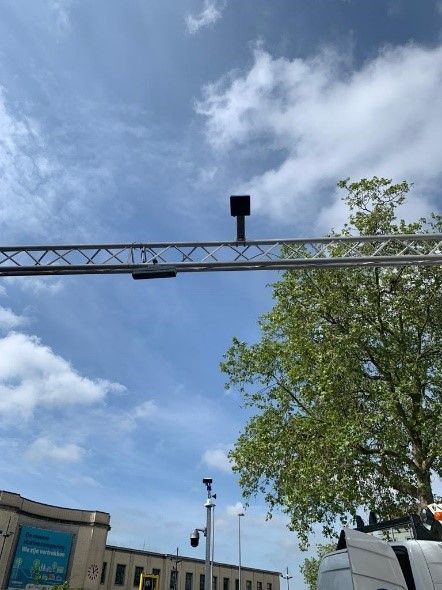
Kortrijk is a smart city in Belgium that used technology to access pedestrian count to promote safety during the COVID-19 pandemic. For a city, knowing the number of people on the streets in relation to a venues’ capacity is an important element to consider when looking for innovative ways to make the municipalities safer.  Beyond the pandemic, though, learning how people move in a particular area can have a great impact on a city’s activities, so having the right tools to access this data can lead to smoother operations and better engagement.


Using edge AI and IoT technology to quickly solve for city challenges


Kortrijk originally relied on webcam barometric pressure readings to gather pedestrian counts, but after several tests, it became clear that live counts were not accurate, prompting city officials to look for alternative solutions. After exploring the market for a suitable solution, Proximus, one of the largest mobile telecommunications companies in Belgium, turned to Azure Percept to propose new alternatives to Kortrijk.


Azure Percept is a comprehensive end-to-end edge AI platform with pre-built models and solution management, as well as Zero Trust security measures, to safeguard models and data. It offers the capabilities to start a proof of concept in minutes with hardware accelerators designed to integrate seamlessly with Azure AI and Azure IoT services.


With this, Microsoft partnered with Proximus, which is the leading telecom provider in Belgium, to develop an innovative, proof of concept solution that leverages Proximus’s cellular network to address the live-count limitations the city had encountered with previous technologies. The strategy was to set-up a test system which included:


  • Video analysis for pedestrian count

  • Video analysis with 3D cameras

  • Point cloud analysis relying on millimeter wave radars

  • Sound analysis based on sound sensors powered by AI


Sensors were placed in key locations and tests , which did not require an initial investment from the city, were conducted in late May.  By leveraging Azure Cognitive Services and ML, Proximus was able to deliver vision and audio insights in real time. The results served to decide which model was best suited for the city by estimating the ideal technology and placement options to obtain optimal pedestrian counts—becoming one of the first operators in Europe to directly integrate Microsoft edge capabilities into the heart of its network.


Intelligent edge for smart cities


Picture2.jpg


Innovation does not come without challenges though. With new applications, services, and workloads, smart cities need solutions and architecture built to support their demands. Enter the intelligent edge, a continually expanding set of connected systems and devices that gather and analyze data. Users get real-time insights and experiences, delivered by highly responsive and contextually aware apps, and when combined with the limitless computing power of the cloud, the possibilities for innovation are endless. 


Bringing enterprise applications closer to data sources, such as IoT devices or local edge servers, results in faster insights, improved response times, and better bandwidth availability. Cloud flexibility and scalability allows for easy integration and deployment, and with low maintenance costs, processes can be managed centrally while still allowing deployment of software depending on the user’s needs—resulting in accelerated value, reduced operating costs, and increased efficiency. With this, smart cities can invent and innovate to meet the demands of the future. 


The 5G power wave—fueling edge computing 


The importance of 5G and LPWA stems from its potential to accelerate value and improve efficiency as it provides a new set of latencies and features that did not exist in the 4G environment and previous generations. This is particularly relevant in smart cities where the convergence of industry, public service, and other enterprises requires high density, speed and bandwidth and low power networks that—when paired with technology—opens a new world of possibilities.


For Kortrijk and other cities, this powerful combination offers accurate insights as well as fast and cost-efficient solutions to address their particular needs. The data gathered through computer vision—which detects objects and movement in real-time—is robust and configurable to support different scenarios, allowing city officials to evaluate their options and make decisions that lead to optimal solutions.


Full throttle toward 5G and smart cities


Picture3.jpg


Thanks to advanced technology like the intelligent edge, AI, and 5G, we have the power to make smart cities a reality more easily. More and more cities around the world are welcoming this approach and solutions are being created and deployed to address the most pressing concerns that decision makers face every day. 


Azure Percept, along with the entire portfolio of Azure services for smart cities, is designed to speed the development and deployment of secure and comprehensive edge AI solutions from partners like Proximus that can leverage a range of edge endpoints – cameras, gateways, environmental sensors, all leveraging telecom infrastructure including 5G and LPWA.


Ultimately, the goal is to create fully integrated smart processes that use data, technology and creativity to shape how people and goods move—making smart cities not only innovative but also safer and more reliable to support economic growth and meet the challenges of the future. 


Learn more about Azure Percept.


Windows 365, your Cloud PC | What it is, how it works, and how to set it up

Windows 365, your Cloud PC | What it is, how it works, and how to set it up

This article is contributed. See the original author and article here.

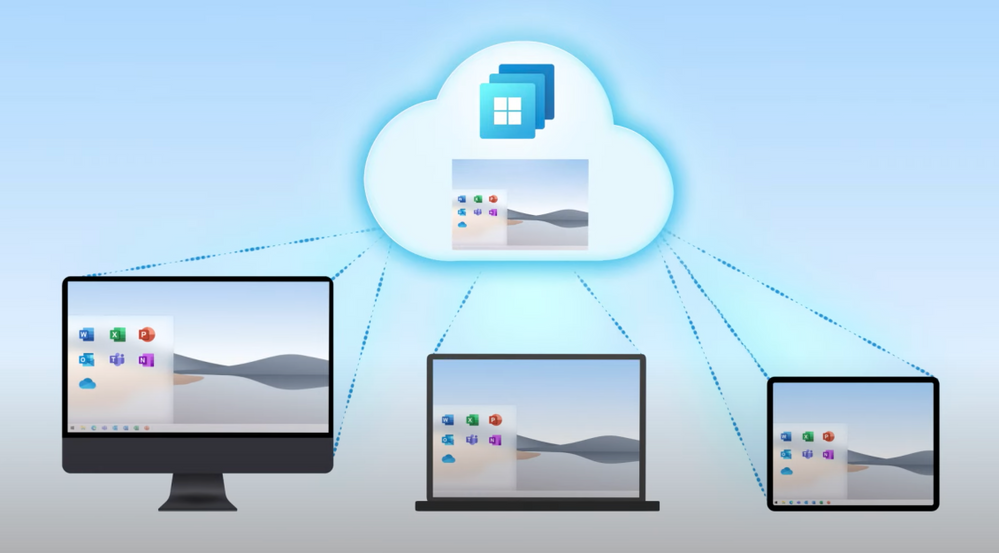
Windows 365 is your PC in the cloud. Securely stream your personalized Windows experience, including your desktop, apps, settings, and content, at any time to any device. For IT, see how easy it is, as a fully-managed service, to assign and configure Cloud PCs using familiar tools like Microsoft Endpoint Manager. 


Screen Shot 2021-07-14 at 12.34.22 PM.png


Given the need to work remotely and securely, there has been a huge demand for cloud based solutions in the past year. Windows 365 modernizes the way Windows experiences are delivered for anyone on any device. It’s a premium experience for both end users and IT. It’s easy to use, and just as easy for IT to manage using familiar tools and processes. Scott Manchester, Partner Director of PM for Windows 365, joins Jeremy Chapman to show how it works and how to set it up. 


QUICK LINKS: 


01:08 — User experience 


05:39 — Admin experience: Deployment 


09:01 — Monitor health and performance 


11:16 — Security and compliance 


13:11 — Wrap up


Link References: 


Get started at https://www.microsoft.com/Windows365 


Find the latest info on the Trust Center at https://www.microsoft.com/trust 


Unfamiliar with Microsoft Mechanics? 


We are Microsoft’s official video series for IT. You can watch and share valuable content and demos of current and upcoming tech from the people who build it at Microsoft. 


Keep getting this insider knowledge, join us on social: 


Video Transcript:


– Hello and welcome to Microsoft Mechanics. Coming up, I’m joined by Scott Manchester to take a first look at Windows 365, your PC in the cloud that lets you securely stream your personalized Windows experience, including your desktop, your apps, your settings and your content, at any time to all your devices. And for IT, we’re gonna show you how as a fully managed service, just how easy it is to assign and configure Cloud PCs using familiar tools like Microsoft Endpoint Manager. Alright, so Scott, we’ve had you on the show now quite a few times over the past few years but, now you’re back with a special announcement.


– Yeah Jeremy, it’s been a while. Well, I sure am excited to have Windows 365 finally announced today, and I can’t wait to show it in more detail.


– That’s right, and you know given the need to work remotely and securely over the past year, we’ve seen this huge demand for cloud-based solutions. So what’s the significance now that we’re doing here with Windows 365?


– So with Windows 365, we are modernizing the way that Windows experiences are delivered for anyone on practically any device. Now it’s a premium experience for both users and IT. It’s easy to use and just as easy for IT to manage. And this, as you mentioned, is a whole new category of computing we call Cloud PC. Now that said, the best way for me to explain this is really to show it to you. So for example here, I have my personal laptop and my iPad, which is a typical combination for many travelers. So I’ll use the browser first on my Windows laptop and go to windows365.microsoft.com. Now I can see my Cloud PC along with its specs. Now it actually has a higher spec than the laptop I’m connecting from. Now there are also a few other things you can do from this portal, but I’ll show you that in a sec. First, let me launch right into my desktop. So here you can see my personal desktop, it still has my apps, even the ones I was using from the last time I was here and my custom desktop background. Everything my IT department has installed for me is in the Start menu, like Office and Teams, so I’m immediately ready to work. Now, I’ll open another app, in this case Excel and here I’ll open this periodic table and let’s change nickel into gold. All right, we’ll come back to that later. Also, everything you connect to is super fast, whether you’re downloading, streaming or uploading content from your Cloud PC. Just to put this into context, the average wireless connection speed in the US is around 27 megabits per second. Which is more than enough for a full-fidelity experience to access and use Windows 365, but once I’m in my Cloud PC things get way faster. I’ve got a speed test running here and in my case you can see here I’ve got a crazy fast five millisecond ping time, and my download is almost peaking at 10 gigabits per second. And look at that upload speed, it’s almost coming up to four gigabits per second.


– And I’ve gotta say, those are pretty amazing speeds and it really shows you that the device that you’re connecting to your Cloud PC with doesn’t need to have a fast connection, and it also means that your Cloud PC’s connection is never gonna be the bottleneck when it comes to using online services, accessing things via the browser or uploading or downloading content.


– That’s right, basically if you can stream a movie, you have enough bandwidth for a great experience. Now I’ll close this browser window here on my laptop and I’ll pick up exactly where I left off on my iPad. Now I’m on my iPad, I’m in the Safari browser. And I could launch here from the browser but also we have native apps for IOS, Android, Mac and Windows, with Linux on the way. So I’ll switch over to the native IOS app connected to my Cloud PC and you’ll see it opens exactly how I left it in Windows. Now here you can see my speed test results are still there, and in Excel, nickel is still gold. Now in my case, I went straight from my Windows PC to my iPad but I could have logged out on Friday in the US on my laptop, and resumed on Monday in France from my iPad, and the experience would have been exactly the same.


– Right, and to be clear, just like you have your own physical PC, this is your own persistent Windows PC in the cloud, so it’ll be the same one today or a year from now, as long as it’s still active.


– Absolutely, and this really opens up new possibilities to securely connect to a persistent and always ready Windows environment with your personalized desktops, apps, files and even your settings, all delivered from the Microsoft cloud.


– Okay, so if this is running in the cloud, can you still get to things that are in your local office’s network, like shared files or folders, internet apps, you know, where you might have to otherwise drive into the office or connect via VPN?


– Yeah, you can. We designed Windows 365 from the ground up to fit the hybrid work experience we’ve all been living. Now ordinarily, connecting directly to your work network with a personal device can introduce risk. And because your Cloud PCs can always be connected to your work network, you don’t need to worry about local or VPN access from a personally owned device. With Windows 365, your Cloud PC experience is effectively the same as if you were in the office. So this is great for anyone, whether you’re a front line worker in a high security environment or an everyday or advanced user working from home or the corporate office, your favorite spot like a cafe or even on the go. It doesn’t matter where you’re working from, you still have a secure and premium experience.


– Okay, so we’ve seen now what your personalized Cloud PC looks like but let’s say it’s my first day on the job and you’ve given me a Cloud PC then what does that experience look like?


– So let me switch back over to that end-user portal and show you the guided experience. Now when a user launches the portal for the first time, they get a welcome and brief tour of the portal, what to expect and how to manage their Cloud PC. So let’s take a look once I’m logged in. So here again, you can see your Cloud PC specs and again I can open directly from the browser, but I can also manage a few settings here. I can restart, rename and also troubleshoot any issues I might encounter. Coming soon, admins will optionally be able to set additional optional settings like reset and resize, so you can do those actions right from here as well.


– Okay, and speaking of our IT admins, who are probably watching right now, what else have you done to make their lives easier?


– Well, for IT this has huge benefits from the management perspective, because you don’t need to worry about the infrastructure to set up and manage this type of experience. You don’t have to learn new management tools and paradigms. We’ve built Windows 365 to be consistent with how you manage your physical devices now, using Microsoft Endpoint Manager or MEM. In fact, I’m in the All Devices list in MEM now, and you can see your physical and Cloud PCs appear side-by-side. Now in my case, I just happen to have a lot of Cloud PCs running. And I can manage apps and policies from here like any other windows device.


– Okay, so it’s a familiar and consistent management experience, just like managing all your other windows PCs but can you walk us through the steps it would take to deploy a Cloud PC?


– Sure. There are really just two requirements for a user to be assigned a Cloud PC. First, they need a license and second, they need to be part of an AAD Group that’s assigned to a provisioning policy. Let me walk you through that. So you start here in the Microsoft 365 Admin Center, and assign licenses just like you would from any other Microsoft 365 service. And this step could be done by your licensing admin. Now I’ll click into Active Users and assign one to our new intern, Adele Vance. Now I’ll go ahead and give her a Cloud PC, in this case let’s do four cores and 16 gigs of RAM. And while I’m here, I’ll also set her up with Microsoft 365. Now I have a group for our interns already assigned to provisioning policy, so for her account, I can just add Adele to this group. So you can see she’s already in two default groups but now I’ll assign a new membership and search for West US, and there’s our intern group. And once I add her, that will kick off the Cloud PC provisioning and will be ready to use shortly. One of the great things about Windows 365 is that it is offered at a fixed price per user per month, like any other Microsoft 365 subscription. So you don’t need to agonize over things like tracking, utilization or keeping idle resources running when people aren’t using them.


– Got it. So it’s more or less the same user licensing experience that you’d be used to for Microsoft 365 but what did you have to do to get that group assignment then to kick off the provisioning process?


– So let me show you how we set this up. First in MEM, you can see I have 26 machines provisioned and three network connections in three different regions. Now in our case, we have set up Adele to access her Cloud PC using the West US standard network connection. In our provisioning policies, I’ll click into the one I assigned to this group, and you can see under image, we are using our Curated Windows 10 20H2 build from the gallery. But also we could have uploaded and selected our own custom image. Adele is assigned to the West US interns provisioning policy that contains all of these settings, including the network connection. Now you see the policy name in this case, as a best practice, matches our group name. And in assignments, you’ll see the AAD Group of West US Interns we added Adele to earlier.


– Can you have more than one group then assigned to a provisioning policy?


– Yeah, you can add multiple AAD groups to a provisioning policy. Now if I go back to the Windows 365 tab, we should see all our existing provisioned Cloud PCs and a new Cloud PC being provisioned for Adele. And she should have access to this Cloud PC in about 20 minutes.


– So can I localize then the connection to just the regions or specific networks where that group should probably have access then for the best experience?


– That’s right, you can create network connections in Azure regions that are closest to where your users are physically located for the best performance. Which is great too for multinational works.


– So once everything is up and running, what do we have then to monitor health and performance?


– I know that’s something that’s top-of-mind for a lot of people and this was a huge area of focus for us. So first let’s look at the network connections. We’ve built analytics into the service to look at health across your VNETs and domain connections as you can see here. To make sure Cloud PC’s users can reach everything they need to on your network to be productive. And once you’ve configured a network connection, our watchdog service continually runs diagnostics to ensure connections are up and running at all times. Now if a diagnostic check fails, we’ll alert you and even give you suggestions for how to correct the issue. Now we’ve also built rich out-of-the-box reporting and analytics for Cloud PCs. This enables admins to take actions to improve end-user performance and can reduce calls to your help desk. So here’s how this works. So I’ll go into the new remoting connection report, and this lists out key performance metrics for connecting to your Cloud PCs and the impact on the user’s experience. For example with Cloud PC sign-in time, we see the total time to connect to the Cloud PC. And round trip time KPI shows you the speed and reliability of network connections from the user locations. So next, if I click into the resource performance report, I can see whether my CPU and memory configurations are optimal across my Cloud PC users. And I can drill into device performance for even more details. Well, here I’ll select this Cloud PC, and I can see it shows a poor performance score of only 18. Now the ideal score should be somewhere around 50 or higher. So I can resolve this by adding more memory or CPU to this Cloud PC for the user.


– So are you able then to change the Cloud PC specs to match the demand on that device?


– Yes, you can. And you know, not all users will have the same needs and the user might even start out being fine with the basic level Cloud PC but then outgrow it. And this ability to upgrade is new with Cloud PC, to help you know when you might want to upgrade, we give you the right visibility and information before a user calls you for support. To resize this Cloud PC, I just need to click on the recommendation and select the right size for this Cloud PC and I’ll select resize. And I can change it to have more virtual cores, memory or storage. For example, I could choose an option here with let’s say eight cores and then resize. And once the change is made, the next time the user logs in, it will get this new spec.


– Nice, but I really wanna switch gears to security and compliance though. How do we make sure that our Cloud PCs meet our requirements?


– Well, like the rest of our Microsoft cloud services, we’ve made Windows 365 surface itself compliant in the region and industries we operate in. And you can find the latest info on the trust center at microsoft.com/trust. From a security perspective, of course the primary benefit is that, your Cloud PC is abstracted from the device you’re using to access it. So as an admin you have full control over the data in the Cloud PC and can prevent people from copying data to their local PC. Now beyond that, Windows 365 follows the Zero Trust security model. For example, you can use multi-factor authentication to explicitly verify any login or access attempt to a Cloud PC. And you can pair this with conditional access policies to assess login risk instantly for each session. Now we’ve also designed the user and admin experiences around the principles of least privileged access. So for example, you can delegate specific functions like licensing, device management, and Cloud PC management using specific roles, so you don’t need to be a global admin. You can use the baselines from Microsoft Defender and Edge just like you would for your physical devices. And we’ve built a Windows 365-specific security baseline to help you get started quickly. And of course, Microsoft Defender for Endpoint also works seamlessly with your Cloud PC. Also, as you would expect, encryption is applied across the board for all data at rest and in transit.


– So this makes it a lot easier than to securely deliver Windows experiences to just about any device, and really anyone with a device management background can add Cloud PCs to their device landscape.


– Right, we took a ton of input from our early adopters, combined with our experiences from delivering other desktop services to make Windows 365 manageable for both small and large organizations. And you can use your familiar tools with rich controls. Now everything I’ve shown you today is part of our vision to transform the PC experience so that you can work remotely or in hybrid office environments securely and from any device.


– So the overall experience then is pretty game changing for both end-users and IT, so congrats to you and the team but how can the folks watching try out Windows 365 for themselves?


– Well, we’ll be launching Windows 365 in early August, so depending on when you’re watching this, it’s either super close or generally available already. Just go to microsoft.com/windows365 to get started.


– Awesome stuff. Thanks so much for joining us today Scott, and always great to have you on. So, to stay up to date with the latest news and see the tech in action, be sure to subscribe to Microsoft Mechanics and as always thanks so much for watching.