
by Contributed | Jul 14, 2021 | Business, Microsoft 365, Technology
This article is contributed. See the original author and article here.
Announcing new hybrid-work innovations to the Microsoft cloud—the cloud built for a new world of work.
The post From collaborative apps in Microsoft Teams to Cloud PC—here’s what’s new in Microsoft 365 at Inspire appeared first on Microsoft 365 Blog.
Brought to you by Dr. Ware, Microsoft Office 365 Silver Partner, Charleston SC.
by Contributed | Jul 14, 2021 | Business, Microsoft 365, Technology
This article is contributed. See the original author and article here.
As some regions begin to make their way out of the challenges and disruption of the past 18 months, we’re seeing a new world of work emerge. Organizations everywhere have transformed themselves through virtual processes and remote collaboration. And as people embrace hybrid work—with people returning to the office, continuing to work from home, or…
The post Introducing a new era of hybrid personal computing: the Windows 365 Cloud PC appeared first on Microsoft 365 Blog.
Brought to you by Dr. Ware, Microsoft Office 365 Silver Partner, Charleston SC.
by Contributed | Jul 13, 2021 | Technology
This article is contributed. See the original author and article here.
Overview
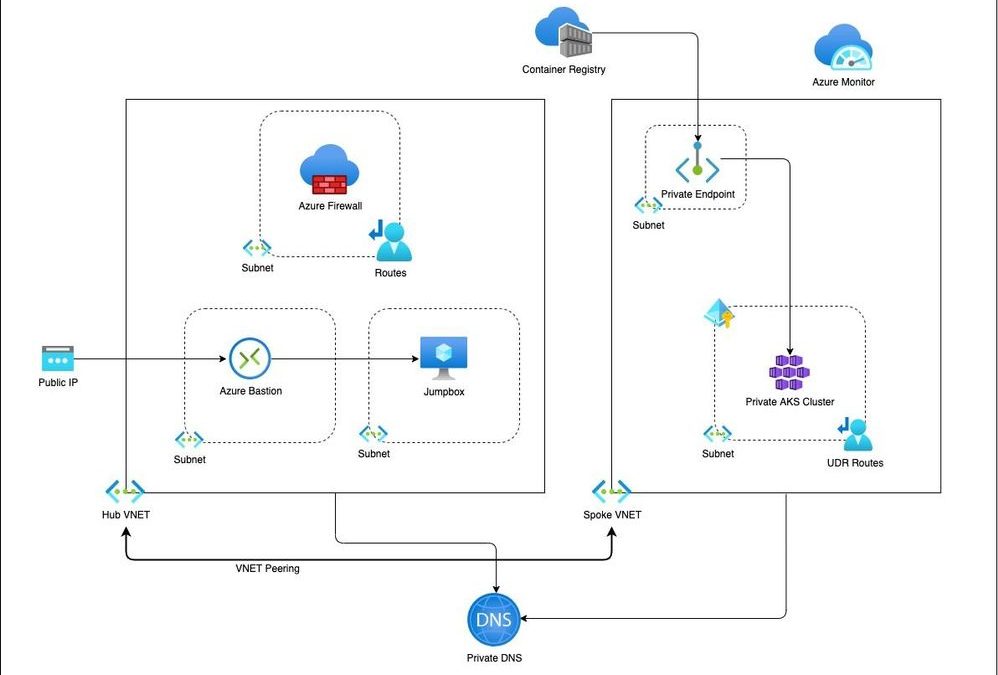
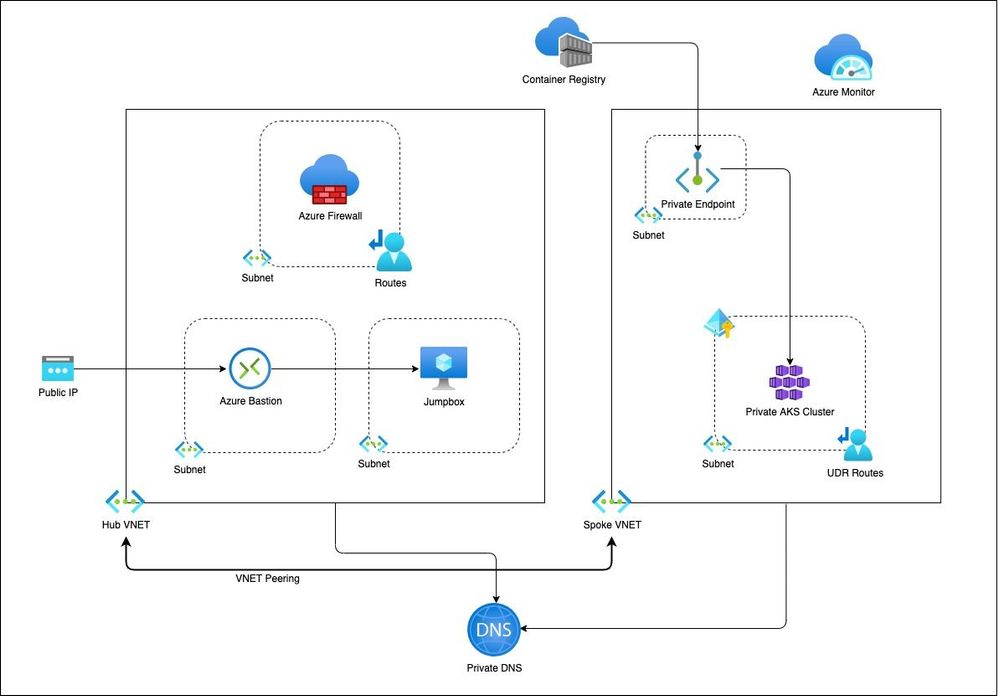
This is a blog on how to use a modular approach for Infrastructure as Code (IaC) in provisioning a private AKS cluster and other related resources. The Bicep modules in the repository are designed keeping the AKS baseline architecture in mind. You can start using these modules as is or modify to suit your own needs.
Architecture
Setup
The Bicep modules will provision the following Azure Resources under subscription scope:
- A Resource Group with Baseline variables
- Hub VNet with required subnets
- Azure Firewall Subnet
- Azure Bastion Subnet
- A jumpbox subnet
- Spoke VNET with AKS cluster subnet and additional subnet for other services like Azure Container Registry etc.
- Azure Firewall and required routes
- Azure Bastion resource and a jumpbox VM without public IP for securing traffic
- Azure Container Registry for storing images.
- A Private Endpoint for ACR
- Private DNS Zone
- AAD Enabled, Managed Private AKS Cluster with monitoring Addon and Azure Policy enabled
- Private AK Cluster need the UDR routes enabled via Firewall.
Resource Provisioning
Clone the repo
git clone https://github.com/ssarwa/bicep

cd bicep

# You could use deploy.azcli as your working file. Don’t run the script as is!
Login to Azure
az login
az account set -s <Subscription ID>
Initialize variables
# Change the variables as required (baseline and location) on deploy.azcli

# Deploy the bicep script

az deployment sub create -n $baseline‘Dep’ -l $location -f main.bicep
The deployment could take somewhere around 20 to 30 mins. Once provisioning is completed you can use the cluster for your needs.
Next Steps
- Enable GitOps using Flux operator for Application deployment
- Enable IaC using CI/CD pipelines on Github Actions
by Contributed | Jul 12, 2021 | Technology
This article is contributed. See the original author and article here.
At Microsoft, we believe your data should be controlled by you. We are transparent about why we collect your data and how we use it across all of our products and services.
Organizations are generating and sharing more personal data than ever before as their employees fluidly transition between work and personal devices and networks. At the same time, the number of data breaches is increasing exponentially. There were over 800 data breaches in the first half of 2021 – 76% of 2020’s total breaches[1]. To protect consumer data from being compromised by increasingly sophisticated breaches, legislatures across the globe are introducing new privacy regulations. A recent study predicted that by 2023, 65% of the world’s population will have its personal information covered under modern privacy regulations, up from 10% today[2]. Most organizations still use spreadsheets, emails, and in-person communication for data mapping, and struggle to identify and effectively manage personal data in their environments.
Microsoft wants to help you on your privacy journey. Starting this week, organizations can use privacy capabilities for Microsoft 365 in preview. These capabilities help organizations gain visibility into the private data in their environment, proactively identify and protect against privacy risks, and manage subject rights requests (commonly known as ‘data subject requests’) at scale. Additionally, to meet organizations where they are in their privacy journey, we are enabling integration with our privacy capabilities to help customers deliver a unified response to subject rights requests.
Get Started
You can access the privacy capabilities for Microsoft 365 from the Microsoft compliance center.
Learn More
Read this document to learn more about privacy capabilities for Microsoft 365.
[1] First half 2021 Data Breach Analysis, ITRC
[2] New Privacy laws outside Europe and California: A global cheat sheet, Gartner
by Contributed | Jul 10, 2021 | Technology
This article is contributed. See the original author and article here.
In July we love to celebrate a whole month of IoT, sharing blog posts, videos, lessons, labs and other content created by Microsoft folks and the community. You can read more about this fun month on the JulyOT blog post. We hope this will inspire you to learn about the Internet of Things, create your own projects and share them with us. We also hope this might give you inspiration for summer projects if you are in the northern hemisphere, capstone projects for you or your students, or ideas for fun lessons on IoT.
What happened last week
Last week we shared a load of great content on AI and IoT, running AI models on IoT devices or Edge devices. From a TinyML powered nose, to a Lego Boost self-driving car powered by Azure Percept, we had fun projects for everyone interested in IoT and AI.

What’s happening this week
This week for JulyOT we are focusing on beginners, makers, students and teachers with the release of the IoT for beginners curriculum, a 24 lesson curriculum designed for teachers to use during a 12 week semester, or for students to use for self-guided learning on your own or in study groups. You can read more on the announcement post, but this week we’re encouraging you to dive deep, learn new things, and share your learnings.
We’re also running some live streams to teach the IoT for beginners content, with live lessons and office hours where you can join to discuss what you just learned. Head to the Microsoft Reactor Hello IoT page and sign up.

What’s happening next?
We don’t want to give away our secrets, so you’ll have to keep checking the JulyOT blog post for more details. This is updated every Thursday with links to the content for the week.
Get involved
We want you to get involved in #JulyOT and share your creations! Share what you have done on social media such as Twitter, Instagram or LinkedIn and we’ll share it with the world.


Recent Comments