by Contributed | May 27, 2021 | Technology
This article is contributed. See the original author and article here.
The Hardware Lab Kit (HLK) for Windows Server 2022 hardware and software testing for Windows Hardware Compatibility Program (WHCP) is now available at the Partner Center for Windows Hardware, https://docs.microsoft.com/en-us/windows-hardware/test/hlk/.
The updated version of the Windows Hardware Lab Kit (HLK), along with updated playlist for testing Windows Server 2022 hardware, may be downloaded at that location. The Playlist may be updated in the future, so it is best to check for new versions regularly.
Vendors may download the Windows Server 2022 Eval version of the operating system for testing purposes here, https://www.microsoft.com/en-us/evalcenter/evaluate-windows-server-2022-preview
Vendors may also download the Virtual Hardware Lab Kit (VHLK) here, https://docs.microsoft.com/en-us/windows-hardware/test/hlk/.
The VHLK is a complete pre-configured HLK test server on a Virtual Hard Disk (VHD). The VHLK VHD can be deployed and booted as a Virtual Machine (VM) with no installation or configuration required.
As with previous releases of the HLK or VHLK, this version is intended for testing for Windows Server 2022. Earlier, or preview, versions of the OS and HLK cannot be used for testing Windows Server 2022. Previous versions of the HLK to be used for testing previous Windows Server versions remain available from the Hardware Dev Center.
Windows Server 2022 WHCP Playlist
For Windows Server 2022, the release playlist has been consolidated for both X64 and ARM64 architecture.
by Contributed | May 27, 2021 | Technology
This article is contributed. See the original author and article here.
Microsoft’s unified Data Loss Prevention solution provides a simple and unified approach to protecting sensitive information from risky or inappropriate sharing, transfer, or use.
Today we are pleased to announce the General Availability of the Microsoft Compliance Extension for Chrome, available from the Chrome web store here.
Many organizations use the Chrome browser to support sensitive workflows and with this extension, customers now have Microsoft DLP and Insider Risk Management capabilities within the Chrome browser of their onboarded endpoint devices, so they can:
- Use Chrome as an approved browser with DLP for working with sensitive data
- Create custom and fine-grained DLP policies for Chrome to ensure sensitive data is properly handled and protected from disclosure including:
- Audit mode: Records policy violation events without impacting end-user activity
- Block with Override mode: Records and blocks the activity, but allows the user to override when they have a legitimate business need
- Block mode: Records and blocks the activity without giving the user the ability to override
- Use DLP events from Microsoft Compliance Extension for Chrome to support Insider Risk Management assessments and investigations
- Deliver new insights related to the obfuscation, exfiltration, or infiltration of sensitive information by insiders. For more information on Insider Risk Management, check out the Tech Community blog.
With the Microsoft Compliance Extension for Chrome, users are automatically alerted when they take a risky action with sensitive data and are provided with actionable policy tips and guidance to remediate properly.
As with other Microsoft unified DLP capabilities, the Microsoft Compliance Extension for Chrome provides the same familiar look and feel that users are already accustomed to from the applications and services they use every day. This reduces end-user training time and alert confusion and increases user confidence in the prescribed guidance and remediation offered in the policy tips. This approach can help improve policy compliance – without impacting productivity.
The Microsoft Compliance Extension for Chrome Browser – Use Case Examples
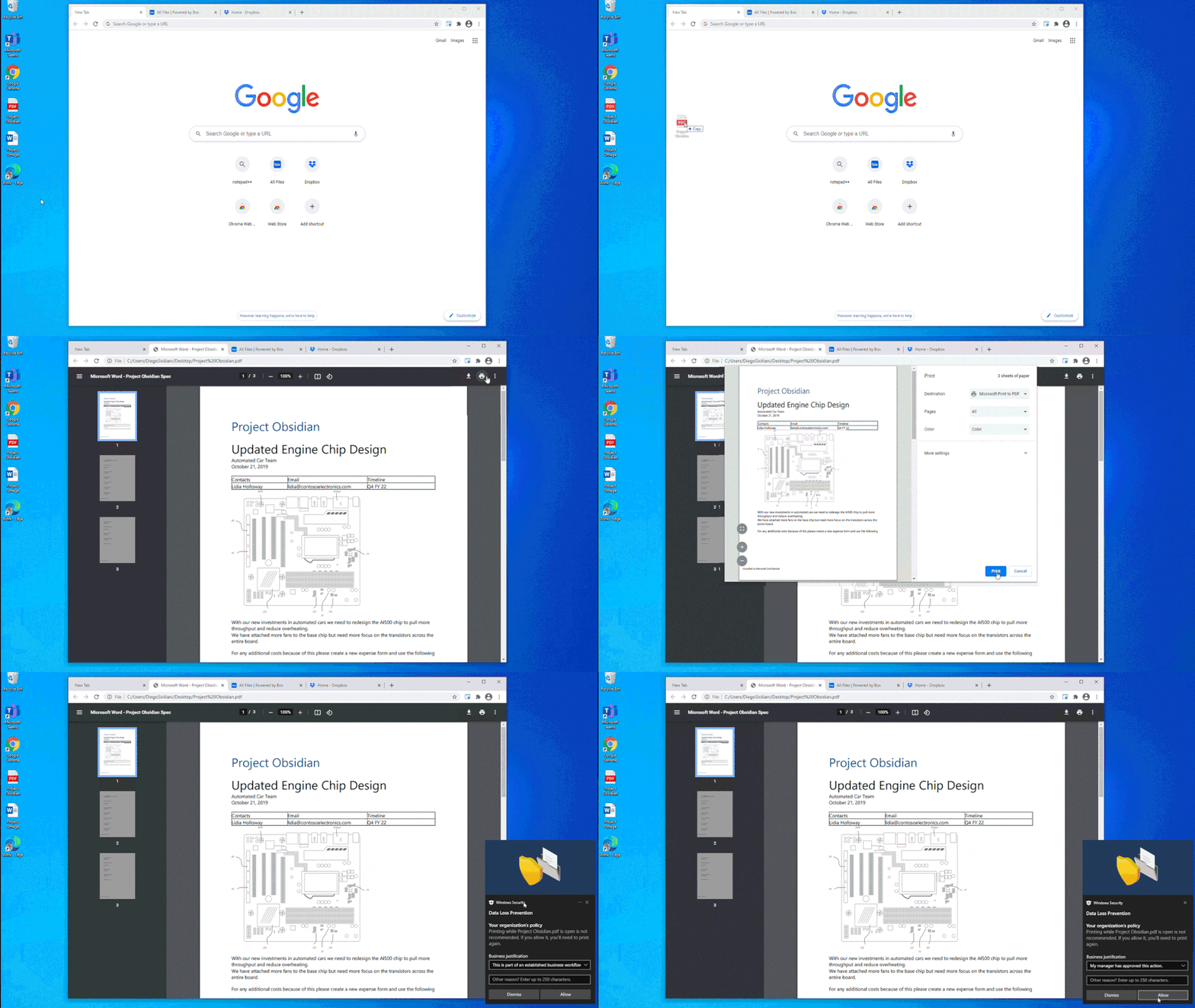
In Figure 1: Chrome DLP block with override for printing, we see how an organization can configure a DLP policy that allows the use of Chrome as an approved application to view sensitive data while protecting it from being printed. In this example, the policy was also configured to allow the information worker to override the policy when there is a justified business need. The business justification is logged as part of the DLP event in Compliance Center and can be reviewed at a later date to ensure compliance with approved business justifications.
Figure 1: Chrome DLP block with override for printing
In Figure 2: Chrome DLP allowing upload of a sensitive file to a sanctioned service domain, we see how a customer configured a DLP policy to allow an information worker using Chrome to upload a sensitive file to Box, an approved service domain
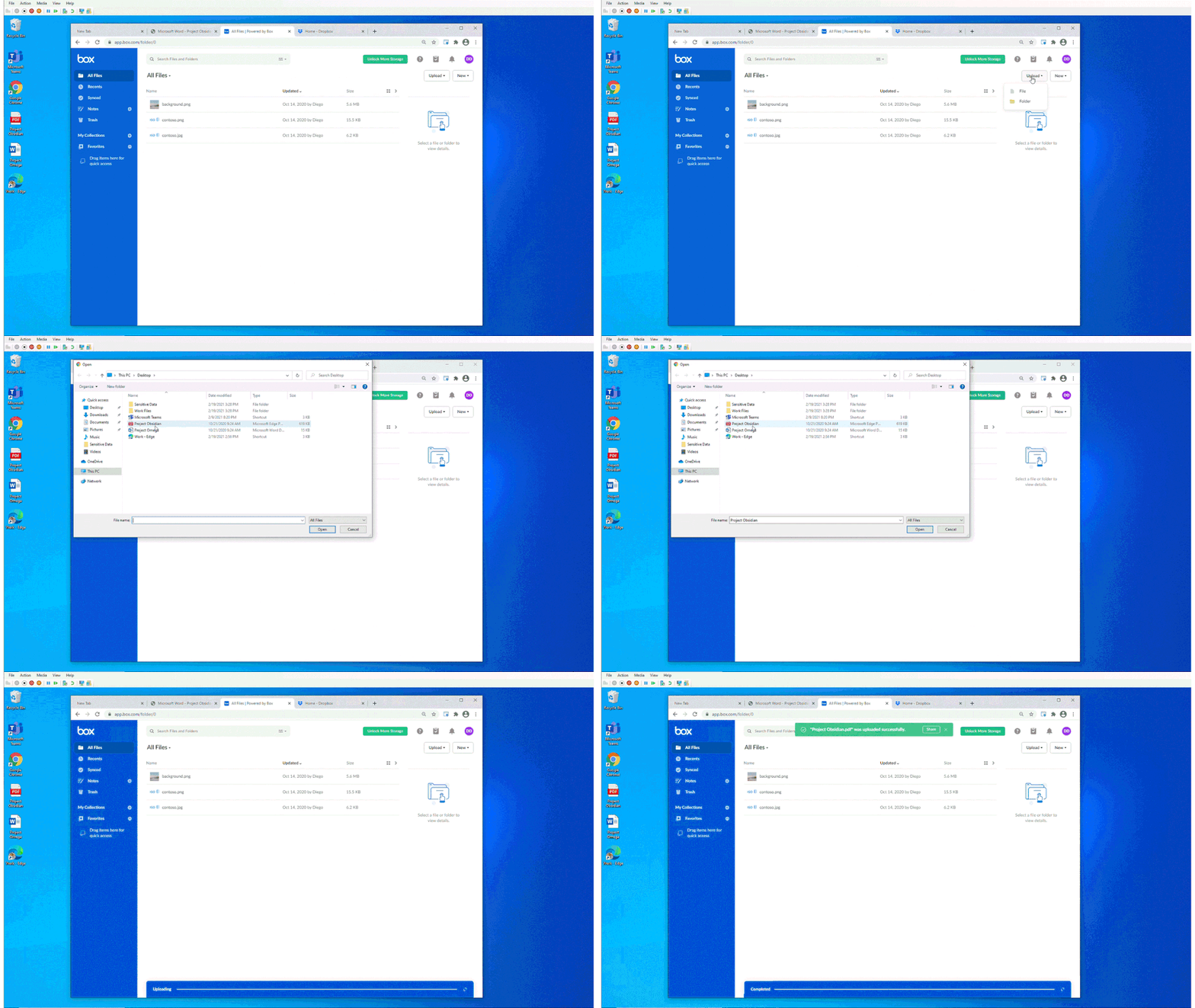
Figure 2: Chrome DLP allowing upload of a sensitive file to a sanctioned service domain
In Figure 3: Chrome DLP blocking upload of a sensitive file to an unsanctioned service domain, we see how a customer configured a DLP policy to block an information worker from using Chrome to upload a sensitive file to Dropbox. Dropbox is defined as an unsanctioned service domain in this DLP policy. In this instance, the policy was not configured to support user override and the user is unable to upload the document Dropbox. This policy violation is recorded as a DLP event and is available to be reviewed with full context in Compliance Center.
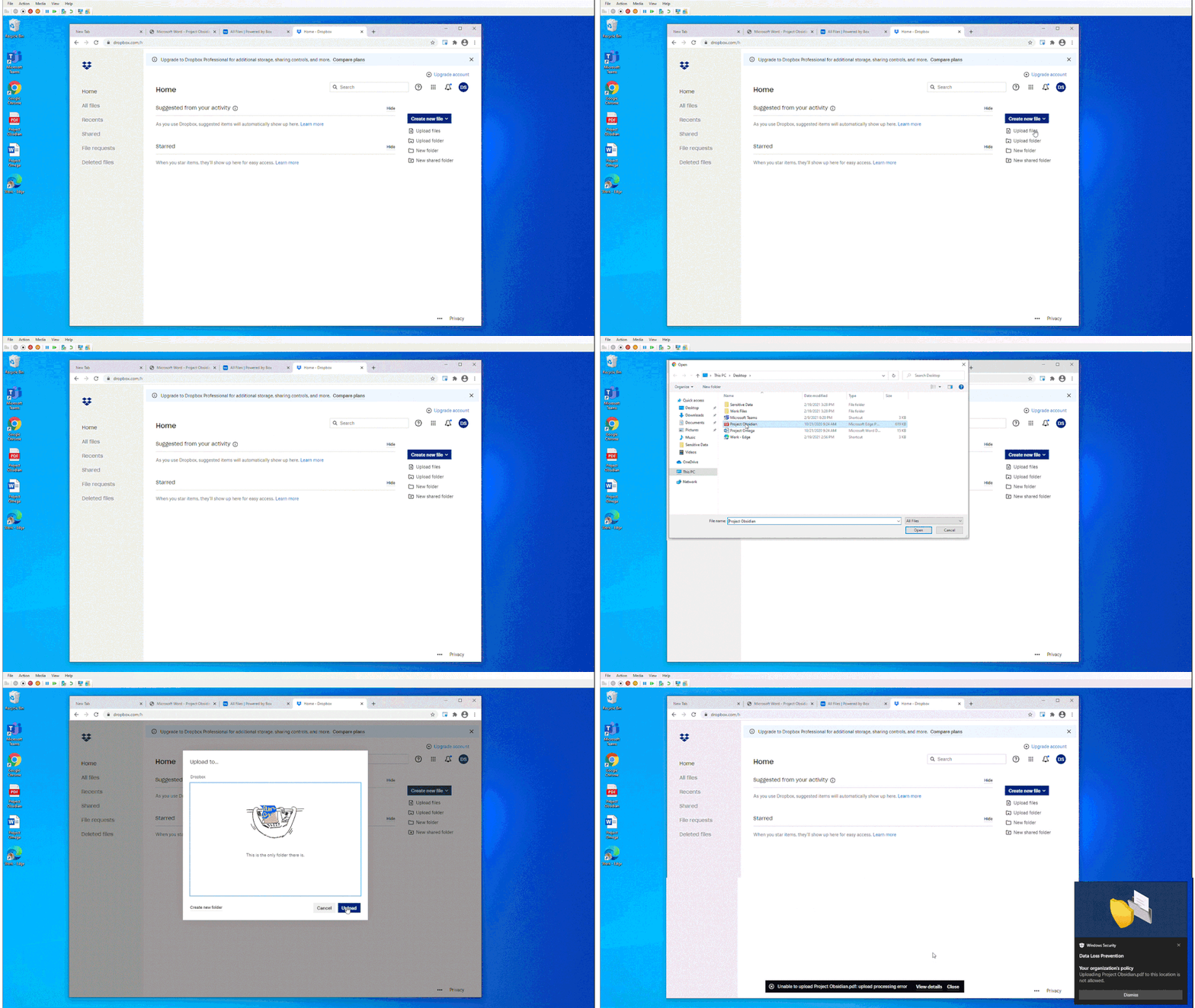
Figure 3: Chrome DLP blocking upload of a sensitive file to an unsanctioned service domain
The Microsoft Compliance Extension for Chrome in Compliance Center
In Figure 4: Compliance Center with Chrome App Event Filter, we see how an organization can apply a new filter to list Chrome related events for review and investigation.
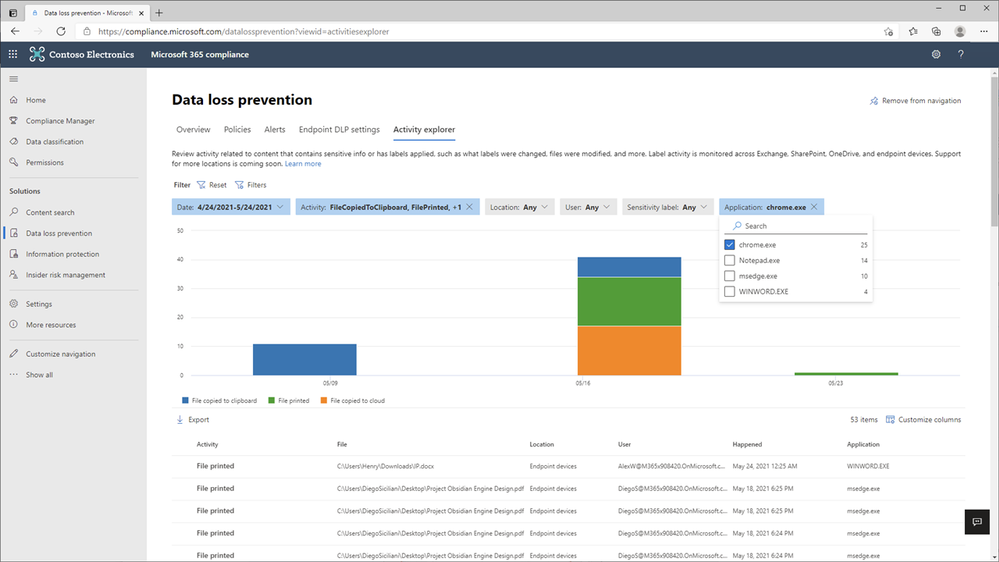
Figure 4: Compliance Center with Chrome App Event Filer
In Figure 5: Chrome File Print Event Details 1 and Figure 6 – Chrome File Print Event Details 2, we see the full details of the Chrome file print event for review and investigation.
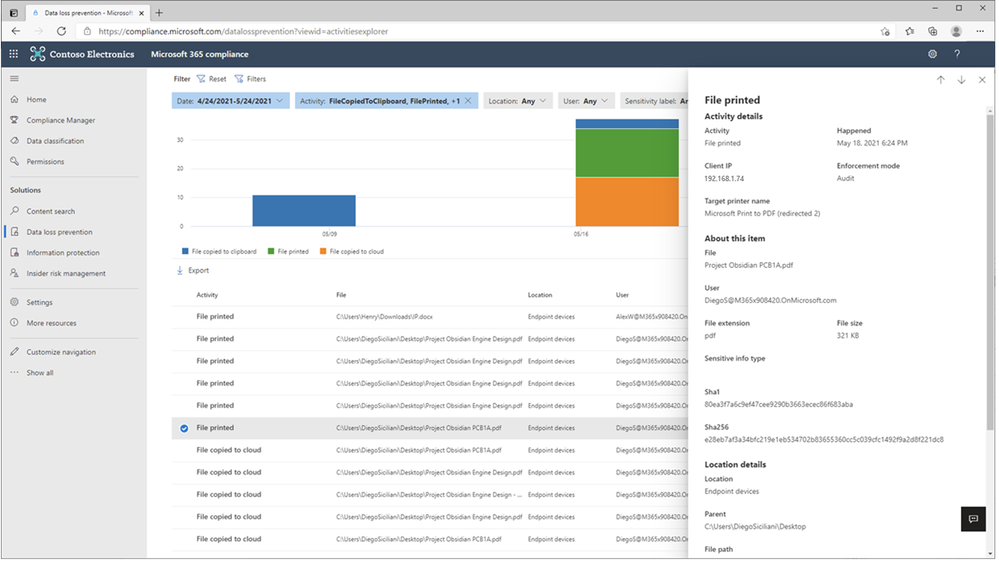
Figure 5: Chrome File Print Event Details 1
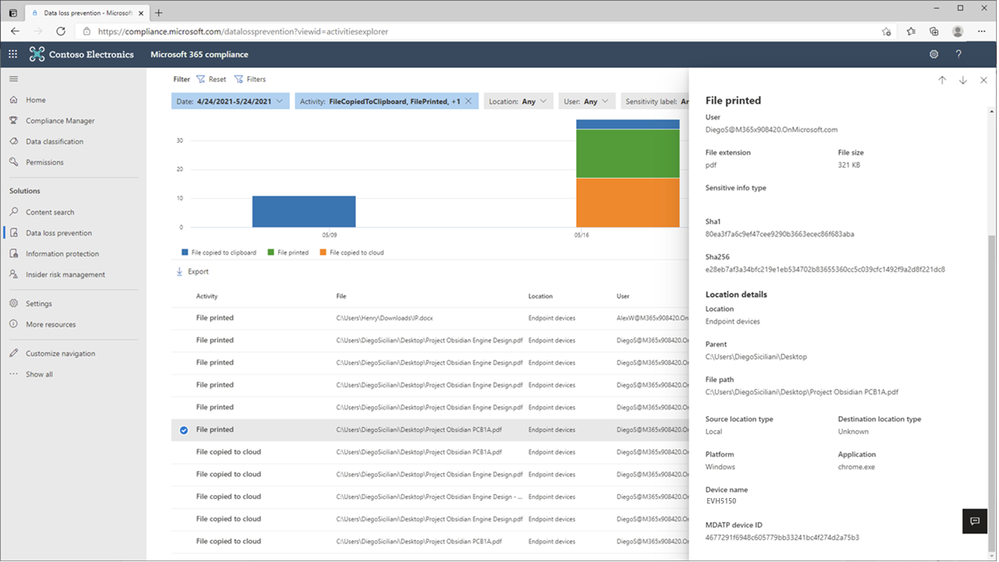
Figure 6: Chrome File Print Event Details 2
In Figure 7: Chrome File Copied to Cloud Event Details 1 and Figure 8 – Chrome File Copied to Cloud Event Details 2, we see the full details of the Chrome file upload to Dropbox event for review and investigation.
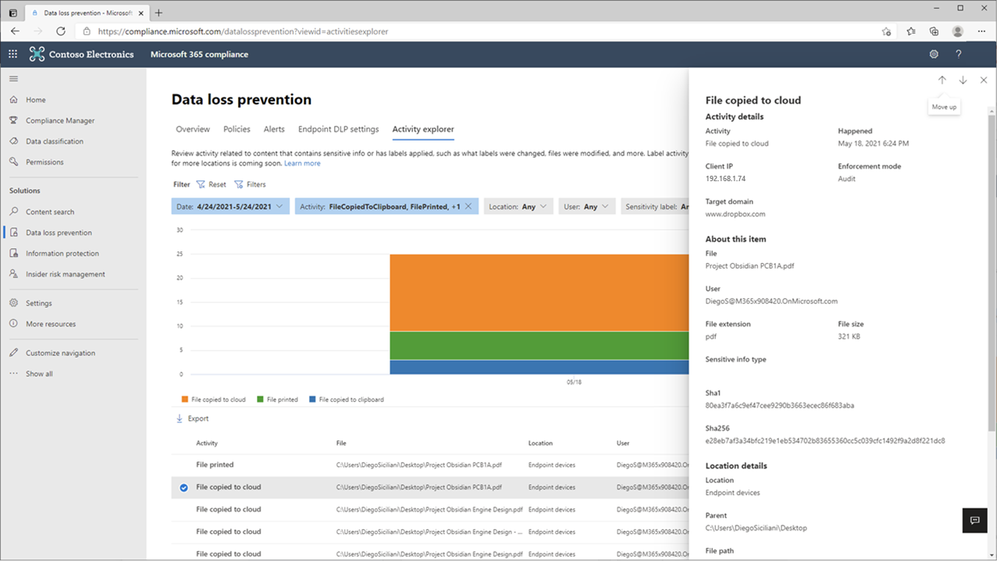
Figure 7: Chrome File Copied to Cloud Event Details 1
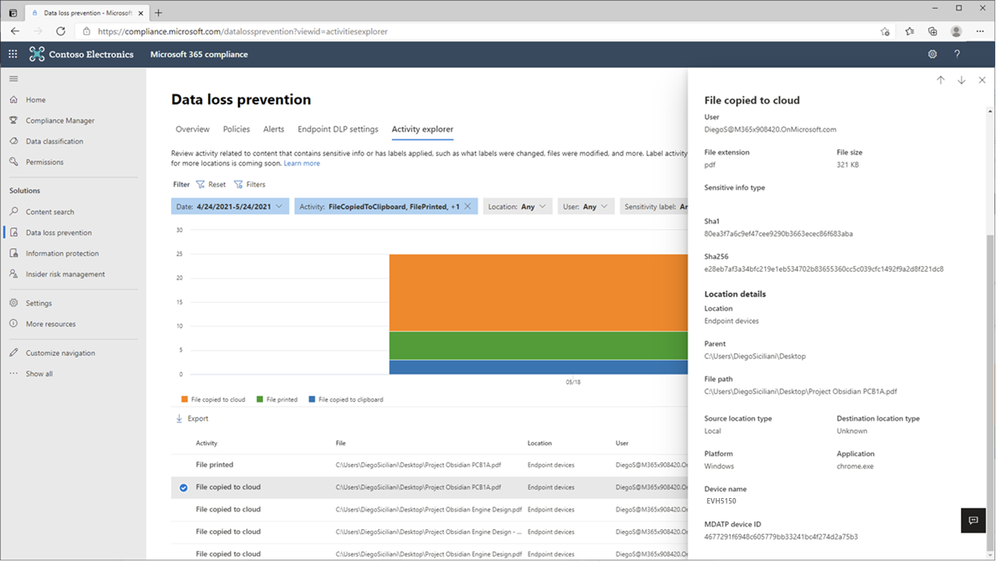
Figure 8: Chrome File Copied to Cloud Event Details 2
Microsoft Unified DLP Quick Path to Value
To help customers accelerate their deployment of a comprehensive information protection and data loss prevention strategy across all their environments containing sensitive data and help ensure immediate value, Microsoft provides a one-stop approach to data protection and DLP policy deployment within the Microsoft 365 Compliance Center.
Microsoft Information Protection (MIP) provides a common set of classification and data labeling tools that leverage AI and machine learning to support even the most complex of regulatory or internal sensitive information compliance mandates. MIP’s over 150 sensitive information types and over 40 built-in policy templates for common industry regulations and compliance offer a quick path to value.
Consistent User Experience
No matter where DLP is applied, users have a consistent and familiar experience when notified of an activity that is in violation of a defined policy. Policy Tips and guidance are provided using a familiar look and feel users are already accustomed to from applications and services they use every day. This approach can reduce end-user training time, eliminates alert confusion, increases user confidence in prescribed guidance and remediation, and improves overall compliance with policies – without impacting productivity.
Integrated Insights
Microsoft DLP integrates with other Security & Compliance solutions such as MIP, Microsoft Defender, and Insider Risk Management to provide broad and comprehensive coverage and visibility required by organizations to meet regulatory and policy compliance.
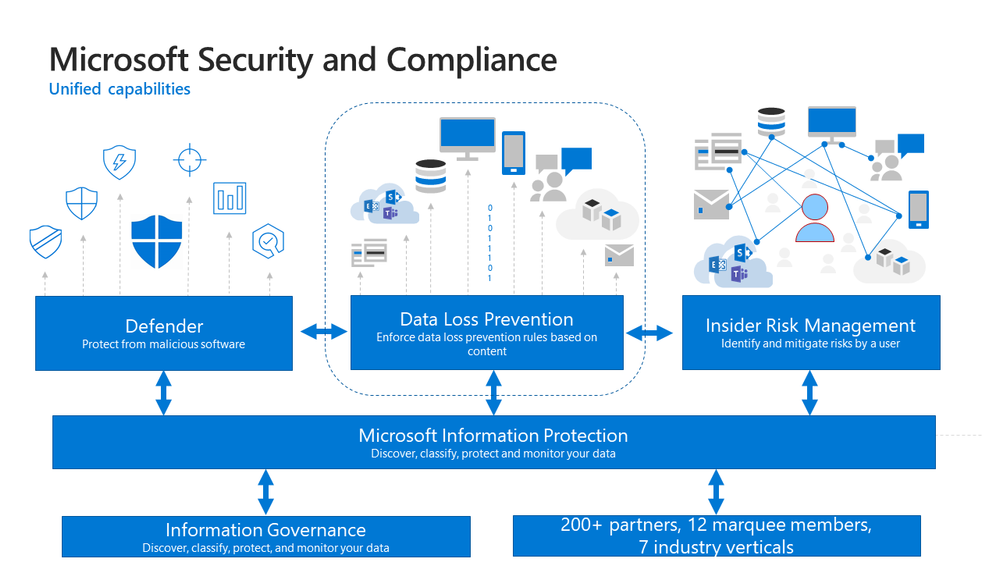
Figure 9: Integrated Insights
This approach reduces the dependence on individual and uncoordinated solutions from disparate providers to monitor user actions, remediate policy violations and educate users on the correct handling of sensitive data at the endpoint, on-premises, and in the cloud.
Get Started
Microsoft DLP solution is part of a broader set of Information Protection and Governance solutions that are part of the Microsoft 365 Compliance Suite. You can sign up for a trial of Microsoft 365 E5 or navigate to the Microsoft 365 Compliance Center to get started today.
Additional resources:
- For more information on Data Loss Prevention, please see this and this
- For videos on Microsoft Unified DLP approach and Endpoint DLP see this and this
- For a Microsoft Mechanics video on Endpoint DLP see this
- For more information on the Microsoft Compliance Extension for Chrome see this and this
- For more information on DLP Alerts and Event Management, see this
- For more information on Sensitivity Labels as a condition for DLP policies, see this
- For more information on Sensitivity Labels, please see this
- For more information on conditions and actions for Unified DLP, please see this
- For the latest on Microsoft Information Protection, see this and this
- For more information on AIP scanner, see this
Thank you,
The Microsoft Information Protection team
by Contributed | May 27, 2021 | Technology
This article is contributed. See the original author and article here.
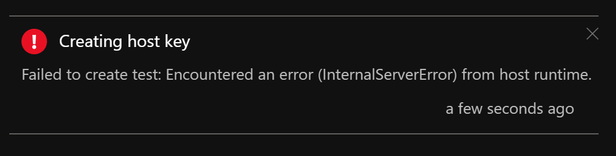
If you’re facing issues with Function App key creation, this document has a few troubleshooting tips that could help you fix it.
First, ensure you’ve reviewed these docs related to Function App storage connections:
Symptom:
Host level and Function level Key creation failure in Function Apps
Issue verification:
Portal – When your Function App is unable to create host level or function level keys, you may see these error messages:
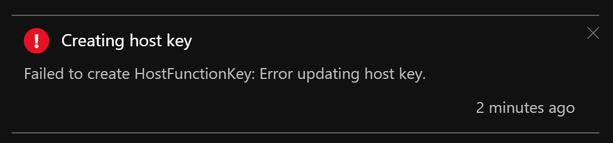
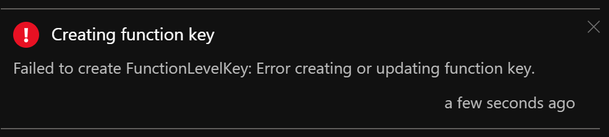
AzCLI – If key creation fails with AzCLI, the error messages are as below:


In addition to this, Function execution could also be returning HTTP 401 (HTTP 500) in some cases.
Troubleshooting:
Function App keys are placed in the azure-webjobs-secrets folder in Blob Container. If this folder is missing, this could mean that the Function App is unable to connect to the storage account referenced by the Function App Application Setting “AzureWebJobsStorage”. This could happen either because of a network misconfiguration or because of an issue on the storage side. We will explore both these causes below.
- Know the outbound Connectivity path for your Function App: Ensure the storage account referenced by the Function App Application Setting “AzureWebJobsStorage” is reachable from the Function App.
- Does the storage account allow access to all networks? If not, what path do you expect the Function App to take to reach the Storage? (Internet/Virtual Network?)
- If you want the Function App to reach the storage account via its public IP, ensure the storage account allows all the IPs listed under outbound IPs in the Function App’s properties blade.
- If your App is integrated with a Virtual Network, ensure this subnet is allowed on the storage account firewall.
- Missing WebJobs secrets folder?
- Once you ensure network connectivity is present between the Function App and Storage, you should be able to see the azure-webjobs-secrets folder under Blob containers as seen below. If you don’t see this folder, it could be because of a missing Vnet integration.
- I’ve seen cases where the Vnet & Subnet are allowed on the Storage Account Firewall but customers sometimes forget to actually integrate the App with the Vnet. This causes the secrets folder to be absent on the storage.
- Also, ensure Service Endpoints/Private Endpoints are configured correctly.
- Erroneous storage connection string?
- Archived Blob Storage?
- Check access tier for files inside azure-webjobs-secrets folder:

- When a blob is in archive storage, the blob data is offline and can’t be read or modified. To read or download a blob in archive, you must first rehydrate it to an online tier. You can’t take snapshots of a blob in archive storage.
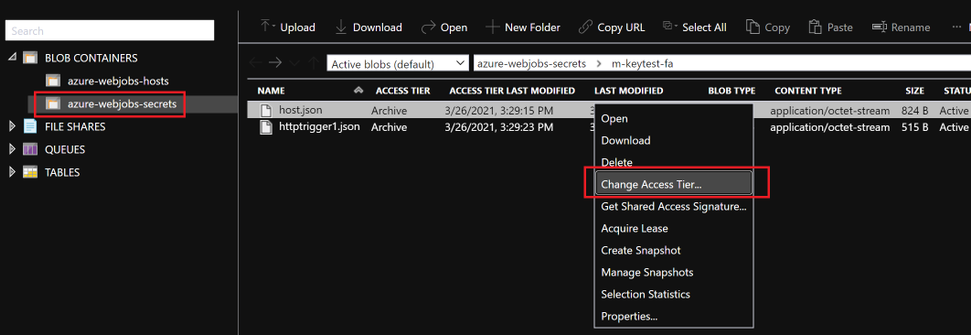
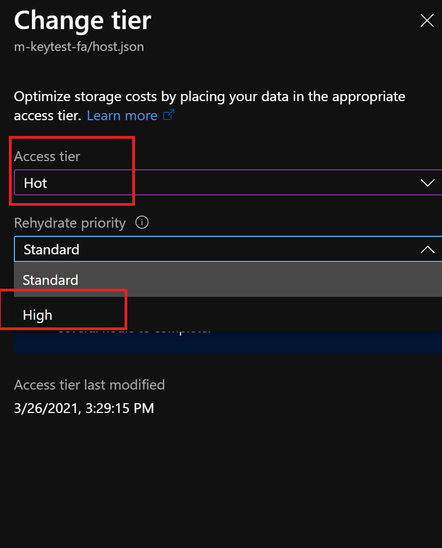
- Solution: Rehydrated storage blobs to Hot – High priority mode. After about 75mins, the blobs will be ready with the modified access tier. Function Key creation will succeed now and the issue with HTTP 401 and HTTP 500 should be resolved.

I hope this helps!
by Contributed | May 27, 2021 | Technology
This article is contributed. See the original author and article here.
In Project Plan 1, Project for the web has had some recent updates to its licensing. Please read on to find out about this exciting news!
- Reduce repetitious and time-consuming work using Power Automate to create flows based on Project for the web data. As examples,
- Automatically send emails when members of your team have a task due that week.
- Use defined business process flows to support governance and compliance for activities such as reviews and approvals for your project intake process.
- Customize your Project for the web experience to meet unique requirements of your department.
- View, add, update, or delete columns in related Project for the web Microsoft Dataverse tables.
- As example, if you want to track the projects that need legal sign off, you can add this requirement as a column that will be available for all projects.
- Create and tailor Dataverse tables with data specific to your needs.
- As example, if you need to track permits that are associated with tasks in your projects, then you can add a permits table.
- Create and share reports with your team and stakeholders.
- Build custom reports, dashboards, or portals with either Power BI or Power Apps that best support you and your team’s needs to share status and insights.
- View data for projects, programs, portfolios, and resources in a variety of ways such as out-of-the-box or custom reports, and dashboards.
For more information, review the Project service description and give us feedback below in the Comments section.
by Contributed | May 27, 2021 | Technology
This article is contributed. See the original author and article here.
This blog post contains important information about TLS certificate changes for Azure IoT Hub and DPS endpoints that will impact IoT device connectivity.
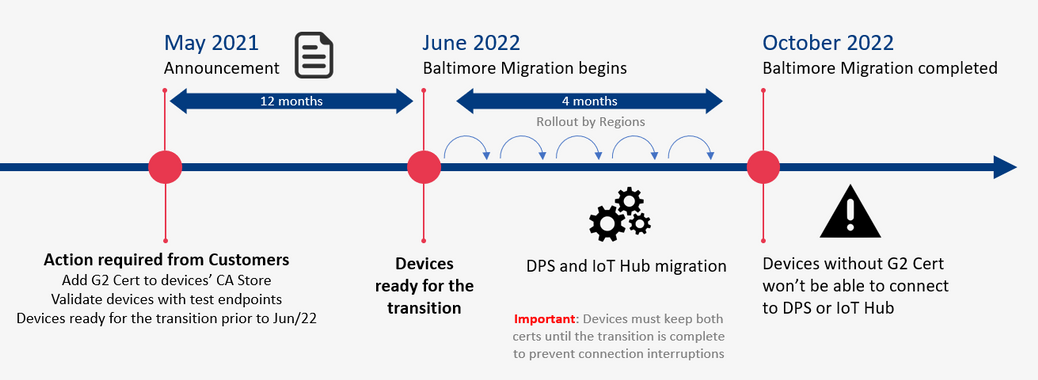
In 2020 most Azure services were updated to use TLS certificates from Certificate Authorities (CAs) that chain up to the DigiCert Global G2 root. However, Azure IoT Hub and Device Provisioning Service (DPS), remained on TLS certificates issued by the Baltimore CyberTrust Root. The time has come now to switch from the Baltimore CyberTrust CA Root for Azure IoT Hub and DPS, which will migrate to the DigiCert Global G2 CA root starting in June 2022, and finish by or before October 2022. This change is for these services in public Azure cloud and does not impact sovereign clouds.
Why is this important? After the migration is complete, devices that don’t have DigiCert Global G2 won’t be able to connect to Azure IoT anymore. You must make certain your IoT devices include the DigiCert Global G2 root cert by June 30, 2021 to ensure your devices can connect after this change.
We expect that many Azure IoT customers have devices which will be impacted by this IoT service root CA update; specifically, smaller, constrained devices that specify a list of acceptable CAs.
The following services used by Azure IoT devices will migrate from the Baltimore CyberTrust Root to the DigiCert Global G2 Root starting June 1, 2022 completing on or before Oct 2022.
- Azure IoT Hub
- Azure IoT Hub Device Provisioning Service (DPS)
If any client application or device does not have the DigiCert Global G2 Root in their Certificate Stores, action is required to prevent disruption of IoT device connectivity to Azure.
Action Required
- Keep using Baltimore in your device until the transition period is completed (necessary to prevent connection interruption).
- In addition to Baltimore, add the DigiCert Global root G2 to your trusted root store.
- Make sure SHA384 for Server certificate processing is enabled on the device.
How to check
- If your devices use a connection stack other than the ones provided in an Azure IoT SDK, then action is required:
- To continue without disruption due to this change, Microsoft recommends that client applications or devices trust the DigiCert Global G2 root:
DigiCert Global Root G2
- To prevent future disruption, client applications or devices should also add the following root to the trusted store:
Microsoft RSA Root Certificate Authority 2017
(Thumbprint: 73a5e64a3bff8316ff0edccc618a906e4eae4d74)
- If your client applications, devices, or networking infrastructure (e.g. firewalls) perform any sub root validation in code, immediate action is required:
- If you have hard coded properties like Issuer, Subject Name, Alternative DNS, or Thumbprint, then you will need to modify this to reflect the properties of the new certificates.
- This extra validation, if done, should cover all the certificates to prevent future disruptions in connectivity.
- If your devices (a) trust the DigiCert Global G2 root CA among others, (b) depend on the operating system certificate store that has OS updates enabled for getting these roots or (c) use the device/gateway SDKs as provided, then no action is required, but validation of compatibility would be prudent:
- Please verify that your respective store contains both the Baltimore and the Global G2 roots for a seamless transition:
- Instructions for Windows here
- Instructions for Ubuntu here
- Ensure that the device SDKs in use, if relying on hard coded certificates or on language runtimes have the DigiCert Global G2 root as appropriate.
Validation
We ask that you perform basic validation to mitigate any unforeseen impact to your IoT devices connecting to Azure IoT Hub and DPS. We are providing test environments for your convenience to verify that your devices can connect before we update these certificates in production environments.
This test can be performed using one of the endpoints provided (one for IoT Hub and one for DPS).
A successful TLS connection to the test environment indicates a positive result outcome – that your infrastructure and devices will work as-is and can connect with these changes. The credentials contain invalid data and are only good to establish a TLS connection, so once that happens any run time operations (e.g. sending telemetry) performed against these services will fail. This is by design since these test resources exist solely for customers to validate device TLS connectivity.
The credentials for the test environments are:
- IoT Hub endpoint: g2cert.azure-devices.net
- Connection String: HostName=g2cert.azure-devices.net;DeviceId=TestDevice1;SharedAccessKey=iNULmN6ja++HvY6wXvYW9RQyby0nQYZB+0IUiUPpfec=
- Device Provisioning Service (DPS):
- Global Service Endpoint: global-canary.azure-devices-provisioning.net
- ID SCOPE: 0ne002B1DF7c
- Registration ID: abc
If the test described above with the TLS connection is not sufficient to validate your scenarios, you can request the creation of devices or enrollments for tests in special canary regions by contacting the Azure support team (see Support below).
The test environments will be available until all public cloud regions have completed their update to the new root CA.
Support
If you have any technical questions on implementing these changes or to request the creation of your own device or enrollment for tests, please open a support request with the options below and a member from our engineering team will get back to you shortly.
- Issue Type: Technical
- Service: Internet of Things/IoT SDKs
- Problem type: Connectivity
- Problem subtype: Unable to connect.
Certificate Summary
The table below provides information about the certificates that are being updated. Depending on which certificate your device or gateway clients use for establishing TLS connections, action may be needed to prevent loss of connectivity.
Certificate
|
Current
|
Post Update (June 1, 2022 – October 1, 2022)
|
Action
|
Root
|
Thumbprint: d4de20d05e66fc53fe1a50882c78db2852cae474
Expiration: Monday, May 12, 2025, 4:59:00 PM
Subject Name:
CN = Baltimore CyberTrust Root
OU = CyberTrust
O = Baltimore
C = IE
|
Thumbprint: df3c24f9bfd666761b268073fe06d1cc8d4f82a4
Expiration: Friday, January 15, 2038 5:00:00 AM
Subject Name:
CN = DigiCert Global Root G2
OU = www.digicert.com
O = DigiCert Inc
C = US
|
Required
|
Intermediates
|
Thumbprints:
CN = Microsoft RSA TLS CA 01
Thumbprint: 417e225037fbfaa4f95761d5ae729e1aea7e3a42
———————————————————————————
CN = Microsoft RSA TLS CA 02
Thumbprint: b0c2d2d13cdd56cdaa6ab6e2c04440be4a429c75
———————————————————————————
Expiration: Tuesday, October 8, 2024 12:00:00 AM;
Subject Name:
O = Microsoft Corporation
C = US
|
Thumbprints:
CN = Microsoft Azure TLS Issuing CA 01
Thumbprint: 2f2877c5d778c31e0f29c7e371df5471bd673173
——————————————————————————–
CN = Microsoft Azure TLS Issuing CA 02
Thumbprint: e7eea674ca718e3befd90858e09f8372ad0ae2aa
——————————————————————————–
CN = Microsoft Azure TLS Issuing CA 03
Thumbprint: 6c3af02e7f269aa73afd0eff2a88a4a1f04ed1e5
——————————————————————————–
CN = Microsoft Azure TLS Issuing CA 04
Thumbprint: 30e01761ab97e59a06b41ef20af6f2de7ef4f7b0
——————————————————————————–
Expiration: Friday, June 28, 2024 5:29:59 AM
Subject Name:
O = Microsoft Corporation
C = US
|
Required
|
Leaf (IoT Hub)
|
Subject Name:
CN = *.azure-devices.net
|
Subject Name:
CN = *.azure-devices.net
|
Required
|
Leaf (DPS)
|
Subject Name:
CN = *.azure-devices-provisioning.net
|
Subject Name:
CN = *.azure-devices-provisioning.net
|
Required
|
Note: Both the intermediate and leaf certificates are expected to change frequently. We recommend not taking dependencies on them and instead trust the root certificate.


Recent Comments