by Scott Muniz | Jul 10, 2020 | Uncategorized
This article is contributed. See the original author and article here.
As previously announced, Microsoft recently made changes to the update channels for Microsoft 365 Apps. For the official announcement of these changes, read this blog post. For Microsoft Endpoint Configuration Manager admins that manage Microsoft 365 Apps updates, actions may be required depending on your environment.
Update packages in the Microsoft Update Catalog began using the new product name starting with releases on June 18, 2020. If you use an automatic deployment rule (ADR) to deploy updates using Configuration Manager, and you rely on the “Title” property, you will need to make changes to your ADR.
For example, the title of an update package released prior to June 9th, 2020 looks something like the following example:
Office 365 Client Update – Semi-annual Channel Version 1908 for x64 based Edition (Build 11929.20708)
For update packages released on and after June 18, 2020, the title of the update package will look something like the following example:
Microsoft 365 Apps Update – Semi-Annual Enterprise Channel Version 1908 for x64 based Edition (Build 11929.50000)
NOTE: Microsoft 365 Apps updates released on the regular June “patch Tuesday” on the 9th were replaced (and expired) by rebranded updates released on June 18th. If you have synced Microsoft 365 Apps updates since June 18th and have not fully deployed the updates released on the 9th, actions may be required.
- If you use an ADR that relies on the “Title” property, you’ll need to make changes as noted above to pick up the latest updates released.
- If you manually deployed the updates released on the 9th, which are now expired, you will need to select the latest updates to continue your deployments.
- No action is required if your ADR does not rely on the “Title” property.
- Microsoft 365 Apps updates released on July “patch Tuesday” on the 14th will of course be published using the new channel and product names.
Additional Resources:
A new wave of innovation to help IT modernize servicing of Microsoft 365 Apps for enterprise
Overview of update channels for Microsoft 365 Apps
Changes to update channels for Microsoft 365 Apps
Manage updates to Microsoft 365 Apps with Microsoft Endpoint Configuration Manager

by Scott Muniz | Jul 10, 2020 | Uncategorized
This article is contributed. See the original author and article here.

How are FHIR-Based APIs changing healthcare?
Check out more details and register here for the HIMSS New York State Chapter’s upcoming panel discussion on July 15, 2020 @ 12:00 PM – 1:30 PM, using Microsoft Teams Live Events.
The HIMSS New York State Chapter will facilitate an interactive discussion on three novel use cases of the HL7® FHIR® standard between our panelists who bring different expert perspectives on the health data exchange standard and its implications. Below are the learning objectives:
– Understand the state of development of open-access APIs within healthcare
– Understand how regulatory requirements affect open-access APIs in New York State
– Understand the business implications of the availability of open-access APIs
Panelists and Moderator:
– Lloyd McKenzie | Senior Consultant at Gevity & Industry Thought Leader, Centers of Excellence

– Virginia Lorenzi | Senior Technical Architect at NewYork-Presbyterian Hospital and Associate at Columbia University in the City of New York Department of Biomedical Informatics

– Helen Oscislawski, Esq. | Founder & Managing Partner at Attorneys at Oscislawski LLC

– Mike O’Neill | CEO at MedicaSoft

– Tom Hallisey | Director at Health Information Technology Strategy at HANYS

We hope to see you there!
by Scott Muniz | Jul 10, 2020 | Azure, Microsoft, Technology, Uncategorized
This article is contributed. See the original author and article here.
This is Sue Bohn, Partner Director of Program Management for Microsoft identity solutions. We’re back with another mailbag focusing on your common questions on access reviews, an Azure Active Directory (Azure AD) identity governance feature. One of my favorite sayings is there’s nothing more permanent than a temporary solution! Let’s say we exclude some users from a Conditional Access policy temporarily for the next week, with good intentions to remove them as soon as the project is done. We often forget that last part, so access reviews help not only with reviewing these exclusions at regular intervals, but also transferring the work from IT admins to the end users themselves to attest they still need that exclusion or access to a resource. This process works equally well for external identities. Reviewing access on a regular basis needs to be a key aspect of your identity governance strategy.
—
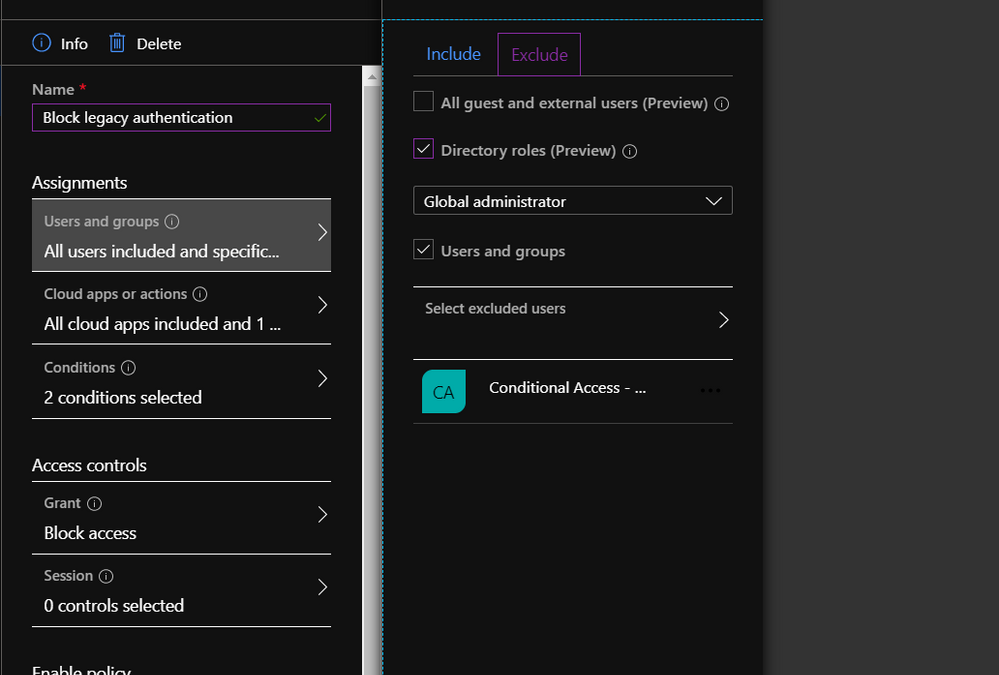
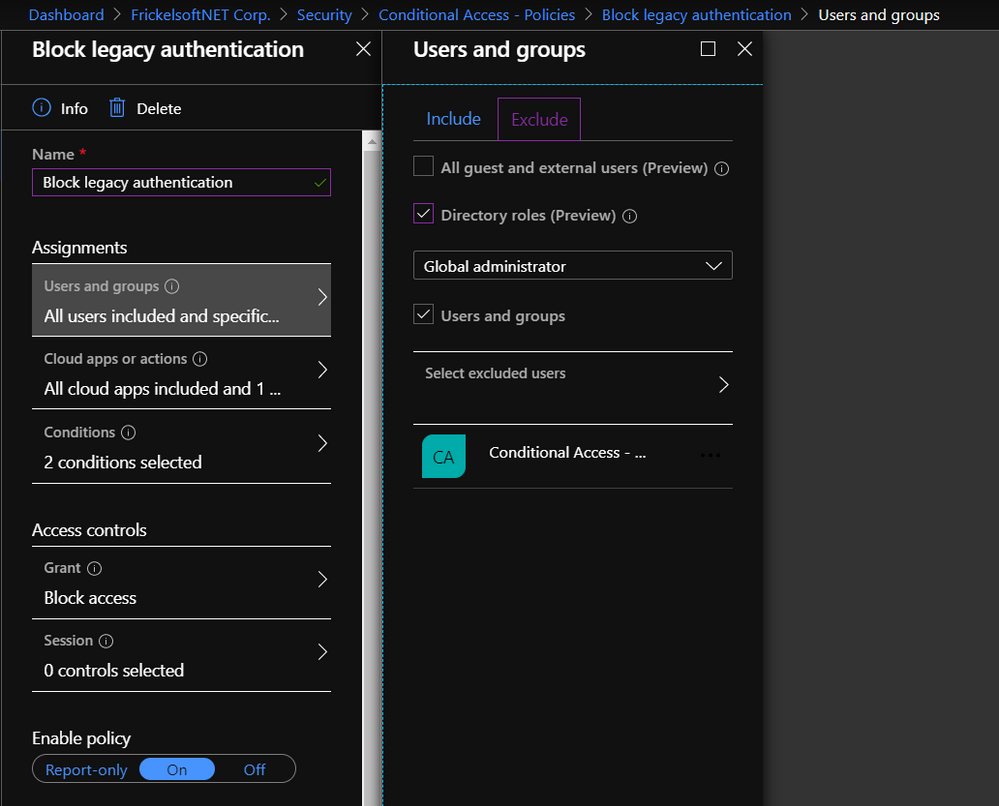
Hi everyone, it’s Florian reporting in today. Like many of our customers, you might be securing access to resources in your organization via Conditional Access policies. You might be using these policies to ensure that multi-factor authentication (MFA) is turned on, and users sign-in from trusted devices, or from trusted locations. During deployment, you might decide to gradually roll these policies out or have a need to ensure that specific users or accounts are untouched by these policies. In this case, you might specify an “exclude” list. Classic examples of such are the list of VIPs that you want to manage differently, or a set of Service Accounts and users that you may want to exclude from your “Block Legacy Authentication” configuration until you remediated them or find a different configuration to run them on.
Exception lists have the benefit (and the burden) of being setup at one point in time, with the goal of staying for some specific amount of time (where the “amount of time” is less than “forever”). There’s an implicit understanding that, eventually, the exception may go and the list of users that enables this exception should shrink gradually. How can you get a better grip on these exception lists, to get clarity on the most important questions most exception processes struggle with? How many users are running on this exception now? How can we regularly check who still needs this exception? How do we clean up this exception list? The answers to these questions are access reviews.
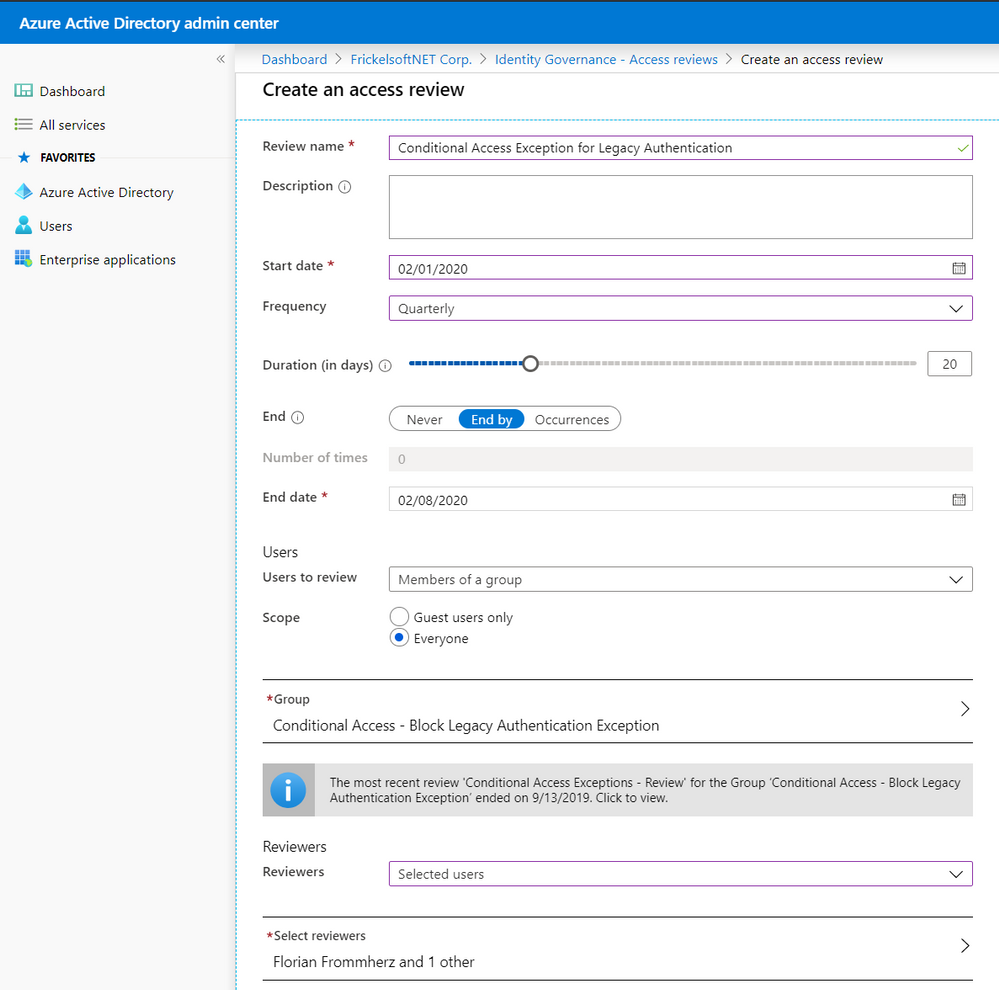
Access reviews build a framework for checking on and attesting access to resources, such as groups and group membership, privileged roles in Azure AD Privileged Identity Management (PIM), access packages, or Azure AD-integrated applications. In this scenario, the resource we’re reviewing is membership to a group. Reviews can be one-off or scheduled in a campaign-fashion, recurring on a monthly, quarterly, or yearly schedule. Reviewers can be defined and delegated, so that the review can be carried out by the best qualified set of people to do it – this may mean that IT does not review access to the resource, but the resource owner. Optionally, you may choose to have the user self-attest their access needs regularly and remove non-responsive users automatically.
Reviewers will be notified when a new review is set up or a scheduled, regular review has started. They’ll receive an email that points them to a reviewer portal – where they decide on a per-user basis whether access for a resource must be preserved or not:
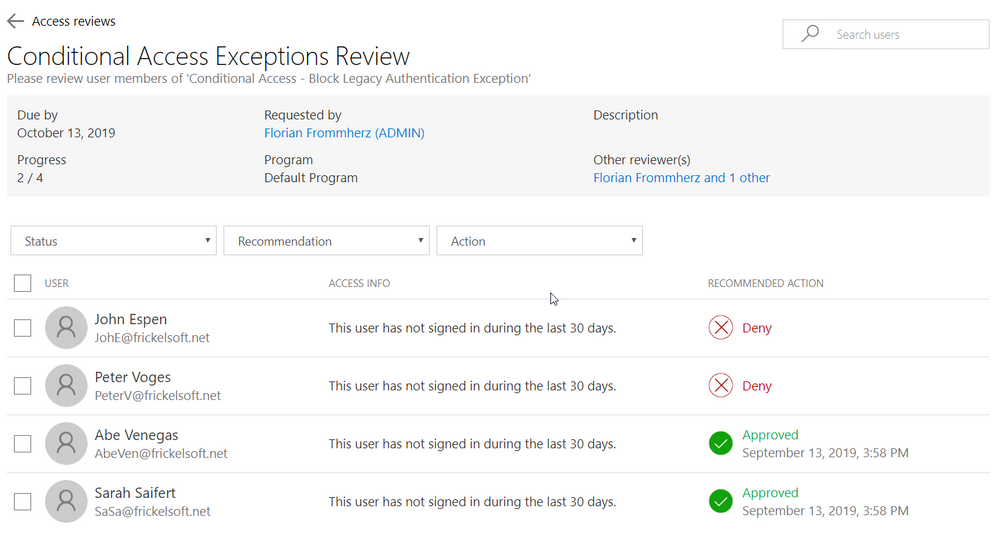
So how does this come together? Your Azure AD admin team creates the Conditional Access policy and assigns it to the target audience. When “Exclude” is used for scoping, the respective excluded users are added as members of a group to the policy. That group, in turn, is then controlled via access reviews and checked in regular campaigns. Reviewers, at best, are the owners of either the resources the Conditional Access policy is targeted to or – in case of blocking legacy authentication – the Security team.
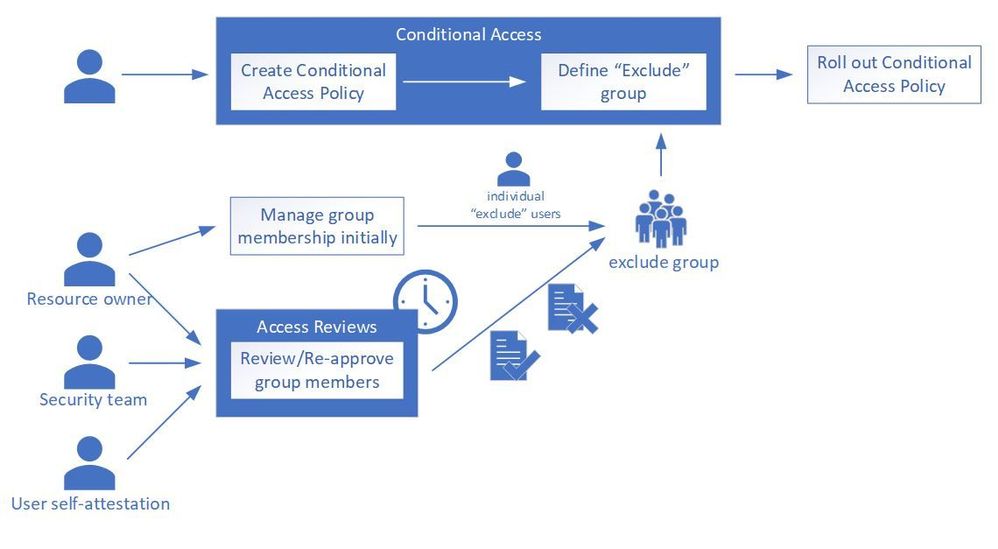
This becomes a useful tool when you need to review access to a resource – such as group membership that enables or disables Conditional Access, or more straightforward things like a Microsoft Teams team – but don’t necessarily own the resource yourself and you need to delegate.
Can I review who has access to an application?
Access reviews work well with several resources and are not limited to exception lists: the most natural are groups of all kinds (Security, Office 365) as well as assignments to applications. Applications may include line-of-business applications that you created and integrated into Azure AD or any Software-as-a-Service (SaaS) application that you configured with Azure AD. In addition, access reviews work with PIM roles, as well as access packages from Azure AD entitlement management. One prominent use cases for access reviews is the periodic attestation of Microsoft Teams teams or Office 365 Groups: you start an access review and let the group owner attest all members – or external identities only.
Can this help me govern access for external partners to Microsoft Teams?
Yes! Microsoft Teams lives and breathes the promise of flexible collaboration across company boundaries. At the same time, enterprises still want control over who accesses corporate resources. Access reviews are a clean way of governing external users’ continued access to resources, such as Teams – while shifting the responsibility from IT Admins to the teams owners – who can judge better whether or not an external partner needs access.
What ways of automation do I have?
Management of access reviews is supported via Microsoft Graph (in beta). We also have a sample PowerShell script and setup instructions to kick-start your PowerShell script accessing and managing access reviews.
I have multiple reviewers – how do I resolve conflicts?
For access reviews that have multiple reviewers aligned, all reviewers’ choices have equal weight. Access reviews count the last reviewer’s choice for every user to be reviewed – until the review ends. That last reviewer’s decision on whether access should be preserved or not is counted, overwriting potential earlier reviewer’s choices – “last reviewer wins”. All reviewers see other reviewer’s choices. For users that have not been reviewed (i.e. no reviewer commented on a particular user), access reviews can be configured to automatically apply a pre-defined result (Approve or Remove access) based on the user’s last logon or use of the resources.
Can I also review groups that I synchronize from on-premises through Azure AD Connect?
On-premises groups can be targeted for access reviews and reviewers can review end users and their continued access to the resource in question. At the end of the review, reviewers will be given an overview of the review result. Unlike cloud-managed groups, access reviews cannot perform “auto apply results” on on-premises groups, such as removing users from a group. Administrators will have to use the results from access reviews and perform manual actions on the on-premises group to apply the review results.
Can I provide this as self-service to users?
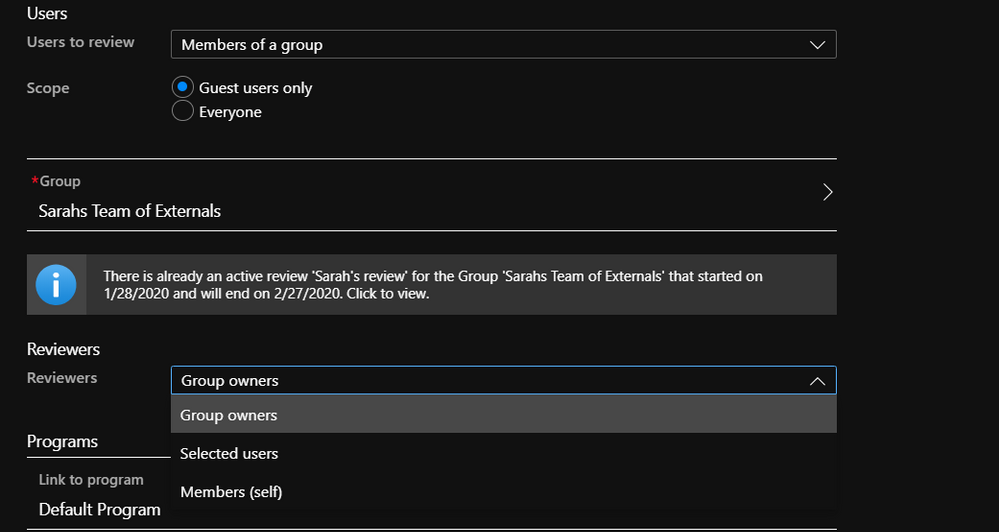
Yes! When creating an access review, there are several choices for reviewers that administrators can take. In addition to “Owners” of the resources and “Selected users” that you delegate as reviewers, there is also a “Self” option, where members of the group in review attest whether they need access or not. The users will be notified via email and will be taken to the reviewer portal via a link in the email. For non-responsive users, the system can also auto-approve or auto-remove access.
What about external identities?
External identities such as partners and contractors are an excellent use-case for organizations to use access reviews! Access Reviews is all tailored to support external identity use cases, from an exception group that you manage for Conditional Access to exempt external partners from MFA, to a Teams team that you want to put under review to have a closer look at external partners and vendors. When creating a review on a group or application, review administrators have a choice between building the review scope over “Everyone” who is member of the group or assigned to the application, or “Guest users only”.
We hope you find this information helpful. Please let us know via Twitter (@AzureAD) or comment below if you have any other questions or clarifications.
by Scott Muniz | Jul 10, 2020 | Uncategorized
This article is contributed. See the original author and article here.
Check out some amazing content in our Enabling Remote Work roundup!
Enable Remote Work
Drive effective meetings with Teams apps while working remote
Over the past few months, we’ve seen tremendous transformations take place as companies adapt to remote work environments. One key trend has been the rise of virtual meetings, as companies look to maintain their rhythm of business and keep human connections while working remote. However, as the volume of meetings increase, teams face challenges with management, efficacy, and engagement. To overcome some of these challenges, we’ll highlight a few popular Teams app integrations that can help you drive effective meetings while working remote.
Premier Offerings; WorkshopPLUS Azure Security Best Practices
G ‘day, I am Vic Perdana, Sr. PFE based in Melbourne, Australia. As COVID-19 forces people to work from home, the number of bad actors is ramping up as demonstrated by the increase of cyber-attacks globally, it is becoming *very* important to educate ourselves with ways we can protect our IT assets from being compromised.
Resources for Remote Workers
Bring back ad hoc meetings to your remote workers!
I’ve had entire projects and my career pivot around who I’ve bumped into at the office at any given time. Whether it was the time a thoughtful co-worker shared why they were leaving the company or the time an Account Executive revealed a resource who could solve my customer’s exact problem, chance 1:1 encounters play a big part in our success.
Enabling remote work for IT pros
If you want to effectively manage your organization’s devices—and ensure a secure, productive user experience—with the increased focus on remote work, check out our on-demand web series titled Enabling remote work for IT pros in the Business Continuity community. Each episode offers an in-depth look at what you can do immediately, in the next few weeks, and over the next few months to maintain control over, and help ensure the security of, your organization’s devices while users are working away from your corporate networks. They also address frequently asked questions and offer links to step-by-step resources to help you implement the strategies and best practices discussed.
Godshall Recruiting moves to an all-remote workstyle in just a day with Microsoft 365
For more than 50 years, Godshall Recruiting in Greenville, South Carolina has successfully paired job candidates with employers using a proven process of phone screening and in-person interviews. Just a day after a statewide quarantine order in 2020, however, all 30 employees suddenly had to pivot to a new way of working: from home, with company-owned devices, and with all their documents and communication in Microsoft Teams.
Upcoming Events
July Webinars & Remote Work Resources
Check out webinars and remote work resources for July for the public sector!
by Scott Muniz | Jul 10, 2020 | Uncategorized
This article is contributed. See the original author and article here.
This week, Microsoft Teams announced several new features, including an introduction to Microsoft Teams Displays.
Two blog posts were published in the SharePoint Blog this week highlighting Microsoft 365 resources that enable people working remotely to learn about using tools and to increase engagement within their organization.
@mtarler is our member of the week, and a fantastic contributor in the Excel Community.
View the Weekly Roundup for July 6-10 in Sway and attached PDF document.
by Scott Muniz | Jul 10, 2020 | Uncategorized
This article is contributed. See the original author and article here.
We will have our Service Fabric Community Q&A call for this month on July 16th 10am PDT. Join us to ask us any questions related to Service Fabric, Mesh, containers in Azure, etc. This month’s Q&A features one session on:
As usual, there is no need to RSVP – just navigate to the link to the call and you’re in.
Talk soon!
by Scott Muniz | Jul 10, 2020 | Azure, Microsoft, Technology, Uncategorized
This article is contributed. See the original author and article here.
The Azure open source database team that I lead is 100% focused on security. We live, eat, and breathe security. After all, many of you rely on national and industry standard security controls to develop and improve your INFOSEC defenses. And of course you expect the same level of security and due diligence when you build your open source workloads on Azure cloud.
This post highlights some of the frequently requested compliance certifications we’ve achieved for Azure Database for PostgreSQL – Single Server.
Note, our Postgres managed database service on Azure also has another deployment option, Hyperscale (Citus), which enables you to scale out your Postgres database horizontally across a server group. Hyperscale (Citus) is a powerful and secure option for those who need the performance and scale of a multi-machine database cluster.
Because the Hyperscale (Citus) deployment option GA’d in November 2019, it has not yet achieved the same compliance certs as our single server deployment option for Postgres. Moving forward, as the Hyperscale (Citus) compliance certificates becomes available, we’ll be sure to blog about it. In the meantime, you can always reach out to our team at AskAzureDBforPostgreSQL@service.microsoft.com if you need important security certs and you don’t (yet) see them in the compliance cert table below.
Notable Compliance Certs for For Azure Database for PostgreSQL – Single Server
|
Certificate
|
Applicable to…
|
|
HIPAA and HITECH Act (U.S.), HITRUST
|
Healthcare Providers, Healthcare Clearinghouses, and Health Plans
|
|
ISO 27001
|
Information Security Management Systems
|
|
ISO/IEC 27018
|
Public and private companies, government entities and not-for-profits that provides PII processing services via the cloud
|
|
NIST Cybersecurity Framework
|
Public and private companies, government entities and not-for-profits
|
|
FedRAMP High
|
U.S. Federal Agencies
|
|
SOC 1, 2 and 3
|
Cloud service providers; offers assurance to customers and stakeholders that effective internal controls that affect financial reports and operational control systems are in place
|
|
Cloud Security Allowance STAR
|
Cloud service providers; demonstrates ISO/IEC 27001 and Cloud Controls Matrix compliance
|
|
EU Model Clauses
|
All EU countries Norway, Iceland, and Liechtenstein; provides assurances for personal data leaving the European Economic Area
|
|
UK G-Cloud
|
UK Government
|
Our single server deployment option for Azure Database for PostgreSQL has achieved a comprehensive set of national, regional, and industry-specific compliance certifications in our Azure public cloud to help you comply with requirements governing the collection and use of your data.
To date, Azure Database for PostgreSQL – Single Server has amassed over 50 compliance offerings, including the more notable ones such as HIPAA, HITRUST, PCI-DSS, ISO 27001, ISO/IEC 27018, FedRAMP High, etc.
Our open source database team is continuing to pursue even more compliance certifications for Azure Database for PostgreSQL—for both Single Server and Hyperscale (Citus) which we will share in future posts about security, and as part of our documented compliance offerings for Azure.
I’ll be talking about even more security capabilities in future blog posts
In addition to all the certifications above for Postgres, our team has also been busy rolling out new security features on Azure Database for PostgreSQL that we’ll be blogging about next. These new Postgres features on Azure include high-demand capabilities such as data encryption for data at rest (we often call this ‘bring your own key’ or (BYOK) as well as double encryption); data security in motion (TLS and SSL); network security (firewall, service endpoint, private link); and access methods (native authentication and AAD authentication).
We also offer the Azure IP Advantage for Azure services running open source technologies. The Azure IP Advantage provides best-in-industry intellectual property protection, uncapped indemnification, the ability to deter and defend lawsuits with patent pick, and broad protection with a springing license.
We’re committed to make Azure the most secure cloud in the world for you and your applications. I’m looking forward to sharing more with you about the new security features we’ve been rolling out for Azure Database for PostgreSQL (as well as the ones our engineering team is actively working on right now).
If you have questions, please feel free to reach out to me and my team on the AskAzureDBforPostgreSQL@service.microsoft.com alias.
by Scott Muniz | Jul 10, 2020 | Azure, Microsoft, Technology, Uncategorized
This article is contributed. See the original author and article here.
Polyglot Persistence is the concept of using different storage technologies by the same application or solution, leveraging the best capabilities of each component. Azure Data Services support all possible data types and its usages.
In this blog post you will learn more about Polyglot Persistence, the trade-offs of its implementation, and available Azure Data Services to implement it.
The Old Reality
Until the 1990s most companies used a single version of a single database product. No matter the use case or the technical requirements, what prevailed was the company standard and all applications had to adapt to the official database vendor. How many times have you heard that “here in the company we use Oracle (or any other)? Yes, this not distant past is still a reality in many companies, where all the functions of all applications use the same RDMS.
In the following decade, we began to see some diversification, with the emergence of analytical databases, to support BI workloads. But usually it was still tied to a single vendor and to relational databases. Which made a lot of sense, since the data was always structured and “small” if we compare with today’s times. Storage was very expensive, and data normalization was decisive for efficient applications.
The CWMBO Revolution – “Cloud – Web – Mobile – Big Data – Open Source”
The public cloud as we know it today was born in 2006 and revolutionized the IT world. Now it was easy to scale your infrastructure and use software as a service. The licensing mode began to lose space for the subscription model. It was easy to use multi-vendor databases, taking advantage of the product’s best capabilities.
At the same time, the web and mobile popularization was generating gigantic volumes of semi-structured or unstructured data. It was named as Big Data and created the necessity for technologies like Hadoop and NoSQL databases. The relational database was no longer a solution for everything. We just understood another factor of the revolution.
The last factor was the exponential growth of Open Source Software, allowing cheap access to innovative and quality products. And the cloud providers embraced this idea, offering the products in multiple modes and adding valuable support in some cases.
Cloud Native Applications and Polyglot Persistence on Azure
At this point we started to see some Polyglot Persistence in architecture level. Modern Data Warehouses were created using multiple products and services, with the data flowing from the data sources until the best storage option for that data type. We also started to see cloud native applications using principals like server-less, containers, complex event processing (on top of event-based architectures), REST APIs, etc.
That’s when companies to finally break down their monolith systems. Some of them were still running on-prem, some of them were lifted and shifted to IaaS servers running in the cloud. Distributed services were developed by different teams, using the best persistence option for that data type or workload.
Let us see the example below. The application was sliced in 5 main persistence activities, but we could include more areas like graphs, events, or cache. For each activity we have the typical datatype and the related Azure’s storage options.
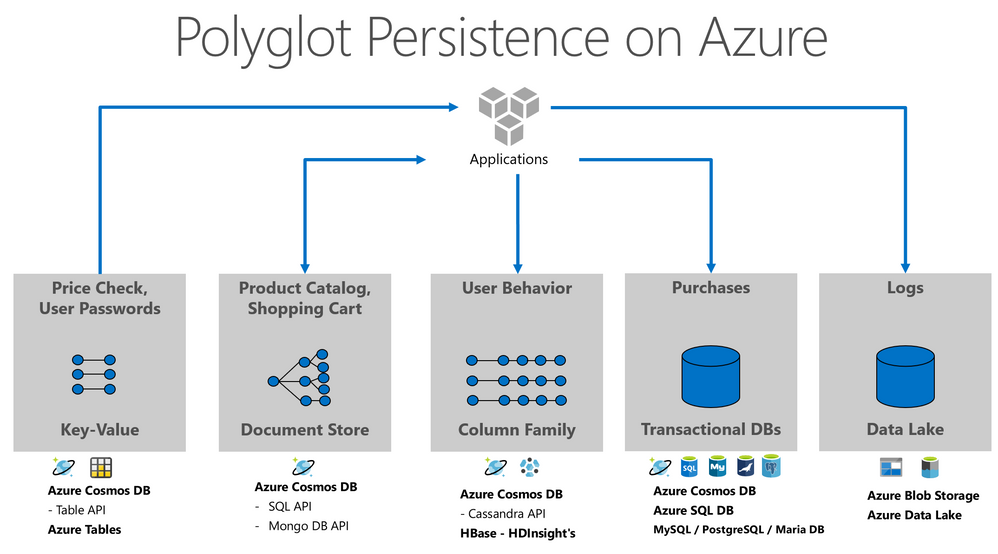
The modern data professional needs tools to handle and manage all this data, the trade-offs of polyglot persistence are orchestration and governance. Buck Woody wrote a great blog post about Azure Data Studio, a great tool to support the challenges of this new era.
The Future
Right now, we are seen the growth of concepts that extend the ideas presented in this post, like Data Mesh and micro-frontends. Also, Azure’s teams just released a data product called Azure Synapse Link, that enable HTAP scenarios in your Data Architecture. It allows NoETL analytical solutions, avoiding complexity of ETL jobs and all other data integration activities.
We can say that Big Data is too big to be moved around your environment, what created this in-place analytics, or NoETL solution. Azure Cosmos DB was the first Azure PaaS database to offer this automatically integration, but we can predict that other services will follow the same path.
by Scott Muniz | Jul 10, 2020 | Uncategorized
This article is contributed. See the original author and article here.
Want to help foster growth in the Humans of IT Community? Passionate about using tech for good and giving back to the community by helping others thrive professionally?
If so, apply to be a Humans of IT Community Ambassador today! You will get the opportunity to be a key representative, contributor and driver of Tech for Good and professional development initiatives, programs, and resources within the Humans of IT community.
The goals of the program are to:
- Help cultivate community through both online community and event experiences (e.g. on Tech Community, at various Microsoft events etc)
- Share perspectives, ideas, and identify improvement opportunities within the Tech for Good space
- [For active MVPs/RDs] Share Tech for Good knowledge within the MVP/RD community, and help host Humans of IT MVP/RD bi-monthly PGI Calls
Benefits for Community Ambassadors include:
- Build your portfolio with first priority to participate at Humans of IT events, guest writing opportunities on the Humans of IT blog, and visibility as a Tech for Good leader in the community
- Gain access to speaking and mentoring opportunities
- Learn, connect and engage with other MVPs, RDs, and technologists on important tech for good topics
- Grow your own personal and professional networks to develop a meaningful career
- Receive a special Humans of IT Community Ambassador Welcome Kit as a token of our appreciation
The ideal ambassador is:
- An MVP, RD or outstanding community leader with experience in the Tech for Good and/or social impact space
- A compassionate individual who cares deeply about community and inspiring others
- A professional who believes in empathy, authenticity, and spreading kindness in tech
- An individual who has built resources and tools for community members to leverage
- An excellent public speaker and/or writer who is able to clearly share ideas
Roles and responsibilities:
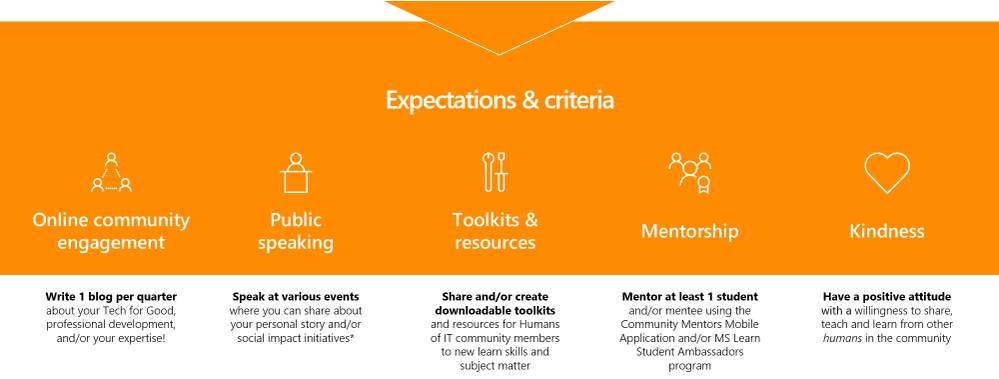
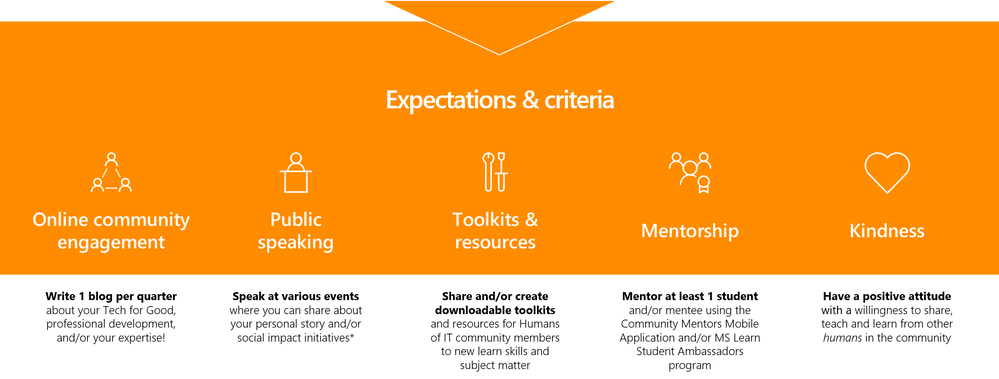 Roles and responsibilities include online community engagement, public speaking, toolkits and resources, mentoring others and spreading kindness in tech
The estimated time commitment for an ambassador is approximately 10-15 hours per quarter, and is for a 12-month term. Community ambassadors will have ad-hoc participation based on event calendar availability and will be required to attend quarterly check-ins with the Humans of IT team.
Ready to apply? Submit your application at https://aka.ms/communityambassador, or nominate someone awesome at https://aka.ms/nominateambassadors. Important note: Please ensure that you are a member of the Humans of IT Community before you apply. We are specifically looking for individuals who truly understand and live out the values of the Humans of IT Community.
We can’t wait to see what you will achieve in building a kinder tech industry for all!
#HumansofIT
#CommunityAmbassadors

by Scott Muniz | Jul 10, 2020 | Uncategorized
This article is contributed. See the original author and article here.
We’re pleased to announce the new addition of several charter partners to the Microsoft 365 Content Services Partner Program. Our partners – including system integrators (SIs) and independent software vendors (ISVs) – help customers worldwide realize the value of Microsoft 365 – from migrating customers off legacy platforms to helping them implement and extend the capabilities of Microsoft Content Services and Project Cortex.

After onboarding our current set of charter partners in August 2019, we’re excited to add new partners to our set of innovators, advisors, and integrator s. This group of partners have completed all the requirements to be recognized as charter members of the program. We think it’s best to let their own success with customers speak for them. Microsoft greatly appreciates their partnership.
Below is a sampling of the projects our charter members have recently delivered to show you what’s possible with Microsoft Content Services:
To read more on the awesome work our partners have been doing, visit our Case Studies library on the Microsoft Tech Community Resource Center.
We’ll be highlighting our partners later this month at Microsoft Inspire. Our partners remind us that we all work together the help our customers achieve more, and we’ll be introducing new ways for partners to join us on this journey in the months and years to come.
To learn more about the charter members of the Microsoft Content Services Partner Program, visit the Content Services Partners page


Recent Comments