by Scott Muniz | Jul 10, 2020 | Uncategorized
This article is contributed. See the original author and article here.
Workload isolation in Azure Synapse Analytics is now generally available where you can use workload groups to reserve, contain, and manage resources across different workloads running on your SQL pool. Previously users had to provision, secure, and manage multiple pools with different endpoints orchestrating additional ETL processes to achieve workload isolation and avoid resource contention. This can become an expensive and a complex process to manage where you can end up with multiple production environments each with potentially hundreds of end users running queries at different times. There are also scenarios where adhoc end users can submit poorly written and runaway queries which consume unnecessary resources. Having comprehensive workload management capabilities is critical to achieving consistent performance and reducing time to insight to meet your business objectives.
With the general availability of workload isolation, you can use familiar T-SQL syntax to quickly ensure resources are appropriately allocated and managed for your most demanding workloads. Workload isolation can all be done within a single pool where you no longer need to manage multiple endpoints. You can also configure query timeouts to cancel any runaway queries without having to build alerting infrastructure or manually connect to your database to cancel these queries.
The simple example below demonstrates how to configure a single workload group where 100% of resources from the SQL pool will be allocated to a single load. This is an extreme example of workload isolation which can be used when you need to initially onboard and ingest a dataset as quickly as possible:
CREATE WORKLOAD GROUP adhocdataload
WITH (
        MIN_PERCENTAGE_RESOURCE = 100
      , CAP_PERCENTAGE_RESOURCE = 100
      , REQUEST_MIN_RESOURCE_GRANT_PERCENT = 100
      , QUERY_EXECUTION_TIMEOUT_SEC = 900 --Load cannot be longer than 15 minutes
);

CREATE WORKLOAD CLASSIFIER [adhocloader]
WITH (
        WORKLOAD_GROUP = 'adhocdataload'
      , WLM_LABEL = 'COPYStatement'
      , MEMBERNAME = 'myloaduser'
);
Requests coming from the ‘myloaduser’ user will automatically be classified to the ‘adhocdataload’ workload group which will be given 100% of the SQL pool resources.
For more information on workload isolation, see the following documentation:
by Scott Muniz | Jul 10, 2020 | Uncategorized
This article is contributed. See the original author and article here.
Ready for a few new tricks? This week, Alireza Aliabadi shows us how to turn a range of cells into a table via Power Automate, Doug H teaches us how to convert numbers into words using VBA, and Mike Girvin over at excelisfun explains a few different ways to change DD.MM.YYYY text into actual dates. If you find these helpful, be sure to check out their channels!
Learn more about the Microsoft Creators Program.
See more from Alireza Aliabadi
See more from Doug H
See more from excelisfun
by Scott Muniz | Jul 10, 2020 | Uncategorized
This article is contributed. See the original author and article here.
Hey there! Josh Mora here, with a brief post on an issue I recently had and wanted to make public, in hopes this will help those that run into this issue, and in addition, provide some helpful logging information that can be useful for any ADWS issues you might come across.
Scenario:
So, the issue I want to talk to you about: You have an AD LDS server, on which you are running ADWS, and you are constantly, minute after minute after minute, getting Event 1202 in the ADWS events with the following information:
Log Name:      Active Directory Web Services
Source:        ADWS
Date:          5/05/2020 1:30:00 PM
Event ID:      1202
Task Category: ADWS Instance Events
Level:         Error
Keywords:      Classic
User:          N/A
Computer:      LDS01.Contoso.com
Description:
This computer is now hosting the specified directory instance, but Active Directory Web Services could not service it. Active Directory Web Services will retry this operation periodically.

Directory instance: ADAM_INSTANCE
Directory instance LDAP port: 389
Directory instance SSL port: 636
Now, this might not even be disrupting your services, everything may continue to work properly. However, this excessive logging of 1202 events can become annoying, and even troubling, since it very well could be indicating issues that you aren’t even aware of. So, let’s jump straight into how we can find the cause of this, and how we resolve it.
ADWS Debug Logging:
In this situation, I used the built-in functionality of ADWS Debug Logging. Enabling the debug logging consists in modifying the “Microsoft.ActiveDirectory.WebServices.exe.config” file, a file you can modify with different configuration parameters in order to achieve some extra functionality out of ADWS, information which is explained in this Microsoft Documentation. Unfortunately, that documentation doesn’t go over the parameters for enabling the Debug Logging, hence why I am posting this.
Checking ADWS Configuration Information:
Special thanks to Jason Bender, who put these two commands together that conveniently provide the configuration information from the ADWS Config file.
- In a PowerShell window, run the following: [xml]$ADWSConfiguration = get-content -path c:windowsadwsmicrosoft.activedirectory.webservices.exe.config
- Then, run: $ADWSConfiguration.configuration.appsettings.add
- You should get an output like this:
Enabling ADWS Debug Logging:
- Navigate to ‘C:WindowsADWS’. The file we are looking to modify is “Microsoft.ActiveDirectory.WebServices.Exe.Config”.
- Now, before making any changes, I strongly suggest to take a backup of the “Microsoft.ActiveDirectory.WebServices.Exe.Config” file. You can never be too safe!
- Right-click the file “Microsoft.ActiveDirectory.WebServices.Exe.Config”, then Open with, and select Notepad, or any other text editor. Right under <appSettings>, enter the following two lines:
<add key=”DebugLevel” value=”Info”/>
<add key=”DebugLogFile” value=”C:WindowsDebugADWSlog.txt”/>
This Config file does not tolerate the smallest mistake, so make sure you do not have any typos or extra spaces.
- Once the file has been modified, save the file and then restart the ADWS service for the changes to take effect.
- You can then run the PowerShell commands and should now be able to see the DebugLevel and DebugLogFile set.
Information to keep in mind:
- Typos or extra spaces in the Config file can cause the ADWS service to fail to start with the following error: “Windows could not start the Active Directory Web Services service on Local Computer. Error 1053: The service did not respond to the start or control request in a timely fashion.”
- There are other debug levels for the DebugLevel parameter, including “None”, “Warn” and “Error”. However, the most helpful and informative is “Info”.
- The DebugLogFile location can be specified per your needs, it’s not a fixed location for the log file.
- This ADWS Debug Logging can log a lot of information when set to “Info”, so it’s suggested to only have this running while you are reproducing your issue, after which you should disable the logging, by deleting the lines that were added.
Analyzing the ADWS Debug Log file:
To clarify, this blog is not a guide on overall analysis of the ADWS Debug Log file, but more focused on the issue at hand, the excessive 1202 events, so that’s what I will be addressing.
The first we see, is the ScavengerThread waking up and begin looking for Instances:
LdapSessionPoolImplementation: [05/05/2020 1:29:40 PM] [8] ScavengerThread: woke up
LdapSessionPoolImplementation: [05/05/2020 1:29:40 PM] [8] ScavengerThread: processing next pool
ConnectionPool: [05/05/2020 1:29:40 PM] [8] GetReservationEnumerator: entering, instance=NTDS
LdapSessionPoolImplementation: [05/05/2020 1:29:40 PM] [8] ScavengerThread: processing next pool
ConnectionPool: [05/05/2020 1:29:40 PM] [8] GetReservationEnumerator: entering, instance=ADAM_INSTANCE
LdapSessionPoolImplementation: [05/05/2020 1:29:40 PM] [8] Scavenger: waking up at 00:00:40 interval
EnumerationContextCache: [05/05/2020 1:30:00 PM] [b] OnTimedEvent: got an event
EnumerationContextCache: [05/05/2020 1:30:00 PM] [b] RemoveExpiredEntries called
EnumerationContextCache: [05/05/2020 1:30:00 PM] [b] RemoveExpiredEntries — found 0 entries to remove
EnumerationContextCache: [05/05/2020 1:30:00 PM] [b] RemoveExpiredEntries done
Next, we see ADWS checking registry keys for NTDS, in order to determine if this Instance is actually servicing:
InstanceMap: [05/05/2020 1:31:00 PM] [d] CheckAndLoadNTDSInstance: entered
InstanceMap: [05/05/2020 1:31:00 PM] [d] CheckAndLoadNTDSInstance: found NTDS Parameters key
At this point, ADWS has found that there is an NTDS Parameter registry key (which would contain all the NTDS settings), and due to the presence of this key, ADWS believes this is a Domain Controller providing ADDS services.
So, now ADWS checks to see if we are indeed meeting basic requirements for providing ADDS services, more specifically if the server is providing Global Catalog services:
InstanceMap: [05/05/2020 1:31:00 PM] [d] CheckAndLoadGCInstance: entered
InstanceMap: [05/05/2020 1:31:00 PM] [d] CheckForGlobalCatalog: entered
DirectoryUtilities: [05/05/2020 1:31:00 PM] [d] GetTimeRemaining: remaining time is 00:02:00
InstanceMap: [05/05/2020 1:31:01 PM] [d] CheckForGlobalCatalog: isGlobalCatalogReady:
InstanceMap: [05/05/2020 1:31:01 PM] [d] GlobalCatalog is not ready to service the requests.
InstanceMap: [05/05/2020 1:31:01 PM] [d] CheckAndLoadGCInstance: CheckForGlobalCatalog=False
At this point, we can see the failure, which is triggering the event 1202.
After this, ADWS moves on to checking ADAM Instances are ready for servicing, as well, however we no longer care for that “noise” in the log file, as we’ve found our problem.
Interpretation of the Data:
The data above tells us the following:
- An NTDS Parameters registry key was found, therefor ADWS is aware NTDS Instance possibly exists on this server.
- Because of the previous point, ADWS now believes that this server is providing ADDS services (though it is not, it is an LDS server).
- Since ADWS believes this is a DC, it checked if Global Catalog is ready and/or if the ports are opened and servicing, however it found that this is false.
So, in simple words, ADWS was tricked into believing that this was a Domain Controller, however since it’s not a Domain Controller, the isGlobalCatalogReady/CheckForGlobalCatalog obviously failed.
This triggers the Event 1202 to get logged, being logged every minute (because that is the default interval in which this check is performed).
Solution:
The solution in this case is very clear and simple. An AD LDS server is not supposed to have a Parameters key under NTDS, as it’s not a Domain Controller and should not/will not require any of the values specified under that key.
Navigate to HKEY_LOCAL_MACHINESystemCurrentControlSetServicesNTDS, and delete the Parameters key.
A Similar Scenario:
There are other situations, in which the same 1202 event is logged, but perhaps the server is not an AD LDS server, but rather an actual Domain Controller. In these scenarios, the common solution is to delay the startup type for the ADWS service.
This is because, in those cases, the issue is due to a “race condition”, where ADWS begins performing it’s checks before ADDS services has started, and therefor fails the check and logs the event. I have only seen this scenario with Domain Controllers running 2012 R2 and below.
Thank you, and that’s all for now!
– Josh

by Scott Muniz | Jul 10, 2020 | Azure, Microsoft, Technology, Uncategorized
This article is contributed. See the original author and article here.

The ultimate guide to Microsoft Teams based approvals
Laura Kokkarinen is an MVP in the Office Development category, and works as a senior software developer and architect at Sulava in Finland. She has been coding for SharePoint and Office 365 since 2011. Today, her main focus is implementing customizations for Microsoft 365 by utilizing SharePoint Framework, Azure services and the Power Platform. Laura writes a Microsoft 365 and Azure focused blog for other developers at laurakokkarinen.com, and regularly shares her knowledge at international conferences. Follow her on Twitter @LauraKokkarinen.

Simplified YouTube live streaming with Azure and OBS Studio
Ihor Leontiev is an MVP for Microsoft Azure, yet ranges in experience from OpenStack to .NET development. Hailing from Ukraine, Ihor’s work takes him all around the world as he offers technical advice to various businesses, largely focusing on manufacturing and transportation. Follow him on Twitter @LeontievIhor

What’s the maximum number of generic parameters for a class in .NET/C#?
Jiří Činčura is an independent developer focusing on data and business layers, language constructs, parallelism and databases. Specifically Entity Framework, asynchronous and parallel programming, cloud and Azure. He’s a Microsoft MVP and you can read his articles, guides, tips and tricks at www.tabsoverspaces.com. Follow him on Twitter @cincura_net.

gRPC & ASP.NET Core 3.1: Message validation
Anthony Giretti is a specialist in web technologies with 14 years of experience. He specializes in particular in Microsoft .NET and he is currently learning the Cloud Azure platform. He has twice received the Microsoft MVP award and he is also a certified Microsoft MCSD and Azure Fundamentals. Follow him on Twitter @anthonygiretti.

Azure Security : Firewall vs NSG
George Chrysovalantis Grammatikos is based in Greece and is working for Tisski ltd. as an Azure Cloud Architect. He has more than 10 years’ experience in different technologies like BI & SQL Server Professional level solutions, Azure technologies, networking, security etc. He writes technical blogs for his blog “cloudopszone.com“, Wiki TechNet articles and also participates in discussions on TechNet and other technical blogs. Follow him on Twitter @gxgrammatikos.
by Scott Muniz | Jul 10, 2020 | Uncategorized
This article is contributed. See the original author and article here.
As we continue to develop native connectors for Microsoft Search, we’d like to invite you or your customers to participate in a private preview program for our upcoming Salesforce connector.
We’re excited to work with you to learn how you would use this connector and listen to your feedback. We’d love to have a range of customers and partners of different sizes and industries with a wide variety of business scenarios. Since we are still in very early stages, please use the form below to nominate your customer or organization for private preview inclusion and we will contact you if your organization is accepted. We thank you so much for your interest!
Connectors expand the types of content sources that are searchable in your Microsoft 365 productivity apps and the broader Microsoft ecosystem. You can read more about the Microsoft Search & Graph Connectors here: http://aka.ms/MicrosoftSearch/Connectors.
Interested? Complete our nomination form here. The survey will take approximately 3 minutes to complete.
by Scott Muniz | Jul 9, 2020 | Azure, Microsoft, Technology, Uncategorized
This article is contributed. See the original author and article here.
With all the changes in Azure, it is sometimes hard to keep track, that’s why I thought I would give you a quick update on a couple of exciting things I learned this week. In this update, I want to share a couple of things around updates on Azure Arc enabled SQL Servers, private endpoints for Azure File Sync, Azure Private Link support for Azure Automation, Azure Digital Twins enhanced features, and much more! Also, tune in for our livestream later today.
Preview of Azure Arc enabled SQL Server is now available
The Azure Data Services team just announced the private preview of Azure Arc enabled SQL Server. The preview includes the following features:
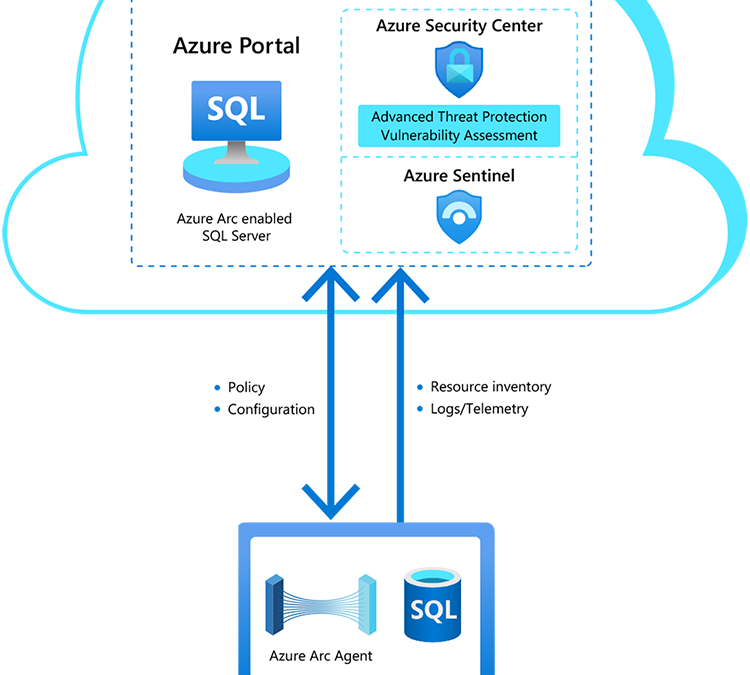
- Use the Azure Portal to register and track the inventory of your SQL Server instances across on-premises, edge sites, and multi-cloud in a single view.
- Use Azure Security Center to produce a comprehensive report of vulnerabilities in SQL Servers and get advanced, real-time security alerts for threats to SQL Servers and the OS.
- Investigate threats in SQL Servers using Azure Sentinel.
 Azure Arc enabled SQL Server is now available
You can register any Windows or Linux based SQL Server to track your inventory. Azure Security Center’s advanced data security works on Windows-based SQL Server version 2012 or higher, running on physical or virtual machines and hosted on any infrastructure outside of Azure.
If you are interested in participating in this preview, check out the full blog post here.
Azure Digital Twins enhanced features are now in preview
Continuing the #JulyOT theme from last week, Microsoft announces the preview release of Azure Digital Twins enhanced features. Create comprehensive digital models of entire environments to help gain insights that can drive better products, optimize operations, reduce costs, and create exceptional customer experiences with Azure Digital Twins Preview.
Private endpoints for Azure File Sync are now generally available
Starting with Azure File Sync agent 10.1, Azure File Sync supports private endpoints in all public and Azure US Government cloud regions where Azure File Sync is available. Private endpoints enable you to assign your Storage Sync Service private IP addresses from within the address space of your virtual network. Private endpoints for Azure File Sync allow you to:
- Securely connect to your Azure resources from on-premises networks using a VPN or ExpressRoute connection with private-peering.
- Secure your Azure resources by disabling the public endpoints for Azure Files and File Sync.
- Increase security for your Azure virtual networks by blocking exfiltration of data from your network boundaries.
You can learn more about configuring Azure File Sync network endpoints.
Azure Private Link support for Azure Automation is now available in preview
Another exciting news is the announcement of the preview of Azure Private Link Support for Azure Automation. You can now use Azure Private Link to securely connect virtual networks to Azure Automation using private endpoints (in preview).
Use Private link to:
- Establish a private connection to Automation without opening public network access.
- Ensure your Automation data is only accessed through authorized private networks.
- Protect data exfiltration with granular access to specific resources.
- Protect resources from public network access.
Use endpoints to:
- Use webhooks to start a runbook.
- Connect Hybrid Runbook Worker.
- Connect Azure DSC nodes.
You can learn how to use Private Link to securely connect networks to Automation here.
Fun IoT projects to do at home during #JulyOT
As they find themselves spending more time at home, people are finding creative ways to strike a new work-life balance using the Internet of Things. Here are the stories of three IoT hobbyists and their home projects that will inspire your creativity too. Stories include connecting a Raspberry Pi to a BBQ smoker to help grill a perfect set of ribs and monitoring moisture levels in plants.
MS Learn Module of the Week

Get started with artificial intelligence on Azure
Artificial Intelligence (AI) empowers amazing innovative solutions and experiences, and Microsoft Azure provides easy to use services to help you get started.
Conclusion
I wish you a good weekend, and I hope this short blog post provided you with some news from this week. I know there is much more than just the things I listed here. I recommend that you follow the Azure announcements blog. If you have any questions, feel free to leave a comment.
Also, check out last week’s Az Update here.
by Scott Muniz | Jul 9, 2020 | Azure, Microsoft, Technology, Uncategorized
This article is contributed. See the original author and article here.
With all the changes in Azure, it is sometimes hard to keep track, that’s why I thought I would give you a quick update on a couple of exciting things I learned this week. In this update, I want to share a couple of things around updates on Azure Arc enabled SQL Servers, private endpoints for Azure File Sync, Azure Private Link support for Azure Automation, Azure Digital Twins enhanced features, and much more! Also, tune in for our live stream later today.
Preview of Azure Arc enabled SQL Server is now available
The Azure Data Services team just announced the private preview of Azure Arc enabled SQL Server. The preview includes the following features:
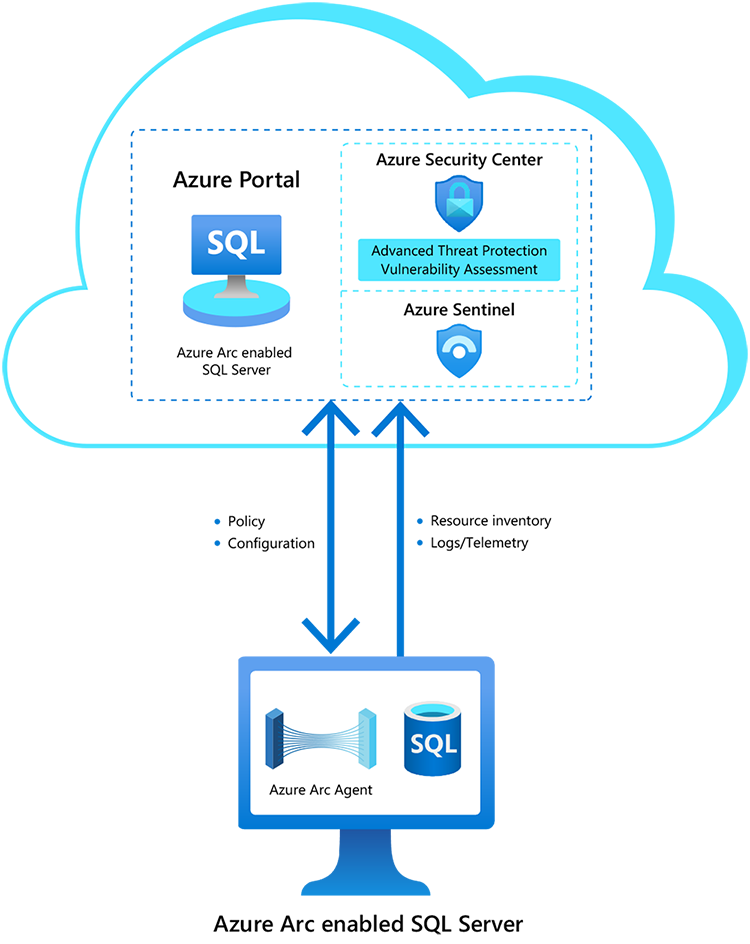
- Use the Azure Portal to register and track the inventory of your SQL Server instances across on-premises, edge sites, and multi-cloud in a single view.
- Use Azure Security Center to produce a comprehensive report of vulnerabilities in SQL Servers and get advanced, real-time security alerts for threats to SQL Servers and the OS.
- Investigate threats in SQL Servers using Azure Sentinel.
Azure Arc enabled SQL Server is now available
You can register any Windows or Linux based SQL Server to track your inventory. Azure Security Center’s advanced data security works on Windows-based SQL Server version 2012 or higher, running on physical or virtual machines and hosted on any infrastructure outside of Azure.
If you are interested in participating in this preview, check out the full blog post here.
Azure Digital Twins enhanced features are now in preview
Azure Digital Twins enhanced features are now in preview. Create comprehensive digital models of entire environments to help gain insights that can drive better products, optimize operations, reduce costs, and create exceptional customer experiences with Azure Digital Twins Preview.
Private endpoints for Azure File Sync are now generally available
Starting with Azure File Sync agent 10.1, Azure File Sync supports private endpoints in all public and Azure US Government cloud regions where Azure File Sync is available. Private endpoints enable you to assign your Storage Sync Service private IP addresses from within the address space of your virtual network. Private endpoints for Azure File Sync allow you to:
- Securely connect to your Azure resources from on-premises networks using a VPN or ExpressRoute connection with private-peering.
- Secure your Azure resources by disabling the public endpoints for Azure Files and File Sync.
- Increase security for your Azure virtual networks by blocking exfiltration of data from your network boundaries.
You can learn more about configuring Azure File Sync network endpoints.
Azure Private Link support for Azure Automation is now available in preview
Another exciting news is the announcement of the preview of Azure Private Link Support for Azure Automation. You can now use Azure Private Link to securely connect virtual networks to Azure Automation using private endpoints (in preview).
Use Private link to:
- Establish a private connection to Automation without opening public network access.
- Ensure your Automation data is only accessed through authorized private networks.
- Protect data exfiltration with granular access to specific resources.
- Protect resources from public network access.
Use endpoints to:
- Use webhooks to start a runbook.
- Connect Hybrid Runbook Worker.
- Connect Azure DSC nodes.
You can learn how to use Private Link to securely connect networks to Automation here.
Fun IoT projects to do at home during #JulyOT
As they find themselves spending more time at home, devs are finding creative ways to strike a new work-life balance using the Internet of Things. Here are the stories of three IoT hobbyists and their home projects that will inspire your creativity too.
MS Learn Module of the Week
Get started with artificial intelligence on Azure
Artificial Intelligence (AI) empowers amazing new solutions and experiences, and Microsoft Azure provides easy to use services to help you get started.
Conclusion
I wish you a good weekend, and I hope this short blog post provided you with some news from this week. I know there is much more than just the things I listed here. I recommend that you follow the Azure announcements blog. If you have any questions, feel free to leave a comment.
Also, check out last week’s Az Update here.
![[Guest blog] 5 Tips to Create Accessible Canvas Power Apps](https://www.drware.com/wp-content/uploads/2020/07/large-360)
by Scott Muniz | Jul 9, 2020 | Uncategorized
This article is contributed. See the original author and article here.
This article was written by Business Applications MVP Éric Sauvé as part of the Humans of IT Guest Bloggers series. Eric shares key tips to create canvas Power Apps that are accessible to users who may have a visual impairment or are color blind, require screen reader or do not use a mouse or a touch screen.
What a nice way for me to return to active community contribution through writing this article and sharing my own learnings and perspectives!
I am a Power Platform Practice Lead and acting Solution Architect many Dynamics and Power Platform projects. In the past few years, I have been pretty active in conferences, user groups, and community training, but recently the whole lockdown and moving into virtual mode has greatly impacted me.
It has been hard to stay motivated when my fuel is mostly based on human contact and being able to bond and connect with people. Enabling others, having an impact on their lives, and allowing them to also create positive impact in other people’s lives are reasons why I continue to share and contribute so much of my time to events. When COVID-19 happened and everything got converted to virtual events, I felt deeply saddened and alone. To me, it felt worse than being single on Valentine’s Day.
It was about this time when I was at my lowest point of this downward spiral that the Humans of IT Community suggested the idea of participating in this blog. I want to thank my CPM Rochelle Sonnenberg for helping making this connection happen and unknowingly giving me the motivation I needed to jump back on the saddle.
So, that is for my “Human” side, let us now consider the “of IT” side of the equation. For this article, I have created a series of tips that can help you create canvas Power Apps that are accessible to users who may have a visual impairment, are color blind, require screen reader or even those who do not or cannot use a mouse or a touch screen for example.
1. App Checker is Your Friend
Within the Power Apps canvas studio, there is an integrated tool that continuously validates if the app is healthy and flags any errors that should be investigated. One of the sections that this App Checker tool validates is the accessibility issues that could improve the application. It is good practice to thoroughly review this section and address those issues before publishing your app to your user base, based on their severity level:
- Errors: Means that the app has issues causing it to be difficult or impossible to use or understand for all users with a disability
- Warnings: Means that the app has issues that make it potentially difficult to use or understand for most but not all users with a disability
- Tips: Suggestions to improve the experience of users who have a disability
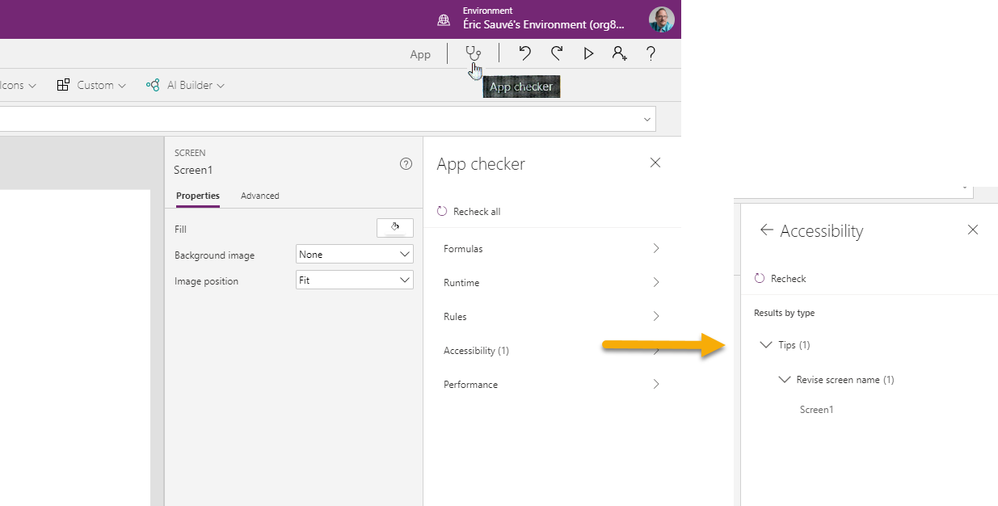
Figure 1 – App checker with Accessibility section
2. Layout and Color Matters!
The Web Content Accessibility Guidelines (WCAG) offer an exhaustive list of recommendations that any organization that is serious about providing accessible Power Apps should be familiar with and include in the revision (Q&A) cycle.
If there is one goal that an app maker should try to achieve in building an app that will be accessible to people who may have a color-based impairment, it is about the color contrasts. Any large text or other interactive UI components (such as buttons) should have a minimum contrast ratio of 3:1. As for regular text, a contrast ratio of 4.5:1 is considered the minimum value.
In the canvas apps, color settings for the components/controls, usually work in pairs:
- Color: the front-most color, can be for the text, line, border, etc.
- Fill: the background color, depending on the action/status, such as pressed, hover, focused, etc.
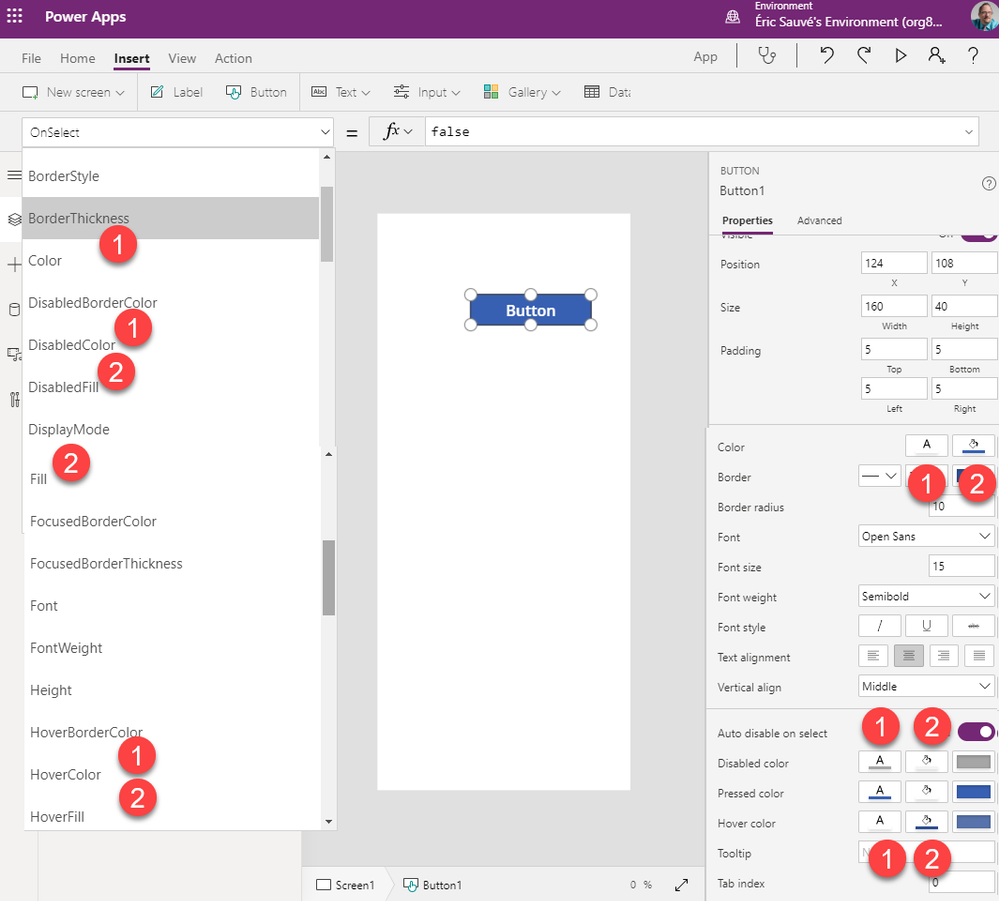
Figure 2 – Different examples of related color and fill properties for a button in a Canvas app
If you want to understand and validate your colors to ensure they are accessibility-compliant, you can use online tools such as the MSF&W color contrast ratio calculator.
3. Provide Keyboard Support
Remember that some app users may not be able to use a touch screen or a mouse, so they should be able to navigate through them via the use of keyboard only. The guidelines to ensure broader support is as follows:
- Interactive components (buttons, inputs, etc) – set TabIndex property to 0
- Decorative components (labels, images, etc) – set TabIndex property to -1
- Avoid setting tab index higher than 0 (see W3C warning)
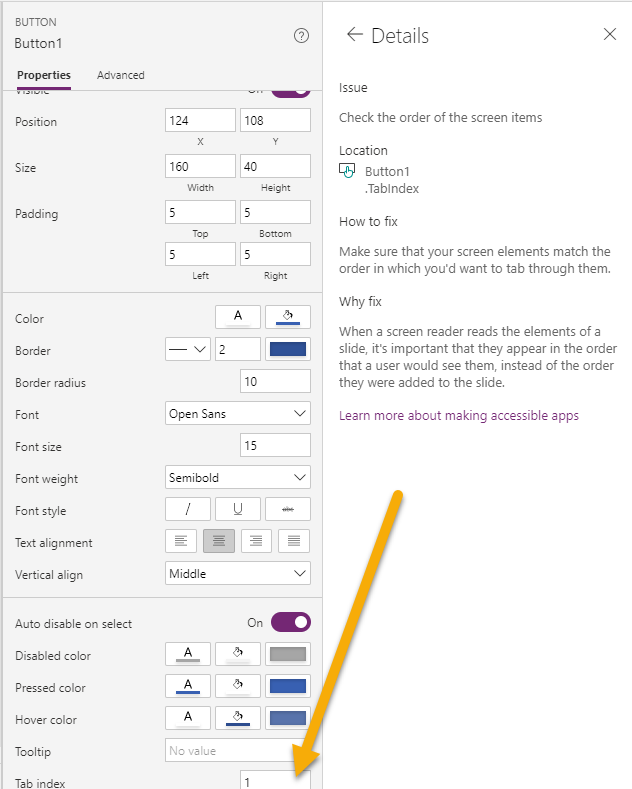
Figure 3 – Demonstration of a Tab index set to 1
4. Screen Reader Support
Power Apps offer screen support over multiple operating systems. To provide support for these, app makers should ensure that all AccessibleLabel properties are set (on input controls and images).
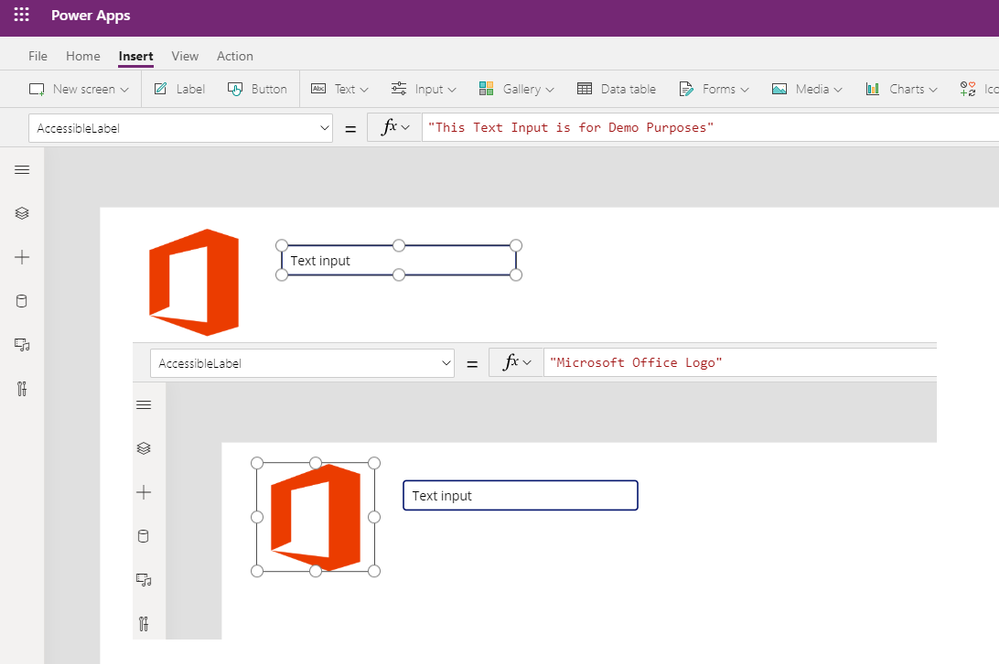
Figure 4 – Examples of image and input field with AccessibleLabel property
5. Accessibility Benefits Everyone
Keep in mind that the best Quality Assurance team you can have should include people with various accessibility needs. When designing an app, make sure you get input and feedback from fellow coworkers or community users that have various accessibility requirements so you can test that your app is truly accessible.
If you are not sure who to reach out to in your organization, try reaching out to your community or specialized centers instead. They will surely embrace the fact that you consider their needs and take them into account in your app design, and can guide you to resources that can help you test your apps.
Conclusion: It’s A Journey – Keep Trying Till It Becomes Second Nature!
This is a very high-level review of accessibility considerations and concepts that you can apply in your canvas Power Apps. Start implementing these in your upcoming projects – you’ll be amazed by what you will learn and achieve. These tips are easy to implement, and you can readily get feedback to improve until designing for accessibility becomes second nature for you. Feel free reach out to me as well if you need help!
About Eric
Éric Sauvé is a MCT & MVP (aka ZePowerDiver), Power Platform Practice Lead, Solution Architect, and Consulting Service Director at XRM Vision. He is a community leader for TDGi‘s global hackathons in Canada. A Power Platform enthusiast, he often delivers App in a Day sessions and leads local community events such as the Montreal Power Platform Happy Hour. Eric also actively participates in his local Montreal Business Application User Group, and has spoken at numerous Power Platform and Dynamics CE related conferences.
Connect with Eric:
LinkedIn: https://www.linkedin.com/in/zepowerdiver
References for this article:
Power Apps Accessibility Standards and Guidelines
Create accessible canvas apps in Power Apps
How do Power Apps support accessibility and Inclusiveness?
Accessibility properties for canvas apps
Review a canvas app for accessibility in Power Apps
Accessible colors for canvas apps in Power Apps
Screen Reader Photo by Sigmund on Unsplash
#HumansofIT
#Accessibility
#TechforGood
by Scott Muniz | Jul 9, 2020 | Uncategorized
This article is contributed. See the original author and article here.
Since the announcement of Update Staging Lab (USL) at Microsoft Ignite 2019, several things have changed. The current global health situation has dramatically shifted the way we work and socialize. As many of us adjust to a new “normal” that includes remote work, organizations big and small are turning to technology to help with collaboration and staying productive and leveraging cloud and automation solutions to ensure business continuity. With Update Staging Lab team, we have been working hard to ensure that software vendors have the capabilities they need to conduct remote application testing and support a reliable, productive experience for their end users.
What is Update Staging Lab?
Update Staging Lab is an Azure service that facilitates data-driven testing of applications on Azure. Backed by the power of data and the cloud, the service enables you take advantage of intelligent testing from anywhere in the world. If you are a developer or a tester, you do not want to worry about whether apps will continue to work as dependencies (such as the latest Windows updates) change. That is exactly why we created Update Staging Lab. Want to learn more and sign up? Visit http://aka.ms/joinUSL.
Recent improvements to the Update Staging Lab service
During the private preview , we have continued to develop new features and capabilities based on the feedback we’ve received from customers like you. The improvements we’ve made to Update Staging include the following.
How the service works
Here’s a closer look at how the Update Staging Lab service works behind the scenes:
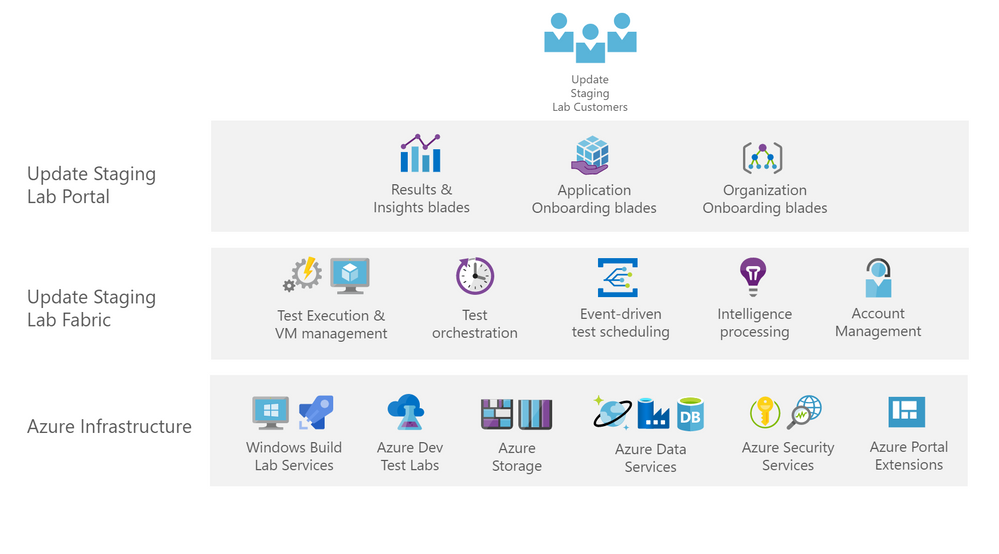
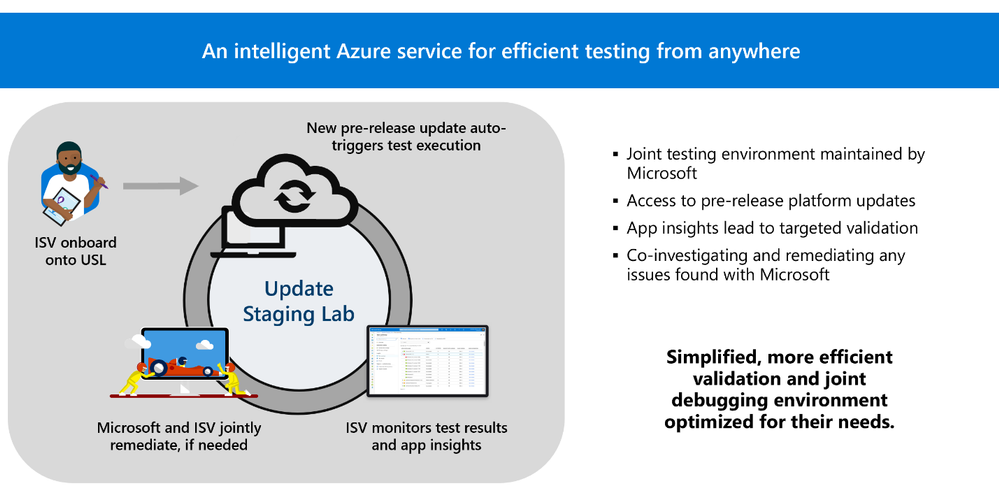
Once onboarded, software vendors interact with the Update Staging Lab service fabric through the Update Staging Lab portal on Azure. The Update Staging Lab service fabric contains key functionality valuable for orchestrating test passes on your applications. Each test pass is completely event driven. For example, in the current private preview, workflows focus on testing a user’s onboarded Windows applications against pre-release security updates every month.
For those that like the details, under the hood, this is how the service works. When Update Staging Lab service fabric gets notified that there is a new security update package in our build lab (which happens as early as three weeks prior to the release date for the monthly security update package), our microservices kick into action. A test pass is scheduled for all onboarded apps. Virtual machines (VMs) are provisioned with the upcoming pre-release monthly update on top of all the released OS versions for which the apps need to be tested. The test pass is orchestrated end-to-end, and the apps are launched on the VMs.
Specific signals that correlate with the health of applications – such as the performance footprint or application reliability data – flow into the Update Staging Lab intelligence service from the test VMs. These signals are processed by our intelligence service using algorithms that can automatically detect potential issues by comparing against the same signals collected from the previous months’ updates. The test pass also runs any automated test suites that the vendor has onboarded into Update Staging Lab. If there is any issue with any of a vendor’s onboarded applications, those issues are visible in the Update Staging Lab Portal along with test logs and additional application performance and reliability insights.
Built on top of other prominent Azure offerings, like Azure Dev Test Labs, which we use to provision and manage our VMs for test passes, Update Staging Lab is able to support testing for software vendors around the world using the same fabric employed by some of the massive internal testing we do within Microsoft.
What’s next on the roadmap for Update Staging Lab?
We are continuously listening to the software vendor community to better understand current testing practices and challenges. We then use feedback we gather to prioritize the next features and capabilities for the Update Staging Lab service. Examples of capabilities that you can expect to light up in the next few months are: support for Windows 7 monthly security updates, support for Windows Server 2016 and Windows Server 2019 monthly security updates, and easier ways to manage application packages you have already uploaded.
Join the community
If you are interested in shaping the future of this important service for the world, I invite you to come join us on the new Update Staging Lab communityU community on Tech Community where you can share your experiences and connect with other customers using (or who are interested in) the service. If you are an software vendor who is interested in onboarding your applications to Update Staging Lab, please complete the private preview sign-up form or bookmark https://aka.ms/JoinUSL to complete the form when it is convenient for you. If you are an IT professional whose organization is interested in nominating a software vendor for participation in the Update Staging Lab service, please complete the same form to nominate your vendor.
Finally, we participate in many events including Microsoft Inspire and Microsoft Ignite. If you are participating in those events, we would love to chat with you regarding your test operations and current challenges.
We look forward to hearing from you and continuing to evolve a service that we hope will help you tremendously in the months and years to come!

by Scott Muniz | Jul 9, 2020 | Uncategorized
This article is contributed. See the original author and article here.

This month at Microsoft we are celebrating July-O-T, a whole month devoted to the Internet of things. With this comes some fun projects that can be easily adapted to bring project-based-learning into the classroom to get hands on with IoT at all levels from K-12 to higher education.
We’re posting more links to different projects every Thursday in July at JulyOT.com so check back there each week, but here are the highlights so far:
Maker week – smart garden ornaments
The week of 13th July is our maker week, with a great project for younger students, or those new to programming and IoT. This is a 5 day project based around a Raspberry Pi and micro:bits. Students can program micro:bits using Microsoft MakeCode to gather sensor data about their environment and send the data to the cloud via a Raspberry Pi programmed in Python. The micro:bits act as a mesh network meaning you can build a network of sensors as large as you have micro:bits that can connect. Students can set this up around their school to track temperatures, light measurements, or even add additional sensors such as a soil sensor made out of wire and nails, and visualize the data on a dashboard.
 A plant with a home-made soil moisture sensor in the soil
This is a great first intro to IoT, and can cover learning objectives including block-based programming, algorithms, electronics, the principles of Cloud computing and the Internet of Things, and data analysis.
You can find all the instructions on GitHub in a hands on lab format, broken into 5 separate stages.
AI week – learn about AI on the edge
AI on the edge is about running AI models close to your IoT data to provide real-time analysis. This weeks project focuses on training AI models in the cloud, then running them on small, relatively low cost AI devices from NVIDIA. This project covers training an image detection model and running it in real-time against a live camera feed, then feeding back the data on what was recognized and visualizing it on dashboards.
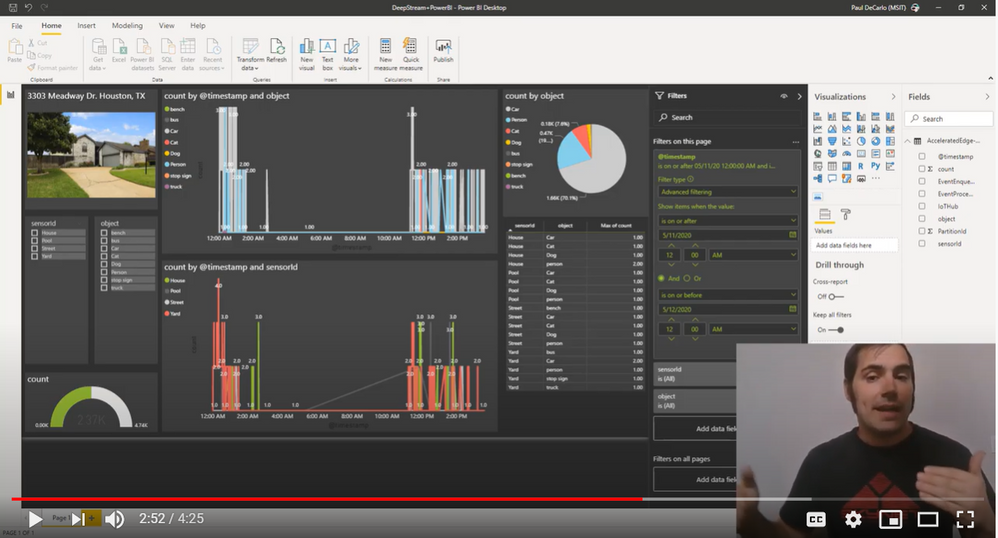 A power BI dashboard showing real time video analytics
This is a more advanced project, but is an ideal introduction to building AI models and running them on the edge. This can be used in the classroom to cover learning objectives around AI, training vision models, IoT Edge, data analysis, and data visualization.
You can find all the steps to recreate this project, as well as hands on videos on GitHub.
Get certified
A sneak preview of our last week – we’ll be focusing on all you need to get certified. Microsoft offers a certification in IoT – the AZ-220 Microsoft Azure IoT Developer certification. This is a great addition to any students CV. Some universities are even augmenting their degree programs with industry recognized certifications, and this is a great one to add to any IoT focused degree program or source.
The last week of July will focus on study guides and everything you need to prepare for this exam.
All the content you need for certification is available as part of Microsoft Learn, our on-line, self-guided, hands-on learning platform. Check out our IoT Learning paths.
There’s more!
There’s more projects coming each week, so keep checking JulyOT.com to see what’s new each week.


Recent Comments