by Scott Muniz | Aug 18, 2020 | Uncategorized
This article is contributed. See the original author and article here.
Ashlee Culmsee never planned to have a career in technology. Tech was boring, she thought, reserved for people like her dad.
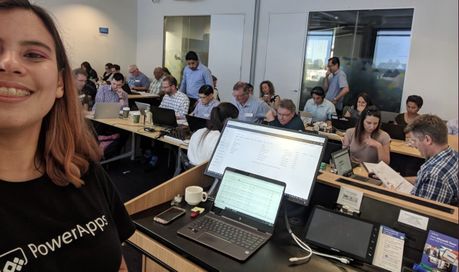
This all changed when her interest in PowerApps quickly evolved into mastery, with the Australian soon creating entire apps by herself and leading workshops. Now at 21 years of age, Ashlee is one of the youngest MVPs in the world and seeking to inspire other young women and young people to embark on careers in tech.
Hailing from Perth, Western Australia, Ashlee’s journey to this point has been defined by tech wizardry despite personal adversity. Ashlee describes her high school experience as a difficult one as she battled anxiety and social phobia. “I was too afraid to raise my hand in class, desperately trying to not draw attention to myself,” she recounts.
Fast forward to age 17. While her friends began working part-time jobs, Ashlee came to the realization that she could not see herself succeeding in that kind of environment. In fact, she questioned whether she would be able to cope in any sort of work environment at all. “My grades were dropping, I was severely depressed, and I was terrified of having to figure out what to do after high school,” Ashlee says.
Ashlee soon found one job that she could manage with respect to her social anxiety: delivering advertising materials and catalogues in her neighborhood. The long hours and low pay, however, forced her parents to consider if there was a better way for Ashlee to spend her time. According to her dad, Microsoft PowerApps offered the solution. Paul Culmsee – a Business Applications MVP in his own right – had been using the recently released suite with clients and recognized an opportunity. Paul decided he would pay his daughter the same amount of money as the delivery job if she dedicated a few hours a week learning the craft.
Ashlee agreed, and what began as a side gig soon morphed into a genuine skill and interest in tech. “I became familiar with the satisfaction of finally figuring out the one piece of code that wasn’t working the way it should, and the adrenaline rushes you get after everything works as planned,” she says. “It reminded me of how exciting it always felt when I finally cracked a maths problem or worked out the solution to a puzzle.”
Six weeks into Ashlee’s training and everything changed forever. Microsoft’s Senior Program Manager for Power Apps launched a competition to create a fidget spinner app without the use of animated gifs or videos. Ashlee entered a solution which used uniform circular motion to create movement – and promptly won the challenge. Overnight, the teenager from the most isolated city in the world had caught the attention of the Microsoft community, even scoring a job offer from Matt Velloso, the Technical Advisor to the CEO of Microsoft.
While Ashlee saw herself as a “random 18-year-old kid who had never studied IT and just played around with Power Apps as a hobby,” many saw otherwise. Ashlee quickly progressed into developing the “Universal Audit App” with her dad which streamlined auditing processes across multiple industries. As Ashlee’s career grew – attending international workshops with her father, gaining her first “real job” as a summer intern in her home city – so too did her confidence. The youngster soon realized that this hobby looked more and more likely as a career, and it was this realization that Ashlee wanted to share with other teenagers struggling with mental health and career prospects.
With support from the Microsoft office in Perth, the 19-year-old hosted PowerApps with PowerAsh. This free workshop for young people saw Ashlee overcome her social anxiety to teach those like herself on the possibilities of PowerApps. “The tables had turned, the roles were swapped, and I had a sudden moment of clarity where I realised that this was exactly where I wanted to be,” Ashlee says. “I felt comfortable, confident, and I enjoyed the entire thing so much that all I could think afterwards was ‘I want to do this again.’”


Ashlee’s whirlwind progression in all things Microsoft and PowerApps soon kicked up another notch in early 2019. At age 20, Ashlee became the youngest woman to be successfully nominated and named as a Microsoft MVP. “I was suddenly part of an incredible community full of talented and supportive people who were willing to guide and encourage me through my journey,” Ashlee says. “I now have a lot more confidence tackling more complex projects as I know that if I have any problems, there are dozens of people I can turn to for advice and technical support.”
In just three years, Ashlee has transformed from a teenager with social anxiety and no interest in IT to an internationally-recognized app developer who creates cost-saving apps for big businesses. The journey, Ashlee says, has been “one of the most incredible experiences of my life.”
“It’s helped me gain confidence, improve my mental health, and grow into the person I am today. I am so happy that I fell into this career,” she says.
“I’m not perfect. I still struggle, and some days I still find it difficult to interact with people, but I have come a long way and I would never have gotten to this point if I hadn’t stumbled into IT.”
For more on Ashlee, check out her blog and her Twitter @AshCulmsee
by Scott Muniz | Aug 18, 2020 | Uncategorized
This article is contributed. See the original author and article here.
Empowering Students and Beginners in Machine Learning with DirectML
Share your feedback on where hardware acceleration would benefit your workflows
Over the past few years, there has been increasing demand for introductory coursework in artificial intelligence and machine learning. Enrollment in Introduction to Machine Learning classes at universities in the US have grown as much as 12 times in the past decade[1]. These introductory courses play a key role in educating the future of machine learning professionals.
The rest of this post is meant as a follow-up to our press release highlighting our release of DirectML on WSL, NVIDIA CUDA support, and TensorFlow with DirectML package. Learn more
DirectML for Students and Beginners
The DirectML teams wants to ensure that the Windows devices students and beginners use can fully support their coursework. Our solution starts by providing hardware accelerated training on the breadth of Windows hardware, across DirectX 12 based GPU, via DirectML. The DirectML API enables GPU accelerated training and inferencing for machine learning models.

TensorFlow with DirectML
In June 2020, we took our first step to enable future professionals to leverage their current hardware across the breadth of the Windows ecosystem by releasing a preview package of TensorFlow with a DirectML backend.
Through this package, we are meeting students and beginners where they are by providing support for the models they want in a frameworks they use, all while making the most of their existing GPU hardware.
Students and beginners can start with the TensorFlow tutorial models or our examples to start building the foundation for their future.
Engage with our Community
If you try out the TensorFlow with DirectML package and run into issues, we would love to hear your feedback on our DirectML GitHub repo.
We are looking to engage with the community of educators to better understand key scenarios for students and beginners getting into machine learning. Share your thoughts in this survey to shape investments we make with DirectML to provide GPU hardware acceleration to additional ML tools and frameworks.
[1] https://hai.stanford.edu/sites/default/files/ai_index_2019_report.pdf
by Scott Muniz | Aug 18, 2020 | Uncategorized
This article is contributed. See the original author and article here.
With the new Yammer comes a new Yammer home feed. This is the place for you to catch up on conversations happening in the communities you belong to today and what’s most important to you.
Additionally, one superpower of Yammer is discovery – discovering new communities and new conversations that help broaden your perspective, includes viewpoints, deepens experiences that may not come across you path otherwise directly in your home feed.
What we have learned through the years is that our Yammer customers are curious – you want to know what is in your feed and why it’s there. Plus, we know that you want to be able to educate the rest of your organization when they have questions.
Below we are some ideas of how to use tools in Yammer to continue to boost the discovery of content within your network’s home feed.
What’s new with the Yammer feed?
The feed in Yammer has two main purposes – the first is to help you stay on top of your communities, people and topics you follow. And the second is discovery – there are so many conversations that are happening, the feed finds conversations from people, communities and topics that we think you might be interested in. We are constantly tweaking the feed based on your interactions with the people, communities, and conversations.
Once you are caught up in the communities you belong to, Yammer may point you to a new community that may be of interest to you.
And if you don’t regularly check Yammer.com you’ll receive Yammer discovery email that includes the highlights of the Yammer communities is based off previous interactions that you or your co-workers have made that you might find interesting. Plus, the Yammer mobile app feed will be the same as you see on the web, so you won’t miss anything when you are away from your desk.
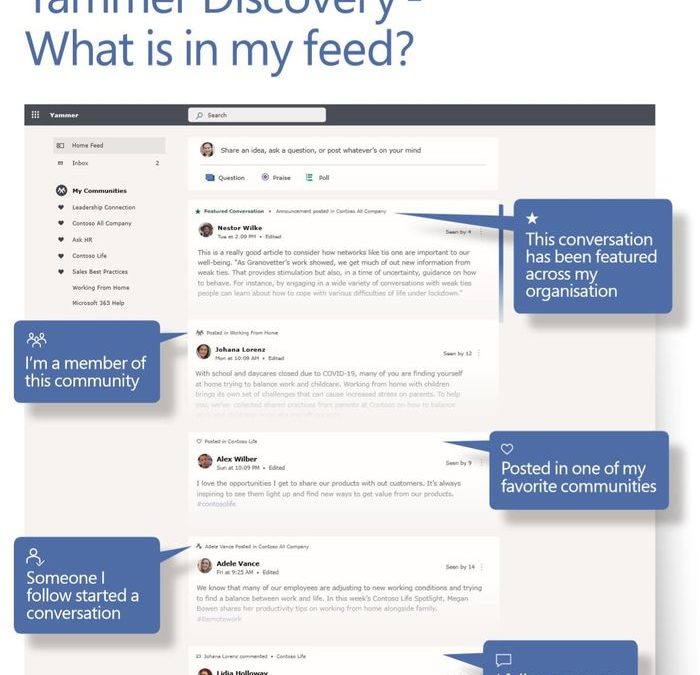
We have heard that you want to know what is in your feed and why. Your curiosity has helped with a project that will explain in product why you are seeing what you are seeing in your feed.
 Download this Yammer infographic and share with your communities as they begin to understand how their Yammer feed works!
How can I impact the feed?
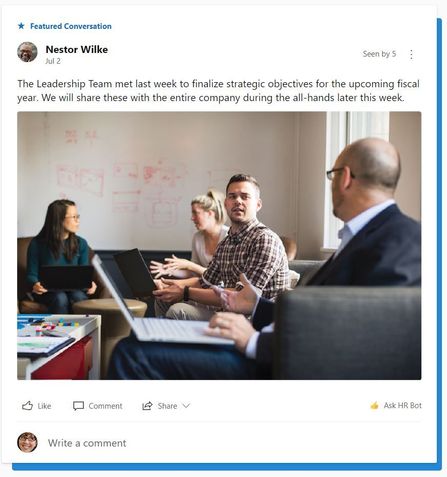
Network admins can select specific conversations to be Featured Conversations for a specific date. These conversations will be highlighted at the top of the Home Feed for everyone, until they have been read by the user. This can be a strategy for the network admins to help shape the culture, spotlight leaders and share expectations of specific use cases of Yammer. Once they have been read or interacted with, these featured conversations will still be highlighted but will not be at the top of the feed.
Also, Network admins will be able to Mute Communities from the home feed. These exist and thrive, but they won’t be the primary focus of content for the network.
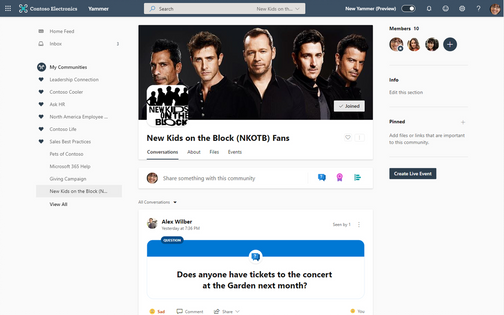
Community Admins can also send announcements, which creates notifications via email, your Yammer inbox as well as push notifications in mobile. will get a slight boost in the feed but aren’t guaranteed at the top, there’s a balance with push notifications and discovering directly in the feed.
All Yammer users have additional opportunities to curate their own feed. Yammer users can mark up to 10 specific communities as Favorite which helps to pull in content from those specific communities and similar communities into the feed.
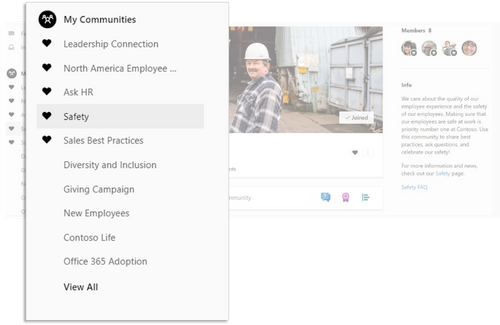
Furthermore, there may be communities that might not be as productive for you personally, and you as a user can mute specific communities. This allows you to keep the focus of your Yammer feed on what is important to you and your work.
What’s next?
We’re on a journey to continuously fine tune the algorithm and incorporate more signals from the rest of the Microsoft 365 suite as it relates to discovering new conversations in Yammer. We continue to work on improving the home feed to discover new communities, to include new conversations for different ideas, and bring people together throughout your organization regardless of geography or time zone.
We are listening and learning from you and your interactions and how you respond. And we have already heard customer feedback from these changes who are discovering conversations and communities that they might not have otherwise.
Tell us, what is something you have discovered in Yammer recently?

Luc Feuvrier-Danziger has been a Product Manager at Yammer for 4 years focusing on the feeds and discovery.
by Scott Muniz | Aug 18, 2020 | Uncategorized
This article is contributed. See the original author and article here.
Admittedly, Dapr is still in its early days since it is still in Alpha release at the time of writing but I see an enormous potential for it in the coming years. As I often tend to say, Microservices architectures bring a lot of benefits but also suffer from many drawbacks and one of them being an increased technical complexity. Dapr aims at fixing the latter, or at least, make it easier to develop assets in a Microservices way.
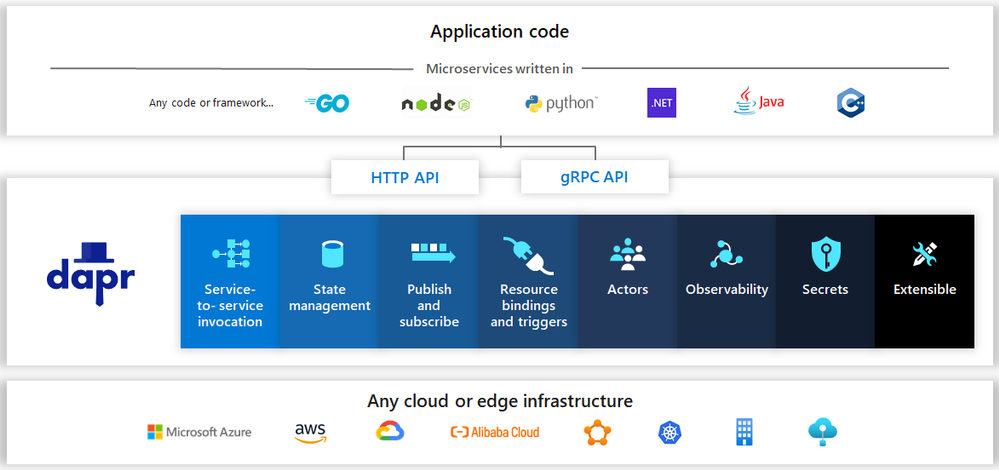
The value proposal of Dapr is to offer an abstraction between your application code and underlying backend systems used in the following areas:
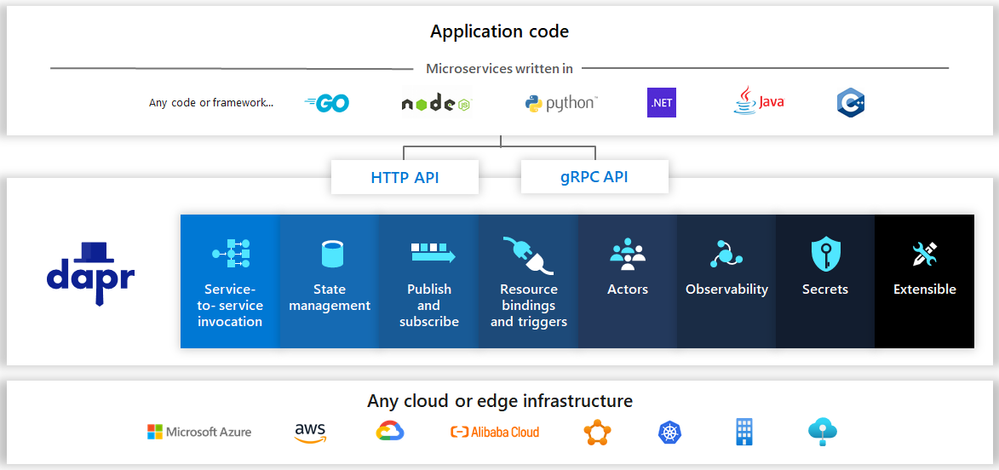
Image from https://github.com/dapr/dapr
for any infrastructure environment. They support an impressive list of connectors:
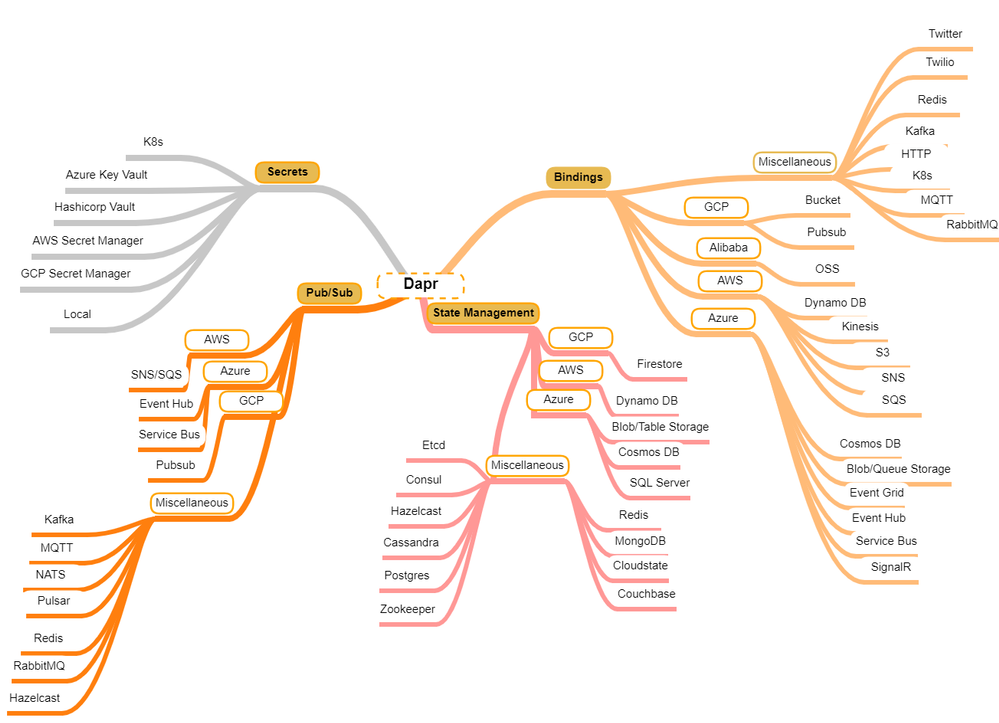
Dapr is available to any programming language since the only thing the application code ever sees are HTTP/gRPC calls to … localhost. So for instance, you can target another Dapr-enabled service by invoking it http://localhost:3500/v1.0/invoke/service or a state store through http://localhost:3500/v1.0/state/anystatestore . The operation (invoke, state, publish, secrets, workflows, etc.) tells Dapr what your application is dealing with. Of course, one can leverage Dapr bindings for any Event-Driven scenario with input-bindings & pub/sub mechanisms.
On top of the areas depicted in the above picture, Dapr also ships with a Logic Apps wrapper that one can use to execute self-hosted Logic Apps workflows. Self-hosted Azure Functions (that you can run anywhere) also offer an extension that have built-in Dapr bindings, see here to know more https://cloudblogs.microsoft.com/opensource/2020/07/01/announcing-azure-functions-extension-for-dapr/
Should you be using Dapr from within Kubernetes, you can combine it with best practices and other products such as Service Meshes. I have tested Dapr together with Linkerd and it works fine. To give a concrete example on how to use Dapr combined with best practices, I built a Dapr workflow (based on Logic Apps) doing the following:
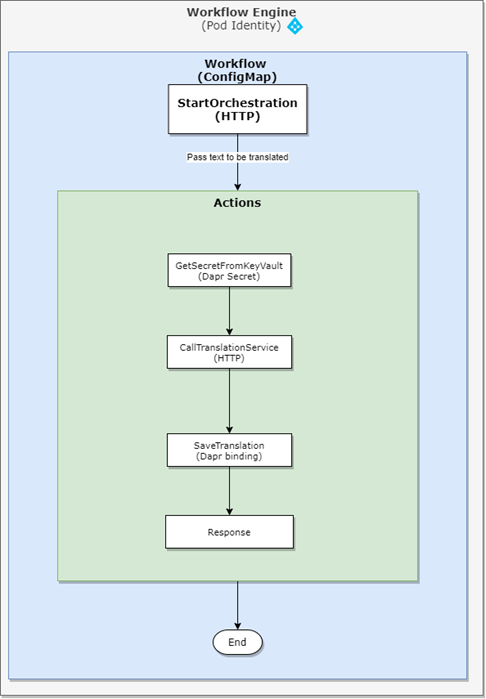
- The workflow is triggered by an HTTP call and gets a text to be translated
- The first step extracts a secret (Cognitive Service API key) from Azure Key Vault using Dapr secrets
- The second step consists in calling the Translation Service using the extracted key.
- The third and last step saves the translated text into an Azure Blob Storage using Dapr bindings
The Logic Apps wrapper (depicted above as the workflow engine) is bound to AAD Pod Identities and is granted a GET secret access policy to Azure Key Vault so that no credentials have to be stored anywhere. Here is the workflow code:
{
    "definition": {
        "$schema": "https://schema.management.azure.com/providers/Microsoft.Logic/schemas/2016-06-01/workflowdefinition.json#",
      "actions": {
        "GetAPIKey": {
          "inputs": {
            "method": "GET",
            "uri": "http://localhost:3500/v1.0/secrets/azurekeyvault/translator-ap-key"
          },
          "runAfter": {},
          "type": "Http"
        },
        "CallTranslationService": {
          "inputs": {
            "body": [ { "Text": "@triggerBody()?['Message']" } ],
            "headers": {
              "Content-Type": "application/json",
              "Ocp-Apim-Subscription-Key": "@body('GetAPIKey')?['translator-ap-key']",
              "Ocp-Apim-Subscription-Region": "westeurope"
            },
            "method": "POST",
            "retryPolicy": {
              "count": 3,
              "interval": "PT5S",
              "maximumInterval": "PT30S",
              "minimumInterval": "PT5S",
              "type": "exponential"
            },
            "uri": "https://api.cognitive.microsofttranslator.com/translate?api-version=3.0&to=fr"
          },
          "runAfter": {
            "GetAPIKey": [
              "Succeeded"
            ]
          },
          "type": "Http"
        },
        "SaveTranslation": {
          "type": "Http",
          "inputs": {
            "method": "POST",
            "uri": "http://localhost:3500/v1.0/bindings/translation",
            "body": {
              "data": "@replace(string(body('CallTranslationService')), '"', '"')",
              "operation": "create"
            },
            "headers": {
              "Content-Type": "application/json"
            }
          },
          "runAfter": {
            "CallTranslationService": [
              "Succeeded"
            ]
          }
        },
        "Response": {
          "inputs": {
            "body": {
              "value": "@body('CallTranslationService')"
            },
            "statusCode": 200
          },
          "runAfter": {
            "SaveTranslation": [
              "Succeeded"
            ]
          },
          "type": "Response"
        }
      },
        "contentVersion": "1.0.0.0",
        "outputs": {},
        "parameters": {},
        "triggers": {
          "manual": {
            "inputs": {
              "method": "POST",
              "schema": {
                "properties": {
                  "Message": {
                    "type": "string"
                  }
                },
                "type": "object"
              }
            },
            "kind": "Http",
            "type": "Request"
          }
        }
      }


}
If you look at the URLs of actions 1 & 3, you’ll notice that they target localhost with respectively a /secrets/ and /bindings/ operation. But, here is the million dollar question: how come does Dapr know what the real targets are (in this case, Azure Key Vault and Azure Storage)? Answer: by defining components. The below one defines Azure Key Vault:
apiVersion: dapr.io/v1alpha1
kind: Component
metadata:
  name: azurekeyvault
  namespace: default
spec:
  type: secretstores.azure.keyvault
  metadata:
  - name: vaultName
    value: sey----ks
  - name: spnClientId
    value: 3cc97f71-----------fbb5c4d4dbf
You’ll notice the link with AAD Pod Identities since Components have a placeholder to define which SPN has to be used. The second component used by the workflow is an Azure Blob Storage:
apiVersion: dapr.io/v1alpha1
kind: Component
metadata:
  name: translation
spec:
  type: bindings.azure.blobstorage
  metadata:
  - name: storageAccount
    value: seykeda
  - name: storageAccessKey
    secretKeyRef:
      name: storageKey
      key: storageKey
  - name: container
    value: daprdocs
auth:
    secretStore: azurekeyvault
Notice how this one refers to the Secret component, stating that the related secret store is azurekeyvault (name of my Secret Store) and that the Storage Account key is stored in the storageKey secret. This makes it very secure since no sensitive information has to be disclosed anywhere but within Key Vault itself. Also, remember that it could be any of the supported secret stores. The workflow knows nothing about the Azure Storage & Azure Key Vault which could be replaced by anything else by overwriting the existing components.
In the more advanced topics, Dapr provides an actor implementation based on the Virtual Actor pattern which is exposed through Java/.NET/.NET Core SDKs. Some SDKs are also available to implement a Dapr-aware gRPC client/server.
Bottom line: Dapr is definitely a framework to keep an eye on, given its fast growth and a first production-ready release that should come around December 2020.
by Scott Muniz | Aug 18, 2020 | Uncategorized
This article is contributed. See the original author and article here.
Endpoint detection and response (EDR) in block mode is a new capability in Microsoft Defender Advanced Threat Protection (Microsoft Defender ATP) that turns EDR detections into blocking and containment of malicious behaviors. This capability uses Microsoft Defender ATP’s industry-leading visibility and detection capability to provide an additional layer of post-breach blocking of malicious behavior, malware, and other artifacts that your primary antivirus solution might miss.
Through built-in machine learning models in Microsoft Defender ATP, EDR in block mode extends behavioral blocking and containment, which uses machine learning-driven protection engines that specialize in detecting threats by analyzing behavior. The ability of this feature to detect and stop threats in real time, even after they have started running, empowers organizations to thwart cyberattacks, maintain security posture, and reduce the manual steps and time to respond to threats.
When EDR in block mode detects malicious behaviors or artifacts, it stops related running processes, blocking the attack from progressing. These blocks are reported in Microsoft Defender Security Center, where security teams can see details of the threat and remediation status, and use Microsoft Defender ATP’s rich set of capabilities to further investigate and hunt for similar threats as necessary.

Figure 1. Sample Microsoft Defender ATP alert on threat caught by EDR in block mode
EDR in block mode was developed in close collaboration with customers, and is in public preview starting today. We thank our customers for the partnership and for the invaluable feedback during the limited preview, during which the feature blocked multiple real-world attacks. In this blog, we’ll share details about one of these attacks.
EDR block mode in action
In April of this year, EDR in block mode protected and blocked a NanoCore RAT attack that aimed to steal credentials, spy using a device’s camera, and pilfer other information. The attack started with a spear-phishing email carrying a malicious Excel attachment. The Excel file contained a malicious macro that, when enabled, ran a PowerShell code that in turn downloaded and ran a file from hxxp://office-services-labs[.]com/Scan.exe.
Figure 2. Malicious Excel file used in NanoCore campaign
The organization’s non-Microsoft antivirus solution didn’t detect the Excel file or its behavior, but Microsoft Defender ATP did. EDR in block mode kicked in, stopping the download behavior and blocking the PowerShell code and Excel file. This was reported in the Microsoft Defender Security Center, alerting the security team about the blocked behavior. While the threat was automatically remediated, the alert empowers the security team to perform additional investigation and hunting for similar threats.
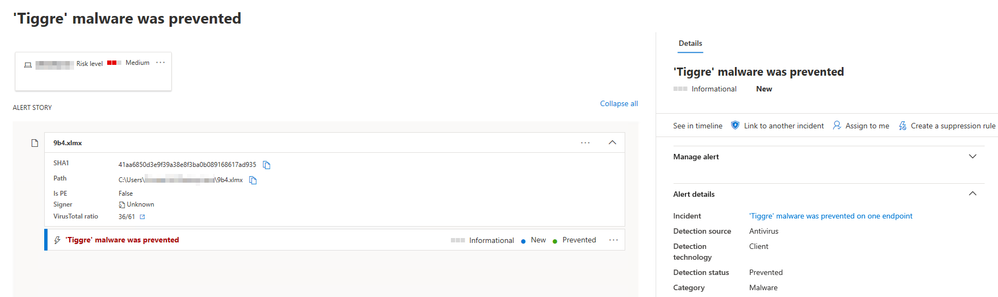
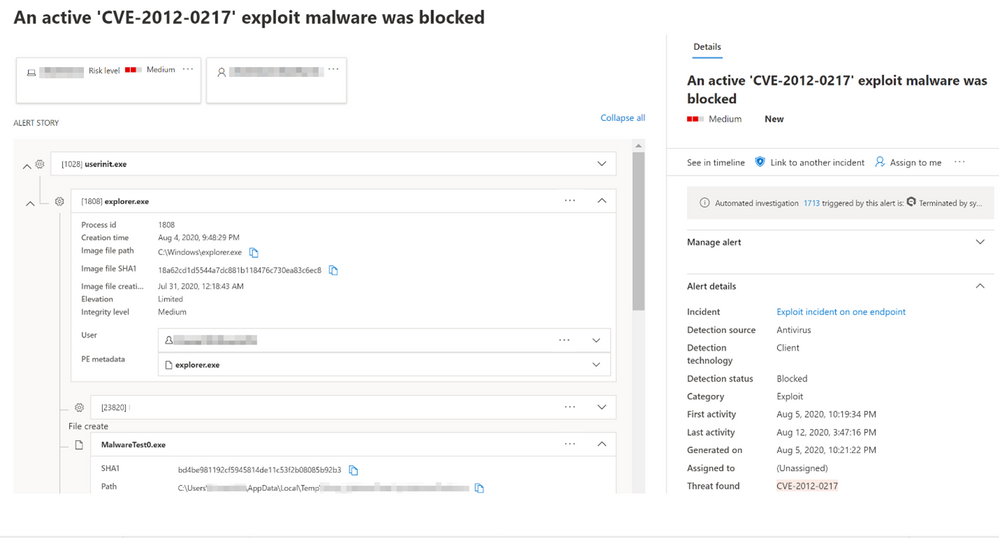
Figure 3. EDR in block mode alert in Microsoft Defender Security Center
Had the attack been allowed to continue, the downloaded file Scan.exe would have run the following PowerShell commands, which would have downloaded the payload, a NanoCore variant, from hxxp://paste[.]ee/r/Pym5k:

Figure 4. Malicious PowerShell commands used by NanoCore campaign
NanoCore is a family of remote access Trojans (RAT) that gather info about the affected device and operating system. It is designed to steal credentials, spy through cameras, and carry out other malicious activities. With EDR in block mode, Microsoft Defender ATP protected against the damaging impact of a successful NanoCore infection.
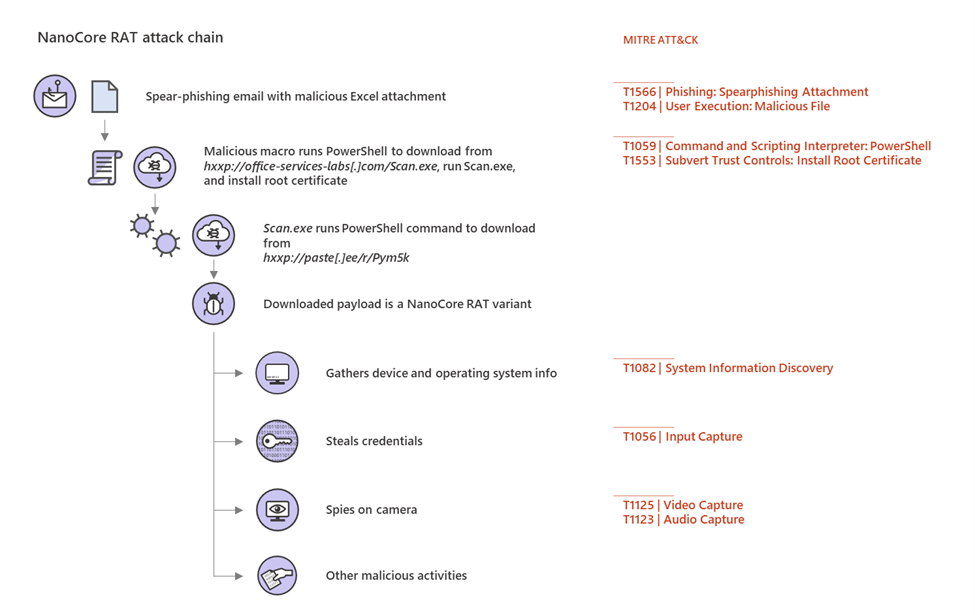
Figure 5. NanoCore RAT attack chain
Turning on EDR in block mode
EDR in block mode is in public preview starting today, so if you have preview features turned on in Microsoft Defender Security Center, you can try it now. Once you’ve opted in, turning on EDR in block mode is simple. Go to Settings > Advanced features. Switch the toggle for “Enable EDR in block mode” to On.
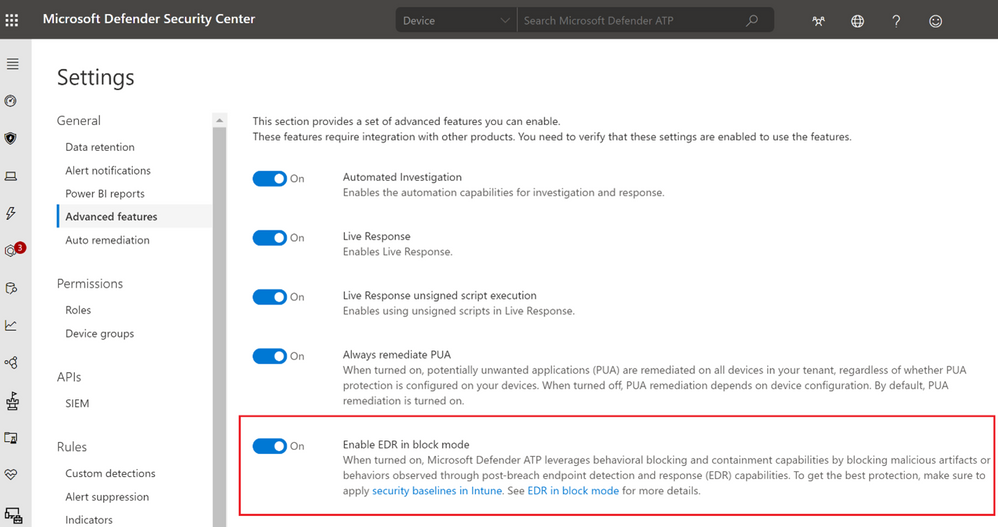
Figure 6. Microsoft Defender Security Center Advanced features settings
Security teams are also informed about this feature via the security recommendation titled, “Enable EDR in block mode” in threat and vulnerability management.
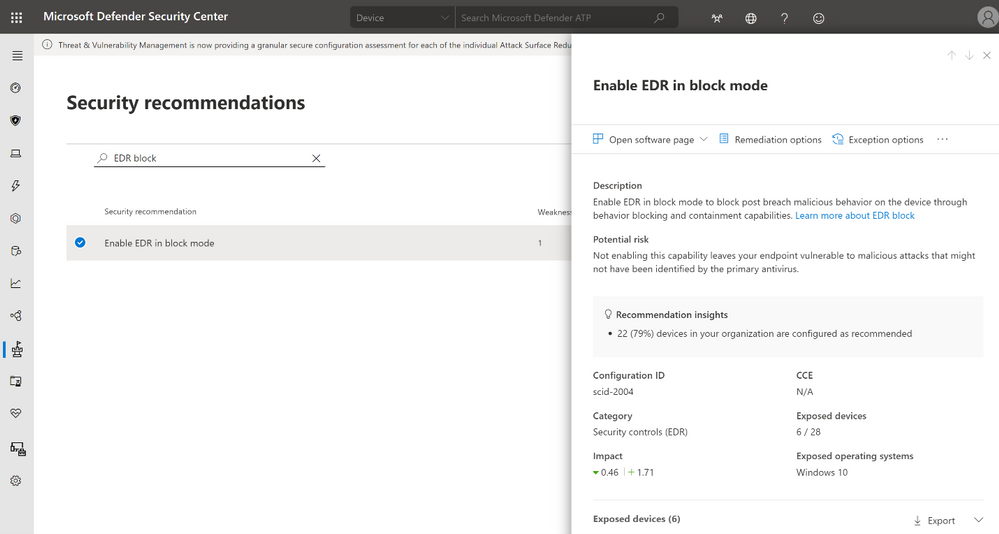
Figure 7. EDR in block mode in security recommendations
To learn more about the behavioral blocking and containment capabilities in Microsoft Defender ATP watch this SANS Webcast, refer to our documentation, and read this blog.
If you’re not yet taking advantage of Microsoft’s industry-leading security optics and detection capabilities for endpoints, sign up for a free trial of Microsoft Defender ATP today.
We welcome your feedback. If you have any comments or questions, let us know.
Jeong Mun and Shweta Jha
Microsoft Defender ATP team
by Scott Muniz | Aug 18, 2020 | Azure, Microsoft, Technology, Uncategorized
This article is contributed. See the original author and article here.
Within Azure SQL maintenance tasks such as backups and integrity checks are handled for you, and while you may be able to get away with automatic updates keeping your statistics up-to-date, sometimes it’s not enough. Proactively managing statistics in Azure SQL requires some extra steps, and in this Data Exposed episode with MVP Erin Stellato, we’ll step through how you can schedule and automate regular updates to statistics.
Watch on Data Exposed
Additional Resources:
SQL Server Maintenance Solution
SQL Server Index and Statistics Maintenance
View/share our latest episodes on Channel 9 and YouTube!
by Scott Muniz | Aug 18, 2020 | Uncategorized
This article is contributed. See the original author and article here.
Co-authored with @Itamar Falcon
Microsoft Cloud App Security is removing non-secure cipher suites to provide best-in-class encryption, and to ensure our service is more secure by default. As of Oct 1, 2020, Microsoft Cloud App Security will no longer support the following cipher suites. From this date forward, any connection using these protocols will no longer work as expected, and no support will be provided.
Non-secure cipher suites:
- ECDHE-RSA-AES256-SHA
- ECDHE-RSA-AES128-SHA
- AES256-GCM-SHA384
- AES128-GCM-SHA256
- AES256-SHA256
- AES128-SHA256
- AES256-SHA
- AES128-SHA
Support will continue for the following suites:
- ECDHE-ECDSA-AES256-GCM-SHA384:
- ECDHE-ECDSA-AES128-GCM-SHA256:
- ECDHE-RSA-AES256-GCM-SHA384:
- ECDHE-RSA-AES128-GCM-SHA256:
- ECDHE-ECDSA-AES256-SHA384:
- ECDHE-ECDSA-AES128-SHA256:
- ECDHE-RSA-AES256-SHA384:
- ECDHE-RSA-AES128-SHA256
What do I need to do to prepare for this change?
Customers should ensure that all client-server and browser-server combinations are using supported suites in order to maintain the connection to Microsoft Cloud App Security.
Components that may be affected by this change include:
- SIEM Agent – Customers can use any supported cipher suite as described above.
- Microsoft Cloud App Security API – Custom applications and code that are utilizing the Microsoft Cloud App Security API must utilize supported suites to continue functioning. If unsure whether applications function with a supported suite, customers can test by authenticating to our dedicated API endpoint: https://tlsv12.portal-rs.cloudappsecurity.com.
- Apps configured with Conditional Access App Control – If customers are using Conditional Access App Control for any web or native client applications, they must verify that these applications are not using the deprecated suites; access to apps that use non-secure cipher suites and relevant controls will no longer work.
- Log collector – No changes are needed if no modification was done to the provided docker.
For additional inquiries please contact support.
– Microsoft Cloud App Security team
by Scott Muniz | Aug 18, 2020 | Uncategorized
This article is contributed. See the original author and article here.
Summary: In March 2020 we introduced inline, short description of fixes in the master Cumulative Update KB articles. We call those descriptions “blurbs” and they replace many of the individual KB articles that existed for each product fix and contained brief descriptions. In other words, the same one-two sentence description that existed in a separate article before, now appears directly in the master CU KB article. For fixes that require longer explanation, provide additional information, workarounds, and troubleshooting steps, a full KB article is still created.
Now, let’s look at the details behind this. SQL Server used the Incremental Servicing Model for a long time to deliver updates to the product. This model used consistent and predictable delivery of Cumulative Updates and Service Packs. A couple of years ago, we announced the Modern Servicing Model to accelerate the frequency and quality of delivering the updates. This model relies heavily on Cumulative Updates as the primary mechanism to release product fixes and updates. The new model provides the ability to introduce new capabilities and features in Cumulative Updates. As you are aware, every Cumulative Update comes with a Knowledge Base article. You can take a look at some of these articles in the update table available in our latest updates section of the docs.
Each one of these Cumulative Update articles have a well-defined and consistent format. It starts off with metadata information about the update, mechanisms to acquire and install the update, listing of all the fixes and changes in the update. In some rare occasions, there might be a section that provides a heads up to users about any known problems encountered after applying the update. In this post, we will focus on the changes introduced to the listing of the fixes and changes in the update. Usually what you will find is a table that contains a list of fixes with bug numbers, link to an article that describes the fix, area of the product to which this fix applies. Imagine a Cumulative Update with a payload of 50 fixes. What that means to a user reading the Cumulative Update article is 50 context switches in and out of that article (not including other links you might end up clicking and reading). We all agree that frequent context switching is not efficient – be it computer processing code or human brain reading things. So how do you optimize this experience and still maintain the details provided in the individual articles you click and read? Here comes the concept of “article inlining” to the rescue! Yes, we borrowed the same concept we use in SQL Server (e.g. scalar UDF inlining) and computer programming in general (e.g. inline functions).
We will take this opportunity to explain the thought process that went into this change and what data points and decision points we use to drive this change.
Justification for Using a Blurb
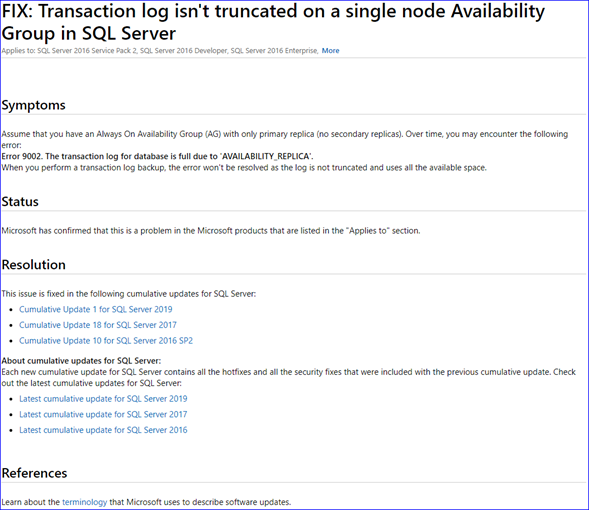
- The normal format used for the individual fix articles include: Title, Symptoms, Status, Resolution, References. For example, let us look at SQL Server 2019 CU1 article. The first one in the fix list table is FIX: Transaction log isn’t truncated on a single node Availability Group in SQL Server

Let us click on the link and open this article to understand more details about this fix. Here is what we see: 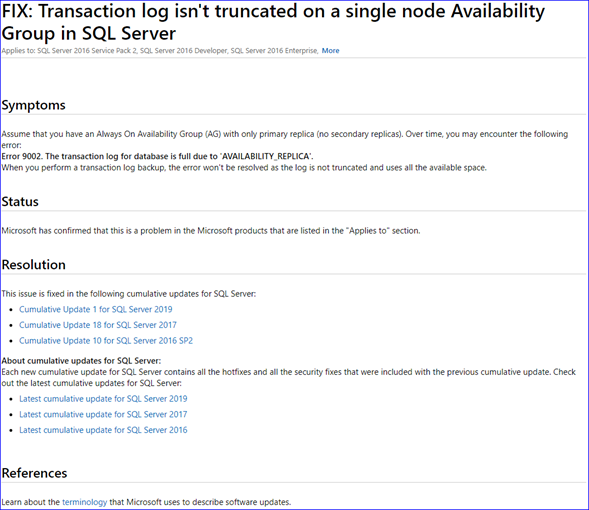
The only useful information you get from this lengthy article is the symptom section. Usually the title of the article provides a summary of the symptoms section. Now look at other sections. Of course, we know this is a problem in the software – otherwise why will we be fixing it:smiling_face_with_smiling_eyes:?. Isn’t resolution here obvious – that you need to apply this cumulative update to fix this problem? If we now moved the 2 lines from the symptoms section in this individual fix article to the main cumulative update article, then you can avoid all these round trips and context switches.
You can go down the list of fix articles in that KB and you will find many articles that fit this pattern. Our content management team did a study of several cumulative updates from the past and found that a majority of the individual fix articles (to the tune of 85%) follow this pattern and can be good candidates to “inlining” the symptom description in the main cumulative update article table.
Criteria for Creating a Full KB Article
In such scenarios, we carefully evaluate if we can perform inlining and still manage to represent this additional information in the main cumulative update article. These are good candidates to have an individual fix article.
We started piloting this approach around March 2020 timeframe. The initial releases we attempted this style for were SQL Server 2016 SP2 CU12 and SQL 2019 CU3. Our friends and colleagues called it the “Attack of the blurbs!”. Some folks called it the “TL/DR version” of knowledge base articles. The reactions have been predominantly positive and encouraging. Of course, we will constantly fine tune these approaches with user feedback. As part of this change, we are also improving the content reviews done for the CU articles to ensure they contain relevant and actionable information for users.
One important callout we would like to make sure users understand is about the quality of these fixes. Irrespective of whether a fix has an individual article or an inline reference in the main cumulative update article, they go through the same rigorous quality checks established for cumulative updates in general. In fact, the article writing, and documentation process is the last step in the cumulative update release cycle. Only after a fix passes the quality gates and is included in the cumulative updates the documentation step happens. And we have already discussed how a fix gets described – an individual article vs inline blurb.
We hope this explains the changes you notice around the KB articles for Cumulative Updates.
From the support team: Joseph, Suresh, Ramu

by Scott Muniz | Aug 18, 2020 | Uncategorized
This article is contributed. See the original author and article here.
Got a problem that needs solving? WWBD. AKA “What would Bob do?” – a common question I ask myself often. And often the answer lies in Bob’s blog, where this episode sprouts its roots. We invite you to figure it out with Bob – Bob German that is.
Bob German is a Cloud developer advocate at Microsoft and a friend of the community who consistently puts complex concepts into simple, meaningful terms. He also is a contributor of samples and ideas via GitHub / PnP. Using a few of his recent blog posts as a guide, we cover the evolution of SharePoint as a modern development platform, alongside the approach to brand and customize SharePoint – to develop once and deploying into SharePoint and Microsoft Teams. You’ll gain clarity and numerous tips and tricks along the way.
Listen to podcast below.
Subscribe to The Intrazone podcast! And listen to episode 55 now + show links and more below.
 Intrazone guest Bob German (Cloud developer advocate, focused on Teams and Microsoft Graph development – Microsoft).
Links to important on-demand recordings and articles mentioned in this episode:
- Articles and sites
- Bob German articles mentioned in this episode:
Subscribe today!
Listen to the show! If you like what you hear, we’d love for you to Subscribe, Rate and Review it on iTunes or wherever you get your podcasts.
Be sure to visit our show page to hear all the episodes, access the show notes, and get bonus content. And stay connected to the SharePoint community blog where we’ll share more information per episode, guest insights, and take any questions from our listeners and SharePoint users (TheIntrazone@microsoft.com). We, too, welcome your ideas for future episodes topics and segments. Keep the discussion going in comments below; we’re hear to listen and grow.
Subscribe to The Intrazone podcast! And listen to episode 55 now.
Thanks for listening!
The SharePoint team wants you to unleash your creativity and productivity. And we will do this, together, one ‘Bob advice nugget’ at a time.
The Intrazone links
+ Listen to other Microsoft podcasts at aka.ms/microsoft/podcasts.
![Left to right [The Intrazone co-hosts]: Chris McNulty, senior product manager (SharePoint, #ProjectCortex – Microsoft) and Mark Kashman, senior product manager (SharePoint – Microsoft).](https://www.drware.com/wp-content/uploads/2020/08/large-758 "Mark Kashman_0-1585068611977.jpeg") Left to right [The Intrazone co-hosts]: Chris McNulty, senior product manager (SharePoint, #ProjectCortex – Microsoft) and Mark Kashman, senior product manager (SharePoint – Microsoft).
Left to right [The Intrazone co-hosts]: Chris McNulty, senior product manager (SharePoint, #ProjectCortex – Microsoft) and Mark Kashman, senior product manager (SharePoint – Microsoft).
 The Intrazone, a show about the SharePoint intelligent intranet (aka.ms/TheIntrazone)
by Scott Muniz | Aug 18, 2020 | Uncategorized
This article is contributed. See the original author and article here.
Azure Synapse Analytics supports Private Link enabling you to securely connect to SQL pools via a private endpoint. This quick how-to guide provides a high-level overview and walks you through how to set up Private Link when you’re using the COPY statement for high-throughput data ingestion. Using the COPY statement is a best practice when data loading where the experience is simple, flexible, and fast.
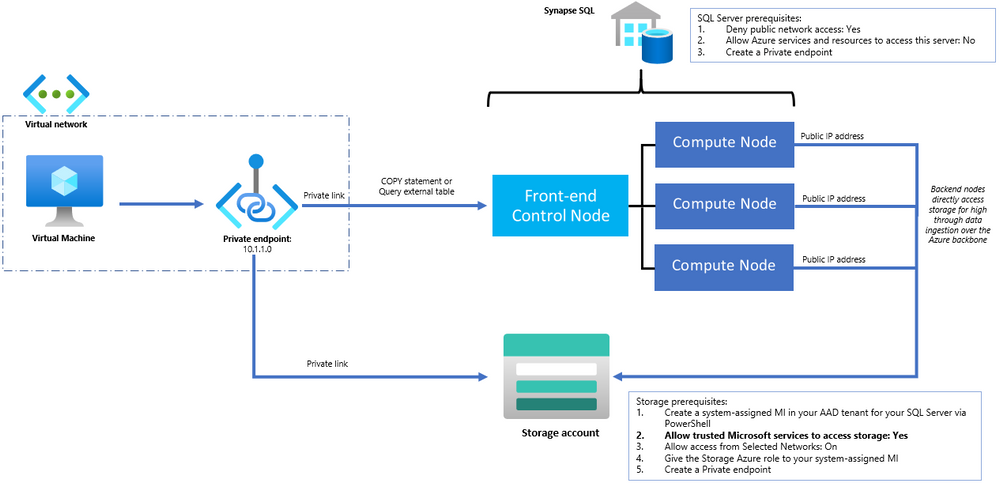
The following diagram illustrates a simple set-up and the interactions happening across various components when Private Link is enabled for a SQL pool with a single VM within a VNet accessing the SQL endpoint:

The following settings are required on your SQL Server when securing your SQL pool:
- Deny public network access: Yes
- Allow Azure services and resources to access this server: No
- Create a Private endpoint
These steps can all be easily done in the Azure portal. After configuring your SQL Server, access to the SQL pool is secured which can only be done via the private endpoint in your VNet.
The following settings are required on your storage account that you are loading from:
- Allow access from Selected Networks: On
- Create a Private endpoint
- Create a system-assigned MI in your AAD tenant for your SQL Server via PowerShell
- Give the required Storage Azure role (Storage Blob Data Reader or higher) to your system-assigned MI
- Allow trusted Microsoft services to access storage: Yes
- This configuration allows the SQL pool backend compute nodes to bypass the storage network configurations using the system-assigned MI. This allows the COPY statement to directly access the storage account for high through data ingestion over the Azure backbone.
For more details on setting up your storage account for COPY access, you can visit the following documentation. You can visit the following links to learn how Azure Synapse provides secure network access for your analytics platform:


Recent Comments