
by Contributed | Oct 7, 2020 | Technology
This article is contributed. See the original author and article here.
Ready or not, it is time once more to Reconnect! For this week’s edition, we are joined by none other than two-time MVP Adnan Rafique!
Hailing from New Jersey, USA, Adnan is a multitalented IT leader who specializes in cloud security and governance, digital transformation, project management, IT leadership and problem-solving. With more than 20 years of experience, Adnan has delivered highly complex projects including cloud migrations for Fortune 500 companies.
Another recent project of Adnan’s relates to modernizing security operations centers using AI and ML. “And with the COVID-19 situation,” Adnan says, “we can’t ignore identity and access protection control.”
Adnan – who is a passionate and regular public speaker – continues to take part in Reconnect events. Most recently, for example, he was a speaker and producer at the M365 Virtual Marathon held in May.
“For me, [Reconnect] is a learning opportunity, and being connected with like-minded people in itself is an amazing resource,” Adnan says.
“Speaking is a passion for me, and I can’t stop myself doing it. Why? Because sharing knowledge helps me to learn more and also builds an unseen connection with my audience.”
Adnan looks back fondly at his time as an MVP, especially co-organizing the Azure Bootcamp for M365 UG in Iselin, New Jersey. “Being an MVP is something that you love doing,” Adnan advises to program newcomers. “This is the same as your lifestyle — let it grow organically. You will be awarded automatically.”
Going forward, Adnan says he is excited to become more productive with automation, artificial intelligence, machine learning and machine teaching. For more on Adnan, check out his blog or Twitter @iMentorCloud

by Contributed | Oct 7, 2020 | Technology
This article is contributed. See the original author and article here.
Did you know October 17 is Spreadsheet Day? Learn more about its history from Excel MVP Debra Dalgleish, founder of Spreadsheet Day.
To celebrate this year’s Spreadsheet Day, the Toronto Excel User Group, led by Excel MVP Celia Alves, is hosting a special event on Wednesday, October 14 at 5 PM ET, featuring an incredible lineup of speakers including
Excel MVP Bill “Mr. Excel” Jelen
Dan Fylstra, President of Frontline Systems, Inc.
Rob Collie, Founder and CEO of PowerPivotPro
David Monroy, Excel PM, Microsoft
Register and attend Spreadsheet Day Celebration here >
![[Guest blog] A train ride to the cloud – My improbable journey to IT](https://www.drware.com/wp-content/uploads/2020/10/medium-57)
by Contributed | Oct 7, 2020 | Technology
This article is contributed. See the original author and article here.
This article was written by Rafael Dominguez, a Core Security Services PM at Microsoft. He shares about his career journey from his early days in the Dominican Republic to the US, as he reflects on his 10th year anniversary at Microsoft.
Meet Rafael – this is his story:
 Meet Rafael Dominguez, a Core Security Services PM at Microsoft
With my 10th year anniversary at Microsoft coming up soon, it occurred to me that I should pen down some of the musings I’ve been mulling over for the past few years. I’ve been debating when and where to write about my journey for a while, and the work anniversary seemed like the perfect motivator to get these thoughts out of my head and share them with all of you. Although the pandemic and the West Coast wildfires have distracted me quite a bit, I’ve decided to stop using those events as excuses and just write. After all, my wife had been asking me for quite some time to share some of these stories and events as she finds them very amusing, and I hope you will too. To that end, let me take you on a quick voyage way back to my humble beginnings in the Dominican Republic.
Quick warning though: This is not a story about a poor kid turned billionaire, blah, blah, blah. Trust me, I wish it were :) Instead, I am sharing about my life experience to juxtapose where I came from, and how I got to where I am today in 48 years. A lot has changed in a short amount time and it amazes me everyday. I hope it will help inspire you, too!
Story #1: My digital transformation from farm to standing desk
Like millions of people, I get up every day and fire up my computer to start my workday. Every now and then however, this almost robotic ritual triggers a memory about a different time in my life before I even knew what a computer was. You see, I moved to New York at 16 years of age without speaking a single word of English and before that, I held several gigs in the local farms in my town.
One of those jobs involved collecting pineapples from the field and loading them into the back of a pickup truck. Yes, you read that correctly. I have no idea how modern farming does this today, but I can certainly tell you that walking through a pineapple field and hand-picking these fruits with very little protection around your legs and hands is something I do not miss. Occasionally I still wonder if a thorn or two are still lodged inside my legs somewhere.
I recently had a project that required me to write scripts in PowerShell, Bash as well as Kusto queries to collect the list of contacts/developers I needed to reach out to. As I went through this process, it was not lost on me how much my life had changed. Writing scripts from the comfort of an office to gather digital information is quite a contrast to those humid and sunny days when I walked the thorny pineapple fields.
From the farm collecting pineapples:
 From the pineapple fields
To a standing desk writing Kusto queries:
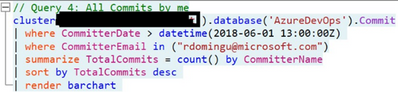
Moral of the story: No matter your background, you CAN make a transition into tech if you want to. Keep pushing and don’t give up on your dreams.
Story #2: Transportation – A car battery, a horse and me
Alt text: Boy taking a battery to be charged. Original drawing by my wife Jane.
 Original drawing by my wife Jane.
For the best part of the last 10 years, my wife and I (later our kids joined too) fell into a strange habit that is now a bit of a family tradition. It went something like this: We go to our favorite Japanese supermarket in White Plains NY, buy some yummy food (rice ball, eel rice, sushi, baked sweet potatoes, etc.), drive to a nearby parking lot behind Bloomingdales and eat inside the car while we listened to the radio or just enjoy the food mostly in silence. One could argue we were training for social distancing way before it became mainstream.
Why am I telling you this? Well, we recently leased a fully electric family car that has a nice screen where my family and I can now watch Netflix while eating take-out in a random parking lot in Seattle WA (we still haven’t found the right spot but we keep looking). The ability to watch our favorite shows from anywhere in our car has greatly enhanced our family tradition.
One day as I connected the car to an outlet in my garage for its overnight charge, I uttered a mild chuckle of amusement. I had just plugged a car into an electrical outlet to charge its batteries so I can drive it (of course it could drive itself if I wanted it to) and watch TV/shows on the road if I wanted to. On its own it’s a trivial activity that more and more people do every day. At that moment though, it brought back memories of my childhood when my family bought its first television.
I am being generous of course when I call it a “television”. It was really a boombox with a small screen at the top and the screen was about the size of a trackpad on most laptops today. Oh and the kicker, because we did not have electricity in my town back then (electricity arrived a couple of years after I left ☹), it required a regular car battery or several D size batteries. Because the smaller batteries were expensive and did not last very long, eventually a car battery became permanent part of our home décor. This was a great couple of days, and we enjoyed the tiny screen tremendously. I recall watching horse races, re-runs of a Duran vs. Leonard boxing match and just about anything that this magical miniature screen wanted to show me.
In just a few days however, the car battery had to be recharged. At this point I should tell you that I am one of 8 siblings and because where I fall in the pecking order, I was quickly volunteered by my older brothers as the battery guy. Before you think this is a promotion of some sort, let me tell you what was involved. I had to take the battery on horseback (sometimes on a donkey, depending on what was available) to a mechanic shop over an hour away just so the battery could be charged. I don’t recall exactly how long the process took but I had to wait around till it was fully charged as my family was waiting for me (technically, waiting for the battery would be more accurate) so we could watch whatever telenovela or show was playing that night.
To some extent I’m still the battery guy in my family, given that it now falls on me to deal with all things electronic including our electric car. This time though, I wear the title proudly as the task is greatly simplified thanks to technology.
Story #3: The subway guy – A train ride to the cloud
A ride in the New York City subway can be quite the adventure. Before a myriad of tiny screens usurped people’s eyes and ears, it was common practice for riders to chat with each other in the subway. These days however, that is the exception not the rule. Luckily for me, a chance conversation with a fellow strap hanger put in motion a series of events that eventually led me to a career in Information Technology.
I met a software developer named Brian on a subway platform (Pacific St station in Brooklyn, to be exact) one cold winter night after on my way back home form a night out in New York City. As we continued to talk, he asked if I would be interested in a job supporting the FOXPRO-based application he was building for a company that served customers in the garment industry. At the time, I worked as an associate in an auto part store in Queens New York. I was immediately interested in the job not just because it was computer-related, but because it was in midtown Manhattan, just a 30-minute or so ride from my house instead of the arduous, almost 2-hour-long train commute from Brooklyn to Queens. However, at this point in my life, I was about 19 years of age and I did not know how to type, much less operate a computer. Brian graciously offered to start right at the beginning by giving me typing lessons a couple of times a week.
After a couple of weeks of training, I was able to land the job installing and supporting the application I had spent a few weeks learning about. Not long after that, I was able to connect one customer factory in NJ to the showroom in NYC via dial-up modems using an application called Carbon Copy. I know, I’m dating myself here.
Side note: I thought I’d make a quick stop to quickly explore how another subway ride completely changed my life yet again almost 20 years after that first encounter. Call it destiny or just coincidence but, one summer I met another traveler at the Union Square station in Manhattan. As we exited the train, that’s when a woman named Jane and I met. We eventually married and have been together for almost 15 years and for the first 2+ years, I was only known to her parents as the “subway guy”! Subway rides can change your life – believe me.
And we’re back. Many years and many jobs later, I received a call from a recruiter about a job at Microsoft after seeing my LinkedIn profile. Back in the farm days, someone usually showed up at my house or sent a message with another person about a job but now this too has been digitized.
Given my background, it’s quite humbling to be part of a team today that creates software and security tools to manage and protect millions of servers around the planet. Looking at the scale of the Azure cloud and comparing it to the time not that long ago when I used to install applications with a few floppy disks and then DVDs, it’s like I’ve time-traveled to another dimension. I suppose that now makes me a cloud guy (instead of the battery-guy).
Final thoughts:
Looking at my life and career journey, the expression “change is the only constant” always resonated with me. I consider myself an individual with a high tolerance for change, and who is quick to trust people and is often an optimist. In hindsight, it’s no surprise that I felt the calling to IT early on given how quickly things change.
I feel very blessed to be in this industry where I get to enjoy a front seat view of the positive impact technology can have on people, and I am very optimistic about its impact in humanity in the long run.
However, we must remain watchful and engaged to ensure the next advances in technology are equitable and responsible. We ought to pay attention to the development and use of Artificial Intelligence (AI) and other new technologies. No, I don’t subscribe to the view that big bad robots will be taking control anytime soon. At least not in the way that movies portray it, anyway.
I often see my 5 and 7-year-old children interact with a “smart assistant” to ask simple questions or just to tell them a joke. It’s not quite the scene in the Terminator movie where Sarah Connor is watching her son play with a robot from the future but it is quite profound and I can’t help but wonder how technology will impact their lives 30 years from now and beyond.
There’s no doubt in my mind that AI will have a life-changing net positive impact in our lives but like any new thing, it is up to us to ensure it’s not being abused for nefarious purposes. Given how quickly technology is advancing, my hope is that we hold each other accountable in this journey. We can’t afford not to. I also hope this country remains the beacon of hope it’s always been, so that a poor kid from a rural village out there is able to come here, work hard and forge a better life for herself/himself as I have.
I’d like to end with an ask if you don’t mind: Get engaged to help shape the impact of AI in our lives and our planet. A good place to start is by joining and keeping tabs on the work at the NextGen Network at https://www.aspennextgen.org/ or others like it.
I wish you all the best on your own tech journey!
#HumansofIT
#CareerJourneys
by Contributed | Oct 7, 2020 | Technology
This article is contributed. See the original author and article here.
Back in 2017, we announced that site mailboxes in SharePoint Online were being deprecated, and that new organizations would no longer have access to the feature and existing organizations would no longer be able to create site mailboxes. Since that announcement, we have seen site mailbox usage drop consistently as customers move to alternative solutions. There are still a few customers who have site mailboxes with some activity, as well as customers who want to archive and delete site mailboxes that are no longer in use.
As an alternative to site mailboxes, we had previously recommended Microsoft 365 Groups (formerly Office 365 Groups) and today, when you create a team site in SharePoint, a Microsoft 365 Group is created automatically. You can also connect classic team sites to a Microsoft 365 Group. This gives you a new shared mailbox and other group features and modernizes your classic sites.
Before we retire (and ultimately delete) all site mailboxes in SharePoint Online, which will happen in April 2021. We’ll post another update as we get closer to April 2021. In the meantime, you can back up the data in your existing site mailboxes using this instruction guide.

by Contributed | Oct 7, 2020 | Uncategorized
This article is contributed. See the original author and article here.
If you’re managing the online presence for one business in the U.S., the new Digital Marketing Center open beta is meant for you. Check out what’s new, and an overview recap.
The post Announcing the open beta for Digital Marketing Center appeared first on Microsoft 365 Blog.
Brought to you by Dr. Ware, Microsoft Office 365 Silver Partner, Charleston SC.
by Contributed | Oct 7, 2020 | Azure, Technology
This article is contributed. See the original author and article here.
When monitoring the health of your applications written for Azure Sphere, you need to be able to diagnose bugs and errors. During application development, you can use a debugger, print statements, and similar tools to help find problems. However, when devices are deployed in the field, it becomes more challenging to debug an application, and a different approach is needed. For example, an application might unknowingly crash or exit, leaving you unable to detect the reason for the occurrence. Tools like the CLI command can help you gain a better understanding as to why your application crashed or reported an error.
We recently released additional documentation to help you interpret error reports, along with a new sample tutorial demonstrating how to analyze app crashes. Read on to find out about the new tools and additional ways to help make debugging easier in the future.
Automatically generated error reports
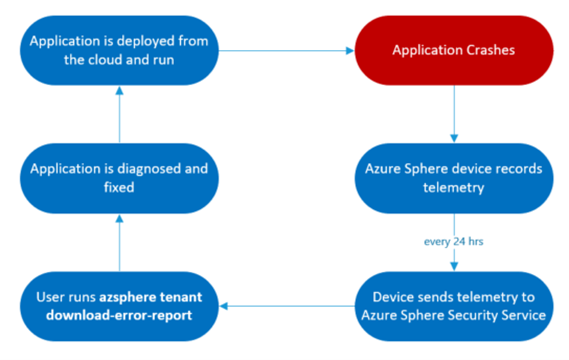
Whenever an issue occurs on your device, such as an app crash or an app exit, the device logs an error reporting event. These events are uploaded to the Azure Sphere Security Service (AS3) daily, and you can get a csv file containing the error reporting data by running azsphere tenant download-error-report. The csv file contains information on errors reported by devices in the current tenant from the last 14 days. The reports provide system-level error data that a traditional application would not be able to collect on its own. A sample error reporting entry in the csv is:
AppCrash (exit_status=11; signal_status=11; signal_code=3; component_id=685f13af-25a5-40b2-8dd8-8cbc253ecbd8;
image_id=7053e7b3-d2bb-431f-8d3a-173f52db9675)
This example shows an error event as it appears in the log. Here, an AppCrash occurred; the additional information includes the exit status, signal status, signal code, component id, and image id. These details are helpful when it comes to diagnosing an error in an application. See Collect and interpret error data in the Azure Sphere documentation to understand how to use this information to debug. Additional interpretation details have recently been added.
In addition to the CLI command azsphere tenant download-error-report, you can also use the Public API to acquire the same error reporting information. The API returns a JSON object, containing the same error reporting information as the csv, that you can parse according to your needs.

The typical lifecycle for using error reporting data to remotely detect a problem with your application in the field and deploy a fix OTA.
New tools for diagnosing applications
Azure Sphere recently released an Error Reporting Tutorial. This tutorial demonstrates how you can interpret expected app crashes and app. The tutorial lets you simulate application crashes and exits for an Azure Sphere and test the Azure Sphere error reporting functionality as well as experiment with sample error reporting data. Within 24 hours after you run the tutorial, you can download a csv that contains error reporting events, and you can then follow the instructions in Collect and interpret error data to learn how to use the csv to diagnose application failures.
Going forward
Exit codes
To further improve error diagnosis, try implementing exit codes in your application code. Exit codes are important as they are reported directly from the application and help you determine where something went wrong in your app. Location-specific exit codes identify exactly where the exit happened. The exit codes will appear in the error reports and can be compared with your code to better understand where the application exited and why. By following the steps and example in the exit codes documentation, you can easily implement exit codes and as a result be more equipped to debug and fix issues in the future. The highlighted portion of the sample error reporting entry below shows how exit codes appear in error reports:
AppExit (exit_code=0; component_id=685f13af-25a5-40b2-8dd8-8cbc253ecbd8;
image_id=0a7cc3a2-f7c2-4478-8b02-723c1c6a85cd)
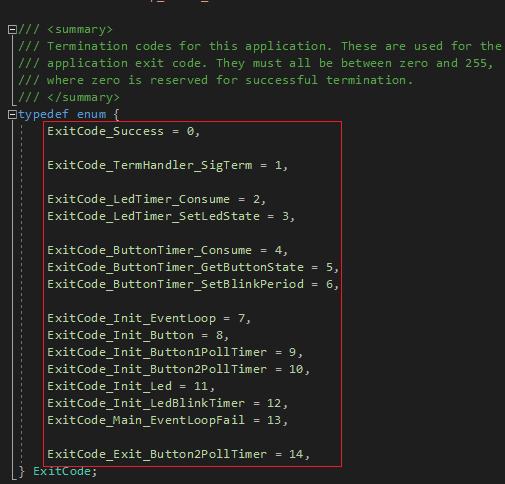
Exit code definitions from the Error Reporting tutorial.
Watchdog timers
Another useful tool is the watchdog timer. If an application becomes unresponsive, the system timer will act as a watchdog and restart the application. When the watchdog is set and expires, it raises a SIGALRM signal that the application is purposely unable to handle. As a result, the application terminates (or crashes) and restarts. The highlighted portion of the sample error reporting entry below shows how a watchdog timer alarm appears in an error report. Signal status 14 corresponds to a SIGALRM, indicating that the application crashed because a watchdog expired:
AppCrash (exit_status=11; signal_status=14; signal_code=3; component_id=685f13af-25a5-40b2-8dd8-8cbc253ecbd8;
image_id=7053e7b3-d2bb-431f-8d3a-173f52db9675)
Next steps
We have updated and published documentation to assist you in diagnosing your Azure Sphere applications:
- For more information on the CLI command azsphere tenant download-error-report to acquire your error report in csv form see our Reference page (and Public API if you prefer to acquire a json object).
- See Collect and interpret error data to understand how to use the information provided in the report to diagnose your application.
- Try out the Error Reporting Tutorial for a demonstration on how you can interpret app crashes and app exits.
See the exit codes and watchdog timer documentation for ways to further assist yourself in the future when writing applications.
About Azure Sphere
Azure Sphere is a secured, high-level application platform with built-in communication and security features for internet-connected devices. It comprises a secured, connected, crossover microcontroller unit (MCU), a custom high-level Linux-based operating system (OS), and a cloud-based security service that provides continuous, renewable security.
by Contributed | Oct 7, 2020 | Technology
This article is contributed. See the original author and article here.
Microsoft has consolidated support.office.com and support.microsoft.com into a unified support site to make it easier for you to find support and troubleshooting resources for Microsoft 365. As part of this effort, you will see a number of changes and improvements to Windows release notes, the Windows update history pages, and related informational articles. Behind the scenes, we’ll also be making foundational changes—to formatting, the user interface, and the type of metadata available.
In addition to making it easier to locate relevant support articles when using a search engine, the consolidation of these two information experiences increases our ability to quickly publish new articles and keep existing articles up to date.
There is nothing you need to do to benefit from these changes. We will begin to roll them out in the coming weeks. For those interested in the fine details, here are some of the changes you can expect.
Authoritative URLs
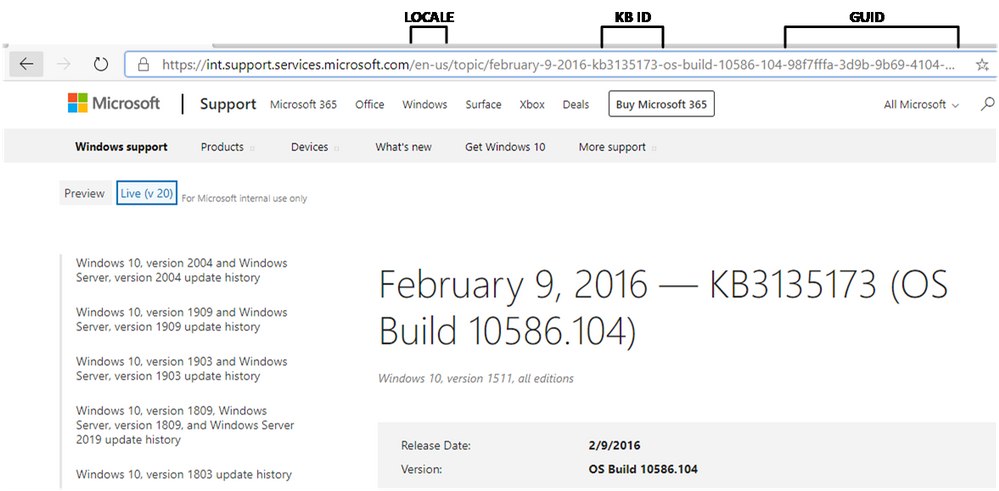
As you can see from the preview screenshot below, the knowledge base (KB) ID will be prominently displayed in the new URL structure and on the page itself. This makes it easier to search for support articles by KB ID and to distinguish one article from another when page titles look similar.
 New support article URL structure
Our current URL structure is: http://support.microsoft.com/[locale]/help/[kb-id]/[url-title]. To find an article by KB ID, you simply append the KB ID to the root URL, https://support.microsoft.com/help. At times, however, KB IDs are not listed in the article itself, and can only be found within the KB URL. The tie between the KB ID is not as strongly associated with the article by search engines and articles can be more difficult to find.
For greater consistency and to support improved search indexing, the URL structure moving forward will include both the GUID and the KB ID. Since many are familiar with appending the KB ID to the URL, we will continue to support this approach and use automatic redirects to ensure you land on the appropriate article.
Greater ability to share
You will continue to be able to share articles through email as you do today, but you will soon have the ability to share them on Facebook and LinkedIn using convenient share controls at the bottom of each page, as shown below:
 Share controls for support articles
What’s not changing
While we are consolidating our content management system (CMS) and web endpoints, there is no change to our content delivery strategy. We will continue to release the following documentation:
- All existing release notes, including:
- Monthly security updates (“B” releases)
- Non-security updates (Preview releases)
- Out of band updates (“OOB” releases)
- Existing support articles dating back to 2016, including informational and standalone articles, for supported operating systems.
- New articles for supported operating systems and those supported by extended security updates (ESUs).
- Content for existing channels, such as Windows Update, Microsoft Catalog, and Windows Server Update Services.
We will also continue to localize the latest cumulative update and rollup articles in the same languages—and support the best parts of the existing user experience, such as the ability to:
- Quickly find related articles (or articles for other versions of Windows)
- Leave feedback in the form of a comment on an individual article
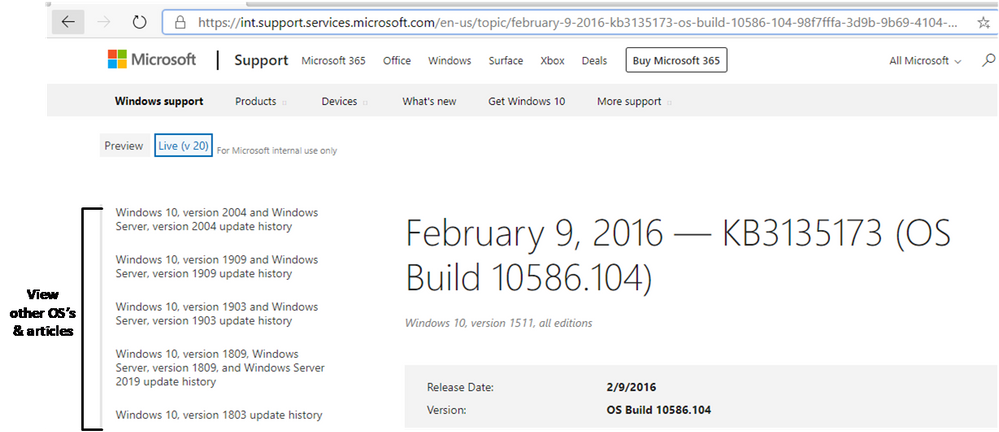 Quickly find information for other versions of Windows with the Windows update history pages
Metadata changes
If you use tools to find our pages using metadata, the information below may help you with this transition.
Articles will no longer be served as JSON objects
Currently, support.microsoft.com serves articles in a JSON format and then renders them on the client. The new support.microsoft.com rendering service will not deliver articles in a JSON format. Instead, the articles will be rendered in HTML.
Metadata will no longer be available in the JSON format
Metadata related to the article will no longer be served as JSON. Instead, article metadata will be rendered in a block of meta tags similar to the following:
<meta name="description" content="Learn more about update KB4075200, including improvements and fixes, any known issues, and how to get the update." />

<meta name="ms.product" content="8540b382-5304-d506-ece2-a936dd11d66e" />

<meta name="search.description" content="Learn more about update KB4075200, including improvements and fixes, any known issues, and how to get the update." />

<meta name="search.products" content="8540b382-5304-d506-ece2-a936dd11d66e" />

<meta name="search.version" content="21" />

<meta name="search.mkt" content="en-US" />

<meta name="awa-asst" content="00bc2e53-72c8-071d-66ed-60bccbda4ae9" />

<meta name="awa-pageType" content="Article" />

<meta name="awa-env" content="Staging" />

<meta name="awa-market" content="en-US" />

<meta name="awa-contentlang" content="en" />

<meta name="awa-stv" content="1.0.0-1e0ba91f1f752fea4fe74d7b26b96c62fd989518" />

<meta name="awa-serverImpressionGuid" content="00-3759df2a751d8547bca6e1d70ae93e01-2f1491318f186642-00" />
A reduced set of metadata will be available in the page source
The previous service exposed the entire JSON object for each article. The new service will expose a limited set of metadata as <meta> tags.
Some metadata that was previously available in JSON will be available as rendered HTML. See the table below for a list of common metadata items and a description of how they will render on the new service.
Previous item
|
Description
|
Rendering from previous service
|
Rendering from the new service
|
KB numbers
|
Used as a unique KB ID for KB articles.
|
id in JSON object and viewable on page
|
Rendered in <title> and <h1> elements if the KB was included in the article title
|
Release date
|
Date of article publication
|
releaseDate in JSON object and viewable on page
|
Rendered as HTML content
|
Last updated
|
Date of the most recent change
|
publishedOn in JSON object and viewable on page
|
Rendered as lastPublishedDate meta tag
|
Applies to
|
List of applicable operating systems (OS).
|
supportAreaPaths and supportAreaPathNodes in JSON object and viewable on page as Applies To: string
|
Rendered as HTML content
|
Version
|
OS build information
|
releaseVersion in JSON object and viewable on page
|
Rendered as HTML content
|
Heading
|
Title of article; heading is used for the title that is rendered on the page. Title is used for the title bar in the browser. There are also title attributes for each section.
|
heading in JSON object and viewable on page as topic title
|
Rendered in HTML content in both <title> and <h1> elements
|
Locale
|
The language of the article.
|
locale in JSON object
|
Derived from URL. Not available in page content.
|
We believe that these changes will make it easier for you to search for, and find, the resources you need to support and get the most out of your Windows and Office experience.

by Contributed | Oct 7, 2020 | Business, Security, Technology
This article is contributed. See the original author and article here.

Interview with Nolene LaNeve, Teams Engineering Senior Technical PM around Security in Teams
This past summer was extremely busy for the Microsoft Teams Engineering team, especially in the US Government space. They helped customers with a record number of net new deployments in the M365 US Gov Clouds; GCC, GCC High and DoD. End users wanted to collaborate with outside agencies but in a way that meant their data was secure. IT Admins wanted to know which configuration options best fit their organization’s security posture. CIO‘s wanted to lean in and give their workforce the best in class technology, all while following US Government accreditation standards. The common theme in most questions asked by our customers was around security. We recently sat down with @NoleneSLaNeve , a Senior Technical Program Manager and all-around security expert from Microsoft Teams Engineering and asked her what are the top 5 security questions asked by our US Government customers for Microsoft Teams. After all, Nolene helped some of our larger Federal Agencies successfully deploy Teams and is known to many as the call quality expert. Interview by Rima Reyes.
1. File Sharing in a Team
Question: “How can I securely collaborate and share files with other trusted organizations inside of a Team?”
Answer: “The best and fullest collaboration experience in Teams is called Guest Access. Essentially, Guest Access allows your organization’s users to collaborate with trusted people outside of your organization on documents, tasks, channels, conversations, and other resources within a Team. When someone outside of your organization is added to a Team, this person is called a Guest. Guest users even have a richer experience in Teams chat! Before anyone can add a Guest to a Team, your IT Admins will need to configure a few things first in Azure Active Directory, the M365 Admin Center, the SharePoint Admin Center and finally the Teams Admin Center. (Everything for Guest Access is off by default.) What’s great about these configuration options is that it really gives IT Admins the power to ‘dial things up or down’ based upon how much you want (or don’t want) to share and with whom exactly your organization wants to share with. A great example of when Guest Access is appropriate is during mission focused activities, like coordinating with local authorities during a natural disaster or when multiple agencies need to be involved for a policy review. Another thing to note is that Guests in Teams are covered by the same compliance and auditing protection as the rest of Microsoft 365 and come with the added benefit of being centrally managed in Azure Active Directory.”
US Gov Cloud Caveats: “Guest Access for Azure AD and Teams is available in GCC. GCC High and DOD will have Azure AD and Teams Guest Access capabilities in the future (allowable only per the accreditation guidelines).
Resources/Screenshots:
2. External Access with Whitelisted Domains
Question: What is the best way to chat with another trusted organization in Teams without having to share files?
Answer: “If your organization just wants to chat with people outside of the organization, then configuring External Access would be key. External access is a way for your users to find, call, chat, and set up meetings with external domains in Teams. You can also use External Access to communicate with outside users who are still using Skype for Business (online and on-premises). External Access is a great way to start figuring out what cross-government agency collaboration looks like. It’s so lightweight and easy since no file sharing is at play here. IT Admins have the power to configure who they want their organization to talk to (or not talk to) all through the Teams Admin Center. External Access is also useful for government agencies with a small subset of users who happen to be in a location that has extremely low bandwidth (think being in the middle of a forest somewhere) and must still use Skype on Prem. External Access allows for these two entities to talk to one another even while in the same organization.”
US Gov Cloud Caveats: “GCC & GCC High users can setup External Access with each other and with organizations in Commercial. DOD agencies can setup External Access with each other only.”
Resources/Screenshots:
3.Teams Encryption
Question: How is content encrypted in Teams?
Answer: “Teams data is encrypted in transit and at rest. Microsoft also encrypts all of the data going between a user’s device and when it finally lands in a Microsoft datacenter. (Even between datacenters too!) Compliance data is also encrypted at rest in Microsoft datacenters, but it is done so in a way that allows organizations to decrypt the content if needed for compliance reasons, like running an eDiscovery case. The type of encryption that Teams uses for all chat messages are TLS (Transport Layer Security) and MTLS (Mutual Transport Layer Security). FYI, TLS and MTLS protocols provide encrypted communications and endpoint authentication on the internet. Teams media content uses a type of network protocol used for delivering audio and video called RTP (Real-time Transport Protocol) and SRTP (Secure RTP) to encrypt media traffic. When it comes to how other content in Teams is encrypted, remember that files are stored in SharePoint and are backed by SharePoint encryption. Notes are stored in OneNote and are backed by OneNote encryption. The OneNote data is stored in the team’s SharePoint site. IT Admins should become really comfortable with managing the other services in M365 as well since Teams works in partnership with SharePoint, OneNote, Exchange, and more…”
Resources/Screenshots:
4. VPN Split Tunneling
Question: Why is VPN split tunneling important for just Teams media traffic? How can US Gov organizations champion for this change?
Answer: “This is the question asked the most by our US Government customers. Most organizations we talk to think that they have to be the ones encrypting all traffic and content over the VPN but in actuality that’s not the case, especially when Microsoft is already encrypting the content for you. (There is no value in double encrypting each packet of data.) In fact, many organizations run their Teams media traffic over the VPN as well causing it to crumble and all but ensuring a poor user experience. Let’s envision an example of how VPN tunnels work. Imagine a 2-lane road. Rush hour has just started so more and more cars are occupying this 2-lane road. The more cars, the slower everyone will move along the road. Cars represent packets of data. If there are too many cars on the road, other important traffic can’t get through. That’s why it’s important for traffic that doesn’t have to be encrypted by the customer’s network be moved off the VPN, like Teams media traffic since it’s encrypted anyway. Split tunneling VPN traffic enables segmenting traffic to be egressed to Office 365 via a direct Internet connection. My team always recommends that at a minimum, organizations enable split-tunnel VPN for Teams media traffic to reduce VPN load. This ensures a high-quality experience for all media scenarios within Teams (and much happier end users with less help desk tickets). Teams Engineering made sure it was easier for customers to implement this since Teams only uses 4 UDP ports and 3 IP ranges for media traffic. In other words, its much easier to split out media traffic and take Teams media traffic off the VPN! Remember, we aren’t saying to remove all M365 traffic off the VPN, just Teams media traffic.”
Resources/Screenshots:
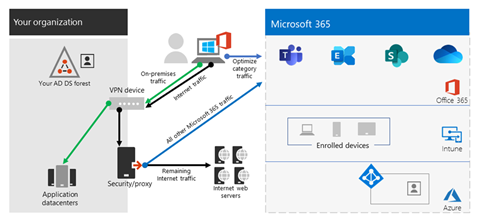
5. Meeting Security
Question: How can customers be assured they know who is in their meetings and not have any ‘uninvited guests’?
Answer: “Ever host an event where unexpected folks showed up and no one was checking their invites at the door? Sam‘s 3rd cousin Vinny happened to hear about your party from his great aunt Myra. How did that even happen, right?! Teams can help you check a guest’s invite at the door before they come into the party! The Teams Admin Center has configuration controls that allow organizations to match meeting security to their specific needs.
We recommend the following configuration settings for Teams Meetings with external participants:
- In the Teams Admin Center, turn on the toggle for Anonymous Join. With this setting on, anyone can join the meeting as an outside user by clicking the link in the meeting invitation. Enabling anonymous join is only for Teams meetings and does not allow the sharing of files during a meeting with those outside of your organization.
- Outside Users without a Teams Account:
- Must enter a name before joining the meeting.
- Meeting chat is limited to text only.
- Can join via the Teams mobile app, even without an already existing account (the app just needs to be installed on the phone before clicking the meeting link).
- Cannot create or join a meeting as a presenter, but can be promoted to presenter after they join a meeting.
- Outside users with a Teams Account:
- Can choose to sign in before joining the meeting for a richer meeting experience. These users, if promoted to do so, can act as presenters.
- Think about using Azure Information Protection Labels in Outlook as an option for meeting organizers to apply classifications that do not allow forwarding of meeting invites.
- In the Teams Admin Center under the Meeting Policies Section, most US Gov agencies use these configuration settings…”
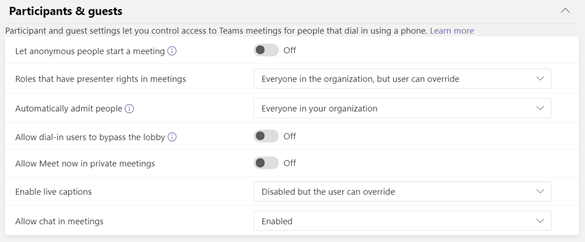
US Gov Cloud Caveats: GCC and GCC High organizations can enable anonymous join to allow outside users join their meetings. DOD hosted meetings cannot be joined by users outside of the DOD.
Resources/Screenshots:
Deploying Teams Quickly and Securely
Bonus Question: What is the fastest way I can deploy Teams in my organization without missing anything important, all while focusing on security?
Answer: “We know these are trying times and want to make sure everyone has the best experience when working from home or in a remote environment. We know Teams can help with that better user experience. That’s why we have catered the ‘must do’ list for deploying Microsoft Teams in your US Gov organization! Check out the resource below!
Resources/Screenshots:
About the Author

Nolene LaNeve
Senior Technical Program Manager, Teams Customer Engineering
Nolene LaNeve is currently a Senior Technical Program Manager in Microsoft’s Teams Engineering Product Group. Nolene is a subject matter expert on media quality and reliability and specializes in ensuring organizations in highly-regulated industries can deploy and/or upgrade to Microsoft Teams and achieve superior media quality and reliability while maintaining necessary security requirements.
Prior to her role in Teams Engineering, Nolene was a Solutions Architect in the Skype Circle of Excellence, where she built the “Optimize Enterprise Communications” engagement and helped customers optimize their Skype for Business deployments, as well as migrate to Office 365.
Nolene came to Microsoft as a Premier Field Engineer, where she supported financial services and defense technology organizations, after being on the customer side as a lead application engineer at Raymond James Financial Services, as well as a mobility engineer at AVI-SPL.
You also might enjoy:
Sharing Azure Sentinel Workbook Data with Someone Outside the SIEM
by Contributed | Oct 7, 2020 | Technology
This article is contributed. See the original author and article here.
Howdy folks,
With usage of cloud apps on the rise to enable remote work, attackers have been looking to leverage application-based attacks, such as consent phishing, to gain unwarranted access to valuable date in cloud services. To protect our customers from such attacks while continuing to foster a secure and trustworthy app ecosystem we’re announcing three new updates:
- General availability of publisher verification
- User consent updates for unverified publishers
- General availability of app consent policies
General availability of publisher verification
Last week at Microsoft Ignite, we announced that publisher verification is now generally available. This capability allows developers to add a verified identity to their app registrations and demonstrate to customers that the app comes from an authentic source. We announced public preview at Build in May, and over 700 app publishers have since added a verified publisher to over 1300 app registrations.
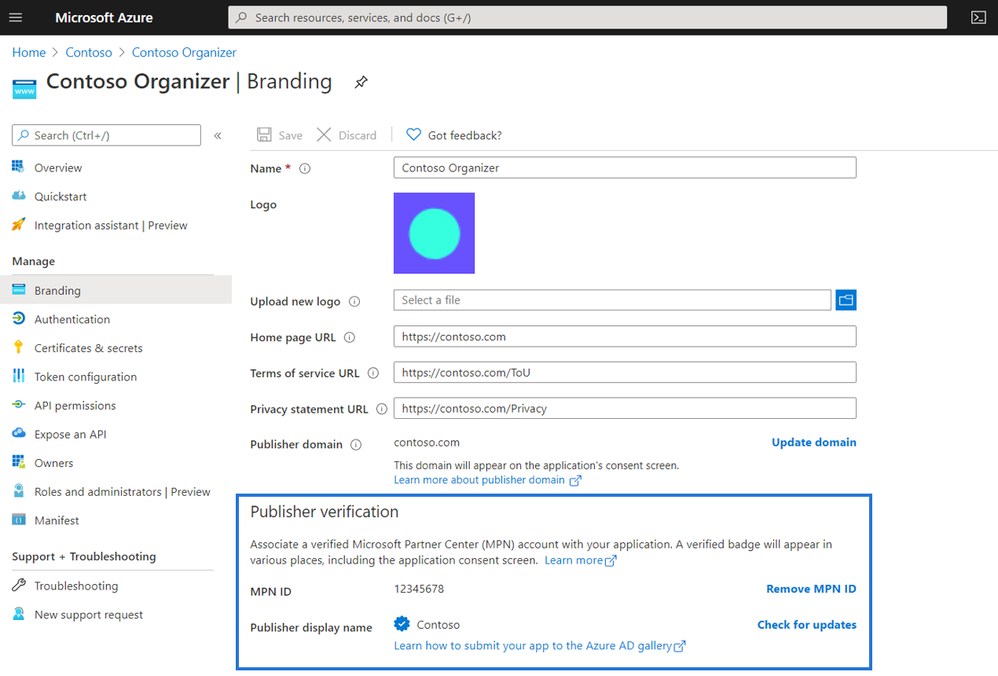
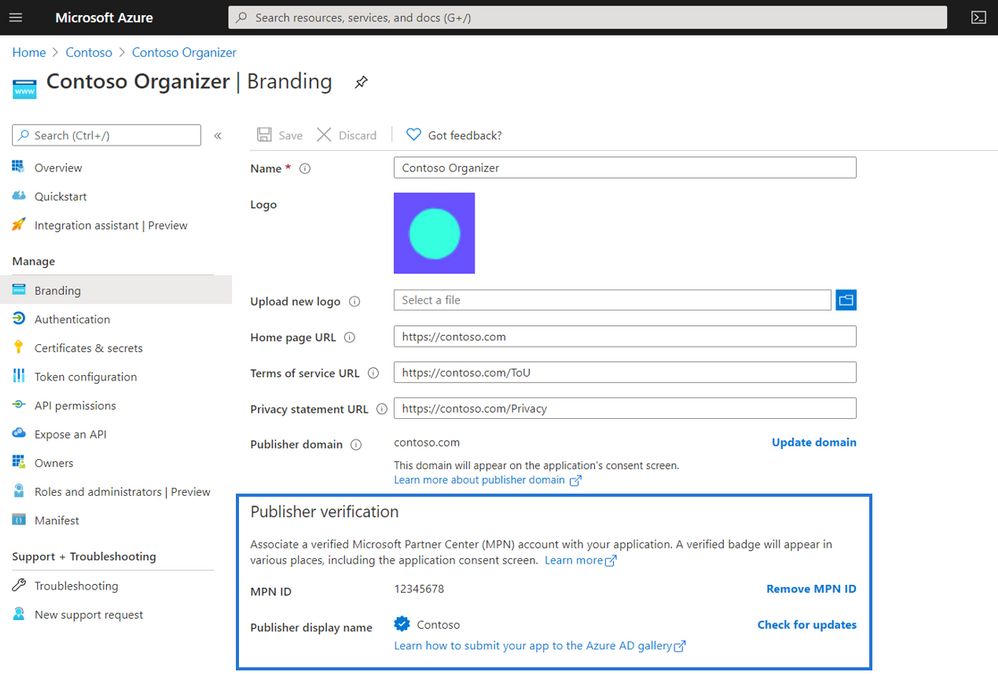
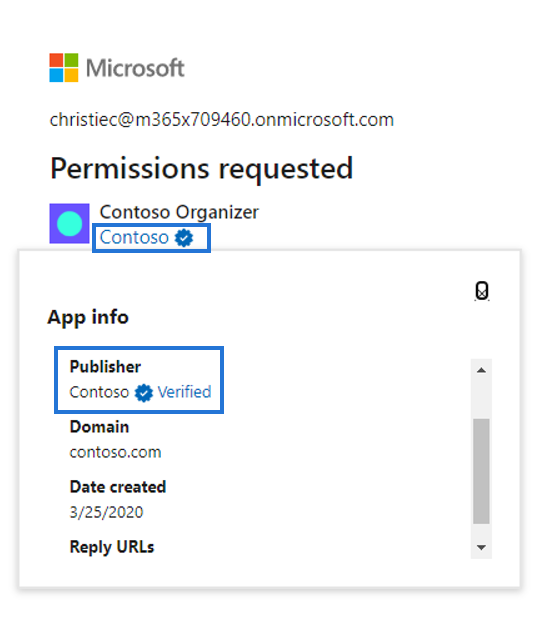
For developers, publisher verification allows them to distinguish their apps to customers by receiving a “verified” badge that appears on the Azure AD consent prompt.
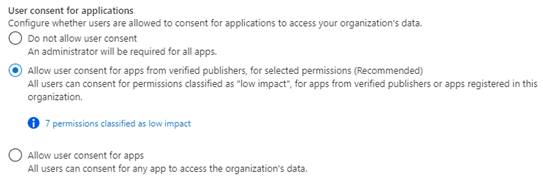
Admins can also set user consent policies based on if an apps is publisher verified helping streamline adoption. Developers who are building for Microsoft 365 that want to further distinguish their apps can also participate in the Microsoft 365 App Certification program.
User consent updates for unverified publishers
With publisher verification now generally available, we will be making changes that help protect users from app-based attacks. End users will no longer be able to consent to new multi-tenant apps registered after November 8th, 2020 coming from unverified publishers. These apps may be flagged as risky and will be shown as unverified on the consent screen. Apps requesting basic sign-in and permissions to read user profile will not be affected, nor will apps requesting consent in their own tenants.
To prepare for this change if you are an app developer, add a verified publisher to all your multi-tenant app registrations.
General availability of app consent policies
To help admins control what apps their users can consent to, we’re announcing general availability of the new app policies for end user consent. With app consent policies, admins have more controls over the apps and permissions to which users can consent.
Customers can manage settings for user consent by choosing from the following built-in app consent policies in the screenshot below:
Customers can also use Azure AD PowerShell or Microsoft Graph to create custom consent policies for even more control. These policies can include conditions that apply to the app, the publisher, or the permissions the app is requesting. Additionally, custom directory roles now support the permission to grant consent, limited by app consent policies. This can enable scenarios such as delegating the ability to consent only for some permissions, and creating least-privileged automation to manage authorization for apps.
We recommend that customer set their policy to allow user consent for apps from verified publishers and to configure the admin consent workflow to streamline access for end users who are not allowed to consent.
As always, we’d love to hear any feedback or suggestions you may have. Please let us know what you think in the comments below. For additional best practices to protect your organization from app-based attacks, be sure to check out the resources below:
Best regards,
Alex Simons (Twitter: @Alex_A_Simons)
Corporate Vice President of Program Management
Microsoft Identity Division
by Contributed | Oct 7, 2020 | Azure, Technology
This article is contributed. See the original author and article here.
Overview
Planning a network security Proof of Concept (POC) in your Azure environment is an effective way to understand the risk and potential exposure of a conceptual network design and how the services and tools available in Azure may be used for improvement. This is the first part of a series of steps to check in validating your conceptual design scenarios.
At the end of this article, you will be able to put a process map on your POC, know the type of resources required and have an idea of the implementation strategy to use. Keep it simple.
Azure network security involves mandatory and continuous improvement processes for workload protection. The effort to improve the network security posture of every client is a combination of both the Azure team and the customer-shared responsibility in the cloud. For more information, see the Azure network security controls documentation.
Azure resources also have a 30-day trial access that may be used to validate security with a POC. This is useful to note when making budgetary commitments.
Scope
In this article, we discuss the steps you should consider when performing a security POC (Network, Container, Apps) to meet regulatory and compliance standards.
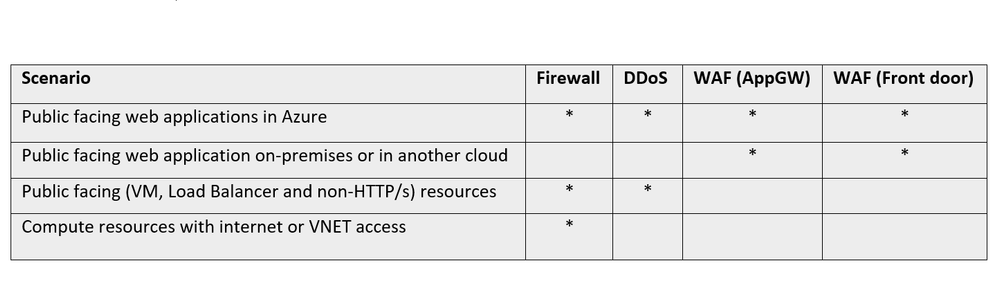
When testing any tool, it will be necessary to determine what capabilities are expected, to achieve a good result. To get started, here are some scenarios that could benefit from layers of network security.

The different standards that guide the resources used by your service offerings such as NIST SP 800-53 R4, SWIFT CSP CSCF-v2020 and CIS, and how they align with compliance, should also be considered as you go along in the exercise.
Take advantage of Azure Security Benchmark to establish guardrails for your security configurations.
Understand your network
As the network administrator/manager, having an adequate understanding of the layout of your network provides insight into the security requirements. The requirements for the different scenarios may be considered by keeping the focus on the objective of your test:
Architecture: Cloud native or hybrid solutions. More information on Cloud design patterns
Resources: Network and Application layer resources. Decide on the focus of your test.
Infrastructure: Storage, Computing etc. See more on Azure infrastructure
Accessibility: Multi-factor auth, JIT, Role Permissions, RDP/SSH, Azure Bastion etc.
Connectivity services: Virtual WAN, ExpressRoute, VPN Gateway, Virtual network NAT Gateway, Azure DNS etc. More information on Connectivity services
Permissions
Access to resources should be role-based when managing user identities. Conditional access should be granted to resources based on device, identity, assurance, network location, and grant temporary access for other connections. In addition, use JIT and MFA and follow the principle of least privilege assignment.

Implementation strategy
It is pertinent to understand which direction your proof of concept should take, such as: how long is the scheduled plan? Is there a dev environment or cluster dedicated to this? What priorities are attached to the application or network infrastructure? A few important guidelines should include:
– Build a security containment strategy: Align network segmentation with overall strategy and centralize network management and security. Develop and update the security incident response plan as the network changes.
– Define success index: This is a practical way to measure the work to be done and set the right expectation from the outcome of the process. Are you testing for feasibility, access control or confirming mitigation? How would you define a successful POC?
– Write down the contributors or administrators for each workload/resource for follow-up and task designation. It is pertinent to know who is assigned to a network contributor role or to a custom role and who has the appropriate actions listed for the permissions.
– Establish a timeline for the requirements that may be discovered during the POC.
Proof of Concept scenarios
Once the guidelines and framework from above have been established, the next step is to map out the scenario. There are different examples of scenarios that may be considered. If unsure, you can look through this article on Azure network security best practices to see areas that need improvement and then work on a POC to address the problem.
Other common examples that an administrator/manager may consider for a POC include:
Network segmentation
The logical partition of the network is achieved using subnets, subnets peering and virtual networks to define resource accessibility by roles, users, functions, resource types, user-defined routing, location etc. Examples include:
– Restrict access within a Virtual network by using Network Security Groups and Firewall
– Access on-prem resources, cloud and filter internet traffic by creating User-Defined Routes in Azure Firewall
Web Application security
Requests served by HTTP and HTTPs require different components for the appropriate response type. You may be looking to test for layer 7 attack validation and mitigation or doing a post deployment check.
The application may require user-managed or system-managed certificates, protocol support (IPv6 and HTTP/2 traffic), bot management. An administrator may be looking to validate security prone issues. Example of POCs for web application security include:
– Web-App vulnerability protection from SQL injection
– Geo-based access control and rate limiting
Ingress and Egress traffic management
This includes a series of tests around how traffic is managed from one node to the other within and outside the network. Examples of POCs might include remote connectivity, intra-VLAN routing, forced tunneling, geolocation management, content distribution etc. Examples of this POC include:
– DNAT access by RDP protocol to Windows client
– Bastion connectivity to a virtual network
– Path-Based Routing for resources in a backend pool.
– Secured Virtual Hub to connect virtual WAN resources.
DDOS attack simulation
Insights into how resources with public facing interfaces handle DDOS attacks and deny access to legitimate users is a common POC. Validation of your threshold values, how your Azure networking environment responds to volumetric or protocol attacks, and the report generation are common instances you may want to review. Examples of this POC include:
– Simulate DDoS attack through a Microsoft approved partner.
– Rate limiting access for a specific IP address.
Monitor the process

Monitoring the proof of concept behavior as you perform the process is essential for aggregating feedback.
Log Analytics is the primary tool in the Azure portal for writing log queries and interactively analyzing their results.
NSG flow Logs provide information about the flow of IP addresses in NSGs. It is vital and highly recommended for more understanding of your network traffic.
Also, confirm that diagnostic logging is enabled for your resource through the Azure portal. This could take a few minutes to show the results during a test.
Diagnostic logs provide insight into Azure operations that were performed within the data plane of an Azure resource. Follow this link for more on diagnostics logging.
Network Performance Monitor is a cloud-based hybrid network monitoring solution that could be used to monitor network performance between various points in your network infrastructure and connectivity to application endpoints. Follow this guideline to set up performance monitoring, Service Connectivity monitoring and Express-route monitoring.
For a complete guide on monitoring your network, follow this 5 minute start video guide.
Conclusion
There are many reasons why you may want to do a POC. This series is focused on creating a direction for a network security POC for layer3-4 and layer 7. Once you are clear on what you are testing for (e.g. WAF performance, DDOS mitigation/response or custom rules), proceed to the implementation strategy.
In summary, align your network segmentation model with the enterprise segmentation model for your organization. Delegation models that are well aligned improve automation and make for quick fault isolation. A recommended approach for production enterprise is to allow resources to initiate and respond to cloud requests through cloud network security devices.
As a rule, always adopt a Zero Trust approach.
(In the next part of this series, we build an environment to do a POC, using some of the examples in the Proof of Concept scenarios mentioned in this blogpost. You will be able to follow the steps in the article to do some POC examples)


Recent Comments