by Contributed | Oct 26, 2020 | Technology
This article is contributed. See the original author and article here.
The integration of Azure Advisor with Azure Kubernetes Service (AKS) means you can can get telemetry based – proactive + actionable – recommendations for your AKS clusters enabling you to follow best practices towards maintaining cluster hygiene.
This is the active set of Advisor recommendations for AKS –
– Use of Pod Disruption Budgets
– Expired Service Principals
– Unsupported Kubernetes Versions
– Expired cluster certificates
– Deleted OMS workspace for Azure Monitor
with more on the roadmap like –
– Resource requests/limits not set
– Namespace quotas not set
– Subnet running out of IP addresses
– Service address range overlapping with another CIDR range in the VNET
….
(Source: See References section)
Let us take a look at a couple of such scenarios and related recommendations –
Ensure cluster is running a supported version
I have a relatively older demo cluster running Kubernetes version [1.16.7] which means my cluster is out of support.
Not upgrading the cluster to a AKS supported Kubernetes version means missing out on one of the key reason to use managed service – support.
Also, there is the risk of running a cluster with crtitical security vulnerabilities.
Learn more about the version support policy here – https://docs.microsoft.com/en-us/azure/aks/supported-kubernetes-versions#kubernetes-version-support-policy
and the related FAQ section – here.
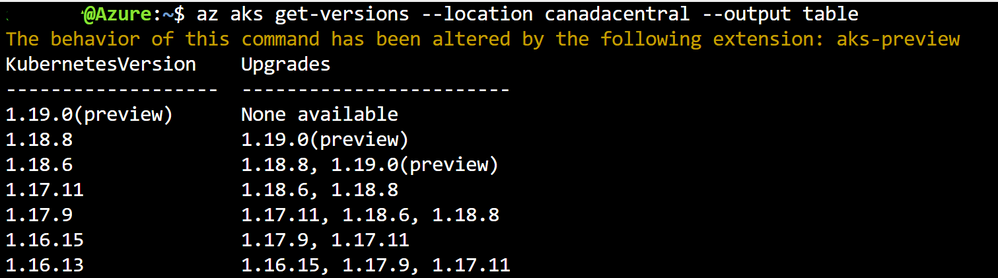
List the supported versions for your region with the Az CLI command
az aks get-versions --location canadacentral --output table
So, how does Azure Advisor help here ?
By providing a proactive recommendation based on detecting the unsupported version –

Pod Disruption Budget recommended
I have not setup PDBs for a set of my active deployments in the cluster – which means I essentially run the risk of application / service unreliability by not following the best practice.
More details of PDBs an related best practice here –
Azure Advisor now recommends as depicted –

References:
Microsoft Videos : Bringing Kubernetes best practices to everyone | Video 1 | Video 2
by Contributed | Oct 26, 2020 | Technology
This article is contributed. See the original author and article here.
[Following material applies to Tumbling Window Triggers in Azure Data Factory. Learn more about Tumbling Window Trigger]
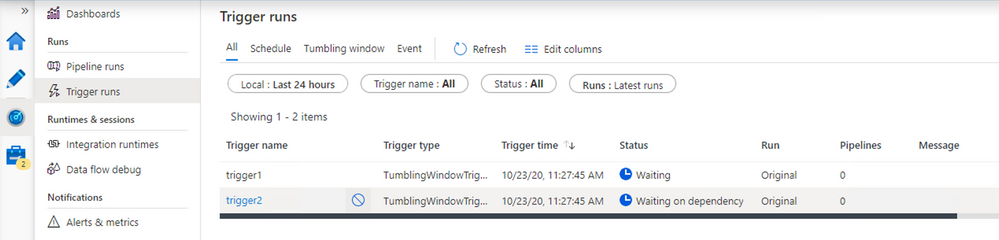
With the newly released feature, you now have the capabilities to cancel Tumbling Window Trigger runs if the window is in Running or Waiting on Dependency state.
- If the window is in Running state, cancel the associated Pipeline Run, and the trigger run will be marked as Cancelled afterwards
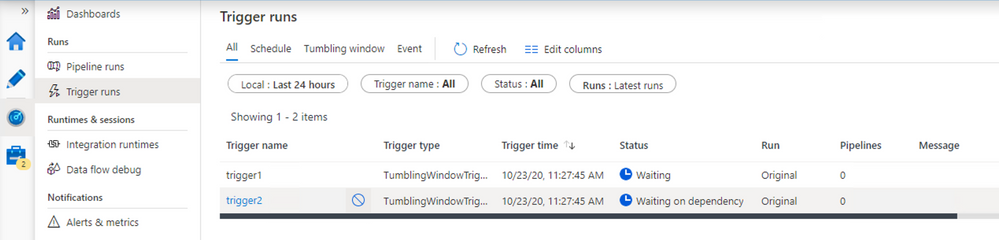
- If the window is in Waiting or Waiting on Dependency state, you can cancel the window from Monitoring
You can also rerun a cancelled window. The rerun will take the latest published definition of the trigger; and dependencies for the specified window will be re-evaluated upon rerun.
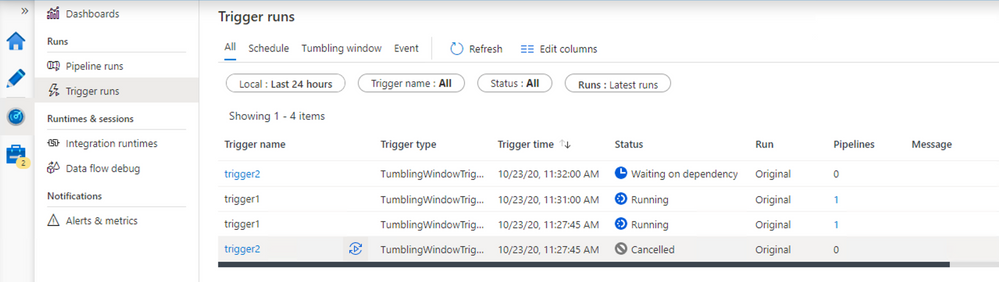
Combining these two capabilities give you a powerful way to resolve the hanging/blocking dependencies view. Imagine the following scenario: TWT-B depends on TWT-A, and for some reasons TWT-A has been consistently failing lately. To unblock downstream work flows, you decided to remove TWT-A from TWT-B’s dependency list.
Instead of stopping and restarting TWT-B, you can now take following steps:
- Cancel all Waiting on Dependency runs of TWT-B (these are the windows waiting for TWT-A to finish)
- Edit and publish new trigger definitions of TWT-B to remove dependencies
- Rerun the cancelled runs
Since the rerun will take the new definition, it will by-pass the blocking TWT-A, and enable downstream workflow to continue
by Contributed | Oct 26, 2020 | Technology
This article is contributed. See the original author and article here.
Hey folks,
In this blog, I am going to tell you about an amazing addition to our family of credential compromise detection capabilities – this one uses our machine learning technology and global signal to create incredibly accurate detection of a nuanced attack called “password spray.”
Understanding Password Spray
In password spray attacks, bad actors try a few common passwords against many accounts from different organizations. Instead of trying many passwords against one user, they try to defeat lockout and detection by trying many users against one password. Effective forms of this attack are “low and slow,” where the bad actor uses thousands of IP addresses (such as from a botnet) to attack many tenants with a few common passwords. From any one tenant’s view, there are so few login attempts with such poor consistency that the attack is undetectable. A customer might only see one or two failed logins happen from these types of attacks once a day, so the attacks get lost in the noise of normal login patterns. They also bypass traditional protection like password lockout and malicious IP blocking. Password spray attacks have a 1 percent success rate for accounts (unless they use password protection – please use it!).
The following chart shows a password spray attack that was observed on our system:
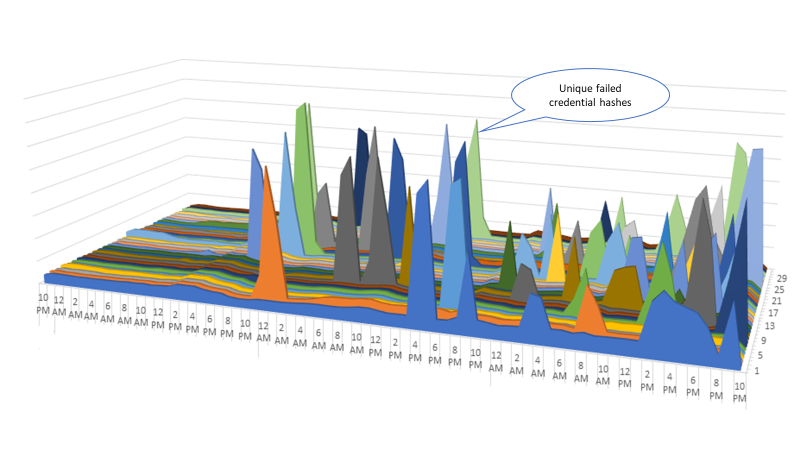
Each color tracks a different password hash for login attempts with incorrect passwords in Azure Active Directory (Azure AD). Looking across millions of tenants, we can see the pattern of a password spray attack. Normally the graph would be flat and evenly dispersed as you see on the left side. The huge elevation of a single hash failing across many accounts indicates a single password being attempted against hundreds of thousands of usernames from many tenants—a password spray attack in progress. This lens extends our detections beyond traffic from a set of IP addresses (a few of these attacks have originated from millions of IP addresses) and instead correlates the patterns of authentications the bad actors are attempting.
The Evolution of Password Spray Detection
To detect password sprays, we built a heuristic detection using the approach previously described. It worked great, and we were able to notify tenants of hundreds of thousands of attacks monthly (increased user risk) so they could protect their organizations. But we weren’t satisfied. So our data scientists started researching the use of these patterns and additional data to train a new supervised machine learning system incorporating IP reputation, unfamiliar sign-in properties, and other deviations in account behavior. The results of this research led to this month’s release of the new password spray risk detection. This new machine learning detection yields a 100 percent increase in recall, meaning it detects twice the number of compromised accounts of the previous algorithm. It does this while maintaining the previous algorithm’s amazing 98 percent precision—meaning if this algorithm says an account fell to password spray, it’s almost certain that it did.
Azure AD Identity Protection customers will see this new risk detection in the portal and APIs for Identity Protection. The following screenshot provides a sample of the new risk detection:
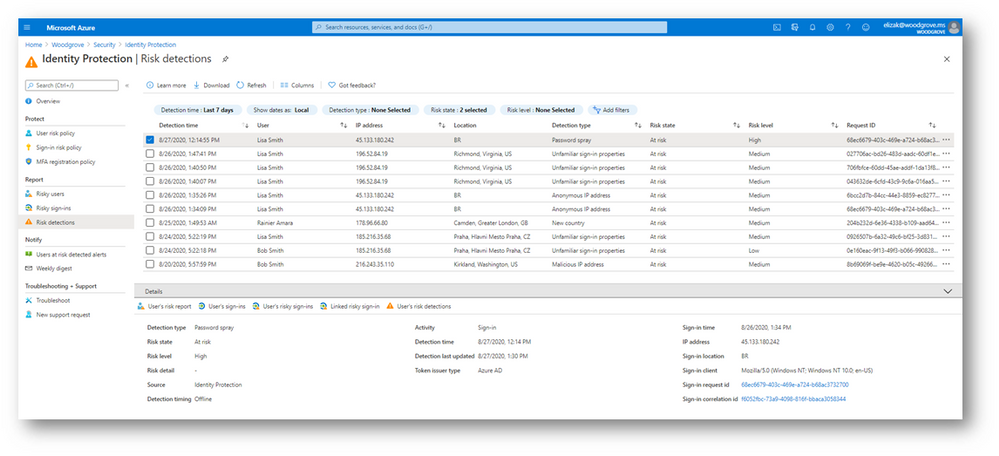
This new password spray detection is a great example of how we use intelligence gained across Microsoft’s identity systems to continuously expand and improve our protections—which you can use to automate processes in Azure AD Conditional Access, in Azure Sentinel, or through the APIs for anything you can imagine. For more information about other risk detections and how you can enable Identity Protection in your own organization, see the article, “What is Identity Protection?”. The team is committed to exploring and creating new and innovative approaches to protect our customers. I look forward to detailing these new protection systems for you in the future.
Stay safe out there!
-Alex (@alex_t_weinert)
by Contributed | Oct 26, 2020 | Technology
This article is contributed. See the original author and article here.
In the previous post I discussed the bigger picture for Harpocrates’ existence and goals. In this post, I will begin by diving into the constructs defined by Harpocrates and how they can be leveraged to achieve the desired configuration for your environment.
As discussed before, Harpocrates addresses the need for a periodic rotation of secrets. And as such, we need a primitive to describe this “period”. To allow for support of other governing constructs in the future, Harpocrates utilizes a concept of a “Policy”. This primitive is meant to enable the system administrator to define a set of time-based rotation intervals that can then be applied to other constructs in the system. At the time of writing of this post, the Policy is used solely to define a rotation interval, though it could be extended to add additional governing properties.
Policies are applied to specific services. This means that a specific storage account can have a “15-day” rotation policy, while another one can have a “90-day” policy applied to it. This enables the administrator to describe how frequently a particular service needs to have its credentials rotated. This brings us to the next primitive: “Service”.
A “Service” primitive is used to describe a specific service you want Harpocrates to manage. For example, you may want to enable Harpocrates to rotate keys for “Storage Account A”, and as such, you would create a “Service” definition for such service. “Service” definition would also provide additional metadata about the given service, such as the type of the service this is (i.e. storage account, cosmosdb account, Redis cache, etc); and lastly, a “Service” will be configured w/ a “connection string” that would describe how this particular service could be managed by the secret management provider. In most cases, this connection string would simply contain a resource group and the service uri. However, it is possible to add additional tokens to this piece of metadata, as long as the syntax used to define it is understood by the respective secret management provided. For example, for Azure Storage Account secret management provider, the connection string looks like this: “AccountEndpoint=https://storageaccounta.core.windows.net;ResourceGroup=myrg;”. If you had extended the secret management provider by adding your own custom provider, the connection string used to configure such service would simply need to match the syntax your customer provider knows how to interpret. At the time of writing of this article, “Service” configuration information is not encrypted, therefore you should avoid storing secrets with its definitions.
Harpocrates uses Azure Key Vault as the secure store for service secrets as well as the eventing mechanism to signal when a specific secret is to be rotated. In Key Vault, secrets are identified by a unique Uri. Here’s an example of a Uri for KV Secret named “my-secret”: https://mykevault.vault.azure.net/secrets/my-secret/{version id}. Since each KV secret has a unique, well defined uri, we can use that Uri to correlate secrets stored in KV to the services we defined in Harpocrates. To do this, we need a third primitive: “Secret”. As you have probably guessed, “Secret” will provide “mapping information”, allowing Harpocrates to “translate” a KV uri to a service we are trying to manage. In addition to this important piece of information, a “Secret” also contains information about the “type” of secret it is, as well as the format in which this secret is to be stored in KV (more on this later). There are currently two types of secrets supported by Harpocrates: Attached & Dependency.
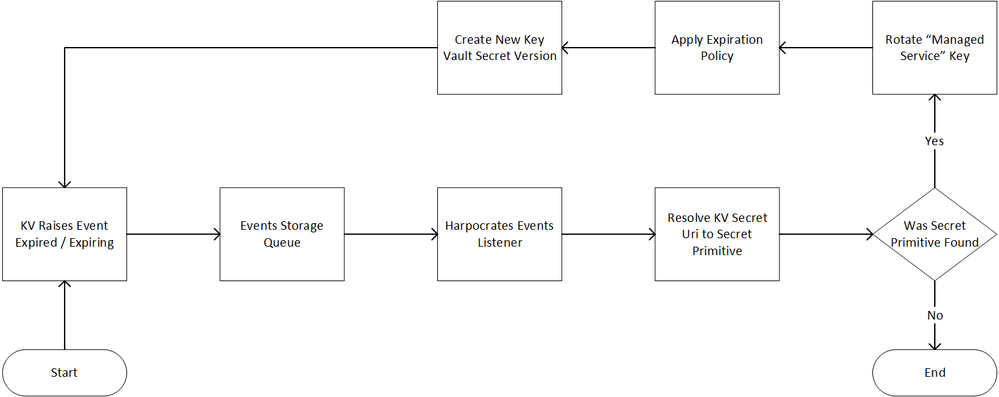
“Attached” secrets represent the entries in KV that store raw values of the downstream service secret. For example, when creating management metadata for “StorageAccountA”, one would create a Key Vault secret named “my-storage-account-a-master-key”. This KV Secret would be associated with a Harpocrates “Secret” “StorageAccountASecret” that would in turn be associated with the “StorageAccountA” service definition and be of type “Attached”. Since “StorageAccountA” service definition is associated with a particular “Policy”, that policies will be used to set the expiration date of the key vault secret named “my-storage-account-a-master-key”, and as such, would cause this secret to expire, firing a KV event that Harpocrates can respond to by rotating the storage account key & updating the associated KV secret. The above described flow is depicted below:
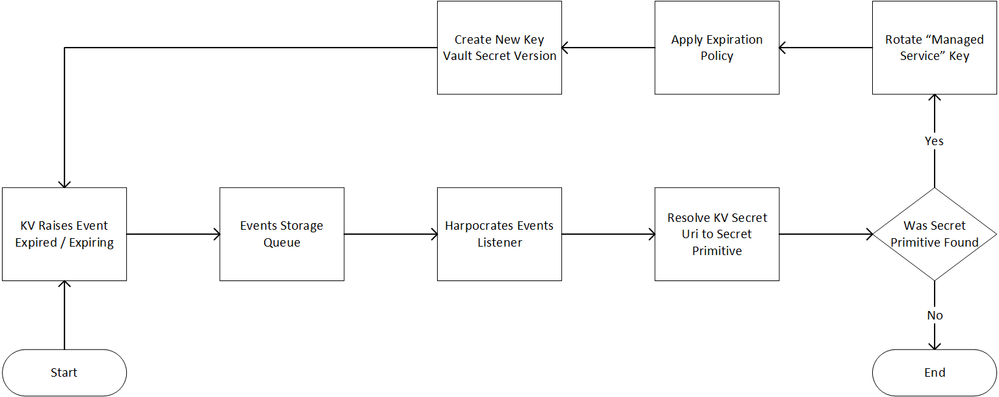
Figure 1 “Attached” secret process flow
“Dependency” secrets represent entries in Key Vault that depend on the value of another secret. This type of a secret would typically be used to define a secret consumed by an application that needs credentials to access one of the services managed by Harpocrates. Most application do not store secrets in plain form but rather use a specific format, such as a connection string. In a typical application, one would likely see a configuration entry in a form of a database connection string, rather than multiple entries each representing the: server name, username, user password, etc. As such, “Dependency” secrets support a concept of a Format Expression. When setting up a “Dependency” secret, a system admin would provide Harpocrates with an expression that matches the expectations of the consuming application and may look something like this: “Server={{server-secret-id}};User={{user-secret-id}};Password={{password-secret-id}}”. The values specified in the “{{“ “}}” are system generated ids of the secrets managed by Harpocrates that can be resolved at time of dependency update, thus allowing the actual KV secret value to be: “Server=myDbServer;User=MyDbUserName;Password=P@ssword@1”.
Now that we have the language to describe a Policy, Service, and Secrete, we need one last construct to simplify the dependency secret resolution: Secret Dependency. This is not as much of a primitive as just a relationship that is defined within the system. When a secret has dependencies and that secret has its associated service keys rotated, the system can schedule updates to all other secrets that depend on it. Since dependencies do not technically require that they depend on “attached” secrets, one could design an extensive cascading secret rotation strategy to be executed by Harpocrates. The above described flow is depicted in the diagram below:
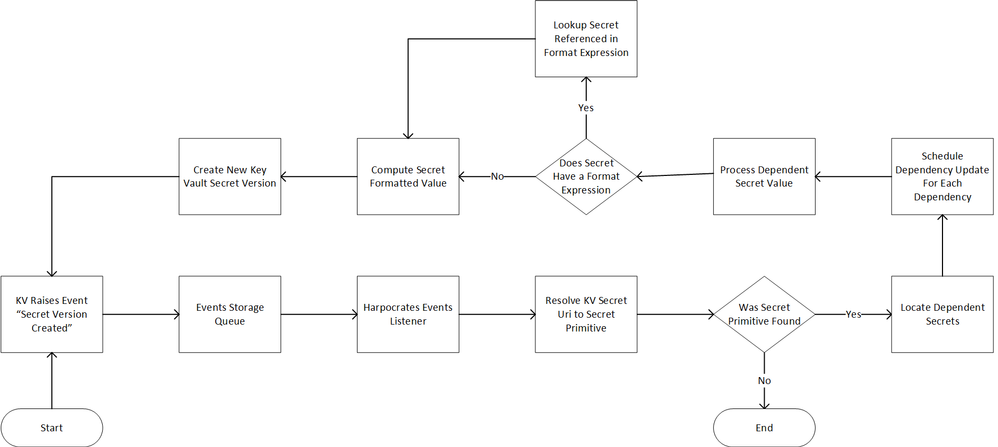
Figure 2 “Dependency” secret process flow
Now that we have the vocabulary required to describe the behavior we want Harpocrates to automate, we can discuss the runtime requirements and assumptions made by Harpocrates. We will do this in the next installment of this blog series. As always, your feedback is welcomed and greatly appreciated.
by Contributed | Oct 26, 2020 | Technology
This article is contributed. See the original author and article here.
A new preview of Microsoft.Data.SqlClient was recently released. The SqlClient team is moving forward with continuous updates and improvements to the Microsoft.Data.SqlClient data provider for SQL Server. Our plan is to provide GA releases twice a year with two preview releases in between. This cadence should provide time for feedback and allow us to deliver features and fixes in a timely manner. This second 2.1 preview includes several fixes and changes over the previous 2.0 GA release, including Azure Active Directory Managed Identity authentication and now supporting Always Encrypted on all supported platforms when targeting .NET Standard 2.0.
For the full list of changes in Microsoft.Data.SqlClient 2.1 Preview 2, please see the Release Notes.
To try out the new package, add a NuGet reference to Microsoft.Data.SqlClient in your application and pick the 2.1 preview 2 version.
We appreciate the time and effort you spend checking out our previews. It makes the final product that much better. If you encounter any issues or have any feedback, head over to the SqlClient GitHub repository and submit an issue.
David Engel
by Contributed | Oct 26, 2020 | Technology
This article is contributed. See the original author and article here.
Azure Stack Hub Partner Solutions Series – Salt
Thomas Maurer
Salt business focuses on bringing a multi-tenanted Azure Stack Hub environment in the Caribbean Islands. Check it out!
Microsoft 365 PnP Weekly – Episode 101
Waldek Mastykarz
In this 1st installment after the 100th installment of the weekly discussion revolving around the latest news and topics on Microsoft 365.
Windows Subsystem for Linux 2 – Addressing Traffic Routing Issues
Anthony Bartolo
WSL2 traffic not routing to local Hyper-V vSwitches? Check this out!
Azure Migrate and PowerBI
Sarah Lean
Use new PowerBI templates to visualise your Azure Migrate data!
October 22, 2020 | Leveraging Turnkey AI Live Tutorial
Ruth Yakubu
Enjoy the videos and music you love, upload original content, and share it all with friends, family, and the world on YouTube.
Cognitive Services—APIs for AI Developers | Microsoft Azure
Aysegul Yonet
Azure Cognitive Services brings AI within reach of every developer through a family of APIs that don’t require machine-learning expertise.
Azure portal – Announcements and videos
Sonia Cuff
Like any cloud service, the Azure portal also gets updates – here’s how to stay up to date with the announcements.
Hosting my first ever Developer Bootcamp in Microsoft Teams : A retrospect
Rabia Williams
IMAGINE… You have a few weeks, to collaborate with a select groups of awesome fellow techies…
Build “One Productivity Hub” using Microsoft Teams and Microsoft Graph Toolkit
Ayca Bas
In this workshop you will learn to use Microsoft Graph Toolkit to build a solution for Microsoft Teams. The user will be able to track daily calendar, tasks …
Video Recording: Azure Architecture Best Practices
Thomas Maurer
Here is the Azure Architecture Best Practices Virtual Event Video Recording with Microsoft Cloud Solution Architect, Dominik Zemp!
How to create Azure Hybrid Cloud Architectures
Thomas Maurer
Looking for Azure hybrid cloud architectures in the Azure Architecture Center? You can find diagrams, reference architectures, and much more!
AzUpdate: Windows 10 version 20H2, Azure AD provisioning updates, Modular Datacenters and more
Anthony Bartolo
Another plethora of news stories to share on this week’s AzUpdate show. News includes: What’s new for IT Pros in Windows 10 version 20H2, Designing Azure Modular Datacenters, Azure AD provisioning updates that include attribute mapping and improved performance, newly announced plans for Microsoft to establish its first cloud region in Austria and as always, the Microsoft Learn module of the week.
AzureFunBytes Short – AI on @Azure
Jay Gordon
With AI, we can build solutions that seemed like science fiction a short time ago; enabling incredibl… Tagged with azure, cloud, beginners, ai.
Docker and Python: making them play nicely and securely for Ml and DS
Tania Allard
Docker has become a standard tool for developers around the world to deploy applications in a reproducible and robust manner. The existence of Docker and Docker compose have reduced the time needed to set up new software and implementing complex technology stacks for our applications. Now, six years after the initial release of` Docker, we can say with confidence that containers and containers orchestration have become some of the defaults in the current technology stacks. There are thousands of tutorials and getting started documents for those wanting to adopt Docker for apps deployment. However, if you are a Data Scientist, a researcher or someone working on scientific computing wanting to adopt Docker, the story is quite different. There are very few tutorials (in comparison to app/web) and documents focused on Docker best practices for DS and scientific computing. If you are working on DS, ML or scientific computing, this talk is for you. We’ll cover best practices when building Docker containers for data-intensive applications, from optimising your image build, to ensuring your containers are secure and efficient deployment workflows. We will talk about the most common problems faced while using Docker with data-intensive applications and how you can overcome most of them. Finally, I’ll give some practical and useful tips for you to improve your Docker workflows and practises. Attendees will leave the talk feeling confident about adopting Docker across a range of DS, ML and research projects.
Deploy your Java Application to Azure App Service with Maven
Sandra Ahlgrimm
In this 4 minutes tutorial Sandra shows how you can deploy a Spring Boot web application to Azure App Service.
Saving Halloween 2020 with Azure Maps and Candy Caches
Jen Looper
Let me show you how I rallied my town and created a map showing kids where to find contactless, pandemic-friendly candy caches that saved Halloween!. Tagged with javascript, vue, webdev, tutorial.
Building a Video Chat App, Part 2 – Accessing Cameras | LINQ to Fail
Aaron Powell
Lights, camera, action! It’s time to get devices for our app.
Using Game Design to Make Virtual Events More Social
Em Lazer-Walker
A few months ago, I had a conundrum: I couldn’t stand virtual conferences. I personally go to in-per… Tagged with games, conferences, mud, events.
Run Visual Studio Code on a Raspberry Pi
Jim Bennett
It’s finally here! An official supported version of VS Code that runs on a Raspberry Pi! ICYMI: VS Code now officially supports @Raspberry_Pi too!
Demo JBoss EAP VMSS Quickstart
Sandra Ahlgrimm
Theresa Nguyen, Senior Product Manager at Microsoft showcases JBoss EAP on Azure VMSS Find more at https://aka.ms/jbossEAP and https://aka.ms/jboss-eap Get y…
by Contributed | Oct 26, 2020 | Technology
This article is contributed. See the original author and article here.
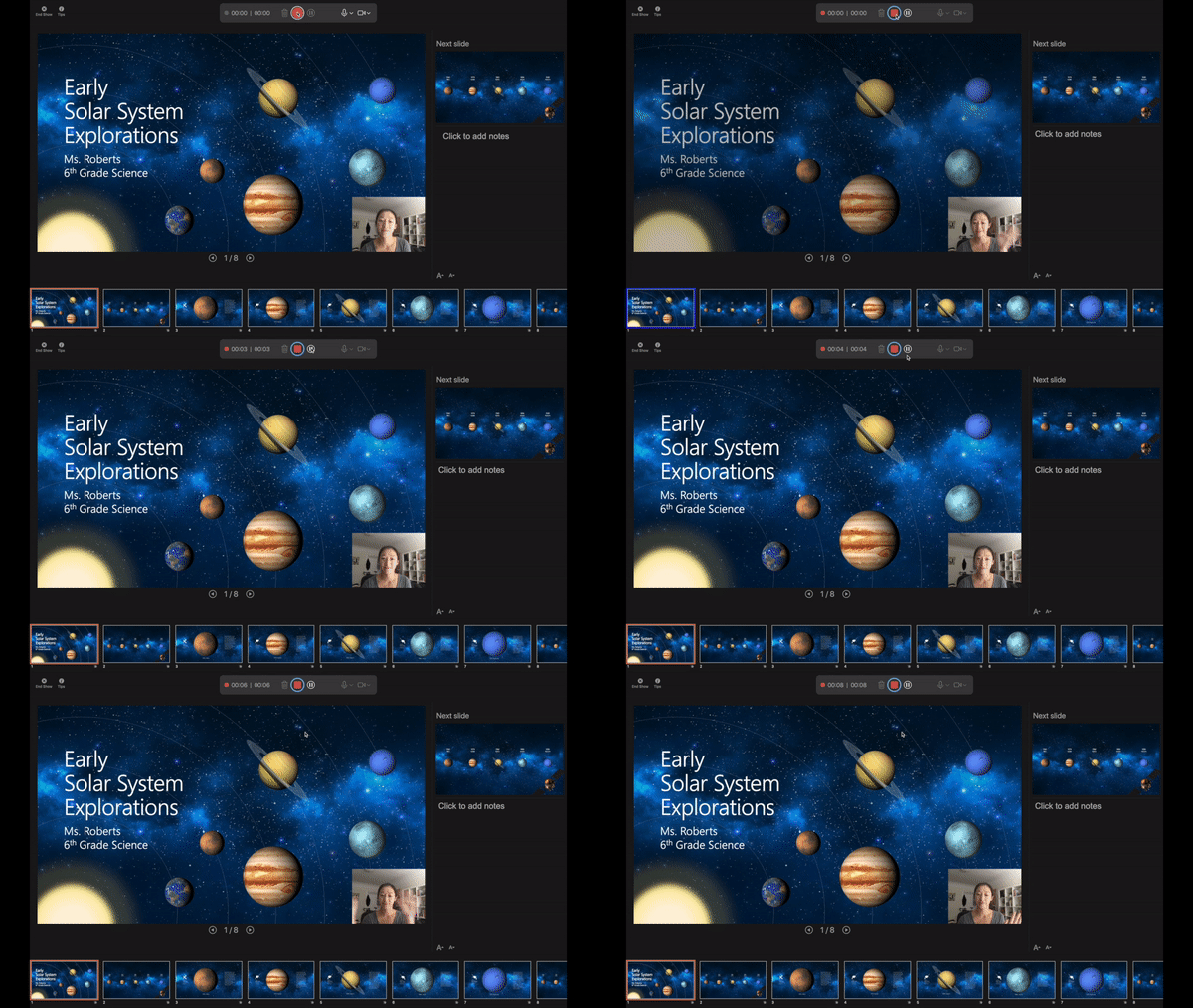
Record Slide Show is an easy to use tool that allows you to create narrations to go along with your slides. During a time of remote meetings and learning, alternate methods of presenting are becoming more and more important in our day to day lives.
We’re excited to announce that new updates are now available on PowerPoint for Mac that allow users to record presenter video and inking during their Record Slide Show sessions. These new capabilities will enable you to create more robust recorded presentations. We hope that this feature can help simplify your presentation recording process and better engage your audience.
Here are some features that will be new in Record Slide Show on PowerPoint for Mac:
Presenter video recording
You can now record a video of yourself to go along with slides that you are presenting. Draw your audience’s attention by making it feel like you are giving the presentation live.
Use the new recording toolbar right under your camera to configure, start, pause, and stop your recording. Playback what you’ve recorded and rerecord when necessary.

Presenter drawing recording
You can also now record notes taken with the pen or highlighter tool. Any drawing done in the recording state will be captured. When you or your audience member plays the presentation back, it will seem like you are drawing on the slides in real time.
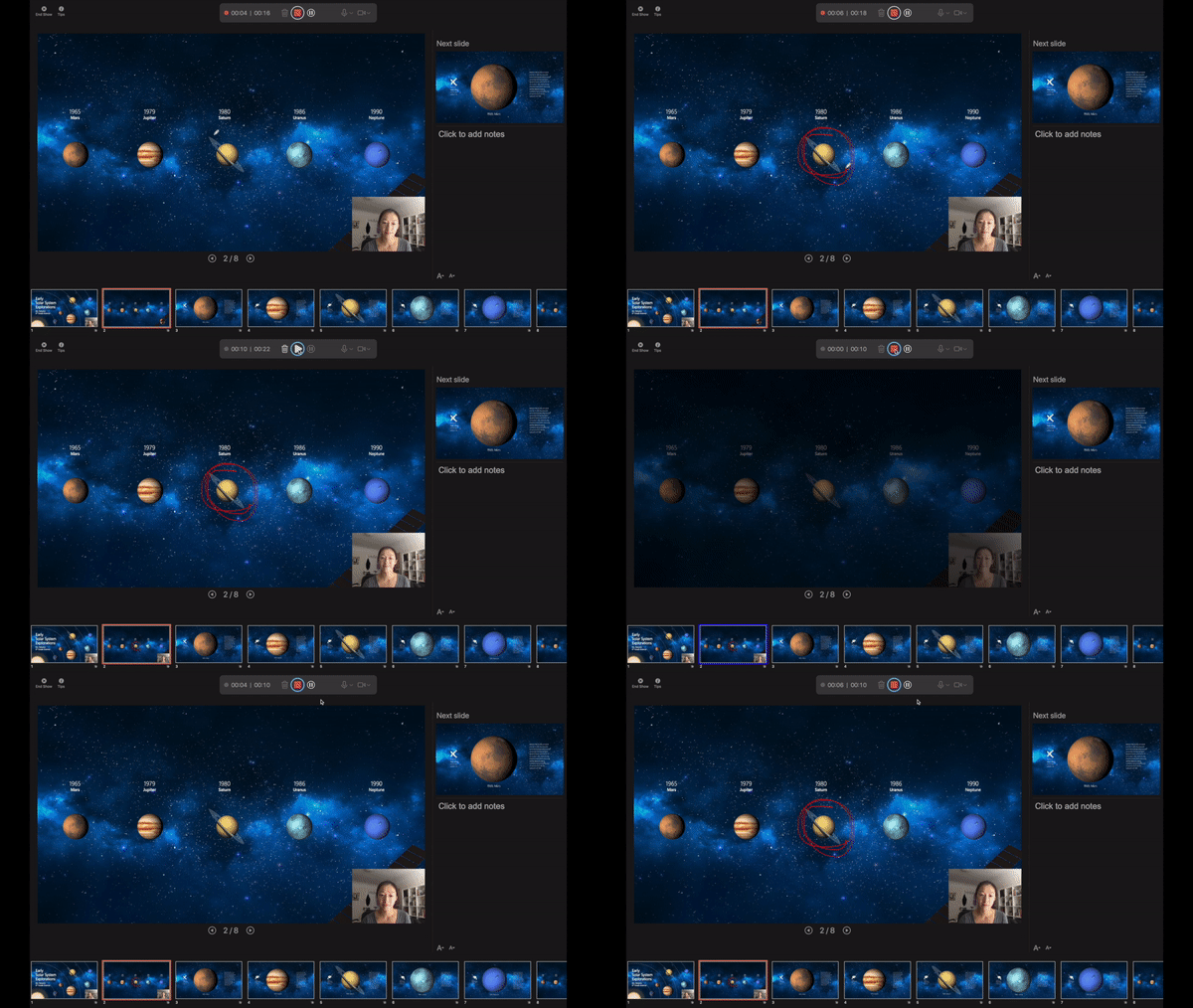
Laser pointer recording
Similar to recording for the pen tool, you can now record your laser pointer movements while using Record Slide Show. Motion towards different portions of your slides to pull the audience’s attention.
Want to be among the first to use the new feature? Make sure you join our Office Insiders Program to get the first look at new features from Office.
Additional new PowerPoint features available today:
Record Audio
Recording audio for your PowerPoint presentation is easier than ever. Recent upgrades to PowerPoint for Mac make recording audio and inserting it into your slides simple with the new Record Audio pane.

Learn more about the experience here.
Export PPT as Animated GIF
Have you ever had an idea for an animated GIF but didn’t know where to get started? With the Export/Save As Animated GIF feature, you can create your ideas in PowerPoint! Use shapes, images, ink, animations, and transitions to create a wide variety of GIFs.
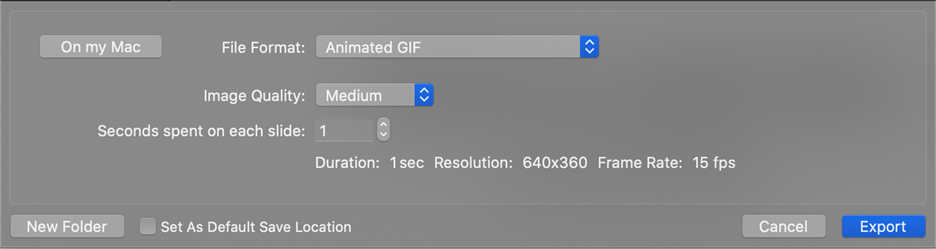
 Learn more about how to use the experience here.
Link to this Slide
Have you ever been working with a colleague on a PowerPoint presentation, and wanted to send them a link to a particular slide? With the Link to this Slide feature, you can save time and avoid any confusion by creating a link that will open the file and take them directly to a specific slide in your presentation. Save your file to OneDrive, right-click on the slide you want to link to and select “Link to this Slide” to help your colleagues quickly access the location you’d like to reference.
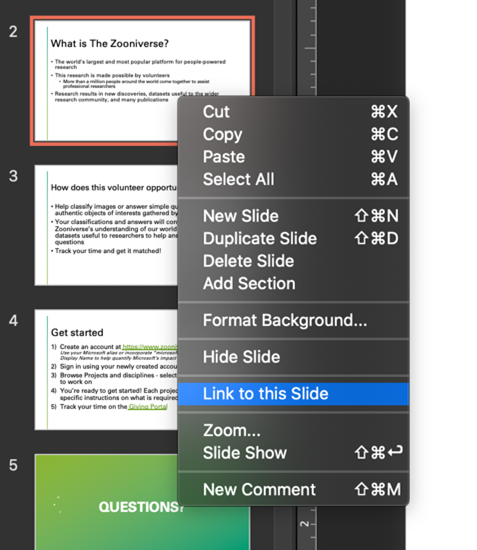
Learn more about this feature here.
Mike Tholfsen
Principal Product Manager
Microsoft Education
@mtholfsen
by Contributed | Oct 26, 2020 | Technology
This article is contributed. See the original author and article here.
News this week includes:
Azure Defender for IoT is now in public preview
Introducing Zoho Notebook for Microsoft Teams: Bring your thoughts and teams together
Microsoft Partners with Salesforce to Deliver Microsoft Teams Integration for Sales and Service
Kam Vinothkumar is our Member of the Week, and a great contributor in the Microsoft Edge Insider community.
View the Weekly Roundup for Oct 19-23 in Sway and attached PDF document.
https://sway.office.com/s/k7yR81iB7cVZW3x2/embed

by Contributed | Oct 26, 2020 | Technology
This article is contributed. See the original author and article here.
We continue to expand the Azure Marketplace ecosystem. For this volume, 91 new offers successfully met the onboarding criteria and went live. See details of the new offers below:
|
Applications
|
 |
Abnormal Security – Free Trial: Abnormal Security’s platform protects enterprises from advanced targeted attacks via anomalous behavior detection, which enables it to stop business email compromise and email account compromises that lead to socially engineered attacks.
|
 |
AdsertiCredit: AdsertiCredit is a cloud-based credit management platform that enables users to efficiently manage the entire credit lifecycle while remaining compliant with regulations. This app is available in Spanish.
|
 |
AI-OCR Jijira: Asilla Inc. offers this high-precision, low-cost cloud service that reads characters on forms and transforms them into digital data. Available only in Japanese, the solution can be customized for atypical and special fonts.
|
 |
Audit Common Data Model: Designed primarily for the professional services industry, Engine B Limited’s open data standard and access mechanism for structured and unstructured data defines the requirements used to deliver financial audits.
|
 |
BANK R: BANK R focuses on the management issues faced by regional financial institutions, and it provides packages in areas where high expertise is required, such as loan and review, sales channel construction, and risk analysis. This app is available only in Japanese.
|
 |
bbv Platform for Industrial IoT: The bbv Platform for Industrial IoT serves as your foundation to connect industrial devices easily and securely. Based on Microsoft Azure IoT Hub, bbv’s solution aims to revolutionize the IoT lifecycle – from analysis, design, and development to industrialization and change management.
|
 |
Bitvore Cellenus Data Sets: Bitvore’s Cellenus Data Set offering provides financial market researchers, analysts, and portfolio managers access to AI-powered leading indicators for opportunity identification and risk management. Drive better business outcomes for customers with Bitvore.
|
 |
Cegid Loop: Available in French, Cegid Loop helps accountants optimize customer relationships and differentiate themselves from competitors. Improve your firm’s productivity, boost customer relationships, and manage payroll and administration while ensuring you remain compliant.
|
 |
CentOS 6.10 Cloud Ready: Cloud Whiz Solutions offers this pre-configured, ready-to-run image of CentOS 6.10. CentOS is a popular Linux distribution running in hosted cloud environments.
|
 |
CentOS 7 Minimal: Tidal Media Inc. provides this pre-configured, ready-to-run image of CentOS 7 Minimal. CentOS 7 Minimal is mainly used as a common base system on which other appliances can be built and tested.
|
 |
CentOS 7.7 Cloud Ready: Cloud Whiz Solutions offers this pre-configured, ready-to-run image of CentOS 7.7. CentOS is a popular Linux distribution running in hosted cloud environments.
|
 |
CentOS 7.8 Cloud Ready: Cloud Whiz Solutions offers this pre-configured, ready-to-run image of CentOS 7.8. CentOS is a popular Linux distribution running in hosted cloud environments.
|
 |
Central Management Console for Guardian Appliances: Nozomi Networks’ Central Management Console (CMC) delivers operational technology and IoT security management for distributed networks of any size. CMC integrates with your IT security infrastructure for streamlined workflows and faster responses to threats and anomalies.
|
 |
Cloud Archive: GE Healthcare’s Cloud Archive is a vendor-neutral, cloud-based data storage service for healthcare imaging data. It provides peace of mind by offloading the burden of managing onsite storage and helps prevent loss of critical patient data in the event of a disaster.
|
 |
Coder Enterprise (Azure): Coder Enterprise automatically configures, secures, and powers an organization’s dev environments on Kubernetes infrastructure. The pre-configured environments allow for a project’s language and tooling dependencies to be source-controlled along with the code itself.
|
 |
ConnectTeams: ConnecTEAMS enables organizations to extend the benefits of Microsoft Teams by enabling the use of existing video and voice devices and ensuring interoperability with customers and suppliers regardless of their infrastructure. This app is available only in Italian.
|
 |
Convertigo for Azure: Convertigo’s mobility platform delivers a secure and scalable open-source solution, integrating rapid cross-platform mobile development tools and a powerful Mobile Backend as a Service (MBaaS) covering backend connectivity and featuring middleware optimized for mobility.
|
 |
COVID-19 Remote Monitoring & Compliance: Optimized for the Fitbit Versa 2, ConnectedLife Health Pte Ltd.’s COVID-19 Remote Monitoring & Compliance app is a highly accessible, simple-to-use solution for unsupervised monitoring in a clinical or home setting that delivers vital signs and case compliance.
|
 |
Databriz Project Management Portal: The Databriz Project Management Portal delivers up-to-date work plans and project status to help you ensure workloads are distributed evenly among employees while minimizing costs and avoiding unnecessary downtime. This app is available only in Russian.
|
 |
Data Management and Analytics Platform: Data Management and Analytics Platform (DMAP) is Cubic Transportation Systems’ solution for all transit and traffic agency data needs. DAMP’s advanced analysis and data management tools deliver robust data insights from multiple sources, regardless of location, format, or volume.
|
 |
Data Quality Management Platform: BaseCap Analytics’ Data Quality Management Platform helps you make better business decisions by increasing the quality of your greatest asset: data. The end-to-end platform covers each stage of the data quality management process and can be adapted to your environment.
|
 |
Docker – Community Engine Server on Ubuntu 20.04: Cloud Infrastructure Services offers this pre-configured, ready-to-run image of Docker Engine – Community server on Ubuntu 20.04. Docker is a platform for developers and system administrators to build, run, and share applications with containers.
|
 |
Dynamics 365 CRM to Outlook Integration: Integrate Microsoft Dynamics 365 Customer Engagement and Microsoft Outlook in four easy steps with RoboMQ’s Connect iPaaS. Ensure all your carefully tracked relationships receive timely, pertinent responses.
|
 |
eduMENTORS: Fully integrated with Microsoft Teams and OneNote, A.S. Adrian Stern’s eduMENTORS platform enables teachers to easily share their objectives, content, and methods with students and parents. This app is available only in Polish.
|
 |
Epsagon: The Epsagon SaaS platform delivers automated, cloud-native application performance monitoring and troubleshooting. With Epsagon, microservices customers know whether apps are working properly along with what’s currently running in production.
|
 |
ExactDocs: ExactDocs is a document automation, generation, and template management platform that helps you ensure all your documents are compliant. Integrated with Microsoft Automate and InRule, ExactDocs can generate documents based on complex rule sets and workflows.
|
 |
Extract Data to SharePoint from Dynamics 365 CRM: Efficiently manage company resources by integrating Dynamics 365 Customer Engagement to SharePoint on RoboMQ’s Connect iPaaS. The solution enables users to create or update files in a SharePoint document library as objects are created or updated in Dynamics 365.
|
 |
Federal GovCloud DSO Turnkey Solution: TechTrend Inc.’s FedGovCloud DevSecOps PaaS helps government agencies and organizations build agile and secure software. This custom platform is FedRAMP-ready at the moderate level and brings together open-source and proprietary tools to securely automate your CI/CD pipeline.
|
 |
Food Categories Recognition API: Foodivisus, a food categories recognition API, uses custom AI models to analyze and categorize images of food. This REST API can be used with image files or image URLs.
|
 |
GoToConnect – For Microsoft Teams: Take your Microsoft Teams experience to the next level with GoToConnect, Qunifi Ltd.’s hosted voice service for Teams. Users can place calls and receive calls to their number directly within the application. GoToConnect features include SMS, MMS, call routing, auto attendants, call queues, faxing, and more.
|
 |
Hubzilla Decentralized Social Network on Ubuntu: This pre-configured image offered by Tidal Media Inc. contains Hubzilla on Ubuntu. Hubzilla is a platform for creating interconnected websites featuring a decentralized identity, communications, and permissions framework.
|
 |
IntelliMatch MRS: FIS Global’s Intellimatch solution addresses challenges with managed reconciliation such as inaccuracy, fragmentation, variation, convolution, and degradation among data. IntelliMatch empowers managed reconciliation service (MRS) professionals to support and track all data integrity and reconciliation processes from one place.
|
 |
IoTConnect Platform: Avnet’s IoTConnect platform solves complexities involved in successfully deploying IoT ecosystems. The platform allows you to connect any sensors, assets, and machinery, enables data transmission, and lets you remotely monitor your IoT ecosystem.
|
 |
Lend.in- end to end digital lending suite: Lend.In enables banks and lending businesses to originate and manage loans directly to customers. Using Lend.In, banks can enable end-to-end straight-through-processing (STP) or bionic loan origination journeys through the web, through mobile, or via kiosks, salesforce tablets, or other channels.
|
 |
MessageLeap: MessageLeap offers two-way business texting from a business mobile phone using your email system. When you send emails to your customer, they receive it as a text message from your phone number, and their text reply comes to you as an email. Customer communications do not pass through employees’ personal phone numbers.
|
 |
Metallic Endpoint Backup & Recovery: Metallic Endpoint Backup & Recovery delivers proven, award-winning data protection for your remote workforce with the simplicity of SaaS. Built on Commvault technology, Metallic ensures employee laptop and desktop data is protected, compliant, and recoverable from today’s threats.
|
 |
MyHealth.ai Teams App: MYHEALTH.ai brings health to your door, driving wellness and compliance to help curb the spread of COVID-19. This solution from Mint Management Technologies enables employee home check-ins, temperature screening, and touchless office access through an app for Microsoft Teams.
|
 |
Norsync Cloud: Norsync Cloud from Norsync Technology Inc. lets you provide full offline support in your mobile apps, with rich relational data synchronized to and from existing or new Azure SQL Databases, configured through a simple web interface.
|
 |
ODS DataStage: OmegaSoftware’s ODS DataStage enables you to easily publish public-sector information in accordance with European Parliament Directive 2003/98/EC and Directive 2013/37/EU, which govern reuse of public-sector information. You can connect your ODS DataStage solution with governments or your own data portal.
|
 |
PerimeterX Bot Defender: PerimeterX Bot Defender is a behavior-based bot management solution that protects your websites, mobile applications, and APIs from automated attacks, safeguarding your online revenue, reducing the risk of data breaches, and improving operational efficiency.
|
 |
Pixton Comic Maker: Quickly create illustrated comics, storyboards, and custom characters with Pixton Comic Maker, a comic creation tool for education and business from Pixton Comics Inc. Create beautiful comics and storyboards in minutes. |
 |
Quick Reports for Xero: Fresh BI’s custom connector gives you the tools and the skills to connect to Xero Accounting from the Microsoft Power BI Desktop. Get immediate access to the categorized data that drives each of the built-in reports in Xero. This custom connector allows you to integrate your Xero data with any other dataset.
|
 |
RxWell by RXR: RxWell is a public health-based program for workplaces in the COVID-19 era. It delivers insights through the Employee App, the Tenant Command Center, and the Building Command Center, ensuring that employees have the peace of mind to safely return to the workplace.
|
 |
SAP Business One: Conespirt GmbH’s SAP Business One service provides a SAP ERP for small businesses and startups, helping you lay the foundation for solid commercial processes that enable entrepreneurial growth. This app is available only in German.
|
 |
SharePlex: Simplify cloud migrations, improve availability, and scale easily with SharePlex data replication. With Quest’s SharePlex, you can replicate Oracle data at a fraction of the cost of native tools. Achieve high availability, increase scalability, integrate data, and offload your reporting and analytics to a separate system to boost performance.
|
 |
SkyPoint Cloud Platform: SkyPoint Cloud Inc.’s Data Privacy Platform turns siloed customer data into game-changing customer experiences, customer trust, and automated privacy compliance. Features include consent management, data integration, management of data subject access requests (DSARs), and more.
|
 |
Sloos: Sloos is a web service that solves conventional transcription problems and allows you to easily transcribe each speaker’s conversation into meeting minutes. Sloos works with face-to-face meetings or in online meeting systems, including Microsoft Teams, Zoom, Skye, and others. This app is available only in Japanese.
|
 |
SQL Beacon: SQL Beacon monitors SQL Servers across an entire organization from a single instance, automating best-practices checks for database administrators. The app monitors databases all day, every day, delivering daily health checks to your mailbox and sending real-time alerts.
|
 |
Starburst Enterprise Presto: Presto is a fast, scalable, and open-source SQL engine architected for separation of storage and compute. Starburst Data Inc. provides Starburst Enterprise Presto, featuring additional security features, more connectors, a cost-based query optimizer, support for running additional deployment platforms, and more.
|
 |
Symend: Symend Inc.’s engagement platform combines behavioral science with advanced analytics for a new approach to debt recovery. Symend enables companies to develop positive, individualized treatment programs that result in higher cure rates and reduced costs while building brand value and customer relationships.
|
 |
TeamSpeak – VoIP System for Gamers on Ubuntu 18.04: This pre-configured image offered by Tidal Media Inc. contains a TeamSpeak client application on Ubuntu 18.04. TeamSpeak is a VoIP system for gamers, who can use the software to communicate with other players on the same team of a multiplayer video game.
|
 |
Teradici Cloud Access Software for Azure Stack: Teradici’s Cloud Access Software securely delivers high-performance desktops on Azure Stack to knowledge workers and power users requiring data-intensive applications.
|
 |
TinyProxy – Advanced Proxy Server on Ubuntu 18.04: This pre-configured image offered by Tidal Media Inc. contains TinyProxy on Ubuntu 18.04. TinyProxy is an HTTP proxy server that buffers a high-speed response from a server and relays it to a client at the highest speed the client will accept.
|
 |
TinyProxy – Easy Proxy Server for Ubuntu 18.04: This pre-configured image offered by Tidal Media Inc. contains TinyProxy on Ubuntu 18.04. TinyProxy has a small memory footprint and is intended for shared network connections.
|
 |
TinyProxy – Protected Proxy Server on Ubuntu 18.04: This pre-configured image offered by Tidal Media Inc. contains TinyProxy on Ubuntu 18.04. TinyProxy is a lightweight, open-source web proxy that allows you to add temporary proxy rules.
|
 |
Travelit: Travelit is a solution for business travel that simultaneously searches all airlines, car hire, and accommodation services, including hotels, B&Bs, and guest houses. Its layout simplifies price comparisons, and the custom approval process enables seamless online reservation and automated ticketing.
|
 |
Ubuntu Kubernetes: Cast AI Group Inc. provides this pre-configured image with Kubernetes on Ubuntu. Kubernetes is an open-source container system that automates computer application deployment, scaling, and management.
|
 |
Velvot e-Solutions: Velvot eSolution is an enterprise sales management application that helps small and medium-size organizations digitize their sales process and expense management. The solution includes a customer portal, expense approval processes, and tools to automate processes.
|
 |
WitFoo Precinct 6.0 Diagnostic SIEM: WitFoo Inc.’s Precinct is a big data diagnostic SIEM providing advanced analytics, log collection, and log aggregation. Precinct consumes and analyzes syslog, NetFlow, Agent, API, and Cloudwatch data to provide almost real-time intelligence on security threats and attacks.
|
 |
Zenko Connect for Azure by Scality: As a subset of Scality Zenko, Scality’s Zenko Connect provides a stepping stone into a multi-cloud world by enabling you to consume Azure Blob Storage with your Amazon S3 apps without any modifications. Zenko Connect runs as a stateless container within your Azure subscription.
|
 |
Zippin checkout-free shopping store: Zippin provides autonomous checkout for leading brick-and-mortar retailers. The cashierless store solution leverages AI computer vision, machine learning, and sensor fusion technology to create a convenient shopping experience. Shoppers can zip in and out with their purchases.
|
Consulting services
|
 |
Advanced Azure Synapse Analytics 3-Day Workshop: In this workshop for data engineers, data architects, business analysts, and product or program managers, MAQ Software will explore the advanced benefits of analytics provided by Microsoft Azure Synapse and Microsoft Power BI.
|
 |
AI/ML Pilot Project: 8-Weeks POC: This proof of concept from RediMinds will turn a business-specific challenge into a machine learning objective. RediMinds will construct an AI/ML model using a subset of your data and will recommend technology, infrastructure, or operational modifications.
|
 |
Analytics in a Day with Synapse – 1 Day Workshop: MAQ Software’s workshop will introduce you to Microsoft Azure Synapse, a unified analytics experience with code-free data orchestration from more than 85 native connectors.
|
 |
App Design and Development: 8 Week Implementation: Intended for forward-looking companies in any industry, ArcTouch’s implementation will provide design and development for a commercial-quality mobile app solution that uses Microsoft Azure services.
|
 |
App Prototype: 4 Week Proof of Concept: In this proof of concept, ArcTouch will build a solution prototype that uses Microsoft Azure services. This offer can be customized to fit your company’s needs, whether you are starting a new mobile app project or updating a legacy version.
|
 |
Azure Cloud Migration: 4 Week Proof-of-Concept: This proof of concept from Optimus Information will create a landing zone, organize resources, and lift-and-shift some servers, applications, and databases from your on-premises datacenter to Microsoft Azure. An assessment should be performed prior to the proof of concept.
|
 |
Azure Cloud Review: 2 week assessment: No matter where you are on your cloud migration journey, xTEN’s review can help you get more from your Microsoft Azure estate. xTEN will provide you with recommendations for improvements, automation, licensing, and cost savings.
|
 |
Azure Kubernetes Service PoC, 3 Week Kick-start: Xello’s proof of concept will showcase the power of Microsoft Azure Kubernetes Service. Xello will containerize your chosen app into Docker packaging and migrate it to an Azures Kubernetes Service dev/test environment.
|
 |
Azure Landing Zone: 1-Hr Briefing: This briefing from BJSS Limited will explain the benefits of its infrastructure-as-code environment, which gives you a starting point for cloud adoption and features a deployment model and coding standards that are consistently applied across your Microsoft Azure estate.
|
 |
Azure Migrate Assessment: 3-Day Assessment: PC Connection Inc. will review your on-premises environment to determine whether your machines are ready for migration to Microsoft Azure. You’ll receive recommendations and a follow-up statement of work for migration activities.
|
 |
Azure Migrate Services: 4-Week Implementation: After completing PC Connection Inc.’s three-day migration assessment, look to this implementation service to help you decide which migration strategy is most suitable for your organization. Options include rehosting (lift and shift), refactoring, or rebuilding.
|
 |
Azure Synapse Analytics, 2 Wk Implementation: Xello will accelerate your data practices by implementing use cases in Microsoft Azure Synapse Analytics and Azure Databricks. This will help break down data silos in your organization and give you the proof required to drive real value.
|
 |
BRAMS – SAP on Azure Free Assessment – 1 Day: In this engagement, BRAMS will examine your SAP and non-SAP landscape and integration touch points to prepare you for a seamless lift and shift to Microsoft Azure.
|
 |
Cloud Migrate Accelerate: 4-Week Assessment: In this assessment, Gijima will analyze your IT landscape and provide you with a roadmap for your journey to Microsoft Azure. An ideation model will identify quick wins and ongoing service improvements.
|
 |
Free 2 Week Windows VDI Proof of Concept: Get a free proof of concept of Windows Virtual Desktop delivered by Zensar Technologies. Zensar Technologies will create a tenant on Microsoft Azure and set up the necessary resources. This offer is for enterprise customers in the United States.
|
 |
Free 2 week Windows VDI Proof of Concept SA: Zensar Technologies is offering customers in South Africa a free proof of concept of Windows Virtual Desktop along with a free two-week assessment services package. Zensar Technologies will use its Zensar ZDaaS (Desktop as a Service) framework for simplified deployment and management.
|
 |
Free 2 Weeks Proof of Concept: Zencare: ZenCare is a work-from-home solution from Zensar Technologies that utilizes Microsoft Azure data services and Azure Virtual Machines. This offer for U.S. customers will set up a two-week proof of concept of ZenCare free of charge.
|
 |
Free 2 Weeks Proof of Concept: Zencare SA: In this offer for customers in South Africa, Zensar Technologies will set up a free two-week proof of concept of ZenCare, its work-from-home service. Through Microsoft Azure and Windows Virtual Desktop, ZenCare enables rapid and secure scaling and access to all your critical apps.
|
 |
Free 2 Weeks Proof of Concept: Zencare UK: In this offer for customers in the United Kingdom, Zensar Technologies will deliver a free proof of concept of ZenCare, which will grant your employees a stable, secure, and convenient work-from-home experience. ZenCare utilizes Microsoft Azure and Windows Virtual Desktop.
|
 |
Healthcare AI/ML Pilot Project: 8-Week POC: RediMinds Inc.’s proof of concept will transform your clinical challenge into a machine learning objective, then construct an AI/ML model using AutoML in Microsoft Azure Machine Learning or the Microsoft Cognitive Toolkit.
|
 |
Infrastructure Assessment – 4 weeks: In this assessment, MITIBI will analyze the state of your infrastructure to determine the readiness of solutions for migration to Microsoft Azure. MITIBI will provide you with a status report, a cost estimate, and cloud migration plan.
|
 |
ISV Azure Transformation Service: 2 Hour Briefing: This briefing will introduce you to Cloud Direct’s transformation service for independent software vendors who are looking to accelerate growth by migrating applications to Microsoft Azure.
|
 |
Konia Consulting Services: Konia Consulting Services can help your IT team with software factory governance, DevSecOps, code repository management, Microsoft HoloLens development, and more. This offer is available only in Brazilian Portuguese.
|
 |
Microsoft 365 Cloud Enablement Workshop – 1 Day: In this workshop, Kiwi IT Solutions Ltd. will benchmark your technology, process, and people to assess the suitability of migrating your solutions and processes to Microsoft 365 and Microsoft Azure.
|
 |
MirrorWave/Feedback Avatar Free Assessment: Mirrorwave Limited will run a free working session to bring you up to speed on digital human technology and to identify practical use cases your company can adopt now. Gain insight into how Mirrorwave’s digital human engagement assistant can help your company.
|
 |
ML Solution Feasibility: 2-Week Assessment: Are you looking to optimize your operations through AI? RediMinds Inc.’s assessment will help you determine if your problem at hand can be solved using AI/ML. You’ll also receive a roadmap for solution development using Microsoft Azure Machine Learning.
|
 |
Oracle2Postgre Migration: 8-Week Implementation: Metanet Tplatform Co. Ltd. will use its platform to migrate your Oracle Database assets to Microsoft Azure Platform as a Service, enabling cost reduction. This service is available only in Korea.
|
 |
SHI Azure Optimization Services: SHI International Corp. provides customers with services to reduce their costs and optimize their Microsoft Azure environment. SHI’s professional tier is designed for customers that need access to additional cloud architect expertise for design and issue resolution.
|
 |
Solvex Public ManagedServices: Allow Solvex Dominicana to manage your Microsoft Azure resources. Customers registered with Partner Admin Link (PAL) can take advantage of disaster recovery, monitoring, cost management, and advisory services. PAL enables Microsoft to identify partners who drive Azure customer success.
|
 |
Speech Analytics 1-day Assessment Services: In this assessment, Tech Mahindra will examine your company’s call center environment and goals, then deliver a report with recommendations for Microsoft Azure Cognitive Services and Sayint, Zen3’s speech analytics platform. Zen3 is a Tech Mahindra company.
|
|
by Contributed | Oct 26, 2020 | Technology
This article is contributed. See the original author and article here.
Microsoft OneDrive lets you save files and photos securely online and access them from any device, virtually anywhere. From backing up files to sharing and collaborating, OneDrive has a lot of features for home, school and work that you may not have discovered yet. Let’s take a look at OneDrive tips for beginner and advanced users—and uncover how to use it to its maximum potential.
OneDrive tips for beginners
Here are some of the key things you can do with OneDrive, including how to get a free account if you haven’t already.
- Create a free OneDrive account and get 5GB of storage, that’s enough to store 2,500 photos and hundreds of docs1.
- Turn on PC folder backup to automatically sync your Windows Desktop, Documents, and Pictures folders to OneDrive. Now, these folders are backed up, protected and available across all your devices.
- Access your files and view your photos online by signing into your OneDrive account on the web. Also, if you lose your device or it crashes, you can always find your OneDrive files here.
- When you’re on the go, you can use the OneDrive mobile app to access or share files and photos right from your mobile device. Give yourself freedom to roam with OneDrive app for Android or iOS.
- Use the OneDrive app on your phone to scan and save multiple pages of printed documents. Now everything from whiteboard notes and business cards, to receipts and to-go menus are there when you need them.
- Automatically backup your phone’s camera roll to OneDrive to keep your favorite moments backed up, protected and all in one place. Once backed you’ll also have easy access to your photos across all your laptop, tablet or other devices. Note: Automatic camera roll backup can only be used on one account at a time. So if you have both a personal and work OneDrive account on your phone, you’ll need to pick one.
- Easily share and collaborate on files, folders, and photos with colleagues, friends and family.
- Use Personal Vault to add extra protection to sensitive photos and files, like social security cards, drivers licenses, passports and more.2 The free and 100 GB OneDrive plans allow you store 3 files in Personal Vault. Microsoft 365 Personal and Family subscribers can store as many files as they want in Personal Vault, up to their storage limit.
- Graduating from school and want to keep using your OneDrive? Use Mover (which is built into OneDrive for work and school) to transfer the files from your school account to your OneDrive personal account in just a few clicks.
- Accidentally throw away a file? Track down deleted files quickly in the recycle bin which is available only on OneDrive for web.
- Turn on AutoSave on your Word, Excel and PPT files. Now you have up-to-the-second versions saved, in case of a crash or battery running out.
OneDrive tips for pros
If you’ve been using OneDrive for a while, it might be time to take it to the next level. Here are a few advanced features that may help make life easier, while keeping your files and photos safer.
- Add another layer of security to your OneDrive account by using two-step verification across your entire Microsoft account.
- Need some extra space? Easily manage your storage by seeing how much you have left and what’s using up the most space.
- Mark selected files for offline access on your phone or PC. That way, if you lose your internet connection you can still work on your files on your phone or PC.
- Scan, sign and send a document with the OneDrive mobile app. From school permission slips to invoices and beyond, now you have a way to quickly scan, sign and send important documents on-the-go.
- Get a quick summary of activity on shared files using the file details pane, including who the file is shared with, recent activity, file size/type and more.
- Free up extra storage space on your Windows 10 PC. Storage Sense automatically frees up space by making local files that you haven’t used recently online-only again. Online-only files stay safe in OneDrive and are accessible from your PC, browser or mobile app as long as you have an internet connection.
- Use version history to restore any OneDrive file to a previous point in time, up to 30 days after being modified. If one of your collaborators made changes that just won’t work, simply revert them.
No matter how you use OneDrive—to back up your camera roll, scan and sign documents, or to share files—these tips will help you get the most out of OneDrive. If you need 1 TB of storage, ransomware protection and other robust features for home, school or work—check out the premium features available with a Microsoft 365 subscription.
1 Assumes photos are 2MB each and docs are .08MB each.
2 This feature is not available on OneDrive for school or work.


Recent Comments