This article is contributed. See the original author and article here.
In the spirit of Halloween, the Ghost of Roadmap Past shall be your guide – helping you to avoid becoming a Roadmap Scrooge. It’s a Dickens of a blog, all to help get you up-to-speed on everything recently released out into Microsoft 365 for SharePoint and related tech– including a few Ebenezer Teasers from our friend, the Ghost of Roadmap Future.
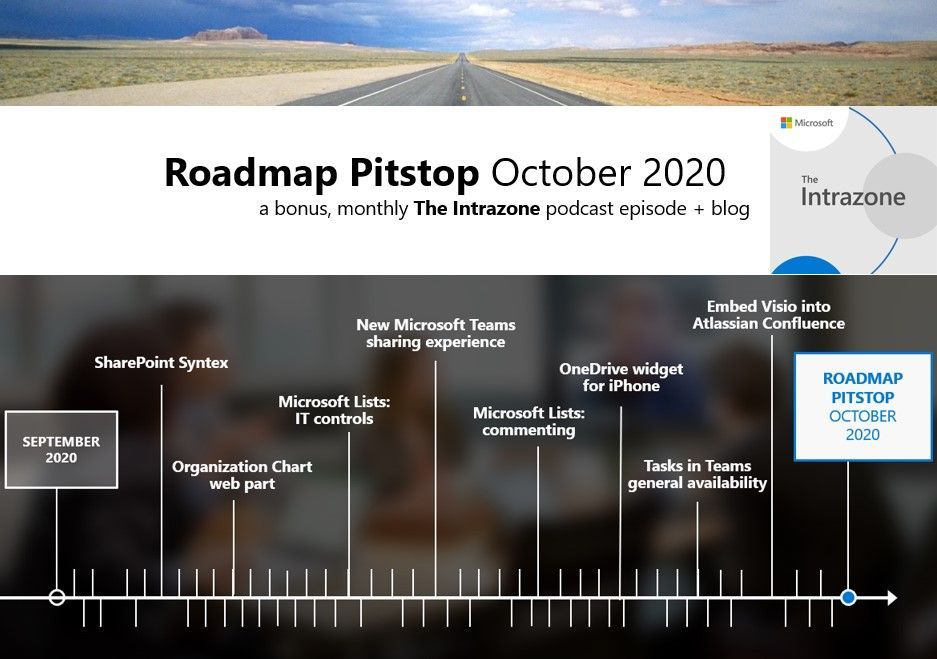
October 2020 brought some great new offerings: SharePoint Syntex, Organization Chart web part, new IT controls for Microsoft Lists, Microsoft Lists – commenting, OneDrive widget for iPhone, Task in Teams GA, and more. Details and screenshots below, including our audible, “ghostly-spirited at times” companion: TheIntrazone Roadmap Pitstop: October 2020 podcast episode – all to help answer, “What’s rolling out now for SharePoint and related technologies into Microsoft 365?”
In the podcast episode, I chat with Harsh Agarwal (LinkedIn), program manager at Microsoft on the Microsoft Teams engineering team. I talked with Harsh about the new file sharing experience in Teams channels and chat and the broader notion of a consistent file sharing experience across Microsoft 365.
Harsh Agarwal, program manager (Teams / Microsoft) [Intrazone guest]
All features listed below began rolling out to Targeted Release customers in Microsoft 365 as of October 2020 (possibly early November 2020).
Inform and engage with dynamic employee experiences
Build your intelligent intranet on SharePoint in Microsoft 365 and get the benefits of investing in business outcomes – reducing IT and development costs, increasing business speed and agility, and up-leveling the dynamic, personalized, and welcoming nature of your intranet.
SharePoint Syntex
This is the first product to come from Project Cortex – a broader Microsoft 365 initiative, that applies advanced artificial intelligence (AI) to empower people with knowledge and expertise in the apps they use every day.
Syntex amplifies human expertise, automates content processing, and transforms content into knowledge. Syntex mainstreams machine teaching, enabling your experts to capture their knowledge about content in AI models they can build with no code.
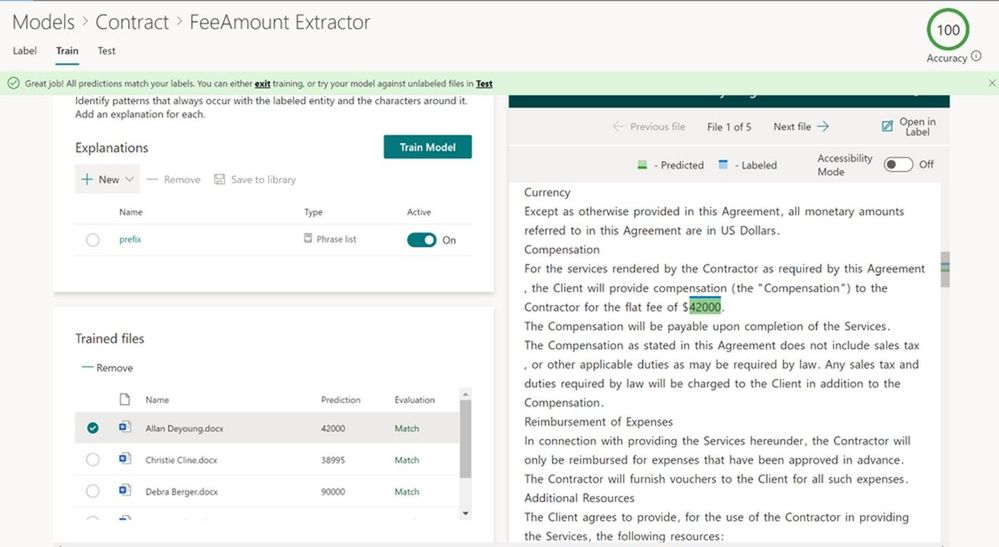
Your experts train Syntex to understand content like they do, to recognize key information, and to tag content automatically. For example, a contract processing expert can teach the service to extract the contract’s value, along with the expiration date and key terms and conditions.
SharePoint Syntex can automatically suggest or create metadata, extraction as a part of ‘document understanding.’
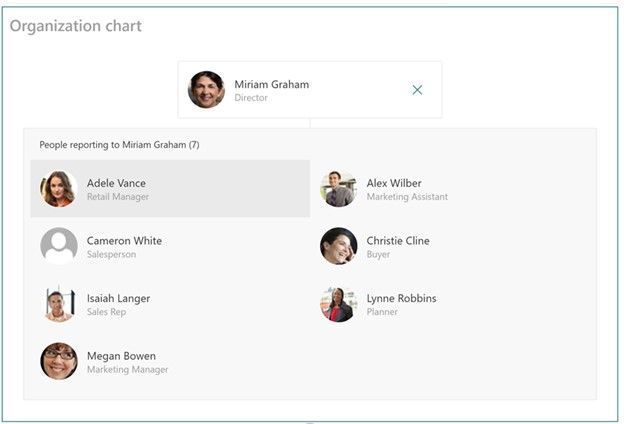
Visibility on hierarchy answers many questions on who’s who and who knows what. This web part allows page authors to generate an organization chart based off of a specific individual – just type in their name. The page author will have the option to determine how many levels up this org chart goes, and as you navigate, you’ll see who reports to who.
For users with edit permissions, the web part will be available in the web part toolbox when a page is in edit mode. Page consumer can then click on a person’s name or photo to learn more and navigate.
Governance depends on who can do what and what they can do. Based on Microsoft 365 admin feedback, we added new IT capabilities, along with new documentation, on how you can better manage *Microsoft Lists* via #PowerShell.
This means you can:
Control the creation of personal lists – a disable control, and
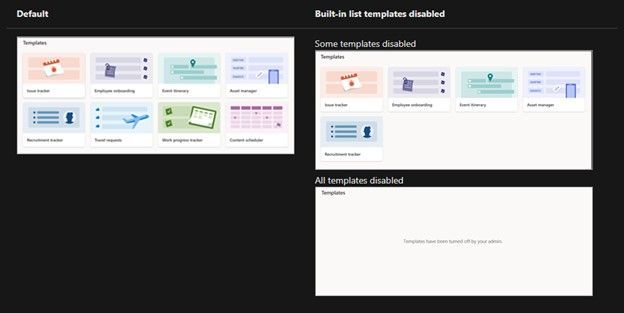
Manage the built-in, ready-made templates – so that only the ones you wish to be available to your people will appear.
Disabling ready-made list templates removes them from all places people create lists (the Lists app, within Microsoft Teams, and within SharePoint sites).
Teamwork updates across SharePoint team sites, OneDrive, and Microsoft Teams
Microsoft 365 is designed to be a universal toolkit for teamwork – to give you the right tools for the right task, along with common services to help you seamlessly work across applications. SharePoint is the intelligent content service that powers teamwork – to better collaborate on proposals, projects, and campaigns throughout your organization – with integration across Microsoft Teams, OneDrive, Yammer, Stream, Planner and much more.
New Teams file sharing experience
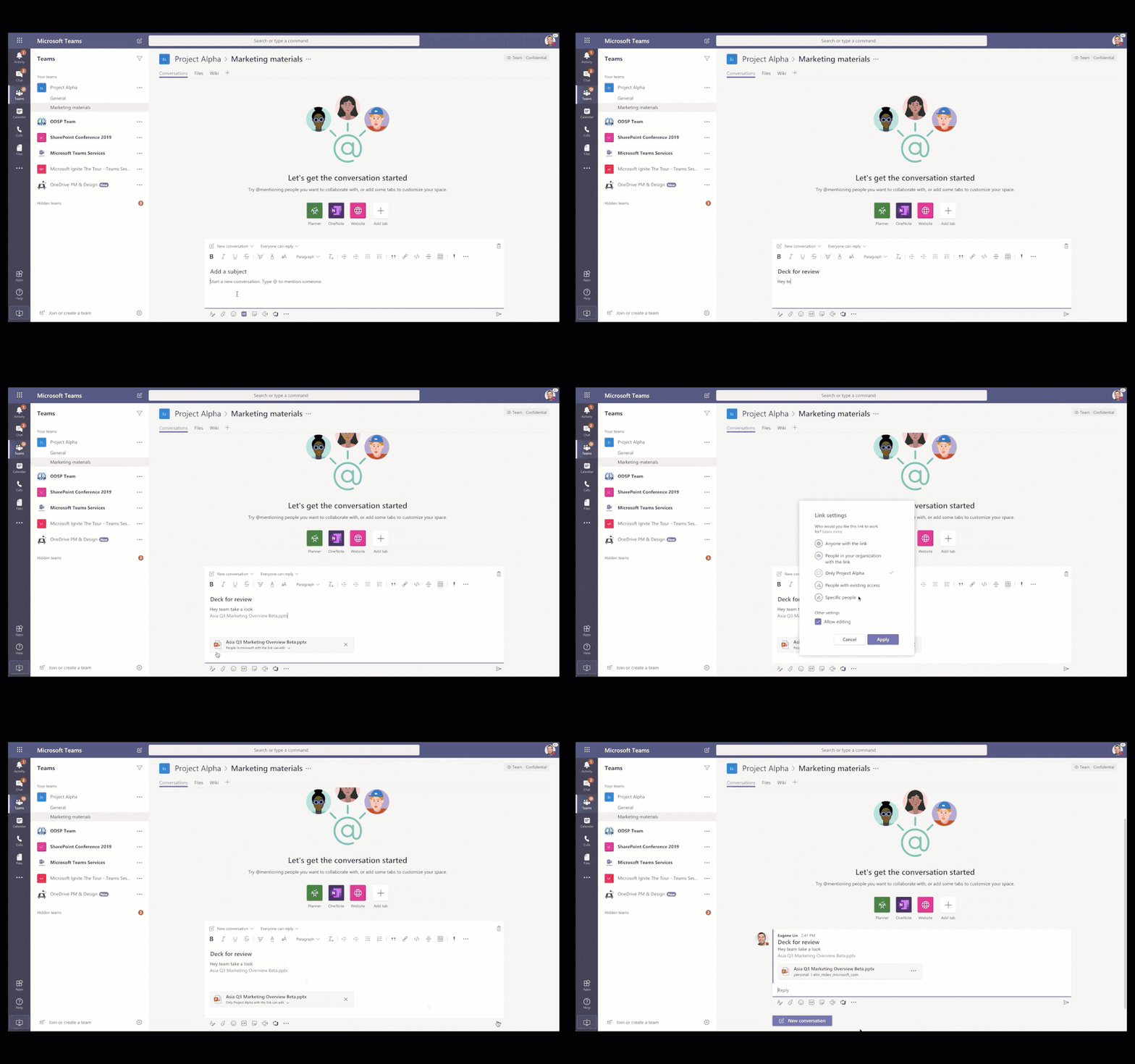
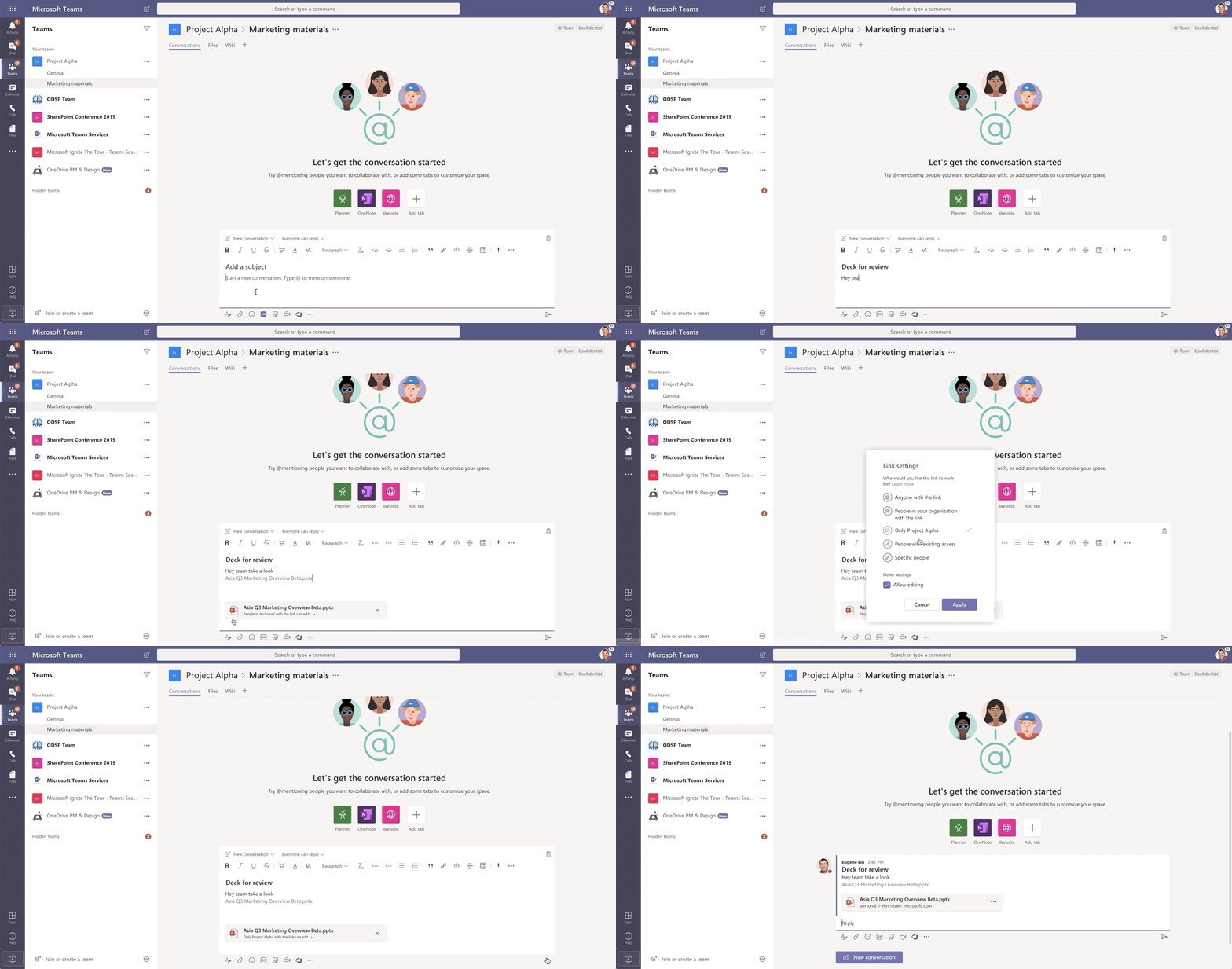
Share files on your terms. You can now create a shareable link for any file stored in Teams and directly set the appropriate permissions. Additionally, you can also set permissions for files stored in SharePoint or OneDrive while composing a private chat or starting a channel conversation.
The new file sharing experience in Teams adheres to set policies and give people the flexibility to share the way they want to share.
The copied link can then be shared with others, by pasting it into a chat or channel. On pasting the plain lengthy link, this feature converts the link into a visual file chiclet/image. The sender can also set permissions on the file link that they are sharing, at the time of composing the message itself, so that the recipients do not run into access issues.
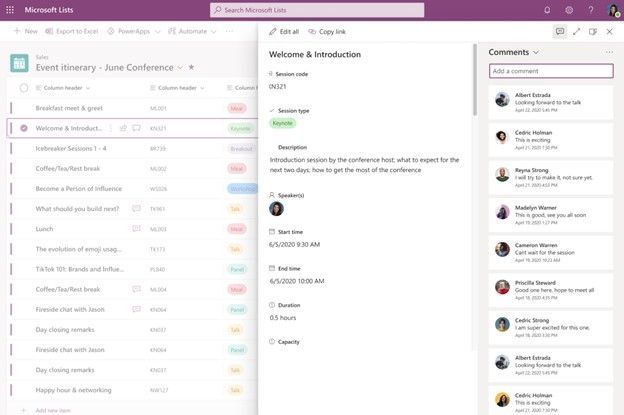
Have something to say? Say it. And say it in a native, natural way without breaking privacy or compliance policy. You will be able to add and delete comments on list items. Users can view all comments on a list item and filter between views that show comments or activity related to an item.
Add and delete comments on list items.
Note: comments follow the permission settings inherent in SharePoint and Microsoft Lists. Users with read-only permission can only view comments. Those with list edit permission can make comments as well as delete comments; editing comments is currently not possible.
A few FYI notes on “where and how are comments stored”:
Comments are stored in the schema for each list, which is based on the SharePoint storage platform.
If you are using a classic list template, it will not have this commenting feature.
Commenting on lists in Teams is not yet available; currently leverage Teams chat for lists in Teams.
And last, comments are not indexed by Microsoft Search.
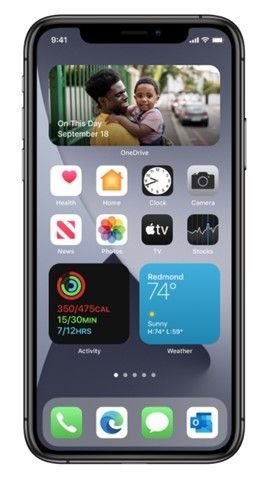
Now, when you run iOS14 on your device, you can add a OneDrive widget to your iPhone home screen. The widget displays your photo memories “on this day” across previous years. And, if you don’t have any On This Day photos for today, you’ll see your most recent photos that you’ve saved to the cloud.
The new OneDrive widget on iOS14 shows your photo memories on this day across previous years.
Note: this feature is only available for personal OneDrive accounts (home and family).
Tasks in Microsoft Teams is now generally available
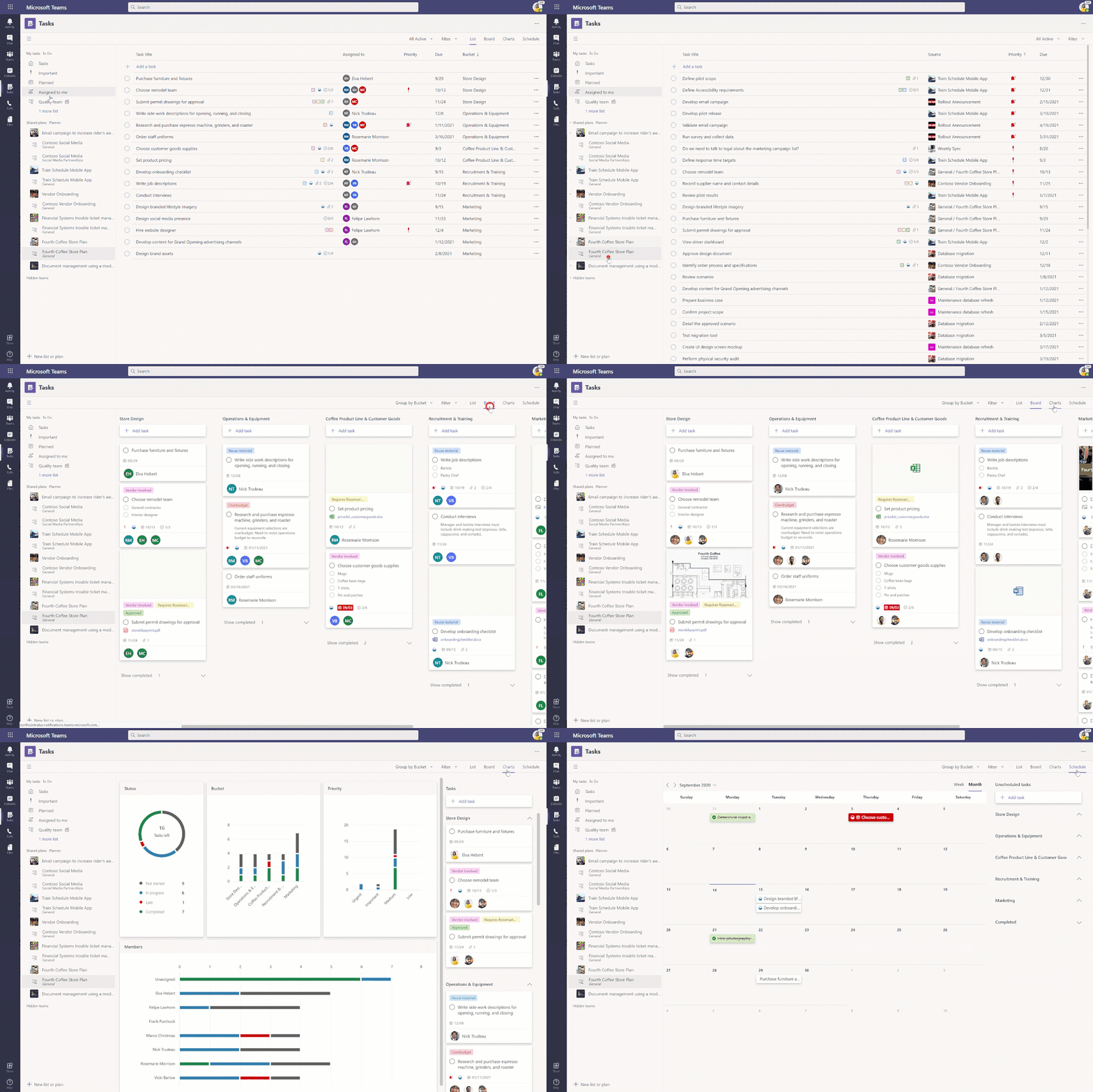
Tasks in Microsoft Teams desktop and web is now 100% rolled out to everyone with a Microsoft 365 subscription across all non-government tenants. Tasks in Teams lets you manage your team tasks from Planner and individual tasks from To Do in your hub for teamwork.
Tasks in Teams lets you manage your team tasks from Planner and individual tasks from To Do in your hub for teamwork.
Note: We’re working to make Tasks in Teams available for our government cloud offerings, with GCC going live in the coming months. GCC High and DoD will follow that.
Embed Visio files, stored in OneDrive or SharePoint, into pages in Atlassian Confluence
We’re excited to announce our first-ever non-Microsoft integration for Visio with Atlassian Confluence, a remote-friendly team workspace.
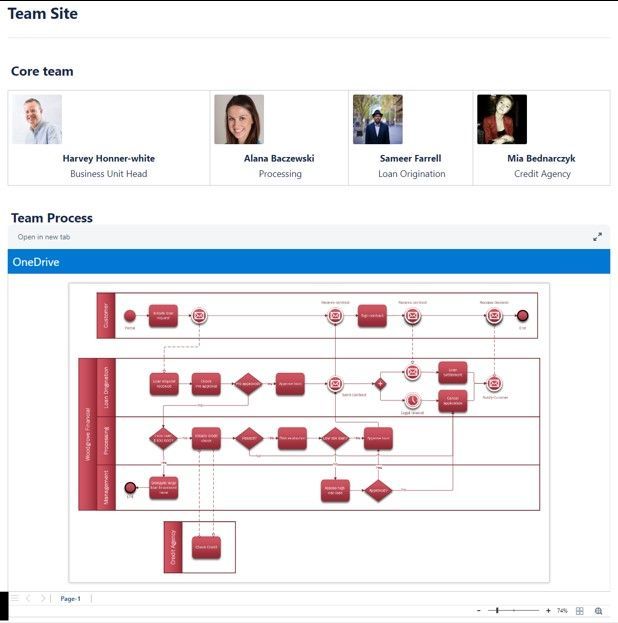
Atlassian Confluence connects to your Microsoft 365 account (OneDrive and SharePoint storage) to display a dynamic preview of the Visio file with governance and permissions intact.
Alongside embedding Word, Excel, or PowerPoint files, you can also easily add Visio diagrams to your Confluence pages – to then open them directly in a new browser tab – keeping the files where they are in Microsoft 365.
Your data remains secure—Confluence respects all privacy settings set in OneDrive and SharePoint, so no unauthorized users can access your content.
Psst, still here? Still scrolling the page looking for more roadmap goodness? If so, here is a few teasers of what’s to come to production next month that are sure to put Jacob Marley at bay…
Follow me to catch news and interesting SharePoint things: @mkashman; warning, occasional bad puns may fly in a tweet or two here and there.
Thanks for tuning in and/or reading this episode/blog of the Intrazone Roadmap Pitstop – October 2020 (blog/podcast). We are open to your feedback in comments below to hear how both the Roadmap Pitstop podcast episodes and blogs can be improved over time.
Engage with us. Ask those questions that haunt you. Push us where you want and need to get the best information and insights. We are here to put both our and your best change management foot forward.
Stay safe out there on the ghostly road’map, and thanks for listening and reading.
Happy Hallowed Eve,
Mark Kashman – senior roadmap ghost manager (SharePoint/Lists) | Microsoft)
The Intrazone Roadmap Pitstop – October 2020 graphic showing some of the highlighted release features.
This article is contributed. See the original author and article here.
Students join the Microsoft Learn Student Ambassador program for all kinds of reasons, and when they get here, they have big plans.
We wanted to share insights from our Student Ambassador community about how and why they joined, what technologies they’re curious about, and how they’re working to build and contribute to the tech community. We asked, and Student Ambassadors from around the world answered.
“So, what brings you here?”
Students learn about the Student Ambassador program through tech events, school faculty, LinkedIn, and, of course, fellow students who are already in the program. But why do they decide to apply?
Most of the Student Ambassadors we heard from were drawn to the program because they’re passionate about technology, which wasn’t a huge surprise. Beyond that, though, each of them also has their own unique reasons for joining. Here’s why some students apply to become Student Ambassadors:
They want to learn something new and develop their skills.
“I felt very inspired by a senior from my university who was already a Microsoft Student Ambassador. She told me all about its perks and the ample amount of experience and knowledge we get to learn, which led me to apply for this program.”
Eva Thakran, fourth-year student at the Manav Rachna International Institute of Research and Studies
They’re excited to collaborate with other passionate students and build a global network.
“I love to learn about cultures of different countries and regions, so what is better than a global community of students?”
Shashank Kanojiya, second-year student at the Indian Institute of Information Technology
They see the value in sharing their knowledge and evangelizing technology.
“I wanted to become a better version of myself by helping others to learn new technologies.”
Christina Pardali, fifth-year student at Aristotle University of Thessaloniki
They aim to create meaningful impact and solve global problems.
“I found the Student Ambassador program to be full of like-minded individuals who share an equal passion for a better world with the help of technology.”
Basu Singh, first-year student at ITI Institute
They want to connect with experts at a well-known company.
“I realized that if I wanted to learn from professionals, I should hitch my wagon to Microsoft.”
Joaquín García Benítez, first-year master’s student at KTH Royal Institute of Technology
“What technologies are you and your community curious about?”
Microsoft Learn Student Ambassadors are deeply invested in learning as much as they can about the technology that catches their interest. They’re naturally curious, and they love diving into emerging topics and tools. (Maybe you can relate? ;))
Here’s what they’re currently exploring:
Cloud computing (including Azure)
The Internet of Things (IoT)
Autonomous systems
AI
Machine learning
Deep learning
Automation (including Power Apps and Microsoft Power Platform)
Low-code development
Databases
Data science and big-data analytics
Image processing
Python
User experience and UI design
Cybersecurity
Web development
Mobile app development
Microsoft 365
“At this moment, I am curious about web development, mobile applications development, autonomous systems, and cloud platforms.”
Joaquín García Benítez, first-year master’s student at KTH Royal Institute of Technology
“My tech community nowadays is more focused towards cybersecurity and big data—how to handle and store big data. I am curious about AI and cybersecurity techniques.”
Eva Thakran, fourth-year student at the Manav Rachna International Institute of Research and Studies
“I am interested mostly in all Microsoft new technologies, such as core programming, AI, IoT, Microsoft Power Platform, Dynamics 365, machine learning, and data science. All those technologies are empowering and have something in store for the future.”
Lablonde Juliette Kalalizi, third-year student at the Durban University of Technology
“How do you hope to expand your knowledge or your community through the Microsoft Learn Student Ambassador program?”
The current Student Ambassador cohort is navigating a global reality that makes in-person events and conversations difficult, if not impossible. But that isn’t stopping them from serving their communities.
Whether they’re just getting started or they’ve been in the program for a while, these Student Ambassadors are working hard to connect and inspire their colleagues:
“I will conduct workshops and events, help my fellow students explore the field of technology, and inspire them to find possible solutions to humanitarian issues through technology.”
Foteini Savvidou, third-year student at Aristotle University of Thessaloniki
“I have two technical communities at my college, and I am General Secretary of one of them, proudly leading a group of 60 students. We are a very diverse community.”
Nandita Gaur, final-year student at ABES Engineering College
“My community has grown fast. In my community, there are not only computer scientists—we also have accounting, law, and administration students. I also created a community with teachers from my country (Peru) for Microsoft 365 topics, to learn with Microsoft Educator Center, and I see several improvements so far.”
Eduardo Salazar, final-year student at the Instituto ISAM
“First, I start by recommending my community to complete the courses that are available in Microsoft Learn to have a fundamental basis about the technology that interests them and then be able to advance. They are all very committed to seeing in themselves the progress they are making and, above all, learning new things.”
Leydi Rosmery Aylas Curi, final-year student at the Peruvian University of the Americas
What’s a fun fact about yourself that you want to share with others?
“I love making paintings and baking various kinds of cakes. I am pretty good at mehendi design, an Indian style of tattoo art.”
Nandita Gaur, final-year student at ABES Engineering College
“When I was a child, I wanted to be a teacher or an actress. Maybe this is the reason that I became a Microsoft Learn Student Ambassador, so I can have the chance to help my fellow students and present on the stage about technology.”
Maria-Anastasia Moustaka, fifth-year student at University of Patras (Greece)
“When I applied at university, I wanted to become a civil engineer. I am grateful that I decided to study ICT programming because it’s helped me find my passion in technology and leadership—and becoming a Microsoft Student Ambassador has helped be become a better version of myself. Lablonde Juliette Kalalizi, third-year student at the Durban University of Technology
Your turn! How would you build community as a Student Ambassador?
Becoming a Microsoft Learn Student Ambassador opens doors near and far. If you were connected to a group of people who were just as passionate as you are about learning, growing, and using technology for good, where would you start?
Seeing AI is an app for iOS that narrates the world around you. And it’s built with Xamarin and Azure. In this episode of the Xamarin Podcast, Matt talks to the folks behind Seeing AI.
Azure Monitor can collect data directly from your physical or virtual Windows computers in your environment into a Log Analytics workspace for detailed analy…
In this weekly discussion of latest news and topics around Microsoft 365, hosts – Vesa Juvonen (Microsoft) | @vesajuvonen, Waldek Mastykarz (Microsoft)
In this “Azure at a Glance” video let’s take a look at what the Asset Inventory feature with Azure Security Centre can offer you. For more information check …
This post shows how to automatically update A record on Azure DNS when the inbound IP address of Azure Functions instance is updated, and reflect the change to the SSL certificate through GitHub Actions.
MyCloudDoor is an Azure Stack Hub partner and Preferred SI that focused on managed services and creating value for their customers throughout the world.
Episode 26 of the Az Update Show. Another plethora of news stories to share on this week’s AzUpdate show. News includes: What’s new for IT Pros in Windows 10…
Learn how to use built-in modules to work with files and directories in a Node.js app with this series of bite-sized videos for beginners. Tagged with webdev, beginners, javascript, node.
This article is contributed. See the original author and article here.
We are very excited to announce the Public Preview release of IoT Hub on Azure Stack Hub!
With IoT Hub, you can now enable your whole IoT pipeline from data ingestion to analytics as well as provide device connectivity and management, locally from within your datacenters. The IoT Hub Service on Azure Stack Hub provides an Azure-consistent API surface, Portal experiences, SDKs and Tools to developers, as well as dedicated management experiences to Azure Stack operators. You can take a look at a complete list of all the features and scenarios enabled by this service in the detailed IoT Hub blog!
The teams have been hard at work getting the service through various previous phases and incorporating the early feedback, resulting in IoT Hub being natively integrated into the Azure Stack Hub platform alongside the infrastructure services. A few of the integrations we’d like to highlight are:
Integrated Deployment and Update experiences
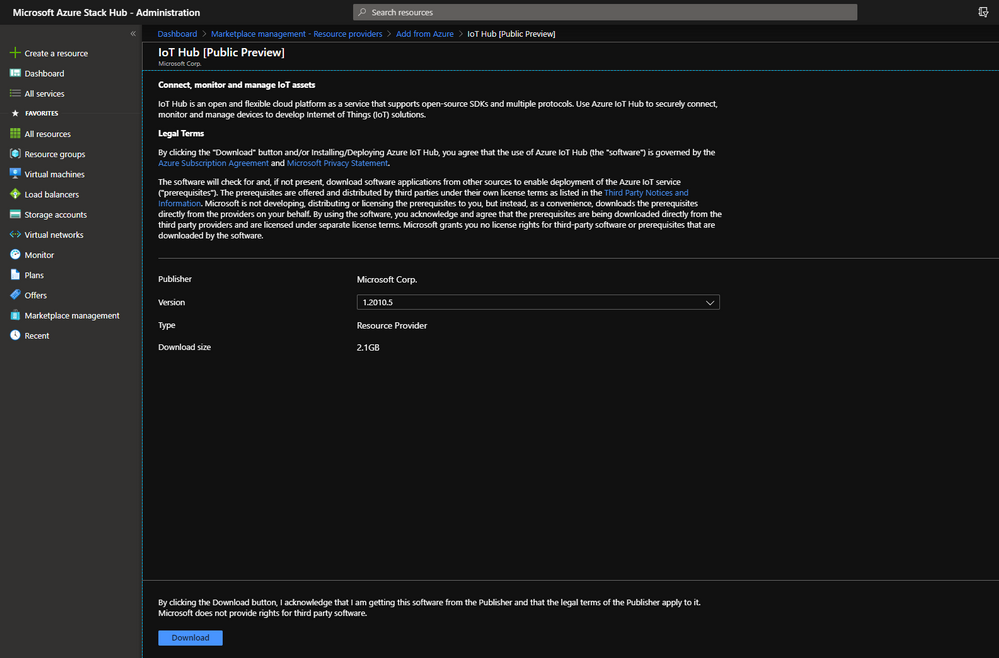
The IoT Hub service can be downloaded directly from the Azure Stack Hub Operator portal through Marketplace Management. The new and improved user experience allows for better discoverability and acquisition of the IoT Hub service.
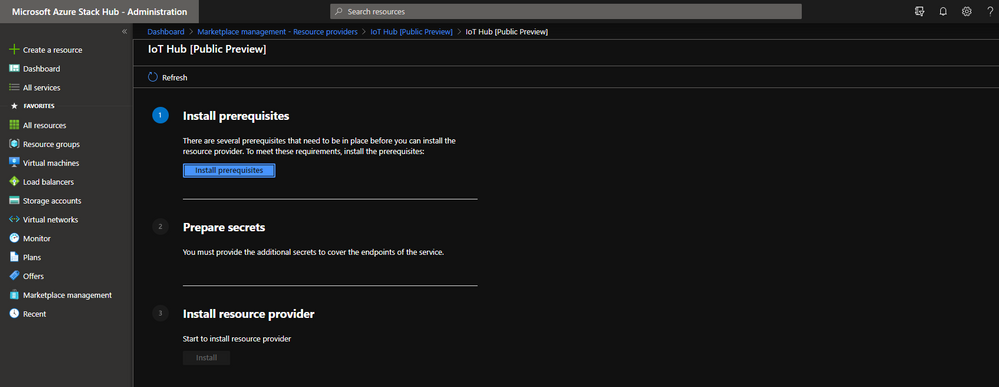
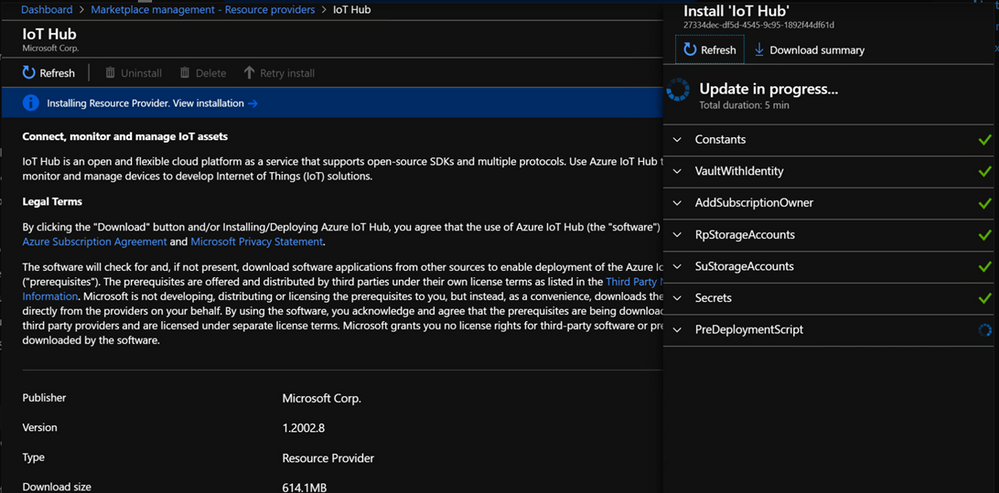
You can install IoT Hub seamlessly using the new and improved installation experience offered through the Operator Portal.
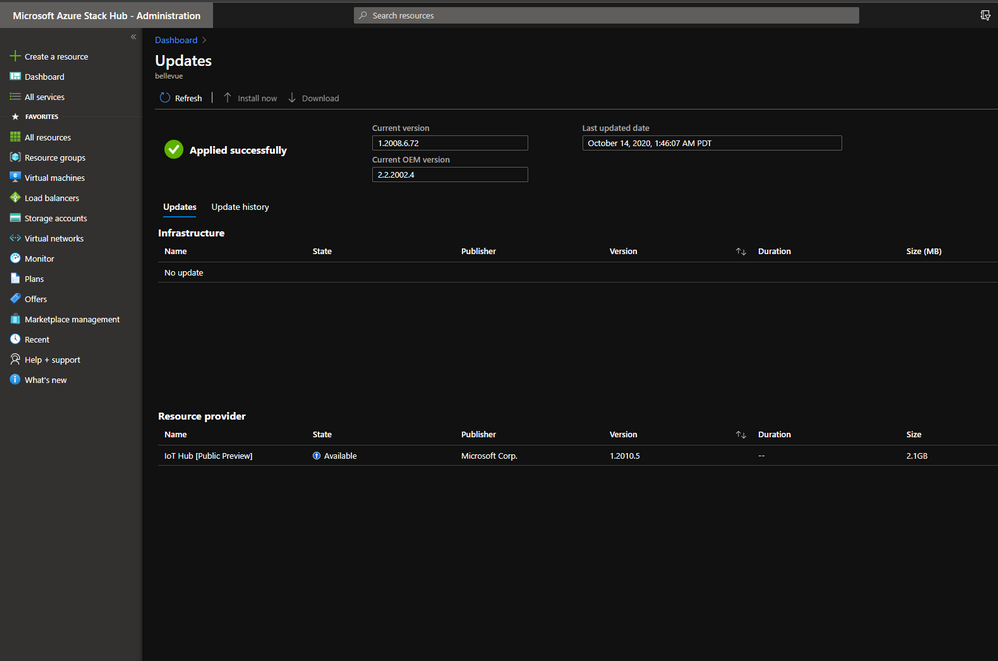
Updates to the service can now be seen directly from the Update blade alongside other Infrastructure updates that might be available!
Integrated Health and Alerting mechanisms
Just like the core Infrastructure Services, IoT hub is integrated into the Health and Alerting mechanisms. Azure Stack Operators can look at the status of the deployed service directly from your dashboard through the Resource Providers tile or from Region Management on the Administration portal.
Seamless Log Collection and Diagnostics experiences
IoT Hub is integrated into the native diagnostics and log collection experiences on Azure Stack Hub. Collecting IoT Hub logs during a support session is the same process as collecting logs for the core Azure Stack Hub infrastructure – through proactive log collection, portal-based log collection or through the tooling on the privileged endpoint.
What’s next?
If you are interested and would like to develop a Proof of Concept, here are the steps:
If you have not set up an Azure Stack Hub in your network, get started now with one of our partners.
Make sure your Azure Stack Hub is installed with or upgraded to version 1.2005.6.53 or above.
Install the necessary dependencies on Azure Stack Hub (Event Hubs).
Download and install IoT Hub [Public Preview] through Marketplace Management on the Azure Stack Hub Operator portal!
To learn more about:
Installation/Operation IoT Hub on Azure Stack Hub, please visit here.
Using the service to develop solutions, please visit here.
IoT Talk Show of the announcement and introduction, please visit here.
It’s been an exciting process working on this service and we’re very eager for you to try it out, build cool solutions with it and letting us know what you think!
Please send your questions, feature requests, concerns, etc. to us through this survey.
This article is contributed. See the original author and article here.
Azure IoT Hub on Azure Stack Hub (ASH) is now in Public Preview! IoT Hub today connects millions of devices so you can monitor, manage, and operate your devices from the cloud. Deploying IoT Hub on Azure Stack Hub allows you to operate your whole solution – from the data ingestion pipeline, to the analytics workflow, to the IoT device and sensor management – all from within your own datacenter. Today’s preview unlocks a myriad of on-premises IoT scenarios, including, hybrid edge computing for low latency and cloud independence, compliance with data sovereignty, and other rich and complex hybrid scenarios which can’t be provided with on the Azure cloud
Azure IoT Hub on the Azure cloud is serving many enterprises and business today, ingesting data and managing their IoT devices and sensors from the cloud. However, we’ve also heard from many of these same companies that have challenges connecting their devices directly to the cloud due to a variety of situations. By offering the IoT Hub service delivered on Azure Stack Hub, we are able to unblock a new dimension of scenarios allowing enterprises to take advantage of the same cloud technologies while addressing their specific environmental constraints. IoT Hub on Azure Stack Hub will offer customers to:
Configure and manage IoT devices in their own protected network
Meet specific regulatory and policy requirements for data management which can’t be satisfied in the public cloud
Bring intelligence and decision making to the edge in real time
Allow solutions to be built in situations with poor or unreliable internet connectivity,
Reduce the costs of transferring all data to the public cloud
New On-premises Scenarios
IoT Hub on Azure Stack Hub enables band new scenarios while unlocking the potential for enterprises to leverage the greatness of the established Azure cloud-based technologies within their specialized environments. Starting early in the development process, we collaborated closely with existing customers and partners to help test and shape today’s release, such as:
Manufacturing companies which had an existing and unique network setup to facilitate their business needs. These networks are often protected from the public Internet in multiple layers and with different levels of protection. The closer to manufacturing activities, the more protected the network will be. Mission critical devices, actuators, and sensors are protected by disallowing direct Internet access. IoT Hub on Azure Stack Hub allows companies to successfully set up and operate IoT solutions within their network settings without compromising their security design and requiring public Internet access.
Many industries have challenges connecting to the Internet due to their remote locations and the high cost of transmitting data over cellular or satellite. The challenges are especially common with energy companies whose operations reside in all corners of the globe. With IoT Hub on Azure Stack Hub, monitoring, data transfer, diagnostics, and production operations can all be performed onsite without interruption due degraded or heavily metered Internet access.
Enterprises are often looking to enable hybrid scenarios. For example, in the retail industry, companies have many stores operated across the globe, sitting close to residential communities. The managers/operators need to monitor the availability of goods on the shelf, order new inventory, and control the temperature and efficiency of refrigerators and chillers. Streaming this data between the cloud and the store front as part of daily operations incurs considerable costs. Leverage IoT Hub on Azure Stack Hub, these managers and operators can conduct store level operations locally while still maintaining some required communications to public cloud, such as periodically sending report to HQ, or delivering data to the public cloud for training machine learning models.
Data sovereignty is especially important for enterprises that need to comply with local regulations or complex geopolitical data policies. For example, hospitals are regulated on patient data and how it can be transmitted for use off-premises. With IoT Hub on Azure Stack Edge, these hospitals can keep patient data confined to the clinics or community hospitals, while still being able to conduct new IoT-driven innovations in analysis, diagnosis and patient treatment.
Feature Parity with Cloud
We strive to provide full feature parity between Azure IoT Hub delivered in the public cloud and on Azure Stack Hub to maximize compatibility of applications built to run in both places. In today’s preview release, here is the list of features that are available for each delivery:
Features
Public Cloud
(all standard SKUs)
Public Preview on ASH (only S2/S3)
Device-to-cloud telemetry
✔
✔
Cloud-to-device messaging
✔
✔
Per-device identity
✔
✔
Message Routing
✔
✔
HTTP, AMQP, MQTT Protocols
✔
✔
Multi-tenancy
✔
✔
Monitoring and diagnostics
✔
✔
Cloud-to-device messaging
✔
✔
Device Management, Device Twin, Module Twin
✔
✔
Twin notifications, device life cycle events
✔
✔
Edge layered Deployment
✔
✔
Admin portal (1)
X
✔
Secret rotation (1)
X
✔
Capacity management (1)
X
✔
Backup & Restore (2)
X
X
DeviceConnected,DeviceDisconnected, ASC (3)
✔
X
device module configuration
✔
✔
Device Streaming, IoT Plug and Play, Jobs, File Upload (4)
✔
X
Failover (5)
✔
X
Notes: 1) This feature is specific to enabling operators to manage IoT Hub on ASH 2) For public preview, customers can perform backups but not restores. Full backup/restore functionality will be supported by GA. 3) This feature depends on other Azure services coming soon to ASH. 4) This is a preview feature in the public cloud and will be available to ASH after the feature GA. 5) This feature is not applicable on ASH.
Single Solution, Different Environments
IoT Hub on Azure Stack Hub provides the same APIs as IoT Hub in the Azure cloud. This means developers can build a single solution which runs seamless across different deployment environments. This lowers development costs as well as shortens the compatibility and testing cycles dramatically.
Differences from IoT Edge and Azure Stack Edge
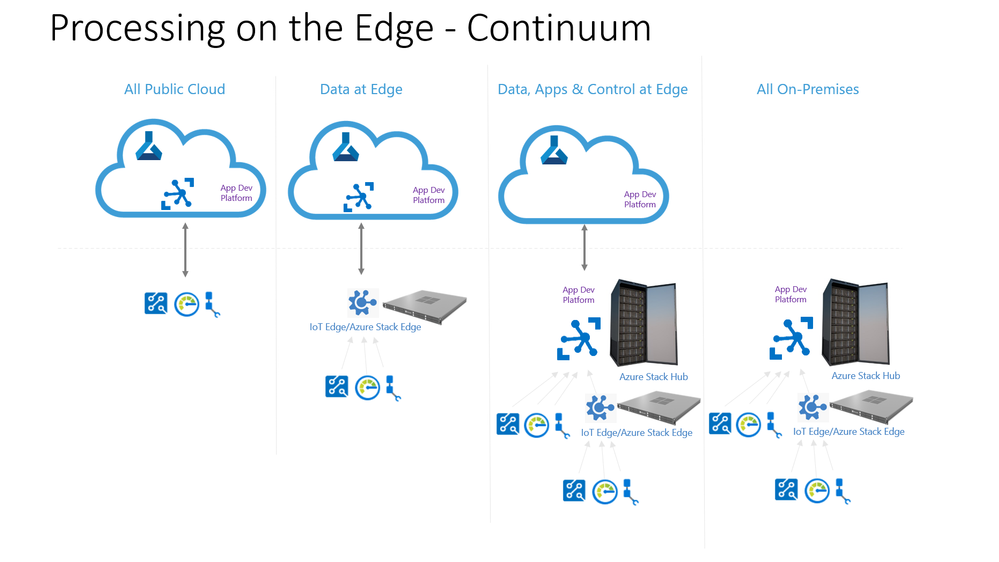
IoT Hub on Azure Stack Hub enables both offline and hybrid IoT solutions. It also works with both Azure IoT Edge and Azure Stack Edge to enable an even wider array of specialized edge capabilities.
The following table describes some of the major differences between each edge technology:
Azure IoT Edge
Azure Stack Edge
Azure Stack Hub & IoT Hub
What is it?
Middleware that deploys container-based cloud applications to run directly on IoT devices and gateways.
On-premises first party Microsoft cloud managed physical appliance with compute, hardware ML acceleration, and storage.
Hybrid cloud platform: an extension of Azure to consistently run hybrid applications on-premises.
IoT Hub is Azure IoT platform which connects, monitors and manages IoT devices. Microsoft makes the service available on Azure Stack Hub for on-prem solutions.
Primary usage
•Low latency and tight control loops
•Protocol translation & data normalization
•On-prem data aggregation and analysis
•Offline, Local AI/ML
•Customer developed code can run in containers
•ML inferencing at the edge – results quickly and close to where data is generated
•require connectivity to activate, transfer data, and deploy/update containers
•Can be completely and permanently isolated environment
•Can support hybrid too
Multitenancy
•Single-tenant only
•Single-tenant only
•Multi-tenant support
Containers/VM support
Containers only
•Containers, including IoT Edge Modules
•Kubernetes
•Virtual Machines
•Support for containers, managed by AKS
•Support for VMs
High availability
Kubernetes support (public preview) – GA CY2021
•Single node
•All nodes are clustered
•In case of hardware failure, VMs and services fail over to a running node
Scale of compute and storage
Dependent on BYO (Bring You Own) hardware
•Single node
•Available options: GPU, FPGA
•4-16 nodes
•X cores and Y RAM
•A-B TB of storage
Hardware acceleration
Dependent on BYO hardware
•Brainwave-powered FPGA
•Nvidia T4 GPU
•ML inferencing done using CPU
•GPU support coming soon
Pricing
During Public Preview, the IoT Hub capability will be offered for free to maximize customer testing. We continue to be hard at work on the generally available release, which is when we will provide finalized pricing, feature set, and support full production deployments.
Join the preview!
The preview Azure Stack Hub resource provider is available today in the Azure Marketplace for Azure Stack Hub. You can download and begin your own proof-of-concept IoT solution by following these steps:
Use an existing Azure Stack Hub instance or if you have not yet acquired one for your private network, get started today with one of our certified partners
Review the documentation to learn how to install the proper dependencies as well as the IoT Hub resource provided from the Azure Marketplace
To learn even more about this exciting preview release:
Visit here to see the Azure Stack Hub preview edition of the IoT Show
Visit here for how to install/operate IoT Hub on Azure Stack Hub
Visit here for how to use IoT Hub on Azure Stack Hub as a solution developer
We look forward to hearing your experience with IoT Hub on Azure Stack Hub and what new scenarios this release will enable for your IoT-enabled business. To contact the product team to send your questions, comments, and feature requests please use this form.
This article is contributed. See the original author and article here.
Microsoft invites you to participate in the 2021 IT Skills and Salary Survey led by Global Knowledge. This year’s survey includes questions around the changes and challenges we’ve all faced these past eight months. The Microsoft community have been strong supporters of the annual IT Skills and Salary Survey by Global Knowledge for over seven years. If you’ve taken any Microsoft training or earned a Microsoft fundamentals, role-based, or specialty certification, we want you to represent Microsoft.
Here are some key themes from the Global Knowledge 2020 IT Skills and Salary Report, which will be available in early November, 2020.
Microsoft is the top tech focus area for their organization this year. Microsoft Certified Azure Solutions Architect Expert certification is the seventh most popular certification being pursued this year.
Cloud and IT security skills are the most in-demand, as IT decision-makers continue to struggle to hire in these areas.
A majority of certified IT professionals experience two main certification benefits: better job performance and higher salaries.
All contributions are confidential and will offer insight into industry salaries, in-demand certifications, skill gaps, and the existing career landscape. Survey results help generate an annual report used by industry insiders, hiring managers, and IT professionals. Please help us contribute and take the 15-25 minute survey by 11:59 ET on Monday, November 30, 2020. Don’t forget to invite your IT colleagues and communities to take it as well!
At the end of the survey, participants who request an advanced copy of the 2021 report before it’s published will be automatically entered to win one of 10 $100 e-gift cards from Global Knowledge. Take the IT Skills and Salary Survey now.
This article is contributed. See the original author and article here.
Welcome back! This month we have a packed blog with a lot of new features that are now generally available to improve your experience with meetings and calling, chat and collaboration, as well as a number of new updates to Microsoft Teams devices. This blog also contains a few industry specific items for Education, Firstline Workers, and our Government customers. We have updates on Teams platform capabilities and we’re introducing a new section called “App spotlight” that showcases 3rd party apps available in Teams.
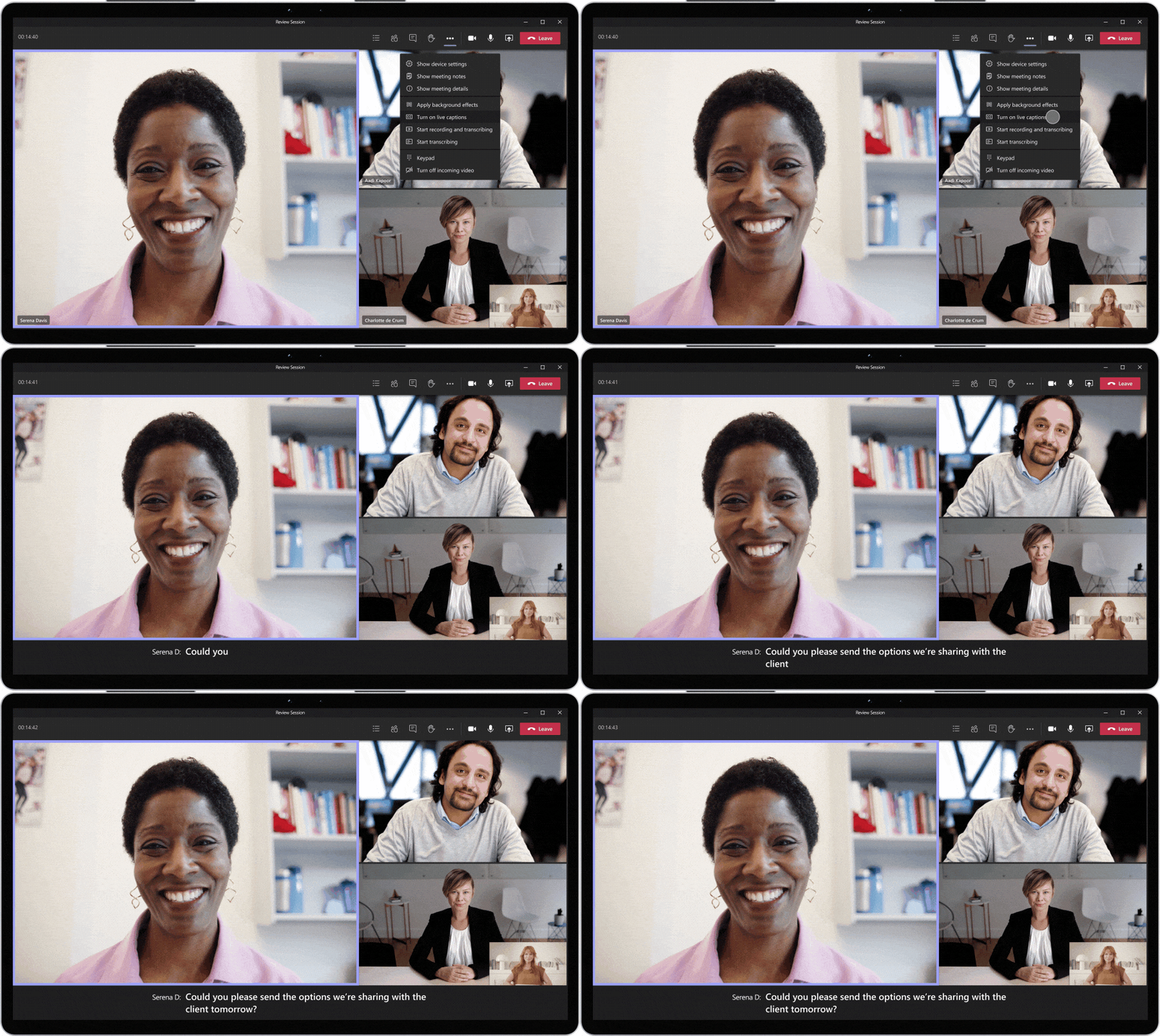
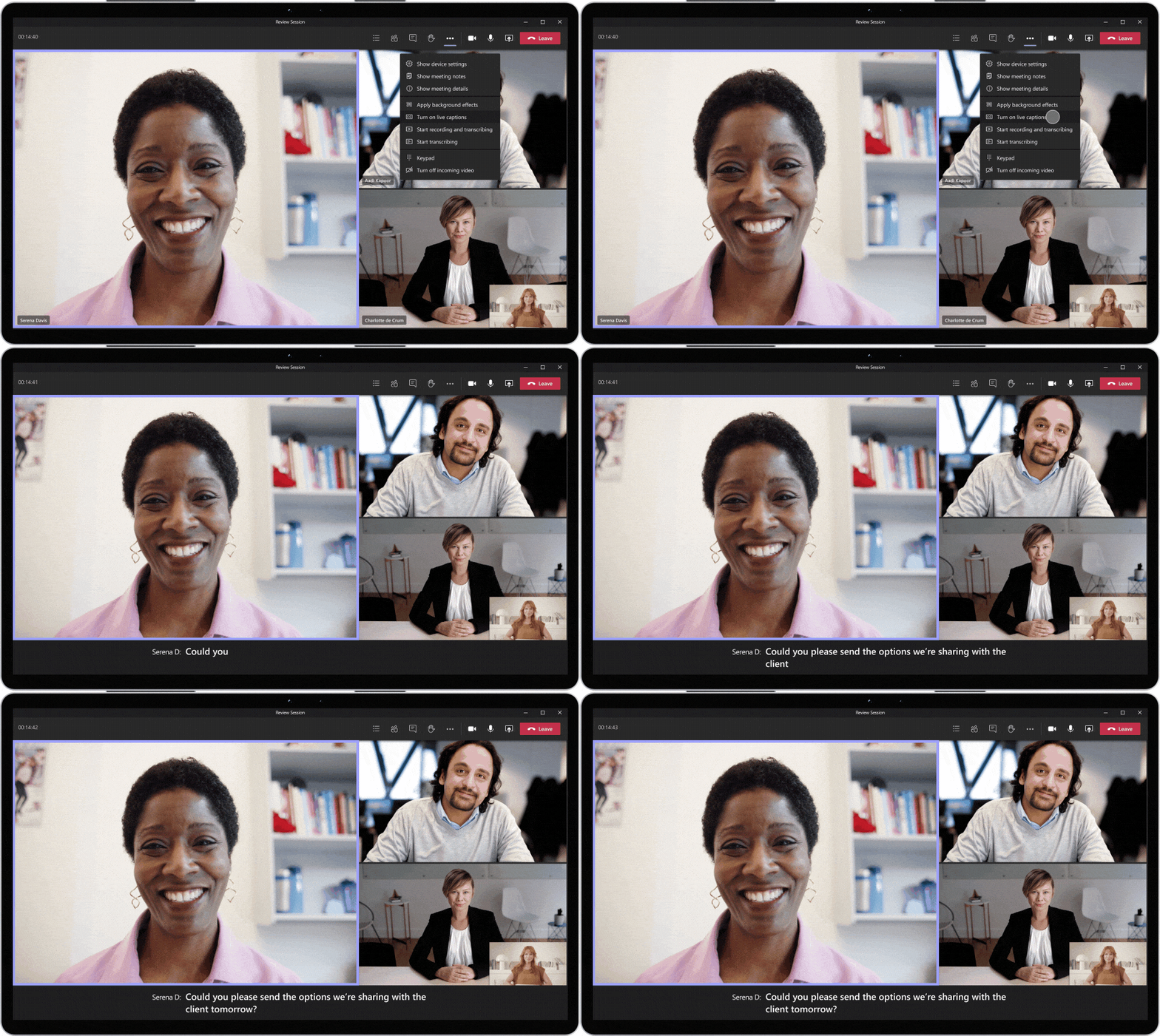
What’s New: Meetings & Calling Live Captions with speaker attribution Microsoft Teams added speaker attribution to live captions so that you can see who is speaking along with what’s being said, making meetings more inclusive and easier to follow along.
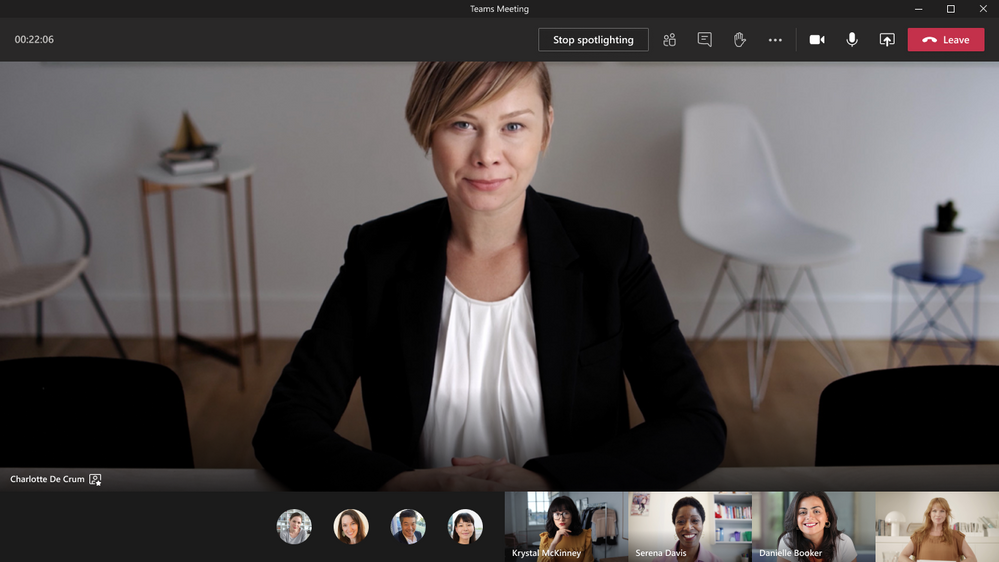
Spotlight an individual video participant for all attendees in a Teams meeting Presenters can now pin an individual video feed for all attendees to see during a Teams meeting. Once pinned, the individual identified as the spotlight will be the main video shown to all participants. This applies to PC, Mac, mobile (view only) and Microsoft Teams Rooms on Windows. Learn more
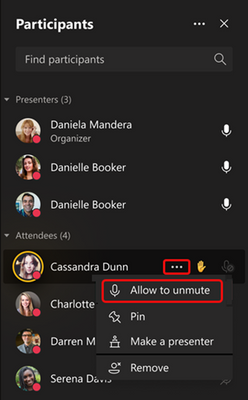
Prevent attendees from unmuting in Teams Meetings Meeting organizers and presenters can now prevent attendees from unmuting during the meeting and enable specific attendees to unmute when they raise their hands. This can be helpful for press conferences and classrooms scenarios where you want to be in control of who’s speaking. Learn more
Advanced Production for Teams Meetings
Transform your Teams Meeting into a virtual stage with a new advanced production option for broadcasts. Network Device Interface (NDI) support for Teams allows event producers to convert each participant’s video into a discrete video source that can be used in the video streaming production tool of your choice. This functionality enables you to use Teams meetings in new ways, including bringing speakers into Together Mode or customized views, to deliver professional broadcasts to the end point of your choice and reach audiences wherever they are.
Microsoft Whiteboard read-only mode
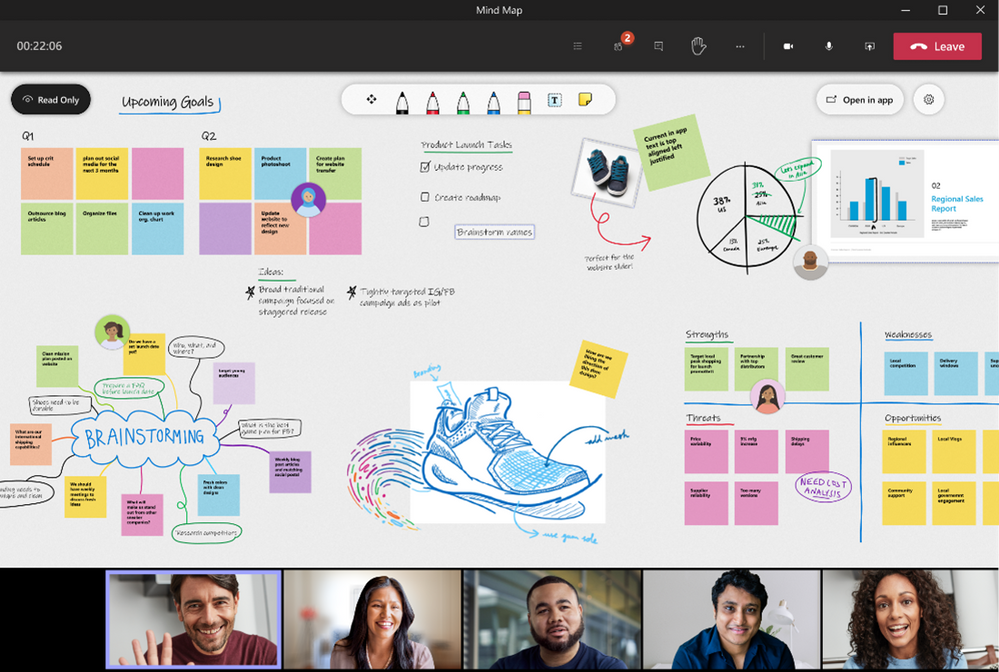
Microsoft Whiteboard read-only mode is available in Teams allowing for more flexibility for you to either present the digital whiteboard in read-only mode, or to allow others to edit and collaborate when given access.
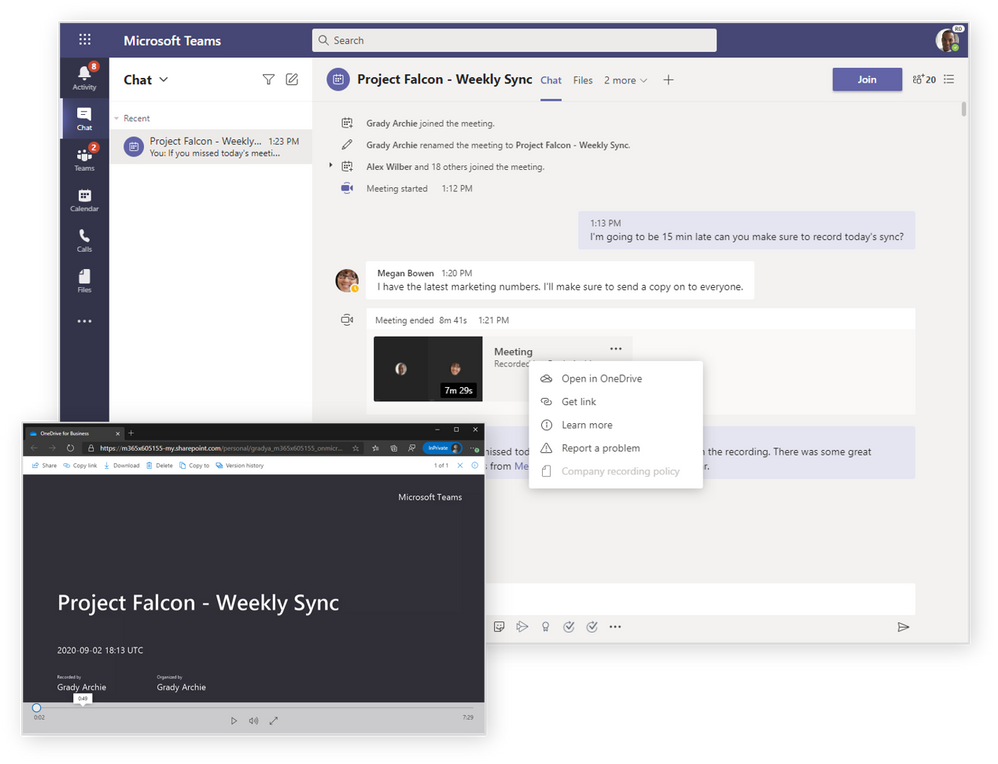
Meeting & Calling recordings stored in OneDrive and SharePoint Teams meeting and call recordings can now be stored in your OneDrive for Business or in SharePoint, providing the ability to share recordings with guests or external users, access meeting recordings faster, and manage recordings with security and compliance controls available to other file types in Microsoft 365. Teams Admins can select their recording storage location by updating policies using PowerShell. Learn more
Updated functionality for downloading participant reports in Teams meetings Meeting organizers, especially teachers and event organizers, often need to know who joined and how many people joined their Teams meetings. Now you can easily download a participant report after the meeting within the meeting chat. We’ve also added new data into the report that allows you to better manage your attendance. Learn more
Changes in Incoming IP Video policy (New Audio and Video Policies) We are updating our meeting policies to allow IT administrators more control over how video is managed in Teams meetings. Current policy can only be set to prevent outgoing video. We have extended the Allow IP Video policy to prevent both outgoing and incoming video as needed. Tenant administrators can use this policy to manage bandwidth. Learn more
What’s New: Devices ARM64 Native Teams App Unleash the full power of Microsoft Teams on your favorite ARM devices with the new native ARM64 Teams client now generally available. Stay connected and organized while enjoying improved performance, reliability, and battery life in devices such as the Surface Pro X.
New capabilities coming to Microsoft Teams Rooms Features beginning to roll out to Microsoft Teams Rooms on Windows include:
Spotlight support: Microsoft Teams Rooms now supports the spotlight feature in Teams meetings, which enables you as a meeting organizer or presenter to select a video feed as the spotlight for all attendees. Once selected, the individual identified as the spotlight will be the main video shown to all participants, which is great to make sure everyone focuses on, for example, the presenter.
Hard mute: This feature allows you as a meeting organizer to disable microphone controls for all meeting participants. This feature can be useful for scenarios like distance learning or executive board meetings where organizers want a higher level of control over who can unmute their microphone and when. Teams Rooms supports this setting and joins muted with microphone disabled unless granted permission.
Dell Meeting Space Solution for seamless onsite and remote collaboration Dell’s newest Meeting Space Solution for Microsoft Teams Rooms offers a complete group collaboration ecosystem that includes the OptiPlex 7080 Micro running the Teams Rooms experience on Windows, Dell Large Format Monitors, plus Logitech Tap and ConferenceCams. With proximity detection and one-touch join, you can start a meeting while instantly projecting content in the room and to virtual participants.
EPOS announces two new headsets certified for Microsoft Teams The IMPACT MB Pro 1 UC ML and 2 UC ML have now passed the rigorous reliability testing required to be certified for Microsoft Teams. You can now experience high end audio tools that provide optimal comfort, easy call handling and rich, natural sound – all while reliable, intelligent technologies filter out unwanted noise, enhance audio and boost efficiency.
Keep important information easily accessible and top of mind with Microsoft Teams. You can pin any message in a channel, and it will appear in the channel information pane for all members of the channel to see.
New offline presence status Let others know when you are not available in Microsoft Teams. You can now change your presence to “Offline”. This allows you to have full access to Teams while signaling to colleagues that you are unavailable.
Language-aware proofing Communicate using multiple languages in Microsoft Teams. If you write different messages in different languages, you now see spellchecking relevant to the language you use when typing a message in the Teams desktop app.
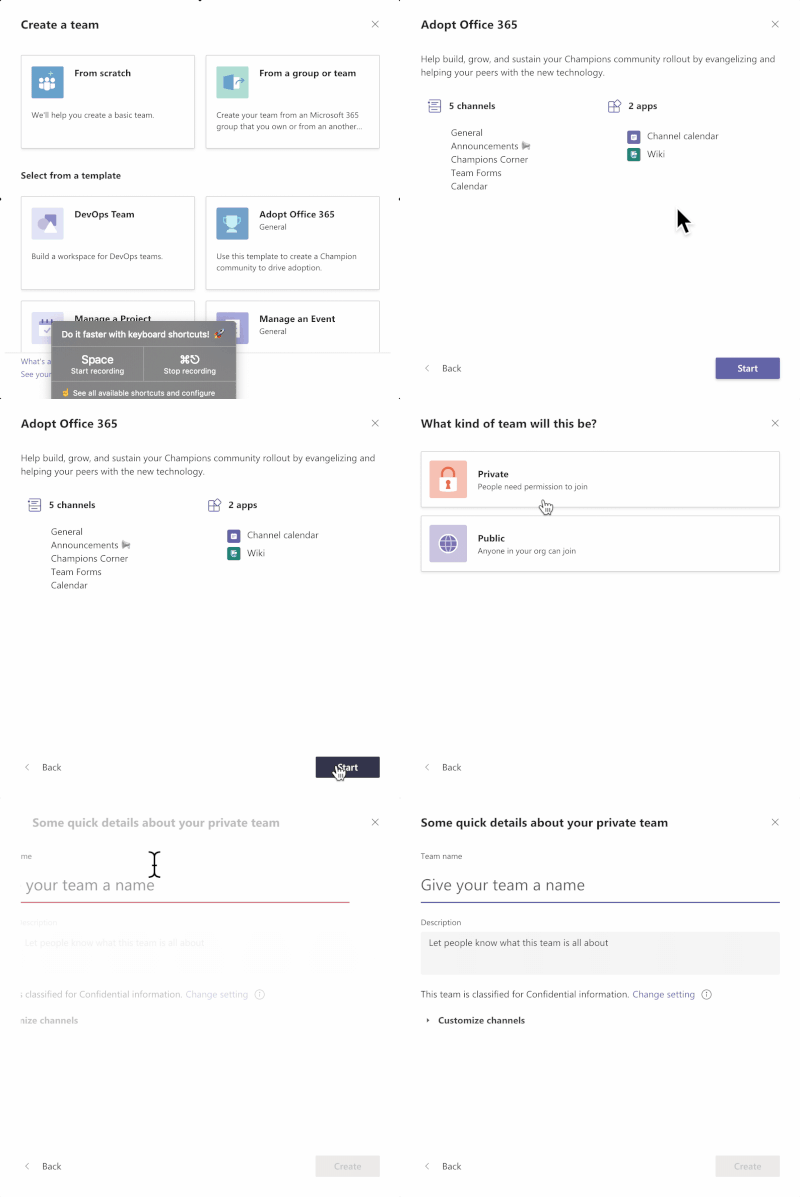
Templates for creation of a new Team When creating a new team, you can now choose from a variety of customizable templates including event management, crisis response, as well as industry-specific templates like hospital ward and bank branch. Microsoft publishes a set of first-party templates and as an IT professional you can also create new custom templates for your organization, allowing you to standardize team structures, surface relevant apps, and scale best practices.
New file sharing experience Team members share and work together on content from a single source of truth seamlessly with Microsoft Teams. You can now create a shareable link for any file stored in Teams and directly set the appropriate permissions. Additionally, you can also set permissions for files stored in SharePoint or OneDrive while composing a private chat or starting a channel conversation. Learn more
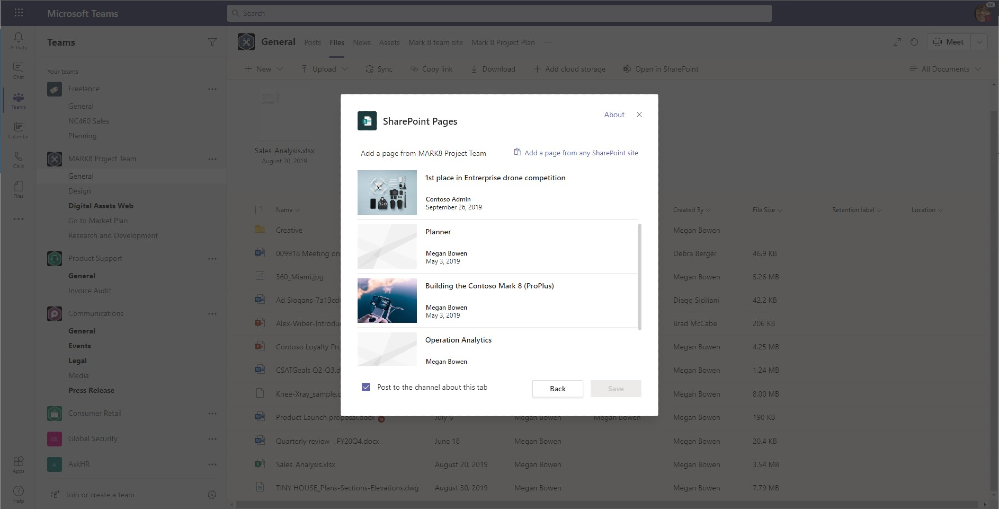
Updated SharePoint pages app Using SharePoint pages is a great way to consolidate and share content in the right context using images, Excel, Word and PowerPoint documents, videos, links, Twitter feeds and more – all on the same page. And now you can more easily add your pages as tabs in Microsoft Teams. Learn more
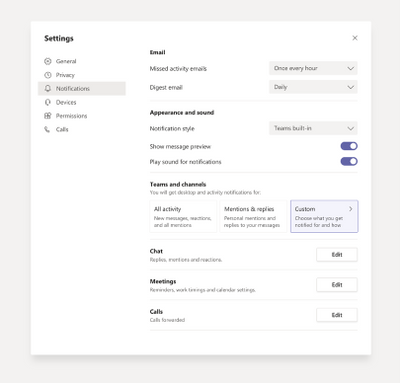
New and simplified global notification settings As a user you can now configure and customize your notification settings through a newly designed notification settings section. This new experience makes it easier to find the exact notifications you want so you can keep track of the activity you care about. To access, go to your profile picture > Settings > Notifications. We also added a new setting that allows you to turn off message previews in chat notifications if you desire more privacy.
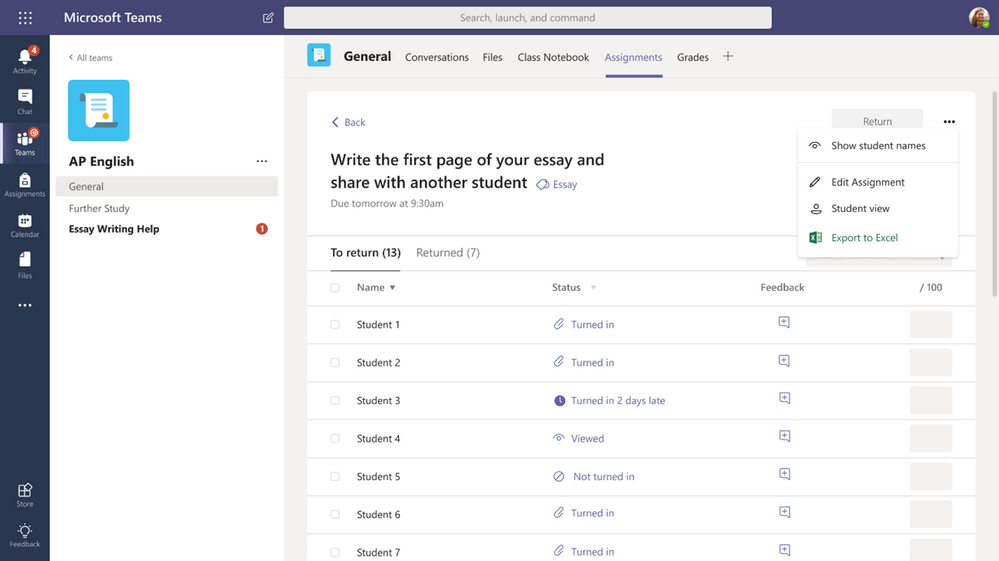
What’s New: Teams for Education Anonymous grading and marking in Assignments Tackle unconscious bias and even the playing field in class with Anonymous Grading. When enabled in the assignment detail view, students’ names are anonymized and avatars are temporarily removed, presenting a random list of students. This allows you as an educator to review work with identities hidden, no shuffling of paper involved.
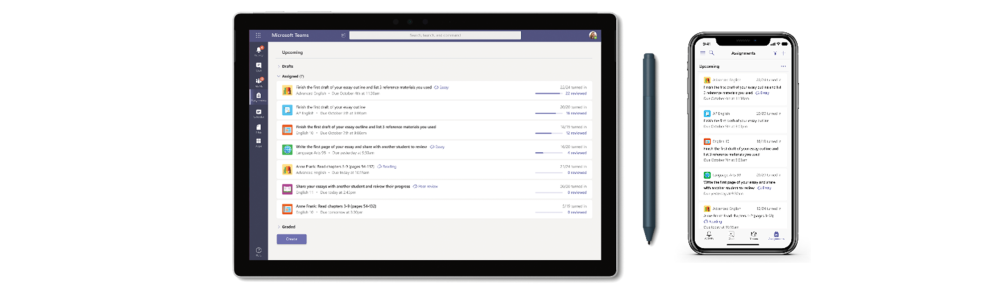
View assignments across all classes Being able to see what’s upcoming, whether you’re an educator or student, is critical to getting a handle on your week, month, or year. Now both educators and students can once again view upcoming and turned in assignments by class or view them across all classes. Just visit Assignments in your app bar on the left-hand side of Teams to view assignments across all classes. Students can also filter by category, see the due date, and assigned value of the assignment and more.
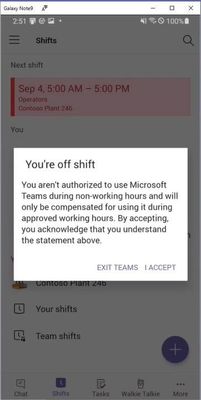
What’s New: Firstline Workers Off-shift access controls With off-shift access controls, IT administrators can now configure Teams to alert you when you are accessing the app on your personal device outside of working hours. The feature prompts you to accept that you will not be getting paid for time spent on Teams to help ensure that you are not involuntarily working while not on shift and helps your employer to comply with labor regulations. The feature does not require active usage of the Shifts app, but it does require Shifts being configured and schedule data being inside the app; either added natively with Excel import or including workforce management API connectors like Kronos, BlueYonder and more. Learn more
What’s New: Government These features currently available to Microsoft’s commercial customers in multi-tenant cloud environments are now rolling out to our customers in US Government Community Cloud (GCC), US Government Community Cloud High (GCC-High), and/or United States Department of Defense (DoD).
Priority notifications Share urgent messages and time-sensitive information more effectively with Teams. Priority notifications alert a recipient of an urgent message on their mobile and desktop devices until a response is received, every two minutes for up to 20 minutes. IT admins can manage this feature as part of messaging policies in Teams. Priority notifications are now available in GCC, GCC High, and DoD. Learn more
Read receipts Now available in GCC, read receipts in private chats allow senders to know that a message was read by the recipients. IT admins can configure messaging policies from the Microsoft Teams admin center to enable or disable this feature for users. Learn more
File viewer upgrades Teams file viewer is being upgraded for Gov clouds from legacy to OneUp for non-Office file types and to unified app for Office file types (Word, PowerPoint, and Excel).
Together mode Together mode, now available in GCC, uses AI segmentation technology in meetings to digitally place participants in a shared background, making it feel like you’re sitting in the same room with everyone else.
Large Gallery view (Preview) – see up to 49 participants Large Gallery is providing a new way to view video up to 49 participants at once on a single screen (7×7). This feature rolled out to production with the new multi-window experience. To take advantage of this new view, users will need to turn on the new multi-window meeting experience. Large Gallery is now available in GCC.
Spotlight an individual video participant for all attendees in a Teams meeting We are delivering the ability for presenters to lock on an individual video feed for all attendees to see during a Teams meeting. Once selected, the individual identified as the spotlight will be the main video shown to all participants. This applies to PC, Mac, mobile, and Microsoft Teams room systems. The spotlight feature is now available in both GCC and GCC High.
Improvements to meeting notes Meeting notes now support 100 users by default. Also, if anyone joins your meeting past after it is scheduled and, doesn’t have access to notes, they can now request access from the note’s owner in one click. Meeting notes are now available in GCC, GCC High, and DoD.
Changes in Incoming IP Video policy (New Audio and Video Policies) We are updating our meeting policies to allow IT administrators on GCC more control over how video is managed in Teams Meetings. Current policy can only be set to prevent outgoing video. We are extending the Allow IP Video policy to prevent both outgoing and incoming video as needed. Tenant administrators can use this policy to manage bandwidth. Learn more
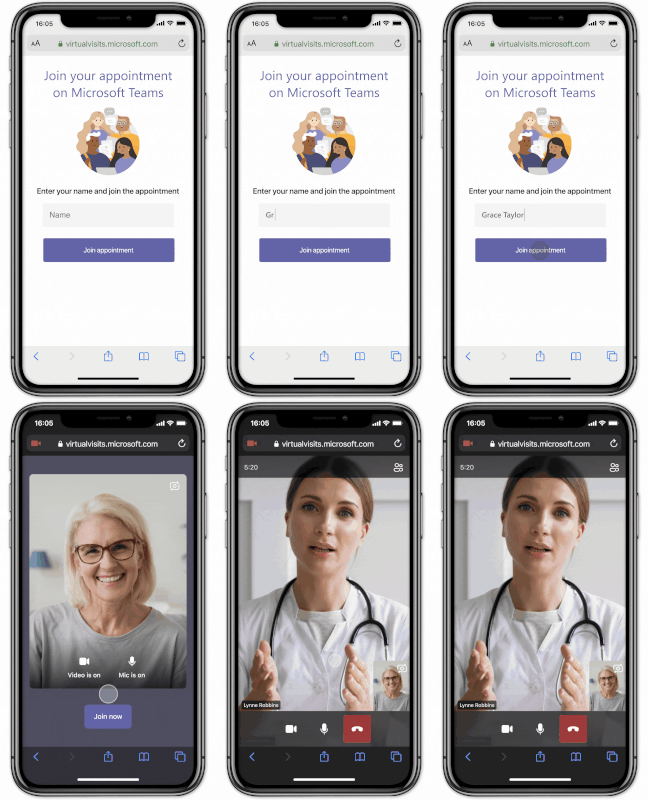
What’s New: Healthcare Microsoft Cloud for Healthcare Earlier this week we announced the general availability of our first industry-specific cloud offering, Microsoft Cloud for Healthcare, including the new Microsoft Teams EHR connector for Epic EHR. This allows clinicians to launch a virtual visit in Teams from within their electronic health record system. Learn more about how and about the many new features now available as part of the Microsoft Cloud for Healthcare.
What’s New: Platform Microsoft Teams and Power Automate – Simpler automation for everyone A new Power Automate app for Teams makes automating workflows easier than ever with new templates and a simplified editor experience.
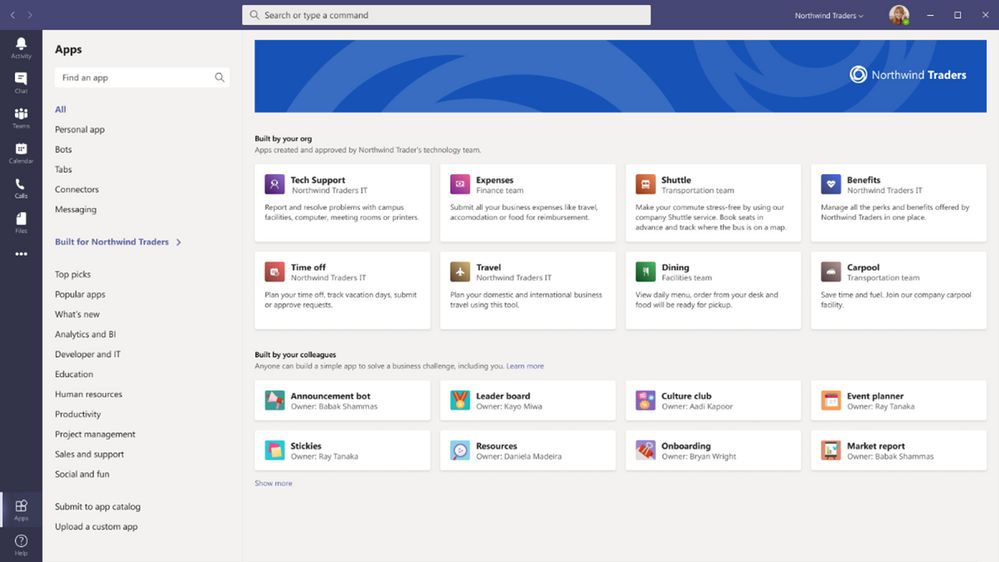
Organizational branding for line-of-business Teams app catalog IT Admins can now customize their Teams line-of-business app catalog using their organization’s branding. This enhances the user experience for end users and increase organic discovery and use of an organization’s line-of-business apps. Learn more
Resource-Specific Consent now generally available on the Microsoft Graph v1.0 endpoint We are excited to announce that Resource-Specific Consent (RSC) is now generally available on the Microsoft Graph v1.0 endpoint! Your Teams app can now call Teams Graph APIs from the BETA endpoint without needing admin consent. This capability empowers Team owners to install an app for their specific team and restrict the app’s scope and access to data to only that one team, without needing the global IT admin to provision access. Learn more
App certification Publishers building Microsoft Teams add-ins can now work with Microsoft to certify that their app – and its supporting infrastructure – protect the security and privacy of sensitive customer data. Certified apps receive a badge that is visible in AppSource and from within the Microsoft 365 tenant administrator’s console. We strongly encourage app publishers to take advantage of this program, and over time, expect to make it a requirement. Learn more
Publisher verification It’s critical that IT Admins and end-users know that partner apps come from verified sources. Using a process that relies on a verified Microsoft Partner Network account, Microsoft now offers application developers a publisher verification service. Verified apps receive a badge that is visible in AppSource and in the consent dialog when a user or admin installs an application. Learn more
Teams App Spotlight
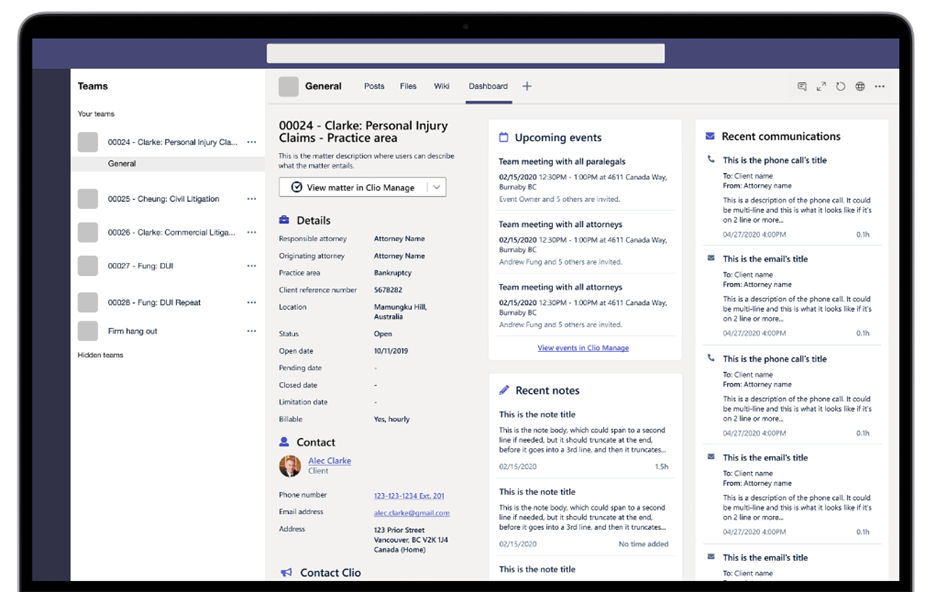
Clio is a cloud-based legal software that law firms trust to manage their practices and clients from intake to invoice. As the needs of legal professionals have changed over the last year, Clio has been focused on building solutions law firms need in this new digital-first reality. To make remote collaboration even easier, Clio customers can now check the status of their matter, scan recent communications, and plan for upcoming events all within Microsoft Teams. Learn more
Miguel Bernard is a Developer Technologies MVP from Canada. With more than 10 years of experience with Microsoft Technologies, Miguel has developed many specializations, including C#, F#, Azure, and DevOps practices. Miguel enjoys sharing his knowledge through his blog and by presenting at user groups and conferences. Miguel is very involved in the Montréal MSDEVMTL user group, where he is a co-organizer, and is passionate about teaching, developers’ communities, and everything related to .Net. For more on Miguel, check out his Twitter @miguelbernard88
Marc Lelijveld is a Data Platform MVP, Power BI enthusiast, and public speaker who is passionate about anything which transforms data into action. Currently employed as a Data & AI consultant in The Netherlands, Marc is often sharing his thoughts, experience, and best-practices about Microsoft Data Platform with others. For more on Marc, check out his blog.
Simon Jackson is a Windows Development MVP from the UK who is passionate about teaching all types of developers the wilds of game development and helping others to achieve their dreams. Regardless of the engine or framework, Simon is always out there breaking down difficult topics in to easy to understand posts and information. Check out his Twitter @SimonDarksideJ
Pio Balistoy is a Filipino Microsoft MVP for Data Platform based in Singapore. He has been working with databases for more than 17 years and has administered all versions of SQL, from SQL Server 6.5 to Azure SQL. For the last 10 years, Pio has been with Pythian Services as a Lead Data Platform Consultant, helping businesses transform using data, analytics and cloud. He actively leads the Data Platform communities both in Singapore and Philippines. For more, check out Pio’s Twitter @Pioisms
Alibek Jakupov an AI MVP. After having finished the IITU International Information Technologies University in Kazakhstan, he won the French Government Scholarship in 2016 and started his studies at the EISTI Graduate School in Computer Science and Mathematics Engineering in France. In 2017, he joined Expertime as a software engineer intern. The work implemented during this internship has provided the foundation to the brand new project called What Do They Think. He is a regular contributor to stackoverflow and his personal blog where he shares his experiences of performing data science on Azure. Check him out on Twitter @Ajakupov1
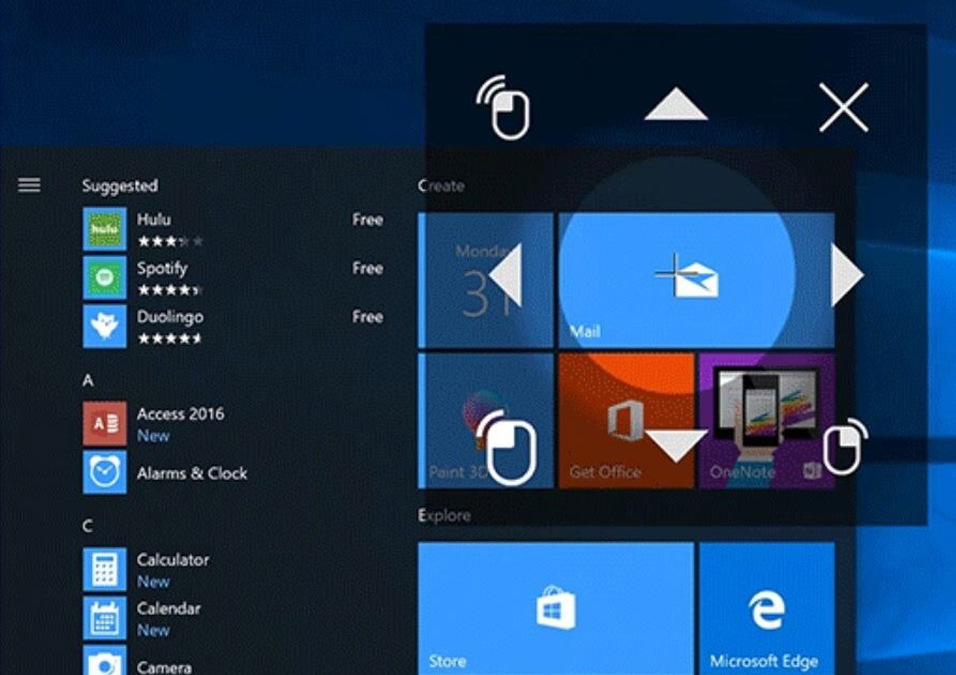
Microsoft puts people first by offering a wide range of Windows 10 accessibility features for users of many different abilities. Known internally as the Windows Accessibility team, the Input for Everyone team draws back a curtain for you to peek behind the scenes. Learn how Windows engineers are building accessibility features for all of us. This is the first article in a series focusing on accessibility and assistive technologies built into Windows 10. Our next installment will be a deep dive into the topic of Vision related features.


![Harsh Agarwal, program manager (Teams / Microsoft) [Intrazone guest]](https://techcommunity.microsoft.com/t5/image/serverpage/image-id/230448iD80F9D83CE8CCF1E/image-size/large?v=1.0&px=999 "IZ-RP-24_001_Harsh-Agarwal-profile.jpg")












Recent Comments