by Contributed | Oct 30, 2020 | Technology
This article is contributed. See the original author and article here.
[Following material applies to Schedule Triggers in Azure Data Factory. Learn more about Schedule Trigger]
We are really excited to release Time Support for Schedule Trigger in Azure Data Factory. Going forward, you can create schedule triggers in your local time zone, without the need to convert timestamps to Coordinated Universal Time (UTC) first. Furthermore, in this release, we are also adding support for Daylight Saving auto-adjustment: for time zones that observe Daylight Saving, auto change schedule trigger time twice a year (e.g. 8AM daily trigger will fire at 8AM, whether it’s PST or PDT)
Note: the changes only applies to new triggers created with time zone other than UTC. Existing ones will continue to follow UTC world clock.
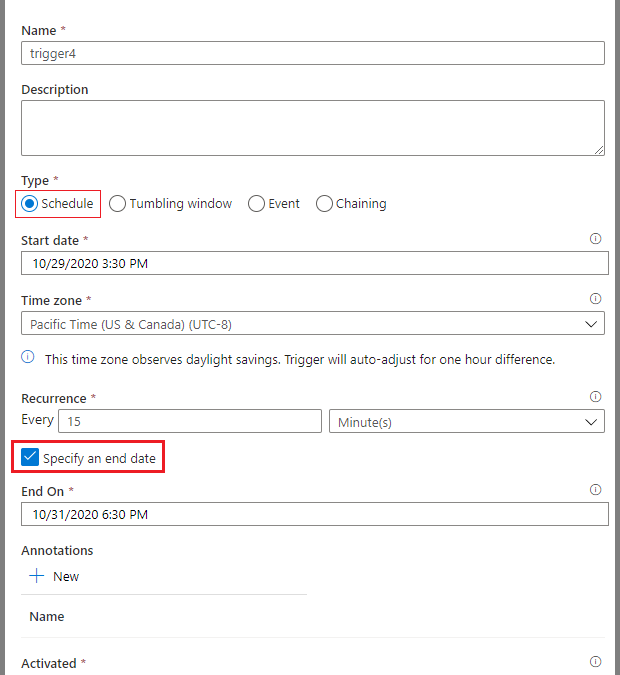
To create a Schedule Trigger in local time zone in UX portal
- Create new trigger and select Schedule for type
- Specify the start date in the desired time zone (e.g. 9AM 2020-10-30 Pacific Time, choose 9:00 AM 2020-10-30). The default value is current time in UTC timestamp
- Specify the desired time zone.
- Despite we are showing UTC offset in Standard time, e.g. Pacific Time (US & Canada) shows UTC-8, it adjusts to Summer time as expected
- Time Zone option applies to StartTime, EndTime, and ScheduleExecutionTime
- Changing time zone will not update StartTime, EndTime, and ScheduleExecutionTime settings. Please make sure that these values are specified correctly in your desired time zone
- Click OK and publish your triggers
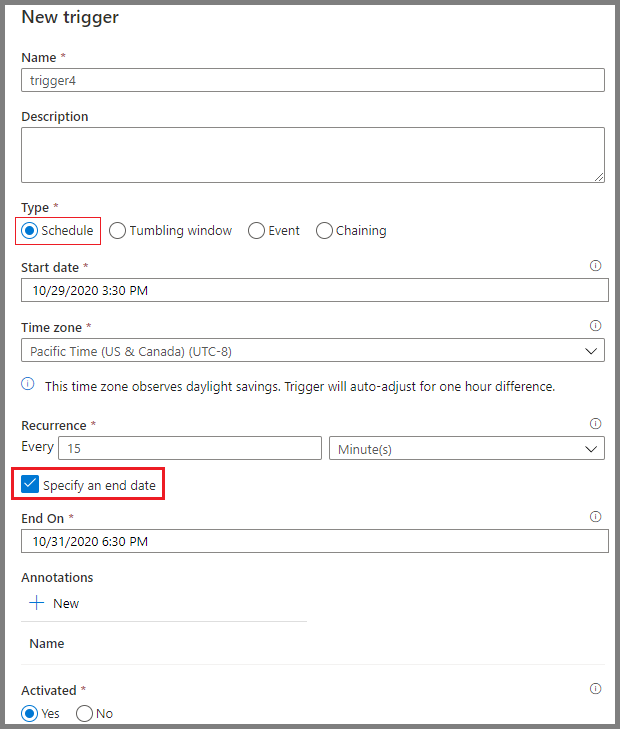 Time Zone setting other than UTC
To create a Schedule Trigger in local time zone with JSON schema
- timeZone property now takes values other than “UTC”
- When timeZone is set to “UTC”, timestamps are expected in format ‘yyyy-MM-ddTHH:mm:ssZ‘
- When timeZone is set to values other than “UTC”, timestamps are expected in format ‘yyyy-MM-ddTHH:mm:ss’, without the suffix Z
- Per ISO 8601 standard, Z suffix to timestamp mark the datetime to UTC and will render timeZone setting useless
- Meanwhile missing Z suffix for UTC time zone will cause an error upon trigger activation
For example, a trigger created in UTC time zone would look like this
{
    "properties": {
        "name": "MyTrigger",
        "type": "ScheduleTrigger",
        "typeProperties": {
            "recurrence": {
                "frequency": "Minute",
                "interval": 15,
                "startTime": "2017-12-08T00:00:00Z",
                "endTime": "2017-12-08T01:00:00Z",
                "timeZone": "UTC"
            }
        },
        "pipelines": [{
                "pipelineReference": {
                    "type": "PipelineReference",
                    "referenceName": "Adfv2QuickStartPipeline"
                },
                "parameters": {
                    "inputPath": "adftutorial/input",
                    "outputPath": "adftutorial/output"
                }
            }
        ]
    }
}
Some of the time zones we support include:
Time Zone |
UTC Offset (Non-Daylight Saving) |
timeZone Value |
Observe Daylight Saving |
Time Stamp Format |
|---|
Coordinated Universal Time |
0 |
UTC |
No |
‘yyyy-MM-ddTHH:mm:ssZ’ |
Pacific Time (PT) |
-8 |
Pacific Standard Time |
Yes |
‘yyyy-MM-ddTHH:mm:ss’ |
Central Time (CT) |
-6 |
Central Standard Time |
Yes |
‘yyyy-MM-ddTHH:mm:ss’ |
Eastern Time (ET) |
-5 |
Eastern Standard Time |
Yes |
‘yyyy-MM-ddTHH:mm:ss’ |
Greenwich Mean Time (GMT) |
0 |
GMT Standard Time |
Yes |
‘yyyy-MM-ddTHH:mm:ss’ |
Central European Standard Time |
+1 |
W. Europe Standard Time |
Yes |
‘yyyy-MM-ddTHH:mm:ss’ |
India Standard Time (IST) |
+5:30 |
India Standard Time |
No |
‘yyyy-MM-ddTHH:mm:ss’ |
China Standard Time |
+8 |
China Standard Time |
No |
‘yyyy-MM-ddTHH:mm:ss’ |
Fine prints on Monitoring if you programmatically monitor your Schedule Trigger runs: as per usual, trigger time of a schedule trigger run is specified as a UTC timestamp in return value. Please convert to local time zone on client side.
by Contributed | Oct 30, 2020 | Technology
This article is contributed. See the original author and article here.
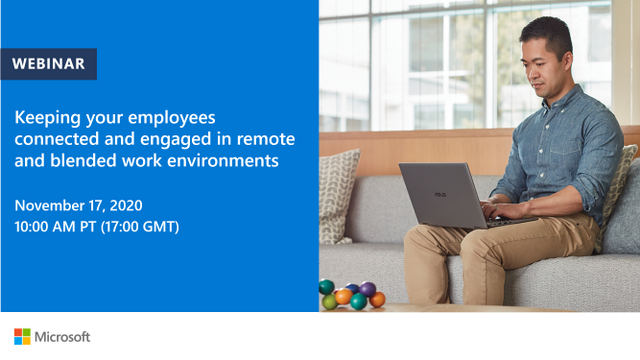
Discover real world techniques that empower individuals and teams to stay connected using Microsoft 365. Join this webinar on Tuesday, November 17 and learn how to make the most of current and coming features for highly collaborative working and how to play to our strengths when we can’t all connect face-to-face.
Click here to join the webinar.
Walk through:
- The shift to remote work now, blended next. Empowering workers
- What are the risks to collaborative team-working
- Disconnected teams
- Meeting overload
- Bias to in-person working
- What are the opportunities?
- Working to our strengths
- Asynchronous working
- Flexibility and preference
- Techniques to thrive as a connected team and Microsoft 365 to level the playing field (some new features in red)
- Team manuals and charters (in wiki, OneNote), team virtual store (SharePoint)
- Making meetings work
- Opening up – inviting others
- Making the team a safe place
- Posts and threads. The future of work
Speaker Bio
Andrew Pope is owner/partner of Consultancy Innosis in the United Kingdom (with Alister Webb in Australia), and advises large and medium-sized organisations throughout Europe and the USA on digital strategy and leadership, virtual team & community building, and how to leverage collaboration tools for business impact.
Andrew is currently advising a UK Government Agency on their blended working strategy for Microsoft Teams and a Dutch manufacturing firm on digital teamworking skills in Microsoft 365. He has also worked with some well-known organisations on their digital collaboration strategies as well as devising engagement programs. He also works as a facilitator, moderating two future workplace peer-to-peer groups, one in Oslo and one in Amsterdam
He has recently created a game to develop engagement and adoption strategies for digital teams, recently launched via a series of virtual interactive workshops and a chatbot for Microsoft Teams.
Andrew is also co-author, with Alister, of Designing Collaboration – a series of books and tools to boost digital collaboration, team and community building.
![[ANNOUNCEMENT] Productivity for Humans Series: Meet Jerry Holy from the Special Olympics](https://www.drware.com/wp-content/uploads/2020/10/large-1386)
by Contributed | Oct 30, 2020 | Technology
This article is contributed. See the original author and article here.
We are thrilled to launch our third Humans of IT Productivity for Humans episode featuring Jerry Holy, a Data Specialist from the Special Olympics organization! Hear from Jerry about how he uses Microsoft 365 tools to stay productive, and why it’s important to infuse humanity in tech.

Productivity for Humans series: Meet Jerry Holy from Special Olympics: In this episode, meet Jerry Holy, a 24-year-old Special Olympics athlete and Data Specialist at Special Olympics International (SOI), living with neurodiversity (ADHD, Asperger’s). Jerry shares about his experience using Microsoft 365 tools such as Power BI, Excel, and Microsoft Teams to stay productive and build a meaningful career. He also encourages everyone to celebrate who they are while embracing the power of technology.
Want to learn more about the Productivity for Humans series? Click here.
Hear from everyday Humans of IT as they share about their personal stories of how M365 solutions help them stay productive despite challenging life circumstances
Interested in viewing more Humans of IT-related video content? Check out our new dedicated page in the Microsoft Virtual Hub where you can get access to additional resources to help you navigate your personal human-centered productivity journey!
Do YOU use M365 tools and solutions to empower yourself or help your loved ones be more productive? Share your stories with us in the comments below, or apply to be a guest blogger on our Humans of IT blog!
We look forward to having you join us on a human-centered productivity journey.
#HumansofIT
#ProductivityforHumans
by Contributed | Oct 30, 2020 | Technology
This article is contributed. See the original author and article here.
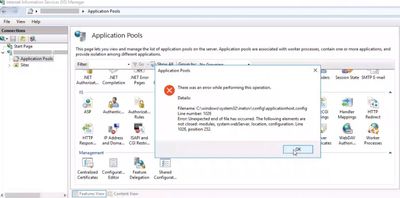
If there is something wrong with the IIS config file (applicationHost.config), IIS Manager may crash with this error message:
There was an error while performing this operation. Unexpected end of file has occurred.
Solution
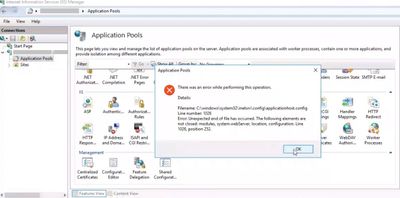
To find solution to this issue, pay close attention to the error message. It tells you which line number (Line 1026) in which file (applicationHost.config) has the issue. It also tells what the issue is (modules, system.webServer, location, configuration elements are not closed).
In my case, the file was actually cut off at the line 1026. Thinking about the issue history (It started occurring after building this server from a virtual machine disk copy), I guess that something went wrong during the disk copy.
Here are a few steps to try for solving this kind of an issue:
- Manually edit the config file (For instance: If an element is missing a closing tag, you can add that tag manually)
- Copy the config file from a backup
- Restore the virtual machine
- If there is another server with the same sites and configuration, compare the files and copy/paste the missing lines
- Reinstall IIS and create sites from scratch
by Contributed | Oct 30, 2020 | Technology
This article is contributed. See the original author and article here.
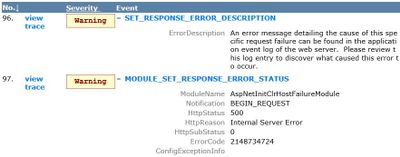
While troubleshooting a 500 error, Failed Request Tracing (FREB) displayed AspNetInitClrHostFailureModule error with 0x80131704 error code (2148734724). Here is the FREB log:
An error message detailing the cause of this specific request failure can be found in the application event log of the web server. Please review this log entry to discover what caused this error to occur.
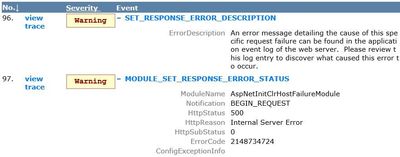
The issue started occurring after migrating from Windows Server 2008 R2 to Windows Server 2012 R2.
Root cause
The HEX equivalent of the error code 2148734724 is 0x80131704. This HEX code means: “A different runtime was already bound to the legacy CLR version 2 activation policy” (Reference).
It refers to a conflict with the runtime version IIS using to execute the application. Either web.config or another config file is instructing IIS to run the application on a .NET framework version that is not compatible with the version the application is targeting.
In my case, it was w3wp.exe.config (Located in C:WindowsSysWOW64inetsrv) forcing a specific .NET Framework version. I saw this line at the end of the file:
<startup><supportedRuntime version="v2.0.50727"/></startup>
This was the root cause of the issue. The application was developed to run on a .NET Framework version newer than 4.0. However, the line above forced IIS to run it on .NET Framework 2.0.
Solution
Removing the supportedRuntime line from the w3wp.exe.config file and restarting IIS solved the issue.
![[Guest Blog] Advanced Entertainment: Removing the barriers to learning](https://www.drware.com/wp-content/uploads/2020/10/medium-276)
by Contributed | Oct 30, 2020 | Technology
This article is contributed. See the original author and article here.
This blog article was written by Ted Biggs, who works at Shaftesbury Technology in Canada. He shares more how his organization’s vision was built on the foundation of where entertainment and technology intersects to help improve the lives of children everywhere.

Today, we find ourselves in a moment of great introspection and innovation. As the world is faced with the challenges a global lockdown creates, we’re also a time of significant intellectual advancement. We’re an AI-dependent world now, and so AI must be made for the better good. AI affects almost every aspect of our daily lives and changes the mode and message of the media we consume.
Shaftesbury Technology was formed at the intersection of entertainment and technology. The vision? Make the lives of children better through technology. With roots as a feature film company, the organization has evolved into a global multi-format production and distribution company. We believe in leveraging the power of artificial intelligence to develop engaging, creative content and powerful immersive reality platforms. We work collaboratively with leading pediatric healthcare institutions and university research centers in Canada and the US to help alleviate situational stress and anxiety by transforming a child’s environment with the power of play.
Using technology for good – especially to help benefit children – is an interesting challenge for all organizations. We’ve expanded the curriculum to include storytelling, games, and creative activities that help fill the void for a child used to having recess, socializing with their schoolmates, creating art for their classroom walls, and experiencing storytime together as a class or in a group. Developing AI tools for a better education experience with a human-focus has a far more significant impact and engagement. It provides a child with a sense of accomplishment, calm, and empowerment.
Humanity is at the turning point, and it all starts with the education of our children.
We look beyond the technology and focus on building a good design foundation and in the hope that we can be a part of creating a more empathetic future. Our research’s primary focus is to invest more in understanding humanly responsive design and engineering practices, policies, and tools to build products around intuitive human interaction. These design principles are based on two core beliefs: Respect people and do good.
How do we do that using cutting-edge technology? Unlike other VR/AR experiences with purely linear content, with advanced machine learning, the content changes for individuals depending on their stress level, resulting in a faster and more significant reduction of anxiety. Through this immersive marriage of content and technology, we hope to create smart entertainment spaces that contribute to learning and living better.
In our development of software products that help reimagine wellness for children using immersive play with adaptive game experience, we decide to build our patent-pending cloud-based Neural Net AI on Microsoft’s Azure cloud system.
The pending patent system for adaptive games and experiences developed by our organization in collaboration with our partners’ research goals adjusts to an individual’s responses, resulting in a unique experience for each child, depending on emotional state and state of mind. The objective of our game experiences is to alleviate stress, adapt to individual learning styles, and reduce anxiety for kids facing situational stress and anxiety. The challenges that arise from Autism Spectrum Disorder (ASD) and anxiety disorders by providing the ability to personalize the experience through gameplay will present different visual and auditory cues to better understand the content.
The use of technology, such as games, to enhance students’ learning in the classroom is a timely topic that permeates a lot of educational literature, especially with distance-learning mandated by COVID physical distancing. COVID-19 has affected us all, and the lives of children have been uniquely altered. The enforced isolation of large parts of the population has presented tremendous difficulties and challenges to educators, clinicians, children, and families.
Based on our experience, most educational games available in schools are not motivating enough for students and lack the fun factor. Children are not as motivated to play these games as they play commercial computer and video games at home. There is a need to design and develop more useful and engaging educational games relevant to the current curriculum and can be integrated in the day to day learning.
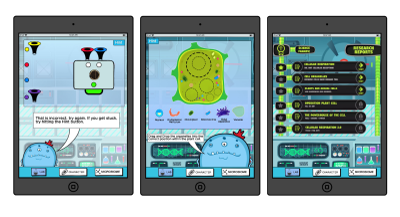
For example, Microscopic Machines is a Mixed Reality game project that allows the player to create, assemble, and personalize their own cell and interact with different creatures at the cellular level. The game looks at cell biology and ecology through a visual programming perspective. Its key innovation is Bubble Flow, an attractive and intuitive visual programming language that can model some essential cell metabolism Big Ideas. The gameplay requires steering a cell through a beautiful microscopic world, overcoming challenges to gather the building blocks, and the understanding needed to empower the designs fully. The game will deliver a 2D and 3D play experience to a range of AR and screen-based platforms. Based on an innovative layer of game logic, the Microscopic Machines provides a wildly entertaining user experience that simultaneously guides players through tasks that correspond to logical constructs used in STEAM topics.
We also designed some games to help address some of the challenges faced by children on the Autism Spectrum and those dealing with anxieties in stressful situations; all of these games provide a safe environment for both children and parents and tremendous value to Educators and Clinicians.
Education is vital for our society, and the new world we find ourselves in may leave some behind, those who require one-on-one and specialized learning. We are thrilled to use to suite of tools that align with the Microsoft Education mandate and helps equip educators, parents, and, most importantly, children of all ages with captivating tools for deeper engagement and fulfillment. We are witnessing a new education paradigm where education must be fluid, learner-centric, and not limited by time or space. By starting from a place of human experience, Advanced Entertainment allows kids to be the heroes of their own learning journey.
How are YOU using technology to help benefit society today? We’d love to learn from the experiences of others and exchange ideas as well!
#HumansofIT
#TechforGood
by Scott Muniz | Oct 30, 2020 | Security, Technology
This article is contributed. See the original author and article here.
Original release date: October 30, 2020
The Cybersecurity and Infrastructure Security Agency (CISA) and the Federal Bureau of Investigation (FBI) have released a joint cybersecurity advisory on an Iranian advanced persistent threat (APT) actor targeting U.S. state websites, including elections websites, to obtain voter registration data. Joint Cybersecurity Advisory AA20-304A: Iranian APT Actor Identified Obtaining Voter Registration Data provides indicators of compromise and recommended mitigations for affected entities.
Analysis by CISA and the FBI indicates this actor scanned state websites, to include state election websites, between September 20 and September 28, 2020, with the Acunetix vulnerability scanner. Additionally, CISA and the FBI observed this actor attempting to exploit websites to obtain copies of voter registration data between September 29 and October 17, 2020. This includes attempted exploitation of known vulnerabilities, directory traversal, Structured Query Language (SQL) injection, web shell uploads, and leveraging unique flaws in websites. CISA and the FBI can confirm that the actor successfully obtained voter registration data for at least one state.
CISA and the FBI advise organizations that do not regularly use Acunetix to monitor their logs for any related activity that originates from IP addresses provided in this advisory and consider it malicious reconnaissance behavior.
This product is provided subject to this Notification and this Privacy & Use policy.
by Contributed | Oct 30, 2020 | Technology
This article is contributed. See the original author and article here.
Today we’re posting the following message in the Message Center (in M365 Admin center under Message Center or in Microsoft Endpoint Manager on the Tenant Admin blade – Service Health and Message Center). We’re sharing here to help answer any questions and also to keep you posted on any new updates.
Intune certificate updates: Action may be required for continued connectivity
Microsoft Intune has begun updating our Root certificates to comply with Azure’s new certificate policy. Most management scenarios will work without administrator action, however, there are a few different configurations that may require you to take action to ensure your continued connectivity to Intune.
How this will affect your organization:
Here are the scenarios that are affected and may need action:
- If you use the Intune iOS SDK, Intune App Wrapper for iOS, or Xamarin Bindings, we posted MC222833 asking you to take action and describing which versions are needed.
- If you use any Microsoft applications with App Protection Policies (APP, also known as MAM), you’ll want to ensure you’re using the latest application version with SDK for iOS version 12.9.0+ or SDK for Android version 6.7.2+. Many of the M365 apps on iOS including Outlook, Teams, OneDrive, Office, and Word/Excel/PowerPoint have adopted the updated SDK. On Android, Outlook and OneDrive have released with the updated SDK and APP applications are continuing their updated releases.
- If you use Configuration Manager, including co-managed devices, read this article for any conditions that need to be unblocked to enable the root cert updates, such as steps to ensure Windows domain joined co-managed devices continue communicating with the Microsoft Endpoint Manager services.
- For any Intune on-premises connectors in use, such as the Exchange, NDES, ODJ, or PFX connectors, ensure your servers receive the Root Certificate updates. For environments that are disconnected, follow guidance to ensure root certificates are installed on the on-premises servers.
- Note that you may also have to check your Group Policy settings, as it is possible to disable automatic root certificate updates. Update your policy or manually update the certificates on devices including MDM-managed Windows devices.
What you need to do to prepare:
Evaluate your environment with the conditions above and take action as needed.
And for those of you that didn’t see MC222833 but have LOB apps with APP (MAM) here’s that post too:
Take Action: Adopt the Latest iOS SDK, Intune App Wrapper, and Xamarin Bindings
Microsoft has made a few important service side updates that will require that you adopt the latest Intune App SDK for iOS version 12.9.0 or higher, Intune App Wrapper, version 13.0.0 or higher, or Xamarin binding version 12.9.0 and then have your end users adopt the updated apps by December 31, 2020. Note that the way Android updates, once one Microsoft application with the updated SDK is on the device and the Company Portal is updated, Android apps will update, so this message is focused on iOS.
How this will affect your organization:
Our service telemetry indicates you have applications wrapped by the Intune SDK, the Intune App Wrapper, or Xamarin Bindings.
What you need to do to prepare:
Action will depend on update status:
- If you’ve wrapped your app, you’ll want to re-wrap your app with the latest wrapper (13.0.0 or higher)
- If you integrated the SDK please re-integrate with SDK 12.9.0 or higher
- If you’re using Xamarin and have integrated our binding, please pull in the binding 12.9.0 or above
Here are the public repositories:
Let us know if you have any additional questions on this by replying back to this post or tagging @IntuneSuppTeam out on Twitter.
by Contributed | Oct 30, 2020 | Technology
This article is contributed. See the original author and article here.
This month we have a second technical preview. Update 2010.2 for the Technical Preview Branch of Microsoft Endpoint Configuration Manager has been released.
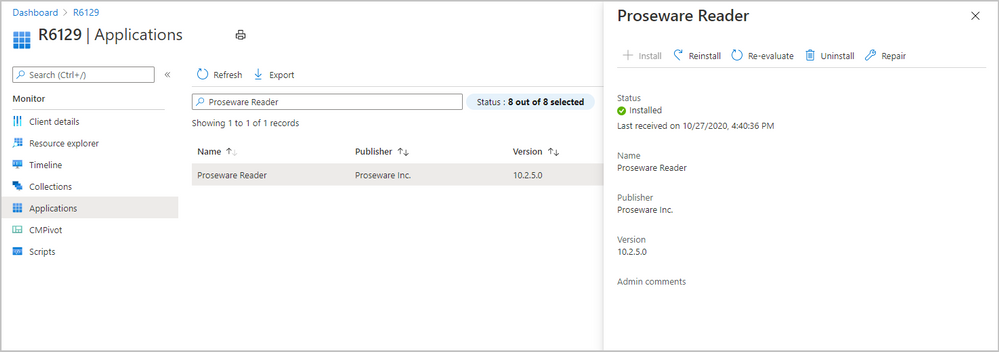
We’ve made improvements to applications for tenant attached devices. Administrators can now do the following actions for applications in the Microsoft Endpoint Manager admin center:
- Uninstall an application
- Repair installation of an application
- Re-evaluate the application installation status
- Reinstall an application has replaced Retry installation
 application actions for tenant attached device
Learn more about Enhancements to applications in Microsoft Endpoint Manager admin center.
This preview release also includes:
Tenant attach: Troubleshooting portal lists a user’s devices based on usage – The troubleshooting portal in Microsoft Endpoint Manager admin center allows you to search for a user and view their associated devices. Starting in this release, tenant attached devices that are assigned user device affinity automatically based on usage will now be returned when searching for a user.
Tenant attach: Create and deploy firewall policies – You can now configure and deploy settings for Windows Defender Firewall with Advanced Security to tenant attached Windows 10 devices.
Enhancements to applications in Microsoft Endpoint Manager admin center – We’ve made improvements to applications for tenant attached devices. Administrators can now do the following actions for applications in the Microsoft Endpoint Manager admin center:
- Uninstall an application
- Repair installation of an application
- Re-evaluate the application installation status
- Reinstall an application has replaced Retry installation
Improvements to BitLocker management – Based on your UserVoice feedback, you can now manage BitLocker policies and escrow recovery keys over a cloud management gateway (CMG). This change also provides support for BitLocker management via internet-based client management (IBCM) and when you configure the site for enhanced HTTP. There’s no change to the setup process for BitLocker management.
Improvements to deploy an OS over CMG using boot media – This release streamlines the administrative workflow in the Configuration Manager console. On the Media Management page of the Create Task Sequence Media Wizard, the Internet-based media option no longer exists. Select the Site-based media option. Then still select the CMG for the management point on the Boot Image page.
Desktop Analytics support for new Windows 10 data levels – Microsoft is increasing transparency by categorizing the data that Windows 10 collects:
- Basic diagnostic data is recategorized as Required diagnostic data
- Full is recategorized as Optional
If you previously configured devices for Limited or Limited (Enhanced), in an upcoming release of Windows 10, they’ll use the Required level. This change may impact the functionality of Desktop Analytics. Configuration Manager will properly configure the devices. If you’re using another mechanism to configure these policies on devices, you may need to make changes for the upcoming new behavior.
Immediate distribution point fallback for clients downloading software update delta content – There’s a new client setting for software updates. If delta content is unavailable from distribution points in the current boundary group, you can allow immediate fallback to a neighbor or the site default boundary group distribution points. This setting is useful when using delta content for software updates since the timeout setting per download job is 5 minutes.
Disable Azure AD authentication for onboarded tenants – You can now disable Azure Active Directory (Azure AD) authentication for tenants not associated with users and devices. When you onboard Configuration Manager to Azure AD, it allows the site and clients to use modern authentication. Currently, Azure AD device authentication is enabled for all onboarded tenants, whether or not it has devices. For example, you have a separate tenant with a subscription that you use for compute resources to support a cloud management gateway. If there aren’t users or devices associated with the tenant, you can now optionally disable Azure AD authentication.
Additional options when creating app registrations in Azure Active Directory – You can now specify Never for the expiration of a secret key when creating Azure Active Directory app registrations.
Validate internet access for the service connection point – If you use Desktop Analytics or tenant attach, the service connection point now checks important internet endpoints. These checks help make sure that the cloud-connected services are available. It also helps you troubleshoot issues by quickly determining if network connectivity is a problem.
Improvements to the administration service – The Configuration Manager REST API, the administration service, requires a secure HTTPS connection. With the previous methods to enable HTTPS, enabling IIS on the SMS Provider was a prerequisite. Starting in this release, you no longer need to enable IIS on the SMS Provider for the administration service. When you enable the site for enhanced HTTP, it creates a self-signed certificate for the SMS Provider, and automatically binds it without requiring IIS.
Update 2010.2 for Technical Preview Branch is available in the Microsoft Endpoint Configuration Manager Technical Preview console. For new installations, the 2010 baseline version of Microsoft Endpoint Configuration Manager Technical Preview Branch is available on the Microsoft Evaluation Center. Technical Preview Branch releases give you an opportunity to try out new Configuration Manager features in a test environment before they are made generally available.
We would love to hear your thoughts about the latest Technical Preview! Send us Feedback about product issues directly from the console and use our UserVoice page for ideas about new features.
Thanks,
The Configuration Manager team
Configuration Manager Resources:
Documentation for Configuration Manager Technical Previews
Try the Configuration Manager Technical Preview Branch
Documentation for Configuration Manager
Microsoft Endpoint Manager announcement
Microsoft Endpoint Manager vision statement
Configuration Manager Forums
Configuration Manager Support
by Scott Muniz | Oct 30, 2020 | Security, Technology
This article is contributed. See the original author and article here.
Original release date: October 30, 2020 | Last revised: November 3, 2020
This advisory uses the MITRE Adversarial Tactics, Techniques, and Common Knowledge (ATT&CK®) version 8 framework. See the ATT&CK for Enterprise version 8 for all referenced threat actor techniques.
This joint cybersecurity advisory was coauthored by the Cybersecurity and Infrastructure Security Agency (CISA) and the Federal Bureau of Investigation (FBI). CISA and the FBI are aware of an Iranian advanced persistent threat (APT) actor targeting U.S. state websites—to include election websites. CISA and the FBI assess this actor is responsible for the mass dissemination of voter intimidation emails to U.S. citizens and the dissemination of U.S. election-related disinformation in mid-October 2020. This disinformation (hereinafter, “the propaganda video”) was in the form of a video purporting to misattribute the activity to a U.S. domestic actor and implies that individuals could cast fraudulent ballots, even from overseas. https://www.odni.gov/index.php/newsroom/press-releases/item/2162-dni-john-ratcliffe-s-remarks-at-press-conference-on-election-security. (Reference FBI FLASH message ME-000138-TT, disseminated October 29, 2020). Further evaluation by CISA and the FBI has identified the targeting of U.S. state election websites was an intentional effort to influence and interfere with the 2020 U.S. presidential election.
Click here for a PDF version of this report.
This product is provided subject to this Notification and this Privacy & Use policy.


Recent Comments