
by Contributed | Nov 9, 2020 | Technology
This article is contributed. See the original author and article here.
GPS has become part of our daily life. GPS is in cars for navigation, in smartphones helping us to find places, and more recently GPS has been helping us to avoid getting infected by COVID-19. Managing and analyzing mobility tracks is the core of my work. My group in Université libre de Bruxelles specializes in mobility data management. We build an open source database system for spatiotemporal trajectories, called MobilityDB. MobilityDB adds support for temporal and spatio-temporal objects to the Postgres database and its spatial extension, PostGIS. If you’re not yet familiar with spatiotemporal trajectories, not to worry, we’ll walk through some movement trajectories for a public transport bus in just a bit.
One of my team’s projects is to develop a distributed version of MobilityDB. This is where we came in touch with the Citus extension to Postgres and the Citus engineering team. This post presents issues and solutions for distributed query processing of movement trajectory data. GPS is the most common source of trajectory data, but the ideas in this post also apply to movement trajectories collected by other location tracking sensors, such as radar systems for aircraft, and AIS systems for sea vessels.

As a start, let’s explore the main concepts of trajectory data management, so you can see how to analyze geospatial movement trajectories.
The following animated gif shows a geospatial trajectory of a public transport bus1 that goes nearby an advertising billboard. What if you wanted to assess the visibility of the billboard to the passengers in the bus? If you can do this for all billboards and vehicles, then you would be able to extract interesting insights for advertising agencies to price the billboards, and for advertisers who are looking to optimize their campaigns.
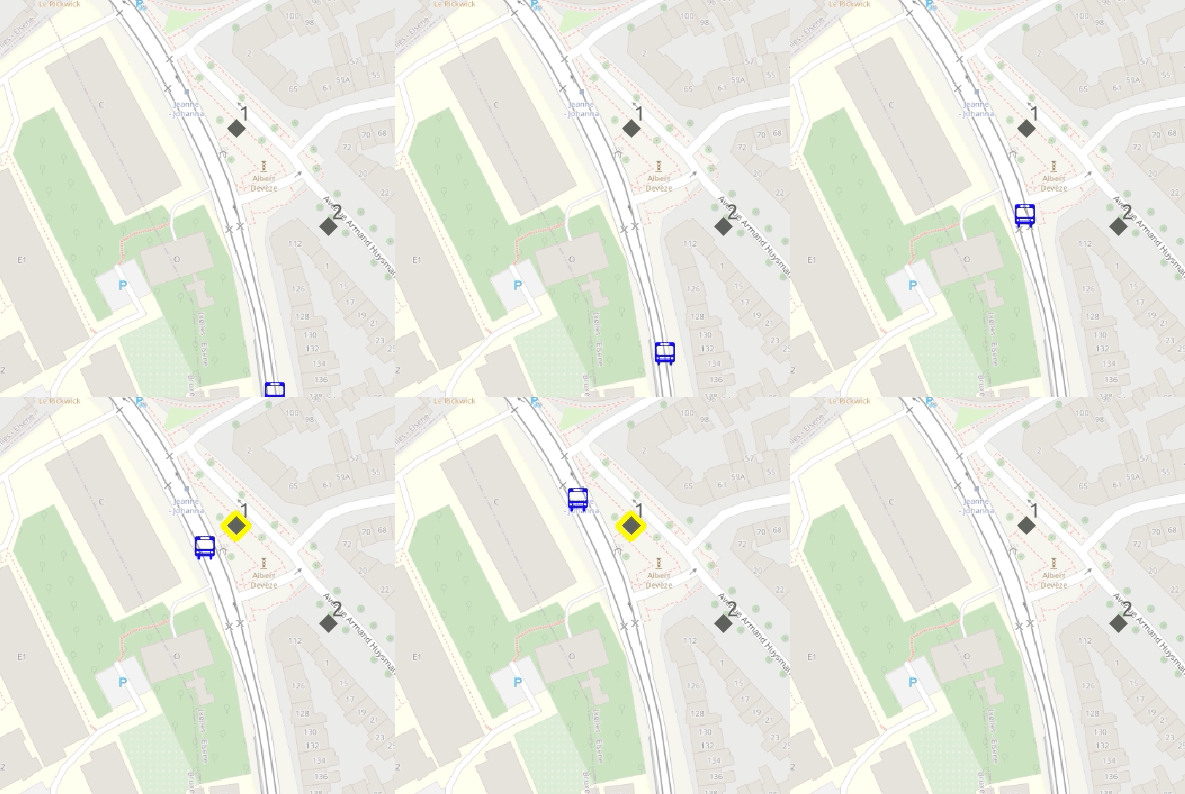 Throughout this post, I’ll use maps to visualize bus trajectories and advertising billboards in Brussels, so you can learn how to query where (and for how long) the advertising billboards are visible to the bus passengers. The background maps are courtesy of OpenStreetMap.
In the animated gif above, we simply assume that if the bus is within 30 meters to the billboard, then it is visible to its passengers. This “visibility” is indicated in the animation by the yellow flash around the billboard when the bus is within 30 meters of the billboard.
How to measure the billboard’s visibility to a moving bus using a database query?
Let’s prepare a toy PostGIS database that minimally represents the example in the previous animated gif—and then gradually develop an SQL query to assess the billboard visibility to the passengers in a moving bus.
If you are not familiar with PostGIS, it is probably the most popular extension to Postgres and is used for storing and querying spatial data. For the sake of this post, all you need to know is that PostGIS extends Postgres with data types for geometry point, line, and polygon. PostGIS also defines functions to measure the distance between geographic features and to test topological relationships such as intersection.
In the SQL code block below, first you create the PostGIS extension. And then you will create two tables: gpsPoint and billboard.
CREATE EXTENSION PostGIS;
CREATE TABLE gpsPoint (tripID int, pointID int, t timestamp, geom geometry(Point, 3812));
CREATE TABLE billboard(billboardID int, geom geometry(Point, 3812));

INSERT INTO gpsPoint Values
(1, 1, '2020-04-21 08:37:27', 'SRID=3812;POINT(651096.993815166 667028.114604598)'),
(1, 2, '2020-04-21 08:37:39', 'SRID=3812;POINT(651080.424535144 667123.352304597)'),
(1, 3, '2020-04-21 08:38:06', 'SRID=3812;POINT(651067.607438095 667173.570340437)'),
(1, 4, '2020-04-21 08:38:31', 'SRID=3812;POINT(651052.741845233 667213.026797244)'),
(1, 5, '2020-04-21 08:38:49', 'SRID=3812;POINT(651029.676773636 667255.556944161)'),
(1, 6, '2020-04-21 08:39:08', 'SRID=3812;POINT(651018.401101238 667271.441380755)'),
(2, 1, '2020-04-21 08:39:29', 'SRID=3812;POINT(651262.17004873  667119.331513367)'),
(2, 2, '2020-04-21 08:38:36', 'SRID=3812;POINT(651201.431447782 667089.682115196)'),
(2, 3, '2020-04-21 08:38:43', 'SRID=3812;POINT(651186.853162155 667091.138189286)'),
(2, 4, '2020-04-21 08:38:49', 'SRID=3812;POINT(651181.995412783 667077.531372716)'),
(2, 5, '2020-04-21 08:38:56', 'SRID=3812;POINT(651101.820139904 667041.076539663)');

INSERT INTO billboard Values
(1, 'SRID=3812;POINT(651066.289442793 667213.589577551)'),
(2, 'SRID=3812;POINT(651110.505092035 667166.698041233)');
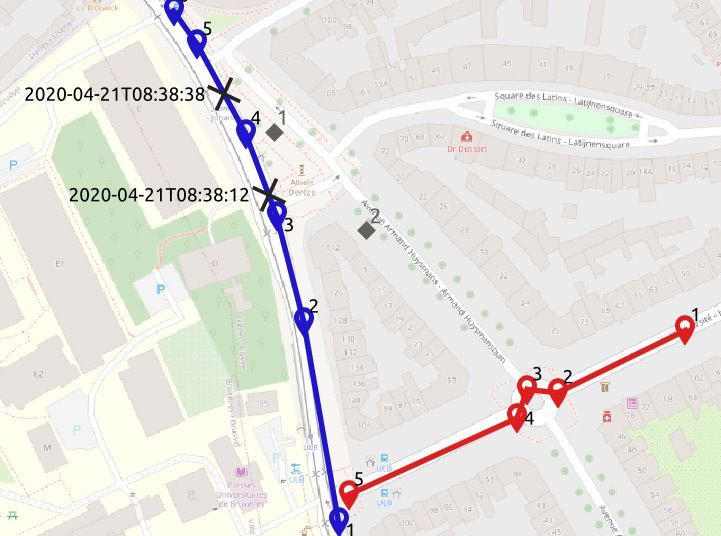
The database is visualized in the map below. You can see that the gpsPoint table has points of two bus trips, trip 1 in blue and trip 2 in red. In the table, each point has a timestamp. The two billboards are the gray diamonds in the map.
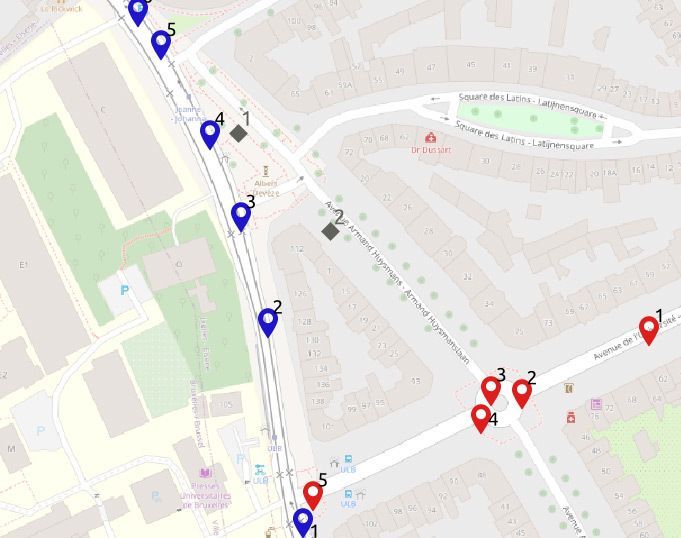
Your next step is to find the locations where a bus is within 30 meters from a billboard—and also the durations, i.e., how long the moving bus is within 30 meters of the billboard.
SELECT tripID, pointID, billboardID
FROM gpsPoint a, billboard b
WHERE st_dwithin(a.geom, b.geom, 30);

--1    4    1
This PostGIS query above does not solve the problem. Yes, the condition in the WHERE clause finds the GPS points that are within 30 meters from a billboard. But the PostGIS query does not tell the duration of this event.
Furthermore, imagine that point 4 in trip 1 (the blue trip) was not given. This query would have then returned null. The problem with this query is that it does not deal with the continuity of the bus trip, i.e. the query does not deal with the movement trajectory of the bus.
We need to reconstruct a continuous movement trajectory out of the given GPS points. Below is another PostGIS query that would find both the locations of the billboard’s visibility to the passengers in the bus, and also the duration of how long the billboard was visible to the bus passengers.
1   WITH pointPair AS(
2     SELECT tripID, pointID AS p1, t AS t1, geom AS geom1,
3       lead(pointID, 1) OVER (PARTITION BY tripID ORDER BY pointID) p2,
4       lead(t, 1) OVER (PARTITION BY tripID ORDER BY pointID) t2,
5       lead(geom, 1) OVER (PARTITION BY tripID ORDER BY pointID) geom2
6     FROM gpsPoint
7   ), segment AS(
8     SELECT tripID, p1, p2, t1, t2,
9       st_makeline(geom1, geom2) geom
10    FROM pointPair
11    WHERE p2 IS NOT NULL
12  ), approach AS(
13    SELECT tripID, p1, p2, t1, t2, a.geom,
14      st_intersection(a.geom, st_exteriorRing(st_buffer(b.geom, 30))) visibilityTogglePoint
15    FROM segment a, billboard b
16    WHERE st_dwithin(a.geom, b.geom, 30)
17  )
18  SELECT tripID, p1, p2, t1, t2, geom, visibilityTogglePoint,
19    (st_lineLocatePoint(geom, visibilityTogglePoint) * (t2 - t1)) + t1 visibilityToggleTime
20  FROM approach;
Yes, the above PostGIS query is a rather complex one. We split the query into multiple common table expressions CTEs, to make it readable. In Postgres, CTEs give you the ability to “name” a subquery, to make it easier to write SQL queries consisting of multiple steps.
- The first CTE,
pointPair in Lines 1-7, uses the window function lead, in order to pack every pair of consecutive points, that belong to the same bus trip, into one tuple.
- This is a preparation for the second CTE,
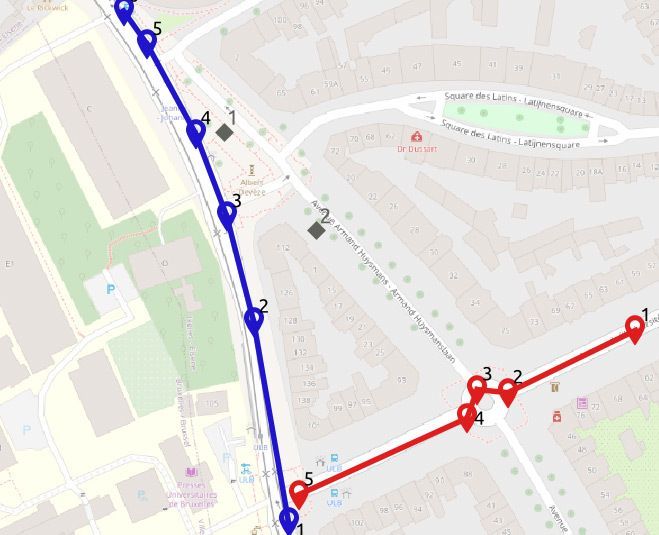
segment in Lines 7-12, which then connects the two points with a line segment. This step can be seen as a linear interpolation of the path between every two GPS points.
The result of these two CTEs can be visualized in the map below:
Then the third CTE, approach Lines 12-18, finds the locations where the bus starts/ends to be within 30 meters from the billboard. This is done by drawing a circular ring with 30 meters diameter around the billboard, and intersecting it with the segments of the bus trajectory. We thus get the two points in the map below, marked with the black cross.
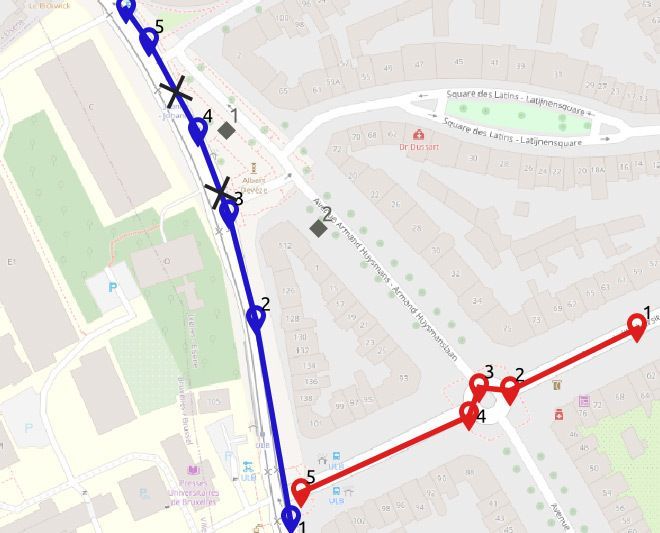
The last step in the earlier PostGIS query, Lines 19-22, computes the time at these two points using linear referencing, that is assuming a constant speed per segment2.
Exercise: try to find a simpler way to express the PostGIS query displayed earlier. I couldn’t. :)
The PostGIS query had to be that complex, because it programs two non-trivial concepts:
- Continuous movement trajectory: while the GPS data is discrete, we had to reconstruct the continuous movement trajectory.
- Spatiotemporal proximity: the continuous movement trajectory was used to find the location and time (i.e., spatiotemporal) during which the bus was within 30 meters from the billboard.
The good news for you is that MobilityDB can help make it easier to analyze these types of movement trajectories. MobilityDB is an extension of PostgreSQL and PostGIS that has implemented these spatiotemporal concepts as custom types and functions in Postgres.
MobilityDB: a moving object database system for Postgres & PostGIS
Let’s have a look on how to express this PostGIS query more simply using MobilityDB. Here is how the previous PostGIS query would be expressed in MobilityDB.
SELECT astext(atperiodset(trip, getTime(atValue(tdwithin(a.trip, b.geom, 30), TRUE))))
FROM busTrip a, billboard b
WHERE dwithin(a.trip, b.geom, 30)

--{[POINT(651063.737915354 667183.840879818)@2020-04-21 08:38:12.507515+02,
--  POINT(651052.741845233 667213.026797244)@2020-04-21 08:38:31+02,
--  POINT(651042.581085347 667231.762425657)@2020-04-21 08:38:38.929465+02]}
What you need to know about the MobilityDB query above:
- The table
busTrip has the attribute trip of type tgeompoint. It is the MobilityDB type for storing a complete trajectory.
- The nesting of
tdwithin->atValue->getTime will return the time periods during which a bus trip has been within a distance of 30 meters to a billboard.
- The function
atperiodset will restrict the bus trip to only these time periods.
- The function
astext converts the coordinates in the output to textual format.
- Accordingly, the result shows the part of the bus trip that starts at 2020-04-21 08:38:12.507515+02 and ends at 08:38:38.929465+02.
The MobilityDB documentation describes all of MobilityDB’s operations.
Now we step back, and show the creation of the busTrip table.
CREATE EXTENSION MobilityDB CASCADE;

CREATE TABLE busTrip(tripID, trip) AS
  SELECT tripID,tgeompointseq(array_agg(tgeompointinst(geom, t) ORDER BY t))
FROM gpsPoint
GROUP BY tripID;

--SELECT 2
--Query returned successfully in 78 msec.


SELECT tripID, astext(trip) FROM busTrip;

1  "[POINT(651096.993815166 667028.114604598)@2020-04-21 08:37:27+02,
       POINT(651080.424535144 667123.352304597)@2020-04-21 08:37:39+02,
       POINT(651067.607438095 667173.570340437)@2020-04-21 08:38:06+02,
       POINT(651052.741845233 667213.026797244)@2020-04-21 08:38:31+02,
       POINT(651029.676773636 667255.556944161)@2020-04-21 08:38:49+02,
       POINT(651018.401101238 667271.441380755)@2020-04-21 08:39:08+02]"
2  "[POINT(651201.431447782 667089.682115196)@2020-04-21 08:38:36+02,
       POINT(651186.853162155 667091.138189286)@2020-04-21 08:38:43+02,
       POINT(651181.995412783 667077.531372716)@2020-04-21 08:38:49+02,
       POINT(651101.820139904 667041.076539663)@2020-04-21 08:38:56+02,
       POINT(651262.17004873  667119.331513367)@2020-04-21 08:39:29+02]"
- The first step above is to create the MobilityDB extension in the database. In Postgres, the
CASCADE option results in executing the same statement on all the dependencies. In the query above—because PostGIS is a dependency of MobilityDB—CASCADE will also create the PostGIS extension, if it has not yet been created.
- The second query above creates the
busTrip table with two attributes (tripID int, trip tgeompoint). tgeompoint is the MobilityDB type to represent a movement trajectory. The tgeompoint attribute is constructed from a temporally sorted array of instants, each of which is a pair of a spatial point and a timestamp. This construction is expressed in the query above by the nesting of tgeompointinst -> array_agg -> tgeompointseq.
- The last
SELECT query above shows that the busTrip table contains two tuples, corresponding to the two trips. Every trip has the format [point1@time1, point2@time2, …].
Bigger than an elephant: how to query movement trajectories at scale, when a single Postgres node won’t do
As we now have two working solutions for measuring the billboard visibility: one in PostGIS and another one in MobilityDB, the next natural move is to apply these solutions to a big database of all bus trips in Brussels in the last year, and all billboards in Brussels. This amounts to roughly 5 million bus trips (roughly 5 billion GPS points) and a few thousand billboards. This size goes beyond what a single Postgres node can handle. Hence, we need to distribute the Postgres database.
This is a job for Citus, the extension to Postgres that transforms Postgres into a distributed database. Efficiently distributing the complex PostGIS query with many CTEs is a challenge we’ll leave to the Citus engineering team.
What I want to discuss here is the distribution of the MobilityDB query. Citus does not know the types and operations of MobilityDB. So the distribution is limited by what Citus can do in general for custom types and functions. My colleague, Mohamed Bakli, has done this assessment and published it in a paper titled “Distributed moving object data management in MobilityDB” in the ACM BigSpatial workshop (preprint) and in a demo paper titled “Distributed Mobility Data Management in MobilityDB” in the IEEE MDM conference (preprint).
The papers presented a solution to distribute MobilityDB using Citus. All the nodes in the Citus database cluster had PostgreSQL, PostGIS, MobilityDB, and Citus installed. The goal was to assess to what extent the spatiotemporal functions in MobilityDB can be distributed.
To do this assessment, the BerlinMOD benchmark (a tool for comparing moving object databases) was used. BerlinMOD consists of a trajectory data generator, and 17 benchmark queries that assess the features of a moving object database system. It was possible to execute 13 of the 17 BerlinMOD benchmark queries on a MobilityDB database cluster that is managed by Citus, without special customization.
See also the illuminating blog post about using custom types with Citus & Postgres, by Nils Dijk.
Back to our MobilityDB billboard visibility query, our mission is to calculate the billboard visibility for all billboards and all common transport vehicles in Brussels for an entire year.
We had set up a Citus database cluster, and created the MobilityDB extension in all its nodes. Then we used the Citus `create_distributed_table` function to distribute the busTrip table across all the worker nodes in the Citus database cluster. Next we made the billboard table a Citus reference table, and copied the reference table to all the worker nodes.
Here is the resulting distributed query plan:
EXPLAIN
SELECT atperiodset(trip, getTime(atValue(tdwithin(a.trip, b.geom, 30), TRUE)))
FROM busTrip a, billboard b
WHERE dwithin(a.trip, b.geom, 30);


Query plan
----------------------------------------------------------------------------------------
Custom Scan (Citus Adaptive)  (cost=0.00..0.00 rows=100000 width=32)
  Task Count: 32
  Tasks Shown: One of 32
  ->  Task
      Node: host=10.140.135.15 port=5432 dbname=roma
      ->  Nested Loop  (cost=0.14..41.75 rows=1 width=32)
          ->  Seq Scan on provinces_dist_102840 b (cost=0.00..7.15 rows=15 width=32)
          ->  Index Scan using spgist_bustrip_idx_102808 on bustrip_hash_tripid_102808 a
              (cost=0.14..2.30 rows=1 width=32)
              Index Cond: (trip && st_expand(b.geom, '30'::double precision))
              Filter: _dwithin(trip, b.geom, '30'::double precision)
The Citus distributed query executor parallelizes the query over all workers in the Citus cluster. Every node also has the MobilityDB extension, which means we can use MobilityDB functions such as dwithin in the query and in the indexes. Here for example, we see that the SP-GiST index on the Citus worker is used to efficiently evaluate the WHERE dwithin(…) clause.
With this, we come to the end of this post. To sum up, this post has two main takeaways:
If you’re ever looking to analyze movement trajectories to understand the spatiotemporal interaction of things across space and time, you now have a few new (open source!) options in your Postgres and PostGIS toolbox:
- MobilityDB can help you to manage and analyze geospatial (e.g. GPS, radar) movement trajectories in PostgreSQL.
- MobilityDB + Citus open source work together out of the box, so you can analyze geospatial movement trajectories at scale, too. Just add the two Postgres extensions (along with PostGIS) into your Postgres database, and you are ready to manage big geospatial trajectory datasets.
Footnotes
- Curious about the source of this data? The trajectory is for line 71 in Brussels, when it goes in front of my university campus ULB Solbosch. The public transport company in Brussels publishes an open API, where all the trajectories of their vehicles can be probed https://opendata.stib-mivb.be. The billboard location was invented by me, and the background map comes from OpenStreetMap. ↩
- It remains to compute the visibility duration, i.e., the difference in seconds between the two timestamps, which can be done by another CTE and window functions. Not to further complicate the query, we skip this detail here. ↩
by Contributed | Nov 9, 2020 | Technology
This article is contributed. See the original author and article here.
Howdy folks!
I’m excited to share today some super cool new features for managing users’ authentication methods: a new experience for admins to manage users’ methods in Azure Portal, and a set of new APIs for managing FIDO2 security keys, Passwordless sign-in with the Microsoft Authenticator app, and more.
Michael McLaughlin, one of our Identity team program managers, is back with a new guest blog post with information about the new UX and APIs. If your organization uses Azure AD Connect to synchronize user phone numbers, this post contains important updates for you.
As always, we’d love to hear any feedback or suggestions you may have. Please let us know what you think in the comments below or on the Azure Active Directory (Azure AD) feedback forum.
Best Regards,
Alex Simons (Twitter: Alex_A_Simons)
Corporate Vice President Program Management
Microsoft Identity Division
————–
Hi everyone!
In April I told you about APIs for managing authentication phone numbers and passwords, and promised you more was coming. Here’s what we’ve been doing since then!
New User Authentication Methods UX
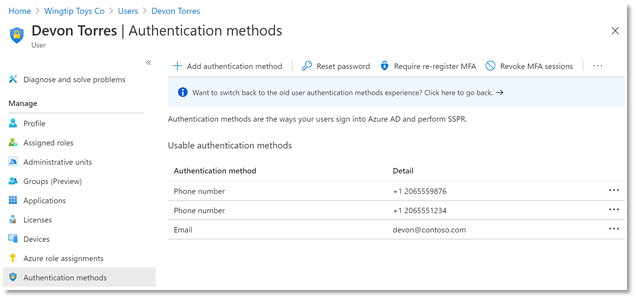
First, we have a new user experience in the Azure AD portal for managing users’ authentication methods. You can add, edit, and delete users’ authentication phone numbers and email addresses in this delightful experience, and, as we release new authentication methods over the coming months, they’ll all show up in this interface to be managed in one place. Even better, this new experience is built entirely on Microsoft Graph APIs so you can script all your authentication method management scenarios.
Updates to Authentication Phone Numbers
As part of our ongoing usability and security enhancements, we’ve also taken this opportunity to simplify how we handle phone numbers in Azure AD. Users now have two distinct sets of numbers:
- Public numbers, which are managed in the user profile and never used for authentication.
- Authentication numbers, which are managed in the new authentication methods blade and always kept private.
This new experience is now fully enabled for all cloud-only tenants and will be rolled out to Directory-synced tenants by May 1, 2021.
Importantly for Directory-synced tenants, this change will impact which phone numbers are used for authentication. Admins currently prepopulating users’ public numbers for MFA will need to update authentication numbers directly. Read about how to manage updates to your users’ authentication numbers here.
New Microsoft Graph APIs
In addition to all the above, we’ve released several new APIs to beta in Microsoft Graph! Using the authentication method APIs, you can now:
- Read and remove a user’s FIDO2 security keys
- Read and remove a user’s Passwordless Phone Sign-In capability with Microsoft Authenticator
- Read, add, update, and remove a user’s email address used for Self-Service Password Reset
We’ve also added new APIs to manage your authentication method policies for FIDO2 and Passwordless Microsoft Authenticator.
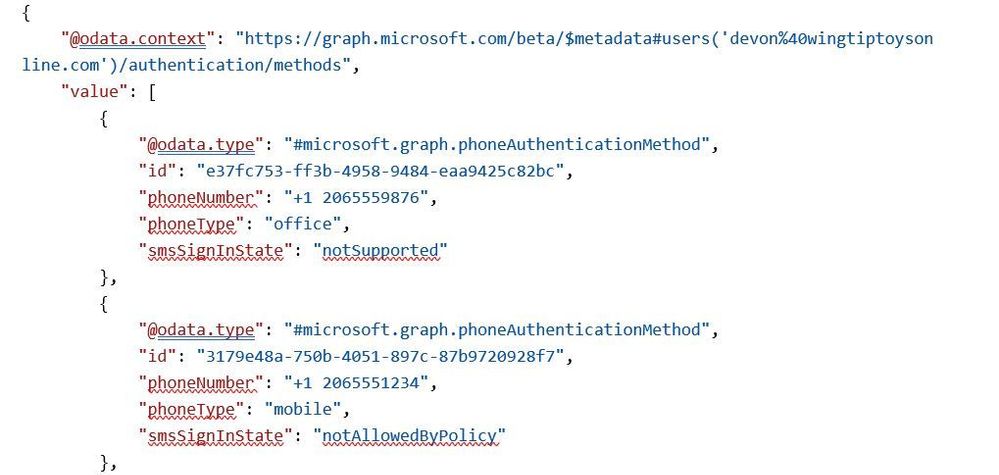
Here’s an example of calling GET all methods on a user with a FIDO2 security key:
Request:
GET https://graph.microsoft.com/beta/users/{{username}}/authentication/methods
Response:
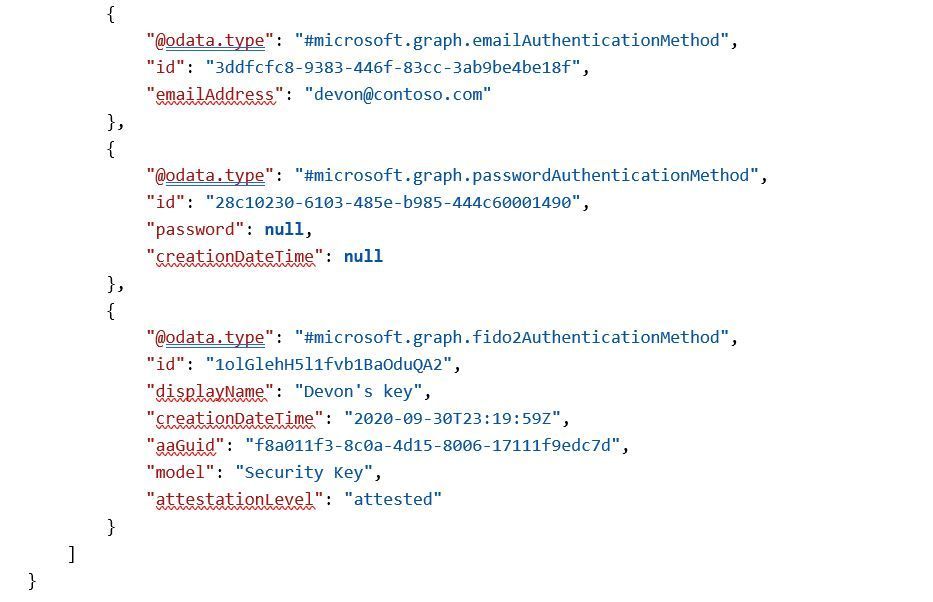
We’re continuing to invest in the authentication methods APIs, and we encourage you to use them via Microsoft Graph or the Microsoft Graph PowerShell module for your authentication method sync and pre-registration needs. As we add more authentication methods to the APIs, you’ll be easily able to include those in your scripts too!
We have several more exciting additions and changes coming over the next few months, so stay tuned!
All the best,
Michael McLaughlin
Program Manager
Microsoft Identity Division
by Contributed | Nov 9, 2020 | Technology
This article is contributed. See the original author and article here.
I was working on this case where a customer load a certain amount of rows and when he compared the rows that he already had on the DW to the rows that he wanted to insert the process just get stuck for 2 hours and fails with TEMPDB full.
There was no transaction open or running before the query or even with the query. The query was running alone and failing alone.
This problem could be due to different reasons. I am just trying to show some possibilities to troubleshooting by writing this post.
Following some tips:
1) Check for transactions open that could fill your tempdb
2) Check if there is skew data causing a large amount of the data moving between the nodes (https://docs.microsoft.com/en-us/azure/synapse-analytics/sql-data-warehouse/sql-data-warehouse-tables-distribute#:~:text=A%20quick%20way%20to%20check%20for%20data%20skew,should%20be%20spread%20evenly%20across%20all%20the%20distributions.)
3) Check the stats. Maybe the plan is been misestimate. (https://docs.microsoft.com/en-us/azure/synapse-analytics/sql-data-warehouse/sql-data-warehouse-tables-statistics)
4)If like me, there was no skew data, no stats and no transaction open causing this.
So the next step was to check the select performance and execution plan.
1) Find the active queries:
SELECT *
FROM sys.dm_pdw_exec_requests
WHERE status not in ('Completed','Failed','Cancelled')
AND session_id <> session_id()
ORDER BY submit_time DESC;
2) By finding the query that you know is failing to get the query id:
SELECT * FROM sys.dm_pdw_request_steps
WHERE request_id = 'QID'
ORDER BY step_index;
3) Filter the step that is taking most of the time based on the last query results:
SELECT * FROM sys.dm_pdw_sql_requests
WHERE request_id = 'QID' AND step_index = XX;
4) From the last query results filter the distribution id and spid replace those values on the next query:
DBCC PDW_SHOWEXECUTIONPLAN ( distribution_id, spid )
We checked the XML plan that we got a sort to follow by estimated rows pretty high in each of the distributions. So it seems while the plan was been sorted in tempdb it just run out of space.
Hence, this was not a case of stats not updated and also the distribution keys were hashed as the same in all the tables involved which were temp tables.
If you want to know more:
https://docs.microsoft.com/en-us/azure/synapse-analytics/sql-data-warehouse/sql-data-warehouse-tables-distribute
https://techcommunity.microsoft.com/t5/datacat/choosing-hash-distributed-table-vs-round-robin-distributed-table/ba-p/305247
So basically we had something like:
SELECT TMP1.*
FROM    [#TMP1] AS TMP1
 LEFT OUTER JOIN [#TMP2] TMP2
     ON  TMP1.[key] = TMP2.[key]
 LEFT OUTER JOIN [#TMP3] TMP3
     ON  TMP1.[key] = TMP3.[key]
     AND TMP1.[Another_column] = TMP3.[Another_column]
 WHERE  TMP3.[key] IS NULL;
After we discussed we reach the conclusion what it was needed was everything from TMP1 that does not exist on TMP2 and TMP3. So as the plan with the LEFT Join was not a very good plan with a potential cartesian product we replace with the following:
SELECT TMP1.*
FROM    [#TMP1] AS TMP1
WHERE NOT EXISTS ( SELECT 1 FROM  [#TMP2] TMP2
                   WHERE TMP1.[key] = TMP2.[key])
 AND WHERE NOT EXISTS ( SELECT 1 FROM [#TMP3] TMP3
     WHERE TMP1.[key] = TMP3.[key] AND TMP1.[Another_column] = TMP3.[Another_column])
This second one runs in seconds. So the estimation was much better and the Tempdb was able to handle just fine.
That is it!
Liliam
UK Engineer.

by Contributed | Nov 9, 2020 | Technology
This article is contributed. See the original author and article here.
We continue to expand the Azure Marketplace ecosystem. For this volume, 92 new offers successfully met the onboarding criteria and went live. See details of the new offers below:
|
Applications
|
 |
Actian Avalanche Hybrid Cloud Data Warehouse: Providing a massively parallel processing (MPP) columnar SQL data warehouse, Actian Avalanche is a hybrid platform that can be deployed on-premises as well as on multiple clouds, enabling you to migrate or offload applications and data at your own pace.
|
 |
Application Connector for Dynamics 365: SnapLogic’s application connector for Microsoft Dynamics 365 enables you to quickly transfer up to petabytes of data into and out of Microsoft Azure cloud storage and analytics services. Move the data at any latency to meet your diverse business requirements.
|
 |
ARK – Action Game Server on Windows Server 2016: Tidal Media Inc. presents this hardened, pre-configured image of ARK: Survival Evolved on Windows Server 2016. In the game, players must survive being stranded on an island filled with roaming dinosaurs and other prehistoric animals.
|
 |
CellTrust SL2 SMB: CellTrust SL2 delivers compliant and secure mobile communication for regulated industries, such as financial services, government, insurance, and healthcare. Separate personal and business communication while capturing business text/SMS, chat, and voice for e-discovery and compliance.
|
 |
Cloud Move for Azure powered by CrystalBridge: Developed together with Microsoft, SNP Group’s Cloud Move for Azure uses CrystalBridge to determine the optimal sizing of your target system and automate the deployment to Azure, helping you save time, money, and resources. |
 |
Energy Billing: Zero Friction’s energy billing platform connects to measurement data communication systems to receive customers’ meter readings, generate invoices, and notify customers about abnormal energy consumption. This app is available only in Dutch and French.
|
 |
Fathom Privacy-Focused Website Analytics on Ubuntu: Tidal Media Inc. provides this secure, easy-to-deploy image of Fathom website analytics on Ubuntu. Fathom is a privacy-focused alternative to Google Analytics that delivers analytics about your top content, top referrers, and other useful details on a single screen.
|
 |
Genesys PureConnect for Dynamics 365: A no-code SaaS integration platform, AppXConnect integrates Microsoft Dynamics 365 with Genesys PureConnect to deliver rich contact center features in Dynamics 365. Increase call center productivity and provide an enhanced customer experience with AppXConnect.
|
 |
GeoDepth: Through the integration of velocity analysis, model building and updating, model validation, depth imaging, and time-to-depth conversion, GeoDepth provides the continuity needed to produce high-quality seismic images while preventing data loss and honoring geologic constraints.
|
 |
iLink Indoor Asset Tracking: iLink Systems’ Indoor Asset Tracking is a geo-aware IoT solution that drives digital transformation by securely tracking the location and health of your business assets. Manage and monitor your assets remotely, gain real-time insights, reduce costs, and create new revenue streams.
|
 |
iLink Power BI Governance: iLink Systems’ Power BI Governance Framework is a web-based solution built and deployed on Microsoft Azure services. It enables customers to streamline the development, validation, and publishing of Microsoft Power BI reports.
|
 |
Information and Analysis Panel – Biovalid: BioValid enables you to prove the identity of an individual without the person’s physical presence. Adhering to the General Data Protection Regulation, each validation request includes an authorization request for the use of data for verification. This app is available only in Portuguese.
|
 |
Information and Analysis Platform – Datavalid: Designed for financial institutions, car rental companies, airlines, insurance companies, and other public and private entities, Datavalid performs biometric and biographical validation of data or images. This app is available only in Portuguese.
|
 |
Intelligence Platform – Active Debt Consultation: Federal Data Processing Service’s Active Debt Consultation service ensures data security and reliability while minimizing the risk of fraud and enabling you to automate queries and information verification. This app is available only in Portuguese.
|
 |
Intelligence Platform – DUE Consultation: DUE Consultation provides access to a company’s basic export operation identification information, customs status, administrative and cargo controls, dispatch and shipment locations, and more. This app is available only in Portuguese.
|
 |
Ivalua source-to-pay platform: The Ivalua platform empowers businesses to effectively manage all categories of spending and suppliers to increase profitability, lower risk, and boost employee productivity.
|
 |
Kaiam: The Kaiam platform automates regulatory processes and enables you to monitor transactions to mitigate corporate and financial risks. This app is available only in Spanish.
|
 |
Kapacitor Container Image: Bitnami offers this up-to-date, secure image of Kapacitor built to work right out of the box. Kapacitor is a native data processing engine for InfluxDB that’s designed to process data streams in real time.
|
 |
Knowledge Lens MLens Platform: MLens from Knowledge Lens enables automated migrations of data, workloads, and security policies from Hadoop Distributions (Cloudera/Hortonworks) to Microsoft Azure HDInsight. MLens automates most of the heavy lifting and follows Azure best practices.
|
 |
LNW-Soft Project Phoenix for SAP on Azure: LNW-Soft Project Phoenix provides automatic installation and orchestration of SAP HANA standalone databases, as well as SAP NetWeaver and SAP S4/HANA systems. This solution currently supports SAP HANA 2.0, SAP NetWeaver 7.5, and SAP S4/HANA 1909.
|
 |
MariaDB Platform: MariaDB Platform is an open-source enterprise database solution that supports transactional, analytical, and hybrid workloads, as well as relational, JSON, and hybrid data models. It can scale from standalone databases to fully distributed SQL for performing ad hoc analytics on billions of rows.
|
 |
Milvus: Milvus, an open-source vector similarity search engine, is easy to use, fast, reliable, and scalable. Milvus empowers applications in a variety of fields, including image processing, computer vision, natural language processing, voice recognition, recommender systems, and drug discovery.
|
 |
Open Web Analytics – Traffic Analytics on Ubuntu: Tidal Media Inc offers this pre-configured image of Open Web Analytics on Ubuntu. Open Web Analytics, a web traffic analysis package, is written in PHP and uses a MySQL database, which makes it compatible for running with an Apache-MySQL-PHP (AMP) solution stack on various web servers.
|
 |
Pay360 by Capita – Evolve: The Evolve platform from Pay360 by Capita offers an integrated payment solution built on Microsoft Azure. Your customers can accept multiple payment options, benefit from improved reporting, and experience simpler reconciliation.
|
 |
Percona XtraBackup Container Image: Bitnami offers this preconfigured container image loaded with Percona XtraBackup, a set of tools for performing backups of MySQL databases. Percona XtraBackup executes non-blocking, highly compressed, and highly secure full backups on transactional systems.
|
 |
Pimp My Log – Log Viewer for Web Servers on Ubuntu: Tidal Media Inc. offers this preconfigured Ubuntu image loaded with Pimp my Log. Pimp my Log is a PHP-based program that provides a web-based GUI to view logs for various web servers, including Apache, NGINX, and Microsoft IIS.
|
 |
Preptalk Chatbot: PrepTalk from Pactera Technologies Inc. provides a chatbot platform for human agents and salespeople to assess their customer service skills, evaluate their performance, and identify their training needs.
|
 |
QuEST Lung Infection Detection with AI: QuEST-Global Digital’s AI solution uses Microsoft Azure Machine Learning to inspect X-ray images, identify and track lung infections, and provide radiologists with a diagnosis and progression analysis within minutes.
|
 |
Rainbow Password & Pins: Rainbow Secure’s Rainbow Password lets users apply color and style options to passwords and PINs, adding layers of defense to logins, data, payments, transactions, and services. Rainbow Password works across platforms and devices, and it includes API integration.
|
 |
Rainbow Secure Passwordless Login: This solution gives users smart tokens and smart formatting challenges that they apply when connecting to trusted endpoints. Automated monitoring generates alerts based on custom parameters.
|
 |
Rainbow Secure Smart Multi-factor Authentication: This solution implements multi-factor authentication (MFA) with color and style options to add layers of security beyond simple passwords. Rainbow Secure Smart MFA can be deployed at scale.
|
 |
rClone Container Image: Bitnami offers this preconfigured container image loaded with rClone. rClone synchronizes files and directories to and from different cloud storage providers, supports multiple cloud storage providers, and provides caching and encryption.
|
 |
Repstor for Collaborative Workspaces: Repstor’s Custodian is a complete information lifecycle solution for Microsoft Teams and collaborative workspaces. Custodian adds governance, compliance, and lifecycle management capabilities to any document or case-focused workspace.
|
 |
RMS: Paradigm RMS from Emerson Electric Co. is a geoscience and reservoir engineering collaboration platform, offering geophysicists, geologists, and reservoir engineers a shared space to compile and visualize a wide range of data from oil and gas fields.
|
 |
SeisEarth: Emerson Electric Co.’s Paradigm SeisEarth handles projects from basin to prospect and reservoir, from exploration field to development field. Quickly perform the day-to-day tasks of seismic interpretation through efficient volume roaming.
|
 |
SKUA-GOCAD: SKUA-GOCAD from Emerson Electric Co. is a suite of tools for seismic, geological, and reservoir modeling. The integrated product suite is available in a standalone configuration or running on Paradigm Epos.
|
 |
Sonetto Product Experience Management PXM: Sonetto PXM on Azure is an on-demand, customer-centric solution for product experience management. This product from IVIS GROUP LTD. helps retailers reach customers across all touchpoints for higher sales, profitability, and brand penetration.
|
 |
Sonetto Product Promotion Toolkit: Sonetto Promotion Toolkit (PTK) on Azure from IVIS GROUP LTD. drives sales through compelling cross-channel promotions. Sonetto PTK’s centralized console manages promotions across all physical and digital channels and regions.
|
 |
Squid Easy Proxy Server with Webmin GUI on Ubuntu: Tidal Media Inc. provides this ready-to-run image of Squid with Webmin GUI on Ubuntu. Squid, a customizable proxy server, has extensive access controls, makes a great server accelerator, and implements negative caching of failed requests.
|
 |
Squid Protected Proxy Server + Webmin UI on Ubuntu: Specially hardened by Tidal Media Inc., this ready-to-run image provides Squid with Webmin GUI on Ubuntu. Get a high level of privacy and security by routing requests between users and the proxy server, setting restrictions by IP address.
|
 |
Telegraf Container Image: Bitnami offers this container image of Telegraf, a server agent for collecting and sending metrics and events from databases, systems, and IoT sensors. Telegraf is easily extendable, up to date, customizable, and secure, with plugins for collection and output of data operations.
|
 |
Training Management: This application from UB Technology Innovations helps you manage training processes, such as defining session topics, identifying trainers with specifications, and scheduling sessions. Attendance is managed by capturing participants’ images and digital signatures to ensure individuality.
|
 |
Transact Mobile Credential: Meet the needs of your mobile-centric students with a fast, secure, NFC-enabled mobile credential. Just as they would with cards, students can use the mobile credential for dining, point of sale, laundry, copy, vending, door access, and more.
|
 |
Transact Mobile Ordering: Provide your students with real-time mobile ordering from any location. Students can choose a restaurant, personalize their orders, select a payment method, and submit an order – all from their mobile devices. Students will be notified every step of the way and receive an accurate estimate of when their order will be ready.
|
 |
Trendalyze – SaaS: Trendalyze is for business users to discover, search, and predict patterns in time-series data. Whether you want to analyze IoT sensor data, operational equipment data, behavioral data, transactions, market trends, or environmental conditions, Trendalyze can discover the anomalies and the recurring motifs that help you manage outcomes.
|
 |
Trend Micro Cloud App Security: This solution enables Microsoft 365 customers to embrace the efficiency of cloud services while enhancing security. The service uses native Microsoft 365 APIs that allow for integration within minutes. Its anti-fraud technology includes business email compromise (BEC) protection and credential phishing protection.
|
 |
Vike Forms Solution: This solution for SharePoint Online, SharePoint 2019, and SharePoint 2016 allows non-technical users to create interactive, better-looking forms quickly. Use custom forms to add data to lists and create multiple forms on a list with different fields/columns to abstract data from different set of users.
|
 |
Vozy: Vozy lets companies communicate with their customers at scale using contextual voice assistants and conversational AI. The platform includes Lili, a digital assistant (chatbot and voicebot) that can handle basic and repetitive calls, speech analytics to analyze conversations, and voice biometrics.
|
 |
WAL-G Container Image: Bitnami provides this image of WAL-G, a customizable archival and restoration tool for PostgreSQL databases. WAL-G allows parallel backup and restore operations using different compression formats. Bitnami continuously monitors all components and libraries for vulnerabilities and updates.
|
 |
WEARFITS – apparel try-on and size fitting in AR: Showcase your products as photorealistic models and give your customers a stunning digital shopping experience by using 3D visualization, augmented reality (AR), and size fitting. WEARFITS provides consulting in the field of implementing AR in retail, especially in the apparel and footwear industries.
|
 |
Xilinx Vitis Software Platform 2019.2 on CentOS: This platform enables you to use the adaptive computing power of Xilinx Alveo Accelerator cards on CentOS to accelerate diverse workloads like vision and image processing, data analytics, and machine learning – without prior design experience.
|
 |
Xilinx Vitis Software Platform 2019.2 on Ubuntu: This platform enables you to use the adaptive computing power of Xilinx Alveo Accelerator cards on Ubuntu to accelerate diverse workloads like vision and image processing, data analytics, and machine learning – without prior design experience.
|
 |
Zoho Analytics On-Premise (BYOL): Built with a self-service approach, Zoho Analytics On-Premise brings the power of analytics to both technical and non-technical users. Run an automatic analysis of data from a variety of sources and create appealing data visualizations and insightful dashboards in minutes with out-of-the-box integrations.
|
Consulting services
|
 |
2 day workshop – Security & Compliance on Azure: In this workshop, datac Kommunikationssysteme GmbH will advise you about threats and points of attack, then evaluate your company’s security status and develop suitable protective measures.
|
 |
ADvantage Azure AIMS – 1 Day Briefing: This free briefing from HCL Technologies will give customers an enterprise-scale roadmap for migrating to Microsoft Azure. An accompanying portfolio analysis will examine risk, operations, performance, architecture, complexity, and more.
|
 |
ADvantage Azure Sketch – 1 Day Briefing: In this free briefing, HCL Technologies will focus on Sketch, an end-to-end data-processing framework on Microsoft Azure for building and reusing data pipelines. Sketch can increase digital transformation’s return on investment.
|
 |
ADvantage Azure SmartBuy – 1 Day Briefing: This free briefing from HCL Technologies will delve into SmartBuy, a cognitive procurement platform that applies machine learning and deep learning to forecast prices, optimize spending, recommend suppliers, and detect anomalies.
|
 |
ADvantage Upgrade on Azure – 1 Day Briefing: Learn about the application modernization capabilities of HCL Technologies in this free briefing, which will address upgrading Java and .NET frameworks and migrating to Microsoft Azure.
|
 |
AI Implementation – 2-week proof-of-concept: With this proof-of-concept offer, Radix will help you build a scalable AI solution. Depending on the solution’s complexity, the proof of concept may be followed by a longer project to help you refine the AI model’s performance and prepare for deploying at scale.
|
 |
AKS Quickstart: 4 Week Proof Of Concept: Microsoft Azure Kubernetes Service makes deploying and managing containerized applications quick, easy, and scalable. This proof of concept from Nous Infosystems will deliver a Kubernetes cluster in your Azure account for selected apps.
|
 |
APPA for Accelerated Azure Adoption: 4 Wk POC: Nous Infosystems will execute a proof of concept involving Nous APPA (Accelerated Program for Porting to Azure), which is based on the Microsoft Cloud Adoption Framework for Azure and enables organizations to successfully adopt Azure.
|
 |
Application Hot Spot Assessment (1-5 days): Using Microsoft Azure services, Prime TSR will assess your organization’s system architecture to identify potential bottlenecks and performance impediments within applications and databases. Prime TSR will then provide remediation recommendations and root-cause analysis.
|
 |
App Modernization Bootcamp: 4 Wk Proof Of Concept: In this engagement, Nous Infosystems will modernize a selected application. This will entail building a microservices architecture, migrating the app to Microsoft Azure App Service, and deploying an Azure DevOps CI/CD pipeline for development services.
|
 |
Automated Technology Modernization -1 day Briefing: Learn about HCL Technologies’ automated technology modernization accelerators and Microsoft Azure migration support in this free briefing for customers looking for scalable architecture and faster time to market.
|
 |
Azure AutoML & Azure DevOps: 1-Wk Implementation: Data-Core Systems will employ Microsoft Azure Machine Learning to build CI/CD pipelines for in-house machine learning models, along with Azure-based AutoML models, to offer clients multiple predictions.
|
 |
Azure Backup & Site Recovery: 1 Day Workshop: Want to protect your business data and reduce your businesses infrastructure costs without compromising compliance? Learn how Microsoft Azure Backup and Azure Site Recovery can help in this one-on-one workshop from Seepath Solutions.
|
 |
Azure DevOps Advantage Code .Net – 1 Day Briefing: This free briefing from HCL Technologies will discuss the company’s ADvantage Code .Net (ADC.Net), which adds automation to the Microsoft Azure application development process to increase productivity and standardization.
|
 |
Azure DevOps with EAZe – 1 Day Briefing: Learn about EAZe in this free briefing from HCL Technologies. EAZe is a maturity elevation framework centered on Microsoft Azure DevOps that enables organizations to expedite DevOps implementation and focus on continuous improvement.
|
 |
Azure Hybrid Cloud 5-Day Proof of Concept: Get ready to develop and execute hybrid-cloud strategies with this proof of concept from Seepath Solutions. In this engagement, Seepath Solutions will set up a Microsoft Azure tenant, configure virtual networking, and build an Active Directory domain controller.
|
 |
azure_implementation_10_weeks: In this engagement, TrimaxSecure will help your organization migrate to Microsoft Azure and reap the benefits of cloud technologies. Migrating your workloads to Azure will improve productivity, operational resiliency, and business agility. |
 |
Azure Landing Zone – 2 Week Implementation: A senior consultant and a technical specialist from Olikka will implement a Microsoft Azure landing zone to give your organization a fast, secure, enterprise-grade foundation based on the Microsoft Cloud Adoption Framework for Azure.
|
 |
Azure Landing Zone: 10-wk imp: Cloudeon A/S will establish a baseline environment on Microsoft Azure that will encompass a multi-account architecture, identity and access management, governance, data security, network design, logging, and other critical and foundational services.
|
 |
Azure Migration: 5 Week Implementation: Using the Microsoft Cloud Adoption Framework for Azure, Olikka will migrate your applications and infrastructure to Azure safely, securely, and with minimal business impact.
|
 |
Azure Migration Assessment: 2 Week Assessment: This assessment from Olikka will help your organization understand how to optimize your applications and datacenter estate to run on Microsoft Azure. Olikka will address costs, modernization opportunities, and more.
|
 |
Azure Readiness & Planning 2-Day Workshop: This workshop from datac Kommunikationssysteme GmbH serves as a starting point for getting your IT infrastructure ready for Microsoft Azure. You’ll receive customized budget planning and strategic guidance for deployment.
|
 |
Azure Sentinel Security: 6-week Implementation: IX Solutions will work with your IT security team to rapidly deploy a proof-of-concept instance of Microsoft Azure Sentinel, which will enable smarter and faster threat detection and response.
|
 |
Azure Server Migration: 1-week Implementation: Migrate your apps, data, and server infrastructure to Microsoft Azure with the help of Seepath Solutions. In this offer, Seepath Solutions will assist you in planning a successful pilot migration of up to five servers (Windows, SQL, or Linux).
|
 |
Cloud Advisory Services- 1 Hour Assessment: In this advisory session, Carahsoft will work with you to determine your public-sector strategy, customer requirements, and ISV strategy within your Microsoft Azure environment. Develop your Azure go-to market strategy with the support of Carahsoft.
|
 |
Cloud Security: 2 week Implementation: This security implementation from Seepath Solutions will give you a centralized way to optimize, secure, and manage your Microsoft Azure workloads. Seepath Solutions will start with a discovery session to analyze the security posture of your cloud infrastructure.
|
 |
Conversational Application Lifecyle 1 Day Briefing: In this free briefing, HCL Technologies will focus on Microsoft Azure migration and CALM, HCL Technologies’ conversational assistant for data-driven application lifecycle management.
|
 |
Data Analytics Architecture: 2-wk Implementation: SDX AG’s data engineers, data scientists, and enterprise developers will help you realize your complex data analytics projects on Microsoft Azure. Projects could include machine learning, explorative data analysis, refactoring, or other scenarios.
|
 |
Free 5 Day Assessment Mainframe Migration Offer: In this free service, Zensar Technologies will review your mainframe estate (MIPS, data store, dependent systems and applications, batch jobs, CICS, COBOL code) and deliver detailed recommendations for initiating migration to Microsoft Azure.
|
 |
HCL Azure Kubernetes Services – 1 Day Briefing: Learn about Microsoft Azure Kubernetes Service, continuous integration and continuous delivery (CI/CD), and other application modernization frameworks in this free briefing from HCL Technologies.
|
 |
HCL FileNxt Azure NetApp Files – 1 day Briefing: This free briefing from HCL Technologies will discuss Microsoft Azure NetApp Files and services offered by HCL Technologies. Azure NetApp Files makes it easy to migrate and run complex, file-based applications with no code change.
|
 |
Image Classification: 3-Wk PoC: Together with your team, paiqo GmbH will implement an image classification proof of concept using Microsoft Azure Cognitive Services or Microsoft Azure Machine Learning to prove the feasibility of your use case.
|
 |
IoT Smart Experience: 8 Week Implementation: ArcTouch will provide development services and design and/or engineering sprints that can be customized to fit your company’s needs. Create apps, websites, and voice assistants that use Microsoft Azure services for enhanced security, scalability, and end-user experiences. |
 |
IoT Smart Experience Prototype: 4 Week POC: ArcTouch will help your company design a product experience and build a prototype of a connected consumer product and IoT device solution. This offer includes multiple weeks of design sprints that can be customized to fit your needs.
|
 |
IoT Smart Experience Strategy: 1 Day Workshop: This workshop from ArcTouch is intended for forward-looking companies that want to define their digital product strategy for their connected consumer products and IoT devices. ArcTouch will highlight Azure IoT services, which provide scalability advantages and a faster time to market.
|
 |
Kubernetes: 1-Day Assessment: Kinect Consulting’s Kubernetes experts will validate the design of your container deployments on Microsoft Azure and create a roadmap to improve your implementation and realize greater business value.
|
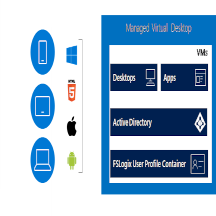 |
Managed Virtual Desktop: 2-week Implementation: Get a fully managed remote desktop, remote app, or virtual desktop infrastructure with this offer from Seepath Solutions. Powered by Windows Virtual Desktop, this virtual environment will enable your users to work from anywhere.
|
 |
Microsoft Azure Adoption: 5-day Assessment: With this assessment from Advania AB, you’ll be able to verify that your Microsoft Azure environment is set up according to the Microsoft Cloud Adoption Framework for Azure. This offer may be used at any stage of your cloud journey.
|
 |
Service 360 Chain Analytics – 1 Day Briefing: This free briefing from HCL Technologies will outline the capabilities of Service 360 Chain Analytics, a platform that uses Microsoft Azure Machine Learning and other Azure services to track asset health and performance.
|
|
by Contributed | Nov 9, 2020 | Technology
This article is contributed. See the original author and article here.
Back in January 2020, Javier and Philippe wrote a great blog on how to deploy, configure and maintain Azure Sentinel through Azure DevOps with IaC using the Sentinel API, AzSentinel and ARM templates. We are now a several months further and more and more functions are integrated in AzSentinel. So, I decided to create a new Azure DevOps Pipeline which covers more than only the “deployment” part. I want to show that Pipelines are more than only deployment ‘tools’ and they need to be implemented the right way with the right DevOps mindset for the best result. Or as I call it in this blog post: Ninja style.
If you prefer to skip the reading and get started right away then you can find all the code examples on my GitHub Repository and all the steps at the end of this blog post.
The story behind DevOps and Pipelines
Before we go deeper into the technical side, I first like to mention the idea behind it all. The reason I’ve invested the time in building AzSentinel and DevOps pipelines. The main reason was to implement the “shift left” Way of Working (Wow). The term ‘shift left’ refers to a practice in software development, in which teams focus on quality, work on problem prevention instead of detection, and begin testing earlier than ever before. The goal is to increase quality, shorten long test cycles and reduce the possibility of unpleasant surprises at the end of the development cycle—or, worse, in production.
Azure Portal is a great portal, but when you log in and by accident remove or change for example an Analytic rule without any testing, approving or 4-eye principle, then you really have a challenge. You will probably find out something went wrong when you are troubleshooting to see why nothing happened in first place. And don’t we all know that’s way too late…
Shifting left requires two key DevOps practices: continuous testing and continuous deployment. Continuous testing involves automating tests and running those tests as early and often as possible. Continuous deployment automates the provisioning and deployment of new builds, enabling continuous testing to happen quickly and efficiently.
Azure Sentinel deployment Ninja style
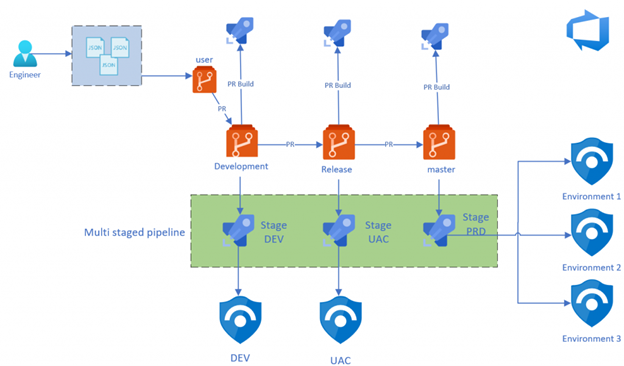
Based on the shift left and DevOps WoW, I made the design below on how I think the process should look like. I will explain the design in different parts. But first, let’s start with the underlying requirements.

Infrastructure as Code
Before we can start implementing shift left for Azure Sentinel, we need to implement an Infrastructure as Code deployment model. Infrastructure as Code (IaC) is the management of infrastructure (networks, virtual machines, load balancers, even your Azure Sentinel rules and settings) in a descriptive model, using the same versioning as DevOps teams use for source code. Like the principle that the same source code generates the same binary, an IaC model generates the same environment every time it is applied.
To be able to manage Azure Sentinel through an IaC model, I build AzSentinel that functions as a translator. The JSON or YAML format that you use to store your Analytic rules or Hunting rules, will be translated into the rules you see in Azure Portal.
This is the first step in our journey to shift left. Having our configuration in a descriptive model gives us also the opportunity to analyze and test this to see if it’s compliant to what and how we want it. For example, do you have a naming convention for your rules? Then now you can easily test that to see if it is compliance to what you want. Or just deploy the rules to a dev environment to see if all the properties are set correct.
Repository
So now we know why and how we store our changes in a descriptive model, it’s time to see where and how we store our configuration. For this we use Git technology. Git is a free and open source distributed version control system, designed to handle everything from small to very large projects with speed and efficiency. For the repository design, I have made the choice to implement a four branch strategy model, which I will explain below. A branch represents an independent line of development. Branches serve as an abstraction for the edit/stage/commit process. You can think of them as a way to request a brand new working directory, staging area, and project history. You can read more about this if you like.
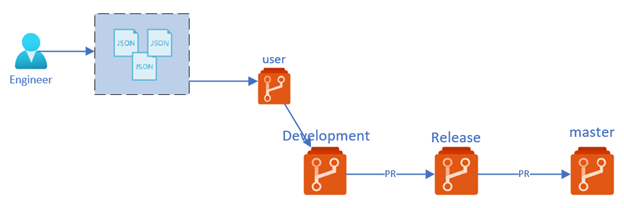
Below a short description of the three main repository’s:
- Master – The Master (also called main) branch contains all the configuration that is deployed to our production environment. The code here has passed all the checks through PR process and is deployed to dev and staging environment before. This is also our point of truth, that means that what is configured here is equal to what’s deployed in Azure
- Release – The Release branch contains all the configuration that is ready to be deployed to our Sentinel staging environment. The changes are already tested through our PR pipelines and is deployed to dev environment before being merged here. Sentinel Staging environment most of the time contains production or preproduction data so that the changes can be tested against real world data.
- Development – The Development branch contains all the small changes that are proposed by the engineers. This changes are tested by PR Build validation and deployed to Sentinel dev environment. The changes are only tested to see if there are no braking changes/configuration. Changes are not tested against real world data.
The three branches above belong to our ‘standard’ branches and are used for automation purposes. The fourth branching is actually the ‘User branch’. The User branch is mostly a copy of all the configuration in the Development branch and only contains the changes that an engineer is working on. For example, if an engineer is working on a specific playbook or Analytic rule, then the branch where he is working in only contains changes that are related to that work. If he wants to work on something new then he can create a new branch.
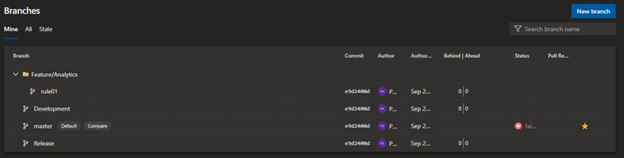
Working with multiple branches means that changes from one branch to another branch are only imported through a Pull request (PR). A PR means that you create a request to merge your code changes to the next branch, for example from development to release .When you file a PR, all you’re doing is requesting that another developer (e.g., the project maintainer) pulls a branch from your repository into their repository. Click here to read more about this.
Branch Policies
The great advantage is that a PR moment gives as the opportunity to configure ‘Branch Policies’. Branch policies help teams protect their important branches of development. Policies enforce your team’s code quality and change management standards. Click here to read more about this.
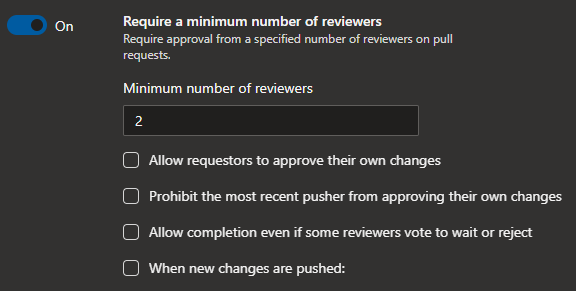
Keep in mind that each branch needs to have it’s own policy set and the policy can be different for each branch. For example, you can have one reviewer when something is getting merged in the Development branch, but two reviewers when you merge your changes to the Release branch. The idea is to come up with a policy that works for the team and doesn’t slow the efficiency of the team. Having a minimum of two reviewers in a three members team is often overkill because then you normally need wait longer before your PR gets approved.
Below a couple of the policies that from my opinion are a good start to configure:
- Require a minimum number of reviewers – Require approval from a specified number of reviewers on pull requests.
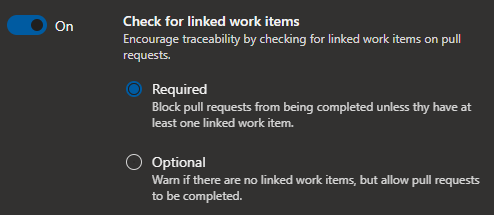
- Check for linked work items – Encourage traceability by checking for linked work items on pull requests.
- Build Validation – Validate code by pre-merging and building pull request changes (more about this in the next post).

Pipeline
Now we have our configuration stored in a descriptive model and have the branches configured correctly, it’s time to implement our automatic test and deployment through Pipelines. Azure Pipelines is a cloud service that you can use to automatically build and test your code project and make it available to other users. It works with just about any language or project type.
Azure Pipelines combines Continuous Integration (CI) and Continuous Delivery (CD) to constantly and consistently test and build your code and ship it to any target. Click here to read more about this.
For this post I will be using Azure DevOps pipelines but you can achieve the same results with GitHub Actions.
Build Validation pipeline
As mentioned earlier shifting left requires two key DevOps practices: continuous testing and continuous deployment. Continuous testing involves automating tests and running those tests as early and often as possible. Build validation is part of the CI, where we test our changes very early and as often possible.
As I described in chapter Branch Policy, one of the options when configuring Branch Policy is to configure Build Validation. Here you can set a policy requiring changes in a pull request to build successfully with the protected branch, before the pull request can be completed. If a build validation policy is enabled, a new build is queued when either a new pull request is created, or if changes are pushed to an existing pull request targeting the branch. The build policy then evaluates the results of the build to determine whether the pull request can be completed.
For this post I have decided to create some example tests to show you what the possibilities are. For this I am using Pester: a testing and mocking framework for PowerShell.
Pester provides a framework for writing and running tests. Pester is most commonly used for writing unit and integration tests, but it is not limited to just that. It is also a base for tools that validate whole environments, computer deployments, database configurations and so on. Click here to read more about it.
The below Pester test is created to test an Analytic Rules JSON file, to see if it converts from JSON. If this test fails that means that there is a JSON syntax error in the file. Then it will test to see if the configured rule types contain the minim required properties. Please keep in mind this is just an example to demonstrate the possibilities. You can extend this by validating values of certain properties or by even deploying the rule to Azure Sentinel to validate that it doesn’t contain any errors.
Build validation pipeline:
# Build Validation pipeline
# This Pipeline is used to trigger teh Pester test files when a PR is created

trigger: none

pool:
  vmImage: 'ubuntu-latest'

steps:

- task: PowerShell@2
  inputs:
    targetType: 'inline'
    script: 'Invoke-Pester *.tests.ps1 -OutputFile ./test-results.xml -OutputFormat NUnitXml'
    errorActionPreference: 'continue'
    pwsh: true

- task: PublishTestResults@2
  inputs:
    testResultsFormat: 'NUnit'
    testResultsFiles: '**/test-results.xml'
    failTaskOnFailedTests: true
PowerShell Pester test:
Describe "Azure Sentinel AlertRules Tests" {

    $TestFiles = Get-ChildItem -Path .SettingFilesAlertRules.json -File -Recurse | ForEach-Object -Process {
        @{
            File          = $_.FullName
            ConvertedJson = (Get-Content -Path $_.FullName | ConvertFrom-Json)
            Path          = $_.DirectoryName
            Name          = $_.Name
        }
    }

    It 'Converts from JSON | <File>' -TestCases $TestFiles {
        param (
            $File,
            $ConvertedJson
        )
        $ConvertedJson | Should -Not -Be $null
    }

    It 'Schedueled rules have the minimum elements' -TestCases $TestFiles {
        param (
            $File,
            $ConvertedJson
        )
        $expected_elements = @(
            'displayName',
            'description',
            'severity',
            'enabled',
            'query',
            'queryFrequency',
            'queryPeriod',
            'triggerOperator',
            'triggerThreshold',
            'suppressionDuration',
            'suppressionEnabled',
            'tactics',
            'playbookName'
        )

        $rules = $ConvertedJson.Scheduled

        $rules.ForEach{
            $expected_elements | Should -BeIn $_.psobject.Properties.Name
        }
    }

    It 'Fusion rules have the minimum elements' -TestCases $TestFiles {
        param (
            $File,
            $ConvertedJson
        )
        $expected_elements = @(
            'displayName',
            'enabled',
            'alertRuleTemplateName'
        )

        $rules = $ConvertedJson.Fusion

        $rules.ForEach{
            $expected_elements | Should -BeIn $_.psobject.Properties.Name
        }
    }

    It 'MLBehaviorAnalytics rules have the minimum elements' -TestCases $TestFiles {
        param (
            $File,
            $ConvertedJson
        )
        $expected_elements = @(
            'displayName',
            'enabled',
            'alertRuleTemplateName'
        )

        $rules = $ConvertedJson.MLBehaviorAnalytics

        $rules.ForEach{
            $expected_elements | Should -BeIn $_.psobject.Properties.Name
        }
    }

    It 'MicrosoftSecurityIncidentCreation rules have the minimum elements' -TestCases $TestFiles {
        param (
            $File,
            $ConvertedJson
        )
        $expected_elements = @(
            'displayName',
            'enabled',
            'description',
            'productFilter',
            'severitiesFilter',
            'displayNamesFilter'
        )

        $rules = $ConvertedJson.MicrosoftSecurityIncidentCreation

        $rules.ForEach{
            $expected_elements | Should -BeIn $_.psobject.Properties.Name
        }
    }
}
Build validation test Results
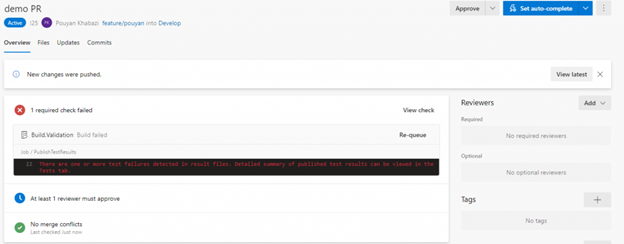
Below you can see an example where the validation failed and blocked our PR from merging to ‘develop’ branch because the Pester tests didn’t pass all the tests.
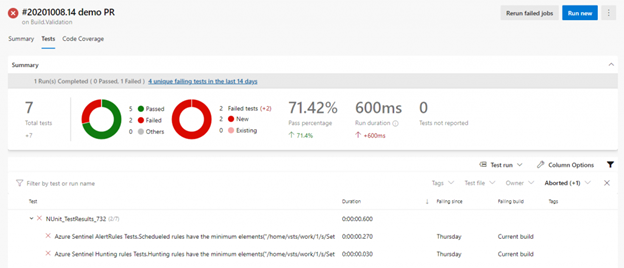
When you click on the test results you see that there are two errors found in our AlertRules.json file
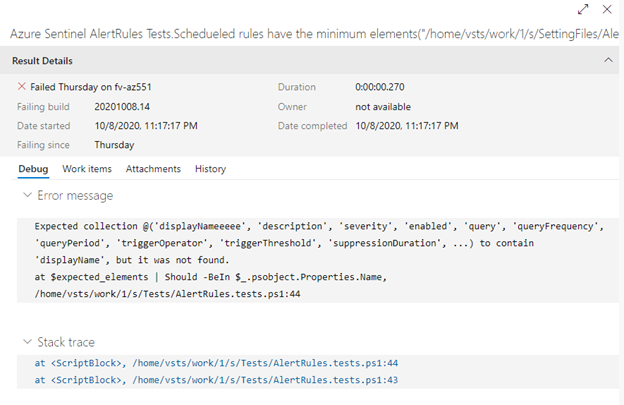
As you can see below our test expects the property “Displayname” but found instead “DisplayNameeee“.
Deployment pipeline
As mentioned earlier Shifting left requires two key DevOps practices: continuous testing and continuous deployment. Continuous deployment automates the provisioning and deployment of new builds, enabling continuous testing to happen quickly and efficiently.
For the deployment I have made the choice to use a multi staged pipeline. Azure DevOps multi stage pipelines is an exciting feature! Earlier, it was possible to define CI pipelines in Azure DevOps using YAML formatted files. With multi stage pipelines, it is also possible to define CI and CD pipelines as code and version them the same way code is versioned. With this we can author a single pipeline template that can be used across environments. What’s also a really nice feature of multi staged pipeline, is that you can configure environment policies for each stage. Environments are the way how Multistage YAML Pipelines handle approvals. I will explain environments in more detail below.
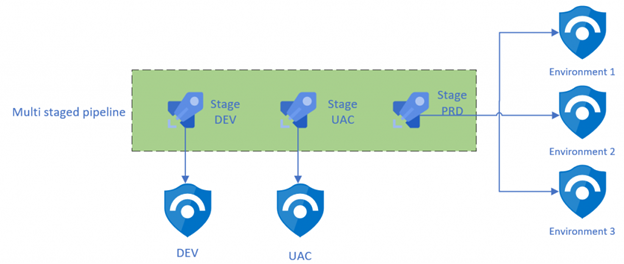
Pipeline Environment
An environment is a collection of resources, such as Kubernetes clusters and virtual machines, that can be targeted by deployments from a pipeline. Typical examples of environment names are Dev, Test, QA, Staging, and Production.
Environments are also the way Multistage YAML Pipelines handle Approvals. If you are familiar with the Classic Pipelines, you know that you can set up pre- and post-deployment approvals directly from the designer.
For this pipeline I have created three environments in Azure DevOps, with each representing an Azure Sentinel environment. You can of course have more environments, for example for each customer.
With environments we can for example configure that all the deployment to Dev environment doesn’t require any approval. When you are deploying to staging, however, one person needs to approve the deployment and when you are deploying to production two people need to approve the deployment.
Approvals and other checks are not defined in the YAML file to avoid that users modifying the pipeline YAML file could modify also checks and approvals.
How to create a new environment
Go to your Azure DevOps project and click on Environment under the Pipelines tab, here click to create a new Environment. Enter the Name that you want to use and select None under Resource.
After creating the environment, click on the environment and then click on the three dots in the right corner above. Here you can select “Approvals and checks” to configure users or groups that you want to add, that need to approve the deployment.
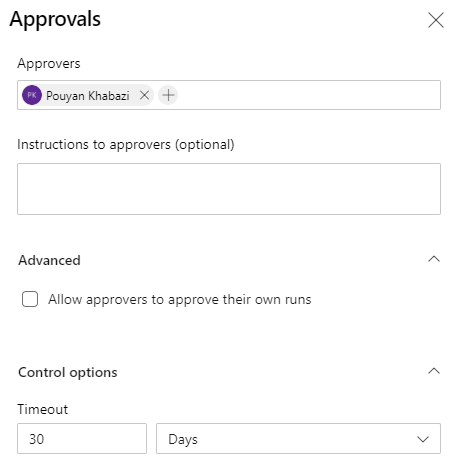
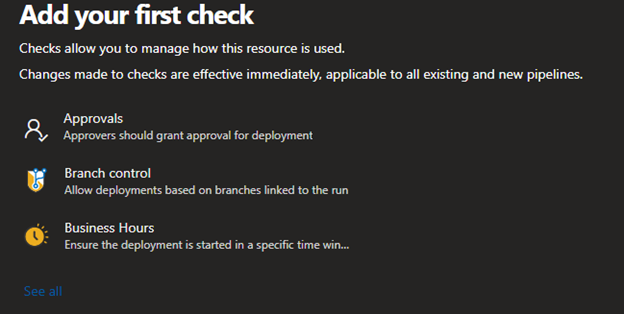
Click on see all to see an overview of all the other checks that you can configure

Multistaged pipeline
Below is our main pipeline which contains all the stages of the deployment. As you can see, I have configured three stages, each stage representing an Azure Sentinel environment in this case. Stages are the major divisions in a pipeline: ‘build this app’, ‘run these tests’, and ‘deploy to pre-production’ are good examples of stages. They are a logical boundary in your pipeline at which you can pause the pipeline and perform various checks.
Every pipeline has at least one stage, even if you do not explicitly define it. Stages may be arranged into a dependency graph: ‘run this stage before that one’. In this case it’s in a sequence, but you can manage the order and dependency’s through conditions. The main pipeline is in this case only used to define our stages/environments and store the specific parameter for each stage. In this Pipeline you don’t see the actual tasks, this is because I’m making use of Pipeline Template. Below you can read more about this great functionality.
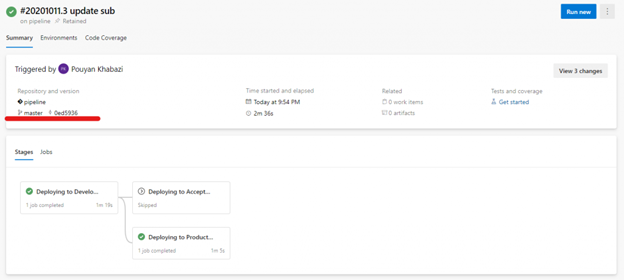
In the example below you also see that I have configured conditions on Staging and Production Stage. This condition checks if the pipeline is triggered from the Release or Master branch. If not then those stages are automatically skipped by the pipeline.
Tip: if you name your main template ‘Azure-Pipeline.yml’ and put it in the root of your branch, then Azure DevOps will automatically create the pipeline for you
# This is the main pipelien which covers all the stages
# The tasks are stored in pipelines/steps.yml

stages:
  - stage: Dev
    displayName: 'Deploying to Development environment'
    jobs:
      - template: pipelines/steps.yml
        parameters:
          environment: Dev
          azureSubscription: ''
          WorkspaceName: '' # Enter the Azure Sentinel Workspace name
          SubscriptionId: 'cd466daa-3528-481e-83f1-7a7148706287'
          ResourceGroupName: ''
          ResourceGroupLocation: 'westeurope'
          EnableSentinel: true
          analyticsRulesFile: SettingFiles/AlertRules.json # leave empty if you dont want to configure Analytic rules
          huntingRulesFile: SettingFiles/HuntingRules.json # leave empty if you dont want to configure Hunting rules
          PlaybooksFolder: Playbooks/ # leave empty if you dont want to configure Playbooks
          ConnectorsFile: SettingFiles/DataConnectors.json # leave empty if you dont want to configure Connectors
          WorkbooksFolder: Workbooks/
          WorkbookSourceId: '' # leave empty if you dont want to configure Workbook

  - stage: Staging
    displayName: 'Deploying to Acceptance environment'
    condition: and(succeeded(), eq(variables['build.sourceBranch'], 'refs/heads/release'))
    dependsOn: Dev    # this stage runs after Dev
    jobs:
      - template: pipelines/steps.yml
        parameters:
          environment: Staging
          azureSubscription: ''
          WorkspaceName: '' # Enter the Azure Sentinel Workspace name
          SubscriptionId: 'cd466daa-3528-481e-83f1-7a7148706287'
          ResourceGroupName: ''
          ResourceGroupLocation: 'westeurope'
          EnableSentinel: true
          analyticsRulesFile: SettingFiles/AlertRules.json # leave empty if you dont want to configure Analytic rules
          huntingRulesFile: SettingFiles/HuntingRules.json # leave empty if you dont want to configure Hunting rules
          PlaybooksFolder: Playbooks/ # leave empty if you dont want to configure Playbooks
          ConnectorsFile: SettingFiles/DataConnectors.json # leave empty if you dont want to configure Connectors
          WorkbooksFolder: Workbooks/
          WorkbookSourceId: '' # leave empty if you dont want to configure Workbook

  - stage: Production
    displayName: 'Deploying to Production environment'
    condition: and(succeeded(), eq(variables['build.sourceBranch'], 'refs/heads/master'))
    dependsOn: Dev    # this stage runs after Dev
    jobs:
      - template: pipelines/steps.yml
        parameters:
          environment: Production
          azureSubscription: ''
          WorkspaceName: ''  # Enter the Azure Sentinel Workspace name
          SubscriptionId: 'cd466daa-3528-481e-83f1-7a7148706287'
          ResourceGroupName: ''
          ResourceGroupLocation: 'westeurope'
          EnableSentinel: true
          analyticsRulesFile: SettingFiles/AlertRules.json # leave empty if you dont want to configure Analytic rules
          huntingRulesFile: SettingFiles/HuntingRules.json # leave empty if you dont want to configure Hunting rules
          PlaybooksFolder: Playbooks/ # leave empty if you dont want to configure Playbooks
          ConnectorsFile: SettingFiles/DataConnectors.json # leave empty if you dont want to configure Connectors
          WorkbooksFolder: Workbooks/
          WorkbookSourceId: '' # leave empty if you dont want to configure Workbook
Below you see an example when the pipeline is triggered from the ‘master’ branch, it firsts deploys to the dev branch and then to the production environment but skips the ‘staging’ environment
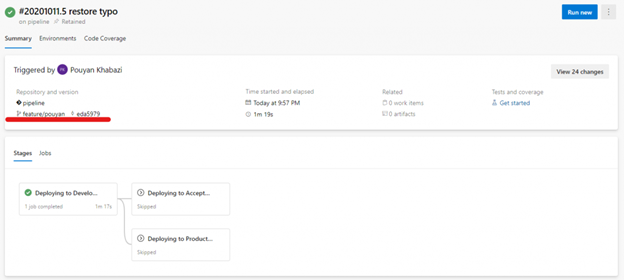
Below you see another example where the pipeline is triggered from a branch other than ‘release’ or ‘master’. in this case the changes are only deployed to the development environments and are the other environments skipped automatically:
Pipeline Template
Pipeline Templates let us define reusable content, logic, and parameters. Templates function in two ways. You can insert reusable content with a template, or you can use a template to control what is allowed in a pipeline.
If a template is used to include content, it functions like an include directive in many programming languages. Content from one file is inserted into another file. When a template controls what is allowed in a pipeline, the template defines logic that another file must follow. Click here to read more about this.
In our case the stages define our Azure Sentinel environments, so the biggest differences are things like subscription name, Sentinel workspace name, etc.
Because most of the steps are the same for all the environments, we can keep all the steps standardized and simplified for usage. This way it’s also easier to update our pipelines. For example, you decide to add an additional step which need to be implemented for all your environments/customers. This way, you only need to update only the steps.yml file instead of (all) your pipelines. This reduces code duplication, which makes your pipeline more resilient for mistakes. Also this way you are sure that if you add a new step it is also first tested in dev stage before going to prod. So to sum it up, now you have a CI/CD process for your pipeline too.
What you also see here is that I have configured conditions for all the steps. This makes the template much more dynamic for usage. For example if you haven’t provided a template for Hunting Rules, which means you don’t want to configure Hunting rule. So the importing Hunting rules step will be automatically skipped. This way we can configure our customers with the same template file but with different input.
# This is the Template that is used from the Main pipeline
# This template contains all the required steps

parameters:
  - name: environment
    displayName: environment name
    type: string

  - name: azureSubscription
    displayName: Enter the Azure Serviceconntion
    type: string

  - name: SubscriptionId
    displayName: Enter the Subscription id where the Azure sentinel workspace is deployed
    type: string

  - name: WorkspaceName
    displayName: Enter the Azure Sentinel Workspace name
    type: string

  - name: EnableSentinel
    displayName: Enable Azure Sentinel if not enabled
    type: boolean

  - name: analyticsRulesFile
    displayName: path to Azure Sentinel Analytics ruile file
    type: string

  - name: huntingRulesFile
    displayName: path to Azure Sentinel Hunting ruile file
    type: string

  - name: PlaybooksFolder
    displayName: The path to the fodler with the playbook JSON files
    type: string

  - name: ConnectorsFile
    displayName: The path to DataConnector json file
    type: string

  - name: WorkbooksFolder
    displayName: The path to the folder which contains the Workbooks JSON files
    type: string

  - name: WorkbookSourceId
    displayName: The id of resource instance to which the workbook will be associated
    type: string

  - name: ResourceGroupName
    displayName: Enter the Resource group name for Playbooks and Workbooks
    type: string

  - name: ResourceGroupLocation
    displayName: Enter the Resource group location for Playbooks and Workbooks
    type: string

jobs:
  - deployment: 'Sentinel'
    displayName: DeploySentinelSolution
    pool:
      vmImage: 'ubuntu-latest'
    environment: ${{ parameters.environment }}
    strategy:
      runOnce:
        deploy:
          steps:
            - checkout: self
            - task: PowerShell@2
              displayName: 'Prepare environemnt'
              inputs:
                targetType: 'Inline'
                script: |
                  Install-Module AzSentinel -Scope CurrentUser -Force
                  Import-Module AzSentinel
                pwsh: true

            - ${{ if eq(parameters.EnableSentinel, true) }}:
              - task: AzurePowerShell@5
                displayName: 'Enable and configure Azure Sentinel'
                inputs:
                  azureSubscription: ${{ parameters.azureSubscription }}
                  ScriptType: 'InlineScript'
                  Inline: |
                    Set-AzSentinel -SubscriptionId ${{ parameters.SubscriptionId }} -WorkspaceName ${{ parameters.WorkspaceName }} -Confirm:$false
                  azurePowerShellVersion: 'LatestVersion'
                  pwsh: true

            - ${{ if ne(parameters.PlaybooksFolder, '') }}:
              - task: AzurePowerShell@4
                displayName: 'Create and Update Playbooks'
                inputs:
                  azureSubscription: ${{ parameters.azureSubscription }}
                  ScriptType: 'InlineScript'
                  Inline: |
                    $armTemplateFiles = Get-ChildItem -Path ${{ parameters.PlaybooksFolder }} -Filter *.json

                    $rg = Get-AzResourceGroup -ResourceGroupName ${{ parameters.ResourceGroupName }} -ErrorAction SilentlyContinue
                    if ($null -eq $rg) {
                      New-AzResourceGroup -ResourceGroupName ${{ parameters.ResourceGroupName }} -Location ${{ parameters.ResourceGroupLocation }}
                    }

                    foreach ($armTemplate in $armTemplateFiles) {
                      New-AzResourceGroupDeployment -ResourceGroupName ${{ parameters.ResourceGroupName }} -TemplateFile $armTemplate
                    }
                  azurePowerShellVersion: LatestVersion
                  pwsh: true

            - ${{ if ne(parameters.analyticsRulesFile, '') }}:
              - task: AzurePowerShell@5
                displayName: 'Create and Update Alert Rules'
                inputs:
                  azureSubscription: ${{ parameters.azureSubscription }}
                  ScriptType: 'InlineScript'
                  Inline: |
                    Import-AzSentinelAlertRule -SubscriptionId ${{ parameters.SubscriptionId }} -WorkspaceName ${{ parameters.WorkspaceName }} -SettingsFile ${{ parameters.analyticsRulesFile }}
                  azurePowerShellVersion: 'LatestVersion'
                  pwsh: true

            - ${{ if ne(parameters.huntingRulesFile, '') }}:
              - task: AzurePowerShell@5
                displayName: 'Create and Update Hunting Rules'
                inputs:
                  azureSubscription: ${{ parameters.azureSubscription }}
                  ScriptType: 'InlineScript'
                  Inline: |
                    Import-AzSentinelHuntingRule -SubscriptionId ${{ parameters.SubscriptionId }} -WorkspaceName ${{ parameters.WorkspaceName }} -SettingsFile ${{ parameters.huntingRulesFile }}
                  azurePowerShellVersion: 'LatestVersion'
                  pwsh: true

            - ${{ if ne(parameters.ConnectorsFile, '') }}:
              - task: AzurePowerShell@5
                displayName: 'Create and Update Connectors'
                inputs:
                  azureSubscription: ${{ parameters.azureSubscription }}
                  ScriptType: 'InlineScript'
                  Inline: |
                    Import-AzSentinelDataConnector -SubscriptionId ${{ parameters.SubscriptionId }} -Workspace ${{ parameters.WorkspaceName }} -SettingsFile ${{ parameters.ConnectorsFile }}
                  azurePowerShellVersion: LatestVersion
                  pwsh: true

            - ${{ if ne(parameters.WorkbooksFolder, '')}}:
              - task: AzurePowerShell@4
                displayName: 'Create and Update Workbooks'
                inputs:
                  azureSubscription: ${{ parameters.azureSubscription }}
                  ScriptType: 'InlineScript'
                  Inline: |
                    $armTemplateFiles = Get-ChildItem -Path ${{ parameters.WorkbooksFolder }} -Filter *.json

                    $rg = Get-AzResourceGroup -ResourceGroupName ${{ parameters.ResourceGroupName }} -ErrorAction SilentlyContinue
                    if ($null -eq $rg) {
                      New-AzResourceGroup -ResourceGroupName ${{ parameters.ResourceGroupName }} -Location ${{ parameters.ResourceGroupLocation }}
                    }

                    foreach ($armTemplate in $armTemplateFiles) {
                      New-AzResourceGroupDeployment -ResourceGroupName ${{ parameters.ResourceGroupName }} -TemplateFile $armTemplate -WorkbookSourceId ${{ parameters.WorkbookSourceId }}
                    }
                  azurePowerShellVersion: LatestVersion
                  pwsh: true
Getting started
So now that we have discussed all the important topics, we can start creating things in Azure DevOps. This is a high-level list of tasks that we will perform.
Steps:
- Create an Azure DevOps organization – link
- Create an Azure DevOps Project – link
- Create a service connection to your Azure environment/s – link
- Get the code in your repository by importing it from GitHub – link
- Update the “Azure-Pipeline.yml” file and fill in all the applicable parameters
- Create and configured the environments – link
- Create Build validation pipeline from YAML by importing Build.Validation.yml
- Create the 3 default branches (copy from master) – link
- Configure Git branch policies for all 3 branches – link
- Create Deployment pipeline from YAML by importing Azure-Pipeline.yml
The end..
Finally! We’ve reached the end of this blog. If you read all of it: thank you for your dedication! I know it took some time. Anyway, I hope that the blog has taught you something about DevOps and the ‘why’ behind this way of working with Azure Sentinel.
Do you still have any questions regarding this subject? Know that you can always hit me up ;).
All the code is published on my GitHub and is free for use. Do you have any ideas or contributions? Please add this on the GitHub project. This way we can spread our knowledge and make the community better!
by Contributed | Nov 9, 2020 | Technology
This article is contributed. See the original author and article here.
Microsoft is committed to reviewing certifications regularly to help ensure that they remain relevant and technically accurate and that they’re assessing the skills need to thrive in a cloud-based world. Our reviews help ensure that we’re evaluating the right skills for a given job role—and only what needs to be evaluated for that particular role. This is important to understand because we cannot assess everything that’s required for success, so we have to prioritize (although that’s not to say that Microsoft won’t create training for those additional skills). In other words, the learning associated with a given job role is more comprehensive than what we can measure on the exam.
Here’s how it works…Microsoft reviews the objective domain every two months for our role-based and specialty exams to make sure they stay up to date and relevant. This review typically takes the form of revising, removing, and, occasionally, adding objectives. In addition, every year, we’re committed to reviewing the job task analysis (JTA)—the basis of the certification. (As you can see with all of these reviews, we’re serious about trying to maintain the relevance, integrity, and value of our certifications!)
As some of you might know, the JTA is the process through which we define the knowledge, skills, and abilities that are critical to success in a job role. The JTA is the foundation for each of our role-based and specialty certifications and for the learning content and hands-on experiences that we build so you can practice your skills.
Often the changes in these JTA reviews (we refer to them as refreshes) are small, reflecting what I like to call evolutions of the job role—small updates that accumulate over time to become something bigger—but these are baby steps that don’t affect someone’s ability to pass the exam. With small changes like these, we’ll update the exam through an in-service update. This means that the update is seamlessly integrated in one of our regularly scheduled exam updates that happen every two months. To support your exam preparation, we provide the details of these updates on our exam details pages, with a marked-up version of the objective domain. This allows you to clearly see what’s changing and when those changes go into effect. Because we cannot proactively notify test takers of impending changes (privacy rules affect our ability to contact you), you need to be proactive about regularly checking the exam details pages to understand when updates are being made. We post these updates at least 30 days in advance of the date when they’ll appear on the exam.
Occasionally, those changes are bigger, reflecting what I like to call a revolution in the job role. When this happens, there are several possible outcomes. Let’s talk about each of them.
New exams with new exam numbers
As long as the job role is still relevant and important in the industry, when the JTA reveals a significant change, we’ll create a new exam for that job role—and it will have a new exam number. This alerts the test taker that the exam has changed quite a bit and lets them know exactly what will be covered on the exam that they choose. New exams with new numbers are needed when more than one-third of the exam content has changed, meaning that the changes could affect someone’s ability to pass the exam if they didn’t realize that the exam had been updated. In other words, we change the exam number because it is the most effective way to communicate to you as a test taker that the exam content has changed significantly—so you can prepare accordingly.
Because it’s a new exam, it’s first available as a beta exam. This gives you the choice to continue preparing to take the “original” version of the exam or to take the new exam that aligns to the revised job role. The choice is yours, and we always keep the old exam in market for 90 days after the new exam is launched. This gives you time to transition to the new exam. If you’ve been preparing for the current version of the exam, you can still take it during this transition period if you want; however, that version will retire at the end of the 90-day window—no extensions and no exceptions, so plan accordingly. If you have to retake the exam, it might no longer be available.
Splitting or consolidating exams
Depending on the nature of the changes made during the JTA refresh, we might also decide to split an exam into two—or we might decide to consolidate two exams into one. We split an exam when the job role has expanded to such an extent that we can no longer cover the core skills and abilities in a single four-hour exam (our maximum seat time). We do everything we can to keep the certification paths straightforward, with a single exam. But, at times, it’s just not possible to do this and still provide a valid and reliable measurement of the required skills.
On the flip side, we might decide that requiring multiple exams to earn a certification is overly burdensome, doesn’t reflect market expectations, or is simply no longer needed because we can design the exam in such a way that if someone demonstrates competence in one area, we can assume competence in other areas (for example, measuring a more difficult or complex skill and assuming that the test taker has the foundational knowledge or skills needed to perform that more complex task). We rarely consolidate exams as a result of a contracted job role; it’s usually because we’ve learned something about the role that allows us to reimagine the assessment process with fewer exams.
Note that in both the consolidation or splitting of exams, new exams with new numbers will be created and will go through the beta exam process we described earlier.
Renaming certifications and/or exams
In rare cases, the JTA refresh might indicate that the name of the job role has changed or that we need to modify how we’re referring to it in some meaningful way. This means that we need to change the name of the certification and, usually, by extension, the name of the exam. The new name will reflect our vision for the job role and the required skills based on industry and subject matter expertise input. As an example, we renamed the Azure DevOps Engineer certification to DevOps Engineer to better reflect the future direction of that job role and to remove the confusion that this certification was based on Azure DevOps (the product) rather than on DevOps Engineer (the job role).
Name changes are generally transparent to candidates. If you’ve already earned the certification and its name changes, the new name will be reflected on your transcript. Rarely does this result in an exam number change.
Retiring certifications
With the rapid pace of change in cloud-based job roles, it shouldn’t be surprising that some job roles become less relevant over time or that this happens more quickly than it did in the past. Although these decisions sometimes result from the JTA refresh process, we often learn of the possible need to reimagine a certification in completely different way before the annual JTA refresh is due. In those cases, we’ll work with internal and external subject matter experts to decide what to do about the existing certification. If the job role as we originally imagined it no longer makes sense, given the direction the industry is headed, we’ll retire the certification. In most cases, we’ll replace it with a job role certification that’s more relevant and valuable to you, our partners, and organizations as they continue on their digital transformation journeys. This is what happened when we retired Teamwork Administrator and replaced it with Teams Administrator.
When we choose to retire a certification, we’ll provide at least 90 days’ notice so that you can complete the certification requirements if you so choose. But keep in mind that after the exams retire, you won’t be able to take them, so make sure you pass all the certification requirements before that date. In addition, you won’t be able to renew that certification—meaning that you won’t be able to extend the expiration date on your transcript beyond the date that it expires by default after earning it.
Answers to some of your questions
Based on my experience with certification and exam changes, I have an idea of some of the questions you’re likely to have. Here are some of the most commonly asked questions, along with their answers.
Does the name of the certification change when you change an exam number?
- Typically, the name of the associated certification doesn’t change when we release a new exam with a different number. Regardless of whether you earned it with the old or new exam, you’ll have the same certification, but the skills that appear on your badge will reflect those that were part of the exam(s) you took to earn it.
I’ve noticed that you released a new exam for the job role, but I’ve been studying for the current version of the exam for that job role. What should I do—continue on this path or start on the new one?
- Truly, this is up to you. You need to do what makes sense for your certification journey. You’ll eventually be tested on the new skills as part of our certification renewal requirements, even if you choose to take the old version now. The key consideration is whether you want to be validated on skills that Microsoft believes are more closely aligned to the job role today or to continue as you’ve planned and to update your skills through our recertification process and your own learning journey after you earn the certification with the version of the exam in market today. We offer sufficient notice of these changes so you can make the decision that best fits your journey.
If you choose to take the current version of the exam, check its retirement date and plan your exam accordingly. Note that after the exam is retired, you won’t be able to retake it if you fail your attempt.
When you make changes to an exam, will the self-paced learning content and instructor-led training be updated at the same time?
- Yes. We’re committed to having the self-paced learning content updated within seven days of the release of the updated exam, and the instructor-led training will be updated within 30 days. If you’re planning to take an instructor-led training course, please make sure that the provided learning is for the version of the exam that you want to take. Some partners will continue to offer the training associated with the old version of the exam until the exam retires, some learning partners will provide both versions, and some will transition immediately to the new version. Be sure to confirm with the partner that’s delivering the training, so you get the training you need.
What’s a beta exam?
- Exam questions are pilot tested in an exam-like situation known as a beta exam. This helps to ensure that only the best content is included in the live exam. Through this process, Microsoft gathers psychometric data on the quality of the questions. Based on this data and on candidate comments, we work with subject matter experts to finalize the items that will be scored and that will appear on the live exam and we set the cut score. For this reason, if candidates take the beta exam, they won’t receive a score immediately. However, they’ll have a meaningful voice in what’s included on the final exam. This is one of the few opportunities in which someone outside the exam development subject matter experts can have significant influence on the exam content.
When you update an exam number, why is the new exam released as a beta version?
- Because many of the skills measured by these exams are new (which is why we use a new exam number), we must develop many new questions to cover those skills. These new questions make up a substantial portion of the new exam and need to be pilot tested to help ensure that they are psychometrically sound, valid, reliable, and fair. The beta process allows us to validate the quality of the items that we include on the live exam and lets us know that we’re measuring the right skills.
Through the beta process, we give candidates an active voice into the certification and exam design. Their data and comments are used to evaluate the quality of the items, identify fixes needed to improve accuracy and clarity, and flag questions that must be removed. The data and information we gather through the beta process is, perhaps, the most important part of ensuring the validity and overall quality of the exam.
When will Microsoft update certification and exam pages with changes?
- We continuously update exam pages with upcoming and applied updates. Candidates should visit those pages frequently to stay up to date with changes to an exam and to learn when they’ll go into effect.
by Scott Muniz | Nov 9, 2020 | Security
This article was originally posted by the FTC. See the original article here.
Daily life has changed a lot since the pandemic started. Because face-to-face interactions aren’t possible for so many of us, we’ve turned to videoconferencing for work meetings, school, catching up with our friends, even seeing the doctor. When we rely on technology in these new ways, we share a lot of sensitive personal information. We may not think about it, but companies know they have an obligation to protect that information. The FTC just announced a case against videoconferencing service Zoom about the security of consumers’ information and videoconferences, also known as “Meetings.”
Brought to you by Dr. Ware, Microsoft Office 365 Silver Partner, Charleston SC.
by Contributed | Nov 9, 2020 | Technology
This article is contributed. See the original author and article here.
It’s November, .NET November that is. Check out the .NET Learn Challenge get over 35 hours of FREE Learning. More Exam help posts from the team this week amongst many other great code samples, blog posts and videos!
Datacenter Migration & Azure Migrate – Sarah Lean
Sarah Lean
In this Skylines Summer Session, Sarah Lean, #Microsoft #Cloud Advocate, is interviewed by Richard Hooper and Gregor Suttie and discusses
Shayne sits down with LayalCodesIt on Twitch
Shayne Boyer
Hang out with Shayne on Layla’s channel this week to hear more about the .NET Learn Challenge and working within Developer Relations at Microsoft.
How to Create a No Code AI App with Azure Cognitive Services and Power Apps
Aysegul Yonet
You might have an idea for an application using AI and not have anyone to build it. You might be a programmer and want to try out your ideas and Azure
Azure Stack Hub Partner Solutions Series – telkomtelstra
Thomas Maurer
telkomtelstra is a Service Provider working with Enterprise customers across Indonesia. Check out their journey with Azure Stack Hub!
VLC Energy Optimization With GPU | Sustainable Software
Asim Hussain
For the past few years, sustainable software engineering has arisen as one of the major topics in the daily discussions I have with software developers. Due to the advancements in technology, as well as the increasing awareness we share on climate change and the overall impact of tech on the environment,
microsoft/iot-curriculum
Jim Bennett
Hands on labs and content for students and educators to learn and teach the Internet of Things at schools, universities, coding clubs, community colleges and bootcamps – microsoft/iot-curriculum
What is Azure Defender?
Sonia Cuff
Learn about the improved experience for managing security across hybrid and multi-cloud environments with the Azure Defender XDR product.
All you need to know about Microsoft Exams
Sarah Lean
Taking any exam can be a stressful experience which requires a lot of preparation and planning. Let’s look at the process for studying, booking and sitting a Microsoft exam.
Introduction to #WebXR with Ayşegül Yönet
Aysegul Yonet
? WebXR is the latest evolution in the exploration of virtual and augmented realities. Sounds interesting, right? Dive into the Basics of WebXR with Ayşegül.
Build a web API with Node.js and Express
Yohan Lasorsa
Learn how to use Node.js and Express to create a RESTful web API with this series of bite-sized videos for beginners.
Microsoft 365 PnP Weekly – Episode 103 – Microsoft 365 Developer Blog
Waldek Mastykarz
Connect to the latest conferences, trainings, and blog posts for Microsoft 365, Office client, and SharePoint developers. Join the Microsoft 365 Developer Program.
.NET Learning Challenge!
Shayne Boyer
Compete, Learn, and Develop Skills https://aka.ms/dotnetskills November 1, 2020 – November 30th.
How to get started learning Microsoft Azure and Cloud Computing
Thomas Maurer
Here is how to get started with learning Microsoft Azure and Cloud Computing. Check out this blog and learn how to get started with Azure!
Sarah Lean
Interview with Sarah Lean, Senior Cloud Advocate at Microsoft
Experts Live Switzerland 2020: Azure Hybrid – Learn about Hybrid Cloud Management
Thomas Maurer
Now the recording of my session: “Azure Hybrid – Learn about Hybrid Cloud Management” is available! With an overview on Microsoft Azure Arc!
AZ-220 IoT Developer Certification Study Guide
Paul DeCarlo
Microsoft offers an official IoT Developer Specialty Certification which requires passing the AZ-220 Certification Exam .
Environment Monitor Lab – Using a Raspberry Pi
Jim Bennett
A walkthrough of the Environment Monitor IoT lab available at https://aka.ms/iot-curriculum/env-monitor using a Raspberry Pi and a Grove Pi+ kit.
Deploying Azure Functions via GitHub Actions without Publish Profile
Justin Yoo
This post shows how to deploy Azure Functions app via GitHub Actions, without having to know the publish profile.
Building a Video Chat App, Part 3 – Displaying Video | LINQ to Fail
Aaron Powell
We’ve got access to the camera, now to display the feed
Azure Thursday – 5 November 2020
Henk Boelman
View the schedule on: https://www.azurethursday.com
Quick tip: download user or group profile picture using Microsoft Graph JS SDK
Waldek Mastykarz
When building your application on Microsoft 365 you might need to download the profile picture of a user or group. Here is how to do it using the Microsoft Graph SDK.
Evénements en ligne : Intelligence Artificielle, Machine Learning et Azure
Maud Levy
Pour le mois de novembre, Microsoft propose plusieurs conférences en ligne en français autour du Mach…
Dataminds Connect – Taking Models To The Next Level With Azure Machine Learning
Henk Boelman
C# Corner Azure Learning and Microsoft Certification – AMA ft. Thomas Maurer
Thomas Maurer
Last week I had the honor to be a guest in the C# Corner Live AMA (Ask Me Anything) about Azure Learning and Microsoft Certification.
by Contributed | Nov 9, 2020 | Technology
This article is contributed. See the original author and article here.
Small Basic Forum has been archived on November 5, 2020. Prior to this, Small Basic on Q&A started on October 10, 2020.
Small Basic Forum
Small Basic Forum started on October 24, 2008 and has been a platform for our community for 12 years.
Small Basic on Q&A
Small Basic on Q&A is a new platform for our community. Following four tags are prepared for Small Basic community.
- small-basic-general – Small Basic general questions.
- small-basic-community-challenges – Post and reply with community challenges, to experiment with new projects and learn more in the process.
- small-basic-featured-program – Post a program that you’d like featured on the SmallBasic.com site and blog.
- small-basic-discussion – Post any general discussion topics or any questions that are meant to spark discussion (where you’re not trying to get an answer).
Getting Start
The first step to join Small Basic on Q&A is to create your account for Microsoft Q&A. And please check following articles before your post.
by Contributed | Nov 9, 2020 | Technology
This article is contributed. See the original author and article here.
Visibility to the activities in your Kubernetes clusters is a crucial part of keeping the clusters secured. With Azure Defender for AKS, you can monitor your AKS clusters and be alerted when suspicious and malicious activities in the clusters occur.
Now you can get even more insights about the security of your AKS clusters with the new workbook for Azure Kubernetes Service (AKS) security in Sentinel. The workbook helps you to get a better visibility to your cluster from security perspective. The workbook leverages Diagnostic Logs and Azure Defender security alerts for giving you insights about operations in the cluster that have security impact. This includes visibility to:
- Creation of privileged containers.
- operations on secrets in the cluster.
- Cluster-admin bindings.
- Images with multiple security alerts.
To get full benefit of the new workbook, enable kube-audit in the diagnostic settings of the AKS clusters and make sure that Azure Defender for Kubernetes is enabled and ingested to Azure Sentinel.
To enable Azure Defender for Kubernetes go to Azure Security Center –> Pricing & Settings –> Select the relevant subscription and make sure that Kubernetes plan is enabled:
To ingest the security alerts to Sentinel, go to Sentinel –> Data connectors –> Azure Security Center
To enable Diagnostic logs for AKS go to your AKS cluster –> Diagnostic settings –> Add diagnostic setting –> select kube-audit logs and “Send to Log Analytics”:
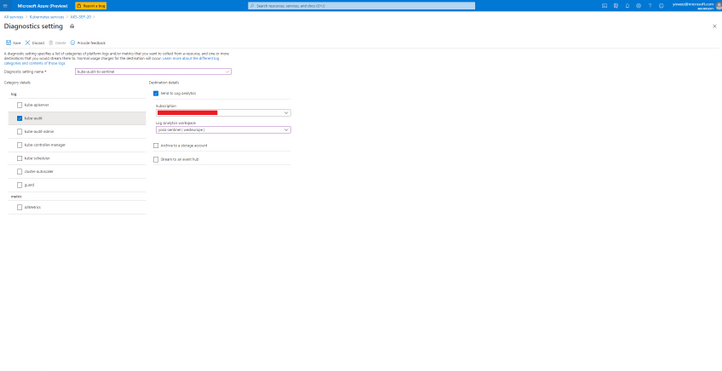
The workbook was developed with the assistance of:
Hesham Saad – Senior Global Cybersecurity Technical Specialist, Global Black Belt
Yaniv Shasha – Senior Program Manager, C+AI Security
Hosam Kamel – Senior Azure Specialist


Recent Comments