by Contributed | Nov 10, 2020 | Technology
This article is contributed. See the original author and article here.
The Azure Service Fabric 7.2 second refresh release includes stability fixes for standalone, and Azure environments and has started rolling out to the various Azure regions. The updates for .NET SDK, Java SDK and Service Fabric Runtime will be available through Web Platform Installer, NuGet packages and Maven repositories in 7-10 days within all regions. This update is only rolling out for Windows currently. SDK and Standalone packages will become available later this week.
- Service Fabric Runtime
- Windows – 7.2.432.9590
- Service Fabric for Windows Server Service Fabric Standalone Installer Package – 7.2.432.9590
- .NET SDK
- Windows .NET SDK – NA
- Microsoft.ServiceFabric – 7.2.432
- Reliable Services and Reliable Actors – 4.2.432
- ASP.NET Core Service Fabric integration – 4.2.432
- Java SDK – 1.0.6
Key Announcements
This release fixes stability issues introduced to FabricDNS in the 7.2 release.
For more details, please read the release notes.
by Contributed | Nov 10, 2020 | Technology
This article is contributed. See the original author and article here.
Missed our Live Video Analytics webinar at the ISC West 2020 Virtual Event earlier this month? Don’t worry, you can now watch the on-demand webinar.
Live Video Analytics (LVA) is a new service from Microsoft that enables developers to apply computer vision, machine learning and AI analysis to live video streams in the Cloud or on the Edge.
With the proliferation of IP cameras, businesses across industries such as retail, healthcare, public safety, transportation, etc. want to increasingly leverage live video analytics to enhance their business objectives.
From the presentation, you will:
- Get an overview of the LVA platform
- Learn about LVA’s capabilities,
- Watch a demo to see how you can analyze a video feed by leveraging an open-source Yolo v3 model to count vehicles in real-time.
Additionally, learn how to combine Azure services such as Custom Vision, Computer Vision (Spatial analysis), and deep learning toolkits/SDKs from partners such as Intel’s OpenVINO and NVIDIA’s DeepStream SDK with LVA to build rich video analytics applications that combine video analysis with other business data to make smarter business decisions.
Watch the on-demand webinar now.
by Contributed | Nov 10, 2020 | Technology
This article is contributed. See the original author and article here.
There are considerable focus areas to infrastructure that the IaaS DBA needs to be aware of, so Part I of this blog can be found here.
Now that we’ve covered storage and VM series in Part I of this blog post on Infrastructure, we can go onto the detail areas for performance. Let’s start on performance gains with host caching.
Cache it Out Right
Host caching, by default, for premium SSD is turned off. This is a feature only available on certain VM series, (look for an ‘S’ in the D, E and M-series VMs.)
Turn on Read-Only host caching for the datafiles, archive logs and redo logs, but recognize that this is a feature only available on Premium SSD and that if you size the volume over 4095G, any host caching is turned off again. The limit is 4095G, so keep that in mind when you choose a P50 disk with it’s 4096G size. Attempt to allocate it all with read only caching on, as soon as you allocate that last 1G with an LVM create or ASM diskgroup creation command, the host caching will become disabled. You can use up to 4095G- that’s it.
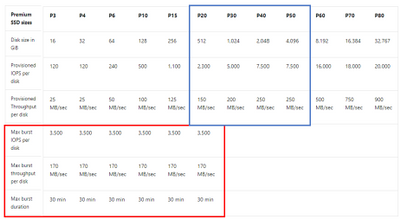
Note the difference in cached vs. uncached performance for the VM you chose to use. We’ve had technical discussions on how “hard” these limits are, as there is also bursting that can cloud the final numbers, as seen in performance tests, but at this time, I recommend sticking to the values shown for the VM you’ve chosen, recognizing the VM values override anything at the storage level unless it’s Azure NetApp Files, (which is only limited by the NIC.)
As stated earlier, I’ll repeat- DON’T turn on read/write caching. These are datafiles and no one wants writes going to memory. We want our data written to disk! There is a risk of corruption in certain Oracle releases, too if this is accidently turned on.
Disk Bursting
Disk Bursting is something that has mixed reviews from most database technologists. On one hand, having the ability to “burst” IO performance for up to 30 minutes during batch loads or heavier IO usage is very beneficial, on the other hand, consistent performance is important because users expect this.
For RDBMS workloads, we can really only focus on the Esv3 series and a few of the Dsv3 series VMs. Disk bursting, like other IO topics, is a combination between the VM and the disk chosen to receive the feature.
To enable disk bursting at the disk layer requires smaller disks and isn’t available in all regions, so take the time to ensure you are deploying in the correct region and disk series P20 or below of premium SSD. If you have a workload that is hitting at the upper limits of the disk series you’ve deployed on, (again, under the P20) then you aren’t going to accumulate credits that can be used towards a bursting period. No, you aren’t robbing Peter to pay Paul, you’re accumulating credits of IO that you aren’t using in inconsistent workloads to be allocated to when you do need that burst of performance.

Premium SSD disks, disk bursting capabilities, (red) vs. those which are preferred for read-only host caching, (blue).
Be Smart with Your Linux Volumes
To use ASM or not to use ASM? That is the question. The answer is really about the ease of management and less about performance gains. There isn’t much that ASM can offer us here, but for the DBA, it does offer the ability to add to an existing diskgroup vs. creating a new volume when adding disk.
- Use 1MB stripe size to ensure the most optimal performance for Oracle, 64K for SQL Server.
- Stripe multiple disks together to combine them for higher IO capabilities. You’re still held to the IO limit at the VM, but you can reach those limits where you may not with just a single disk.
- Use the correct queue depths for SQL Server and match the vCPU count to calculate the DOP for Oracle.
Another common mistake we experience with customers- identify where the swap device is located in Linux. We’ve come across many customers who have placed the swap device on slower, managed disk vs. fast local disk, creating latency and throttling.
Remember not to use standard disk for your OS disk and consider the amount of IO required for anything placed on this disk. As my partner in crime remarked the other day, “I haven’t seen an Oracle environment on a VM perform optimally with a standard SSD for the OS Disk.” Consider Premium SSD for your OS Disk for any database VM.
Lay out Files Strategically
For small databases, all datafiles, redo logs and archive logs, (or transaction logs in SQL Server) can reside in one volume. As databases get larger or experience IO latency, the first step is to separate the appropriate files onto appropriate physical volumes. In Oracle, the redo logs, archive logs and for SQL Server, the transaction logs from the main datafiles.
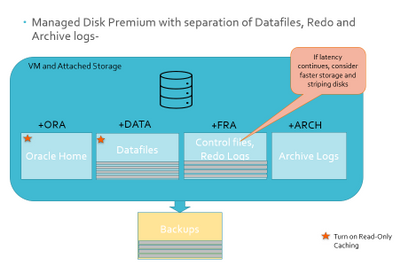
If the database has exceptionally high IO vs. the managed disk chosen, consider mirroring and striping smaller disks, along with strategically positioning datafiles to get the most performance out of the database. Match datafile IO demands with the managed disk it resides on.
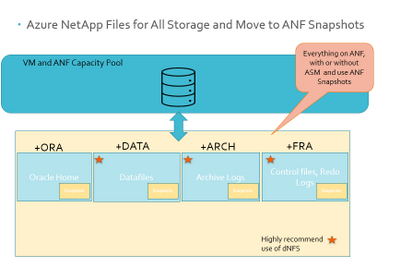
If you’re experiencing IO throttling at the VM tier, then it’s time to move away from managed disk and onto Azure NetApp Files, (ANF). ANF is constrained only by the NIC and can offer higher MBPs. ANF capacity pools can be connected to multiple VMs, offering simpler architecture and cloning solutions that are often part of the reason customers have moved to the cloud. When utilizing ANF, also consider using dNFS to benefit the performance, too.
Stop Backing up Your Databases
Yeah, I said it, but that’s not what I meant- most backup utilities, (looking at you, Oracle RMAN!) is slow and creates heavy IO situations. Most specialists don’t think twice about choosing slow, blob storage to backup databases to, but this can create a serious problem in IO throttling and latency issues in the database during night-time batch processing and other jobs.
Consider moving to snapshot technology that is database platform aware. For Oracle, that is Azure NetApp Files and Commvault, (although there are others, these are the two I’m most satisfied with.) Most snapshot technologies not only take a snapshot in a matter of minutes, (while the heavy lifting goes on behind the scenes, but it far from impacting to the database) and they also have the ability to create clones in as short of time, saving considerable resources. Many of these products provide object level backups, restores and a management interface to make maintaining the backups easy for the DBAs. With the time saved on backups, restores and refreshes, DBAs can get to more important and satisfying work.
There are significantly more infrastructure tips, but this is a good list to start with. If you have time and are registered for PASS Summit, I’ll be presenting on Migrating Oracle Workloads to Azure this week and next blog post, I’ll discuss more on the topic of Oracle optimization in the cloud!
by Contributed | Nov 10, 2020 | Technology
This article is contributed. See the original author and article here.
Windows Embedded Standard 7 reached end of support on October 13, 2020. As devices running Windows Embedded Standard 7 will no longer receive updates of any kind from Microsoft,
we recommend migrating any remaining devices to Windows 10 IoT as quickly as possible.
If you were unable to complete your migration in time, Microsoft offers the Extended Security Update (ESU) program as a last resort. This paid program will ensure that your devices receive critical and important security updates for a maximum of three years after the end of support date, which in the case of Windows Embedded Standard 7, would be October 10, 2023.
Extended Security Updates for embedded devices, including Windows Embedded Standard 7, are only available from OEMs. Other products currently supported by the ESU program include SQL Server 2008 R2 for Embedded Systems, Windows Server 2008 R2 for Embedded Systems, and Windows 7 for Embedded Systems. For more information, see the Extended Security Updates FAQ.
Additional resources
For more information on end of support dates for Windows and other Microsoft products, see the following resources:

by Contributed | Nov 10, 2020 | Technology
This article is contributed. See the original author and article here.
The Azure PowerShell modules expose over 4,000 cmdlets and, on average, ten parameters per cmdlet. Experienced PowerShell users will find the right cmdlet and parameter to achieve their goal but this can be more complicated for casual users.
I have rarely seen people experimenting with a new module being able to execute a command successfully on their first attempt. With time, this is no more an issue as people get accustomed to the cmdlet and remember the associated parameters, unless you have a terrible memory like me and need to refer to the documentation frequently.
 Az Predictor annimated GIF
Goals
We built Az Predictor, an intelligent command completion module for Azure Powershell. Az Predictor helps our Azure developers find the cmdlet they are looking for efficiently, identify the required parameters quickly, and experience fewer errors.
We worked closely with the PowerShell team to have Az be the first module that leverages this new interface and bring suggestions to the developer’s fingertips. Az Predictor takes the context of the current session into account in its suggestions. With Az Predictor’s context-aware suggestions users will be guided through the discovery of cmdlets and will not need to go to the online help as often.
To satisfy different working styles, we are offering two modes:
- Inline mode: a suggestion with parameters and values will appear with some opacity on the rest of the command line. We expect this mode to be more suited for the experienced developers who already understand the cmdlets.
 Az Predictor inline mode screen capture
- Listview mode: several suggestions will appear below the command line with the complete parameter set displayed. This mode should be more suited to folks who need to see the command’s full line to know the parameters.
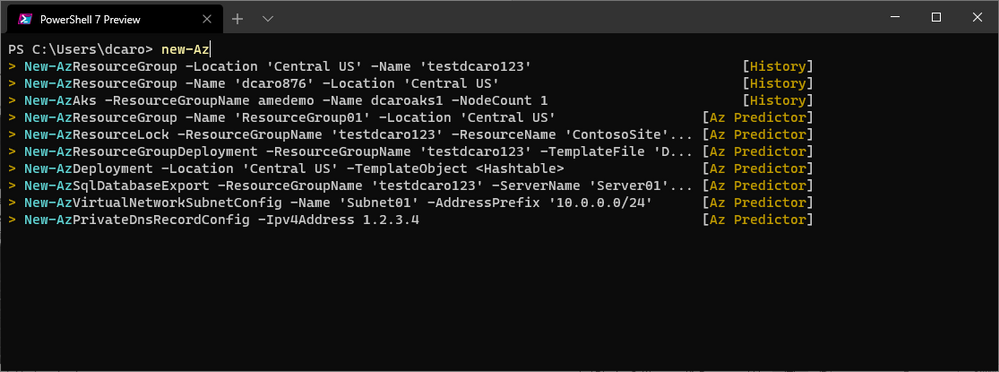 Az Predictor listview mode screen capture
Technical details
Az Predictor is currently a module in preview in the PowerShell gallery. We are looking for feedback on this first preview, and based on what we will hear from customers, we are considering making it part of the Az wrapper module.
The inline view and list view modes are provided by PSReadline to manage the user’s interactions. The plugin is responsible for providing the suggestions to be used by PSReadline.
Az Predictor is built on top of the subsystem plugin model that is available after PowerShell 7.1-preview7 and used by PSReadline 2.2.0-beta1; hence the following configuration is required to try Az Predictor:
Note: If you are using Windows PowerShell (5.1), you can install PowerShell 7.1 side by side. More information on this page: https://docs.microsoft.com/en-us/powershell/scripting/install/migrating-from-windows-powershell-51-to-powershell-7?view=powershell-7#using-powershell-7-side-by-side-with-windows-powershell-51 .
To provide the suggestions to PSReadline, Az Predictor makes regular calls to an API that will return suggested commands based on the session’s context.
The full functionality of Az Predictor requires internet access. We are planning to add support for environments with limited or no network capacity (for example, mobile connectivity or Wi-Fi in airplanes).
Once loaded, Az Predictor will identify the value or variable used for resource group name and location and use it in the subsequent suggestions. When you start typing a command, Az Predictor will search for the cmdlet that you are the most likely to use based on the session’s context. As you type, we refine the search and display more accurate examples to use.
Az Predictor understands parametersets, required, and optional parameters and leverages the Azure PowerShell examples in the reference documentation as suggestions. The suggestions will then be adjusted based on the possible parametersets and parameters that have already been typed
The code of Azure PowerShell, including this module, is opensource. If you find a bug and want to contribute, you can submit an issue or open a PR (pull request).
Getting started
We hope that you are as excited as we are with this new interface.
To get started:
- Install PowerShell 7.1-rc2 or more recent: https://docs.microsoft.com/en-us/powershell/scripting/install/installing-powershell?view=powershell-7.1
- Install PSReadline 2.2-beta1 https://github.com/PowerShell/PSReadLine/releases/tag/v2.2.0-beta1
Install-Module PSReadline -AllowPrerelease
- Install Az.Tools.Predictor preview
Install-Module -Name Az.Tools.Predictor
- Import the module via
import-module Az.Tools.Predictor
- Enable plugins via
Set-PSReadLineOption -PredictionSource HistoryAndPlugin
- You can enable the list view mode with
Set-PSReadLineOption -PredictionViewStyle ListView
If you want to load Az Predictor at the launch of PowerShell, add the following lines to your PowerShell profile (Microsoft.PowerShell_profile.ps1)
Import-Module Az.Tools.Predictor
Set-PSReadLineOption -PredictionSource HistoryAndPlugin
Set-PSReadLineOption -PredictionViewStyle ListView
Log issues, feature requests, or design changes on GitHub: https://github.com/Azure/azure-powershell/issues
We are at the early stage of the module and want to hear from you; please take a moment to fill this brief survey: http://aka.ms/azpredictorsurvey
Tell us about the following:
- Are the predictions useful?
- Would you like to have Az Predictor turned on by default?
- Which mode is the most valuable?
by Contributed | Nov 10, 2020 | Technology
This article is contributed. See the original author and article here.
You are reading the October issue of the Infrastructure + Security: Noteworthy News series! As a reminder, the Noteworthy News series covers various areas, to include interesting news, announcements, links, tips and tricks from Windows, Azure, and Security worlds on a monthly basis.
Microsoft Azure
|
Azure TLS certificate changes
Microsoft is updating Azure services to use TLS certificates from a different set of Root Certificate Authorities (CAs). This change is being made because the current CA certificates do not comply with one of the CA/Browser Forum Baseline requirements. View this article to see when this will happen per service.
|
Conditional Access APIs are generally available!
Azure AD Conditional Access can ensure that the right people have the access to resources they need from wherever they are. We’ve had a ton of requests for Conditional Access APIs to manage policy at scale. That’s why it is so cool that at Microsoft Ignite, we announced that Conditional Access APIs and named location APIs has reached general availability in Microsoft Graph!
|
Assign scoped roles to an administrative unit
In Azure Active Directory (Azure AD), for more granular administrative control, you can assign users to an Azure AD role with a scope that’s limited to one or more administrative units.
|
Microsoft 365 All Tenants list is rolling out
We’re thrilled to announce that a new multi-tenant management experience called All tenants is now rolling out to Microsoft 365 customers. The All tenants list is specifically for admins that manage two or more Microsoft 365 tenants.
|
Disable and delete external identities with Azure AD Access Reviews (Preview)
In addition to the option of removing unwanted external identities from resources such as groups or applications, Azure AD Access Reviews can block external identities from signing-in to your tenant and delete the external identities from your tenant after 30 days.
|
Conditional Access Adoption
This blog forms part of a series showcasing the impact SMC has had in securing our customer’s cloud-based identities.
|
Azure AD provisioning, now with attribute mapping, improved performance and more!
We’ve made several changes to identity provisioning in Azure AD over the past several months, based on your input and feedback. The public preview of Azure AD Connect cloud provisioning has been updated to allow you to map attributes, including data transformation, when objects are synchronized from your on-premises AD to Azure AD.
|
Provisioning reports in the Azure Active Directory portal (preview)
Provisioning logs have now been added in preview to the Azure AD portal. Check out this article to see how to access them.
|
Windows Server
|
Hybrid Agent and Root Certificate Changes
Microsoft is updating Azure services to use TLS certificates from a different set of Root Certificate Authorities (CAs). This change will ONLY impact Azure AD hybrid agents installed on-premises that have hardened environments with a fixed list of root certificates and will need to be updated to trust the new certificate issuers. This change will result in disruption of service if proper action is not taken.
|
Modern Authentication Support comes to Microsoft Remote Connectivity Analyzer
Since December last year, we’ve been making a lot of investment into the Microsoft Remote Connectivity Analyzer site. We’re thrilled to announce that our Office 365 tests now have modern authentication capabilities!
|
Understanding Azure Arc Enabled SQL Server | Data Exposed
In this episode of Data Exposed with Sasha Nosov, learn how Azure Arc allows you to leverage Azure Services for your existing database applications hosted on-premises or in other public clouds, without changing or even stopping them.
|
New application actions in MEM admin center with Configuration Manager Technical Preview 2010.2
This month we have a second technical preview. We’ve made improvements to applications for tenant attached devices. Administrators can now several more actions for applications in the Microsoft Endpoint Manager admin center.
|
Windows Client
|
Microsoft Endpoint Manager – WIN 10 Auto Enrollment
In this tutorial John Barbare will walk you through the steps of enrolling a Windows Device in Microsoft Endpoint Manager (MEM) and the newly released Android enrollment policy.
|
SHA-2 signing enforcement on Windows 7 and Windows Server 2008 R2 is almost here!
The deadline, November 2, 2020, is fast approaching. Customers running Microsoft Defender for Endpoint on Windows 7 or Windows Server 2008 R2 must take a couple of actions or their agents will stop sending data.
|
What’s New in Microsoft Teams | October 2020
This month we have a packed blog with a lot of new features that are now generally available to improve your experience with meetings and calling, chat and collaboration, as well as a number of new updates to Microsoft Teams devices.
|
Announcing Windows 10 Insider Preview Build 20251
Today we’re releasing Windows 10 Insider Preview Build 20251 (FE_RELEASE) to Windows Insiders in the Dev Channel.
|
Security
|
Advancing Password Spray Attack Detection
In this article you will read about an amazing addition to our family of credential compromise detection capabilities – this one uses our machine learning technology and global signal to create incredibly accurate detection of a nuanced attack called “password spray.” This is a great example of where worldwide, multi-tenant detection combines with rapidly evolving detection technology to keep you safe from this very common attack.
|
Continuous Access Evaluation in Azure AD is now in public preview!
CAE is available in public preview for Azure AD tenants who have configured Conditional Access policies. Microsoft services, like Exchange and SharePoint, can terminate active user sessions as soon as a Conditional Access policy violation is detected.
|
Secure Score Over Time Power BI Dashboard
As organizations start to use Azure Security Center Secure Score to measure their journey to a better cloud security posture, it becomes important to understand how this secure score is progressing over time. With our new Power BI dashboard, you will be able to track your secure score progress over time and your resources’ health.
|
Azure Defender for Key Vault
We are excited to share that Azure Defender for Key Vault has been generally available since Microsoft Ignite on September 22nd, 2020! We have prepared this blog to go over the several topics. Be sure to check it out.
|
Office 365 ATP is now Microsoft Defender for Office 365
At Ignite, we announced Microsoft 365 Defender which brings the threat protection service portfolio across Microsoft 365 together under a unified brand. This new unified branding is a testament to our continued endeavor to integrate the different threat protection focused services across Microsoft. Office 365 Advanced Threat Protection is now Microsoft Defender for Office 365. While the name has changed, what has not changed is Microsoft’s continued commitment to offer best-of-breed protection against attacks targeting Office 365.
|
Introducing a new threat and vulnerability management report
We are excited to announce a new built-in report for Microsoft Defender for Endpoint’s threat and vulnerability management capability, the vulnerable devices report! The Vulnerable devices report provides extensive insights into your organization’s vulnerable devices with summaries of the current status and customizable trends over time.
|
Connect your Favorite Apps to Microsoft Cloud App Security
As our team assists customers in adopting Microsoft Cloud App Security, and continues to encourage customers to leverage the best of its capabilities, we often see that a number of our customers are not aware of how simple and beneficial it can be to connect their other apps (in addition to O365 and Azure) to Cloud App Security. To help you in that journey, we’ve compiled a short series of videos to help you with key points of integration.
|
Updates and Support Lifecycle
|
Windows 10 Feature Update Downloaded status reverted to No
You may have noticed that after synchronizing updates released on patch Tuesday (October 13, 2020), Windows 10 Feature Updates for versions 1903 and 2004 that were previously downloaded, now show a status of Downloaded = No under the All Windows 10 Updates node. The content for these Windows 10 Feature Updates were revised to address a security issue. As a result of this content revision, any previously downloaded feature updates will need to be downloaded again.
|
Update: Retirement of Site Mailboxes in SharePoint Online
We will retire (and ultimately delete) all site mailboxes in SharePoint Online in April 2021. We’ll post another update as we get closer to April 2021. See this article for a to backup existing data.
|
Products reaching End of Support for 2020
|
Microsoft Premier Support News
|
Check out Microsoft Services public blog for new Proactive Services as well as new features and capabilities of the Services Hub, On-demand Assessments, and On-demand Learning platforms.
|
by Scott Muniz | Nov 10, 2020 | Security, Technology
This article is contributed. See the original author and article here.
Original release date: November 10, 2020
Adobe has released security updates to address vulnerabilities in multiple products. An attacker could exploit some of these vulnerabilities to take control of an affected system.
The Cybersecurity and Infrastructure Security Agency (CISA) encourages users and administrators to review the Adobe security advisories for Adobe Connect and Adobe Reader for Android and apply the necessary updates.
This product is provided subject to this Notification and this Privacy & Use policy.
by Scott Muniz | Nov 10, 2020 | Security, Technology
This article is contributed. See the original author and article here.
Original release date: November 10, 2020
Cisco has released a security update to address a vulnerability in IOS XR Software for ASR 9000 Series Aggregation Services Routers. An unauthenticated, remote attacker could exploit this vulnerability to cause a denial-of-service condition.
The Cybersecurity and Infrastructure Security Agency (CISA) encourages users and administrators to review the Cisco security advisory and apply the necessary update.
This product is provided subject to this Notification and this Privacy & Use policy.
by Contributed | Nov 10, 2020 | Technology
This article is contributed. See the original author and article here.
Follow along with this video covering a scenario of sales sharing active project development for new products and understand how both admins and end user can apply labels to prevent these actions before data leaves the company.
In summary, this training will help to
➢ Show how a development team can provide active projects
➢ Prevent others in company from sharing with outside persons
➢ Ensure a consistent knowledge of sensitivity labels.
➢ Suggest documents needing labels.
Microsoft Security YouTube Channel
This document was written by Randall Galloway, a member of the Microsoft Information Protection & Compliance – CxE team.

by Contributed | Nov 10, 2020 | Technology
This article is contributed. See the original author and article here.
 Man using AI glasses with machinery
It’s an exciting time at Microsoft, with growing investments in edge computing and AI. Much of the future will be influenced by these technologies, and indeed, we are already seeing their power in telco 5G devices, IoT platforms, and low-power wide-area (LPWA) networks. With Microsoft’s recently announced Azure for Operator efforts, we’re in a unique position to drive IoT experiences that leverage edge AI via these emerging 5G and LPWA networks.
Toward that end, I’m so pleased to say we’re now collaborating with Qualcomm Technologies to facilitate a seamless artificial intelligence (AI) and machine learning (ML) developer experience. The efficiency granted by this seamlessness of development and deployment will benefit enterprises using Microsoft’s Azure and AI solutions such as the Azure IoT platform, and Qualcomm Technologies’ IoT processors and AI inferencing products.
Our two companies have produced some great work together over the years, including recent products and solutions for Microsoft’s Surface Pro X and Vision AI Developer Kit. This newest collaboration is just as exciting. Qualcomm Technologies’ position in the mobile ecosystem enables them to drive hardware-accelerated inference capabilities from ultra-low power edge AI solutions all the way to high-performance AI inferencing in the cloud using the Qualcomm® Cloud AI 100, all leveraging LPWA and emerging 5G deployments with commercial customers. This makes them an excellent company to team up with for our new, polished AI and ML developer experience.
Keith Kressin, Senior President and General Manager, Compute and Cloud, Qualcomm Technologies said, “5G and AI are the two key technologies today fueling the convergence of the cloud and devices at the edge of networks. Collaborating with Microsoft to accelerate AI across a wide breadth of connected devices from the edge to the cloud, with our platform that runs single-milliwatt to Snapdragon to the Qualcomm Cloud AI 100, will enable a variety of powerful new applications and services.”
I know I speak for the entire Microsoft Azure Edge Devices team when I say we’re very excited to be working with Qualcomm Technologies on solutions to benefit enterprise developers and deployers across industries.


Recent Comments