by Contributed | Nov 17, 2020 | Azure, Microsoft, Technology
This article is contributed. See the original author and article here.
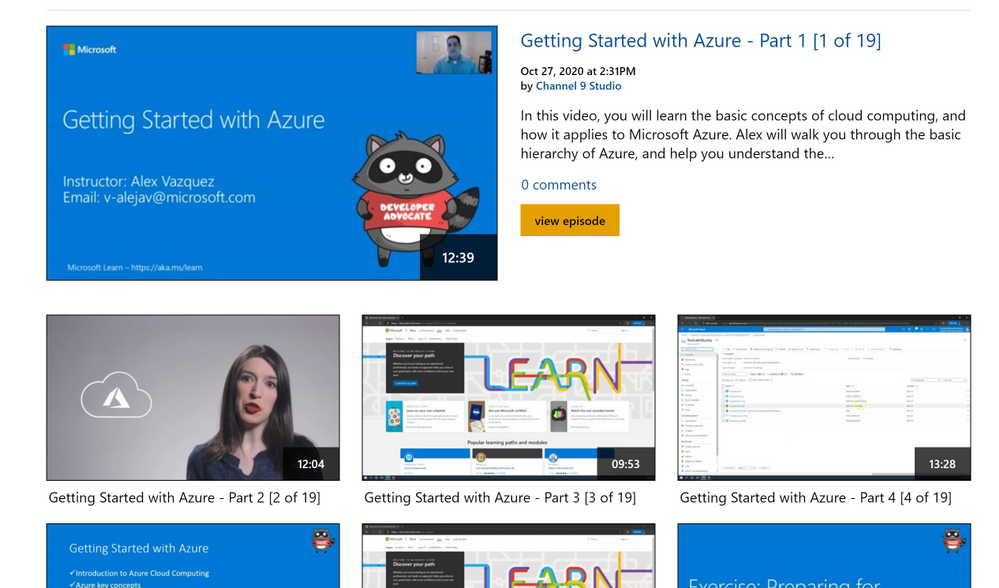
This is a series of Azure applied workshops where participants will start with the basics of cloud, getting started on Azure, and will then move on to learn about Azure’s Data and Machine Learning tools. This training series is intended for a broad audience including students, researchers, faculty, post-docs, staff and anyone interested in getting started and learning Azure.
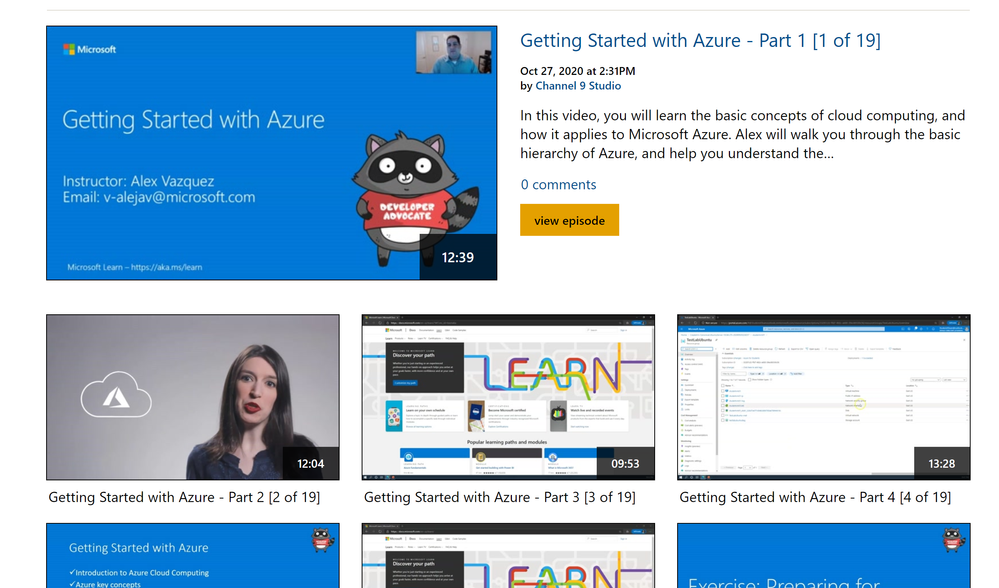
This series will get you started on Azure and provide hands on experience managing data and leveraging Azure’s data science and machine learning tools.
The Azure workshop series will focus on the following topics:
1. Getting Started with Azure – Part 1 [1 of 19]
2. Getting Started with Azure – Part 2 [2 of 19]
3. Getting Started with Azure – Part 3 [3 of 19]
4. Getting Started with Azure – Part 4 [4 of 19]
5. Getting Started with Azure – Part 5 [5 of 19]
6. Exercise – Setting up first Subscription [6 of 19]
7. Exercise – Preparing for Machine Learning [7 of 19]
8. Exercise – Preparing for Working with Data [8 of 19]
9. What is Machine Learning? [9 of 19]
10. Azure ML Tools [10 of 19]
11. Exercise – Build a ML Model with Azure [11 of 19]
12. Exercise – Deploy and Consume a ML Model [12 of 19]
13. Using Automated ML [13 of 19]
14. Exercise – Deploy your ML Model on Azure [14 of 19]
15. Benefits Working with Data [15 of 19]
16. Databases [16 of 19]
17. Unstructured Data [17 of 19]
18. Exercise: How to Transform Data [18 of 19]
19. Tools and Integrations [19 of 19]
Additional resources and links:

by Contributed | Nov 17, 2020 | Technology
This article is contributed. See the original author and article here.
Abstract:
We will be covering prerequisites for IEmode, How to configure IEmode and basic knowledge of Enterprise site list manager tool.
We will be looking at troubleshooting issues related to IEMode and why do we use IEMode.
Added advantage about the benefits of IEMode and the limitations of IEMode.
Webinar Date & Time : December 8, 2020. Time 4.00 PM IST (10.30 AM GMT)
Invite : Download the Calendar Invite
Speaker Bio:

Ahmed currently works as a Support Engineer with the Browsers team, NA region. He is one of our senior engineers with expertise in Browser Technology. He is passionate about learning and sharing knowledge. He is very effective in communicating with customers and helping them achieve more.
Devinar 2020
by Contributed | Nov 17, 2020 | Azure, Microsoft, Technology
This article is contributed. See the original author and article here.
Azure Data Explorer offers ingestion (data loading) from Event Hubs, a big-data streaming platform and event ingestion service. Event Hubs can process millions of events per second in near real-time.
The “1-click” tool now intelligently suggests the relevant table mapping definitions according to the Event Hub source, in just 4 clicks.
Click 1:
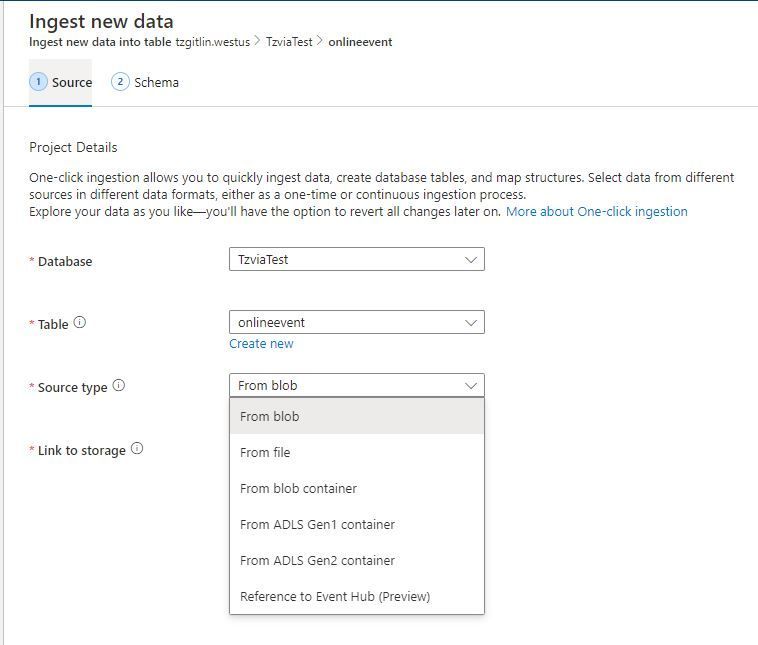
Click on “Ingest new data” in Kusto Web Explorer (KWE) –> Reference to Event Hub
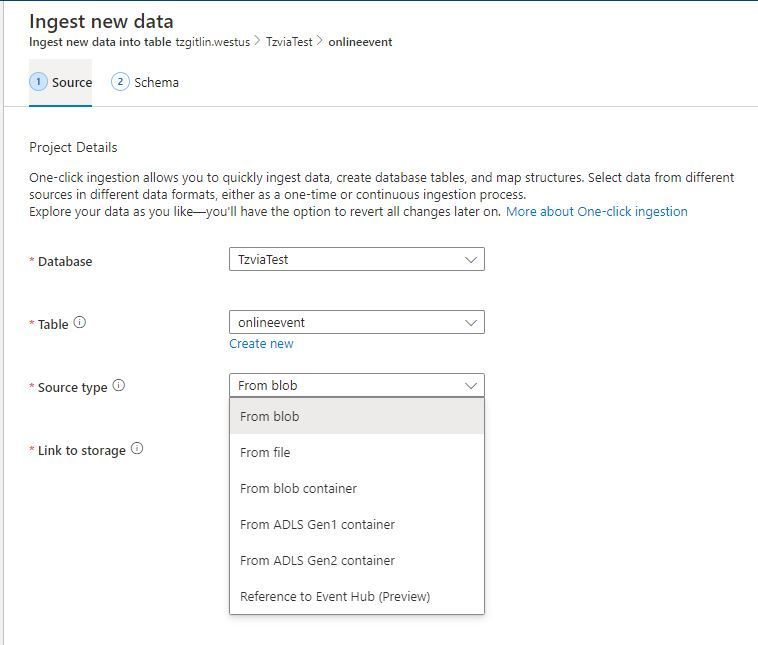
Click 2:
Connect the Event Hub as a source for continuous event ingestion to a table (new/existing)
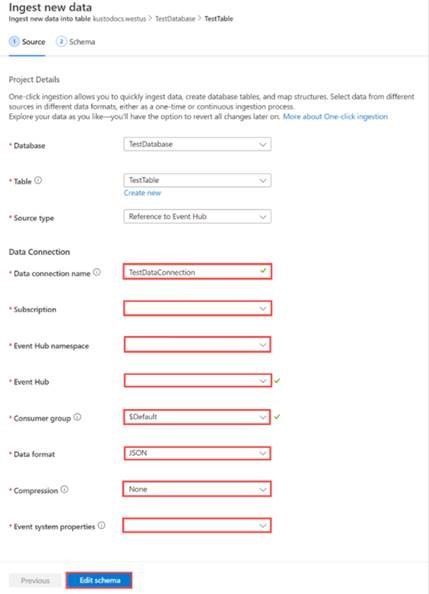
Click 3:
The 1-click tool fetches Event Hub events and infers its schema per the event structure. The user must only verify the inferred schema, and make any necessary adjustments.
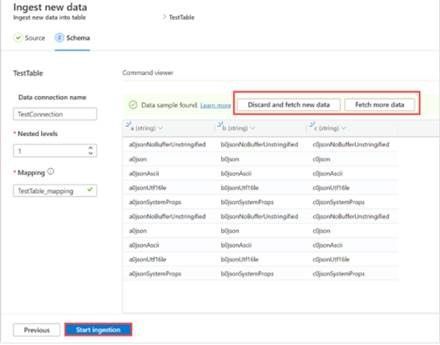
Click 4:
Click on the “Start Ingestion” button to begin inferring the incoming events in either streaming or batching mode, per your needs.
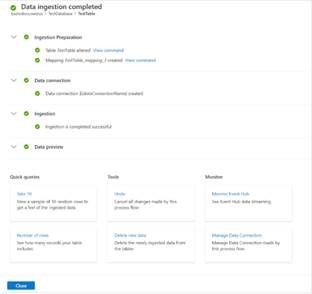
Next time you need to connect Event Hub with Azure Data Explorer, use 1-click for an easy and accurate definition end to end ingestion definition from table to query.
** All actions are revertible by the service (Tools)
read more
by Contributed | Nov 17, 2020 | Technology
This article is contributed. See the original author and article here.
Today, we are excited to announce the public preview of endpoint detection and response (EDR) capabilities in Microsoft Defender for Endpoint on Linux servers.
With the new Linux EDR capabilities, Defender for Endpoint customers will have the ability to detect advanced attacks that involve Linux servers, utilize rich experiences, and quickly remediate threats. This builds on the existing preventative antivirus capabilities and centralized reporting available via the Microsoft Defender Security Center.
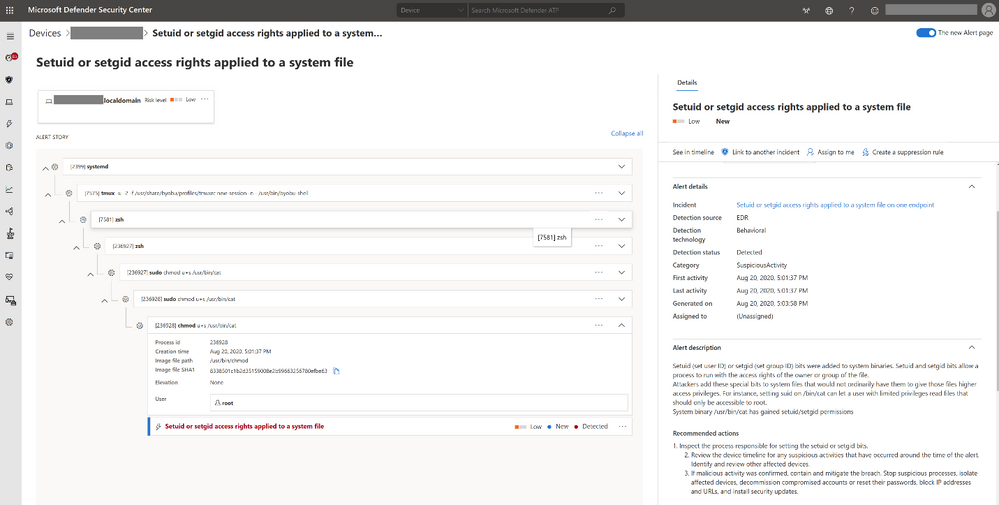
Linux EDR preview scope
Microsoft Defender for Endpoint on Linux supports recent versions of the six most common Linux server distributions:
- RHEL 7.2+
- CentOS Linux 7.2+
- Ubuntu 16 LTS, or higher LTS
- SLES 12+
- Debian 9+
- Oracle Linux 7.2
With Defender for Endpoint EDR capabilities for Linux, your security team can immediately start benefiting from:
- Rich investigation experience – including machine timeline, process creation, file creation, network connections, login events and, of course, the popular advanced hunting.
- Optimized performance – enhanced CPU utilization in compilation procedures and large software deployments.
- In-context AV detections – just like with Windows, get insight into where a threat came from and how the malicious process or activity was created.
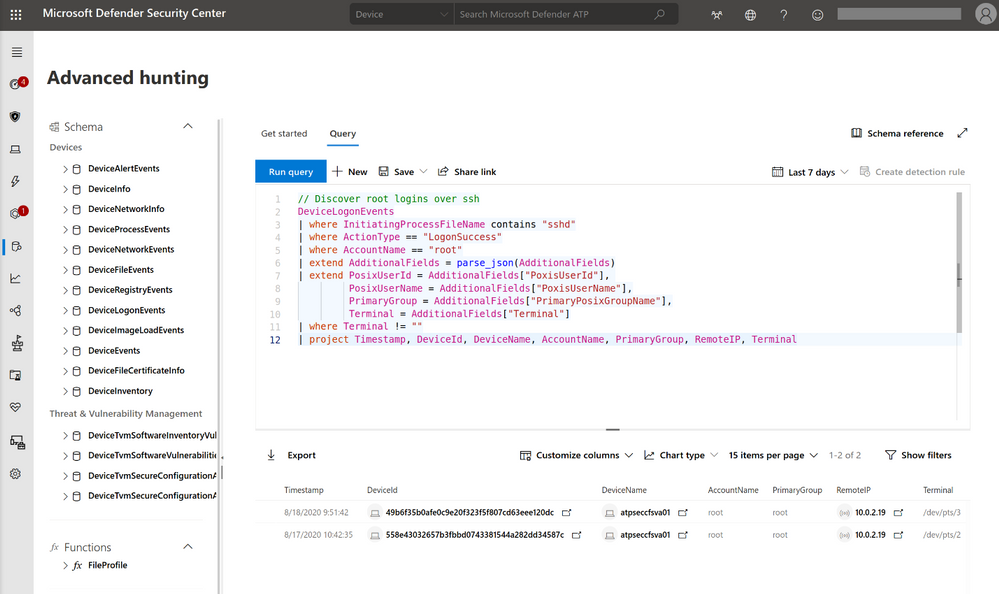
Getting started with Linux EDR preview
To get started with Microsoft Defender for Endpoint public preview capabilities, we encourage customers to turn on preview features in Microsoft Defender Security Center.
If you’re already running Microsoft Defender for Endpoint on Linux, we recommend that you configure some of your Linux servers to Preview mode, by applying the following command on the device:
$ sudo mdatp edr early-preview enable
Please make sure you are running version 101.12.99 or higher. The version can be found in the output of “mdatp health”.
If you are new to Microsoft Defender for Endpoint on Linux, learn how to get started by visiting our documentation and then enable the preview mode as explained above.
Experience Linux EDR with simulated attack
To test out the functionalities of EDR for Linux, follow the steps below to simulate a detection on your Linux server and investigate the case. Please share your feedback with us!
- Verify that the onboarded Linux server appears in Microsoft Defender Security Center. If this is the first onboarding of the machine, it can take up to 20 minutes until it appears.
- Download and extract the script file from here aka.ms/LinuxDIY to an onboarded Linux server and run the following command: “./mde_linux_edr_diy.sh”
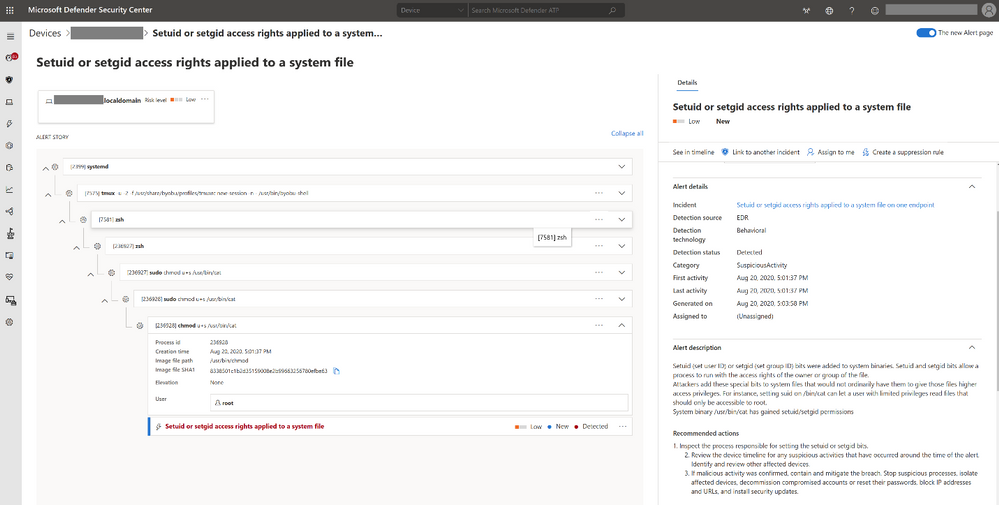
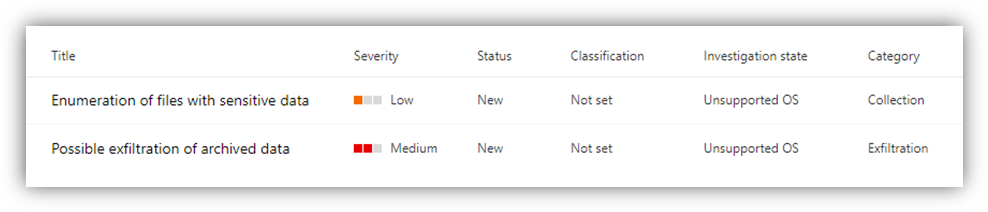
- After a few minutes, should be raised in Microsoft Defender Security Center.
- Look at the alert details, machine timeline, and perform your typical investigation steps.
Help us innovate Microsoft Defender for Endpoint on Linux
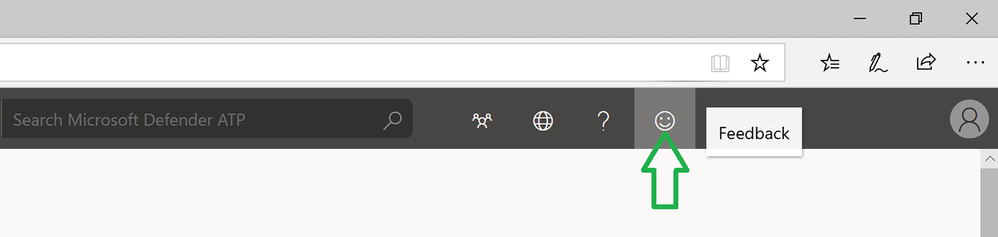
We are very excited to share today’s Linux EDR preview news with you and your feedback is highly valuable to us! Join us on the journey to enhance Microsoft Defender for Endpoint on Linux. Try the new Linux EDR capabilities and You can submit feedback by joining the discussion below or by clicking on the ‘send a smile/frown’ icon on the top right corner of the security center.
If you’re not yet taking advantage of Microsoft’s industry leading optics and detection capabilities, sign up for a free trial of Microsoft Defender for Endpoint today.
Tomer Hevlin
Microsoft Defender for Endpoint Team
by Contributed | Nov 17, 2020 | Azure, Microsoft, Technology
This article is contributed. See the original author and article here.
Azure Data Studio – a cross-platform client tool with hybrid and poly cloud capabilities – now brings KQL experiences for modern data professionals. In this episode with Julie Koesmarno, she will show KQL magic in Notebooks and the native KQL experiences – all in Azure Data Studio. You’ll also learn more about the use cases for KQL experiences in Azure Data Studio and our roadmap.
Watch on Data Exposed
Resources:
View/share our latest episodes on Channel 9 and YouTube!
by Scott Muniz | Nov 17, 2020 | Security, Technology
This article is contributed. See the original author and article here.
Original release date: November 17, 2020
Cisco has released security updates to address vulnerabilities in Cisco Security Manager. A remote attacker could exploit these vulnerabilities to obtain sensitive information.
The Cybersecurity and Infrastructure Security Agency (CISA) encourages users and administrators to review the following Cisco Security Advisories and apply the necessary updates.
This product is provided subject to this Notification and this Privacy & Use policy.
by Contributed | Nov 17, 2020 | Technology
This article is contributed. See the original author and article here.
Matt Soseman, Senior Security Architect, One Commercial Partner @ Microsoft
History:
As an IT professional of 20 years, I can recall the days of supporting line of business applications hosted in a corporate datacenter, behind a firewall, where IT had complete control. As Software as a Service (SaaS) started becoming the new modern line of business apps, a new challenge presented itself – the infrastructure behind that app is outside IT’s control. Not having controls to govern access (nor the data) in the app posed significant risks to the organization, not to mention a lack of visibility into the compliance and security posture of the app.
Fast forward to present day, SaaS apps are mission critical components to successful operations for an organization – cloud storage, online meetings, customer relationship management, inventory control, payroll and so much more. SaaS provides the organization with the modern technology to meet business needs, without a large infrastructure investment. However, SaaS needs to be trusted by the IT department and be carefully considered as part of a security and compliance strategy.
Matt’s Insight: As I am sure you would agree, reality looks something like:
Business: “I want my SaaS apps now!”
IT: “What do you need me to support? Do you have funding and staffing? Will this app touch security, compliance, is governance needed, etc.?”
Business: “I am already using SaaS apps, and you don’t know I am using them”
IT: “…”
More SaaS Apps, More SaaS Problems:
As SaaS becomes more popular and the business is setting expectations of usage, from an IT perspective SaaS presents many challenges. Some of the common challenges that often come up are:
How does your organization discover SaaS apps:
- Discover new and existing SaaS apps in my environment?
- Determine which apps can be used, and which can be blocked?
- Evaluate the security and compliance risks of the app?
- Identify who is using the apps and how much is used?
- Get notified when new apps are discovered?
- Get notified when an app has a public data breach?
How does your organization block SaaS apps:
- Block SaaS apps I do not want users to access?
- Ensure the block is occurring at not only the firewall layer, but also the client layer?
How does your organization approve and provision access to SaaS apps:
- Approve new/existing SaaS apps to be used?
- Consider an automated workflow?
- Provision access to approved apps?
- Remove access to approved apps?
App access:
- Govern access to the app?
- Ensure access encompasses Multi-Factor Authentication and Single Sign On?
- Require/verify the app is only accessed only from a managed device?
Data Loss Prevention:
- Block downloads of sensitive data?
- Block uploads of sensitive data?
- Control the types of data in specific activities? (i.e. printing, instant messaging, copy/paste, etc)
- See if data is being shared externally?
- Monitor for abnormal activities?
- Scan all the data in the app and discover sensitive data, and apply appropriate controls?
Matt’s Insight: The priority is to always strike a balance between productivity and security. There are so many more challenges that come up with SaaS app usage than what is listed above. It starts with gaining visibility to the apps, then using those insights to build a strategy on how to block/govern/control the apps. As I am sure you will agree, this is a journey and not a destination.
How can a Cloud Access Security Broker help?
When I think about how to use a CASB, it comes down to the outcome I am trying to drive. I need to clearly understand what I am trying to accomplish, why it needs to be done and the business outcome it will drive. I cannot stress enough understanding the why as a critical component of your decision-making process: ask yourself if the SaaS app is truly a requirement or a ‘nice to have.’ This helps to ensure it is being used for the right reasons – ultimately helping to transform the business with users who are more productive with proper security in place.
One approach is to address these concerns with each SaaS app individually using the app’s administrative controls. However, the problem with this approach is that SaaS apps are not always centrally managed. This is critical to centralize alerting, activity visibility, common policy, dashboards/reporting, and more. This is where a Cloud Access Security Broker (CASB) comes in. The CASB offers many capabilities to help you address challenges such as:
- Discover new and existing SaaS apps in the environment.
- Identify security and compliance risk for discovered SaaS apps.
- Provide visibility and governance to all user/admin activity within SaaS apps.
- Apply policy controls to govern how an app is accessed and how data in an app can be used (i.e., Data Loss Prevention).
- Robust reporting on SaaS app usage.
- Alerting on policy violations.
- Anomalous behavior detection and mitigation.
- Real-time session controls.
- And more!
Another way to get ideas for how a CASB can be used is to review some common use cases, for example from Microsoft’s Top 20 CASB Use Cases:
1) Discover all cloud apps and services used in your organization
2) Assess the risk and compliance of your cloud apps
3) Govern discovered cloud apps and explore enterprise-ready alternatives
4) Enable continuous monitoring to automatically detect new and risky cloud apps
5) Detect when data is being exfiltrated from your corporate apps
6) Discover OAuth apps that have access to your environment
7) Gain visibility into corporate data stored in the cloud
8) Enforce DLP and compliance policies for sensitive data stored in your cloud apps
9) Ensure safe collaboration and data sharing practices in the cloud
10) Protect your data when it’s downloaded to unmanaged devices
11) Enforce adaptive session controls to manage user actions in real-time
12) Record an audit trail for all user activities across hybrid environments
13) Identify compromised user accounts
14) Detect threats from users inside your organization
15) Detect threats from privileged accounts
16) Identify and revoke access to risky OAuth apps
17) Detect and remediate malware in your cloud apps
18) Audit the configuration of your IaaS environments
19) Monitor user activities to protect against threats in your IaaS environments
20) Capture user activities within custom cloud and on-premises apps
Matt’s Insight: When looking to add a CASB to my toolbox, understanding what business challenges and security objectives I need to meet is critical. Bringing in a subject matter expert from a Microsoft Partner can help me build that business justification by identifying the why and the outcome I need to achieve. It can be helpful to bring in someone who has done this for organizations like mine and who can bring new insights that perhaps I have not thought of. That experience is invaluable and can help me build the business case and a plan of action.
How does a Cloud App Security Broker Work?
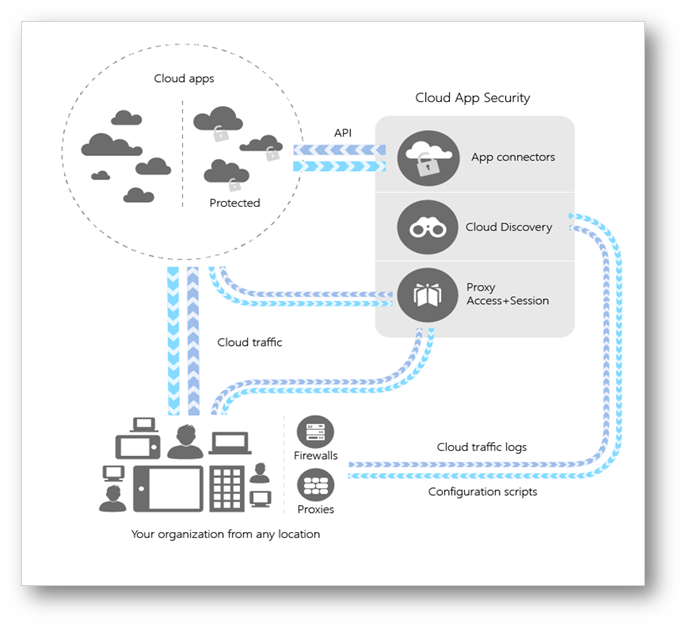
For this, I am going to reference Microsoft’s CASB – Microsoft Cloud App Security (MCAS). The following diagram is a high-level architecture of MCAS to use as a reference in this section:
 MCAS High-Level Architecture
Microsoft Cloud App Security supports various deployment modes including log collection, API connectors, and reverse proxies. It provides rich visibility, control over data travel, and analytics to identify and combat cyberthreats across your Microsoft and third-party cloud services. Yes, I wrote third-party cloud services (read on)!
I am often asked if MCAS requires a client-side proxy agent to be installed on the user’s device. The answer is no, it does not; the proxy capability with session control is achieved through identity and Single Sign On (supporting both Azure Active Directory and 3rd party identity providers). This flexibility allows governance and protection for users accessing SaaS apps from either a corporate or Bring Your Own Device (BYOD).
If I were to summarize the capabilities of MCAS, it would come down to five main pillars:
1) Shadow IT discovery and control
2) Information Protection
3) Secure Access
4) Threat Protection
5) Cloud Security Posture Management
Matt’s Insight: Microsoft Cloud App Security is a multi-purpose tool, with many capabilities that we will get deeper into with each blog. Afterall, that is the intent of the MCAS Ninja Blog Series, to dive deep into everything MCAS! A key feature is that it does not require a client-side agent making deployment simpler and transparent to end-users. If you are a Microsoft Partner, start thinking about how MCAS can be used with your clients to help them be successful with their SaaS apps. For customers, begin thinking about prioritizing the pillars mentioned above and focus on it within MCAS to start.
Wrap Up & Conclusion:
As you can see, a Cloud Access Security Broker wears many hats to perform jobs that help manage SaaS app usage in your organization. I see the CASB as a core solution to enable secure remote work and key to digital transformation. CASBs allows organizations to use the SaaS apps they need while enabling IT to provide the security (and in some cases even compliance) they require.
How are you using a CASB in your organization? What use cases do you find valuable? Let me know in the comments below as I am anxious to hear your insights. More blog posts are on the way in the MCAS Ninja series. The next blog post will focus entirely on architecture and design of Microsoft Cloud App Security.
I am honored to have you on this journey with me, see you soon!
–Matt Soseman
http://aka.ms/SosemanTV
P.S. Stay up to date on all the MCAS Ninja training at http://aka.ms/MCASNinja
by Contributed | Nov 17, 2020 | Technology
This article is contributed. See the original author and article here.
In September 2020, Microsoft announced the new Microsoft Certified: Power Platform Developer Associate certification, providing an opportunity to demonstrate your expertise in implementing Microsoft Power Platform solutions. To earn this certification, you must pass Exam PL-400: Microsoft Power Platform Developer. This is a standalone certification and doesn’t require any prerequisite certifications or exams.
Exam PL-400 is replacing Exam MB-400
Exam MB-400 expires on December 31, 2020. After that date, only PL-400 will be available. If you’re currently preparing to take MB-400, make sure you take and pass the exam before it’s retired. To compare the two exams, check out the PL-400 skills outline document on the exam page or read Power Platform Developer PL-400 Certification, a blog post written by a Microsoft Certified Trainer (MCT). When you pass Exam PL-400, you’ll have earned your Power Platform Developer Associate certification and it will be valid for two years. If you passed Exam MB-400 before it retired and earned the associated certification, Power Apps + Dynamics 365 Developer Associate, that certification will remain valid for two years.
If you’re a professional developer who would like to extend and further customize Microsoft Power Platform capabilities for your current or future employer, you can benefit from this training and certification. The comprehensive training can get you up to speed with the platform and its extensibility points, providing many examples of how it’s done properly. And by validating your skills, certification can help you get noticed and rewarded with a salary increase or promotion. According to the 2020/2021 Nigel Frank Microsoft Dynamics Salary Survey, 61 percent of respondents believe that certifications give you the edge in the job market, 74 percent of Dynamics 365 professionals think that training and certification make you more attractive to employers, and 73 percent of permanent employees reported that their salary increased after certification.
Is this certification right for you?
Are you a developer responsible for developing, securing, and troubleshooting Microsoft Power Platform solutions? Do you implement components of the solution, such as application enhancements, custom user experience, system integrations, data conversions, custom process automation, and custom visualizations? If so, this certification can help you build and validate your skills.
To train for and earn this certification, you must have strong applied knowledge of Microsoft Power Platform, including an in-depth understanding of its capabilities, boundaries, and constraints. You should also have a basic understanding of DevOps practices for Microsoft Power Platform, and your development experience should include Microsoft Power Platform, JavaScript, JSON, TypeScript, C#, HTML, .NET, Azure, Microsoft 365, RESTful web services, ASP.NET, and Power BI.
When you’ve completed the training and passed Exam PL-400, which is a very broad developer-oriented exam, you’ll have demonstrated skills in Common Data Service, Power Apps (canvas, model, and portal), Power Automate, Power BI, and Power Virtual Agents. You’ll also be able to integrate with, and use, Azure with Microsoft Power Platform.
How can you prepare?
To help you plan your journey, check out our infographic, The journey to Microsoft Certified: Power Platform Developer Associate. You can also find it in the resources section on the certification page, which contains other valuable help. There, you’ll also find links to the free online learning paths and paid instructor-led trainings offered by Microsoft Learning Partners that help you prepare for this exam, along with a link to schedule the exam.
Demand for people trained in Microsoft Power Platform is growing, according to job listings on LinkedIn, PricewaterhouseCoopers, and other sites. See whether this new certification can help expand your opportunities for hiring or promotion.

by Contributed | Nov 17, 2020 | Technology
This article is contributed. See the original author and article here.
Migrating, intact, from one platform to another is no easy task – unless you work with a trusted partner who knows how to get from here to there, and not have that be the end.
The Intrazone continues to spotlight Microsoft partners, the people and companies who deliver solutions and services to empower our customers to achieve more. In our 8th partner episode, we talk with Tewabe “Joro” Ayenew (Microsoft 365 migrations Executive | Verinon) and his customer, Gary Moss (Director, Application Services Assurance | Stanley Black & Decker).
In this episode, we dig into the breadth of SharePoint at Stanley Black & Decker over the last 15 years ago. We then dig into one of their recent successes moving 9TB of content from OpenText Documentum eRoom to SharePoint in Microsoft 365. The result being updated and advanced productivity for their 9,400 users on this content, now more aligned with much of their active content.
And… on with the show.
https://html5-player.libsyn.com/embed/episode/id/16811675/height/90/theme/custom/thumbnail/yes/direction/backward/render-playlist/no/custom-color/247bc1/
Subscribe to The Intrazone podcast! Listen this partner episode on Verinon now + show links and more below.
![Left-to-right: Tewabe “Joro” Ayenew (Microsoft 365 migrations Executive | Verinon) and Gary Moss (Director, Application Services Assurance | Stanley Black & Decker). [The Intrazone guests]](https://techcommunity.microsoft.com/t5/image/serverpage/image-id/233973i09064276AAB55246/image-size/large?v=1.0&px=999 "IZ-P008_Joro-and-Gary.jpg") Left-to-right: Tewabe “Joro” Ayenew (Microsoft 365 migrations Executive | Verinon) and Gary Moss (Director, Application Services Assurance | Stanley Black & Decker). [The Intrazone guests]
Left-to-right: Tewabe “Joro” Ayenew (Microsoft 365 migrations Executive | Verinon) and Gary Moss (Director, Application Services Assurance | Stanley Black & Decker). [The Intrazone guests]
Link to articles mentioned in the show:
- Hosts and guests
- Articles and sites
- Events
Subscribe today!
Listen to the show! If you like what you hear, we’d love for you to Subscribe, Rate and Review it on iTunes or wherever you get your podcasts.
Be sure to visit our show page to hear all the episodes, access the show notes, and get bonus content. And stay connected to the SharePoint community blog where we’ll share more information per episode, guest insights, and take any questions from our listeners and SharePoint users (TheIntrazone@microsoft.com). We, too, welcome your ideas for future episodes topics and segments. Keep the discussion going in comments below; we’re hear to listen and grow.
Subscribe to The Intrazone podcast! And listen this partner episode on Verinon now.
Thanks for listening!
The SharePoint team wants you to unleash your creativity and productivity. And we will do this, together, one partner at a time.
The Intrazone links
![Left to right [The Intrazone co-hosts]: Chris McNulty, director (SharePoint, #ProjectCortex – Microsoft) and Mark Kashman, senior product manager (SharePoint – Microsoft).](https://www.drware.com/wp-content/uploads/2020/11/large-375 "Chris-Mark_in-studio.jpg") Left to right [The Intrazone co-hosts]: Chris McNulty, director (SharePoint, #ProjectCortex – Microsoft) and Mark Kashman, senior product manager (SharePoint – Microsoft).
Left to right [The Intrazone co-hosts]: Chris McNulty, director (SharePoint, #ProjectCortex – Microsoft) and Mark Kashman, senior product manager (SharePoint – Microsoft).
 The Intrazone, a show about the Microsoft 365 intelligent intranet (aka.ms/TheIntrazone)
by Contributed | Nov 17, 2020 | Technology
This article is contributed. See the original author and article here.
In this series on DevOps for Data Science, I’m covering the Team Data Science Process, a definition of DevOps, and why Data Scientists need to think about DevOps. It’s interesting that most definitions of DevOps deal more with what it isn’t than what it is. Mine, as you recall, is quite simple:
DevOps is including all parties involved in getting an application deployed and maintained to think about all the phases that follow and precede their part of the solution
Now, to do that, there are defined processes, technologies, and professionals involved – something DevOps calls “People, Process and Products”. And there are a LOT of products to choose from, for each phase of the software development life-cycle (SDLC).
But some folks tend to focus too much on the technologies – referred to as the DevOps “Toolchain”. Understanding each of these technologies is indeed useful, although there are a LOT of them out there from software vendors (including Microsoft) and of course the playing field for Open Source Software (OSS) is at least as large, and contains multiple forks.
While knowing a set of technologies is important, it’s not the primary issue. I tend to focus on what I need to do first, then on how I might accomplish it. I let the problem select the technology, and then I go off and learn that as well as I need to so that I can get my work done. I try not to get too focused on a given technology stack – I grab what I need, whether that’s Microsoft or OSS. I choose the requirements and constraints for my solution, and pick the best fit. Sometimes one of those constraints is that everything needs to work together well, so I may stay in a “family” of technologies for a given area. In any case, it’s the problem that we are trying to solve, not the choice of tech.
That being said, knowing the tech is a very good thing. It will help you “shift left” as you work through the process – even as a Data Scientist. It wouldn’t be a bad idea to work through some of these technologies to learn the process.
I have a handy learning plan you can use to start with here: https://github.com/BuckWoody/LearningPaths/blob/master/IT%20Architect/Learning%20Path%20-%20Devops%20for%20Data%20Science.md. (Careful – working through all the references I have here could take a while – but it’s a good list). There are some other more compact references at the end of this article.
See you in the next installment on the DevOps for Data Science series.
For Data Science, I find this progression works best – taking these one step at a time, and building on the previous step – the entire series is here:
- Infrastructure as Code (IaC)
- Continuous Integration (CI) and Automated Testing
- Continuous Delivery (CD)
- Release Management (RM)
- Application Performance Monitoring
- Load Testing and Auto-Scale
In the articles in this series that follows, I’ll help you implement each of these in turn.
(If you’d like to implement DevOps, Microsoft has a site to assist. You can even get a free offering for Open-Source and other projects: https://azure.microsoft.com/en-us/pricing/details/devops/azure-devops-services/)


Recent Comments