
by Contributed | Nov 18, 2020 | Technology
This article is contributed. See the original author and article here.
In this week’s edition of Reconnect, we are joined by none other than 15-time MVP titleholder Dave Noderer!
The South Florida software developer and community activist has been developing custom business automation software, services and applications for clients in his region since founding Computer Ways, Inc. in 1994.
Windows-based application development has been one of Dave’s main areas of focus ever since, achieving Microsoft Certified System Engineer + Internet, Microsoft Certified Solutions Developer, and Microsoft Certified Database Administrator certifications.
Always willing to expand his expertise and share knowledge with others, Dave is an active member of many technical groups and meetups in South Florida. For starters, Dave co-founded FlaDotNet in 2001 to organize in-person and online meetings for the community.
Later, Dave worked to establish the annual event of The South Florida Code Camp. More than 1500 developers have been in attendance in recent years with the February event focused on technologies like .NET, SQL, Cloud, The Internet of Things and machine learning.
Last year, meanwhile, Dave co-founded the Microsoft Cloud South Florida User Group.
“My passion is community of any kind, especially the developer community,” Dave says.
This passion is certainly evident in Dave’s extensive list of community engagements, which also includes work with Florida Azure Association, Azure Global Boot Camp, SQL Saturday and ITPalooza.
When he’s not lending a hand to the developer community, Dave is involved with the wider community as well. Dave works with Kiwanis, Deerfield Beach Historical Society, Hillsboro Lighthouse Society and the Deerfield Chamber.
For more on Dave and his dedicated support of all things community, check out his blog and Twitter @davenoderer

by Contributed | Nov 18, 2020 | Technology
This article is contributed. See the original author and article here.
The new release for DPM SCOM management pack is now out for download! You can access the MP here:
Download Link: https://www.microsoft.com/en-us/download/details.aspx?id=56560
This Management Pack has fixed some of the key issues found in earlier version of DPM SCOM MP.
Also, we announced the release of System Center Data Protection Manager UR 10! You can access the KB article here for the release for a list of known issues fixed and new features:
DPM 2016 UR10 KB article:
https://support.microsoft.com/en-us/help/4578608/update-rollup-10-for-system-center-2016-data-protection-manager
SCDPM 2016 UR10 has a new optimized capability for backup data migration. For details on the new feature refer to the documentation here.
Follow us on https://twitter.com/SCDPM for the latest updates on DPM!

by Contributed | Nov 18, 2020 | Technology
This article is contributed. See the original author and article here.
Hi Team, Eric Jansen here again, this time to add on to Joel Vickery’s previous post discussing how to view the DNS Analytic Logs without having to disable them. It’s a great read if you haven’t already seen it…. however, there’s been a very unfortunate death in the family since that posting…

It was a sad day when the news posted that Microsoft Message Analyzer was no more; because it was an extremely feature rich tool that myself and a lot of others still use today, albeit of the last release – that can no longer be downloaded. In situations like this one though, we must adapt and overcome, to find new ways to accomplish the same goals. This is where I thought I might be able to help empower you guys to be able to do more, using the power of PowerShell. Reading through online forums I’ve seen numerous posts where folks say that it’s not possible to view the DNS Analytical log while it’s running. I’m here to tell you guys that you absolutely can, and not just using the methods that Joel outlined in his blog.
As you may have noticed in part one of the series, I used several cmdlets that if you tried to follow along with the posting, wouldn’t have worked for you. That’s because they’re all custom functions that I’ve personally written, since I spend a fair amount of time digging around in these logs, just to make my life a bit easier. I’ve written a series of functions (Seven to be exact) to help with DNS Analytic Log configuration. As we move along through the series, I’ll likely share more of them, and at some point, I’ll see if I can muster up the motivation to setup a code repository on GitHub, if the interest is there.
For today’s topic though, I thought I’d share one of my shiny new functions, I call her…… Show-DNSAnalyticLog. I decided that I’d even reveal the magic behind the curtains (OK, it’s not that magical, but it does what I want it to.). In reality, there’s only one real line that does the work in the wrapper-of-a-function that I wrote, and that’s the line that uses Get-WinEvent, specifically with the use of the -Oldest parameter; that’s the key.
So, let’s take a look at this sample code and a few notes that I’ve added in there:
<#
.Synopsis
   Shows what's currently in the DNS Analytic log regardless of if the log is enabled or disabled.

.DESCRIPTION
   See Synopsis.

.EXAMPLE
   Show-DNSAnalyticLog

.NOTES
 Alpha Version - 13 Oct 2020

 Disclaimer:

 This is a sample script.  Sample scripts are not supported under any Microsoft standard support program or service. The sample scripts are provided AS IS without warranty of any kind. Microsoft further disclaims all implied warranties including, without limitation, any implied warranties of merchantability or of fitness for a particular purpose. The entire risk arising out of the use or performance of the sample scripts and documentation remains with you. In no event shall Microsoft, its authors, or anyone else involved in the creation, production, or delivery of the scripts be liable for any damages whatsoever (including, without limitation, damages for loss of business profits, business interruption, loss of business information, or other pecuniary loss) arising out of the use of or inability to use the sample scripts or documentation, even if Microsoft has been advised of the possibility of such damages.

 AUTHOR: Eric Jansen, MSFT
#>

function Show-DNSAnalyticLog
{
    [CmdletBinding()]
    [Alias('SDAL')]

    Param
    (
        #Parameter to define the server.
        [Parameter(Mandatory=$false,
                   ValueFromPipelineByPropertyName=$true,
                   Position=0)]
        $Server = $env:COMPUTERNAME
    )

        #Define the DNS Analytical Log name.
        $EventLogName = 'Microsoft-Windows-DNSServer/Analytical'

        Try{

            #Step 1 for Show-DNSAnalyticLog.....does the Analytical log even exist on the computer to be enumerated?
            If(Get-WinEvent -listlog $EventLogName  -ErrorAction SilentlyContinue){

                $DNSAnalyticalLogData = Get-WinEvent -listlog $EventLogName
                If(($DNSAnalyticalLogData.LogFilePath).split("")[0] -eq '%SystemRoot%'){$DNSAnalyticalLogPath = $DNSAnalyticalLogData.LogFilePath.Replace('%SystemRoot%',"$env:Windir")}

            }
            Else{
            Write-Host "The Microsoft-Windows-DNSServer/Analytical log couldn't be found to be enumerated.`n" -ForegroundColor Red
            Write-Host "Ensure that this function is being run on a DNS Server that has the Microsoft-Windows-DNSServer/Analytical log."
            Return
            }

            #Check to make sure that the log can be found to be read, because if it's cleared, via the GUI, or wevtutil, or Clear-DNSAnalyticLog, the .etl is not just cleared, but deleted.
            If(Test-Path $DNSAnalyticalLogPath){
            Get-WinEvent -Path $DNSAnalyticalLogPath -Oldest
            }
            Else{
            Write-Warning "The $($EventLogName) log doesn't exist at the expected path:"
            Write-Host "`n$($DNSAnalyticalLogPath)"
            Return
            }

        }
        Catch{
        $_.Exception.Message
        }
}
So, once you load that guy up, all you need to do is type Show-DNSAnalyticLog, and you’re off to the races. It’ll dump an unparsed / unfiltered list of events that’ll scroll down the screen until everything’s dumped out for your viewing pleasure. One thing to take into consideration though, is that when dumping ALL events (and there could be millions of them), then it could take a while before the scroll fest begins. Once it does though, it’ll look something like this…again, starting from the oldest created event, racing to catch up with the newest written event:
Note: The below just shows that the log is in fact enabled and was written to, even after I showed the current time, followed by the running of the function to show the events that are in the log.
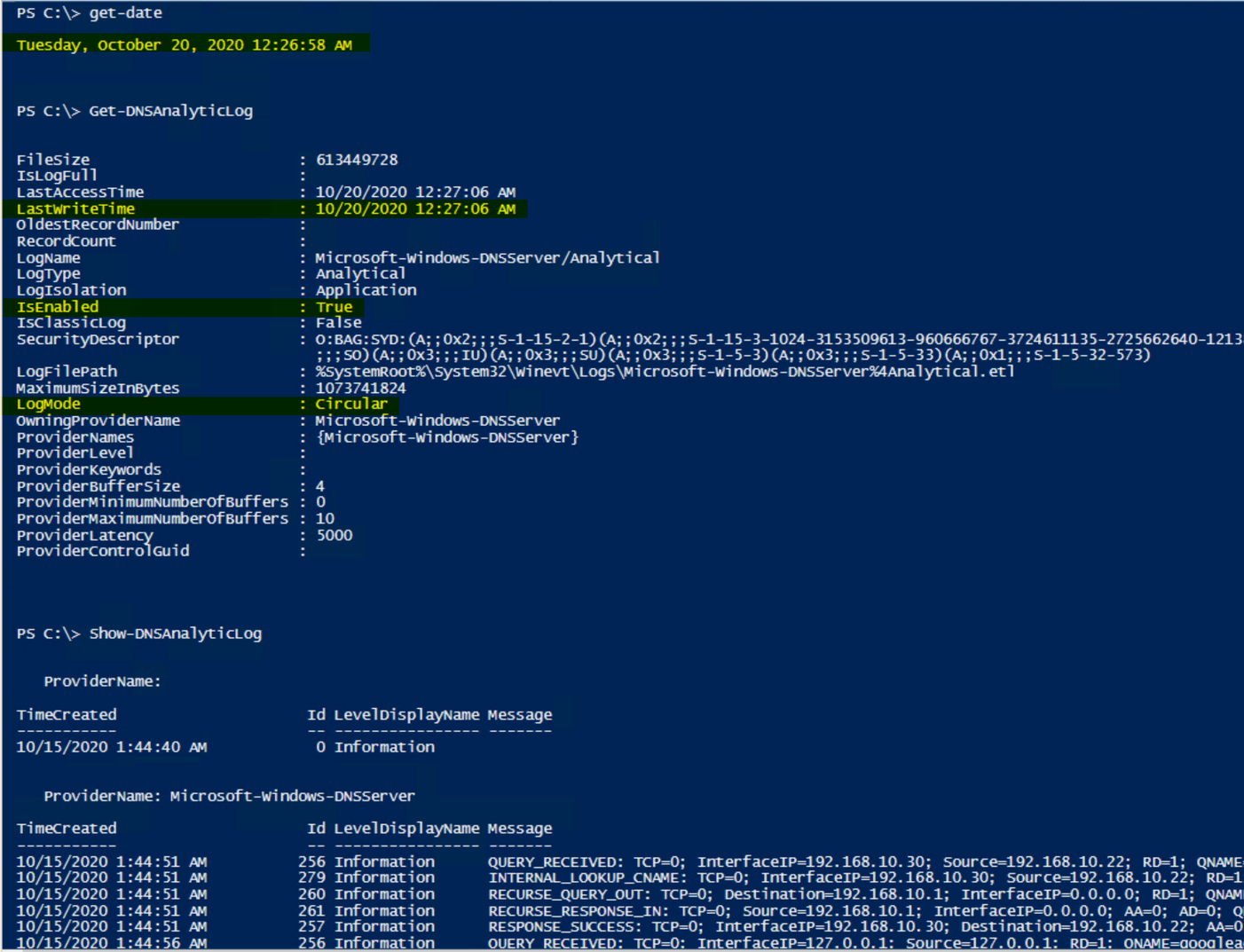
Anyhow, nothing crazy, but if it can help someone else, then my job is done (for the time being).
But who wants unparsed / unfiltered logs when you’re on a hunt? Gross. Maybe we can talk about that in a future post. ;)
Until next time…
by Contributed | Nov 18, 2020 | Azure, Microsoft, Technology
This article is contributed. See the original author and article here.
This week, Tiberiu Radu (Azure Stack Hub PM @rctibi) and I, had the chance to speak to Azure Stack Hub Partner Cloud Assert. Cloud Assert is an Azure Stack Hub partner that helps provide value to both Enterprises and Service Providers. Their solutions cover aspects from billing and approvals all the way to multi-Azure Stack Hub stamp management. Join the Cloud Assert team as we explore the many ways their solutions provide value and help Service Providers and Enterprises in their journey with Azure Stack Hub.
They have several solutions for customers and partners like Azure Stack Hub Multi-Stamp management. Azure Stack Hub Multi-Stamp management enables you to manage and take actions across multiple stamp instances from a single Azure Stack Hub portal with one-pane of glass experience. It provides a holistic way for operators and administrators to perform many of their scenarios from a single portal without switching between various stamp portals. This is a comprehensive solution from Cloud Assert leveraging Cloud Assert VConnect and Usage and billing resource providers for Azure Stack Hub.
We created this new Azure Stack Hub Partner solution video series to show how our customers and partners use Azure Stack Hub in their Hybrid Cloud environment. In this series, as we will meet customers that are deploying Azure Stack Hub for their own internal departments, partners that run managed services on behalf of their customers, and a wide range of in-between as we look at how our various partners are using Azure Stack Hub to bring the power of the cloud on-premises.
Links mentioned through the video:
I hope this video was helpful and you enjoyed watching it. If you have any questions, feel free to leave a comment below. If you want to learn more about the Microsoft Azure Stack portfolio, check out my blog post.
by Contributed | Nov 17, 2020 | Azure, Microsoft, Technology
This article is contributed. See the original author and article here.
Final Update: Wednesday, 18 November 2020 01:36 UTC
We’ve confirmed that all systems are back to normal with no customer impact as of 11/18, 01:15 UTC. Our logs show the incident started on 11/18, 00:20 UTC and that during the 55 minutes that it took to resolve the issue some customers might have experienced issues with missed or delayed Log Search Alerts or experienced difficulties accessing data for resources hosted in West US2 and North Europe.
- Root Cause: The failure was due to an issue in one of our backend services.
- Incident Timeline: 55 minutes – 11/18, 00:20 UTC through 11/18, 01:15 UTC
We understand that customers rely on Azure Log Analytics as a critical service and apologize for any impact this incident caused.
-Saika
by Contributed | Nov 17, 2020 | Azure, Microsoft, Technology
This article is contributed. See the original author and article here.
As customers progress and mature in managing Azure Policy definitions and assignments, we have found it important to ease the management of these artifacts at scale. Azure Policy as code embodies this idea and focuses on managing the lifecycle of definitions and assignments in a repeatable and controlled manner. New integrations between GitHub and Azure Policy allow customers to better manage policy definitions and assignments using an “as code” approach.
More information on Azure Policy as Code workflows here.
Export Azure Policy Definitions and Assignments to GitHub directly from the Azure Portal
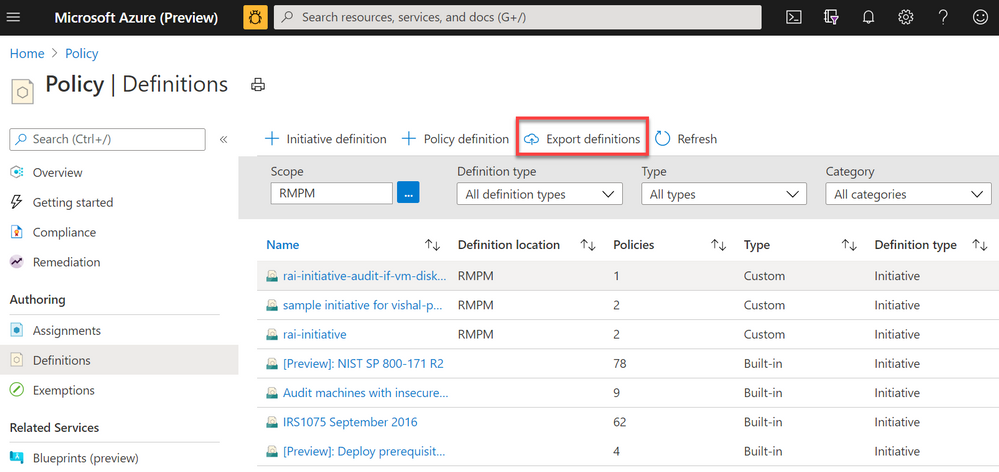
 Screenshot of Azure Policy definition view blade from the Azure Portal with a red box highlighting the Export definitions button
The Azure Policy as Code and GitHub integration begins with the export function; the ability to export policy definitions and assignments from the Azure Portal to GitHub repositories. Now available in the definitions view, the export definition button will allow you to select your GitHub repository, branch, directory then instruct you to select the policy definitions and assignments you wish to export. After exporting, the selected artifacts will be exported to the GitHub. The files will be exported in the following recommended format:
|- <root level folder>/  ________________ # Root level folder set by Directory property

| |- policies/  ________________________ # Subfolder for policy objects

|  |- <displayName>_<name>____________ # Subfolder based on policy displayName and name properties

|   |- policy.json _________________ # Policy definition

|    |- assign.<displayName>_<name>__ # Each assignment (if selected) based on displayName and name properties
Naturally, GitHub keeps tracks of changes committed in files which will help in versioning of policy definitions and assignments as conditions and business requirements change. GitHub will also help organizing all Azure Policy artifacts in a central source control for easy management and scalability.
Leverage GitHub workflows to sync changes from GitHub to Azure
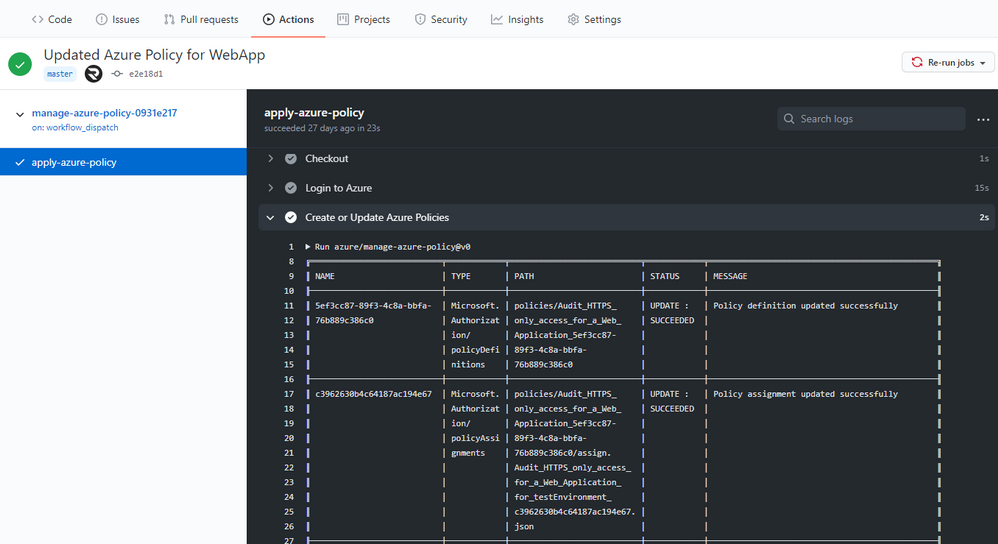 Screenshot of the Manage Azure Policy action within GitHub
An added feature of exporting is the creation of a GitHub workflow file in the repository. This workflow leverages the Manage Azure Policy action to aid in syncing changes from your source control repository to Azure. The workflow makes it quick and easy for customers to iterate on their policies and to deploy them to Azure. Since workflows are customizable, this workflow can be modified to control the deployment of those policies following safe deployment best practices.
Furthermore, the workflow will add in traceability URLs into the definition metadata for easy tracking of the GitHub workflow run that updated the policy.
More information on Manage Azure Policy GitHub Action here.
Trigger Azure Policy Compliance Scans in a GitHub workflow
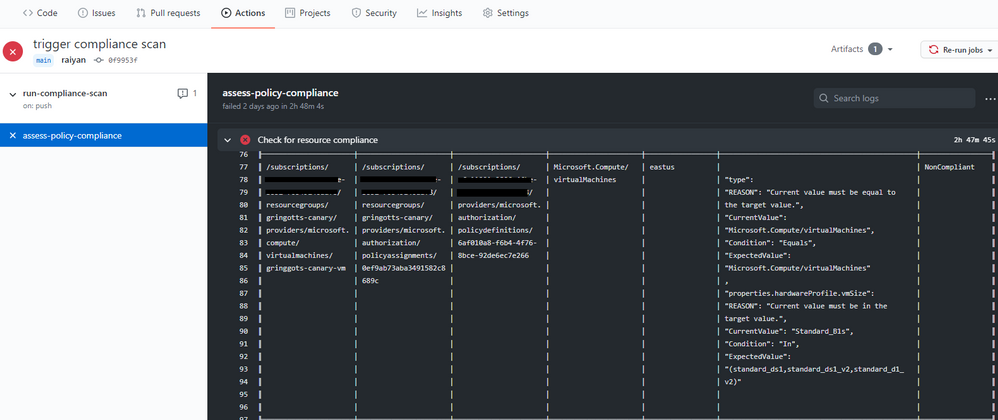 Screenshot of the Azure Policy compliance scan on GitHub Actions
We also rolled out the Azure Policy Compliance Scan that triggers an on-demand compliance evaluation scan. This can be triggered from a GitHub workflow to test and verify policy compliance during deployments. The workflow also allows for the compliance scan to be targeted at specific scopes and resources by leveraging the scopes and scopes-ignore inputs. Furthermore, the workflow is able to upload a CSV file with list of resources that are non-compliant after the scan is complete. This is great for rolling out new policies at scale and verifying the compliance of your environment is as expected.
More information on the Azure Policy Compliance Scan here.
These three integration points between GitHub and Azure Policy create a great foundation for leveraging policies in ‘as code’ approach. As always, we look forward to your valuable feedback and adding more capabilities.
by Contributed | Nov 17, 2020 | Technology
This article is contributed. See the original author and article here.
By: Adrian Moore | Sr. PM – Microsoft Endpoint Manager – Intune
The following article helps IT Pros and mobile device administrators understand some of the finer details regarding iOS device migration from an existing MDM platform to Intune when using Apple’s Automated Device Enrolment program (ADE), formally known as the Device Enrolment Program (DEP). We receive a lot of questions on how best to approach the issue of factory resets and how to handle the Apple Business Manager (ABM) side of things. We hope this article helps with some of the decisions you will face when deciding the best path forward for your organization.
As you migrate your mobile device management to Microsoft Intune, arguably one of the most important parts of the transition will be the impact to your users. Before considering how you will migrate your devices to Intune, it is important to understand your device landscape and how your employees are using their devices. This information will largely drive your migration path.
Based on our experience working with customers, the following are the most common points that will help you decide how you will migrate, and what the user experience will be during the migration:
- You currently have iOS Apple Business Manager devices enrolled in another MDM platform.
In this scenario, the devices will need to be moved to a new (Intune) MDM server in Apple Business Manager to be able to pick up an Intune ADE profile.
Devices must be factory reset to properly enrol in Intune and remain in a fully supported state with Microsoft and Apple.
- Users store personal data on these devices.
Devices with personal data on them will need to be backed up by the user to their iCloud account if they wish to retain it, however this does require you to backup corporate data to a consumer cloud service that is not controlled by your organization.
Devices must be unenrolled from the current MDM platform before the final backup is taken.
If users decide to use the restore option in the Apple Setup Assistant, once the restore is complete they will have to visit the App Store to install the Intune Company Portal.
- Users backup the device to personal iCloud.
- Backing up a device while it is still enrolled in your current MDM will mean the management profile will also be backed up, and, subsequently, re-applied to the device at the point of restore.
- You are/are not willing to factory reset the devices.
- The only supported way to enrol an ADE device is from the out-of-box experience, which requires a factory reset of the device. While it is technically possible to unenroll from one MDM platform and enrol into Intune manually via the App Store version of Company Portal, this is not recommended for several reasons:
It is not possible to “lock” a management profile to a device enrolled in this manner (however, the device does retain its “supervised” state).
The device will not show as being enrolled against an ADE profile in Intune, which means any configuration applied based on that logic will not be applied to the device.
- Devices will not get automatically marked as “Corporate”.
NOTE: If you ever need to re-enrol your ADE device, you must first add the IMEI number of that device as a corporate identifier. You might need to re-enrol your ADE device if you are troubleshooting an issue, like the device not receiving policy. In this case, you would:
- Retire the device from the Intune console.
- Add the device’s serial number as a corporate device identifier.
- Re-enrol the device by downloading the Company Portal and going through device enrolment.
Failing to do this will mean the device will be marked as “Personal” and not “Corporate”.
Now let us look at an example scenario that we commonly see when working with our customers.
Example iOS scenario
Contoso has iOS ADE devices currently enrolled in an MDM platform. They allow their staff to use their personal Apple IDs on their devices and store personal data on them. Most of their users do this, and back-up their content to iCloud. Staff understand that devices may, from time to time, need to be factory reset and may be wiped if lost or stolen. Contoso IT wants the migration to Intune to be done as quickly as possible, so they are only managing two MDM platforms for a short time. They want minimal IT interaction when it comes to users enrolling their devices. Contoso has users in regions where ADE is not supported by Apple.
In this example, the migration flow for ADE devices could look like this:
- IT Pro Action: In Apple Business Manager, move the user’s device to the new Intune MDM Server and sync devices in Intune.
- IT Pro Action: Unenroll the device from the current MDM.
- User Action: Backup the device to iCloud.
- User Action: Factory reset the device.
- User Action: Enrol device through ADE flow (do not select restore option as this will break the enrolment flow).
- User Action: Once enrolled, add Apple ID and restore any required data.
This procedure ensures that the data on the device is backed up without the old management profile and the device has been enrolled correctly with the new Intune-based ADE profile. Many of our customers add the user to a Conditional Access group after step #3, which blocks access to corporate resources until the user enrols and their device is compliant.
In the same example, the migration flow for non-ADE devices would look like this:
IT Pro Action: Unenroll the device from the current MDM.
User Action: Backup the device to iCloud.
User Action: Download Company Portal from the App Store.
User Action: Enrol device through Company Portal app.
User Action: Once enrolled, add Apple ID and restore any required data.
NOTE: The Intune service synchronizes with Apple at the following frequencies*:
- ADE: Once every 12 hours
- VPP: Once every 15 hours
*It is possible to run a manual synchronization, or use a synchronization script to increase the frequency, which can be found here (ADE) and here (VPP).
Conclusion
As you can see from the examples, the migration path will largely be determined by the way the devices are being used by your employees, so it is important to do some analysis before deciding the best path forward for your organization.
More info and feedback
For further resources on this subject, please see the links below.
Supported operating systems and browsers in Intune
Automatically enroll iOS/iPadOS devices with Apple’s Automated Device Enrolment
Enroll iOS/iPadOS devices in Intune
Backup and restore scenarios for iOS/iPadOS
Troubleshoot iOS/iPadOS device enrolment problems in Microsoft Intune
As always, we want to hear from you! If you have any suggestions, questions, or comments, please visit us on our Tech Community Page, or leave a comment below.
Follow @MSIntune and @IntuneSuppTeam on Twitter.
by Contributed | Nov 17, 2020 | Technology
This article is contributed. See the original author and article here.
This blog was published today on the M365 Developer Blog, but given its relevance and importance to our readers we wanted to publish it here too.
Microsoft Graph is the modern API for the Microsoft 365 platform. We make continuous, significant investments in its security, performance, and features to ensure it meets the needs of our own product teams as well as the global ecosystem of developers who build applications using its capabilities.
While we’re investing in Microsoft Graph, we’re also examining our legacy surface areas. Some of our existing legacy services become obsolete based on the new functionality and they no longer provide the best way to access M365 data. When this happens, we start the two-year process defined in our service deprecation policy to shut down the service in question.
Today we are announcing the deprecation of Outlook REST API v2.0 and that it will be decommissioned on November 30, 2022. Once past this date, the service will be retired, and developers may no longer access it. As part of the deprecation, we will soon disable creation of new Outlook REST API v2.0 applications.
Going forward, we will not be making any further investments in the capabilities or capacity of the Outlook REST API v2.0. In line with this announcement, we will also be retiring the OAuth Sandbox by December 31, 2020.
If you are using the Outlook REST API v2.0 in your app, you should plan on transitioning to Microsoft Graph.
Please refer to: https://docs.microsoft.com/en-us/outlook/rest/compare-graph#moving-from-outlook-endpoint-to-microsoft-graph as a starting point.
We understand that for some applications this change, even if anticipated, will require some amount of work to accommodate, but we are confident it will ensure better security, reliability, and performance for our customers. The Microsoft Support Community is here to support you through this transition.
Thanks for continuing with us on our journey as we continue to improve productivity for everyone on the planet, and please let us know if you have any additional questions or concerns by reaching out to our Q&A Mail forum.
The Microsoft 365 Team
by Contributed | Nov 17, 2020 | Technology
This article is contributed. See the original author and article here.
We have a maintenance window on November 20, 8:00AM to 5:00PM Pacific time. HDC’s Driver Flight Status page and the Flight Performance Report will be unavailable at this time. If all goes well, we’ll be back up and running in a much shorter period of time. All other HDC functions, including APIs and driver submissions will be available during this window.

by Contributed | Nov 17, 2020 | Azure, Microsoft, Technology
This article is contributed. See the original author and article here.

As Azure continues to deliver new H-series and N-series virtual machines that match the capabilities of supercomputing facilities around the world, we have at the same time made significant updates to Azure CycleCloud — the orchestration engine that enables our customers to build HPC environments using these virtual machine families.
We are pleased to announce the general availability of Cyclecloud 8.1, the first release of CycleCloud on the 8.x platform. Here are some of the new features in this release that we are excited to share with you.
Welcome Univa Grid Engine
Univa Grid Engine, the enterprise-grade version of the beloved Grid Engine scheduler, joins IBM Spectrum LSF, OpenPBS, Slurm, and HTCondor as supported schedulers in CycleCloud.
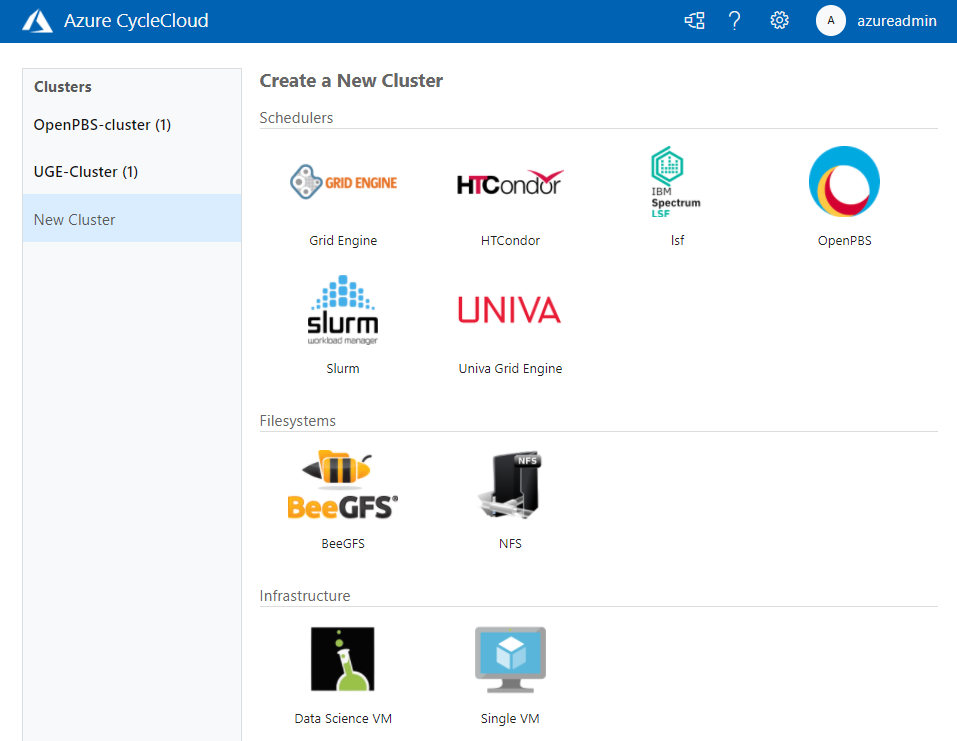
Whether they are tightly-coupled or high-throughput, submit your jobs to your scheduler of choice and CycleCloud will allocate the required compute infrastructure on Azure to meet resource demands, and automatically scale down the infrastructure after the jobs complete. With this addition, CycleCloud is the only cloud HPC orchestration engine that supports all the major HPC batch schedulers, one that you can rely upon to run your production workloads.
Configure Shared Filesystems Easily in the UI
In CycleCloud 8.1, it is simple to attach and mount network attached storage file systems to your HPC cluster. High-performance storage is a crucial component of HPC systems; Azure provides different storage services, such as HPC Cache, NetApp Files, and Azure Blob, that you may use as part of your HPC deployment, with each service optimized for different workloads.
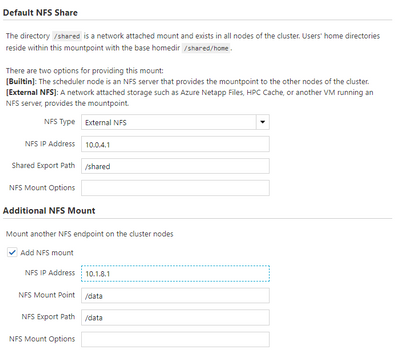
Most workloads typically require access to one or more shared filesystems for common directory or file access, and you can now configure your cluster to mount NFS shares through the CycleCloud web user interface without needing to modify configuration files.
Perform Last-Mile VM Customization with Cloud-Init
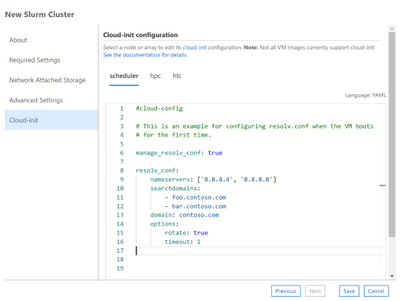
CycleCloud Projects is a powerful tooling system for customizing your cluster nodes as they boot-up. In CycleCloud 8, we have included support for a complementary approach with Cloud-Init, a widely-used initialization system for customizing virtual machines.
You can now use the CycleCloud UI or a cluster template to specify a cloud-init config, Shell script or Python script that will configure a VM to your requirements before any of CycleCloud’s preparation steps.
Trigger Actions through Azure Event Grid
CycleCloud 8 generates events when certain node or cluster changes occur, and you can configure your CycleCloud installation to have these events published to Azure Event Grid. With this, you can create triggers for events like SpotVM evictions or node allocation failures, and automatically drive downstream actions or alerts . For example, track Spot eviction rates for your clusters by VM SKU and Region, and use those to trigger a decision to switch to pay-as-you-go VMs.
Azure is the Best Place to Run HPC Workloads
Over the past year, we have been privileged in being able to help our partners run their mission critical HPC workloads on Azure. CycleCloud has been used by the U.S Navy to run weather simulations for forecasting cyclone paths and intensities, by structural biologists to obtain one of the first glimpses at the crucial SARS-Cov-2 Spike protein, by biomedical engineers in performing ventilator airflow simulations ahead of an FDA EUA submission.
With the CycleCloud 8.1 release, we look forward to continuing our support of the HPC community and partners by giving them familiar and easy access to scalable, true supercomputing infrastructure Azure.
Learn More
All the new features in Azure CycleCloud 8.1
Azure CycleCloud Documentation
Azure HPC


Recent Comments