This article is contributed. See the original author and article here.
Another busy week for cloud services at Microsoft. Here are the news items the team at AzUpdate are covering this week: New Priority Account capabilities now available in Microsoft 365, Azure Bastion and VNet peering can be used together, New integrations between GitHub and Azure Policy allow for better manage policy definitions and assignments, New constrained vCPUs capable VMs now available and of course the Microsoft Learn module of the week.
New Priority Account capabilities now available in Microsoft 365
Executives, leaders, managers, and other personnel are considered priority accounts for IT requiring added effort to ensure uptime and confirmation of service. To address this need, Microsoft has introduced capabilities in Microsoft 365 enabling an admin to tag specific users as priority accounts and then leverage app-specific features designed for them. These 2 capabilities include:
Priority account protection:Microsoft Defender for Office 365 now supports priority accounts as system tags that can be used in filters in alerts, reports, and investigations.
Premium mail flow monitoring: Mail flow for priority accounts can now be assigned a threshold for failed or delayed emails, receive alerts when that threshold is exceeded, and view a report of email issues for priority accounts.
Azure Bastion and VNet peering can now be used together
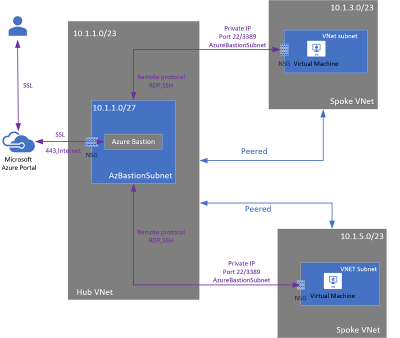
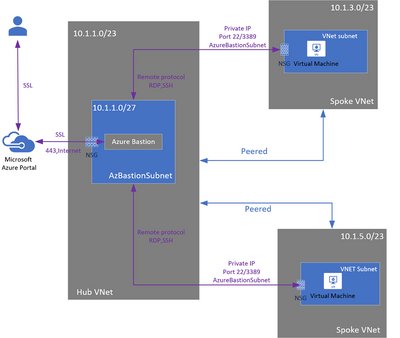
Azure Bastion no longer needs to be deployed in each peered VNet when VNet peering is configured. The Azure Bastion host can now be used to connect to VMs deployed in a peered VNet without deploying an additional Bastion host so long as it is configured in one virtual network (VNet). Added information regarding this offering can be reviewed here: VNet peering and Azure Bastion (Preview)
Azure Policy as Code via GitHub
Azure Policy as code enables the ability to manage the lifecycle of definitions and assignments in a repeatable and controlled manner. New integrations between GitHub and Azure Policy allow the ability to better manage policy definitions and assignments as code. The integration begins with the ability to export policy definitions and assignments from the Azure Portal to GitHub repositories. The export definition button, available in the definitions view, allow the ability to select your GitHub repository, branch, directory then enable the ability to select the policy definitions and assignments to export to GitHub. More information can be viewed here: Using GitHub for Azure Policy as Code
New constrained vCPUs capable VMs now available
Microsoft now offers the Esv4, Edsv4, and Easv4 memory optimized Azure VMs as new constrained vCPU VM sizes. Organizations can now take advantage of next generation Azure Virtual Machines for workloads requiring high memory, storage, and I/O bandwidth, but not a high vCPU count. Further details as to the entire list offered can be found here: Constrained vCPU capable VM sizes
Community Events
Festive Tech Calendar – New content from different communities and people around the globe for the month of December
All Around Azure: Beginner Guide to AI – First event in a series specifically focused on AI technologies such as Azure Cognitive Services, Azure Cognitive Search, Conversational AI and Azure Machine Learning Designer
Introduction to Cloud Adoption Framework – Sarah Lean investigates Microsoft’s Cloud Adoption Framework offering and what is available for organizations to take advantage of
MS Learn Module of the Week
AZ-104: Configure and manage virtual networks for Azure administrators
Preparing for your AZ-10: Microsoft Azure Administrator Exam? This learning path share details on configuration and management of Azure network capabilities like connectivity services, application protection, application delivery, and network monitoring services. This learning path can be completed here: AZ-104: Configure and manage virtual networks for Azure administrators
Our team always appreciates your input on the Microsoft services news we share. Let us know in the comments below if there are any news items you would like to see covered in next week show. Az Update streams live every Friday so be sure to catch the next episode and join us in the live chat.
This article is contributed. See the original author and article here.
Listening to the challenges many of our customers are facing with increasingly working online, we’ve developed new capabilities in Dynamics 365 to discover email messages, meetings, and phone call activities related to an opportunity, and then to factor these signals into the score.
Capturing activities to determine opportunity health
A healthy opportunity will usually have activities happening in it like email messages, meetings, and phone calls. Many of our predictive opportunity scoring customers were gathering these signals manually to determine opportunity health. We’ve replaced the need for customers to manually track activities by using AI to gather activities, approving prediction accuracy and compensating for cases where sellers do not diligently update the opportunity fields.
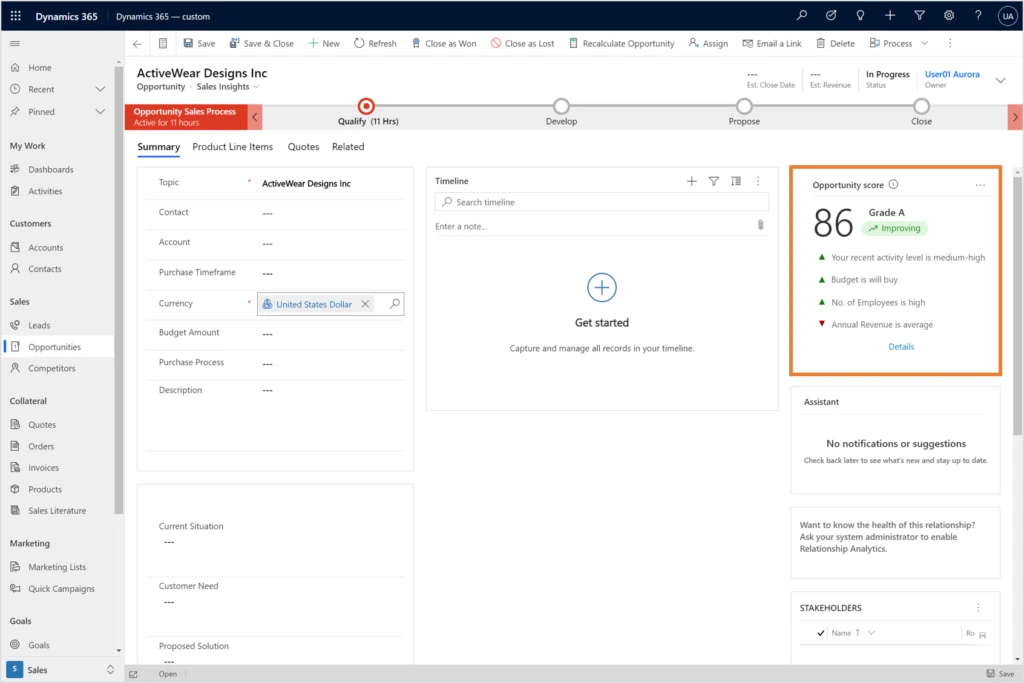
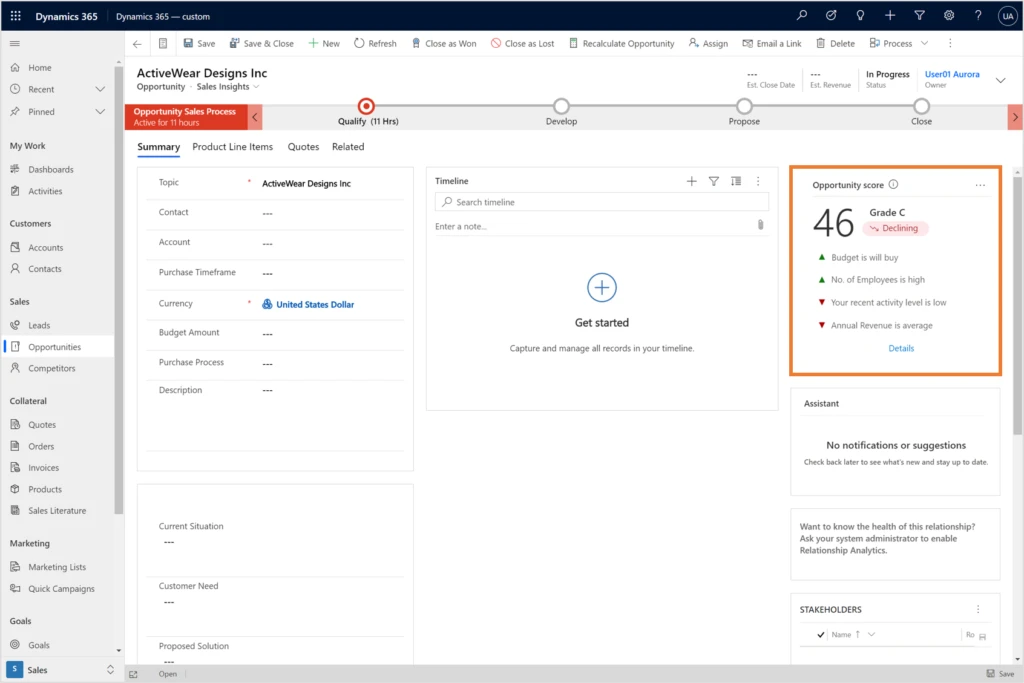
There is additional value in activities they provide actionable explanations for opportunity scoring predictions. It can help the seller make more educated choices about what the best next action might be for example, a high level of activity may indicate that the opportunity is heating up and is worth attention. Likewise, an opportunity with where the activity level is low may need immediate attention.
Here’s an example showing the opportunity score improving:
Here’s an example showing the opportunity score declining:
Connecting opportunities with activities
In addition to activities that are explicitly connected to opportunities, we developed algorithms to infer indirect connections between activities and opportunities, using Contact and Account activity timelines. Since these are not trivial connections (for example, an account may have multiple opportunities), AI is assigning them appropriate predictive weights.
How the predictive opportunity scoring model is trained
First, we make sure, automatically, that the data we have is meaningful and contributing to the prediction. Then we look at each recent activity level of every opportunity and try and find a correlation between this signal and the likelihood of winning the opportunity.
After the model is trained, we can view the open opportunities in the system and give them a score based on past examples. What the AI does is learn how recent activity level affects the likelihood to win an opportunity in your organization.
What Clover Imaging Group has to say about predictive opportunity scoring
“The predictive opportunity scoring model in Dynamics 365 Sales offered sales leaders at Clover Imaging Group valuable machine learning into what has traditionally been a manual process. With the predictive opportunity scoring model implemented, sellers were able to more effectively prioritize their opportunities based on metrics that are unique to our industry and organization. Beyond that, the predictive opportunity scoring model also gave detailed explanations as to why an opportunity was scored as it was, and what needs to be done to achieve a higher success probability. Plus, the Microsoft support and development team took the time to understand the nuances of our business, which allowed the model to pick up and evaluate the metrics most important to us.”
Next steps and continued learning
We encourage you to explore predictive opportunity scoring in Dynamics 365 Sales to see how it can help your sales team to prioritize work more effectively.
To understand the full capabilities of Dynamics 365 Sales and the value they bring to Dynamics 365 customers, visit Dynamics 365 Sales. To get started with activity suggestion, visit Overview of Dynamics 365 Sales. you’re using contact capture and have feedback, questions, or new needs, contact us at D365AISales@microsoft.com.
This article is contributed. See the original author and article here.
New apps and features in Microsoft 365 for individuals and families this fall
By Gareth Oystryk, Director of Product Marketing, Microsoft 365
Since we introduced Microsoft 365 to individuals and families earlier this year, we have continued to deliver new innovations across our apps and services to help you and your family save time and stay connected. See what’s new below.
Locate your loved ones and build better driving habits with Microsoft Family Safety
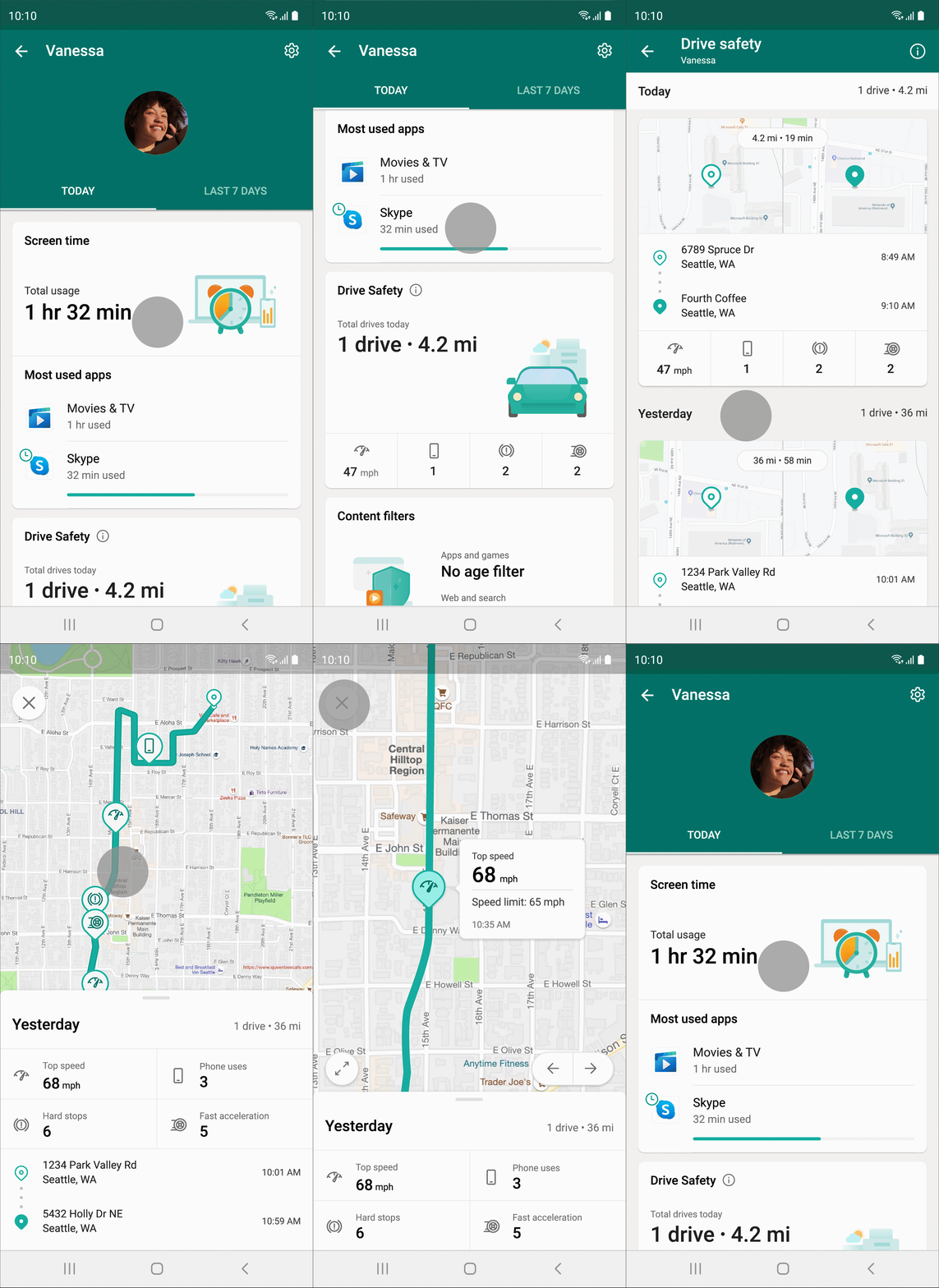
Stay connected even when you’re apart with the Microsoft Family Safety app. Share your location with loved ones, spot them on a map, and save places they visit the most, all with a free Microsoft account. With a Microsoft 365 Family subscription, you also get alerted when your family members arrive or depart from a specific location.1 Plus, get insights on how your family is doing on the road, including how many times the driver uses their phone, their top speed, and even the number of times they brake hard. Location alerts are available to Microsoft 365 Family subscribers on Android and iOS worldwide, except for Japan, China, and countries where right-to-left languages are used. Drive safety reports and driver history are available to Microsoft 365 Family subscribers in the US, Canada, UK, and Australia on Android and iOS.
Get a more holistic view of your spending in Money in Excel
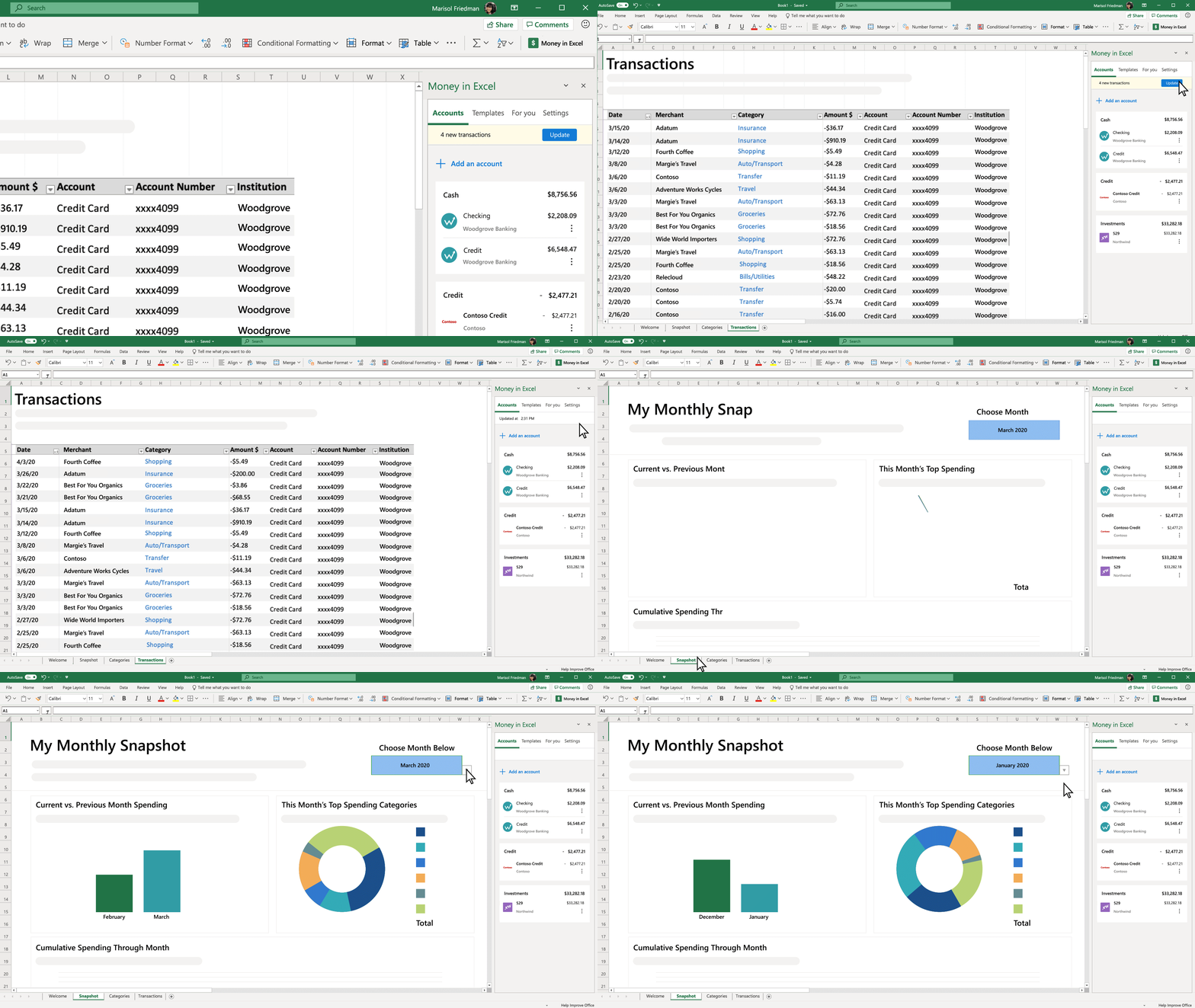
Money in Excel now pulls up to two years of transaction history to get a better picture of your spending habits, a big increase from the three months of transaction history it launched with. Plus, Money in Excel now supports multiple credentials per financial institution so you and your partner can get a unified view of your accounts. Available now to Microsoft 365 Personal and Family subscribers in the US in Excel for Windows, macOS, and web.
Get started quickly with new templates for Word, Excel, and PowerPoint
Over the last couple of months, we’ve published over 30 premium templates for Word, Excel, and PowerPoint that help you get started faster and look your best. Check out the Family Budget Planner template, the Mood Board template for your next creative project, and the Emergency Contacts template, a must-have for every home. Available now to Microsoft 365 Personal and Family subscribers in Word, Excel, and PowerPoint for web, Windows, and macOS.4
Stay in your flow with Your Phone app and Link to Windows on Galaxy phones
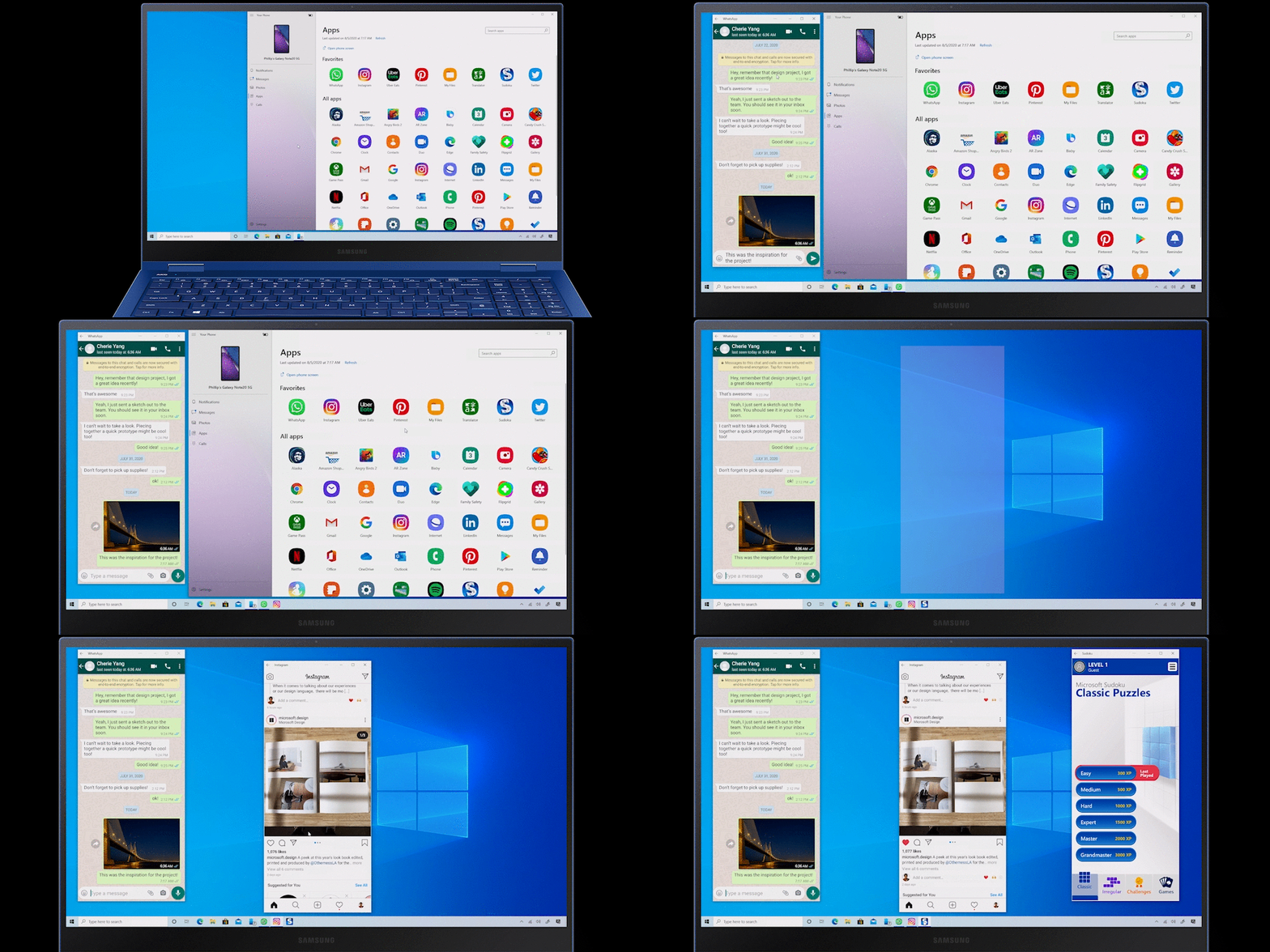
In August, Microsoft and Samsung announced new experiences that will help you stay productive wherever you are. Today, we’re rolling out a new multi-app5 experience in Your Phone app, so you can run multiple Android mobile apps side by side on your Windows 10 PC. Apps will launch in separate windows enabling you to interact with multiple apps at the same time even if Your Phone app is not open. Pin your apps to Favorites, Windows 10 taskbar, or Start menu for quick and easy access. And moreover, you can now search for your previously pinned apps via Windows search from within your Start app list.
Whether you are staying connected with family and friends, keeping up on your social feed, or ordering food, you can do it all simultaneously from the comfort of your PC, with no need to install apps or sign-in again. The Your Phone multi-apps experience is now rolling out to supported Samsung devices. Learn more here.
Sync Samsung Notes and Reminders on Galaxy phones with Outlook, OneNote, and To Do
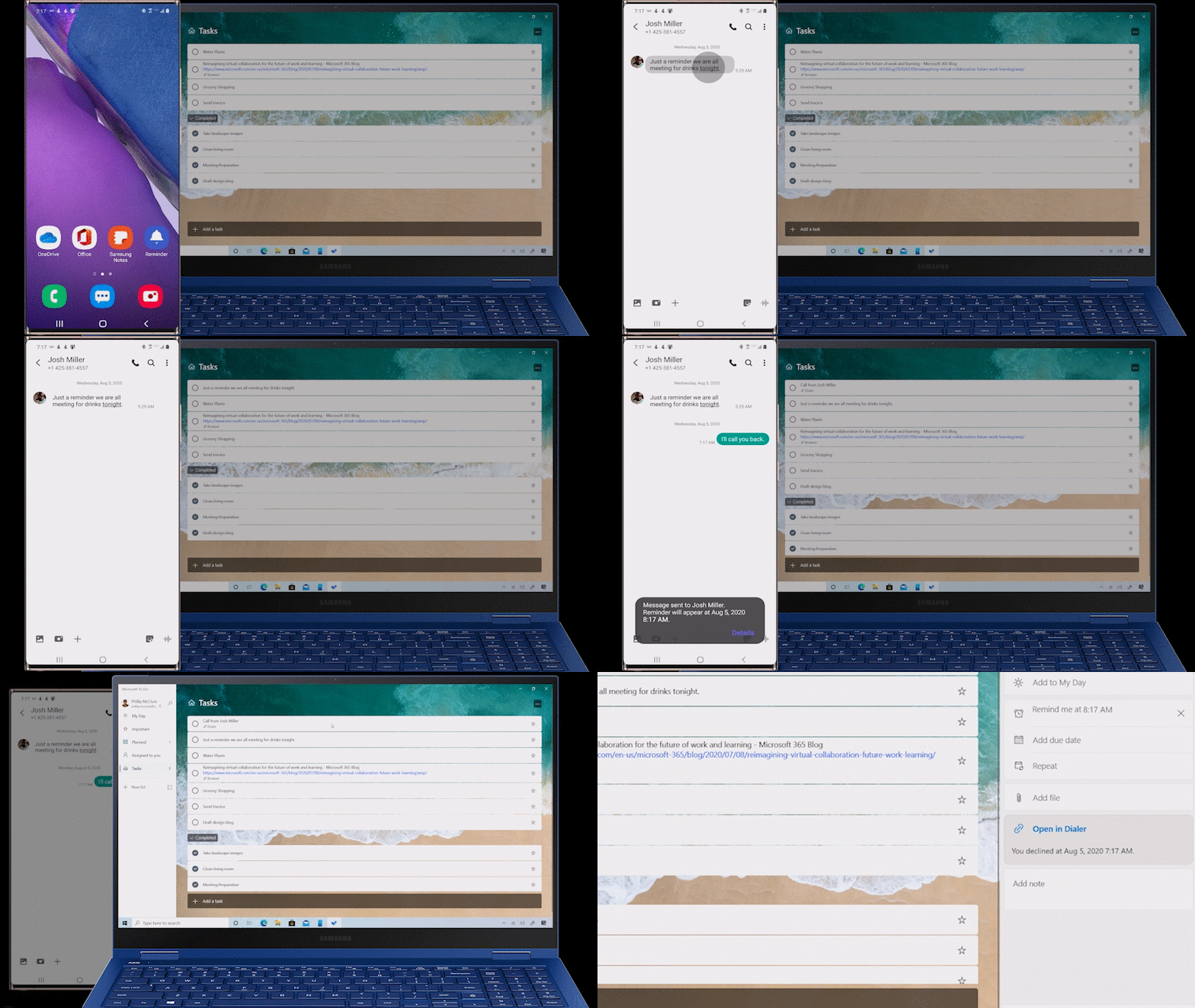
Also rolling out, Samsung Notes can automatically sync with your OneNote feed in Outlook on the web. And Samsung Reminders can automatically sync to Microsoft To Do, Outlook, and Microsoft Teams. Now you can take notes or set reminders while on the go with your Samsung Galaxy phone, and then access them on your Windows 10 PC when you return home. Samsung Note sync to OneNote feed in Outlook on the web is available now for Microsoft 365 Personal and Family subscribers and to anyone with a Microsoft account by the end of this year. Learn more about this experience on Samsung.com.
Easily share your photos and files with OneDrive family and group sharing
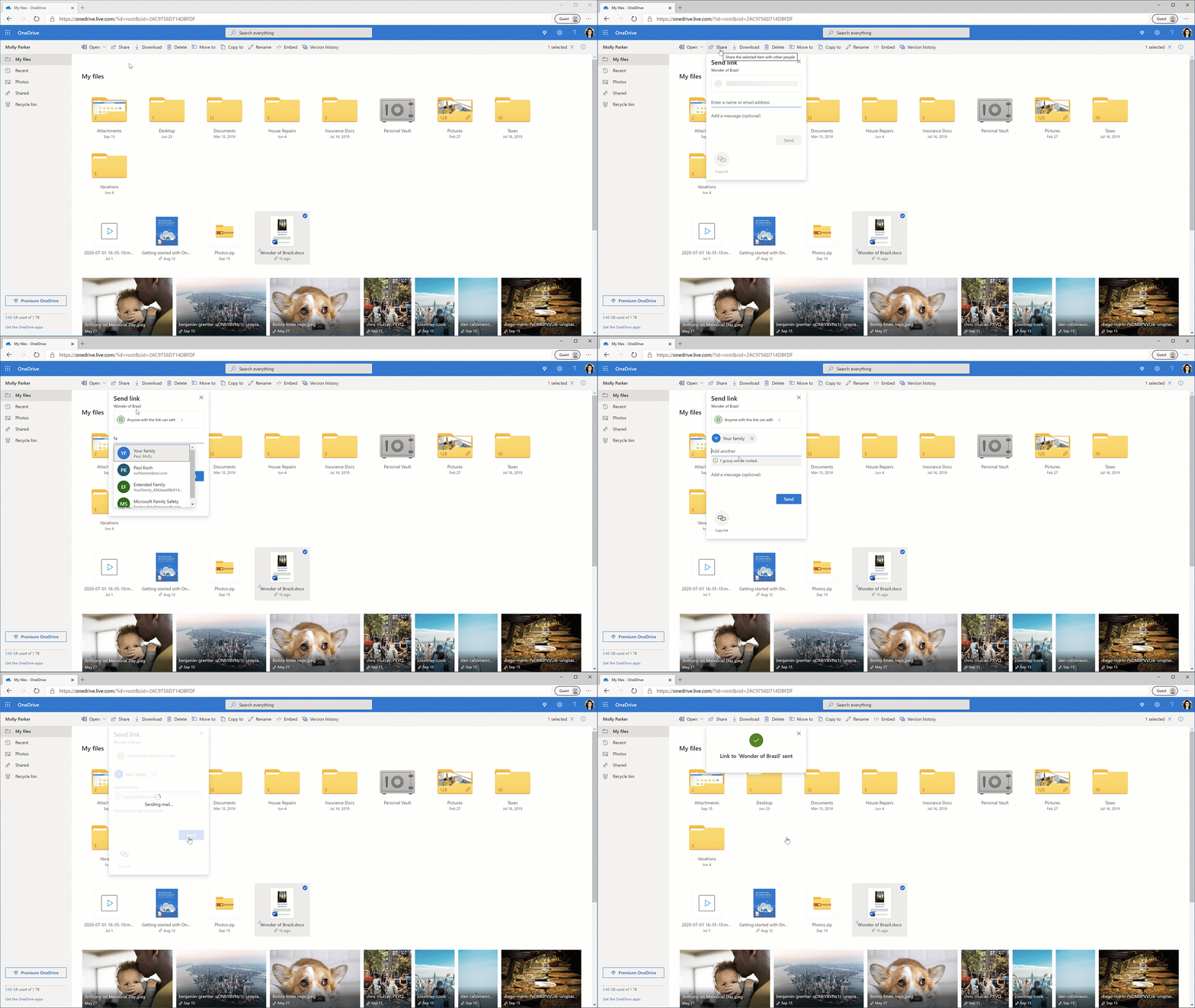
OneDrive has always made it easy to share docs, photos, videos, albums, and folders. But until now, sharing to a group of people meant typing in the names of all the people you wanted to share with. Last month, we simplified the process with one-click sharing to family and groups. Once you predefine your family or friend group, you’ll be able to share a photo, album, or important document to your group with one click. Family and group sharing is available in OneDrive for web to anyone with a free Microsoft account.
Formal or casual? Specify your writing goals in Microsoft Editor
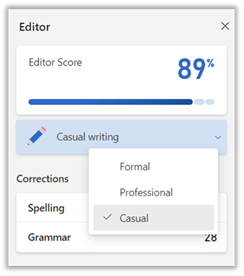
Now you can choose the level of formality you would like Microsoft Editor to consider when providing relevant critiques for your writing. You can choose between “formal,” “professional”, or “casual” styles to help ensure your writing hits the right tone. This experience is rolling out now to Microsoft 365 Personal and Family subscribers in Word for web. Writing goals is currently only available for English language users; however, it will support additional languages in Word for web in the coming weeks.6 For languages outside of English, you can choose between two goals: “formal” or “casual.”
Focus on your conversation instead of your notes with Transcribe in Word for web
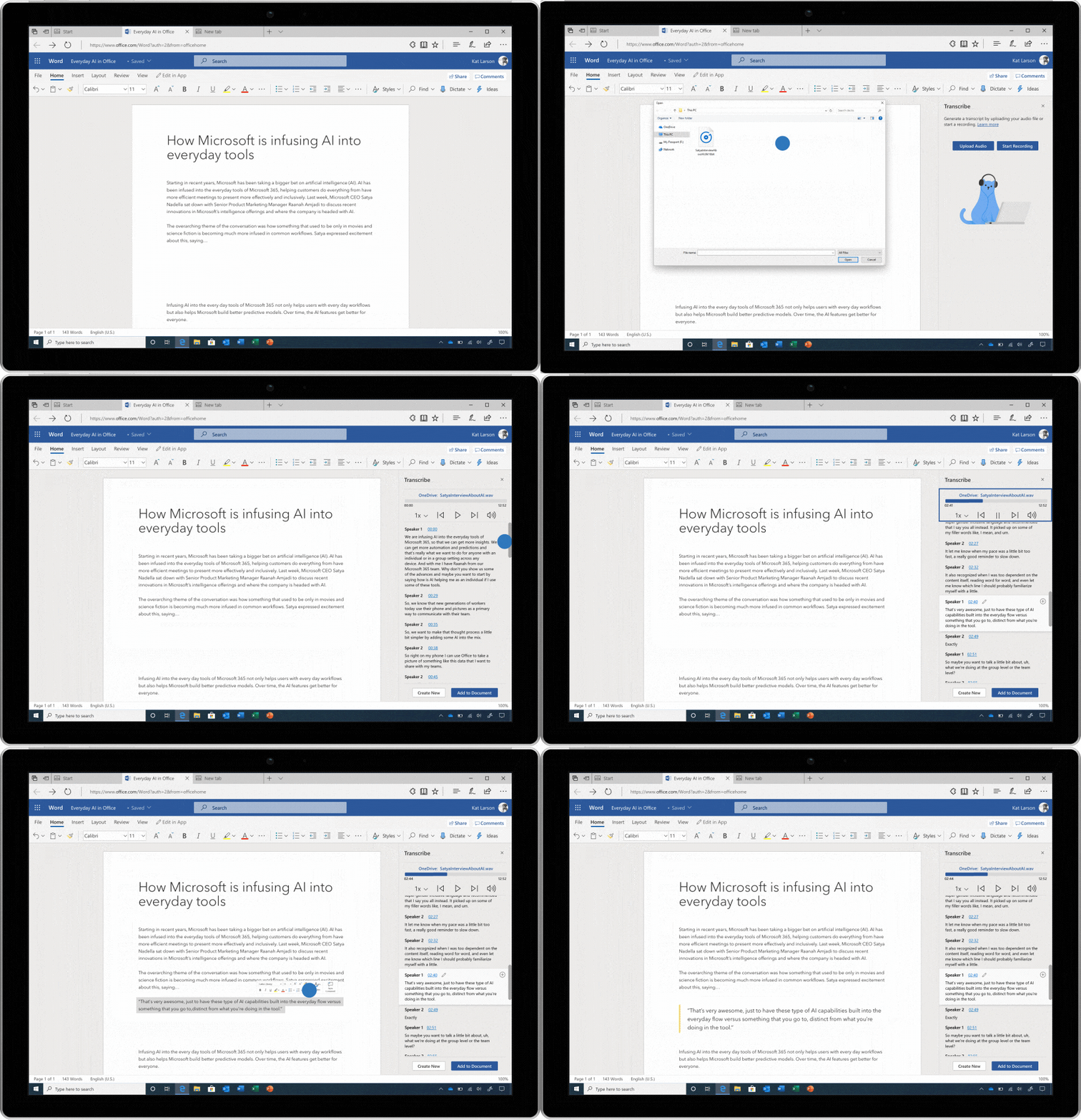
Whether you’re interviewing a family member to chronicle your family’s history, running a virtual parent-teacher association meeting, or “attending” a college lecture via any major video conferencing platform, you want to focus on the conversation without worrying about taking notes. Now you can record your conversations directly in Word for the web and transcribe them automatically. Transcribe detects different speakers so after you finish recording, you can easily follow the flow of the transcript. Available now to Microsoft 365 Personal and Family subscribers in Word for web. Currently only available for English language users using Microsoft Edge or Chrome web browsers.
Survey or quiz your friends and family with Microsoft Forms
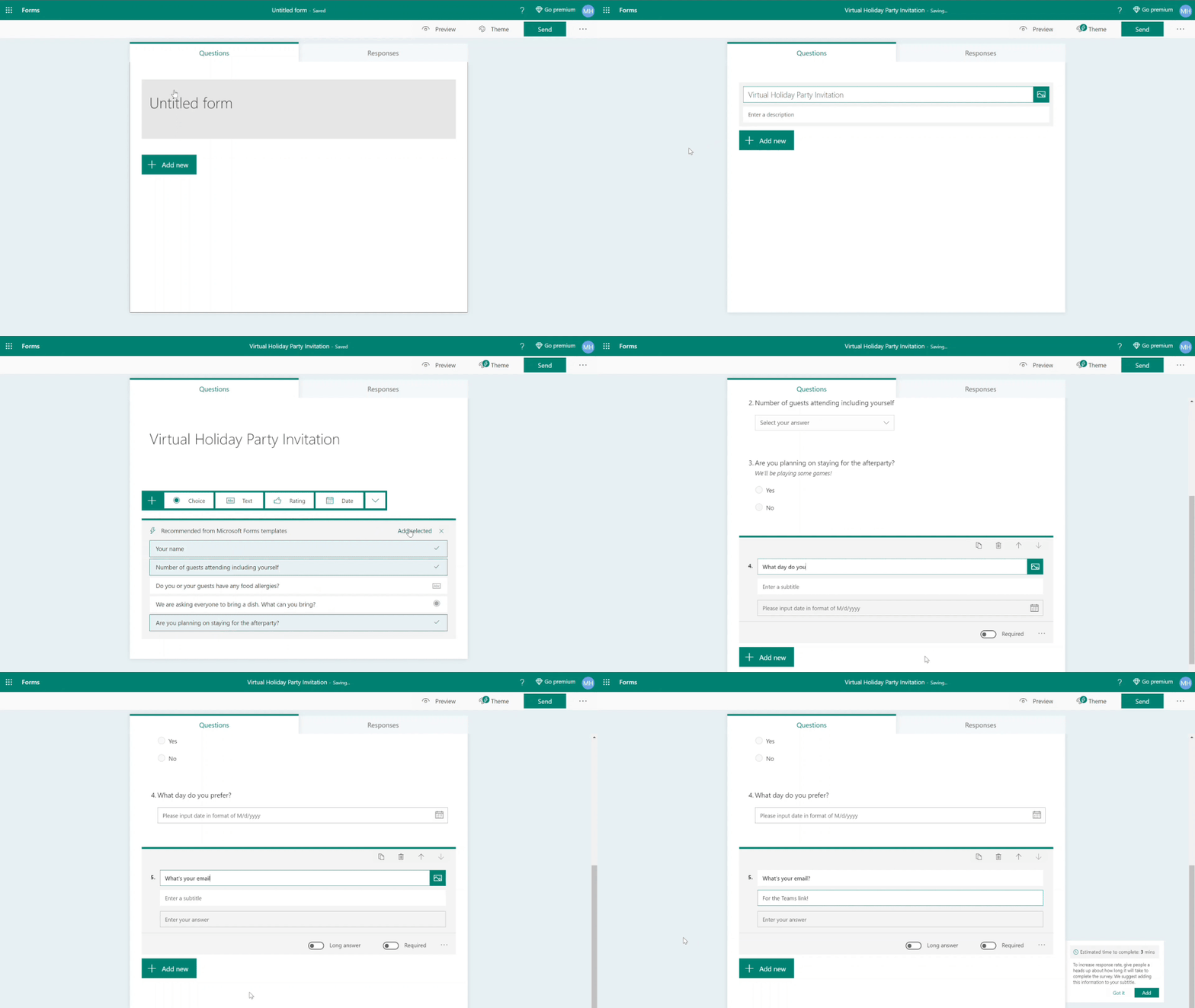
In October, we made Microsoft Forms available for personal use. With easy-to-use tools and clear design suggestions, you can gather input and make plans for a variety of activities—survey your neighborhood friends for a weekly running time, coordinate your virtual holiday gathering with family, or even host a virtual trivia night with friends from any location. Available now for web and within the Office mobile app for anyone with a Microsoft account. Microsoft 365 Personal and Family subscribers can poll an expanded number of respondents and get access to more templates.
1Requires location alerts to be enabled and active. 2This feature is currently available in preview only in the US and Canada and is currently available only in chats with three or more participants. Standard SMS data charges apply. 3To help ensure the privacy of our users, this feature will only work if you are already sharing your location with the person setting up a location alert for you. Additionally, anytime someone sets up a location alert on you, Teams will notify you. To disable this feature, you can simply stop sharing your location. 4Premium templates are available in the following languages: Chinese (simplified), Dutch, English, French, German, Italian, Japanese, Portuguese (Brazilian), Russian, and Spanish. 5Users must link their Galaxy device to their Windows PC through ‘Link to Windows’ on phone and Your Phone app on PC, follow the set-up prompts, including being signed into same Microsoft account. Link to Windows is preloaded on select Galaxy devices. Your Phone requires latest Windows 10 Update on the PC. For Apps experience, Galaxy device must be on and connected to the same Wi-Fi network as the PC. Some mobile apps may restrict content to be shared on other screens or may require a touch screen to be able to interact with them. Ability to run multiple apps simultaneously is rolling out to select Samsung Galaxy devices running Android 11 and requires Windows 10 May 2020 Update or later. 6Writing goals in Microsoft Editor will support the following languages in the coming months: Chinese (simplified), Chinese (traditional), French, German, Italian, Japanese, Portuguese (Brazilian), Portuguese (European), Russian, and Spanish.
Brought to you by Dr. Ware, Microsoft Office 365 Silver Partner, Charleston SC.
This article is contributed. See the original author and article here.
In Microsoft Information Protection (MIP) SDK version 1.7, changes were made to support a new label metadata storage location for Office files – Word, Excel, and PowerPoint. For your applications and services to continue reading and writing MIP sensitivity labels for Office file types, it’s critical that you update to MIP SDK version 1.7. Applications running older versions will not be capable of reading the updated metadata format.
Metadata Storage
Historically, MIP SDK, the Office native labeling experience, and Azure Information Protection client have written MIP label metadata in a custom XML part. As customers enable features that require the new storage location, all MIP-enlightened applications and services will migrate this metadata to a new storage location upon save. New files will have the metadata written to the new location only.
Updates to the Office file formats are detailed in the protocol documentation listed below.
Start updating your applications and services to MIP SDK 1.7 today. Without this update your customers and partners will be unable to take advantage of future experiences and features that may depend on this updated storage location.
This article is contributed. See the original author and article here.
In Microsoft Information Protection (MIP) SDK version 1.7, changes were made to support a new label metadata storage location for Office files – Word, Excel, and PowerPoint. For your applications and services to continue reading and writing MIP sensitivity labels for Office file types, it’s critical that you update to MIP SDK version 1.7. Applications running older versions will not be capable of reading the updated metadata format.
Metadata Storage
Historically, MIP SDK, the Office native labeling experience, and Azure Information Protection client have written MIP label metadata in a custom XML part. As customers enable features that require the new storage location, all MIP-enlightened applications and services will migrate this metadata to a new storage location upon save. New files will have the metadata written to the new location only.
Updates to the Office file formats are detailed in the protocol documentation listed below.
Start updating your applications and services to MIP SDK 1.7 today. Without this update your customers and partners will be unable to take advantage of future experiences and features that may depend on this updated storage location.
Claire: On November 13, Johnson Johnson Sonsiel, Dev Up and Microsoft partnered to host the second annual nursehack4health, giving nurses and clinicians an opportunity to define new ways to save lives. Today I talked with Chris Recinos, nurse practitioner and previous Chief Nursing executive at Kaiser Permanente and nurse hack for health hacker. And Molly McCarthy, National Director for US health providers and health plans at Microsoft and moderator for the pitch presentations and nurse hack for health.
Hi, Molly. Hi, Chris. And welcome to the confessions of health geeks podcast. Molly, you’re coming off of a big weekend. Do you mind sharing a little bit more about nurse hack for health?
Molly: Sure. Thanks, Claire for having us today. This past weekend was our second nurse hack for health. This past weekend we saw over 650 participants from across the globe, eight countries over 22 states with more than 44 hours spent really networking innovating and hacking for the greater good. really inspiring to see over 15 solutions. And really nurses looking to expand their technology skills this past weekend eager to share their creative ideas to improve patient communication, patient education, and nurses eager to join a community of innovators. And I was so pleased to meet Chris.
Claire: That’s amazing. Those stats are truly amazing. Chris, do you mind doing a brief intro?
Chris: Yeah, absolutely. So I’m Chris Recinos. And as of the last four weeks, I’ve actually left my role as the chief nursing executive for Kaiser Permanente. I’m a nurse practitioner by background and a doctorally prepared. So I am now leading my own organization, as an entrepreneur, and so happy to be here.
Claire: That’s great. Well, I have some questions for you later. But first, Molly, you participated as a moderator for the final pitches this weekend. Do you mind explaining what stood out to you the most during those pitches?
Molly: Sure, yeah. So past hackathon, we we really wanted to provide each of the 15 teams with not just judging or, you know, criteria as to what stood out to us. But really, in addition, feedback for the team so that they could continue on to bring their solution really to fruition. So the weekend was all about creating a minimally viable product that can be rapidly applied in healthcare settings. I was a moderator of a group, there were four different pitches, each team had three minutes to pitch. And then we actually spent about 15 to 20 minutes, providing feedback, asking questions of the team. And one of the most outstanding pitches that I saw that really hit home both to me, and I believe, to many others on the call was an idea and solution from Chris, and her team of nurses called Hello harmony.
Claire: And I actually heard a little bit about that pitch, Molly from you earlier on Monday. So Chris, I’d love for you to use this opportunity to tell our listeners a little bit more about your solution and your pitch. And what inspired you to be part of the nurse hack for health.
Chris: Yeah, so I actually was not like planning on participating in the nurse hack route, because I hadn’t heard about it. So the day before it actually was launched, I got an invite to a webinar and found out about it and immediately signed up and thought I would just join another group didn’t think I was going to be kind of creating my own group. But I joined late. And so I was like, Okay, I need to create my own group. And I thought about, you know, the reason I joined it was really around, like, how can I impact patients outside of the way, you know, the patients that I touch every day. And it hit me that that I needed to create a solution that I saw many people struggling with. And so about three years ago, I woke up that it was a normal morning, and proceeded to go into my daughter’s room and found her lifeless in her bed. She had died of suicide. And so we found out later on that part of the reason behind that was her she just had a an immense sense of isolation, had some depression and her friends knew about it and didn’t know what to do. They didn’t know how to have the conversation or let anybody know. And so you know, as I’ve been in my chief nursing executive position and seen my nurses dropping out because of their kids that are, you know, having challenges my own children having their challenges, I realized that there was just a solution that needed to be that needed to take care of this. And so what my team and I developed in under 24 hours, which was amazing, was a chat box based solution that takes the team through a scenario like a real life scenario based on a friend that they’ve created so they create the key friends can chat about what the likes and dislikes are. And it’s really a gamification. So you kind of go in there just kind of talking to your friend, they respond to you the way that a normal friend will respond to you. But then it’ll go into like a mental health scenario and and hope gave you the words that you need to help really normalize suicide prevention and isolation and teens. And so it was really just interesting to see the uptake, we created a minimal viable product. And then we include it teenagers in the development, I got all my kids and teens, we had all of the people on the group bring all their kids and teens, they’re really the ones that gave us the idea for the solution. I knew what the problem was, but they gave us the idea for the solution. My daughter shared it with her friends on social media. And immediately we had like 50 to 100 teams reach out and ask, How can I find us on Apple, so I can’t find it. And so I know that there’s a need out there. And it’s just been, you know, it’s something you know, something beautiful was born out of this adversity that happened to my family. And you know, my husband and I now have a new fire around, like what our next steps and our you know, trip future trajectory is gonna look like.
Molly: first of all, I just want to say thanks to Chris for sharing her story, and really looking to help others. Teenagers, I know that I actually, Chris, I had my my two boys watch your pitch the other day, on Sunday, the recording because it’s so powerful and so real in today’s world, with COVID-19. So thank you.
Claire: So what’s next? What are your plans to further this?
Chris: So I, you know, I my business action, LLC. So I have, I did not ever want to go any kind of industrial route, I like to joke that I’m not a good employee, I don’t like being told what to do, I really like to really focus on my customers. And that’s it, I want to hear I have anybody above me telling me what to do. And so um, so I didn’t have a lot of experience in this space in terms of investors. And so I, I actually had several advisors and investors reach out to me after the meeting to ask about how they could partner, you know, how they could help. And I’m working right now with one of them who he raised, he’s raised the largest investor around $60 million as a registered nurse. And so I’m working with him in terms of mentoring. And so next steps for me are what I’m currently looking for a technical advisors slash co founder for Hello, harmony, I’m working on building the business plan and the team members that will need to, you know, really create this in a larger way, and working with a partner marketing team around what marketing will look like around this. And I’m looking at, I’m really engaging with psychologists and others to make sure that we combine within the rules of HIPAA really look at how we can utilize the data that we find to really improve the mental health and well being. And I’m starting to reach out to partner with organizations like the American Foundation for Suicide Prevention around some of their campaigns that they’re doing for teen suicide.
Claire: And all of this in this weekend, just 24 hours, and now you have a whole plan of what you’re going to do. I love that. And what about nurse hack for health Molly? This is the second annual hack. So what’s next for next year? How should listeners get involved?
Molly: In terms of nurse hack for health, we this is a commitment that we do alongside our partners, Johnson and Johnson, as well as Sonsiel. And we’re really truly committed to bringing nurses and developers together to learn from one another and create solutions that are much needed in the marketplace. So we look forward to our third nurse hack for health. And that will be may 14 to 16th right after nurses week. So I hope that everyone listening will join us or check out nurse hack for health.org to learn more. So thank you, Claire.
Claire: Great, thank you so much, Molly. And thank you again, Chris, for being on the podcast and sharing your story.
Chris: So if you’d like to find out more, you can reach me on LinkedIn. I’m Chris Recinos, the one and only LinkedIn at this moment, or you can send me an email at Chris ch ri s at nurse leader network.com. Great, thank you so much, and I will link those details below as well.
Claire: Thank you all for watching. Please feel free to leave us questions or comments below and check back soon for more content from the HLS industry team.
Claire: On November 13, Johnson Johnson Sonsiel, Dev Up and Microsoft partnered to host the second annual nursehack4health, giving nurses and clinicians an opportunity to define new ways to save lives. Today I talked with Chris Recinos, nurse practitioner and previous Chief Nursing executive at Kaiser Permanente and nurse hack for health hacker. And Molly McCarthy, National Director for US health providers and health plans at Microsoft and moderator for the pitch presentations and nurse hack for health.
Hi, Molly. Hi, Chris. And welcome to the confessions of health geeks podcast. Molly, you’re coming off of a big weekend. Do you mind sharing a little bit more about nurse hack for health?
Molly: Sure. Thanks, Claire for having us today. This past weekend was our second nurse hack for health. This past weekend we saw over 650 participants from across the globe, eight countries over 22 states with more than 44 hours spent really networking innovating and hacking for the greater good. really inspiring to see over 15 solutions. And really nurses looking to expand their technology skills this past weekend eager to share their creative ideas to improve patient communication, patient education, and nurses eager to join a community of innovators. And I was so pleased to meet Chris.
Claire: That’s amazing. Those stats are truly amazing. Chris, do you mind doing a brief intro?
Chris: Yeah, absolutely. So I’m Chris Recinos. And as of the last four weeks, I’ve actually left my role as the chief nursing executive for Kaiser Permanente. I’m a nurse practitioner by background and a doctorally prepared. So I am now leading my own organization, as an entrepreneur, and so happy to be here.
Claire: That’s great. Well, I have some questions for you later. But first, Molly, you participated as a moderator for the final pitches this weekend. Do you mind explaining what stood out to you the most during those pitches?
Molly: Sure, yeah. So past hackathon, we we really wanted to provide each of the 15 teams with not just judging or, you know, criteria as to what stood out to us. But really, in addition, feedback for the team so that they could continue on to bring their solution really to fruition. So the weekend was all about creating a minimally viable product that can be rapidly applied in healthcare settings. I was a moderator of a group, there were four different pitches, each team had three minutes to pitch. And then we actually spent about 15 to 20 minutes, providing feedback, asking questions of the team. And one of the most outstanding pitches that I saw that really hit home both to me, and I believe, to many others on the call was an idea and solution from Chris, and her team of nurses called Hello harmony.
Claire: And I actually heard a little bit about that pitch, Molly from you earlier on Monday. So Chris, I’d love for you to use this opportunity to tell our listeners a little bit more about your solution and your pitch. And what inspired you to be part of the nurse hack for health.
Chris: Yeah, so I actually was not like planning on participating in the nurse hack route, because I hadn’t heard about it. So the day before it actually was launched, I got an invite to a webinar and found out about it and immediately signed up and thought I would just join another group didn’t think I was going to be kind of creating my own group. But I joined late. And so I was like, Okay, I need to create my own group. And I thought about, you know, the reason I joined it was really around, like, how can I impact patients outside of the way, you know, the patients that I touch every day. And it hit me that that I needed to create a solution that I saw many people struggling with. And so about three years ago, I woke up that it was a normal morning, and proceeded to go into my daughter’s room and found her lifeless in her bed. She had died of suicide. And so we found out later on that part of the reason behind that was her she just had a an immense sense of isolation, had some depression and her friends knew about it and didn’t know what to do. They didn’t know how to have the conversation or let anybody know. And so you know, as I’ve been in my chief nursing executive position and seen my nurses dropping out because of their kids that are, you know, having challenges my own children having their challenges, I realized that there was just a solution that needed to be that needed to take care of this. And so what my team and I developed in under 24 hours, which was amazing, was a chat box based solution that takes the team through a scenario like a real life scenario based on a friend that they’ve created so they create the key friends can chat about what the likes and dislikes are. And it’s really a gamification. So you kind of go in there just kind of talking to your friend, they respond to you the way that a normal friend will respond to you. But then it’ll go into like a mental health scenario and and hope gave you the words that you need to help really normalize suicide prevention and isolation and teens. And so it was really just interesting to see the uptake, we created a minimal viable product. And then we include it teenagers in the development, I got all my kids and teens, we had all of the people on the group bring all their kids and teens, they’re really the ones that gave us the idea for the solution. I knew what the problem was, but they gave us the idea for the solution. My daughter shared it with her friends on social media. And immediately we had like 50 to 100 teams reach out and ask, How can I find us on Apple, so I can’t find it. And so I know that there’s a need out there. And it’s just been, you know, it’s something you know, something beautiful was born out of this adversity that happened to my family. And you know, my husband and I now have a new fire around, like what our next steps and our you know, trip future trajectory is gonna look like.
Molly: first of all, I just want to say thanks to Chris for sharing her story, and really looking to help others. Teenagers, I know that I actually, Chris, I had my my two boys watch your pitch the other day, on Sunday, the recording because it’s so powerful and so real in today’s world, with COVID-19. So thank you.
Claire: So what’s next? What are your plans to further this?
Chris: So I, you know, I my business action, LLC. So I have, I did not ever want to go any kind of industrial route, I like to joke that I’m not a good employee, I don’t like being told what to do, I really like to really focus on my customers. And that’s it, I want to hear I have anybody above me telling me what to do. And so um, so I didn’t have a lot of experience in this space in terms of investors. And so I, I actually had several advisors and investors reach out to me after the meeting to ask about how they could partner, you know, how they could help. And I’m working right now with one of them who he raised, he’s raised the largest investor around $60 million as a registered nurse. And so I’m working with him in terms of mentoring. And so next steps for me are what I’m currently looking for a technical advisors slash co founder for Hello, harmony, I’m working on building the business plan and the team members that will need to, you know, really create this in a larger way, and working with a partner marketing team around what marketing will look like around this. And I’m looking at, I’m really engaging with psychologists and others to make sure that we combine within the rules of HIPAA really look at how we can utilize the data that we find to really improve the mental health and well being. And I’m starting to reach out to partner with organizations like the American Foundation for Suicide Prevention around some of their campaigns that they’re doing for teen suicide.
Claire: And all of this in this weekend, just 24 hours, and now you have a whole plan of what you’re going to do. I love that. And what about nurse hack for health Molly? This is the second annual hack. So what’s next for next year? How should listeners get involved?
Molly: In terms of nurse hack for health, we this is a commitment that we do alongside our partners, Johnson and Johnson, as well as Sonsiel. And we’re really truly committed to bringing nurses and developers together to learn from one another and create solutions that are much needed in the marketplace. So we look forward to our third nurse hack for health. And that will be may 14 to 16th right after nurses week. So I hope that everyone listening will join us or check out nurse hack for health.org to learn more. So thank you, Claire.
Claire: Great, thank you so much, Molly. And thank you again, Chris, for being on the podcast and sharing your story.
Chris: So if you’d like to find out more, you can reach me on LinkedIn. I’m Chris Recinos, the one and only LinkedIn at this moment, or you can send me an email at Chris ch ri s at nurse leader network.com. Great, thank you so much, and I will link those details below as well.
Claire: Thank you all for watching. Please feel free to leave us questions or comments below and check back soon for more content from the HLS industry team.
This article is contributed. See the original author and article here.
External Presenters in a Teams Live Event: Best Practices
Many of my customers have reached out to me recently about this situation: they are organizing a Teams Live Event, they have presenters that are outside of their organization, and those external presenters are only able to join the event as attendees. Sound familiar?
Good news! I run webcasts constantly with presenters outside of the Microsoft tenant, and I avoid this confusion completely. Just proactively follow the three steps below for smooth sailing with your events:
1. Add the external presenter as a guest to a team.
No, it doesn’t matter what team! It doesn’t even matter if you add them to an existing team or a new team. In fact, I often create a sample team for a new event, and then delete that team after the event. Anyone with a business or consumer email account (Outlook, Gmail, others) can participate as a guest in Teams. Never added a guest to a team before? Here is a step-by-step guide on adding guests to a team.
2. Let the presenter know that they need to accept the guest invitation and join the team.
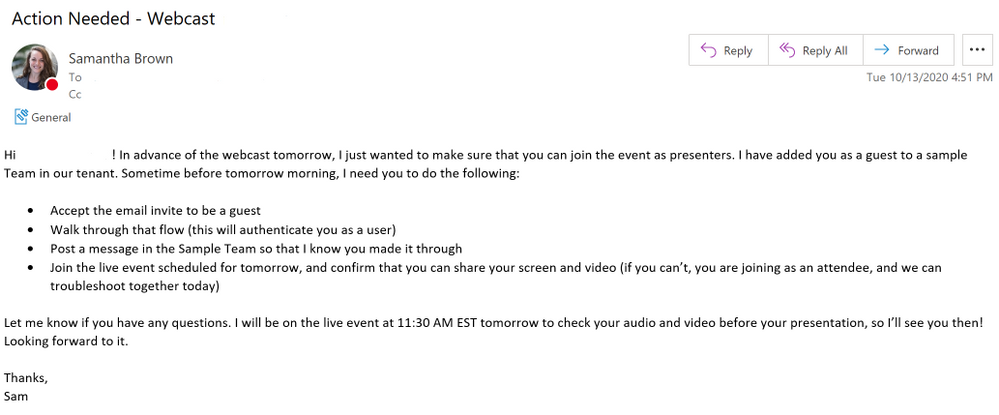
Even if you add them as a guest to your Teams tenant and they receive an email, the most important part is that they step through the entire flow. This ensures that the external presenter is authenticated as a guest within your tenant. Below is an example of an email that I sent to my guest presenters just last week! Feel free to save yourself time and use it as a template:
3. Schedule the live event and add the guest as a presenter in the event group.
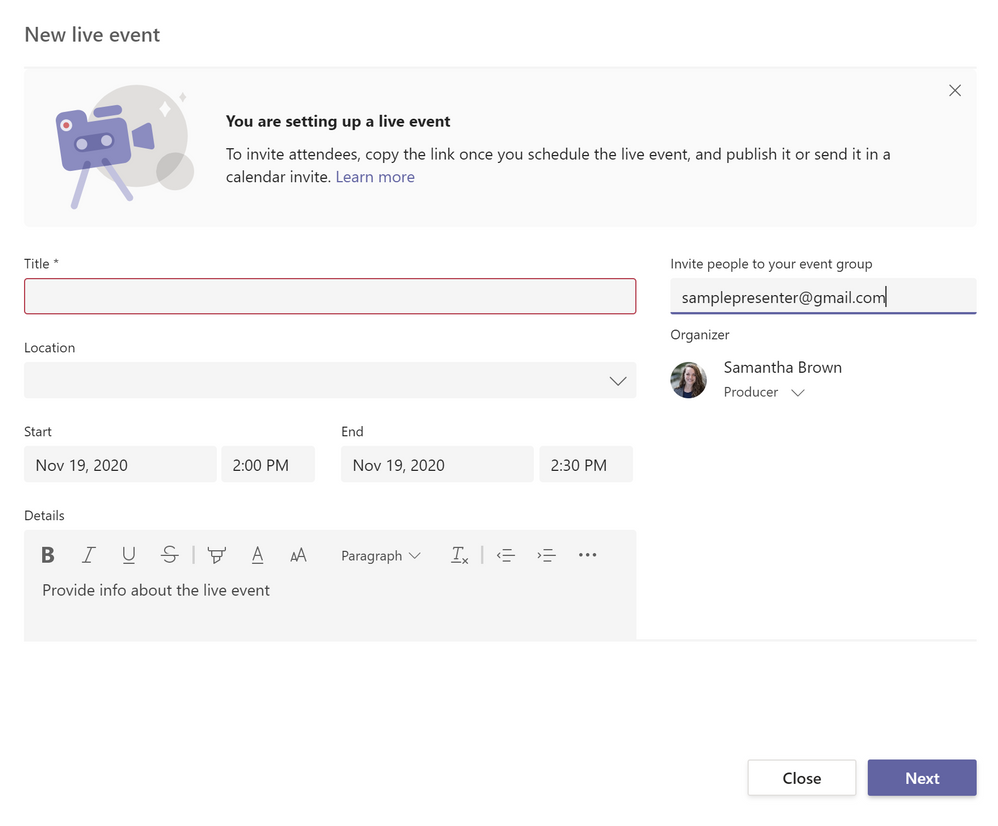
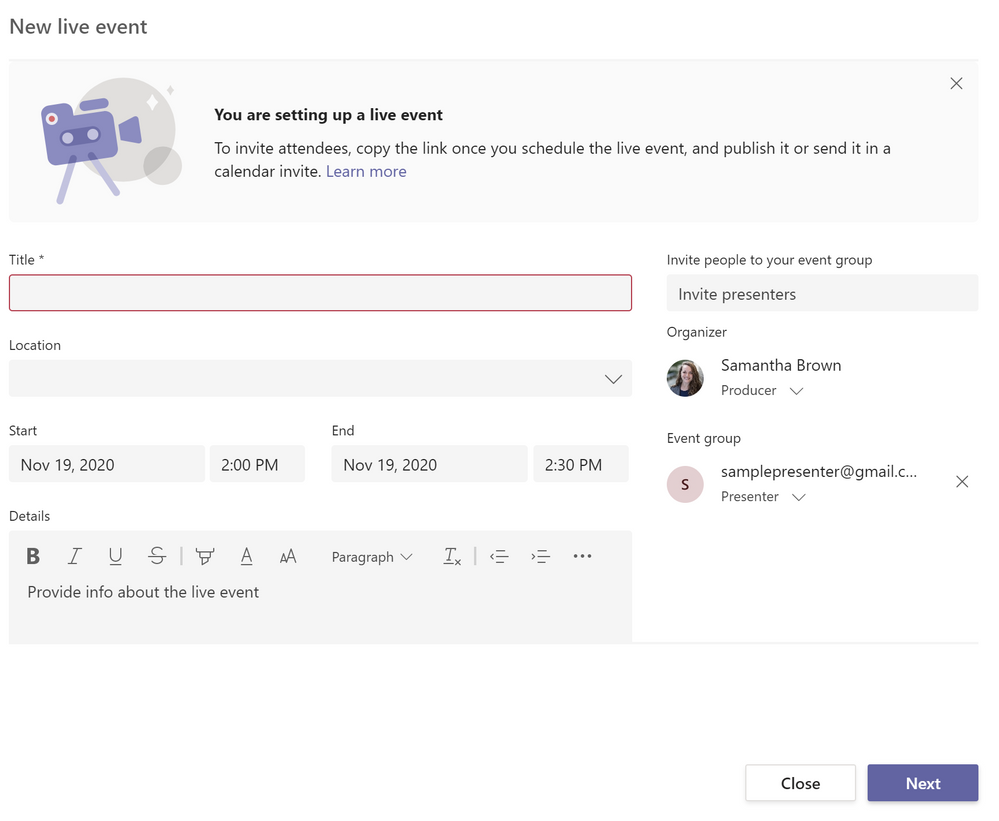
When you schedule a live event, the first screen asks for the meeting title, date and time, and other details including the event group. Simply add in the presenters’ email addresses to add them to the event group as shown below:
After you invite the presenter, they will be added to the event group, as you shown here:
This can be done before step 1, and you can add more presenters to your event group at any time. That being said, until the external user goes through the flow to authenticate as a guest in your tenant (step 2), they will not be able to join the live event as a presenter.
That’s it, folks! Hopefully this simplifies the process of inviting external guests to present in your live events. For even more details on planning live events in Microsoft Teams, check out this resource.
This article is contributed. See the original author and article here.
We wanted to share some best practices to prepare the on-premises public folders for migration to Exchange Online. The document will walk you through the overview of process to migrate public folders to Exchange Online, using the native tools as well as talk about best practices and tools used for trouble free migration.
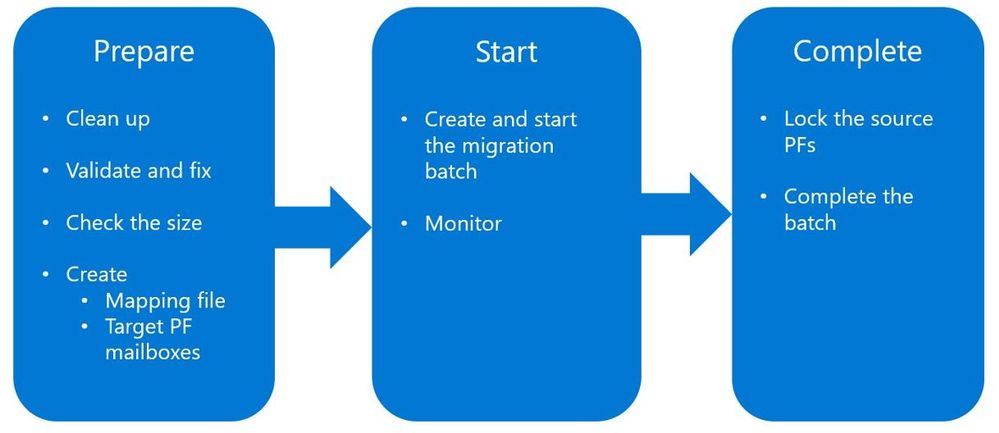
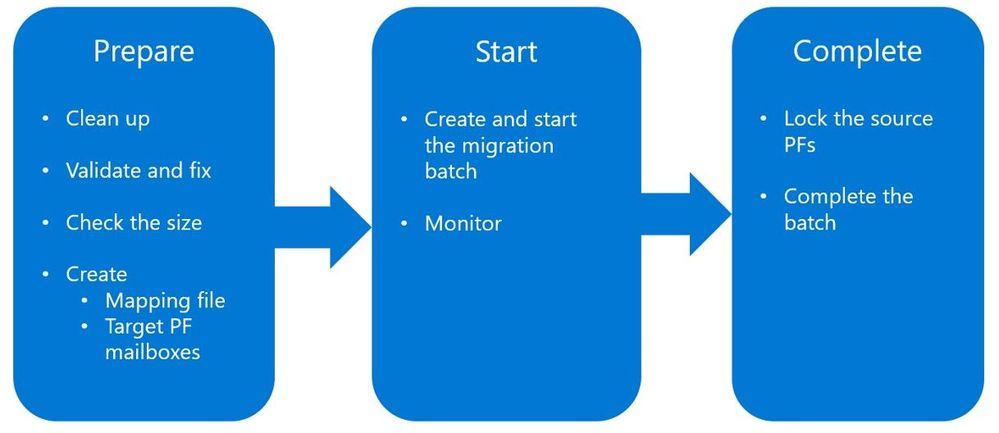
Public folder migration process overview
A quick overview of how the native migration process works follows. The intention here is not to walk through details of each step of native migration, that is already done here and here.
Preparation is the key step, and we will be spending majority of this post on that part, which will ensure you face minimal issues during the actual migration.
As part of preparation you will:
Find out stale/unwanted public folders and remove them
Validate existing public folders for known issues and fix any issues found
Check the size of existing public folders and public folder items and ensure they are not too large
Create the mapping file and target PF mailboxes
Out of scope of this post: once all the preparation is completed, creation of a migration batch using a mapping file and starting of the migration batch.
Before we dive into the details of preparation, here are some of the highlights of the native migration process:
There is no option to migrate only some public folders, therefore:
You must remove unwanted public folders if you don’t want them to be migrated.
If you wish to migrate some public folders to Microsoft 365 Groups, you should do this before you migrate the rest of your public folders to Exchange Online.
Only one migration batch is allowed – all public folders will be migrated in a single batch.
Once the migration is completed, no more data from source public folders can be copied over to Exchange Online public folders.
As the famous quote goes “By failing to prepare, you are preparing to fail”; this applies to public folder migration. Let us now explore detailed steps of preparing the public folders at source.
Cleanup
We need to start with inventory. This is the time to take inventory of public folder deployment at the source. Find out stale public folders out there and decide if those folders are really needed? Do you really need to migrate data that has not been accessed for years?
The following commands show public folders that do not have user activity for last two years:
Note: LastUserAccessTime is available only in Exchange 2010, not in later versions.
On public folder replicas (legacy public folders)
On a simple side of things, an organization might have a single (or two) public folder databases on two servers, with actual public folder data (replicas of actual content) on both servers. This can then scale to organizations that have 10s of public folders servers with complicated replication strategy.
The best chance of success to have timely migration can be achieved by having as few copies of same public folder data (replicas) as possible. Consider that during the migration stage, users are still using public folders as they currently are. The more replicas of public folder content there are, the more places we have where public folder data can be written to or changed. This then results in public folder replication process between different replicas. Many an Exchange administrator has spent lots of time troubleshooting legacy public folder replication – which can be challenging even if there is no migration going on at the same time!
Our recommendation therefore is to consider that in a large public folder environment, it might be worth it to consolidate / remove some folder replicas and therefore reduce complexity / data churn during the migration finalization stage. Also, you want to make sure that all the public folder databases are mounted (dismounting the database is not a way to try work around this complexity!)
Public folder size and item size
A lot of public folder migrations fail and get delayed because the individual items were too large, or a very large public folder was being migrated.
It is best to:
Keep the maximum individual public folder size between 15 to 25 GB.
Use Export-PublicFolderStatistics.ps1 to get public folder size information. If you have any public folders larger than 25 GB, you should break them up to be less than 25 GB.
If you are planning to migrate large public folders, ensure to change the default public folder post limit in Exchange Online.
For public folder items:
The default MaxReceiveSize on public folder mailboxes in Exchange Online is 35MB. You should find out the public folder item sizes at the source. The following command example can help:
$pf=Get-PublicFolder -Recurse -ResultSize unlimited;foreach ($i in $pf) {$s=Get-PublicFolderItemStatistics $i.EntryID;foreach ($r in $s) {if ($r -gt “38600”) {$r.MessageSize,$r.PublicFolderName}}}
If you have public folder items that are large then 35MB, change the MaximumSend/ReceiveSize on target public folder mailboxes, once they are created in Exchange Online.
If public folder items are larger than 150 MB, you must remove these items before migration. See “Message limits” here.
Validate – SourceSideValidation.ps1
The following are major causes for migration slowness or failures, when it comes to public folder data issues:
Bad ACLs
Issues related to Mail Enabled Public Folders (MEPF)
Health of dumpster folders
Source exceeding limitations (things like folder depth etc.)
The Source Side Validation (SSV) script was developed to analyze the on-premises public folder deployment and report issues found along with providing guidelines to fix them. The script must be run from Exchange 2010 or Exchange 2013+ server, depending on where the public folders are deployed. Use the script before the start of migration process but after you have cleaned up the source environment from folders you do not need to migrate.
To get the script to perform all the checks:
.SourceSideValidations.ps1
To get the script to perform only public folder permission related validations:
The following are common issues encountered during migration of MEPFs:
Orphaned MEPFs
Non_Ipm_Subtree public folder is mail enabled
The .ValidateMailEnabledPublicFolders.ps1 script will help you find such MEPFs and provide you readily usable output to fix such MEPFs.
Target public folder mailboxes
Planning how many public folder mailboxes you need in Exchange Online is a critical task as well. You don’t want to create a ton of unnecessary public folder mailboxes and at the same time you don’t want to overload each target mailbox so that it might fill up during the migration (or soon after).
Some guidelines to remember:
Do not place any content in the primary hierarchy mailbox, nor point any users directly to this mailbox. You can read more about public folder deployment best practices here.
Plan to fill up to 50% of maximum allowed size of PF mailboxes during migration. Current maximum size of PF mailbox is 100GB. So, the “Total public folder size at source in GB”/50 should give you an idea of how many public folder mailboxes you need in Exchange Online.
So, for example, if you have 2 TB (2000 GB) of public folder data at source, you will need around 40 public folder mailboxes in Exchange Online.
The .ModernPublicFolderToMailboxMapGenerator.ps1 file can help you get idea of how many PF mailboxes are required in Exchange Online and also provides you the mapping file.
Mapping file
The Mailbox Replication Service uses the mapping file to place source public folders into specific target public folder mailboxes. The following are some guidelines on well-defined mapping file:
Ensure the primary hierarchy mailbox is mapped to the root folder “”
If you wish to place specific folder into a specific public folder mailbox, add the entry exclusively
Once the entry is added, the folder and subfolders below it will be migrated to the target mailbox specified
Ensure each folder that is present directly on the root has explicit mapping in the file and is mapped to a non-primary hierarchy public folder mailbox; this ensures the primary hierarchy mailbox serves only hierarchy
Finally, ensure the target public folder mailbox names are correct
Connectivity
Migrations can fail or produce unexpected results if connectivity to source server is unreliable.
Migration from Exchange Server 2010 works using Outlook Anywhere (RPC/HTTP), even if you have Exchange Server 2013 (or higher) acting as a FrontEnd server.
It is best to ensure the service account being used to migrate public folders can access Exchange 2010 public folders from the internet using Outlook for desktop client or Microsoft Remote Connectivity Analyzer.
You can use the Test-MigrationServerAvailability command to ensure connectivity.
If your environment uses a load balancer, it is best not to use the load balancer for MRS related traffic as this is handled by EWS and the MRSProxyEnabled property on that Virtual Directory.
Finally, if you have a firewall with very stringent inbound connectivity, ensure that Exchange Online IP addresses are whitelisted.
Changing the default quota in Exchange Online
The default prohibit post quota to public folders in Exchange Online is 2GB. The migration may not fail if your individual public folders are larger than this size, but users might not be able to post or email items to public folders as soon as the migration is complete.
The default quota can be changed at organization level:
Note: Do not set the default quota above 25 GB as it may result in giant public folders, which might cause issues with the auto-split process in the future. You can read more about auto-split feature here.
Also by default, the MaxReceiveSize and MaxSendSize on public folder mailbox is configured at 35MB. You must increase this limit to accommodate largest public folder items from on-premises:
The deleted public folders are stored under Non_IPM_Subtree, also affectionately referred to as the Dumpster.
Excluding this data can help you scale your public folder migration if you do not need the data to come over. This will result in faster public folder migration as the amount of data that will need to be migrated is going to be smaller. In some cases, corrupted dumpster folders can cause migration to fail.
Migration of public folders in dumpsters can be skipped using ExcludeDumpsters parameter.
This option is available only for migrations from Exchange Server 2013+ to Exchange Online and must be specified at the time of batch creation.
The goal of this article was to ensure the source is prepared for a successful and hassle-free migration. Once you are done with preparation, we recommend you follow each of the migration steps from here for a trouble-free migration experience.
This article is contributed. See the original author and article here.
We are excited to share several new Azure Migrate-related assets to help you learn how to discover, assess, and migrate your workloads, and walk you through different migration scenarios.
Azure Migrate L100 deck Learn how to discover, assess, and migrate infrastructure, applications, and data to the cloud with Microsoft’s first-party migration service, Azure Migrate.
Azure Migrate L300 deck Take an in depth look at Azure Migrate use cases. This deck gives a more detailed description of different server migration scenarios – agentless VMware, agentless Hyper-V and agent-based migrations for physical servers, AWS servers and servers from other clouds.
We also have several click-through demos to walk you through various migration scenarios:







Recent Comments