by Contributed | Dec 7, 2020 | Azure, Microsoft, Technology
This article is contributed. See the original author and article here.
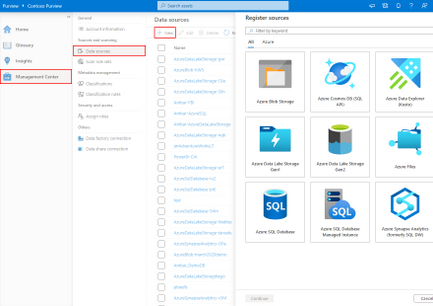
We are excited to announce the integration of Azure Data Explorer with Azure Purview today.
The new ADX capabilities will create more transparency on how data is delivered into your data lake and how this data is structured.
This data governance tool is built for data consumers, such as analysts, business users, data scientists, etc. It’s built to help you to discover your data source, data pipeline, data structure, how to access the data, and if it is classified (for example if there are special privacy regulations that need to be fulfilled in order to work with that data).
Here are some examples of key Azure Data Explorer scenarios leveraging the built-in custom rule functionality of Azure Purview:
- Discover data flow for each data component
- Leverage Azure Purview metadata, lineage and custom classifications/rules
- Easily answer these questions about my data structure “Does our data contain PII data?” “Is my PII data processed and isolated properly?”
- Leverage Azure Purview classifications, lineage
- Confidently use all relevant data sources for dashboard and queries
- Leverage Azure Purview upstream lineage, classifications/business glossary
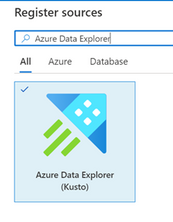
The Azure Data Explorer and Azure Purview product teams have worked together from the beginning. The first version of the connector was released in private preview and has provided valuable insights from the first set of customers. Today, based on that feedback, we are thrilled to provide a native connector for ADX that’s ready for public preview.
Read more on how to register and scan Azure Data Explorer
Read more on Azure Data Explorer integration into Azure Purview
by Contributed | Dec 7, 2020 | Technology
This article is contributed. See the original author and article here.
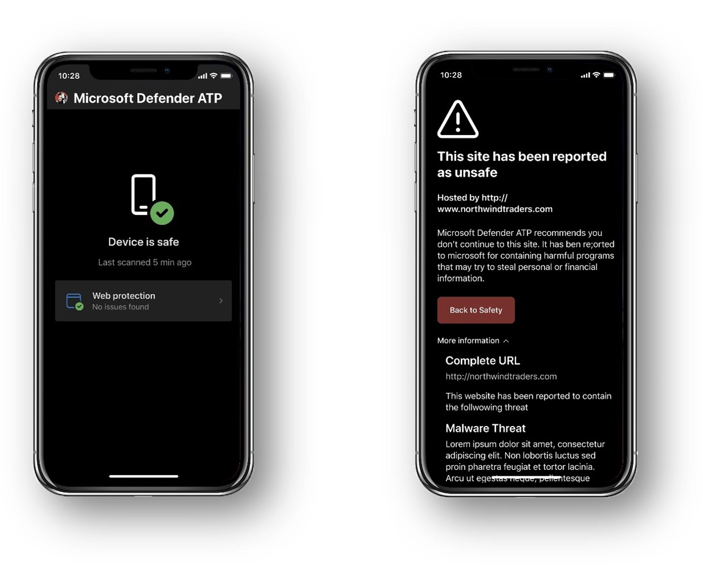
Today, we’re excited to announce that Microsoft has reached a new milestone in our cross-platform security commitment with the general availability of our iOS offering for Microsoft Defender for Endpoint, which adds to the already existing Defender offerings on macOS, Linux, and Android.
This release delivers the rich set of capabilities we announced in public preview, including anti-phishing, blocking unsafe connections, and custom Indicators. In addition, it offers a unified security experience through the Microsoft Defender Security Center, where security teams can get a centralized view of alerts, incidents, and gain additional context to remediate threats across all endpoints.
https://www.microsoft.com/en-us/videoplayer/embed/RE4G1oj
The threats on mobile are unique, with phishing being the biggest and fastest growing threat. More than 85% of these attacks take place outside of email through phishing websites, messaging apps, games, and other apps. Phishing is where we believe we bring the strength of the Microsoft security platform to bear. The scale of our service gives us extensive visibility into the billions of phishing attacks and social engineering techniques our customers face and enables us to detect and prevent these attacks on mobile.
Since our public preview announcement, we have also updated how users can get the Microsoft Defender for Endpoint app on their iOS devices. Now, eligible users can download Microsoft Defender for Endpoint from App Store.
For more information, including system requirements, prerequisites, deployment, and configuration instructions visit our documentation.
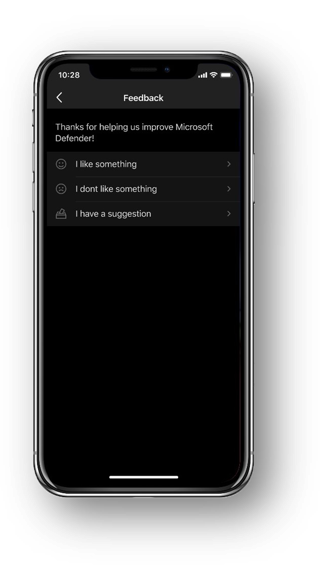
In the iOS app, to share feedback, you can use the “send feedback” option:
Increasing coverage for Android to include fully managed devices
We are also excited to share the general availability for Microsoft Defender for Endpoint (Android) support for Android Enterprise fully managed devices. This adds to the already existing support for installation on enrolled devices for the legacy Device Administrator and Android Enterprise Work Profile modes.
Android Enterprise fully managed devices are corporate-owned devices associated with a single user and used exclusively for work and not personal use. Admins can manage the entire device and enforce policy controls to work profiles, such as:
- Allowing app installation only from managed Google Play
- Blocking uninstallation of managed apps
- Preventing users from factory resetting devices
With this change, Android Enterprise fully managed devices will get the full capabilities of our offering on Android including phishing and web protection, malware scanning, and additional breach prevention through integration with Microsoft Endpoint Manager and Conditional Access.
For more details, please refer to the documentation here.
Simplifying onboarding for Android users
As a part of our commitment to continuously improve the experience for end users, we are now also simplifying end user onboarding. Till now, end users needed to provide VPN permissions to allow the Android and iOS apps to provide anti-phishing protection. With this update, admins will be able to setup configuration and push the device profile for VPN to their users’ devices so that VPN related permissions will not have to be provided by end users, thus simplifying their experience.
For more details, please refer to the documentation here.
We’re excited to be bringing these additional capabilities into mobile threat defense and look forward to hearing about your experiences and your feedback. If you’re not yet taking advantage of Microsoft’s industry leading optics and endpoint detection capabilities, sign up for a free trial of Microsoft Defender Endpoint today.

by Contributed | Dec 7, 2020 | Azure, Microsoft, Technology
This article is contributed. See the original author and article here.
We continue to expand the Azure Marketplace ecosystem. For this volume, 91 new offers successfully met the onboarding criteria and went live. See details of the new offers below:
|
Applications
|
|
Advanced Transportation Management System: The Advanced Transportation Management System from Trafficware, a Cubic Transportation Systems company, helps smart cities address the challenges of transportation management. Features include an alarms dashboard, a map view, and a streaming traffic information service.
|
 |
AI.SEE: AI.SEE, an automated quality assurance system, uses AI-powered image recognition and deep learning algorithms to find even the smallest defects on heterogeneous or reflective surfaces, which are often overlooked by human inspectors. This app is available in German and English.
|
 |
Appointment and Customer Management: SkizzleOpus is a cloud-based appointment-scheduling solution for a wide variety of businesses. Also, as a source of centralized information on space utilization, SkizzleOpus helps track the flow of people to manage social distancing.
|
 |
Augmental: Making education more personalized: Augmental, an adaptive learning platform, empowers teachers by providing them with real-time insights to better support their students. Augmental, which customizes course material to each student’s needs, includes a virtual classroom tool and a reporting and analytics module.
|
 |
BIA Reporting Hub: Bridge your business intelligence platforms with BIA Reporting, which allows you to centralize reports and dashboards. BIA Reporting includes free updates and unlimited support from BI4ALL.
|
 |
Bidvest ALICE: SaaS for Governance and Assurance: Bidvest’s ALICE platform translates business logic and rules into repeatable algorithms and augments them with cognitive services, aiding governance, risk, and compliance efforts.
|
 |
BLE Authentication Module: Bluetooth Low Energy Authentication Module (BLEAM) uses Bluetooth beacons to determine the precise location of a person or object and enable touchless authentication services at various businesses, such as electric vehicle charging points.
|
 |
Bottomline Healthcare eCapture and PreCapture: Bottomline Technologies’ eCapture and PreCapture solutions make it easy to move away from paper forms, centrally manage patient forms, and capture signatures, photos, and data on almost any device anywhere.
|
 |
BryteFlow Ingest Enterprise Edition: BryteFlow Ingest automatically transforms source data structures and schemas to build identical data sets in Microsoft Azure SQL Database and Azure Synapse Analytics. Log-based tracking enables continuous detection and transfer of incremental changes.
|
 |
Casper365 Enterprise: Casper365 Enterprise is ideal for companies looking to allow their users to create new SharePoint sites via a governed and managed self-service portal. Casper365 automates complex SharePoint deployments quickly and easily.
|
 |
Clearstep: Clearstep, a chatbot triage tool, routes patients to the right place of care depending on their symptoms. Patients can search based on their symptoms, get matched to the right in-network provider, understand the cost of care, and book care online.
|
 |
CloudBrain: Click2Cloud’s CloudBrain is a multi-cloud management platform that helps users control cloud spending by optimizing the utilization patterns of their cloud services.
|
 |
Cloudbric Smart Web Application Protection: Cloudbric’s fully managed Smart Web Application Protection (SWAP) offers threat monitoring, automated configuration, managed maintenance, and continual threat response. Reduce security costs and achieve peace of mind with SWAP.
|
 |
CloudCADI: CloudCADI, cloud consumption and optimization software from Amadis Technologies, utilizes machine learning models to predict expenses. This helps organizations, IT teams, and others accelerate and manage their transformation.
|
 |
Commerble EC PaaS: Commerble is a customizable e-commerce platform that can maintain a high level of performance even under the pressure of 2,000 simultaneous orders per minute. This app is available only in Japanese.
|
 |
COVID-19 Scientific Data Engine (SDE): The Scientific Data Engine (SDE) from SciMar ONE is a drug development platform that expedites the delivery of safe and effective drugs, vaccines, and diagnostics. The SDE uses COVID-19 clinical data to streamline and de-risk drug development efforts.
|
 |
cPanel & WHM for Azure: cPanel & WHM is a suite of tools that gives website owners and server administrators the ability to automate web hosting tasks via a simple graphical user interface. Migrate new customers, launch databases, secure your system, and customize and brand your service.
|
 |
Cubic Interactive: Cubic Interactive enables transit agencies to build custom loyalty and incentive programs in their mobile transit apps. Agencies can encourage desired travel behavior by awarding travelers loyalty points to offset transportation costs.
|
 |
CyberPion’s Ecosystem Security: CyberPion enables enterprises to identify security issues throughout their ecosystem and to control and manage vulnerable connection points to prevent exploitation.
|
 |
DataWeave Brand Analytics: With human-aided machine intelligence, DataWeave gathers external competitive information online, organizes it, and delivers it in a structured, easily consumable form. This helps businesses protect brand equity and enhance their e-commerce catalogs.
|
 |
dcirrus_b2bfileshare: This file-sharing solution from DCirrus lets business-to-business customers share confidential files using secured dynamic passwords. Customers can track their files and disconnect shared links at their convenience.
|
 |
dcirrus_vdr: DCirrus VDR is a secured virtual data room solution for due diligence and audits. Features include granular controls, smart tagging, indexing of documents, and watermarking with user details to avoid data theft.
|
 |
deFacto Power Planning: deFacto Power Planning, a corporate performance management solution, enables enterprise-quality budgeting, forecasting, analysis, and more. Designed for Microsoft customers, its architecture is synchronized with Azure, Dynamics 365, and data integration tools.
|
 |
dh Model Lab: dunnhumby’s machine learning solution, Model Lab, lets data scientists in retail automate many repetitive tasks, giving them more time to model and deliver customer insights to drive profitability and customer loyalty.
|
 |
Direct Routing for Teams with AT&T: This solution utilizes AT&T IP Flexible Reach to allow you to make and receive calls outside of your company’s Microsoft Teams service. Empower your workforce to collaborate whenever and wherever with SIP trunking, SBC-as-a-Service, and professional services from AT&T.
|
 |
E-book borrowing program: Offer your users e-books through this app from Jiju International Co. Ltd. Users can choose a book, download it to Microsoft OneDrive, and sync it to their personal folders. This app is available in Chinese.
|
 |
ERP SCHOOLS SISGA ACADEMIC: This virtual classroom system targeting the Latin American market includes forums, calendars, an online payment gateway, integration with the Schoology learning management system, and more. This app is available only in Spanish.
|
 |
Flarie Studio – Create your own branded games: Flarie Studio from Flarie AB allows organizations to take advantage of the fast-growing gaming market by branding games for social media campaigns and more. Users choose from premade games, upload design assets, adjust game settings, and launch a branded experience.
|
 |
Footprints for Retail: Footprints for Retail is an advanced AI marketing platform that anticipates shopper behavior. With its predictive models and campaign automation, marketing teams can increase their effectiveness while decreasing spending.
|
 |
Fortanix Confidential Computing Manager on Azure: The Fortanix Confidential Computing Manager enables applications to run in confidential computing environments. It orchestrates critical security policies, verifies the integrity of environments, and manages the enclave application lifecycle.
|
 |
G Suite to Office 365: Cloudiway’s platform helps organizations migrate from G Suite to Office 365. All types of migration paths are supported. For best results, Cloudiway recommends using its file migration tool alongside its site migration tool.
|
 |
Geotrend Market Intelligence: Geotrend aids market intelligence teams by carrying out cross-disciplinary research on all types of markets. The AI-based SaaS solution reduces research time, giving teams more time for analysis. This app is available in English and French.
|
 |
Granulate Real Time Continuous Optimization: Granulate provides continuous performance optimization, enabling organizations to handle compute workloads with fewer servers and allowing DevOps and infrastructure managers to optimize costs.
|
 |
Haldor Planning: Haldor Planning allows teachers to plan lessons and build a curriculum in Microsoft Teams. This gives teachers and students a clear overview of plans, assignments, and assessments, all in one tab in Teams. |
 |
Hub Cittamobi: Hub Cittamobi centralizes control of urban transportation operations, integrating cameras, turnstiles, sensors, audio and video systems, Wi-Fi, and more. This app is available in Brazilian Portuguese.
|
 |
IN-D Payables – Invoice Processing: IN-D Payables, an AI-based engine for accounts payable operations, processes invoices and extracts the useful details, like invoice number, PO number, and vendor name. It can send the relevant fields to accounting software in a matter of seconds.
|
 |
Inpowa: Inpowa is an industry-agnostic employee engagement platform that reduces staff turnover, increases productivity, improves morale, and incentivizes workers through rewards based on numerous key performance indicators. Inpowa integrates with Microsoft Teams.
|
 |
Mavenir Business Messaging Solution: Mavenir Business Messaging Solution provides a Messaging-as-a-Platform layer and value-added tools, apps, and services to enable brands, mobile network operators, and aggregators to build conversational customer experiences for mobile consumers.
|
 |
NeoStencil – Making Institutes Live/Online: Through its secure platform hosted on cloud servers, NeoStencil brings the experience of India’s top education institutes and teachers online to help students. Institutes can host live classes and receive support from the NeoStencil team.
|
 |
On Demand License Management: Gain complete visibility into Office 365 and Microsoft Azure Active Directory licenses and utilization with Quest On Demand License Management. Discover who is or isn’t using provided licenses and determine what’s provisioned in your tenants.
|
 |
Osirium PAM: This privileged access and infrastructure management solution protects critical assets, ensuring every action is accountable, visible, and auditable. Osirium PAM is one component of Osirium’s Privileged Access Security solution.
|
 |
PackID – Temperature and humidity monitoring: PackID offers temperature and humidity monitoring to prevent loss in the distribution chain of perishable products. The solution includes radio-frequency sensors that send information to the cloud and can be accessed through any device. This app is available only in Portuguese.
|
 |
pecano-erp-billing-electronic-taps: PECANO’s enterprise resource planning software includes an electronic billing service provided to Peruvian companies. This app is available only in Spanish.
|
 |
PIDGraph – Digitalization of brownfield documents: PIDGraph uses artificial intelligence to convert analogue piping and instrument diagrams into a digital format. Increase your process plant’s efficiency with the help of a digital twin of your analog system models.
|
 |
Qourt from Law Qube: Part of Law Qube’s suite of judicial and law enforcement management products, Qourt helps courts of all levels manage cases as they progress from initiation through disposition.
|
 |
Rigado Cascade: The Cascade IoT Gateway is an element of the Rigado Edge-as-a-Service solution, and it offers an edge network for large-scale, low-power wireless deployments. Rigado makes capturing physical and environmental data easy by combining edge hardware with a secure connectivity platform and a managed cloud service.
|
 |
SaaS Offer for EO/Remote Sensing Service Chain: This package from Kratos supports earth observation and remote sensing missions. It includes the quantumRX wideband receiver (qRX), the quantumDRA stream processor/recorder (qDRA), and a one-week implementation support service.
|
 |
Sage 50 Cloud Order & Accounting: Are you looking for a reliable cloud solution for order processing, inventory management, and financial accounting? Sage 50 delivers, and it brings with it the flexibility to run on any device. This app is available only in German.
|
 |
Scissors Staffing Management: Speed up your temp staffing with Scissors, a white-label solution available as a web or mobile app. Scissors can help you manage timekeeping, hiring, incident reporting, and more. Turn on additional integrations with major invoicing and payroll software to save even more time.
|
 |
SkyBase for Oracle Database on Azure: SkyBase Launcher lets you create an Oracle database server in your Microsoft Azure account with just a few clicks. The deployment process is fully automated and repeatable using an infrastructure-as-code approach.
|
 |
Stimulus Relationship Intelligence Platform (SRIP): Through real-time data analysis, Stimulus Relationship Intelligence Platform (SRIP) helps companies make better purchasing decisions, identify business opportunities, and avoid disruptions across the supply chain.
|
 |
SurPaaS Operato: Operato enables you to group your cloud resources by application and perform day-to-day optimization and modernization with its management tools.
|
 |
SwiftGo Smart Cart and Smart Basket: SwiftGo allows brick-and-mortar retail stores to shrink checkout lines and supply customers with personalized marketing as they shop. SwiftGo retrofits existing carts and baskets, enabling a swift, frictionless shopping experience.
|
 |
TalentTurf: Move from traditional performance reviews to insights-led performance conversations with TalentTurf. TalentTurf features embedded analytics, an easy-to-use interface, integration with leading ERP systems, and multi-device versatility.
|
 |
Transport Management Platform: Cubic’s Transport Management Platform facilitates coordination between transportation networks. Agency operators can work together to manage incidents and congestion in urban, interurban, and freeway environments.
|
 |
UbiOps: UbiOps is a hosting layer for data science and AI code that lets teams keep track of their algorithms, functions, and scripts in one place. UbiOps also quickly turns algorithms into scalable apps without requiring knowledge of microservices or DevOps practices.
|
 |
uqudo Digital Onboarding and KYC: The uqudo platform is used for onboarding, sharing, and authentication. Onboarding covers user registration, ID validation, and background screening. Sharing covers know-your-customer details. Authentication uses biometrics to verify the identity of users already onboarded.
|
 |
Versa Operating System (VOS): Connect and secure your Microsoft Azure workloads with the Versa Operating System (VOS), which provides software-defined routing, security, and a wide-area network. VOS is managed and controlled by Versa Director.
|
 |
Video Surveillance as a Service: Intended for small and medium-sized enterprises, Duranc’s scalable video surveillance solution brings together artificial intelligence algorithms and cameras for use in loss prevention and risk mitigation.
|
 |
Wallet Station: Wallet Station enables QR code payments and one-stop services from merchant apps to management systems. Additional functionality, such as coupons, can be added. This app is available only in Japanese.
|
![Zultys MXVirtual Enterprise Phone System [jpeg].jpg](https://www.drware.com/wp-content/uploads/2020/12/large-341 "Zultys MXVirtual Enterprise Phone System [jpeg].jpg") |
Zultys MXVirtual Enterprise Phone System: Zultys MXvirtual is a unified communications solution and IP phone system virtual appliance. Innovative, reliable, and scalable, it integrates voice, video, data, and mobility services to optimize collaboration and communications for businesses of all sizes. |
Consulting services
|
 |
Analytics with Azure Synapse: 2wk Proof of Concept: Insight’s team of specialists will align the power of data analytics with your business opportunities, then shape one to three use cases for a proof of concept. Stakeholders will receive code, artifacts, and one or more demo-ready AI solutions.
|
 |
Application Modernization: Future-proof your applications by moving them to Microsoft Azure. Stratum’s cloud experts will determine which apps are ready to be migrated to Azure and which will need modernization. Stratum’s goal is to modernize with few to no code changes to the apps.
|
 |
Application Modernization: 4 weeks assessment: In this assessment, Birlasoft will examine your enterprise IT systems and monolithic applications, then provide a strategic roadmap for the easy adoption of microservices and Microsoft Azure.
|
 |
AWS to AZURE – Cloud Migration: 2-Wk Imp: Solo Network Brasil S/A will migrate your resources from Amazon Web Services (AWS) to Microsoft Azure. A roadmap for migration will ensure the process is structured and optimized.
|
 |
Azure AD Setup 10-Week Implementation: In this engagement, Wipro will provide consultation and setup for Microsoft Azure Active Directory. Wipro will start with an assessment to determine your organization’s identity posture, then develop a gap analysis and a transformation roadmap.
|
 |
Azure App MVP Development: 10 Week Implementation: Let Ascendle Technology supply your business with a custom software development team to build a minimum viable product. This will entail four weeks of strategy and three two-week production sprints. You’ll receive a demonstration every two weeks.
|
 |
Azure Arc Management Assessment: 5 Days: Fujitsu Services United Kingdom will conduct a workshop, a proof of concept with Microsoft Azure Arc, an implementation of a dashboard and workbook in Azure, and a plan to roll out Azure Arc for your hybrid and multi-cloud estate.
|
 |
Azure Cloud Migration Assessment: 3-Day Assessment: After reviewing your company’s goals and analyzing its infrastructure, Chorus will create a cloud readiness report and discuss the findings and recommendations with you. Chorus assessments help companies plan an optimal migration to Microsoft Azure.
|
 |
Azure DevOps for Data – 2 Day workshop: Are your data developers left in the dark about the power of DevOps? This workshop from Improving will demonstrate how to automate data deployments via Microsoft Azure DevOps and a CI/CD process. Improving will build a foundation for DevOps in your data world.
|
 |
Azure Logic Apps Bot: 1 Day Workshop: Catalyst Technology Group’s free workshop will introduce companies to Microsoft Azure Logic Apps and Microsoft Power Automate, then set up a configuration to return results to the Otto.bot chatbot.
|
 |
Azure Networking Workshop (2 day KickOff): Available only in German, this workshop from braincon GmbH will go over the basics of Microsoft Azure network infrastructure, security concepts, landing zones, and resource locations. The workshop is limited to four customer participants.
|
 |
Azure Security/Compliance Audit (3-Day Assessment): This free assessment from Hanu will examine your Microsoft Azure security posture. Hanu will perform a compliance audit, conduct an application vulnerabilities check, and look for infrastructure configuration gaps.
|
 |
Azure Sentinel SIEM Managed Service: ITC Secure’s managed service provides a cost-effective approach to event collection and collation, threat detection, incident investigation, and rapid response using Microsoft Azure Sentinel. |
 |
Blockchain Engineer Course and Lab: Get three months of instruction and hands-on lab assignments in this blockchain fundamentals course from Trak Labs. The course will include 11 modules and 20 practical projects on Ethereum, Hyperledger, and Tezos. |
 |
Citizen Services Conversational AI: 4-Hr Workshop: Discover how conversational AI powered by Microsoft can alleviate demand on call centers. VERSA’s workshop will examine this and how conversational AI can create more meaningful interactions between citizens and government entities.
|
 |
Custom software development: 1-day Assessment: In this assessment, Comminus will determine your project goals, estimate a budget, and provide a technical proposal that reflects the associated costs of running your solution on Microsoft Azure.
|
 |
Cyber Defense Analysis: CUATROi’s Cyber Defense Analysis service, available in English and Spanish, assesses organizations’ cybersecurity status. CUATROi analyzes Microsoft 365 solutions, IaaS and PaaS services, spear phishing risks, and more. |
 |
Data Analytics on Azure: 2-h Briefing: This briefing from SDX is aimed at customers interested in using Microsoft Azure for data analytics in hybrid or cloud-only settings. SDX will cover selected use cases and conclude with recommendations and best practices.
|
 |
Explore Innovation Workshop: 10 day engagement: Prodware’s workshop will focus on your organization’s strategic needs and how technology and Microsoft Azure can bring about transformation in an agile manner. This offer includes an innovation gap analysis and an action plan.
|
 |
Go to Cloud – 5 Day Workshop: Intended for technical and business stakeholders, this workshop from GFI will allow your organization to understand the possibilities of cloud migration. With GFI’s assistance, you’ll be able to create a roadmap for migrating to Microsoft Azure.
|
 |
HPC Consulting- Implementation: 3 Weeks: CrunchYard will assess your high-performance computing (HPC) needs and propose an architecture to implement on Microsoft Azure. Examples of solutions: parallel file systems for financial services or HPC clusters for exploration geophysics.
|
 |
Insight Discovery and Accelerator: 1 Hr Assessment: Enlighten Designs will address how to implement the Insights and Discovery Accelerator in your Microsoft Azure tenancy. The Insights and Discovery Accelerator uses Azure Cognitive Search and more to analyze page layouts and to extract text, images, and key entities for indexing.
|
 |
IoT with Azure: 1-day workshop: Available only in German, this workshop from SDG Group will discuss implementing IoT scenarios with Microsoft Azure IoT services, then help you develop a complete use case, from data acquisition and processing to infrastructure-as-code deployment.
|
 |
Modern Data Warehouse: 10-Day Assessment: Predica will analyze your on-premises or hybrid cloud architecture, then collaborate with you on a plan that will allow you to implement a modern data warehouse and take advantage of the possibilities of Microsoft Azure.
|
 |
One Day Azure Kubernetes Consulting Workshop: In this workshop, COMLiNE SE will provide an overview of container technologies and how to manage and orchestrate your containers with Microsoft Azure Kubernetes Service and other Azure services.
|
 |
Road to Success Teams: Together with employees from your organization, experts from Ask Roger! will strategize the migration of your traditional phone system or Skype system to Microsoft Teams. This offer is available only in Dutch.
|
 |
SAP on Azure: 8-Wk Proof of Concept: SE16N’s proof-of-concept offer lets customers choose a pilot project from among several scenarios, such as migrating to Microsoft Azure, building an SAP system landscape on Azure, or building an SAP disaster recovery solution on Azure.
|
 |
SEGA Cloud: SEGA Cloud, a managed service from SEGA S.A., is designed to optimize your cloud costs and identify possible security risks by monitoring your Microsoft Azure services.
|
 |
VDICE-Virtual Desktop Intertec Cloud Experience: Intertec Systems LLC’s pay-as-you-go managed desktop service, built on Windows Virtual Desktop and third-party add-ons, reduces the hassle of managing end-user computing to just hardware support and access to the internet.
|
 |
Windows Virtual Desktop: 2 weeks Implementation: In this offer, QDS will implement Windows Virtual Desktop so you can easily transition to a virtual work experience. Customers can save money and improve flexibility with Windows Virtual Desktop.
|
|
by Scott Muniz | Dec 7, 2020 | Security, Technology
This article is contributed. See the original author and article here.
Original release date: December 7, 2020
The National Security Agency (NSA) has released a Cybersecurity Advisory on Russian state-sponsored actors exploiting CVE-2020-4006, a command-injection vulnerability in VMware Workspace One Access, Access Connector, Identity Manager, and Identity Manager Connector. The actors were found exploiting this vulnerability to access protected data on affected systems. The NSA advisory provides mitigation and detection guidance.
The Cybersecurity and Infrastructure Security Agency (CISA) encourages users and administrators to review the following resources and apply the necessary updates and detection guidance.
This product is provided subject to this Notification and this Privacy & Use policy.

by Contributed | Dec 7, 2020 | Dynamics 365, Microsoft 365, Technology
This article is contributed. See the original author and article here.
Even before the pandemic, organizations across industries, from manufacturing to retailers, felt the squeeze to modernize supply chain operations. The historic supply chain shock of 2020 has accelerated the need to both respond to immediate disruptions while building resilience into every layer of the supply chain.
In the past, rapidly overhauling a supply chain operation has been no easy feat. Today, cloud solutions like Microsoft Dynamics 365 Supply Chain Management are dramatically shortening the time and effort to get up and running on a modern, intelligent cloud-based solutionreducing a once-massive months long effort to just weeks.
Let’s look at three organizations that transformed supply chain operations in a remarkably short time, while building in a level of resilience that provides the agility to weather any future disruption.
Wahl Clipper Corporation
In 1911, Leo J. Wahl invented the first practical electric hair clipper. One hundred years later, the Wahl family is carrying forward the tradition of innovation and superior service with 3,000 associates and a partner network that distributes product in virtually every country worldwide.
With different on-premises enterprise resource planning (ERP) systems across global locations, the team faced increasing challenges managing the complexities of a global supply chain. “The system we’ve been using for the last 30 years: we’ve outgrown it. It can’t keep up with the changing business needs that we have,” explained Brian Wahl, CEO. Among the culprits of inefficiencydata inconsistencies across offices. “Our data wasn’t rationalized,” according to John Payton, Director of Information Technology. “It didn’t mean the same thing in each country or in each ERP system.”
By migrating to a single cloud platform, Wahl is able to execute uniformly across global resources instead of operating as individual units tied to disparate systems.
“We can already see that Dynamics 365, along with Office, is allowing us to process information, to move information to people much more quickly in a way that they can understand, absorb and make decisions on almost immediately. So we really appreciate the integration of those products along with the balance of Microsoft’s vision around the modern workplace, of having other tools available to us like Power BI and Power Apps, and we can bring solutions to the business in hours that used to take us days or weeks previously.”Brian Wahl, CEO
Takeaway
Fractured point solutions and siloed, disparate data sources can be a major source of inefficiency as organizations scale supply chain operations in the digital age. By migrating on-premises and legacy solutions to Microsoft Dynamics 365, Wahl Clipper Corporation broke down technological barriers to deliver a universally agile, collaborative and insight-driven way of doing business across global operations. Harmonized data available across point solutions, including Microsoft Office, enables faster decision making and opportunities to collaborate and share information more freely. And access to Microsoft Power Platform drives the speed and agility to solve challenges more effectively by enabling those closest to problems to solve them.
Read additional details on how this hair clipper manufacturer migrated to the cloud to adapt to growing business needs and innovations.
The JB Hi-Fi Group
Fulfilling bulky commercial goods can be trickya logistical puzzle that requires an efficient warehousing, inventory management, and fulfillment that can keep product moving. For JB Hi-Fi, a modern warehouse management system is essential to fulfill an extensive range of consumer electronics, appliances, and home entertainment products across 300 JB Hi-Fi and The Good Guys retail locations in Australia and New Zealand.
JB Hi-Fi needed a new warehouse management system to boost the efficiency of inventory flow, management of back-of-house processes such as goods storage, and route to market for big and bulky goods. The modern system needed to ensure data transparency across the organization, as well as seamlessly coordinate logistics across two retailers, each with unique point of sale systems and unique stock codes.
Thanks to Dynamics 365 Supply Chain Management, JB Hi-Fi not only found an intelligent solution that met all the Group’s needs but was able to deploy the solution for warehouse management in Sydney in just four months.
“It’s definitely an accelerated timeframe for this type of project, but it is actually quite achievable with a modern tech stackthe fact that the core environment is cloud based, software as a service. You can integrate quickly to Azure.”Simon Page, Technology Director
In addition to a faster time to value, Dynamics 365 provided the agility to seamlessly integrate with JB Hi-Fi and The Good Guys host systemssolving the logistical challenge posed by two separate systems for each retailer.
“One of the things we had to do is focus on the end process that the customer experiences. All the stages that an order flows through and a delivery flows through, right from where the sales person is having a conversation through to getting it to your door, that process needed to be harmonized for both brands. We’ve effectively managed to do that by creating this group model, which then translates back into statuses that the host systems understand without having to rewrite all the host systems.”Simon Page, Technology Director
Takeaway
With Dynamics 365 Supply Chain Management in place as the warehouse management foundations, JB Hi-Fi Group can focus all its efforts to ensure bulky goods are warehoused, picked, dispatched, and delivered safely, efficiently, and fastand in the process ensure it remains at the forefront of modern retail. The move has also made the business more resilient to disruptions, including COVID-19. The Group has been able to support a shift in how people shopped during lockdown, while seamlessly delivering from warehouses and stores.
Read additional details how JB Hi-Fi accelerates efficiency and customer experiences in the transformation to cloud native warehouse management.
Invitalia
Invitalia coordinates economic development in Italy. When COVID-19 spread to Italy, the agency took on additional responsibility for coordinating the acquisition and distribution of personal protective equipment (PPE), medicines, medical devices, and other supplies from international suppliers. Invitalia took over the program at a critical time: international buyers were chasing a limited supply of equipment. Adding to the complexity, each hospital in Italy ordered medical supplies in a decentralized, unstructured way, causing procurement delays and frequent partial or missing orders.
In need of a logistics platform capable of simplifying the complex process of purchasing and distributing PPE and COVID-19 supplies, Invitalia rapidly deployed Dynamics 365 Supply Chain Management. Microsoft Services and Agic Technology, a Microsoft Gold Partner, helped them set up a system for managing hundreds of international suppliers and transporting equipment to hospitals injust two weeks.
Takeaway
Invitalia was able to achieve remarkable time to value with Dynamics 365 Supply Chain Management, providing a centralized solution that helps the agency assess medical needs across the country and then quickly provision and distribute critical medical equipment. They’ve also adopted a platform that delivers the agility to easily extend across other departments and uses.
“It will be straight forward to expand our use of Dynamics 365 into other areas of public administration. It connects easily with other Microsoft products, giving us the opportunity to create end-to-end solutions for enterprise resource planning.”Fabrizio Bellezza, Chief Information Officer
Read additional details how Invitalia streamlines procurement and distribution of vital medical supplies with Dynamics 365 Supply Chain Management.
Build resiliency into your supply chain
These three stories bring to life how modern, cloud-based intelligent solutions can deliver versatility, scalability, and rapid time to value, even during a globally-disruptive events. We’ll share more stories from the supply chain frontlines in the next few weeks. Until then, learn more about Dynamics 365 Supply Chain Management, see what’s new and planned in the next few months, learn how to build resilience with an agile supply chain, and contact us to today to see a demo or start a free trial.
The post 3 unique success stories—building resilience into the supply chain appeared first on Microsoft Dynamics 365 Blog.
Brought to you by Dr. Ware, Microsoft Office 365 Silver Partner, Charleston SC.
by Contributed | Dec 7, 2020 | Technology
This article is contributed. See the original author and article here.
Azure IoT Hub now supports MQTT 5 in public preview. MQTT 5 is the newest version of the protocol and includes many enhancements over version 3.1.1. We’re excited to announce this new IoT Hub capability – it doesn’t replace the existing MQTT 3.1.1 support.
Why MQTT 5
Among all the enhancements, I’m most excited about MQTT 5’s robust support for reason codes. That is, you will be provided with much more clarity on if things are going right, and if not, what’s wrong. For example, if you hit one of IoT Hub’s throttling limits, MQTT 5 protocol has a built-in reason code to tell you about it directly in response:
Request:
-> PUBLISH
    QoS: 1
    Packet_Id: 31
    Topic: $iothub/telemetry
    @myProperty1: My String Value # optional
    creation-time: 1600987195320 # optional
    @ No_Rules-ForUser-PROPERTIES: Any UTF-8 string value # optional
    Payload: <data>
Response (throttled):
<- PUBACK
    Packet_Id: 31
    Reason_Code: 151
    status: 0501
Here, the reason code 151 is the pre-defined code for “quota exceeded” as per spec, and you’ll find the explanation for the 501 status in our docs. The client has much more visibility compared to the MQTT 3.1.1 days, where you may even need to go to our diagnostic logs to get the root cause of an issue!
This is just one example. MQTT 5 for IoT Hub also includes enhancements like:
- Support for reauthentication before SAS token expiration without disconnecting
- User properties to store custom key value pairs
- C2D commands will no longer get purged in absence of subscription from device – they’ll remain queued up until device subscribes or they expire
- And more!
Getting started
To get started, you’ll need to create a brand new IoT hub with preview mode enabled. This is temporary limitation – once we’re out of preview it will be available to existing IoT hubs as well.
Then, check out our docs on setting up your client for the preview:
by Contributed | Dec 7, 2020 | Technology
This article is contributed. See the original author and article here.
Azure IoT Hub’s Elliptic Curve Cryptography (ECC) server TLS certificate, also known as ECDSA certificate, is now in public preview. Compared to the normal RSA server cert, TLS handshake with ECC cert uses less data, is less computationally intensive, and is faster – all meaningful benefits to constrained IoT devices.
RSA vs ECC certificates
While offering equivalent cryptographic security to RSA certificates, ECC certificates use smaller key sizes. This following table (source: RFC 4492) shows the comparison between the approximate key sizes (in bits):
Symmetric |
ECC |
RSA |
80 |
163 |
1024 |
112 |
233 |
2048 |
128 |
283 |
3072 |
192 |
409 |
7680 |
256 |
571 |
15360 |
Smaller key sizes result in smaller certificate size and less data usage for TLS handshake. This is particularly important for IoT devices due to their smaller profiles and memory (such as RTOS devices) and to support use cases in network limited environments (such as cargo ships and remote areas).
IoT Hub results
We ran some experiments for the ECC (256 bits) vs. RSA (2048 bits) certificates for this IoT Hub preview. We found that the TLS handshake data usage went from ~4500 bytes to ~2700 bytes, 40% less! Not only will you be getting the reduction on your bandwidth bills, the savings on battery, computation costs, and memory should not be overlooked. For example, in Azure RTOS, we saw a possible 4KB reduction in TLS stack memory footprint if ECC is used. Such a reduction is significant for a device with limited memory as it opens up the possibility of re-using that memory for other purposes not previously possible.
Getting started
To get started,
- You’ll need to create a brand new IoT hub with preview mode enabled. This is temporary limitation – once we’re out of preview it will be available to existing IoT hubs as well.
- Follow our docs to prefer ECDSA cipher suites in order to tell IoT Hub to present the ECC cert.

by Contributed | Dec 7, 2020 | Microsoft 365, Office 365, Technology
This article is contributed. See the original author and article here.
What is a PowerPoint Party?
Yes, it is a real thing! The PowerPoint party has been growing in popularity since COVID required social distancing began, but PowerPoint parties have been entertaining people long before 2020. PowerPoint Parties are a great way to interact with your family this holiday season! Everyone invited to your party is asked to prepare a short presentation on a topic of their choice, or assigned in advance by the group, and they will present their PowerPoint to the group on their The topics can be fun and lighthearted – we all need that in unprecedented times like this!
How to get a PowerPoint Party planned…
Below are some steps for you to follow to successfully throw an online gathering like this!
- Plan a theme: Throw a virtual game night, online happy hour, formalized “vent session” or watch party!
- Create your deck (and help inspire your friends to create their PowerPoint with these easy templates and tools….
This is an accessible PowerPoint Party template to get you started: PowerPoint party (office.com)
Here are some additional fun templates that may get your creative
- Make it more visually appealing – this isn’t your Father’s PowerPoint
You can use additional PowerPoint features like zoom and morph to make your slides more visually appealing and compelling for your virtual audience!
- Get your party started!
Naturally, we share our presentations via Microsoft Teams. But, you can host a PowerPoint party on the video conferencing platform of your choice. For the best Teams experience, share using PowerPoint sharing in Teams via the share tray. This will provide you with the best experience for both you and your audience: Share content in a meeting in Teams – Office Support (microsoft.com)
- Have Fun!!
- Repeat often!
All in all, PowerPoint Parties are a great way to connect with friends, family, or colleagues over the holidays. Whether you’re planning an online shower, virtual birthday party, or just hanging out, PowerPoint has got you covered.
by Contributed | Dec 7, 2020 | Technology
This article is contributed. See the original author and article here.
The Teams devices portfolio strives to give users options based on the space they use for work, the kind of collaboration they engage in, and their personal preferences for when and how they choose to get things done. We are constantly working to provide an intuitive and familiar experience for Teams on every device type, and this means carrying over the great features we have for meetings and calling into the phone experience as well. This month we’ve got some great updates that bring together the features users love in Teams meetings into the Teams phone app and more to keep users productive and secure.
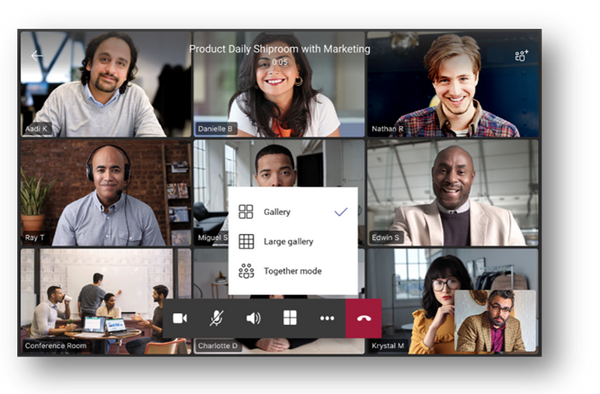
1. Video Enhancements for Teams meetings: 3×3 Layout, together mode, gallery view and background blur
Teams phones now support a new video layout including 3×3 gallery view, large gallery view for more participants and Together Mode. Using 3×3, users can see the video feeds of up to 9 meetings participants at a time. For even larger meetings, enable large gallery view to show up to 49 participants. Teams phones will also support Together Mode, a revolutionary meeting experience where participants are transported to a virtual shared space.
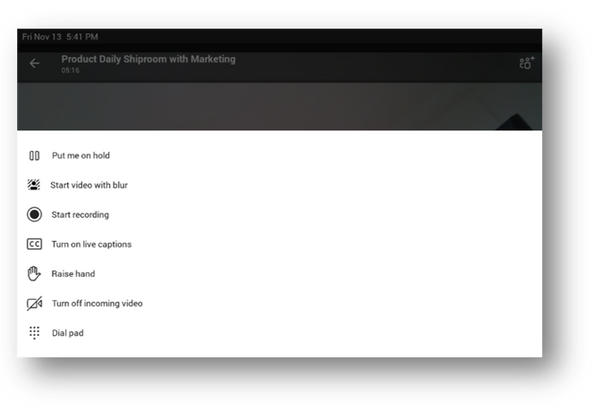
No matter which style of meeting you select you can always enable background blur to reduce distractions and obscure any imagery found in a video setting.
2. Meet Now on Phones
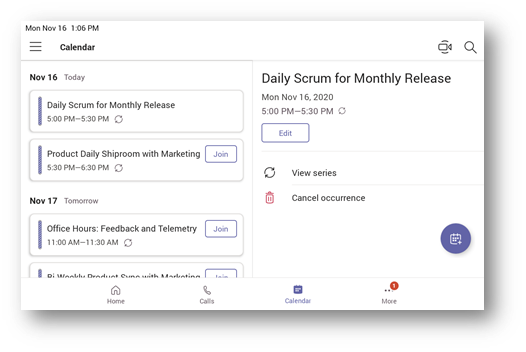
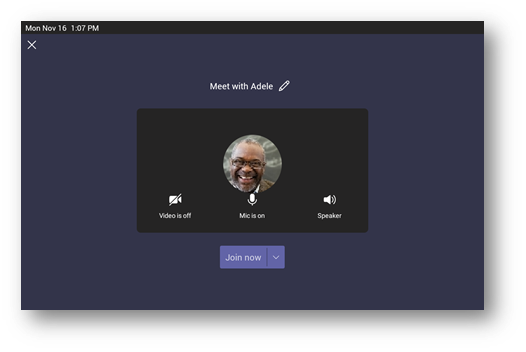
Sometimes, the need to collaborate with a teammate can pop up at unscheduled times; it is easier to get clarity or talk through a few quick details with the new instant meeting feature on Teams phones. Users can select “meet now” in their calendar interface to easily start a meeting and add a participant.
3. Screensharing on Select Audio Phones
With this update some models of touch screen audio phones meeting the minimum hardware requirements will now allow user to see content that is being presented or shared by others during calls and meetings.
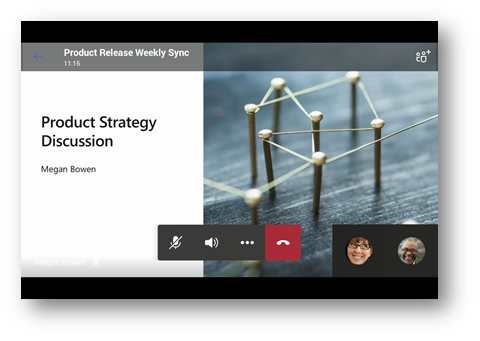
4. Spotlight
From a desktop client, presenters can pin an individual feed for all attendees to see during a Team meeting. The spotlighted video will be the main video the Teams phone user will see on their screen. For more information, see here.
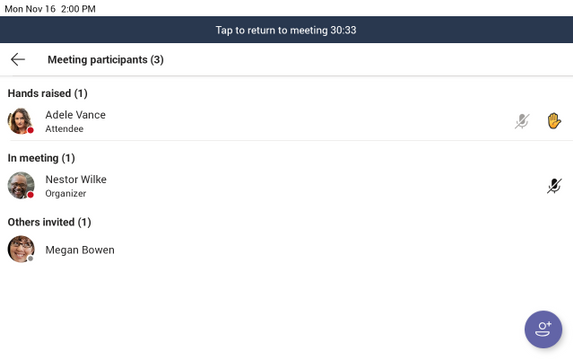
5. Request to Speak
The hard mute functionality allows you to prevent attendees from unmuting themselves. This can be switched on or off from within the meeting, and individually for attendees who put up their hand to speak.
In addition to meetings functionality, there are some exciting core updates to Teams phones coming out this month.
6. Sidecar Support *Beta Release*
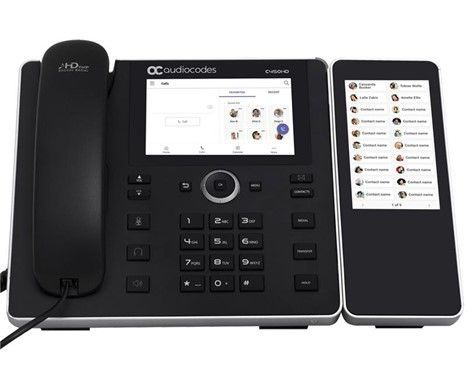
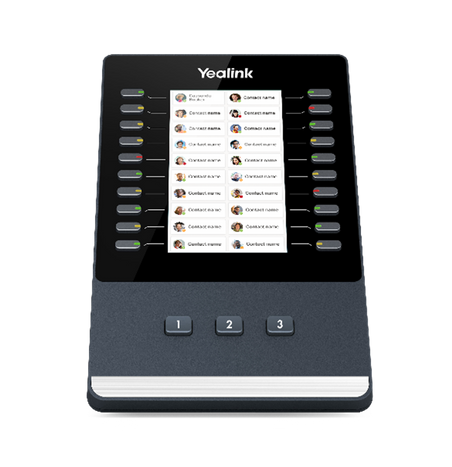
Sidecars are an efficient way for a phone user to reach frequently used contacts on a desk phone. They are an accessory to a Teams phone with hardware buttons that can be linked to speed dial contacts. A user can select and pin the names of any contacts in the Teams phone to the screen of the sidecar so that calls can be made with one click and it is clear whether a contact is available or not at-a-glance with LED indicators. Teams will support sidecars with touch or non-touch enabled hardware.
Now Teams supports sidecar functionality on the Yealink EXP50, and the Audiocodes C450HD with the expansion module in beta release.
7. Phones in Microsoft 365 Government – GCC
Microsoft Teams phones application is ready to be deployed in the Microsoft 365 Government – GCC environment. For more information, see here. Please check with your vendors for any hardware compliance questions.
8. Policy changes to enable/disable HomeScreen and BetterTogether
There will be two new settings (AllowHomeScreen and AllowBetterTogether) added to the TeamsIPPhone policy that will allow tenant admins to enable/disable home screen and better together on Teams phones. See here for more information.
9. Proximity based meeting join on Teams conference room phones
Proximity based meeting join for an available Microsoft Teams conference phone is supported from this update. The Microsoft Teams client on your PC and mobile detect proximity of the conference phone via the BLE beacon transmitted by the phone and allow you to add the phone easily to the meeting from your pre-join screen on your desktop or mobile client. When a user adds the conference phone to the meeting, the phone would auto accept the incoming meeting request. For more information, see here.
As always you can shop our robust portfolio of Teams certified devices, including a wide array of calling endpoints at the Teams marketplace!
by Contributed | Dec 7, 2020 | Technology
This article is contributed. See the original author and article here.
This is the second of a three-part series on the ways that Microsoft Power Platform empowers people with no coding experience to upskill and quickly learn how to create apps to solve business problems or problems they’ve identified in their local communities. The first post, based on an interview with Gomolemo Mohapi, focused on the young South African student’s path to becoming an IT teacher, app maker, and Microsoft Student Ambassador and cloud advocate experienced in Microsoft Power Platform. The third post, based on a conversation with Dona Sarkar, Advocate Lead – Microsoft Power Platform, tells the story of Sarkar’s meeting Mohapi and inviting him to become a member of her team. Today’s post is based on an interview with Joe Camp, Microsoft Power Platform Advocacy team member and one of Mohapi’s current colleagues. To hear Mohapi, Sarkar, and Camp talk about their experience with Microsoft Power Platform, listen to this Digital Lifestyle podcast.
In July 2020, when Joe Camp joined the Microsoft Power Platform/Power Apps Advocacy team led by Dona Sarkar, he and Gomolemo Mohapi became colleagues. Camp is the lead advocate for career switches to Microsoft Power Platform, and Mohapi is the lead advocate for students and emerging markets. They first met just over a year earlier, at the Microsoft Build Conference in Seattle in 2019, when Camp was still on the Windows Insider team and Mohapi hadn’t yet been hired by Microsoft. Mohapi had been invited to speak at Build and to help launch the project he had worked on with Sarkar, #InsiderUp. Although Sarkar was the one who invited Mohapi and guided him through the conference, it was Camp who helped arrange all his travel from South Africa to Seattle, including visas, lodging, meals, and transportation in Seattle, and who was on call to help him with any logistical issues that arose during the conference. “Now, just a year later,” Camp says with a smile, “we’re colleagues.”
It was Sarkar who was the catalyst for their meeting and becoming colleagues. She had met Mohapi during Microsoft Ignite The Tour in Johannesburg in 2019, when she was head of the Windows Insider Program. She’d been “blown away” by Mohapi, especially by that fact that he had taught himself Microsoft Azure and Microsoft Power Platform using the resources on Microsoft Learn and had created content to help his student peers learn this tech, too. So she invited the young South African and a few others she had met at conferences to the 2019 Build conference in Seattle to help her launch a new program and meet other Microsoft executives. “This shows,” Camp emphasizes, “why it’s so important to get out and meet people.” By staying inside a tech or corporate or even location bubble, and not engaging with people in different contexts, many opportunities are missed. In Empowering—Gomolemo Mohapi’s journey from student to Microsoft Power Platform advocate, the first post in this series, you can read the story of how Mohapi made the journey from attending Microsoft Ignite The Tour in Johannesburg to speaking at Build in Seattle to being hired on the Microsoft Power Platform Advocacy team and becoming Camp’s colleague.
Cloud advocates who continue their learning by learning from each other
As colleagues, Camp and Mohapi are frequently in contact. They have regular contact in team meetings, of course, but their work relationship extends far beyond that. “We’re a generation apart,” Camp says, “but we’re peers. He’s one of the most mature people I’ve ever met—at any age. When I first met him at Build and heard that he had developed learning guides to help his fellow college students grasp difficult material, I was blown away. I certainly wasn’t that focused at that age or in college.” Add to that, Camp says, Mohapi is humble. “He always gives credit to other people first, instead of calling attention to himself.”
Working with Mohapi on the Microsoft Power Platform Advocacy team these past months, Camp has also had the opportunity to observe his teaching close up. “He’s one of the best presenters I’ve ever seen—though I know speaking in public hasn’t always been easy for him. He’s always thoroughly prepared, he’s concise, and he’s engaging. Most important, his content is always easily digestible. It flows naturally.” Recently they both gave presentations at Start. Dev. Change., a virtual event for beginners looking to learn new development skills. Camp led a “First Power Apps” session (1:38:25) and Mohapi a “Power Apps from Scratch” session (2:08:38). Afterward, they had a sync to talk through their presentations and see what they could learn from one another about how to present the material better.
“He teaches me stuff all the stinking time,” Camp says. “He helps me to think technically. As someone without a technical background, I especially appreciate his teaching me this mindset: think through things structurally, in terms of a system, and thinking out of the box, and then marrying the two. For example, with the Power Apps tool, you think things through as a developer and also in terms of the user experience, a kind of right brain/left brain experience.” Camp and Mohapi are currently working together, with other team members, on an “Intro to Power Apps” course for Udacity, the online learning website with a focus on career switching.
Camp’s journey from no-code to citizen developer
Camp and Mohapi may be a generation apart and come from very different backgrounds, but before their journeys overlapped, they had both found their way to Microsoft Power Platform from very different experiences with coding experiences. And just as Mohapi’s journey from being an Azure developer to creating apps with Microsoft Power Platform and helping teach others to do that is an asset, so is Camp’s journey from non-coder to Microsoft Power Platform app maker. Camp’s journey shows that anyone can learn how to build apps with low-code techniques to simplify, automate, and transform business tasks and processes. You can start your upskilling journey by exploring the Microsoft Power Platform app maker training and certification on Microsoft Learn.
Though reluctant to focus on himself, Camp has a story of becoming a cloud advocate that’s also inspiring. He spent years in the financial services industry, where his work consisted primarily of “playing with Excel spreadsheets.” When his position at a Washington-based bank was eliminated, and the banking industry was consolidating, so there was less of a need for his type of expertise, he saw it as an opportunity to look for a different kind of work in the Seattle area. He landed as a vendor working in the Microsoft Most Valuable Professional (MVP) program, an outreach program to identify non-Microsoft employees who provide support, advocacy, and feedback from the community back into Microsoft programs. Eventually, he was hired full time in that program, due to his strong passion for building and nurturing communities. His role at the time was to help identify community influencers (potential MVPs) who were providing support for all the Office apps, SharePoint, and Exchange and were nurturing internal- and external-facing relationships.
Pivoting to such a different role wasn’t easy. To go from working with spreadsheets to nurturing internal- and customer-facing relationships, he had to develop an entirely new skill set. Two important skills, he says, helped him make this transition. First, being willing to learn new software he hadn’t even been aware of before. And second, accepting the challenge to build out customer relations skills, so-called soft skills, so he could nurture effective working relationships—both internally and externally—to help everyone “play nice in the sandbox,” as he says, which sometimes works and sometimes doesn’t. One challenge, for example, was building trust in relationships, so product teams would be willing to share information with the MVP community influencers talking together.
After he met Jeremiah Marble, who was running the Windows Insider Program with Sarkar at that time, Camp was hired on the Windows Insider team to build a Windows Insider–focused community program, which is where he was when he met Mohapi. Camp’s role on that team was to build out the Windows Insider MVP Program. He was responsible for setting up that program and running it, managing all internal-facing and more than 160 external-facing relationships.
Another prominent part of his new role was being the point person for the Windows Insider Program’s participation in Microsoft first-party events, such as Build, Inspire, Ignite, and Ignite The Tour. It was at those conferences that he got to know Sarkar, who was then the engineering lead for the Windows Insider Program and the public face of the program. He and Sarkar ran a few small customer engagement events in New York City and Boston, together with a couple of other team members. “That’s when I really got to know Dona,” he says, “and we developed a working relationship. During this time, I mentioned that I was interested in learning to code someday.” After Sarkar became the lead of the advocacy team, she hired him on that team to do this and to help others learn to do so, too.
A citizen developer empowering others to make a change
Camp’s role now on the advocacy team is to focus on people like himself who have made or are making a career switch. By sharing his experience—his learning path—he can encourage and empower others. “I still don’t consider myself a technical person,” he says, “but thanks to learning Microsoft Power Platform, I’ve built three or four apps in the last couple of months. Here’s the story I want to put out there: if you’re scared to make a change, or afraid you can’t learn a new technology, don’t be. You can learn these skills—learn how to use these tools and create apps. I fight the imposter syndrome every day, and I’m creating apps. There’s this great tool called Microsoft Power Platform that enables you to leverage the skills you’ve developed using Office apps—Microsoft Excel, Microsoft Word, Microsoft PowerPoint—to build functioning apps that automate your workspace.” If you want to learn to create your own Power Apps, a good place to start is this collection of learning paths on Microsoft Learn.
As his comments indicate, Camp takes his role as cloud advocate seriously. He reaches out on Twitter and LinkedIn to his MVP contacts, Sarkar’s many followers, and hiring managers to share with them what he’s doing, which they can then share with their broader audience and their companies. He publishes articles about his developer journey, the first app he created (an inventory management app), how to build your first app, how to set up your own test environment, and reasons to inspire others to upskill as a citizen developer, however he can, to let people know how empowering this is and to inspire them to make a change they might think they’re not ready for or capable of. The opportunities and rewards are great, he says. PricewaterhouseCoopers recently posted 160 jobs focused on Microsoft Power Platform. Right now, the Jobs board on LinkedIn lists over 11,000 jobs around the world that include Microsoft Power Platform in the job description—and that number is getting bigger.
Camp is proof that creating apps is not just for technically trained developers. It’s in reach, even for people who have no experience coding and who may not consider themselves “technical people.” With a desire to learn, the courage to change, and a tool like Microsoft Power Platform, the opportunity to become a citizen developer, as Camp calls himself, or a community developer, as Mohapi calls himself, is there. All you have to do to start your journey, from wherever you are, is take the first step. Check out the Microsoft Power Platform app maker training and certification on Microsoft Learn and explore the possibilities for you. And check out the new Microsoft Power Platform course at aka.ms/UdacityPower.


Recent Comments