by Contributed | Dec 18, 2020 | Technology
This article is contributed. See the original author and article here.
This post was written by Office Apps & Services MVP Sarah Haase as a part of our Humans of IT guest blogger series. Sarah shares her journey as a female technology leader and provides ideas for mentoring and developing others.
Female technology leaders face unique challenges. We’re often outnumbered by our male counterparts and can face an uphill journey to prove ourselves. But we bring strengths to the tech workplace: communication and critical-thinking skills, diverse life perspectives, and distinctive ways of solving traditional technology challenges.
I remember the first day I walked into my company’s IT department to take on a SharePoint analyst role. I was the lone woman on a team of 30 technical men. I stood out, and not just because of my gender. I was a librarian working in IT. I had a different way of looking at challenges and talking in meetings and it showed. Within a couple of months, I was known as the “librarian with the impressive vocabulary.”
I’ve had the privilege of working with female technology leaders who bring an awareness of self and a strong team-building focus to their jobs every day. Have I seen these female tech leaders be judged or viewed differently than their male counterparts? Sometimes. Despite the many advances we’ve made, there’s still a paradox of cultural norms and gender stereotypes at play. Leaders are expected to be direct and decisive and make hard decisions based on business rationale. But gender stereotypes call for women to be kind, nurturing, and “nice.” How can female technology leaders be direct and decisive while also being nurturers?
In my roles as a Microsoft 365 adoption advocate, product manager, and leader, I need to balance the technology and people-centric needs of my team and customers. I’m a coach, subject matter expert (SME), strategist, people leader, security advocate, evangelist, and mentor.
Early in my career, I struggled to find my footing as a leader that lives out loud. Speaking up in meetings was tough, particularly when I was representing a minority opinion. Having authentic conversations with employees, peers, and executives was hard, and my authenticity sometimes made others uncomfortable. But discomfort can be a productive agent for change, and others’ comfort isn’t always my primary goal. I can be in tune with and aware of others’ feelings while also being a strong leader.
I’ve had amazing mentors, leaders, and co-workers that have offered advice, perspective, and the occasional reality check. Being able to give back and encourage the growth of others is one of my greatest joys. Whether you’re a female technology leader, an aspiring mentor, or an ally that wants to support the growth of others, you have valuable insights to share.
Here are some ideas to help yourself and others on their leadership journey:
Build mentor relationships. Seek out (or become) a mentor. One of the most powerful work relationships I’ve had was with a female mentor who was 15+ years ahead of me in her career. If you’re a male technologist, seek out a female mentor. Be inquisitive and ask questions about her experiences, background, and strengths.

Connect with interns. Volunteer to mentor high school and college interns. Have coffee with them, ask questions, and see how they view careers in technology. You’ll gain an amazing perspective.
Support and empower others. I’ve joined mentoring circles at several of the companies I’ve worked for, and they’ve provided an amazing opportunity to grow my network and broaden my perspective. Making time to connect with and listen to others’ experiences is incredibly rewarding…and the connections made can help with future career opportunities.
Build alliances & invest in advocates. If you’re focused on advancing your career and getting that next promotion, start forging relationships to help you along the way. Build alliances with other leaders that see your potential and achievements. These leaders can serve as advocates for your career growth.

Create a strong personal brand. Your brand is the impression you leave; it’s what your peers say about you when you’re out of earshot. Ask your leaders and co-workers how people describe you. If your brand doesn’t reflect who you want to be, take the opportunity to evolve.
Seek opportunities. Reach for that tough assignment. Lean into work opportunities that stretch you. Focus on creating value and don’t be afraid to share your wins with your peers and leaders.
Believe you can do it. Speak up. Raise your hand. Be heard! If you usually hold back in meetings, try leaning in and sharing your thoughts. If you suffer from imposter syndrome, script out positive messages for yourself and repeat the messages aloud several times a day.
Give (and seek) candid feedback. Have you ever received performance feedback that included comments on your strengths but gave you nothing to work on and improve? Many of us find it easy to give positive feedback but hard to give constructive feedback. Seek out peers who will tell you like it is…and give others the gift of authentic feedback.
Evaluate feedback. Feedback should be heard, considered, and evaluated. Listen with an open mind, ask questions, and reflect on the feedback you’ve received. Consider its merits and determine which pieces you’ll take to heart.
Call out poor behavior (and then let it go). Many female technologists (myself included) have received inappropriate feedback. We receive comments on our appearance instead of our performance and achievements. Or we’re told we’re too nice, too difficult, or too smart. If someone gives you this kind of feedback (or you see it occurring in the wild), call it out. And then dump the feedback in the trash. Don’t let poor behavior go unchecked, but don’t carry it with you.
I feel fortunate to be a part of this amazing technology community, and I love connecting with other female leaders at conferences and events. We have so much to learn from each other!
Sarah
by Contributed | Dec 18, 2020 | Technology
This article is contributed. See the original author and article here.
The Driver Shiproom Operations Policy and Schedule is now available in MS Docs.
by Contributed | Dec 18, 2020 | Technology
This article is contributed. See the original author and article here.
Apache Spark has been a long-time favorite tool amongst data engineers and data scientists; it is well known for handling large scale data processing and complex machine learning workloads.
Azure Synapse Analytics offers a fully managed and integrated Apache Spark experience. By leveraging Apache Spark in Azure Synapse, you can benefit from integrated security, fully managed provisioning, and tight-coupling to other Azure services, such as SQL databases (dedicated and serverless), Azure Key Vault , ADLS Gen2, and Azure Blob Storage as well as fast starting, high performance compute instances.
Deploying an Apache Spark pool from the Synapse Studio
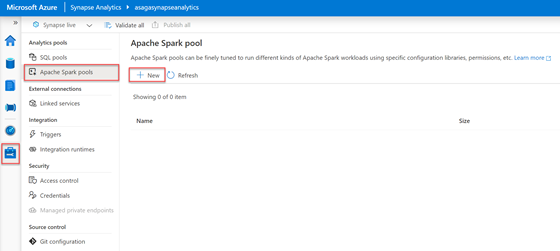
In the Synapse Studio, access the Manage Hub by selecting the briefcase icon in the left menu. In the blade menu, select Apache Spark pools from beneath the Analytics pools heading. In the toolbar of the Apache Spark pool screen, select the + New button.
In the Manage Hub, Apache Spark pools screen, the + New button is selected.
The Create Apache Spark pool blade will display on the right side of the screen. In this form, the only value you must enter is the Apache Spark pool name field. Enter your desired name and let the rest of the fields retain their default values. Select the Review + Create button, and after validation has succeeded, select Create.
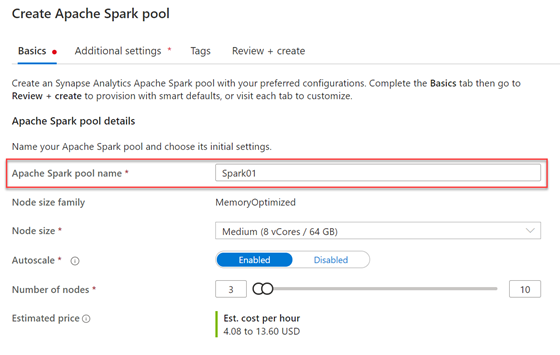
The Create Apache Spark pool form is shown.
In a few moments, the newly created Apache Spark pool will display in the Apache Spark pool screen listing. Notice how fast and easy it was to get started using Apache Spark in Azure Synapse.
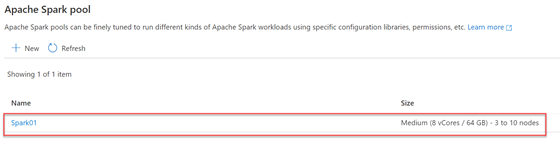
The new Apache Spark Pool is shown in the listing.
Learning Apache Spark using Knowledge Center samples
If you are new to Apache Spark, the Knowledge Center directly available in Azure Synapse contains fully functional samples that you can quickly deploy into your workspace to kickstart your learning process. To access the Knowledge Center, expand the ? menu located next to your user account information in the Synapse Studio header, and select the Knowledge center item.
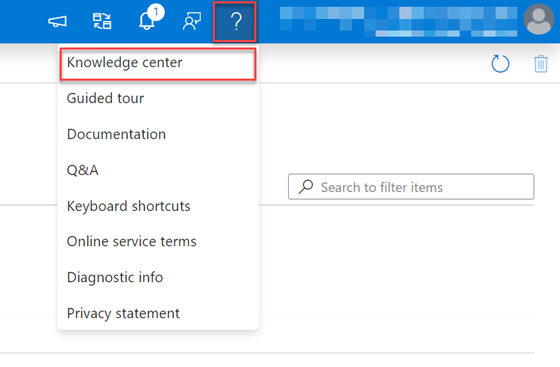
The question mark menu is expanded in the header with the Knowledge center item selected.
In the Knowledge Center, select the Use samples immediately card.
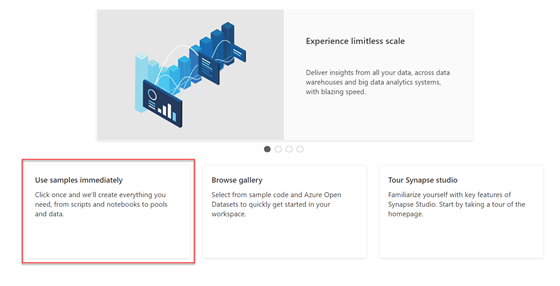
In the Knowledge center screen, the Use samples immediately card is selected.
The Use samples immediately blade will display on the screen’s right. Select the Explore sample data with Spark item.
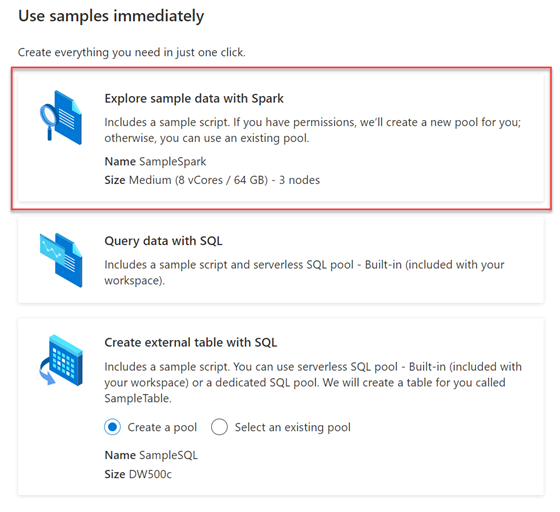
The Use samples immediately blade is shown with the Explore sample data with Spark item selected.
The Knowledge center will then deploy a notebook named Explore sample data with Spark in the Develop Hub, and if your permissions allow it, it will also create a new Apache Spark pool named SampleSpark.
After the sample’s deployment is complete, Synapse Studio will redirect you to the Develop Hub with the sample notebook open. A notebook is a collection of cells, some containing text (markdown) and others containing executable code. The sample notebook is not published (saved) by default. If you wish to keep the notebook, select the Publish all button in the Synapse Studio toolbar.
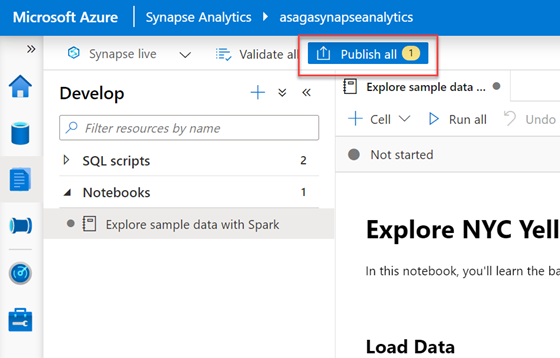
The Publish all button is shown in the toolbar.
The Explore sample data with Spark notebook will walk you loading, interpreting, aggregating, and visualizing NYC Yellow Taxi data obtained from Azure Open Datasets.
Let’s do a quick exploration of the toolbar of the notebook. The + Cell menu expands to provide the options of adding a code cell or text cell to the current notebook. The Run all button will execute all code cells in the order they appear in the notebook. The Publish button will save the current notebook in your workspace. The Attach to field lists the Spark pool options available in your environment. You can set this to either the Spark pool we created earlier or the SampleSpark pool created when the Knowledge center deployed the sample. The Language field indicates the primary/default language of the notebook. It’s important to note that you can mix and match languages in a single notebook using magic commands in a cell.
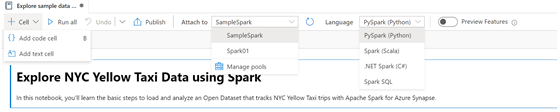
The Spark notebook toolbar is shown with each menu expanded.
Directly below the notebook toolbar is a secondary toolbar that displays the current state of the Spark session. The Spark session will start once a code cell in the notebook executes or the Run all button is selected. It takes a few minutes for the Spark session to be provisioned and started.

The Spark notebook Session toolbar is shown in a Not started state.
When the Spark session reaches the Ready state, you can hover over the status and view how much time you have left before the session expires. Every time code executes in the notebook, this timer resets. This timeout is a cost-saving measure to deprovision unused compute resources.
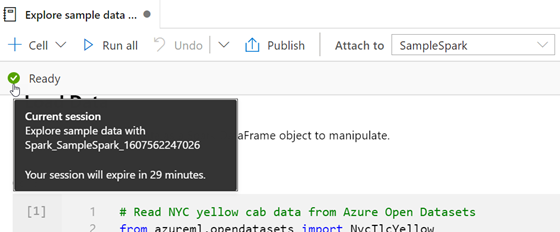
The Spark notebook Session toolbar is shown in a Ready state with the timeout tooltip showing.
On the Spark session toolbar’s right, you will find a Stop session button that immediately stops the current section and releases the associated Spark resources and a Configure session (gear) button that allows you to modify settings such as Session timeout.

The right hand side of the Spark Session toolbar is shown with the Stop Session and Configure Session buttons.
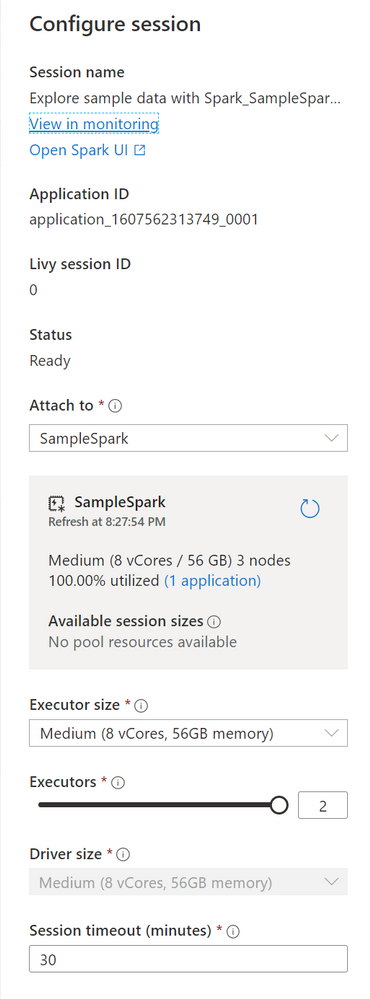
The Configure session blade is shown.
When you enter a code cell in the notebook, it becomes the active cell. A Run cell button appears in the margin space on the cell’s left-hand side. Selecting this button executes the code in the cell. Directly below the code, the Job execution details and output of the code displays.
Click on the sample notebook’s first code cell (labeled Cell 3) to enter the cell. The code in this cell imports the NYC Yellow Taxi dataset from Azure Open Datasets. It then retrieves all data between a start and end date from that dataset and loads it into a dataframe. Select the Run cell button in the left margin of the cell to execute the code. If the session has not already started this can take 2-3 min, however once its started the cell will execute in a few moments andthe output of the code displays beneath the cell. This cell does not have any printed output; however, you can expand the Job execution section in the output to see the details of the execution.
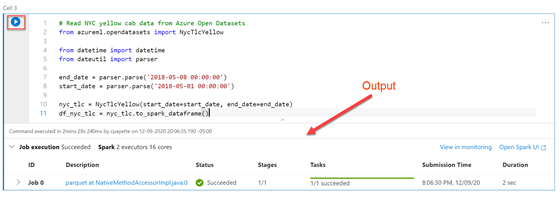
Cell 3 of the notebook is displayed with its associated output
The next code cell in the notebook (Cell 5) executes the printSchema command on the dataframe loaded with the data from the NYC Yellow Taxi dataset. Execute the cell’s code and observe the data’s schema/structure is printed in the output section.
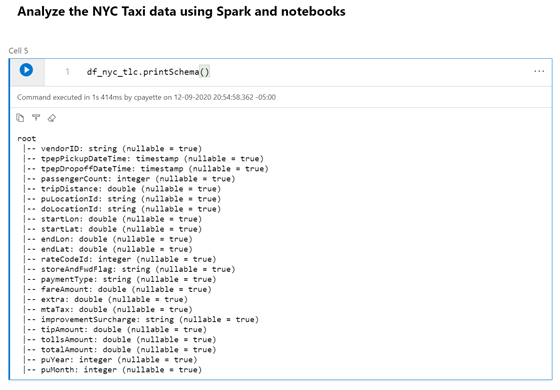
Cell 5 of the notebook is displayed with its associated output
In Cell 6, the first line of code imports a SQL function library so you can execute queries against the dataframe. The next line of code performs an aggregation query against the original dataset and calculates the average trip distance and total trip distance grouped by the passenger count. A new dataframe gets created with the results of this query. The last line of code displays this new dataframe in the cell’s output, defaulting the view to display the data in a tabular format.
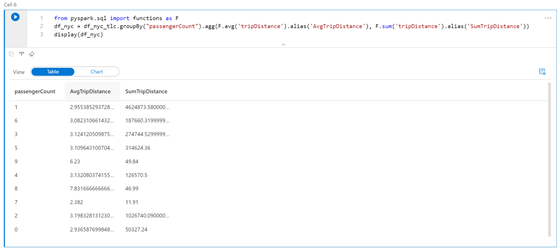
Cell 6 of the notebook is displayed with its associated output in tabular format.
In the output for Cell 6, toggle the View field to the Chart setting to see the resulting data in a chart format. The icon on the top right of the chart allows you to change the type of chart and its settings.
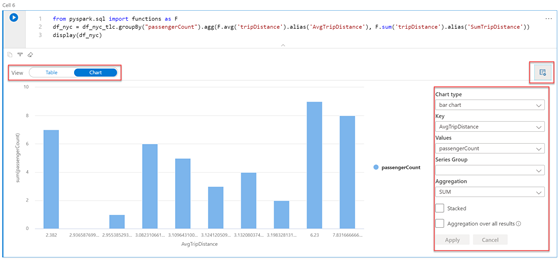
Cell 6 of the notebook is displayed with its associated output in chart format.
You are not limited to using the built-in charting functionality to visualize your data. You can import many popular data visualization libraries, including Matplotlib, Bokeh, and Seaborn. There is a long list of libraries automatically included with Apache Spark pools in Azure Synapse.
Alternatively, you can manage the libraries available to an Apache Spark pool by uploading a requirements.txt file in pip freeze format that lists the desired libraries along with the specific version information. All libraries must be available from the PyPi package index.
Moving along to Cell 8 in the sample notebook, you will find code that leverages the Matplotlib and Seaborn libraries to plot a line chart with the same aggregated data shown in Cell 6.
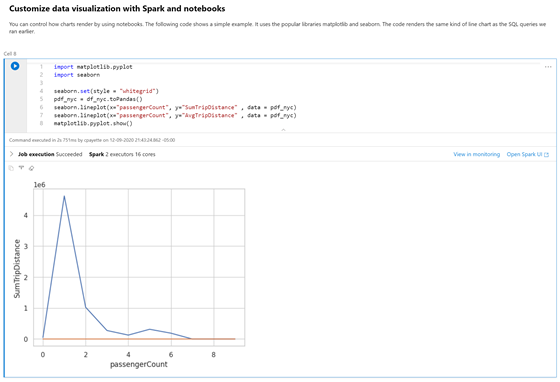
Cell 8 of the sample notebook is displayed with its associated output in chart format.
Creating a shared Apache Spark pool
Due to the deep integration of Azure Synapse Analytics services, we can easily share data between. We will create a Spark pool that can be shared not only with current and future Spark pools but with the serverless SQL pool engine as well.
Recall that in Cell 6 of the Explore sample data with Spark notebook, we’ve already created a dataframe (df_nyc) based on an aggregation query against the NYC Yellow Taxi data obtained from Azure Open Datasets. It would be great to share this data with the serverless SQL capabilities found in Azure Synapse. To implement this, add a new code cell to the current notebook, and add the following code to create a Spark database.
spark.sql(“CREATE DATABASE IF NOT EXISTS NycAggregates”)
Next, we’ll add our data into a table in this shared database. Append the following code to the same cell to write the contents of the df_nyc dataframe to a table in the NycAggregates database, then run the cell.
df_nyc.write.mode(“overwrite”).saveAsTable(“NycAggregates.PassengerCountAggregates”)

The code mentioned above is shown in a cell with its associated output.
From the left menu of Synapse Studio, select the Data Hub, which is identified by the cylinder icon. In the Data blade, expand the Databases section, and you will see the nycaggregates Spark database listed. Expand the database node as well as the Tables folder. There you will find the passengercountaggregates table. Next to this table, open the Actions menu, and select New SQL script, then Select TOP 100 rows.
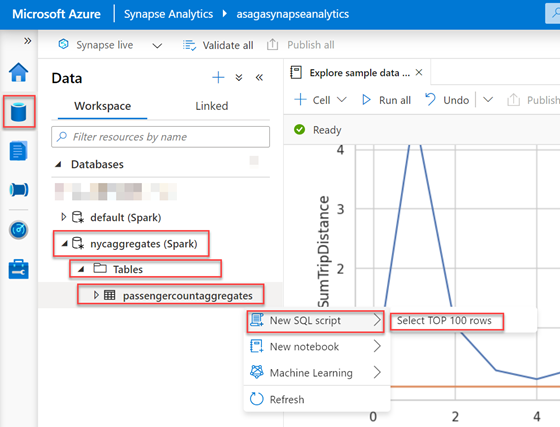
The passengercountaggregates table actions menu is expanded with New SQL script and Select TOP 100 rows selected.
A new SQL script tab displays populated with a query to retrieve the data from the table we created from the df_nyc dataframe in the notebook. Note that the SQL script toolbar is pre-populated to connect to the Built-in serverless SQL pool, and the database selected is the one that we created in the notebook (nycaggregates). Select the Run button in the query tab toolbar to view the results of the query. Observe that similar to the notebook experience; you also can toggle the View from Table to a Chart visualization.
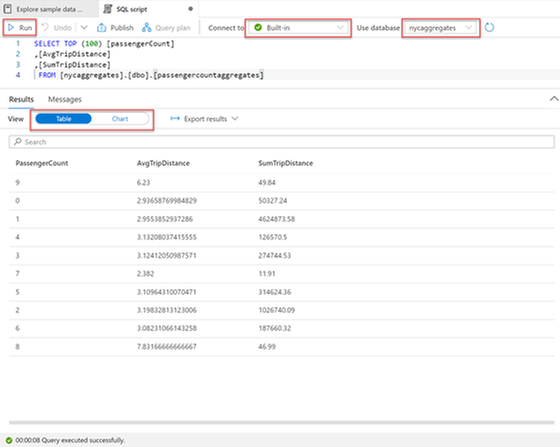
The query and the tabular result of the Select TOP 100 query on the passengercountaggregates is shown.
Clean up
Let’s take a moment now to remove the items created during this tutorial. Add a new code cell to the Explore sample data with Spark notebook, add the following code, and run the cell to delete the Spark table and database that we created.
spark.sql(“DROP TABLE IF EXISTS NycAggregates.PassengerCountAggregates”)
spark.sql(“DROP DATABASE IF EXISTS NycAggregates”)
Access the Data Hub (cylinder icon) from the left menu, and in the Data blade, expand the Databases section. Open the Actions menu next to the nycaggregates database and select Delete.
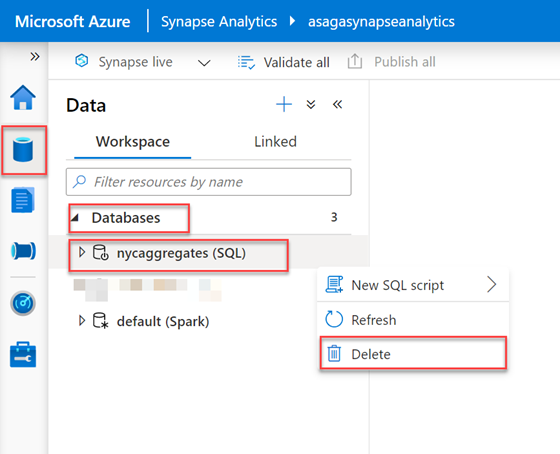
The Actions menu next to the nycaggregates database is expanded with Delete selected.
To delete the notebook, select the Develop Hub (paper icon) from the left menu, and in the Develop blade, expand the Notebooks section. Open the Actions menu next to the Explore sample data with Spark notebook and select Delete.
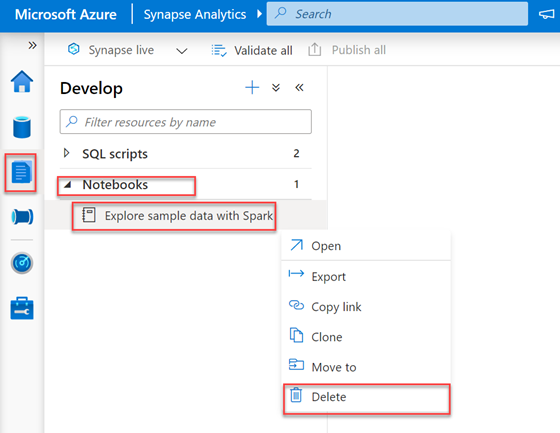
The Actions menu next to the sample notebook is expanded with Delete selected.
Next, select the Manage Hub (briefcase icon) from the left menu of Synapse Studio. Then in the blade menu, select Apache Spark pools. In the Apache Spark pool listing, hover over the row for the SampleSpark item, then expand the ellipsis (…) menu and select Delete.
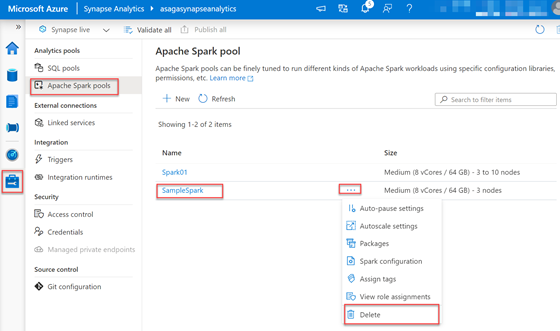
The ellipsis menu is expanded on a Spark pool with the Delete item selected.
Repeat the same steps for the Spark pool you created in the first exercise.
Conclusion
In this post, we explored some of the capabilities of Apache Spark in Azure Synapse. We created an Apache Spark pool from the Synapse Studio and deployed a ready-to-use sample notebook from the Knowledge Center that leveraged taxi data from Azure Open Datasets. We walked through each of the code cells in the notebook and learned how to read data, perform queries, and investigate some data visualization options. We then created a shared Spark pool and table populated with our dataframe’s data and queried it using a serverless SQL pool.
Try out this tutorial today by creating an Azure Synapse workspace with a dedicated SQL pool.
– Euan Garden, Principal Program Manager, Azure Synapse
by Contributed | Dec 18, 2020 | Technology
This article is contributed. See the original author and article here.
Today, I’m pleased to announce that we are taking the next step in our commitment to the resilience and availability of Azure AD. On April 1, 2021, we will update our public service level agreement (SLA) to promise 99.99% uptime for Azure AD user authentication, an improvement over our previous 99.9% SLA. This change is the result of a significant and ongoing program of investment in continually raising the bar for resilience of the Azure AD service. We will also share our roadmap for the next generation of resilience investments for Azure AD and Azure AD B2C in early 2021.
Because our identity services are vital to keep customer businesses running, resilience and security are and always will be our top priority. In the last year, we’ve seen a surge in demand as organizations moved workforces online and schools enabled study from home—in fact, some national education systems moved entire student populations online with Azure AD. Azure AD is now serving more than 400 million Monthly Active Users (MAU) and processing tens of billions of authentications per day. We treat every one of those authentication requests as a mission critical operation.
In conversations with our customers, we learned that the most critical promise of our service is ensuring that every user can sign in to the apps and services they need without interruption. To deliver on this promise, we are updating the definition of Azure AD SLA availability to include only user authentication and federation (and removing administrative features). This focus on critical user authentication scenarios aligns our engineering investments with the vital functions that must stay healthy for customers businesses to run.
Of course, we will continue to improve reliability in all areas of Microsoft identity services. Last year, we shared our approach and architectural investments to drive availability of Azure AD. I’m pleased to share significant progress completed since then.
- We’ve made strong progress on moving the authentication services to a fine-grained fault domain isolation model — also called “cellularized architecture”. This architecture is designed to scope and isolate the impact of many classes of failures to a small percentage of total users in the system. In the last year, we’ve increased the number of fault domains by over 5x and will continue to evolve this further over the next year.
- We have begun rollout of an Azure AD Backup Authentication service that runs with decorrelated failure modes from the primary Azure AD system. This backup service transparently and automatically handles authentications for participating workloads as an additional layer of resilience on top of the multiple levels of redundancy in Azure AD. You can think of this as a backup generator or uninterrupted power supply (UPS) designed to provide additional fault tolerance while staying completely transparent and automatic to you. At present, Outlook Web Access and SharePoint Online are integrated with this system. We will roll out the protections across critical Microsoft apps and services over the next few quarters.
- For Azure infrastructure authentication, our managed identity for Azure resources capabilities are now transparently integrated with regional authentication endpoints. These regional endpoints provide significant additional layers of resilience and protection, even in the event of an outage in the primary Azure AD authentication system.
- We’ve continued to make investments in the scalability and elasticity of the service. These investments were proven out during the early days of the COVID crisis, when we saw surging growth in demand. We were able to seamlessly scale what is already the world’s largest enterprise authentication system without impact. This included not just aggregate growth but very rapid onboarding, including entire nations moving their school systems (millions of users) online overnight.
- We are rolling out innovations to the authentication system such as Continuous Access Evaluation Protocol for critical Microsoft 365 services (CAE). CAE both improves security by providing instant enforcement of policy changes and improves resilience by securely providing longer token lifetimes.
The above are just some examples of the key resilience investments we have made that have enabled us to raise the public SLA to 99.99%. We will have more to share in 2021 on the next generation of resilience investments for Azure AD and Azure AD B2C.
Planning for resilience in your identity estate
We know many customers are also asking for guidance on how best to configure and use Azure AD in the most resilient patterns – to help you understand how to build resilience into your identity and access management estate, we’ve published technical guidance that provides best practices for building resilience into the policies you create.
Thank you for your ongoing trust and partnership.
by Contributed | Dec 18, 2020 | Technology
This article is contributed. See the original author and article here.
Resources:
- AHA Course Artificial Intelligence and the Path to Health Care Innovation | AHA News
- ANA Bot (Wellbeing) Coronavirus | Well-Being Initiative | Mental Health | ANA (nursingworld.org)
- NurseHack4Health Blog from Marc Inspiring nursing innovation for COVID-19 and beyond – Microsoft in Business Blogs
- WW blog Year of the Nurse: First responders build resilience with technology and data – Microsoft News Centre Europe
- YOTNM WW video https://youtu.be/Wnd-84FMG7o
Claire Bonaci
The World Health Organization designated 2020 as the year of the nurse and midwife to raise awareness of nurses and midwives, significant and varied roles in healthcare. On this episode, Molly McCarthy and Kathleen McGrow reflect on the big accomplishments for 2020, the year of the nurse midwife, and how we can continue our support for nurses and midwives in 2021. Hi Kahtleen and Hi, Molly, and thank you for coming on the podcast to discuss the year of the nurse and midwife.
Molly McCarthy
Thanks, Claire. It’s great to be here today.
Kathleen McGrow
Hi, Claire, good to see you.
Claire Bonaci
So 2020 was the the year of the nurse and midwife by the World Health Organization. As we enter 2020. Molly, do you have a feel that this year achieved what intended to at the beginning of the year?
Molly McCarthy
Yeah, that’s a great question. And I can certainly say that going coming into 2020 is not exactly how we imagined the year of the nurse midwife would be it was designated in 2019, to really raise awareness of nurses and midwives, varied roles in health care, and increase investment in education and training and leadership throughout the world. And I think it was evident very early on in the year that, you know, nurses are an integral part of our health system, from the bed side all the way to the boardroom, in terms of patient care, and interacting with the care team and family. So I would say 110%, yes, we’ve definitely seen an elevation and in the role of nurses, through media, through storytelling, here at Microsoft, just our support, which we’ll talk about. And due to the pandemic, it really shone a light on the profession.
Claire Bonaci
100% I definitely think that, you know, no one really thought going into 2020, that there was going to be a worldwide pandemic. And then nurses really got we’re going to be the frontline workers and the ones kind of dealing with all of it. So Kathleen, you were integral to many of the year of the nurse and midwife events and accomplishments, what were some of the biggest accomplishments this year for the nurse and midwife? And how did Microsoft take part in that?
Kathleen McGrow
So you’re correct, Claire, I think under Molly’s purview, we really worked hard and diligently to bring the year of the nurse to Microsoft, so that our counterparts and our peers at Microsoft really knew what it was about. And you know, we educated our peers, internal to Microsoft, but then we really worked with the nurses in our community, and that we work with all the time. So I think some of our big biggest accomplishments were really around working to build relationships within our nursing community, promoting our nursing colleagues innovations, elevating the voice of nurses within health information technology, which I think due to COVID, there actually has been a significant amount of visibility to nurses that were maybe there wasn’t previously. So that might be one light at the end of the COVID tunnel. And then I think that we really look to support a culture of innovation within our health system. So nurses, I believe, as a nurse, were we’ve always been innovative, but maybe we just didn’t know how to get the innovation out into the eye of the patient and what we’re doing the patient care. And I think that with COVID-19, there’s a lot of innovations that nurses did even on the fly, that, you know, we can talk about, and really recognize and I think that really helped with year of the nurse and promoting those nurses. So as a collective group, highly innovative group. And really, we should be recognizing them. I think all the time. I think the year the nurse was kind of ironic this year, right? It really was something that we were doing to promote the profession. And wow, we really got a lot of promotion out of COVID.
Claire Bonaci
And, Molly, do you have anything to add to that?
Molly McCarthy
Yeah, so I think both, you know, as Kathleen mentioned, internally, just educating our team’s within the healthcare organization across Microsoft was part of our mission. And truly, as Kathleen said, and then working directly with our customers. The other piece that we really took on this year, was thinking about who can we partner with in the marketplace, to, you know, elevate the role of nurses, rather than, you know, take it on ourselves, but who’s out there. And so, three different projects that I want to take a minute to mention. The first is what we did in partnership with the American Hospital Association that actually started well over a year ago, but essentially looking to provide frontline clinicians, including nurses, doctors, as well as healthcare administrators with a foundation in what a artificial intelligence is in healthcare and what that means as a nurse as a clinician. So the program is a free virtual course that provides one continuing ed contact hour and it’s available for the next couple of years. So I highly suggest you know, if you’re listening to take a look at it, The second piece is a project, we work with the American Nurses Association. So here in the US, there are about 4 million nurses. And obviously, with COVID-19, the stress of the pandemic, and the pressure on our nurses is just been, you know, excruciating to see and to watch the images of, you know, the masks on the face and the skin damage, as well as just dealing with the family. And the patients day after day really took a toll. So we work to create a health bot, actually, with ANA as part of their well being initiative, and it resides on their well being initiative website. It’s a 10 question, stress self assessment checker, for any nurse can go on and go through a series of questions like a decision tree, and then at the end, we’ll provide them with different resources. We’ve had many, I think, well over 3000 nurses in the past couple months take it, we hope to share more statistics around it. And then the last thing that I would love to take a few minutes, because it’s truly been a highlight of my career. And and thank you to Kathleen for being involved is our nurse hack for health. We entered into 2019 thinking, how can we continue to bring nurses into the fold in the design, the development and deployment of technology, and really, truly understand how we can marry them with developers, IT to create solutions that make sense in terms of the clinical workflow, but then make sense for better patient outcomes. So we launched the nurse hack for health in partnership with Johnson and Johnson and Sonseil. We had our first hack in May, we just completed our second hack. And for more information on that, because we have some great resources, we’ll put something in we’ll put a link in at the end of the podcast. But that was really, truly a phenomenal process of getting not just nurses in the United States. But throughout the world. This past hack, we had eight different countries represented.
Claire Bonaci
Well, thank you, Molly, for describing all of that. I know you both worked incredibly hard on the nurse hack for health and all of the other initiatives. And they’re actually podcasts for all of those initiatives as well. So I will link those below. Molly, Kathleen, I know you’re both very passionate about this. What are some 2021 goals to support nurses, even as you’re the nurse and midwife comes to an end. Kathleen, do you wanna start?
Kathleen McGrow
Sure. So obviously, we really don’t feel it’s coming to an end. Right, it will continue for us because we do feel that we would like to continue to educate our internal teams as well as nurses. You know, based on the sources that Molly even talked about how we can can we continue to grow those different offerings. We also want to raise our voices, to be able to be influencers and get the word out about nurses, Molly and I are nurses in a large health IT Corporation. So it’s our responsibility to educate folks, both internally and then and educate and influence both internally and externally, I feel and then how can we really work to accelerate digital transformation and innovation? And how do we leverage the innovation that the nurses in the field, you know, that they’re coming up with? How do we help them promote those innovations?
Claire Bonaci
Molly, do you have anything to add?
Molly McCarthy
Yeah, no, I think Kathleen did a great job of summarizing it, you know, to her point, we we don’t want to end. We’ve supported nurses for for several years here at Microsoft through partnerships, with HIMSS, and other organizations with our nursing informatics roundtables every year etc. So our goal is to continue to raise the bar here at Microsoft internally in terms terms of making it inclusive, as we look to design and develop solutions that make sense and impact clinical workflow, for example, teams right now that we’re using. And then I think, too, as we move forward, you know, our goal is to continue with our podcasts, as well as our social media outreach, blogs, etc. I know that Kathleen and myself are avid writers. So that’s part of what we do. The other piece that I want to mention is we’re lucky enough that our teams expanded this year when we actually just hired a new chief nursing officer, a new chief patient experience officer who happens to be a nurse practitioner, and we look forward to bringing on another clinician at the beginning of January to really help us expand in our health plan space. So you know, 2021, we’re ready for you and we’re excited to continue the work we’ve started in 2020.
Claire Bonaci
There really is so much momentum with Year of the nurse and midwife, and I’m very excited o see it continue into 2021. And my last question for you both is how can listeners get involved in supporting nurses and midwives moving forward
Molly McCarthy
Well, I think, you know, I did mention the well being initiative that’s really to support nurses resilience. So that’s one effort through the American Nurses foundation. I encourage you, if you’re listening to please go out and take a look at that, in terms of how you can help that organization as we support our nurses. In addition, I want to welcome everyone listening and not listening, quite frankly, to the next nurse hack for health that’s taking place may 14 to 16th. Again, we’ll do that virtual. And then Kathleen, I know you always have some parting words of wisdom, so I’m going to turn it over to you.
Kathleen McGrow
Yep, it’s the shock trauma nurse me my advice. And what I ask of everyone how we can support our nurses and nurse midwives is to wear a mask, social distance and wash your hands.
Claire Bonaci
Great. Thank you so much, Kathleen. Thank you so much, Molly, for being on the podcast and explaining a little bit more of all of the work that has gone on in the year the nurse and midwife here at Microsoft.
Molly McCarthy
Great. Thanks so much for your support. Claire.
Claire Bonaci
Thank you all for watching. Please feel free to leave us questions or comments below and check back soon for more content from the HLS industry team.
by Contributed | Dec 18, 2020 | Technology
This article is contributed. See the original author and article here.
In September, at Microsoft Ignite, we shared that Customer Key support for Microsoft Teams would become available for public preview at the end of 2020 – we are now happy to share it’s here for public preview!
Microsoft Teams helps keep data safe by encrypting it while at rest in Microsoft data centers, starting with volume-level encryption enabled through BitLocker while service encryption ensures that content at rest is encrypted at the application layer. Customer Key is built on service encryption and provides an added layer of encryption at the application level for data-at-rest and allows you as the organization to control the encryption keys.
Customer Key helps you meet compliance obligations because you control the encryption keys that Microsoft 365 uses to encrypt and decrypt data, enhancing your ability to meet the demands of compliance requirements that specify key arrangements with the cloud service provider.
Already available in Exchange Online, SharePoint Online, and OneDrive, this extension into Teams will be offered as a preview. You can now assign a single data encryption policy at the tenant level to encrypt your data-at-rest in Teams and Exchange. For more details, please see Overview of Customer Key for Microsoft 365 at the tenant level.
by Contributed | Dec 18, 2020 | Technology
This article is contributed. See the original author and article here.
This is the third of a three-part series on the ways that Microsoft Power Platform empowers people with no coding experience to upskill and quickly learn how to create apps to solve business problems or problems they’ve identified in their local communities. The first post, Empowering—Gomolemo Mohapi’s journey from student to Microsoft Power Platform advocate, focused on this young South African student’s path to becoming an app maker. The second post, Empowering—Joe Camp’s path from no-code to Microsoft Power Platform advocate, features the career switch and journey to app maker of one of Mohapi’s colleagues on the Microsoft Power Platform Advocacy team. Today’s post tells the story of how Dona Sarkar, team lead, built the Microsoft Power Platform Advocacy team. To hear Sarkar, Mohapi, and Camp talk about their experience with Microsoft Power Platform, listen to this Digital Lifestyle podcast.
Dona Sarkar, lead for the Microsoft Power Platform Advocacy team, is a person who brings her own unique perspective and energy to whatever she touches. She asks questions, notices problems or opportunities for change, brings her creativity to them, and then does something to make a difference in the world. Helping people around the world upskill with Microsoft Power Platform is by no means the whole of her story, but it is one of her great passions.
When Sarkar was working as the “Chief #NinjaCat” of the Windows Insider Program at Microsoft, a community of people in every country/region in the world—even Antarctica—who give feedback on Windows releases before they goes out to public, she noticed something was missing. Windows Insiders are passionate about technology, she says, and they’re also passionate about other people learning and using technology, which is why their input is so valuable. But most of the Windows Insider feedback they were getting came from the United States and Western Europe. How could they build a good product for everyone in the world, she wondered, if they didn’t have feedback from other places, countries/regions, and cultures with different circumstances and needs? Not everyone has 24/7 online access, for example, so the requirement to be online to sign in to Windows doesn’t work in many places.
So, what did she do? She and her team got on planes and traveled to places all over the world—Jakarta, Malaysia, Ghana, Tanzania, Nigeria, South Africa, and more—to find out what those other needs were. The team found that people in developing countries/regions wanted to help their peers and colleagues who were not as technical as they were to skill up to improve their lives and get better jobs. So, while she was in South Africa, Sarkar focused on talking to people about how to organize an upskilling program Microsoft could sponsor and on finding people who might help with leading this locally. That’s how she met Gomolemo Mohapi, who had traveled from his home in Durban to Microsoft Ignite The Tour in Johannesburg in 2019. Mohapi, a college student at the time, was already “a big Microsoft follower—a huge .NET fan and a Windows Insider.” He told Sarkar he thought they really needed just such a program in South Africa. What really inspired her was that this young student, who was working hard and getting good grades, was taking time to help other students learn—for free. She was so inspired by the work he was doing that she and her team started building out an upskilling program, #InsiderUp, with Mohapi as the inspiration.
Envisioning and creating the Microsoft Power Platform Advocacy team
A year later, Sarkar was asked to head up a new Developer Advocacy team for Microsoft Power Platform, focused on getting people to understand this new technology’s potential to help them. She was interested in how it might help workers already in jobs, but she also asked different questions that led her in another direction. “How do we get people all over the world into jobs? What about the people who don’t know what Microsoft Power Platform is, who don’t know that it’s a really quick way to build app development skills? That with these tools, people who aren’t software engineers like me, people with no developer skills at skill, can very easily build websites, chatbots, workflows, and automation?”
So, what did Sarkar do? She was so inspired by Microsoft Power Platform and its potential to help upskill people around the world, especially in places where computer science degrees are expensive and very difficult to get, that she started sketching out a team centered on upskilling people no matter what background they came from.
Sarkar identified three audiences her team would serve all over the world: students under 25 who might be a little lost career-wise, with no one to guide them into technology so they could get a better job; mid-career workers who wanted to do better at their jobs or to switch jobs or careers; and classic software developers who wanted to do their job more efficiently and to write and debug less code. When it came time to hire, she wanted to work with people who were passionate about upskilling and who already doing this work, so she hired “three people who were the best in the world at what they do.” To head the Student Ambassador program, she hired Mohapi. For the mid-career/career switch position, she hired Joe Camp. And for the developer position, Greg Hurlman.
Her team, the Microsoft Power Platform Advocacy team, was ready to go in July 2020. “There’s so many people we can help,” she realized after they were up and running. And they have. From the get-go, they’ve been extremely busy. They’re constantly creating new content, organizing events, helping train people, and maintaining a job board where they post Microsoft Power Platform jobs. In just the few months her team has been working together, they’ve put on 3 conferences, spoken at over 100 events, and created 50 pieces of content—plus, Mohapi kicked off the Microsoft Learn Student Ambassadors Low-Code League.
No chance of this team slowing down. “Our work has just started,” Sarkar says. “We’re going big on international now, which has been our aim from the beginning.” They’re working on a series of events in Africa, called Power Africa, for citizen developers with a range of skills from no code all the way to code-first developers. Sarkar herself is heading up three in-person events in Barbados, called Power Barbados. She’ll be leading a series of workshops for The University of the West Indies there, which will be open to educators and students and to business owners. She’s also recruiting people to do an in-person hackathon there to solve local problems.
And these are just the team’s short-term projects. In January 2021, her team starts moving their advocacy into South America and Latin America, where up until now they’ve done very little work. They plan to work with local Microsoft Most Valuable Professionals (MVPs), student partners, and others to create Power Latin America/South America.
Empowering people everywhere to solve local problems, including her own
Sarkar’s commitment to diversity and advocacy for Microsoft Power Platform are part of her life, not just her role as the team leader for Microsoft Power Platform advocacy. In May 2020, she and a friend of hers, along with teams of volunteers from the community, ran a 48-hour virtual hackathon for 390 people from over 40 countries/regions. At #Hack4GoodMBAS, participants used Microsoft Power Platform to build solutions to problems real people were facing in their local communities during the pandemic. One person created an app to connect elderly people who need groceries with designated shoppers. Another created a mental health app to help combat the loneliness many people are feeling right now. That app’s SharePoint list of people willing to connect and talk means people can reach out to those willing to listen and help. The winning app came from New Zealand—an app that enables businesses to scan your signature, so you don’t have to touch a pen or other device to complete a transaction.
“These apps are all so simple,” Sarkar stresses, “and yet they’re enormously helpful.” And most were built in just a few hours by people who were brand new to coding or had minimal coding experience. People can learn how to use Microsoft Power Platform in a day, she says. For the hackathon, she did give participants pre-work, a set of unique learning paths she created for them: a carefully chosen set of Microsoft Learn tutorials—the best of Microsoft Learn—combined with other resources, all on one page. That content is now available as Upskilling Academy for Power Platform, a co-created curriculum designed for people starting from scratch, especially for groups that want to upskill their employees and fellow students together in cohorts or groups.
The curriculum was developed by a Microsoft customer in Nigeria and blends Microsoft Learn content, docs, tutorials, guides, and videos, plus other resources. You can use it as a loose starting point to learn the basics of each aspect of Microsoft Power Platform, including customizing canvas apps, managing apps, working with Common Data Service and model-driven Power Apps, Power Automate, AI Builder, Power Virtual Agents, and Power BI.
During the virtual hackathon, Sarkar and the other helpers “stayed away from technical instruction because we believed people could figure it out on their own.” And they did. “Most people figured it out, and they did it fast.” If someone asked, “How do you use AI to …?,” they wouldn’t show them how to do it but instead would point them in the right direction, saying, “Go look at AI Builder.” People were immensely proud of themselves, she says, because they built something out of nothing to solve a real problem they had identified in their local community. “Anyone can build an app,” she says. You can watch her prove it in the video, Anyone Can Build a Power App—and Today I Prove It. And you can prove it to yourself. If you want to learn how to build apps with low-code techniques to simplify, automate, and transform business tasks and processes, check out this handy Learn Power Apps collection of learning paths on Microsoft Learn. And if you want to learn app-making skills and validate them, explore the Microsoft Power Platform app maker training and certification.
Although Sarkar is a software engineer, she uses Microsoft Power Platform to help solve her own real-life challenges. After being diagnosed with dyslexia four years ago, she realized that many coping mechanisms were available and there was no need to suffer in silence, so she started using the tools in OneNote and other hacks. But when she encountered difficulty reading a teleprompter, she realized that Microsoft Power Platform is actually “a hack for dyslexia.” Looking at an Excel spreadsheet or SharePoint list is very stressful, for example. But if you generate it into a Power App, it’s much easier to decode, even on a phone, because the content is displayed not all at once but one segment at a time. So, what did she do? She created a teleprompter app for herself that pulls from an Excel spreadsheet all the lines she needs to say and displays them on her phone in a way she can easily read, so she knows what’s coming up and can be extra prepared. For her, Power Apps are a “dyslexia coping tool.” And the potential is there for helping to solve other neurodiversity challenges that people experience, too.
The advantages of diverse points of view in the workplace
Hiring is expensive, Sarkar says. “Companies spend so much money hiring people. You have to interview 10,000 people to hire 1,000.” She’s hired over 1,000 people herself, from all over the world. The more you get outside your bubble, your comfort zone, she explains, whether that’s Redmond or any other place, the better hires you’re going to get. You’re not just looking for people who can code in C. You want people who bring a different point of view to whatever problem you’re facing. “Say you’re working in AI and are tagging pictures of people, and you want to tag light skin or dark skin. A person in Nigeria is going to tag a picture very differently than a person in Britain. I consider myself to be a dark-skinned person, but in Nigeria I’m considered to be a light-skinned person.” That subjectivity is true for many things—what we consider good or bad, offensive or funny, for instance. “Many other cultural context issues are missed, as well, like internet connectivity and speed or what hybrid cloud means in different parts of the world, when you build products in Redmond with only an American point of view. The more diverse points of view you have, the better your product or service is going to be.”
That’s why corporations don’t need clones. They need “misfits and weirdos,” Sarkar notes on her website, “the b, entrepreneurial types. The ones who refuse to do the job the way the last guy did it. The ones who hate tracking our work in the tool. The ones that are always creating our own jobs. The ones that are determined to use the power of the corporation to make a real difference in the world.” She calls winning in the corporate world—while being you—the “art of Intrapreneurship.” She still tells herself, “I’m a software engineer. And I’m a fashion designer. I don’t belong at Microsoft.” As you might expect, her colleagues quickly let her know that she indeed does belong. “It’s the people who think they don’t belong who are often the people companies need most, people with different points of view.” People like Sarkar herself, who saw a need to help people in countries/regions all over the world get into jobs by helping them skill up in technology and then set about making that happen in her role at Microsoft.
Working is learning
Intrapreneurial workers need corporations as much as corporations need them. Corporations can help their “crazy” ideas become reality. They provide mentors and support. They give you the opportunity to make mistakes and learn from them, because they provide a buffer of time, money, and people. And they pay you to learn. “You’re always learning on the job,” she notes. “No one expects you to know everything. You may know how to deliver a service for 10,000 people, but who knows how to scale to 1.5 billion?” You’re always being challenged by problems and situations you haven’t dealt with before, so you’re always learning something new. Big companies give you an opportunity to learn. “That’s why I believe Microsoft needs weirdos and weirdos need Microsoft.”
Fast Company lists Sarkar as one of its Most Productive People. It’s hard to disagree. All you have to do is check out her Instagram or Twitter to see what she’s up to currently. Whether working with her Microsoft Power Platform advocacy team, speaking or leading workshops, running hackathons, creating apps, coaching entrepreneurs in emerging markets, designing an ethically made clothing line for women by women, or writing fiction, she’s always taking creative action, doing something to make a difference in the world.
Make some friends somewhere else in the world, Sarkar suggests, and bring them along with you on your adventures. Go forth and #DoTheThing—together. And check out the new Microsoft Power Platform course at aka.ms/UdacityPower.

by Contributed | Dec 18, 2020 | Technology
This article is contributed. See the original author and article here.
Auto ML in Azure: Getting Started
Vlad Iliescu is an AI MVP, public speaker, storyteller, music lover and uke player. Hailing from Romania, Vlad is Partner and Head of AI at Strongbytes, a company with a strong focus on building software products around well-operationalized machine learning models, and the co-founder of the Romanian AI conference NDR. For more on Vlad, check out his blog and Twitter @vladiliescu

Five Years as Software Development Manager
Lee Englestone is an innovative Dev Manager who likes to operate in the area where technology, product, people and business strategy converge. Lee, from the UK, is constantly working on side projects, building things and looking for ways to educate the .NET community in great technologies. He is the creator of Visual Studio Tips, Hackathon Tips and Xamarin Arkit. For more, see Lee’s blog and Twitter @LeeEnglestone.

JWT Social auth with ASP.net core and Xamarin Essentials
Damien Doumer is a software developer and Microsoft MVP in development technologies, who from Cameroon and currently based in France. He plays most often with ASP.Net Core and Xamarin, and builds mobile apps and back-ends. He often blogs, and he likes sharing content on his blog at https://doumer.me. Though he’s had to deal with other programming languages and several frameworks, he prefers developing in C# with the .Net framework. Damien’s credo is “Learn, Build, Share and Innovate”. Follow him on Twitter @Damien_Doumer.

Teams Real Simple with Pictures: Hard Mute
Chris Hoard is a Microsoft Certified Trainer Regional Lead (MCT RL), Educator (MCEd) and Teams MVP. With over 10 years of cloud computing experience, he is currently building an education practice for Vuzion (Tier 2 UK CSP). His focus areas are Microsoft Teams, Microsoft 365 and entry-level Azure. Follow Chris on Twitter at @Microsoft365Pro and check out his blog here.

Unit testing: What it is and why it is important for T-SQL code!
Sergio Govoni is a graduate of Computer Science from “Università degli Studi” in Ferrara, Italy. Following almost two decades at Centro Software, a software house that produces the best ERP for manufacturing companies that are export-oriented, Sergio now manages the Development Product Team and is constantly involved on several team projects. For the provided help to technical communities and for sharing his own experience, since 2010 he has received the Microsoft Data Platform MVP award. During 2011 he contributed to writing the book: SQL Server MVP Deep Dives Volume 2. Follow him on Twitter or read his blogs in Italian and English.
by Contributed | Dec 18, 2020 | Alerts, Microsoft, Security, Technology
This article is contributed. See the original author and article here.
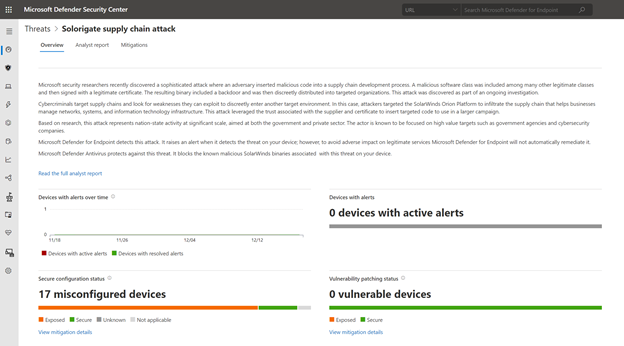
Microsoft security researchers have been investigating and responding to the recent nation-state cyber-attack involving a supply-chain compromise followed by cloud assets compromise.
Microsoft 365 Defender can help you track and respond to emerging threats with threat analytics. Our Threat Intelligence team has published a new Threat analytics report, shortly following the discovery of this new cyber attack. This report is being constantly updated as the investigations and analysis unfold.
The threat analytics report includes deep-dive analysis, MITRE techniques, detection details, recommended mitigations, updated list of indicators of compromise (IOCs), and advanced hunting queries that expand detection coverage.
Given the high profile of this threat, we have made sure that all our customers, E5 and E3 alike, can access and use this important information.
If you’re an E5 customer, you can use threat analytics to view your organization’s state relevant to this attack and help with the following security operation tasks:
- Monitor related incidents and alerts
- Handle impacted assets
- Track mitigations and their status, with options to investigate further and remediate weaknesses using threat and vulnerability management.
For guidance on how to read the report, see Understand the analyst report section in threat analytics.
Read the Solorigate supply chain attack threat analytics report:
For our E3 customers, you can read similar relevant Microsoft threat intelligence data, including the updated list of IOCs, through the MSRC blog. Monitor the blog, Customer Guidance on Recent Nation-State Cyber Attacks, where we share the latest details as the situation unfolds.
by Contributed | Dec 18, 2020 | Technology
This article is contributed. See the original author and article here.
Here’s a quick review of the road so far:
CI CD in Azure Synapse Analytics Part 1
- Creating an Azure DevOps project
- Linking our Azure Synapse Analytics environment to that Project via Git
- Validating that our Azure DevOps Repo was populated with our Azure Synapse Analytics environment
CI CD in Azure Synapse Analytics Part 2:
- Create a new branch on our Repo
- Edit our Azure Synapse Analytics environment
- Specifically my SQL scripts have demos all over the place and Buck Woody said I have to clean up my very messy room …. Azure Synapse Analytics environment
- Create a Pull Request in Azure Synapse Analytics to merge our new branch with the main
- Approve the Pull Request in Azure DevOps
- Validate our main branch is updated in our Azure Synapse Analytics Environment
This time we will:
- Create an Artifact pipeline
- This is to create an Artifact we can use to deploy to another environment
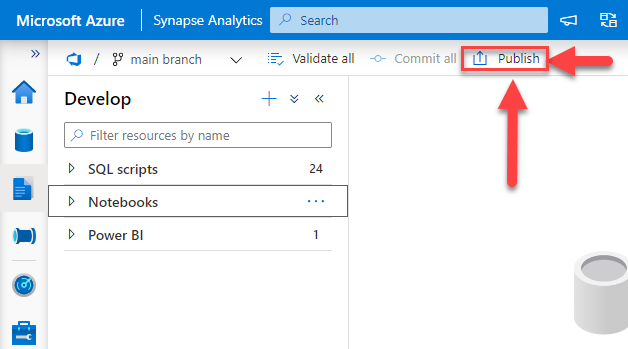
First we are going to examine a very important part of our Azure Synapse Analytics environment. The Publish button.
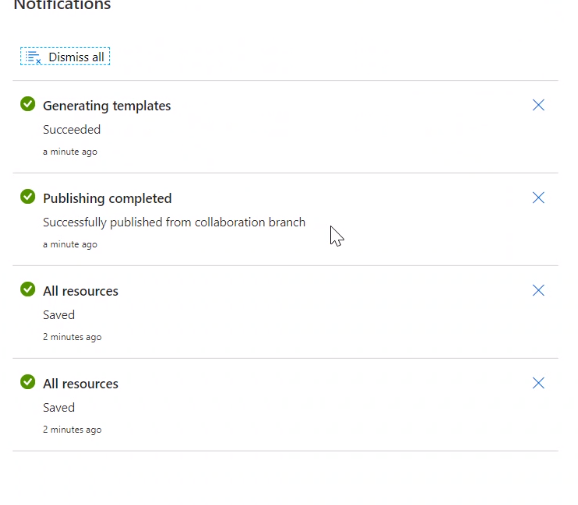
Why all the arrows and boxes? Because this is important. This publish button saves the templates that we will use to deploy our environment to another Azure Synapse Analytics workspace. When you click publish a few messages should appear. Publishing In progress, Publishing completed, Generating templates, and Generating templates completed.
If you get an error do not fear, validation will occur and show you where the error is in your workspace. I’ve encountered this a time or two. Eventually I will intentionally write a blog in this series where we break things just to fixt them. For now, let us presume that everything went just fine.
Next we will move over to our Azure DevOps Repo. Find the folder that is the same name as your Azure Synapse Analytics workspace. In this picture mine is bballasw. Under that folder you will find two files, TemplateForWorkspace.json & TemplateParametersForWorkspace.json.
*NOTE – these templates are not the same templates you would use to deploy a new environment. These are only for deploying the artifacts from one environment to another. In part 5 we will look at generating the ARM templates needed for deploying a new environment from Azure DevOps.
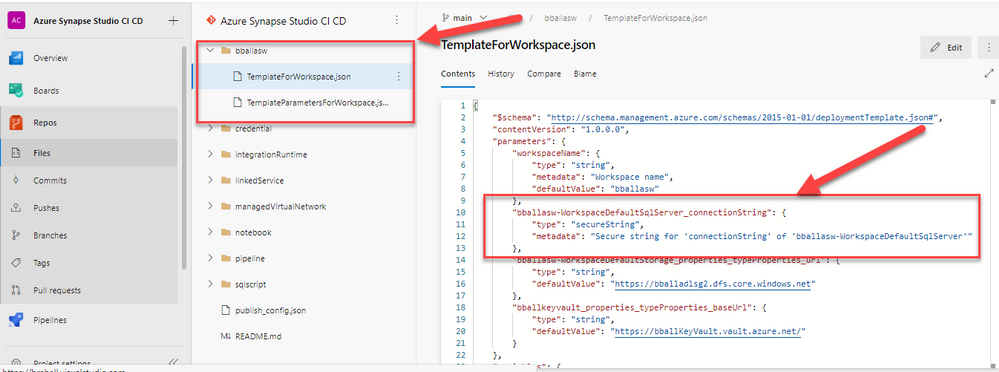
We will be using these files to create our artifact build pipeline. Also highlighted is the WorkspaceDefaultSqlServer_connectionString, this string is of the type secureString. This is important when we reach our release pipeline in Part 4, if we do not handle this string properly the release will fail.
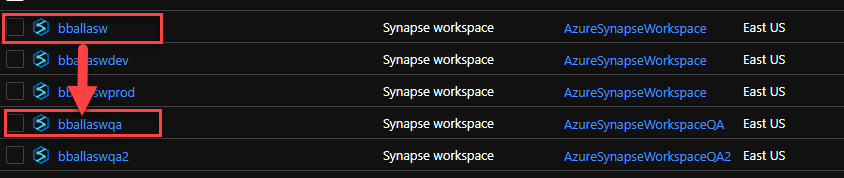
For this exercise I’ve created another Azure Synapse Analytics Environment for us to deploy to named bballaswqa in a separate resource group from bballasw.
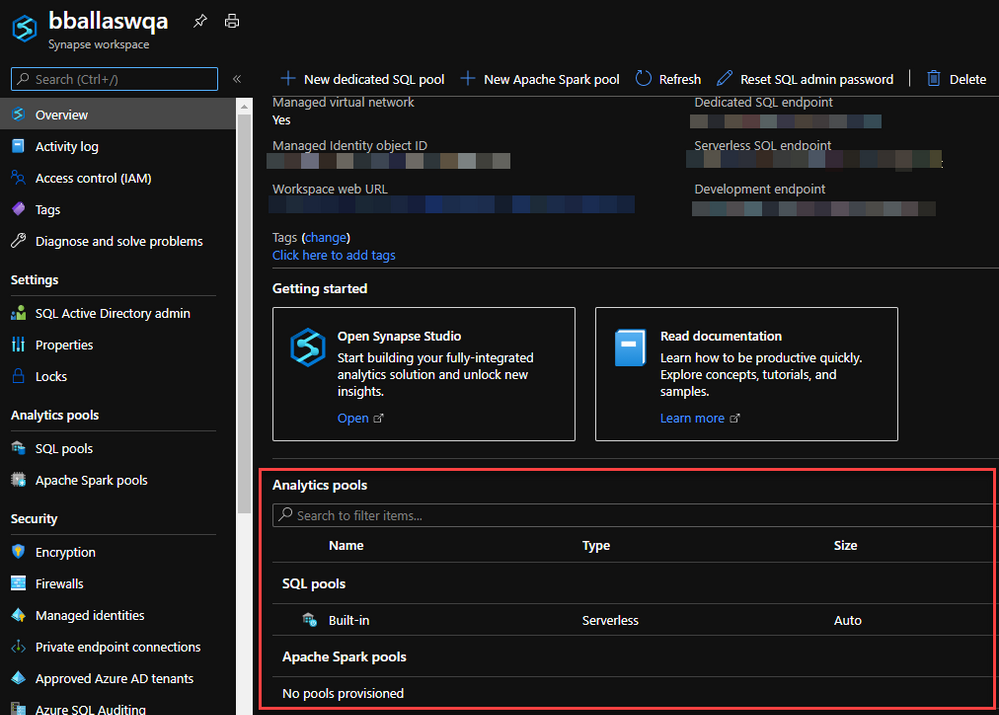
Right now there is nothing in bballaswqa.
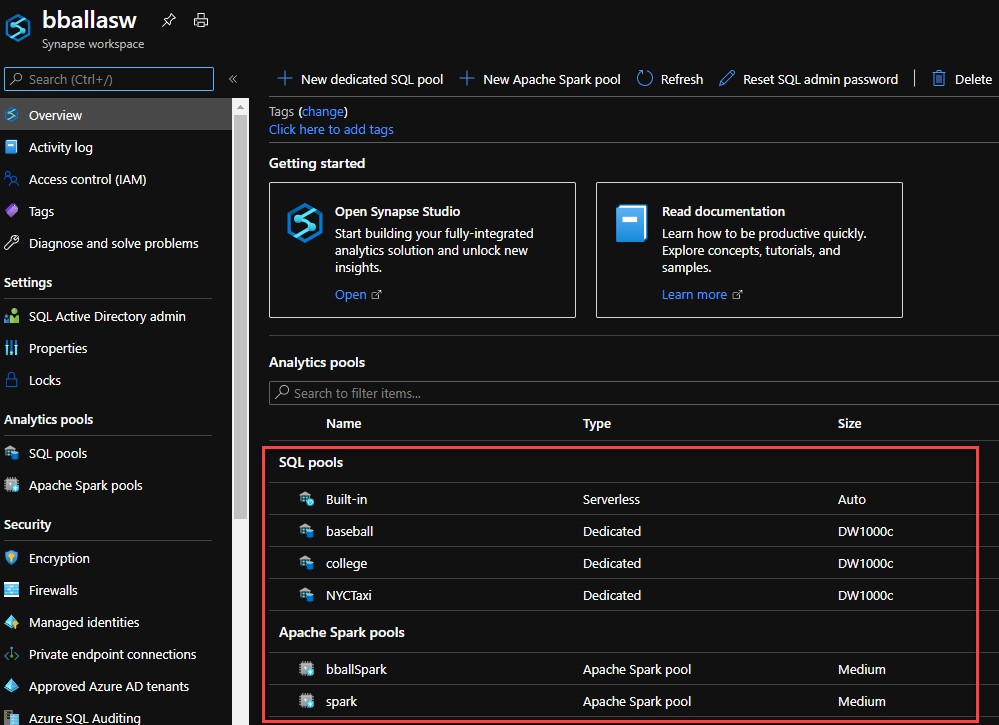
Especially compared to bballasw.
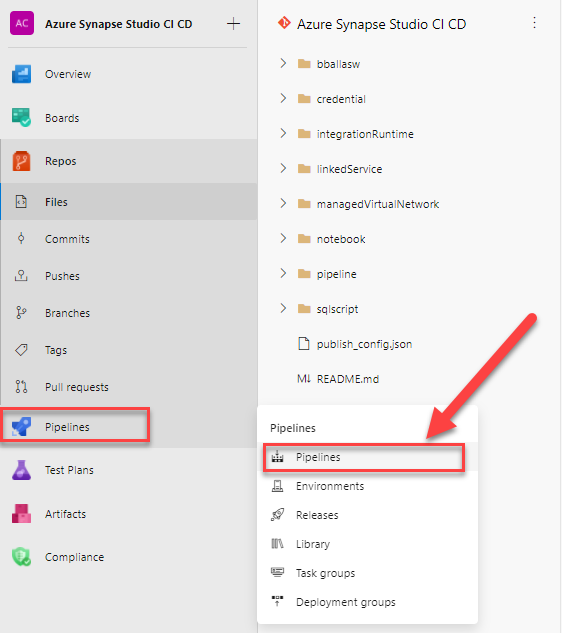
With our destination of bballaswqa in mind, we begin with our build pipeline. Moving over to Azure DevOps we want to move to Pipelines.
Click New pipeline.

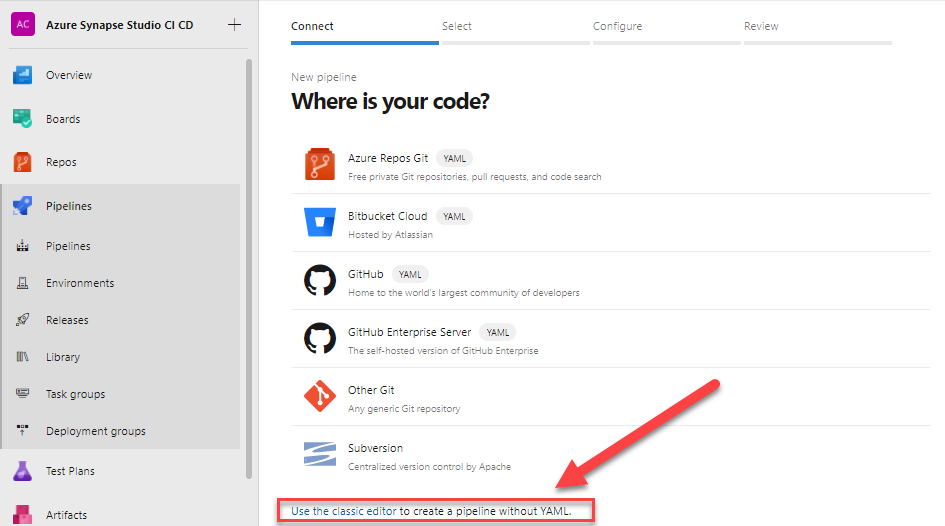
At the very bottom of the page, in super tiny font you will find Use the classic editor. Make sure to click on that lin.
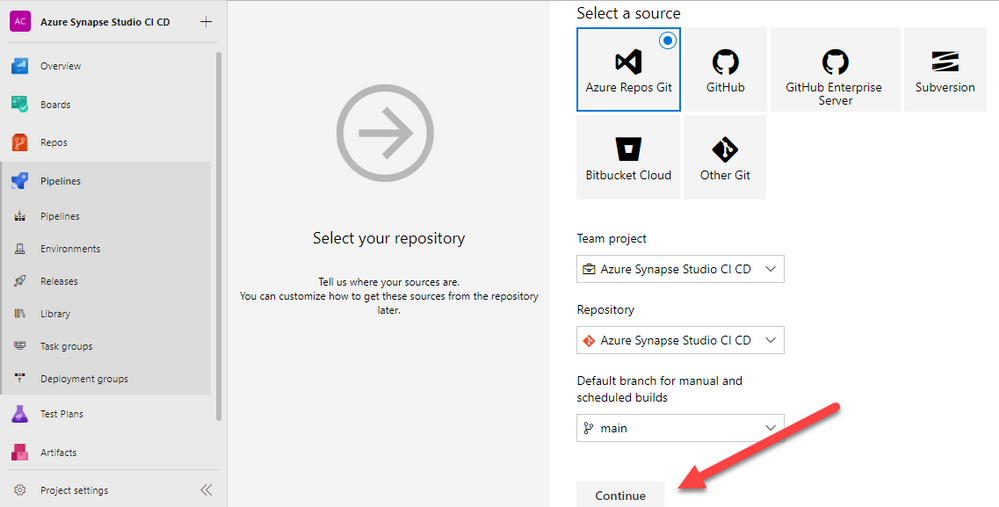
This is where we configure the project, repository, and the default branch for our builds. All of this information is correct. We are using Azure Repos Git, we will click the Continue button.
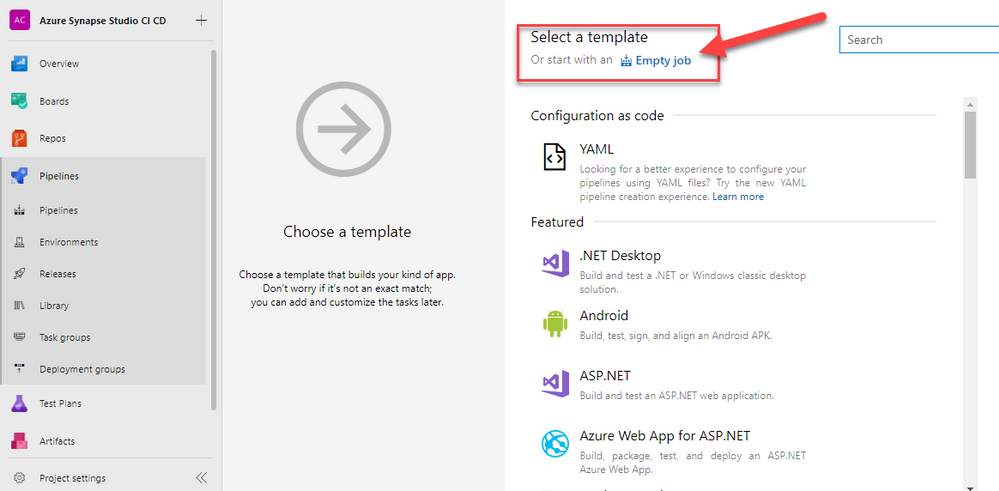
At the very top of our next page we have different options for our pipeline template. We will click on the Empty job link.
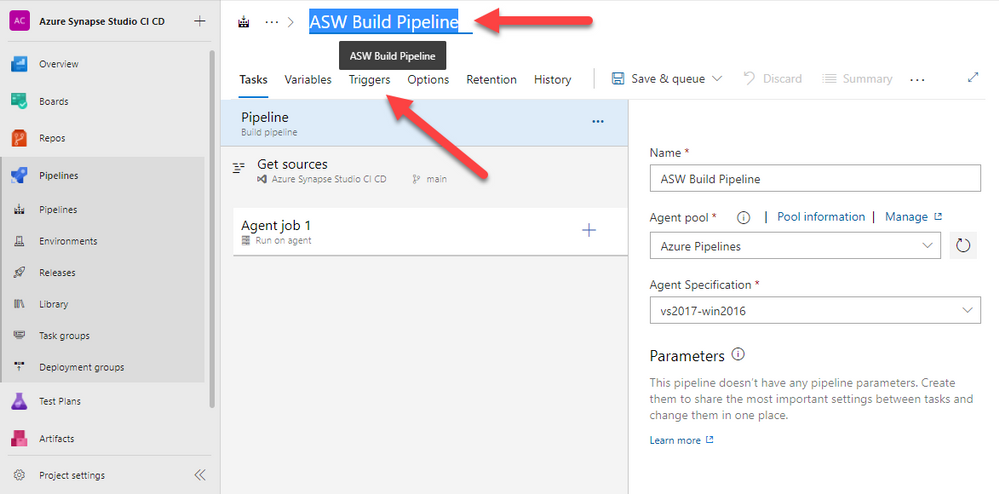
Now we are finally to the pipeline. First we will rename the default name. I use ASW in my naming convention as it stands for Azure Synapse Workspace. We rename the pipeline to ASW Build Pipeline. Then we click on the Triggers section. The Triggers section is where we will configure our CI portion of our build.
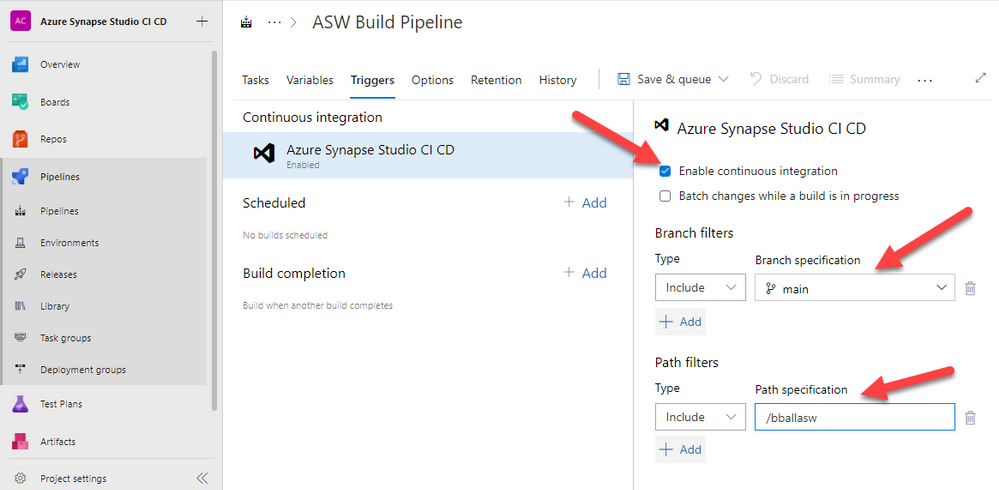
Check the Enable continuous integration check box. Under branch filters we want main, as that is the branch we are publishing to for all of our builds. But we need to add a Path filter. Ever time we merge a branch to main it would cause the build pipeline to run. I only want the pipeline to run when we publish from our Azure Synapse Analytics environment.
After this return to the tasks window.
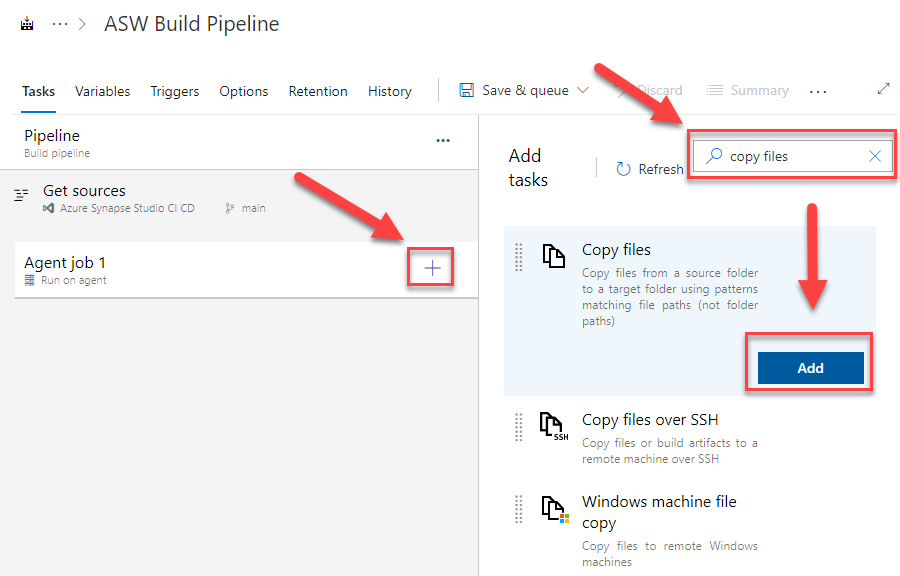
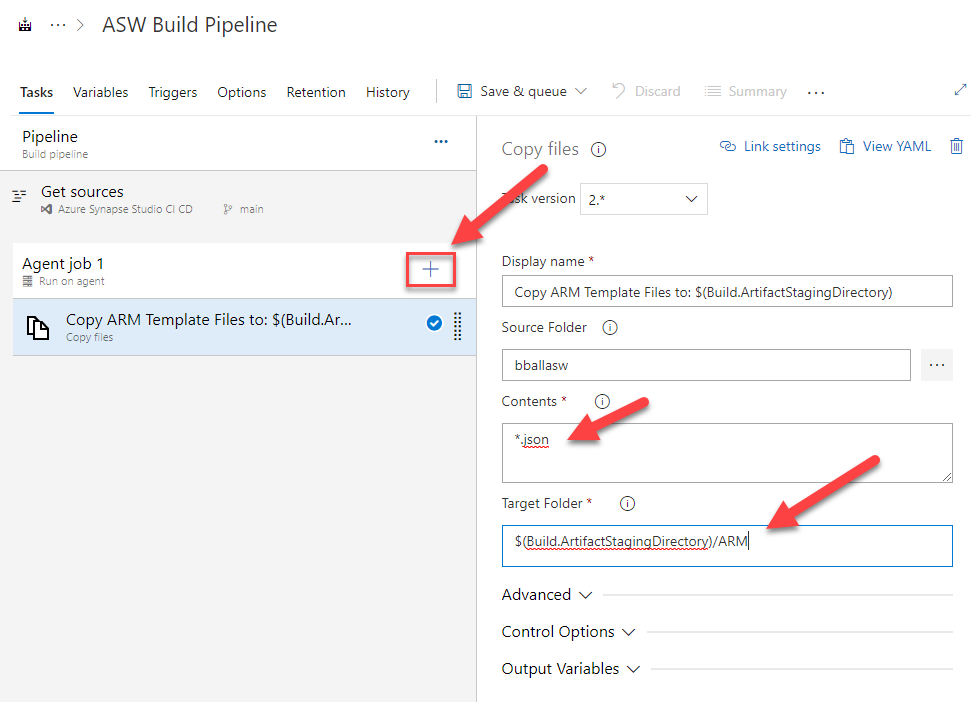
On the Agent job 1 click the + button. We need the Copy files task. Add that to our pipeline.
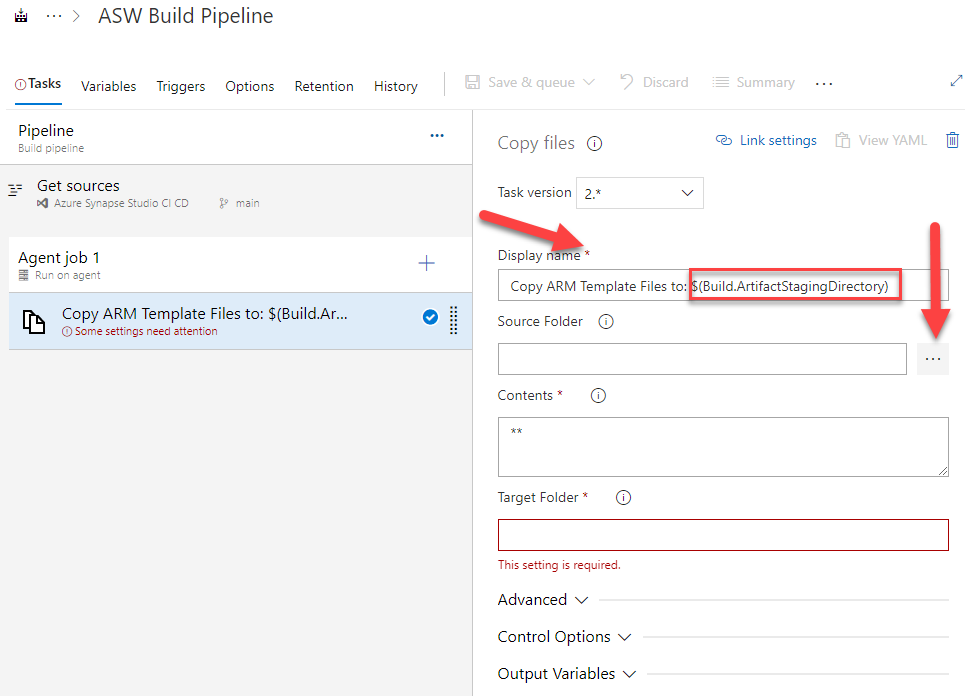
In Azure DevOps there are some reserved variables. One of the Build variables is Build.ArtifactStagingDirectory, for a full list see this Docs article Predefined variables – Azure Pipelines | Microsoft Docs. This defines a local path on a build agent and this is where we want our build files deployed to. In part 4 we will build a Release Pipeline and that Release will be linked to the artifacts we produce.
We will change our Display name to Copy ARM Template Files to: $(Build.ArtifactStagingDirectory). When you use a variable in Azure DevOps you invoke it with $(variableName). Now click on the three ellipsis next to the Source Folder text box.
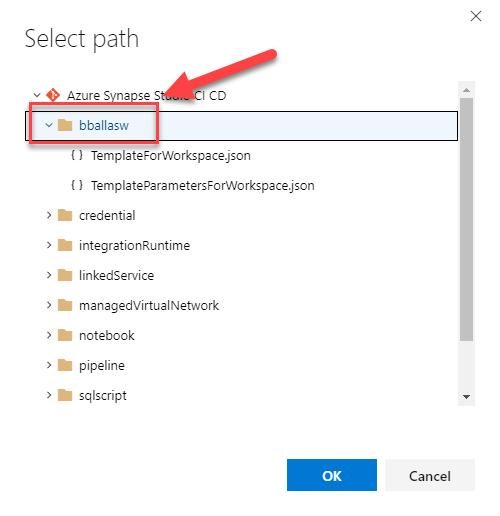
We will select the folder that has the same name as our Azure Synapse Analytics workspace that has our Template JSON files.
We finish configuring this task by setting our contents to *.json. This will pull in only the JSON files under our folder. We set the Target Folder to $(Build.ArtifactsStagingDirectory)/ARM.
We don’t need the folder path. At this time there are no other object in my build pipeline. If we ever want to add them we can have additional subfolders, but for now my OCD won and I created a folder.
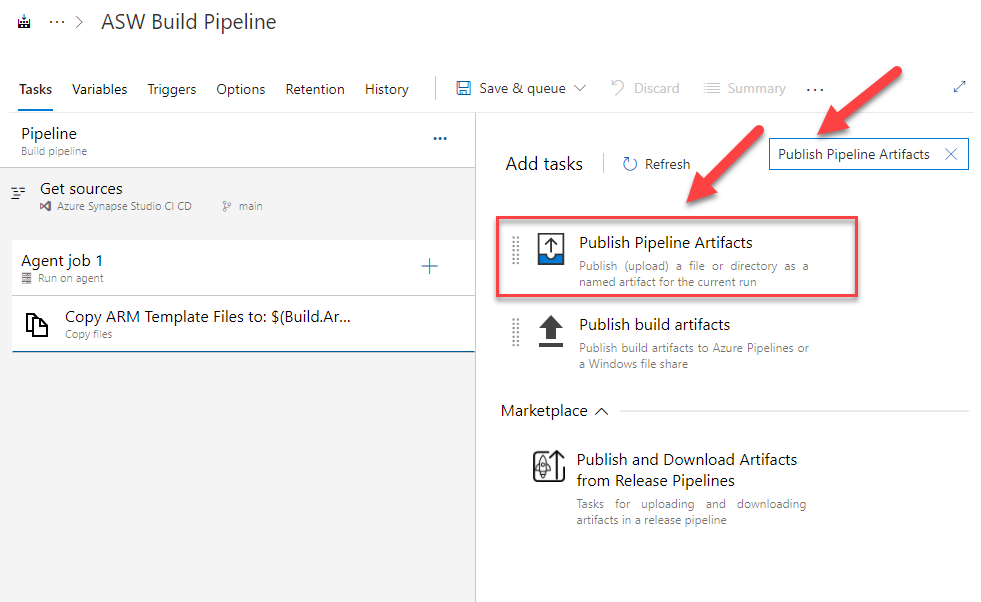
Now click on the + sign on Agent Job 1. We need to add the Publish Pipeline Artifacts task.
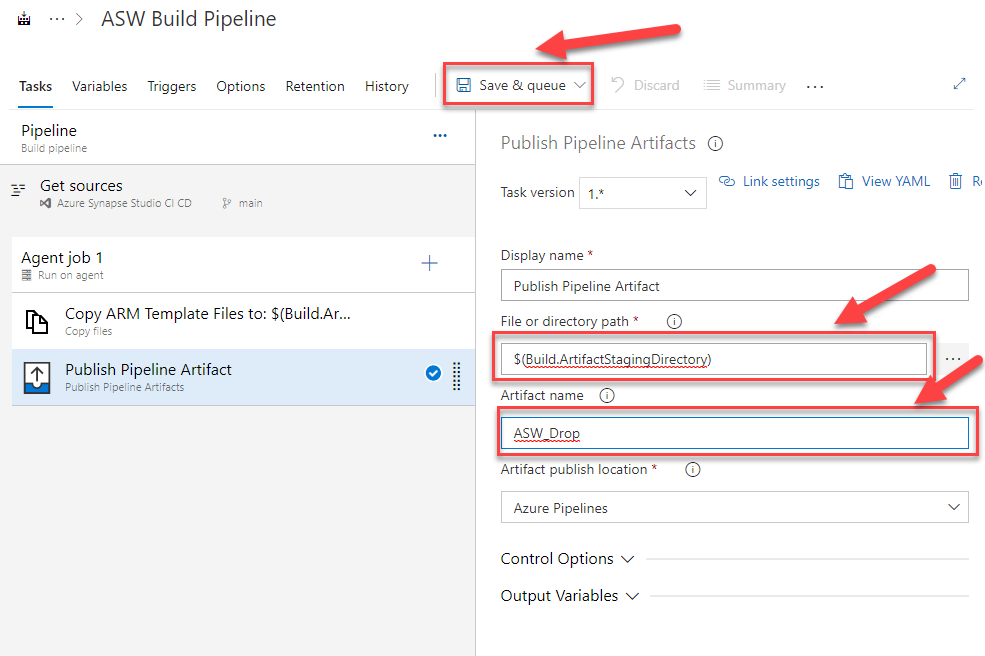
Our File or Directory path will be $(Build.ArtifactsStagingDirectory). Our Artifact name will be ASW_Drop.
Hit Save & queue.
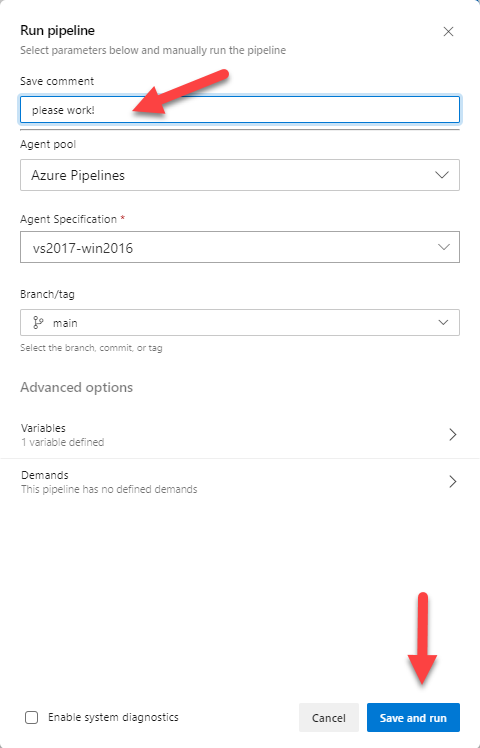
Enter a save comment, click Save and run.
Click on the Agent job 1 section of the page and open the build agent window.
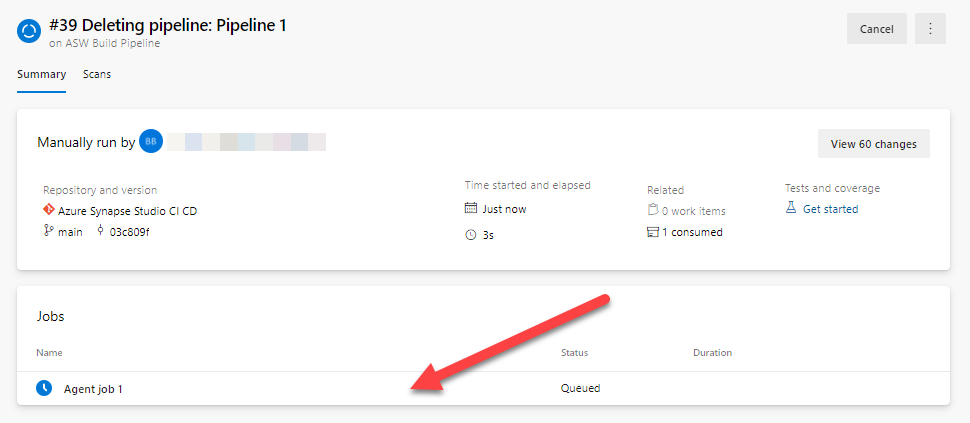
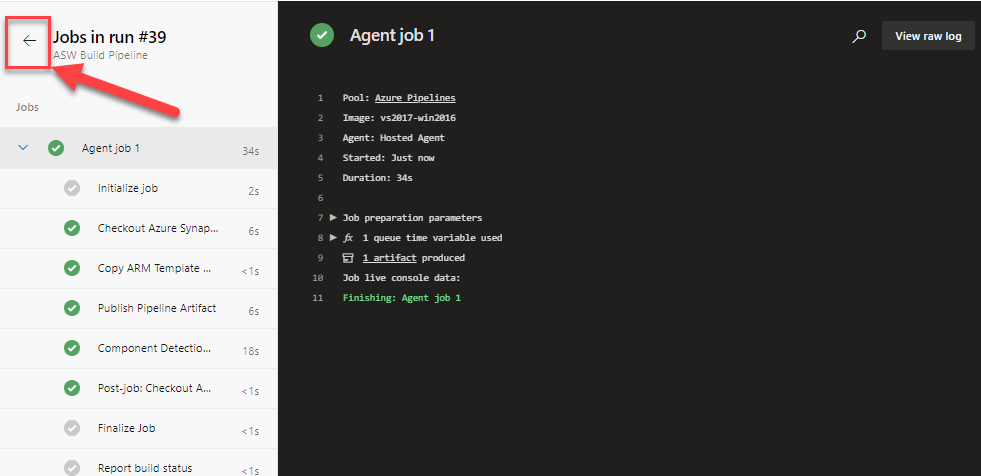
OH WOW! IT ALL TURNED GREEN AND WORKED!!! …..it’s not like I did this a few 100 times failing miserably until I figured it out…… Now click on the small arrow next to the Jobs run to return to the pipeline.
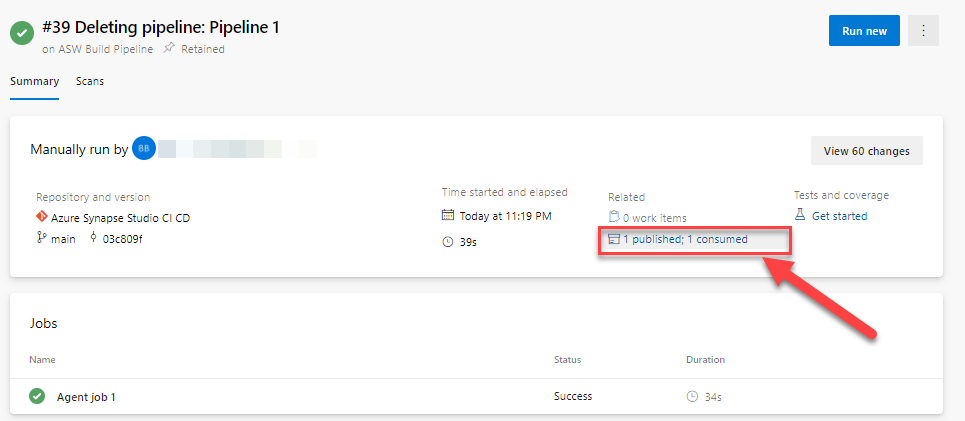
Under the header Related 0 work items click on 1 published; 1 consumed.
Expand the arrow next to ASW_Drop, ARM, and we can see our Template files. Success we have a build artifact that we can now call in a Release pipeline.
Ok Dear Reader, it’s late and we are done for today. In our next blog we will cover the release pipeline and look at what was deployed to our QA environment!
As always, thank you for stopping by.


Recent Comments