by Scott Muniz | Jan 8, 2021 | Security, Technology
This article is contributed. See the original author and article here.
CISA has evidence of post-compromise advanced persistent threat (APT) activity in the cloud environment. Specifically, CISA has seen an APT actor using compromised applications in a victim’s Microsoft 365 (M365)/Azure environment and using additional credentials and Application Programming Interface (API) access to cloud resources of private and public sector organizations. This activity is in addition to what has been previously detailed in AA20-352A.
In response, CISA has released AA21-008A: Detecting Post-Compromise Threat Activity in Microsoft Cloud Environments to describe this malicious APT activity and offer guidance on three open-source tools—including a CISA-developed tool, Sparrow, released on December 24. Network defenders can use these tools to help detect and remediate malicious APT actor activity as part of the ongoing supply chain compromise.
CISA strongly encourages users and administrators to review the Activity Alert for additional information and detection countermeasures.
by Scott Muniz | Jan 8, 2021 | Security, Technology
This article is contributed. See the original author and article here.
This Advisory uses the MITRE Adversarial Tactics, Techniques, and Common Knowledge (ATT&CK®) framework. See the ATT&CK for Enterprise for all referenced threat actor tactics and techniques.
This Alert is a companion alert to AA20-252A: Advanced Persistent Threat Compromise of Government Agencies, Critical Infrastructure, and Private Sector Organizations. AA20-252A primarily focuses on an advanced persistent threat (APT) actor’s compromise of SolarWinds Orion products as an initial access vector into networks of U.S. Government agencies, critical infrastructure entities, and private network organizations. As noted in AA20-252A, the Cybersecurity and Infrastructure Security Agency (CISA) has evidence of initial access vectors in addition to the compromised SolarWinds Orion products.
This Alert also addresses activity—irrespective of the initial access vector leveraged—that CISA attributes to an APT actor. Specifically, CISA has seen an APT actor using compromised applications in a victim’s Microsoft 365 (M365)/Azure environment. CISA has also seen this APT actor utilizing additional credentials and Application Programming Interface (API) access to cloud resources of private and public sector organizations. These tactics, techniques, and procedures (TTPs) feature three key components:
- Compromising or bypassing federated identity solutions;
- Using forged authentication tokens to move laterally to Microsoft cloud environments; and
- Using privileged access to a victim’s cloud environment to establish difficult-to-detect persistence mechanisms for Application Programming Interface (API)-based access.
This Alert describes these TTPs and offers an overview of, and guidance on, available open-source tools—including a CISA-developed tool, Sparrow—for network defenders to analyze their Microsoft Azure Active Directory (AD), Office 365 (O365), and M365 environments to detect potentially malicious activity.
Note: this Alert describes artifacts—presented by these attacks—from which CISA has identified detectable evidence of the threat actor’s initial objectives. CISA continues to analyze the threat actor’s follow-on objectives.
Frequently, CISA has observed the APT actor gaining Initial Access [TA0001] to victims’ enterprise networks via compromised SolarWinds Orion products (e.g., Solorigate, Supernova).[1] However, CISA is investigating instances in which the threat actor may have obtained initial access by Password Guessing [T1110.001], Password Spraying [T1110.003], and/or exploiting inappropriately secured administrative or service credentials (Unsecured Credentials [T1552]) instead of utilizing the compromised SolarWinds Orion products.
CISA observed this threat actor moving from user context to administrator rights for Privilege Escalation [TA0004] within a compromised network and using native Windows tools and techniques, such as Windows Management Instrumentation (WMI), to enumerate the Microsoft Active Directory Federated Services (ADFS) certificate-signing capability. This enumeration allows threat actors to forge authentication tokens (OAuth) to issue claims to service providers—without having those claims checked against the identity provider—and then to move laterally to Microsoft Cloud environments (Lateral Movement [TA0008]).
The threat actor has also used on-premises access to manipulate and bypass identity controls and multi-factor authentication. This activity demonstrates how sophisticated adversaries can use credentials from one portion of an organization to move laterally (Lateral Movement [TA0008]) through trust boundaries, evade defenses and detection (Defense Evasion [TA0005]), and steal sensitive data (Collection [TA0009]).
This level of compromise is challenging to remediate and requires a rigorous multi-disciplinary effort to regain administrative control before recovering.
Detection
Guidance on identifying affected SolarWinds software is well documented.[2] However—once an organization identifies a compromise via SolarWinds Orion products or other threat actor TTPs—identifying follow-on activity for on-premises networks requires fine-tuned network and host-based forensics.
The nature of cloud forensics is unique due to the growing and rapidly evolving technology footprints of major vendors. Microsoft’s O365 and M365 environments have built-in capabilities for detecting unusual activity. Microsoft also provides premium services (Advanced Threat Protection [ATP] and Azure Sentinel), which enable network defenders to investigate TTPs specific to the Solorigate activity.[3]
Detection Tools
CISA is providing examples of detection tools for informational purposes only. CISA does not endorse any commercial product or service, including any subjects of analysis. Any reference to specific commercial products, processes, or services does not constitute or imply their endorsement, recommendation, or favoring by CISA.
There are a number of open-source tools available to investigate adversary activity in Microsoft cloud environments and to detect unusual activity, service principals, and application activity.[4] Publicly available PowerShell tools that network defenders can use to investigate M365 and Microsoft Azure include:
- CISA’s Sparrow,
- Open-source utility Hawk, and
- CrowdStrike’s Azure Reporting Tool (CRT).
Additionally, Microsoft’s Office 365 Management API and Graph API provide an open interface for ingesting telemetry and evaluating service configurations for signs of anomalous activity and intrusion.
Note: these open-source tools are highlighted and explained to assist with on-site investigation and remediation in cloud environments but are not all-encompassing. Open source tools can be complemented by services such as Azure Sentinel, a Microsoft premium service that provides comprehensive analysis tools, including custom detections for the activity indicated.
General Guidance on Using Detection Tools
- Audit the creation and use of service principal credentials. Look for unusual application usage, such as use of dormant applications.
- Audit the assignment of credentials to applications that allow non-interactive sign-in by the application. Look for unexpected trust relationships added to the Azure Active Directory.
- Download the interactive sign-ins from the Azure admin portal or use the Microsoft Sentinel product. Review new token validation time periods with high values and investigate whether it was a legitimate change or an attempt to gain persistence by a threat actor.
Sparrow
CISA created Sparrow to help network defenders detect possible compromised accounts and applications in the Azure/M365 environment. The tool focuses on the narrow scope of user and application activity endemic to identity- and authentication-based attacks seen recently in multiple sectors. It is neither comprehensive nor exhaustive of available data. It is intended to narrow a larger set of available investigation modules and telemetry to those specific to recent attacks on federated identity sources and applications.
CISA advises Sparrow users to take the following actions.
- Use Sparrow to detect any recent domain authentication or federation modifications.
- Domain and federation modification operations are uncommon and should be investigated.
- Examine logs for new and modified credentials applied to applications and service principals; delineate for the credential type. Sparrow can be used to detect the modification of service principals and application credentials.
- Create a timeline for all credential changes, focusing on recent wholesale changes.
- Review the “top actors” for activity in the environment and the number of credential modifications performed.
- Monitor changes in application and service principal credentials.
- Investigate any instances of excessive permissions being granted, including, but not limited to, Exchange Online, Microsoft Graph, and Azure AD Graph.
- Use Sparrow to detect privilege escalation, such as adding a service principal, user, or group to a privileged role.
- Use Sparrow to detect
OAuth consent and users’ consent to applications, which is useful for interpreting changes in adversary TTPs.
- Use Sparrow to identify anomalous Security Assertion Markup Language (SAML) token sign-ins by pivoting on the unified audit log UserAuthenticationValue of 16457, which is an indicator of how a SAML token was built and is a potential indicator for forged SAML tokens.
- Note that this TTP has not been the subject of significant published security research but may indicate an unusual usage of a token, such as guest access for external partners to M365 resources.
- Review the PowerShell logs that Sparrow exports.
- Review PowerShell mailbox sign-ins and validate that the logins are legitimate actions.
- Review PowerShell usage for users with PowerShell in the environment.
- Use Sparrow to check the Graph API application permissions of all service principals and applications in M365/Azure AD.
- Investigate unusual activity regarding Microsoft Graph API permissions (using either the legacy https://graph.windows.net/ or https://graph.microsoft.com). Graph is used frequently as part of these TTPs, often to access and manipulate mailbox resources.
- Review Sparrow’s listed tenant’s Azure AD domains, to see if the domains have been modified.
- For customers with G5 or E5 licensing levels, review MailItemsAccessed for insight into what application identification (ID) was used for accessing users’ mailboxes. Use Sparrow to query for a specific application ID using the app id investigation capability, which will check to see if it is accessing mail or file items.
- The MailItemsAccessed event provides audibility for mailbox data accessed via mail protocols or clients.
- By analyzing the MailItemsAccessed action, incident responders can determine which user mailbox items have been accessed and potentially exfiltrated by a threat actor. This event will be recorded even in some situations where the message was not necessarily read interactively (e.g., bind or sync).[5]
- The resulting suspicious application ID can provide incident responders with a pivot to detect other suspicious applications that require additional analysis.
- Check for changes to applications with regards to the accessing of resources such as mail or file items.
Hawk
Hawk is an open-source, PowerShell-driven, community-developed tool network defenders can use to quickly and easily gather data from O365 and Azure for security investigations. Incident responders and network defenders can investigate specific user principals or the entire tenant. Data it provides include IP addresses and sign-in data. Additionally, Hawk can track IP usage for concurrent login situations.
Hawk users should review login details for administrator accounts and take the following steps.
- Investigate high-value administrative accounts to detect anomalous or unusual activity (Global Admins).
- Enable PowerShell logging, and evaluate PowerShell activity in the environment not used for traditional or expected purposes.
- PowerShell logging does not reveal the exact
cmdlet that was run on the tenant.
- Look for users with unusual sign-in locations, dates, and times.
- Check permissions of service principals and applications in M365/Azure AD.
- Detect the frequency of resource access from unusual places. Use the tool to pivot to a trusted application and see if it is accessing mail or file items.
- Review mailbox rules and recent mailbox rule changes.
CrowdStrike Azure Reporting Tool
CrowdStrike’s Azure Reporting Tool (CRT) can help network defenders analyze their Microsoft Azure AD and M365 environment to help organizations analyze permissions in their AzureAD tenant and service configuration. This tool has minor overlap with Sparrow; it shows unique items, but it does not cover the same areas. CISA is highlighting this tool because it is one of the only free, open-source tools available to investigate this activity and could be used to complement Sparrow.
Detection Tool Distinctions
- Sparrow differs from CRT by looking for specific indicators of compromise associated with the recent attacks.
- CRT focuses on the tenant’s Azure AD permissions and Exchange Online configuration settings instead of the unified audit log, which gives it a different output from Sparrow or Hawk.
- CRT returns the same broad scope of application/delegated permissions for service principals and applications as Hawk.
- As part of its investigation, Sparrow homes in on a narrow set of application permissions given to the Graph API, which is common to the recent attacks.
- CRT looks at Exchange Online federation configuration and federation trust, while Sparrow focuses on listing Azure AD domains.
- Among the items network defenders can use CRT to review are delegated permissions and application permissions, federation configurations, federation trusts, mail forwarding rules, service principals, and objects with KeyCredentials.
Detection Methods
Microsoft breaks the threat actor’s recent activity into four primary stages, which are described below along with associated detection methods. Microsoft describes these stages as beginning with all activity after the compromise of the on-premises identity solution, such as ADFS.[6]
Note: this step provides an entry vector to cloud technology environments, and is unnecessary when the threat actor has compromised an identity solution or credential that allows the APT direct access to the cloud(e.g., without leveraging the SolarWinds Orion vulnerability).
Stage 1: Forging a trusted authentication token used to access resources that trust the on-premises identity provider
These attacks (often referred to as “Golden Security Assertion Markup Language” attacks) can be analyzed using a combination of cloud-based and standard on-premises techniques.[7] For example, network defenders can use OAuth claims for specific principals made at the Azure AD level and compare them to the on-premises identity.
Export sign-in logs from the Azure AD portal and look at the Authentication Method field.
Note: at portal.azure.com, click on a user and review the authentication details (e.g., date, method, result). Without Sentinel, this is the only way to get these logs, which are critical for this effort.
Detection Method 1: Correlating service provider login events with corresponding authentication events in Active Directory Federation Services (ADFS) and Domain Controllers
Using SAML single sign-on, search for any logins to service providers that do not have corresponding event IDs 4769, 1200, and 1202 in the domain.
Detection Method 2: Identifying certificate export events in ADFS
Look for:
- The IP address and Activity_ID in EventCode 410 and the Activity_ID and Instance_ID in EventCode 500.
- Export-PfxCertificate or certutil-exportPFX in Event IDs 4103 and 4104, which may include detection of a certificate extraction technique.
- Deleted certificate extraction with ADFSdump performed using Sysmon Event ID 18 with the pipe name microsoft##widtsqlquery (exclude processes regularly making this pipe connection on the machine).
- Event ID 307 (The Federation Service configuration was changed), which can be correlated to relevant Event ID 510 with the same instance ID for change details (Event ID 510 with the same Instance ID could be more than one event per single Event ID 307 event).
Detection Method 3: Customizing SAML response to identify irregular access
This method serves as prevention for the future (and would only detect future, not past, activity), as it helps identify irregularities from the point of the change forward. Organizations can modify SAML responses to include custom elements for each service provider to monitor and detect any anomalous requests.[8]
Detection Method 4: Detecting malicious ADFS trust modification
A threat actor who gains administrative access to ADFS can add a new, trusted ADFS rather than extracting the certificate and private key as part of a standard Golden SAML attack.[9]
Network defenders should look for:
- Event ID 307 (The Federation Service configuration was changed), which can be correlated to relevant Event ID 510 with the same Instance ID for change details. (Event ID 510 with the same Instance ID could be more than one event per single Event ID 307 event.)
- Review events, particularly searching for Configuration: Type: IssuanceAuthority where Property Value references an unfamiliar domain.
- Possible activity of an interrogating ADFS host by using ADFS PowerShell plugins. Look for changes in the federation trust environment that would indicate new ADFS sources.
Stage 2: Using the forged authentication token to create configuration changes in the Service Provider, such as AzureAD (establishing a foothold)
After the threat actor has compromised the on-premises identity provider, they identify their next series of objectives by reviewing activity in the Microsoft Cloud activity space (Microsoft Azure and M365 tenants).
The threat actor uses the ability to forge authentication tokens to establish a presence in the cloud environment. The actor adds additional credentials to an existing service principal. Once the threat actor has impersonated a privileged AzureAD account, they are likely to further manipulate the Azure/M365 environment (action on objectives in the cloud).
Network defenders should take the following steps.
- Audit the creation and use of service principal and application credentials. Sparrow will detect modifications to these credentials.
- Look for unusual application usage, such as dormant or forgotten applications being used again.
- Audit the assignment of credentials to applications that allow non-interactive sign-in by the application.
- Look for unexpected trust relationships that have been added to AzureAD. (Download the last 30 days of non-interactive sign-ins from the Azure portal or use Azure Sentinel.).[10]
- Use Hawk (and any sub-modules available) to run an investigation on a specific user. Hawk will provide IP addresses, sign-in data, and other data. Hawk can also track IP usage in concurrent login situations.
- Review login details for administrator accounts (e.g., high-value administrative accounts, such as Global Admins). Look for unusual sign-in locations, dates, and times.
- Review new token validation time periods with high values and investigate whether the changes are legitimate or a threat actor’s attempts to gain persistence.
Stage 3: Acquiring an OAuth access token for the application using the forged credentials added to an existing application or service principal and calling APIs with the permissions assigned to that application
In some cases, the threat actor has been observed adding permissions to existing applications or service principals. Additionally the actor has been seen establishing new applications or service principals briefly and using them to add permissions to the existing applications or service principals, possibly to add a layer of indirection (e.g., using it to add a credential to another service principal, and then deleting it).[11]
Network defenders should use Sparrow to:
- Examine highly privileged accounts; specifically using sign-in logs, look for unusual sign-in locations, dates, and times.
- Create a timeline for all credential changes.
- Monitor changes in application credentials (the script will export into csv named AppUpdate_Operations_Export).
- Detect service principal credentials change and service principal change (e.g., if an actor adds new permissions or expands existing permissions).
- Export and view this activity via the ServicePrincipal_Operations_Export.
- Record
OAuth consent and consent to applications
- Export and view this record via the Consent_Operations_Export file.
- Investigate instances of excessive high permissions, including, but not limited to Exchange Online, Microsoft Graph, and Azure AD Graph.
- Review Microsoft Graph API permissions granted to service principals.
- Export and view this activity via the ApplicationGraphPermissions csv file.
- Note: Hawk can also return the full list of service principal permissions for further investigation.
- Review top actors and the amount of credential modifications performed.
- Monitor changes in application credentials.
- Identify manipulation of custom or third-party applications.
- Network defenders should review the catalog of custom or third-party vendors with applications in the Microsoft tenant and perform the above interrogation principles on those applications and trusts.
- Review modifications to federation trust settings.
- Review new token validation time periods with high values and investigate whether this was a legitimate change or an attempt to gain persistence by the threat actor.
- The script detects the escalation of privileges, including the addition of Service Principals (SP) to privileged roles. Export this data into csv called AppRoleAssignment_Operations_Export.
Stage 4: Once access has been established, the threat actor Uses Microsoft Graph API to conduct action on objectives from an external RESTful API (queries impersonating existing applications).
Network defenders should:
- In MailItemsAccessed operations, found within the Unified Audit Log (UAL), review the application ID used (requires G5 or E5 license for this specific detail).
- Query the specific application ID, using the Sparrow script’s app ID investigation capability to interrogate mail and file items accessed for that applicationID (Use the application ID utility for any other suspicious apps that require additional analysis.).
- Check the permissions of an application in M365/AzureAD using Sparrow.
- Hawk will return Azure_Application_Audit, and Sparrow will return ApplicationGraphPermissions.
- Network defenders will see the IP address that Graph API uses.
- Note: the Microsoft IP address may not show up as a virtual private server/anonymized endpoint.
- Investigate a specific service principal, if it is a user-specific user account, in Hawk. This activity is challenging to see without Azure Sentinel or manually downloading and reviewing logs from the sign-in portal.
Microsoft Telemetry Nuances
The existing tools and techniques used to evaluate cloud-based telemetry sources present challenges not represented in traditional forensic techniques. Primarily, the amount of telemetry retention is far less than the traditional logging facilities of on-premises data sources. Threat actor activity that is more than 90 days old is unlikely to have been saved by traditional sources or be visible with the Microsoft M365 Management API or in the UAL.
Service principal logging is available using the Azure Portal via the “Service Principal Sign-ins” feature. Enable settings in the Azure Portal (see “Diagnostic Setting”) to ingest logs into Sentinel or a third-party security information and event management (SIEM) tool. An Azure Premium P1 or Premium P2 license is necessary to access this setting as well as other features, such as a log analytics workspace, storage account, or event hub.[12] These logs must be downloaded manually if not ingested by one of the methods listed in the Detection Methods section.
Global Administrator rights are often required by tools other than Hawk and Sparrow to evaluate M365 cloud security posture. Logging capability and visibility of data varies by licensing models and subscription to premium services, such as Microsoft Defender for O365 and Azure Sentinel. According to CrowdStrike, “There was an inability to audit via API, and there is the requirement for global admin rights to view important information which we found to be excessive. Key information should be easily accessible.”[13]
Documentation for specific event codes, such as UserAuthenticationMethod 16457, which may indicate a suspicious SAML token forgery, is no longer available in the M365 Unified Access Log. Auditing narratives on some events no longer exist as part of core Microsoft documentation sources.
The use of industry-standard SIEMs for log detection is crucial for providing historical context for threat hunting in Microsoft cloud environments. Standard G3/E3 licenses only provide 90 days of auditing; with the advanced auditing license that is provided with a G5/E5 license, audit logs can be extended to retain information for a year. CISA notes that this license change is proactive, rather than reactive: it allows enhanced visibility and features for telemetry from the moment of integration but does not provide retroactive visibility on previous events or historical context.
A properly configured SIEM can provide:
- Longer term storage of log data.
- Cross correlation of log data with endpoint data and network data (such as those produced by ADFS servers), endpoint detection and response data, and identity provider information.
- Ability to query use of application connectors in Azure.
Built-in tools, such as Microsoft Cloud Services and M365 applications, provide much of the same visibility available from custom tools and are mapped to the MITRE ATT&CK framework and easy-to-understand dashboards.[14] However, these tools often do not have the ability to pull historical data older than seven days. Therefore, storage solutions that appropriately meet governance standards and usability metrics for analysts for the SIEM must be carefully planned and arranged.
by Contributed | Jan 8, 2021 | Technology
This article is contributed. See the original author and article here.
Overview
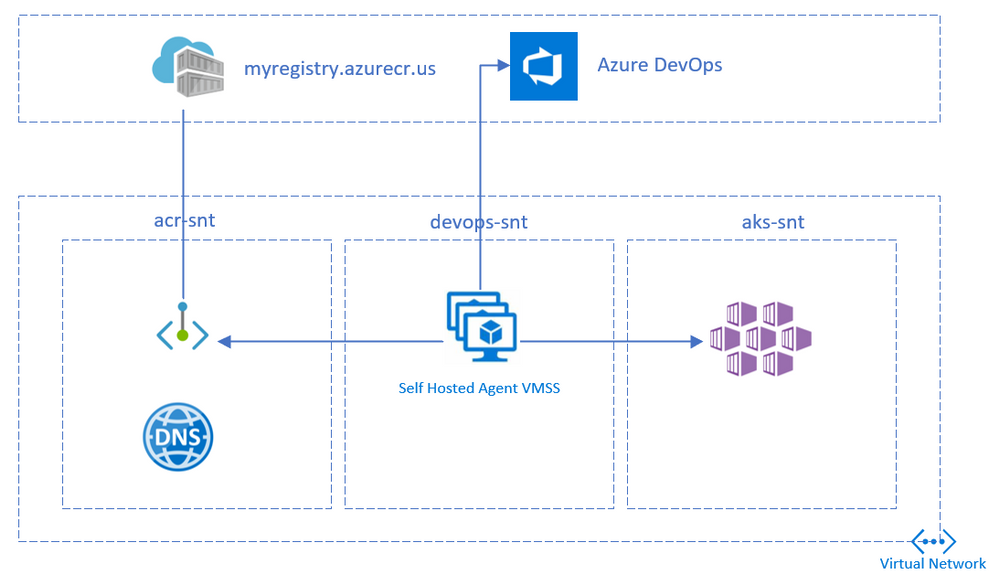
This article details building and deploying a container to an Azure Kubernetes Service(AKS) cluster in Azure Government cloud using Azure DevOps.
Private AKS Clusters has the API Server accessible only within the virtual network. This limits the deployments from Hosted Azure DevOps agents. To overcome this, a self-hosted agent within the same virtual network needs to be deployed.
Access to Azure Container Registry (ACR) can be restricted to the virtual network using Private Endpoints. This will limit ACR exposure to public internet. Since private ACR is available only within the vnet, self-hosted devops agents comes to the rescue.
Lastly, to ensure that Azure Pipelines can deploy to Azure Government Clouds, Azure Resource Manager Service Connection should be created with an Environment parameter.
Setup
The following steps replicates the above setup. The setup has 3 subnets with the following components
- Azure Container Registry Private Endpoint
- Azure DevOps self hosted agent
- Azure Kubernetes Service
Network setup
Create a Virtual Network and add 3 subnets.
Use the below values for reference:
Address Space: 10.0.0.0/16
Subnet name
|
Address Space
|
|---|
acr-snt |
10.0.1.0/24 |
devops-snt |
10.0.2.0/24 |
aks-snt |
10.0.4.0/22 |
az group create --name gov-devops --location usgovtexas

az network vnet create
  --name gov-devops-vnet
  --resource-group gov-devops
  --subnet-name default

az network vnet subnet create
  --address-prefixes 10.0.1.0/24
  --name acr-snt
  --resource-group gov-devops
  --vnet-name gov-devops-vnet

az network vnet subnet create
  --address-prefixes 10.0.2.0/24
  --name devops-snt
  --resource-group gov-devops
  --vnet-name gov-devops-vnet

az network vnet subnet create
  --address-prefixes 10.0.4.0/22
  --name aks-snt
  --resource-group gov-devops
  --vnet-name gov-devops-vnet
Create ACR
Create a Container Registry in the premium tier (required for private link)
az acr create --resource-group gov-devops
  --name mygovacr --sku Premium
Create the registry’s private endpoint in the acr-snt subnet
az network vnet subnet update
 --name acr-snt
 --vnet-name gov-devops-vnet
 --resource-group gov-devops
 --disable-private-endpoint-network-policies

az network private-dns zone create
  --resource-group gov-devops
  --name "privatelink.azurecr.io"

az network private-dns link vnet create
  --resource-group gov-devops
  --zone-name "privatelink.azurecr.io"
  --name govdns
  --virtual-network gov-devops-vnet
  --registration-enabled false

REGISTRY_ID=$(az acr show --name mygovacr
  --query 'id' --output tsv)

az network private-endpoint create
    --name myPrivateEndpoint
    --resource-group gov-devops
    --vnet-name gov-devops-vnet
    --subnet acr-snt
    --private-connection-resource-id $REGISTRY_ID
    --group-id registry
    --connection-name myConnection

NETWORK_INTERFACE_ID=$(az network private-endpoint show
  --name myPrivateEndpoint
  --resource-group gov-devops
  --query 'networkInterfaces[0].id'
  --output tsv)

PRIVATE_IP=$(az resource show
  --ids $NETWORK_INTERFACE_ID
  --api-version 2019-04-01
  --query 'properties.ipConfigurations[1].properties.privateIPAddress'
  --output tsv)

DATA_ENDPOINT_PRIVATE_IP=$(az resource show
  --ids $NETWORK_INTERFACE_ID
  --api-version 2019-04-01
  --query 'properties.ipConfigurations[0].properties.privateIPAddress'
  --output tsv)

az network private-dns record-set a create
  --name mygovacr
  --zone-name privatelink.azurecr.io
  --resource-group gov-devops

# Specify registry region in data endpoint name
az network private-dns record-set a create
  --name mygovacr.usgovtexas.data
  --zone-name privatelink.azurecr.io
  --resource-group gov-devops

az network private-dns record-set a add-record
  --record-set-name mygovacr
  --zone-name privatelink.azurecr.io
  --resource-group gov-devops
  --ipv4-address $PRIVATE_IP

# Specify registry region in data endpoint name
az network private-dns record-set a add-record
  --record-set-name mygovacr.usgovtexas.data
  --zone-name privatelink.azurecr.io
  --resource-group gov-devops
  --ipv4-address $DATA_ENDPOINT_PRIVATE_IP

az acr update --name mygovacr --public-network-enabled false
Choose one of the below authentication methods to perform docker login from the DevOps pipelines
az acr update -n mygovacr --admin-enabled true
Note the admin username and password from the ACR Access Keys blade in the portal
Create AKS
Create a private AKS cluster in the aks-snt subnet
Integrate ACR with AKS or create a pull secret
kubectl create secret docker-registry regcred
  --docker-server=<your-registry-server>
  --docker-username=<your-name>
  --docker-password=<your-pword>
  --docker-email=<your-email>
Create a VM and deploy DevOps agent
Create a Linux VM in devops-snt subnet to host the DevOps agent.
az vm create
  --resource-group gov-devops
  --name devopsagent
  --image UbuntuLTS
  --admin-username azureuser
  --generate-ssh-keys
  --subnet devops-snt
  --vnet-name gov-devops-vnet
Note the publicIpAddress from the output
Deploy the DevOps agent on the VM
- Generate a PAT token
- Create an Agent Pool
- Click Add Pool
- Select New
- Select pool Type as Self-hosted
- Enter a name as govpool
- Select New Agent -> Linux
- Copy the Agent Download link
- Deploy the agent on the VM
ssh azureuser@publicIpAddress

curl -O <<url copied above>
mkdir myagent && cd myagent
tar zxvf ../{tar file name}

./config.sh
sudo ./svc.sh install
sudo ./svc.sh start
Install docker, az cli and kubectl
sudo apt -y update
sudo apt -y install apt-transport-https ca-certificates curl gnupg-agent software-properties-common
curl -fsSL https://download.docker.com/linux/ubuntu/gpg | sudo apt-key add -
sudo add-apt-repository "deb [arch=amd64] https://download.docker.com/linux/ubuntu $(lsb_release -cs) stable"
sudo apt update
sudo apt install docker-ce docker-ce-cli containerd.io
sudo usermod -aG docker $USER
newgrp docker

curl -sL https://aka.ms/InstallAzureCLIDeb | sudo bash
sudo az aks install-cli
Create the pipeline
Create Service Connections
From Azure DevOps, create a Docker Registry Service Connection
- Navigate to Project Settings
- Click New Service Connection
- Select Docker Registry
- Select Registry Type as Others
- Provide the below details:
- Docker Registry: { ACR url eg: https://mygovacr.azurecr.us }
- Docker ID: { admin username or Service principal App ID }
- Docker Password: { admin password or service principal secret }
- Service Connection name: { Connection name }
To run kubectl task against the AKS cluster, Create Service Principal and grant contributor access to the resource group
From Azure DevOps, create an Azure Resource Manager Service Connection
- Navigate to Project Settings
- Click New Service Connection
- Select Azure Resource Manager
- Select Service Principal (manual)
- Provide the below details:
- Environment: Azure US Government
- Subscription Id: { Gov Subscription ID }
- Subscription Name: { Gov Subscription Name }
- Service Principal Id: { Create Service Principal using Portal or PowerShell }
- Credential: Service Principal key: { Secret of the Service Principal }
- Tenant Id: { Gov Tenant ID }
- Service Connection name: { Connection name }
Create pipeline
- Fork the sample repo
- Copy the contents below to a deploy.yaml file in the repo (Remove imagePullSecrets if ACR integrated with AKS)
apiVersion: v1
kind: Pod
metadata:
  name: private-reg
spec:
  containers:
  - name: private-reg-container
    image: mygovacr.azurecr.us/nginx-echo-headers:latest
  imagePullSecrets:
  - name: regcred
- Navigate to the project in Azure DevOps
- Go to Pipelines, and then select New Pipeline
- Select GitHub as the location of your source code and select your repository
- Select Starter pipeline
- Replace the contents of the yaml in the Review tab
trigger:
- master

pool:
  name: 'govpool'

steps:
- task: Docker@2
  inputs:
    containerRegistry: '{Docker Registry Service Connection Name}'
    repository: 'nginx-echo-headers'
    command: 'buildAndPush'
    Dockerfile: 'Dockerfile'
    tags: 'latest'
- task: Kubernetes@1
  inputs:
    connectionType: 'Azure Resource Manager'
    azureSubscriptionEndpoint: '{Azure Resource Manager Service Connection Name}'
    azureResourceGroup: 'gov-devops'
    kubernetesCluster: '{aks cluster name}'
    command: 'apply'
    arguments: '-f deploy.yaml'
Summary
The setup facilitates secure deployments to private ACR/AKS on Azure Government Cloud using Pipelines.
by Scott Muniz | Jan 8, 2021 | Security, Technology
This article is contributed. See the original author and article here.
The Multi-State Information Sharing and Analysis Center (MS-ISAC) has released an advisory on a vulnerability in Zyxel firewalls and AP controllers. A remote attacker could exploit this vulnerability to take control of an affected system.
CISA encourages users and administrators to review the MS-ISAC Advisory 2021-001 and Zyxel Security Advisory for CVE-2020-29583 and apply the necessary updates and mitigation recommendations.

by Contributed | Jan 8, 2021 | Technology
This article is contributed. See the original author and article here.
Episode 9: Functional Programming in C# with Simon Painter
Dan Clarke is an independent software developer specialising in .NET and Azure, and is interested in Docker, Kubernetes, TDD, and anything new and shiny! He runs the .NET Oxford user-group, blogs at https://www.danclarke.com, and has also recently started The Unhandled Exception podcast. Follow him on Twitter @dracan.

Introducing C# 9: Extension GetEnumerator support for for each loops
Anthony Giretti is a specialist in web technologies with 14 years of experience. He specializes in particular in Microsoft .NET and he is currently learning the Cloud Azure platform. He has twice received the Microsoft MVP award and he is also a certified Microsoft MCSD and Azure Fundamentals. Follow him on Twitter @anthonygiretti, and visit his blog for more on the C# 9 Series.

Azure Arc Security remediation on Azure Stack HCI Cluster
James van den Berg has been working in ICT with Microsoft Technology since 1987. He works for the largest educational institution in the Netherlands as an ICT Specialist, managing datacenters for students. He’s proud to have been a Cloud and Datacenter Management since 2011, and a Microsoft Azure Advisor for the community since February this year. In July 2013, James started his own ICT consultancy firm called HybridCloud4You, which is all about transforming datacenters with Microsoft Hybrid Cloud, Azure, AzureStack, Containers, and Analytics like Microsoft OMS Hybrid IT Management. Follow him on Twitter @JamesvandenBerg and on his blog here.

Teams Real Simple with Pictures: Get Ready for Teams Public Preview
Chris Hoard is a Microsoft Certified Trainer Regional Lead (MCT RL), Educator (MCEd) and Teams MVP. With over 10 years of cloud computing experience, he is currently building an education practice for Vuzion (Tier 2 UK CSP). His focus areas are Microsoft Teams, Microsoft 365 and entry-level Azure. Follow Chris on Twitter at @Microsoft365Pro and check out his blog here.

C#.NET: HOW TO CONVERT LIST TO STRING DATA TYPE
Asma Khalid is an Entrepreneur, ISV, Product Manager, Full Stack .Net Expert, Community Speaker, Contributor, and Aspiring YouTuber. Asma counts more than 7 years of hands-on experience in Leading, Developing & Managing IT related projects and products as an IT industry professional. Asma is the first woman from Pakistan to receive the MVP award three times, and the first to receive C-sharp corner online developer community MVP award four times. See her blog here.
by Contributed | Jan 8, 2021 | Technology
This article is contributed. See the original author and article here.
Disclaimer: The purpose of this article is only to call attention to Microsoft’s new cloud service (Azure Government Secret), highlight its public features/services, and provide general guidance for those Microsoft customers who are eligible to use these new services. For more in-depth information, training, advanced materials or customer-ready materials, please use the resources and links at the end of this article to get started.
To speak with a Microsoft representative about Microsoft Azure Government fill out this contact form.
To verify eligibility, complete the eligibility form and Microsoft will contact you within 2 business days to talk about the next steps.
Overview
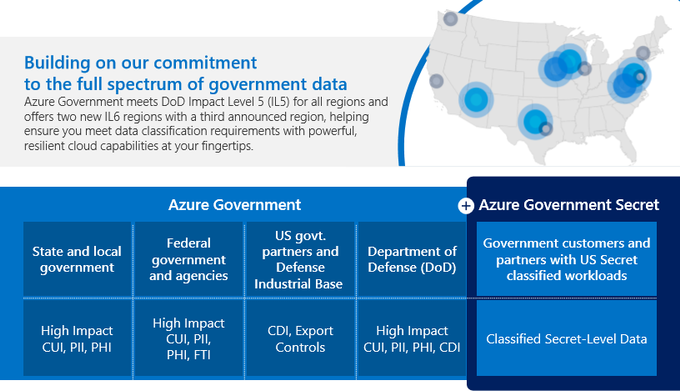
Azure Government Secret (US) was developed with the same principles and architecture as Microsoft’s commercial cloud solutions. This new solution; however, is built exclusively in support of US agencies and partners working with data classified at the U.S. Secret classification level. It is enhanced for maintaining the security and integrity of these classified workloads without compromising the speed of access to sensitive, mission-critical information.
Highlights
Azure Government Secret was given Provisional Authorization (PA) at Department of Defense Impact Level 6 (IL6) and Intelligence Community Directive (ICD) 503 with facilities at ICD 705, and it provides a broad range of commercial innovation for classified workloads.
Technical
- Infrastructure as a Service (IaaS)
- Platform as a Service (PaaS)
- Software as a Service (SaaS)
- Marketplace solutions
Institutional
- Over twenty years of experience working across classified networks to support critical customer missions.
- Microsoft is committed to meeting the needs of government across the spectrum of data classifications, while providing your agency with specialized cloud services and best-in-class security.
Connectivity
Connect securely and natively to classified networks, or leverage options for private, resilient, high-bandwidth connectivity using ExpressRoute and ExpressRoute Direct. All methods utilize Azure networking technologies, delivering high-speed communications within the Continental U.S. (CONUS) back to exclusive datacenters over a private network.
Direct connection
Natively available for agencies with direct connections through US government classified networks.
ExpressRoute
Extend your on-premises networks into Azure Government Secret regions over a private connection facilitated by a connectivity provider with ExpressRoute can be used to extend the on-premises network of the organization.
ExpressRoute Direct
Allows connectivity directly into Azure Government Secret locations.
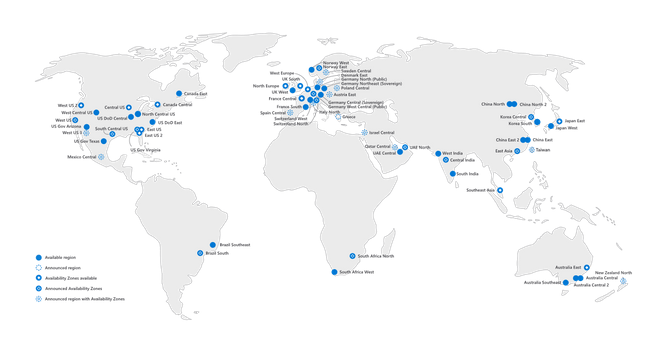
Regions
Bring your data to the cloud with confidence using dedicated regions, built for US Secret classified workloads and operated by cleared US citizens under the broadest compliance certifications available.
- FedRAMP Moderate and High provisional authorizations meet DoD compliance standards at Impact Levels 2, 4, 5, and NIST 800-171 controls satisfy DFARS and ITAR requirements.
- Three regions for Azure Government Secret provide the DoD Impact Level 6 (IL6) and Director of National Intelligence (DNI) Intelligence Community Directive (ICD 503) accreditation with facilities at ICD 705.
- Azure Government Secret delivers across three dedicated regions located over 500 miles apart for required geodiversity.
Services
Take advantage of cloud capabilities including infrastructure as a service (IaaS), platform as a service (PaaS), software as a service (SaaS), and marketplace offerings. Below are some of the services that are supported by Azure Government Secret. For a complete, up-to-date list, visit Azure Government Services by Audit Scope
Compute
- Virtual Machine Scale Sets
- Functions
- VMs: Av2, B, DSv3, DSv2, Dv2, Dv3, ESv3, Ev3, FS, NCv3
- Cloud Services
- Service Fabric
- Container Register
- VMs Instance Level IPs
- VMs Reserved IP
- Batch
- Web Apps
Storage
- Azure Data Lake Storage Gen2
- Managed Disks
- Disk Storage
- Storage Queues
- Hot/Cool Blob Storage
- Storage Tables
Networking
- Application Gateway
- Virtual WAN
- ExpressRoute
- Traffic Manager
- VPN Gateway
- Azure DNS
- Virtual Network
- Load Balancer
Analytics
- Event Hubs
- Azure Data Explorer
- Azure Cosmos DB
- Redis Cache
- Azure SQL
Management Tools
- Azure Portal
- Service Bus
- Azure Resource Manager (ARM)
- Network Watcher
- Azure Service Manager (RDFE)
- Logic Apps
- Azure Backup
Security + Identity
- Azure Active Directory
- Multi-Factor Authentication (MFA)
- Azure Key Vault
- Microsoft Graph
Trusted Microsoft Partners
Microsoft’s approved AOS-G Partner network for specialized government cloud computing services.
- Accenture Federal Service
- Agile IT, Inc
- American Technical Services
- Applied Information Sciences
- Arctic Information Technology, Inc.
- C3 Integrated Solutions, Inc.
- Catapult Systems, LLC
- CGI Federal Inc.
- Cloud Navigator, Inc – formerly ISC
- Dox Electornics Inc.
- F1 Soluitions Inc
- Four Points Technolgy, LLC
- KTL Solutions, Inc.
- LiftOff LLC
- Permuta Technologies, Inc.
- Planet Technologies, Inc.
- Quiet Professionals, LLC
- Smartronix
- SAIC
- Summit 7 Services, Inc.
- TechTrend, Inc
- VLCM
- VC3
Links/Resources
Azure Government for National Security
https://azure.microsoft.com/en-us/global-infrastructure/government/national-security/
Azure Government Secret Datasheet
https://azure.microsoft.com/mediahandler/files/resourcefiles/azure-government-secret-datasheet/Azure%20Gov%20Secret%20Datasheet.pdf
Azure Government Documentation
https://docs.microsoft.com/en-us/azure/azure-government/
Azure Government Blog
https://devblogs.microsoft.com/azuregov/
AOSG Partner List
https://docs.microsoft.com/en-us/azure/azure-government/documentation-government-csp-list#approved-aos-g-partners
Microsoft Trust Center
https://www.microsoft.com/en-us/trust-center/?rtc=1
Azure Government Validation
https://azure.microsoft.com/en-us/global-infrastructure/government/request/?ReqType=General
by Contributed | Jan 8, 2021 | Technology
This article is contributed. See the original author and article here.
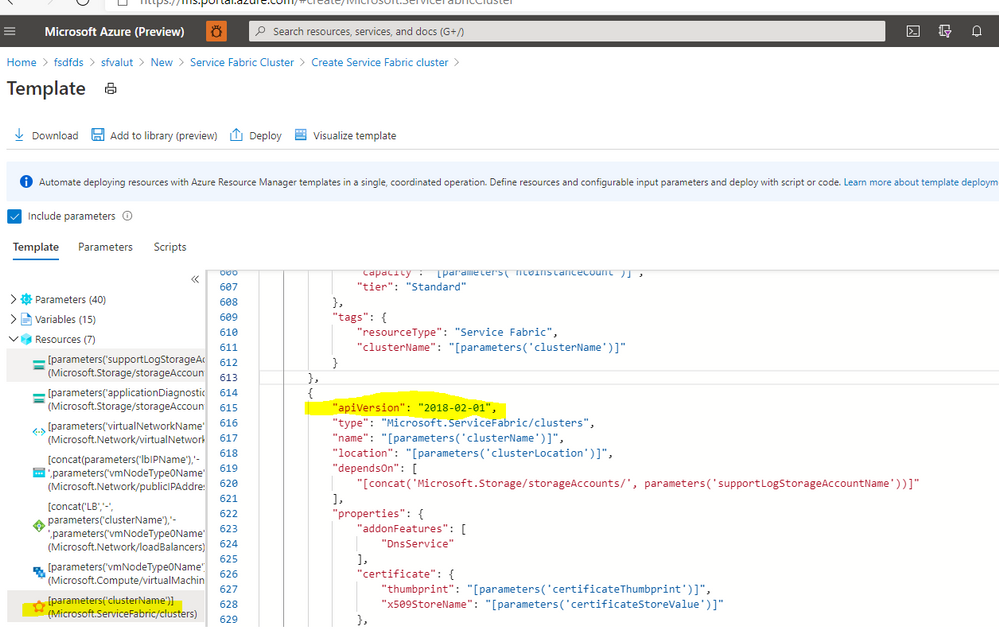
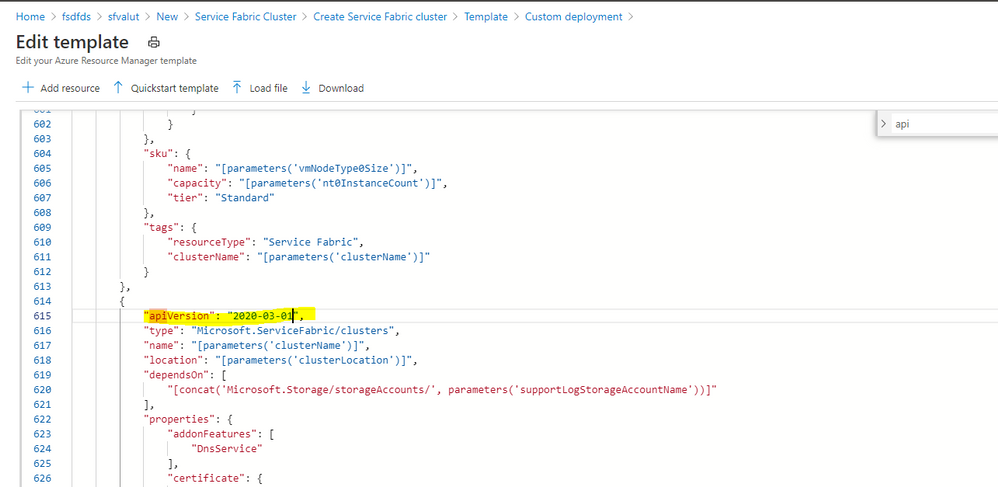
Creating a new cluster with latest API version :
If you create a service fabric cluster currently it takes the API version as 2018-02-01 as of today.
while deploying the ARM template you can change it to latest version available prior to deploying via Azure portal or Visual Studio or Azure Dev ops.
You can find the latest version at : Microsoft.ServiceFabric/clusters – ARM template reference | Microsoft Docs
OLD :
NEW :
Update an existing cluster with latest API version :
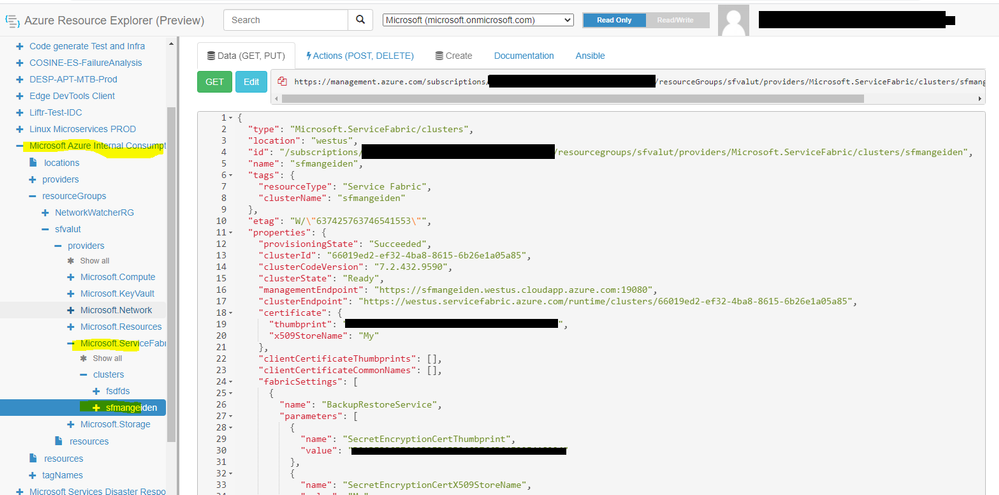
If you have the previous template available you can redeploy only the Service Fabric resource with required API version or get template from the deployment section of your resource group otherwise simply you can pull the latest template with https://resources.azure.com
Navigate to your subscription by expanding subscriptions -> <Your Subscription> -> resourceGroups -> <Your Resource Group> -> providers -> Microsoft.ServiceFabric -> clusters -> <Your Cluster Name>
Copy the template
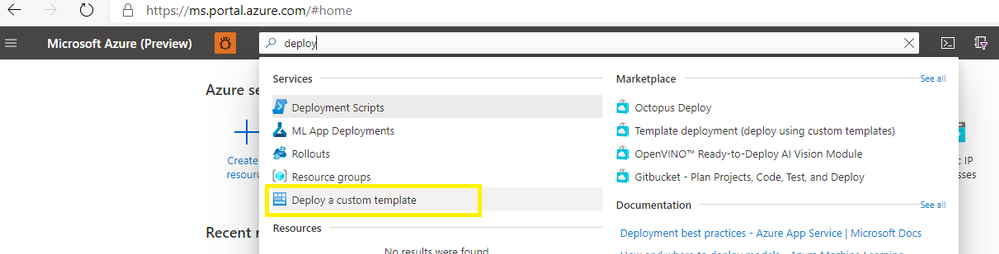
Create a new custom deployment template and deploy via Azure portal or powershell/ VS with making the changes for the API version.
Important note for the template copied via Azure Resource Explorer make sure your remove the etag and cross verify your existing Fabric setting applied or update any setting want to apply which requires latest API version and not able to perform via Azure Resource Explorer.
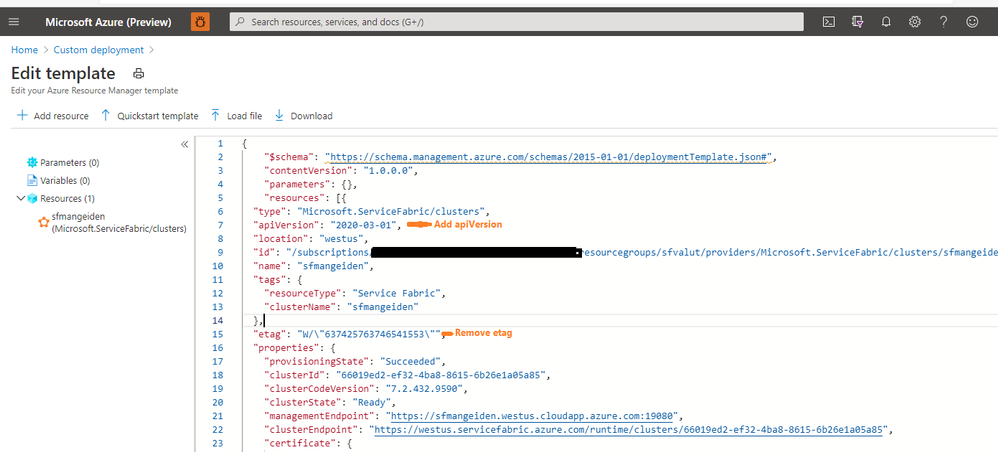
Then you can deploy the changes.
by Contributed | Jan 7, 2021 | Technology
This article is contributed. See the original author and article here.
What is the Issue?
To improve security, we are making potentially breaking changes to the unsupported versions from 5.7 to 6.3.63.* of Azure Service Fabric Runtime to all Azure Regions on Jan 19, 2021.
As a result, we have reached out to impacted customers to upgrade Service Fabric clusters by Jan 19,2021 to avoid service disruptions. We observed some customers have not taken action to avoid outage to clusters and hence request you all treat this a final reminder to take the recommended action to upgrade to the latest supported and compliant version applicable to your scenario.
We also posted an Upgrade alert on the Service Fabric supported versions page.
Impact
Service Fabric clusters will not come up if you have not upgraded to one of below supported versions.
Impacted Service Fabric workloads
Azure Service Fabric clusters which run on unsupported versions from 5.7 to 6.3.63.* are impacted by this breaking change.
Required Action
Upgrade Service Fabric clusters as soon as possible to one of the below supported versions of Service Fabric runtime that includes the fix for the security issue. We have also reached out to the impacted customers with guidance.
A fix to address the security issue will be deployed across Azure fleet by Jan 19,2021. We have released fix for the issue in all Service Fabric supported versions and is made available in all regions.
Service Fabric runtime version including Break fix
Ensure that Azure Service Fabric cluster is an upgraded to one of the below supported version of Service Fabric runtime that includes fix for the security issue described above.
OS
|
Current Service Fabric runtime in the cluster
|
CU/Patch release
|
Windows
|
7.0.*
|
7.0.478.9590
|
Windows
|
7.1.*
|
7.1.503.9590
|
Windows
|
7.2.*
|
7.2.445.9590
|
Ubuntu 16
|
7.0.*
|
7.0.472.1
|
Ubuntu 16
|
7.1.*
|
7.1.455.1
|
Ubuntu 1804
|
7.1.*
|
7.1.455.1804
|
Ubuntu 16
|
7.2.*
|
7.2.447.1
|
Ubuntu 1804
|
7.2.*
|
7.2.447.1804
|
If you have any questions or concerns, please contact us by opening a support request. In addition, here are your general support options for Service Fabric: Learn about Azure Service Fabric Support options – Azure Service Fabric | Microsoft Docs.
by Contributed | Jan 7, 2021 | Technology
This article is contributed. See the original author and article here.
FastTrack for Azure is proud to announce that IoT solutions are now Generally Available to eligible customers across all geographic areas where FastTrack for Azure is available.
This includes support for the following IoT services:
- IoT Hub
- IoT Device Provisioning Service
- IoT Edge
- IoT Central
- Azure Time Series Insight
- Industrial Internet of Things
FastTrack for Azure will continue to evaluate additional IoT services over time to meet customer demand through a pilot and preview approach. Should your solution include additional services outside of the list above, the level of assistance available will be explained to you during project scoping.
The road to get here has been one of much learning. Not only for FastTrack for Azure but also for all our stakeholders across Microsoft. To reach this milestone we have worked through a complete end-to-end Pilot, Preview, and Release framework which ensures that we can provide services of the highest quality to our Azure customers. In addition to ensuring that the scope of assistance we provide is both matched to our capabilities, customer demand, product roadmaps, and aligns with the FastTrack for Azure strategic direction.
Please note that hardware and device specific assistance is outside the supported scope for FastTrack for Azure. Your account manager can assist you in sourcing the appropriate channel for those services should you require.
To learn more about FastTrack for Azure and how to nominate visit https://azure.microsoft.com/en-us/programs/azure-fasttrack/
by Contributed | Jan 7, 2021 | Technology
This article is contributed. See the original author and article here.
We are happy to announce the public preview availability of a new data source in Microsoft 365 Defender advanced hunting.
Two new tables for Azure Active Directory sign-ins are now available in advanced hunting:
Tables are visible for global roles assigned in Azure Active Directory only, as enforced by Azure Active Directory.
The tables are suffixed with “beta” because it is a short-term solution to help you quickly identify possible malicious sign-in events for investigation. In parallel to making this data available, we are working on a more robust and complete solution. We will share more details on that soon.
Here are some useful sample queries that can also help you understand how to use these new tables:
// Finds attempts to sign in to disabled accounts, listed by IP address
let timeRange = 14d;
AADSignInEventsBeta
| where  Timestamp >= ago(timeRange)
| where ErrorCode == ‘50057’  // The user account is disabled.
| summarize StartTime = min(Timestamp), EndTime = max(Timestamp), numberAccountsTargeted = dcount(AccountObjectId),
numberApplicationsTargeted = dcount(ApplicationId), accountSet = makeset(AccountUpn), applicationSet=makeset(Application),
numberLoginAttempts = count() by IPAddress
| extend timestamp = StartTime, IPCustomEntity = IPAddress
| order by numberLoginAttempts desc
// Users with multiple cities
// Gets a list of users that signed in from multiple locations in the last 24 hours
AADSignInEventsBeta
| where  Timestamp >= ago(1d)
| summarize CountPerCity = dcount(City), citySet = makeset(City) by AccountUpn
| where CountPerCity > 1
| order by CountPerCity desc
// Most active Managed Identities
// Gets list of the top 100 most active managed identities in the last 24 hours
AADSpnSignInEventsBeta
| where Timestamp > ago(1d)
| where IsManagedIdentity == True
| summarize CountPerManagedIdentity = count() by ServicePrincipalId
| order by CountPerManagedIdentity desc
| take 100
// Inactive Service Principals
// Gets list of service principals with no sign-ins in the last ten days
AADSpnSignInEventsBeta
| where Timestamp > ago(30d)
| where ErrorCode == 0
| summarize LastSignIn = max(Timestamp) by ServicePrincipalId
| where LastSignIn < ago(10d)
| order by LastSignIn desc
Note: Customers who can access Microsoft 365 Defender through the Azure Security Center’s integrated Microsoft Defender for Endpoint solution, but do not have licenses for any of Microsoft Defender for Office, Microsoft Defender for Identity, or Microsoft Cloud App Security, will not be able to view this schema.


Recent Comments