This article is contributed. See the original author and article here.
Faced with an unprecedent global crisis that disrupted classrooms around the world, educators demonstrated perseverance, agility, and creativity in quickly adapting to an online classroom environment. As remote and hybrid learning continues into 2021, we know that maintaining secure and productive classrooms remains one of your top concerns. Creating safer distance learning environments is a two-fold effort involving both the policies and safeguards enabled by IT Admins in schools and districts, as well as the daily best practices of educators. With that goal in mind, we’ve pulled together five tips you can start using today to help keep your classroom meetings safe, productive, and fun.
Tip 1: Decide who can do what, ahead of time Before your class begins, it’s important to choose how you’d like your students to join and interact during the class.
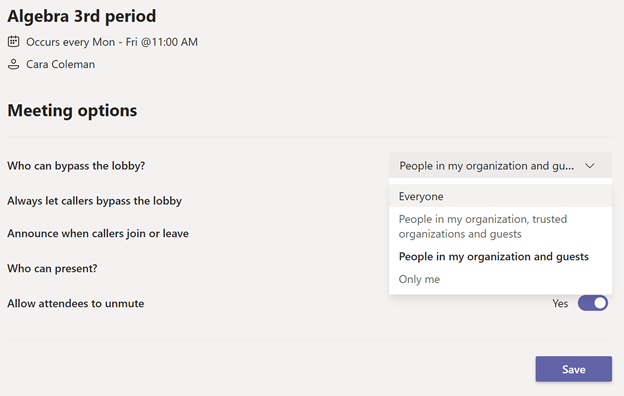
When setting up a meeting for your class in Teams, adjust the online meeting options to determine who can bypass the lobby, who can share content, and if you’d prefer attendees to be muted when you begin class.
Tip 2: Make sure the right people have access Every classroom is different. Today, a guest speaker may be joining your class. To avoid any uninvited guests, we recommend setting Always let callers bypass the lobby to Only Me most of the time. When you know a guest will be joining you, you can edit the strictness of this setting. This way, students and others joining your class meeting will automatically wait in a virtual lobby before you admit them.
Tip 3: Control who can present their screen or share content It’s “show and tell” time for one of your students, so they need to be able to share with the rest of the class.
As a rule, everyone should join as a standard attendee without the ability to present or share content. That way, you control the agenda of the class. However, if you have a guest presentation planned, you can grant the presenter role in Meeting options. Need a student to present while class is going? No problem! You can grant presenter permissions to specific attendees during the class and change them back to attendees after their presentation is done.
Tip 4: Mute all meeting attendees or specific individuals Let’s face it, sometimes you need to focus class on one voice, or mute disruptive background noise—barking dogs, traffic, you name it!
Here you have a couple of options: If you need to make sure there are no interruptions, you can mute all the attendees to make sure the whole class stays focused on the lesson’s content. Or, mute specific attendees at any time.
Tip 5: End the class for all attendees It’s safer for students if they do not have access to a meeting after it’s over, especially if you’ve already left the call.
At the end of class, make sure that you end the meeting for everyone. Instead of selecting Leave, make sure to select the dropdown arrow and click End meeting.
Thanks for following along! Please let us know how else we can support you and your students in your distance and hybrid learning journeys.
This article is contributed. See the original author and article here.
Microsoft is committed to continually extending Microsoft Defender for Endpoint capabilities across all the endpoints you need to secure, and today we’re excited to announce that Defender for Endpoint for Windows Virtual Desktop is now generally available! In this post we’ll briefly go over what this means, and what the experience looks like in the Microsoft Defender Security Center.
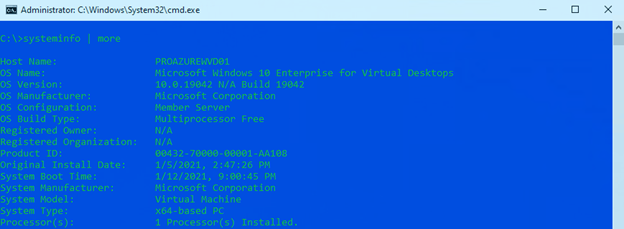
Defender for Endpoint now supports Windows Virtual Desktop with up to 50 concurrent user connections for Windows 10 Enterprise multi-session (listed here as “Microsoft Windows 10 Enterprise for Virtual Desktops”)
Single session scenarios on Windows 10 Enterprise are fully supported and onboarding your Windows Virtual Desktop machines into Defender for Endpoint has not changed.
There are several new items in the Microsoft Defender Security Center that you’ll see have been added to support Windows Virtual Desktop, we’ll detail them in the following sections.
Device Inventory Page
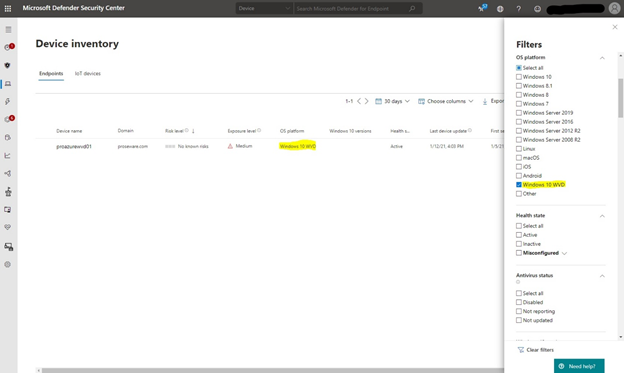
On the device inventory page, select “filters” to see a new “Windows 10 WVD” filter under OS Platform that you can use to view only Windows Virtual Desktop machines. Identify Windows Virtual Desktop machines by looking for “Windows 10 WVD” in the OS platform column of the table.
Device Page
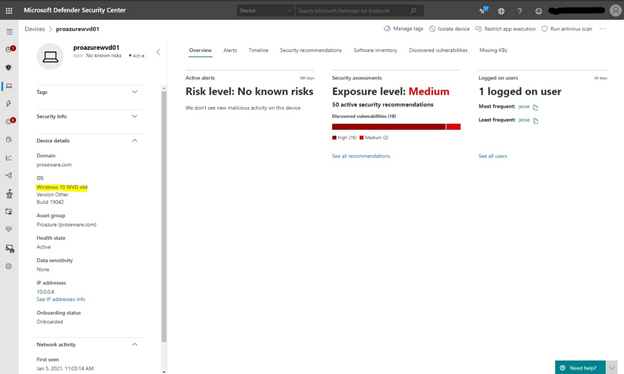
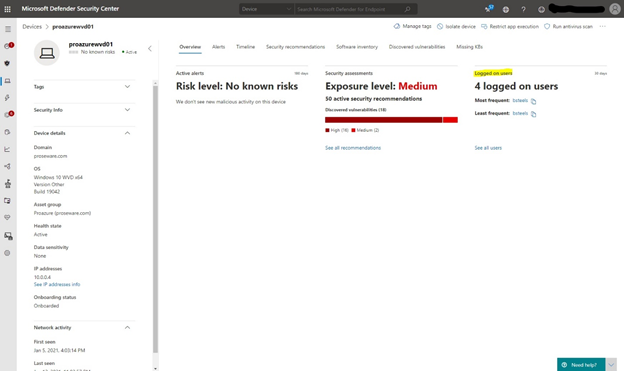
On the device page in the left fly out, you’ll also see that Windows Virtual Desktop is reflected under the device details section. Under “OS” you’ll see “Windows 10 WVD x64” indicating that it’s a Windows Virtual Desktop machine.
The device page will also show the number of logged on users in the past 30 days on the overview tab.
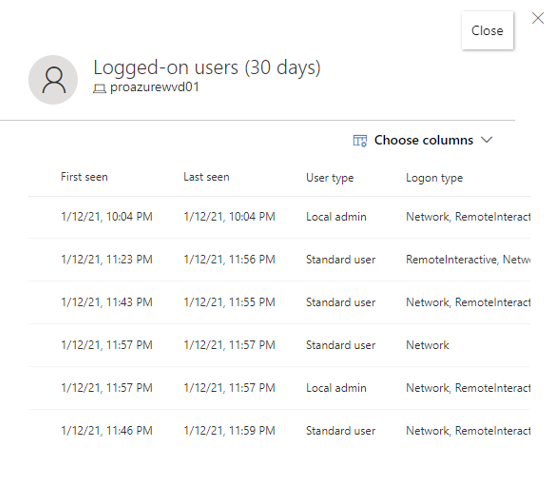
Selecting the “See all users” link will allow you to see the complete list of users. You’ll have a number of columns at your disposal including “Logon Type,” which for Windows Virtual Desktop will be “logon type 10” or “RemoteInteractive.”
The changes thus far are there to help you identify Windows Virtual Desktop machines in the Microsoft Defender Security Center. The data that is collected, and the investigation experience that you are used to with all other supported endpoint types, remains mostly unchanged. You can expect the majority of the functionality and capabilities such as the device page, response actions, threat and vulnerability management, Microsoft Secure Score for Devices, software inventory, etc. to all still work in the same way they do for Windows 10 and other supported devices. However, there are some things to take note of in a few key areas of the security center which we’ll walk through below.
Machine Timeline
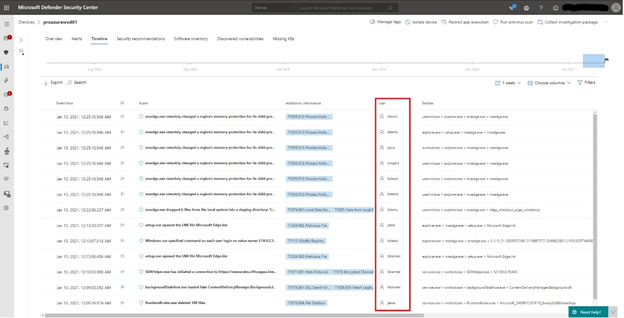
The machine timeline will be populated with cyber telemetry from all active user sessions on the Windows Virtual Desktop machine. This allows analysts to see all events happening on the machine and also gives the option to investigate timeline events that are specific to a particular user session. As an example, I’ve flagged a couple of events in the machine timeline from five different users who are logged on concurrently to a Windows Virtual Desktop machine:
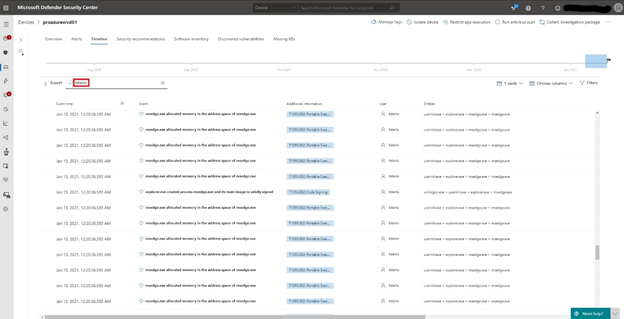
If you want to see all activity related to a specific user, simply search for the username to display all associated cyber telemetry:
All of the machine timeline capabilities such as search, filters, flagging, columns, time span, etc. still work the same way as they do with other devices.
Advanced Hunting
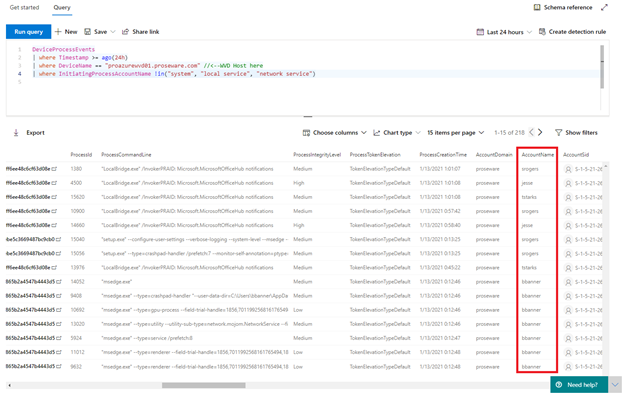
All of the cyber telemetry data reported by Windows Virtual Desktop machines will be available in advanced hunting. For example, you may want to see process events or image loads related to a specific user session and this can be accomplished by using columns that are already present in the advanced hunting schema:
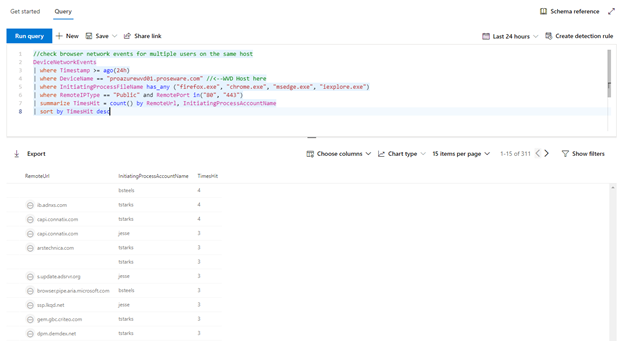
Perhaps you want to check browser network events by user on a Windows Virtual Desktop host for the last 24 hours:
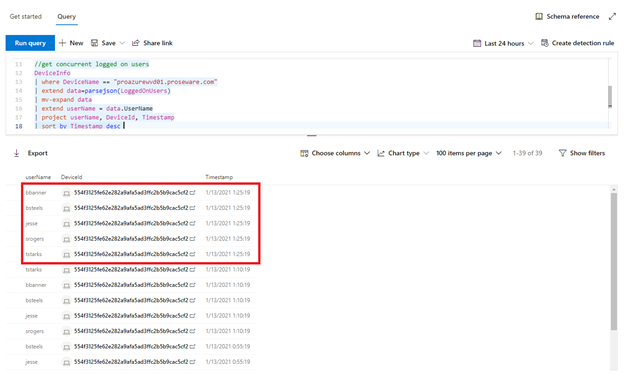
For the last example, you may want to check for currently logged on users via the DeviceInfo table, as you can see here at 1/13/2021 1:25:19 there are five users concurrently logged on to this specific Windows Virtual Desktop host:
These are just a few examples that target all or specific user sessions for data insights via advanced hunting. Continue to reference the schema and use your imagination and creativity for unique data insights!
Incidents and Alerts
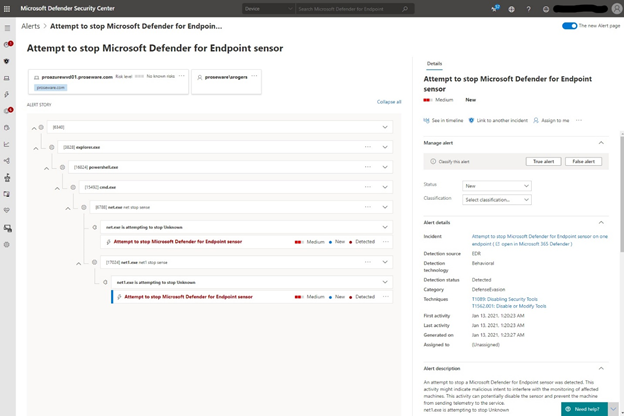
This experience in the portal remains unchanged, here is an example alert that is triggered for a user on a Windows Virtual Desktop machine:
Note on licensing: When using Windows 10 Enterprise multi-session, depending on your requirements, you can choose to either have all users licensed through Microsoft Defender for Endpoint (per user), Windows Enterprise E5, Microsoft 365 Security, or Microsoft 365 E5, or have the VM licensed through Azure Defender.
We’re excited to share this milestone with everyone, and we hope this better enables organizations who are embracing user productivity virtualization to protect these unique Windows Virtual Desktop assets. Let us know what you think by leaving a comment below!
If you’re not yet taking advantage of Microsoft’s industry leading security optics and detection capabilities for endpoints, sign up for a free trial of Microsoft Defender for Endpoint today.
Jesse Esquivel, Program Manager Microsoft Defender for Endpoint
This article is contributed. See the original author and article here.
Haimantika Mitra is a third-year student at Siliguri Institute of Technology (SIT), a private engineering and management college in West Bengal, India, majoring in electronics and communications. She won’t graduate until May 2021, but she’s already working as an intern at a major tech company, a step she hopes will lead to a full-time job offer after graduation. She credits her discovery of and training in Microsoft Power Platform—especially the support and inspiration she received from developer and cloud advocate Dona Sarkar and other women in tech—for helping her land this internship. But it’s clear that her own passion for technology and for helping others—especially women—also plays a large role in her journey to success.
Mitra grew up in Siliguri, the third-largest urban area in West Bengal, after Kolkata and Asansol. Her early years of education, from the age of 10 on, were conducted in English, and her focus was on biology. Her family always stressed to her and her two sisters the importance of getting as much education as they could to help them succeed, especially since as women they were likely to encounter hindrances in the working world. So Mitra knew early on that she would continue her studies after high school. She didn’t want to do engineering at all, she says, but in India it’s mainstream and everybody does it. In fact, in India more women are enrolled in engineering programs and other STEM disciplines than in the United States and the United Kingdom. However, the only technical college in Mitra’s area was SIT, and as the child of a single parent, she couldn’t move away, so that’s where she applied. “But I did love electronics and devices,” she says, laughing, “so I thought I’d give it a try.”
At SIT, women represented less than a third of the student population. In 2017–2018, the academic year she began her studies, women made up only 29.7 percent of the entire student population in colleges approved by the All India Council for Technical Education (AICTE). In her second year, when she started learning programming and saw how much could be done with technology, she reached out to fellow students for help, since she had zero coding experience. She found that male students hesitated to help women learn coding. The juniors and seniors, for example, often didn’t follow through on answering her questions or showing her how to do things, even though they would politely agree to her requests for help. “This is why it’s so important to me to help women learn coding,” she explains. Her professors, on the other hand, were ready to help, but they were experts in technology that was rapidly becoming outdated and their educational model was more a book-learning one than an experiential one based in real-world learning. To acquire the skills she needed to succeed in today’s world, she knew she had to find ways to augment and amplify her formal technical education. “It’s time for me to do something on my own,” she told herself.
It was only in her third year that Mitra found out about tech communities and other ways that people shared tech knowledge, such as events hosted by Microsoft Learn Student Ambassadors, a global program of on-campus ambassadors who assist students and their communities by taking a lead in their local tech circles and helping them develop technical and career skills for the future. “I was really inspired by the Microsoft Learn Student Ambassador program,” she says. On Twitter she began following Dona Sarkar, a lead for the Microsoft Power Platform Advocacy team, who often hosted events. In April 2020, Mitra decided to attend an event led by Sarkar. That day, Sarkar gave a presentation on building Power Apps with Microsoft Power Platform, told the audience what kind of apps people had created, and gave them homework: try it out for yourself and create your own app.
“That was the first time I had heard about Microsoft Power Platform,” Mitra points out. As a result of showing up for that event, Mitra not only learned about Power Apps but she also built an app that day—in less than 24 hours—and shared it with the Microsoft team. She started by working through the Microsoft Power Platform Fundamentals learning path on her own, including the modules on how to build canvas apps, and then watched the demo, which empowered her to build her own app. The app she created tracked COVID-19 numbers in her area, drawing data from a government site that was open source.
After that experience, Mitra was hooked. “I was amazed to see the power of this particular platform,” she says, “and I got excited about all the things we could do with this.” So she immersed herself in more Microsoft Learn content—mixing and matching learning paths, tutorials, and docs—to teach herself other parts of Microsoft Power Platform.She was ready for the challenge of creating more apps, not just because she was a curious student but also because she was dedicated to her local community. “Before this, she explains, “I had had a lot of ideas in my head for apps that could help people in my community with real issues they faced every day. So I thought, let’s see how I can integrate these skills with my ideas.”
One of her ideas led to an app to alert people to flooding, which happens frequently in her area. She used Power BI to collect all the data the Indian government had on flooding and then built an app that notifies people through Twitter, Gmail, and other media of possible flooding, so whenever there’s an emergency they can prepare. She also built a custom connector for weather forecasting, so if the temperature gets really high or low, it sends a notification. Currently she’s working on app to help people with speech and hearing impairments, using AI Builder to detect American Sign Language. Microsoft Power Platform is really helpful, she notes, because it empowers you to build solutions to community problems fast.
Mitra knew right away that she could help not only herself and her community with her newly acquired skills but also her coder and non-coder friends by sharing this knowledge with them. In January 2020, Mitra became a Microsoft Learn Student Ambassador herself, exploring Microsoft technologies, organizing events, and speaking about Microsoft Power Platform. Soon after that, she participated in Black Minds Matter Hackathon 2020, in which the organizers set up a bootcamp to help Black students learn about Microsoft Power Platform and build apps with it. She and other student ambassadors helped one of those students build a mental health tracking app for the Black, Asian, and minority ethnic (BAME) community. The girl’s app records people’s moods and, based on that, connects them to YouTube videos, calendar reminders for events they can attend, or other resources that can help them calm their mind. The app, known as iFeel, won a prize. Because of that experience, the girl got excited about the amazing things that could be done with Microsoft Power Platform, decided to keep learning this technology, and was inspired to pass along the kind of help she had received from Mitra’s and her team to others. To see some of what Mitra’s been up to recently, including speaking engagements, hackathons, and other events, scroll through her #MSFT Student Ambassador Twitter account.
According to Sarkar, Mitra became such a role model that she was invited to speak at Microsoft Build 2020, a conference for developers, where she gave a presentation, “Low code, no code, more power—Power Platform,” with colleagues Justin Yoo and Phantip Kokilanon. Since then, she’s been speaking at and actively participating in many other events. She spoke at Start. Dev. Change. 2020, a conference and community for people who want to learn to code, including beginners in tech and people switching careers. At Devs Speak: Low Code, No Code, a gathering of developers and tech enthusiasts from communities like Women Who Code, she presented “Empowering Students with Power Platform” (time stamp: 1:11:47). And during Smart India Hackathon (SIH) 2020, an annual nationwide initiative that provides students a platform to solve some of the pressing problems submitted from across India, she used Microsoft Power Platform low-code skills on a use case to help her team become a winner. The solution they created, Smart Flood Prediction and Warning System, predicts flooding in hydroelectric projects and issues warnings to local residents about impending floods.
With all the time she’s been spending on giving presentations, creating videos to share what she’s learned or to point others to how they can learn, winning prizes, and participating in various tech communities and her own community in Siliguri, Mitra has also kept up with her own learning and career goals. She’s worked her way through all the Microsoft Power Platform training and is ready to take Exam PL-900: Microsoft Power Platform Fundamentals in January 2021, the next scheduled date, to earn her Power Platform Fundamentals certification.
Clearly Mitra’s not one to sit around and wait. Instead, she scopes out new opportunities and challenges to help her learn and grow. While anticipating the certification exam and finishing her third year at SIT, she decided to seek an internship. Internships aren’t a requirement or an expectation at SIT, but Mitra wanted an opportunity to gain real-world experience and to test out her app-making skills, so she went looking for a place that would take her on as an intern. Though Cyclotron Group in Austin, Texas, doesn’t have an internship program, she convinced a hiring manager there to give her a shot. “And that’s how I got lucky!” she notes.
Mitra started working at Cyclotron Group in November 2020—the first intern the company has ever hired. As a part-time Power Platform consultant, she’s building solutions using Microsoft Power Platform, that is, Power Apps, Power BI, Power Virtual Agents, and Power Automate. Her internship runs until she graduates in May. “Before the pandemic, I wasn’t even aware of opportunities like this. But during the pandemic I began to seek them out, and this is how the pandemic became a boon for me.”
What excites her most about Power Apps? “I wanted to learn a skill and help people in my community,” she says. “I was interested in Microsoft Power Platform because I’ve always been inclined to help people around me.” And that’s exactly what she does with her Microsoft Power Platform skills. In addition to creating apps to help solve local problems, she also teaches underprivileged students in her local area, and she works as a student mentor at the Siliguri Welfare Organization. Also, in India, she says, there are a lot of startups, most of which are owned by people who have no coding experience. “I hope that by introducing them to this no-code platform they won’t have to hire a third party to solve their problems. They can do it themselves.”
A self-professed Microsoft Power Platform evangelist, Mitra’s mission is to is help make technology easier for everyone by teaching them or introducing them to these tools. Her work with companies, developers, tech communities, and kids proves that. As does her commitment to introducing women to tech and helping them learn it. “A woman helped me get excited about technology and build my skills as a developer,” she explains, “and I want to continue that tradition of women helping women in technology. The world’s been unfair for women for a very long time, and it’s time for us to support and empower one another. Through technology and women-in-tech communities, women are now being heard and helped, including me. By carrying the help I received forward to other women, I move a little closer to my goal of technology for everyone.” To that end, she often chooses to mentor girls, she participates in developer communities that focus on women, and she’s the Siliguri lead for a women’s developer group. Though in many ways India is a leader in women in technology—with women making up 34 percent of the IT industry (compared to 26 percent in the United States)—there’s still lots of room for improvement. And Mitra is helping lead the way to greater success for women in technology in her country and around the world.
Mitra’s story is unique but not rare. Training and certification in Microsoft Power Platform can help advance your career, whether you’re still a student, you’re just entering the work force, you’re changing careers, or you want to advance your developer skills. Anyone who’s interested in learning how to build apps with low-code techniques to simplify, automate, and transform business tasks and processes can start their upskill journey by checking out the Microsoft Power Platform app maker training and certification on Microsoft Learn. And once you’ve earned your certification, head over to the Microsoft Power Platform LinkedIn Job board to see all the opportunities available and find the one waiting for you.
The NCSA teaches users how to protect valuable data online, while encouraging businesses to Respect Privacy by protecting data they collect. CISA encourages users and businesses to visit NCSA’s website to learn more, including several calls to action:
For Individuals: Own Your Privacy
Personal info is like money. Your purchase history, IP address, or location has tremendous value. Make informed decisions about whether or not to share such data with certain businesses.
Keep tabs on your apps. Delete unused ones and keep others secure by performing updates.
Manage your privacy and security settings. Continuously check them to limit what information you share.
For Businesses: Respect Privacy
If you collect it, protect it. Make sure any personal data you collect is processed in a fair manner and is only collected for relevant and legitimate purposes.
Consider adopting a privacy framework to manage risk and secure privacy within your organization.
Asses data collection practices by evaluating which privacy regulations apply to your organization.
Transparency builds trust. Be honest with customers about how you collect, use, and share their personal information.
Maintain oversight of partners and vendors. You are responsible for anyone collecting and using your consumers’ personal information.
This article is contributed. See the original author and article here.
View and Query Log Analytics in Kibana dashboard using Azure Data Explorer
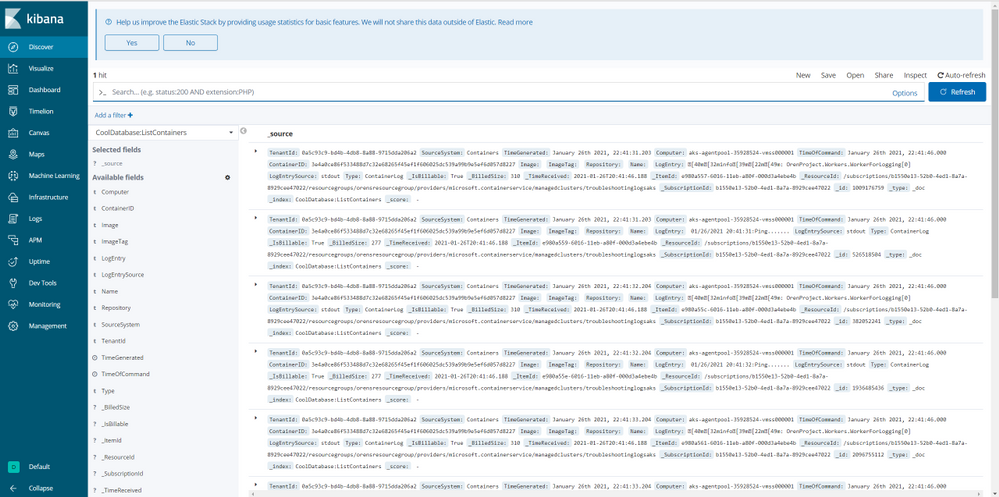
This experience enables you to query Azure Log Analytics in Kibana, using the Azure Data Explorer and Kibana integration and the cross-service query ability between Azure Data Explorer and Azure Log Analytics (see more info here) so you could join and analyze all your data in one place.
Follow the instructions to set up an integration between your Kibana instance and your Azure Data Explorer cluster, than, create a function in Azure Data Explorer with the following pattern:
This article is contributed. See the original author and article here.
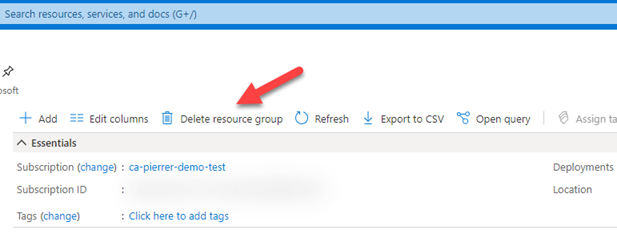
I know this not a new feature, but this saved my proverbial behind earlier this week. I was cleaning out demo subscriptions and resource groups that I’m no longer using or that need to be reset for new demos. Well… It did not take long for me to pick one that I needed to keep and hit the “Delete resource group”.
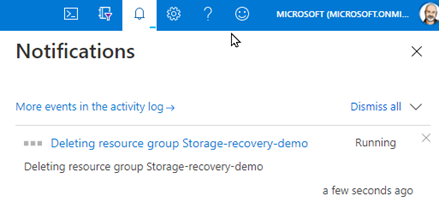
And like any situation where you know you’ve screwed up. I knew the second I saw the notification.
Turns out this Resource Group was where stored all the recorded demos I regularly use…. #Facepalm
Blob soft delete is available for both new and existing general-purpose v2, general-purpose v1, and Blob storage accounts (standard and premium). But only for unmanaged disks, which are page blobs under the covers, but is not available for managed disks.
If you have not enabled this on storage accounts where you have important data…. DO IT NOW!!
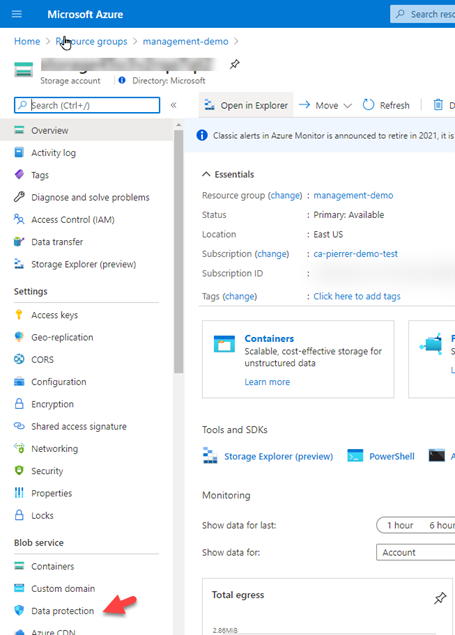
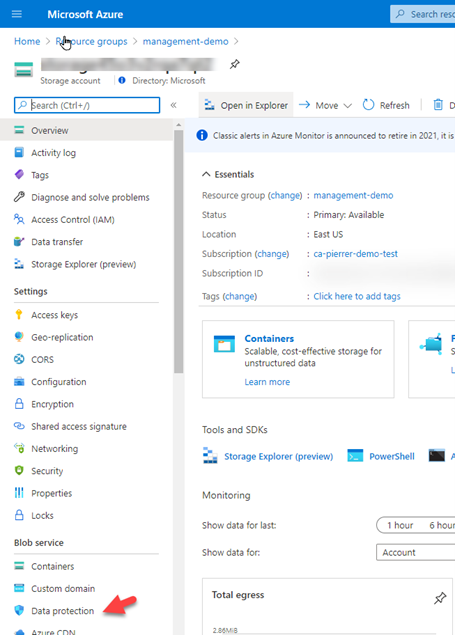
1. In the Azure portal, navigate to your storage account, and in the left-side menu find the “Data Protection” option under the “Blob service” section.
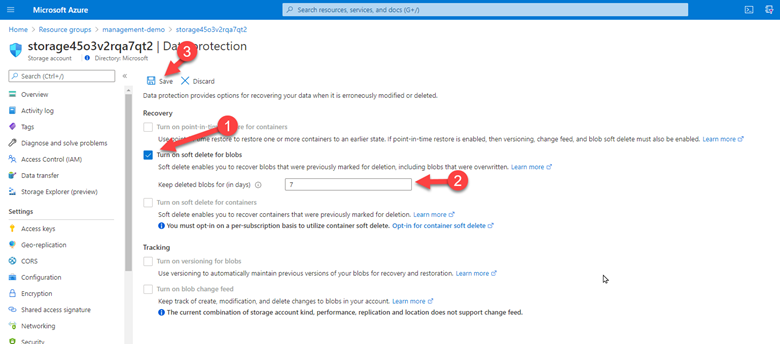
2. Check the box for “Turn on soft delete for blob”, then specify how long soft-deleted blobs are to be retained by Azure Storage, and finally save your configuration.
That’s it! You are now protected. Anyway, I was still looking at how I was going to recover my data. I deleted the Resource Group!! Not just the storage account or just the blob container… started looking for documentation. And found the one I was looking for. Recover a deleted storage account.
I followed the steps that were simple, even when you’re restoring a storage account from a deleted resource group.
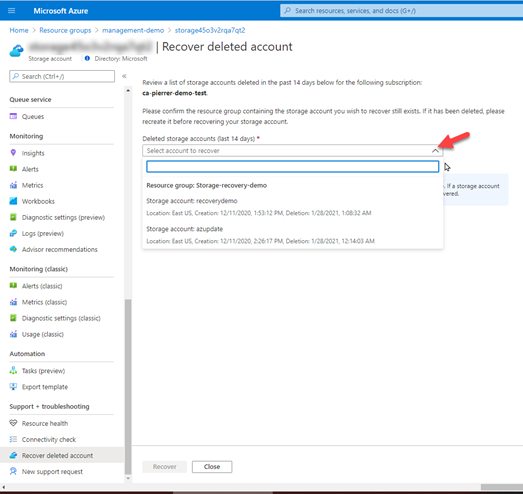
1. Create a Resource Group with the EXACT SAME NAME you just deleted. Once it’s created, navigate to the overview page for an existing storage account in the Azure portal. ANY existing storage account. And in the Support + troubleshooting section, select Recover deleted account.
2. From the dropdown, select the account to recover. If the storage account that you want to recover is not in the dropdown, then it cannot be recovered. Once you have selected the account, click on recover button.
Once the process is complete, your storage account will have been restored in its original spot. This really saved my bacon. I know it can potentially save yours.
Hopefully this can potentially save you some grief as well.
This article is contributed. See the original author and article here.
As announced via the Microsoft Advertising blog, mixed campaigns are now available to all Dynamic Search Ads customers in Microsoft Advertising.
Mixed campaigns are Search campaigns that can include both standard ad groups (with text ads, responsive search ads, and keywords) and dynamic ad groups (with dynamic search ads and auto targets).
Coming soon, campaigns that only support dynamic search ads will be converted to search campaigns. Here are the key dates that you need to know about.
January 8th
As of January 8th, mixed campaigns are supported in all markets where Dynamic search ads are available.
Dynamic search ads campaign creation is not allowed in the Microsoft advertising UI. Campaigns that only support dynamic search ads can still be viewed and edited.
There are no changes to the Bing Ads API. All add, edit, and read operations still work without interruption.
There are no changes to Microsoft Advertising Editor. All add, edit, and read operations still work without interruption.
Q2 calendar year 2021
During early Q2 calendar year 2021, Bing Ads API and Microsoft Advertising Editor clients will not be allowed to add new campaigns with the DynamicSearchAds campaign type. You can still edit and read Dynamic search ads campaigns.
Shortly after the campaign creation calls began to fail, we will convert all dynamic search ads campaigns to search campaigns. The campaign type will be updated from DynamicSearchAds to Search. We anticipate that it could take a couple of weeks to convert DSA campaigns to search campaigns across all accounts.
This article is contributed. See the original author and article here.
Final Update: Thursday, 28 January 2021 10:22 UTC
We’ve confirmed that all systems are back to normal with no customer impact as of 01/28, 10:00 UTC. Our logs show the incident started on 01/28, 08:00 UTC and that during the 2 Hours that it took to resolve the issue some customers may have experienced issues with missed, delayed and wrongly fired Log Search alerts and may have experienced difficulty accessing data for resources hosted in USGov Arizona region.
Root Cause: We identified the issue was caused by a recent deployment task with a incorrect configuration setting.
Incident Timeline: 2 Hours – 01/28, 08:00 UTC through 01/28, 10:00 UTC
We understand that customers rely on Log Search Alerts as a critical service and apologize for any impact this incident caused.
This article is contributed. See the original author and article here.
Introducing Unified Neural Text Analyzer: an innovation for Neural Text-to-Speech pronunciation accuracy improvement
This post is co-authored by Dongxu Han, Junwei Gan and Sheng Zhao
Neural Text-to-Speech (Neural TTS), part of Speech in Azure Cognitive Services, enables you to convert text to lifelike speech for more natural user interactions. Neural TTS has powered a wide range of scenarios, from audio content creation to natural-sounding voice assistants, for customers from all over the world. For example, BBC, Progressive and Motorola Solutions are using Azure Neural TTS to develop conversational interfaces for their voice assistants in English speaking locales. Swisscom and Poste Italiane are adopting neural voices in French, German and Italian to interact with their customers in the European market. Hongdandan, a non-profit organization, is adopting neural voices in Chinese to make their online library audible for the blind people in China.
In this blog, we introduce our latest innovation in the Neural TTS technology that helps to improve the pronunciation accuracy significantly: Unified Neural Text Analyzer.
What is text analyzer?
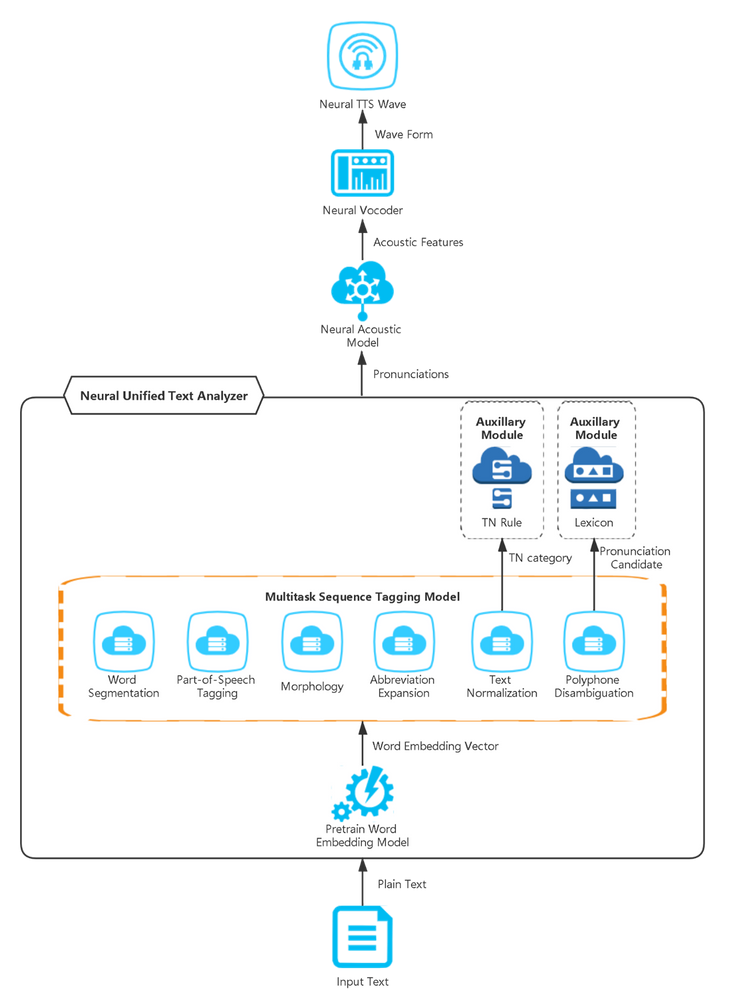
Neural TTS converts plain text into wave form via three modules: neural text analyzer, neural acoustic model and neural vocoder. Text analyzer converts plain text to pronunciations, acoustic model converts pronunciations to acoustic features and finally vocoder generates waveforms. Text analyzer is the first link of the entire TTS system with results directly affecting the acoustic model and vocoder. The correct pronunciation of a word or phrase is the basic expectation in TTS, which delivers the right information to use but it’s not always easy. For example, “live” should be read different in “We live in a mobile world” and “TV Apps and live streaming offerings from The Weather Network” depending on context. If TTS reads them incorrectly, the intelligibility and naturalness of the content will be significantly influenced. Thus, text analyzer is important to TTS.
Recent updates on Neural TTS include a major innovation to the text analyzer, called “UniTA” (Unified Neural Text Analyzer). UniTA is a unified text analyzer model, which seamlessly simplifies text analyzer workflow and reduces time latency in the runtime server. It adopts a multitask learning approach, jointly training all ambiguity models to solve context ambiguity and generate correct pronunciation and as a result reduces over 50% of pronunciation errors.
What are the challenges?
Generally, different natural languages have different linguistic grammar. In TTS, text analyzer needs to follow the same grammar of languages in order to generate correct pronunciations, which contains but isn’t limited to the following required grammar categories:
Word Segmentation is the process of dividing the written text into meaningful units, such as words. In English and many other languages using some form of the Latin alphabet, the space is a good approximation of a word divider. On the other hand, in languages such as Chinese or Japanese, there is no spacing in sentences. Different word segmentation results may cause different meanings and pronunciations.
Part-of-Speech Tagging is the process of marking up a word in a text as corresponding to a particular part of speech (such as noun, verb, adj, adv and so on), based on both its definition and its context.
Morphology is the progress of classifying words according to shared inflectional categories such as person (first, second, third), number (singular vs. plural), gender (masculine, feminine, neuter) and case (nominative, oblique, genitive) with a given lexeme.
Text Normalization is the process of transforming digits or symbols to their standard format for disambiguation, for example: “$200″ would be normalized as “two hundred dollars”, “200M” would be normalized as “two hundred meters” or “two hundred million”.
Similar to Text Normalization, Abbreviation Expansion is the process of transforming non-standard words to their standard format for disambiguation, for example: “VI” would be normalized as “six”, “St” would be normalized as “Saint” or “street”.
Polyphone Disambiguation is the process of marking up polyphone word (heteronym word, which has one spelling but has more than one pronunciation and meaning) to its correct pronunciation based on its context.
Category
Example
Word Segmentation
[English] Nice to meet u:) –> Nice / to / meet / u / :)
[Noun, | l ai v s |] Many people have lost their lives since the cyclone because aid has not been able to be distributed.
[Verb, | l I v s |]
I also discovered the very angry raccoon that lives near my porch.
Morphology
[Singular]
1km –> one kilometer
[Plural]
5km –> five kilometers
Text Normalization
[Fraction, nine out of ten]
The O.S. Speed T1202 ups the ante for race-winning performance, resulting in a power plant that will dominate 9/10 scale competition.
[Date, September tenth]
1st episode will air 9/10 with never before seen video of her birth!
Abbreviation Expansion
[Street]
Oh man, biking from 24th St BART to the 29th St bikeshare station, that will be sweet.
[Saint]
We continue to ask anyone who was in the wider area near St Heliers School between 7.30am and 9am and witnessed any suspicious activity to contact police
Polyphone Disambiguation
[p r ih – z eh 1 n t]
The prices will present the estimated discount utilizing the drug discount card.
[p r eh 1 – z ax n t]
But our present situation is not a natural one.
Most pronunciations are affected by these categories based on syntactic or semantic context, and these categories are all challenging disambiguation problems. The traditional TTS approach is a pipeline-based module called “text analyzer” with a series of models aimed at solving grammar disambiguation problems, which causes some of the following issues:
Complex model. Redundant models are built and optimized separately but implemented together in the traditional text analyzer, which causes pipeline long and complicated.
Error propagation. Accumulated errors caused by the models isolated would affect the final results.
High latency. Models run one by one in the traditional text analyzer which is pipeline-based. Time cost is high in the runtime server.
Compared to the traditional pipeline-based text analyzers, our Neural TTS proposes a Unified Neural Text Analyzer model (UniTA) to improve TTS pronunciation.
It builds a unified text analyzer model, which greatly simplifies the text analyzer workflow and reduces time latency in the runtime server.
It adopts a multitask learning approach, jointly training all ambiguity models to solve context ambiguity and generate the correct pronunciations, reducing pronunciation errors by over 50%.
How does UniTA improve pronunciations?
Firstly, UniTA converts the input text to word embedding vectors through a pre-trained model. Word embedding is a set of language modeling and feature learning techniques in natural language processing (NLP) where words or phrases from vocabulary are mapped to vectors of real numbers. Conceptually, it involves a mathematical embedding from a space with many dimensions per word to a continuous vector space with a much lower dimension. Pre-training models like XYZ-Code have demonstrated unprecedented effectiveness for learning universal language representations based on unlabeled corpus with the method achieving great success in many tasks like language understanding and language generation.
Secondly, a sequence tagging fine-tune strategy is adopted in the UniTA model. UniTA is designed as a typical word classification task, in which
Word Segmentation predicts word delimiter as word boundary or not.
Part-of-Speech(POS) predicts “noun”, “verb”, “adj” and so on to classify word part-of-speech.
Morphology predicts “singular”, “plural”, “masculine”, “feminine”, “neuter” and so on to classify word number, gender and case.
Text Normalization(TN) predicts candidate digits to “cardinal”, “date”, “time”, “stock” or other TN categories, and then an auxiliary component “TN Rule” helps convert digits to word form based on predicted category.
Abbreviation Expansion predicts candidate abbreviation word to its expanded form.
Polyphone disambiguation predicts polyphone words’ pronunciation. An auxiliary component, “Lexicon” is used here for achieving non-polyphone words’ pronunciations.
Different from the traditional text analyzer training models , UniTA adopts a multitask learning approach to jointly train all categories together including word segmentation, part-of-speech tagging, morphology, abbreviation expansion, text normalization and polyphone disambiguation. The multitask learning approach shares hidden layers’ information and jointly trains across different tasks, which has achieved state-of-art achievements on many NLP tasks. In UniTA, hidden information is also shared in models when training.
For example, the sentence “St. John had a 10-3 run to build its lead to 78-64 with 4:44 left.” in the training corpus is annotated as showed in the table below. “–” means there is no related tag in the category. In the word segmentation column, the phrase “10-3” is segmented as “10”, “-” and “3”; in the morphology column, the word “had” is annotated as “past tense”; in the text normalization column, “10-3” belongs to interpreting word “to” instead of “-“ while “4:44” belongs to the pattern using time format; In the abbreviation column, word “St.” is expanded as “Saint” rather than “Street”; and in the polyphone disambiguation column, the word “lead” is pronounced as [l i: d]. Actually, the word “lead” has two pronunciations, it is pronounced as [l i: d] when its POS is noun while pronounced as [l e d] when its POS is verb. This means the POS results and Polyphone results can share the inner information. In this way, multitask model improves UniTA accuracy.
Word
Word Segmentation
Part-of-Speech
Morphology
Text Normalization
Abbreviation
Polyphone disambiguation
St.
—
Noun
—
—
Saint
—
John
—
Noun
—
—
—
—
had
—
Verb
Past tense
—
—
—
a
—
Det
—
—
—
—
10-3
10 / – / 3
Num
—
numbers are predicted as “ten to three”
—
—
run
—
Noun
Singular
—
—
—
to
—
Particle
—
—
—
—
build
—
Verb
—
—
—
—
its
—
Det
—
—
—
—
lead
—
Noun
Singular
—
—
l i: d
to
—
Particle
—
—
—
—
78-64
78 / – / 64
Num
—
numbers are predicted as “seventy-eight to sixty-four”
—
—
with
—
Prep
—
—
—
—
4:44
4 / : / 44
Num
—
numbers are predicted as time format
—
—
left
—
Verb
Past participle
—
—
—
.
—
Symbol
—
—
—
—
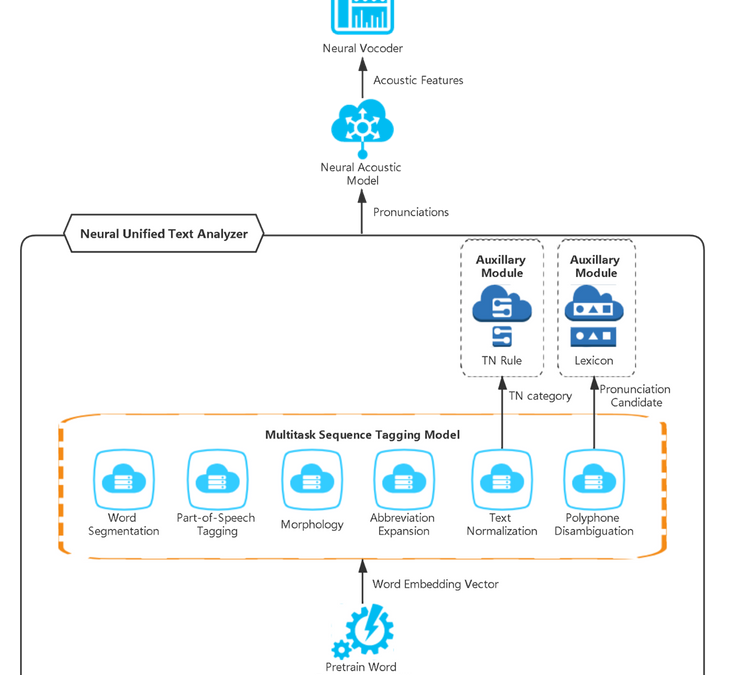
UniTA model predicts categories’ results together in the neural TTS runtime service. The same as training, UniTA converts the plain texts to word embeddings and then the multitask sequence tagging model predicts all the categories’ results. Some auxiliary modules are embedded after fine-tuning categories to further improve pronunciations. Finally, the pronunciation results are generated from UniTA.
Here is the figure of the UniTA model structure in Neural TTS:
UniTA model diagram
Pronunciation accuracy improved with UniTA
Compared with the traditional TTS text analyzer, UniTA reduces over 50% of pronunciation errors in improving pronunciation accuracy. It is already used many neural voice languages such as English (United States), English (United Kingdom), Chinese (Mandarin, simplified), Russian (Russia), German (Germany), Japanese (Japan), Korean (Korea), Polish (Poland) and Finnish (Finland). Due to varying types of grammar in language, not all categories are suitable for every language. For example, Chinese and Japanese heavily depend on word segmentation and polyphone while these languages don’t need morphology or abbreviation expansion.
Here are some samples of the pronunciation improvement using UniTA.
Category
Language
Input text
(target word bolded)
Previous pronunciation
Current pronunciation
Word Segmentation
Chinese (Mandarin, simplified)
太子与三殿下行过礼后坐了片刻就离开了。
“三殿 / 下行 / 过礼”
“三殿下 / 行过礼”
Word Segmentation
Chinese (Mandarin, simplified)
叶奎最终还是在剧痛下泄了气
“剧痛 / 下泄了气”
“剧痛下 / 泄了气”
Word Segmentation
German (Germany)
kulturform
kult+urform
kultur+form
Word Segmentation
Korean (Korea)
해외감염병
h̬ɛwɛg̥mjʌmbjʌŋ
h̬ɛwɛg̥mjʌmpjʌŋ
Morphology – case ambiguity
Russian (Russia)
Количество ударов по воротам (15 против 7)также говорит о преимуществе чемпионов мира
Семь
Семи
Abbreviation Expansion
English (United States)
Joined TX Army National Guard in 1979.
T.X.
Texas
Text Normalization
English (United States)
The Downtown Cabaret Theatre’s Main Stage Theatre division concludes its 2010/11 season with the Tony Award winning musical, in the heights by Lin-Manuel Miranda.
November 2010
2010 to 2011
Polyphone disambiguation
Chinese (Mandarin, simplified)
卓文君听琴后,理解了琴曲的含意,不由脸红耳热,心驰神往。
qu1
qu3
Polyphone disambiguation
English (United States)
I received a copy early in November, and read and contemplated it’s provisions with great satisfaction.
Polyphone disambiguation
Japanese (Japan)
パッケージには、富士屋ホテルが発刊した「We Japanese」内の説明用の挿絵を採用。
うち
(w u – ch i)
ない
(n a – y i)
Hear how the Cortana voice pronounces each word accurately with UniTA.
Get started
With these updates, we’re excited to continue to power accurate, natural and intuitive voice experiences for customers world-wide. Azure Text-to-Speech service provides more than 200 voices in over 50 languages for developers all over the world.
This article is contributed. See the original author and article here.
Logic Apps Preview enables hosting Logic apps runtime on top of App Service infrastructure and as a result inherits many platform capabilities that App Service offers. In this blog we are going to explore some of the network capabilities that you can leverage to secure your workflows running in Logic Apps preview.
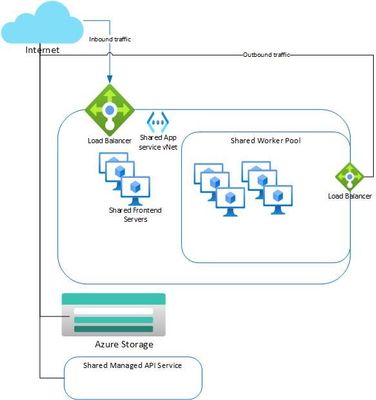
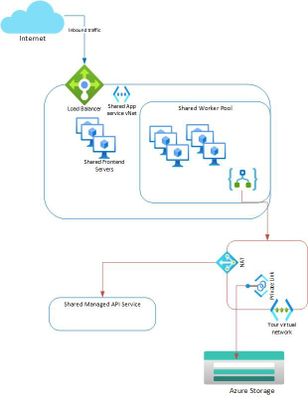
Networking overview of Logic Apps preview
The azure storage that is configured in the default create experience will have a public endpoint that the Logic Apps runtime will use for storing state of your workflows.
The managed API service (azure connectors) is a separate service hosted in azure and is shared by multiple customers. The Logic Apps runtime uses a public endpoint for accessing the API connector service.
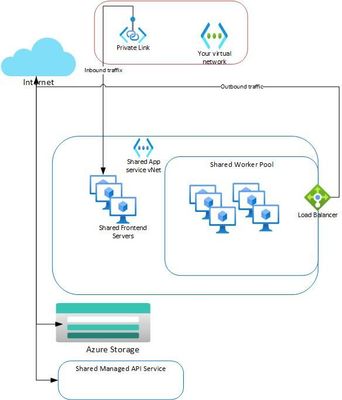
Securing Inbound Traffic Using Private Endpoints
See here for instructions for adding a private endpoint to your Logic App preview. When you add a private endpoint:
The data-plane endpoint will resolve to the private IP of the private link and all public inbound traffic to your Logic Apps data plane endpoint will be disabled.
Request triggers and webhook triggers will only be accessible from within your vNET.
Azure managed API webhook triggers and actions will not work since they need a public endpoint for invocations.
The monitoring view will not have to access to inputs and outputs from actions and triggers if accessed from outside of your vNET.
Deployment from VSCode or CLI will only work from within the vNET. You can leverage deployment center to link your app to a GitHub repo and have the azure infrastructure build and deploy your code. In order for GitHub integration to work the setting WEBSITE_RUN_FROM_PACKAGE should be removed or set to 0.
Enabling private link will not affect the outbound traffic and they will still flow through app service infrastructure.
An alternative configuration
You can setup an application gateway to route all inbound traffic to your app by enabling service endpoint and adding a custom domain name for your app to point to the application gateway.
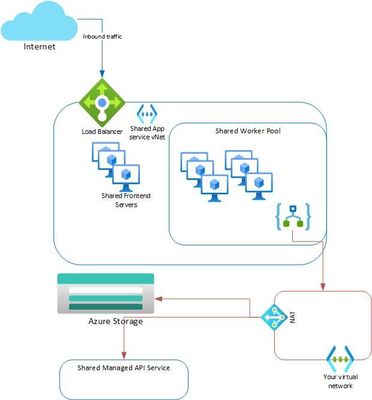
Securing Outbound Traffic Using vNET integration
To secure your outbound traffic from your web app, enable VNet Integration. By default, your app outbound traffic will only be affected by NSGs and UDRs if you are going to a private address (10.0.0.0/8, 172.16.0.0/12, 192.168.0.0/16).
To ensure that all your outbound traffic is affected by the NSGs and UDRs on your integration subnet, set the application setting WEBSITE_VNET_ROUTE_ALL to 1.
Set WEBSITE_DNS_SERVER to 168.63.129.16 to ensure your app uses private DNS zones in your vNET
Routing all outbound traffic through your own vNET allows you to subject all outbound traffic to NSGs, routes and firewalls. Note that an uninterrupted connection to storage is required for Logic Apps runtime to work and an uninterrupted connection to managed API service is needed for azure connectors to work.
Enabling vNET integration does not impact inbound traffic which will continue to use App Service shared endpoint. Securing inbound traffic can be done separately using private endpoints as we discussed above.
Securing Storage Account by using storage private endpoints.
Azure storage allows you to enable private endpoints on storage account and lock it down to be accessed only within your own vNET. We can leverage this capability by enabling private endpoint on the storage account used by your Logic Apps.
The setting AzureWebJobsStorage should point to the connection string of the storage account with private endpoints.
Different private endpoints should be created for each of table, queue and blob storage services
All outbound traffic should be routed through your vNET by setting the configuration WEBSITE_VNET_ROUTE_ALL to 1.
Set WEBSITE_DNS_SERVER to 168.63.129.16 to ensure your app uses private DNS zones in your vNET.
The workflow app should be deployed from Visual Studio Code and WEBSITE_RUN_FROM_PACKAGE config setting should be set to 1. Note that this will not work if you are also using private endpoint feature in which case you would want to leverage GitHub integration for deployment.
A separate storage account with public access is needed for deployment and setting WEBSITE_CONTENTAZUREFILECONNECTIONSTRING should be set to the connection string of that storage account
Troubleshooting
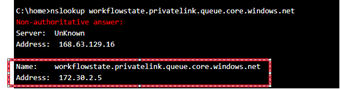
If your workflow app is not coming up, you can use the Kudu console of the app to check the name resolution and the connectivity. Pls note that you need to connect to kudu console from the vnet if you have enabled private endpoints on the app. Here are some good pointers on debugging connectivity issues.
For example, we can test the private queue endpoint dns resolution for “workflowState” as shown below.
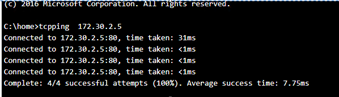
And the connectivity to the private endpoint can be tested as shown below:
Further Reading
This article provides an in-depth detail on different networking options available on App Service platform and Logic Apps preview inherits most of these features given it is running on the App service infrastructure.
Sample App
Here is a sample deployment of Logic Apps preview integrated into a vNET.



Recent Comments