by Contributed | Jan 29, 2021 | Technology
This article is contributed. See the original author and article here.
Version 17.7 of the Microsoft ODBC Driver 17 for SQL Server has been released. Version 17.7.1 brings several new features and fixes to the driver.
Features
- Support Azure Active Directory Interactive authentication (Windows-only) against Azure Key Vault when using Always Encrypted
- Support Azure Active Directory Service Principal authentication
- Support for inserting into encrypted money and smallmoney columns
- Support for Ubuntu 20.10
- Support for Oracle Linux 7
- Support for macOS 11 (Big Sur)
- Support for Alpine Linux 3.12
Fixes
- Fixed character encoding of VARIANT columns in BCP NATIVE mode
- Fixed setting of SQL_ATTR_PARAMS_PROCESSED_PTR under specific conditions
- Fixed SQLDescribeParam in FMTONLY mode for statements containing comments
- Fixed an issue with federated authentication when using Okta
- Fixed excessive memory usage on multi-processor systems
- Fixed Azure AD authentication against some variants of Azure SQL Database
Next steps
For Windows installations, you can directly download the Microsoft ODBC Driver 17 for SQL Server.
Linux and macOS packages are also available. For installation details see the online instructions.
Roadmap
We are committed to improving quality and bringing more feature support for connecting to SQL Server Azure SQL Database Azure Synapse Analytics, and Azure SQL Managed Instance through regular driver releases. We invite you to explore the latest the Microsoft Data Platform has to offer via a trial of Microsoft Azure SQL Database or by evaluating Microsoft SQL Server.
David Engel
by Contributed | Jan 29, 2021 | Dynamics 365, Microsoft 365, Technology
This article is contributed. See the original author and article here.
In the past, many sales organizations looked at customer relationship management applications simply as process-driven data repositories or systems of record. Sales reps spent hours manually entering data and had less time to build profitable relationships and actually sell. However, this approach has become increasingly untenable for businesses now that the norm is for savvy, modern buyers who expect sellers to engage with them in real time across almost every digital channel and platform.
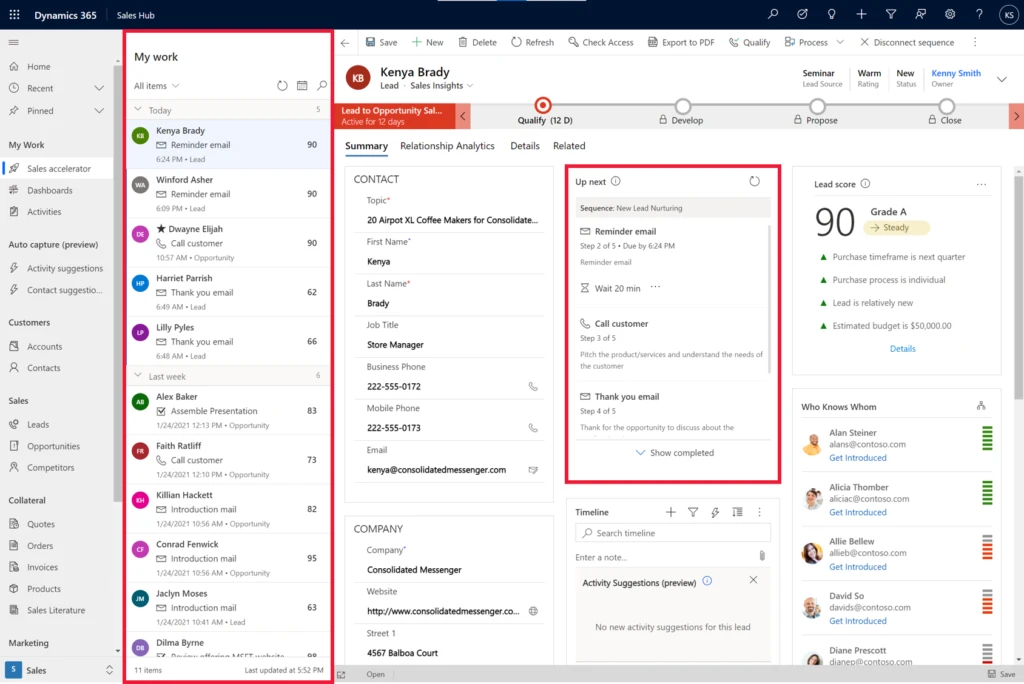
Sales accelerator, a digital selling capability of Dynamics 365 Sales, helps sellers transform the way they work in today’s digital world. Instead of spending so much time on manual data input, sellers rely on the system to gather relevant information from multiple sources, create a prioritized pipeline, offer more context, and surface automated recommendations throughout the sales process. They’re also able to engage with customers on their preferred channels using integrated email and phone calling.
Example screenshot showing the intelligent work list and ‘up next’ widget in sales accelerator
Focus on the right deals with an intelligent work list
A typical seller starts the day working on multiple leads and opportunities, with several important tasks competing for their attention at once. With the sales accelerator, all the tasks and activities for their leads and opportunities that are due today, plus upcoming activities, are prioritized and organized in a work queue, enabling these sellers to be more efficient:
- Work from a prioritized list of customers. With a prioritized work list, sellers can identify the next best lead or opportunity to work on. The intelligent work list surfaces a sorted list of customers with associated next tasks due. Default sorting relies on a composite score, presenting the next best action based on organizational sales sequences.
- Tailor the intelligent list to meet your needs. Sort, filter, or group by entity attributes (main fields) to meet your needs, like reaching out to customers from a specific source.
- Identify new leads or opportunities in your pipeline. Identify whenever a new lead or opportunity enters the work list or is reassigned to you, so nothing is accidentally overlooked.
Learn more about how to prioritize the pipeline through work lists
Gain context on customers in one place
As sellers run through a long list of potential customers, they often struggle to gain a holistic view, including history of communications, customer needs, and special circumstances. However, having this type of view is necessary for crafting a relevant sales pitch that’s most likely to achieve a positive outcome. To address this issue, the sales accelerator helps sellers:
- Get all relevant information in a single place. Benefit from a comprehensive entity form that collects and surfaces customer information and insights from related entities to help craft winning messages for every communication.
- View historical context for every customer. See past and present activities via an “up next” widget, timeline, notes, and additional details through integrated data across the system, all available with tabs on the entity form.
Use sales sequences to ensure your sales team follows best practices
Consistent experiences and clear communications are a critical aspect of achieving successful outcomes. Best practices from sales enablement managers help to propagate and reinforce winning selling strategies. Infusing suggestions and insights throughout the sales motion helps to keep sellers on track, makes the most out of every customer interaction, and increases the likelihood of successful outcomes.
With sequences, sellers receive in-the-moment guidance toward the correct activity, on time, using an appropriate communication channel with the necessary content. Everyone on the team adheres to organizational best practices, while sales enablement managers are empowered to optimize sales practices for better outcomes through a frictionless cycle and can easily distribute sales strategies.
- Build sales sequences. Build sales sequences that reflect organizational best practices and sales strategies to help sellers in the moment.
- Guide sellers in the moment. Offer guidance to sellers toward the next step they need to take. Guidance includes recommending the most suitable channel to reach out to the customer and the best time.
Learn more about the “up next” widget for recommendations
Connect with customers across multiple channels
Sellers can communicate with contacts without leaving Dynamics 365 Sales, using integrated communications across multiple channels that leverage Microsoft Dynamics 365 Channel Integration Framework.
- Connect with customers easily via email or phone. Benefit from multichannel communications, connecting with customers via email or phone with an integrated dialer, without switching context.
- Compose emails with templates. Take advantage of email templates aligned with sales sequences to communicate simply and consistently with customers.
- Call customers with real-time insights using Microsoft Teams. Sellers can place customer calls using an integrated dialer and receive real-time conversation intelligence insights that will boost their productivity on top of those calls.
What’s next
We’re working on some exciting capabilities to be released in public preview in the coming months:
- Automatic assignment of leads
- Adaptive sequences for non-linear scenarios
- Monitoring sequence performance
- Automated process of capturing call summary with conversation intelligence
Get started with sales accelerator
The sales accelerator is part of Dynamics 365 Sales Premium licenses. Sign up for a free trial and get started with just a few clicks.
Learn how to enable the sales accelerator
Next steps
If you have already tried the sales accelerator and have feedback, questions, or new needs, please share your feedback on our Ideas Portal.
The post Enable digital selling with the sales accelerator in Dynamics 365 Sales appeared first on Microsoft Dynamics 365 Blog.
Brought to you by Dr. Ware, Microsoft Office 365 Silver Partner, Charleston SC.
by Contributed | Jan 29, 2021 | Technology
This article is contributed. See the original author and article here.
Final Update: Saturday, 30 January 2021 00:45 UTC
We’ve confirmed that all systems are back to normal with no customer impact as of 1/30, 00:30 UTC. Our logs show the incident started on 1/29, 02:00 UTC and that during the 22 hours and 30 minutes that it took to resolve the issue some customers could have experienced Data Latency with Activity Logs that are generated from Azure Resource manager as well as delayed Activity Log Alerts.
- Root Cause: The failure was due to a backend dependency.
- Incident Timeline: 22 Hours & 30 minutes – 1/29, 02:00 UTC through 1/30, 00:30 UTC
We understand that customers rely on Azure Monitor as a critical service and apologize for any impact this incident caused.
-Eric Singleton
Update: Friday, 29 January 2021 22:27 UTC
Root cause has been isolated to a misconfiguration from a backend dependency. To address this issue the team is currently implementing a hotfix to decrease the latency. Some customers may experience Data Latency with Activity Logs that are generated from Azure Resource Manager as well as delayed Activity Log Alerts.
- Work Around: None
- Next Update: Before 01/30 02:30 UTC
-Eric Singleton
Initial Update: Friday, 29 January 2021 20:36 UTC
We are aware of issues within Activity Logs and are actively investigating. Some customers may experience Data Latency with Activity Logs that are generated from Azure Resource Manager. Investigation points to a start time of 1/29 02:00 UTC.
- Work Around: None
- Next Update: Before 01/29 23:00 UTC
We are working hard to resolve this issue and apologize for any inconvenience.
-Eric Singleton
by Contributed | Jan 29, 2021 | Technology
This article is contributed. See the original author and article here.
Update: Friday, 29 January 2021 22:27 UTC
Root cause has been isolated to a misconfiguration from a backend dependency. To address this issue the team is currently implementing a hotfix to decrease the latency. Some customers may experience Data Latency with Activity Logs that are generated from Azure Resource Manager as well as delayed Activity Log Alerts.
- Work Around: None
- Next Update: Before 01/30 02:30 UTC
-Eric Singleton
Initial Update: Friday, 29 January 2021 20:36 UTC
We are aware of issues within Activity Logs and are actively investigating. Some customers may experience Data Latency with Activity Logs that are generated from Azure Resource Manager. Investigation points to a start time of 1/29 02:00 UTC.
- Work Around: None
- Next Update: Before 01/29 23:00 UTC
We are working hard to resolve this issue and apologize for any inconvenience.
-Eric Singleton
by Contributed | Jan 29, 2021 | Technology
This article is contributed. See the original author and article here.
Initial Update: Friday, 29 January 2021 20:36 UTC
We are aware of issues within Activity Logs and are actively investigating. Some customers may experience Data Latency with Activity Logs that are generated from Azure Resource Manager. Investigation points to a start time of 1/29 02:00 UTC.
- Work Around: None
- Next Update: Before 01/29 23:00 UTC
We are working hard to resolve this issue and apologize for any inconvenience.
-Eric Singleton

by Contributed | Jan 29, 2021 | Technology
This article is contributed. See the original author and article here.
Learn how to use elasticity to scale your cloud resources with
Jay Gordan,
Dwitrisha Saha and Carnegie Mellon University Microsoft Learn Module
Date: February 19, 2021
Time: 12:30 PM – 1:30 PM (Pacific) 3.30 PM EST 8.30 GMT
Location: Global
Format: Livestream
Topic: Cloud Development
Register Now
Cloud elasticity is the ability of your cloud service to continually reallocate and redistribute resources to adapt to changing demands. With proper automation and strategy, you can increase your service’s computing power to better support your development. In this session, Jay Gordon, Microsoft Cloud Advocate and Dwitrisha Saha, Microsoft Student Ambassador, will deep dive into how to optimize your cloud service. They’ll describe common load patterns and how they drive the need to scale, they’ll discuss strategies and considerations in scaling cloud applications, show the importance of load balancing and provide methods to achieve it. Finally, they’ll also discuss the benefits of serverless computing and serverless functions.
This session is perfect for anyone interested in cloud management and wants to learn more about how to leverage cloud elasticity in their service.
WATCH THE LIVE STREAM HERE:
https://aka.ms/CMUCloudDevLearntv
Presenter:
Jay Gordon, Cloud Advocate, Microsoft
Jay Gordon is a Cloud Advocate with the Microsoft Azure Advocates. He and the rest of the Advocacy team are focused on helping Developers and Ops teams get the most out of their cloud experience with Microsoft Azure. Prior to Microsoft, Jay was part of teams at DigitalOcean, BuzzFeed and MongoDB. Community is critical in his core beliefs, this is why Jay is an organizer for devopsdays NYC. Jay lives in New York City with his wife Betsy. https://devblogs.microsoft.com/devops/author/jagordmicrosoft-com/

Dwitrisha Saha, Microsoft Student Ambassador
Dwitrisha is a sophomore at Manipal Institute of Technology pursuing her B.Tech in Information Technology with biomedical electives. She is currently part of her University’s Augmented Reality project – Vision and has a keen interest in AI in Cloud Computing. She also takes an interest in research in the Healthcare sphere and how AI can positively impact the healthcare systems around the world.
Microsoft Learn Resources
Microsoft Learn Carnegie Mellon University Cloud Developer
Microsoft Learn Carnegie Mellon University Cloud Administration
Microsoft Learn LTI Application
Microsoft Professional Certifications
Exam AZ-103: Microsoft Azure Administrator
Exam AZ-400: Designing and Implementing Microsoft DevOps Solutions
Register Now
Session1. 15th Feb Sharpen your Cloud Skills with Carnegie Mellon University and Microsoft Learn
Session 2. 19th Feb Use Elasticity to Scale Cloud Resources with Carnegie Mellon Uni & MS Learn
Session 3. 22nd Feb Automate your Cloud with Carnegie Mellon University & Microsoft Learn
Session 4. 23rd Feb Monitor cloud resources with Carnegie Mellon University and Microsoft Learn
Session 5. 26th Feb Cloud Security with Carnegie Mellon University and Microsoft Learn
by Contributed | Jan 29, 2021 | Dynamics 365, Microsoft 365, Technology
This article is contributed. See the original author and article here.
Most of us know at least one college student who is attending some or all of their classes online to cope with current circumstances. With many schools operating primarily online or in a hybrid mode, millions of students are cut off from the traditional sources of support that colleges offer.
To help students navigate these challenges, we’re continuing to add new capabilities to the Dynamics 365 education accelerator, including a recent update that enables tele-advising to help students connect with their academic advisors online or in person, and an easy-to-read student success path that helps them monitor progress toward their academic goals.
The January 29, 2021 update includes:
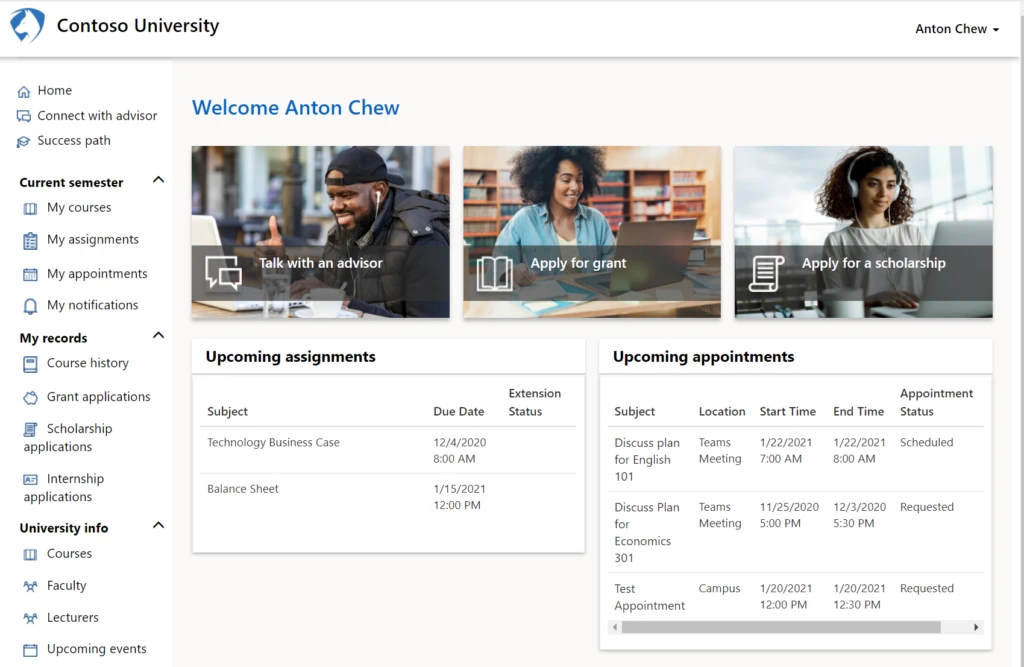
- An updated student portal with an improved user interface and user experience.
- Advisor connection, allowing students to request in-person or online meetings with their advisor.
- Student success path to give students an at-a-glance view of their progress toward completion of program requirements.
- Personalized progress with details about their academics, such as current courses, assignments, appointments, and notifications.
- An advisor dashboard with a comprehensive view of top- and bottom-performing students, and upcoming appointments with students.
Student portal
Student success path

Delivering success through the partner ecosystem
Microsoft partners have already been helping higher education institutions make great use of these capabilities for their students.
The latest release of the accelerator focuses on ensuring that students continue to have access to advisors and key student success resources, even when they are not able to meet in person. Even when we all return to in person meetings, these tools will continue to ensure that advisors and students remain aligned and working to help each student achieve their goals.
—Dr. Jennifer Beyer, Vice President, Product Management, Anthology
With the January 2021 release, the Dynamics 365 education accelerator has truly transformed into a usable, functional and relevant extension of the Microsoft Dataverse for partners like the Frequency Foundry to continue to adopt into our ISV solutions.
With the introduction of features such as tele-advising, assisting students in understanding their graduation goals through the success path, and the updated student portal, the higher education accelerator provides a solid data architecture foundation for our CRM solution, greymatter.
With these great additions, we’ve been able to successfully extend our offering from our niche higher education marketplace to school districts with greymatter for K12. We’re stoked about the possibilities for us and for what it means for our higher education and K-12 customers.
—Shekar Kadaba, Chief Experience Officer | Chief Product Officer, Frequency Foundry
Ready to build your own education solution?
The education accelerator takes the unified data approach of Microsoft Power Platform a step further to help you build solutions for schools more quickly. To get started, download the education accelerator, which includes a higher education component and a K-12 component, from AppSource.
Read the documentation to learn more, or reach out to our team with your questions.
The post Support student success with the Dynamics 365 education accelerator appeared first on Microsoft Dynamics 365 Blog.
Brought to you by Dr. Ware, Microsoft Office 365 Silver Partner, Charleston SC.

by Scott Muniz | Jan 29, 2021 | Security
This article was originally posted by the FTC. See the original article here.
Have you ever thought about paying for a training program to learn how to invest in real estate or start an online business? These programs can be pricey — and some make false promises about helping people make money. In fact, the FTC has sued plenty of real estate investment training and online business coaching programs that have done exactly that, while charging people thousands — or even tens of thousands — for those programs.
Pricey deceptive coaching and investment schemes often involve deceptive financing, as well. Today the FTC filed a complaint against Seed Consulting LLC, a company that claims to offer financing to aspiring entrepreneurs interested in buying a training program. But, the FTC says, Seed Consulting is not a lender and doesn’t offer any financing itself. Instead, Seed Consulting charges people $3,000 or more merely to submit credit card applications on their behalf. In addition, the FTC says, Seed Consulting improperly encouraged people to significantly overstate their income to get credit of $50,000 or more on these new cards.
You can probably predict what happened next to people who paid Seed Consulting: according to the FTC, they often ended up mired in debt with lower credit scores while Seed Consulting took in more than $10 million from their funding scheme.
So how do you protect yourself from deceptive training and financing schemes?
- Do your research before you act. Take a few minutes to search online: look for the name of the company and the words “review,” “complaint,” or “scam.”
- Be skeptical of any company that charges you a hefty sum to secure credit card financing. When such financing is warranted, you can typically obtain it directly from the credit card issuer on the Internet or via phone without any middlemen or fees.
- If a company encourages you to inflate your income on a credit application, walk away. Income information on credit applications must be truthful.
- Check out alternatives. Look at free or low-cost info on investing in real estate or starting a business before you buy a big, expensive training program. And certainly do that before racking up charges on new credit cards to pay for it.
- Talk it over with someone first. Tell someone you trust about the details of the investment training program. And tell someone how the company suggests you should finance the cost of that training.
Don’t be pressured into a quick decision. Scammers often say their offer or pricing is only available for a limited time. But deals will always be there. And remember: there’s no such thing as a sure-bet investment that has a high return but little or no risk. If someone offers you one, tell the FTC: ReportFraud.ftc.gov.
Brought to you by Dr. Ware, Microsoft Office 365 Silver Partner, Charleston SC.
by Contributed | Jan 29, 2021 | Technology
This article is contributed. See the original author and article here.
Background
Azure offers several options for ISVs to deploy and sell their solutions to US Government customers. The important first steps for any ISV to consider before embarking on the journey to sell to US Government customers are:
- How do you intend to sell your solution?
- Is this sold as traditional COTS (Commercial Off-The-Shelf) where the US Government customer will simply buy the solution and then operate it within its own Azure tenant, or
- Is this a fully hosted SaaS offering where the US Government customer will consume the solution from the ISV’s tenant, or
- Will it be a combination of the two, where the US Government customer hosts the solution within their tenant but the ISV owns the operational aspect of the solution?
- What are your regulatory requirements?
- Typically, most Federal agencies will require a FedRAMP Moderate or High ATO.
- If doing business with the DoD, it is likely that they will require a DoD CC SRG IL4/IL5 ATO.
- Specialized compliance requirements such as CJIS, IRS 1075, ITAR, and DFARS may also be required by the end customer.
Choose the Appropriate Azure Region
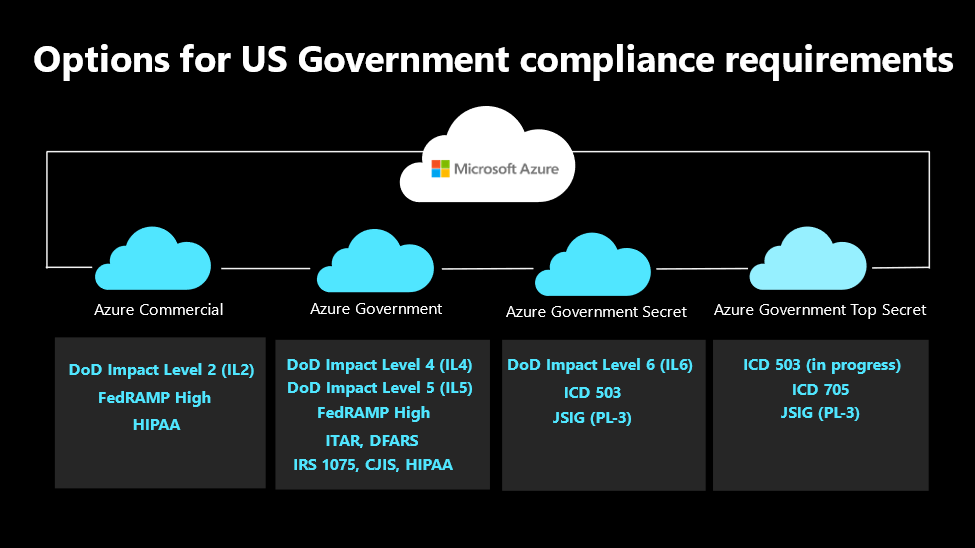
Azure meets differing levels of compliance considerations across our regions. Select the region that meets the needs of your end customers.
Figure 1: Compliance by Azure Region
Azure Services Compliance by Region
Azure services achieve overall compliance and ATOs based upon the required audit scope. As pictured above, our US Public Commercial regions meet the FedRAMP Moderate/High needs of our US Government customers. Higher level ATOs are met within our US Government Regions. The overall regulatory requirements that the ISV solution must meet will inform the regional selection decision.
Azure services are submitted to the US Government for authorization on a monthly basis. For an up-to-date reference by audit scope for our Commercial and Government regions, please refer to Azure Services in FedRAMP and DoD SRG Audit Scope – Azure Government | Microsoft Docs. The top of the page refers to our Azure Public Commercial regions and the second half is specific to our Azure Government regions.
Understanding FedRAMP/DoD Compliance Requirements
FedRAMP is a government-wide program that provides a standardized approach to security
assessment, authorization, and continuous monitoring for cloud products and services.
- Cloud services that hold/manage federal data must have a FedRAMP ATO.
- FedRAMP High has essentially the same control requirements as DoD CC SRG IL4, although they require separate submissions for authorization.
- DoD CC SRG IL5 requires everything from IL4 and then adds controls.
There are two ways most ISV’s authorize a cloud service through FedRAMP:
- Joint Authorization Board (JAB) provisional authorization (P-ATO), and/or
- Using an individual Agency as a sponsor, called an “Agency ATO”.
An Agency ATO is the most common method for sponsorship as often there is a specific agency that wants to purchase the ISV’s solution. For help deciding which option to pursue, refer to this guide: https://www.fedramp.gov/jab-or-agency-how-do-i-get-a-fedramp-ato/.
Does the ISV Need Their Own ATO?
Based upon how the ISV intends to sell/operate the solution, they may or may not need their own ATO.
IF
|
THEN
|
· The ISV is hosting within its own tenant/ subscription that the end customer will access (typical for a SaaS offering) and/or,
· The ISV has control/management of the end customer’s data
|
The ISV is responsible for compliance and must attain their own ATO
|
· The ISV provides software to the end customer (COTS model) and,
· The end customer operates the solution within their own tenant/subscription
|
The end customer is responsible for compliance
|
· The end customer hosts the solution within their own tenant/subscription and,
· The ISV is responsible for managing/operating the solution on behalf of the end customer
|
Joint responsibility for compliance
|
Options to Achieve an Independent ATO for an ISV’s Solution
In general, there are three methods to achieve an ATO for an ISV’s solution.
- Contract for Compliance Consulting
- Guides the ISV through the controls required and how to architect, build, and deploy the solution such that it will meet the requirements.
- Consultative in nature, generally time & materials-based approach.
- Most time consuming (12 – 18 months) and expensive method to achieve an ATO.
- Example: CoalFire, Quzara
- Utilize a Compliance Automation Solution
- Pre-built cloud environment that deploys within an ISV’s tenant.
- Automated SecOps, DevOps, and document production.
- ISVs can be audit-ready in 60 – 90 days at typically less than half the cost of the consultative model.
- Examples: Anitian, CoalFire Accelerated Cloud Engineering
- Utilize a Managed Cloud Service Provider
- Contract with a provider to host and manage the ISV’s solution within their FedRAMP compliant Azure cloud offering.
- Typically the fastest way to achieve an ATO and bring the solution to market.
- Costs vary depending on the level of services consumed.
- Example: ProjectHosts
Once your solution is ready to be audited, a Third Party Assessment Organization (3PAO) needs to be engaged to perform an audit of the solution and produce a Security Assessment Report (SAR) which establishes the basis for the resulting ATO.
Obtaining an Enrollment in Azure US Government
If the ISV determines that they need a US Government enrollment to meet their regulatory requirements, they must first meet the requirements:
- Must be providing services/solutions to a government entity, be a GSA vendor, or have a government contract vehicle in place.
- Must have a US-based HQ with a physical address within the US. It is ok if it is a foreign parent company as long as they have a US subsidiary with a domestic physical HQ.
Once it is determined that the eligibility requirements are met, the ISV needs to request an enrollment. There is then a vetting process that gets started to verify that the requirements are met before the ISV is approved. This process typically takes 10 – 15 business days to complete.
- It is recommended that the ISV request a free trial subscription to start this process and get familiar with the US Government tenants and regions.
- Once the trial period is over, the ISV can transition to their normal procurement process for Microsoft technologies (Enterprise Agreement or via a Cloud Solution Provider).
Azure US Government Regions
There are 5 regions in the US Government Unclassified space:
- US Gov VA (Primary, includes Availability Zones, GA as of Feb 2021)
- US Gov AZ (Primary)
- US Gov TX (DR for both VA and AZ)
- US DoD Central (DoD workloads only)
- US DoD East (DoD workloads only)
Additional Resources
Request customer responsibility matrix, SSPs: azfeddoc@microsoft.com
Join our Upcoming Webinars
This topic will be discussed on the first Tuesday of every month, beginning February 2nd. Visit the event page and sign up for a delivery that fits your schedule. The US Government specific deliveries are entitled “The Azure Government Marketplace Opportunity”.
About the Author

Chris Billet | LinkedIn
Principal Program Manager
Azure Global US Government Engineering
Chris is part of Microsoft’s Azure Global Engineering team specifically focused on US Government customer and ISV adoption of the Azure platform. Chris helps customers/ISVs understand their regulatory requirements and how to select the appropriate Azure region for their workloads. He also works as a liaison between our end customers/ISVs and our product groups when features/deployment timelines need to be prioritized in support of anticipated production workloads.
Chris attended Bloomsburg University of Pennsylvania and earned a BS in Computer Science with a focus on Application Development. In 1994 Chris started his career as a software developer at an ISV that provided solutions to the Healthcare industry, specifically Hospital Management Systems. In 2003, Chris earned his MBA from Penn State University in a part-time night school program.
In 1999 Chris joined Microsoft as an Enterprise Strategy Consultant based in Philadelphia and worked with many SLG and Education customers in the Northeast. In 2004, he transitioned to a Program Management role in the Windows Product Group and subsequently a startup Product Group within DevDiv in Redmond. Transitioning back to field services in 2008, he supported SLG and Education customers from a consulting and Premier support perspective in the Southeast, based in the Tampa Bay area. In 2018, Chris returned to an engineering role, joining Azure Global Engineering with a focus on supporting our US Government customers.
by Contributed | Jan 29, 2021 | Technology
This article is contributed. See the original author and article here.
Microsoft partners like Center For Internet Security, DataVisor, and SPIN Analytics deliver transact-capable offers, which allow you to purchase directly from Azure Marketplace. Learn about these offers below:
|
CIS Microsoft Windows Server 2016 Benchmark L1: This image of Microsoft Windows Server 2016 is pre-configured to the recommendations in the associated Center for Internet Security benchmark, which was developed for system admins, security specialists, auditors, help desk professionals, and others who plan to develop, deploy, assess, or secure solutions that incorporate Windows Server 2016.
|
 |
DataVisor Feature Platform: DataVisor’s Feature Platform enables users to build sophisticated machine learning models with advanced features, accelerate the feature engineering process, and deploy features rapidly in production. The platform supports real-time and batch processing and seamlessly integrates with your and DataVisor’s machine learning solutions.
|
 |
RISKROBOT: Credit Risk Model Automation: Developed by SPIN Analytics, RISKROBOT uses artificial intelligence to combine expert judgement with risk modeling and machine learning techniques on big data. RISKROBOT supports credit risk models for retail, commercial, and corporate products and portfolios to produce accurate predictive analytics for effective risk management. |
|



Recent Comments