by Contributed | Feb 1, 2021 | Technology
This article is contributed. See the original author and article here.
Which service or product is perfect for my requirements?
Did you ever run into a situation where you have multiple choices of the product and/or services to choose from, and you don’t know which one is a best choice for you and your organization?
In the modern era, where companies are developing rapid solutions, often we are presented with multiple products and/or services to solve our business problems. Even, it may sometimes be possible that the same company is offering you multiple products/services with the overlapping features. And it can be overwhelming to make a choice.
Now, let’s try to understand it from a practical example. Assume, you are a customer running SAP systems. You will need a lot of enveloping services to complete your business process flow. A few of those essential requirements are backup, monitoring, integration, analytics, etc. No matter if you run SAP on-premises or in Azure, you will need these services. Now you start exploring which service(s) is better for me, and you realized there are multiple services offered in Azure, SAP, or third party which fulfil your requirements. So, which one do I select?
In this article, you will find ten selection criteria which may help you to make the right decision. If you are puzzled on which services to choose from, use the table provided at the end of the article, and the service scores most, is your optimal choice.
Please note, the intent of this article is to help customer make a right choice, and NOT TO COMPARE SERVICES FROM DIFFERENT PROVIDERS, AND/OR PROVE OR COMPARE WHICH SERVICE OR PROVIDER IS BEST.
1. Business and technical requirements
Have your business and technical requirements documented. Check the requirements against services/products and evaluate which one fulfills all or most of your requirements. It is also very important that you get clarity on your future requirements as well (as much as possible) and check the feature of service/product against your requirements, so you don’t have to change the product/service in near future. For example: If you are looking for a messaging service, ensure that it supports the message type your source or destination application require.
2. Resource readiness with required skills
Your IT department resource and skill readiness are very important for the product/service you select. Prior experience of the service will help you expedite the adoption of the product/service. If all the product/services available are new to the team, it is a good idea to perform a quick PoC (Proof of Concept) to learn about the product before you decide. For example: If your IT team is more familiar with a specific OS based product, it will be easier for them to adopt a product/service which runs on that OS.
3. Performance
Test the overall performance of the service against your business processes and ensure you are getting the required performance. Ensure to test it against the peak time workload so you know how much load a service/product can sustain. Also, look for the scalability of the product. For example: If you are looking a tax calculation service, ensure that roundtrip latency is optimal. Also, ensure that it can sustain peak load transactions like holiday shipping season for a retailer.
4. Limitation and restrictions
It may be possible that the product/service is meeting your technical requirements currently. However, you need to check for any limitation or restriction of the product which may prevent you to use it when the technical attributes of your requirement changes. Also, ensure that if product/service has any restrictions. For example: If you are looking a backup services, ensure that it not only support the current database size, but the future database size of current growth as well.
5. Interoperability and integration with other systems
When you use a service/product for one system, you probably going to use it with other systems as well. Check the interoperability and integration with other systems too, which may be a future consumer of this product/service. For example: A messaging service I choose, can I use it for both SAP, and non-SAP systems?
6. Licensing
Check the licensing and usage policy of the product/services. Consider the future renewal cost as well. Some products/services may have upfront cost, others may have pay per use. For example: A product allow you to purchase once and use it at many places Vs. for every use you need a new license.
7. Availability, SLA, and support
Based on the business requirements, you may have availability, and SLA requirements against the business process. You may want to ensure that selected product is meeting your availability and SLA requirements. You should also check the high availability and disaster recovery aspect of the service/product. It is also important to check their support hours. For example: The file conversion service has 8Hx5D support, would that be sufficient? What if service goes down on Saturday, can your business sustain it?
8. Availability in your region
There may be country specific privacy requirements (Ex: GDPR). Using the service in your country may help you to comply with privacy policies. Also, service being available in your region may help to reduce the round-trip network latency.
9. Maintenance overhead
Once you implement the service/product for the product usage, it is most likely you will use it for many years. You should consider the maintenance of the product/service. For example: If I use a service, I want to check with provider how many times a year I need to patch it. What is the upgrade cycle?
10. Roadmap of the product
In some cases, you would also want to learn the product/service roadmap. It will help you to determine if product will fulfill your future requirements, if any. For example: If you plan to use chat bot in future, and if the product does not have that feature today, would it fulfil your bot requirement in near future?
Decision Table
The following table may help you to select the best services among the available one. Here is how you use this table:
- Replace <Service1> and <Service2> with your services/products name.
- Score 1 for the service which is most close to the question under the criteria section.
- The service which scored most is your optimal choice.
Sr No
|
Criteria
|
<Service1> Score
|
<Service2> Score
|
1
|
Which one meet my all or most business and technical requirements?
|
1
|
|
2
|
Which one is easy to adopt by my IT resources?
|
|
1
|
3
|
Meet performance requirement of my business process
|
1
|
|
4
|
No Limitation and restrictions for my use case
|
|
1
|
5
|
I can use it with other system or requirements as well
|
|
1
|
6
|
Lower cost of the license
|
|
1
|
7
|
Highly available, with great support
|
|
1
|
8
|
Available in my region
|
1
|
|
9
|
Least maintenance overhead
|
|
1
|
10
|
Product roadmaps align with my org future requirements
|
1
|
|
*If both the services scored same, then make your judgment to select one.
Summary
It is never a binary answer to say, “use this service or product”. It always requires deep analysis. In most cases, when people ask which service to use, the most common answer is “It depends…”. Hopefully, this article, and above “Decision table” help you to make a best choice of services/products.
by Contributed | Feb 1, 2021 | Technology
This article is contributed. See the original author and article here.
This blog is about the issue that stateless/stateful service cannot be started in service fabric cluster.
It provides a overview about reliable service life cycle, details of some important events like CreateServiceInstanceListener, RunAsync and troubleshooting steps to identify the issue event and exceptions details.
Stateless And Stateful Service Life Cycle
The lifecycle of a stateless service is straightforward. Here’s the order of events:
1. The service is constructed.
2. Then, in parallel, two things happen:
* StatelessService.CreateServiceInstanceListeners() is invoked and any returned listeners are opened.
ICommunicationListener.OpenAsync() is called on each listener.
* The service’s StatelessService.RunAsync() method is called.
3. If present, the service’s StatelessService.OnOpenAsync() method is called.
This call is an uncommon override, but it is available. Extended service initialization tasks can be started at this time.
Stateful services have a similar pattern to stateless services, with a few changes. For starting up a stateful service, the order of events is as follows:
1. The service is constructed.
2. StatefulServiceBase.OnOpenAsync() is called. This call is not commonly overridden in the service.
The following things happen in parallel:
* StatefulServiceBase.CreateServiceReplicaListeners() is invoked.
* If the service is a Primary service, all returned listeners are opened.
ICommunicationListener.OpenAsync() is called on each listener.
* If the service is a Secondary service, only those listeners marked as ListenOnSecondary = true are opened.
Having listeners that are open on secondaries is less common.
* If the service is currently a Primary, the service’s StatefulServiceBase.RunAsync() method is called.
3. After all the replica listener’s OpenAsync() calls finish and RunAsync() is called, StatefulServiceBase.OnChangeRoleAsync() is called.
This call is not commonly overridden in the service.
Events and Cancellation Token
CreateServiceInstanceListener is to supply the communication listeners for the service instance, it is normally override in stateless service like using Kestrel , https and so on.
RunAsync() is executed in its own task. Note that in the code snippet above, we jumped right into a while loop. There is no need to schedule a separate task for your workload. Cancellation of your workload is a cooperative effort orchestrated by the provided cancellation token. The system will wait for your task to end (by successful completion, cancellation, or fault) before it moves on. It is important to honor the cancellation token, finish any work, and exit RunAsync() as quickly as possible when the system requests cancellation. It will be triggered for stateful primary replica or all stateless instances and normally override in stateful service.
Cancellation token is provided to coordinate when your service instance needs to be closed. In Service Fabric, this open/close cycle of a service instance can occur many times over the lifetime of the service as a whole. This can happen for various reasons, including:
* The system moves your service instances for resource balancing.
* Faults occur in your code
* The application or system is upgraded.
* The underlying hardware experiences an outage.
Troubleshooting
Below are some ways to get more insight:
1. RDP to service fabric node. (primary replica node if it is stateful service)
2. Check Application event logs for any exception if no exceptions go to step 3.
3. Check if the port is occupied by the other services.
For TCP:Get-Process -Id (Get-NetTCPConnection -LocalPort YourPortNumberHere).OwningProcess
For UDP:Get-Process -Id (Get-NetUDPEndpoint -LocalPort YourPortNumberHere).OwningProcess
4. For non-prod environment, remote debug would be a good way to get more insight
Please ref more details via Debug your application in Visual Studio
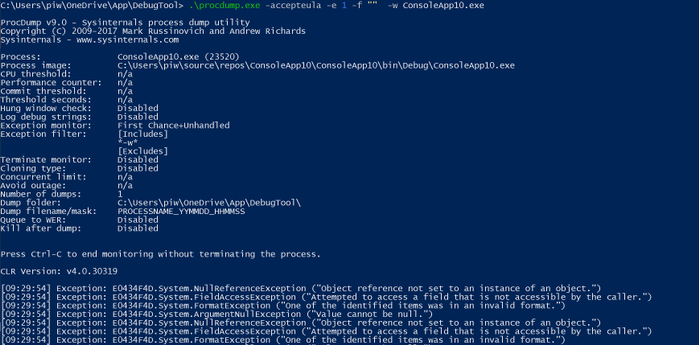
5. List underlying exceptions and capture dump via procmon
Start-bitstransfer “https://download.sysinternals.com/files/Procdump.zip“
procdump.exe -accepteula -e 1 -f “” -w “processname”
6. Then capture the dump for specific exception.
procdump.exe -ma -e 1 -f “NullReferenceException” -w “processname”
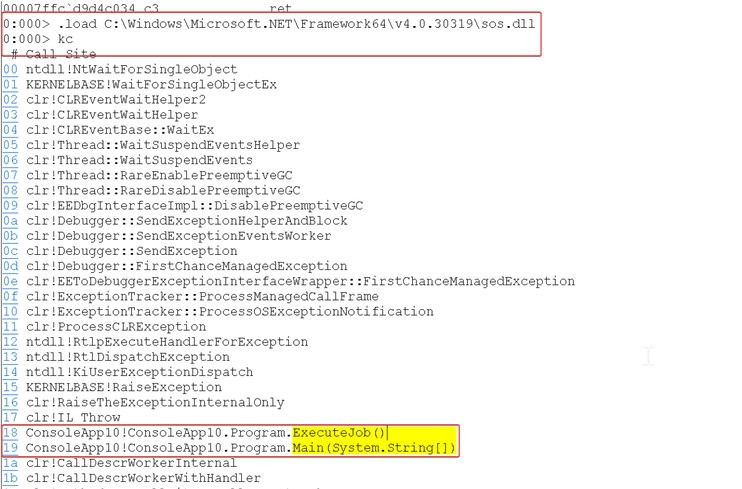
7. Use Windbg, Debugdiag to get details about exception like method call stack.
by Contributed | Feb 1, 2021 | Technology
This article is contributed. See the original author and article here.
As the health industry continues its digital shift, one of the biggest challenges is how to ensure that traditional health data systems like EMR, PACS, Labs & Testing etc can interact with evolving health systems like IoMT, immunomics, SDOH data etc while keeping all the PHI data generated secure. We often find that there is a challenge with managing existing data sets and having multiple sources of truth regarding a patient’s data – each of these may be in a different format and UI.
In this video series you will learn all about why FHIR is the key to building modern health solutions by focusing on data interoperability, what is the Azure API for FHIR and how it is built with security and compliance in mind. We will also walk you through different features of the Azure API for FHIR including CCD-A conversion, IoMT data, and how to ingest data .
The first video in this series explains what FHIR is and why its the future of health data systems and solutions.
Resources:
Learn More about the Azure API for FHIR
Deploy the Azure API for FHIR
Data agility and open standards in Health
by Contributed | Feb 1, 2021 | Technology
This article is contributed. See the original author and article here.
The Mixed Reality Feature Tool for Unity is a new application that simplifies the process of learning about new Mixed Reality features, such as the Mixed Reality Toolkit, from Microsoft.
Every time you run the feature tool, it refreshes the catalog, keeping you up to date on new features and new versions of existing ones.
Simply select the desired features and the Mixed Reality Feature Tool will do the work of identifying required dependencies, downloading the packages and, assists with updating your Unity project to include those features.
Discovering and acquiring features
When you click Start, the catalog is queried, and the available Mixed Reality features are displayed. Features are grouped into related categories (ex: Platform Support) where you can discover what is available, learn more (via the Details link) and select the desired version.
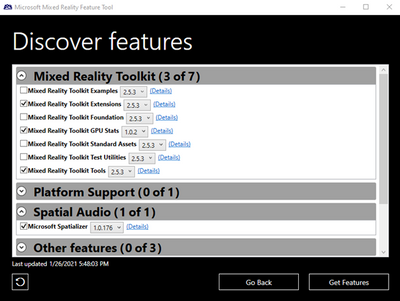
Discovering features using the Mixed Reality Feature Tool.
Clicking Get features will begin downloading the selected feature packages.
Want to learn more?
Check out our documentation and download the Mixed Reality Feature Tool to get started!
by Contributed | Feb 1, 2021 | Technology
This article is contributed. See the original author and article here.
With the release of image scanning using Azure Defender for container registries, we received enormous interest in findings among wide audiences including traditional ASC admins along with repository owners and DevOps personnel.
One of the biggest challenges that was raised by these audiences was how to use the Defender scanning capability in their integration and deployment processes to ensure only scanned and healthy images reach the production environments.
By embedding Azure Defender for container registries assessments into your CI/CD pipeline, you can address this need and have a more secure automation and deployment processes in enterprise environments.
This blog will take you through a few simple steps to take your CI/CD pipeline to the next security level.
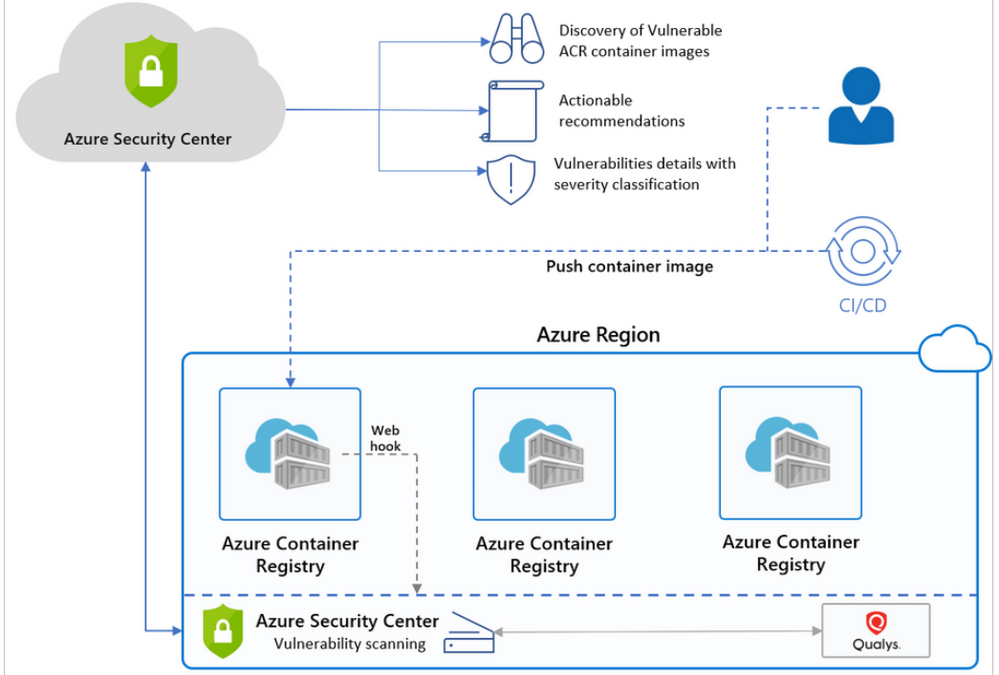
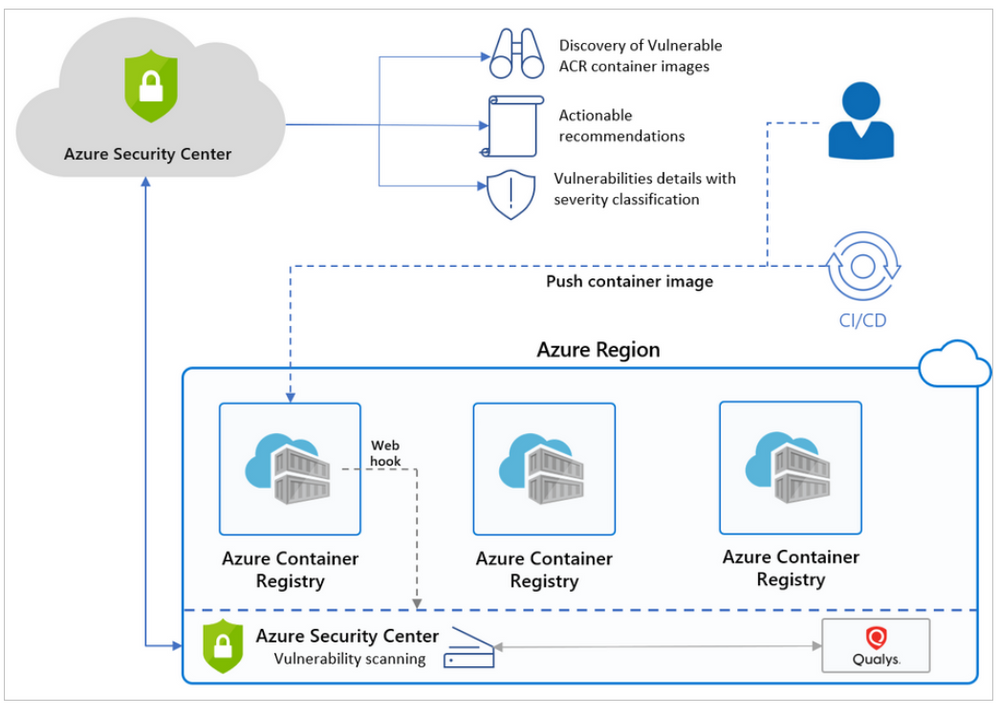
How does Azure Defender’s container image scanning for vulnerabilities work?
When you enable Security Center’s optional Azure Defender for container registries advanced security plan, the images in your container registries are scanned for vulnerabilities.
There are multiple triggers for an image scan, such as On push, On import and Recently pulled.
Security Center pulls and scans the image in an isolated sandbox. It is then extracts, filters and classifies the findings, and presents them as actionable security recommendations.
Each finding Security Center published for an image is represented as a Container Registry Vulnerability Sub Assessment.
Extract scan summary using API:
Scan summaries are available in Security Center dashboards. You can also access them programmatically (through our API or PowerShell) using
With the scan summary ARG query published in ASC container image scan community GitHub, you can fetch results for all images by simply running it via ARG REST API, PowerShell module or Explorer.
securityresources
| where type == ‘microsoft.security/assessments/subassessments’
| where id matches regex ‘(.+?)/providers/Microsoft.Security/assessments/dbd0cb49-b563-45e7-9724-889e799fa648/’
| parse id with registryResourceId ‘/providers/Microsoft.Security/assessments/’ *
| parse registryResourceId with * “/providers/Microsoft.ContainerRegistry/registries/” registryName
| extend imageDigest = tostring(properties.additionalData.imageDigest)
| extend repository = tostring(properties.additionalData.repositoryName)
| extend scanFindingSeverity = tostring(properties.status.severity), scanStatus = tostring(properties.status.code)
| summarize scanFindingSeverityCount = count() by scanFindingSeverity, scanStatus, registryResourceId, registryName, repository, imageDigest
| summarize severitySummary = make_bag(pack(scanFindingSeverity, scanFindingSeverityCount)) by registryResourceId, registryName, repository, imageDigest, scanStatus
You can also filter results to get summary for a specific image or registry by adding
it to the bottom of the query, for example:
| where imageDigest == ‘<ImageDigest>’ and repository == ‘<ImageRepository>’
and registryResourceId endswith ‘/<ImageRegistryName>’
Use scan summary as part of an image CICD pipeline:
In ASC container image scan GitHub community, you can also find the Image Scan Automation Enrichment Security Gate tool.
The security gate tool is used for enriching and acting upon image scan results as part of a CICD pipeline to follow a scan initiated by image push.
It is built by two parts:
- Scan automation gate PowerShell script:
An Azure CLI PowerShell script that fetches provided image scan result and assess them by configuration.
- Azure DevOps pipeline template:
An Azure DevOps pipeline that: Builds image, Pushes it to Azure container registry, then Assesses scan results for image to decide whether to pass of fail pipeline.
Push only scanned and healthy images to your production registry:
You can use the security gate task above as a conditional task to push image to your production registry.
- Push image to your staging registry first (make sure it is also on-boarded to ASC).
- Set Azure DevOps scan gate task to run on image in stagging registry.
- Set security gate task result as a dependency for Pushing the image to your production registry.
You are welcome to join ASC container image scan community on GitHub.
Contribute, share and suggest useful tools to automate or improve work with the ASC image scan service and results.
Tomer Weinberger, Azure Security Center.
by Contributed | Feb 1, 2021 | Technology
This article is contributed. See the original author and article here.
The future of work is here, and it’s more collaborative than ever before. With everyone becoming more globally connected, collaboration has become paramount today. While it’s not always possible to collaborate in person, working together to share ideas and information can help us improve efficiency in our work.
You’ve asked for shared editing in Visio, so today, we are excited to present the first look at one of the most productivity-enhancing features in Visio for the web: Real-time coauthoring.
Better together!
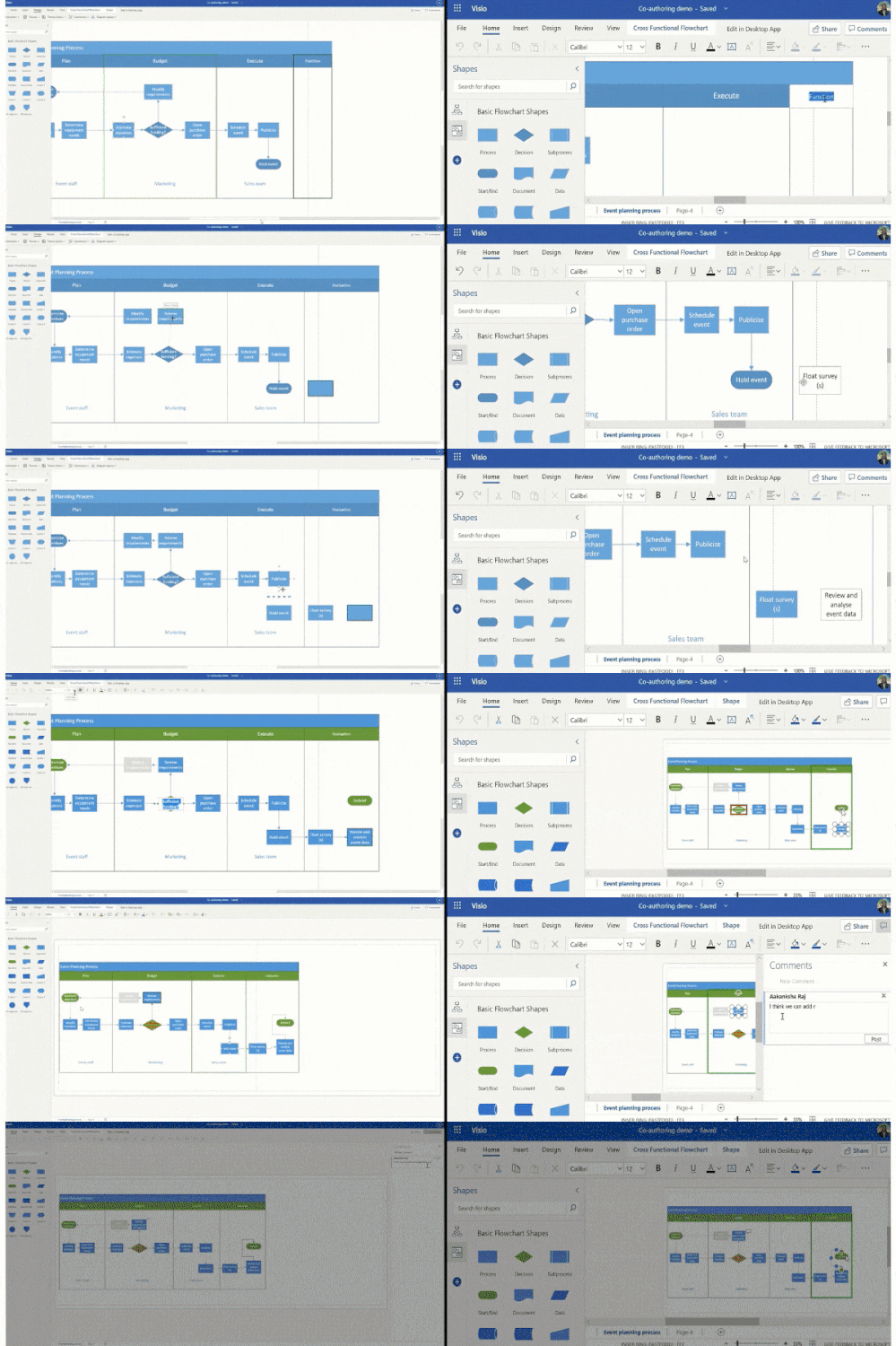
With the introduction of coauthoring, you and your collaborators with a Visio Plan 1 or Visio Plan 2 subscription can now co-create and edit diagrams simultaneously using Visio for the web. See your coauthors’ edits as they happen and stay updated as the ideas evolve on canvas.
Additionally, a simple presence indicator allows you to see where other coauthors are working in the canvas, helps you to avoid conflicts while editing. You can also add or reply to comments in a coauthoring session in real time. Don’t have a Visio subscription? You can still view and reply to comments or add a shape/page level comment.
Try it out yourself!
We’ve started rolling out these changes in Visio for the web. Visit visio.office.com to start collaborating on your diagrams!
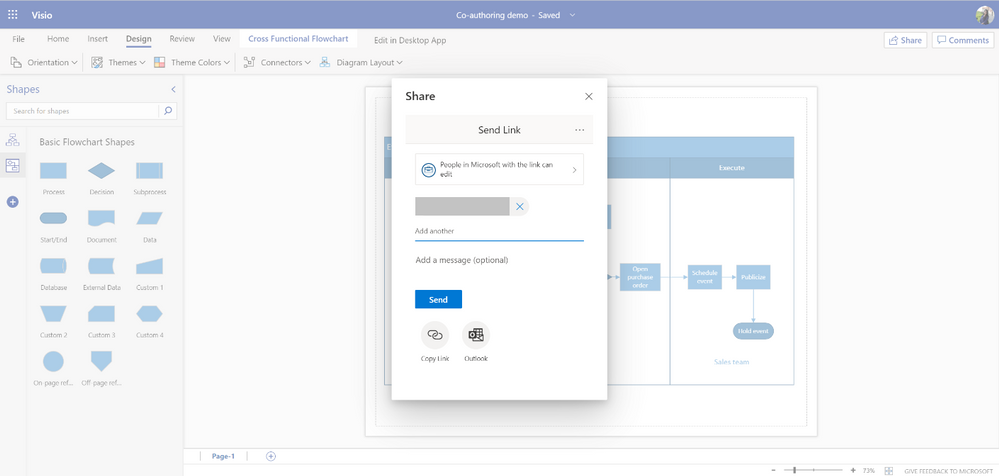
Create a Visio drawing and invite others to work on the document with you. You can set permissions and send the document link via e-mail or chat. Anyone with edit permissions and a Visio Plan 1 or Visio Plan 2 subscription can coauthor on the file you shared.
Work together on a drawing as soon as the other person opens the link and chooses to “Edit in browser,” and make changes as you normally would—without interruption. There are no other requirements to start a seamless coauthoring experience.
 Co-author with Visio for the web
Brainstorm with your team directly on the canvas about the process you are designing, collectively work on a Visio drawing shared in Microsoft Teams, share feedback with your colleagues on the drawing they shared, or work together with your clients to come up with designs on their transformation journey.
For more information on real time coauthoring in Visio for the web, visit support.office.com. Tell us what other collaboration scenarios you’d like to use Visio for in the comments section below.
What’s next for Visio collaboration features?
Our goal is to make the way you work easier. This is yet another step in the journey of making Visio a more collaborative app that you can use to brew ideas and work seamlessly with others.
Over the next several months, we’ll keep adding features to provide an enriched collaborative experience in Visio for the web. With your suggestions and our know-how, it’ll become easier and quicker to create Visio diagrams with your team.
Feedback
We’d love to hear from you! Send us a smile or frown directly from the app and let us know what you think.
Follow us on Twitter to stay current on the latest releases. You can email us at tellvisio@microsoft.com for more detailed questions, and don’t forget to send us your ideas through the UserVoice site to help improve Visio.
Stay tuned for more updates on collaboration!

by Contributed | Feb 1, 2021 | Technology
This article is contributed. See the original author and article here.
On Monday, February 1st, at 12 noon EST, Microsoft’s Gregory Lisiak and Nikita Pitliya covered the Microsoft COVID Vaccine Health Bot to assist organizations in implementing and leveraging the bot. Additionally, Microsoft’s Michael Gannotti, Samantha Brown, Mark Litwin, Pete Anello, and Patrick Miller joined to bring you the latest in Microsoft News, Events, and more.
Mid-Day Café is a new, weekly, fast paced, live web series by the HLS Group. Join us each Monday at 12 noon eastern. Check out the second episode, recorded below:
Resources:
News in 2:
Upcoming Events:
- Microsoft Teams 101 – Hospital Case Study: Want to learn practical tips on how to use Microsoft Teams effectively at your hospital? Join Mary Buonanno, Healthcare Chief Technology Officer at The Ergonomic Group, and Margaret Campbell, Director at HealthNET Consulting, as they share their real-world experience with Microsoft Teams during COVID-19 in a multi-facility acute care hospital environment. Join us on Wednesday, February 10th from 2-3 PM EST. Click here to register!
- Upcoming Mid-Day Cafe Webcast Schedule:
- February 8th – Andres Santamaria, Epic FHIR API Integration
- February 22nd – Bill Baer, Microsoft Search
- March 1st – Dan Holme, Community/Yammer
- March 8th – Mark Kashman, Microsoft Lists
- March 15th – Karuana Gatimu, Teams Adoption and Governance
COVID Vaccine Health Bot:
Have questions/comments/suggestions/requests for the Mid-Day Café team? Post them to our Mailbag! Click here to access the Mid-Day Café Mailbag form.
Thanks for visiting!
Sam Brown, Microsoft Teams Technical Specialist

by Contributed | Feb 1, 2021 | Technology
This article is contributed. See the original author and article here.
Many features requested through Microsoft UserVoice appear on the Microsoft 365 Public Roadmap when they are in development, rolling out, or being launched. If you follow UserVoice, submit suggestions for new capabilities, continue to vote on other users’ feature requests, or track which submissions receive the most votes. If you don’t follow this forum, come join and help us make Project better.
Feedback on existing features is also welcomed! If you have feedback, submit it by using the ‘Feedback’ button in Project for the web. Make sure to include your email so we can contact you directly with any follow up questions or comments. Your comments on our blog posts are also monitored, so let us know what you think about this or other articles.
New features:
- Deploy Project to different environments: Coming soon, organizations now have more flexibility on how they deploy Project for the web. You can use multiple environments, not just the Default one.
- Task attachments: All Project users can add file and link attachments to their tasks in Project for the web.
Upcoming features:
- Email notifications: Switch on notifications to see changes about your projects. Get updates when you have a new project, roadmap, or task so you never miss any work.
- Export Timeline to PDF: Share your schedule with outside stakeholders by exporting your timeline to PDF.
2020 Review:
The new year is a great time to check out all the features that Project for the web added in 2020! Here’s a list of our favorite features that came out last year:
- Task-Level Custom Fields ~ Store custom information about your projects effectively by adding custom fields! For more information, check out our blog post on this feature.
- Export to Excel ~ Export your task grid information to an Excel spreadsheet. Share your information with colleagues and analyze Project data using the power of Excel! Learn more by checking out our blog post on this feature.
- Project and Roadmap in Teams ~ Add your project or roadmap as a tab in Teams. You can use this to more effectively collaborate with teammates and keep all your work in one place. Check out our blog post on this feature to learn more.
- Group by Assigned to ~ Organize your tasks by assignee while on the Board view. Get insight into what each teammates is working on and see all your project tasks in one place.
- Office 365 Users viewing Project ~ All Office 365 users can access Project and Roadmap as read-only users. Share your project with stakeholders, even if they don’t have a Project license.
- Dynamics 365 Project Operations ~ Our team partnered with Dynamics to help launch Project Operations, a new application that has everything you need to run your service business. For more information on this product, check out the Project Operations overview page.

by Contributed | Feb 1, 2021 | Technology
This article is contributed. See the original author and article here.
Microsoft Lens logo
Recommended by Wirecutter as one of the best mobile scanning apps in 2020, we’re taking the next step in our evolution by changing our name and logo from Office Lens to Microsoft Lens and adding some dynamic new features.
Along with the new identity, we are bringing intelligent actions into the camera, including: Image to Text, Image to Table, Image to Contact, Immersive Reader, and QR Code Scan.
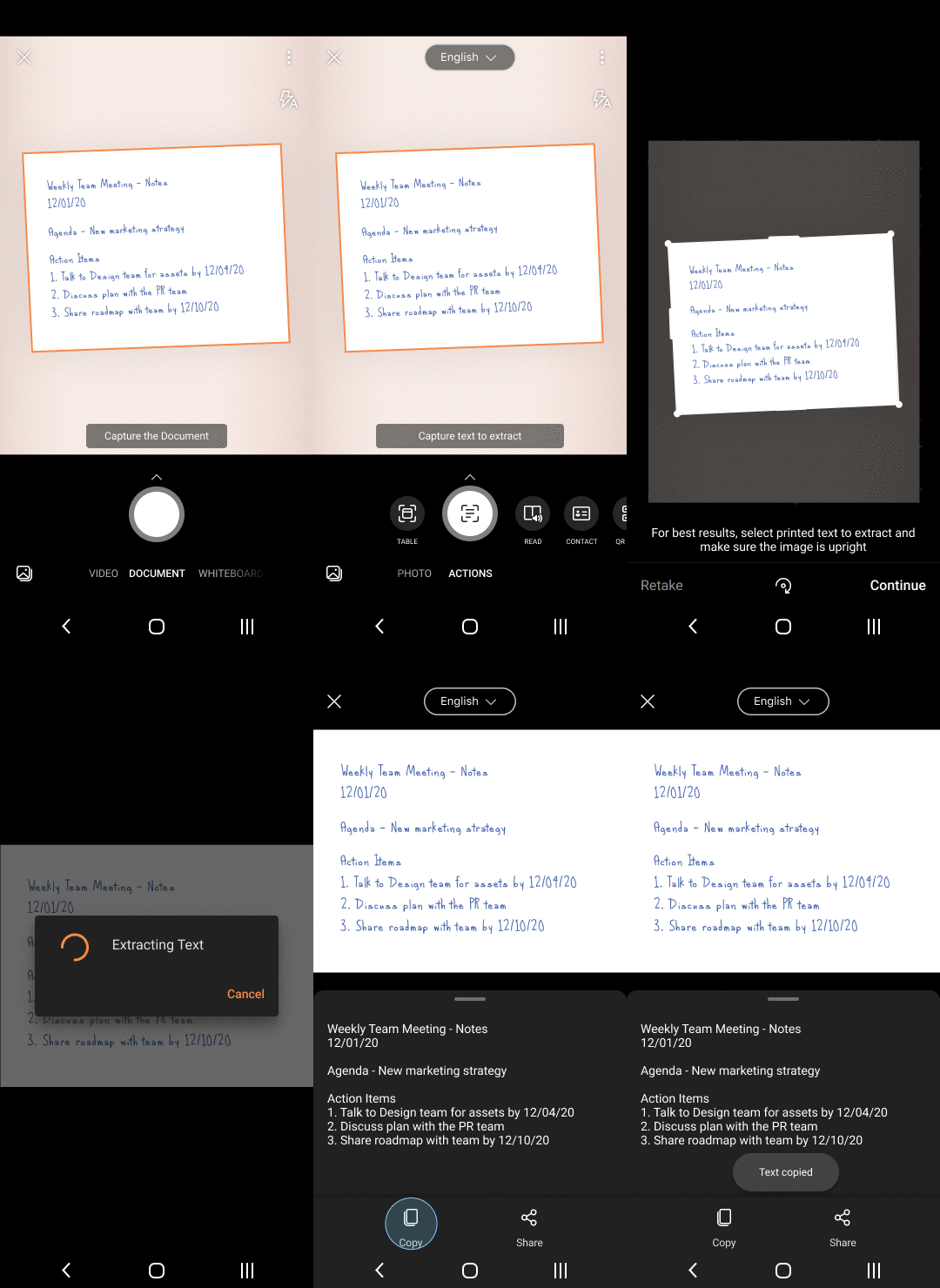 Image to text
We are releasing an improved scan experience allowing you to re-order pages, re-edit scanned PDFs, apply a filter to all images in the document, scan up to 100 pages as images or PDFs, easily switch between local and cloud locations while saving PDF, along with an easy way to identify local and cloud files.
We will be rolling out these new features and improvements on Android first and then follow up with iOS in the coming months! Please refer to our support documentation for Android and iOS for further details.
Since Microsoft Lens powers the camera in Microsoft 365 mobile apps, including Office, Microsoft Teams, Outlook, and OneDrive, you can rely on Microsoft Lens to capture and intelligently enhance, and work with your documents, photos and videos with the same ease and dependability of Microsoft Lens app.
Now you can be more organized and productive at work or at school!
Download: Android
Download: iOS

by Contributed | Feb 1, 2021 | Business, Microsoft 365, Microsoft Teams, Microsoft To Do, Office 365, Technology
This article is contributed. See the original author and article here.
What’s the one essential you’d go back home for if forgotten? Maybe it’s your mask. But also, your mobile phone, right? Your personal organizer, your digital wallet, your instant camera—your mobile device has become the most essential tool you use to stay connected to the people and things that are important at home, at the office,…
The post The evolution of mobile productivity, even when we’re a little less mobile appeared first on Microsoft 365 Blog.
Brought to you by Dr. Ware, Microsoft Office 365 Silver Partner, Charleston SC.


Recent Comments