This article is contributed. See the original author and article here.
CPU utilization can indicate whether an application is affected by an operating system update. Test Base for Microsoft 365 provides software developers with insight into CPU performance regressions that occur when their application is running on a pre-release version of an upcoming Windows operating system (OS) update. These CPU regressions enable developers to detect and resolve application issues (and potential failures) before the OS update is deployed broadly, thus preventing a bad end user experience.
I’ll now explain this feature in more detail and provide an inside look at how it works. You can also watch this short demo to see the feature in action:
As a Test Base user, you can upload your application binaries (in a single .zip file), along with associated test scripts, and select the Windows OS version against which you’d like to test your application in the Test Base portal on Azure. The Test Base service then runs the test scripts and performs the CPU regression analysis. The service checks if the CPU utilization for the application on the pre-release version of the update for the target OS is in line with the CPU utilization for the released version of the OS. Because the processes running on the two versions of the OS may or may not be an exact match due to differing OS versions. CPU utilization is not a 100% like-for-like comparison; however, the analysis performed by Test Base can show you whether CPU utilization for your application is impacted by an upcoming OS update and specifically which processes have regressed from previous test runs.
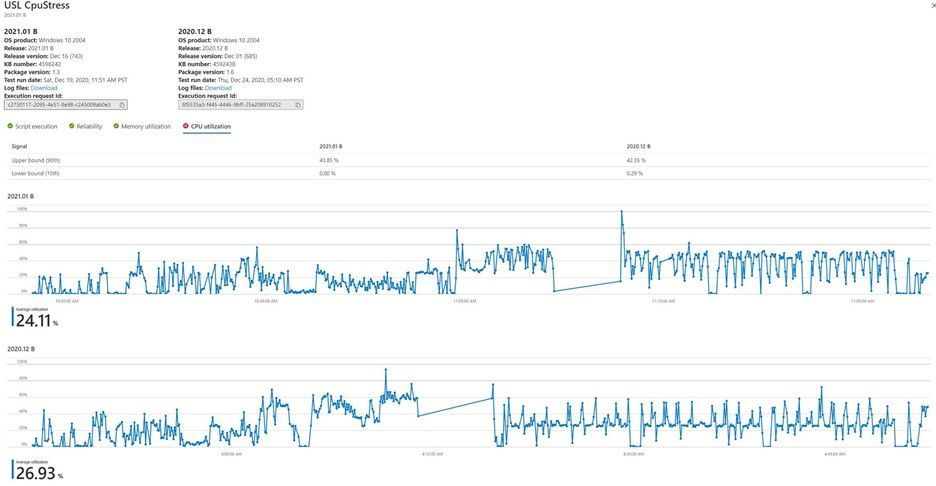
In the below snapshot, there are two OS releases against which the CPU utilizations are compared for the same application. The CPU utilization tab shows the upper and lower bounds of utilization for both releases at 90th and 10th percentiles respectively. The graphs show the time series of CPU utilization along with the average utilization. Customers can now use the functionality to determine if their application CPU utilization is impacted by OS updates and specifically which processes have regressed from their previous execution.
Relevant process identification
Let’s discuss how we identify regressed processes in the application. Analyzing performance regression requires tracking different kinds of performance counters for every process running on a virtual machine during the test run. Such an analysis captures a lot of variables for a lot of processes for a given application. Not all processes are associated with a run or application. To work around this challenge, a mutual information ranking algorithm using probability and information theory is applied to figure out which processes are most relevant for a given application. An application can be considered one type of discrete random variable while a process is considered another kind of discrete random variable. The association of the two random variables is measured using conditional probabilities for relevance. Processes are then displayed in the order of their relevance for each application. You can also favorite a subset of processes that can be monitored, by default, along with relevant processes for CPU regression analysis. Once a regression is detected, you can download the Windows Performance Analyzer toolkit and analyze reasons for CPU performance regressions. The Windows Performance Analyzer takes event trace log (ETL) as inputs and these .etl files are available in the log files downloadable for test runs on the portal. If you would like to know more about debugging CPU performance, see the Windows Performance Analyzer documentation.
We hope that CPU regression analysis is a valuable part of your Test Base experience. In the coming months, the service will automatically alert you when a CPU regression occurs for an application. Until then, please let us know what you think about this feature by leaving a comment below!
When: Thursday, February 4, 2021 at 6:00am PT | Please join us, Satya Nadella and Jared Spataro to discover our commitment to empower people and teams be their best at the Reimagine the Employee Experience digital event. See new ways to bring together communications, knowledge, learning, resources, and insights with everyday work. Visit Microsoft 365 Twitter on Thursday, February 4 at 9:00 AM Eastern Time for a link to the digital event.
When: Thursday, February 11, 2021 at 9:00am PT | Please join us for an ‘Ask Microsoft Anything’ (AMA) on Microsoft Lists – Your smart information tracking app in Microsoft 365 – has several new updates and resources to help you track information, organize work and get things done. An AMA is a one-hour online forum similar to “Ask Me Anything” on Reddit. This AMA gives you the opportunity to connect with members of the product engineering team who will be on hand to answer your questions and listen to feedback. Post any questions or feedback you have about Microsoft Lists for this event in the Microsoft 365 AMA space. The Microsoft Lists experts will be available during the hour to respond. Be sure to add this event to your calendar!
Working from home offers the opportunity to maintain your workflow while allowing flexibility in how and where you get your work done. Shifting to a remote worker status can be an adjustment as you look for ways to balance home and work life, maintain focus and be fully productive. Microsoft Teams can help you stay connected to your team while providing access to all of the tools and resources you need to get your work done. Join us to learn tips that can help set you up for success as you transition into a ‘work from home’ scenario. During this session, we’ll share: (1) Guidance for setting up your home environment for work, (2) Best practices for maintaining your workflow while working at home, (3) Tips for staying connected to your team while remote, and (4) Insights for effectively supporting a remote team.
To be productive in a remote environment, your employees need to be able to safely collaborate from anywhere. Microsoft 365 Virtual Training Day: Enabling Remote Work with Microsoft Teams helps you provide a remote workforce with the tools, resources and solutions they need to stay connected and productive. Join us to learn how to get the most out of Microsoft Teams online meetings, calling, video and chat, and empower your workforce to work from any location on any device. During this two-part training event, you will explore how to: (1) Enable your people to meet and collaborate from home, (2) Make productivity applications available on any device, and (3) Deliver the best remote user experience.
Discover everything you need to facilitate a successful upgrade to Teams. By the end of this workshop, participants will be able to: (1) Understand why a formal plan is crucial for upgrade success, (2) Identify the steps to the upgrade success framework, (3) Recognize common attributes of successful customers, and (4) Create and implement their own upgrade plan. The audience for this session is All (Business Sponsors, IT Admins, User Readiness/Change Manager, Project Lead).
Microsoft Teams can help your employees stay connected and collaborate with each other, especially in the current unprecedented time where remote work is a reality of employees around the world. Being able to chat, do video meetings and collaborate on Office documents within Teams can help companies stay productive. Whether you are a small business, a non-profit or a large organization, you can get started with Teams within Microsoft 365 or Office 365 suite – even before deploying any other Office app or service. Join Microsoft Teams experts as we review Teams implementation for collaboration, chat and meetings. We’ll share key configurations, considerations, best practices, and resources to get your users up and running quickly. After this session, you will be able to: (1) Recognize key success factors for technical and user readiness, (2) Identify pre-requisites and tenant setup for your environment, (3) Install the Teams clients appropriate for your organization, (4) Configure policies that enable your preferred user experiences, and (5) Leverage collaboration features to enhance remote work scenarios.
Join Microsoft Teams experts as we review how you can deploy commonly-used applications directly within Teams, enabling your users to work more efficiently and effectively by accessing everything they need in a single interface. This foundational workshop covers basic capabilities across app management and security. With over 400 out-of-the-box applications available (and growing), you’re sure to find an app, or two, that your team can begin using today in Teams. After this session, you will be able to: (1) Identify suitable apps to meet the needs for your organization, (2) Recognize common attributes of successful app deployment, (3) Navigate security and compliance considerations for Teams’ apps, and (4) Determine the next steps to deploy an app to your environment.
Are you ready to add PSTN calling capabilities to Microsoft Teams? Join Microsoft Teams Engineering subject-matter-experts as they demystify the options for adding PSTN calling to Teams, provide you with best practices for configuring calling options and show you how to monitor call quality. After this session, you will be able to: (1) Understand the history of voice services in Microsoft products, (2) Identify what calling options in Microsoft Teams are right for you, (3) Configure your calling options in the Teams admin portal, and (4) Monitor and use call quality tools in Teams.
Are you looking to ensure users have optimal experiences with meetings and voice capabilities in Teams? During this session, we’ll discuss tools, reporting and best practices to help you manage service quality — from establishing a proactive strategy to resolving common quality issues as they arise. We’ll build upon best practices from Teams experts and make it real with examples of common scenarios that may arise as your organization embraces meetings and voice capabilities in Teams. Join us for an expert-led workshop for guidance on key resources and actionable insights to manage audio and video quality with Microsoft Teams. Your users will thank you for it! After this session, you will be able to: (1) Define key service metrics and user experience factors for quality, (2) Recognize concepts and metrics in core tools and resources that help you assess usage and quality, (3) Identify key indicators of poor experience in common scenarios and relevant actions to address, and (4) Establish a proactive quality management strategy to ensure optimal user experience.
Join Microsoft Teams experts as we review high-value scenarios including incident management (help desk), employee engagement, and productivity that can be enhanced through simple integrations in Teams. We focus on popular enterprise applications your users may already be using every day. Come see how easy it is to connect your systems, increase automation, and deliver improved experiences by bringing the apps your organization relies on into Teams. After this session, you will be able to: (1) Understand common app integrations for Teams across multiple scenarios and user personas, and (2) Understand third-party apps available for key scenarios.
When: Thursday, February 11, 2021 at 9:00am PT | Please join us for an ‘Ask Microsoft Anything’ (AMA) on Microsoft Lists – Your smart information tracking app in Microsoft 365 – has several new updates and resources to help you track information, organize work and get things done. An AMA is a one-hour online forum similar to “Ask Me Anything” on Reddit. This AMA gives you the opportunity to connect with members of the product engineering team who will be on hand to answer your questions and listen to feedback. Post any questions or feedback you have about Microsoft Lists for this event in the Microsoft 365 AMA space. The Microsoft Lists experts will be available during the hour to respond. Be sure to add this event to your calendar!
When: Tuesday, February 16, 2021 at 9:00am PT | We’re so excited to announce our first-ever Ask Microsoft Anything (AMA) for Office Scripts! The AMA will take place on Tuesday, February 16, 2021, from 9:00 a.m. to 10:00 a.m. PT in the Excel AMA space. Add the event to your calendar and view it in your time zone here. During this AMA, you will have the opportunity to share your questions and feedback about Office Scripts and receive responses directly from our product team. Facing trouble with automating on Excel for web? Have an idea that would make our feature better? Let us know- we’re eager to hear and learn from you! Looking forward to seeing you at the AMA.
Whether you are switching from Skype for Business or brand new, join us to learn the basics of how to use Teams to chat with your colleagues and collaborate on projects. Through a series of live demonstrations and best practices, you’ll leave this session with everything you need to start using Teams. After this session, you will be able to: (1) Set up your profile and notifications in Microsoft Teams, (2) Use chat and calling for 1:1 and group conversations, sharing and collaboration in Microsoft Teams, (3) Schedule and conduct meetings in Microsoft Teams, and (4) Align your team and teamwork in Microsoft Teams.
Working from home offers the opportunity to maintain your workflow while allowing flexibility in how and where you get your work done. Shifting to a remote worker status can be an adjustment as you look for ways to balance home and work life, maintain focus and be fully productive. Microsoft Teams can help you stay connected to your team while providing access to all of the tools and resources you need to get your work done. Join us to learn tips that can help set you up for success as you transition into a ‘work from home’ scenario. During this session, we’ll share: (1) Guidance for setting up your home environment for work, (2) Best practices for maintaining your workflow while working at home, (3) Tips for staying connected to your team while remote, and (4) Insights for effectively supporting a remote team.
Whether you are switching from Skype for Business or brand new, join us to learn the basics of how to use Teams to chat with your colleagues and collaborate on projects. Join us for this session and leave this with everything you need to start using Teams. During this 2-hour interactive session, you will explore how to: (1) Set up your profile and notifications in Microsoft Teams, (2) Use chat and calling for 1:1 and group conversations, sharing and collaboration in Microsoft Teams, (3) Schedule and conduct meetings in Microsoft Teams, and (4) Align your team and teamwork in Microsoft Teams. Each session is limited to 15 participants, reserve your seat now.
Designed for those who are already familiar with Microsoft Teams, our ‘Go Deeper’ sessions offer insights and best practices. Learn how Teams can help organize your workday and make it easier to stay connected with colleagues. Explore ways to determine the best approach for creating workspaces for projects and workgroups. After this session, you will be able to: (1) Determine the best approach for your collaboration needs (chat versus teams & channels), (2) Create workspaces for your team to provide the best teamwork experience, and (3) Determine best practices in Microsoft Teams to enhance productivity.
We designed Microsoft Teams to be a virtual office you can take anywhere you go. Work seamlessly and transparently with your remote team and discover greater collaboration and productivity. Join us for this session and explore how to avoid communication sinkholes and do more together, no matter where you are. Each session is limited to 15 participants, reserve your seat now.
Have you spent significant time and resources to prepare for a meeting and still felt it wasn’t productive? Have you attended a meeting only to leave feeling like not much was accomplished? Join this class to learn how to make your meetings engaging, productive and effective. Microsoft Teams can help make your meetings worth showing up for. After this session, you will be able to: (1) Use Teams for your entire meeting experience, (2) Record your meeting, making it easy for those who couldn’t attend to get caught up, (3) Keep important meetings at your fingertips by pinning them for easy access, and (4) Assess which audio and video devices are best for your meeting needs.
Do you want to get more done in Teams? Receive targeted and timely updates? Access services directly through Teams? Apps let you complete tasks, receive updates and communicate. This session introduces you to the key activities needed to get started with adding applications, bots and connectors in Microsoft Teams today. Through a series of live demonstrations and best practices, you’ll leave this session with everything you need to start using apps in Teams. After this session, you will be able to: (1) See how applications, bots and connectors can help you be more efficient while working in Teams, (2) Select an application, bot or connector for your workspace, (3) Install an application, bot or connector, and (4) Use an application, bot or connector in your workspace.
Designed for those who are already familiar with Microsoft Teams, our ‘Go Deeper’ sessions offer insights and best practices. Learn how Teams can help organize your workday and make it easier to stay connected with colleagues. Learn tips and tricks for managing and organizing work and communications in Teams. After this session, you will be able to: (1) Leverage formatting best practices to help get your messages noticed (and responded to), (2) Easily find files, chats and projects, (3) Implement strategies to manage and organize your work, and (4) Simplify your workday.
Remote work requires smarter workflows. Microsoft 365 Virtual Training Day: Building Microsoft Teams Integrations and Workflows shows you how the Microsoft Teams developer platform makes it easy to integrate your apps and services to improve productivity, make decisions faster and create collaboration around existing content and workflows. Join us to learn how to build apps for Teams and create integrated, people-centered solutions that can transform productivity in your organization, whether you’re on-site or working remotely. During this two-part training event, you will explore how to: (1) Build modern enterprise-grade collaboration solutions with Microsoft Teams, (2) Transform everyday business processes with Microsoft 365 platform integrations for Power Platform, SharePoint and Microsoft Office, and (3) Use the wealth of data in Microsoft Graph to extend Microsoft 365 experiences and build unique intelligent applications.
In this training, you will learn how to protect your organization’s identities, data, applications, and devices across on-premises, cloud, and mobile – end to-end using the latest tools and guidance. This event covers intermediate to advanced content (level 200-300) and includes the following technologies: Threat Protection, Information Protection, Identify and Access Management, Security Management. In this workshop you will: (1) Increase level of understanding on how Microsoft delivers security across Microsoft 365, (2) Increase knowledge of security features and solutions, and (3) Connect with local technical experts and FastTrack resources.
Leverage the intelligent and integrated Microsoft solutions to help your organization achieve its compliance goals by joining the Microsoft 365 Virtual Training Day: Meeting Organizational Compliance Requirements free one day online training session. Level 200-300 (Intermediate to Advanced) content. Technology covered: Data classification, labeling, governance, policy violation remediation, eDiscovery, audit, risk assessment. In this session you will: (1) Learn to use intelligence to identify, protect and govern your important data, (2) Learn to intelligently identify and remediate critical insider threats and risks, (3) Learn how to use the latest eDiscovery and audit capabilities to find relevant data and respond efficiently, and (4) Learn how to simplify and automate IT risk assessment.
To support your efforts to deliver and deploy updates to the Windows 10 devices being used by remote, onsite, and hybrid workers across your organization, and manage those devices effectively, we are continuing our series of weekly “office hours” for IT professionals here on Tech Community. During office hours, we will have a broad group of product experts, servicing experts, and engineers representing Windows, Microsoft Endpoint Manager (Microsoft Intune, Configuration Manager), security, FastTrack, and more. They will be monitoring the Windows 10 servicing space and standing by to provide guidance, discuss strategies and tactics, and, of course, answer any specific questions you may have. Office hours are text-based; there is no audio or virtual meeting component. To post a question, you just need to be a member of the Tech Community. Simply visit the Windows 10 servicing space and click Start a new conversation. At the start of office hours, we’ll pin a post outlining the individuals on hand, and their areas of expertise. Can’t attend at the designated time? Again, no problem. Post a question in the Windows 10 servicing space up to 24 hours in advance and we’ll make sure we review it during office hours.
Thanks for stopping by and reading our monthly resources. Feel free to reach out in the comments below with any comments, questions or ideas on other events to add to the list. Here in Public Sector we want to make sure we are giving you the information and insights to best serve your needs in this community.
This article is contributed. See the original author and article here.
This week we’re hearing once again from MVP and IT specialist Vito Macina, from Bari, Italy. Vito is no stranger to our blog thanks to his role with the inspiring training program “Ricomincio da Me” which assisted sufferers of breast cancer as they reentered the world of work in 2019.
More recently, the group has found new life online by guiding all women through the fears and anxieties of quarantine.
“As a result of the pandemic, a devastating economic crisis has arisen and the world of work has become more critical,” Vito says. “Some of these women have lost their jobs and others have decided to change it thanks to the important reflections that the moment of crisis has brought. Thus, the online edition of “Ricomincio da me” presented itself as a short training focused entirely on resilience.”
Ten women from the Italian cities Bari, Taranto, Matera and Brindisi used Microsoft Teams to reconnect during this trying period. During the live broadcasts of “Ricomincio da Me” — which roughly translates to “Starting Over With Myself” — much of the time was spent listening to the experiences of one another and offering guidance on both the professional and the personal.
“After the “Ricomincio da me” course in the classroom, the online version was a pleasant surprise, a breath of fresh air, because it came at a time dark enough for all of us — lockdown,” says group member Halyna.
“For me, it was very stimulating to acquire new information, to deepen the knowledge I already had, and to compare myself with really smart women who have had similar experiences to mine. These meetings encouraged me and gave me the motivational charge I was losing,” she says.
Fellow member Palma agrees: “Just when you thought you were living in isolation with individual management of the unknowns and phobias, a window suddenly opened that brought light, passion, stimuli, reflections and cultural and managerial insights.”
Vito, who received the first of six MVP awards in 2015, in categories Windows and Devices for IT, says he enjoyed using his skill set to instruct the group on digital transformation and its ability to drive real change towards new opportunities.
While the project is currently on pause, group organizers Alessandra Campanile and Stefania Lacriola are working to make it possible in the near future. For more, visit the “Ricomincio da Me” website.
This article is contributed. See the original author and article here.
Custom Neural Voice is a Text-to-Speech (TTS) feature of Speech in Azure Cognitive Services that allows you to create a one-of-a-kind customized synthetic voice for your brand. Since its preview in September 2019, Custom Neural Voice has empowered organizations such as AT&T, Duolingo, Progressive, and Swisscom to develop branded speech solutions that delight users.
Today, we are excited to announce that Custom Neural Voice is now generally available (GA). It is important to note that although Custom Neural Voice is GA from a technological standpoint, interested customers must apply and be approved to use it. Alternatively, developers can add TTS capabilities to their apps quickly by creating an Azure Speech instance and selecting from over 200 pre-built TTS and Neural TTS voices across 54 languages/locales.
In this blog, we’ll introduce how Custom Neural Voice works and share best practices in responsibly creating a highly natural brand voice for your apps. If you have questions, join us at our ‘Ask-Microsoft-Anything’ on Wednesday, 2/10 at 9AMPT. Add to Calendar.
Your voice, your brand
In a world where voice-based interactions are increasingly becoming the norm, your voice is your brand. A recognizable digital voice helps your customers connect with your brand in new ways.
In recent years we have seen increased interest from a broad range of companies across Media and Entertainment, Telecom, Automobile, Education, and Hospitality, who consider voice-based interactions from a range of devices like phones, speakers, TV/cable boxes, and cars as a key interaction point with their customers. These organizations are looking to have a consistent, branded experience delivered directly to their customers.
Custom Neural Voice empowers people and organizations in many ways. The following scenarios are examples of use cases where customers find Custom Neural Voice particularly useful and valuable:
Customer Service Chatbots – Companies can automate their call center operation with conversational AI to answer calls from customers with a natural-sounding voice that conveys friendliness, empathy, and professionalism and other values that are important to companies. For example, Progressive is using Custom Neural Voice to enable their virtual version of Flo to help their customers with ‘everything from getting a free car insurance to general insurance questions’. Read the full story.
Voice Assistants – Companies developing smart assistants on appliances, cars, and homes can use Custom Neural Voice to create a unique synthetic voice that conveys the brand of the company, the persona of the assistant and a speaking style that enables the best experience for their target users. With Custom Neural Voice, Swisscom was able to create a multilingual voice assistant that sound human and unique to Swisscom and resonates with its audience. Read the full story.
Online Learning – Education providers can add speech to their learning material with a voice that is suitable for the subjects and the students, thereby improving the engagement of the students and the effectiveness of the learning. Duolingo is using the Custom Neural Voice capability to develop stylized voices for their virtual characters for their online learning experience. Learn more.
Audio Books – Content publishers can turn written content into audio that is spoken with a synthetic voice to make it more accessible to the global audience. With Custom Neural Voice, the content publishers can create one or more unique voices with natural reading styles that match the subject and context of the content as well as the preference of the listeners. The Beijing Hongdandan Visually Impaired Service Center is using the Custom Neural Voice capability to produce audiobooks based on the voice of Lina, a trainer at the organization who is familiar to the people who are blind in China.
Assistive Technology and Real-time Translations – Custom Neural Voice can be used in situations to assist people in need or improve accessibility. When used as an assistive technology, people with speech impairment could use the technology to enable them to communicate with others with a voice that sounds like them. Custom Neural Voice can used in other situations such as real-time translation allowing people to communicate with others in a foreign language in a familiar voice.
Public Service Announcement – Public service organizations can use Custom Neural Voice to create a voice that is suitable for public announcements, whether it is in an airport, a train terminal, or other venues. The use of synthetic voice provides the ability to generate announcements with dynamic content that cannot be recorded ahead of time.
Benefit of Custom Neural Voice
Traditionally, TTS requires a large volume of voice data—in the range of 10,000 lines or more—to produce a fluent voice model. Consequently, TTS models with fewer recorded lines tend to sound noticeably robotic.
With the innovation of deep neural networks and a powerful base model built with speech data from many different speakers, Neural TTS can ‘learn’ the way phonetics are combined in natural human speech rather than using classical programming or statistical methods.
Empowered with this technology, Custom Neural Voice enables users to build highly-realistic voices with just a small number of training audios. This new technology allows companies to spend a tenth of the effort traditionally needed to prepare training data while at the same time significantly increasing the naturalness of the synthetic speech output when compared to traditional training methods.
Listen to the samples created with Custom Neural Voice below. Or try more demos on the Speech Studio.
Language
Voice
Human
TTS (Custom Neural Voice)
Chinese (Mandarin, simplified)
Lina (Hongdandan)
English (Australia)
Thomas
English (United States)
Angela
French (France)
Zoe (Swisscom)
German (Germany)
Lara (Swisscom)
How it works
Custom Neural Voice is based on Neural TTS technology that creates a natural-sounding voice. The realistic and natural sounding voice of Custom Neural Voice can represent brands, personify machines, and allow users to interact with applications conversationally in a natural way.
The underlying Neural TTS technology used for Custom Neural Voice consists of three major components: Text Analyzer, Neural Acoustic Model, and Neural Vocoder. To generate natural synthetic speech from text, the text is first input into Text Analyzer, which provides output in the form of phoneme sequence. A phoneme is a basic unit of sound that distinguishes one word from another in a particular language. A sequence of phonemes defines the pronunciations of the words provided in the text. Then the phoneme sequence goes into the Neural Acoustic Model to predict acoustic features that define speech signals, such as the timbre, speaking style, speed, intonations, and stress patterns, etc. Finally, the Neural Vocoder converts the acoustic features into audible waves so that synthetic speech is generated.
Neural TTS voice models are trained using deep neural networks based on real voice recording samples. With the customization capability of Custom Neural Voice, you can adapt the Neural TTS engine to better fit your user scenarios. To create a custom neural voice, visit the Speech Studio to upload the recorded audio and corresponding scripts, train the model, and deploy the voice to a custom endpoint. Depending on the use case, Custom Neural Voice can be used to convert text into speech in real-time (e.g., used in a smart virtual assistant) or generate audio content offline (e.g., used as in audiobook or instructions in e-learning applications) with the text input provided by the user. This is made available through REST APIs, Speech SDK, or a no-code Audio Content Creation tool.
Building a Custom Neural Voice
As part of Microsoft’s commitment to responsible AI, we are designing and releasing Custom Neural Voice with the intention of protecting the rights of individuals and society, fostering transparent human-computer interaction, and counteract the proliferation of harmful deepfakes and misleading content. For this reason, we have limited the access and use of Custom Neural Voice. Submit an intake form here.
Microsoft requires every customer to obtain explicit written permission from the voice talent before creating a voice model (see Disclosure for Voice Talent). In addition, you must not use custom neural voice for certain prohibited use cases (see Code of Conduct) and must disclose the synthetic nature of the service to your users upon deployment of the custom voice model (see Disclosure Guidelines).
When preparing your recording script, make sure you include the following sentence to acquire the voice talent’s acknowledgement of using their voice data to create a TTS voice model and generate synthetic speech.
“I [state your first and last name] am aware that recordings of my voice will be used by [state the name of the company] to create and use a synthetic version of my voice.”
As a technical safeguard intended to prevent misuse of Custom Neural Voice services, Microsoft will use this recording to verify that the voice talent’s voice in the script matches the voice provided in the training data through the Speaker Verification technology. Read more about this process in the Data and Privacy document.
In the video below, we introduce how to use the Speech Studio to create a highly natural voice with your own data.
Creating a great custom voice requires careful quality control in each step, from voice design, data preparation, to the deployment of the voice model to your system. This docs page outlines in more detail the characteristics, limitations and the best practices in designing and building a custom neural voice.
Below are some key steps to take when creating a custom neural voice for your organization. (Note: this presumes you have applied and have been approved for use of Custom Neural Voice.)
Step 1: Persona design
First, design a persona of the voice that represents your brand using a persona brief document that defines elements such as the features of the voice, and the character behind the voice. This will help to guide the process of creating a custom voice model, including defining the scripts, selecting your voice talent, training and voice tuning.
Step 2: Script selection
Carefully select the recording script to represent the user scenarios for your voice. For example, you can use the phrases from bot conversations as your recording script if you are creating a customer service bot. Include different sentence types in your scripts, including statements, questions, exclamations, etc.
Step 3: Preparing training data
We recommend that the audio recordings be captured in a professional quality recording studio to achieve a high signal-to-noise ratio. The quality of the voice model heavily depends on your training data. Consistent volume, speaking rate, pitch, and consistency in expressive mannerisms of speech are required.
Common issues with recordings include speaking style mismatch (e.g., not in an ‘excited’ manner that you want to the voice to be), unnatural speed, unstable breaks, wrong pronunciation on words, etc. It is recommended that you work with a voice director to control the recording quality. Follow the recording guidance here.
Once the recordings are ready, follow the instructions here to prepare the training data in the right format.
Step 4: Testing
Prepare test scripts for your voice model that cover the different use cases for your apps. It’s recommended that you use scripts within and outside the training dataset so you can test the quality more broadly for different content.
Step 5: Tuning and adjustment
The style and the characteristics of the trained voice model depend on the style and the quality of the recordings from the voice talent used for training. However, several adjustments can be made using SSML (Speech Synthesis Markup Language) when you make the API calls to your voice model to generate synthetic speech. SSML is the markup language used to communicate with the TTS service to convert text into audio. The adjustments include change of pitch, rate, intonation, and pronunciation correction. If the voice model is built with multiple styles, SSML can also be used to switch the styles.
All of the SSML markups mentioned above can be passed directly to the API. We also provide an online tool, Audio Content Creation, that allows customers to fine-tune their audio output using a friendly UI.
Besides the capability to customize TTS voice models, Microsoft offers over 200 neural and standard voices covering 54 languages and locales. With these Text-to-Speech voices, you can quickly add read-aloud functionality for a more accessible app design, or give a voice to chatbots to provide a richer conversational experiences to your users.
For more information:
Join us during our ‘Ask Microsoft Anything’ on Wed., Feb. 10th (9amPT) (add to Calendar)
This article is contributed. See the original author and article here.
A redirect URI, or Reply-URL, is where an authorization server sends a user once their app has been successfully authorized and granted an authorization code or access token. We are updating the Reply-URL list in Exchange Online PowerShell. We’ve found that one of the reply URLs in the existing lists is unsafe and we are replacing it with a new Reply-URL list by the end of March 2021.
We have already released a new version of the Exchange Online PowerShell MFA module that uses the new Reply-URL list, and we strongly recommend moving to this newer version of the module as soon as possible.
If you are an admin of an Exchange Online tenant with any of the following configurations, you are affected by this issue:
Admins using a version of MFA PowerShell module/EXO V2 Module earlier than 1.0.1;
Developers / Admins who create automation with ModernAuth using Reply-URL to acquire OAuth token and then invoke a New-PSSession; or
Hybrid customers HCW versions earlier than 17.0.5785.0.
The Reply-URL being deprecated (by the end of March 2021) is ietf:wg:oauth:2.0:oob. The new Reply-URLs that should be used are:
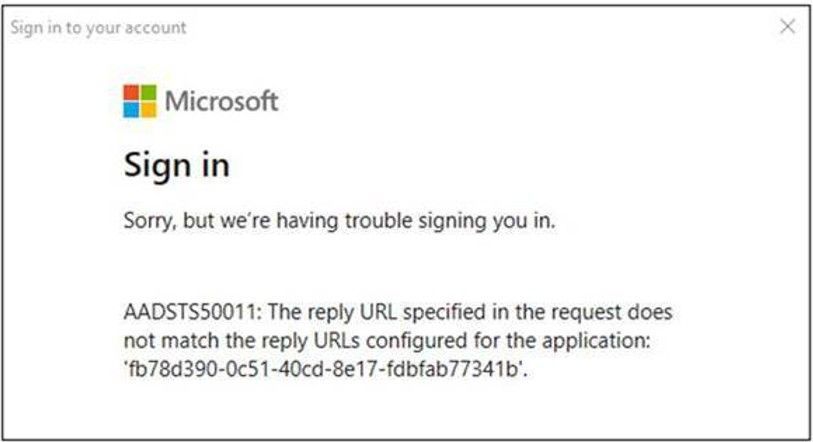
Because of the change to the Reply-URL list, you might see the following error after entering admin credentials in the HCW:
ADSTS50011: The reply URL specified in the request does not match the reply URLs configured for the application: ‘a0c73c16-a7e3-4564-9a95-2bdf47383716’.
If you see this error, download the latest HCW from https://aka.ms/hybridwizard and restart the wizard to resolve the problem.
EXO MFA PowerShell module or EXO MFA v2 module errors
Because of the change to the Reply-URL list, you might see the following error when using Exchange Online PowerShell v2:
Sorry, but we’re having trouble signing you in. ADSTS50011: The reply URL specified in the request does not match the reply URLs configured for the application: ‘fb78d390-0c51-40cd-8e17-fdbfab77341b’.
Simply update to the latest version of the module to resolve this error.
This article is contributed. See the original author and article here.
We want to make everyone aware of an upcoming change to the default setting for Guests in Microsoft Teams. With the large increase in organizations looking to use Teams to expand collaboration beyond the boundaries of their tenant, we want to make it easier for customers to get started. This has also been announced in Message Center post MC234252.
As a result, starting on February 8th we are turning on Guest access in Microsoft Teams by default for any customers who have not already configured this setting. This will bring the control for Teams Guest capability into alignment with the rest of the suite, where the setting is already on by default. When this change is implemented, if you have not already configured Guest access capability in Microsoft Teams, that capability will be enabled in your tenant. With guest access enabled, you can provide access to teams and other resources to people outside your organization while maintaining control over your corporate data.
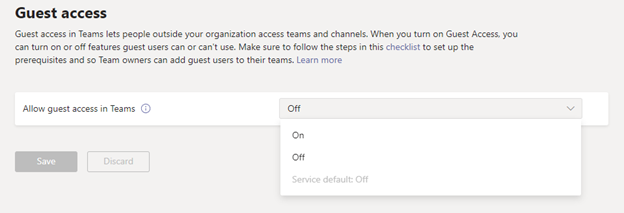
Prior to this change taking effect beginning on February 8th, if you want Guest access to remain disabled for your organization, you will need to confirm that the Guest access setting is set to “Off” instead of “Service default”. Instructions for how to configure the Teams guest access settings can be found here: Teams guest access settings
A view of Teams admin center Guest access page, showing the choices for Guest access being “Off”, “On”, and “Service default”. Currently the service default is off but beginning February 8th the service default will be “On”.
This article is contributed. See the original author and article here.
Microsoft Certifications come together thanks to a dedicated team of subject matter experts. Liberty Munson joined Microsoft 13 years ago as the psychometrician for Microsoft’s technical certification program. She makes sure the tools or processes used to evaluate people are measuring the right skills and abilities. In partnership, Sudarshan Krishnamurthi is responsible for the product management and product experience of the Microsoft Certification program. He helps optimize and modernize the certification program, enhancing the learner experience for anyone who wants to earn a Microsoft Certification by analyzing pain points, competitive offerings in market, and more.
From opposite sides of the country, both Munson and Krishnamurthi play major roles in making Microsoft Certifications valuable. That’s why we went to them to dig deeper into how the certification exams are created, and why certifications matter for businesses and individuals today.
Creating Microsoft Certification exams
The Microsoft Certification program has evolved over the years, shifting away from product-based certifications to a focus on role-based certifications. Role-based training and certifications are created to help individuals develop necessary skills and experience to advance in an accelerated and increasingly cloud-based world.
So, how does a Microsoft Certification exam get created? Munson explains that the process begins with the job task analysis (JTA) – the foundation of a certification. A JTA is the process of identifying the core skills needed for success in the job role; most often, this is accomplished through a focus group with subject matter experts (SMEs) who know the job role. SMEs identify the core skills that are needed to be successful in that role. Using that information, Munson and her team give another larger and more diverse set of SMEs an opportunity to rate how important those skills are and how frequently they are performed. With this process, Munson can make data-driven decisions and prioritize 20-30 skills to measure on the exam. After that, she can figure out how many questions are needed for each skill. That ‘blueprint’ becomes the basis that SMEs use when writing the exam questions.
When creating questions, there are a few ways Munson coaches SMEs – experts in the job role who are external to Microsoft – to make exam questions as relevant as possible. First, she has them tap into their own experiences. She asks them to think about a time they had to do a certain task and then write a question around that. Then, she has them think about the most common mistakes made. Not only does this make for a great exam question, but mistakes are often a great basis for writing plausible distractors (incorrect answer choices). Plus, qualified test takers should be able to solve relevant problems without making common mistakes.
Write. Release. Update.
Munson also shared this interesting tidbit: The exam creation process, from the JTA to writing questions to releasing the beta exam, takes about 14-15 weeks. This process of developing exams faster than just about any certification program in the industry is extremely valuable given how quickly technology changes. Munson adds, “When we create exams, we have to move fast. We have to stay relevant by assessing the skills needed right now. If we took any longer, the skills could already be outdated.”
Once the exam goes live, the team updates each exam every two months. If there are updates, a minimum of a 30-day notice is provided on the exam details page where you can download the skills guide to see the changes being made to the exam as you prepare for it.
One piece of advice, and the best feedback to give
Did you know when you launch the exam, there’s an introduction that tells you what your test experience will be like? You’ll find out if you’re getting labs or case studies or something else. As you move into different sections of the exam, you’ll be presented with important instructions about what to expect. It may seem obvious, but Munson notes that many test takers miss this step and are surprised while taking the exam.
What if you have some feedback on a question? Mark it for comment and provide your feedback after your exam. Your comments help inform the team of possible issues with a question. While commenting on typos is common, what truly helps is feedback about the technical accuracy of a question. Here are some good examples:
There’s more than one answer and here’s what I think they are.
The question is technically inaccurate and here’s why.
This question doesn’t have a correct answer and here’s why.
Why invest in Microsoft Certifications?
Now that we’ve taken you through the certification exam process, it’s key to understand why being certified matters. Krishnamurthi explains that with every organization today trying to digitize their businesses, IT professionals play a pivotal role. Business leaders want to focus on driving business outcomes and they expect their technical employees to leverage the most optimal technical solutions available in the market to solve complex business problems. In order for IT pros to do this, they need to be abreast with all the new features that are being added on a regular basis. Technology is moving faster than ever before; what used to be a six-month or one-year shelf life is now reducing to a few months. So, it’s crucial for businesses to focus on continuously keeping their workforce up-skilled and create a culture of continuous learning.
As for individuals, if you’re looking for a new career or just starting out, Krishnamurthi says to look no further. There is high demand in the industry for many areas. He notes, for example, that data scientists are getting a 40% salary premium because that’s a skill companies need and there aren’t enough people with the capabilities. This means businesses are willing to pay more to find the right person for the job.
So, what should you do if you’re fresh out of college or trying to make your resume stand out? Krishnamurthi suggests aligning your training plans to in-demand jobs and get a Microsoft Certification in that field. You can start with fundamentals training and certifications. Both help build and validate foundational understanding of mixed concepts and applied learning of Microsoft technologies, and are a springboard into deeper role-based learning paths and certifications. Krishnamurthi adds, “Microsoft has invested a lot of resources in skilling individuals to be successful, like Microsoft Learn – where people can consume learning nuggets and learn about new technologies and features. All at no cost and at their own pace and time.”
With Microsoft Learn, you can find learning paths to help you prepare for certifications. Content is updated over time so you can keep coming back and take the latest modules to make sure you’re up to date with today’s modern technology.
To learn more, check out all the learning paths and certifications at Microsoft Learn.
This article is contributed. See the original author and article here.
We have seen a number of PolyBase cases in SQL Server Support related to logins or permissions created and set during installation that are missing. It is quite common for organizations to want to lock down their environment from a security perspective in order to comply with principal of least privilege. Unfortunately, this has resulted in the removal of logins and permissions that are required for PolyBase to function properly.
I want to give a brief overview of the logins and permissions that are required and then highlight a couple of the common issues we’ve seen when these logins and permissions are removed.
Permissions Assigned During Installation
When you install SQL Server 2019 with PolyBase feature you must assign the service account for the two PolyBase services (PolyBase Engine, PolyBase Data Movement). The default account is NT AUTHORITYNETWORK SERVICE. If you wish to use PolyBase scale-out groups, you must use a domain account. For the purposes of this post, I did a fresh installation of SQL Server 2019 with PolyBase feature and used the account ‘SQLPBPolyBaseSvcAcct’ for the services.
It’s important to point out that there are three databases that get created when installing the PolyBase feature:
DWConfiguration
DWDiagnostics
DWQueue
The specific ways these databases function in PolyBase are outside the scope of this post, but in order for PolyBase to function properly, the service account must have permissions within these databases. The needed permissions are achieved by database role membership assigned to the service account.
After installation, you’ll see that the domain login is added to SQL Server, but does not have sysadmin role (or any server role, aside from public).
You’ll also see that the account has the following database roles in the previously mentioned databases:
{DWConfiguration}
db_datareader
db_datawriter
public
{DWDiagnostics}
db_datareader
db_datawriter
db_ddladmin
public
{DWQueue}
db_datareader
db_datawriter
public
{tempdb}
public
After troubleshooting some of the issues I’ll mention later, I learned that there are two certificates (_##PDW_SmDetachSigningCertificate## and _##PDW_PolyBaseAuthorizeSigningCertificate##) created in master database and two logins (l_certSignSmDetach and l_certSignPolyBaseAuthorize) that are also created during installation of the PolyBase feature. These security objects help maintain the principals of least privilege for the service accounts while facilitating some of the PolyBase functionality that requires sysadmin role on the SQL Server instance. During installation, the certificates are created and then the logins are created from the certificates. In short, these two logins must exist and must be members of the sysadmin server role. If they do not exist or are missing sysadmin role membership, you may see issues I outline below.
Common Issues
Data Movement Service won’t start – Shared memory segment has not been created or attached
Symptom
SQL Server PolyBase Data Movement service fails to start. If you’re starting it from SQL Server Configuration Manager, you’ll see that it enters the Running state, but after a short time, it is no longer running. If you check the Dms_errors.log file in the PolyBase logs directory (default instance: C:Program FilesMicrosoft SQL ServerMSSQL15.MSSQLSERVERMSSQLLogPolybase), you’ll see:
Microsoft.SqlServer.DataWarehouse.Common.ErrorHandling.LoginFailedException[110064:1]: 110064;Windows authentication failed. Possible network configuration issue. Please contact your system administrator. —> Microsoft.SqlServer.DataWarehouse.Common.ErrorHandling.MppSqlException[110064:1]: 110064;Windows authentication failed. Possible network configuration issue. Please contact your system administrator. —> Microsoft.SqlServer.DataWarehouse.Common.ErrorHandling.MppSqlException[110064:1]: 110064;Windows authentication failed. Possible network configuration issue. Please contact your system administrator. —> System.Data.SqlClient.SqlException[40104:1]: Only sysadmin can execute this stored procedure ‘sp_polybase_authorize’.
If you gather a profiler trace during the attempted query execution, you’ll see:
This article is contributed. See the original author and article here.
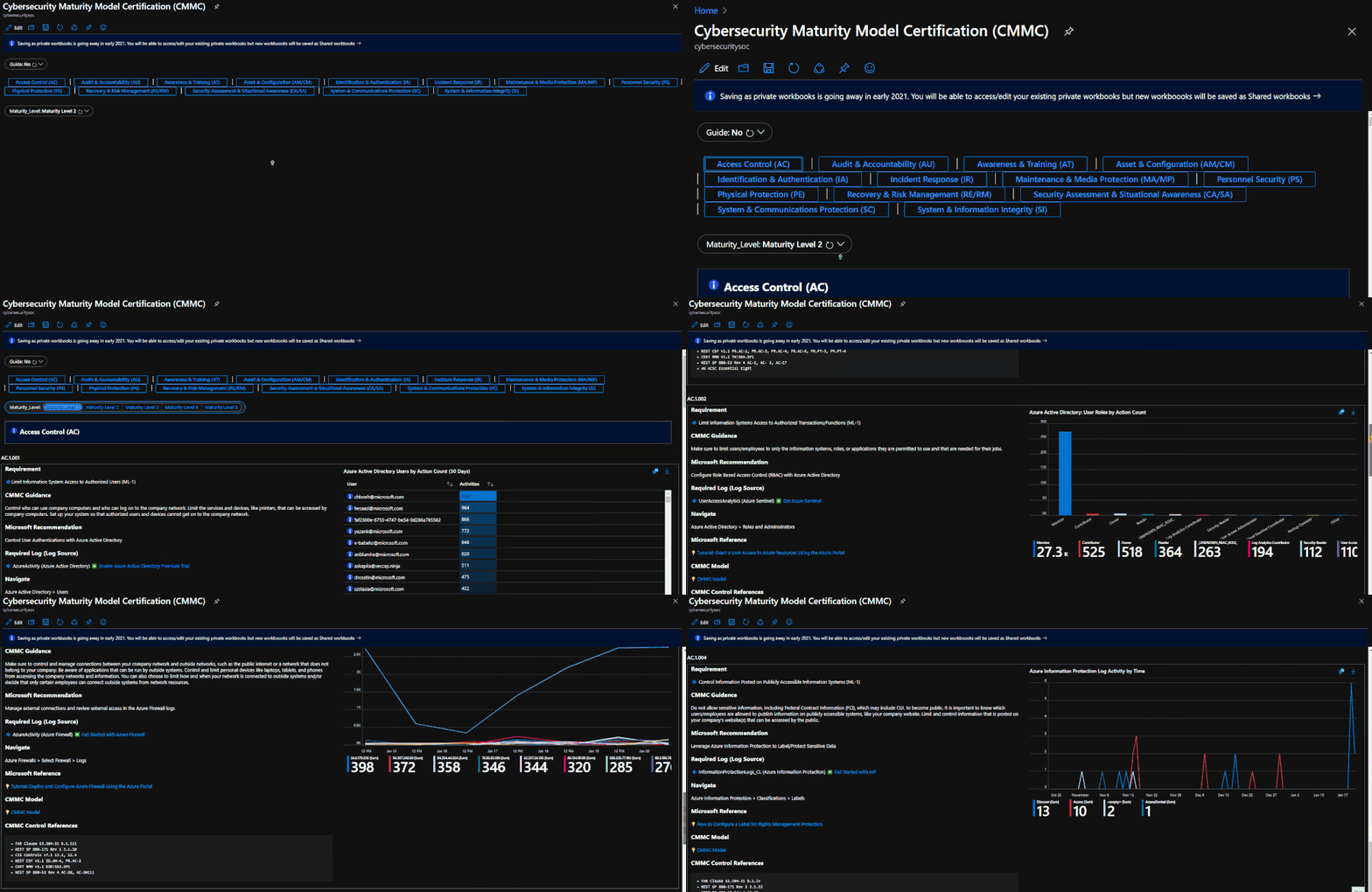
The Azure Sentinel CMMC Workbook provides a mechanism for viewing log queries aligned to CMMC controls across the Azure cloud including Microsoft security offerings, Office 365, Teams, Intune, Windows Virtual Desktop and many more. This workbook enables Security Architects, Engineers, SecOps Analysts, Managers, and IT Pros to gain situational awareness for the security posture of cloud workloads. There are also recommendations for selecting, designing, deploying, and configuring Microsoft offerings for alignment with respective CMMC requirements and practices. The workbook features 250+ control cards aligned to the 17 CMMC control families across all 5 maturity levels with selectable GUI buttons for navigation.
The workbook helps you to gain better visibility into your cloud architecture from security perspective while reinforcing CMMC principles for building cybersecurity critical thinking skills. The workbook consolidates multiple log sources from your Azure environment:
Azure Active Directory
Azure Active Directory Identity Protection
Azure Activity
Azure DDoS Protection
Azure Firewall
Azure Information Protection
Azure Security Center
Common Event Format
DNS
Intune
Microsoft 365 Defender
Microsoft Cloud App Security
Microsoft Defender for Endpoint
Microsoft Defender for Identity
Office 365
Security Events
Syslog
Threat Intelligence Platforms
Windows Firewall
Teams
User Entity Behavior Analytics
Windows Virtual Desktop
Deploying the Workbook
It is recommended that you have the log sources listed above to get the full benefit of the CMMC Workbook, but the workbook will deploy regardless of your available log sources. Follow the steps below to enable the workbook:
Requirements: Azure Sentinel Workspace and Security Reader rights.
1) From the Azure portal, navigate to Azure Sentinel
2) Select Workbooks > Templates
3) Search CMMC and select Save to add to My Workbooks
Navigating the Workbook
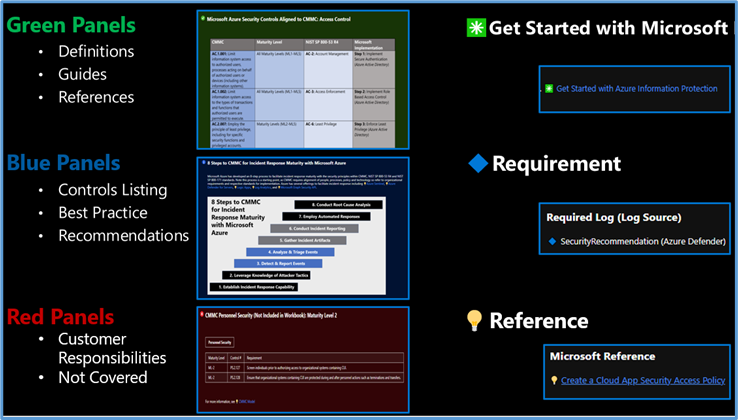
The Legend Panel provides a helpful reference for navigating the workbook with respective colors, features, and reference indicators.
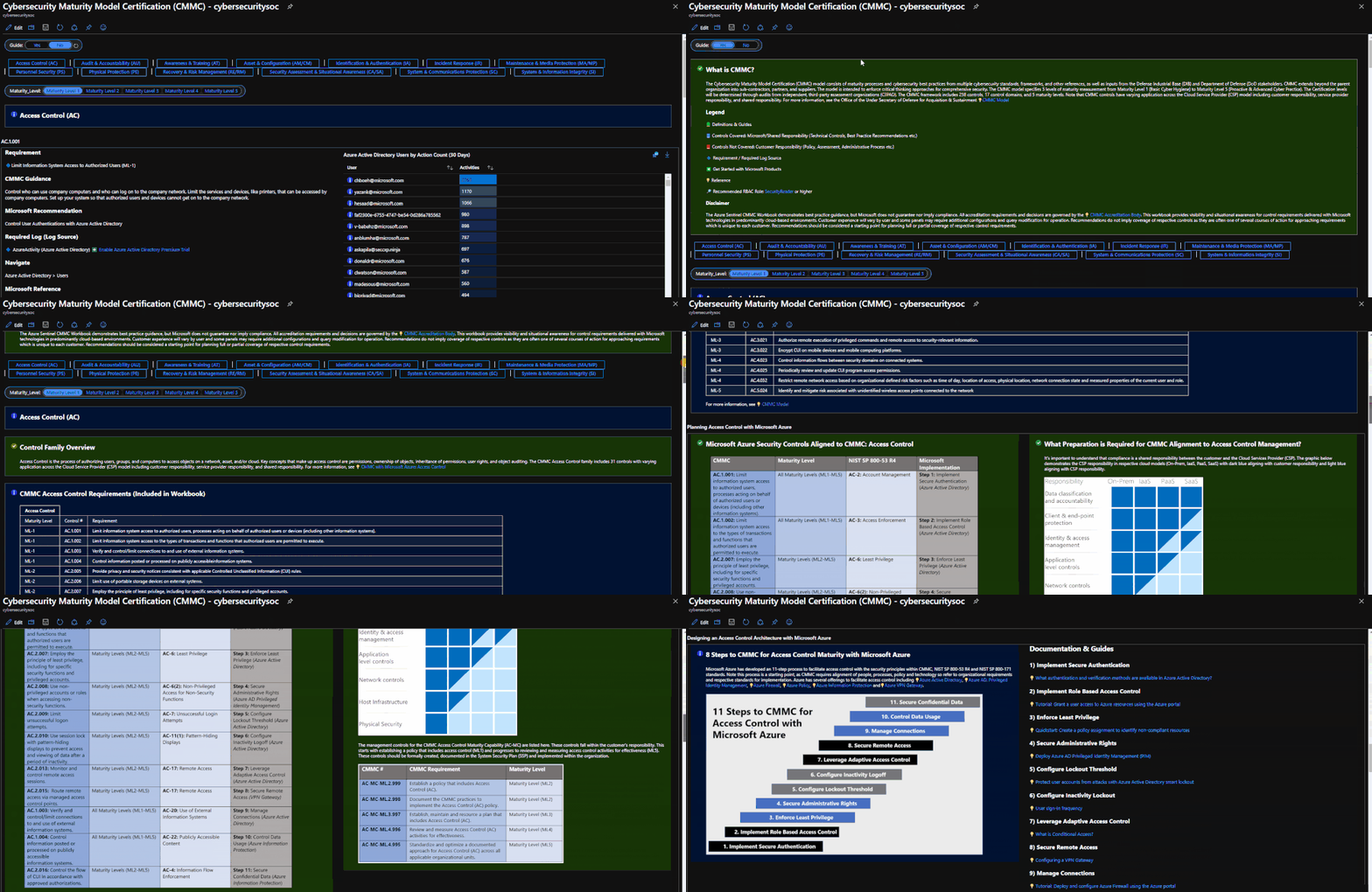
The Guide Toggle is available in the top left of the workbook. This toggle allows you to view panels such as architectural recommendations and guides which will be helpful when you first access the workbook but can be hidden once you’ve grasped respective concepts.
The Control Family Ribbon provides a mechanism for navigating to the desired control family. Selecting a control family will display Control Cards in the respective Control Family. The Maturity Level Ribbon drills down further to the desired control maturity level. You can view an index of controls in the workbook if you have the Guide Toggle enabled.
Use Cases
There are several use cases for the Azure Sentinel CMMC Workbook depending on user roles and requirements. The graphic below shows how a cloud security architect can leverage the workbook to review requirements, reference documentation, make configurations, and export artifacts. There are also several additional use cases where this workbook will be helpful:
Security Architect: Build/design a cloud security architecture to compliance requirements.
It’s important to note that this workbook provides visibility and situational awareness for control requirements delivered with Microsoft technologies in predominantly cloud-based environments. Customer experience will vary by user and some panels may require additional configurations and query modification for operation. It’s unlikely that all 250+ panels will populate data, but this is expected as panels without data highlight respective areas for evaluation in maturing cybersecurity capabilities. Control Cards without data will display the custom error message below. Most issues are resolved by confirming licensing/availability/health of the log source, confirming the log source is connected to the Sentinel workspace, and adjusting time thresholds for larger data sets. Ultimately this workbook is customer-controlled content, so panels are configurable per customer requirements. You can edit/adjust Control Card queries as follows:
Below are additional resources for learning more about CMMC in the cloud with Microsoft. Let us know if there are additional government compliance frameworks we can help with. Bookmark the Security blog to keep up with our expert coverage on security matters and follow us at @MSFTSecurity or visit our website for the latest news and updates on cybersecurity.
The Azure Sentinel CMMC Workbook demonstrates best practice guidance, but Microsoft does not guarantee nor imply compliance. All accreditation requirements and decisions are governed by the CMMC Accreditation Body. This workbook provides visibility and situational awareness for control requirements delivered with Microsoft technologies in predominantly cloud-based environments. Customer experience will vary by user and some panels may require additional configurations and query modification for operation. Recommendations do not imply coverage of respective controls as they are often one of several courses of action for approaching requirements which is unique to each customer. Recommendations should be considered a starting point for planning full or partial coverage of respective control requirements.
This article is contributed. See the original author and article here.
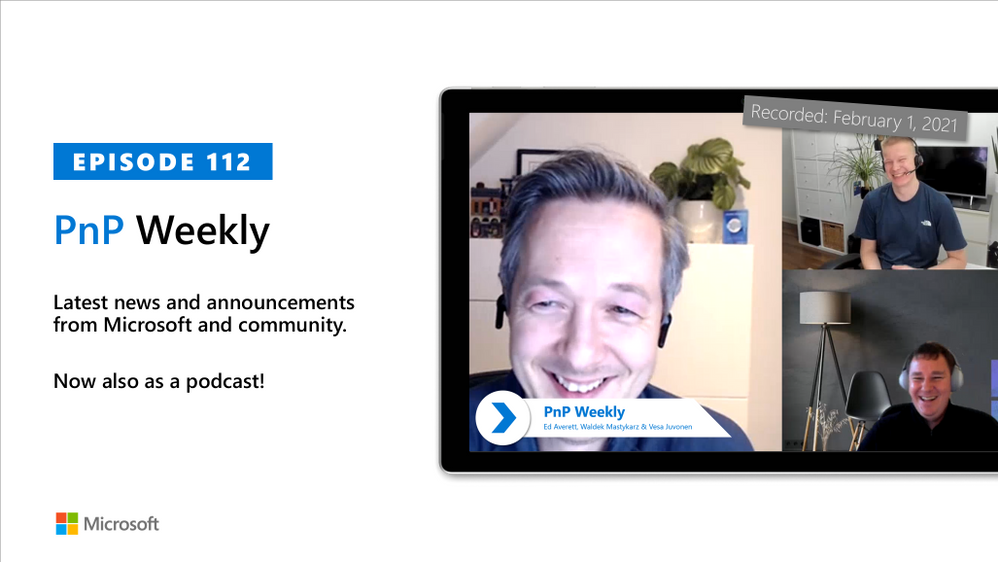
In this installment of the weekly discussion revolving around the latest news and topics on Microsoft 365, hosts – Vesa Juvonen (Microsoft) | @vesajuvonen, Waldek Mastykarz (Microsoft) | @waldekm, are joined by Ed Everett, Principal Group Program Manager from Microsoft, leading the platform extensibility efforts for OneDrive and SharePoint areas.
The trio talk about continued integrations of infrastructure and app platform across Microsoft 365, including still tighter integration with Microsoft Teams, Microsoft Graph, Power Platform, resource-based consent for app development, several SPFx updates, and more on forms customization.
The session was recorded on Monday, February 1, 2021.
Did we miss your article? Please use #PnPWeekly hashtag in the Twitter for letting us know the content which you have created.
As always, if you need help on an issue, want to share a discovery, or just want to say: “Job well done”, please reach out to Vesa, to Waldek or to yourMicrosoft 365 PnP Community.






Recent Comments