by Contributed | Feb 4, 2021 | Technology
This article is contributed. See the original author and article here.
Final Update: Thursday, 04 February 2021 07:34 UTC
We’ve confirmed that all systems are back to normal with no customer impact as of 02/04, 07:35 UTC. Our logs show the incident started on 02/04, 06:12 UTC and that during the 1 Hour & 23 minutes that it took to resolve the issue some customers may have experienced data latency and incorrect alert activation in South Africa North region.
- Root Cause: The failure was due to incorrect configuration in one of the component of the service.
- Incident Timeline: 1 Hour & 23 minutes – 02/04, 06:12 UTC through 02/04, 07:35 UTC
We understand that customers rely on Azure Log Analytics as a critical service and apologize for any impact this incident caused.
-Mohini
by Contributed | Feb 3, 2021 | Technology
This article is contributed. See the original author and article here.
Creating custom meetings experiences in Microsoft Teams with Apps
As organizations embrace a hybrid work environment they are increasingly looking for a custom, rich meetings experience. Microsoft Teams brings together a unified meetings, chat, calling, and collaboration platform and now provides developers with an extensible canvas that now extends to include new meeting extensibilities allowing them to reimagine how their apps are able to transform the meeting experience.
App integration and interactivity across the entire meeting lifecycle
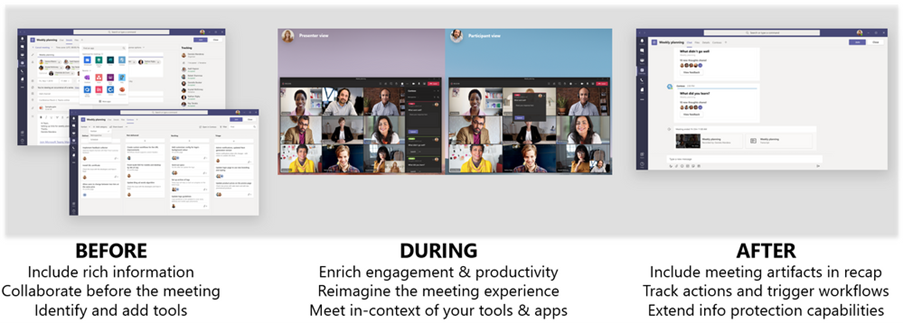
Meetings are not static experiences; there are several user interactions and activities leading up to, during, and following the meeting. With meetings extensibility customers can now leverage apps throughout the entire meetings lifecycle – empowering users to be more collaborative and productive.
From exposing apps during pre-meeting planning, to leveraging the new content surfaces for richer experiences during the meeting and building post-meeting scenarios customers are able to reimagine their Teams meetings experience.
Extensible content surfaces and meeting APIs for richer meeting experiences
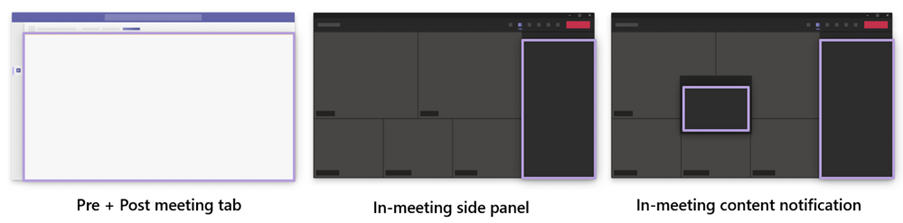
Three new extensible content surfaces are available for meetings. These new surfaces include:
- Pre and Post meeting tab
- In-meeting side panel
- In-meeting content notification
Pre and post-meeting tab
The pre-meeting experience helps users discover meeting apps and prepare for their meetings in advance like drafting a poll for use later during the meeting. Meetings apps are aware of the meeting context like who are the participants and what are their role in the meeting creating a custom in app experience for organizers and attendees. For post-meeting experience these tabs can be used to capture meeting notes, visualizations, and outcomes for organizers and attendees to action on.
In-meeting content side panel
The new in meeting 320px canvas allows meeting participants to meet around content and their line of business applications.
In-meeting content notifications
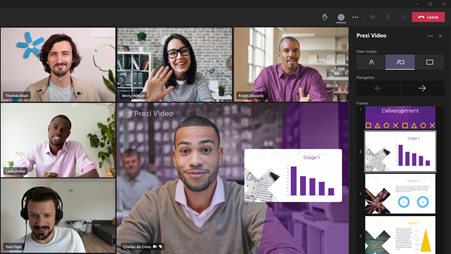
And in-meeting content notifications enable even deeper integration via the in-meeting notification surface to engage participants during the meeting and share actionable information.
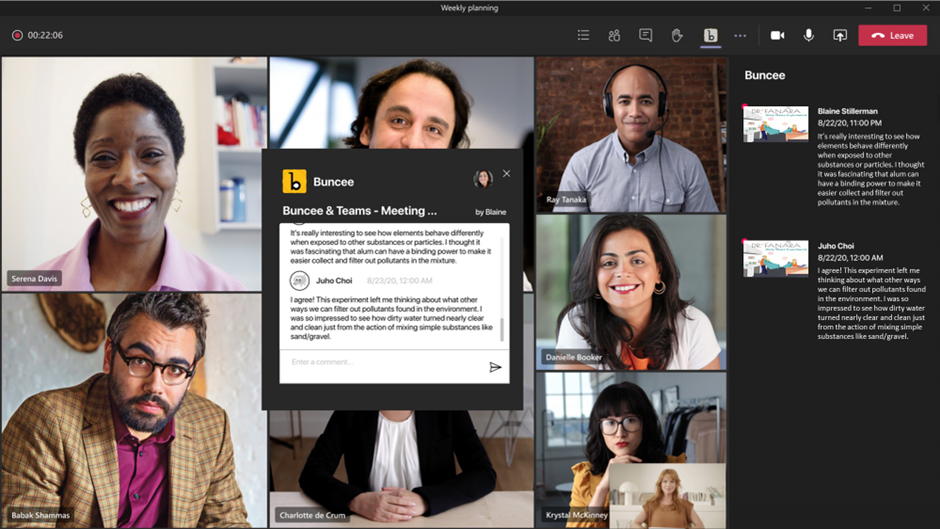
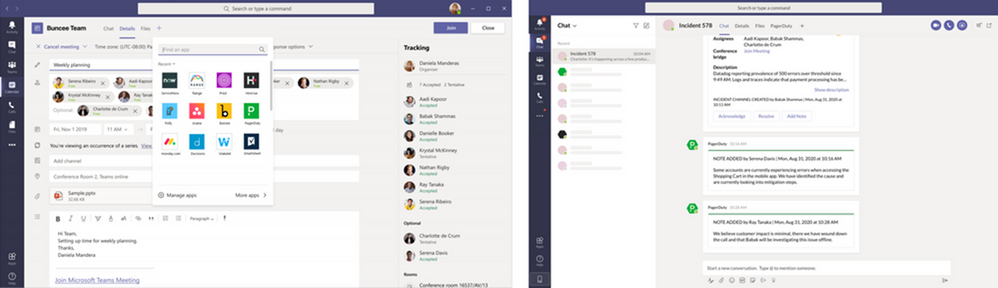
Underneath all these new surfaces are meeting APIs that power these experiences. From fetching participant information to surface roster/roles for contextualized experiences to notification APIs that signal based on end-user action to show-case an in-meeting notification bubble.
Unveiling the power of meetings extensibility through our rich ecosystem of partners
We’ve made great strides over the past few months, and a large part of the success and progress made was from the feedback and partnership from an innovative group of launch partners. Our partners are reimagining the meeting experience and transforming their respective industries and functional areas.
Project Management
Project management is an essential process that all organizations need to keep their business operating smoothly, and meetings are where the bulk of the management occurs. With meetings extensibility, developers can integrate their apps directly into the meeting surface – allowing users to bring their project management apps to organize tasks, facilitate project planning, and much more. Partners including Range, Asana, Monday.com, Smartsheet, Soapbox, PriorityMatrix, Decisions, Lucid Agreements and Wrike have built powerful integrations directly into the meeting experience.
Talent Management
Talent management apps are empowering organizations to bring their human resource processes into a single hub for collaboration. With meetings extensibility, developers can integrate their apps into the full meeting lifecycle to power scenarios such as in-meeting candidate analysis, interview question reminder notifications, and much more. Users can bring talent management processes directly into the Teams meeting lifecycle. Partners including HireVue and Talview are leading the way and have built powerful integrations directly into the meeting experience.
Incident & Resolution Management
Incident & resolution management is a key component of a solid DevOps practice. Today, users leverage incident & resolution management apps in Teams to stay on top of incidents through channel or bot notifications, and quickly coalesce as a team to resolve. With meetings extensibility, developers can integrate these apps directly within the meetings lifecycle – empowering DevOps teams to bring incidents directly into meetings where they can collaborate and resolve issues in real-time, directly within the app in the meeting itself. xMatters utilizes meetings extensibility to power these scenarios.
Polling
Polling during meetings is an efficient and effective way to quickly ask a question and gather feedback from a group of individuals. While polling apps have long been integrated in our Teams experience through bots and channel/group conversations, we are excited to see these apps integrated directly in meetings – where users will be able to conduct real-time polls with their meeting participants. Partners including Polly, Slido, Vivox and Pigeonhole are utilizing meetings extensibility to bring this experience to bear!
Business Intelligence
Business Intelligence (BI) & analytics are critical for all organizations and the need to have real-time data and insights available for teams to review and discuss is essential. With meetings extensibility, developers can integrate their BI & analytics apps into the meeting experience – empowering users to power scenarios such as the ability to attach analyses prior to a meeting, collaborate real-time on insights during the meeting, and capture notes after the meeting, and more.
Sales and CRM
Sales and CRM apps provide sales teams the tools to let them focus on the sale rather than the minutia. With meetings extensibility, developers can integrate sales apps directly into the meeting lifecycle and enable the sales team to bring the power of their apps to let them focus on finding the leads and making the sale with their customers. Bigtincan brings the powerful capabilities of their app into the meeting itself to help sales teams throughout the sales process.
Other meetings apps available in GCC
HR meetings apps
Analytics meetings apps
EDU meetings apps in GCC
Lastly, we are integrating some of our own Microsoft apps to enrich the meeting experience. Users will be able to utilize some of popular apps such as Power Apps – bringing those capabilities directly into the meeting experience! These include :
- Excel
- OneNote
- PowerBi
- Word
- Stream
- PowerPoint
- Visio
- Website
We are thrilled with all the innovative meeting scenarios that our partners have enabled in their apps using our meetings extensibility, and so we invite you to check out these apps when they become available!
Leveraging your first meetings app in Teams
You are planning your next meeting in Microsoft Teams and need a means to ask a set of questions to gather feedback from a group of individuals in a meeting.
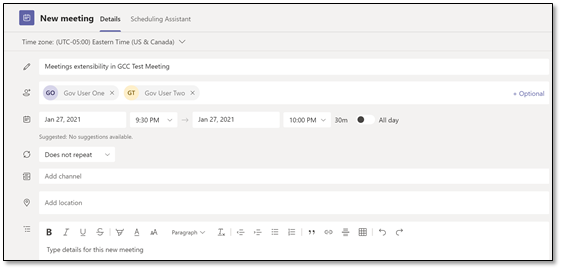
Step 1
Schedule your meeting in Microsoft Teams.
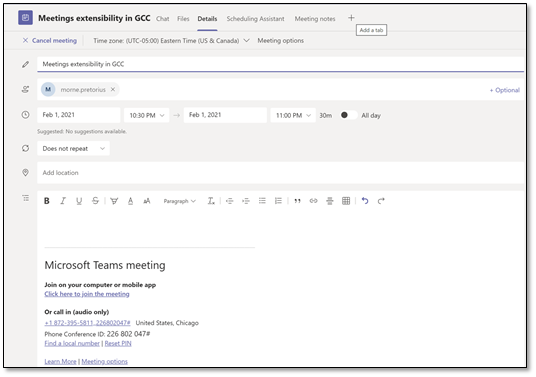
Step 2
Add Polly to your previously scheduled meeting by selecting the “+” sign alongside meeting notes and search for Polly.
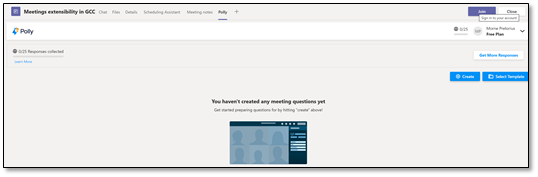
Step 3
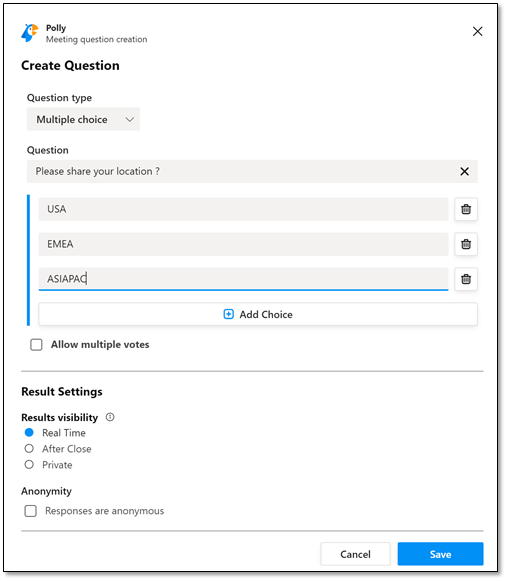
Go ahead and create your first meeting poll in Polly.
Step 4
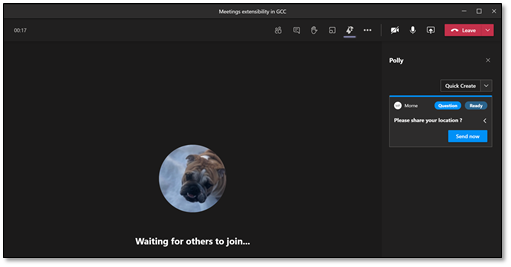
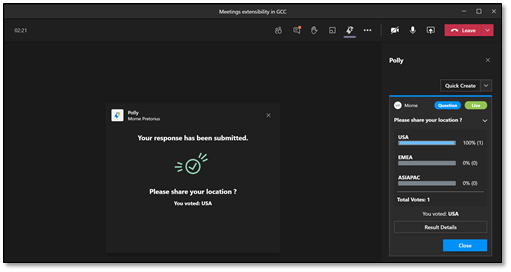
Join your meeting and share your poll into the meeting.
Step 5
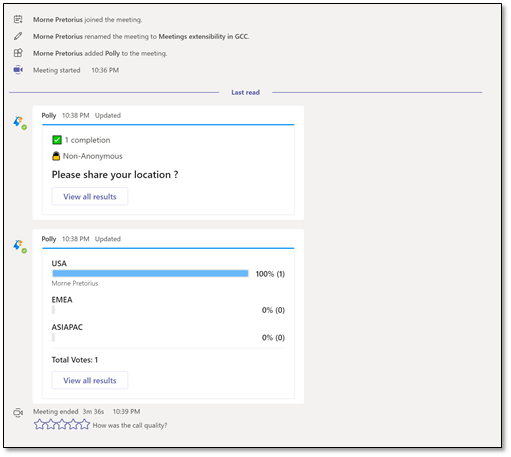
Review the results of your poll in the post meeting dialogue.
Known limitations
- In meetings apps are not available in channel meetings.
- In meetings apps are not available to external, anonymous users.
- In meetings apps cannot yet be added to a meeting in progress.
by Contributed | Feb 3, 2021 | Technology
This article is contributed. See the original author and article here.
A Deep Dive into Serverless Applications on Power Apps and Azure
Overview
In 2021, each month we will be releasing a monthly blog covering the webinar of the month for the Low-code application development (LCAD) on Azure solution. LCAD on Azure is a new solution to demonstrate the robust development capabilities of integrating low-code Microsoft Power Apps and the Azure products you may be familiar with.
This month’s webinar is ‘A Deep Dive into Serverless Applications on Power Apps and Azure’ In this blog I will briefly recap Low-code application development on Azure, provide an overview of serverless, why to build a serverless Power App, and what to look forward to in the webinar’s demos.
What is Low-code application development on Azure?
Low-code application development (LCAD) on Azure was created to help developers build business applications faster with less code, leveraging the Power Platform, and more specifically Power Apps, yet helping them scale and extend their Power Apps with Azure services.
For example, a pro developer who works for a manufacturing company would need to build a line-of-business (LOB) application to help warehouse employees’ track incoming inventory. That application would take months to build, test, and deploy, however with Power Apps’ it can take hours to build, saving time and resources.
However, say the warehouse employees want the application to place procurement orders for additional inventory automatically when current inventory hits a determined low. In the past that would require another heavy lift by the development team to rework their previous application iteration. Due to the integration of Power Apps and Azure a professional developer can build an API in Visual Studio (VS) Code, publish it to their Azure portal, and export the API to Power Apps integrating it into their application as a custom connector. Afterwards, that same API is re-usable indefinitely in the Power Apps’ studio, for future use with other applications, saving the company and developers more time and resources.
Serverless Applications
You may be wondering what a serverless application is? Serverless is a cloud computing execution model where the cloud provider dynamically manages the allocation and provisioning of servers. A serverless application runs in stateless compute containers that are event-triggered, ephemeral, and fully managed by the cloud provider. In turn this model greatly benefits the developer and team by reducing their workload by reducing the need to manage servers, and this model is much cheaper because teams don’t incur the hardware and associated costs.
A logical next question is “in what scenario(s) do I go serverless?” You can choose it when you have asynchronous and concurrent tasks to be executed, when you have infrequent requests and spiky traffic where you don’t have a dependency on latency. Also, when you’re looking to quickly iterate your development, build MVPs, change your code or change business requirements to immediately deploy that code.
You’re now convinced of serverless code’s benefits, but how do you get started? At the core are cloud functions that enable you to write code in containers. In reaction to an event execution can be triggered by any of the managed services or any custom sources you might be defining that are important for your application. Due to durable functions you can write stateful functions in a serverless compute environment. Lastly, serverless code is event driven, running in response to specific triggers which can be a HTTP or a blob trigger when running code in response to a file being uploaded to a storage account number.
Serverless Power Apps
Building serverless applications on Azure sound great by themself, why would you bother to build your using Microsoft Power Apps? Building business applications quickly is not easy when utilizing several different frameworks, hosting options, and complex integrations between systems. Leveraging serverless technologies (Azure Functions and Logic Apps) can provide the building blocks for APIs to connect to custom backends, services, or a Data Model (Dataverse) that stores data across many applications. Leverage these APIs to deeply integrate with PowerApps or Power Automate and extend the data that is most critical to business users with apps that are quickly built, managed, and distributed. Moreover, with the development of ‘Fusion Development’ teams a term coined by analysts, developers can build back-end serverless APIs and import them via Azure API management directly into Microsoft Power Apps as custom connectors. ‘Citizen Developers’ or those who aren’t professional developers, can leverage these APIs in their Power App, reducing the overall work of the developer, by not having to build front-end code. Thus, piling on the time and resources saved by building serverless applications.
What to expect in the webinar?
Simona will cover first build a web API that generates jokes, throughout this process she will test and debug her APIs. Afterward publishing the API to which is available to test at aka.ms/joke which generates jokes using random words. Lastly, she exports the API to Power Apps via the Azure portal and challenges the viewers to extend her app with Power Automate AI chatbots that send jokes as text messages.
Summary
Make sure to tune into the webinar on February 25th to learn more about serverless APIs and how to export them into your Power Apps. Moreover, there will be a Low-code application development on Azure ‘Learn Live’ session during Ignite, the data loss prevention and new governance policies for Power Apps at Ignite, and an SAP on Azure Power Apps webinar in March.
Resources
Low Code Application Development on Azure
LCAD on Azure
Azure plus Power Apps for pro developers
Low Code Application Development on Azure – YouTube
Power Apps x Azure documentation
Azure integration document
Azure API Management integration announcement
Azure API Management integration documentation
Serverless documentation
Compare serverless options
Compare serverless options module
Azure Functions documentation
Azure Functions website
by Contributed | Feb 3, 2021 | Technology
This article is contributed. See the original author and article here.
Intune and Office test beta OS versions to ensure management and apps work as expected when Apple releases new updates. With the release of iOS 14.5 beta OS on February 1, we’ve discovered an issue where App Protection Policy (APP, also known as MAM)-protected apps may be unable to launch. We see the issue in Office apps with APP protection and 3rd party line-of-business (LOB) and independent software vendor (ISV) apps that use SQLite directly or indirectly.
We have shared feedback with Apple about this launch issue, however, we are actively working to provide you with updated Intune SDK versions to resolve the issue. We anticipate providing updates and links on February 4, check back then or follow us on Twitter (@IntuneSuppTeam) for an update.
by Contributed | Feb 3, 2021 | Technology
This article is contributed. See the original author and article here.
Summary: SQL Server KB articles have migrated to DOCs at https://docs.microsoft.com/troubleshoot/sql. This excludes CU and hotfix which will remain currently on http://support.microsoft.com
What do you get:
- Articles organized by support area: Improved discoverability, updated articles.
- Automatic redirects to migrated articles. The original KB id of each of these articles are tracked in the text of the migrated version (e.g.: Original KB number: 2406745).
- Some of the KB content was incorporated into the DOCs.microsoft.com product documentation and those KB articles have been redirected to that content.
- Lucid design and ease of navigation within each doc and all the rest of benefits that docs platforms provide.
- Much cleaner portfolio of KB articles.
- 25+ new error articles added alongside other error articles.
- Ability to contribute to these troubleshoot to improve technical accuracy, correcting typos, suggesting better explanations etc. The procedure is similar to what you would use to contribute to SQL docs.
Note: Hotfix/CU articles will continue to be serviced via support.microsoft.com (SMC), but you can still use our master version KB article at Determine the version, edition, and update level – SQL Server | Microsoft Docs to quicky find information about latest builds and the corresponding CU articles for the same.
This marks phase one of our KB article clean-up and migration work we had started almost a year ago. During this time, we reviewed hundreds of these articles with different SMEs across Microsoft and grouped these articles into following categories:
- Migrate as is – these are the articles that were deemed up to date and can be migrated ‘as is’ or with very minor updates.
- Migrate with updates – these are the articles that had varied amounts of outdated information and needed to be updated before migration.
- Redirect to another doc – the KB article can be redirected to another doc which contains more up to date information.
- Merge with existing document – there is another doc with more relevant information on the same subject that is covered in the KB, but some of the information present in the KB is missing in the doc. For these scenarios, we are merging the content from the KB into the relevant docs and redirecting the KB URL to the doc. This ensures that customer can find relevant information about a topic at one place.
- Error pages – If the KB article was discussing a specific database engine error message, we used this opportunity to create error pages so that customers can search for these by using MSSQLServer_<Error number>. An example in this category is MSSQLSERVER_3988 – SQL Server | Microsoft Docs
- Archive – These are the KB articles that are no longer relevant to any of the supported versions of SQL server or contained completely outdated information.
We will be adding more troubleshooting articles in this space in the coming days and making additional enhancements (enabling PR functionality, improvements to landing pages for each category etc.) to continue creating seamless experiences for our customers. As you may have noticed already, KB articles for other commercial products like Windows, IIS, System Center and others have also moved over to the new troubleshooting site.
We hope you enjoy this new experience and book mark this page for your troubleshooting needs and welcome any feedback regarding the same.

by Contributed | Feb 3, 2021 | Technology
This article is contributed. See the original author and article here.
* This is a guest post by Microsoft’s John “JD” DeNoy, Modern Workplace Specialist at Microsoft.
COVID-19 has accelerated the push toward digital business transformation for most businesses. In response Healthcare Providers and Payors are creating new or modified business models that increase efficiencies, cut costs and support digitalization initiatives, but also impacts existing processes and present new compliance risks for legal and compliance leaders. Challenges around transformation are compounded by the need to create deliverables ensuring that compliance and legal requirements will be met.
General counsel and its team are tasked with advancing organizational priorities and instituting the considerable change management necessary to support compliance and risk management priorities. Concurrently, legal and compliance leaders need to improve their own functional management by streamlining and automating workflows within their teams to allow their attorneys and legal staff to focus on higher value work. Forming an information governance strategy with IT is a best practice because it creates a more proactive data management life cycle position. Increasingly within Healthcare organizations, IT is working together with legal and compliance stakeholders, where shared responsibility for information governance, data privacy and security issues is prevalent. IT can effectively shepherd this process, but, legal and compliance must first identify requirements, which are driven by applicable laws and regulations. From there, the parties can develop and implement policies to address risk.
Legal and Compliance teams within Healthcare are using M365 primarily to support 3 areas of risk: eDiscovery, Data Protection and Records Management. In doing so, they are working with IT and others to understand the capabilities of the toolset and designing new workflows that account for M365 Technology. Enterprise stakeholders should anticipate both the positive potential improvements that the opportunity presents and the risks that come with new technology innovations. Greater collaboration is needed across IT, Legal and Compliance teams to build support for enterprise-wide investments in technology that address complex business demand while managing risks.
Major enterprises today are engaged in hundreds if not thousands of e-discovery matters each year. Software that supports the ability to effectively conduct and manage discovery activities not only saves time and cost, but also enables enterprises to have higher levels of confidence over risk control and compliance. End-to-end and SaaS-based solutions like Office 365 have accelerated adoption by bringing e-discovery inside an organization which saves cost and time.
Microsoft Advanced eDiscovery offers a native and integrated solution that streamlines and speeds up the document review process by identifying redundant information with features like Near-duplicates detection and Email Thread analysis. The Relevance feature applies predictive coding technology to identify relevant documents. Advanced eDiscovery learns from your tagging decisions on sample documents and applies statistical and self-learning techniques to calculate the relevance of each document in the data set. This enables you to focus on key documents, make quick yet informed decisions on case strategy, cull data, and prioritize review.
Advanced eDiscovery builds on the existing set of eDiscovery capabilities in Office 365, while allowing an in-house legal team to perform further Early Case Assessment or complete a case to end-to-end. For example, it provides a Search feature in the Security & Compliance Center to perform an initial search of all the content sources in your organization to identify and collect the data that may be relevant to a specific legal case. This offers the ability to perform analysis on that data by applying the text analytics, machine learning, and the Relevance/predictive coding capabilities of Advanced eDiscovery. This can help an organization quickly process thousands of email messages, documents, and other kinds of data to find those items that are most likely relevant to a specific case.
Complementary to a company’s eDiscovery strategy, healthcare organizations are increasingly concerned about the protection of personal and sensitive information due to changes in regulations (GDPR, CCPA. etc) and increased enforcement and awareness of Data Privacy laws. The use of sensitivity labels to identify and manage sensitive content; and the use of Microsoft Information Protection to understand the data landscape allow for effective policies to be put in place, and control the retention and deletion of these data types.
Healthcare Providers and Payors fast adopters are proactively planning and budgeting for compliance requirements that focus on user convenience throughout the compliance journey. Beginning with taking inventory of the data protection risks to managing the complexities of implementing controls, staying current with regulations and certifications, and reporting to auditors. Improvement actions are helping centralize compliance activities. These improvement actions provide recommended guidance that’s intended to help you align with data protection regulations and standards. Improvement actions can be assigned to users in your organization to perform. eDiscovery practices can also be more proactive by implementing several components found within information governance plans, as well as anticipating increased global privacy and regulatory compliance requirements.
Join this 1-hour session to benchmark with peers and hear from subject-matter experts on how healthcare and pharmaceutical organizations can utilize M365 native tools to support eDiscovery, Information Governance, and Records Management programs. Uncover common challenges, most impactful use cases for the healthcare industry, and key considerations when forming a wider compliance strategy for M365.
During this webinar, expect to learn:
- How M365 is changing the way healthcare and pharma companies think about eDiscovery and information governance
- What M365 tools legal and compliance professionals can utilize to support their wider initiatives
- How to ensure compliance and legal requirements are met in context of M365, and why people and process are critical to this strategy
- What resources and investments Microsoft can offer for a successful transition
Thanks for visiting – Michael Gannotti LinkedIn | Twitter
 Michael Gannotti
by Contributed | Feb 3, 2021 | Technology
This article is contributed. See the original author and article here.
By: Adrian Moore, Sr. PM and Sameer Yadav, Program Manager – Microsoft Endpoint Manager – Intune
The following article helps IT Pros and mobile device administrators understand the new enhancements to the noncompliance notification feature of Microsoft Intune.
A lot of customers we work with operate globally, with end-users in countries all over the world. Many of these customers standardise their IT communications in English. This certainly makes things easier from an IT perspective but can often leave some staff with limited English struggling to understand what is being asked of them. One area that we often get this feedback about is noncompliance email notifications. With Conditional Access (CA), you can control the devices and apps that can connect to your email and company resources. Intune enhances CA by adding mobile device compliance to the access controls. With an Intune compliance policy that defines requirements for devices to be compliant, you can use a device’s compliance status to either allow or block access to your apps and services. You can do this by creating a CA policy that uses the setting Require device to be marked as compliant. When a device falls out of compliance, end-users are notified by email. While it has been technically possible to achieve localised language email notifications, it did require duplication of policies. We have heard your feedback, and are delighted to announce a new, streamlined approach to providing localised language support for noncompliance emails, making it easier for this part of your IT communications to be more inclusive and remove language as a barrier for self-remediation of noncompliance issues.
The current experience
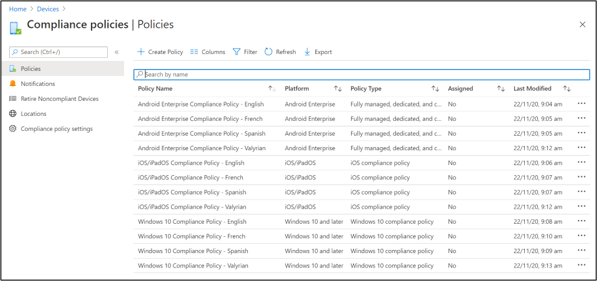
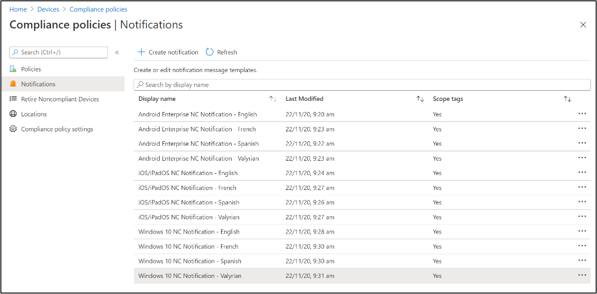
Prior to our new experience, compliance policy could only have a single noncompliance email template attached to it. In practice, this means a duplicate compliance policy for each language you want and a corresponding template. Even with a few languages in play, you can see below how this can be challenging for large organisations:
Compliance policies – Policies blade
 Compliance policies – Notifications blade
The feedback from our customers has been that, for many, this would result in many compliance policies to set up and maintain.
The new experience
With the new enhancements, you only need to create a single notification template, which you can add multiple localised email messages to. Let us look at this in practice.
First, create a single compliance policy (instead of one for each language):
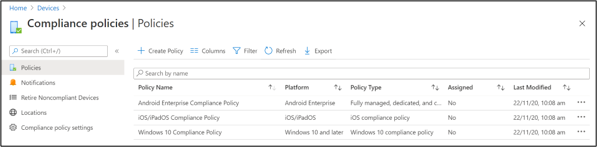 New experience of the Compliance policies – Policies blade
Then, we create a single notification template and add multiple localised email messages to it:
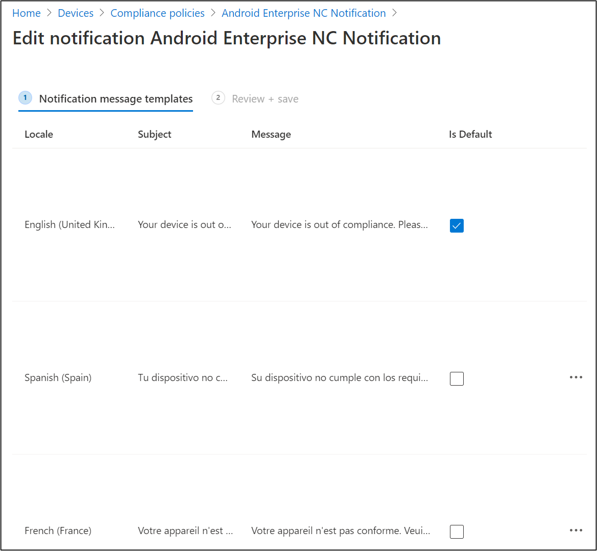 Notification message templates settings
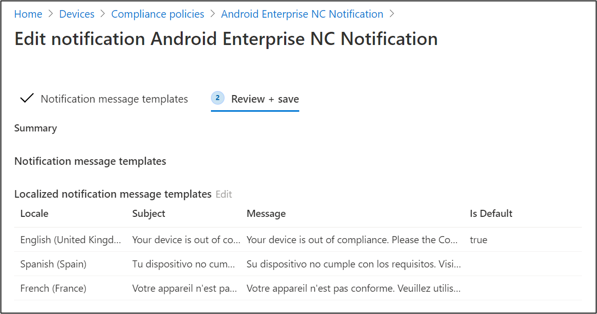 Notification message templates summary view
We then assign that template to our compliance policy (note the languages in the details pane on the right):
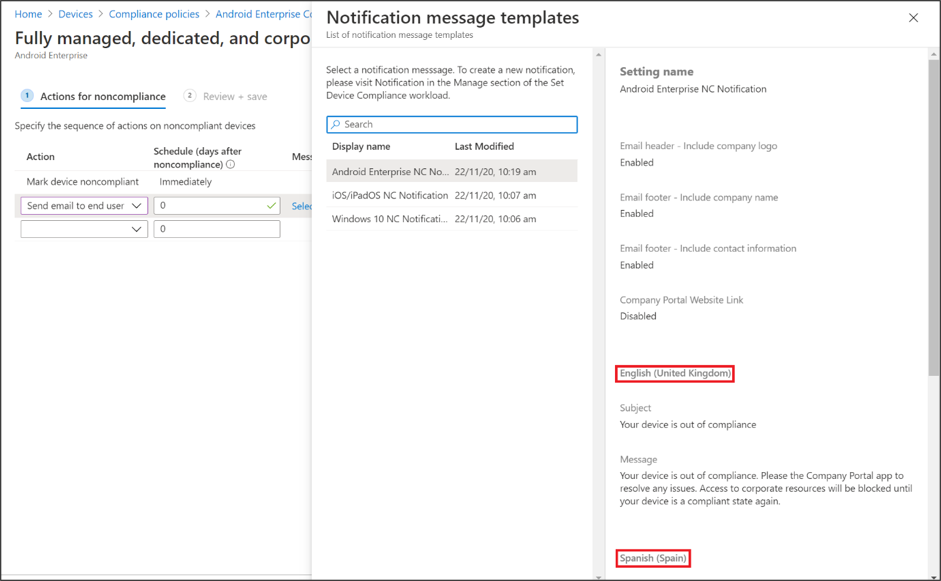 List of notification message templates
If you are wondering how we determine which template to send to the user, the answer lies in the user’s Microsoft 365 “Display Language” setting, which is accessed via myaccount.microsoft.com:
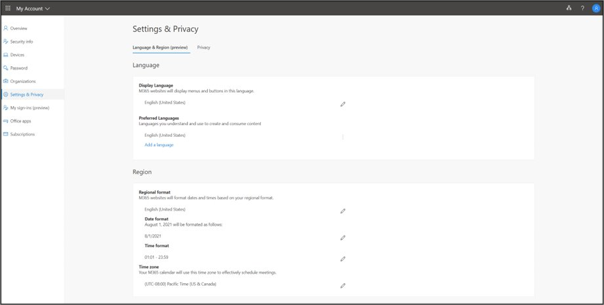 Microsoft 365 – Settings & Privacy – Display Language setting
This means the language that the user has set themselves will be what Intune uses to trigger the localised email message. However, some customers may want to manage this centrally, in which case you have a couple of options:
Note:
You must use a defined language tag (for example en-US for the US, or es-ES for Spain). Supported languages can be found at the Supported Language Packs and Language Interface Packs page.
If a user’s display or preferred language cannot be determined, they will receive the default template selected by their IT admin.
Hybrid environments
The above methods for setting the user’s language only applies to cloud-only accounts. For those customers who are using Azure Active Directory (Azure AD) Connect to sync their identities from their on-premises Active Directory, the language must be set on-premises and then sync’d to Azure AD. If this is the case, your users will see the following:
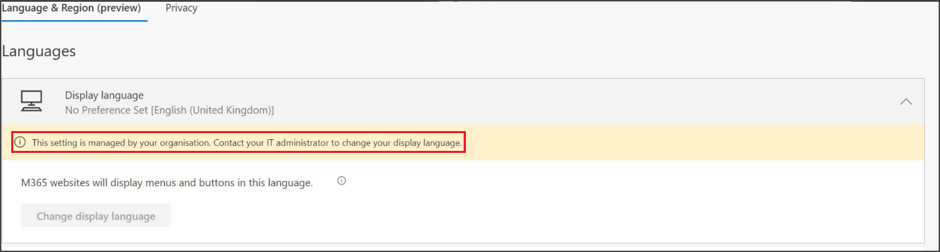 Language & Region – Display language for Hybrid users
To set the language in your local Active Directory, navigate to the user object and edit the attribute:
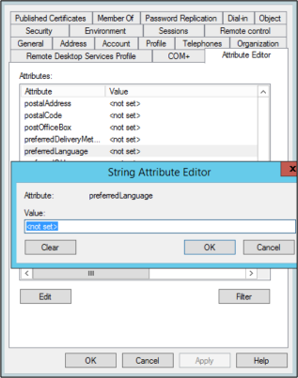 preferredLanguage setting for a user object in local Active Directory
This may be something you leverage scripting for as, in large organizations, you may run into scale challenges without scripting.
Conclusion
As our customers move towards more inclusive workplaces, technology needs to move with it. Keeping your end-users productive demands that, should their device become noncompliant for any reason, they can self-remediate the problem quickly and, ideally, without the help of others. Ensuring your end-users always receive their noncompliant email notifications in their preferred language means they can easily understand what they need to do to get their corporate access back – without language being a barrier.
More info and feedback
For further resources on this subject, please see the links below.
Use compliance policies to set rules for devices you manage with Intune
How to set language and region settings for Office 365
Supported Language Packs and Language Interface Packs
As always, we want to hear from you! If you have any suggestions, questions, or comments, please visit us on our Tech Community Page, or leave a comment below.
Follow @MSIntune and @IntuneSuppTeam on Twitter and feel free to ask any questions about implementing this new feature to the @IntuneSuppTeam on Twitter!
by Contributed | Feb 3, 2021 | Technology
This article is contributed. See the original author and article here.
Background
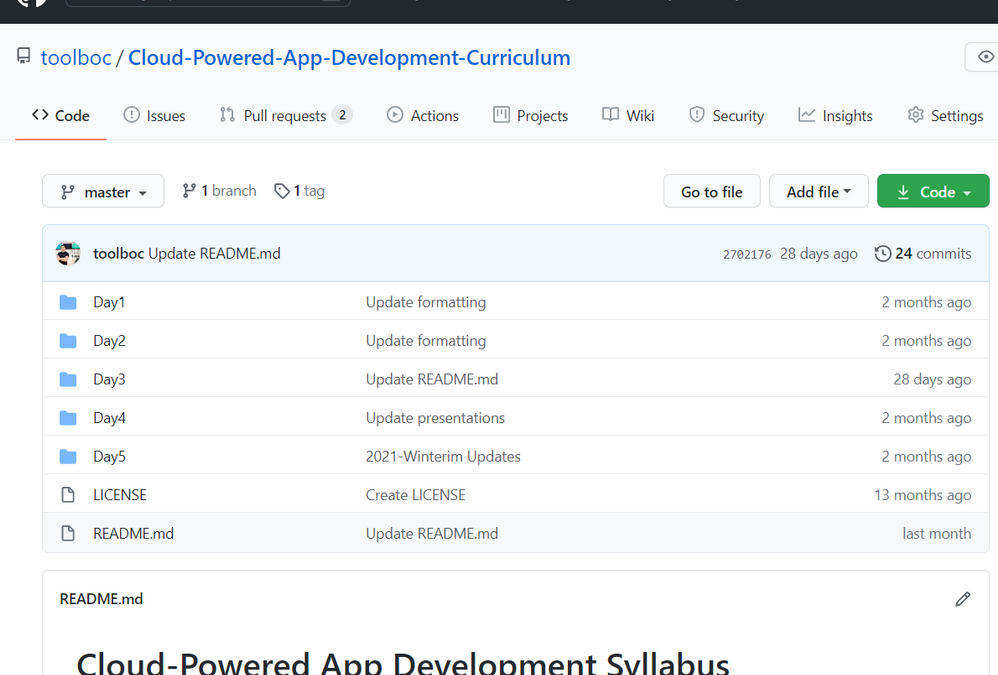
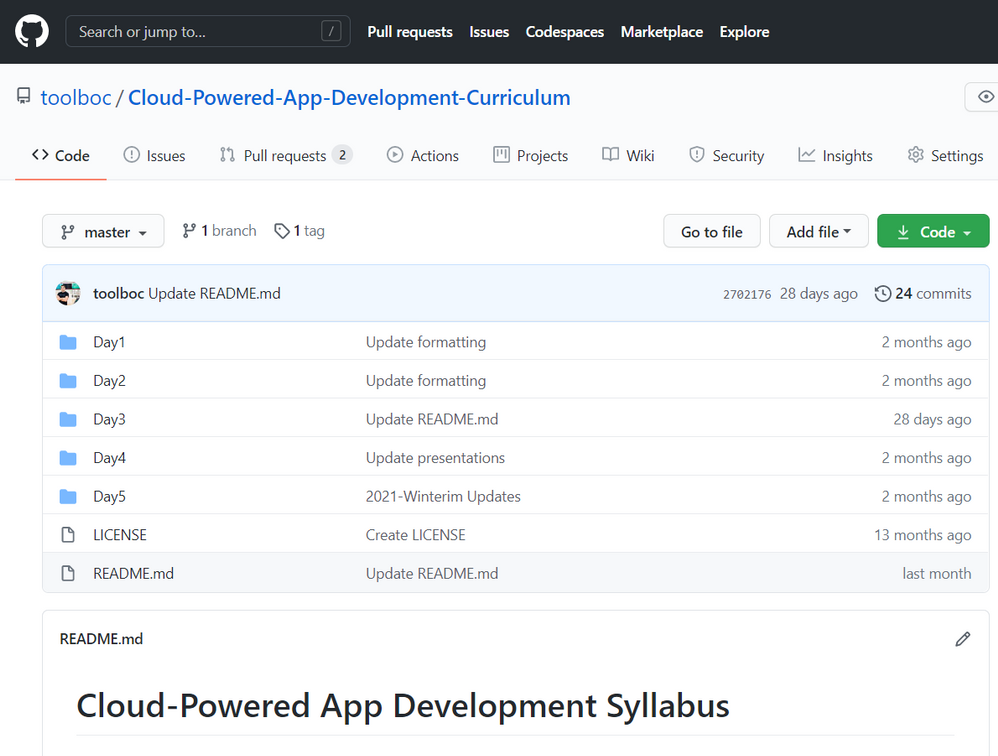
Over the past seven years, I’ve had the pleasure of teaching a course titled “Cloud-Powered App Development” twelve times now at the University of Houston with my long-time friend and faculty colleague Jesus Hernandez. I’ve been humbled by the course’s success, regularly producing some of the highest course evaluations in the department and earning me a less-official ranking of highest-rated professor on ratemyprofessors.com for the entire University of Houston. Our course content is open-source and maintained on GitHub and we encourage you to use any portions that may be of benefit to your classroom.
Challenges
The Covid-19 pandemic has created many new challenges, particularly in the area of Education. In September of 2020, I learned that the University of Houston would move all classes to a primarily virtual format. My course would not be offered until the Winter, and it became very clear as that date neared that the Cloud-Powered App Development course would need to adapt to this.
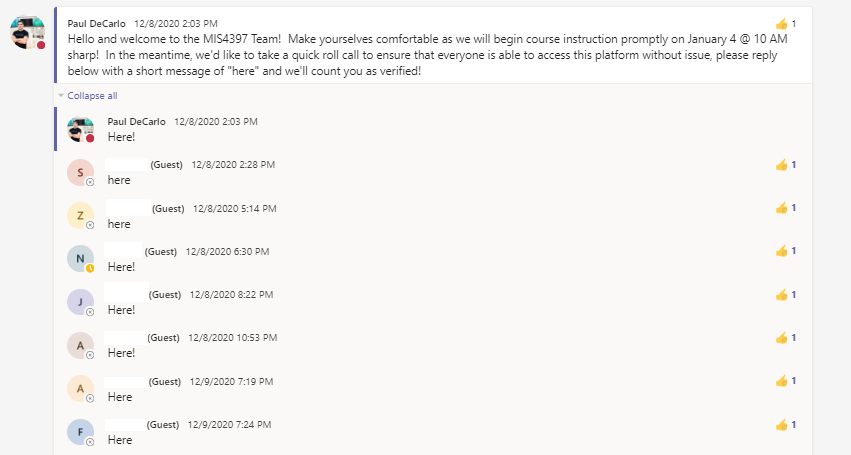
To accommodate, the first issue was to figure out how the students would meet together for instruction. Microsoft Teams was a natural choice as the University of Houston provides student access to Office 365 services. However, this did not mean that the process was straightforward, as this is not activated for students by default. One month before class started, I created a custom Teams channel for the course and sent a message to all students with instructions on how to obtain access with a simple instruction of leaving a message of “here” to ensure that they could properly access the virtual classroom. This gave students ample time and peace of mind that they could properly access the course, and as a result we had 100% attendance on the first day of class!
The second issue was ensuring that students would have access to the prerequisite services needed to complete the coursework. Looking at the course description for MIS4397: Cloud-Powered App Development” can give a glimpse into what was needed:
“The course will cover: (a) Cloud Services – The primary technology focus will be on the Microsoft Azure Platform and cover scalable services / websites / virtual machines; (b) Platform as a Service offerings to support scalable web development / deployment with WordPress on Azure. (c) Introduction to AI concepts including computer vision and the development of custom object detection models. (d) Internet of Things applications using GPU accelerated embedded devices to employ object detection models and publish inference results to the cloud.”
To accomplish these goals students would need access to the following services:
- Microsoft Azure,
- Microsoft Learn Platform
- NVIDIA’s Deep Learning Institute
The great news is that academic institutions can obtain access to these resources at zero cost!
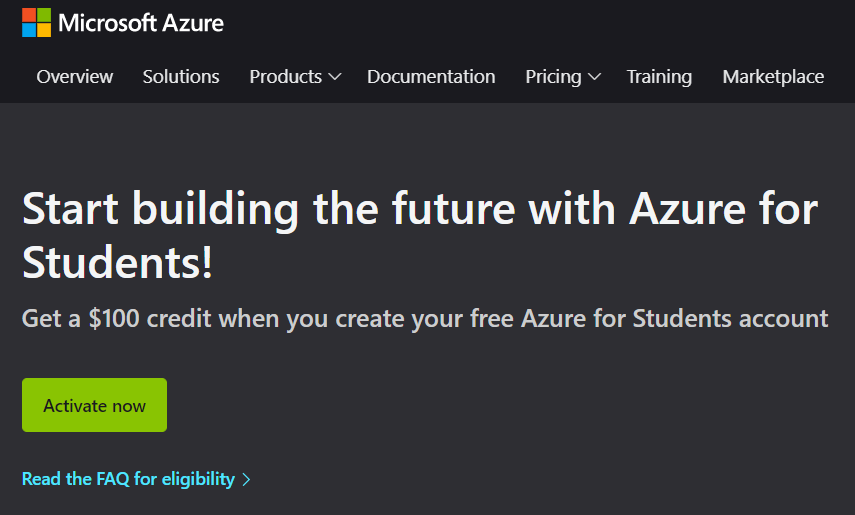
To accommodate access to Microsoft Azure, we leveraged the Azure for Students Offer, which provides $100 in Azure Cloud for use in academic settings given a valid *.edu email address. This serves as the backbone for a variety of hands on activities in the course which include:
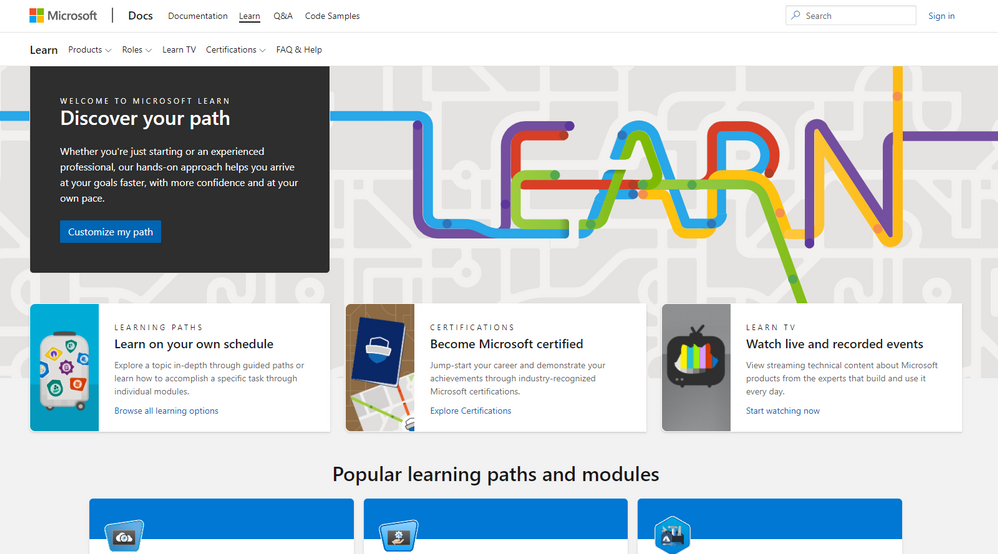
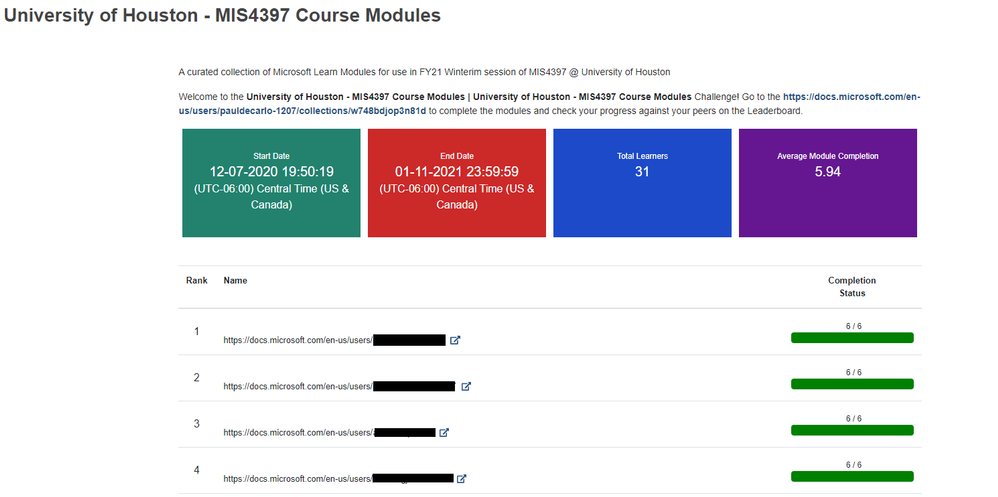
The Microsoft Learn Platform is a free, online training platform that provides interactive learning for Microsoft products and more. The goal is to help you become proficient on Microsoft technologies and learn skills with fun, guided, hands-on, interactive content that’s specific to your role and goals. We use many of the modules here as homework content which we were able to track completion (which greatly simplified the grading process) using a custom Cloud Skills Challenge. Examples of modules used in the course include:
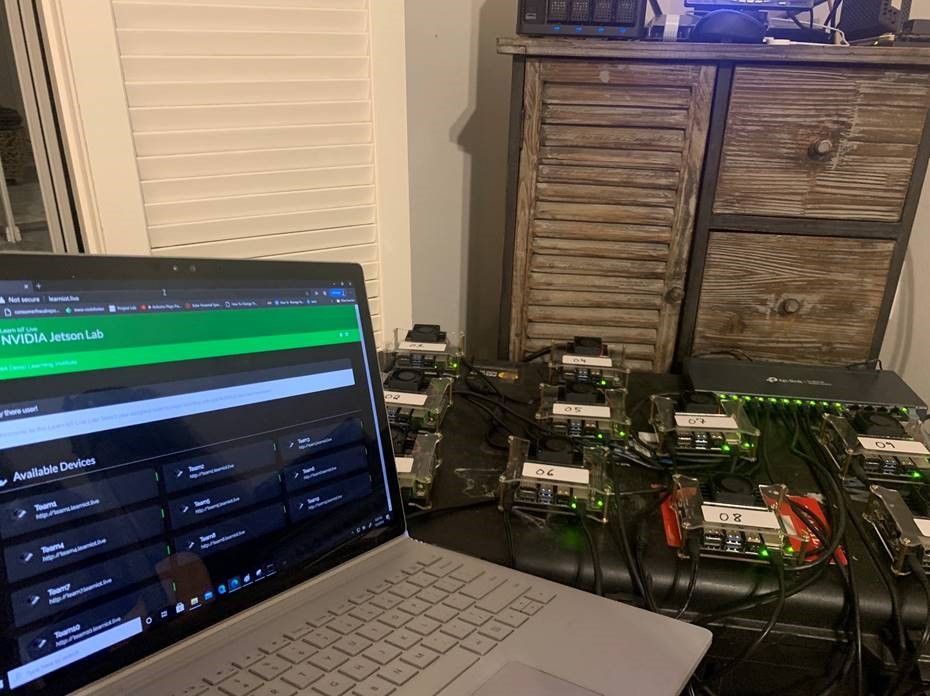
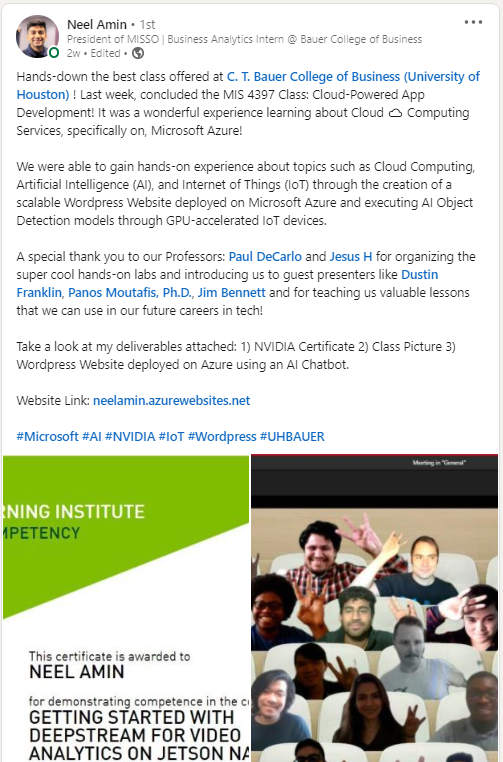
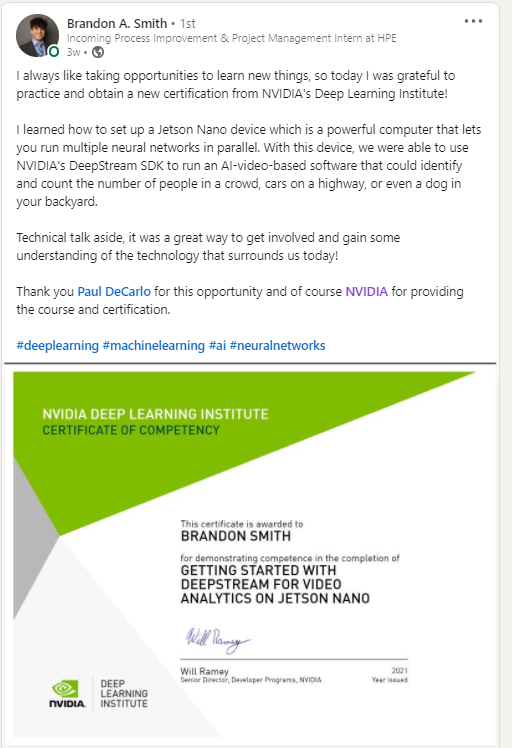
NVIDIA’s Deep Learning Institute (DLI) offers hands-on training in AI, accelerated computing, and accelerated data science. Developers, data scientists, researchers, and students can get practical experience powered by GPUs in the cloud. This was particularly challenging as we required physical devices in order to complete the AIoT Lab – Getting Started with DeepStream for Video Analytics on Jetson Nano hands-on-lab. This required engineering a home lab solution consisting of 10 NVIDIA Jetson Nano devices that were deployed into a securely segmented LAN and made accessible over the internet. The effort was totally worth it as each student was awarded with an official certification from NVIDIA for completing the lab! If you have the chops or interest to reproduce or use my homelab, let me know, I plan to keep it in production until the pandemic ends ;)
Opportunities
With these challenges out of the way, the course was able to be offered with zero compromises, we could teach exactly the same content that we would have had we held the class in-person. However, we discovered that a 100% virtual classroom actually opens up the door to otherwise inaccessible opportunities.
Microsoft Teams gives you a number of benefits to ensure students are engaged and provides features to make it very easy to help students who may be stuck on portions of an exercises.
- Use the Raise hand in Teams meetings feature to poll students on where they are in the middle of group tasks. For example, ask students to “raise their hand” when they complete a segment.
- Use the Share your screen in a chat in Teams feature to assist students who may have technical issues. A side-benefit is that when you solve issues through screen share, others who face similar issues get to see the solution.
- Use the Sharing files and folders in Microsoft Teams feature to collect assignments in one place. This simplifies grading assignments and is a million times better than the alternative of herding e-mails. We used this to gather IoT inventions from all students and believe me, my team was very inspired by some of the suggestions and hope to implement some of them for an upcoming #JulyOT event.
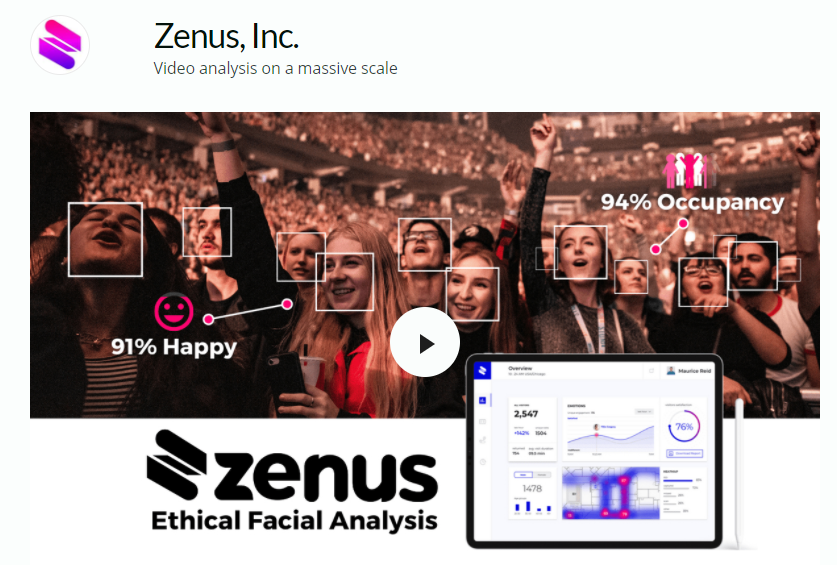
- Using Teams makes it super easy to bring in guest lecturers from around the world! We used teams to bring in special guest speakers featuring Dustin Franklin of NVIDIA, Panos Moutafis of Zenus.AI, and Jim Bennett of Microsoft. In fact, if you would a like Microsoft speaker to guest lecture for you course, reach out! We can probably make it happen ;)
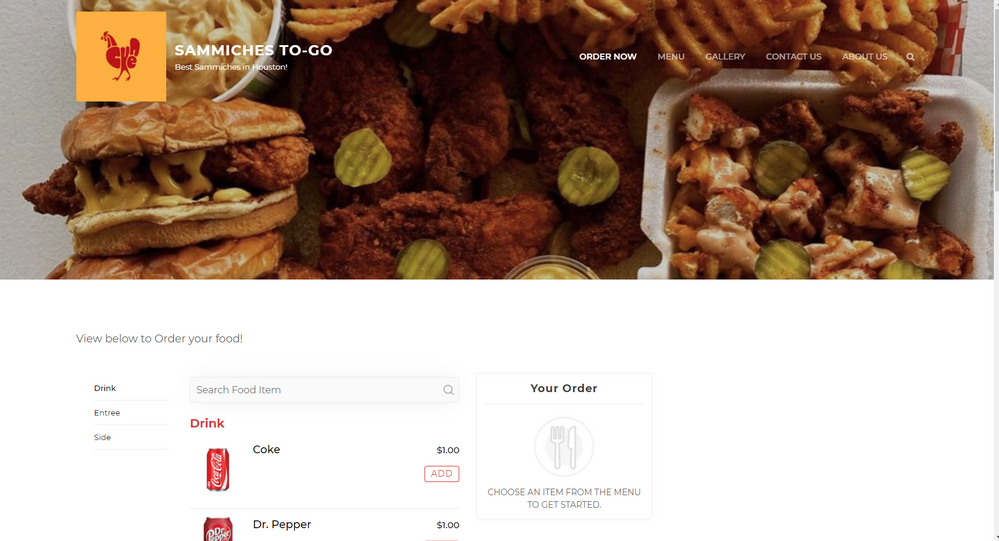
As a final assignment, we task student to present a scalable website running on Microsoft Azure. Using Teams we were able to allow students to deliver class presentations from the comfort of their home, and let me tell you, these presentations were amazing! Here are a couple examples (keep in mind they build these in FIVE days!):
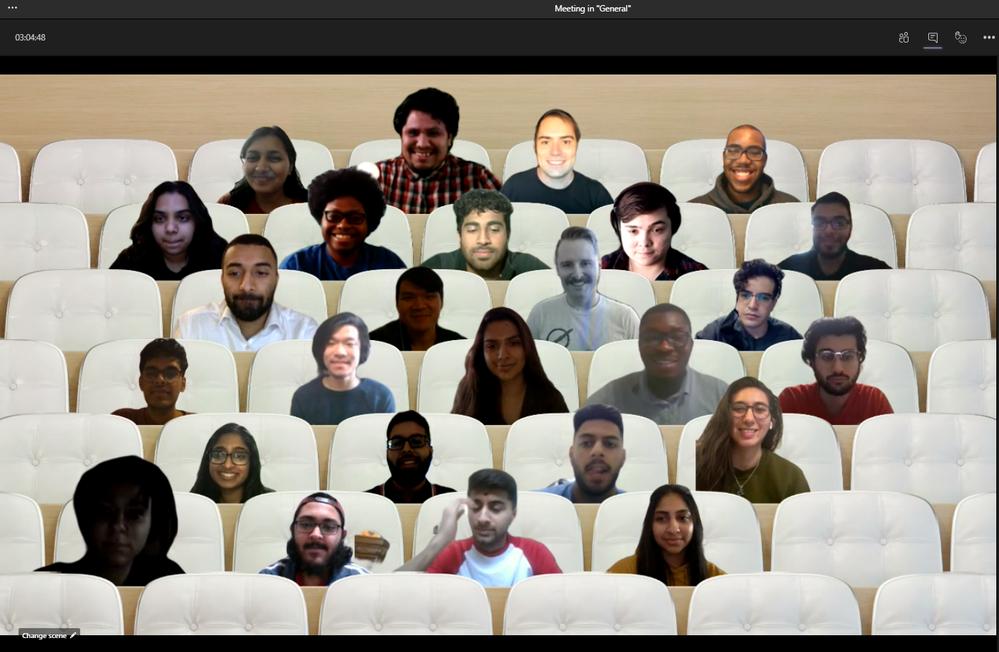
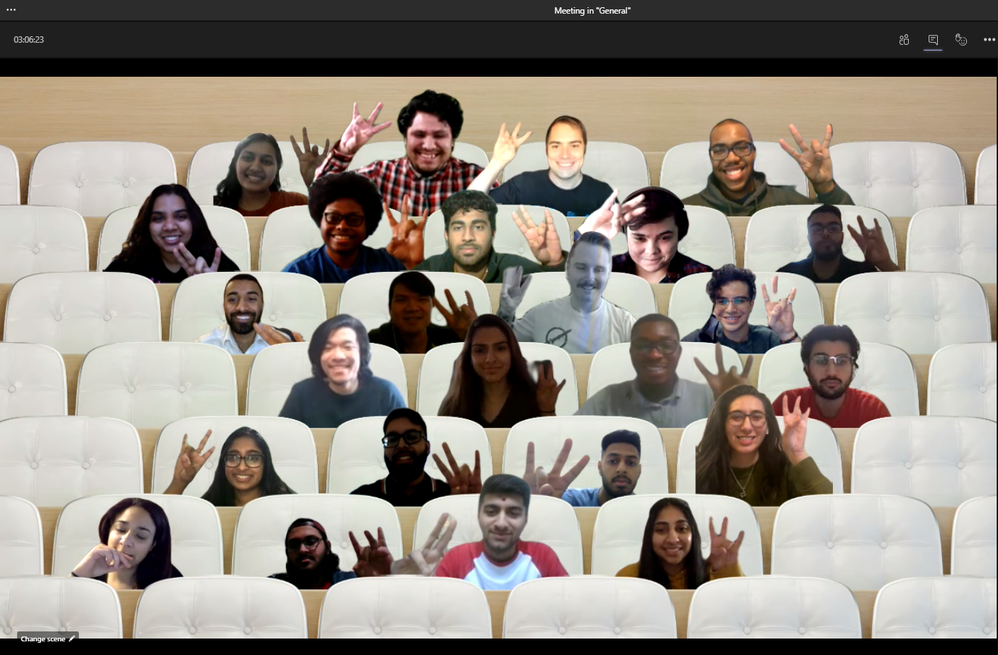
At the end of class we took a couple team pictures using Together Mode, one “normal” and the other will be familiar if you attended the University of Houston (Go Coogs!)
Summary
I am pleased to say that as a result of this course, we had 30 students who successfully completed each and every assignment, which consisted of:
When you take advantage of technology, it is often the case that you can improve your overall situation. In our case, by leveraging tools and technology services we were able to deliver a course that covered a wide range of topics with hands-on materials provided by various online learning platforms. This enabled us to make the most of situation, and as a result we have inspired a new batch of students who are now aware of these possibilities and prepared them for the world of tomorrow. But don’t my word for it:
Until next time…
Cheers,
Paul DeCarlo

by Contributed | Feb 3, 2021 | Dynamics 365, Microsoft 365, Technology
This article is contributed. See the original author and article here.
It’s no secret that fully embracing digital sales experiences is increasingly necessary to stay in the sales game. By 2025, this shift will be business as usual. What does this mean for sales organizations? Gartner analysts breaks it down in a recent trend insight report, “The Future of Sales in 2025: Why B2B Sales Needs a Digital-First Approach.”
- 80 percent of B2B sales interactions between suppliers and buyers will occur in digital channels. Sales teams will need to merge their sales processes, apps, data, and analytics into a single operational practice that will scale and won’t require weeks of training.
- 60 percent of B2B sales organizations will transition from conventional wisdom and intuition-based selling to data-driven selling, according to the “Future of Sales 2025: Data-Driven B2B Selling to Drive Digital Commerce.”
- As buyers become savvier and want less frequent but more informed interaction with sales reps, sellers must figure out how to show up at the right time to help buyers make sense of the research they’ve done.
The right time to reach out
As buyers try to go at it alone, they are often overwhelmed by the volume of trustworthy information available, and over half of buyers have found supplier information can contradict trustworthy sources. Buyers dealing with this kind of complexity often become uncertain in their decision, making them less likely to make a purchasing decision at all. Now is the time for sellers to add guidance and help customers make sense of the research and what’s best for their company. However, most organizations lack the automation, AI augmentation, and digital scalability to deliver the experience buyers seek. By successfully undergoing a digital transformation, organizations should empower human sellers to deliver the right information, at the right time.
Introducing sales accelerator for tailored experiences
For many sales teams, implementing the technology and human skills to keep up with the evolving demands of digitally savvy customers may seem like a stretch, even for 2025. That’s why we’re introducing sales accelerator, a digital selling capability of Microsoft Dynamics 365 Sales. Sales accelerator helps sellers work faster and smarter with a prioritized work list of the next best lead or opportunity, allowing them to engage through their customers’ preferred channel with integrated email, phone dialer, and a Microsoft Teams channel (coming soon). Sellers are equipped with timely, AI-driven insights and recommendations based on customer events and needs, so sales teams know when to offer customer guidance.
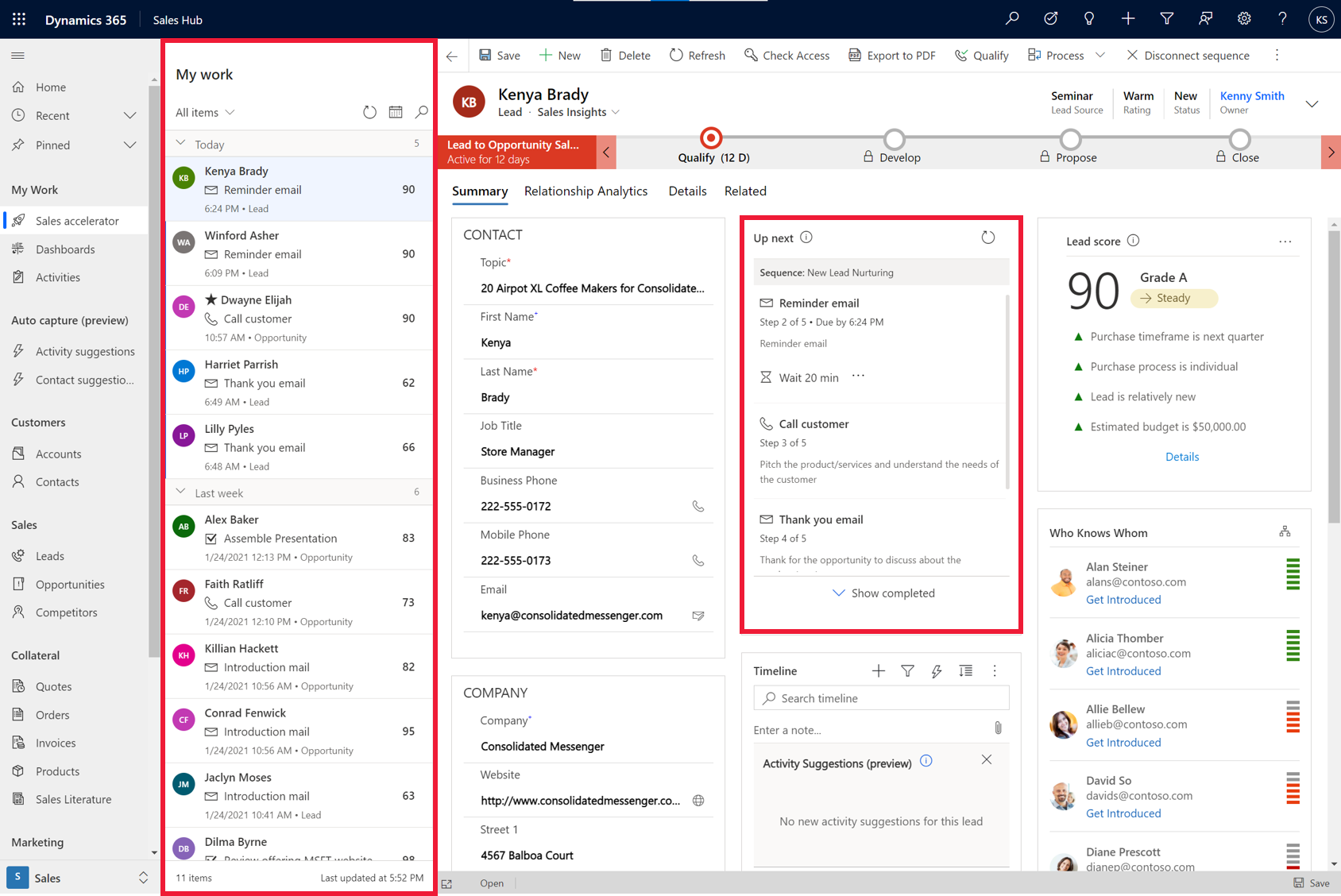
“Sales accelerator has provided our agents with a single location to prioritize and conduct their important work every day. Along with sequences we’ve been able to keep the agents more organized and focused on communicating with people interested in staying at our hotels.”
“We receive a tremendous amount of leads daily and the sales accelerator provides a platform for our agents to prioritize and focus on selling without scrolling through a long list of leads to find out what’s next. This along with the addition of sequences has allowed us to create a simple sales cadence that our agents can follow to increase conversion. Once a lead is assigned all of the work is published to the sales accelerator for the agent to follow. They simply log in and start selling,”Brian Miller, Director of Sales for Brittain Resorts and Hotels.
Prioritizing your day and scaling up
As fewer sellers are dealing with a greater number of customers, it can be difficult to determine whom to engage with, or the next best task. With sales accelerator, all actions and activities that need to happen that day are prioritized and organized in a work queue. The seller has flexibility to sort and filter based on key attributes such as scoring, urgency and source. Each record presents the next best action based on organizational sales sequences set up by the seller or their sales manager.
As sellers run through an extensive list of leads, they often struggle to gain a holistic view, including communications history, customer needs, and specific circumstances. This view is necessary for crafting the most relevant pitch to the customer, achieving a positive outcome.
A powerful feature of sales accelerator is the data-driven context it gives sellers for each potential customer’s journey. Without navigating away from their screen, sellers benefit from a comprehensive view that captures and surfaces customer data, past and present activities, and insights into one place to help craft the right message at the right time. Trigger events like a customer doing research on a seller’s site, requesting a white paper, or responding positively to a call or email can prompt suggested actions the seller might take to best nurture the sale.
“The new sales accelerator capabilities in Microsoft Dynamics 365 Sales has been a game changer. Using My Work List and Up Next widget in conjunction with Sequences in the new sales accelerator help our reps stay focused and prioritized so they always know the next most important task to complete.”Lowell Vande Kamp, CIO and Chief of Staff at Synergis Education
Sales accelerator can make digital scalability a reality. Learn more about sales accelerator and Microsoft Dynamics Sales.
Watch a demo or take a guided tour to see how Dynamics 365 Sales can empower your sellers with actionable insights.
For more technical details, check out our blog, “Enable digital selling with the sales accelerator in Dynamics 365 Sales.”
The post Sales accelerator brings digital scalability within reach appeared first on Microsoft Dynamics 365 Blog.
Brought to you by Dr. Ware, Microsoft Office 365 Silver Partner, Charleston SC.
by Contributed | Feb 3, 2021 | Technology
This article is contributed. See the original author and article here.
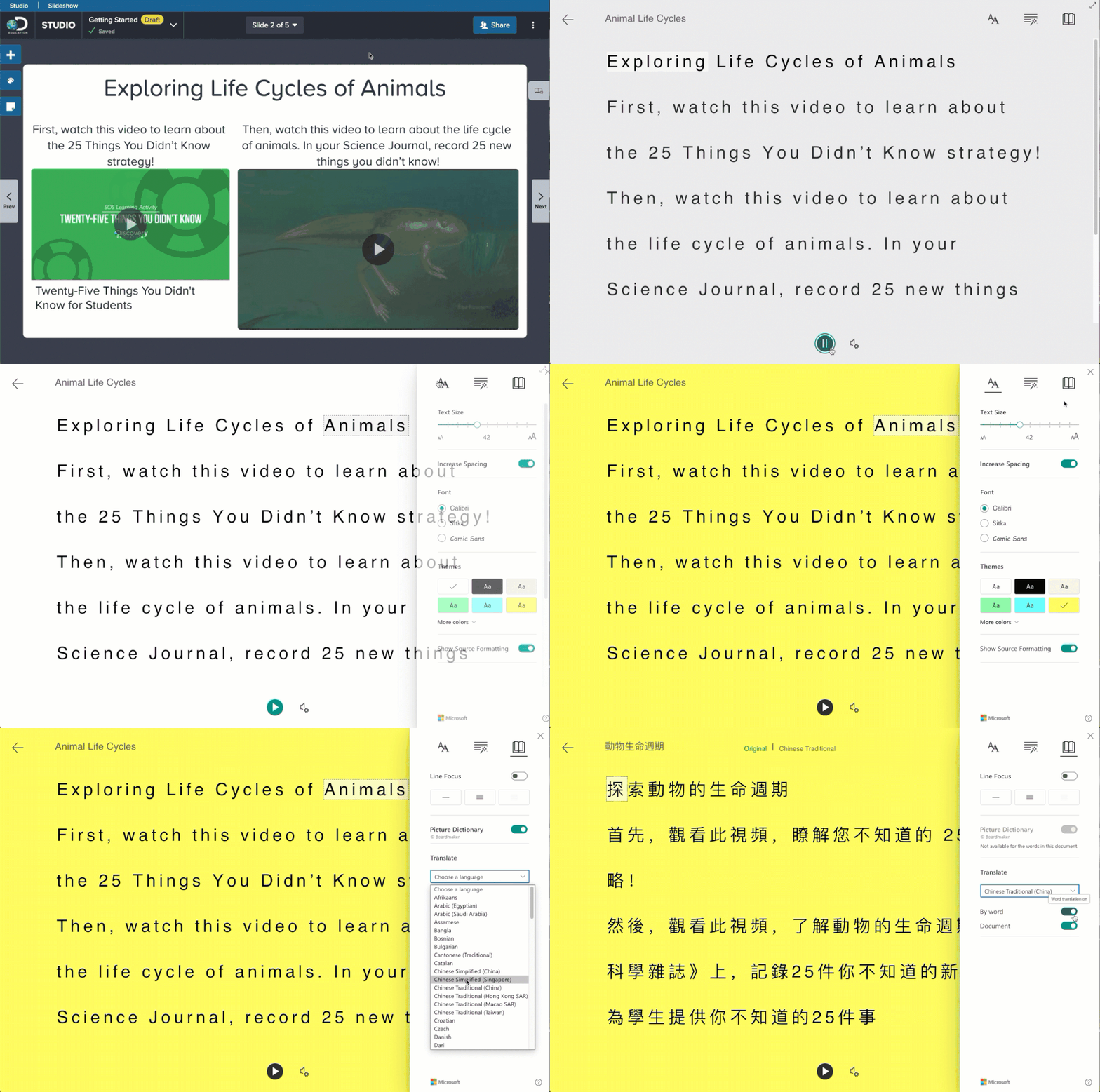
Today we are excited to announce that Microsoft’s Immersive Reader has been integrated into Discovery Education’s award-winning K-12 services! Immersive Reader’s integration with Discovery Education’s dynamic services further accelerate the development of critical reading and comprehension skills while making learning more accessible for all students.
“School technology leaders are pressed to wring every last ounce of value out of their edtech purchases,” said Pete Weir, Discovery Education’s Chief Product Officer. “That’s why we are so glad to work with Microsoft on this important integration. The addition of Immersive Reader makes all Discovery Education’s digital services and resources even more useful to the schools we serve.”
Since we launched the Immersive Reader as a Cognitive Service, we’ve seen a great deal of excitement from educators and schools eager to combine the power of Immersive Reader with Discovery’s intuitive instructional tool. Immersive Reader is included in both the Studio tool and Glossary.
In addition to Studio, here is an example of the Immersive Reader integrated with the Discovery Education glossary.
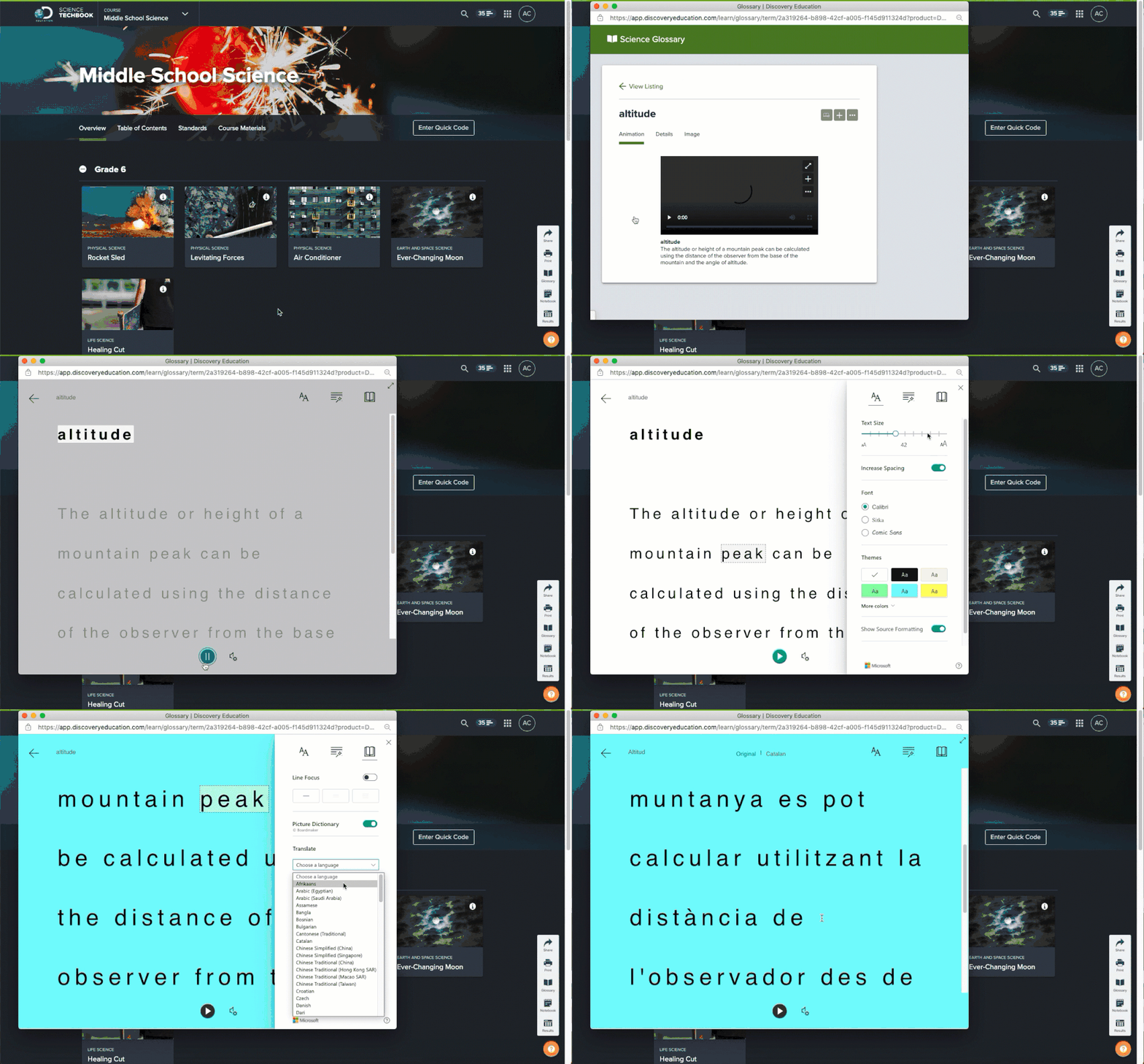
Teachers and students using Discovery Education’s K-12 learning platform can now find within Studio the icon for Immersive Reader—Microsoft’s free tool using proven techniques to improve reading for people regardless of their age or ability. This inclusive education tool gives more students personalized access to their curriculum, optimizes teacher time, and improves learning outcomes. Through features such as read aloud, line focus, translation and grammar markings, as well as the ability to adjust the size, style, and color of the font, learning becomes even more accessible to all students. Users of STEM Connect and Science Techbook can find Immersive Reader in the Studio slideshows feature, and users of the Math and Social Studies Techbooks can find Immersive Reader in those services’ interactive glossary.
Get Started Today
To begin exploring how to integration the Immersive Reader into your app or service, here are some helpful getting start links:
We look forward to hearing your feedback, and partners enabling the Immersive Reader to help even more people with reading.
Mike Tholfsen
Product Manager, Microsoft Education
@mtholfsen




Recent Comments